Available Online atwww.ijcsmc.com
International Journal of Computer Science and Mobile Computing
A Monthly Journal of Computer Science and Information Technology
ISSN 2320–088X
IJCSMC, Vol. 4, Issue. 6, June 2015, pg.461 – 468
RESEARCH ARTICLE
Preventing Distributed Denial of Service
Attacks Via MAC Cloning
Vijay Bharti, Prof. Nasib Singh Gill
Department of Computer Science and Applications Maharishi Dayanand University, Rohtak, Haryana, India
[email protected], [email protected]
Abstract- DDOS Attacks are producing quickly due to huge use of internet nowadays. Different DDOS Attacks that we face are due to honeypots, botnets and several attack traffic etc. it usually consists of the concerted efforts of a person, or several people to stop an Internet locale or ability from working effectually or at all, temporarily or indefinitely. "In this paper DDOS Attacks are manipulated by the MAC cloning.MAC cloning includes the changing of the external IP addresses.it concentrates on the changing of the MAC address which is unique rather than easily changeable IP address.
Keywords—DDOS, MAC Cloning, IP Address, Security
I. INTRODUCTION
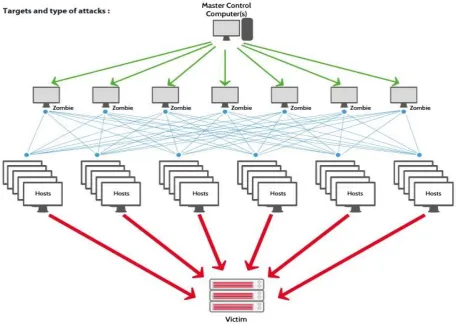
A denial-of-service attack (DoS attack) or distributed denial-of-service attack (DDoS attack) is an endeavor to make a computer or web resource unavailable to its aimed users. Even though the way to hold out, motives for, and targets of a DoS attack could vary, a DoS attack is that it merely comes from one locale and can facilely be blocked or could not be even be noticeable if the attacker doesn‟t understand far concerning what they are doing. On the supplementary hand, a Distributed Denial of Service attack will come from different locations. This makes the attack difficult to block due to the IP‟s of the attacker‟s being from several subnets.
Most ISPs allocate their IPs established on the MAC address in r equipment. If the MAC address of a router is 00-16-26-37-46-57 and we link to r ISP, the DHCP server records MAC and assigns an IP. If we disconnect from the ISP, we lose IP address. The subsequent period we link, the DHCP server sees its MAC, looks to discern if it has allocated an IP address to we before.
Fig. DDOS Attack Structure
II. CLONING MAC ADDRESS
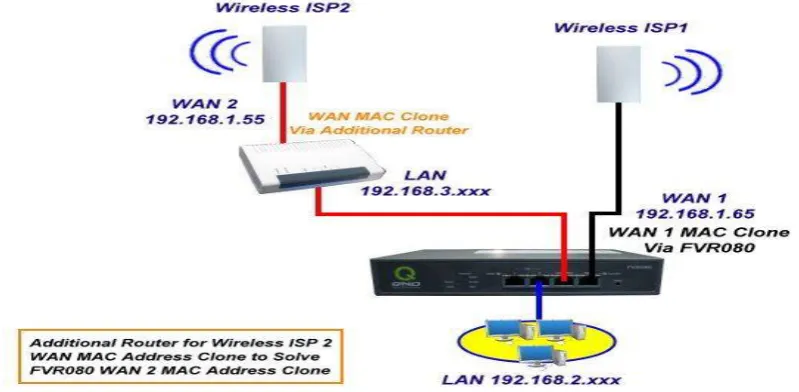
Some ISPs (most particularly MediaOne) user NIC's MAC address to authenticate its service. After we change the computer that we have related to its cable modem ability, we normally have to call up Tech support and give them the MAC address of the NIC in the new machine. As hardware routers have the equivalent of a NIC on their WAN port in order to link to r cable modem, we should have to do the alike thing if 're installing a router.
Recently, though, a little ISPs have commenced to understand the MAC addresses of accepted routers and disconnect ability if a router is detected. Fortunately, countless router manufacturers are encompassing the skill to whichever set the router WAN port MAC address to whatever we desire, or duplicate it from a computer related to the router LAN side. we can check the Router analogy chart "MAC address clone" to discern that routers support this feature. Next debate the router's documentation for orders on employing the feature.
Fig. Illustration of MAC Cloning in Wireless LANs
III. SUPREMACY OF CLONING
The supremacy of MAC address cloning should be to have internet or not. In countless cases, it is definitely unnecessary to use the MAC address clone. If we have a working internet connection across router next there is no demand to use the MAC address clone function. Only after we find that we have a working internet connection on one computer undeviatingly on modem but not after we link across the router (or a disparate computer undeviatingly on the modem) next it is vital to use the MAC address clone function.
This normally is merely the case alongside cable TV ISPs. They merely permit we to have a solitary alert internet connection at each time. They do this by recalling the MAC address that links across a specific modem. If we early link a computer for examinations undeviatingly to modem 'll have an internet connection. Nowadays if we link a disparate mechanism to r modem it doesn't it's because the ISP has yet locked the internet connection for the MAC address of the early computer.
How to remove the lock depends on the ISP and the modem. From time to time it's plenty to reset the modem or to manipulation down everything. From time to time we have to manipulation down everything for a insufficient hours and afterward that the early relating mechanism is the one alongside the internet connection (i.e. make sure to link the router then).
The easy workaround is to use the MAC address clone function. The router "clones" the MAC address of the early computer, i.e. it basically pretends to be that computer. The MAC address is consented by the ISP and is instantly allowed to the network. we have a working internet connection which ever undeviatingly on the early computer or across the router because both use the alike MAC address. (It's no setback on the router because the MAC address is utilized on the internet port only).
Of sequence, we have to recall all this. If at a little afterward period we link a disparate computer undeviatingly to the modem (e.g. we have connection setbacks and we desire to find out what's wrong) we could "lock" in a disparate MAC address for connection and will have to pause once more to recover the connection for a disparate device.
But again: there is definitely no demand to use the clone purpose if we have a working internet connection across the router.
IV. DIFFERENT WAYS OF MAC CLONING
There are two disparate methods that ISP can furnish an IP, Vibrantly and Statically. Vibrant IP addressing involves ISP allocating a disparate IP every single period we log on the ISP‟s network. This doesn‟t vitally mean ISP will change IP every single period when restart computer as it is merely reliant on after they deem it necessary. A vibrant IP address will be public alongside supplementary clients and will hop concerning as to who receives what IP. A Static IP is precisely what it sound like, static and not ever changing. Static IP addressing is far less safeguard as we are endowed an IP that not ever changes. ISP‟s nowadays a date merely furnish static IP‟s to their client due to it being price competent contrasted to vibrant addressing. Exceedingly counsel shouting ISP and discovering our ip. If we are Static, is there each potential to be modified to dynamic?
MAC Address Change(Solution 1)
Unplug CABLE/DSL modem as well as router and pause 60-120 seconds. Plus back in and check www.whatismyip.com to discern if we were allocated a new IP.
Some ISP‟s locale a TTL (Time to Live) on IP for 8 to 24 hours so if we are below, no period constraint. Next this can be attempted.
Call ISP and notify them that we are being DDoS‟d and that we demand a new IP. Reliant on whom, become on the phone, as well as ISP will ascertain if they will or not.
Open a start window(Start -> run -> „cmd‟) Release (This will disconnect from the internet) Type Ipconfig release in cmd.
If the above doesn‟t work, subsequent pace is endeavoring to clone mac address. This can be completed here and is as easy as pressing the "Clone My PC's MAC Address" button. we can merely clone mac address after, but it ought to change our IP.
The MAC Address boxes will have messages and numbers. I blurred them out for protection reasons. MAC Address Change (Solution 1)
Go into Domination Panel and pull up Web Connections:- Open Network Connections
Right click Web Adapter > Properties > Configure Configure
Next we will desire to click on the 'Advanced' tab and scroll down to 'Network Address'. The MAC address consists of 6 pairs of numbers (0 - 9) and alphabets (A - F) in combination. For example 22-19-A2-C5-3D-65. Recall though that after going in this worth in the 'Network Address' earth that we desire to exclude the dash (-), for example 8817E890E20A.
MAC Address Change (Solution 2)
Yet If we are incapable to bring a new IP address next we can endeavor going into registry settings and changing the MAC address of Network Interface Card (NIC).
it will early desire to find out what kind of NIC we have. So go to „Control Panel‟ -> „Network and Internet‟ -> „Network Connections‟ and find the connection that is enabled and right click it and select „properties‟. we will next discern the pursuing that will notify what kind of NIC we are using.
As we can discern here, are working with an „Intel(R) 82579V Gigabit Adapter‟. Next we desire to go registry editor
From inside the registry editor we will traverse to:
Under this key, we ought to discern numbers in sequence as “0000?, “0001?. Click on one at a period to check the description of the mechanism to match it alongside that of Web Card. I discovered my NIC down at „0022‟.
Once discovered, in the right-pane, gaze for “Network Address” key value. If we find it, right-click and select modify. Go in the wanted MAC-Address as a 12 digit number (all in one, no “space” “.” or “-”). Note that we can go in each arbitrary MAC-address as long as it is hexadecimal (a 12 digit thread encompassing numbers 0-9 and messages A-F).
If we don‟t find the key, right-click in the right pane, select “New” – “String Value”. Go in the term as “Network Address”. Nowadays adjust and set the wanted value.
Disable and enable the Web card from the Control Panel – Web Connections.
This ought to imitate the new MAC-Address on NIC. Ought to we select to go back to the early producer set MAC-Address plainly del.
the key we just created/modified in the Windows Registry.
After changing the MAC across the registry, onset back at the early pace and reattempt restarting the modem, etc.
This portion of the escort will entail the actual prevention aspect and what to do to retain a DDoS attack from occurring.it is not necessary to endeavor and clarify the technical aspect of the VPN.
VPN
At the period of including this escort endeavored their ability and the merely method to truely understand if this VPN should be suitable.
Server Selection
They have a huge catalog of obtainable servers that are categorized according to geographical distance. This is a pretty large deal as they categorize their servers as being overloaded at 30%.
Once become a prosperous VPN connection, here is the new dashboard that is displayed. A little vital thing to note is how we are able to make quick locale adjustments, IP adjustments, as well as design for an IP change.
The subsequent thing which wanted to check out was how the latency was. Not Related to VPN Connected to VPN
There was definitely no change alongside ping. It was tested alongside supplementary servers and on a insufficient of them had a little hopping concerning amid 70ms – 100ms but for most servers it should stay pretty steady. This was additionally completed as it had two streams running.
Now for the speedtest across Speedtest.net. Not Related to VPN Connected to VPN
The early thing that notice is the cut in download speed. Mostly have 50/5 here across period warner but if we were on a 10/5 design across ISP next we wouldn‟t discern far, if each noticeable differences. They promise precise speeds across their servers that is a higher speed that what most of us have at home. The ping is somewhat higher but nothing is far concern whichever and varies according to server location.
Here candid opinion is that if we are weightly concerning completely protecting from being DDoS‟d ever once more and don‟t desire to be compelled into forfeiting a match across large event, next buying a VPN is the method to go. It will facilely wage for itself afterward one tournament. And presently, there are a good bit of the pros that haven‟t been able to frolic a maximum tournament all the method across lacking being targeted. So what should be done is setup the VPN and next become a new IP address via ISP across the methods that remarked preceding in guide. This method if we are waver of employing the VPN due to each presentation setbacks there could be, we might coil it off and as are proxies across Skype, it should be good to go.
Skype Proxy (Best Resolution - Combination of 2 & 3) Step 1:Next match settings.
This ought to catalog the fastest proxies for the US. Substitute the state for one more if we are not residing in the US ( Or if we desire to use a proxy in one more state).
Step 2: Select a server, which usually desire to go alongside the one at the top.
The top points ought to give a good fallback if the extremely top one becomes overloaded .Note: Skype does not normally USE the proxy we set unless it's blocked from a manage connection though we can FORCE it to use the proxy via registry settings. That's what now concerning to do.
Step 3: Input the proxy data.
This configuration will produce a registry file to merge into windows registry. It's completely harmless, and in the event that desire to remove proxy ( can't remove it across Skype itself ) , it additionally provides a key that will automatically remove the proxy settings.
By default, there are no registry settings.
Which equates to the early "empty thread = unset", skype will endeavor a manage connection, and if it fails it will use the proxy set in the Elevated Connection settings to connect.:If it understood what we are doing, we can set it to Automatic so skype will use the system's proxy settings ( Internet Explorer's proxy settings), but for this escort we're going to be compelling it to use an HTTPS Proxy.
Obviously, substitute HTTPS for SOCKS5 if we are fortunate plenty to become a GOOD SOCKS5 Proxy.
Skype will yet endeavor to manage link above UDP even as providing proxy TCP above HTTPS. This is a HUGE setback as it efficiently renders proxy useless. Though, we can fix that by compelling Skype to disable it's custom of UDP. This will encounter voice and video quality a bit, but finished it's not a huge setback and being harmless is extra important.it additionally like to re-iterate that SOCKS5 Proxies do not have this setback, they support both TCP and UDP across the proxy. If we can find a good one, extremely fortunate paying for it.
Step 4: Locale the selected proxy's IP and port in the appropriate boxes.
And click save. It will be punctual to save the file, so save it somewhere we can find it easily. Step 5: Go find the file, and whichever right click -> Merge Or just double click on it. Step 6: It will notify that we shouldn't add data from origins where we don't trust.
Finished: It will merge the benefits into registry, nowadays RESTART COMPUTER and we ought to be protected!
It can next confirm that the proxy settings are saved into Skype by going to "Tools" -> "Options" -> "Advanced" -> "Connections" and checking the IP tabulated as the alike one we picked as Proxy.
Skype Proxy (Solution 2)
In Skype, Go to Instruments -> Options -> Elevated -> Connection
Check the box that says "User port 80 and 443 as alternatives for incoming connections" Click this drop-down and change it to "SOCKS5"
Go to http://www.xroxy.com/proxy-country.htm
Select the State that we reside, select each “SOCK5” IP Address from the catalog and go in it as the host.
Note: What we are acting is running Skype via a proxy. As long as we select an IP that is in the alike state as we reside next we shouldn‟t discern far, if each degradation in call quality. If we do, just select a new IP till we find the best setup.
Skype Proxy (Solution 3)
Open notepad and glue the pursuing (substituting the proxy data alongside the proxy server) Windows Registry Editor Edition 5.00
[HKEY_LOCAL_MACHINE\SOFTWARE\Policies\Skype\Phone] "DisableSupernode"=dword:00000001
"ProxyUsername"="username" "ProxyPassword"="password"
V. PROBLEM ALONGSIDE MAC CLONING The problem: cloning router's MAC address no longer adjustments IP.
It's as facile as that perplexing bestowing how tiny has changed. I've endeavored varied timings and variations to different orders - unplugging merely the modem, unplugging both modem and router, unplugging whichever both and re-plugging them afterward fluctuating pauses. Nothing seems to work. Is it probable that I was given a static IP?
Something to note: afterward thinking my 'network map' in Windows' Web and Internet panel, mousing above the router always reveals its IP address to be a MAC address that seems to come from nothing in my ownership - neither the router's actual MAC address from its sticker matches it, nor the modem-router's. I have no clue why this is the case. Looking at the router's manipulation panel right nowadays, it is set to spoof a disparate MAC address from the one that this web chart says it possesses. Disabling MAC spoofing completely, and departing the router to present its actual, unspoofed MAC address has the comparable result.
We are affirmative that we are being hit by a Distributed DoS attack and we are completely disconnected from the internet. we can‟t ping every single websites, all demands are offline, and all of this is transpiring as we are 35 minutes into game 3 of the Leaguepedia Invitational 2 Finals. team has activated the pause feature for the match but we don‟t have long so we demand to deed quickly.
VI. SOLUTION
If we desire to obscure locale from a slight websites we so journ, I ought to counsel the TOR browser. It's a Firefox browser that has proxies that permit we to select locale to a degree and change it as oftentimes as we like. Because it's a proxy, it will sluggish speed on the Internet.
I suspect the setback is that we are retaining a Modem/Router combo unit. I not ever use these kind of constituents for protection reasons so I don't have whatever we can check my opinion opposite but I contemplate it might be that the Modem/Router combo constituent sees it's two constituents as different on the inside. To use a different Router, we had to locale the combo constituent Router in connection mode but the Modem is plausibly yet discerning the MAC of the inner Router because it is technically yet the main mechanism connected to the Modem.
VII. CONCLUSION AND FUTURE SCOPE
First point out that changing the IP Address does NOT enhance the confidential security. Websites we so journ nearly not endeavor to hack into visitors webs and if they do, we so journ them across a slight kind of malware on their locale, not across a grasp attack a slight era later. They do this by systematically scanning IP's and trying varied methods of becoming in. The instant we change IP, a new sequence of Attacks will begin. In this paper MAC Cloning concept becomes the biggest threat for DDOS attacks .To reach a target system, the investigation agencies try to recover the IP address and MAC address. Where IP address can be changed easily but MAC address is worldwide unique address mounted on Ethernet chip but this technology becomes the major threat to reach exact target system.
VIII. ACKNOWLEDGEMENT
I am profoundly thankful to Lecturer Nasib Singh Gill, department of computer science and applications, MD University for accepting me as a M.Tech Dissertation student.
Professor Nasib's depth of vision, thoughts and work control has been extremely inspirational. I should like to express my genuine cheers to Lecturer Nasib for his support, wise suggestions, motivation and priceless freedom in leading the research throughout the dissertation period.
REFERENCES
[1].Khan, Shafiullah, et al. "Cloned access point detection and prevention mechanism in IEEE 802.11 wireless mesh networks." International Journal of Information Assurance and Security (IJIAS) 3.4 (2008): 257-262.
[2].Gilliam, David. "Summary report on enterprise security workshop." 2012 IEEE 21st International Workshop on Enabling Technologies: Infrastructure for Collaborative Enterprises. IEEE Computer Society, 2002.
[3].Szor, Peter. The art of computer virus research and defense. Pearson Education, 2005.
[4].McKelvey, J. T. "Combatting Security Risks on the Cable IP Network." IBC 2002 Conference, www. broadcastpapers. com/ibc2002/ibc2002. html. 2007.
[5].Dimitriadis, Christos K., and Despina Polemi. "An identity management protocol for Internet applications over 3G mobile networks." computers & security 25.1 (2006): 45-51.
[6].Alzubaidi, Waleed Kh, Longzheng Cai, and Shaymaa A. Alyawer. "A new verification method to prevent security threads of unsolicited message in IP over ethernet networks." Int. J 4.6 (2012).
[7].Girdhar, Anup, and Sushila Madan. "media access control (MAC) spoofing: a biggest threat for 'cyber crime investigation'." [8].Specht, Stephen M., and Ruby B. Lee. "Distributed Denial of Service: Taxonomies of Attacks, Tools, and Countermeasures."
ISCA PDCS. 2004.