IJEDR1401086
International Journal of Engineering Development and Research (www.ijedr.org)484
A Study on Browser-Based Anti-Phishing Tools
1
Beena Kurian,
2Sangeetha Sangam,
3Beena M V
1M-Tech Student, 2M-Tech Student, 3Assistant Professor
Department of CSE, Vidya Academy of Science & Technology, University of Calicut - Thrissur, India
1[email protected], 2[email protected], 3[email protected]
________________________________________________________________________________________________________
Abstract— Phishing is the act of attempting to acquire sensitive information such as usernames, passwords, credit card details etc. by
impersonating trustworthy entities in an electronic communication. Phishing attacks can range from and not limited to social web sites, auction sites, banks, online payment processors etc. Such areas are commonly used to lure the unsuspecting public. In order to prevent such attacks, several anti-phishing tools can be employed. Anti-phishing software consists of computer programs that attempt to identify phishing content contained in websites and e-mail. It is often integrated with web browsers and email clients as a toolbar that displays the real domain name of the website the viewer is visiting. This helps to prevent fraudulent websites from masquerading as other legitimate web sites. Anti-phishing functionality may also be included as a built-in capability of some web browsers. There are currently various freely available tools to combat phishing, many of which are web browser extensions that warn users when they are browsing a suspected phishing site. This paper is a comprehensive study of the various browser-based anti-phishing tools including toolbars, and plug-ins currently employed in a world-wide basis.
Index Terms—Anti-Phishing, Plug-in, Add-ons, Blacklist and Whitelist
I. INTRODUCTION
Phishing web pages are forged web pages that are created by malicious people to mimic Web pages of real web sites. Most of these kinds of web pages have high textual and visual similarities to scam their victims. Some of these kinds of web pages look exactly like the real ones. Victims of phishing web pages may expose their bank account, password, credit card number, or other important information to the phishing web page owners. It includes techniques such as tricking customers through email and spam messages, man in the middle attacks, etc. Phishing is a form of identity theft, in which criminals build replicas of target websites and lure unsuspecting victims to disclose their sensitive information like passwords, etc. Phishing has caused huge economic losses in the past a few years. Although there is a wide range of values for damage, the number of attacks is substantial. In the past a few years, phishing scams have evolved to target users on the web through social networking sites such as Facebook, and phishing has also been increasing in other areas of the world like China.
Phishing scams use spoofed emails and websites as lures to prompt people to voluntarily hand over sensitive information. It is not surprising, then, that the term “phishing is commonly used to describe these ploys. There is also a good reason for the use of “ph” in place of the “f” in the spelling of the term. Some of the earliest hackers were known as phreaks. Phreaking refers to the exploration, experimenting and study of telecommunication systems. Phreaks and hackers have always been closely linked. The “ph” spelling was used to link phishing scams with these underground communities.
“PHISH” has been a growing phenomenon, Comprises 50% of all reported Internet Security reports. Phishing is threatening people‟s confidence to use the Web to conduct online finance & other related activities. Phishing remains a major criminal activity involving great losses of money and personal data. It is public interest for ISPs to implement anti-phishing measures to protect their users. Automatic detection has attracted much attention from security and software providers, financial institutions, to academic researchers.
II. OVERVIEW OF ANTI-PHISHING TOOLS
Passpet
Passpet in [1] is a tool that improves both the convenience and security of website logins through a combination of techniques. Passpet makes logging in to websites easier by clicking a button to fill in username and password. Only, we need to memorize one secret, and Passpet will generate different password for each site. Even if there is a break-in at one site, our other accounts and passwords are safe. Passpet protects from attackers who try to fool you into revealing passwords because each password is generated only for the site where you originally established it.
Passpet appears on your Firefox toolbar as an animal icon. Everyone gets a randomly chosen animal with a randomly chosen name, so the Passpet button is hard for an impostor to imitate. When you first start Firefox, your Passpet is asleep. To awaken it, click on it and enter your master secret. When Passpet is awake, we can automatically fill the password by just clicking the icon as shown in Fig.1.The text box next to your Passpet lets you label the sites you know. If you enter a label in the text box, the label will reappear when you are back at the same site. To fill in a password, Passpet calculates the password from your label. So, to start using Passpet at a particular website, enter a site label in the box. When registering for a new account on the site, click on your Passpet to fill in the new password.
IJEDR1401086
International Journal of Engineering Development and Research (www.ijedr.org)485
Figure 1: One click on the Passpet button fills in a login form with a site-specific password [1].
Passpet‟s most obvious advantage is the improved convenience of logging-in. Instead of having to enter a username and password for every login, the user only has to enter the master secret once in a browser session and can thereafter fill in login forms with a single click. For users that change passwords periodically or sites that require password changes, Passpet provides a significant improvement in convenience.
The earlier implementation of Passpet, an extension to Internet Explorer, has been informally tested in a deployment to 15 users at HP Labs. After three months, ten of the users are still using Passpet for IE regularly. The main complaint from those who stopped using it was that it‟s inconvenient to use on multiple machines, a problem addressed by Passpet for Firefox.
PhishProof
PhishProof is an anti-phishing tool designed to help Firefox users distinguish between phishing and legitimate websites. PhishProof does not require any effort from the users to identify a phishing website. When the system evaluates a website as a phishing website, users are notified immediately via an alert message which makes the system easy to use even for naïve users. PhishProof can be installed on any system that has Firefox (version 12 and later). After installing PhishProof toolbar, users will be able use the browser normally, and will be notified if they visit any potential phishing website. Risk rating for each website visited by the user will be displayed in the toolbar along with the risk rating percentage. To constantly improve the system, a website (www.phishproof.com) and a website management admin panel (www.phishproof.com/admin) is also developed along with the toolbar. Users will be able to report phishing URLs via this website and also assist in improving PhishProof by giving their valuable feedback. PhishProof uses a combination of blacklist and web page content analysis method to provide 3-level protection against phishing. Level-1 uses blacklist method, level-2 uses a combination of both methods and level-3 analyses 6 features of a web page to compute risk rating which determines whether a page is phishing or legitimate. Each level is only initiated if a web page survives the previous level without being flagged. Voice and message alerts are used to get user‟s attention if a phishing page is encountered. It requires browser memory and time to perform all checks and calculate risk rating of a page. Figure 2 and Figure 3 shows PhishProof toolbar in idle and active state respectively.
Figure 2: PhishProof toolbar idle state [2].
IJEDR1401086
International Journal of Engineering Development and Research (www.ijedr.org)486
When a user opens Firefox, PhishProof is initialized and starts performing its operations by loading Whitelist, blacklist, mail list, countries list and hosting company list. Whitelist and blacklist are maintained on main PhishProof server and managed using website administrator panel while other 3 lists are part of installation package. If the URL entered by the user is not found in either of the lists, the website is evaluated on the basis of its content. A risk rating percentage is calculated by performing content analysis. Risk rating value determines whether the website is a potential threat to the user or not. Website content is analyzed using 6 different labels. Each label is evaluated individually and its score is multiplied by weight assigned to that label. The total risk rating is the sum of all individual labels. If the value of total risk rating is above a threshold value, the page is evaluated as a potential threat and users are notified about it.AntiPhish
The paper in [3] present AntiPhish, a browser extension that aims to protect inexperienced users against spoofed web site based phishing attacks. AntiPhish keeps track of the sensitive information of a user and generates warnings whenever sensitive information is typed into a form on a web site that is considered untrusted. The tool has been implemented as a Mozilla Firefox plug-in and is free for public use. AntiPhish is based on the premise that for inexperienced, technically unsophisticated users, it is better for an application to attempt to check the trustworthiness of a web site on behalf of the user. Unlike a user, an application will not be fooled by obfuscation tricks such as a similar sounding domain name.
The development of AntiPhish was inspired by automated form-filler applications. Most browsers such as Mozilla or the Internet Explorer have integrated functionality that allows form contents to be stored and automatically inserted if the user desires. This content is protected by a master password. Once this password is entered by the user, a login form that has previously been saved, for example, will automatically be filled by the browser whenever it is accessed. AntiPhish takes this common functionality one step further and tracks where this information is sent. Besides storing the sensitive information, AntiPhish also stores a mapping of where this information “belongs” to. That is, the domain of the web site where this information was originally entered is also stored. We use domains instead of web site addresses because some web sites are hosted on multiple servers with different addresses .If the user would like to use the same piece of sensitive information (e.g., the same password) on multiple web sites, this information has to be captured by AntiPhish for all sites where it is being used. This is typically done by first deactivating AntiPhish from the menu in order to prevent it from generating false phishing alerts.
The CallingID LinkAdvisor
Like many of the other toolbars, CallingID relies on passive visual indicators. These indicators change from green—to
represent a known-good site; to yellow—to represent a site that is “low risk;” to red—to represent a site that is “high risk,” and therefore probably a phishing site. Some of the heuristics used include examining the site‟s country of origin, length of registration, popularity, user reports, and blacklist data. The CallingID Toolbar runs on Microsoft Windows 98/NT/2000/XP with Internet Explorer. Main features of CallingID LinkAdvisor includes: Protects against phishing/spoofing sites, confirms who you are doing business with, identifies if site is safe to do business with, identifies who gets the info you are sending, warns if passwords/info not protected, analyzes all links of a search, analyzes links in email/instant messenger[4].
BogusBiter
BogusBiter in [5] is designed as either a new component or an extension to popular web browsers such as Firefox 2 or IE 7. When a login page is classified as a phishing page by a browser‟s built-in detection component or a third-party detection toolbar, BogusBiter is triggered. At this point, BogusBiter will perform differently based on a user‟s response to the browser‟s phishing warning page. For a vulnerable user who clicks the “Ignore this warning” link and submits a real credential, BogusBiter will intercept the victim‟s real credential, hide it among a set of „S−1‟ generated bogus credentials, and then submit the „S‟ credentials one by one to the phishing site within a few milliseconds. For a security-conscious user who clicks the “Get me out of here!” link on the warning page, BogusBiter will generate a set of „S‟ bogus credentials, and then feed them one by one into the phishing site in the same way as it does for a vulnerable user. These actions are completely transparent to both vulnerable and security-conscious users. The BogusBiter extensions installed on users‟ browsers make up the offensive line. Later on, when a phisher verifies the collected credentials at the legitimate site, the defensive line enabled by BogusBiter will help a legitimate site to detect victims‟ stolen credentials in a timely manner.
PhishZoo
PhishZoo [6] presents and evaluates a new approach for web phishing detection based on profiles of sensitive sites‟ appearance and content. PhishZoo makes profiles of sites consisting of the website contents and images displayed. These profiles are stored in a local database and are either matched against the newly loaded sites at the time of loading or against risky sites (for example, links in email) offline. Phishing detection is done using content similarity between real sites and malicious sites. Malicious sites tend to use sensitive sites‟ appearance to provoke false belief in users. PhishZoo determines a site as a phishing site if its contents match with any of the protected profiles. Otherwise, the site is considered as a non-phishing site.
IJEDR1401086
International Journal of Engineering Development and Research (www.ijedr.org)487
The EarthLink Toolbar
The EarthLink Toolbar appears to rely on a combination of heuristics, user ratings, and manual verification. The toolbar allows users to report suspected phishing sites to EarthLink. These sites are then verified and added to a blacklist. The toolbar also appears to examine domain registration information such as the owner, age, and country. The toolbar displays a thumb that changes color and position. A green thumbs up represents a verified legitimate site, whereas a gray thumbs up means that the site is not suspicious, but it has not been verified. The red thumbs down means that a site has been verified to be fraudulent, whereas the yellow thumbs down means that the site is “questionable.” Sites determined to be fraudulent are sometimes blocked, in which case users are redirected to an information page and given the option of overriding the block (and a green thumb is displayed on the information page).It runs under Windows 7 / Vista / XP, Internet Explorer 6.0 and more [7]. Figure 4 shows Earthlink toolbar.
Figure 4: Earth link Toolbar
Web Of Trust (WOT) add-on
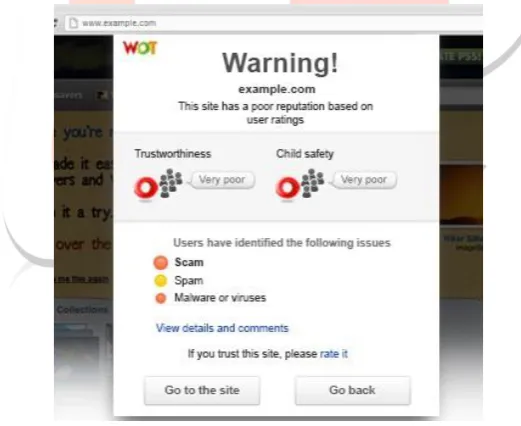
WOT is a website reputation and review service that helps you make informed decisions about whether to trust a website or not when you are searching, shopping or surfing online. WOT simply shows website reputations as traffic lights next to search results when we use Google, Yahoo!, Bing or any other search engine. Icons are also visible next to links in social networking sites like Facebook and Twitter and email services like Gmail and Yahoo! Mail, as well as other popular sites like Wikipedia. By clicking the traffic light icon you can find out more information about a website‟s reputation and other users‟ opinions. A green traffic light means users have rated the site as trusted and reliable, red warns about potential threats and yellow indicates that you need to be cautious when using a site. WOT ratings and reviews are powered by a global community of millions of users who rate websites based on their personal experiences. In addition, third-party sources are used to warn you about malicious software and other technical threats that you might encounter. Figure 5 shows a warning page of WOT.
Figure 5: Warning page of WOT add-on [8]
eBay Toolbar
IJEDR1401086
International Journal of Engineering Development and Research (www.ijedr.org)488
Figure 6: Account Guard indicator with a green background when the user visits a site known to be operated by eBay
DontPhishMe Add-on
DontPhishMe [10] is an Anti-Phishing add-on for Mozilla Firefox which utilizes the pattern matching techniques to provide the Malaysian Internet user with information and notification to protect them against online banking phishing website. DontPhishMe is an initiative of MyCERT, Cyber Security Malaysia, to provide a security mechanism in preventing online banking phishing threat specifically for local Malaysian banks. DontPhishMe obtained 100% FREE award granted by Softpedia, which mean DontPhishMe is free from spyware, malware and viruses. DontPhishMe will automatically warn you when you encounter a page that's trying to trick you into disclosing personal information. List of supported online banking websites : Maybank2u, Cimbclicks, Public Bank, Bank Rakyat, Bank Islam, HSBC, EON Bank, UOB, AMBank, OCBC, RHB, Citibank, Standard Chartered Bank, AlRajhi Bank, Affin Bank, Hong Leong Bank, Alliance Bank, BSN, Muamalat, Kuwait Finance House. This Works with Firefox 2.0a1 and later, SeaMonkey 2.0a and later, Thunderbird 2.0a1 and later. Figure 7 shows a warning page of DontPhishMe.
Figure 7: Warning page of „DontPhishMe‟ Add-on
TrustWatch Toolbar
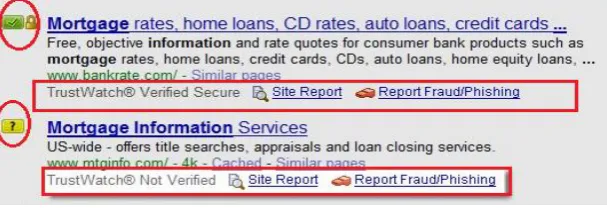
TrustWatch is GeoTrust‟s website verification service that helps you, the consumer, identify trusted websites. It also alerts you to potentially unsafe, or “phishing” web sites, which can steal private information and lead to identity theft. The TrustWatch Toolbar provides real-time alerts, either red to signal that the Web site is unverified as being safe, yellow for caution, or green to indicate that it is verified and users should call the company first as shown in Fig.8.
GeoTrust‟s web site provides no information about how TrustWatch determines if a site is fraudulent; however, we suspect that the company compiles a blacklist that includes sites reported by users through a button provided on the tool. The toolbar also lets users store a custom image or bit of text that is constantly displayed so that he or she knows that the toolbar is not being spoofed. TrustWatch runs on Microsoft Windows 98/NT/2000/XP with Internet Explorer [11].
Figure 8: TrustWatch URL verification
Microsoft SmartScreenFilter
IJEDR1401086
International Journal of Engineering Development and Research (www.ijedr.org)489
malicious behavior [12]. SmartScreen Filter checks the sites you visit against an up-to-the-hour, dynamic list of reported phishing sites and malicious software sites. If it finds a match, SmartScreen Filter will show you a red warning notifying you that the site has been blocked for your safety. SmartScreen Filter also checks files downloaded from the web against the same dynamic list of reported malicious software sites. If it finds a match, SmartScreen Filter will show a red warning notifying you that the download has been blocked for your safety.Use of SmartScreen Filter is governed by the Microsoft Service Agreement.Netcraft Anti-Phishing Toolbar
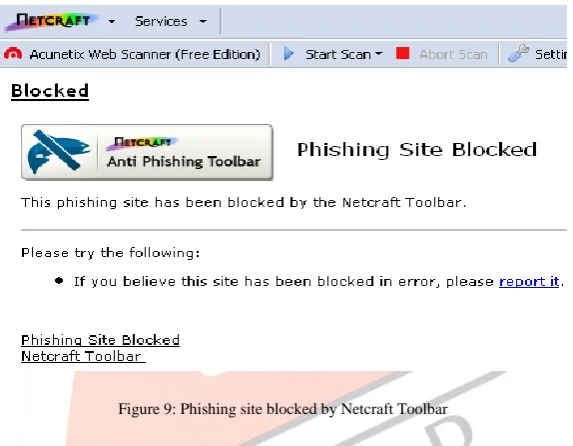
Netcraft first launched its anti-phishing system in 2005: people can install the Netcraft Anti-Phishing Extension and become part of a giant neighbourhood watch system whereby the most experienced members of the community can report phishing sites and have them blocked for the rest of the community. Netcraft makes the list of phishing sites reported by the Anti-Phishing Extension user community and validated by Netcraft available as a continuously updated feed suitable for network administrators and internet service providers. The feed can be used to prevent customers and employees from succumbing to phishing attacks and presents an excellent opportunity for service providers to win new customers and reassure existing ones by taking a proactive stance against fraud. System requirements for Netcraft Toolbar are: Firefox 1.0 or later on Windows, Mac or Linux; Google Chrome 26.0 or later on Windows, Mac or Linux; Opera 15.0 or later on Windows or Mac [13].Figure 9 shows Phishing site blocked by Netcraft Toolbar.
Figure 9: Phishing site blocked by Netcraft Toolbar
Additionally the feed can be taken by software developers to allow them to integrate anti-phishing services into their products. The Netcraft Phishing Site Feed is already used in many widely used anti-virus, firewalls, mail and proxy services. The toolbar also displays a risk rating between one and ten as well as the hosting location of the site. Users can also use the toolbar to access a more detailed report on a web site. The Netcraft Anti-Phishing Toolbar runs on Firefox on most platforms, and on Microsoft Internet Explorer under Windows 2000/XP.
McAfee SiteAdvisor
In McAfee SiteAdvisor, theSecurity threats are revealed by a three-color alarm system: a green icon means the site is safe as shown in Fig.10. , a yellow one means the site is low risk and the red one means the site is high risk (which identifies a potential phishing site). This color-coded rating system lets users know whether the site they are browsing is threat-free or not. It supports multiple browsers works for both Internet Explorer and Mozilla Firefox.
IJEDR1401086
International Journal of Engineering Development and Research (www.ijedr.org)490
Figure 10: Alert box of McAfee SiteAdvisor
Sender Verification Extension
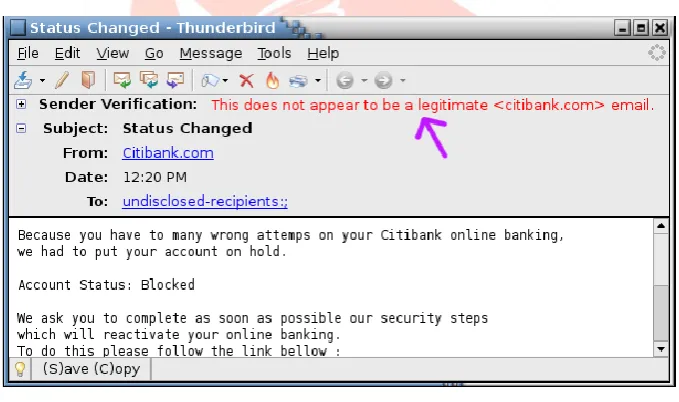
This is an extension that reports, when possible, whether the sender shown in the “From:” header was actually the sender of the email. In fact, forging the “From:” address is possible! This is intended to be a tool to identify phishing attacks, fraudulent emails asking for your sensitive data, so that you don't fall prey. The extension uses Sender Policy Framework (SPF) to verify the sending domain and SURBL, Spamhaus, DNSWL, and Sender Score Certified for reputation information on the domain [15]. Figure 11 shows a mail with sender verified.
Figure 11: Sender Verification Anti-Phishing Extension in active state
FirePhish
IJEDR1401086
International Journal of Engineering Development and Research (www.ijedr.org)491
Figure 12: FirePhish Toolbar in ideal state
PhishTank SiteChecker
PhishTank SiteChecker [17] gives Firefox users a way to bring the community judgment of PhishTank (http://www.phishtank.com/) into their favorite browser, for extra protection against phishing. SiteChecker comes in English, Swedish, Dutch, Chinese (simplified and traditional), Italian, Spanish, French, German, Croatian, Japanese, Korean, Swedish, Norwegian, Brazilian and more translations all the time. Visits to known phishing sites are blocked; the user has the option to continue. Additional features include customizable status bar, error Logging/support system, preferences for changing the behavior how the extension functions with certain actions, the ability to turn off the phishing filter, safe view (this is called continue in the extension) allows you to view the phishing site temporarily before reloading the filter, an up-to-date blacklist using data from PhishTank and BloodHound, dynamic URL matching, very fast and free. Figure 13 shows Phishing site blocked by PhishTank SiteChecker.
Figure 13: Phishing site blocked by PhishTank SiteChecker
SpoofGuard
IJEDR1401086
International Journal of Engineering Development and Research (www.ijedr.org)492
Figure 14: SpoofGuard toolbar displays a red icon which is a warning to users that the site is a positively identified phishing site.
ScamBlocker
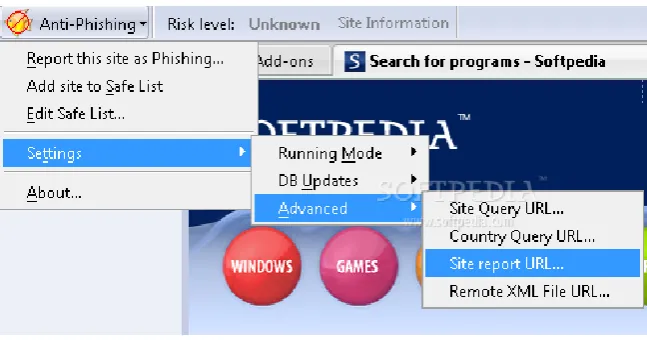
Identify the phished site by using eleven tips that reveals the validity of the website. Some of the tips are checking the false urgency, mails with spelling and grammar mistakes. ScamBlocker [19] is integrated along with EarthLink mailbox as shown in Fig.15, so any person who maintains account with Earthlink their incoming mails will be scanned for Phishing threat and only if it is found ignorant mail will be shown in the inbox. You can scan your email and see a visual protection rating for any suspicious email that you check.
Figure 15: ScamBlocker Toolbar
Dr. Web LinkChecker
This plug-in allows you to check any link, any page you are about to visit [20]. Link checking process using Dr. Web is shown in Fig.16. The LinkChecker is a valuable tool for the user to quickly check any links before opening it in the same or another tab. The site “http://www.drlinkcheck.com/”, provide a way to check the link and find out the associated links. It also shows, whether the links are blacklisted or not.
Figure 16: Link checking process using Dr. Web
VeriSign EV Green Bar Extension
IJEDR1401086
International Journal of Engineering Development and Research (www.ijedr.org)493
Figure 17: VeriSign EV Green Bar Extension turns the address bar green and displays certificate owner
PhishNet
PhishNet [22] has two major components first component grows the blacklist database by generating URL variations from known Phished link. Second Component assigns a score to each URL by matching the targeted URL with the URLs generated in the first component.
Pixastic
This paper uses Steganography concept in the browser plug-in to prevent phishing attack. The proposed plug-in technique uses novel Robust Message based Image Steganography algorithm [23].
Preprocessing is the first step in RMIS technique. The input to the processing phase is the secret message and the output is the embedding sequence. The secret message that is to be embedded is converted into binary values. The binary values are then grouped in two bits per group and it is converted to decimal values. This sequence of number is called as „embedding sequence‟. The embedding sequence is multiplied with image size (row*column) and the obtained value is called as „Stego-Key‟. Stego-key is converted into binary and the binary sequence is called as „embedding rate sequence‟.
Embedding is the second phase of RMIS technique. Embedding phase hides the secret messages into the given cover image in such as way that the resultant Stego-image is not differentiable by Human Visual System (HVS).
The Extraction phase extracts the secret message embedded from the Stego-image using the same secret key as in embedding phase. Any bank website who wishes to use Pixastic plug-in should incorporate the Stego-image generated from Robust Message based Image Steganography embedding algorithm in their website.
Users who is having internet banking facility with the bank should install the Pixastic Plug-in from the legitimate bank website. Pixastic components have three main components they are a) Scanner b) RMIS Extraction and c) Message Handler. Scanner scans the address bar for URL and check whether the domain name for which this plug-in was developed is there in domain name part of the URL. If the domain name or any of the sub-string of the domain name for which the plug-in was developed is found in the address bar Pixastic plug-in will be triggered. Once the Pixastic is triggered it tries to locate the stego-image in the website and it extracts the secret message using RMIS extraction algorithm. Once the extracted secret message matches with the message in the plug-in, then the user is allowed to access the website. If there is a mismatch then the user is warned about the authenticity of the website and all the controls in the website are blocked.
III. STUDIES AND FINDINGS
Table. 1: Comparison of Different Anti-phishing Extensions
Anti-Phishing Extension
Main features Techniques/Methods
used
Limitations
PassPet Improves password security
Logging is more convenient
Click a button instead of typing in your password.
Even if there is a break-in at one site, other accounts and passwords are safe
Passwords are never saved in a file anywhere
Passpet provides resistance to dictionary attacks.
Master secret
Automatic form filling by clicking icon
Passpet is vulnerable to an offline diction-nary attack against the master secret.
Passpet, impose some arbitrary limit on site password length.
PhishProof Does not require any effort from the users
Users are notified immediately via an alert message if phishing detected.
Risk rating percentage is displayed in the toolbar
Heuristic
Whitelist
Blacklist
Mail list
Countries list
It cannot protect users against JavaScript based attacks.
IJEDR1401086
International Journal of Engineering Development and Research (www.ijedr.org)494
Users will be able to report phishing URLs in PhishProof website
3-level phishing protection
Hosting company list
displaying toolbar in tabbed browsing
AntiPhish Inspired by automated form-filler applications
Allows form contents and mappings to be stored and automatically inserted if the user desires
Content is protected by a master password
Master Password
Automatic form filling
Storing the
sensitive
information is a
bad idea
The CallingID Link Advisor
Relies on passive visual indicators
Warns if passwords/info not protected
Analyzes all links of a search
Analyzes links in email/instant messenger
CallingID Link Advisor is an add-on thatidentifies the true address of a website, and displays information about the location, at which the site is maintained, by performing a quick who-is lookup.
Heuristics
Blacklist
If it can't retrieve all the information, it considers that site as unsafe..
BogusBiter Transparently feed a relatively large number of bogus credentials into a suspected phishing site
Not attempt to prevent vulnerable users from “biting the bait”
Feed a relatively large number of bogus credentials to phishing web page
Phishers analyze their collected credentials by using filtering techniques.
The EarthLink Toolbar
Relies on visual indicator-colored thumb.
Sites determined to be fraudulent are sometimes blocked.
Heuristics
User ratings
Manual verification
No alert message is displayed.
Only indicators.
Web Of Trust (WOT) add-on
Relies on visual indicators.
Website reputations as traffic lights are shown next to search results.
By clicking on the traffic light icon will give information about a website‟s reputation and other users‟ opinions.
Ratings
Reviews
A single rating from a single person can suddenly mark a site as unsafe, even if there is no useful detail about that rating.
eBay Toolbar Relies on visual indicators
Toolbar provide ability to report phishing sites, which will then be verified before being blacklisted.
Heuristics
Blacklists
Only support eBay users.
PhishZoo Makes profiles of sites
Profile consist of website contents and images
Profiles are stored in a local database
Matched against the newly loaded sites at the time of loading
It can detect new attacks where other anti-phishing approaches fail
IJEDR1401086
International Journal of Engineering Development and Research (www.ijedr.org)495
DontPhishMeAdd-on
It will automatically warn you when you encounter a page that's trying to trick.
Provide a security mechanism in preventing online banking phishing threat specifically for local Malaysian banks.
Pattern matching Provide support only to the Malaysian Internet user with some selected banks TrustWatch
Toolbar
Alert when phishing page is detected. Blacklist User falls prey to the newly developed phished URL until it get entered into the black listed database is very high. Microsoft Smart
Screen Filter
Internet Explorer 7 web browser includes a built in phishing filter.
User is redirected to a built in warning message if phishing detected.
Blacklist
Heuristics
Works only with IE
Netcraft Anti-Phishing Toolbar
The toolbar also displays a risk rating between one and ten as well as the hosting location of the site.
User ratings The user may not be aware of the host place of the entire website being accessed. McAfee Site
Advisor
Alert you to potentially risky sites and help you find safer alternatives.
Security threats are revealed by a three-color alarm system.
Ratings are based on tests conducted by McAfee using an army of computers
Excessive memory consumption
Cause Firefox to run much more slowly and crash much more often. Sender Verification
Extension
Reports whether the sender shown in the “From:” header was actually the sender of the email.
Sender Policy Framework (SPF)
Blacklist
whitelist
Does not work behind restrictive firewalls
FirePhish Open Phishing Database to provide the user with information and tools to protect against phishing attacks.
Open Phishing Database
It is not helpful at all unless you built your own database of safe and unsafe sites.
PhishTank SiteChecker
Visits to known phishing sites are blocked. Open Phishing Database
User falls prey to the newly developed phished URL until it get entered into the PhishTank database is high.
Because many users have to mark a site as bad, Phish Tank can be slow. SpoofGuard SpoofGuard compares outgoing passwords
with its database of <username, password, domain>
SpoofGuard computes a score for each web page.
Score in the form of a weighted sum of the results of each set of heuristics.
Based on the score, indicator will be triggered.
Heuristics
uses history, such as whether the user has visited this domain before
SpoofGuard currently does not recognize username and password combinations from sites that use other input field names.
ScamBlocker Checking the false urgency mails with spelling and grammar mistakes.
Integrated along with EarthLink mailbox.
Any person who maintains account with EarthLink Toolbar, their incoming mails will be scanned for Phishing threat.
Scam blocker scans every mail for the
Check Spelling and grammar mistakes in mail.
IJEDR1401086
International Journal of Engineering Development and Research (www.ijedr.org)496
studied pattern and based on the validity itsends to user‟s inbox. Dr. Web
LinkChecker
This plug-in allows you to check any link, any page you are about to visit.
Blacklist User falls prey to the newly developed phished URL until it get entered into the black listed database is very high.
VeriSign EV Green Bar Extension
It identifies VeriSign‟s own EV SSL certificates.
Make the address bar to indicate the result
Thawte and GeoTrust are VeriSign companies.
SSL Certificate Verification
It only identifies VeriSign‟s own EV SSL certificates.
Other perfectly valid EV SSL certificates are not recognized.
PhishNet Assigns a score to each URL Grows blacklist by
generating URL variations from known Phished links
Blacklist may not be up-to-date
Pixastic Any bank website who wishes to use Pixastic plug-in should incorporate the Stego-image generated from RMIS algorithm.
Users who is having internet banking facility with the bank should install the Pixastic Plug-in from the legitimate bank website.
Robust Message based Image Steganography (RMIS) algorithm
Brute force attack, DNS Spoofing attack, Print Screen Attack are possible in Pixastic.
IV. CONCLUSION
Phishing attacks hit almost every sector - predominantly banking, e-payment systems and e-auctions. The impact of phishing is international and it poses increasing threats to individuals, institutions and enterprises. Phishing attacks usually result in financial loss to the victim. Basic prevention methods like avoiding suspicious e-mails, protecting financial information etc. fail more often than not because of the numerous ways phishers can attack and by using newer and more sophisticated techniques. The users may not always be alert in checking the authenticity of websites. Since the phishing web pages look exactly like the real pages, the users cannot check the authenticity just by looking at the webpage. There are a variety of methods that can be used to identify a web page as a phishing site such as whitelist, blacklist, heuristics, user ratings, steganography, digital signatures etc. The tools examined in this study employ different combinations of these methods. Each of these tools has been discussed briefly and their features studied. Despite having several anti-phishing tools, the number of victims has increased dramatically over last few years as internet users ignore warning alerts and most of the solutions available rely on user input. Also the number of unique phishing sites hosting increases day by day. Though the tools studied here help the users against phishing, due to these reasons, there is a need for much more effective methods to protect the users against phishing. Measures must also include improving user awareness, educating internet users about the risks and controlling the number of spam e-mails more effectively.
REFERENCES
.
[1] Ka-Ping Yee, and Kragen Sitaker, “Passpet: Convenient Password Management and Phishing Protection,”Symposium On Usable Privacy and Security (SOUPS) 2006, Pittsburgh, PA, USA, July 2006.
[2] Taimoor Zahid, “An Anti-Phishing Tool: PhishProof,”A dissertation submitted to the University of Manchester for the degree of Master of Science in the Faculty of Engineering and Physical Sciences.
[3] Thomas Raffetseder, Engin Kirda, and Christopher Kruegel, “Building Anti-Phishing Browser Plug-Ins: An Experience Report,”Secure Systems Lab, Technical University of Vienna.
[4] CallingID, Ltd. Accessed: February 2, 2014. http://www.callingid.com/linkadvisor-2.0
IJEDR1401086
International Journal of Engineering Development and Research (www.ijedr.org)497
[6] Sadia Afroz and Rachel Greenstadt, “PhishZoo: Detecting Phishing Websites By Looking at Them,” Department of Computer Science, Drexel University[7] EarthLink, Inc. EarthLink Tool. Accessed: February 6, 2014. http://www.earthlink.net/software/free/tool/. [8] WebOfTrust Add-on. Accessed: February 6, 2014. https://www.mywot.com/en/download
[9] eBay Toolbar. Accessed: February 8, 2014. http://anywhere.ebay.com/browser/chrome/
[10] DontPhishMe. Accessed: February 10, 2014. https://addons.mozilla.org/en-US/firefox/addon/dontphishme/# [11] GeoTrust Inc. Accessed: February 12, 2014. http://www.geotrust.com/comcasttoolbar/
[12] Microsoft SmartScreenFilter. Accessed: February 12, 2014. http://windows.microsoft.com/en-in/windows/smartscreen-filter-faq#1TC=windows-7
[13] Netcraft Anti-phishing Toolbar. Accessed: February 14, 2014. http://toolbar.netcraft.com/. [14] McAfee, Inc. McAfee SiteAdvisor. Accessed: February 16, 2014. http://www.siteadvisor.com/.
[15]Sender Verification Extension. Accessed: February 18, 2014. https://addons.mozilla.org/en-us/thunderbird/addon/sender- verification-anti-phish/
[16] Firephish .Accessed: February 20, 2014. https://addons.mozilla.org/en-US/firefox/addon/firephish-anti-phishing-extens/ [17] Phishtank Sitechecker. Accessed: February 22, 2014. https://addons.mozilla.org/en-US/firefox/addon/phishtank-sitechecker/ [18] Chou, Neil, Robert Ledesma, Yuka Teraguchi, Dan Boneh and John C. Mitchell, “Client-Side Defense against Web-Based Identity Theft,” in Proceedings of The 11th Annual Network and Distributed System Security Symposium (NDSS '04), San Diego, CA , February, 2004.
[19] ScamBlocker. Accessed: February 22, 2014. http://www.earthlink.net/elink/issue95/security_archive.html
[20] Dr.Weblinkchecker. Accessed: February 24, 2014. https://addons.mozilla.org/en-US/firefox/addon/drweb-anti-virus-link- checker/
[21] Verisign EV Green Bar Extension. Accessed: February 24, 2014. https://addons.mozilla.org/en-US/firefox/addon/verisign- ev-green-bar-extensio/
![Figure 1: One click on the Passpet button fills in a login form with a site-specific password [1]](https://thumb-us.123doks.com/thumbv2/123dok_us/8470770.1390144/2.595.146.453.58.207/figure-click-passpet-button-fills-login-specific-password.webp)