http://www.scirp.org/journal/jcc ISSN Online: 2327-5227
ISSN Print: 2327-5219
DOI: 10.4236/jcc.2016.412001 October 18, 2016
Source Code Comparison of DOS and CP/M
Bob Zeidman
Zeidman Consulting, Cupertino, CA, USA
Abstract
In a previous paper [1], I compared DOS from Microsoft and CP/M from Digital Research Inc. (DRI) to determine whether the original DOS source code had been copied from CP/M source code as had been rumored for many years [2] [3]. At the time, the source code for CP/M was publicly available but the source code for DOS was not. My comparison was limited to the comparison of the DOS 1.11 binary code and the source code for CP/M 2.0 from 1981. Since that time, the Computer History Museum in Mountain View, California received the source code for DOS 2.0 from Microsoft and was given permission to make it public. The museum also received the source code for DOS 1.1 from Tim Paterson, the developer who was originally con-tracted by Microsoft to write DOS. In this paper, I perform a further analysis using the newly accessible source code and determine that no code was copied. I further conclude that the commands were not copied but that a substantial number of the system calls were copied.
Keywords
Copyright Infringement, CP/M, Digital Research, DOS, Intellectual Property, Microsoft, Operating Systems, Software Forensics
1. CP/M Oddities
The DOS files were written in standard Intel assembly language syntax, but some CP/M files used a variation I call DRI assembler that was created at DRI while other files were written in the PL/M programming language developed at DRI. In particular, I found that an exclamation point could be used to separate multiple instructions on a single line. I eventually found an assembler user’s guide from DRI [4] that confirmed this syntax.
1
.
1. Cleaning the Code
For CP/M version 1.3, the code consisted of low-resolution PDF scans of dot matrix printouts of source code. I performed a number of processes to recover the source code How to cite this paper: Zeidman, B. (2016)
Source Code Comparison of DOS and CP/ M. Journal of Computer and Communica-tions, 4, 1-38.
http://dx.doi.org/10.4236/jcc.2016.412001
Received: August 20, 2016 Accepted: October 15, 2016 Published: October 18, 2016
Copyright © 2016 by author and Scientific Research Publishing Inc. This work is licensed under the Creative Commons Attribution International License (CC BY 4.0).
from the scans as best as could be done. These steps are described below.
1.2. Remove Things That Are Not Source Code
There are stamps on each page indicating that the code copyrighted by Digital Research in 1976. Each stamp needed to be cut out from the document. Where a stamp was on top of code, and cutting out the stamp removed source code text, the underlying text was rebuilt using characters copied from other sections of code to exactly replace what could be seen under the stamp. There were also memory locations and machine code hex on the left margins—these scans were obviously printouts of assembler listings showing the generated machine code and where the code had been located in memory after assembly. I manually cut out line numbers on the left margins and memory maps that were not source code.
Also, the scans had dots and smudges that were either due to scans of multi-gener- ation photocopies, ink spraying from the printer, or dirt from handling the pages over the years. I went through each page and digitally erased all dots and smudges to im-prove the OCR reliability.
Some of the code ran off the printed page. Usually these were comments, which did not affect the functionality of the code but might have contained potential clues to co-pying. Unfortunately, without other printouts or the original code, this missing code could not be replaced.
1.3. Optical Character Recognition (OCR)
I used the ABBYY FineReader program to perform OCR scanning on each page of each PDF of source code. Several passes of manual corrections were needed where the OCR did not produce good results, usually because the printouts were not clear.
1.4. Fix Printer Glitches
There were a number of errors that were introduced by problems with the printer that was used to print the pages. These took a while to figure out because while some of the glitches were obvious, others were masquerading as strange code syntax. One easy glitch to figure out was in file BDOS. plm, where I found following gibberish at lines 193 - 194:
BCBBSSNPQQTHUNCBJUTDHQRTPQHUSSSSH;
CBSHHSSQCBSSSNCBSSSSBYTE;
Examining the code before and after the gibberish, I could discern a simple pattern and determined the correct code and substituted it for the gibberish:
END SELSEC; READ$DISK: PROCEDUREBYTE;
3 In the PL/M files, there were extra letters “N” and “D” at the beginning of some lines like NDECLARE and DDECLARE. These are not valid PL/M statements, though DECLARE is a valid PL/M statement. I figured out this printer anomaly when I saw a procedure called NDISKMON that ended with the statement END DISKMON. So if I found a PL/M instruction or identifier that would only be valid without that initial let-ter, I removed the initial letter.
1.5. Run CodeMatch of Each File against Itself
I found that by running the CodeMatch function of CodeSuite to compare files of a particular language (assembler or PL/M) against itself, I could find additional problems with the OCR scans. Each time I found a problem this way, I would correct it and rerun CodeMatch. I continued this process until I could find no more errors. The types of problems I found are described below.
1.5.1. Comments as Instructions
CodeMatch listed some comments as instructions. This meant that there was a missing comment delimiter that needed to be added back in.
1.5.2. Instructions as Comments
CodeMatch listed some instructions as comments. This also meant that there was a missing comment delimiter that needed to be added back in, though there were cases where an instruction was commented out, so each case needed to be examined indivi-dually to determine whether it was correct or whether it was an OCR problem to be corrected.
1.5.3. Strange Identifiers
Some identifiers seemed wrong because, for example, they looked like common words that were not spelled correctly. I examined these identifiers in the original scans, de-termined the correct identifier, and fixed it in the code.
1.5.4. Incorrect OCR
I searched through the files for the letter “O” within numbers and changed it to the numeral “0”. I checked the original scan before making the correction.
I also searched for the numeral “0” within identifier names. If it was at the end of the identifier, it was probably correct. If it was part of a word then it should probably be the letter “O”. I checked the original scan before making the correction.
I also searched for the letter “W” and changed it to letter “U” if necessary. This could be seen in words where the word was nonsensical with a “W” but made sense with a “U”. I checked the original scan before making the correction.
1.5.5. Reformatted Code
diff between the original code and the beautified code. This formatter program simply lined up labels, instructions, and comments by adding or subtracting whitespace. I also made edits by hand, but other than whitespace, and the changes listed above, I did not make further changes to the code.
To make the PL/M code more readable, I created an AWK script to format the code. The AWK script, and a batch file to run it on a Windows machine, is given in the tools folder that can be downloaded from the link at the end of this paper.
2. Code Comparisons
I used the CodeSuite® tool from my software company Software Analysis and Forensic Engineering and followed the procedures that I have written about in my textbook on software forensics [6] and that have been used at my company Zeidman Consulting in over 80 software copyright litigation cases. The purpose of this procedure is to find all of the correlation between the two sets of code and then eliminate the correlation that can be explained by reasons other than copying: commonly used identifier names, common algorithms, common author, automatically generated code, and third party code. Any correlation that cannot be explained by one of these five reasons must have been copied. It is important to remember that all of these five kinds of correlations could have been due to copying, but copying cannot be reasonably proven. If some correlation can only be reasonably explained by copying, then that is proof of copying, and it makes sense to go back and look at other correlation that had previously been filtered out, to determine the extent of the copying.
The steps in the procedure are:
1) Use the FileIdentify™ function of CodeSuite to search the source code directories for source code files and determine the programming languages used.
2) Load the source tree into the Understand tool from Scientific Toolworks and re-view for errors and warnings to determine that the code is not corrupted and to deter-mine whether files and functions are missing.
3) Perform global searches within the source code files for the following terms: 4) The string copyright.
5) Company names.
6) Author names and initials. 7) Any relevant terms.
8) Run the CodeMatch® function of CodeSuite on all programming language files; export the resulting CodeMatch databases to HTML reports and inspect the most high-ly correlated file pairs.
9) Run the SourceDetective® function of CodeSuite on the CodeMatch databases to determine the frequency of matching program elements (identifiers, statements, com-ments, and strings) on the Internet.
10) Produce search spreadsheets showing the number of times matching program elements can be found on the Internet.
5 matches with low search count.
12) Filter out any program elements with low but unimportant hit count matches. 13) Inspect the most highly correlated file pairs.
14) Create a spreadsheet of partially matching identifiers to find any unusual ones and examine the surrounding code.
15) Run the CodeCross® function of CodeSuite; export the resulting Code Cross da-tabases to HTML reports and inspect the most highly correlated file pairs.
16) Run the SourceDetective function of CodeSuite on the CodeCross databases to determine the frequency of cross-matching program elements (statements, comments, and strings) on the Internet.
17) Produce search spreadsheets showing the number of times cross-matching pro-gram elements can be found on the Internet.
18) Filter out the cross-matching program elements with high search counts. Focus on matches with low search count.
19) Filter out any cross-matching program elements with low but unimportant hit count matches.
20) Inspect the most highly correlated file pairs. 21) Draw conclusions.
2.1. Run FileIdentify
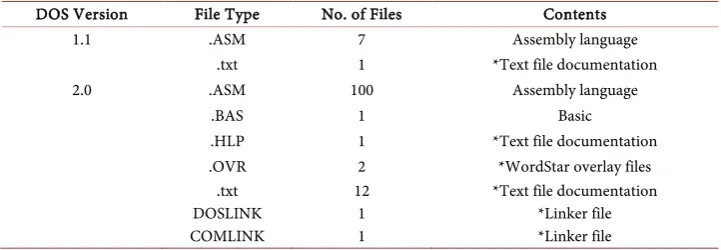
FileIdentify is a function of the CodeSuite program that identifies the number of file types in a folder and reports which programming language is typically associated with each file type. There is nothing to prevent someone from mislabeling a file as a type containing code in one programming language when it really contains code in a differ-ent programming language, and FileIddiffer-entify does not actually do a semantic analysis to determine the programming language, but in this case, opening the files revealed that the file types are indeed correct. The file types are listed in Table 1 for each version of
Table 1. CP/M files.
CP/M Version File Type No. of Files Contents
1.1 .plm 7 PL/M
.sub 1 *Configuration file .txt 2 *Text file documentation .z80 2 **Z80 simulator code from 2007
1.3 .asm 7 Assembly
.plm 5 PL/M
1.4 .asm 1 Assembly
.plm 1 PL/M
2.0 .asm 22 Assembly language
.lin 5 *ASCII hex
.pdf 1 *Documentation
.plm 5 PL/M
.src 1 Assembly
.txt 1 *Text file documentation
the CP/M operating system to be compared. The file types are listed in Table 2 for each version of the DOS operating system to be compared.
2.2. Run Understand
Understand is a program from Scientific Tool works that analyzes source code and re-ports the relationships between functions and files. Understand reported 114 errors in the PL/M code, which seems to be because this code conforms to an older version of PL/M that Understand does not fully recognize. Understand cannot analyze assembly code so it could not be used to analyze the assembly code.
2.3. Perform Global Searches
I searched the source code files for terms that could be clues to copying.
2.3.1. Search for the String “Copyright”
The CP/M files all had copyright notices for Digital Research and Gary Kildall. The DOS files had copyright notices for Seattle Computer Products, IBM, Tele Video Sys-tems, or Microsoft.
The Seattle Computer Products copyright notice is found in a comment the file ASM. ASM in the DOS 1.1 source code. The exact code is:
DB 13, 10, “Copyright 1979-1983 by Seattle Computer Products,
Inc.”
Seattle Computer Products was the hardware company that hired Tim Paterson to write an operating system, called QDOS, that was eventually purchased by Microsoft and turned into DOS, so it makes sense for this notice to be in the code.
The Tele Video copyright notice is found in a comment the file UINIT. ASM in the DOS 2.0 source code. The exact code is:
IF IBM; HEADER DB 13,10,13,10, “Tele Video Personal Computer
DOS Vers. 2.11”, 13, 10; DB “(C) Copyright Tele Video Systems,
Inc. 1983”, 13, 10; DB “(C) Copyright Microsoft Corp. 1981,
[image:6.595.192.553.567.692.2]1982, 1983”, 13, 10, “$”; ENDIF.
Table 2. DOS files.
DOS Version File Type No. of Files Contents
1.1 .ASM 7 Assembly language
.txt 1 *Text file documentation
2.0 .ASM 100 Assembly language
.BAS 1 Basic
.HLP 1 *Text file documentation .OVR 2 *WordStar overlay files
.txt 12 *Text file documentation
DOSLINK 1 *Linker file
COMLINK 1 *Linker file
7 TeleVideo was a company that manufactured computer terminals. In the early 1980 s, it also built CP/M and DOS computers, including the Model TS-1603 that ran both DOS 2.0 and CP/M-86 1.1 [6].
2.3.2. Search for the Company Names
The CP/M files had mentions of Digital Research. The DOS files had mentions of Seat-tle Computer Products, IBM, TeleVideo Systems, and Microsoft. A case-insensitive search for the following terms in the DOS code did not produce any results.
DRI (searched for whole word only) Digital
Research (found two generic program labels)
2.3.3. Search for Author Names and Initials
The CP/M files had mentions of Gary Kildall while the DOS files had mentions of Tim Paterson. A case-insensitive search for the following terms in the DOS code did not produce any results.
Kildall Gary
GK
2.3.4. Search for Any Relevant Terms
Interestingly, a search for the terms CP/M and CPM did find some results in the DOS source code.
In file MSDOS.ASM in DOS 1.0:
; 1.12 10/09/81 Zero high half of CURRENT BLOCK after all
(CP/M programs don’t)
.
.
.
STOSB; Set it to zero (CP/M programs set low byte).
In file MSHEAD.ASM in DOS 2.0:
; 1.12 10/09/81 Zero high half of CURRENT BLOCK after all
(CP/M programs don’t).
And in the file SYSCALL.ASM in DOS 2.0:
STOSB; Set it to zero (CP/M programs set low byte).
My research on the Internet and my reading of the code led me to believe that the code above has something to do with the file system. Because it discusses differences between DOS and CP/M, it would not be reasonable to interpret this as a clue that the code was copied from CP/M.
I also found the following reference to CP/M in file EXEC.ASM in DOS 2.0:
And in files PRINT.ASM and PRINT_v211.ASM I found:
DOCHAR:
MOV AL, BYTE PTR [BX]
CMP AL, 1AH ; ^Z?
JZ FILEOFJ ; CPM EOF
CMP AL, 0DH ; CR?
JNZ NOTCR
MOV [COLPOS], 0
And in file PRINT_V211.ASM I found:
JZFILEOFJ; CPM EOF.
The CP/M file system used fields called “extents” to keep track of files in directories. The sizes of CP/M files were stored in “sectors” of 128 bytes each. If a file filled up less than the 128 bytes of the last sector, the other bytes were filled with an ASCII Control-Z character as an end-of-file marker (EOF) [8] [9].
DOS had a different way of keeping track of file information. It recorded file sizes in bytes and so no EOF marker was needed. The code above seems to indicate that DOS could read CP/M files and had special code to do so, but initial research showed that CP/M files were incompatible with DOS. Was this a clue to copying?
Further research showed that very early versions of DOS were designed to read and write CP/M files. The code above confirms that compatibility [10]. Eventually that compatibility was dropped from DOS. The mention of CP/M in DOS makes sense once this purposeful compatibility is recognized. It is not a sign of copying.
2.4. Run CodeMatch and Inspect Most Highly Correlated File Pairs
Because CP/M is written in two different languages, two comparisons needed to be run. First, all DOS assembly code was compared to all CP/M assembly code. Second, all DOS assembly code was compared to all CP/M PL/M code.
2.4.1. DOS Assembly Code to CP/M Assembly Code
Examples and discussions of the matching elements between DOS and CP/M assembly code are given below.
1) Matching statements
Some examples of matching statements are shown in Appendix A. The first example shows that the constant TRUE is set to NOT FALSE. This is logical and would not be a sign of copying, especially since the line above shows that the constant FALSE is set to different values in DOS and CP/M.
9 of copying.
In the third example, the statement DW RENAME is found in both programs, which reserves a word in memory for a variable called RENAME. In the CP/M code, this varia-ble is used to store information about one of the operating system commands while in the DOS code it points to one of many DOS system calls. Given the different functio-nality, this is not an indicator of copying.
In the fourth example, the labels COMERR and COMERR1 are found. Both routines process command errors, but the code can be seen to be significantly different other than these two labels. In fact, the CP/M code has an additional label COMERR0 that is not found in the DOS code. Given the different functionality, this is not an indicator of copying.
In the fifth, sixth, and seventh examples, there are conditional jump instructions (JC, JZ, and JNZ) to identically labelled sections of code (COMERR, GETOP, SE2). However, the code surrounding these instructions are significantly different and these matching instructions are thus not indicators of copying.
These matching statements, along with others, were examined, and none of them appeared to be correlated for any reason other than common programming terms that could be expected to be found in many programs and are thus not indicators of copy-ing.
2) Matching comments and strings
Some examples of matching comments and strings are shown in Appendix B. The first comment is Get next character. Looking at the surrounding code, the rou-tines are very different, and thus not an indicator of copying.
In the second example, the terms DIR, REN, and TYPE are found in both sets of source code. In both sets of code they are multiple byte variables. However, in the DOS code, DIR and REN are 4 bytes while TYPE is 5 bytes. In the CP/M code they are all 4 bytes. They are also listed in a different order. When code is copied, it is rarely reor-dered because there is no need to do so. Both sets of code contain other commands that do not match. And there commands were well known commands in operating systems at the time. Also note that these commands are the “intrinsic commands” that are processed by the operating system command processor code. Every other command had its own executable file and source code file. For example, the DDT and ED com-mands in CP/M had source code files DDT.ASM and ED.ASM and executable files DDT.COM and ED.COM respectively. While CP/M 1.3 implemented 5 commands in-trinsically1, DOS 1.1 implemented 11 commands intrinsically. Given the differences, it does not appear that this code was copied.
In the third example, the comment Select disk is found in both sets of source code. In the DOS code, the comment is in code that is outputting to a disk. In the CP/M code the comment is at code that is simply declaring a constant. Given the differences, it does not appear that this code was copied.
In the fourth example, the comment End of file can be found in both programs where a constant is set to 1 AH in both files. The DOS constant EOF looks very similar to the CP/M constant EOFILE. However, this is the ASCII Control-Z that CP/M uses to signify the end of file that we already determined that DOS also uses for compatibili-ty. Interestingly, there is more overlap here. The EOL character in DOS is 0DH, which is the hex equivalent of the carriage return (CR) character 13 in decimal. But the car-riage return character was intended to be used to signal the end of a line, so it is no surprise that both operating systems use the character. This correlation is explained by common identifier names and common algorithms, and is not an indicator of copying.
The fifth example shows the comment Print it in both sets of code. This a very common expression. Both functions are in debugger code, looping and printing cha-racters, but the surrounding code is significantly different, performing different func-tions, and thus not an indicator of copying.
The matching comments and strings were examined, and none of them appeared to be correlated due to copying.
3) Matching identifiers
Some examples of matching comments and strings are shown in Appendix C. In the first example, CRLF is a label in both programs. CRLF is a common abbreviation for the carriage return/linefeed that appears at the end of a string in CP/M and DOS. The rest of the surrounding code is different, and thus not an indicator of copying.
In the second example, renam is an identifier in both programs. In DOS it is a label whereas in CP/M it is a constant. Given that it is used differently in each program, it is not an indicator of copying.
In the third example, BLKSIZ is a constant in both programs. In DOS it is equal to 512 and is used for printing I/O blocks. In CP/M it is equal to 2048 and is a disk block. Given that it is used differently in each program, it is not an indicator of copying.
In the fourth example, FLGTAB is a variable of 4 bytes in both programs. In DOS, it is the ASCII bytes for the letters t, l, s, w, and b. In CP/M it is the numbers 1, 7, 8, 3, and 5. Given that it is used differently in each program, it is not an indicator of copy-ing.
In the fifth example, RDLOOP is a label in the code. In both program, it marks the beginning of a loop that ends in a conditional jump back to the beginning of the loop using the instruction JNZ RDLOOP. However, other than those instructions, the loops are very different. Given the differences in surrounding code in each program, it is not an indicator of copying.
In the sixth example, LSTFCB is a variable in the CP/M code while it is a constant in the DOS code.
The matching identifiers were examined, and none of them appeared to be correlated due to copying. Given this difference it is not an indicator of copying.
4) Partially matching identifiers
11 shows the identifier in DOS, the middle column shows the identifier in CP/M, and the rightmost column shows the overlap.
Examining partially identifiers requires looking at the common part and finding something unusual that would indicate copying. For example, the identifiers variab-leOne and variable1 might seem suspicious because they are identical except that the number 1 appears in one identifier where the word “one” appears in the other. Or the identifiers ZeidmanIndex and ZeidmanCount might seem like an attempt to disguise copying. Reviewing the partially matching identifiers, I found no such signs of copying.
5) Matching instruction sequences
If code has been extensively scrubbed to hide all signs of copying, there would still be instruction sequences that matched. If the code was modified so much that all of the algorithms were changed, then what was the justification for copying? So the final test is to look for instruction sequences that match.
Appendix E gives an example of one of the very few instruction sequences that matched in DOS and CP/M. As can be seen, this is a simple jump table that is a com-monly known algorithm and not a sign of copying.
2.4.2. DOS Assembly Code to CP/M PL/M Code
It is unlikely that a high-level programming language such as PL/M would be copied to low-level assembly language because it would require manual translation or compila-tion and disassembly of the PL/M code, which could introduce errors. However, for completeness I compared the DOS assembly code to the CP/M PL/M code.
Examples and discussions of the matching elements between DOS assembly code and CP/M PL/M code are given below.
1) Matching statements
There were few matching statements, but two examples are given in Appendix F. In both cases, routines in both programs had an identical name but the algorithms being implemented in each case were significantly different. The few statement matches are not indications of copying.
2) Matching comments/strings
There were few matching comments and strings, but two examples are given in Ap-pendix G. The comment RUBOUT is not unusual given that ASCII delete character 7 H was also commonly called the rubout character.
In the second example, the comment get next character can be found in both sets of code. This is not an unusual comment and the surrounding code in both rou-tines is very different.
In the third example, the comment Return current drive number can be found in both sets of code. Although this is a very uncommon phrase when searched on the Internet, as I will discuss in section 3.5.2, the surrounding code in both routines is very different.
There were some matching identifiers in both sets of code, examples of which are shown in Appendix H. The abbreviation FCB means file control block, a term used by both operating systems to keep track of files, so it is not unusual to find the term PUTFCB and SETFCB in both sets of code.
More interesting, perhaps, is the use of the term SETDMA throughout both sets of code. In the CP/M code, SETDMA is the name of similar procedures in many files. In DOS, SETDMA is a constant in most files but a simple routine in the file MSDOS.ASM. Notice that while the code is very different in the two programs, the number 26 is asso-ciated with all of the SETDMA code. I will address this in the section 3.2 System Calls.
The few identifier matches are not indications of copying. 4) Partially matching identifiers
Appendix I shows some examples of identifiers in DOS and CP/M that partially match. The leftmost column shows the identifier in DOS, the middle column shows the identifier in CP/M, and the rightmost column shows the overlap. Reviewing the par-tially matching identifiers, I found no signs of copying.
5) Matching instruction sequences
There were no matching instruction sequences in the two sets of code.
2.5. Run SourceDetective for Identifiers, Statements, and Comments
The next step is to run SourceDetective to determine the number of times each match-ing code element (statements, comments and strmatch-ings, and identifiers) can be found on the Internet. In a typical code comparison, this focuses attention on those elements that can be found in both programs but cannot be found, or are rarely found, on the Inter-net. These are much more likely to be smoking guns. In this case, however, since CP/M source code has been available online for several decades, running SourceDetective was not as helpful as it would otherwise be which is why I examined nearly all cases of matching code elements. However, the rarely found elements may still be important and are described below.
[image:12.595.192.556.637.707.2]2.5.1. DOS Assembly Code to CP/M Assembly Code
Table 3 shows the number of hits for the rarest matching comments and strings in the DOS and CP/M assembly code. All the matches are fairly common and provide no signs of copying.
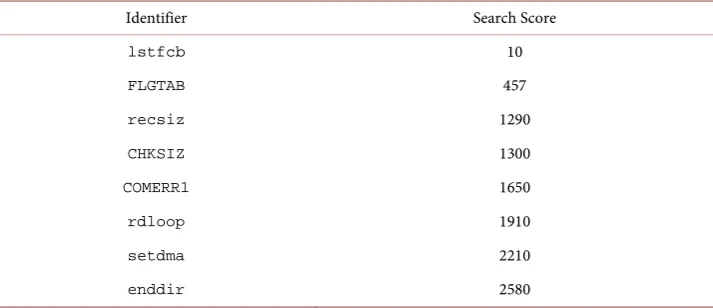
Table 4 shows the number of hits for the rarest matching identifiers in the DOS and CP/M assembly code. All the matches are fairly common except for the first one,
Table 3. Matching DOS and CP/M assembly code comments and strings with hits on the internet.
Comment or string Search Score
Save DMA address 45
decrement character count 273
Restore opcode 484
No, get next character 655
13 Table 4. Matching DOS and CP/M assembly code identifiers with hits on the internet.
Identifier Search Score
lstfcb 10
FLGTAB 457
recsiz 1290
CHKSIZ 1300
COMERR1 1650
rdloop 1910
setdma 2210
enddir 2580
lstfcb, and provide no signs of copying. The identifier lstfcb can be seen in Ap-pendix C and was already determined not to be an indicator of copying.
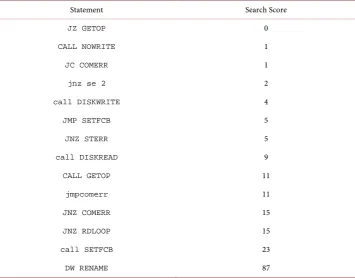
Table 5 shows the number of hits for the rarest matching statements. The top of the table shows statements that are fairly rare, which could indicate copying. However, as shown in Appendix A, when the surrounding code is examined, these statements are found in very different routines in the two programs, indicating that they are not signs of copying.
2.5.2. DOS Assembly Code to CP/M PL/M Code
Table 6 shows the number of hits for the rarest matching comments and strings in the DOS assembly code and CP/M PL/M code. Only the first listed match is rare. Examin-ing the procedures in which the comment is found, shown in Appendix G, the code is different in both programs and thus not a sign of copying.
Table 7 shows the number of hits for the rarest matching statements in the DOS as-sembly code and CP/M PL/M code. There are a few rare matches, as already described and already shown in Appendix F, which are not signs of copying as determined by the surrounding code. All the other matches are fairly common and provide no signs of copying.
Table 8 shows the number of hits for the rarest matching identifiers in the DOS as-sembly code and CP/M PL/M code. All the matches are fairly common and provide no signs of copying.
2.6. Examine Partial Identifiers
Reviewing the list of partially matching identifiers none of them stood out as unusual or indicated copying.
2.7. Run CodeCross
Table 5. Matching DOS and CP/M assembly code statements with hits on the internet.
Statement Search Score
JZ GETOP 0
CALL NOWRITE 1
JC COMERR 1
jnz se 2 2
call DISKWRITE 4
JMP SETFCB 5
JNZ STERR 5
call DISKREAD 9
CALL GETOP 11
jmpcomerr 11
JNZ COMERR 15
JNZ RDLOOP 15
call SETFCB 23
[image:14.595.190.555.412.466.2]DW RENAME 87
Table 6. Matching DOS assemblycode and CP/M PL/M code comments and strings with hits on the internet.
Comment Search Score
Return current drive number 0
Get next digit 1710
Table 7. Matching DOS assemblycode and CP/M PL/M code statements with internet hits.
Statement Search Score
call CLOSEDEST 2
call DISKWRITE 4
call DISKREAD 9
call SETFCB 23
CALL GETFILE 1460
Table 8. Matching DOS assemblycode and CP/M PL/M code identifiers with internet hits.
Identifier Search Score
PUTFCB 398
[image:14.595.194.553.500.610.2] [image:14.595.193.553.646.699.2]15 code using the old code as a guide. Code Cross finds this very strong indicator of copy-ing.
2.7.1. DOS Assembly Code to CP/M Assembly Code
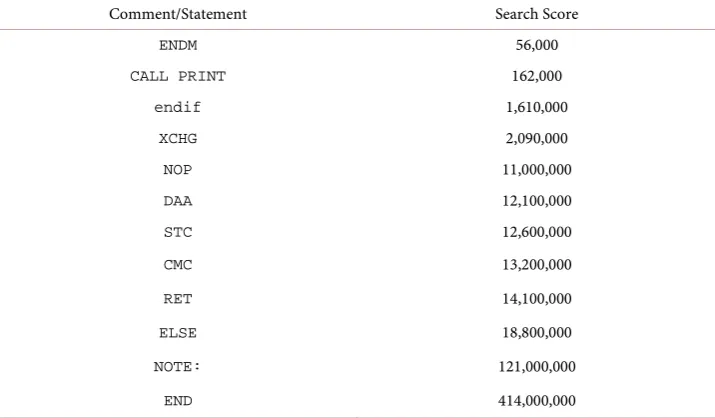
[image:15.595.194.552.382.591.2]The code was compared and found to consist of one-or two-word statements that were commented out. Source Detective was run to determine whether these commented out statements were rare, and they were determined to be extremely common, as shown in Table 9.
2.7.2. DOS Assembly Code to CP/M PL/M Code
The code was compared and found to consist of one-or two-word statements that were commented out. Source Detective was also run to determine whether there commented out statements were rare, and they were determined to be extremely common, as shown in Table 10.
2.8. Comparing DOS 1.0 Binary
The DOS source code from Microsoft is for version 1.1. No source code was supplied for version 1.0, and the binary files for version 1.0 are also difficult to find. I received a copy of the DOS 1.0 binary code from Daniel B. Sedory [11] that appears to be valid. I
Table 9. 3.7.1. DOS and CP/M assembly code commented-out statements and internet hits.
Comment/Statement Search Score
ENDM 56,000
CALL PRINT 162,000
endif 1,610,000
XCHG 2,090,000
NOP 11,000,000
DAA 12,100,000
STC 12,600,000
CMC 13,200,000
RET 14,100,000
ELSE 18,800,000
NOTE: 121,000,000
[image:15.595.193.553.637.705.2]END 414,000,000
Table 10. DOS assembly code and CP/M PL/M code commented-out statements and internet hits.
Comment/Statement Search Score
EOF 11,000,000
ELSE 18,800,000
compared this version to both the DOS version 1.1 source code and to the CP/M source code using the Bit Match function of Code Suite that compares binary code to binary code or to source code.
2.8.1. Microsoft 1.0 Binary Code to Microsoft 1.1 Assembly Code
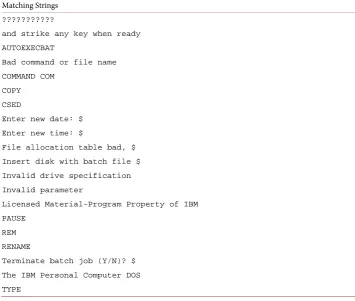
[image:16.595.191.547.235.536.2]When source code is converted to binary code, much of the human-readable informa-tion is lost. Strings such as error messages are not lost, and some words also remain. The strings that were found in both versions of DOS are given in Table 11 while the words that were found in both versions of DOS are given in Table 12.
Table 11. Matching strings in DOS 1.0 binary code and DOS 1.1 source code. Matching Strings
???????????
and strike any key when ready
AUTOEXECBAT
Bad command or file name
COMMAND COM
COPY
CSED
Enter new date: $
Enter new time: $
File allocation table bad, $
Insert disk with batch file $
Invalid drive specification
Invalid parameter
Licensed Material-Program Property of IBM
PAUSE
REM
RENAME
Terminate batch job (Y/N)? $
The IBM Personal Computer DOS
TYPE
Table 12. Matching words in DOS 1.0 binary code and DOS 1.1 source code. Matching Words
1982 abort ADDRESS AGAIN ASK BATCH BITS
BUFFER CHKDSK COM COMMAND COPIED COPY DATE
DELETE Disk Done DOS entry ERASE EXTERNAL
FALSE FATAL file files from FULL HEX
IBM Initialized LOAD MAKE March MORE
new NEXT NUL OPEN PAUSE Program RANGE
READ RENAME SCROLL Segments set SOURCE
specified Start SWITCH SYS system terminate
[image:16.595.193.554.566.705.2]17 The fact that a relatively large number of strings and words were found in both ver-sions confirms that version 1.0 is probably a legitimate version of DOS.
2.8.2. Microsoft 1.0 Binary Code to CP/M Assembly Code
The strings that were found in DOS 1.0 binary code and CP/M assembly code are given in Table 13 while the words that were found in DOS 1.0 binary code and CP/M assem-bly code are given in Table 14.
There was only on string that could be found in both programs. The words that can be found in both operating systems are common words, most of which are simple Eng-lish language words. This comparison gives no indications of copying.
2.8.3. Microsoft 1.0 Binary Code to CP/M PL/M Code
[image:17.595.193.553.384.532.2]The strings that were found in DOS 1.0 binary code and CP/M PL/M code are given in Table 15 while the words that were found in DOS 1.0 binary code and CP/M PL/M code are given in Table 16.
Table 13. Matching strings in DOS 1.0 binary code and CP/M assembly code. Matching Strings
TYPE
Table 14. Matching words in DOS 1.0 binary code and CP/M assembly code. Matching Words
BAD base BIOS bit BOOT BOUNDS COLUMN COM
continued copied COPY DELETE disks DISPLAY
DONE empty ENTER EOF ERASE ERRO error false
FOUND HEX KEY LETTER list LOW MAKE MODULE
NEXT note NUMERIC offset OPEN per position
PUBLIC READ RENAME RETRY SECTOR seek SELECT STACK
STARS START title TRACK true TYPE user VALUE
[image:17.595.189.554.564.598.2]VERSION WRITE
Table 15. Matching strings in DOS 1.0 binary code and CP/M PL/M code.
Matching Strings
[image:17.595.194.553.632.704.2]RENAME TYPE
Table 16. Matching words in DOS 1.0 binary code and CP/M PL/M code. Matching Words
BASE BIT boot BUFFER COLUMN copyright CTS
DELETE DISK ERROR ESC FALSE FOREVER INPUT INT
ITEMS length LOAD LOW MAKE MON OPEN OUTPUT
The only matching strings and words are common words, most of which are simple English language words. This comparison gives no indications of copying.
3. Other Possible Copying
In addition to code, I examined whether the DOS commands were copied from CP/M and whether the DOS system calls were copied from CP/M.
3.1. Commands
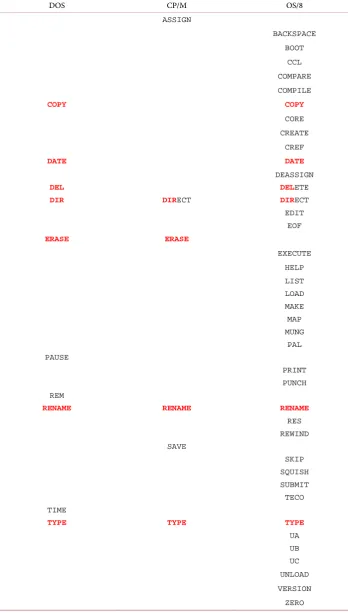
The commands for DOS and CP/M are given in Table 17 along with those of OS/8, the operating system from Digital Equipment Corporation for the PDP-8 computer that was released before CP/M in 1974 [12].
As can be seen, there is overlap between the commands, which I will discuss in my conclusions.
3.2. System Calls
System calls are the way that a computer program requests a service from the underly-ing operatunderly-ing system. Examples of early system calls included rebootunderly-ing the system, outputting text to a console or a printer, determining the amount of memory that is in-stalled in the system, or reading/writing data from/to a hard disk.
The DOS source code and CP/M source code for implementing the system calls are shown in Appendix J. Programs running on DOS and CP/M used different software code to perform system calls, and the code to implement the system calls was written very differently. However, at least 22 system calls—the numbers of system calls 0 through 5, 9 through 11, 13 through 23, 25, and 26—are identical functions2. I will dis-cuss the implications of this in my conclusions.
4. Conclusions
Here are my conclusions about copying. And because many people are interested in whether DRI could have brought a copyright lawsuit against Microsoft, I will tie in my conclusions with that possibility. Keep in mind that while I have extensive experience in copyright law, I am not a lawyer and the law is constantly changing.
4.1. Software Source Code
There is no indication of copying of software source code. The small number of corre-lations between DOS source code and CP/M source code can all be explained by rea-sons other than copying.
4.2. Commands
The command names are descriptive of the functionality, which would preclude copy-rightability because only creative expression that is not descriptive or functional can be
19 Table 17. DOS, CP/M, and VMS commands.
DOS CP/M OS/8
ASSIGN
BACKSPACE
BOOT
CCL
COMPARE
COMPILE
COPY COPY
CORE
CREATE
CREF
DATE DATE
DEASSIGN
DEL DELETE
DIR DIRECT DIRECT
EDIT
EOF
ERASE ERASE
EXECUTE
HELP
LIST
LOAD
MAKE
MAP
MUNG
PAL
PAUSE
PUNCH
REM
RENAME RENAME RENAME
RES
REWIND
SAVE
SKIP
SQUISH
SUBMIT
TECO
TIME
TYPE TYPE TYPE
UA
UB
UC
UNLOAD
VERSION
copyrighted. Also, DOS commands have more in common with OS/8 commands than with CP/M commands, and even many CP/M commands appear copied from OS/8, so it would be difficult to claim that DOS copied CP/M. A claim of copyright infringement of the commands would probably not hold up.
4.3. System Calls
The DOS system calls were definitely copied from the CP/M system calls. Given the quantity of identical numbers representing identical functions, it is clear that Tim Pa-terson referenced the CP/M manual when writing DOS.
So the question of copyright infringement of system calls remains. While a list of numbers is not by itself creative and thus not copyrightable, a list of numbers that arbi-trarily express specific functions is creative and thus copyrightable. Furthermore, DRI appears to have indicated its copyright by putting a copyright notice on the CP/M In-terface Guide [13] that describes the system calls. Had DRI brought a copyright in-fringement case against Microsoft, it would have had to show that it guarded its system calls from copying.
On the other hand, Microsoft could have prevailed by showing that it was a fair use to copy the system calls. According to copyright law, fair use is determined by the fol-lowing factors [14]:
1) The purpose and character of the use, including whether such use is for nonprofit educational purposes.
2) The nature of the copyrighted work, especially whether it benefits the public. 3) The amount and substantiality of the portion used in relation to the copyrighted work as a whole.
4) The effect of the use upon the potential market for or value of the copyrighted work.
It is clear that the copying did not pass the first two factors. DOS was a commercial product sold at a profit and it would be hard to argue that the copying served a public benefit. Therefore to defeat a copyright infringement charge, Microsoft would have had to show that the amount of copyrighted material copied into DOS was minimal and that copying the CP/M system calls did not, by itself, cause DRI any financial harm.
It is my opinion that DRI could have brought a legitimate copyright claim against Microsoft for copying a substantial number of system calls. Furthermore it is my belief that Microsoft could have claimed a fair use defense because using the same system commands did not reduce the market for CP/M. In other words, no one bought DOS over CP/M solely because many of the system commands used the same numbers.
I further believe that had had DRI brought a copyright case against Microsoft that Microsoft would have won using the fair use argument.
5. Download Full Results and Tools
21 http://www.ZeidmanConsulting.com/DOS_comparisons.
Acknowledgements
I would like to thank Len Shustek and John Hollar at the Computer History Museum for pointing me to the DOS code and encouraging me to do another comparison. I would also like to thank Daniel B. Sedory for providing me with a rare copy of PC DOS 1.0 binary code. I would like to thank Clement Cole for pointing me to the DEC OS/8 handbook and pointing out the similarities to CP/M commands. And I would like to thank Tom Rolander, employee number one at Digital Research, who was always happy to answer my questions.
References
[1] Zeidman, B. (2014) A Code Correlation Comparison of the DOS and CP/M Operating Sys-tems. Journal of Software Engineering and Applications, 7, 513-529.
http://www.scirp.org/journal/PaperInformation.aspx?PaperID=46362#.U4WDefldWCU
[2] Evans, H., Buckland, G. and Lefer, D. (2004) They Made America. Little, Brown and Co., New York.
[3] Hamm, S. and Greene, J. (2004) The Man Who Could Have Been Bill Gates. Bloomberg.
http://www.bloomberg.com/news/articles/2004-10-24/the-man-who-could-have-been-bill-gates
[4] CP/M Assembler (ASM) User’s Guide (1978).
http://www.cpm.z80.de/randyfiles/DRI/ASM.pdf
[5] 8051assemblyformatter. https://code.google.com/p/8051assemblyformatter
[6] Zeidman, B. (2011) The Software IP Detective’s Handbook. Prentice Hall, Upper Saddle River.
[7] Model TS-1603, Old-Computers.com.
http://www.old-computers.com/museum/computer.asp?c=1077
[8] Haardt, M. and Elliott, J. (2013) CP/M Disk and File System Format. Welcome to the Wonderfully Ancient World of CP/M. http://www.cpm8680.com/cpmtools/cpm.htm [9] Tanenbaum, A.S. (2002) The CP/M File System.
http://www.informit.com/articles/article.aspx?p=25878&seqNum=3
[10] Keet, M. (2001) File Systems: Microsoft Disk Operating Sysytem [sic].
http://meteck.org/msdos.htm
[11] Sedory, D.B. (2011) The Starman’s Realm. http://thestarman.pcministry.com
[12] OS/8 Handbook. Digital Equipment Corporation, April 1974.
http://bitsavers.trailing-edge.com/pdf/dec/pdp8/os8/OS8_Handbook_Apr1974.pdf
[13] CP/M Interface Guide (1978).
http://www.cpm.z80.de/randyfiles/DRI/CPM_1_4_Interface_Guide.pdf
[14] Tysver, D.A. (2015) Fair Use in Copyright Law. Bitlaw.
Appendix A: Matching Statements in DOS Assembly Code and CP/M Assembly Code
DOS Code
CP/M Code
In file DOS\v11source\COMMAND.ASM: In file CPM\1.3\CCP.asm:
FALSE EQU 0
TRUE EQU NOT FALSE
FALSEEQU 8000H TRUEEQU NOT FALSE
In file DOS\v11source\MSDOS.ASM: In file CPM\1.3\CCP.asm:
IFIBM
DELIM:
ENDIF
CMPAL,":";Allow ":" as separator in IBM version JZRET21
IFNOT IBM
DELIM:
ENDIF
CMPAL,"+" JZ RET101 CMP AL,"=" JZ RET101 CMP AL,";" JZ RET101 CMP AL,"," JZ RET101 SPCHK:
CMP AL,9 ;Filter out tabs too
JZ RET101;WARNING! " " MUST be the last compare
CMP AL," " RET101: RET
DELIM:;LOOK FOR A DELIMITER
LDAXD! ORA A! RZ;NOT THE LAST ELEMENT CPI' '! JC COMERR;NON GRAPHIC
RZ;TREAT BLANK AS DELIMITER CPI'='! RZ
CPILA! RZ;LEFT ARROW CPI','! RZ
CPI','! RZ CPI';'! RZ CPI'<'! RZ CPI'>'! RZ
RET;DELIMITER NOT FOUND
In file DOS\v11source\MSDOS.ASM: In file CPM\1.3\CCP.asm:
; Standard Functions DISPATCH DW ABORT ;0 DW CONIN
DW CONOUT DW READER DW PUNCH
DW LIST ;5 DW RAWIO
DW RAWINP DW IN DW PRTBUF
DW BUFIN ;10 DW CONSTAT DW FLUSHKB DW DSKRESET DW SELDSK
DW OPEN ;15 DW CLOSE
DW SRCHFRST DW SRCHNXT DW DELETE
DW SEQRD ;20 DW SEQWRT
DW CREATE
JMPTAB:DWDIRECT;DIRECTORY SEARCH DW ERASE ;FILE ERASE DW TYPE ;TYPE FILE
DW SAVE ;SAVE MEMORY IMAGE
DW RENAME ;FILE RENAME
23 DW RENAME
DW INUSE
DW GETDRV ;25 DW SETDMA
DW GETFATPT DW GETFATPTDL DW GETRDONLY
DW SETATTRIB ;30 DW GETDSKPT
DW USERCODE DW RNDRD DW RNDWRT
DW FILESIZE ;35 DW SETRNDREC
In file DOS\v20source\EDLIN.ASM: In file CPM\1.3\CCP.asm:
COMERR:
MOV DX,OFFSET DG:BADCOM
COMERR1:
MOV AH,STD_CON_STRING_OUTPUT INT 21H
JMP COMMAND
COMERR: ;ERROR IN, COMMAND STRING STARTING AT
POSITION
;'STADDR' AND ENDING WITH FIRST DELIMITER CALLCRLF ;SPACE TO NEXT LINE
LHLDSTADDR ;H,L ADDRESS FIRST TO PRINT
COMERR0: ;PRINT CHARACTERS UNTIL BLANK OR ZERO MOVA, M! CPI ' '! JZ COMERR1; NOT BLANK
ORAA! JZ COMERR1; NOT ZERO, SO PRINT IT PUSHH! CALL PRINTCHAR! POP H! INK X JMPCOMERR0 ; FOR ANOTHER CHARACTER
COMERR1: ;PRINT QUESTION, MARK, AND DELETE SUB
FILE
MVIA, '?'! CALL PRINTCHAR CALLCRLF! CALL DEL$SUB
JMPCCP ;RESTART WITH NEXT COMMAND
In file DOS\v20source\SYSINIT.ASM: In file CPM\1.3\CCP.asm:
ASSUME ES:SYSINITSEG
MOV DX,OFFSET COMMND ; NOW POINTING TO FILE DESCRIPTION
IF NOEXEC
MOV ES,BP ; SET LOAD ADDRESS
MOV BX,100H
CALL LDFIL ; READ IN COMMAND
JC COMERR MOV DS,BP CLI
MOV DX,80H MOV SS,BP MOV SP,DX STI
FCB SCAN, AND FILL SUBROUTINE (ENTRY IS AT FILLFCB BELOW)
;FILL THE COMFCB, INDEXED
BY A (0 OR 16)
;SUBROUTINES
DELIM: ;LOOK FOR A DELIMITER
LDAX D! ORA A! RZ ;NOT THE LAST ELEMENT CPI' '! JC COMERR ;NON GRAPHIC
RZ ;TREAT BLANK AS DELIMITER CPI '='! RZ
CPI LA! RZ ;LEFT ARROW CPI ','! RZ
CPI ','! RZ CPI ';'! RZ CPI '<'! RZ CPI '>'! RZ
RET ;DELIMITER NOT FOUND
In file DOS\v11source\ASM.ASM: In file CPM\1.3\asm.asm:
FLG:
CMP DL,[MAXFLG] ;Invalid flag for this operation?
MOV CL,27H JG ERR1
CALL GETSYM
OPER6: ;UNARY SET, MUST BE + OR -
MOV A, C ;RECALL OPERATOR CPI PLUS
JZ GETOP ;IGNORE UNARY PLUS
CMP AL,',' JZ GETOP
JP GETOP1 OR DX,DX
JZ FULLREC ;If remainder 0, then full record transfered
MOV BYTE PTR [DSKERR],3 ;Flag partial last record
SUB CX,DX ;Bytes left in last record
PUSH ES
MOV ES,[DMAADD+2]
XCHG AX,BX ;Save the record count temporarily
XOR AX,AX ;Fill with zeros SHR CX,1
JNC EVENFIL STOSB
INR A ;CHANGE TO UNARY MINUS MOV C, A
JMP OPER2
In file DOS\v20source\FC.ASM: In file CPM\1.3\DDT.asm:
get_nextl:
mov si,word ptr [bx].curr get_next:
mov cx,word ptr [bx].dat_end sub cx,si
mov di,si mov al,LF cld
repnz scasb
mov si,di ;pointer to next line
jnz se2 ;not found
clc ret se2:
inc si ;point past the LF
stc ret
SE1:
LDAX D ;POINT TO FIRST BYTE TO MATCH CMPM ;SAME CHARACTER AS TABLE?
JNZ SE2 ;NO, SKIP TO NXT TABLE ENTRY
INXH ;YES, LOOK AT NEXT CHARACTER INXD ;MOVE TO NEXT CHARACTER TYPED DCRB ;DECREMENT CHARACTER COUNT JNZSE1 ;MORE TO MATCH?
;
; COMPLETE MATCH, RETURN WITH D,E ADDRESSING BYTE VALUE
POPD RET
Appendix B: Matching Comments and Strings in DOS Assembly Code and CP/M Assembly
Code
DOS
CP/M
In file DOS\v11source\ASM.ASM: In file CPM\2.0\as4sear.asm:
FPREG:
;Have detected "ST" for 8087 floating point stack register
MOV DL,0 ;Default is ST(0)
CALL SCANB ;Get next character CMP AL,"(" ;Specifying register number? JNZ HAVREG
;Get register number
CALL NEXTCHR ;Skip over the "("
CALL GETOP ;A little recursion never hurt anybody
CMP AL,CONST ;Better have found a constant MOV CL,20 ;Operand error if not
NEXTS: ;LOOK AT NEXT SUFFIX
LXI H,ACCUM+1 ;SUFFIX POSITION LDAX D ;CHARACTER TO ACCUM CMP M
INX D ;READY FOR NEXT CHARACTER JNZ NEXT0 ;JMP IF NO MATCH LDAX D ;GET NEXT CHARACTER
INX H ;READY FOR COMPARE WITH ACCUM CMP M ;SAME?
25 JNZ ERRJ3
CMP [DLABEL],0 ;Constant must be defined MOV CL,30
JNZ ERRJ3
MOV DX,[DATA] ;Get constant
CMP DX,7 ;Constant must be in range 0-7 MOV CL,31
JA ERRJ3 MOV AL,[SYM] CMP AL,")" MOV CL,24 JNZ ERRJ3 HAVREG: MOV DH,FREG
XOR AL,AL ;Zero set means register found RET
In file DOS\v11source\COMMAND.ASM: In file CPM\1.3\CCP.asm:
COMTAB DB 4,"DIR",1
DW OFFSET TRANGROUP:CATALOG DB 7,"RENAME",1
DW OFFSET TRANGROUP:RENAME DB 4,"REN",1
DW OFFSET TRANGROUP:RENAME DB 6,"ERASE",1
DW OFFSET TRANGROUP:ERASE DB 4,"DEL",1
DW OFFSET TRANGROUP:ERASE DB 5,"TYPE",1
DW OFFSET TRANGROUP:TYPEFIL DB 4,"REM",1
DW OFFSET TRANGROUP:COMMAND DB 5,"COPY",1
DW OFFSET TRANGROUP:COPY DB 6,"PAUSE",1
DW OFFSET TRANGROUP:PAUSE DB 5,"DATE",0
DW OFFSET TRANGROUP:DATE DB 5,"TIME",0
DW OFFSET TRANGROUP:TIME
DB 0 ;Terminate command table
intvec:
;intrinsic function names (all are four characters)
db 'DIR ' db 'ERA ' db 'TYPE' db 'SAVE' db 'REN ' db 'USER'
In file DOS\v11source\IO.ASM: In file CPM\1.3\SYSGEN.asm:
CHKDENS: SEG CS
MOV AL,[SI] ; Get previous disk I/O driver number. MOV BX,DRVTAB
SEG CS
XLAT ; Get drive select byte for previous density
IF CROMEMCO16FDC
CALL MOTOR ; Wait for motor to come up to speed.
ENDIF
OUT DISK+4 ; Select disk MOV AL,0C4H ; READ ADDRESS command CALL DCOM
AND AL,98H
ORG 100H ;BASE OF TRANSIENT AREA ;
LOADP EQU 900H;LOAD POINT FOR SYSTEM DURING LOAD/STORE
BDOS EQU 5H ;DOS ENTRY POINT
BOOT EQU 0 ;JUMP TO 'BOOT' TO REBOOT SYSTEM CONI EQU 1 ;CONSOLE INPUT FUNCTION
CONO EQU 2 ;CONSOLE OUTPUT FUNCTION SELF EQU 14 ;SELECT DISK
IN DISK+3 ; Eat last byte to reset DRQ JZ HAVDENS ; Jump if no error in reading address. NOT AH ; AH = -1 (disk changed) if new density
works. SEG CS
XOR B,[SI],1 ; Try other density LOOP CHKDENS
MOV AX,2; Couldn't read disk at all, AH = 0 for don't STC ; know if disk changed, AL = error code 2
-
RET L; disk not ready, carry set to indicate error.
In file DOS\v11source\TRANS.ASM: In file DOS\1.3\CCP.asm:
ORG 100H
EOF: EQU 1AH ;End of file EOL: EQU 0DH
FCB: EQU 5CH SYSTEM: EQU 5 OPEN: EQU 15 CLOSE: EQU 16 SETDMA: EQU 26 CREATE: EQU 22 DELETE: EQU 19 READ: EQU 20 WRITE: EQU 21 PRNBUF: EQU 9
DISKAEQU 0004H ;DISK ADDRESS FOR CURRENT DISK
BDOS EQU 0005H ;PRIMARY BDOS ENTRY POINT
BUFF EQU 0080H ;DEFAULT BUFFER
FCB EQU 005CH ;DEFAULT FILE CONTROL BLOCK ;
RCHARF EQU 1 ;READ CHARACTER FUNCTION PCHARF EQU 2 ;PRINT CHARACTER FUNCTION PBUFF EQU 9 ;PRINT BUFFER FUNCTION RBUFF EQU 10 ;READ BUFFER FUNCTION BREAKF EQU 11 ;BREAK KEY FUNCTION
LIFTFEQU 12;LIFT HEAD FUNCTION, (SHUGART SA3900 ONLY)
INITF EQU 13 ;INITIALIZE BDOS FUNCTION SELF EQU 14 ;SELECT DISK FUNCTION CPENF EQU 15 ;OPEN FILE FUNCTION CLOSEF EQU 16 ;CLOSE FILE FUNCTION SEARF EQU 17 ;SEARCH FOR FILE FUNCTION SEARNF EQU 18 ;SEARCH FOR NEXT FILE
FUNCTION
DELF EQU 19 ;DELETE FILE FUNCTION DREADF EQU 20 ;DISK READ FUNCTION DWRITF EQU 21 ;DISK WRITE FUNCTION MAKEF EQU 22 ;FILE MAKE FUNCTION RENF EQU 23 ;RENAME FILE FUNCTION LOGF EQU 24 ;RETURN LOGIN VECTOR CSELFEQU 25;RETURN CURRENTLY SELECTED DRIVE
NUMBER
DMAF EQU 26 ;SET DMA ADDRESS ;
CR EQU 13 ;CARRIAGE RETURN LF EQU 10 ;LINE FEED LA EQU 5FH ;LEFT ARROW EOFILE EQU 1AH ;END OF FILE
NDISKS EQU 2 ;NUMBER OF DISKS
In file DOS\v20source\DEBCOM1.ASM: In file CPM\1.3\DDT.asm:
DOSCAN:
SCASB; Search for first byte
LOOPNEDOSCAN; Do at least once by using LOOP JNZ RET1 ; Exit if not found
PUSH BX ; Length of list minus 1 XCHG BX,CX
PUSH DI ; Will resume search here REPE CMPSB ; Compare rest of string MOV CX,BX ; Area length back in CX
DELT: ;DISPLAY CPU ELEMENT GIVEN BY COUNT IN REG-B, ADDRESS IN H,L
MOVA, M ;GET CHARACTER CALL PCHAR ;PRINT IT MOVA, B ;GET COUNT
CPIAVAL ;PAST A?
27 POP DI ; Next search location
POP BX ; Restore list length
JNZ TEST ; Continue search if no match DEC DI ; Match address
CALL OUTDI ; Print it
INC DI ; Restore search address CALL CRLF
Appendix C: Matching Identifiers in DOS Assembly Code and CP/M Assembly Code
DOS Code
CP/M Code
In file DOS\v11source\COMMAND.ASM: In file CPM\1.3\CCP.asm:
CRLF:
MOV DX,OFFSET RESGROUP:NEWLIN PUSH AX
MOV AH,PRINTBUF INT 33
POP AX RET10: RET
CRLF: MVI A, CR! CALL PRINTCHAR MVI A, LF! JMP PRINTCHAR
In file DOS\v11source\COMMAND.ASM: In file CPM\2.0\os2ccp.asm:
RENAM EQU 23
renam: ;rename the file given by d,e
In file DOS\v20source\PRINT.ASM: In file CPM\2.0\deblock.asm:
;WARNING DANGER WARNING:
; PRINT is a systems utility. It is clearly understood that it may have ; to be entirely re-written for future
versions of DOS. The following ; TWO vectors are version specific,
they may not exist at all in future ; versions. If they do exist, they may
function differently.
; ANY PROGRAM WHICH IMITATES PRINTS USE OF THESE VECTORS IS ALSO A SYSTEMS ; UTILITY AND IS THEREFORE NOT VERSION
PORTABLE IN ANY WAY SHAPE OR FORM. ; YOU HAVE BEEN WARNED, "I DID IT THE SAME
WAY PRINT DID" IS NOT AN REASON ; TO EXPECT A PROGRAM TO WORK ON FUTURE
VERSIONS OF DOS.
SOFTINT EQU28H ;Software interrupt generated by DOS
COMINT EQU2FH ;Communications interrupt used by PRINT
; This vector number is DOS reserved. It
; is not generally available to programs
; other than PRINT.
BLKSIZ EQU512 ;Size of the PRINT I/O
block in bytes
FCBSIZ EQU40 ;Size of an FCB
;***************************************************** ;* * ;* CP/M to host disk constants * ;* * ;*****************************************************
blksiz equ 2048 ;CP/M allocation size
hstsiz equ 512 ;host disk sector size hstspt equ 20 ;host disk sectors/trk hstblk equ hstsiz/128 ;CP/M sects/host buff cpmspt equ hstblk * hstspt ;CP/M sectors/track secmsk equ hstblk-1 ;sector mask
smask hstblk ;compute sector mask secshf equ @x ;log2(hstblk)
FLGTAB: DB "tlswb"
; FLGTAB ELEMENTS DETERMINE SHIFT COUNT TO SET/EXTRACTFLAGS
FLGTAB:
DB . 1, 7, 8, 3, 5 ;CY, ZER, SIGN, PAR, IDCY
In file DOS\v20source\PROFIL.ASM: In file CPM\2.0\xsub1.asm:
RDLOOP:
MOV BX,DX AND DX,000FH MOV CL,4 SHR BX,CL ADD AX,BX PUSH AX PUSH DX PUSH DS MOV DS,AX MOV AH,SETDMA INT 21H POP DS MOV DX,FCB
MOV CX,0FFF0H ;Keep request in segment
OR SI,SI ;Need > 64K? JNZ BIGRD
MOV CX,DI ;Limit to amount requested
BIGRD:
MOV AH,BLKRD INT 21H
SUB DI,CX ;Subtract off amount done SBB SI,0 ;Ripple carry
CMP AL,1 ;EOF? POP DX
POP AX ;Restore transfer address
JZ RET10
ADD DX,CX ;Bump transfer address by last read
MOV BX,SI
OR BX,DI ;Finished with request JNZ RDLOOP
RET10: STC RET
rdloop:
ldax d ;next char mov m,a
inx h inx d dcr c
jnz rdloop ;loop til copied
mvi c,closef lxi d,subfcb lxi h,modnum
dad d ;hl=fcb(modnum)
mvi m,0 ;=0 so acts as if written lda subcr ;length of file dcr a ;incremented by read op sta subrc ;decrease file length ora a ;at zero?
jnz fileop
mvi c,delf ;delete if at end fileop: call fbdos
ret
In file DOS\v20source\ASM.ASM: In file CPM\2.0\os3bdos.asm:
ERRMES: DM '***** ERROR: ' NOSPAC: DB 13,10,'File creation
error',13,10,"$"
NOMEM: DB 13,10,'Insufficient memory',13,10,'$'
NOFILE: DB 13,10,'File not found',13,10,'$'
WRTERR: DB 13,10,'Disk full',13,10,'$' BADDSK: DB 13,10,'Bad disk
specifier',13,10,'$'
ERCNTM: DM 13,10,13,10,'Error Count =' SYMSIZE DM 13,10,'Symbol Table size = ' FRESIZE DM 'Free space = ' SYMMES: DM 13,10,'Symbol
; file control block (fcb) constants empty equ 0e5h ;empty directory entry lstrec equ 127 ;last record# in extent recsiz equ 128 ;record size
fcblen equ 32 ;file control block size
dirrec equ recsiz/fcblen ;directory elts / record dskshf equ 2 ;log2(dirrec)
dskmsk equ dirrec-1
fcbshf equ 5 ;log2(fcblen) ;
29 Table',13,10,13,10
EXTEND: DB 'ASM',0,0 IFEND: DB 5,'endif' IFNEST: DB 2,'if'
RETSTR: DM 'ret'
HEXFCB: DB 0,' HEX',0,0,0,0 DS 16
DB 0,0,0,0,0
LSTFCB: DB 0,' PRN',0,0,0,0
DS 16
DB 0,0,0,0,0 PC: DS 2
fwfmsk equ 80h ;file write flag is high order modnum namlen equ 15 ;name length
reccnt equ 15 ;record count field dskmap equ 16 ;disk map field
lstfcb equ fcblen-1
nxtrec equ fcblen
ranrec equ nxtrec+1;random record field (2 bytes)
Appendix D: Partially Matching Identifiers in DOS Assembly Code and CP/M Assembly Code
DOS
CP/M Common
blank blankzer isblank
deblank blank
blank
zexeccodeend zexeccodesize
ccode ccode
conchng
concha conchar oconch
conch
dollar
pdollar dollar
extcom
nextcom extcom
smallddsect
olddsk ldds
nomod
nomove nomo
noover
noovf noov
drvnoset movnamenoset nosetbuf nosetcasc nosetdir nosetsing nosetsing2 nosetudrv nosetver nosetver2 nosetwrperr
noselect nose
zzopcode
opcode opcode
get_fcb_position
position position
fcb_random_read
fcb_random_read_block
fcb_random_write
fcb_random_write_block random
dirstart
find_buf_dirstart
rstart rstart
savemes
savemem savme
issimpfile
ssimp ssimp
testins
testing testin
out_token out_tokenp
token stoken
token
Appendix E: Matching Instruction Sequences in Dos Assembly Code and CP/M Assembly Code
DOS CP/M
In file DOS\v11source\IO.ASM: In file CPM\2.0\os4bios.asm:
JMP
INIT
JMP
STATUS
JMP
INP
JMP
OUTP
JMP
JMP
AUXIN
JMP
AUXOUT
JMP
READ
JMP
WRITE
JMP
DSKCHG
JMP
SETDATE
JMP
SETTIME
JMP
GETTIME
JMP
FLUSH
JMP
MAPDEV
jmp
const
jmp
conin
jmp
conout
jmp
list
jmp
punch
jmp
reader
jmp
home
jmp
seldsk
jmp
settrk
jmp
setsec
jmp
setdma
jmp
read
jmp
write
jmp
listst
;list status
jmp
sectran
Appendix F: Matching Statements in DOS Assembly Code and CP/M PL/M Code
DOS CP/M
In file DOS\v11source\ASM.ASM: In file CPM\2.0\load.plm:
LOAD:
MOV DH,25
CMP AL,BH ;Check if memory-to-memory JZ MRERR
MOV AL,BH
CMP AL,REG ;Check if 8-bit operation JNZ XRG
MOV DH,22
TEST CL,1 ;See if 8-bit operation is OK JZ MRERR
LOAD:
DO;
/* C P / M C O M M A N D F I L E L O A D E R
COPYRIGHT (C) 1976, 1977, 1978 DIGITAL RESEARCH
BOX 579 PACIFIC GROVE CALIFORNIA 93950
31 DECLARE
TPA LITERALLY '0100H', /* TRANSIENT PROGRAM AREA */
DFCBA LITERALLY '005CH', /* DEFAULT FILE CONTROL BLOCK */
DBUFF LITERALLY '0080H'; /* DEFAULT BUFFER ADDRESS */
In file DOS\v11source\ASM.ASM: In file CPM\2.0\load.plm:
L0014: POP BX MOV AL,[BX] INC BX MOV CH,AL ADD AL,24 SHR AL SHR AL SHR AL MOV CL,AL
INC CL ;Invert last bit
AND CL,1 ;Number of extra tabs needed (0 or 1)
SHR AL ;Number of positions wide this symbol needs
SUB [SYMLIN],AL
JNC WRTSYM ;Will it fit? SUB AL,SYMWID
NEG AL
MOV [SYMLIN],AL
CALL CRLF ;Start new line if not
PRINT: PROCEDURE(A); DECLARE A ADDRESS;
/* PRINT THE STRING STARTING AT ADDRESS A UNTIL THE
NEXT DOLLAR SIGN IS ENCOUNTERED WITH PRECEDING CRLF */
CALL CRLF;
CALL PRINTM(A); END PRINT;
In file DOS\v20source\COPY.ASM: In file CPM\1.3\pip.plm:
NEXTMEL:
call CLOSEDEST xor ax,ax mov [CFLAG],al mov [NXTADD],ax mov [DESTCLOSED],al mov si,[MELSTART] mov [SRCPT],si call SEARCHNEXT jz SETNMELJ jmp ENDCOPY2
SIMPLECOPY: PROCEDURE; DECLARE (FASTCOPY,I) BYTE; REAL$EOF: PROCEDURE BYTE; RETURN HARDEOF <> 0FFFFH; END REALEOF;
CALL SIZE$MEMORY;
TCBP = MCBP; /* FOR ERROR TRACING */ CALL SETUPDEST;
CALL SETUPSOURCE;
/* FILES READY FOR DIRECT COPY */ FASTCOPY = TRUE;
/* LOOK FOR PARAMETERS */ DO I = 0 TO 25;
IF CONT(I) <> 0 THEN DO;
IF NOT(I = 14 OR I = 21) THEN /* NOT OBJ OR VERIFY */ FASTCOPY = FALSE; END;
END;
IF FASTCOPY THEN /* COPY DIRECTLY TO DBUFF */ DO; CALL SET$DBLEN; /* EXTEND DBUFF */
DO WHILE NOT REAL$EOF; CALL FILLSOURCE; IF REAL$EOF THEN
NDEST = HARDEOF; ELSE NDEST = DBLEN; CALL WRITEDEST;
END; ELSE CALL COPYCHAR; CALL CLOSEDEST; END SIMPLECOPY;
In file DOS\v20source\COPY.ASM: In file CPM\1.3\pip.plm:
NOSETCASC: push SI
mov ax,[STARTEL]
mov SI,offset trangroup:SCANBUF ; Adjust to copy sub ax,SI
mov DI,offset trangroup:SRCBUF add ax,DI
mov [SRCTAIL],AX
mov [SRCSIZ],cl ; Save its size inc cx ; Include the NUL rep movsb ; Save this source mov[SRCINFO],bh ; Save info about it popSI
movax,bp ; Switches so far
callSETASC ; Set A,B switches accordingly callSWITCH ; Get any more switches on this
arg
call SETASC ; Set call FRSTSRC
jmp FIRSTENT
ENDCOPY: CALL CLOSEDEST
/* IF NECESSARY, CLOSE FILE OR PUNCH TRAILER */ IF PDEST = PUNP THEN
DO; CALL PUTDEST(ENDFILE); CALL NULLS; END;
IF PDEST = 0 THEN /* FILE HAS TO BE CLOSED AND RENAMED */
CALL CLOSEDEST;
/* COMLEN SET TO 0 IF NOT PROCESSING MULTIPLE COMMANDS */
ENDCOM:
COMLEN = MULTCOM;
In file DOS\v20source\COPY.ASM: In file CPM\2.0\pip.plm:
DOREAD: call DOCOPY cmp[CONCAT],0
jnz NODCLOSE ; If concat, do not close
call CLOSEDEST ; else close current destination
jc NODCLOSE ; Concat flag got set, close didn't really happen
mov [CFLAG],0 ; Flag destination not created
SIMPLECOPY: PROCEDURE; DECLARE (FASTCOPY,I) BYTE; REAL$EOF: PROCEDURE BYTE; RETURN HARDEOF <> 0FFFFH; END REALEOF;
CALL SIZE$MEMORY;
TCBP = MCBP; /* FOR ERROR TRACING */ CALL SETUPDEST;
CALL SETUPSOURCE;
/* FILES READY FOR DIRECT COPY */ FASTCOPY = TRUE;
/* LOOK FOR PARAMETERS */ DO I = 0 TO 25;
IF CONT(I) <> 0 THEN DO;
IF NOT(I = 14 OR I = 21) THEN /* NOT OBJ OR VERIFY */ FASTCOPY = FALSE; END;
END;
IF FASTCOPY THEN /* COPY DIRECTLY TO DBUFF */ DO; CALL SET$DBLEN; /* EXTEND DBUFF */
DO WHILE NOT REAL$EOF; CALL FILLSOURCE; IF REAL$EOF THEN
NDEST = HARDEOF; ELSE NDEST = DBLEN; CALL WRITEDEST;
END;
33 END; ELSE
CALL COPYCHAR;
CALL CLOSEDEST(FASTCOPY);
END SIMPLECOPY;
In file CPM\2.0\pip.plm:
/* IF NECESSARY, CLOSE FILE OR PUNCH TRAILER */ IF PDEST = PUNP THEN
DO; CALL PUTDEST(ENDFILE); CALL NULLS; END;
IF PDEST = 0 THEN /* FILE HAS TO BE CLOSED AND RENAMED */
CALL CLOSEDEST(FALSE);
/* COMLEN SET TO 0 IF NOT PROCESSING MULTIPLE COMMANDS */
ENDCOM:
COMLEN = MULTCOM;
Appendix G: Matching Comments and Strings in DOS Assembly Code and CP/M PL/M Code
DOS CP/M
In file DOS\v20source\DEBCOM1.ASM: In file CPM\1.1\bdos.plm:
NOHEX:
CMP AL,8 ; Backspace JZ BS
CMP AL,7FH ; RUBOUT JZ RUB
CMP AL,"-" ; Back CLDto previous address JZ PREV
CMP AL,13 ; All done with command? JZ EOL
CMP AL," " ; Go to next address JZ NEXT
MOV AL,8
CALL OUT ; Back CLDover illegal character
CALL BACKUP JCXZ DWAIT
JMP SHORT GETDIG
IF (C := CONIN) = CTLC THEN DO; CALL CTLOUT; CALL CRLF; GO TO BOOT;
END;
IF C = CTLE THEN /* PHYSICAL RETURN */ CALL CRLF; ELSE
IF C = CR THEN
DO; BUFFER(1) = COMLEN; CALL CONOUT(CR);
RETURN; END;
IF C = CTLU THEN
DO; CALL CTLOUT; CALL CRLF; COMLEN=0; END; ELSE
IF C = 7FH THEN /* RUBOUT */ DO;
IF COMLEN > 0 THEN
CALL CONOUT(BUFFER((COMLEN:=COMLEN-1)+2)); END; ELSE
DO;
IF (C AND 01100000B) = 0 THEN /* CONTROL CHARACTER */
CALL CTLOUT; ELSE CALL CONOUT(C);
BUFFER ((COMLEN:=COMLEN+1)+1) = C; END;
END;
In file DOS\v20source\DIRCALL.ASM: In file CPM\1.1\load.plm:
CopyPieceNext:
GETCHAR: PROCEDURE BYTE;