TM
FlexOS 286
Pro grammer's
COPYRIGHT
Copyright
©
1986 Digital Research. All rights reserved. No part of this publication may be reproduced. transmitted. transcribed. stored' in a retrieval system. or translated into any language or computer language. in any form or by any means. electronic. mechanical. magnetic. optical. chemical. manual. or otherwise. without the prior written permission of Digital Research. 60 Garden Court. Box DRI. Monterey. California 93942.DISCLAIMER
DIGITAL RESEARCH MAKES NO REPRESENTATIONS OR WARRANTIES WITH RESPECT TO THE CONTENTS HEREOF AND SPECIFICALLY DISCLAIMS ANY IMPLIED WARRANTIES OF MERCHANTABILITY OR FITNESS FOR ANY PARTICULAR PURPOSE. Further. Digital Research Inc. reserves the right to revise this publication and to make changes from time to tim~ in the content hereof without obligation of Digital Research Inc. to notify any person of such revision or changes.
NOTICE TO USER
This manual should not be construed as any representation or warranty with respect to the software named herein. - Occasionally changes or variations exist in the software that are not reflected in the manual. Generally. if such changes or variations are known- to exist and to affect the product significantly. a release note or README.DOC file accompanies the manual and distribution disk(s) In that event. be sure to read the release note or README.DOC file before using the product.
TRADE.MARKS
Foreword
The FlexOS'M 286 Programmer's Utilities Guide (cited as the Programmer's Utilities Guide) assumes that you are familiar with the CP/M-86 or FlexOS operating. system environment. It also assumes tha' you are familiar with the basic elements of 8086/286 assembly language programming.
Part I of the Programmer's Utilities Guide describes several utility programs that aid programmers and system designers in the software development process. Collectively, these utilities allow you to assemble 8086 and 80286 assembly language modules, link them together to form a program that runs, and generate a cross-reference map of the var~ables used in a program. You can also use these utilities ·to create and manage your own libraries of subroutines and program modules, as well as create large programs by breaking them into separate overlays.
The tools described in this guide can be run either on the 8086 microprocessor under' CP/M-86 or on the 80286 microprocessor under FlexOS 286.
RASM-86'M is an assembler that translates 8086, 80186, or 80286 assembly language statements into a relocatable objec"t fire in the
Intel'M format. RASM-86 facilities include assembly of Intel.
mnemonics, assembly-time expressions, conditional assembly, page formatting of listing files, and powerful code-macro capabilities.
The Programmer's Utilities Gui~~ is divided into ·the following sections:
Section 1
Section 2
The overall operation of RASM-86 and its optional run-time parameters.
Section 4
Section 5
Section 6
Section 7
Section 8
Section 9
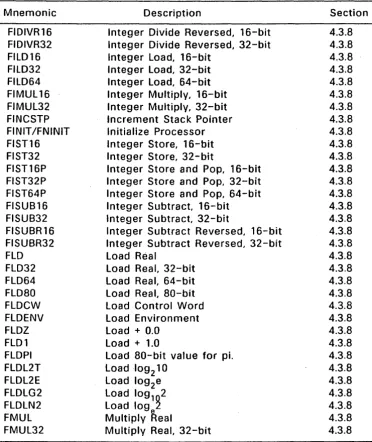
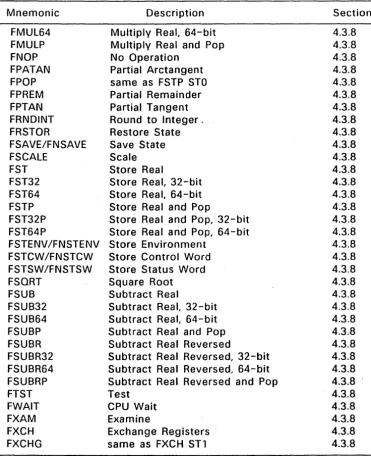
A brief description of the RASM-86 instructions for data transfer, mathematical operations, string manipulation, control transfer, and processor control.
The code-macro facilities of RASM-86.
XREF-86T~, an assembly language cross-reference program ·'used with RASM-86.
LINK 86T~, the linkage editor that combines relocatable object modules into an absolute file that runs under CP/M-86 or FlexOS.
How to use LINK 86 to produce overlays.
How to use LlB-86T~, the software librarian that creates and manages libraries.
Sections 10 through 16 explain how to use SID-286 , the Symbolic Instruction Debugger.
The appendixes contain a complete list of error messages output by each of the utility programs.
TYPOGRAPHICAL CONVENTIONS USED IN THIS GUIDE
This guide uses the following notation to describe commands:
command parameter [option]
A command is any of the commands described in this guide. ". A parameter can be a filename, an address location, or any specifier that is particular to the command. Optional items, such as command options or additional filenames, appear inside square brackets.
Examples of specific usage of a command are preceded by an A> prompt, and the user's input appears in bold print. For example:
A>rasm86 test
illustrates a specific usage of the RASM86 command.
Contents
1 The RASM-86 Assembler
1.1 Introduction... 1-1
1.2 RASM-86 Operation . . . . . . . 1-1 1.3 RASM-86 Command Syntax . . . . . . . 1-2 1.3.1 RASM-86 Run-Time Parameters. . . . . . . 1-3 1.3.2 RASM-86 Command Line Examples. . . . . . . 1-6 1.4 Stopping RASM-86. . . . . . . 1-7
2 Elements of RASM-86 Assembly Language
2.1 Introduction... 2-1
2.2 RASM-86 Character Set . . . . . . . 2-1 2.3 Tokens and Separators. . . . . . . 2-2 2.4 Delimiters. '. . . . . . . 2-2
2.5 Constants... 2-4
2.5.1 Numeric Constants. . . . . . . 2-4 2.5.2 Character String Constants. . . . . . . 2-5
2.6 Identifiers... 2-6
Contents
3 RASM-86 Directives
Contents
3.10 Miscellaneous Directives. . . . . . . .. 3-20 3.10.1 INCLUDE Directive. . . . . . . .. 3-20 3.10.2 ORG Directive. . . .. 3-21
4 RASM-86 Instruction Set
4.1 Introduction... 4-1
4.2 RASM-86 Instruction Set Summary. . . . . . . 4-1 4.3 Instruction-definition Tables. . . . . . . . . .. 4-10 4.3.1 Symbol Conventions. . . . . . . .. 4.,..10 4.3.2 Flag Registers. . . . . . . . . . . . . .. 4-12 4.3.3 8086 Data Transfer Instructions. . . . . . . .. 4-12 4.3.4 8086 Arithmetic, Logical, and Shift Instructions. . .. 4-16 4.3.5 8086 String Instructions . . . . . . . .. 4-26 4.3.6 8086 Control Transfer Instructions . . . . . . . .. 4-30 4.3.7 8086 Processor Control Instructions . . . . .. 4-36 4.3.8 8087 Instruction Set . . . -. . . .. 4-39 4.3.9 Additional 186 and 286 Instructions . . . . . . . . . . .. 4-52 4.3.10 Additional 286 Instructions . . . . . . . . . .. 4-54
5 RASM-86 Code-macro Facilities
5.1 Introduction... 5-1
5.2 Invoking Code-macros .'". ... . . . . . . 5-1 5.3 Defining Code-macros. . . . . . . 5-2 5.3.1 Formal Parameter List. . . 5-2 5.3.2 Code-macro Directives. . . . . . . 5-4 5.3.3 Example Code-Macro Definitions. . . . . . . .. 5-10
6 XREF-86 Cross-Reference Utility
6.1 Introduction... 6-1
6.2 XREF-86 Command Syntax . . . ,. . . 6-1
7 LINK 86 Linkage Editor
7.1 Introduction... 7-1
Contents
7.6 LINK 86 Command Options. . . 7-6 7.7 Command File Options. . . .. 7-10 7.7.1 CODE/DATA/STACKlEXTRA/X1/X2/X3/X4 . . . 7-11 7.7.2 FILL I NOFILL. . . . , 7-14 7.7.3 HARD808? I SIM8087 I AUT08087 . . . , 7-14 7.7.4 CODESHARED... 7-15 7.8 SYM File Options . . . , 7-16 7.8.1 LOCALS I NOLOCALS . . . .. 7-16 7.8.2 LlBSYMS I NOLIBSYMS . . . ; . . . .. 7-16 7.9 LIN File Options . . . .. 7-17 7.10 MAP File Option . . . .' . . . .. 7-17 7.11 L86 File Options . . . , 7-18 7.11.1 SEARCH . . . : . . . 7-18 7.11.2 SHARED I NOSHARED . . . .. 7-19 7.12 Input File Options ... '. . . .. 7-20 7.13 1/0 Option. . . .. 7-21 7.13.1 $C (Command) Option . . . , 7-22 7.13.2 $L (Library) Option. . . .. 7-23 7.13.3 $M (Map) Option. . . .. 7-23 7.13.4 $0 (Object) Option . . . .. 7-23 7.13.5 $S (Symbol and Line Number) Option. . . .. 7-24 7.14 Overlay Options . . . .. 7-24 7.15 The Link Process . . . '. . . .. 7-25 7.15.1 Phase 1 - Collection . . . 7-26 7.15.2 Phase 2 - Create Command File. . . .. 7-32
8 Overlays
8.1 Introduction... 8-1
Contents
9 L1B-a6 Library Utility
9.1 Introduction... 9-1
9.2 L1B-86 Operation . . . . . . . . . . . 9-1 9.3 L1B-86 Command Syntax. . . . . . . 9-3 9.4 Stopping L1B-86 . . . . . . . . . . . 9-3 9.5 L1B-86 Command Options. . . 9-4 9.6 Creating and Updating libraries . . . . . . . 9-4 9.6.1 Creating a New library. . . . . . . 9-5 9.6.2 Adding to a library. . . . . . . 9-5 9.6.3 Replacing a Module. . . . . . . 9-5 9.6.4 Deleting a Module. . . 9-6 9.6.5 Selecting a Module. . . . . . . 9-7 9.7 Displaying library Information. . . . . . . 9-8 9.7.1 Cross-reference File. . . . . . . 9-8 9.7.2 library Module Map. . . . . . . 9-8 9.7.3 Partial Library Maps . . . '. . . . . . . . 9-9 9.8 lIB-86 Commands on Disk . . . '. . . . . . . 9-9 9.9 Redirecting 110. . . .. 9-10
10 SID-286 Operation
10.1 Introduction... 10-1 10.2 Typographical Conventions. . . .. . . . . . . .. 10-1 10.3 Starting SID-286. . . . . . . . ... 10-2 10.3.1 SID-286 Command Options. . . . . . . .. 10-3 10.3.2 SID-286 Example Commands. . . . . . . .. 10-5 10.4 Exiting SID-286. . . . . . . .. 10-6
11 SID-286 Expressions
Contents
11.6 Stack References
11.7 Symbolic References . . . . 11.8 Qualified Symbols . . . . 11.9 Expression Operators . . . ~ . . . . 11.10 Sample Symbolic Expressions . . . .
11-4 11-5 11-6 11-7 11-8
12 51D-286 Commands
Contents
12.4.23 W (Write) Command . . . . . . . . . . . . .. 12-31 12.4.24 X (Examine CPU State) Command . . . . . . . . .. 12-32 12.4.25 Z (Print 8087/80287 Registers) Command. . . .. 12-34 12.4.26 ? (List Commands) Command . . . . . . . . . . . .. 12-35 12.4.27 ?? (List Commands Format) Command. . . . . .. 12-35 12.4.28 : (Define Macro) command. . . . . . . .. 12-35 12.4.29
=
(Use Macro) Command. . . . . . . .. 12-3613 Default Segment Values
13.1 Introduction... 13-1 13.2 Type-1 Segment Value. . . . . . . .. 13-1 13.3 Type-2 Segment Value. . . . . . . .. 13-2
14 Assembly Language Syntax for A and L Commands
14.1 Assembly Language Exceptions. . . . . . . .. 14-1
15 SID-286 Sample Sessions
15.1 Introduction . . . '. . . . . . . .. 15-1 15.2 SID-286 Session # 1 . . . . . . . ... 15-1 15.3 SID-286 Session #2 . . . . . . . .. 15-8 15.4 SID-286 Session #3 . . . . . . . .. 15-18
A Example RASM-86 Source Files. '.' . . . . . . . A-1
Contents
B.4 Small & Medium Model SRTLs
...
'... .
B-l0B.4.1 Calling Conventions . . . " B-ll B.5 Large Model SRTLs . . . " B-12 B.5.1 Calling Conventions . . . .. B-12 B.6 SRTL Restrictions. . . .. B-13 B.7 Example SRTL. . . . , . . . . . . .. . . . .. B-14
C Mnemonic Differences from the Intel Assembler. . . C-1
D Reserved Words . . . . . . . • . . 0-1
E Code-Macro Definition Syntax. . . E-1
F RASM-86 Error Messages. . . F-1
G XREF-86 Error Messages. . . G-1
H LINK 86 Error Messages. . . H-1
Overlay Manager Run-Time Errors. . . 1-1
J LlB-86 Error Messages . . . J-1
K S10-286 Error Messages. . . K-1
L Additional FlexOS Utilities. . . L-1 L.l H S E T . . . L-l L.2 I O M F . . . L-l
L.3 OBJERR... L-2
L.4 POSTLINK... L-2
Contents
Tables
Contents
9-2 lIB-86 Command Line Options . . . . 12-1 SID-286 Command Summary . . . . 12-2 Flag Name Abbreviations . . . . 13-1 SID-286 Default Segment Values . . . . C-1 Mnemonic Differences . . . ; . . . . C-2 Memory Operands for 8087 Instruction . . . . D-1 Reserved Words . . . . F-1 RASM-86 Non-recoverable Errors . . . . F-2 RASM-86 Diagnostic Error Messages . . . : .. G-1 XREF-86 Error Messages . . . . H-1 LINK 86 Error Messages . . . . 1-1 Overlay Manager Error Messages ... ' . . . . J-1 lIB-286 Error Messages . . . . K-1 SID-86 Error Messages . . . . L-1 IOMF Options . . . ' . . . .
Figures 9-4 12-1 12-33 13-2 C-1 C-2 0-1 F-1 F-3 G-1 H-1 1-1 J-1 K-1 l-2
1-1 RASM-86 Source and Object Files. . . ... . . 1-2. 6-1 XREF-86 Operation . . . . . . 6-1 7-1 LINK 86 Operation. . . 7-3 7-2 Combining Segments with the Public Combine Type. . .. 7-27 7-3 Combining Segments with the Common Combine Type.. 7-28 7-4 Combining Segments with Stack Combination. . . .. 7-28 7-5 Paragraph Alignment. . . .. 7-30 7-6 The Effect of Grouping Segments. . . .. 7-31 8-1 Using Overlays in a large Program. . . . . 8-2 8-2 Tree Structure of Overlays. . . 8-3 9-1 UB-86 Operation. . . 9-2 B-1 Small Memory Model Data Segment . . . .. B-11 8-2 Small Memorv Model Calling Sequence.. . . .. B-12 B-3 large Memory Model Calling Sequence. . . .. B-13
Listings
SECTION 1
The RASM-86 Assembler
1.1 Introduction
This section describes RASM-86 operation and its command syntax. Sections 2 through 5 detail the characteristics and uses of the RASM-86 components. A sample RASM-86 source file is provided in Appendix EXAMPLE.
1.2 RASM-86 Operation
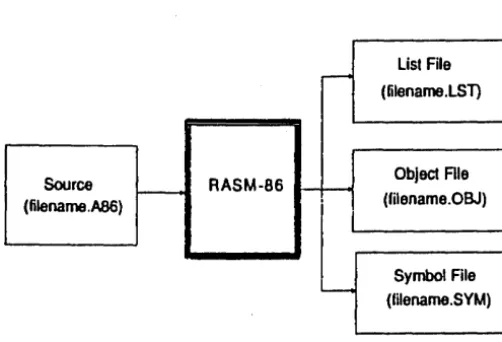
1.2 RASM-86 Operation
Source
-
RASM-86 (filename .A86)Programmer's Utilities Guide
--
List File (filename.LST)Object Ale (filename.OBJ)
Symbol File (filename.SYM)
Figure 1-1. RASM-86 Source and Object Files
The lST list file contains the assembly language listing with any error messages. The OBJ object file contains the object code in Inte.1 8086 and 80286 relocatable object format. The SYM symbol file lists any user-defined symbols.
The three files have the same filename as the source file. For example, if the name of the source file is BIOS88.A86, RASM-86 produces the files BIOS88.0BJ, BIOS88.LST, and BIOS88.SYM.
1.3 RASM-86 Command Syntax
Invoke RASM-86 with the following command form:
RASM86 [d:]filename[.typ] [$ run-time parameters]
[image:18.493.101.352.64.235.2]Programmer's Utilities Guide 1.3 RASM-86 Command Syntax
The d: is an optional drive specification denoting the source file's location. The drive specification is not needed if the source is on the current drive. The typ is the optional filetype, which can be any valid filetype of I to 3 characters. If no filetype is specified, filetype A86 is assumed. The run-time parameters are described below in Section 1.3.1.
1.3.1 RASM-86 Run-Time Parameters
The dollar sign character, $, denotes an optional string of run-time parameters. A run-time parameter is followed by a device or file specification.
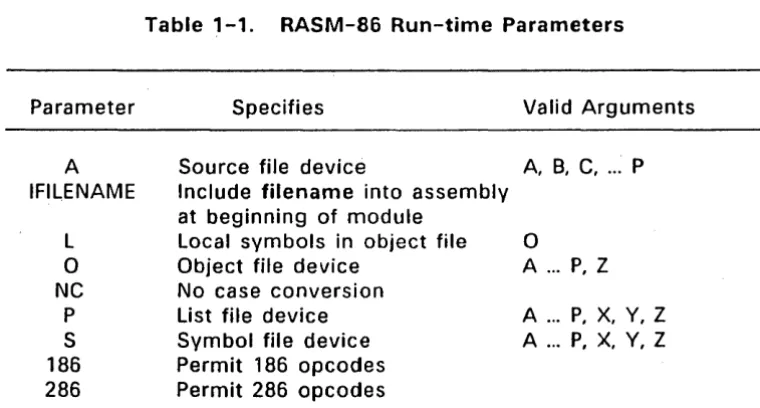
Table 1-1 contains a summary of the RASM-86 run-time parameters, described in detail in the following sections.
Parameter
A
IFILENAME
L
a
NC
P
S 186 286
Table 1-1. RASM-86 Run-time Parameters
Specifies
Source file device
Include filename into assembly at beginning of module
Local symbols in object file Object file device
No case conversion List file device Symbol file device Permit 186 opcodes Permit 286 opcodes
Valid Arguments
A, B, C, ... P
o
A ... P, Z
A ... P, X, Y, Z A ... P, X, Y, Z
[image:19.488.79.459.240.444.2]1.3 RASM-86 Command Syntax Programmer's Utilities Guide
If you specify an invalid parameter in, the parameter list, RASM-86 displays
SYNTAX ERROR
and echoes the command tail up to the point where the error occurs, then prints a question mark. (Appendix F contains the complete list of RASM-86 error messages.)
A, 0, P, and S Parameters
These run-time parameters associate a filetype with a device. The file parameters: A, 0, p, and S specify the type of file. Each of these parameters is followed by a device, specifier: A - P, X, Y, Z. For example:
$
AA
specifies the source file on drive A.
The A, 0, P, and S parameters specify the following:
A
a
p
S
Specifies the Source File Specifies the Object File Specifies the List File Specifies the Symbol File
A device name must follow each of these parameters. The devices are as follows:
A through P X
Y
Z
Specify disk drives A through P, respe :tively. Specifies the user console, CON:
Specifies the list device, LST: Suppresses output, NUL:
Programl'!1er's Utilities Guide 1.3 RASM-86 Command Syntax
IFILENAME Parameter
If a CP/M filename is preceded by an I (upper case i), the contents of the file is included at the beginning of the module being assembled. If no. filename extension is specified, RASM-86 assumes an extension of A86. The file specified must be a CP/M file. This parameter will not work with PC DOS files.
L Parameter
The L parameter directs RASM-86 to include local symbols in the object file so that they appear in the SYM file created by L1NK-86. Otherwise, only public symbols appear in the SYM file. You can use the SYM file with. the Symbolic Instruction Debugger, SID-286 .. , to simplify program debugging.
NC Parameter
The NC parameter directs RASM-86 to distinguish between uppercase and lowercase in symbol names. Thus, when you specify. the NC parameter, the symbols ABC and abc are treated as two unique symbols. If the NC parameter is not specified, RASM-86 would consider ABC and abc to be the same symbol. This parameter is useful when writing programs to be linked with other programs whose. symbols might contain . lowercase characters, such as "c".
186 and 286 Parameters
The 1 86 parameter specifies that 80186 opcodes are to be assembled.
1.3 RASM-86 Command Syntax Programmer's Utilities· Guide
1.3.2 RASM-86 Command Line Examples
The following are some examples of valid RASM-86 commands:
Command Line Result
A>rasm86 io
Assembles file IO.A86 and produces IO.OBJ, IO.LST, and IO,SYM, all on the default drive.A>rasm86 io.asm
S
ad sz
Assembles file IO.ASM on drive 0 and produces IO.LST and IO.OBJ. Suppresses the symbol file.
A>rasm86 io
$
py sx
Assembles file IO.A86, produces IO.OBJ, and sends listing directly to printer. Also outputs symbols on console.
A>rasm86 io
$
Ifirst
Assembles file IO.A86 with the contents of the file, first.a86, appearing at the beginning of the module. Then produces IO.OBJ, IO.LST, and IO.SYM, all on the default drive.
A>rasm86 io
$
10
Includes local symbols in IO.OBJ.
After the command to invoke RASM-86 is given, the following sign-on message is displayed:
RASM-86 (87)
12/14/85
Version 1.3
Serial No. xxxx-OOOO-654321
All Rights Reserved
Copyright (C) 1982,1985
Digital Research, Inc.
RASM-86 then attempts to open the source file. If the file does not exist on the designated drive or does not have the correct filetype, RASM-86 displays
NO FILE
Programmer's Utilities Guide 1.3 RASM-86 Command Syntax
By default, RASM-86 creates the output files on the current disk drive. However, you can redirect the output files by using the optional parameters, or by a drive specification in the source filename. In the latter case, RASM-86 directs the output files to the drive specified in the source filename.
When the assembly is complete, RASM-86 displays the message:
END OF ASSEMBLY. NUMBER OF ERRORS: n USE FACTOR: ppo/o
where n represents the number of errors encountered during assembly. The Use Factor indicates how much of the available Symbol Table space was actually used during the assembly. The Use Factor is expressed as a decimal percentage ranging from 0 to 99.
1.4 Stopping RASM-86
To stop the assembly at any time, press any key on the console keyboard. When you press a key, RASM-86 responds
STOP RASM-86 (YIN)?
If you type Y, RASM-86 immediately stops processing, and returns control to the operating system. Type N to resume processing.
SECTION 2
Elements of RASM-86 Assembly Language
2.1 Introduction
This sec.tion describes the elements of the RASM-86 assembly language. RASM-86 elements are described in the following order:
• RASM-86 Character Set • Tokens and Separators • Delimiters
• Constants • Identifiers • Operators • Expressions • Statements
2.2 RASM-86 Character Set
RASM-86 recognizes a subset of the ASCII character set. Valid RASM-86 characters are the following alphanumeric characters, special characters, and non-printing characters.
Valid Alphanumeric Characters:
ABC D E F G H I
JK L M N 0 P
Q
R STU V W X Y Z
a b c d e
f9 h
i
j
kIm n
0 p qr s t u v
wx
yz
0 1 2 3 4 567 8 9
Valid Special Characters:
+ -
* /
= ( ) [ ] ;
.
.
,
,
$
?2.2 RASM-86 Character Set Programmer's Utilities Guide
Usually RASM-86 treats lowercase letters as uppercase, except within strings. You can use the NC parameter described in Section 1.3.1 to make RASM-86 distinguish between lower and upper case. Only alphanumerics, special characters, and spaces can appear in a string.
2.3 Tokens and Separators
A token is the smallest meaningful unit of a RASM-86 source program, much as a word is the smallest meaningful unit of a sentence. Adjacent tokens within the source are commonly separated by a bl~nk character or space. Any sequence of spaces can appear wherever a single space is allowed. RASM-86 recognizes horizontal tabs as separators and interprets them as spaces. RASM-86 expands tabs to spaces in the list file. The tab stops are at each eighth column.
2.4 Delimiters
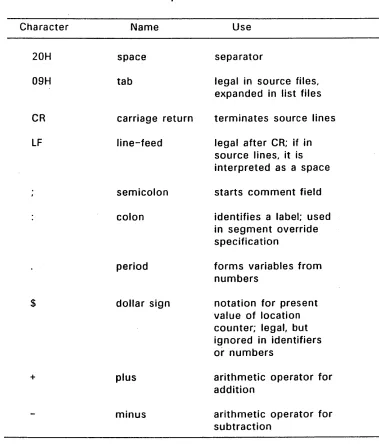
Delimiters mark 'the end of a token and add special meaning to the instruction; separators merely mark the end of a token. When a delimiter is present, separators need not be used. However, using separators after delimiters can make your program easier to read.
Programmer's Utilities Guide 2.4 Delimiters
Table 2-1. Separators and Delimiters
Character Name Use
20H space separator
09H tab legal in source files,
expanded in list files
CR carriage return terminates source lines
LF
line-feed legal after CR; if insource lines, it is interpreted as a space
semicolon starts comment field
colon identifies a label; used
in segment override specification
period forms variables from
numbers
$ dollar sign notation for present
value of location counter; legal, but ignored in identifiers or numbers
+ plus arithmetic operator for
addition
minus arithmetic operator for
[image:27.486.69.448.59.503.2]2.4 Delimiters Programmer's Utilities Guide
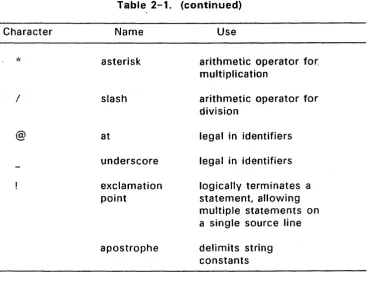
Table 2-1. (continued)
Character
I
@
2.5 Constants
Name
asterisk
slash
at
underscore
exclamation point
apostrophe
Use
arithmetic operator for. multiplication
arithmetic operator for division
legal in identifiers
legal in identifiers
logically terminates a statement, allowing multiple statements on a single source line
delimits string constants
A constant is a value known at assembly time that does not change while the assembled program is running. A constant can be either a numeric value or a character string.
2.5.1 Numeric Constants
[image:28.489.48.418.42.325.2]Programmer's Utilities Guide 2.5 Constants
Table 2-2. Radix Indicators for Constants
Indicator Constant Type Base
B binary 2
a
octal '8.,
Q octal 8D decimal 10
H hexadecimal 16
RASM-86 assumes that any numeric constant, not terminating with a radix indicator is a decimal constant. Radix indicators can be uppercase or lowercase.
A constant is thus a sequence of digits followed by an optional radix indicator, where the digits are in the range for the radix. Binary constants must be composed of zeros and ones. Octal digits range from 0 to 7; decimal digits range from 0 to 9. Hexadecimal constants contain decimal digits and the hexadecimal digits A (10D), B (11 D), C (12D), D (13D), E (14D), and F (15D). The leading character of a hexadecimal constant must be a decimal digit so RASM-86 cannot confuse a hex constant with an identifier. The following are valid numeric constants:
1234
1234H
33770
1234D
OFFEH
OFE3H
1100B
33770
1234d
2.5.2 Character String Constants
1111000011110000B
13772Q
Offffh
The numeric value of a character is its ASCII code. RASM-86 does not translate case in character strings, so you can use both uppercase and lowercase letters. . Note that RASM-86 allows only alphanumerics, special characters, and spaces in character strings.
A DB directive is the only RASM-86 statement that can contain strings longer than two characters (see Section ). The string cannot exceed
255 bytes. If you want to include an apostrophe in the string, you must enter it twice. RASM-86 interprets two apostrophes together as a single apostrophe. Table 2-3 shows valid character strings and how they appear after processing.
Table 2-3.
String in source text
'a'
'Ab"Cd' '1 like CP/M'
'ONLY UPPERCASE' 'only lowercase'
2.6 Identifiers
String Constant Examples
As processed by RASM-86
a
Ab'Cd I like CP/M
ONLY UPPERCASE only lowercase
The following rules apply to all identifiers:
• Identifiers can be up to 80 characters long.
.•
• The first character must be alphabetic or one of these special characters: ?, @, or
Programmer's Utilities Guide
There are two types of identifiers:
Keywords
Symbols
Keywords have predefined meanings to RASM-86. identifiers you define yourself.
2.6.1 Keyword Identifiers
2.6 Identifiers
Symbols are
Keywords are reserved for use by RASM-86; you cannot define an identifier identical to a keyword. Appendix E illustrates the use of keywords.
RASM-86 recognizes five types of keywords:
• instructions • directives • operators • registers
• predefined numbers
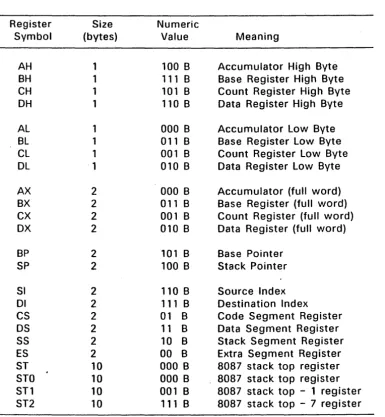
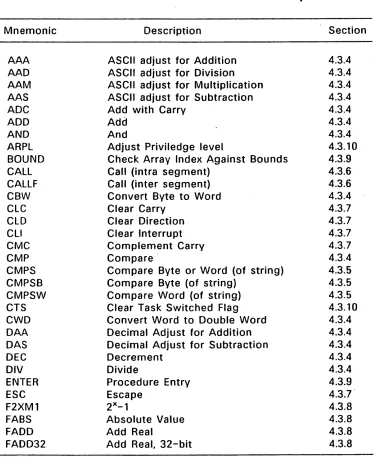
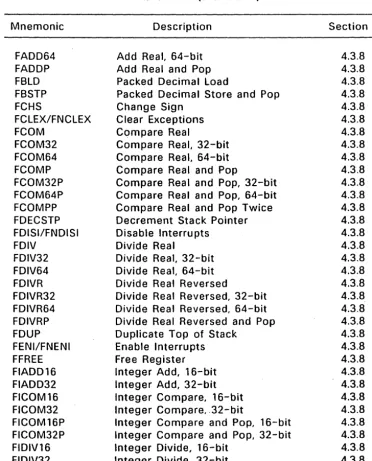
Section 4 defines the 8086, 8087, 80186, 80286, and 80287 instruction mnemonic keywords and the actions they initiate; Section 3 discusses RASM-86 directives, and Section 2.7 defines operators. Table 2-4 lists the RASM-86 keywords that identify the processor registers.
2.6 Identifiers Programmer's Utilities Guide
Table 2-4. Register Keywords
Register Size Numeric
Symbol (bytes) Value Meaning
AH 1 100 B Accumulator High Byte
BH 1 111 B Base Register High Byte
CH 1 101 B Count Register High Byte
DH 1 110 B Data Register High Byte
AL 1 000 B Accumulator Low Byte
BL 1 011 B Base Register Low Byte
CL 1 001 B Count Register Low Byte
DL 1 010 B Data Register Low Byte
AX 2 000 B Accumulator (full word)
BX 2 011 B Base Register (full word)
CX 2 001 B Count Register (full word)
OX 2 010 B Data Register (full word)
BP 2 101 B Base Pointer
SP 2 100 B Stack Pointer
SI 2 110 B Source Index
01 2 111 B Destination Index
CS 2 01 B Code Segment Register
OS 2 11 B Data Segment Register
SS 2 10 B Stack Segment Register
ES 2 00 B Extra Segment Register
ST 10 000 B 8087 stack top register
STO 10 000 B 8087 stack top register
ST1 10 001 B 8087 stack top - 1 register
[image:32.491.39.425.53.470.2]Programmer's Utilities Guide 2.6 Identifiers
2.6.2 Symbol Identifiers
A symbol is a user-defined identifier with attributes specifying the kind of information the symbol represents. Symbols fall into three categories:
• variables • labels • numbers
Variables
Variables identify data stored at a particular location in memory. All variables have the following three attributes:
Segment
Offset
Type
tells which segment was being assembled when the variable was defined.
tells how many bytes are between the beginning of the segment and the location of this variable.
tells how many bytes of data are manipulated when this variable is referenced.
A segment can be a code segment, a data segment, a stack segment, or an extra segment, depending on its contents and the register containing its starting address (see "Segment Control Directives" in Section 3.3). The segment's starting address is a number between 0
and OFFFFH (65,5350). This number indicates the paragraph in memory to which the current segment is assigned, either when the program is assembled, linked, or loaded .
.
"
The offset of a variable is the address of the variable relative to the starting address of the segment. The offset can be any number between 0 and OFFFFH.
A variable has one of the following type attributes:
2.6 Identifiers Programmer's Utilities Guide
The data definition directives: DB, OW, and DO, define a variable as one 9f these three types (see Section 3). For example, the variable, my_variable, is defined when it appears as the name for a data definition directive:
my_variable db 0
You can also define a variable as the name for an EOU directive referencing another variable, as shown in the following example: ••
another_variable equ my_variable
Labels
Labels identify locations in memory containing instruction statements. They are referenced with jumps or calls. All labels have two attributes, segment and offset.
Label segment and offset attributes are essentially the same as variable segment and offset attributes. A label is defined when it precedes an instruction. A colon separates the label from instruction. For example,
my_label: add ax,bx
A label can also appear as the name for an EOU directive referencing another label. For example,
another label equ my_label
Numbers
You can also define numbers as symbols. RASM-86 treats a number symbol as though you have explicitly coded the number it represents. For example,
number_five equ 5
mov al,Number _five
is equivalent to the following:
mov al,5
Programmer's Utilities Guide
2.6.3 Example Identifiers
The following are valid identifiers:
NOLIST WORD
AH
Mean streets crashit
variable number 1234567890
2.7 Operators
2.6 Identifiers
This section describes the available RASM-86 operators. RASM-86 operators define the operations forming the values used in the final assembly instruction.
RASM-86 operators fall into the following categories:
• arithmetic • logical • relational
• segment override • variable manipulation • variable creation
2.7 Operators Programmer's Utilities Guide
Table 2-5. RASM-86 Operator Summary
Operator Description· Section
+ addition or unary positive 2.7.1
subtraction or unary negative 2.7.1
*
multiplication 2.7.1/ unsigned division 2.7.1
create variable, assign offset 2.7.6
$ create label, offset
=
location counter 2.7.6AND logical AND 2.7.2
EQ Equal to 2.7.3
GE . Greater than or equal to 2.7.3
GT Greater than 2.7.3
LAST compare LENGTH of variable to 0 2.7.5
LE Less than or equal to 2.7.3
LENGTH create number from variable length 2.7.5
LT Less than 2.7.3
MOD return remainder of division 2.7.1
NE Not Equal to 2.7.3
NOT logical NOT 2.7.2
OFFSET create number from variable offset 2.7.5
OR logical OR 2.7.2
PTR create variable or label, assign type 2.7.6
seg:addr override segment register 2.7.4
SEG create number from variable segment 2.7.5
SHR shift right 2.7.1
SHl shift left 2.7.1
TYPE create number from variable type 2.7.5
XOR logical eXclusive OR 2.7.2
Programmer's Utilities Guide 2.7 Operators
variable located in a segment that will be combined with some other segments at link-time is a relocatable number.
2.7.1 Arithmetic Operators
Addition and Subtraction
Addition and subtraction operators compute the arithmetic sum and difference of two operands. The first operand (a) can be a variable, label, an absolute number, or a relocatable number. For addition, the second operand (b) must be a number. For subtraction, the second operand can be a number, or it 'can be a variable or label in the same segment as the first operand.
When a number is added to a variable or label, the result is a variable or label with an offset whose numeric value is the second operand plus the offset of the first operand. Subtraction from a variable or label returns a variable or label whose offset is the first operand's offset, decremented by the number specified in the second operand.
Syntax:
a
+ ba -
breturns the sum of a and b. Where a is a variable, label, absolute number, or relocatable number.
returns the difference of a and b. Where a and b
are variables, labels, absolute numbers, or
2.7 Operators
Example:
0002
0005
OOOA FF
count
displ
flag
equ
equ
db
Programmer's Utilities Guide
2
5
offh
0008 2EA00800
OOOF 2E8AOEOFOO
0014 8303
mov
mov
mov
al,flag+l
cl,flag+displ
bl,displ-count
Multiplication and Division
The multiplication and division operators *,
I,
MOD, SHL, andSHR accept only numbers as operands.*
and I treat all operators as unsigned numbers.Syntax:
a
*
ba
I ba
MOD ba
SHL ba
SHR bunsigned multiplication of a and b
unsigned division of
a
and breturn remainder of
a
I breturns the value resulting from shifting a to left by the amount specified by b
Programmer's Utilities Guide 2.7 Operators
Example:
0016 BE5500
0019 B310
0050
buffersize
si,256/3
bl,64/4
80
OOIB B8AOOO
rnov
rnov
equ
rnov
ax,buffersize
*
2
Unary
Unary operators specify a number as either positive or negative. RASM-86 unary operators accept both signed and unsigned numbers.
Syntax:
+
a
- a
Example:
OOIE B123
0020 B007
0022 B2F4
gives a
gives a - a
rnov
mov
rnov
cl,+35
al,2--5
dl,-12
2.7.2 Logical Operators
Logical operators accept only numbers as operands. They perform the Boolean logic operations AND, OR, XOR, and NOT.
Syntax:
a XOR b
a
OR ba AND b
NOT a
bit-by-bit logical EXCLUSIVE OR of a and b
bit-by-bit logical OR of a and b
bit-by-bit logical AND of a and b
2.7 Operators
Example:
OOFC
0080
0000 8180
0002 8003
mask
equ
signbit equ
mav
mav
Programmer's Utilities uUloe
Ofch
80h
cl,mask and signbit
al,nat mask
2.7.3 Relational Operators
Relational operators treat all operands as unsigned numbers. The relational operators are EO (equal), l T (less than), lE (less than or equal), GT (greater than), GE (greater than or equal), and NE (not equal). Each operator compares two operands and returns all ones
(OFFFFH) if the specified' relation is true, and all zeros if it is not.
Syntax:
In all of the operators below,
a
and b are unsigned numbers; or they are labels, variables, or relocatable numbers defined in the same segment.a
EO ba
IT ba
lE ba
GT ba
GE ba NE b
returns OFFFFH if
a
=
b otherwise 0returns OFFFFH if
a
<
b, otherwise 0returns OFFFFH if
a
<
= b, otherwise 0returns OFFFFH if a
>
b, otherwise 0returns OFFFFH if a
>=
b, otherwise 0Programmer's Utilities Guide 2.7 Operators
Example:
OOOA
0019
0004 B8FFFF
'0007 B80000
limitl
limit2
equ
equ
mav
mav
10
25
ax,limit1 It limit2
ax;limit1 gt limit2
2.7.4 Segment Override Operator
When manipulating variables, RASM-86 decides which segment
register to use. You can override this choice by specifying a different register with the segment override operator.
In the syntax below, seg:addr represents the segment register (seg) and the address of the expression (addr).
Syntax:
seg:addr overrides segment register selected by assembler. seg can be: CS, DS, SS, or ES.
Example:
0024 368B472D
0028 268BOE5BOO
002D 26A4
mav
ax,ss:wardbuffer[bx]
mav
cX,es:array
mavs
byte ptr
[di]~es:[si]2.7.5 Variable Manipulation Operators
2.7 Operators
Syntax:
SEG
a
OFFSET a
TYPE a
Programmer's UtilitieS uUlOe
creates a number whose value is the segment value of the v~riable or,label a.
creates a number whose value is the offset value of the variable or label
a.
creates a number. If the variable
a
is of type BYTE, WORD, or DWORD, the value of the number created is 1, 2, or 4, respectively.LENGTH a creates a number whose value is the 'length
attribute of the variable a. The length attribute is the number of bytes associated with the variable.
LAST a if LENGTH a
>
0, then LAST a = LENGTH a - 1; if LENGTH a=
0, then LAST a=
O.Example:
0020 000000000000 wardbuffer
0033 0102030405
buffer
0038 B80500
003B 880400
003E B80100
0041 880209
2.7.6 Variable Creation Operators
may
may
may
may
dw
db
0,0,0
1,2,3,4,5
ax, length buffer
ax, last buffer
ax, type buffer
ax, type wordbuffer
Three RASM-86 operators are used to create variables. These are the, PTR, period, and dollar sign operators described below.
Programmer's Utilities Guide 2.7 Operators
The period operator (.) creates a variable in the current Data Segment. The new variable has a segment attribute equal to the current Data Segment and an offset attribute equal to its operand.
The dollar sign operator ($) creates a label with an offset attribute equal to the current value of the location counter. The label segment value is the same as the current segment. This operator takes no operand.
Syntax:
a PTR b creates virtual variable or label with type of a and attributes of b. a can be a BXTE, WORD, or DWORD; b is the address of the expression.
. a
creates variable with an offset attribute of a .Segment attribute is current data seg~ent.
$ creates label with offset equal to current value of
location counter; segment attribute is current segment.
Examples:
0044 C60705
0047 8A07
0049 FF04
004B AlOOOO
004E 268BlE0040
0053 E9FDFF
0056 EBFE
0058 E9FD2F
mav
mav
inc
mav
mav
jmp
~mps
]mp
byte ptr [bx], 5
al,byte ptr [bx]
ward
ptr [si]
ax, .0
b><;, es:.4000h
$
$
2.7 Operators Programmer's Utilities Guide
2.7.7 Operator Precedence
Expressions combine variables, labels, or numbers with operators. RASM-86 allows several kinds of expressions (see Section 2.8). This section defines the order that RASM-86 performs operations if more than one operator appear in an expression.
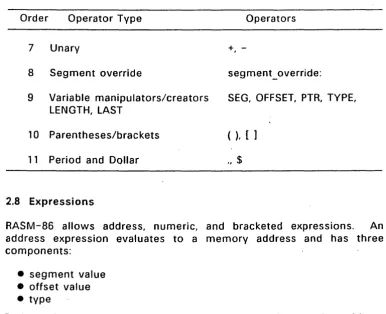
RASM-86 evaluates expressions from left to right. but evaluates operators with higher precedence before operators with lower precedence. When two operators have equal precedence, RASM-86 evaluates the leftmost operator first. Table 2-6 shows RASM-86 operators in order of increasing precedence.
You can use parentheses to override the precedence rules. RASM-86 first evaluates the part of an expression enclosed in parentheses. If you nest parentheses,. RASM-.86 evaluates the innermost expressions first. For example,
15/3
+18/9
=
5
+2
=
7
15/{3
+18/9)
=15/{3
+2)
=15/5
=3
(20*4)
+({27/9 -
4/2))
=
(20*4)
+(3 -
2)
=
80
+1
=
E
Note that RASM-86 allows five levels of nested parentheses.
Table 2-6 .. Precedence of Operations in RASM-86
Order Operator Type Operators
1 Logical XOR, OR
2 Logical AND
3 Logical NOT
4 Relational EO, L T, LE, GT, GE, NE
5 Addition/subtraction +,
Programmer's Utilities Guide 2.7 Operators
Table 2-6. (continued)
Order Operator Type Operators
7 Unary +,
-8 Segment override segment_override:
9 Variable manipulators/creators SEG, OFFSET, PTR, TYPE, LENGTH, LAST
10 Parentheses/brackets ( ), [ ]
11 Period and Dollar ., $
2.8 Expressions
RASM-86 allows address, numeric, and bracketed expressions. An address expression evaluates to a memory address and has three components:
• segment value • offset value • type
Both variables and labels are address expressions. An address expression is not a number, but its components are numbers. You can combine numbers with operators· such as PTR to make an address expr·ession.
A numeric expression evaluates to a number. It contains no variables or labels, only numbers and operands.
[image:45.489.65.452.61.375.2]2.B Expressions Programmer's Utilities Guide
Use the + operator between a base register and an index register to specify both base- and index-register addressing. For example,
mov variable[bx],O mov ax,[bx+di] mov ax,[si] mov bl,[si]
Since all of the above instructions are memory references, the current DS Segment Selector is implied. The first instruction moves the value of 0 hex into the word location specified by the sum of the base register BX and the displacement VARIABLE. The second instruction moves the word found at the location specified by the sum of the base register BX and
tne
index register DI into the location specified by the word register AX. The third instruction moves the word found at the location specified by index register SI into the location specified by the word register AX. The last instruction moves the byte found at the location specified by the index register SI into the location specified by the byte register BL.2.9 Statements
Statements can be instructions or directives. RASM-B6 translates instructions into BOB6 and B02B6 machine language instructions. RASM-B6 does not translate directives into machine code. Directives tell RASM-B6 to perform certain functions.
Programmer's Utilities Guide 2.9 Statements
2.9.1 Instruction Statements
The following is the syntax for an instruction statement:
[label:] [prefix] mnemonic [operand(s)] [;comment]
The fields are defined as follows:
label
prefix
mnemonic
operand{s)
comment
A symbol followed by a colon defines a label at the current value of the location counter in the current segment. This field is optional.
Certain machine instructions such as LOCK and REP can prefix other instructions. This field is optional.
A symbol defined as a machine instruction, either by RASM-86 or by an EQU directive. This field is optional unless preceded by a prefix instruction. If you omit this field, no operands can be present, although the other fields can appear. Se'ction 4 describes the RASM-86 mnemonics.
An instruction mnemonic can require other symbols
to represent operands to the instruction.
Instructions can have zero, one, or two operands.
Any semicolon appearing outside a character string
begins a comment. A comment ends - with a
carriage re~urn. This field is optional, but you
should use comments to facilitate program
maintenance and debugging.
Section 3 describes the RASM-86 directives.
2.9.2 Directive Statements
,The following is the syntax for a directive statement:
2.9 Statements programmer"s utilities uUloe
The fields are defined as follows:
directive
operand(s}
comment
Names are legal for CSEG, OSEG, ESEG, SSEG, GROUP, DB, OW, DO, RB, RW, RD, RS, and EQU directives. The name is required for the EQU and GROUP directives, but it is optional for the other directives. Unlike the label field of an instruction, the name field of a directive is never terminated with a colon.
One of the directive keywords defined in Section 3.
Analogous mnemonics.
allow any
requirements.
to the operands for instruction
Some directives, such as DB and OW
operand; others have special
Exactly as defined for instruction statements in Section 2.9.1.
SECTION 3
RASM-86 Directives
3.1 Introduction
RASM-86 directives control the assembly process by performing functions such as assigning portions of code to logical segments, requesting conditional assembly, defining data items, allocating memory, specifying listing file format, and including source text from
exte~nal files.
RASM-86 directives are grouped into the following categories:
• segment control • linkage control • conditional assembly • symbol definition
• data definition and memory allocation • output listing control
• 8087 control. • miscellaneous
3.2 Assembler Directive Syntax
The following is the general syntax for a directive statement:
[name] directive operand(s) [;comment]
The fields are defined as follows:
3.2 Assembler Directive syntax t'rogrammer S U1.lIIlItHi UUIUt:=
directive
operand{s)
comment
One of the directive keywords defined in Sections 3.3 through 3.10.
Analogous mnemonics.
allow any
requirements.
to the operands for instruction
Some directives, such as DB and OW
operand; others have special
Exactly as defined. for instruction statements in Section 2.9.1.
The following sections describe each RASM-86 directive. The syntax for each directive follows each section heading.
3.3 Segment Control Directives
This section describes the RASM-86 directives used to assign specific attributes to segments. These attributes affect the way the segments are handled during the link process. The available segment control directives are:
CSEG OSEG ESEG SSEG
GROUP
.•
In order to utilize these directives, you must understand the segmented architecture of the 8086 and 80286 processors. The following section summarizes the general characteristics of the 8086/80286 segmented architecture.
3.3.1 The 8086/80286 Segmented Architecture
Programmer's Utilities Guide 3.3 Segment Control Directives
Every location in the memory space has a physical address and a logical address. A physical address is a value specifying a unique byte location within the memory space. A logical address is the combination of a segment base value and an offset value. The offset value is the address relative to the base of the segment. At run-time, every memory reference is the combination of a segment base value and an offset value that produces a physical address. A physical address can be contained in more than one logical segment.
The CPU can access four segments at a time. The base address of each segment is contained in a segment register. The CS register points to the current code segment that contains instructions. The OS register points to the current data segment usually containing program variables. The SS register points to the current stack segment where stack operations such as temporary storage or parameter passing are performed. The ES register points to the current Extra Segment that typically also contains data.
RASM-86 segment directives allow you to divide your assembly language source program into segments corresponding to the memory segments where the resulting object code is loaded at run-time.
3.3 Segment (.;ontrol ulrectlves t'rogn:HIHlItH ~ UllIlll~~ \,;JUIU"
3.3.2 CSEG, DSEG, ESEG, and SSEG Directives
Every instruction and variable in a program must be contained in a segment. The segment directives described in this section allow you to specify the attributes of a segment or a group of segments of the same type. Create a segment and name it by using the segment directive syntax:
[seg_ name] seg_ directive [align_type] [combine_type] ['class_name']
where seg_ directive is one of the following:
CSEG (Code Segment) DSEG (Data Segment) ESEG (Extra Segment) SSEG (Stack Segment)
The optional parameters are described below. Examples illustrating how segment directives are used are provided at the end of this section.
seg_name
The segment name can be any valid RASM-86 identifier. If you do not specify
a
segment name, RASM-86 supplies a default name, as shown in Table 3-1.Table 3-1.
Segment Directive
CSEG DSEG ESEG SSEG
Default Segment Names
Default Segment Name
Programmer's Utilities Guide 3.3 Segment Control Directives
Once you use a segment directive, RASM-86 assigns statements to the specified segment until it encounters another segment dirE3ctive. RASM-86 combines all segments with the same segment name even if they are not contiguous in the source code.
align_type
The align type allows you to specify to the linkage editor a particular boundary for the segment. The linkage editor uses this alignment information when combining segments to produce an executable file. You can specify one of four different align types:
• BYTE (byte alignment) • WORD (word alignment) • PARA (paragraph alignment) • PAGE (page alignment)
If you specify an align type, it must be with the first definition of the
segment. You can omit the align type on subsequent segment
directives that name the same segment, but you cannot change the original value. If you do not specify an align type, RASM-86 supplies a default value based on the type of segment directive used. Table 3-2 shows the default values.
.,
Table 3-2.
Segment Directive
CSEG DSEG ESEG' SSEG
Default Align Types
Default Align Type
BYTE WORD WORD
WanD
3.3 Segment Control Directives Programmer's Utilities Guide
WORD alignment means that the segment begins on an even boundary. An even boundary is a hexadecimal address ending in 0, 2,. 4, 6, 8, A, C, or E. In certain cases, WORD alignment can increase execution speed because the CPU takes only one memory cycle wj1en accessing word-length variables within a segment aligned on an even boundary. Two' cycles are needed if the boundary is odd.
PARA (paragraph) alignment means that the segment begins on a paragraph boundary, that is, an address whose four low-order bits are zero.
PAGE alignment means that the segment begins on a page boundary, an address whose low order byte ,is zero.
combine_type
The combine type determines how the linkage editor can combine the segment with other segments with the same segment name. You can specify one of five different combine types:
• PUBLIC • COMMON • STACK • LOCAL
• nnnn (absolute segment)
If you specify a combine type, it must be in the first segment directive for that segment type. You can omit the combine type on subsequent segment directives for the same segment type, but you cannot change the original combine type. If you do not specify a combine typ~, RASM-86 supplies the PUBLIC combine type by default; except for SSEG, which uses the STACK combine type by default.
The RASM-86 combine types are defined as follows:
PUBLIC means that the linkage editor can combine the
Programmer's Utilities Guide 3.3 Segment Control Directives
COMMON
STACK
LOCAL
means that the segment shares identical memory locations with other segments of the same name. Offsets inside a COMMON segment are absolute unless the segment is contained in
a
GROUP (see "Group Directive" in this section).is similar to PUBLIC, in that the storage allocated for STACK segments is the sum of the STACK segments
from each module. However, instead of
concatenating segments with the same name, the linkage editor overlays STACK segments against high memory, because stacks grow downward from high addresses to low addresses when the program runs.
means that the segment is local to the program being assembled, and the linkage editor will not combine it with any other segments.
ABSOLUTE SEGMENT
class name
causes RASM-86 to determine the load-time
pOSition of the segment during assembly, rather than allowing its position to be determined by the linkage editor, or at load time.
3.3 Segment Control Directives ~rogrammE;!r-s UUIHles uUlUe
Table 3-3. Default Class Name for Segments
Segment Directive
CSEG DSEG ESEG SSEG.
Examples:
Default Class Name
CODE DATA EXTRA STACK
Section of CMD file
CODE DATA EXTRA STACK
The following are ex~mples of segment directives:
CSEG
DSEG
CSEG
DATASEG
CODEl
XYZPAGE
DSEG
CSEG
DSEG
PARA
BYTE
WORD
'DATA'
COMMON
The example RASM-86 source file in Appendix EXAMPLE illustrates how segment directives are used.
3.3.3 GROUP Directive
group_name GROUP segment_name1, segment_name2, ...
Programmer's Utilities Guide 3.3 Segment Control Directives
The order of the segment names in the directive is the order the linkage editor arranges the segments in the CMD file.
Use of groups can result in more efficient code, because a number of segments can be addressed from a single segment register without having to change the contents of the ,segment register.
See Section 7.15 for more information on the grouping and other link processes.
3.4 Linkage Control Directives
Linkage control directives modify the link process. The available linkage control directives are:
END NAME PUBLIC EXTRN
3.4.1 END Directive
END [start_label]
The END directive marks the end of a source file. RASM-86 ignores any subsequent lines. The END directive is optional, and if omitted, . RASM-86 processes the source file until it finds an end-of-file
character (1AH).
3.4 Linkage Control Directives Programmer's Utilit'ies Guide
3.4.2 NAME Directive
NAME module name
The NAME directive assigns a name to the object module generated by RASM-86. The module name can be any valid identifier based on the guidelines described in Section 2.6. If you do not specify a module name with the NAME directive, RASM-86 assigns the source filename to the object module. Both LlNK-86 and LlB-86 use NAME directives to identify object modules.
3.4.3 PUBLIC Directive
PUBLIC name
L
name, . ..]The PUBLIC directive instructs RASM-86 that the names defined as PUBLIC can be referenc"ed by other programs linked together. Each name must be a label, variable. or a number defined within the program being assembled.
3.4.4 EXTRN Directive
EXTRN external id Lexternal_id, ... ]
The EXTRN directive tells RASM-86 that each external id can be referenced in the program being assembled but is defined in some other program. The external id consists of two parts: a symbol and a type.
The external id uses the ,form:
symbol:type
where "symbol" is a variable. label, or number and "type" is one of the following:
• Variables: BYTE. WORD, or DWORD • Labels: NEAR or FAR
Programmer's Utilities Guide 3.4 Linkage Control Directives
For example,
EXTRN
FCB:BYTE,BUFFER:WORD,INIT:FAR,MAX:ABS
RASM-86 determines the Segment attribute of external variables and labels from the segment containing the EXTRN directive. Thus, an EXTRN directive for a given symbol must appear within the same segment as the module in which the symbol is defined.
3.5 Conditional Assembly Directives
Conditional assembly directives are used to set up controlling the instruction sequence. The available assembly directives are:
IF ELSE ENDIF
3.5.1 IF, ELSE, and ENDIF Directives
IF
numeric expression
ELSE
source line 1
source line 2
source line n
alternate source line 1
alternate source line 2
alternate source line n
3.5 Conditional Assembly Directives programmer's Utilities Guide
The IF and ENDIF directives allow you to conditionally include or exclude a group of source lines from the assembly. The optional ELSE directive allows you to specify an alternative set of source lines. You can use these conditional directives to assemble several different versions of a single source program. You can nest IF directives to five levels.
When RASM-86 encounters an IF directive, it evaluates the numeric expression following the IF keyword. You must define all elements in the numeric expression before you use them in the IF directive. If the value of the expression is nonzero, then RASM-86 assembles source line 1 'through source line n. If the value of the expression is zero, then RASM-86 lists all the lines, but does not assemble them.
If the value of the expression is zero, and you specify an ELSE directive between the IF and ENDIF directives, RASM-86 assembles alternative source lines 1 through alternative source lines n.
3.6 Symbol Definition Directive
The available symbol definition directive is:
EOU
3.6.1 EQU Directive
symbol_name EOU numeric_expression symbol_name EOU address_expression symbol_name EOU register
Programmer's Utilities Guide 3.6 Symbol Definition Directive
The EQU (equate) directive assigns values and attributes to user-defined symbols. Do not put a colon after the symbol name. Once you define a symbol, you cannot redefine the symbol with a subsequent EOU or another directive. You must also define any elements used in numeric expressions or an address expression before using the EQU directive.
The first form of the EQU directive assigns a numeric value to the symbol. The second form assigns a memory address. The third form assigns a new name to an 8086 or 80286 register. The fourth form defines a new instruction (sub)set. The following are examples of these four EOU forms.
0005
0033
0001
005D BBC3
FIVE
EQU
NEXT
EQU
COUNTER EQU
MOVVV
EQU
MOVVV
3.7 Data and Memory Directives
2*2+1
BUFFER
CX
MOV
AX,BX
Data definition and memory allocation directives define the storage format used for a specified expression or constant. The available data definition and memory allocation direc,tives are:
DB DW
DD RS
RB
RW3.7 Data and Memory Directives Programmer's Utilities Guide
3.7.1 DB Directive
[symbol] DB numeric expression Lnumeric expression ... ] [symbol] DB string_constant [,string_ constant...]
The 08 directive defines initialized storage areas in byte format.
RASM-86 evaluates numeric expressions to 8-bit values and
sequentially places them in the object file. RASM-86 places string constants in the object file according to the rules defined in Section . 2.5.2. Note that RASM-86 does not perform translation from lower- to
uppercase within strings.
The DB directive is the only RASM-86 statement that accepts a string constant longer than two bytes. You can add multiple expressions or constants, separated by commas, to the definition if it does not exceed the physical line length.
Use an optional symbol to reference the defined data area throughout the program. The symbol has four attributes:
• segment • offset • type • .Iength
The segment and. offset attributes determine the symbol's memory reference; the type attribute specifies single bytes, and the length attribute tells the number of bytes reserved.
The following listing shows examples of DB directives and the resulting hexadecimal values:
005F 43502F4D2073 TEXT
797374656DOO
006B E 1 . ,
AA
006e 0102030405
X
0071 B90eOO
DB
DB
DB
MOV