Concurrent CP /
MTM
.
with Windows
Operating System
Technical Note
for the IBM® Personal Computer
[!ID
DIGITAL
RESEARCH®
Concurrent CP/M™
with Windows
Operating System
Technical Note
for the IBM® Personal Computer
COPYRIGHT
Copyright
©
1984 by Digital Research Inc. All rights reserved. No part of this publication may be reproduced, transmitted, transcribed, stored in a retrieval system, or translated into any language or computer language, in any form or by any means, electronic, mechanical, magnetic, optical, chemical, manual, or otherwise, without the prior written permission of Digital Research Inc., Post Office Box 579, Pacific Grove, California, 93950.DISCLAIMER
Dig i tal Research makes no repre sen ta t ions or warranties with respect to the contents hereof and specifically disclaims any implied warranties of merchantability or fitness for any particular purpose. Further, Digital Research reserves the right to revise this publication and to make changes from time to time in the content hereof without obligation of Digital Research to notify any person of such revision or changes.
TRADEMARKS
CP/M, CP/M-86, Digital Research and its logo are registered trademarks of Digi tal Research Inc. ASM-86, Concurrent CP/M, Concurrent CP /M-ASM-86, Digital Research C, and TEX are trademarks of Digital Research Inc. IBM is a registered trademark of IntOernational Busines~ Machines.
Table of Contents
1 Window Management for Programmers
1.1 Console Output 1-1
1.2 Technique for Method 3 Type of Console Output. 1-2
1.3 XIOS Entry Points for Window Management. 1-4
1.4 Window Management Escape Sequences 1-11
2 Queue-driven Serial Communication
2.1 Theory of Operation • •
2.2 Protocol
2.3 Files and Sample Programs on the Distribution Diskette • . . • • •
Tables
l-l. 1-2. 1-3. 1-4.
Tables and Figures
XIOS Window Functions • • • • • • . • . . . . . Virtual Console Structure Definition •
Window Data Block Definition • • . XIOS Calls for Escape Sequences • • • •
2-1. Protocol and Queue Messages
Figures
2-1. Queue-driven Serial Communication Interface
2-1
2-3
2-4
1-5 1-6
1-7
1-11
2-4
Section
t
Window Management for Programmers
This section describes how you can use the window management primitives of the Digital Research® retail version of Concurrent CP/M'M with Windows for the IBM® Personal Computer and Personal Computer XT. These window management primitives are implemented in the hardware-specific portion of the operating system (the XIOS). Any program that uses the window management primitives (or any other XIOS function) will probably not be portable to another Concurrent CP/M 3.1 system.
1.1 Console Output
There are four methods of handling console output in Concurrent CP/M. As you move from one method to another, the resulting console output has a higher degree of performance and a lower degree of portability. These four methods and their relative advantages and disadvantages are as follows:
Method 1
This method uses the traditional BDOS system calls for console output with TTY-style output (that is, there is no cursor positioning or other escape sequences). This method works on any version of CP/M®, works inside windows if they are provided, and works on almost any kind of output device. However, this method is not useful for interactive applications such as word processors or spreadsheets. It is also not efficient for clearing the screen or positioning text at random positions on the screen.
Method 2
Concurrent CP/M Technical Note 1.1 Console Output Method 3
This method uses the XIOS backdoor entry points that allow you to wri te directly to the virtual console buffer and still work in windows. This method works inside windows, is extremely efficient, and exploits the full capabilities of the IBM PC character map. However, this method is nonportable, requires complex programming interface to the XIOS, and requires the ability to link with an assembly language routine.
Method 4
This method bypasses the BDOS and the XIOS by going directly to the physical console buffer (for either the monochrome monitor or the color monitor) as if it were the only process running in the system. This method is extremely efficient and exploits the full capabilities of the IBM PC character map. Also the code will run without change on CP/M-86® for the IBM PC. However, it is nonportable and does not work in windows. That is, applications can only be run full-screen and in the front screen layer.
Given these four alternatives for handling console output, you should choose the method best sui ted to the application. The techniques used for Methods 1, 2, and 4 are self-explanatory. The technique for Method 3 is described in Section 1.2. A sample program, SAMPLE.C, that uses Method 3 is included in the distribution diskette.
In addition to doing console output in a way that works with windows, you might want to directly control the placement, sizing, scrolling, tracking, and layering (what is on top) of the windows onto Concurrent CP/M's virtual consoles. This direct interaction with the window management primitives can be very useful. However, it is very XIOS-dependent and therefore nonportable. The functions for controlling windows directly are described in Section 1.3. 1.2 Technique for Method 3 Type of Console Output
Concurrent CP/M Technical Note 1.2 Technique for Method 3
The XIOS in Concurrent CP/M ensures that the virtual console images are updated and that the physical console displays the appropriate portions of each virtual console. In the first version of Concurrent CP/M for the IBM PC, simple window management only allowed full-screen (24x80) windows to be displayed on the physical console. As the user switched screens, the virtual console that was brought to the front completely covered the physical console. However, in this latest version of Concurrent CP/M, the XIOS contains more sophisticated window management functions. Now, windowed portions of each virtual console may all be shown on the physical console at the same time.
The fact that different portions of a virtual console c-an be displayed on the physical console in almost any location makes it almost impossible for application programmers to go directly to the physical console and still work in windows. To provide a mechanism for efficient screen updates, a scheme has been devised that allows a program to update its virtual console buffer and then have the XIOS handle the windowing 6f the appropriate portion of the virtual console to the physical console.
The general steps you take for the Method 3 type of console output are as follows:
1. Make the BDOS function call to find your default virtual console number:
vc number
= __
BDOS( Ox99, OXO)i2. Make a special XIOS call to find the address of the virtual console screen buffer that corresponds to your default virtual console:
WM_PK(l, vc_number, VS_VC_SEGMENT, &vc_segment)i
3. Make a special XIOS call to guarantee that what is currently on the physical console is synchronized with your virtual console screen buffer. This might become out of synch if another program has been sending direct output to your physical console, or if the virtual console window is full screen on top and positioned at 1,1 on the physical console:
wm_sync(vc_number)i
Concurrent CP/M Technical Note 1.2 Technique for Method 3
5. You can now use the full power of the 8086 instruction set to update your virtual console screen buffer. After updating the buffer, immediately make a special XIOS call that frees the internal virtual console semaphore. No other XIOS window management functions that involve your virtual console can occur while you have the semaphore that protects your virtual console:
6. Finally, whenever you feel the time is right, make a special XIOS call that updates the physical console with the current contents of the virtual console:
IO_CALL(&ax, &bx, &cX, &dx);
Steps 4, 5, and 6 can be repeated as often as necessary. Any time you mix traditional BOOS system calls for console output wi th direct updates of your virtual screen buffer, you must again perform step 3. The reason for this is that a special case of full screen on top on the monochrome display is made where the XIOS does not bother to keep the virtual console and the physical console synchronized. This allows for programs that go directly to the monochrome display to work as long as they are only run full screen and on top.
1.3 XIOS Entry Points for Window Management
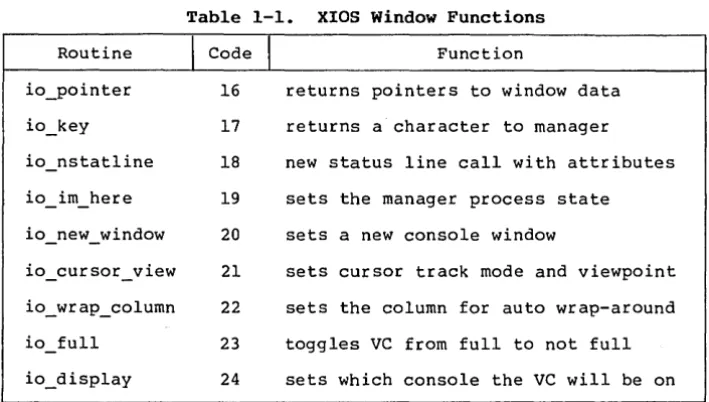
This section contains the XIOS entry points that are specifically used for window control. It describes nine routines in terms of registers at entry and exit. These XIOS routines are "back door" in the sense that they cannot be called using the standard Function 50 XIOS calling convention. These routines are called using a far call to the XIOS entry point using the standard XIOS segment register conventions, specifically: OS =/SYSOAT and ES = UOA.
Concurrent CP/M Technical Note 1.3 XIOS Entry Points Table 1-1. XIOS Window Functions
Routine
I
CodeI
Functionio_pointer 16 returns pointers to window data io_key 17 returns a character to manager
io_nstatline 18 new status line call with attributes io im here 19 sets the manager process state io_new_window 20 sets a new console window
io_cursor_view 21 sets cursor track mode and viewpoint io_wrap_column 22 sets the column for auto wrap-around io full 23 toggles VC from full to not full io_disp1ay 24 sets which console the VC will be on
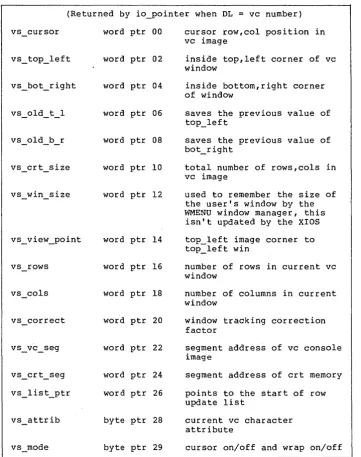
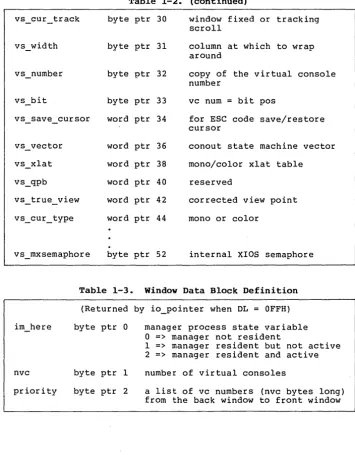
The parameters for the routines are described in the following pages. The virtual console structure is described in Table 1-2, and the window data block is described in Table 1-3.
Function Code 16 io_pointer Returns pointers to window-relevant information. Entry Parameters:
Register AL: 16
DL
=
virtual console number=
OFFH Returned Values:Register AX
=
vc structure pointer if DL=
virtual console number [image:10.471.72.427.51.252.2]Concurrent CP/M Technical Note 1.3 XIOS Entry Points
Table 1-2. Virtual Console Structure Definition
(Returned by io_pointer when DL = vc number) vs cursor
-vs_top_left
vs
-
bot_rightvs old t 1
-vs
-
old _b_ rvs crt size
-
-vs win size
-
-vs rows
vs cols
vs attrib
word ptr 00
word ptr 02
word ptr 04
word ptr 06
word ptr 08
word ptr 10
word ptr 12
word ptr 14
word ptr 16
word ptr 18
word ptr 20
word ptr 22
word ptr 24
word ptr 26
byte ptr 28
byte ptr 29
cursor row,col position in vc image
inside top, left corner of vc window
inside bottom,right corner of window
saves the previous value of top_left
saves the previous value of bot_right
total number of rows,cols in vc image
used to remember the size of the user's window by the WMENU window manager, this
isn't updated by the XIOS
top left image corner to top=left win
number of rows in current vc window
number of columns in current window
window tracking correction factor
segment address of vc console image
segment address of crt memory
points to the start of row update list
current vc character attribute
[image:11.470.46.407.62.519.2]Concurrent CP/M Technical Note 1.3 XIOS Entry Points
vs_vector
Table 1-2. (continued)
byte ptr 30 byte ptr 31 byte ptr 32 byte ptr 33 word ptr 34 word ptr 36 word ptr 38 word ptr 40
window fixed or tracking scroll
column at which to wrap around
copy of the virtual console number
vc num
=
bit posfor ESC code save/restore cursor
conout state machine vector mono/color xlat table
reserved
vs true view word ptr 42 corrected view point word ptr 44 mono or color
vs_mxsemaphore byte ptr 52 internal XIOS semaphore
nvc priority
Table 1-3. Window Data Block Definition
(Returned by io_pointer when DL = OFFH) byte ptr 0
byte ptr 1 byte ptr 2
manager process state variable
o
=> manager not resident1 => manager resident but not active 2 => manager resident and active number of virtual consoles
[image:12.473.71.427.59.514.2]Concurrent CP/M Technical Note 1.3 XIOS Entry Points
Function Code 17
Return character to window manager. Entry Parameters:
Register AL: 17
CL
=
OFFH (input/status)=
OFEH (status only) < OFFH (wait for input) Returned Values:Register AL
=
char if char ready (input/status)=
0 if no char is ready (input/status)=
OFFH if char ready (status only) = 0 if no char is ready (status only)=
char when ready (wait for input) AH=
key type if AL = char(O=regular, OFFH = special)
Window manager will go to sleep on this call if CL < OFEH.
Function Code 18 io_nstatline New status line call with attributes.
Entry Parameters: Register AL: 18
CX: DX: Returned Values: None
CX and DX are as described in the Concurrent CP/M Operating System System Guide.
Concurrent CP/M Technical Note 1.3 XIOS Entry Points
Function Code 19 io im here
Set window manager process state.
Entry Parameters: Register AL: 19
CL = im here state
o
=> manager not resident1 => manager resident but not active 2 => manager resident and active 3 => leave state the same but
switch VC to top DL = VC number to switch to top
= OFFH means do not switch VC to top Returned Values:
Window manager process state changed and/or specified VC is switched to the top and given the keyboard.
The process state can also be changed from a 1 to a 2 by the wake-up key, as described in the Concurrent CP/M User's Reference Guide for the IBM PC and PC XT. All other manager process state changes can be made only by using routine io_im_here •
. '
Function Code 20 io new window
-'Create a new window.
Entry Parameters: Regist,er AL: 20
DL
=
virtual console number CX=
top left (row, column) BX=
bottom right (row, column)Returned Values:
, Window to specified VC is redrawn with new dimensions
Windows are specified by their inside corners. ~ows are from 0 to 23, columns from 0 ~o·79. If the new size i~ the same as the the old size, then the physical image is·updated from the virtual sc~een
Concurrent CP/M Technical Note 1.3 XIOS Entry Points
Function Code 21 io_ cu.rsor -view Set the cursor tracking mode and the viewpoint.
Entry Parameters: Register AL: 21
DL = virtual console number DH = cursor tracking mode
0 => fixed window (no tracking)
1 => track scrolling cursor CX = top left viewpoint corner
(row, column)
Returned Values:
Window's tracking mode and/or viewpoint are changed.
Function Code 22 io_wrap_column Set virtual console wrap around column.
Entry Parameters: Register AL: 22
DL
=
virtual console number CL=
wrap column numberReturned Values:
Window's wrap column is changed
Function Code 23 io full
Change window state.
Entry Parameters: Register AL: 23
Concurrent CP/M Technical Note 1.3 XIOS, Entry Points
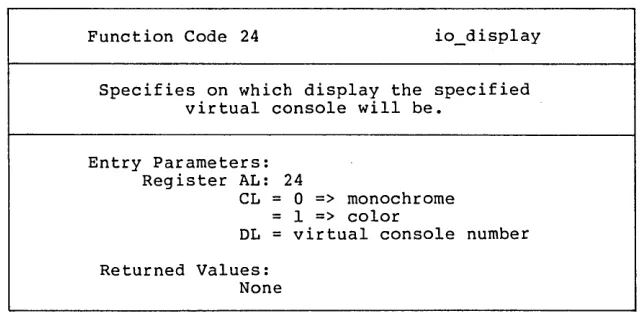
Function Code 24 io_display Specifies on which display the specified
virtual console will be. Entry Parameters:
Register AL: 24
CL = 0 => monochrome = 1 => color
DL = virtual console number Returned Values:
None
1.4 Window Management Escape Sequences
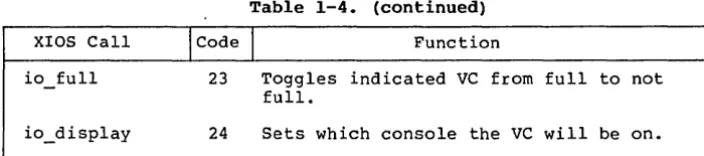
The window management escape sequences provide a limited subset of window management functionality if you either cannot or do not want to link with assembly language routines that make back-door XIOS calls. These escape sequences all have the same basic format. In general, they are a list of bytes to be stored in AL, AH, BL, BH, CL, CH, DL, DH prior to making an XIOS call. The only XIOS calls that are supported via this escape sequence mechanism are listed in Table 1-4.
Table 1-4. XIOS Calls for Escape Sequences XIOS Call
I
CodeI
Functionio switch 7 Switch screen to top but do not give it the keyboard. If screen is already on top, update the vc buffer with what is currently on the physical console. io statline 8 Display 80 character status line. io nstatline 18 New status line call with attributes. io im here 19 Sets the window manager process state and changes which console is on top. io new window 20 Sets a new console window.
[image:16.468.101.421.58.216.2]Concurrent CP/M Technical Note 1.4 Escape Sequences
XIOS Call
io full
Table 1-4. (continued)
\code
I
Function23 Toggles indicated VC from full to not full.
24 Sets which console the VC will be on.
The escape sequences to access these calls use a parameter list of registers. There are always 10 bytes in the escape sequence. The last 8 bytes contain the desired values for the registers prior to an XIOS call. The exact escape sequence format is as follows:
ESC ! al ah bl bh cl ch dl dh
If you use these escape sequences in an application, you are g~v~ng
up portability for the ability to use windows. Digital Research encourages OEMs to implement the same escape sequence conventions on their machines.
The program SAMPLE.C is included on the distribution diskette to demonstrate the technique for using Method 3 of console output.
[image:17.471.36.388.57.135.2]Section 2
Queue-driven Serial Communications
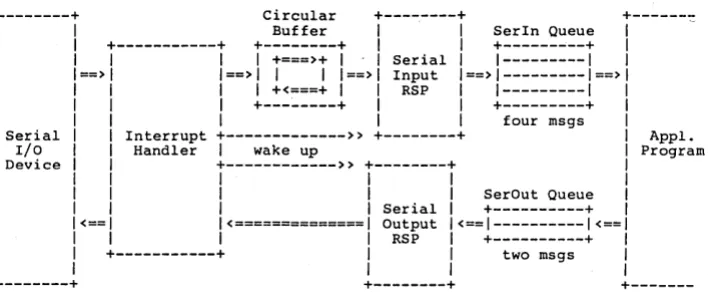
A Serial I/O device looks like a pair of queues to an application program. An application program can write to, or read from, a queue either conditionally or unconditionally. The details of synchronization and protocol are taken care of by the Input and Output RSP's, by the Interrupt Handler, and by the queue mechanism of Concurrent CP/M-86~ itself.
2.1 Theory of Operation
A character received by a Serial I/O Device generates an interrupt which activates the Interrupt Handler. The Interrupt Handler puts the character into the Circular Buffer, and then wakes up the Ser ial Input RSP. The Serial Input RSP reads one or more characters from the Circular Buffer, forms a message of the characters preceded by a count, and writes this message to the Serln Queue. The received characters are now available to the application program.
When the application program wants to transmit characters, i t can form a message of the same type as Serln's (a string of characters preceded by a count), and write that message to the SerOut Queue. The Serial Output RSP reads this message and passes a pointer to the Interrupt Handler. The Interrupt Handler then transmits the message, one character at a time, and wakes up the Serial Output RSP when finished.
Each queue message is 17 bytes in length. The first byte, N, is a count indicating the number of valid data characters in the message. The next N bytes are the actual data in the order received or transmitted. This means that any message may contain from 1 to 16 bytes of actual data. The size of the input message is determined by the speed of the communications line and by system response time. Higher speeds of the received characters will produce longer messages on the average. The size of the output message is determined by the application program. Writing longer messages to the SerOut queue results in greater system efficiency, particularly at higher transmission speeds.
Concurrent CP/M Technical Note 2.1 Theory of Operation
---+
Serial I/O Device---+
Circular
+---+
+---~Buffer 1 1 Serln Queue
+---+
+---+
1
1
+---+
1
1 +===>+ 1
1
Serial1
1---1
==>
1 ==> 1 1
1 1 ==> 1
Input1 ==> 1---1 ==>
1
1 +<===+ 1
1
RSP1
1---1
1
+---+
1
1
+---+
1
1
1
four msgsInterrupt
+---» +---+
Appl.Handler 1 wake up Program
+---» +---+
1
1
1
1
1
1
SerOut Queue1
1
Serial1
+---+
<==
1<==============1
Output1<==1---1<==1
1
1
RSP1
+---+
1
+---+
1
1
two msgs1
1
1
1
+---+
+---Figure 2-1. Queue-driven Serial Communication Interface
In addition to the SerIn and SerOut queues, there is another queue that is created for each port at system initialization. It is a mutual exclusion queue, named "MXSerO" for port 0, and "MXSerl" for port 1. These queues are designed to prevent access of more than one process to a single serial port. An application program reads its MX queue before accessing the Serial Data queues, and writes to its MX queue when it terminates.
There are limitations to the performance of Serial Communications under Concurrent CP/M-86. The primary limitation is encountered when using high speed communications while running other programs concurrently. There are times when the system "goes to sleep" for more than one high-baud-rate character time (Multi-sector disk access is an example). When this happens it is common to drop a received character or two, thus destroying the integrity of the incoming message. The other common problem is that the program receiving the data cannot consume it as fast as it is being sent.
(Trying to send characters to the console at 9600 baud is an example of this.) Solutions to these problems must address the question of both high and low level communication protocol. Section 2.2 discusses communication protocol in detail.
[image:19.469.39.393.52.202.2]Concurrent CP/M Technical Note 2.2 Protocol
2.2 Protocol
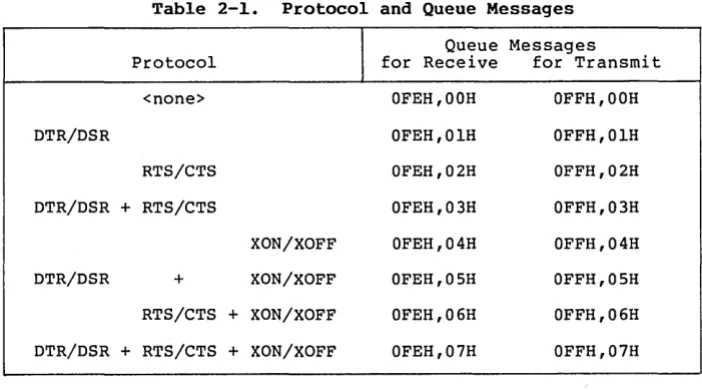
The Interrupt Handler currently supports the following three types of handshaking protocol to synchronize communications between systems:
1. DTR/DSR is a hard-wired handshake using the Data Terminal Ready and Data Set Ready modem control lines.
2. RTS/CTS is a hard-wired handshake using the Request To Send and Clear To Send modem control lines.
3. XON/XOFF is a software handshake accomplished by sending an ASCII XON or XOFF character through the reverse channel.
A description of conditions and actions pertaining to all three protocols is presented below.
Protocol
---DTR/DSR RTS/CTS XON/XOFF
The Interrupt Handler, when receiving a character if buffer is if buffer almost full is empty
---
---Sets DTR 0 Sets DTR Sets RTS 0 Sets RTS
1 1 Sends an XOFF Sends an XON
The Interrupt Handler, when transmitting a character will stop will resume transmission transmission
---
---if DSR 0 if DSR 1 if CTS 0 if CTS 1 if XOFF rec'd if XON rec'd
Concurrent CP/M Technical Note 2.2 Protocol Table 2-1. Protocol and Queue Messages
Protocol
I
Queue Messages for Receive for Transmit <none>
DTR/DSR
RTS/CTS DTR/DSR + RTS/CTS
DTR/DSR +
XON/XOFF XON/XOFF RTS/CTS + XON/XOFF DTR/DSR + RTS/CTS + XON/XOFF
OFEH,OOH OFEH,OlH OFEH,02H OFEH,03H OFEH,04H OFEH,OSH OFEH,06H OFEH,07H OFFH,OOH OFFH,OlH OFFH,02H OFFH,03H OFFH,04H OFFH,OSH OFFH,06H OFFH,07H
If the application program does not set the protocol, the default protocol for receive is <none> and the default protocol for transmit is DTR/DSR + XON/XOFF.
The program PROTOCOL.A86 is included on the distribution diskette. This program sets protocols for queue-driven serial communications. 2.3 Files and Sample Programs on the Distribution Diskette Two window utilities, WINDOW and WMENU, are included on the distribution disk. The following files are required to generate the WINDOW and WMENU utilities (WINDOW.CMD and WMENU.CMD):
CAPARM.H FIELDS.H PORTAB.H PDKEEP.A86 WMCA.A86 WWCALL.A.86 WINDOW.C WMCOLOR.C WMENU.C WMEXEC.C WMFTD.C WMUTIL.C WMWINDOW.C WMWRITE.C
A submit file, WINDOW.SUB, is included to generate WMENU.CMD and WINDOW.CMD from the preceding files.
[image:21.469.40.391.53.248.2]Concurrent CP/M Technical Note 3.1 Files and Sample Programs The sample progra.m TERM.A86 on your distribution diskette demonstrates the use of queue-driven serial communication. The sample program PROTOCOL .A86 demonstrates protocols for queue-dr iven serial communication.
The Digital Research C'M compiler is required to compile the programs with filetype C. ASM-86'M is needed to assemble the programs with the A86 filetype. GENCMD can be used to generate the CMD files.
Reader Comment Card
We welcome your comments and suggestions. They help us provide you with better product documenta tion.
Date
1. What sections of this manual are especially helpful?
2. What suggestions do you have for improving this manual? What information is missing or incomplete? Where are examples needed?
From: ______________________ _
BUSINESS REPLY MAIL
FIRST CLASS / PERMIT NO. 182 / PACIFIC GROVE, CA
POSTAGE WILL BE PAID BY ADDRESSEE