RECORD OF REVISION ~::::U=SEA~CH, INC. PUBLICATION NUMBER SG-0055
Each time this manual is revised Ind reprinted, all cha"9U iuued egainst the previous version in the form of change packets are incorporated Into the new version and ftle new vertion .s assigned an alphabetic level. Between reprints, cheng .. may be issued against the current venion in the form ot changa packets. Each change packet isauigned a numeric designator, starting with 01 for the first change peket of eech revision level.
Every plge changed by I reprint Or by a change packet has the revision 'eveland change picket number in the lower righthand corn.r. Chang •• to part of a page ara noted by a change ber along the margin of tha paga. A changa ba, in the margin opposite tha page number indicates that the entire pIG. il naw; a dot in ttla urne prece Indicates that information has been moved from one paga to enother, but has not otherwise changed.
Requlsts for copies of Cray Reselrch, Inc. publications and comments about the .. publications should be diracted to: CRAY RESEARCH, INC.,
1440 Northland Drive.
Mendota Heights, Minnesota 65120
Revision
01
A
A-Ol
SG-0055
Description
May, 1982 Original printing.
March, 1983 - This change packet brings the manual into agreement with version 1.12 of COS.
June, 1984 - This reprint incorporates the original printing with change packet 01. No other changes have been made.
December, 1984 - Change packet deleted 'SYS' command and brings documentation into agreement with COS 1.14. (Appendix A was deleted and Appendixes Band C are now A and B
respective1yw)
I
PREFACE
This publication describes the external features of TEDIr the cray Research, Inc., interactive text editor. TEDI is designed to edit text online.
It is assumed the reader has knowledge of the Cray Operating System (COS) and is familiar with the CRAY-OS version 1 Reference Manual, publication SR-OOll.
Cray Research, Inc., gratefully acknowledges the work of Dr. Clair Neilson in the development of the predecessor to TEDI.
SG-0055
DISCLAIMER
This document was prepared as an account of work sponsored by an agency of the United States
Government. Neither the United States Government nor any agency thereof, nor any of their employees, makes any warranty, express or implied, or assumes any legal liability or responsibility for the accuracy,
completeness r or usefulness of any information,
apparatus, product, or process disclosed, or represents that its use would not infringe privately owned
rights. Reference herein to any specific commercial product, process, or service by trade name, trademark, manufacturer, or otherwise, does not necessarily
constitute or imply its endorsement, recommendation, or favoring by the United States Government or any agency thereof. The views and opinions of authors expressed herein do not necessarily state or reflect those of the United States Government or any agency thereof.
CONTENTS
PREFACE • • • iii
l . INTRODUCTION • • • 1-1
TEDI CONTROL STATEMENT • • • • • 1-1
TED! DATASETS • • 1-1
TEDI REGISTERS • • 1-2
RUN-TIME SWITCHES 1-2
GENERAL DATASET PROCESSING CHARACTERISTICS • 1-3
Terminal attention interrupt 1-4
COMMAND RANGE • • 1-4
COMMAND STRUCTURE • • 1-5
CONVENTIONS • 1-5
2. USING TEDI 2-1
MODE • • 2-1
COMMAND ENTRY • • 2-1
Special characters 2-2
Escape character • 2-2
Prompts • 2-3
USING NUMERIC ARGUMENTS 2-5
Expressions 2-5
USING STRING ARGUMENTS 2-6
Symbol and pattern • 2-6
Meta-string argument 2-6
COMMAND TERMINATION 2-7
INTERACTIVE EDITING SESSION • • 2-7
Terminating an editing session 2-8
Typical editing session • 2-8
SETTING RUN-TIME SWITCHES 2-8
3. COMMAND FUNCTIONS 3-1
COPY COMMANDS • • 3-2
DATASET MANIPULATION COMMANDS 3-2
DELETE COMMANDS • • 3-3
EXCHANGE COMMAND • • 3-4
INSERT COMMANDS 3-4
ITERATIVE COMMANDS • • 3-5
LINE DIVISION COMMANDS • 3-6
3. COMMAND FUNCTIONS (continued)
4.
LOCATE COMMANDS REPLACE COMMANDS •
RUN-TIME SWITCH COMMANDS • TERMINATE COMMANDS •
TYPE COMMANDS
COMMAND DESCRIPTIONS •
column • line • pattern
• COMMAND SYNTAX •
AC After AL After AP After AS After
AX After AY After BC Before
symbol •
meta-string pattern meta-string symbol
BL BP BX BY CA CB CDA COB DAP
column • Before line Before pattern Before meta-string Before meta-string Copy line after Copy line before •
pattern symbol
Copy dataset after Copy dataset before Delete after pattern Delete after symbol •
• • DAS DAX DAY DBP DBS DBX DBY
Delete after meta-string pattern Delete after meta-strin9 symbol • Delete before pattern •
Delete before symbol Delete before meta-string Delete before meta-string
pattern symbol DC Delete column
DL Delete line
DNP Do if no pattern DNS Do if no symbol •
DNX Do if no meta-string pattern DNY Do if no meta-string symbol DO - Unconditional do •
DOP Do if pattern • DOS Do if symbol DOX Do if meta-string DOY Do if meta-string DP Delete pattern • DS Delete symbol
pattern symbol
DX DY END
Delete meta-string pattern Delete meta-string symbol - Terminates TEDI execution • I - Information • •
•
SG-0055 vi
CO~ SYNTAX (continued)
JL - Join lines • • • •
. . . .
. . .
.
.
. .
SG-0055
L - Locate line • • • • • • • • • • • • • • • •
LA Locate line after • • • • • • • • • LB - Locate line before • • • • • • • • • • • • • • • •
LP - Locate pattern • • • • • • • • • • • • • • • • • •
LPA - Locate pattern after • • • • • • • • • • • • • • • • LPB - Locate pattern before • • • • • • • • • • • • • LS - Loca te symbol • • • • • • • • • • • • • • • • • LSA - Locate symbol after • • • • • • • • • LSB - Locate symbol before • • • • • • • • LX - Locate meta-string pattern • • • • • • • • LXA - Locate meta-string pattern after • • • • • • • • • • LXB - Locate meta-string pattern before • • • • • LY - Locate meta-string symbol • • • • • • • • • • LYA - Locate meta-string symbol after • • • • • • • • • • • LYB - Locate meta-string symbol before • • • • • • •
MA Move lines after • • • • • • • • • • • •
MB Move lines before • • • • • • • • • • • • • • NN No line number echo • • •
. .
.
.
NV No change verification • • •
o - Open dataset • • • • • • • • • • • • • • • OD - Open dataset, discard updates • • • • • • •
QUI Quit . . • . . • • • • • • • • • • . . . • .
RAe Replace after column • • • • • • • • • • • • • • • •
RAP Replace after pattern • • • • • • • • • • • •
RAS Replace after symbol • • • • • • • • • • • • • •
RAX Replace after meta-string pattern • • • • • • • • • • RAY Replace after meta-string symbol • • • • • RBe Replace before column • • • • • • • • • • • • • •
RBP Replace before pattern • • • • • • • •
RBS Replace before symbol • • • • • • • • • • • • • • RBX Replace before meta-string pattern • • • • • • • • • RBY Replace before meta-string symbol • • • Re Replace column • • • • • • • • • • • • • • • • • • RD Replace da ta • • • • • • • • • • • • • • • • • • RL Replace line • • • • • • • • • • • • • • • RP Replace pattern • • • • • • • • • • • • • • • • • RS Replace symbol • • • • • • • • • • • • • • • • • • RX Replace meta-string pattern • • • • • • • • • • • RY Replace meta-string symbol • • • • • • • •
SCM Set columns for match • • • • • • • • • • • • SeT - Set columns to type • • • • • • • • • • • • • • • • • SOC - Set to uppercase and lowercase • • • • • • • • • SI Set indentation • • • • • • • • • • • • • • • • • • •
SN - Set line number echo • • • • • • • • • • •
SR - Set register • • • • • • • • • • • • • • • • • • • • • STC Set tab character • • • • • • • • • • • • • • • STS - Set tab stops • • • • • • • • • • • • • • • • sue - Set uppercase • • • • • • • • • • • • • • • • SV - Set change verification • • • • • • • • • •
COMMAND SYNTAX (continued)
T - 'l'y'pe 1 ine . . • . . • . . • • • . • • • •
TA
TYPe
line after • • .. .. .. .. • • • • .. .. • • • • •TB Type line before • • • • • ..
TC Type column • • • • • • • • • • • • • • • • • • • • •
TD Type delimited • .. .. .. .. .. • • .. .. • .. • • • .. .. .. .. • TO Type octal • .. .. • .. .. .. .. .. • • .. .. • • .. • ..
TP Type pattern • .. • .. • .. .. • .. .. .. • .. .. • • • • •
TPA - Type pattern after. • • .. • • • • .. • ••
TPB - Type pattern before • .. • .. • .. • • ..
TS - Type symbol • • • • • • • • • • • • • • • • • .. •
TSA - Type symbol after .. • • • .. • • • • .. • .. • •
TSB - Type symbol before ... • .. .. .. .. .. .. .. • .. • .. •
TX - Type meta-string pattern .. .. • .. • .. .. • • .. .. • .. • ..
TXA - Type meta-string pattern after . . . • • •
TXB - Type meta-string pattern before • .. .. • .. • • • • • ..
TY - Type meta-string symbol .. .. .. .. .. .. • • .. .. .. .. .. • •
TYA - Type meta-string symbol after • • • .. .. .. • .. • •
TYB - Type meta-string symbol before .. • • • .. .. .. .. .. • ..
TZ - Type hexadecimal .. .. .. .. .. .. • .. .. • .. • • .. • .. • .. •
U - Use • • • • • • • • • • • • • • • • • • • •
VAC Divide after column .. .. • .. • .. .. .. • .. .. •
VAP Divide after pattern • • • • .. .. .. • • .. • • • VAS Di vide after symbol .. .. • • .. .. • .. • .. • • .. .. VAX Divide after meta-string pattern ... .. • • .. .. .. ..
VAY Divide after meta-string symbol .. • .. .. •
VBC Divide before column • • .. • • .. ..
VBP
vas vax
VBY
Divide before pattern • .. ..
· .
.
.
.
• • • • • • Divide before symbolDivide before meta-string Divide before meta-string
.
.
. .
.
. .
.
.
.
.
pattern
symbol
.
..
.
.
.
.
.
.
.
.
.
. . .
.
W - Write .. • • • •
WD - write dataset
. . .
.
.
.
.
. .
.
.
.
.
..
.
.
.
...
.
. .
.
.
.
.
.
.
..
..
WDN - write dataset numbered
.
..
·
.
.
.
. . .
.
. .
WR - Write dataset ..
..
..
· . .
.
.
. .
.
X - Exchange • • .. .. .. .. .. ..
..
..
·
.
.
.
.
. . .
.
.
.
...
..
..
..
..
..
.
APPENDIX SECTION
[image:8.600.116.561.68.546.2]A. MESSAGES ...
.
.
.
.
. . .
. .
. .
. .
.
. .
.
.
.
. .
.
B. BASIC COMMANDS • • • 4 • • • • • • • •· . .
. .
. . .
. .
. .
.
FIGURE
1-1 TEDI data flow
.
. .
.
.
.
. .
. .
.
.
.
. . .
. .
.
.
. .
.
.
SG-0055 viii
TABLES
2-1 Special characters.. • • • •
2-2 Prompts • • . • • • • • • •
2-3 Command line number replacements • •
2-4 Meta-string characters • • • • • • 3-1 Numeric arguments • • • • • •
INDEX
SG-0055 ix
. . . .
..
.
• • • • • •
• • • • •
. ...
• • • • • • • • •
2-3 2-4
2-5
2-7
3-1
I
INTRODUCTION
Text Editor (TEDI) is an interactive line editor on a Cray Computer System operating under control of the Cray Operating System (COS). TED I can be used to edit computer programs, data, documentation, or any other text files.
TEDI CONTROL STATEMENT
Format:
TEDI,DN=dn,I=idn,L=Zdn.
Parameters:
DN=dn
L .. Zdn
TED! DATASETS
Name of the dataset to be edited. If this parameter is omitted, TEDI uses the first input command of the dataset
idn as the name of the dataset to be edited. Keyword with value unassigned is not allowed.
Name of the dataset containing the editor commands. (Input is entered at the terminal keyboard in interactive mode.) The default is $IN.
Name of the dataset used for TEDI output listing. Default is $OUT.
TEDI operates in command and enter modes and edits COS-blocked datasets through TEDI commands. TEDI datasets are called input dataset, current dataset, output dataset (depending on the stage of processing), run-time switch dataset, and command dataset. The user defines the input
dataset through the COS control statement TEDI,DN=dn. when the input dataset is being edited, it is referred to as the cuppent dataset.
SG-0055 1-1 01
I
I
(The
output dataset
contains the text TEDI has updated.)The user might want to call an input dataset composed of frequently needed commands rather than repeating the commands. The user can call such a dataset (referred to as a command dataset) while editing the current dataset by using the U command (see section 3). The run-time
switch dataset ($TEDISW) records rUn-time switch settings for an editing session (refer to Run-time switches, this section, and Run-time switch commands, section 3).
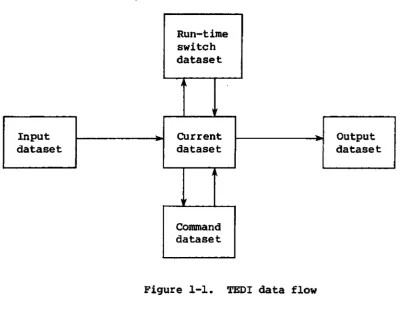
Figure 1-1 shows the interrelationship of the TEDI datasets.
TED! REGISTERS
TEDI maintains symbolic registers (RO through R9) as they are altered by the user. These registers permit the user to access a particular value repeatedly and can be set to a value that replaces a numeric value in a command. The Set register (SR) command loads the registers.
Example:
SR 1,. Loads the current line number into register Rl
T Rl Displays the line pointed to by the contents of register Rl
RUN-TIME SWITCHES
The user can exit from TEDI without losing switch settings by using a
run-time switch dataset. A run-time switch is a symbolic switch that sets and saves parameters in TED I (for example, tab settings). If the dataset name is not provided with the control statement when execution begins, TED! reloads the existing run-time switch settings. If the switch dataset is nonexistent or the user provides a dataset name, TEDI resets all switches to their default values. The user can examine and modify the switch settings with TEDI commands. (Refer to sections 2 and
3 for detailed information on using the run-time switches.)
Releasing the run-time switch dataset or editing a new dataset forces the switches to their default conditions.
Run-time switch dataset
j
Input CUrrent Output
dataset dataset dataset
Command dataset
Figure 1-1. TEDI data flow
GENERAL DATASET PROCESSING CHARACTERISTICS
When TEDI overwrites, or alters the length of, a permanent dataset, maintenance permission and unique access are required. TEDI prompts for permission (YES or NO) from the user before the command is continued. TEDI terminates execution without updating the dataset when there is no input after END command in a batch job. When TEDI edits a permanent dataset, the edition number is not updated.
During initialization, COS ends of file are replaced by an end-of-file character string «EOF». The user can add or delete end-of-file
character strings while editing. During post-processing, TEDI converts the <EOF> strings back into COS EOPs.
[image:13.595.76.483.116.427.2]I
TERMINAL AT'l'BN'l'ION INTERRUPT
When an entry is terminated by a Terminal Attention Interrupt, TEDI
handles the interrupt as followsz
• All dataset editing commands are continued to completion. Only the terminal output is suppressed.
• An interrupt during enter mode cancels all additions. No update occurs.
• Iterative commands (see section 3) are suspended after the iteration in which the interrupt was received.
COMMAND RANGE
TEDI uses line numbers to reference the contents of the dataset by assigning a number to each line of the current dataset. Each time the dataset is modified, TEDI reassigns the numbers. Therefore, a line number is not permanently assigned to a line but is implied by its relative position.
Line numbers are consecutive (1, 2, 3, ••• ]) to the last line. Every editing operation that adds or deletes or moves lines renumbers the dataset.
Commands that modify or display text can be restricted to a range of lines. Additional restrictions can be placed on the command range by specifying a column range, or a pattern or symbol that must match.
TEDl restricts string, line, and column length in the following ways.
• Insertion and replacement strings are limited to 64 characters.
• The maximum TEDI line length is 150 characters.
• The maximum TEDI line range is 1 <
m
~J (]
indicates the last line number of the dataset).• The TEDI column range is 1 <c < 150.
• In commands requiring column number specifications, m,n must specify the line range.
I
Certain commands accept column numbers as input. The column numbers must be entered with the command mnemonic (they are not prompted). Some
commands, such as Be (see section 4), accept either a column range or a single column number; o~her commands require only a single column number (for example, see command AC in section 4).
COMMAND STRUCTURE
Tbe basic format of a TEDI command is a verb optionally followed by numeric arguments and string arguments. TEDI commands are described in detail in section 4 of this manual. Appendix B contains a basic set of commands for the new user.
A TEDI verb is a 1-, 2-, or 3-character alphabetic mnemonic, for example, TA (type after). Entry of a command is explained in section 2.
Numeric arguments specify numeric information such as line number, column number, increment value, and number of display lines. Numeric arguments, separated from each other by commas or spaces, can immediately follow the verb.
String arguments include symbols, patterns, and meta-string symbols and patterns and are required by some commands. String arguments are
separated by escape characters or line feeds.
Numeric and string arguments are discussed in more detail later.
CONVENTIONS
In this manual the following conventions are used to illustrate commands and TEDI's replies.
UPPERCASE
Italics
<> Angle
brackets
••• Ellipsis
BOLD
SG-0055
Identifies the command verb or literal parameter
Define generic terms that represent the words or symbols to be supplied by the user
Enclose optional portions of a command format
Indicates the omission of one or more words, terms, or characters that are obviously understood
Highlights information in the text
$
*
SG-0055
User-supplied escape character
Prompt displayed in command mode
Prompt displayed in enter mode
Prompt displayed in system mode
NOTE
The preceding characters
*,
&, and - are often dependant on the front end and can be altered (by default) by the site.USING TEDI
This section explains how to use TEDI·for creating and editing a dataset and terminating an editing session. Command entry and termination are discussed.
2
I
TEDI operates in command mode and enter mode. In command mode, TEDI edits existing text and displays an*
when ready to accept the next command.I
Enter mode permits entry of new text. In this mode, TEDI prompts entries with 6. The following commands put TEDI in enter mode.
AL after line BL before line RL replace line
To exit from enter mode to command mode, enter a period in column 1, followed by a carriage return.
COMMAND ENTRY
Enter a command verb in uppercase or lowercase letters or a cOmbination; enter patterns, symbols, and line additions exactly as needed. End the command with a carriage return or an escape character. Using a carriage return with a string argument elicits the appropriate prompt (see prompts later in this section) on the screen. Using an escape character
suppresses the prompt, allowing the command and string argument information to be strung together. (Escape characters are explained later in this section.)
Use commas or blanks to separate elements in a numeric argument. Use a carriage return or an escape character to separate numeric arguments from string arguments and string arguments from each other.
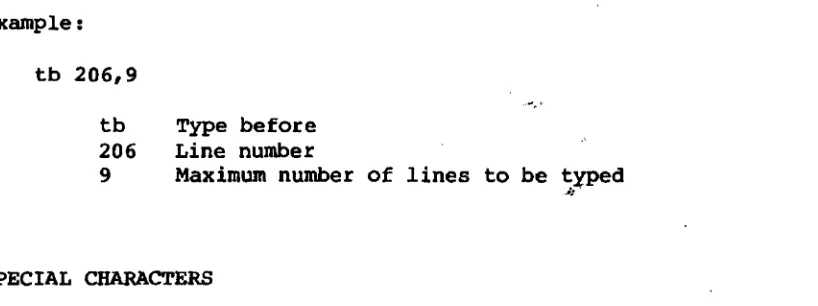
Example:
tb 206,9
tb Type before
[image:18.597.81.490.126.279.2]206 Line number
... ,.
9 Maximum number of lines to be typed 1/"
SPECIAL CHARACTERS
When TEDI is in enter mode, special characters can be used as instructions or for indentation control. For indentation control, automatic line indentation must be enabled (see the SI command, " section 4). Then the first character of each added line is recognized as the indentation control character.
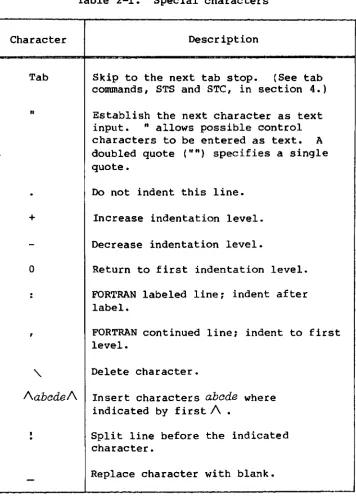
Table 2-1 lists the special characters and their descriptions. The \ ,
/abcde/, !, and _ characters can be used only with the X command. Their special meanings cannot be altered.
ESCAPE CHARACTER
The escape charactep can be used instead of the carriage return to separate string arguments. Using the escape character causes TEDI to suppress prompts between each string argument.
The escape character can be either the escape key or a user-supplied character that functions in the same way. (In this manual, both of these characters are represented by'.) If an escape character is used,
indicate the additional argument on the same line and suppress the prompt.
The usep-supptied escape charactep is determined on a line-by-line basis only in command mode. The first occurrence of a nonalphanumeric character not recognized by TEDI as a special character (refer to Special characters, this section) is the escape character. Tbe user-supplied escape character stays the same until another command line supplies an escape character.
PROMPTS
Table 2-1. Special characters
Character Description
Tab
n
+
a
'\
!\abedeA
Skip to the next tab stop. (See tab commands, STS and STe, in section 4.)
Establish the next character as text input. "allows possible control characters to be entered as text. A
doubled quote (.111) specifies a single quote.
Do not indent this line.
Increase indentation level.
Decrease indentation level.
Return to first indentation level.
FORTRAN labeled line: indent after label.
FORTRAN continued line: indent to first level.
Delete character.
Insert characters abade where indicated by first A •
Split line before the indicated character.
Replace character with blank.
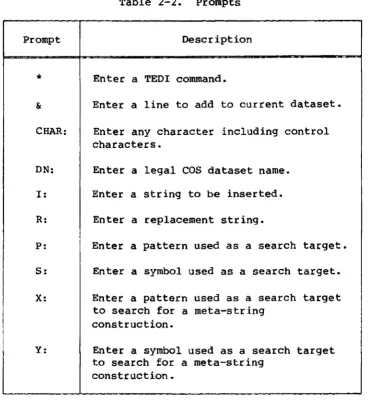
When a carriage return is used after verb and parameter entry, TED! prompts for the additional data needed to complete the command. Table 2-2 lists the prompts TED! displays and description of the action to be taken by the user.
To elicit a prompt, enter the verb and parameters, followed by a carriage return. To suppress a prompt, enter the verb and parameters, followed by an escape character.
[image:19.597.127.483.71.573.2]Example:
Table 2-2. Prompts
Prompt Description
*
& CHAR: DN: I : R: P:s:
X:Enter a TEDI command.
Enter a line to add to current dataset.
Enter any character including control characters.
Enter a legal COS dataset name. Enter a string to be inserted.
Enter a replacement string.
Enter a pattern used as a search target.
Enter a symbol used as a search target.
Enter a pattern used as a search target to search for a meta-string
construction.
Y: Enter a symbol used as a search target to search for a meta-string
construction.
AP 5,8
TED! searches lines 5 through 8 to insert a new string after a specified pattern. If a carriage return is entered after the 8, the prompt,
P:, appears on the screen, allowing for entry of the pattern. Another carriage return used after the pattern is entered causes a second prompt, I:, to appear. Now enter the string to be inserted after the pattern. TEDI searches for all occurrences of the specified pattern within the line range and adds the specified string.
In the following example, by choosing the escape character rather than a carriage return after the 8, the user can enter the pattern, another escape character, and the string to be inserted on a single line.
AP 5,8$!iZeSdataset
where !iZe is the pattern and dataset is the string to be inserted.
[image:20.598.134.502.68.472.2]USING NUMERIC ARGUMENTS
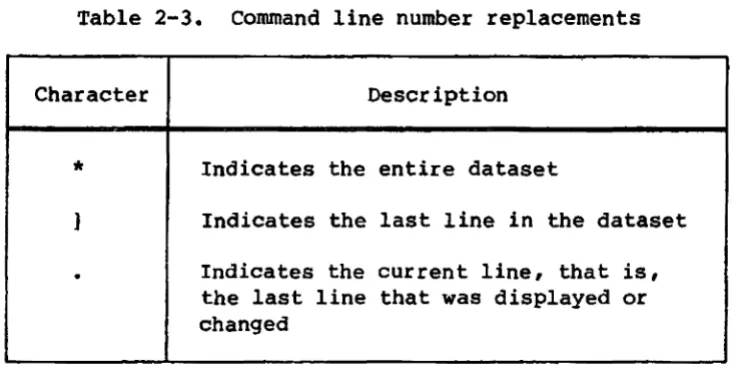
Use the special characters shown in table 2-3 to replace line numbers in a command_ For example,
*
is a shortened version of the line number and line increment designation (represented as m,n in commanddescriptions, section 4) when the entire dataset is indicated.
Table 2-3. Command line number replacements
Character Description
*
Indicates the entire dataset} Indicates the last line in the dataset
.
Indicates the current line, that is,the last line that was displayed or changed
A question mark used as the first argument in a command displays the command's format and function. When it is used alone in place of the command mnemonic, it displays all TEDI commands.
EXPRESSIONS
TEDI recognizes simple arithmetic expressions using the addition (+) and subtraction (-) operators. An expression can replace any simple numeric argument.
Examples:
The expression .-10 addresses a line 10 lines above the current line.
The expression .-10,.+10 specifies a 2l-line range encompassing the current line.
[image:21.602.124.491.170.356.2]I
I
I
USING STRING ARGUMENTS
A command statement can require st~ng arguments. The string arguments include symbols, patterns, and meta-string symbols and patterns. String arguments are separated by escape characters.
SYMBOL AND PATTERN
TED! distinguishes between patterns and symbols. A pattern is any string of characters; a
symbol
is one character or a string of contiguous characters delimited by spaces or separators (not 0-9 or A-Z). This distinction provides a means for locating and replacing variables in a dataset. Specific symbol-matching commands (for example, TS means display symbol or RS means replace symbol) can distinguish all occurrences of the specified symbol from identical characters or strings embedded in symbols or in patterns. For example, all occurrences of the FORTRAN variable I can be distinguished from the letter I bothin the symbol PI and in the FORTRAN statement IF.
META-STRING ARGUMENT
The meta-stPing a~gument is a powerful tool in the TEDI command
inventory. It uses nonalphanumeric characters to match single characters and to construct pattern- or symbol-matching character groups and strings embodying some optional feature, usually generalized character identity or quantity.
The characters in table 2-4 are recognized as meta-string constructions when entered as the pattern or symbol part of an appropriate command.
Examples:
Consider the following meta-strings and their matches.
?ickory matches hickory and dickory. ??ck ••• matches hickory, dickory and dock.
wh ••• @? and wh ••• : both match who?, what?, when?, where? and
why?
The meta-string ma ••• matches ma, mama and mamama in the string mamamamamam. The string containing the least number of characters, ma, is selected. Therefore, the result of the command RX$ma$+$ when applied to the string maaaxx is ++xx
I
Table 2-4. Meta-string characters
Character Description
?
•
•
@
[:ryB]
COMMAND TERMINATION
Matches anyone character (including separators). For example, g??e could mean give or gone.
Matches any nonalphanumeric character (separator)
The character that follows @ is the
actual keyed-in character and is not part of a meta-string construction.
Matches anyone of the enclosed
characters. For example, [abc] matches either the a, the b, or the 0,
independent of each other.
Matches any character string, including words and phrases. For example, t ••• s matches the string beginning with t and ending with s.
To terminate the execution of a command, use the terminal attention interrupt on your specific terminal. See section 1 for TEDr's handling of interrupts.
INTERACTIVE EDITING SESSION
The process for using TEDI follows:
1. Log on to the Cray mainframe. For logging-on procedures for the interactive lOS station, refer to the I/O Subsystem (lOS)
Operator's Guide, CRI publication SG-OOS1.
[image:23.599.126.498.73.429.2]I
I
I
I
I
2. When the prompt ! appears, enter the TEDI job control statement, specifying the name of the dataset to be edited. Typing TEDI
without a dataset name either loads the last dataset updated or prompts for a name if TEDI cannot find a dataset name.
•
.
TEDI, DN=dn.3. When the prompt
*
is displayed, you are in command mode. Enter any command. (See section 4 for a description of all TED!cornmands. )
TERMINATING AN EDITING SESSION
To terminate an editing session, enter the END or the QUI command.
Enter END to output the current dataset with all the changes recorded. (The edited version of the dataset is saved.)
Enter QUI to leave the original dataset intact. QUI is used if changes made during the editing session are no longer desired.
TYPICAL EDITING SESSION
•
TEDI, DN=RUN •.
- RUN
n
lines Call TED!*
ts 1,10$CAT Request for lines between first and tenth (inclusive) containing a specific symbol*
AL 4 Add lines after specified location& FILE
Return to command mode
SETTING RUN-TIME SWITCHES
To examine and modify run-time switch settings, enter the appropriate command after TEDI prompts with
*.
To display the contents of arun-time switch, use the information command (I).
I
Saving the switches allows exit and reentry to TED! without specifying the dataset name or resetting any of the run-time switches in the same interactive session (or batch job).
Example:
To set a tab character for the current dataset, use the STC (set tab character) command.
*STC $@
$ User-supplied escape character
@ Symbol to set the tab characters for the current dataset
To elicit a TED! prompt, enter this command without $.
*STC
C~:@
I
COMMAND FUNCTIONS
3
In this section, the commands are described according to function. For a detailed explanation of each command and command entry, refer to section 4, Command Descriptions. Basic commands are discussed in Appendix B.
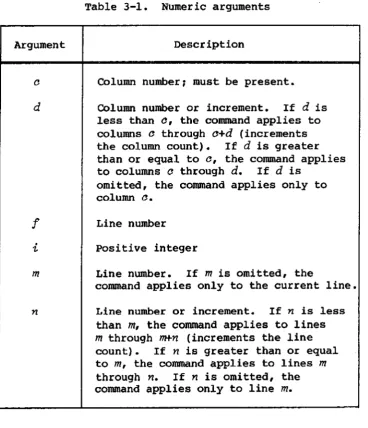
Table 3-1 contains definitions of the numeric arguments for TEDI commands in this section. Refer to section 2, table 2-3 for command line number replacements.
SG-0055
Table 3-1. Numeric arguments
Argument Description
d
f
i
m
Column number, must be present.
Column number or increment. If d is
less than 0, the command applies to columns 0 through a+d (increments
the column count). If d is greater than or equal to 0, the command applies to columns a through
d.
Ifd
isomitted, the command applies only to column o.
Line number
positive integer
Line number. If m is omitted, the
command applies only to the current line.
Line number or increment. If n is less than m, the command applies to lines
m through m+n (increments the line count). If n is greater than or equal to m, the command applies to lines m
through n. If n is omitted, the command applies only to line m.
[image:27.595.129.498.286.715.2]COpy COMMANDS
Copy line commands (CA, CB) duplicate the line range
m,n
eitherbefore or after line
f.
Copy dataset commands (CDA, CDB) copy the line rangem,n
of ON: either before or after linef.
The dataset tobe copied must be local to the job. During a dataset copy, TED! replaces each logical end of file with the end-of-file string (EOF).
Command Description
CA
m,n,!
Copy lines afterCB
m,n,!
Copy lines beforeCDA
m,n,!
Copy dataset afterCDB
m,n,!
aopy dataset beforeDATASET MANIPULATION COMMANDS
Dataset manipulation commands control the current dataset updating process.
The open dataset command (OD) discards all updates to the current dataset and opens a second dataset for editing. The open command (0) updates the current dataset before opening a second dataset.
Write commands (W, WF, WFN, WR) output all or a portion of the edited current dataset to a second dataset. The W command rewrites the current dataset including all changes. The WD command allows a
specified line range to be written to the second dataset. The WON
command prefixes each line written with a l-word ASCII line number. The
WR command rewrites the entire dataset to a second dataset. NO and WON allow line ranges1 Wand ViR do not.
The use command (U) directs TEDI to accept commands from a command dataset. The command dataset is read sequentially from its current position until the end of the dataset or a command error is encountered. Control then reverts to the console. Nested U commands (that is, a U
command in a command dataset) are illegal.
Command Description
o Open dataset
OD Open dataset, discard updates
Command Description
u
Use commandW Rewrite dataset
WD write dataset
WDN <m,n> Write dataset numbered
WR write dataset to another dataset
DELETE COMMANDS
Delete commands delete all or parts of lines in a specified range. Delete commands referring to before or after, delete from the beginning of the line (before) or from a specified point to the end of the line
(after).
Command Description
DL <m,n> Delete line
DC m,n,a<,d> Delete column
DP <m,n> Delete pattern
DAP <m,n> Delete after pattern
DBP <m,n> Delete before pattern
DS <m, n> Delete symbol
DAS <m,n> Delete after symbol
DBS <m,n> Delete before symbol
I
Command Description
DX <m,n> Delete meta-string pattern
DAX <m,n> Delete after meta-string pattern
DBX <m,n> Delete before meta-string pattern
DY <m,n> Delete meta-string symbol
DAY <m,n> Delete after meta-string symbol
DBY <m,n> Delete before meta-string symbol
EXCHANGE COMMAND
The exchange command is a special form of replacement that can modify several parts of a line at a time. In response to this command, TEDI presents each line of the range followed by a colon prompt. The user can then key in a replacement on a character-by-character basis. A space used as a replacement signifies the character is to remain unchanged. TEDI also recognizes the special exchange characters I ! and (See
table 2-1.)
COTIUlland Descr iption
X <m,n> Exchange
INSERT COMMANDS
Insert commands add lines or character strings either before or after a designated point. These commands put TED! in enter mode. To insert at
the beginning, BLI! must be used.
TEDI prompts line insert commands with & •
Command Description
AL <m> After line
BL <m> Before line
AC m,n,c After column
Command Description
Be m,n,o Before column
AP <m,n> After pattern
BP <m,n> Before pattern
AS <m,n> After symbol
BS <m, n> Before symbol
AX <m,n> After meta-string pattern
BX <m,n> Before meta-string pattern
AY <m,n> After meta-string symbol
BY <m,n> Before meta-string symbol
ITERATIVE COMMANDS
Iterative commands allow a series of commands to be executed
repetitively. The commands are specified on the same line and separated by a user-supplied escape character. Iterate command nesting is not allowed and can produce unexpected results. The U command cannot be used in an iterate command.
Command Description
DO <m,n>$t... Do commands unconditionally
DOP <m,n>$pat$t ••• Do commands if pattern condition
DOS <m,n>$sym$t ••• Do commands if symbol condition
DOX <m,n>$mpat$t ••• Do commands if meta-string pattern
condition
DOY <m,n>$msym$t ••• Do commands if meta-string symbol
condition
DNP <m,n>$pat$t ••• Do commands if no pattern condition
DNS <m,n>$sym$t ••• Do commands if no symbol condition
Conunand Description
DNX <m,n>$mpat$t ••• Do commands if no meta-string pattern condition
DNY <m,n>$msyrr$t ••• Do commands if no meta-string symbol condition
LINE DIVISION COMMANDS
Line division commands divide each line in a specified range into two lines at a designated point. The join line (JL) command is the
exception; it reverses the action of the division, appending all lines in the range to form one line.
Command Description
JL <m,n> Join lines
VAC m, n, a Divide after column
VBe
<m,n> Divide before columnVAP <m,n> Divide after pattern
VBP <m,n> Divide before pattern
VAS <m,n> Divide after symbol
VBS <m,n> Divide before symbol
VAX <m,n> Divide after meta-string pattern
VBX <m,n> Divide before meta-string pattern
VAY <m,n> Divide after meta-string symbol
VBY <m,n> Divide before meta-string symbol
LOCATE COMMANDS
Locate commands search for a specified line number and display those lines. These commands are particularly useful in conjunction with the U command in the command dataset. They function identically to the type commands except locate commands allow no console output.
I
Command Description
L <m,n> Locate line
LA m,i Locate after
LB m,i Locate before
LP <m,n> Locate pattern
LPA m,i Locate pattern after
LPB m,i Locate pattern before
LS <m,n> Locate symbol
LSA m,i Locate symbol after
LSB m, 't Locate symbol before
LX <m,n> Locate meta-string pattern
LXA m,i Locate meta-string pattern after
LXB m,i Locate meta-string pattern before
LY <m,n> Locate meta-string symbol
LYA m,i Locate meta-string symbol after
LYB m,'t Locate meta-string symbol before
REPLACE COMMANDS
Replace commands replace the data within a specified line range.
The replace data command (RD) provides a convenient method of replacing fixed field data (such as assembler fields). The position of the tab stop (see the STC command, sections 2, 3, and 4) determines whether the field is right- or left-justified (positive or negative, respectively). TED! prompts line replacement commands (RL) with &.
Conunand Description
RD m,n,i Replace data field
RL m,n Replace line
Command Description
MA m,n,! Move lines after
MB m,n,f Move lines before
RC m, '11., 0< ,d> Replace column
RAC m,n,a Replace after column
RBe
m,n,o Replace before columnRP <m,n> Replace pattern
RAP <m,n> Replace after pattern
RBP <m,n> Replace before pattern
RS <m,n> Replace symbol
RAS <m,n> Replace after symbol
RBS <m,n> Replace before symbol
RX <m,n> Replace meta-string pattern
RAX <m,n> Replace after meta-string pattern
RBX <m,n> Replace before meta-string pattern
RY <m,n> Replace meta-string symbol
RAY <m,n> Replace after meta-string symbol
RBY <m,n> Replace before meta-string symbol
RUN-TIME SWITCH COMMANDS
Run-time switch commands manipulate and display run-time switches. The information command (I) reports the status of the following:
• Current dataset name and length in lines
• Current tab character
• Tab stop settings
• Symbolic register settings
• Verification switch settings
• Translation mode
• Line number echo
• Column match and type settings
• Initial indentation level
• Indentation level increment
Case control commands (SUC, SDC) allow all text insertion lines from the terminal to be forced to uppercase or accepted as both uppercase and lowercase. Certain input such as dataset names is translated to uppercase regardless of the case setting.
Tab stop commands (STC, STS) set a maximum of 10 tab stops. If the column number is negative, display information is right-justified to the tab stop. When the tab character is designated space, a double space on input signals tab. pressing the space bar twice is the default tab character.
The set indentation command (51) automatically controls the indentation of a group of lines added in enter mode.
The set-columns-for-match command (SCM) limits pattern and symbol searches to the designated column ranges e through d. The default values are c=l and d=150.
The set-columns-to-type command (SCT) controls the column range, which is displayed by such commands as T, TP, and TS.
The set register command (SR) alters the symbolic registers RO through R9.
Command Description
NN No line number echo
SN Set line number echo
NV No change verification
sv
Set change verificationI Information
suc
Set uppercaseSOC Set to uppercase and lowercase
Command Description
STC char> Set tab character
STS <Cl ,C2 ' ••• > Set and clear tab stops
S1 c< ,i> Set and clear indentation
SCM c<,d> Set column match
SCT c<,d> Set columns type
SR i,<expr>ession> Set or clear a symbolic register
TERMINATE COMMANDS
Two types of terminate commands are available. The end command
terminates TEDI execution after updating the current dataset. The quit command terminates TED! without updating. For both commands, the current switch settings are retained.
Conunand Description
END End
QUI Quit
TYPE COMMANDS
Type commands display a line or range of lines on the console. The current line number is set to the last line displayed.
The type delimited command (TO) displays a group of lines followed by carriage returns. This command is useful with a hardcopy terminal. The number of lines typed equals i, and the number of carriage returns
between the next set of lines typed equals j. The default values are
i=60 and j=6. TEDI retains i and j~ therefore, once they have
been specified, they need not be repeated for subsequent TD commands.
The type octal (TO) and type hexadecimal (TZ) commands display the specified lines as a series of character codes.
The type column (TC) command displays the specified lines prefixed by a l-line column heading. This command is particularly useful for data field alignment.
Type after and type before commands (TA, TB, TPA, TPB, TSA, TSB, TXA,
TXB, TYA, TYB) set display i lines before or after line m. If a
pattern or symbol match is required, only lines containing the match are
displayed. A maximum of i lines is displayed by these commands.
Type line range commands (TP, TS, TX, TY) display a line range having the specified matching string.
Command Description
T <m,n> Type line
TD <m,n, i , j> Type delimited
TO -em,n> Type octal
TZ <m,n> Type hexadecimal
TC <m,n> Type column
TA -em,i> Type line after
TB <m,'/..> Type line before
TP -em,n> Type pattern
TPA -em, i> Type pattern after
TPB <m,i> Type pattern before
TS <min> Type symbol
TSA -em, i> Type symbol after
TSB <m,i> Type symbol before
TX <m,n> Type meta-string pattern
TXA <m,i> Type meta-string pattern after
TXB <m,i> Type meta-string pattern before
TY <m,n> Type meta-string symbol
TYA <m,i> Type meta-string symbol after
TYB <m,i> Type meta-string symbol before
COMMAND DESCRIPTIONS
Detailed descriptions of TEDI commands are contained in this section and are discussed in alphabetical order by command mnemonic. For command breakdown by function, refer to section 3, Command Functions. Basic
I
commands are discussed in Appendix B.COMMAND SYNTAX
4
Every command requires a verb, and most commands require a numeric and/or a string argument.
Commands described in this section have the following general form:
verb
nwnerie
stl'irzg
Set of characters uniquely identifying the command. TEnI
recognizes only the mnemonics in the command formats. For readability, a space can follow the verb.
Specifies numeric information such as line and column numbers. Numeric arguments are separated by a space or a comma.
A single character or group of characters such as a dataset name or a pattern. String arguments are separated by
escape characters.
NOTE
Execution of TEDI commands applies only to whole lines in the current dataset.
AC -.AF'l'~R.C()LUMN'
FUNCTION;
FORMAT:'
, PROMPT:
5,0';"0055
Searches, for a designated line range ,and, within that line r.ange only, inserts a specified 'string after the
specified column
AC
m,n,c
m
L,ine numbern ,Line numb~r Or in¢:reme"l:l1;. If
n
<m, the " ·'.;::ommand ~pplies, ,t~ l::iries'mtl1toughm+n,(increltlentsthe l,.inecount[l.-
'If
n '>m,
tbecommand applies to lines m throug.h
:no ,
.0 ' • • Column number f ,. . '
!: 'In,sert t5he new string.
'AC'15l$~ND ,
".
, ..) .
'Insert:,'.tn,e'std.ngBIID' aftet Co1Uitllll,' fpc, iines 1
AL - AFTER LINE
FUNCTION:
FORMAT:
Adds lines after a designated 1ine1 puts TEDI in enter mode
AL <m>
m Line number. If m is omitted, the command
applies only to the current line.
PROMPT: &
EXAMPLES: AL
SG-0055
Adds lines after the current line. Used for entering lines into a new dataset.
AL ]
Add lines after the last line in the dataset.
To terminate the insert, type a period as the first character of the next line and follow it with a carriage return.
._;.-. -."
"··:··:AS:-':~·S~:
. .
"~a:NC*.rI()N; .
_ FOIU-lATf '.'
,PROMPTS:
SG-OO·55 .
.. ·Se·~~Cbe$· f,!rth. des!gnated,,,;t:i:rte.:rcari.geand, within those'
, .1iri:.~ 'Qnly ~ seaJ;ches '.
for
thed~s:t$;ated' symbol. ,The.'s:p~¢ified str'ing is ·ins~rted ..
af·ter·
e·aoh,ooeui"rence· of the.-symbCii
within the lftie :range.:: . .AS,.
<m<,n»
-c. in
'n
. "
Line number ~If 1Tl is-omitted, the co~and
applies only to the CUJ;rent line.
Line number or increment. If n < m, the
command applies to lines m through m+n
(inete.en·ts the line count) . 1 £ n ::.. m, the command applies to lines m through
n.
Ifn is omitted, the command applies only to line m.
' .. ,S: . Insert the symbol i,lsed as a,search target.
. I: Insert. tJ]e new string- ,
·:AS
'J$DATU-Jrisert - after the symbol DAB'in the last line of .the·.dataset. No pJ;ompts appear since' the· escape
~character '.is used •
AY - AFTER ME'l'A";'STRING SYMBOL
FUNCTION:
FORMA,T:
PROMPTS:
EXAMPLE:
Searches for the designated line range and, within those lines only, searches for the designated meta-string symbol. The specified string is i~serted after eacl'} occurrence of the symbol within the line range.
AY <m<,n».
m
n
Y:
I :
Line number. If m is omitted, the command applies only to the current line.
Line number or increment. If
n
<m,
the conunand applies to linesm
tbrough'm+n(increments the line count). If
n:: m,
the command applies to linesm
throughn.
Ifn is omitted, the command applies only to, line m.
Insert the symbol used to search for a meta-string construction.
Irisert the new string.
AY 1,1 $ [TBJ$OO
)
/
BC - BEFORE COLtlMN
FUNCTIO~:
FORMAT:
PBQMPT·{ .'
":" _ ....
Sea,rche:s' for a designated line
,r'angeabcl,
withln.tbai;.line t'ange only, inserts aspecifiedstriilg before the
specified. column
.BC mi~,a
",
n
Line numJ:)er
Lin~ number or. inee-emant. .
If
n
-<.m,
th,ecQlllmand applt,esto:lines mtb~ough·7nf.n'
: '( inoremen4ts
the, iin~
couatf.···
Ifn
~~mi ,the''OOiDIIand>appl~eB ~o It'nes',m .t:hr~gh '1.
<:plumn
nUlilher·II .. Insert . '1ibe , new . s~in9.
. ,
~'5,,2;):, ....
',' ..
"Iri:se-~itbe:'J~tJ:lri9;'
*
~;:~~for~ . ~l:~'::'3j; ;;i.ii~ :'lltne~,5~,;tbr.o~9h" ~1>oo:lY,," c ";,.: .,,"
.. ',. ...
", -. ,
. , .. :
I
BL ,- BEJOU LINE
FUNCTION:
FORMAT:
Adds lines "fore a designated line; puts 1'BDI in enter
mode.
BL <m>
Line nUmber. If
m
is omitted, the~ndapplies only to the current line.
PROMPT: ,
EXAMPLES: BL
~d any number of lines before the current line.
BL 1
Add lines at the beginning of the dataset.
BL •
Insert lines before the current line. 'TO terminate the
insert, type a 'period as the first and only character of
the next line.
" . ' - , "
- 0;
BP
FUNCTION,:
FORMAT:
. ", . ~;, .,',
. :', ".~' .~
.
S~ai"ch'es
"~CJJ;
.
the·desi.9nated 1 ille·ra.n~e
.,'
:~~d,; ,'~i
thin:;tbCl$e .
line.lit Qnly" searehesfqr 'theae,s19na.tedpa:~.t~1'h •. ·~he,
specified, Jiitr irig
is
inserted "be~O"re,each .occurrence ,Qf.thi!! patte'rnwithin the line
range..
.
BP <m<,.11» ... ~ .: .'
. ···.·Line
nuttibef
~'Iem 'isomi:tt-e'ci,;,tlle
c9Il1ltland .
'.applies,c.nl1~(:.t()
:the:
:cu.t.reht'iih'~'~:'-,.. ~." ~ .' .
''''insert
t~;I!;pat tex'Pstring-.. ; ....
<.
~:~;~~,!i;~:~~n~me~$·l~.s;~ .J." .
"," :" . . '
.
BX - BEFORE MBTA-ST~ING PATTERN
FuNC'llION.:
FORMAT:
PROMPTS:
EXAMPLE:
$.G-OOS5
Searches for.the designated Line range and, within those line·s only, searches for the desig.nated meta-string pattern. The specified string is in$erted before ~ach
occurrence of the pattern within the line range.
BX<m<,n»
m
n
X:
I:
BX
Line number. If m is omitted, the command applies only to the current line.
Line number or increment. If
n
<m,
the command applies to lines m through m+n(increments the line count). If n > m, the command applies to lines m through n. If
n
is omitted, the command applies only toline
m.
.
Insert the pattern used to search for a meta-string construction.
Insert the new string.
Insert a string before the specified pattern in the current line only. TEDI prompts for search target and insertion string.
4-12
/
FUNCTION:
FORMAT:---...
. ' ' , .. : ',' . '.. . :~: .:~
" , ..
. ~. ' ~; ,
,:'~. ; ' :
SG-005S
Searches for the designated iine rariqe a~d~, within ~hC)se··_
lines'only" searches for th~ -de'si:g~~ted meta'-st~ih9 syinbol. The specified st;.d,nq 1s i·ns~r:ted:,b.eforeeach·'
'oecu~i~ri~e of th~, syDlbol wit.hi.~ :theilneia.rt9.e~
Line nu·mber. If. liz. is' omi:tted~ . tilecomirtai)a
appiie~()lJly ·to~hecurrerit~ine:.
Line n\1'Jnber o't' .ill.~temetit~·,:, If n -<:m, the command (lppl.i~~ t~, ::l:in.es 1n:' throu,qh m+n
"'(l;tacren1eri~s th~
iiJ'tt!
,~o\.ln~r...
!r
n.''::'·
m~ ~he.. d.:s.and. appfies tOc:!·i-nes.·mthrough n . I f
<n
'-Is omitt'ed~the.,c9.n<lapplies
only to. - ,- '. > .. ~- ' . '. . " - . . . .
"'line " , -
m._
. ' . < ' ,.. -." -.'
" .. ~.
-...• ::;..
-", '-'."'
ir:t~~rt
th,e:::sy,n1bt>:~·;Lu~~.~>
to'-~ea,r~
:fOtil'mf!ta .. s't.~~i~~:·',~~l]s:tf·~ot~Qn.
:.;, ,:.', '
-,~~,' ::' .
, .~ ';'~:'~ .. . ;
-... ~.
" .... '
'~, .
-..•. -.~ ..
-.:.~ .. :;~ .
. ''':.: ~- . , .
.
.'::-.::.-.,", :~.,
CA - COPY LINE AFTER
FUNCTION: FORMAT:
PROMPT:
EXAMPLE:
SG-005S
Copies tbe line range m,n after line!
CA
m,n,!
m
n
.f
None
CA 1,.,]
Line number
Line number or increment. If n < m, the command applies to lines m through m+n
(increments the line count). If n ~
m,
the command applies to linesm
through n •Line number after whiCh the lines are copied
,/
,/
..
-.
FUNCTION:
FORMAT:
PROMPT:.
'- ,-.
. .
...
s~dri55· ' ••
Copies the·lineranqe
m,n
b~~fore li,ne.t ...
CB
m,n"
m
n
.Linenumber
. Line n,umber or increm~nt.. If n< m; the··
command app,lies to. lines
m·
throughm+n... U.ncr~Dients the" line coun~);, If
n
>.m,
thecolllJtlMd . applies.
to
.:l;nes:
m :th~r~u9!t:'n.
'·:'Lj.l'le;.
n:uml)er·:
~fote ·i7:biblfehe: .).Jjl~f1I .. are ~Qpied··....•
~ .. -.
;,', .. ': ...
"% '- > ," 1<:
..
.;. :--.~:
',-.
..".':."
-~". . ,.,:." -~- .
. .~.,,!
-.~ :"~-: .
" '-"
I
I
· .: .:~.,~, ... -." : ,~.:'
CDA - COPt DATASET AFTBR
FUNCTION:
PROMPT:
EXAMPLE:
SG-OOSS
Copies the line range m,n o~ ON after line
f
of tb~current dataset. The dataset to be copied must be local to the job. During the copy, '!'EDI replaces each physical end of file with an end-of-file string (EOF).
eDA
m,n,f
n
f
. DN:"
.CDA 1 51
Copy lines line 1.
Line number
Line number or increment. If
n
< m, the command applies to lines m through m+n(increments the line count). If n ~m, the command applies to lines
m
throughn.
Line number after which the dataset is copied
Insert the 1- to7-character dataset name •
1 through 5 of the TEDI-prompted dataset after
DAS - D&LETE AFTER 51MBOL
FUNCTION:
FORMAT:
PROMPT:
T.", '
SG-OOSS
Within the specified line range, de,l..~tesall char~oters
after the first occurrence of ' specified sYmbol
DAB <m< ,n»
m
n·
s:
DAS $FILE
Line number. If m is omitted, the command applies only to the current l,ine.
Line' nwnbe~r or increment. " I f n < m, the command applies to 1 lnes
m
through m+n. (i~crements the line count) •. ' 1£ n > m, , the
conunand ;applies to lines·m through
n.
If n.is, om,itte9,.. the command:a:pplies only toline m.
Insert the symbol used asa sea.rchtarget.
.' ,In:!-}i1ecuJ:rent line, :d~lete :eyer:ythin~
·a1.te.E
the symb.ol:FlU.
<, " .
'-.!, .
• • \ c
.:~ .
. ,'
.
;.-' . "'. ".
... ~ .. -~
/4-19