March,, 2003 DRTC, Bangalore
Paper: O
eXtensible Markup Language: A Tutorial
Aditya Tripathi Indian Statistical Institute
Documentation Research & Training Centre Bangalore- 560 059
email: [email protected] email: [email protected]
Abstract
“If you use the original World Wide Web program, you never see a URL or have to deal with HTML. You're presented with the raw information. You then input more information. So you are linking information to information--like using a word processor. That was a surprise to me --that people were prepared to painstakingly write HTML.”
--Tim Berners-Lee Tim Berners-Lee had vision about the easy access to the data all round the world, when he first proposed about the WWW. Since then Internet has gone a long way, from text-based browser to the present completely GUI (Graphical User Interface) browser. The representation of information has also changed. We saw the development of HTML in 1980s and then its various versions in 1990s, then came the era of XML (Extensible Markup Language). This change also supports the vision of Lee though he would have never dreamt about the development of such system for the web content development. But finally it was he who had the vision about the use of semantic Internet because there is lot of information available over Internet & finding information has become as difficult as finding gold coin in a garbage heap. That is why the domain specific information interchange systems are thought of and it is there XML comes into picture.
1.
FROM SGML TO XML
The markup languages that carry the instruction for text processing are known as ‘Procedural Markup’. The idea of markup was to format a particular kind of document. But later on it was felt that markup languages can be used for system to system information interchange also. This was first realized by Charles Goldfarb, Ed Mosher and Ray Lorie when they were working with legal documents. They designed the first markup language known as GML (Generalized Markup Language) based on the following observation:
Ø The document processing programs needed to support a common document format.
Ø The common format needed to be specific to their domain - for example legal
documents.
Ø To achieve a high a degree of reliability, the document format would have to follow
specific rules.
For example, take an example of memorandum,
To: Bishwanath Dutta
CC: Bibhuti Bhushan Sahoo From: Aditya Tripathi
Date: 27.01,2003
Subject: Appointment order
--- We are extremely happy to inform you that you are selected as the coordinator of Knowledge management team.
If we look into this document we find that there are six fields in this document.
Ø Who the document is intended for (the To: field)
Ø Who has been sent a copy of document (the CC: field)
Ø Who sent the document (the From: field)
Ø The date of document written (the Date: field)
Ø The subject of document (the Subject: field)
So, if we make a fixed structure of this document then whoever writes the document has to write it in the same structure. Thus if we try to port the information from one system to another it will not be a problem as the structure of document is always same. The definition of the structure of document is known as ‘DTD (Document Type Definition)’.
Once GML was designed, Goldfarb fine tuned his work and propos ed the SGML (Standardized Markup Language) which was further approved by ISO (International Organization for Standardization) in 1986. SGML was not a language itself but it was a meta language to develop other markup languages. HTML (Hypertext Markup Language) is a derivative of SGML. HTML is more like a formatting language. Thus it is difficult to pull out what kind of data is stored inside a HTML document. Once this difficulty was understood, the need for domain specific tags was felt, for information interchange, which is not possible with HTML. Hence the XML was developed. It is always said that XML is more near to SGML when compared to HTML.
2.
WHAT IS XML?
According to the abstract from the XML Specification version 1:
“The extensible Markup Language (XML) is a subset of SGML that is completely described in this document. Its goal is to enable generic SGML to be served, received, and processed on the Web in the way that is now possible with HTML. XML has been designed for ease of implementation and for interoperability with both SGML and HTML.”
• XML stands for EXtensible Markup Language.
• XML is a markup language much like HTML.
• XML was designed to describe data.
• XML tags are not predefined in XML. You must define your own tags.
• XML uses a DTD (Document Type Definition) to describe the data.
• XML with a DTD is designed to be self-descriptive.
XML is still under development, & the following goals are kept in mind while developing the specification for XML.
1. XML shall be straightforwardly usable over the Internet. 2. XML shall be compatible with SGML.
3. It shall be easy to write programs which process XML. 4. The processors could read the XML document easily.
5. XML document should be human-legible and reasonably clear. 6. The XML design should be prepared quickly.
7. The design of XML should be formal and concise. 8. XML document shall be easy to create.
9. Terseness in XML is of minimum importance.
2.1. How XML is Different from HTML?
1. XML was designed to carry data.
2. XML is not a replacement for HTML.
3. XML was de signed to describe data and to focus on what data is. HTML was designed to display data and to focus on how data looks.
4. HTML is about displaying information. XML is about describing information.
3.1. XML does not DO Anything
XML was not designed to DO anything. Maybe it is a little hard to understand, XML was not made to DO anything. XML is created as a way to structure, store and send information. To look into more detail let us write our first XML documents book.xml:
<?xml version="1.0" encoding="UTF-8" ?> - <book>
<title>Application of expert systems in libraries and information centres</title>
- <author>
<f_name>Anne</f_name> <l_name>Morris</l_name> </author>
<edition>1st Edition</edition> <place>London</place>
<publisher>Bowker-Saur</publisher> <physical_desc>241 p.</physical_desc> </book>
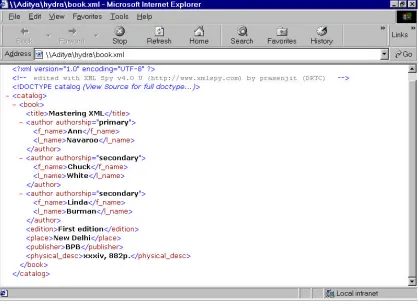
The example shows the structure of a document which describes a book, titled ‘Application of expert systems in libraries and information centres’. The book will have a title, author, edition, place, publisher, physical description elements. Author will be further divided into first name (f_name) and last name (l_name). Inside these tags the actual data is stored. If one browses the document in the browser, data will appear embedded in the tag without having any kind of formatting (Figure 1).
3.2. Define Your Own Tags
In the above mentioned example, <book> tag is defined by the person who is describing the document. Thus one can see that XML provides the facility to define your own tags. It is contrary to HTML where the tags are predefined. So the XML provides the facility to create domain specific tag set which facilitates the information interchange within a specific domain. For example, NewsML is developed for information interchange among the news agencies like Reuter and others.
3.3. XML is Not a Replacement for HTML
It is important to understand that XML is not a replacement for HTML. In future, it is most likely that XML will be used to describe the data, while HTML will be used to format and display the same data, using CSS (Cascading Stylesheets) or XSL (eXtensible Style -sheet Language).
3.4. XML is Used to Exchange Data
With XML, data can be exchanged between incompatible systems. In the real world, computer systems and databases contain data in incompatible formats. One of the most time -consuming challenges for developers has been to exchange data between such systems over the Internet.
Converting the data to XML can greatly reduce this complexity and create data that can be read by many different types of applications.
3.5. XML can be Used to Share Data
With XML, plain text files can be used to share data. Since XML data is stored in plain text format, XML provides a software as well as hardware-independent way of sharing data.
This makes it much easier to create data that different applications can work with. It also makes it easier to expand or upgrade a system to new operating systems, servers, applications, and new browsers.
3.6. XML can Make Data More Useful
With XML, your data is available to more users. Since XML is independent of hardware, software and application, you can make your data available to more than only standard HTML browsers.
Other clients and applications can access your XML files as data sources, like they are accessing databases. Your data can be made available to all kinds of "reading machines" (agents).
3.7. XML Can Be Used to Create New Languages
XML is the mother of WAP (Wireless Application Protocol) and WML (Wireless Markup Language). The Wireless Markup Language (WML), used to markup Internet applications for handheld devices like mobile phones, is written in XML.
4.
XML SYNTAX
Let us do a little analysis of the example to understand the syntax of XML. Let us consider the line one of book.xml,
<?xml version="1.0" encoding="UTF-8" ?>
</book>. <book> has several child element like <title> <author>, <edition>, <place>, <publisher> and <physical_desc>. A child can have further sub-children as in case of <author>.
- <author>
<f_name>Anne</f_name> <l_name>Morris</l_name> </author>
Inside the tags actual data is stored for example,
<title>Application of expert systems in libraries and information centres </title>
4.1. XML Tags are Case Sensitive
Unlike HTML, XML tags are case sensitive. With XML, the tag <Author> is different from the tag <author>. Opening and closing tags must therefore be written with the same case. All XML elements must be properly nested. Improper nesting of tags makes no sense to XML. For example,
<edition>1st edition</edition> <place>London
<publisher></place>Bowker-Saur</publisher>
4.2. All XML Documents Must Have a Root Tag
The first tag in an XML document is the root tag. All XML documents must contain a single tag pair to define the root element. All other elements must be nested within the root element. All elements can have sub elements (children). Sub elements must be correctly nested within their parent element. In the above mentioned example <book> is the root element all the other tags are child to it.
<root> <child>
<subchild>...</subchild> </child>
</root>
4.3 XML Elements
An element is a component of a document. Elements can be made up of other elements, other types of data, or a descriptive representation that tells the XML parser about a resource that exists in document. Thus,
Ø XML Elements have simple naming rules.
Ø XML Elements are Extensible. XML documents can be extended to carry more
information.
Ø XML elements have relationship. All the elements inside the <book> are child elements
for <book>. This relationship indicates that <title> <author>, <edition>, <place>,
<publisher> and <physical_desc> are describing an element book.
Thus the tags used like <book>, <author>, <place>, <publisher> etc. are elements.
4.4 Element Naming
Ø Names can contain letters, numbers, and other characters
Ø Names must not start with a number or other punctuation characters
Ø Names must not start with the letters xml (or XML or Xml ..)
Ø Names cannot contain spaces
Ø Any name can be used, no words are reserved, but the idea is to make names
descriptive. Names with an underscore separator are nice. Examples: <f_name>, <l_name>.
Ø Avoid "-" and "." in names. It could be a mess if your software tried to subtract name
from first (f-name) or think that "name" is a property of the object "first" (f.name).
Ø Element names can be as long as you like but names should be short and simple, like
this: <book_title> not like this: <the_title_of_the_book>.
Ø Non-English le tters like éòá are perfectly legal in XML element names, but watch out
for problems if your software vendor doesn't support them.
Ø The ":" should not be used in element names because it is reserved to be used for
something called namespaces (more later).
4.5 XML Attributes
Attributes are used to provide additional information about elements. In good old HTML we often use attribute to get extra effect while formatting. For example,
<font size= “12” color= “red”>Hello World</font>
will show the “Hello World” text in 12 font size and red color. The size and color used are nothing but pre-defined attributes to the <font>.
Similarly, in XML also one can define the attributes. Attribute values must always be quoted. With XML, it is illegal to omit quotation marks around attribute values. XML elements can have attributes in name/value pairs just like in HTML. In XML the attribute value must always be
quoted. Let us extend file book.xml:
1---<?xml version="1.0" encoding="UTF-8" ?> 2---- <book>
3--- <title> Application of expert systems in libraries and information centres </title>
4---- <author authorship="primary"> 5--- <f_name>Anne</f_name> 6--- <l_name>Morris</l_name> 7--- </author>
8--- <edition>1st edition</edition> 9--- <place>London</place>
10-- <publisher>Bowker-Saur</publisher> 11-- <physical_desc>241 p.</physical_desc> 12-- </book>
Line 4 - <author authorship="primary"> has an attribute called as authorship which
has value “primary”. You can have any number of attributes associated with a single element.
There are some problems associated with using attributes:
Ø attributes cannot contain multiple values (child elements can)
Ø attributes are not easily expandable (for future changes)
Ø attributes are more difficult to manipulate by program code
Ø attribute values are not easy to test against a DTD
So it is always good to use child elements in spite of using attributes to describe an object.
5.
DTD (DOCUMENT TYPE DEFINITION): WELL-FORMED AND VALID
DOCUMENT
One can define his own structure of XML document and give others to write the XML document against his own schema to avoid the mistakes. A schema is nothing but the logical structure of document. This schema is called as DTD (Document Type Definition). When the XML
document is prepared against DTD is called as a Valid document and when there is no DTD for
the document and the syntax of document is correct, it is known as Well-formed document.
A DTD can be defined for a Valid-document. The declaration of DTD used for the validation is
given in the processing tag of XML file. Let us further extend book.xml and make it a catalog for
the description of book:
1---<?xml version="1.0" encoding="UTF-8"?>
2---<!DOCTYPE catalog SYSTEM "C:\hydra\book.dtd"> 3---<catalog>
4--- <book>
5--- <title>Mastering XML</title> 6--- <author authorship="primary"> 7--- <f_name>Ann</f_name> 8--- <l_name>Navaroo</l_name> 9--- </author>
10-- <author authorship="secondary"> 11-- <f_name>Chuck</f_name> 12-- <l_name>White</l_name> 13-- </author>
14-- <author authorship="secondary"> 15-- <f_name>Linda</f_name> 16-- <l_name>Burman</l_name> 17-- </author>
18-- <edition>First edition</edition> 19-- <place>New Delhi</place> 20-- <publisher>BPB</publisher>
21-- <physical_desc>xxxiv, 882p.</physical_desc> 22-- </book>
23--</catalog>
In this example, the second line,
<!DOCTYPE catalog SYSTEM "C:\hydra\book.dtd">
Let us examine the content of book.dtd:
1---<?xml version="1.0" encoding="UTF-8"?> 2---<!ELEMENT catalog (book+)>
3---<!ELEMENT book (title, author+, edition, place, publisher, physical_desc)> 4---<!ELEMENT title (#PCDATA)>
5---<!ELEMENT author (f_name, l_name?)> 6---<!ELEMENT edition (#PCDATA)> 7---<!ELEMENT place (#PCDATA)> 8---<!ELEMENT publisher (#PCDATA)> 9---<!ELEMENT physical_desc (#PCDATA)> 10--<!ELEMENT f_name (#PCDATA)> 11--<!ELEMENT l_name (#PCDATA)>
First line shows the version of XML specification used for the generation of file. The second
means the element catalog will have atleast one or more occurrence of element book. That means
the element book is mandatory and repeatable field. The sign plus (+) represents the field in question is mandatory and repeatable. There are other notations for different kind of repeatability.
No sign Element is mandatory and non-repeatable
Plus (+) Element is mandatory and repeatable
Star (*) Element is optional and repeatable
Question mark (?) Element is optional and non-repeatable
Third line means the element book has the child elements title, author (which is repeatable and
mandatory), place, publisher and physical_desc (physical description). The element which contains data is known as leaf element. A leaf element is repr esented by either #PCDATA i.e. parsed character data (the data will be parsed by XML parser) or #CDATA i.e. character data (XML parser will not parse the data). Parsed character data or Character data are nothing but the actual data content of the element. For example,
<title>Mastering XML</title>
the data “Mastering XML” is parsed character data according to our DTD. The use #CDATA is done to represent the formulae or data which contains restricted characters for example, angular brackets (<) and so on. So in our example, all the leaf elements are represented as #PCDATA. One can use DTD in the same XML file but it is always good to use a separate DTD file for your XML file.
Once you define a DTD, any non-conformity with the structure during the generation of XML document will be complained at the time of validation.
6.
DISPLAYING XML WITH XSL (EXTENSIBLE STYLESHEET
LANGUAGE)
Fig. 2: Displaying plain XML file in browser
To see a formatted file in the browser we require to process the XML file and then display. There are two ways of formatting a file for display, one is use of CSS (Cascading Style Sheet) and second is XSL (eXtensible Stylesheet Language). XSL (eXtensible Stylesheet Language) is far more sophisticated than CSS. One way to use XSL is to transform XML into HTML before it is displayed by the browser. XSL is in itself a huge language.
Let us take new example, for formatted display in browser. Let us look the content the content of book2.xml,
1---<?xml version="1.0" encoding="UTF-8"?>
2---<!-- edited with XML Spy v4.0 U (http://www.xmlspy.com) by prasenjit (DRTC) --> 3---<!DOCTYPE catalog SYSTEM "book2.dtd">
4---<?xml-stylesheet type="text/xsl" href="book2.xsl"?> 5---<catalog>
6--- <book>
7--- <image>proleg.gif</image>
8--- <alt>Prolegomena to library classification</alt>
9--- <link>http://www.isibang.ac.in/drtc/srr/index.htm</link> 10-- <title>Prolegomena to library classification</title> 11-- <author authorship="primary">
12-- <f_name>Ranganathan</f_name> 13-- <l_name>S.R.</l_name>
14-- </author>
16-- <place>Bangalore</place>
17-- <publisher>Sarada Ranganathan Endowment</publisher> 18-- <physical_desc>640p.</physical_desc>
19-- </book> 20-- <book>
21-- <image>xml.gif</image> 22-- <alt>Mastering XML</alt>
23-- <link>http://www.ibiblio.org/xml/books/bible2/chapters/ch17.html</link> 24-- <title>Mastering XML</title>
25-- <author authorship="primary"> 26-- <f_name>Ann</f_name> 27-- <l_name>Navaroo</l_name> 28-- </author>
29-- <edition>First edition</edition> 30-- <place>New Delhi</place> 31-- <publisher>BPB</publisher>
32-- <physical_desc>xxxiv, 882p.</physical_desc> 33-- </book>
34--</catalog>
Following is the XSL file (book2.xsl) for the display of book.xml. This XSL file transforms book.xml to a tabular form and represents it as shown in Fig 2.
1---<?xml version="1.0" encoding="UTF-8"?>
2---<xsl:stylesheet version="1.0" xmlns:xsl="http://www.w3.org/1999/XSL/Transform" xmlns:fo="http://www.w3.org/1999/XSL/Format">
3---<xsl:template match="/"> 4---<html>
5---<xsl:apply-templates/> 6---</html>
7---</xsl:template>
8---<xsl:template match="catalog"> 9---<body>
10--<xsl:apply-templates select="book"/> 11--</body>
12--</xsl:template>
13--<xsl:template match="book">
14--<img src="{./image}" alt="{./alt}" height="125" width="100"></img> 15--<table>
16--<tr>
17--<td><font color="red">Author</font></td>
18--<td><a href="{./link}"><xsl:value-of select ="author/f_name"/> <xsl:value-of
select="author/l_name"/> 19--</a></td>
20--</tr> 21--<tr>
22--<td><font color="red">Title</font></td> 23--<td>
24--<xsl:value-of select="title"/> 25--</td>
27--<tr>
28--<td><font color="red">Edition</font></td> 29--<td><xsl:value-of select="edition"/></td> 30--</tr>
31--<tr>
32--<td><font color="red">Publisher</font></td> 33--<td>
34--<xsl:value-of select="publisher"/> 35--</td></tr>
36--<tr>
37--<td><font color="red">Place</font></td> 38--<td>
39--<xsl:value-of select="place"/> 40--</td>
41--</tr> 42--<tr>
43--<td><font color="red">Physical Description</font></td> 44--<td>
45--<xsl:value-of select="physical_desc"/> 46--</td>
47--</tr> 48--</table> 49--<br></br> 50--<br></br> 51--</xsl:template> 52--</xsl:stylesheet>
The first line is version declaration as usual. The second line is the processing instruction for the parser to use the schema for XML transformation. The third line shows that parser matches with the root (/) node and then writes <html> to the virtual output file. The eight line shows that parser now matches with node called “catalog” than writes <body> inside the <html> of virtual output file. It further selects the node called “book”. It has to be min d that each
<xsl:template match="">
has to be closed by
<xsl:template>
6.1. Putting Image
The line 13 matches with <book> node. Then it puts
<img src="{./image}" alt="{./alt}" height="125" width="100"></img>
<img> tag, where the source of image (src) is defined by defining the path of <image> in the XML document. The relative path should be given for the finding the data. Than further attributes like height and width is defined. Alternative caption is stored in <alt> of book2.xml file. XSL extracts value of <alt> from the XML file.
Line 18 represents how the links to other document can be given in XML document. To link the pages anchor <a> tag is used. Similar to image tag here also link file is mentioned in XML document <link> tag. ./link represents the relative path of the node <link>.
<a href="{./link}"><xsl:value-of select ="author/f_name"/> <xsl:value-of
select="author/l_name"/>
Line 19 onwards each node is selected from book2.xml and formatting is applied to it. Basically the output is generated in a tabular form.
Fig.3: XSL display of book2.xml
With XML we can define the tags. These tags have the semantic value such that author tag contains the name of author. But for machine still it is difficult to understand that is why domain specific tags are generated. NewsML is a very good initiative as lot of news information have to be transferred from one place to other. The NewsML tag set provides a standard for data interchange among the news agencies. Currently Reuter is taking care of NewsML. More
information regarding NewsML is available at http://newsml.org.
Many think that with XML formatted display is a tedious job. It is true but the objective of XML is not the display in browser but to store data in a more meaning full manner.
7.
REFERENCES
2. Powell, T. A. (2000). The complete reference HTML (2 ed.). New Delhi: Tata McGraw Hill.
3. Navarro, A., White, C., & Burman, L. (2000). Mastering XML. New Delhi: BPB.
4. Chapter 17 of the XML Bible, Second Edition: XSL Transformations. from http://www.ibiblio.org/xml/books/bible2/chapters/ch17.html