Volume 3, Issue 5, May 2014
Page 65
Abstract
This paper presents a pure Graphical based Simulator used to study two Ad hoc protocols (DSR & AODV).Simulator has drag and drop functionality which makes it user friendly even for a novice user. An ad hoc network is a collection of wireless mobile hosts forming a temporary network without the aid of any established infrastructure or centralized administration.The AODV Routing protocol uses an on-demand approach for finding routes, that is, a route is established only when it is required by a source node for transmitting data packets.The Dynamic Source Routing protocol is truly based on source routing whereby all the routing information is maintained (continually updated) at mobile nodes.
Keywords: Algorithms, AODV(Ad hoc On Demand Distance Vector), DSR(Dynamic Source Routing), Design,Performance,Theory.
1. Introduction
Ad hoc NetworkA collection of mobile hosts with wireless network interfaces may form a temporary network without the aid of any established infrastructure or centralized administration is known as an ad hoc network. An ad hoc network is made up of multiple “nodes” connected by “links”. The network must allow any two nodes to communicate by relaying the information via other nodes. A “path” is a series of links that connects two nodes. Various routing methods use one or two paths between any two nodes; flooding methods use all or most of the available paths. One key problem in Wireless Ad Hoc networks is foreseeing the variety of possible situations that can occur. As a result, Modeling and Simulation using extensive parameter sweeping and what-if analysis becomes an extremely important paradigm for use in ad hoc networks. Traditional M&S tools include NS2 and OPNET Modeler.
Ad hoc On Demand Distance Vector (AODV)
AODV belongs to the class of Distance Vector Routing Protocols (DV). In a DV every node knows its neighbors and the costs to reach them. A node maintains its own routing table [3], [6], [8], storing all nodes in the network, the distance and the next hop to them. Every node sends its entire routing table to its neighbors periodically. Thus they can check if there is a useful route to another node using this neighbor as the next hop. To characterize the AODV with the five criteria used by Keshav[1] AODV is distributed, hop-by-hop, deterministic, single path and state dependent. AODV uses IP in a special way. It treats an IP address just as a unique identifier. This can easily be done with setting the Subnet mask [7] to 255.255.255.255. Only one router in each of them is responsible to operate the AODV for the whole subnet and serves as a default gateway. It has to maintain a sequence number for the whole subnet and to forward every package. In AODV the routing table is expanded by a sequence number to every destination and by time to live for every entry. It is also expanded by routing flags, the interface, a list of precursors. For outdated routes the last hop count is stored.
Advantages:
Adaptability to dynamic networks
Reduced overhead
Lower setup delayDisadvantages:
Periodic updates
Inconsistent routesCharacteristics
Only when it needs to communicate, the process of discovery of route begins.
Simulator for ADHOC protocol
(AODV & DSR)
Dhanashree Toradmalle1, Fenil Jain2, Viral Vora3, Ronak Patel4, Prashant Raina5
1Assistant-professor
Shah & Anchor Kutchhi Engineering College, Mumbai-88
2,3,4&5
Student
Volume 3, Issue 5, May 2014
Page 66
Low utilization of resources and it introduces few overcharges in the network due to the fact that it does a constant update of routes.
It uses HELLO messages (they are used to support the information of local connectivity of a node to other one) to check whether neighbouring nodes are active.
Dynamic Source Routing (DSR)
It is an on-demand protocol designed to restrict the bandwidth consumed by control packets in ad hoc wireless networks by eliminating the periodic table-update messages required in the table-driven approach. The DSR protocol is beacon-less and hence does not require periodic hello packet (beacon) transmissions, which are used by a node to inform its neighbors of its presence. The basic approach of this protocol (and all other on-demand routing protocols) during the route construction phase is to establish a route by flooding RouteRequest[2] packets in the network. The destination node, on receiving a RouteRequest packet, responds by sending a RouteReply[2] packet back to the source, which carries the route traversed by the RouteRequest packet received.
Advantages:
A route is established only when it is required
Reducing load
No need to maintain Routing table Disadvantages:
Route overheads
Higher delay
The route maintenance Characteristics
The packages include a head-board of information about the nodes that they are going to cross.
Every node keeps a cache memory of routes of its neighbors.
There is absence of any type of periodic message avoiding traffic of control in the network taking advantage of the packages for useful resources.
Example
Consider the following graph:
Figure 1 : Graph AODV
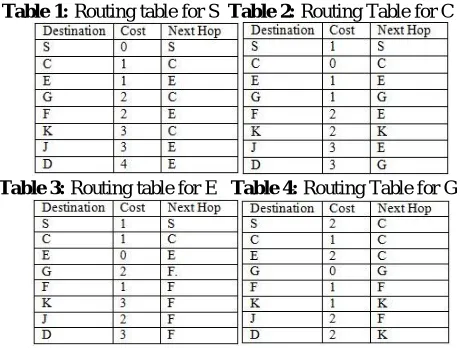
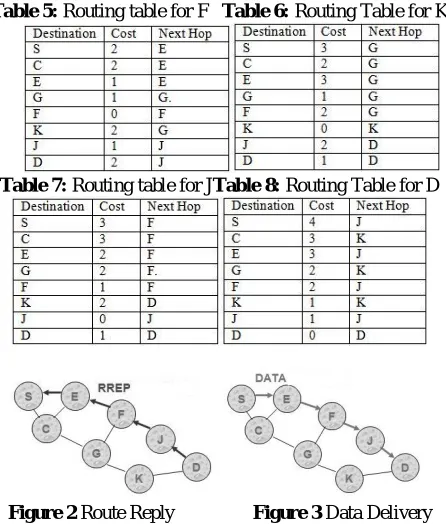
So considering the above graph, using AODV the routing tables will be as follows:
Table 1: Routing table for S Table 2: Routing Table for C
Volume 3, Issue 5, May 2014
Page 67
Table 5: Routing table for F Table 6: Routing Table for KTable 7: Routing table for JTable 8: Routing Table for D
Figure 2 Route Reply Figure 3 Data Delivery
DSR
Solving the same graph using DSR, there is no need of maintaining routing tables and result are as follows:
Figure 4(a)Route Discovery Figure 4(b) Route Discovery
Figure 4(c)Route Discovery Figure 4(d)Route Discovery
Figure 4(e) Route Discovery
Volume 3, Issue 5, May 2014
Page 68
2. Simulator
Simulator is designed to simulate protocols used in ad hoc network like AODV and DSR. Simulator is GUI based so that novice user can easily simulate the protocol and learn the protocol easily without even having the knowledge of the coding. Initial window of simulator is shown in Figure 7.
Figure 7 : Initial Window of Simulator
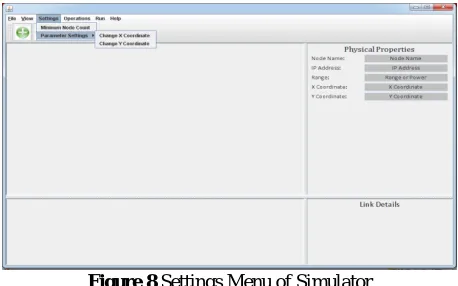
This GUI includes different functionalities of simulator; it has File menu, View menu, Settings menu, Operations menu, Run menu, Help menu, Add node button, Delete node button, start button, stop button, node graph, physical properties details, link details and text window. Settings Menu of Simulator as shown in Figure 8.
Figure 8 Settings Menu of Simulator Features
The GUI features provided in toolkit make it easy to use and understand the protocols behaviour.
The help menu provided on the menu bar includes a video that can guide a new user about how to create a graph and use the simulator.
The user will be prompted with respective messages stating the success or error of simulation.
The user can view the nodes as well as link details any time he wishes, provided in physical property area of simulator.
At the end of simulation user can also go through the updated routing table belonging to every node.
Simulator is platform independent.
Study materials and presentations related to the protocols will be provided in simulator. Working of the Simulator
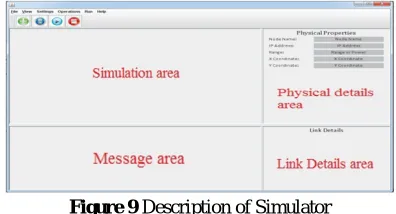
Simulator consists of four areas such as Simulation area, Message area, Physical details area and Link details area.
Simulation area:
Volume 3, Issue 5, May 2014
Page 69
Message area:Dynamic updates of execution are shown in the Message area of simulator. It represents the textual details of the working of simulator. Any modification in the graph will be acknowledged to the user via textual content in this region
Link details area:
In this area the entire graph is represented graphically in compressed manner with link details of each node. It also represents the radius of each node and makes it easy for user to maintain a large graph.
Physical details area:
The routing tables (used in AODV) will be shown in physical details area. It represents details such as Node name, IP address, Range, X-Y co-ordinate of the selected node. Any modification made to the node will be immediately reflected in the routing table.
Layout details of simulator are shown in Figure 9.
Figure 9 Description of Simulator
Simulation starts after user creates graph in simulation area and provides source and destination as required within graph and executes it. After simulation starts various phases of protocol like Route Request, Route Reply, Data Delivery, and link break can be visualized by the user which is represented using various types of symbols.
Symbols for various phases used are:
RREQ packet is used when simulation starts and route discovery phase is initiated. Depending upon protocol’s route discovery mechanism packets are broadcasted in network. Symbol used for RREQ packet in simulator is shown in Figure 10.
Figure 10 Symbol for RREQ packet
RREP packet is used in Route Reply phase which is initiated by destination node upon receiving RREQ packet from source. It indicates the route from the source node to destination node. Symbol used for RREP packet in simulator is shown in Figure 11.
Figure 11 Symbol for RREP packet
Message packet indicates the message is being forwarded via the path found in Route Discovery phase. Symbol used for Message packet in simulator is shown in Figure 12.
Figure 12 Symbol for Message packet
RERR packet is broadcasted when a link between nodes is no longer available. When this packet is broadcasted the data transfer takes place via alternate path in the graph. Symbol used for Message packet in simulator is shown in Figure 13.
Volume 3, Issue 5, May 2014
Page 70
User can also get the details of nodes and also can view the process displayed textually in message area of simulation. After simulation is completed user can change the graph and simulate for same protocol or can select other available protocol and simulate. User can also go for comparative study between the available protocols and can make a conclusion which protocol is more efficient than other in a particular environment.Tutorial Section of Simulator
Simulator consists of tutorial section where user can test his/her knowledge. It consists of exam which has multiple choice questions. Questions are based on the protocols available in simulator. Tutorial section can also be used by Professors to conduct the test on protocol. At the end of test, depending on the questions answered the user can be evaluated and be graded accordingly. Correct answer of question can be viewed after completion of test. It also provides user with some study material regarding various protocol.
Comparison with Network Simulator-2(NS-2)
Traditionally available simulator like Network Simulator-2 requires coding knowledge for a user to create graph and simulate using protocol. Novice users are unable to use this simulator until they gain some knowledge of coding required for simulation. On the other hand, GUI based simulator is a user friendly for a novice user. Without having any knowledge of coding user can still simulate protocol and analyze the performance of protocol. User feels more comfortable to work with software that has user friendly GUI and less complex coding.
3. Conclusion
This paper provides descriptions and working of Simulator used to study mobile Ad hoc routing protocols. The simulator also provides a detailed working of both the protocols using graphical representation. The drag and drop feature of simulator enables user to work with simulator without any coding overhead. It provides a tutorial to test the skills of the user and study materials for detail study of Ad Hoc network routing protocols.
REFERENCES
[1] An Engineering Approach to Computer Network, S. Keshav, Addison Wesly / AT&T, 19
[2] David B. Johnson, David A. Maltz. “Dynamic Source Routing in Ad Hoc Wireless Network”: PA 15213-3891. [3] Dr. Baruch Awerbuch, Dr. Amitabh Mishra, Department of Computer Science, ”Ad Hoc On Demand Routing
Vector(AODV) Routing Protocol” CS:647.
[4] Dr.S.S.Dhenakaran, A.Parvathavarthini “An Overview of Routing Protocols in Mobile Ad-Hoc Network”, Feburary 2013.
[5] D. Johnson, D. Maltz, Y. Hu, Rice University, UIUC, Microsoft Research, Dynamic Source Routing(DSR), Network Working Group, Request For Comments: 4728, Category: Experimental, Feburary 2007.
[6] E. Belding-Royer, S. Das, University of California, University of Cincinnati, Ad hoc On-Demand Distance Vector (AODV) Routing, Network Working Group, Request for Comments: 3561.
[7] Gary Hecht “Computer Networking(IP Addressing, Subnet Masks, and Packets)”
[8] Luke Klein-Berndt,A Quick Guide to AODV Routing, Wireless Communications Technologies Group.