SwyxWare Hosted Solution
Hosted IP-PBX Solution
© 2000-2008 Swyx. All rights reserved.
Legal information
Whilst Swyx attempt to convey accurate and current information relative to the creation of SwyxWare and this documentation, the information provi-ded in this user guide may contain typographical or technical errors.
This documentation, including all information contained herein is provided „as is“, without any warranty of any kind, whether expressed or implied, including, but not restricted to, any implied warranties of merchantability or fitness for a particular purpose or non-infringement.
Trademark: Swyx, SwyxIt!, the integration smiley and „Click. Phone. Smile.“ are registered trademarks of Swyx. All other trademarks and product names are trademarks or registered trademarks of the respective owners. This documentation is proprietary intellectual property of Swyx. Reproduc-tion, adaptaReproduc-tion, or translation of this documentation without the express written consent of Swyx is prohibited and will be prosecuted as a violation of intellectual property rights.
Swyx Solutions AG
Joseph-von-Fraunhofer-Str. 13a D-44227 Dortmund
New Functions... 3
Introduction ... 6
1 What is meant by…? 1.1 Hosted SwyxWare... 8
1.2 Hosted SwyxWare Server (SwyxServer) ... 8
1.3 Front End Server (FES) ... 8
1.4 Database Server ... 8
1.5 Back End Server (BES)... 8
1.6 Provider (Serviceprovider) ... 8
1.7 SoftSwitch ... 9
1.8 Customer... 9
1.9 User... 9
1.10 Virtual telephone system (V-PBX)... 9
1.11 Virtuozzo ... 9
1.12 Virtual Environment (VE)... 9
1.13 Licensing Server ... 9
1.14 Location... 9
1.15 Feature Profile... 9
1.16 Reporting... 10
1.17 Cold Standby Server ... 10
1.18 Administration profiles ... 10
1.19 Trunk and Trunk Groups ... 10
2 The Basics 2.1 Hosted SwyxWare in Detail... 11
2.1.1 Front End Server... 12
2.1.2 Back End Server... 12
2.1.3 Hosted SwyxWare database... 13
2.1.4 Cold Standby Server... 13
3 System Requirements 3.1 Hardware and Software Requirements ... 14
3.1.1 Back End Server (BES) Requirements... 14
3.1.2 Requirements for separated SwyxGate... 15
3.1.3 Requirements for Front End Server (FES)... 15
3.1.4 Requirements of a virtual PBX... 16
3.1.5 Database System Requirements... 16
3.1.6 Network Card(s)... 17
3.2 Virtuozzo ... 17
3.3 Network Requirements and Bandwidth ... 18
3.3.1 Creating an Appropriate Network Environment for SwyxServer... 18
3.4 Mail Server for Voicemail ... 19
3.5 Microsoft Exchange Server for Call Management ... 19
3.6 Lotus Domino Server for Call Management ... 19
4 Scenario 4.1 Overview ... 21
4.2 Components of Hosted SwyxWare ... 21
5 Installation 5.1 Overview ... 23
5.2 Concept of a Number Plan ... 24
5.3 Mail Server ... 24
5.4 Installation of a separated database ... 25
5.5 Installation of a licensing server (back end server) ... 25
5.6 Installation of SwyxWare Administration ... 26
5.7 Configuration of a back end server (BES) ... 26
5.8 Installation of a front end server (FES)... 27
5.8.1 Installation of Virtuozzo... 27
5.8.2 Creation of the clone template for a virtual PBX... 27
5.9 Creation of a customer installation ... 29
5.11 Configuration of a customer installation by the reseller ... 32
5.12 Configuration of a customer installation by the customer ... 33
5.13 Installation of the SwyxWare Web Administration... 34
5.14 Installation of SwyxFax ... 34
5.14.1 Backup of a SwyxFax Server installation... 34
5.15 Update of the Virtuozzo environment ... 35
5.16 Update of an existing Hosted SwyxWare scenario ... 35
6 Administration 6.1 Administration profiles ... 37
6.1.1 Administration profiles in the Standard Installation... 38
6.1.2 Overview of the various administrator levels... 39
6.2 Further Functions of Administration ... 40
6.2.1 Bulk Administration... 40
6.2.2 Reproduction of elements in Administration (Cloning)... 40
6.3 Number of simultaneous connections ... 41
6.4 Feature Profiles ... 41
7 Licenses 7.1 Licenses ... 43
7.2 Reporting... 43
7.2.1 What is entered in Reporting?... 44
7.3 Logging of invoice-relevant activities on SwyxServer ... 47
> New Functions
3
New Functions
New and Improved Functions in SwyxWare
Additional functions and increased flexibility and user-friendliness are typical features of every new version of SwyxWare, making SwyxWare one of the most advanced IP telephone systems on the market. The complete IP architecture and extensive range of functions have made SwyxWare the system of choice for more than 4000 SMBs throughout Europe.
The main changes in Hosted SwyxWare will be listed below: You will find a complete overview about the changes between the versions in the SwyxWare Administrator Documentation.
•
SwyxWare V6.20 - New Functions
Support of the new telephone family SwyxPhone L6xx
With this version, the phones SwyxPhone L620, SwyxPhone L640 , SwyxPhone L660 and SwyxPhone L680 are offered along with the associated key modules. The PhoneManager has been redesigned to support these. The 'PhoneController' service, which was formerly installed with SwyxServer, lapses from this version on. New SwyxPhone firmware for the existing SwyxPhone L4xx/L5xx is unnecessary.
AD (Active Directory) support for the SwyxWareuser configuration To import users that are already present in Windows administration into SwyxWare, there is the User Import Assistant. For further information, please refer to the SwyxWare Administrator documentation.
If new Windows users are created or existing ones removed, then from this version the creation / deletion of the associated SwyxWare user is also integrated via a further tab in the user Windows properties. For further information, please refer to the SwyxWare Administrator documentation.
Enhancement of the Swyx Trace Tool
Starting with this version, the trace files are compressed. Also, the SwyxWare configuration files and the network configuration are added to the trace files. For further information, please refer to the SwyxWare Administrator documentation.
Use of Virtuozzo 4.0 as virtualization platform for SwyxWare Essential SwyxWare Essential can be installed on a virtual platform (Virtuozzo). However, a clone cannot be made permanent.
System-wide Standard Skin definable for all users
Starting with this version, the system-wide Standard Skin is specified as the skin for each newly created user, if the administrator has not provided otherwise.
For existing users or in an update to Version 6.20, it is checked whether the user uses a Standard Skin (LoonaClassicXT, LoonaClassic or BlueLineClassic). In this case it is assumed that the user should use the system-wide Standard Skin. Thus after the update to v6.20, if the administrator changes the system-wide Standard Skin, the skin also changes for all these users. All other configured skins will still be transferred unchanged.
SwyxIt!
Additional Caller List entry for forwarded calls
The caller list in SwyxIt! and SwyxPhone is expanded so that for forwarded calls, more information can be seen about the users involved.
In detail, it shows
• for the recipient, who forwarded the call to him/her, and the number of the original caller with whom he/she then spoke.
• for the forwarder, the number of the original caller, and the person to whom he forwarded this call.
• for the calling SwyxWare user, the final conversation partner. For further information, please refer to the SwyxIt! documentation.
Standard line button for SwyxIt!
It is now possible in the user properties to select a line button, which is then always used for outgoing calls if the user has not explicitly chosen a different line. Previously, the last used line was chosen. This standard line is also used for calls that are initiated via TAPI or Client SDK applications.
Link to the website
It is now possible in SwyxIt! to check whether a newer version is available for download. If so, the user can download and install the new client, provided he has the corresponding rights.
> New Functions
4
Skin preview
The skin can be changed in SwyxIt! and in the SwyxWare Administration. Starting with this version, a preview of the selected skin is displayed when a skin is selected in the drop-down list on the "Skin" tab.
Hosted SwyxWare
Use of Virtuozzo 4.0 as virtualization platform for Hosted SwyxWare Virtuozzo 4.0 is the successor version to Virtuozzo 3.5.1. Hosted SwyxWare can be installed on Virtuozzo 4.0 and then cloned, as previously in Virtuozzo version 3.5.1. An existing Hosted SwyxWare installation on Virtuozzo 3.5.1 can equally be updated with Virtuozzo 4.0.
Logging of invoice-relevant activities on SwyxServer
All changes of parameters that are entered in Reporting, and thus are relevant for billing, are logged. The log contains the time of the change, the old and new parameter values, and the user making the change. The log file can be displayed in SwyxWare Administration or exported. For further information please refer to chapter 7.3, Logging of invoice-relevant activities on SwyxServer, page 47.
Feature profile "Deactivated" in Hosted SwyxWare
In some SwyxIt! scenarios there are users who only use their SwyxIt! access a few days in the year. These users can now be assigned the profile "Deactivated" during their absence. Their entire configuration (announcements, scripts) is then preserved, but is no longer entered in Reporting.
If this profile is assigned to a user, then call routing rules are likewise inactive for this user.
For further information please refer Feature profile 'Deactivated', page 46.
SwyxIt! Mobile
Dual Mode support for SwyxIt! Mobile (Symbian)
Within a WLAN area it is possible to register directly on SwyxServer with a mobile terminal device as a SIP terminal device. It is thereby possible e.g. to log on with a mobile phone both via SIP and via GSM (dual mode). The new version supports a call set-up via SIP, provided the user is in the WLAN area. If no WLAN or SIP registration is present, the call is set up via GSM.
For further information, please refer to the SwyxMobile documentation. Support of further operating systems
Starting with this version, Windows Mobile 6.1 Professional is additionally supported.
Improved behavior of SwyxIt! Mobile
The behavior of SwyxIt! Mobile has been improved in a few points:
• Entries in the exceptions list can now be created simply by export of entries from the existing contacts.
• Configuration of SwyxIt! Mobile via a URL
SwyxIt! Mobile can also be configured until now by import of a configura-tion file. Starting with this version, it is possible to reference this file via a link (URL).
• SwyxIt! Mobile (for dialing
• Changed behavior for MEM usage 'On demand'
For dialing direct from the SwyxIt! Mobile interface, it is assumed that the call should go via the MobileExtensionManager. The parameter "MEM usage (='On demand') only leads to a query if a number is dialed outside SwyxIt! Mobile.
License changes back end server
Voice and fax channels are set up between the front end servers and the back end server. To prevent double payments in Reporting, the channels of a back end server are excluded from the payment.
If the Reporting mechanism identifies a system with fewer than two configured users, then it interprets this as a back end system. In this case users, fax channels and voice channels are not counted.
> New Functions
5
•
SwyxWare V6.12 - New Functions
The changes for this version are concentrated on telephony clients (SwyxIt! and SwyxIt! Mobile). Minor changes were made in the licensing model for Hosted SwyxWare, and the Voicemail and Faxmail have been improved.
License changes back end server
Voice and fax channels are set up between the front end servers and the back end server. To prevent double payments in Reporting, the channels of a back end server are excluded from the payment.
If the Reporting mechanism identifies a system with fewer than two configured users, then it interprets this as a back end system. In this case users, fax channels and voice channels are not counted.
For further information please refer Licensing and reporting of the back end serverThe back end server puts the fax and voice channels into the outside world and manages the licenses. Typically, no users are created on such a back end server. In order that the voice and fax channels are not entered in duplicate in the reporting, a SwyxServer that has no more than one user is not recorded in reporting., page 46.
Changes for Voicemails
Voicemails sent as e-mail attachments now contain the number or name of the caller in the filename. The subject line of the e-mail also contains this information, along with the length of the recorded voicemail.
In the e-mail, you will find a link with which you can access the relevant voicemail directly by remote inquiry.
Changes for Faxmails
The name of the faxmail attachment (TIF or PDF) now contains the date/time, station ID, name and Caller ID.
SwyxWare V6.12 - SwyxIt! Mobile Changes/Enhancements
The functional range of the mobile phone client has been expanded: it is now available for a further operating system (RIM). Further information about the changes and improvements you will find in the SwyxWare Administrator Manual.• Direct calls without using the MobileExtensionManager • Pickup of an active call with the office phone
• Sending of a DTMF string • Right selection key configurable
• Protection of settings with a password • Access to the native calendar
• Better structuring of the SwyxIt! Mobile settings • Automated configuration by configuration file • Number replacement
• Activate speaker / microphone
SwyxWare V6.12 - SwyxIt! Changes
SwyxIt! offers a few new functions in this version.• Operating systems - 64-bit support
• Dialer Mode for SwyxPhone S315(SwyxIt! Dialer) • SwyxIt! Messenger
• SwyxIt! Web Extension
For further information, please refer to the SwyxIt! documentation.
SwyxWare V6.12 - Hardware
The following ISDN cards are supported from this version on: • SX2-express QuadBRI
• SX2-express SinglePRI • SX2-express DualPRI
The new SX2-express ISDN cards supplement the proven SX2 ISDN cards in the Swyx portfolio.
> Introduction
6
Introduction
Swyx develops and markets powerful solutions for company telephony. The "SwyxWare" telephone system is practically a pure software solution, using the existing standard PC platform: telephony thus becomes a network application like your e-mail system, your ERP system for company data management, or your CRM system for management of your customer and prospects database.
What is SwyxWare?
The Swyx solution is software which, with the operating system Microsoft Windows Server 2003, turns your PC into a high-performance and user-friendly telephone system. This telephone system can grow almost seamlessly from a few telephone subscribers to company sizes of around 1000 subscribers.
SwyxWare here offers a previously unknown flexibility and capability for its telephone users, who can choose freely between a wide variety of telephone terminals: as in classic systems, a family of elegant system telephones ("SwyxPhones") and various equipment features are available, but it is additionally possible to connect other manufacturers' IP telephones which conform to the standard, if the efficiency of the terminal devices is not the most important criterion for the selection.
However, a completely new dimension opens up with the PC-based "SwyxIt!" telephony software, which converts any Windows PC into a telephone of unprecedented capability, user-friendliness and flexibility. For each user a handset or a headset is selected, typically connected to the PC via the USB port, and the user then has the most powerful telephone solution integrated directly into his workstation.
Perfect Integration into the ‘Microsoft world’
With a SwyxWare installation in your network, the fusion of computer and telephone is quick and easy: for the first time, users are provided with really intelligent and integrated telephone functions on their workstations. These cover everything from Caller ID and selection help at the click of the mouse, to sophisticated support for Microsoft Office products and even Unified Messaging.
Flexibility Through Individual PC/Telephone Support
Telephony with SwyxWare can be arranged entirely according to the user's personal taste and the desired workstation support - especially elegantly with the PC telephony client SwyxIt!. The requirements of a user who only uses the telephone occasionally
are very different from those of someone who needs to phone a lot. Users in a Logistics department need a different kind of PC/telephone support than communication-oriented Sales staff. The future-proof Swyx telephone solutions take these different kinds of requirements and needs into account. Thus - in addition to being able to choose from the numerous user interfaces which are supplied - the user can decide how his telephone is presented, including how many and which buttons it should have, what information is displayed, which ring tones or melodies are used and when, or which announcements should be played under which circumstances, to which of his callers.
You will find an overview of the many functions supported when using SwyxIt! as terminal equipment for your SwyxServer in the SwyxIt! documentation.
Image ii-1 Example
Unbeatable Effectiveness Through ‘Voice over IP’
The SwyxWare telephone application is a pure software solution. It is thus easy to install, easy to administer and easy to extend. This saves money and it is very simple. Furthermore, the use of Voice over IP technology also means considerable cost savings: moving, deleting or adding subscribers has now become a matter of one or two mouse clicks, and is all done without specialist maintenance staff.
You'll find further details and advice on the efficient use of SwyxWare, interesting use cases and tips and tricks for the operation of more complexSwyxWare installations, not only in this manual but also on theSwyx Internet pages at:
> Introduction
7
Support from Swyx
Swyx offers a comprehensive range of initial services provided by a team of specialists in the context of Hosted SwyxWare. This so called "Jump Start Package" enables providers to implement the services Hosted SwyxWare offers in a quick, efficient and professional way. The solutions contained in the "Jump Start Package" facilitate a smooth implementation of Hosted SwyxWare at the provider. This includes the setup of call termination or the connection of clients, and furthermore the adaptation of internal processes for the provider and the technical training of staff.
The "Jump Start package" enables Providers to minimize the risks associated with a new line of business, and to benefit from the experience of Swyx Solutions AG. In addition, corresponding service contracts for maintaining existing installations are available. For further information, please contact Swyx Sales or send an E-mail to [email protected].
About this Documentation
This documentation contains the information necessary for making the most effective use of the Swyx solution and the advantages it provides.
Who is this documentation written for?
The documentation assumes that you, as system administrator, know the platforms used and their conventions.
Accordingly, a detailed description of Windows menu calls, for example, is not included with this documentation, and adequate basic knowledge of network administration is assumed.
A knowledge of the SwyxWare solution is also assumed, relating to installation as well as configuration. For further information, please refer to the SwyxWare Administrator documentation. This documentation deals only with the specific properties of Hosted SwyxWare which are needed for a hosted application.
The Layout and Organization of this Documentation
• Chapter 1 - Definition and explanation of special terms used in this documentation.
• Chapter 2 - Requirements for operating Hosted SwyxWare
• Chapter 3 - Hardware, software, and network requirements, in addition to the license conditions
• Chapter 4 - Area of application of Hosted SwyxWare
• Chapter 5 - Initial installation and configuration of Hosted SwyxWare • Chapter 6 - Administration of Hosted SwyxWare
• Chapter 7 - Licensing and billing procedure
• The extensive Index provides you with an orientation resource which will help you find topics quickly.
Additional Information
Given the processing time necessary for creating printed documentation, this documentation is not always current for the software. Therefore, you will find additional information here:
• For current information on the products, please see our Internet homepage:
http://www.swyx.com
• Detailed questions concerning the current version are answered in the ‘readme’ file on the SwyxWare CD.
• Furthermore, in the Support database (Knowledgebase), you will find additional information regarding special installation scenarios as well as tips & tricks for the optimal implementation of your SwyxWare.
http://www.swyx.com/support/support-kb.html
• Under the ‘Support’ category of the homepage, you can download the most current version of the documentation (PDF) and software updates:
> What is meant by…?
8
1
What is meant by…?
Definition and explanation of special terms used in this documentation. This chapter describes in detail the terminology commonly used throughout this documentation. Knowledge of the SwyxWare documentation is assumed.
1.1
Hosted SwyxWare
Software installation that covers the complete installation of SwyxWare. This includes the installation at the service provider as well as the installation of the telephony clients (SwyxIt! or SwyxPhone) at the customer.
The provider sets up the database, the front end servers and the back end servers. The provider is thus responsible for the interfaces to other networks, e.g. to the PSTN or to other providers.
Depending on the sales model of the provider the provider himself or the administrator of the customer can create and configure the telephone users.
The supplied telephony services are invoiced with detailed reporting.
1.2 Hosted SwyxWare Server (SwyxServer)
In a service provider's environment this is the equivalent of a SwyxServer. This SwyxServer is installed in a virtual environment (VE) with Windows 2003 server as operating system, and offers the provider's customers the functionality of a telephony system.
For further information about hard and software please refer to the chapter 3.1, Hardware and Software Requirements, page 14.
1.3
Front End Server (FES)
Front end server refers to a computer on which several virtual instances are set up with Windows 2003 servers (VEs). A SwyxServer (Hosted SwyxWare server) is installed on each of these virtual instances. For further information please refer Front End Server, page 12.
1.4 Database Server
The database server is a PC (or cluster of PCs) with Windows 2003 servers, on which the Microsoft SQL database is installed. We always recommend using a cluster, to ensure the appropriate failure safety. This shared database contains all data of the individual SwyxServers. Each SwyxServer finds its users and their profiles here, along with the relevant scripts. The reporting of the number of users set up, and their functional range, occurs directly from this database.
For further information please refer Hosted SwyxWare database, page 13.
1.5
Back End Server (BES)
Back end server refers to a computer which handles the connections to other networks within a Hosted SwyxWare. A back end server within a Hosted SwyxWare installation takes on the licensing and monitoring of the front end servers, and the reporting (licensing server).
The following services can be installed here on the PCs with Windows 2003 servers: • SwyxGate for the connection to the PSTN (ISDN or analog)
• SwyxLinkManager for SIP connections e.g. to other providers or to a SoftSwitch, which then offer access to the public telephone network • Reporting service (on the licensing server) for the daily recording of
installed users and feature profiles, and for sending the monthly reports It is naturally possible to use several PCs here, according to requirements. The individual SwyxServers then use this functionality within the scope of the purchased channel licenses.
For further information please refer Back End Server, page 12.
1.6 Provider (Serviceprovider)
A provider (hoster, service provider) offers accesses to the Internet. In this case the provider is the contractor, who has an installation of Hosted SwyxWare and offers customers (usually other companies) these telephony services.
> What is meant by…?
9
1.7
SoftSwitch
The SoftSwitch is a system that the provider uses to receive the calls via SIP (LinkManager) from the back end server and route them into the public telephone network (PSTN).
1.8 Customer
Customers of a provider can be companies as well as persons with a single line. In this case the customer uses the telephony services of the provider in the form of a virtual telephone system (V-PBX).
1.9 User
A user is a person, a group or a location (for example, a conference room), for whom/ which an account has been set up on the SwyxServer. Each account on SwyxServer is assigned a user name and a PIN (Personal Identification Number). The PIN is required for user authentication when using the SwyxPhone and for remote inquiry. When SwyxIt! is started your access authorization is automatically checked and your user account on SwyxServer is recognized. If SwyxServer does not find a SwyxServer account for your user login, then SwyxIt! will be exited and an error message will appear. If several SwyxServer accounts exist for your user account, you will be prompted by SwyxIt! to choose one of these accounts.
Each user’s individual settings are stored centrally (for example, entries in a personal telephone book, forwarding definitions, or the assignment of extension numbers to lines). This means that you will always find the same telephone environment, whichever PC or SwyxPhone you logon to!
1.10 Virtual telephone system (V-PBX)
V-PBX denotes a virtual telephone system. This is implemented with Hosted SwyxWare as a SwyxServer, which is installed at the provider on a virtual instance (VE) and is exclusively available to the customer.
1.11 Virtuozzo
Virtuozzo is the software that supplies multiple isolated virtual environments (VE) on a single physical PC. This means that each of the provider's customers can be
supplied with a separate SwyxServer installation. Virtuozzo is a product of Parallels (http://www.parallels.com).
1.12 Virtual Environment (VE)
'Virtual Environment' denotes an isolated (Windows) server instance, implemented by Virtuozzo. This instance behaves like a stand-alone PC. A customer thus has an exclusive server as PBX, but without using separate PC hardware for each server.
1.13 Licensing Server
If there are multiple back end servers within a Hosted SwyxWare installation, one of these servers acts as license administrator. The Hosted SwyxWare license is input, or made permanent, on this licensing server. The reporting service is activated on this server, i.e. a reporting database is also only needed for this server. All other back end and front end servers reference this licensing server for licensing.
1.14 Location
The location is effectively a property of the telephone system. Call numbers are interpreted using this property, e.g. a call into the local network is thereby recognized.
Example:
The SwyxServer has the property: England (code 44), Luton (prefix 231)
If the user now dials a number e.g.9345678 (’9’ as public line access), this is recognized as a local number and the number +44231345678 is dialed. This configured location is naturally independent of where the provider's PC actually physically is.
1.15 Feature Profile
Various functions can be made available to each user: the use of the Call Routing Manager, the possibility of receiving voicemail or recording calls. These functions are combined in a profile. An individual user's functional range can be expanded
> What is meant by…?
10
quickly and easily at any time, by assigning him a different profile. The assigned profiles are used in reporting as the basis for the recording of the functions used. If there is a functionality in the feature profile which should not be used by the user himself will be deactivated by the user administrator.
For further information please refer to chapter 6.4, Feature Profiles, page 41.
1.16 Reporting
Reporting denotes the reporting procedure for the current user numbers and their functional range. This reporting procedure serves for continuous licensing and the related invoicing.
For further information please refer to chapter 7.2, Reporting, page 43.
1.17 Cold Standby Server
Cold Standby Server denotes a server on which multiple virtual environments (VE) are already preinstalled. This server can be started if one of the current installed front end servers fails. The SwyxServers of the virtual enviroments obtain the necessary user data for operation from the database.
For further information please refer Cold Standby Server, page 13.
1.18 Administration profiles
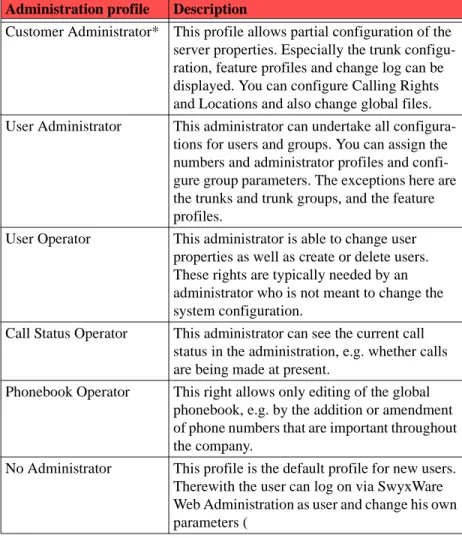
An administration profile is assigned to each user. These profiles define which areas a user can look at and change. You can choose from a variety of profiles:
For further information please refer to chapter 6.1, Administration profiles, page 37.
1.19 Trunk and Trunk Groups
"Trunk" denotes a connection into another network, e.g. the public telephone network. A connection to another network can be e.g. an "ISDN trunk", a connection to the Internet an "SIP trunk". Connections (trunks) of the same type can be combined to form groups. The trunks of a trunk group then have the same properties - the trunk groups can therefore be seen primarily as capacity expansions.
Different trunk groups can be differently prioritized by the administrator. The result is e.g. that calls are handled with preference given to a cost-efficient connection (e.g.
an SIP trunk directly to the Internet). If this is not available, a lower-priority path is chosen, e.g. an ISDN trunk to the normal telephone network.
> The Basics
11
2
The Basics
Requirements for operating Hosted SwyxWare
Hosted SwyxWare is a client-capable software package of the well-known and proven telephony application SwyxWare.
Please refer to the relevant SwyxWare administrator documentation for details of the installation, configuration and operation of SwyxWare.
Knowledge of the installation and configuration of SwyxWare is assumed in the following. For further information, please refer to the SwyxWare Administrator documentation.
Hosted SwyxWare is based on this Swyx technology, and now enables providers to offer their customers optimally scaled telephony services. The telephony server remains with the provider, who installs it and configures it according to the customer's wishes. The customer installs only the telephony clients, either as SwyxIt! on the employees' PCs or as stand-alone IP telephones, e.g. from the SwyxPhone family. If the customer wishes, his system administrator can also be allowed to maintain his own telephony server. SwyxWare offers the option of administration at various levels.
The telephony services are invoiced using a reporting system, which takes into account the functional range permitted for the individual users of SwyxWare. Each user's scope for use is defined by the provider or by the reseller, with the help of so-called features profiles (see chapter 6.4, Feature Profiles). For further information please refer to chapter 7.2, Reporting, page 43.
Swyx offers a comprehensive range of initial services provided by a team of specialists in the context of Hosted SwyxWare. This so called "Jump Start Package" enables providers to implement the services Hosted SwyxWare offers in a quick, efficient and professional way. The solutions contained in the "Jump Start Package" facilitate a smooth implementation of Hosted SwyxWare at the provider. This includes the setup of call termination or the connection of clients, and furthermore the adaptation of internal processes for the provider and the technical training of staff.
The "Jump Start package" enables Providers to minimize the risks associated with a new line of business, and to benefit from the experience of Swyx Solutions AG. In addition, corresponding service contracts for maintaining existing installations are available. For further information, please contact Swyx Sales or send an E-mail to [email protected].
2.1 Hosted SwyxWare in Detail
The installation of Hosted SwyxWare contains several server installations. The heart of the Hosted SwyxWare is the BackEnd server, which manages the license and provides the connections to the public network (ISDN, SIP). In a big installation there can be more than one BackEnd-Server and also separated additional gateways. Only one server can be the license server on which the reporting service is installed on. Additionally there may be several FrontEnd server, on which some virtual instances can be installed on using Virtuozzo. Each of these virtual instances is a virtual PBX for a customer. The data of the customer installation will be managed in a database on a separated server.
The components listed below form the basis of a Hosted SwyxWare installation. Such an installation can be expanded according to the requirements.
> The Basics
12
Image 2-1 Minimum Scenario for Hosted SwyxWare
2.1.1 Front End Server
With the help of Virtuozzo, several SwyxServers are installed on this PC with the operating system Windows 2003 Server x64-bit edition. Each of these SwyxServers is a virtual PBX exclusively for one customer, who can reach it via IP.
If more than four virtual environments are to be operated on one system, the Microsoft Data Center Edition must be used.
The front end server is connected via a further network card to the internal network, in which the database server is also available.
None of these SwyxServers has its own SwyxGate. To establish the connection to the outside world, each of these SwyxServer is connected via a SwyxLink trunk to the back end server, which manages the connections to the outside world. The number of channels per SwyxLink trunk also defines the number of simultaneous outside calls customer's staff can make.
Depending on the utilization of a PC, a further front end server with further SwyxServer instances can be added to the existing ones.
2.1.2 Back End Server
The SwyxServer of the Hosted SwyxWare is installed directly on this PC with the operating system Windows 2003 Server. The main task of this server is to establish the connection between the virtual telecommunications systems (customer SwyxServer) and the outside world. This server accordingly hosts
• one or more SwyxGates for the connection to the public telephone network (ISDN trunks or analog trunks). SwyxGates can be installed on one or - for performance or failure safety reasons - on multiple physical PCs with corresponding ISDN or analog cards.
• a LinkManager, which establishes SIP connections e.g. to other providers or directly (SIP trunks). The connection to a SoftSwitch of the provider is also managed here.
If only one back end server is present in an installation, it handles both the connection to the outside world and the licensing server function.
> The Basics
13
Licensing Server
The license server will be installed on a BackEnd server. It manages the Hosted SwyxWare license, and licenses all other servers within the Hosted SwyxWare installation. The reporting service, which prepares a report about the configured users, the associated feature profiles and the server configuration at appropriate time intervals, is active on the licensing server. For the report preparation, all installed databases of the Hosted SwyxWare are evaluated daily, and the results are stored in a reporting database. The reporting service then extracts the information from this reporting database. This service must be activated at all times within the Hosted SwyxWare.
For further information please refer to chapter 7, Licenses, page 43.
2.1.3 Hosted SwyxWare database
On this central server, which cannot be seen from the customer side, a Microsoft SQL Server 2005 is installed. This server manages all databases of the installed front end servers and provides the database for the report information.
Swyx recommends the use of a cluster system on redundancy grounds, to ensure the necessary failure safety for the SQL databases.
2.1.4 Cold Standby Server
This server should act as a substitute for a failed front end server. A Windows Server operating system and Virtuozzo are already preinstalled on the cold standby server. The necessary SwyxServer instances are created (cloned) in the Virtuozzo Management Console with the help of the prepared template on the cold standby server. These virtual instances have not yet been assigned names or databases.
The cold standby server does not use the SwyxWare standby functionality as this always relates to exactly one SwyxServer and thus cannot be used for a front end server with multiple SwyxServer instances.
If a front end server fails, it is replaced by the administrator with the cold standby server. The names and the connection to the relevant database are configured for these SwyxServer instances with a configuration program (IpPbxConfig). These new instances can then connect to the database and are once again operational with all information relating to the respective customer, since this customer information is centrally stored in the database.
> System Requirements
14
3
System Requirements
Hardware, software, and network requirements, in addition to the license conditions
Please note that the following hardware requirements apply only to a Hosted SwyxWare installation. If you want to run other processes on this PC, such as a file server application, the hardware requirements are different.
3.1 Hardware and Software Requirements
It is only possible to give examples of hardware requirements here. They are very much dependent on the number of SwyxServer instances on a front end server, the calls to be handled simultaneously, and the extent of the script editing.
A hardware scenario is presented below which covers four SwyxServer instances each with 20 users. It is assumed there will be 1000 call set-ups per hour and per instance.
Microsoft .NET Framework and WSE Runtime 3.0
For the installation of SwyxWare, Microsoft .NET Framework v2.0 and WSE Runtime 3.0 (Web Services Enhancements) are required. These components are also required for installing SwyxWare Administration and the telephony client SwyxIt!, since the SwyxWaredatabase is now accessed via the web services. All software components are available on the CD. If you start the installation from the CD, Setup checks the availability and suggests installation of these components.
Please make certain that the most up-to-date Service Pack from Microsoft is installed when using the Windows system. Install the security updates provided by Microsoft on a regular basis:
http://windowsupdate.microsoft.com
Hard Drive Memory and File System for SwyxWare
A complete SwyxWare installation needs around 130MB disk space (80MB in the program directory and 50MB in the "Documents and Settings" directory). The files assigned to the users, such as their own call routing scripts, voicemail announcements, bitmap files, ringing tones or skins, are stored with Hosted
SwyxWare in the database, and therefore do not add to the SwyxServer memory requirement.
Prerequisite for SwyxFax
In order to offer SwyxFax within the installation, the provider or his SIP interface to the public telephone network must support the T.38 protocol.
3.1.1 Back End Server (BES) Requirements
The back end server establishes the connection between the individual virtual PBXs and the outside world. The limiting factor is the management of the configured voice channels.
Typically, no users are configured on this server. Please refer to Licensing and reporting of the back end serverThe back end server puts the fax and voice channels into the outside world and manages the licenses. Typically, no users are created on such a back end server. In order that the voice and fax channels are not entered in duplicate in the reporting, a SwyxServer that has no more than one user is not recorded in reporting., page 46 for further information on special licensing of a back end server.
Back end server Requirements
CPU Dual Xeon Dual Core 3.2 GHz
Memory 4 GB for 400 voice channels via SIP or 76 channels via
ISDN Hard disk memory, server 130 MB
Corresponds to the installation of 'normal' SwyxWare Hard disk memory,
administration
30 MB
Hard disk memory, tracing If you want to save trace outputs to the hard disk during operation, further disk space has to be provided for this. Memory space in the
database
60 MB
Network Adapter 100 MBit
Software • Windows Server 2003 x64 bit
• all available operating system updates • Microsoft .Net Framework 2.0 • WSE 3.0 Runtime
> System Requirements
15
3.1.2 Requirements for separated SwyxGate
The access to the public network can be via a separate SwyxGate. SwyxGate requires NO special hardware equipment for operation. The software can be run on all standard PCs on which Windows Server 2003 or Windows XP Professional can also be run. The hardware requirements correspond essentially to those recommended by Microsoft for the use of these operating systems.
SwyxGate Requirements
CPU Pentium IV, 3 GHz HT (for SX2 SinglePRI)
Dual Xeon (for SX2 DualPRI)
Memory 512 MB
Disk Space 25 MB
Network Adapter 1 GBit/s
PCI Plug-In Slot one free plug-in slot for each ISDN card
Software • Windows Server 2003 (32 bit or 64 bit) or
Win-dows XP Professional
• all available operating system updates • Microsoft .Net Framework 2.0 • WSE 3.0 Runtime
3.1.3 Requirements for Front End Server (FES)
On a front end server you need space for• the Virtuozzo installation and the related management tools (Chapter 3.2, Virtuozzo),
• the clone installation that serves as a template for all virtual PBXs
• the virtual SwyxWare instances themselves, which can be configured by the customer (Chapter 3.1.4, Requirements of a virtual PBX).
The requirements of a front end server are naturally dependent on the number of SwyxWare instances (virtual PBXs) to be installed here. The memory requirement of each individual virtual PBX is only marginally dependent on the number of users, since the user data itself (e.g. for announcements, scripts etc.) is stored in the database.
The installation values from the laboratory can provide a clue here. For a front end server with a Virtuozzo installation and e.g. 6 (30) SwyxWare instances each with 20 users, where these users have not installed any further scripts in addition to the standard call handling, the following values apply:
For the virtualization of the operating system, please note the Microsoft license conditions, e.g. at present the Standard Edition cannot be virtualized, the Enterprise Edition only four times, but the DataCenter Edition more often. You will find further information on this at
http://www.microsoft.com/germany/serverlizenzierung/default.mspx. Front end server Requirements
CPU Dual Xeon Dual Core 3.2 GHz
Memory 4 GB (for 6 vPBX) to 32 GB (for more than 30 vPBX)
Disk Space 200 GB
Network Adapter dual Ethernet Board, 1Gbit/s
Software • Windows Server 2003 x64 Edition (for more than
four virtual instances the Data Center Edition is needed)
• all available operating system updates • Microsoft .Net Framework 2.0 • WSE 3.0 Runtime
> System Requirements
16
3.1.4 Requirements of a virtual PBX
The requirements of a single virtual environment are not dependent on the number of users set up, since this data is all stored in the database. Indications for a single virtual instance can be given here.
Please note that on a virtual instance only SwyxWare is installed, and no further applications from third-party manufacturers.
Virtual PBX Requirements
Disk Space SwyxServer 130 MB plus the space needed by the other software components (see below)
Hard disk memory, administration
30 MB
Hard disk memory, tracing If you want to save decentralized trace outputs to the hard disk during operation, further disk space has to be provided for this. We recommend at least 8 GB for each virtual environment.
Memory space in the database
60 MB (initial database), and additionally the data for users that are set up
Software • Windows Server 2003 x64 Edition
is cloned by the Virtuozzo installation from the ope-rating system. Please note the Microsoft license con-ditions.
• Microsoft .Net Framework 2.0 • WSE 3.0 Runtime
• Virtuozzo 3.5.1 SP1
3.1.5 Database System Requirements
The database system can be installed on a cluster. It supplies the application data for the individual virtual PBXs. The size of the system is thus dependent on the number of configured virtual PBXs. The data for the reporting is also recorded here.
Requirements
CPU Pentium IV, 3 GHz HT
Memory 2 GB
Disk Space • 60 MB for each virtual PBX
• 5 MB for each installed user
Without memory space for recorded calls! Recordings should not be stored in the database: they should go in a separate directory at the provider.
Network Adapter 1 GBit/s
Software • Windows Server 2003, Enterprise x64 Edition
• Microsoft SQL Server 2005, Enterprise Edition If the database is configured as a cluster, the opera-ting system must be at least Windows Server 2003 Enterprise and the SQL Server Enterprise must be installed in the cluster configuration.
> System Requirements
17
3.1.6 Network Card(s)
There are two networks present in the Hosted SwyxWare installation: the frontnet over which the customers reach their respective SwyxServer, and the backnet, which contains e.g. the back end server and the database server as well as the interfaces to other networks.
We recommend using two static IP addresses for the front end server. Internally (to the back end server) it is possible also to distribute the IP address via DHCP. Externally, a static IP address for the customer is always needed.
Front end server
Two network cards or a dual network card should be installed in the front end servers. This provides on one side for the customer's access to his telephony server, and on the other side the access to the back end server and the database.
Back End Server and Database Server These servers need only an access to the backnet.
3.2 Virtuozzo
The Hosted SwyxWare scenario was tested with Virtuozzo 3.5.1 SP1 and Virtuozzo 4.0.
For the management of Virtuozzo the Virtuozzo Management Console (VZMC) is recommended. That has to be licensed separately. For Virtuozzo 4.0, the management tool is called "Parallels Management Console". The program "Parallels Infrastructure Manager" (PIM) enables Virtuozzo to be administered online without restrictions. Both tools require licenses, but are included in the Virtuozzo licenses assigned by Swyx. In the following, the configuration via Management Console is therefore described.
The recommendations from Virtuozzo for the Management Console (VZMC) are listed in the table below.
Regardless of the hardware used, the number of licenses for virtual instances per hardware node is limited to 100 in the software obtained by Swyx from Parallels. For further information please refer directly to the manufacturer's website:
http://www.parallels.com/en/products/virtuozzo/tools/specs/
Front end server Requirements
Memory 25 MB (5 MB per 100 virtual environments is
recom-mended)
Disk Space 60 MB
added to this is the necessary space for the individual virtual PBXs
> System Requirements
18
3.3 Network Requirements and Bandwidth
The IP network, in its function as a transport medium, has a significant influence on the voice quality of the telephone connections. Therefore, special attention must be paid to the configuration of the network.
We recommend ensuring an adequate IP connection: at least a network with 100Mbit/ s, according to requirements a network with 1 Gbit/s. The requirements depend very much on the number of systems in use and the number of active users.
For calls within a virtual PBX the media data stream is handled directly between the two terminal devices, i.e. only bandwidth in the end customer's LAN is needed for these.
As well as the connection from the provider to the end customer, the connection from the provider to the SoftSwitch as ISDN interface into the public telephone network must also be considered here.
Practical experience suggests the following recommendations for the bandwidth in relation to the number of users:
For the example of a front end server with 32 virtual PBXs and average user numbers of 20, this gives a requirement of 224 channels and, at 160 kb/s per channel (80 kb/s per media stream - two media streams are needed for a call), a bandwidth of 17.9 Mb/ s.
Number of users
Chan-nels Bandwidth
10 4 0.6 Mb/s
20 7 1.0 Mb/s
50 14 2.2 Mb/s
100 25 4.0 Mb/s
500 60 8.0 Mb/s
1000 90 14.4 Mb/s
3.3.1 Creating an Appropriate Network Environment for SwyxServer
In order for the SwyxWare telephone system to operate smoothly, the existing network infrastructure is a deciding factor in addition to the basic software and hardware requirements described above. The following provides a description of an environment that offers optimal conditions for the functioning of SwyxServer.Suitable setup of the SwyxServer PC
To create optimal conditions for SwyxServer, the following should be set up: • The PC, on which the SwyxWare is installed, will be configured
exclusively as the telephony server. Other network services, such as e-mail server, DHCP or DNS server, should not be provided on this PC.
• SwyxServer is given a permanent IP address (Public IP address). Suitable setup of the network
• Infrastructure of the Network
SwyxWare uses the Internet Protocol (IP) to transfer voice and control data. Each client and SwyxServer PC requires a unique IP address in the net-work.
A complete layer 2 switched network guarantees an optimal transmission of the voice and control data even in the case of a large number of Swyx-Ware telephone calls or in a network with a great deal of data traffic (e.g. file transfer, HTTP, FTP) but it is not absolutely necessary.
The SwyxServer PC or the SwyxGate which has been installed on a sepa-rate PC must be connected to a switch. This will ensure that there is suffi-cient bandwidth available for the data traffic between the telephony clients (SwyxIt! or SwyxPhone) and SwyxServer.
• Quality of Service
In order to improve the voice quality, the use of Quality of Service in the network is advantageous. Especially with narrowband connections (e.g. home connections), the prioritization of the packets is important for voice transmission.
SwyxWare also supports QoS for RTP and SIP packets.
The following Knowledgebase article describes in detail the procedure:
> System Requirements
19
• DHCP (Dynamic Host Configuration Protocol)
If the IP addresses for the telephony clients (SwyxIt! and SwyxPhone) are to be distributed automatically, a DHCP server which is in the customer's network can be used.
This distribution offers the following advantages: Unique assignment of IP addresses in the network
Automatic transmission of the SwyxServer IP address to the clients To find out how to install a DHCP server and how to configure it for the use of telephony clients, see the SwyxWare documentation.
• DNS (Domain Name Service)
An Active Directory requires a DNS Server located in the network. The Active Directory uses DNS as a locator service, which helps to assign the names of the client’s FQDN (Fully Qualified Domain Name), domains, locations and services in the Active Directory of an IP address.
If there are SwyxIt! instances in the network which are installed on the ope-rating system Windows Vista, please use DNS to assign the IP addresses. If the above mentioned components are correctly configured, SwyxWare will be provided with an optimal environment.
Link-up of the customer terminal devices
We recommend linking the customer terminals via VPN (Virtual Private Network) to the virtual PBXs. This is especially necessary if the customer uses a SwyxPhone or wants to implement a DECT link.
Such a VPN link further ensures greater security for both sides (provider and customer).
3.4 Mail Server for Voicemail
To deliver voicemails you will need an SMTP mail server that can be contacted by SwyxServer.
The SMTP authentication (user name and password) will be supported.
In order to remotely check Voicemails, the mail server must support IMAP4 protocol. During remote inquiry, SwyxServer uses this protocol to access the user’s mailbox, in order to play the voicemails stored there upon demand.
3.5 Microsoft Exchange Server for Call Management
With the Call Routing Manager, SwyxWare further offers calendar-based call management. If you would like to take advantage of this, you must have a Microsoft Exchange Server which is accessible via the MAPI interface. In order to ensure this, please install the Microsoft Outlook Client on the SwyxServer.
For further information, please refer to the SwyxWare Administrator documentation.
3.6 Lotus Domino Server for Call Management
If you have a Lotus Notes environment, you can also carry out an integration for calendar based call management.
> Scenario > 4
20
4
Scenario
Area of application of Hosted SwyxWare
SwyxWare can be used in a very wide range of scenarios. Only one subset will be considered in this documentation: Hosted SwyxWare. This is SwyxWare which gives providers the option of offering SwyxWare as a solution which can be offered in freely scalable form by a provider as a service to other companies.
> Scenario
21
4.1 Overview
For a provider, the specific environment created by the supported services is of interest:
Image 4-2 Hosted SwyxWare
Various possibilities arise: • A - Hosted Company
The telephony clients in a company are interfaced directly to Hosted Swyx-Ware, i.e. SwyxWare set up at a provider and hosted there.
• B - Private User, Home Office with SwyxIt!
Individual telephony clients are linked via a SIP connection to the Hosted SwyxWare.
• C - Company with SwyxWare
A company that already uses SwyxWare as a telecommunication system can be linked via a SwyxLink to the provider's Hosted SwyxWare.
4.2 Components of Hosted SwyxWare
The various Hosted SwyxWare components are installed at the provider in the back and front networks.
Image 4-3 Overview of a complete Hosted SwyxWare installation
Within his network, a provider installs one or more front end servers (FES) in the so-called front network. On each front end server, several SwyxServers are installed with the help of Virtuozzo. Each of these SwyxServers is assigned to a customer. The
> Scenario
22
provider's customers connect their telephony clients to 'their' SwyxServer, which is installed on such a front end server.
In the back end network, which cannot be reached by the customer computers, are one or more back end servers and the database server. The database server in turn can be installed on one or more PCs in the form of a cluster.
The front end servers are connected via a SwyxLink to the back end server. The back end server manages the reporting mechanism and the connections to the outside world. For example, several PCs each with a SwyxGate can be installed here, in order to provide access via the built-in ISDN cards to the public telephone network. On the other hand, the back end server also supplies the access to the Internet or to other SIP providers (Soft-Switch) via the LinkManager.
Connection to the Customer, Firewall
The connection to the customer is provided via an IP route, which in most cases (as soon as SwyxPhone is used) is implemented through a VPN. Suitable VPN systems should be used for this; they will usually already provide a firewall on both sides.
> Installation
23
5
Installation
Initial installation and configuration of Hosted SwyxWare
5.1 Overview
A complete Hosted SwyxWare scenario consists of at least one back end server (licensing server) and multiple front end servers.
Multiple virtual instances (VEs) are set up on the front end servers with the help of Virtuozzo. A clone template is created, which already contains a SwyxServer, a SwyxWare Administration, possibly SwyxFax, a user 'Administrator' and feature profiles defined by the provider.
Thereafter for each customer the clone template will be copied and named accordingly. This customer instance will be bound to a - copied- database and afterwards customer specific configured.
For further information please refer to chapter 2, The Basics, page 11.
The following specific actions must be executed. You will find references to the detailed instructions for every step. Knowledge of the SwyxWare Administrator documentation is assumed for the configuration of SwyxWare.
No. Step Explanation
1 Preparation of the systems (FES, BES)
Back end system
• Operating system with current service packs and updates
• .NET 2.0 • WSE 3.0 • 1 network card Front end system
• Operating system with current service packs and updates
• Virtuozzo • .NET 2.0 • WSE 3.0 • 2 network cards
Make certain that the necessary hardware and software conditions have been fulfilled.
For further information please refer to chapter 3.1, Hardware and Software Requirements, page 14.
2 Network Check your network in order to guarantee interference-free transmission.
For further information please refer to chapter 3.3, Network Requirements and Bandwidth, page 18.
3 Install Micro-soft SQL Server 2005
Install a Microsoft SQL 2005 server on a separated PC (cluster).
Create the following databases: • database for the reporting
• a database for the back end system
• for the front end template a database, from which all further databases are then duplicated.
Configure the access rights (DB user).
For further information please refer to chapter 5.4, Installa-tion of a separated database, page 25.
> Installation
24
4 Install back end system
Install a SwyxServer as back end server (licensing server) and the SwyxWare Administration.
Configuration of the SwyxLink trunks of the BES:
• Use only canonical numbers for the forwarding to the FESs
• For each trunk configure "Signal the unassigned num-ber / URI"
• Configure NO public number limitation
For further information please refer to chapter 5.5, Installa-tion of a licensing server (back end server), page 25. 5 Virtuozzo
installation
Install Virtuozzo on the front end system for the virtual environments.
For further information please refer Installation of Virtuozzo, page 27.
6 FES: Create clone template
Create a complete SwyxWare installation on a virtual server. As database, use the database already created for the front end template.
For further information please refer to chapter 5.8.2, Creation of the clone template for a virtual PBX, page 27. In particular, create the administrator profiles and the feature profiles which you want to use later on all customer servers. For further information, please refer to the
SwyxWare Administrator documentation. 7 Database for
customers
Before creating a customer server, duplicate the FES template database. For further information please refer to chapter 5.4, Installation of a separated database, page 25. 8 FES:
Customer installation
Use the clone template to create a SwyxServer for a custo-mer. Specify the database created for the custocusto-mer. For further information please refer to chapter 5.9, Creation of a customer installation, page 29.
9 Adaptation of the customer installation
Adapt the cloned SwyxServer installation with the help of ’IPPBXConfig’.For further information please
refer Configuration with IpPbxConfig, page 29.
No. Step Explanation
5.2 Concept of a Number Plan
Make sure that a flexible, sustainable number concept is designed before Hosted SwyxWare is installed.
In doing so, consider
• which numbers can be supplied by the provider for the customer and • the assignment of these public numbers to the internal numbers within a
customer installation.
5.3 Mail Server
For the voicemail functionality and the reporting (licensing server), you will need an SMTP mail server. When installing SwyxServer you will need the name of the mail server, e.g. Mail.company.com. For further information, please refer to the SwyxWare Administrator documentation.
10 Configure SwyxLink
Create a SwyxLink from the customer's SwyxServer to the back end server. For further information, please refer to the SwyxWare Administrator documentation.
11 Further custo-mer installati-ons
Create further databases and (using the template) SwyxSer-vers for further customers.
12 Additional FES
Install further FES as necessary.
13 Create gate-ways
For access to the public telephone network (ISDN) and to other SIP providers, install suitable gateways (SwyxLink-Manager or SwyxGate) on the back end server. For further information, please refer to the SwyxWare Administrator documentation.
14 Further BES Install further back end servers if necessary, e.g. for setting up separated gateways.
> Installation
25
5.4 Installation of a separated database
Create a separated Microsoft SQL database for user administration for each SwyxServer included in a Hosted SwyxWare installation (FrontEnd and BackEnd). The users configured for this SwyxServer are managed in this database along with all other server parameters.
It is recommended to use the template database which already contains profiles, an administrator and other pre-configured parameters. After the first configuration this database can be copied for every server you want to create using the Backup&Restore mechanism.
When installing the SwyxServer you then give the instance name and the name of this database. The configuration wizard creates the necessary database schema for SwyxServer when configuring the SwyxServer.
Please note that the backup and restore function that can be used in the SwyxWare variant for businesses is not applicable for the Hosted SwyxWare. This backup cannot be used since the database is not installed locally on the same PC, but was implemented as a separated database. Please use the SQL server backup mechanism for the Hosted SwyxWare.
database for the reporting
For the daily data entry by the licensing server, a reporting database is needed. Data is collected here within the entry period (one month). The reporting uses the data of this database and this will be sent by e-mail both to the provider and to Swyx. For further information please refer to chapter 7.2, Reporting, page 43.
Access rights for the databases
SwyxServer needs only restricted rights for database access. During the installation, the Configuration Wizard awards the necessary rights (db_datawriter; db_datareader; IpPbxUser) to the user account under which SwyxServer will later access the database.
Please note that for copied databases the access rights must then be manually assigned. Alternatively, the Configuration Wizard can also be run again here.
5.5 Installation of a licensing server (back end server)
The first SwyxServer you install should be a back end server, the licensing server in fact. This server manages the Hosted SwyxWarelicense, so that there is no further license entry for further installations of the front end servers. If necessary you can also create more back end servers later, e.g. for linking to SoftSwitches. In these installations you reference the previously existing licensing server for the license.
Preparation
Before the installation of the licensing server, create two databases: • SwyxWare database
All the SwyxWare data is stored in this database: user parameters, trunk group parameters etc.
If the license server is used only for administration of the licenses and the trunks and trunk groups, the database will remain small (see Licensing and reporting of the back end serverThe back end server puts the fax and voice channels into the outside world and manages the licenses. Typically, no users are created on such a back end server. In order that the voice and fax channels are not entered in duplicate in the reporting, a SwyxServer that has no more than one user is not recorded in reporting., page 46).
• Reporting database
This database is exclusively for the entry of the reporting data. How to install a licensing server (back end)
1. Log on with a user account which has local administrator rights.
2. Start the Hosted SwyxWare installation.
You start the installation from the CD using the link on the server installation page or from the command line. In the command line enter:
msiexec.exe /i setup.msi HOSTED=1
3. Please refer to the SwyxServer documentation for the individual steps in the installation of the SwyxServer.
In particular enter during the server configuration
• the created SwyxWaredatabase Enter the user account and the password with which the server should access this database.
• the database created for the reporting, and enter the user account and password with which the reporting service should access this database.