Telephony Services PBX Driver
Interface Specification
Notice
Every effort was made to ensure that the information in this document was complete and accurate at the time of printing. However, information is subject to change.
Preventing Toll Fraud
"Toll fraud" is the unauthorized use of your telecommunications system by an unauthorized party (for example, a person who is not a corporate employee, agent, subcontractor, or working on your company's behalf). Be aware that there may be a risk of toll fraud associated with your system and that, if toll fraud occurs, it can result in substantial additional charges for your telecommunications services.
Avaya Fraud Intervention
If you suspect that you are being victimized by toll fraud and you need technical assistance or support, call Technical Service Center Toll Fraud Intervention Hotline at +1 800 643 2353 for the United States and Canada. For additional support telephone numbers, see the Avaya Web site:
http://www.avaya.com
Select Support, then select Escalation Lists US and International. This Web site includes telephone numbers for escalation within the United States. For escalation telephone numbers outside the United States, select Global Escalation List.
Providing Telecommunications Security
Telecommunications security (of voice, data, and/or video
communications) is the prevention of any type of intrusion to (that is, either unauthorized or malicious access to or use of) your
company's telecommunications equipment by some party.Your company's "telecommunications equipment" includes both this Avaya product and any other voice/data/video equipment that could be accessed via this Avaya product (that is, "networked
equipment"). An "outside party" is anyone who is not a corporate employee, agent, subcontractor, or working on your company's behalf. Whereas, a "malicious party" is anyone (including someone who may be otherwise authorized) who accesses your
telecommunications equipment with either malicious or mischievous intent.
Such intrusions may be either to/through synchronous
(time-multiplexed and/or circuit-based) or asynchronous (character-, message-, or packet-based) equipment or interfaces for reasons of:
■ Utilization (of capabilities special to the accessed equipment)
■ Theft (such as, of intellectual property, financial assets,or toll-facility access)
■ Eavesdropping (privacy invasions to humans)
■ Mischief (troubling, but apparently innocuous, tampering) ■ Harm (such as harmful tampering, data loss or alteration,
administrator, your telecommunications peers, and your managers. Base the fulfillment of your responsibility on acquired knowledge and resources from a variety of sources including but not limited to:
■ Installation documents
■ System administration documents ■ Security documents
■ Hardware-/software-based security tools ■ Shared information between you and your peers ■ Telecommunications security experts
To prevent intrusions to your telecommunications equipment, you and your peers should carefully program and configure:
q your Avaya-provided telecommunications systems and their interfaces
■ your Avaya-provided software applications, as well as their ■ underlying hardware/software platforms and interfaces ■ any other equipment networked to your Avaya products.
Trademarks
Adobe, Adobe Acrobat, and the Adobe logo are registered trademarks of Adobe Systems, Inc.
Avaya and MultiVantage are trademarks of Avaya, Inc. CallVisor, DEFINITY, and the Avaya logotype are registered trademarks of Avaya, Inc.
Internet Explorer is a trademark of SyNet, Inc.
Microsoft, DOS, Windows, Windows NT, Windows 2000, Windows XP, Win32, and the Microsoft logo are registered trademarks and Windows for WorkGroups, Windows 95, and Windows 98 are trademarks of Microsoft.
Netscape Navigator is a registered trademark of Netscape Communications.
Pentium is a registered trademark of Intel Corporation.
Sun, Sun Microsystems and the Sun logo are registered trademarks and Java, Solaris, and Solaris SPARC are trademarks of Sun Microsystems, Inc. in the USA and other countries.
UNIX is a registered trademark in the USA and other countries, licensed exclusively through X/Open Company Limited.
UnixWare is a registered trademark of the Santa Cruz Operation, Inc. in the USA and other countries.
All products and company names are trademarks or registered trademarks of their respective holders.
Avaya Support
Avaya provides a telephone number for you to use to report problems or to ask questions about your contact center. The support telephone number is 1-800-242-2121 in the United States. For additional support
telephone numbers, see the Avaya Web site: http://www.avaya.com
About This Document
ix■ External Specification of the
TSDI for Telephony Services ix
■ Reason For Reissue ix
Impact of Dial Plan Expansion x
■ Scope of this Document x
■ What’s In This Document x
■ How to Use this Document xii
Related Documents xii
1
Telephony Services Overview
1-1■ The Telephony Server and
API Standards 1-1
■ A Simple Configuration 1-1
■ Terminology 1-3
■ Basic Connectivity 1-4
■ Telephony Server Architecture 1-4 ■ Telephony Server Software Modules 1-6 ■ The Telephony Services
Driver Interface 1-6
2
Telephony Server Communication Model
2-1■ Telephony Server —
A Client-Server Model 2-1
Routing Services Reverses
the Client-Server Roles 2-1
Differences Between the OA&M Model
and the CSTA Model 2-2
Driver Termination 2-3
■ Traffic Measurements Utility 2-3 ■ Telephony Server Multiplexing 2-7
■ CSTA Tserver Security 2-7
Client Access Security Levels 2-7
■ Security Issues and Class of Service 2-8
Home Worktop Class of Service 2-8
Monitor Class of Service 2-8
Control Class of Service 2-9
Routing Class of Service 2-9
■ Driver OA&M 2-9
Using the Tserver as a Transport 2-9
■ Error Log Interface 2-10
3
Functional Description
3-1■ PBX Driver to Tserver Interface 3-1
Driver Registration 3-1
Registration Mechanism 3-1
Driver Registration Security Level 3-3
TSDI Version Control 3-3
Traffic Measurements Registration 3-3 Receiving Requests and Responses 3-4 Sending Requests and Responses 3-4 Traffic Measurements Reporting 3-5 Driver to Tserver Heartbeat Message 3-6 Unregistering for Traffic Reporting 3-6
Unregistering the Driver 3-6
The Message Format Between the PBX Driver
and the Client 3-10
■ The Driver Control Block 3-12
The Driver Control Block Field Definition 3-12 DC Block / Message Class Mapping 3-17 The Protocol on the Client Stream 3-20 TSDI Session ID to ACS Handle Mapping 3-21 Scope of Monitor and Routing
Cross-Reference IDs 3-21
Scope of Invoke IDs 3-21
■ ACS Messaging Interface 3-22
Application Control Services 3-23 Processing ACS Control Messages 3-23 Processing an acsOpenStream Message 3-23 Processing a Close Request 3-25 Asynchronously Closing a Stream from the Driver 3-26 When To Use ACSUniversalFailureConfEvent 3-26 When To Use ACSUniversalFailureEvent 3-26 Failure Codes To Use in ACSUniversal
Failure Type Messages 3-26
■ CSTA Messaging Interface 3-28
Request-Response Protocol 3-28
Processing CSTA Messages 3-29
CSTA Control Services Functions 3-30 CSTA Security Services Functions 3-30 Switching Function Services 3-30
Status Reporting Services 3-33
CSTA Snapshot Services 3-33
CSTA Computing Function Services 3-34 Routing Registration Functions and Events 3-34 Routing Functions and Events 3-35 Register Request ID vs. Routing
Cross-Reference ID 3-35
CSTA Escape/Maintenance Services 3-37 Escape Services: Application as Client 3-37 Escape Service: Driver/Switch as the Client 3-38
■ TSAPI Version Control 3-42
■ Private Data Definition 3-44
Private Data Version Negotiation 3-44
■ Error Log Interface 3-46
4
TSDI Coding
4-1■ Initializing the Driver with the Tserver 4-1
main() 4-1
unloadDriver() 4-2
sanity() 4-3
■ Traffic Measurement Functions 4-3
Traffic Registration 4-3
Traffic Unregistration 4-4
Maintaining Traffic State 4-5
Traffic Call Back Routine 4-6
Reporting Traffic 4-7
■ Processing an acsOpenStream() Request 4-9
Receiving an ACSOpenStreamConfEvent 4-9 Returning an ACSOpenStreamConfEvent 4-10 Returning an ACSUniversalFailureConfEvent 4-11
■ Processing an acsCloseStream() Request 4-12 ■ Creating a CSTAConferenceCallConfEvent 4-12
■ Private Data 4-15
■ Processing a Monitor Request 4-15
■ tdiFreeBuffer ( ) 5-10
■ tdiGetSessionIDInfo() 5-12
■ tdiGetSessionInformation() 5-14
■ tdiGetTDISize ( ) 5-16
■ tdiGetTservVersion ( ) 5-17
■ tdiLogError() 5-19
■ tdiMapInvokeID() 5-21
■ tdiMemAllocSize() 5-22
■ tdiQueueSize ( ) 5-25
■ tdiReceiveFromTserver( ) 5-27
■ tdiSendToTserver( ) 5-29
■ tdiSetMessageFlowControl ( ) 5-31 ■ tdiGetMessageFlowControl ( ) 5-34
■ tdiTrafficRegister() 5-36
■ tdiTrafficReport() 5-39
■ tdiTrafficUnregister() 5-41
■ TSDI and CSTA Message Interface Header Files 5-44
6
OA&M Manual Pages
6-1■ Introduction 6-1
■ tsrvDriverRequest( ) 6-2
■ TSRVDriverOAMConfEvent 6-4
■ TSRVDriverOAMEvent 6-5
■ OA&M Header Files 6-7
7
Implementation Notes
7-1■ Overview 7-1
■ Driver Requirements 7-2
■ Thread Priorities 7-5
■ Compiling and Linking 7-5
■ Porting from NetWare to NT 7-5
■ Platform Differences 7-5
Threads 7-6
Memory allocation 7-6
Semaphores 7-6
Server Console Interfaces 7-6
Porting existing NetWare Server console screens 7-6
Tips on porting… 7-7
For the Driver DLL: 7-7
For the GUI application: 7-7
■ Coding Examples 7-8
DllMain() 7-8
tdiStartDriver() 7-8
tdiStopDriver() 7-9
External Specification of the
TSDI for Telephony Services
This document is the external specification of the Telephony Services Driver Interface for the Telephony Services product. The Telephony Server provides service for Computer-Supported Telecommunications Applications (CSTA) and consists of three parts:
■ Application Programming Interface (API)
The API supported by the Telephony Server is based on the European Computer Manufacturers Association (ECMA) CSTA standard. The Telephony Server software supporting the API exchanges messages that represent the API function calls and parameters over the network with the Tserver.
■ Tserver
The Tserver is responsible for routing messages between the application workstations on the network and the PBX Driver.
■ PBX Driver
The PBX Driver implements the CSTA services via a switch vendor-specific Computer Telephony Integration (CTI) link to a PBX. The Telephony Services Driver Interface is an open interface that specifies how messages are passed between the Tserver and any vendor's Driver.
Reason For Reissue
This document is reissued to accommodate technical changes driven by the seven digit DEFINITY Dial Plan expansion, which expands the maximum extension length on the dial plan from five to seven digits.
Impact of Dial Plan Expansion
When Avaya Computer Telephony cannot determine if a 7-digit extension is internal, it will be reported as an IMPLICIT_PUBLIC number. Any extension less than 7 digits will be designated as IMPLICIT_PRIVATE or EXPLICIT_PRIVATE_ LOCAL_NUMBER (see "Creating a CSTAConferenceCallConfEvent" on page 4-12).
Scope of this Document
This document specifically covers the function call interface to pass the messages between the Tserver and Driver, the structure of these messages, and
requirements for vendors that must be followed when writing a PBX Driver that adheres to the interface (Chapter 7 of this document describes what a driver must implement for a Windows NT platform).
What’s In This Document
This section summarizes the contents of this document.
■ The Preface, About this Document, provides you with an orientation to the
topics covered in this document. It also provides a list of related documents that form the prerequisites for this document.
■ Chapter 1, Telephony Services Architecture, describes how the Telephony
Services Driver Interface relates to the Telephony Server and the Computer-Supported Telecommunications Applications (CSTA) API, defines terminology used throughout this document, and includes a list of documents that are prerequisites for this document.
■ Chapter 2, Telephony Server Communications Model, describes the
communication between the major components of the Telephony Server and provides a high-level description of the tasks and responsibilities of the PBX Driver, and describes services provided by the Telephony Server for the PBX Driver.
■ Chapter 3, Functional Description, describes the Telephony Services Driver
Interface from the PBX Driver perspective.
■ Chapter 4, TSDI Coding, provides coding examples that can be used as
the basic, skeletal outline of a driver which will be using the TSDI to process CSTA messages.
■ Chapter 7, Implementation Notes, provides operating system-specific
implementation details and notes on compiling and linking the Driver.
■ Appendix A, Release History, contains a record of the changes to this
How to Use this Document
Since the Telephony Services Driver Interface is based on messages that represent the CSTA-API function calls and parameters, this document should be read in conjunction with the CSTA API specification [TSAPI].
Related Documents
This document assumes that the reader is familiar with the documents listed below. The first two documents are provided on the Avaya Computer Telephony CD-ROM.
■ [CSDI] — Avaya Computer Telephony 1.2, Telephony Services CSTA
Server Driver Interface (CSDI) Programmer’s Reference (CSDI.PDF on the Avaya Computer Telephony CD-ROM).
■ [TSAPI] — Avaya Computer Telephony, Telephony Services Applications
Programming Interface (TSAPI) Rrogrammer’s Reference (TSAPI.PDF on the Avaya Computer Telephony CD-ROM).
■ [ECMA/52] — Technical Report ECMA/52, Computer-Supported Telecommunications Applications (CSTA), European Computer
Manufacturers Association.
■ [ECMA-179] — STANDARD ECMA-179, Services For
Computer-Supported Telecommunications Applications (CSTA), European Computer Manufacturers Association.
■ [ECMA-180] — STANDARD ECMA-180, Protocol For Computer-Supporter Telecommunications Applications (CSTA), European Computer
1
The Telephony Server and
API Standards
The Telephony Server provides the desktop integration of telephones and personal computers by exporting an API (application programming interface) over a network. The basis for the Telephony Services API is the Computer Supported Telecommunications Applications (CSTA) standard. The CSTA standard is based on the European Computer Manufacturers Association (ECMA) CSTA standard.
A Simple Configuration
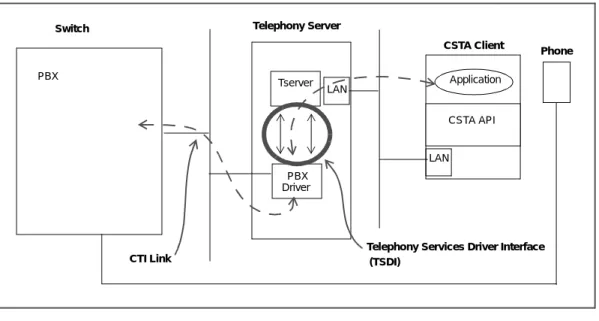
Figure 1-1 provides a high-level view of a simple Telephony Server configuration. Each phone and associated computer represents a workstation on a desktop; workstations can run applications that are integrated with the local phone. Although Figure 1-1 shows one link to one switch, the Telephony Server (actually, the PBX driver) can have multiple links, possibly terminating on different switches.
Figure 1-1. Schematic of a Telephony Services Implementation
■ The application uses the CSTA API supported by a native library loaded on
the workstation.
■ The library supporting the CSTA API exchanges messages that represent
API function calls and parameters over the network with the Tserver.
■ The Tserver is a module that resides on the Telephony Server and is
responsible for routing messages between the applications on workstations connected to the network and the PBX Driver.
■ The PBX Driver resides on the Telephony Server and implements the
CSTA services via a switch vendor-specific Computer Telephony Integration (CTI) link to a PBX.
■ A CTI link is a logical link between the computing environment (Telephony
Server) and the switching environment (PBX). Each Driver that supports CTI links via the TSDI must define the physical implementation for a CTI link (that is, the CTI link could be one or more physical links).
■ The TSDI is an open interface that specifies how messages are passed
between the Tserver and any vendor's Driver.
Application
CSTA API Tserver
PBX Driver
LAN LAN
PBX
Telephony Services Driver Interface (TSDI)
CTI Link
CSTA Client Telephony Server
Switch
Terminology
Use this section as a quick reference to the technical terms used in this document.
ACS Application Control Services
API Applications Programming Interface. The API specifies the
access methods that a programmer can use to exercise functionality provided by a kernel or library. An example of an API for this product is the “C” language interface used to access CSTA capabilities supported by the Telephony Server.
CSTA Computer-Supported Telecommunications Applications.
CTI Computer Telephony Integration
OA&M Operations, Administration and Maintenance. A module
that provides the maintenance and administration interface.
PBX Driver A vendor-dependent software specific to switch control. The PBX Driver is the service provider portion of the Telephony Server.
PDU Protocol Data Unit. A data object exchanged between the
Telephony Server and the client application.
Tserver The specific module that manages the routing of CSTA requests and responses between a client application and the appropriate PBX driver. The Tserver is part of the Telephony Server.
Telephony Server The Telephony Server comprises various components (Tserver, PBX Driver, Cserver) that together support CSTA.
TSDI (TDI) Telephony Services Driver Interface: A connection
between a Driver and the Tserver using a function call interface to pass messages between modules.
Basic Connectivity
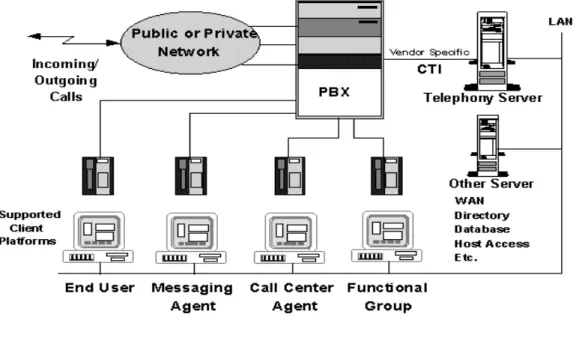
Figure 1-2 illustrates the connectivity of a simple Telephony-Serivces configuration.
Figure 1-2. A Simple Telephony Serivces Configuration
Telephony Server Architecture
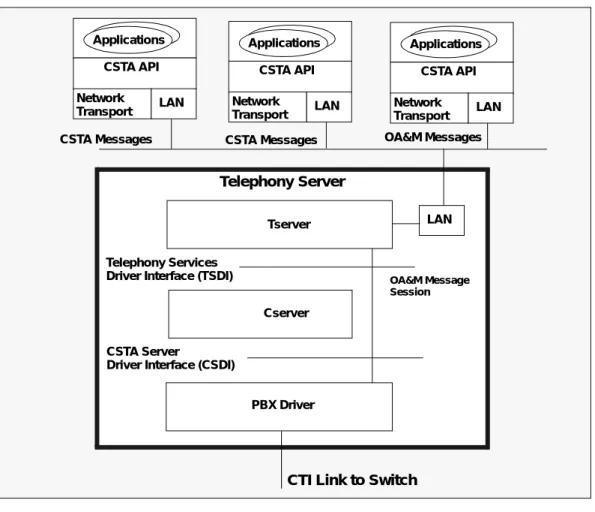
This section provides a high-level summary of the Telephony Server Architecture. Refer to Figure 1-2 as you read through the following list of components.
■ The Telephony Server — The Telephony Server provides a platform for
the desktop integration of telephones and personal computers. Figure 1-2 shows a block diagram of the Telephony Server architecture.
■ PCs and Workstations — The personal computers or workstations can
run CSTA applications that are integrated with their users phones. The CSTA applications will use a library (the CSTA API) as a client
communicating with a Telephony Server that has advertised CSTA services on the network.
■ OA&M Services — The Telephony Server provides a separate set of
generic Operation Administration and Maintenance (OA&M) services. The OA&M application uses a separate native library (the OA&M API) as a client for communication with the Telephony Server. The OA&M API provides a basic interface for passing what appears to be a character array to the Telephony Server, between the OA&M application and the Driver.
— Format of OA&M Messages
The format and interpretation of these messages are defined entirely by the OA&M application and the Driver. The Telephony Server supports one or more OA&M interfaces per PBX Driver (this is defined by the Driver).
Figure 1-3. Telephony Server Architecture
Applications CSTA API Network
Transport LAN
Applications CSTA API Network
Transport LAN
Applications CSTA API Network
Transport LAN
LAN Tserver
Cserver
PBX Driver
CSTA Messages OA&M Messages
Telephony Services Driver Interface (TSDI)
CSTA Server
Driver Interface (CSDI)
OA&M Message CSTA Messages
Session Telephony Server
Telephony Server Software Modules
The Telephony Server comprises three main modules (as shown in Figure 1-3):
■ Tserver
The Tserver manages Telephony and OA&M requests from clients (over the LAN). Additionally the Tserver performs the following functions.
— confirms that each client is administered for the requested service, CSTA or OA&M
— authenticates some CSTA (but not OA&M) requests, and — routes the requests to the appropriate PBX Driver.
■ Cserver
The Cserver manages client CSTA sessions on behalf of the PBX Driver and provides an ECMA-180 compliant interface to the PBX Driver. It is responsible for mapping CSTA requests and responses between the formats passed across the CSDI and TSDI interfaces. See [CSDI] for a full description of the Cserver.
■ PBX Driver
The PBX driver handles CSTA or OA&M requests for a specific vendor's PBX. The PBX Driver may choose to provide OA&M services through the Telephony Server, or the Driver may choose to provide its own OA&M interface.
The Telephony Services
Driver Interface
The interface between the Tserver and the PBX Driver is a function call interface referred to in this document as the Telephony Services Driver Interface (or TSDI). The TSDI is used to pass messages that represent (CSTA or OA&M) requests and responses between the Client Application and the PBX Driver.
The Telephony Server provides services to clients distributed over the network. The Tserver handles service advertising, client authentication, connection setup, and connection tear down. Note that all CSTA client requests are multiplexed to a single stream per PBX driver registration; that is, each tdiDriverRegister()
2
Telephony Server —
A Client-Server Model
The Telephony Server to telephony application communication is based on a client-server model. The CSTA application behaves as a client requesting switching function and status reporting services (as defined in [ECMA-179]) from the Telephony Server via the CSTA API function calls defined in TSAPI. The Telephony Server will send responses for each client request, and the client application will receive each response as a confirmation event through the CSTA API (see TSAPI). The event reports generated by the Telephony Server as part of the event reporting services (see [ECMA-179]) are also received by the client application as events through the CSTA API.
Routing Services Reverses
the Client-Server Roles
The client-server roles for the application and the Telephony Server are reversed for the computing function services (routing services) defined in [ECMA-179]. The Telephony Server will format computing function requests that the application will receive as events through the API, and the application will use CSTA API function calls to send the response back to the Telephony Server.
NOTE:
This document often refers to the Telephony Server-application relationship as a server-client relationship, even though these roles are reversed for the computing function services.
Differences Between the OA&M Model
and the CSTA Model
The OA&M application communication model is similar to the CSTA model, except that the application always performs the role of the service requesting client. The PBX Driver defines the OA&M services it will support; the Telephony Server (and the OA&M API) only enforce the client-server messaging model as described in ‘‘CSTA Messaging Interface’’ on page 3-28.
PBX Driver Tasks and Responsibilities
The design of a PBX Driver for the Telephony Server begins when the vendor determines the CSTA and OA&M services the Driver will support. The CSTA switching function and status reporting services require the PBX driver to act as a server for incoming requests from the client application. The CSTA computing function (routing) services require the PBX Driver to act as a client, generating requests for the server application.
NOTE:
The PBX Driver must fail any CSTA client request that the Driver does not support.
If the PBX Driver is supporting OA&M services through the Telephony Server, the set of supported maintenance services, and the OA&M messages that support requests and responses for those services must be defined by the PBX Driver authors. The following sections describe three tasks that the PBX Driver must implement to support these services. There may be other requirements placed on the Driver based on operating system implementation details (see Chaper 7, Implementation Notes.)
Driver Initialization
The PBX Driver must first register with the Tserver before CSTA or OA&M requests can be routed to the driver. When the PBX Driver registers with the Tserver, resources are allocated for the Telephony Services Driver Interface, and the Tserver will advertise on the network that the Driver is available to handle CSTA (CTI Link) or OA&M application requests. The PBX Driver must separately register for each CTI or OA&M Link the driver is going to support. These
registrations result in completely separate interfaces, and message traffic across these interfaces is completely independent. When a PBX Driver registers with
Message-Based Interface
The PBX Driver must be able to handle incoming requests from the CSTA or OA&M application immediately after the driver has completed the registration process. The PBX Driver sends and receives messages that represent the CSTA or OA&M requests and responses to the application through a function call interface to the Tserver. The PBX Driver must always be prepared to negatively acknowledge client application requests that the Driver does not understand. If the PBX Driver provides CSTA services, each time it sends a message to the PBX and receives a message from the PBX it must report this traffic statistic to the Tserver. This is done through one of the Traffic Measurements function call interfaces to the Tserver.
NOTE:
Nearly every message in the CSTA API TSAPI that is sent by a client to the Driver is a Request-Response type message. The Driver must always send a response message, either the defined positive acknowledgment (that is, cstaMakeCallConfEvent in response to a cstaMakeCall request) defined in the CSTA API or one of the two defined negative acknowledgment
messages, acsUniversalFailureConfEvent or
cstaUniversalFailureConfEvent, to every client request. The CSTA Routing messages flow in the opposite direction. Here the application acts as the routing server and the PBX takes the role of the client. (Routing is discussed in more detail in Chapter 3 of this document).
Driver Termination
The PBX Driver should always unregister with the Tserver before exiting
(unloading), or the Driver can unregister with the Tserver any time it wants to stop handling CSTA or OA&M requests. The Tserver will halt the advertisement of the Driver services and free all resources associated with the Telephony Services Driver Interface when the PBX Driver unregisters. The PBX Driver cannot use the Telephony Services Driver Interface for the CTI or OA&M Link for which the register was originally done after the unregister operation has completed. The Driver can, however, re-register for CSTA or OA&M services. Prior to
unregistering with the Tserver to stop handling CSTA requests, the PBX Driver that was registered for Traffic Measurements reporting must unregister for traffic reporting.
Traffic Measurements Utility
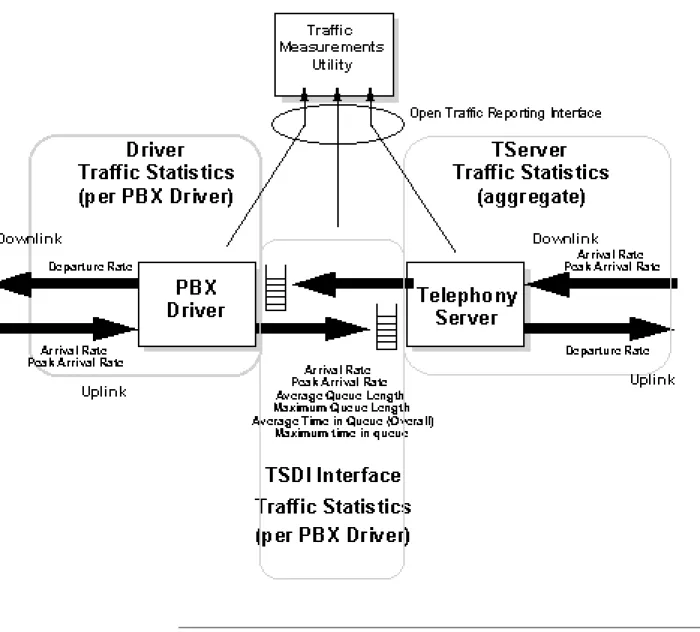
The Tserver's Traffic Measurements Utility (TMU) allows customers to watch and tune their CTI configuration. The TMU measures the flow of traffic from a PBX to
each Driver and the Tserver. The PBX Driver measurements are taken at its interface to the PBX. The PBX Driver measurements consist of the messages it sends to the PBX and the messages it receives from the PBX. The TSDI
measurements are taken at its interface between the PBX Driver and the Tserver. The Tserver measurements are taken at its interface to the client.
Each location is responsible for reporting traffic information to the TMU for both uplink and downlink messages. The terms uplink and downlink refer to the direction of the message in relation to the PBX; downlink means that the message is being sent to the PBX from the client and uplink means that the message is being sent away from the PBX or to the client. The TMU will calculate and report the following measurements for the Driver each hour based on the traffic
information provided by the Driver.
The following list describes what measurements the TMU will report for the PBX Driver based on the information it receives from the Driver. A later table will show the information that the Driver needs to provide the TMU to generate these measurements.
■ At the uplink, PBX Driver interface (from the PBX), the TMU will report:
— Message Arrival Rate
Number of messages received from the PBX in the past hour. — Peak Message Arrival Rate
Maximum message arrival rate detected over a series of discrete, non-overlapping time intervals. This time interval defaults to 15 seconds and can be administered through the Tserver's TMU interface.
■ At the downlink, PBX Driver interface (to the PBX), the TMU will report:
— Message Departure Rate
Number of messages sent to the PBX for the past hour..
■ For the PBX Driver interface, the TMU will report:
— Message Rejection Rate
Number of messages rejected or denied service due to a lack of resources. These messages are not included in any other rate. For example, the PBX Driver receives a message and cannot allocate a buffer to properly service this request or must reject the request due to some form of flow control. The Driver would not report that it received a message but instead would report that it rejected a
directions. Queue lengths and queued times are calculated as well. Combining the measurements from all of the interfaces the end user will be able to watch their CTI configuration and make changes as necessary. The diagram below illustrates the measurements available to the end user.
Figure 2-1. PBX Driver Traffic Measurements
PBX Drivers will report their traffic information to the TMU for each CSTA service that it registers with the Tserver through
tdiDriverRegister()
. TSDI traffic interface routines allow a Driver to register with the Traffic Measurements Utility,The table below shows the data that the Driver must report (through
tdiTrafficReport()
) and which measurements result from that data. The calculations are performed once an hour and then the rates start back at zero. An option is available at the Tserver's TMU interface to allow the administrator to specify the interval over which the peak arrival rate is calculated. This option will be defaulted to 15 seconds but can be set between 5 and 15 seconds.NOTE:
It is assumed that a Driver will provide a traffic report to the TMU each time it receives or sends a message rather than processing multiple messages before it calls the traffic report interface. Using the latter method of reporting will affect the accuracy of the Peak Arrival Rate measurement.
Administrative commands are also available that allow the user to enable/disable the TMU for the entire system or for a specific location (for example, a specific Driver, a specific TSDI or the Tserver). The Traffic Measurements feature must be enabled for any measurements to be performed. Similarly, if the feature is disabled, then no measurements will be taken regardless of whether any of the interfaces are still enabled.
NOTE:
This option means that the TMU must be able to communicate this enabling information to the affected reporting interface(s) so the interface will know to stop or start sending traffic data. This will be accomplished through the TSDI. Part of the registration process requires the Driver to specify a callback function that the TMU will call when the administration of the measurements feature has changed for the specific driver interface or the entire feature.
Driver Reports for each registered CSTA Service:
Traffic Measurements Utility Calculates:
Received an uplink message (from the PBX) and have the necessary resources to process it
Message Arrival Rate Peak Message Arrival Rate Sent a message downlink (to the
PBX)
Message Departure Rate
Cannot service a message due to a lack of resourcesr
Telephony Server Multiplexing
The telephony server does not provide multiplexing services for the Driver. An ACS stream is opened to a Driver (that is, the CTI Link name as generated by a Driver registration), not to a device. The application must know ahead of time to which CTI Link it wants to open a stream. When CSTA requests are received for a device, the request is received by the Tserver over an ACS stream that terminates at a CTI Link. The request is forwarded to the driver if and only if, the security database indicates the device in the request can be controlled by the user (login) that opened the ACS stream and that the CTI Link which the ACS stream terminates on can control the device. If the security database indicates that more than one CTI Link can be used to control a device, the Tserver does not select a
CTI Link to receive the CSTA request. The Tserver always forwards requests to
the CTI Link where the ACS stream terminates.
The above description also applies to CSTA monitor requests. If an application or several applications send requests to monitor the same device to the same CTI Link, the driver must be able to handle the multiple monitors. The Tserver will not multiplex these monitors to a single request for the driver.
In the security database, users (logins) are given permission to control devices and all the CTI Links that can support (control) a device are indicated.
CSTA Tserver Security
The Tserver will provide telephony-based security services for drivers registering for CSTA functionality. Providing the security services within the Tserver allows applications to present a uniform platform across multiple vendor's drivers. A driver that wants or needs to provide its own security mechanism can override the telephony-based security services, to a point, by indicating so in the
tdiDriverRegister() routine. A user wishing to open an ACS stream will always require at least a Login on the file server on which the Tserver is loaded. The lowest level of security a driver can register with is TDI_NO_SECURITY which means the Tserver will not validate any message including an
acsOpenStream() call; that is, a client may open an ACS stream without a valid login/password.
Client Access Security Levels
The Telephony Server supports a Security Database that allows the
administration of users, groups of users, worktops, devices, lists of devices, and lists of CTI Links. Users are given names, unique login IDs, passwords, pointers to their worktop records, security level permission to monitor and query, control
device record for the primary telephone, and a pointer to a list of devices if more than one device (that is,. telephone, fax, etc.) is associated with a worktop. Group records specify a list of devices that belong to that group. Device records contain the type of device ( PC, phone, etc.), a device ID, a security level permission, location of the device, and a list of Tservers/PBXs that support this device
Security Issues and Class of Service
The Telephony Server defines four classes of service that can be granted to a user in the security database for the Telephony Server.
Home Worktop Class of Service
This class of service gives a user the privilege to control the device monitor or
query the device or set of devices associated directly with a users home worktop
location and possibly the device or set of devices associated with a worktop location a user may login from which is not the user's home worktop location. A user's home worktop is defined as the worktop associated with the users record in the Tserver SDB.
The home worktop class of service is based on two assumptions. The first is based on the assumption that the LAN Address can be trusted. The second assumes that the LAN address is not secure and can easily be faked in a packet sent to the Telephony Server.
If the administration is set up to believe the LAN Address (by disabling the Tserver OA&M Restrict User Access to Home Worktop option), the following algorithm is used to determine if a user has a home worktop privilege over a device:
■ When a user is logging in from his/her home workstation, he/she gets
privilege over the set of devices defined by his/her worktop record. When a user logs in from a workstation other than his/her home workstation, he/she gets privilege over his/her home workstation set of devices as well as the set of devices associated with the workstation he/she logged in from. If the administration is setup to not believe the LAN Address (by enabling the Tserver OA&M Restrict User Access to Home Worktop option), the following algorithm is used to determine if a user has privilege over a device:
■ Regardless of which workstation a user is logging in from, he/she gets
■ Device monitoring on a device: A list of devices is defined on which this
user can perform device monitoring.
■ Call monitoring on a device: A list of devices is defined on which this user
can perform call monitoring.
■ Call monitoring on a call: A user can be given permission to call monitor
calls. Because calls are not known in advance, a specific list of calls that might be monitored cannot be administered. The user either has or does not have permission to do this type of monitoring.
Control Class of Service
Control class of service gives the user privilege to perform control functions only. A user must have some type of monitoring class of service to monitor devices.
Routing Class of Service
Routing class of service gives the user privilege to perform routing functions on a set of devices.
Driver OA&M
Using the Tserver as a Transport
The PBX Driver vendors can implement a client or server based application using the generic Telephony Server Driver OA&M API for driver OA&M (see Chapter 6 of this document). The Tserver would act as the transport mechanism in this case. To use the Tserver transport mechanism and OA&M API, the PBX Driver must register with the Tserver for OA&M functionality. The driver would then use the TSDI routines to pass vendor-defined OA&M messages analogous to CSTA messages for CSTA functionality. The Tserver will treat an OA&M message as a block of data received from a client, and the message will be passed directly to the PBX Driver that has registered for the OA&M services. The data contained within the message block is to be defined by the PBX Driver authors and is specific to each vendor's driver.
NOTE:
The generic OA&M messages that the Tserver will transport for use in defining a driver-specific OA&M application are simple character array (whose length is defined by the Driver and OA&M application). The Driver and OA&M application must be very careful in defining structures that will be overlaid on this byte array due to different byte ordering and padding rules employed on different client and server machines.
The Tserver will provide administration options on User Records that will provide access to the OA&M link for specific users. That is, each user in the Tserver Security Database can be given permission to open a stream to the Driver OA&M service (defined by the Driver registering for OA&M services).
The PBX Driver vendor may also select to provide OA&M services directly from the Driver module, from a separate Driver OA&M module, or through a
client-based application where the Driver provides the transport mechanism. Regardless of how the PBX Driver vendor supports/supplies Driver OA&M services, the Telephony Server OA&M client application must still be used to administer and maintain the Telephony Server.
Error Log Interface
A common error log serves both the Tserver and the PBX driver. The interface to the error log is through the Telephony Server OA&M client application or the Tserver's Console Administration screens. It supports a standard function call interface so errors have a uniform appearance in the error log. The error log interface provides six severity levels: TRACE, CAUTION, AUDIT_TRAIL,
WARNING, ERROR, and FATAL for errors, and will include the date, time, location of the error, a specific error code, and supporting text for each error (see "Error Log interface" in ‘‘Error Log Interface’’ on page 2-10). Whenever possible, the PBX Driver should log errors in this common error log with the appropriate severity. The PBX Driver authors are free to ignore this error log interface and provide their own mechanism, but their error messages will not be integrated with the Telephony Server.
3
PBX Driver to Tserver Interface
The TSDI provides a function call interface with a mechanism for the exchange of messages representing CSTA requests and responses that map to the CSTA API (see TSAPI), or OA&M requests and responses that map to the OA&M API (see ‘‘OA&M Interface’’ on page 3-41. The PBX Driver must first register with the Tserver, and then the driver can send and receive these requests and responses using Telephony Services Driver Interface routines. All messages exchanged with the Tserver must be allocated via the tdiAllocBuffer()routine (see
‘‘tdiAllocBuffer()’’ on page 5-1); they cannot be directly allocated from the
operating system. The PBX Driver must always unregister with the Tserver before it unloads.
The following sections provide a brief description of the function call interface provided by the Telephony Services Driver Interface routines. See Chapter 5 for a complete specification of the interface routines
Driver Registration
Registration Mechanism
A PBX Driver must establish a connection with the Tserver before it can provide the CSTA services described in the CSTA API TSAPI, or OA&M services described in the <Link> "OA&M Interface" section, on page 58. A separate connection must be created for each type of service the PBX Driver will provide (for example, one for CSTA services and one for OA&M services). Each CTI Link or OAM Link supported by the Driver for which the Driver wants the Tserver to advertise this service must be registered separately with the Tserver; that is, each TSDI registration supports one CTI or OAM link.
NOTE:
The Driver must use the Telephony Services Driver Interface routine,
tdiDriverRegister(), to establish a connection between the Driver and the Tserver. When a PBX Driver registers via the tdiDriverRegister() routine, the Tserver creates a separate TSDI instance by allocating resources from the OS for this (TSDI), and begin service advertising on behalf of the PBX Driver. The Telephony Server treats each tdiDriverRegister(), or TSDI instance completely independently. From the Telephony Servers viewpoint each
tdiDriverRegister() represents a different Driver, even though multiple registrations may have been done by the same Driver.
The Tserver will apply the vendor_name, service_name, and service_type parameters provided by the Driver in the tdiDriverRegister() routine to advertise this service (CSTA or OA&M) to clients. This routine will guarantee that no two Driver registrations result in the same advertised name. The Tserver will also store the driver_name parameter provided by the PBX Driver in the
tdiDriverRegister() routine for maintenance purposes. Version information must be specified in the tdiDriverRegister() routine so that the PBX Driver can guard against version compatibility problems with the Tserver. Because two versions of the TSDI currently exists, the version field must always be set to
TSDI_VERSION or TSDI_VERSION_2 (see ‘‘TSDI Version Control’’ on page 3-3).
The Telephony Services Driver Interface monitors TSDI buffer usage by both the PBX Driver and the Tserver. The PBX Driver can specify a maximum number of bytes that can be allocated (by the PBX Driver and the Tserver) for TSDI
messages via the buffer_descriptor parameter of the tdiDriverRegister()
routine. The Tserver will allocate space from the TSDI interface only for buffers that are used to forward/send events to the driver. All other space allocated by the Tserver is not charged against the total TSDI space.
The tdiDriverRegister() routine returns a driverID to the PBX Driver that must be used to identify this TSDI connection. All message buffer allocations, send requests, receive requests, and unregister requests for this TSDI connection (registration) must use this driverID. The PBX Driver is not allowed to interchange messages from one TSDI registration to another. The tdiDriverRegister()
routine is a blocking function that will return to the PBX Driver after the Tserver has initiated the service advertising procedures.
Driver Registration Security Level
For a Driver to be certified, it must register with the TDI_CSTA_SECURITY option. The valid security options a Driver can register with are defined below:
■ TDI_CSTA_SECURITY
— Login and Password will be validated on the acsOpenStream()
request.
— Entry in the Tserver's Security Database must contain this login. This is also checked at the time of the acsOpenStream() request. — Each subsequent CSTA request will be validated per the user's
administered permissions.
■ TDI_LOGIN_SECURITY
— Login and Password will be validated on the acsOpenStream()
request.
— Entry in the Tserver's Security Database must contain this login. This is also checked at the time of the acsOpenStream() request.
■ TDI_NO_SECURITY
— No validation is done on an acsOpenStream() request.
TSDI Version Control
The version field in the tdiDriverRegister() function is used to enforce version control of the TSDI. Currently, two versions, TSDI_VERSION and TSDI_
VERSION_2, of the TSDI exist and the version field must be set to one of these.
Version 2 of the TSDI allows the PBX Driver to specify the TSAPI versions that the PBX Driver supports in the protocol_descriptor argument to
tdiDriverRegister(). This argument replaces the previously unused channel_number argument. See ‘‘TSAPI Version Control’’ on page 3-42 for more information on TSAPI version control.
Version 2 of the TSDI also adds the new function tdiGetTservVersion() that allows a driver to determine the customer and internal version of the Tserver and the supported TSAPI protocol versions for a given service type. This function is not available in the Release 1 Tserver. If the PBX Driver is being written to work with both the Release 1 and Release 2 Tservers, then this function should be imported dynamically.
Traffic Measurements Registration
This enables end users to watch and fine-tune their CTI configuration.
Specifically for the Driver, this utility will measure the message arrival rate from a PBX and the message transmission rate to the PBX. Given the uplink arrival rate (from the PBX) reported by the Driver, the Traffic Measurements Utility will calculate the peak message arrival rate over a series of discrete non-overlapping time intervals. The PBX Driver may also report that it had to reject a message, or in other words, it could not allocate the necessary resources to successfully process the request. The Traffic Measurements Utility will keep track of this rejection rate as well.
The traffic registration interface routine requires the driverID be returned to the PBX Driver by the tdiDriverRegister() routine and is not blocking.
Receiving Requests and Responses
The tdiReceiveFromTserver() routine is used by the PBX Driver to receive incoming (CSTA or OA&M) requests and responses from the Client. These Client requests and responses are contained in message buffers (see ‘‘The Message Format Between the PBX Driver and the Client’’ on page 3-10) returned by the bufptr parameter to the tdiReceiveFromTserver() routine. The
tdiReceiveFromTserver() routine is a blocking routine that will only return when a message buffer is ready for the PBX Driver, or an error has occurred. The PBX Driver "owns" the message buffer returned by the
tdiReceiveFromTserver() routine. The message buffer should not be directly returned to the OS by the PBX Driver instead it must be returned back to the Telephony Services Driver Interface instance. The buffer can be returned by either calling tdiFreeBuffer()or populating it with a request or response message and sending it back across the TSDI to the client (see the next section, "Sending Requests and Responses") via tdiSendToTserver(). The
tdiFreeBuffer() routine is a non-blocking routine which requires the driverID and a pointer to the buffer to be released. The same driverID that was used in the
tdiReceiveFromTserver() routine must be applied to the
tdiFreeBuffer() routine.
Sending Requests and Responses
The tdiSendToTserver() routine is used by the PBX Driver to send outgoing (CSTA or OA&M) requests and responses to a Client. These Client requests and responses are contained in message buffers (see ‘‘The Message Format Between the PBX Driver and the Client’’ on page 3-10) pointed to by the bufptr parameter of the tdiSendToTserver() routine. The message buffers must be "owned" by
the tdiReceiveFromTserver() routine as described in the <Link> "Receiving Requests and Responses" section, on page 20), or allocated the message buffer from the TSDI via the tdiAllocBuffer() routine.
The tdiAllocBuffer() routine will return a BYTE aligned block of data as big as that requested by the PBX Driver, or the routine will return a failure indication. The tdiAllocBuffer() routine will fail the "request" if the size of the message buffer requested exceeds the maximum buffer size allowed in the OS, or if the size requested plus the size of all message buffers currently allocated by the PBX Driver and the Tserver (on this Telephony Services Driver interface) exceeds the limit specified by the Driver during PBX Driver registration. The TSDI memory allocation for this driver (or TSDI registration) will be charged the size of the data block allocated.
The tdiSendToTserver() routine supports a two-level message priority scheme. The PBX Driver can send "priority" messages through the interface by setting the priority parameter to TDI_PRIORITY_MESSAGE. The Telephony Services Driver Interface will always deliver priority messages (in
First-In-First-Out order) before delivering "normal" messages (also in First-In-First-Out order).
The PBX Driver no longer "owns" a message buffer that was successfully passed to the Tserver (and the Client) via tdiSendToTserver(), and the PBX Driver should no longer access this buffer. The tdiSendToTserver() routine is a non-blocking routine that will fail only when the bufptr, priority, or driverID parameters are invalid.
NOTE:
The tdiReceiveFromTserver() routine is blocking because it waits on a semaphore that is only signaled when the Tserver sends the Driver a message. The tdiSendToTserver() routine, however, is non-blocking because it signals a different semaphore that the Tserver waits on for receiving messages from the Driver.
Traffic Measurements Reporting
The PBX Driver must call the interface routine, tdiTrafficReport(), when it receives a message from the PBX and when it sends a message to the PBX. In the case where the Driver cannot process a message due to a resource problem (for example, cannot allocate memory or other necessary resources), then it should report this as a rejection and not as an arrival. Rejections are also reported using the tdiTrafficReport() routine.
NOTE:
It is assumed that a Driver will provide a traffic report to the Traffic
This interface routine requires the driverID returned to the PBX Driver by the
tdiDriverRegister() routine. This routine will not block
Driver to Tserver Heartbeat Message
The PBX Driver must inform the Tserver, once a minute, that it is still active by calling the tdiDriverSanity() function. This routine requires one parameter, the driverID, returned to the PBX Driver by the tdiDriverRegister()
routine. This is a non-blocking routine. If the Driver fails to call this function, the Tserver will generate a high severity error message that by default is placed in the error log file and sent to the Tserver's OA&M client. No other recovery action is taken.
Unregistering for Traffic Reporting
The PBX Driver must unregister with the Traffic Measurements Utility before it unregisters with the Tserver to stop handling CSTA requests. The interface routine for unregistering with this Utility is tdiTrafficUnregister(). It requires the
driverID returned to the PBX Driver by the tdiDriverRegister() routine and is not a blocking call.
Unregistering the Driver
The PBX Driver must unregister before unloading, or any time it needs to break the TSDI connection. The tdiDriverUnregister() routine requires a single parameter, the driverID, returned to the PBX Driver by the
tdiDriverRegister() routine. This routine will not block, but only signal the Tserver that the driver wishes to unregister. After the routine returns, the Tserver will then forward the remaining messages sent from the Driver to the Tserver via the tdiSendToTserver() to the appropriate clients, and clear all of its resources from this TSDI. No resources allocated for this interface should be accessed by the PBX Driver after the tdiDriverUnregister() routine completes successfully.
Telephony Server Flow Control Of TSDI
Messages
tdiQueueSize() and tdiMemAllocSize() routines return structures that describe the current state of the message queues and the bytes allocated for message buffers for both the Tserver and the PBX Driver. The PBX Driver can use this information to determine if some form of flow control is required for messages exchanged between the PBX Driver and the Client.
The Telephony Server provides two types of flow control mechanism to drivers. The first is controllable by the driver in which the driver uses the
tdiSetMessageFlowControl() routine to specify which CSTA and/or ACS messages should be flow controlled and at what level of message congestion this flow control should take affect. The second flow control mechanism is activated automatically by the Tserver when the size of allocated memory in the TSDI hits the defined TSDI High-Water Mark level. At this level, the Tserver rejects all messages from clients
Selective Driver Flow Control
If a driver wishes to have specific CSTA or ACS messages flow controlled by the Tserver before the TSDI High-Water Mark flow control mechanism kicks in (see the ‘‘TSDI High-Water Mark Flow Control’’ on page 3-7), the driver must call the
tdiSetMessageFlowControl()routine. This function allows the driver to specify which messages should be flow controlled and what level of TSDI message congestion the flow control should be activated. The TSDI message level is defined to be the number of TSDI messages either queued for the Driver or allocated to the Driver. When the Tserver receives a client request, it allocates a TSDI buffer and then queues the buffer for the Driver via the
tdiSendToDriver() routine. When the driver receives the message via the
tdiReceiveFromTserver()routine, that TSDI buffer is now considered to be allocated by the Driver. The Tserver will flow control messages sent to the Driver by rejecting those messages indicated in the tdiSetMessageFlowControl()
routine with an error code of TSERVER_DRIVER_CONGESTION.
There is no flow control of messages sent from the driver to the Tserver as a result of the tdiSetMessageFlowControl() routine or as a result of any other action taken by the Tserver or Driver.
TSDI High-Water Mark Flow Control
The Tserver will flow control messages sent to the Driver via the
tdiSendToDriver() routine by comparing the amount of TSDI resources currently allocated with the hiwater_mark. If it reaches this mark the Tserver will reject all new requests (including acsOpenStream()) with an error code of
TSERVER_DRIVER_CONGESTION. NOTE:
the buffer descriptor in the registration is ignored. The values can be change via the Tserver's OA&M application.
This will prevent new requests from being sent to the driver and should allow the driver to catch up on current requests. If the TSDI memory has hit the max_bytes level, then the Tserver will drop an ACS Stream when a new request comes in with an error code of TSERVER_NO_TDI_BUFFERS. If the Server is out of memory, then the Tserver will drop all requests for new ACS Streams with an error code of TSERVER_NO_MEMORY.
This means the driver should choose the max_bytes and hiwater_mark of the buffer_descriptor argument to the tdiDriverRegister() very carefully.
There is no flow control of messages sent from the driver to the Tserver.
PBX Driver to Client Interface
Advertising Driver Services
The Tserver connection that was created when the PBX Driver registered via the
tdiDriverRegister() routine is used for exchanging messages between the Driver and its clients. Clients using the CSTA API will attempt to create a CSTA
stream to a PBX Driver that had previously registered for CSTA services. Clients
using the OA&M API (see Chapter 6) will attempt to open an OA&M stream to a PBX Driver that had previously registered for OA&M services. The Tserver advertises the specific services registered by the PBX Driver via the
tdiDriverRegister() routine. The Tserver uses the combination of the vendor_name, service_name and service_type parameters passed to
tdiDriverRegister() in order to create the advertised name. The name will appear as follows:
In the following examples, assume that the name of the server on which the Tserver is running is BUFFALO
8 Bytes
14 Bytes
4 Bytes
<= 19 Bytes
The Stream to the Client Workstation
The stream between a client workstation and the PBX Driver can only be created after the Driver has registered with the Tserver for a specific service (CSTA or OAM).
The CSTA client will perform an
acsOpenStream()
for the advertised name to establish a CSTA stream to the PBX Driver and set the streamType parameter toST_CSTA. This
acsOpenStream()
request will be mapped to a corresponding CSTA message (see ‘‘The Message Format Between the PBX Driver and the Client’’ on page 3-10) and sent over the TSDI to the PBX Driver. If the Tserver does not reject the open request based on login and password, the request will be passed to the PBX Driver, which must then consider whether to honor this request or not. The Driver must send an ACS message back across the interface either acknowledging (ACSOpenStreamConfEvent) or failing(ACSUniversalFailureConfEvent) the open request. If the PBX Driver acknowledged the CSTA open request, a (logical) CSTA stream or session has been established between the PBX Driver and the client application. CSTA requests and responses that map to the CSTA API can be sent back and forth across the Telephony Services Driver Interface in the form of CSTA messages until the stream is disconnected by the PBX Driver (via the ACSAbortStream) or the client (via the acsCloseStream() or acsAbortStream() function calls ).
The establishment of an OA&M stream is accomplished in the same way as the establishment of a CSTA stream as described above except the streamType parameter is set to ST_OAM..
A Client Session ID is included in each message exchanged on the stream between the PBX Driver and the CSTA or OA&M client. This Client Session ID uniquely identifies a session and is initially provided to the PBX Driver in the message corresponding to the
acsOpenStream()
performed by the client application. The PBX Driver must include this Client Session ID in each request or response sent across the TSDI for this client session. A Driver Control block is always included as the first portion of each message exchanged on the stream, and the Client Session ID is a mandatory field in the Driver Control block.The Message Format Between the PBX Driver
and the Client
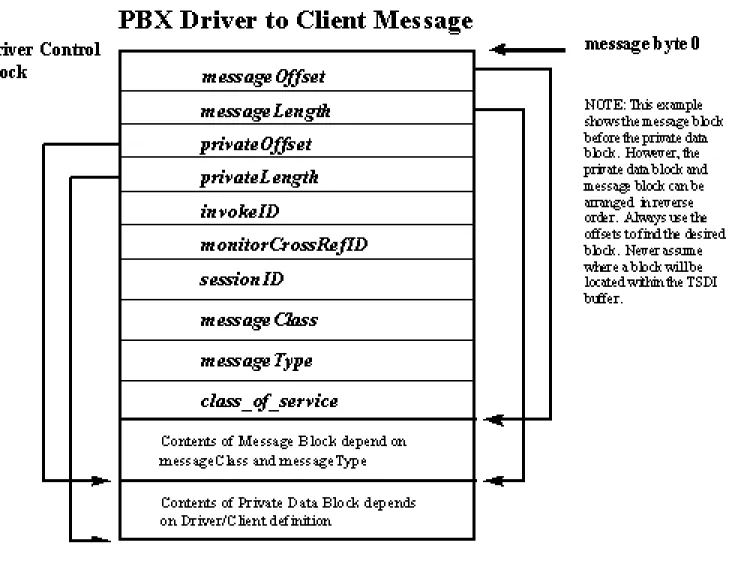
All messages exchanged between the PBX Driver and the client application (via the API) over the TSDI conform to a format that consists of a Driver Control block followed by (an optional) message block followed by (an optional) private data block. The Driver Control block is a fixed length structure starting at the first byte of the message buffer, and the Driver Control block has the same format for all messages exchanged over the TSDI.
The next two fields of the Driver Control block specify the location and length of the private data block. The private data block is an a optional portion of the messages exchanged between the PBX Driver and the client over the TSDI. It is variable in length, and its format is defined beforehand between the client and the Driver.
The remaining Driver Control block fields are defined in the following sections.
The Driver Control Block
The first bytes of the messages exchanged across the TSDI must be the Driver Control block (DC block). The DC Block is the portion of the message passed across the TSDI to the PBX Driver that provides control information to the Driver for it to properly interpret and process client requests and responses. The PBX Driver must always create a DC block as the first part of request or response messages sent across the TSDI so that the Tserver can route the message to the appropriate client, and the client can receive the appropriate event. The DC block is populated by the Tserver with information received from the client. It is a C structure of fixed size that is located at the first byte of the message buffer that is passed across the TSDI and received by the PBX Driver via the
tdiReceiveFromTserver() routine. The DC block must also start at the first byte of the message buffer sent to the Tserver via the tdiSendToTserver()
routine. A message block and /or private data block that contains the formatted request or response message may immediately follow the DC block in the message buffer as defined by the message and private offset fields.
The DC block, the message block and private data block must be contained within one contiguous TSDI buffer that was either received by the driver via the
tdiReceiveFromTserver() routine or allocated by the Driver via the
tdiAllocBuffer() routine. There may be "holes" in the buffer between these three blocks as long as the DC block starts at the first byte and the message and private data offset fields are set correctly.
The Driver Control Block Field Definition
/* Driver Control Block Structure */
typedef struct {
unsigned short
messageOffset;
unsigned short
messageLength;
unsigned short
privateOffset;
unsigned short
privateLength;
InvokeID_t
invokeID;
CSTAMonitorCrossRefID_t monitorCrossRefID;
SessionID_t
sessionID;
EventClass_t
messageClass;
EventType_t
messageType;
short
class_of_service;
messageOffset The messageOffset is a value that determines the start of the request or response message associated with this Driver Control block. The messageOffset must be added to the address of the Driver Control block to get the start of the message. This field should be set to 0 if no message block is included with the Driver Control block.
messageLength The messageLength is a value that provides the length of the request or response message associated with this Driver Control block. This field must be set to 0 if no message block is associated with this Driver Control block.
privateOffset The privateOffset is a value that determines the start of the private data associated with this Driver Control block. The privateOffset must be added to the address of the Driver Control block to get to the beginning of the private data. This field should be set to 0 if no private data is included with the Driver Control block.
privateLength The privateLength is a value that provides the length of the private data associated with this Driver Control block. This field must be set to 0 if no private data is associated with this Driver Control block.
invokeID The invokeID is a value that is used for pairing request-response messages. The PBX Driver will receive an invokeID in each request message, and this value should be passed back unchanged in the DC block of any response message. The invokeID is undefined for requests or events that originated from the PBX Driver.
monitorCrossRefID The monitorCrossRefID is a value for pairing monitor
request-response messages. This monitorCrossRefID is set only in unsolicited events sent by the Driver in response to a previously opened monitor.
Note: The cstaMonitorStartConfEvent message includes a
monitorCrossRefID in the actual structure and this is the place where a driver should indicate the cross-reference ID for that monitor, not here in the DC block.