Technical Report
Microsoft Exchange Server 2010 and
SnapManager for Exchange on Data ONTAP
8.1 Cluster-Mode Best Practices Guide
Mohamed Niyaz, NetApp April 2012 | TR-4056
TABLE OF CONTENTS
1 Introduction ... 5
1.1 Purpose and Scope ...5
1.2 Intended Audience ...5
2 Introduction to Data ONTAP 8.1 Cluster-Mode ... 5
3 Benefits of Cluster-Mode ... 6
3.1 Scalability ...6
3.2 High Availability ...7
3.3 Flexibility ...8
3.4 Multi-Tenancy ...8
4 Cluster-Mode Terminology ... 9
5 Sequence of Deployment on the Storage System ... 10
6 Cluster-Mode Limitations and Recommendations ... 11
6.1 Limitations ... 12
6.2 Recommendations ... 12
7 Cluster-Mode with Microsoft Exchange Server ... 13
7.1 Nondisruptive Operations... 13
7.2 Operational Efficiency ... 13
8 SnapManager Dependency on SnapDrive ... 13
9 Supported Software Versions for Windows ... 13
10 Exchange Server 2010 Architecture ... 14
10.1 Database Availability Groups ... 14
10.2 Personal Archive Mailbox... 14
11 Exchange Server 2010 Planning Considerations ... 15
11.1 System Requirements ... 15
12 NetApp Storage Efficiencies ... 15
12.1 RAID-DP ... 15
12.2 Snapshot Technology ... 15
12.3 Thin Provisioning ... 15
12.4 Space Guarantee ... 16
12.5 Fractional Reserve ... 16
12.7 Autosize ... 17
12.8 NetApp FlexClone ... 17
12.9 NetApp Deduplication ... 18
13 NetApp Solution for Microsoft Exchange Server 2010 ... 19
13.1 NetApp Storage Software and Tools ... 19
13.2 SnapManager for Exchange Server Overview ... 19
13.3 SnapManager for Exchange Server Architecture ... 20
13.4 SnapManager for Exchange Server Installation and Upgrade Considerations ... 21
13.5 SnapManager for Exchange Management... 21
13.6 Sizing and Storage Layout for Exchange Server 2010 ... 22
13.7 Capacity Planning ... 23
14 Performance ... 26
14.1 SATA Performance Considerations ... 27
14.2 Database Sizing Considerations ... 27
14.3 Aggregate Sizing and Configuration Considerations ... 27
14.4 Volume Configuration Considerations ... 28
15 Virtualization ... 28
15.1 Microsoft Support for Exchange 2010 in Virtualized Environments ... 28
16 High Availability ... 28
16.1 Exchange 2010 Database Availability Group Deployment Scenarios ... 29
17 Data Protection ... 30
17.1 SnapMirror ... 30
18 Exchange 2010 Disaster Recovery ... 31
18.1 Exchange 2010 Disaster Recovery Process for DAG Configurations ... 31
18.2 Exchange 2010 Disaster Recovery Process for Standalone Physical Mailbox Server Configurations ... 31
18.3 Exchange 2010 Disaster Recovery Process for Virtualized Standalone Mailbox Servers ... 32
19 Summary ... 33
Appendixes ... 34
Best Practices ... 34
References ... 37
LIST OF TABLES Table 1) Cluster-Mode components and features. ...7
Table 2) Cluster-Mode and 7-Mode software versions. ... 13
Table 3) DAG storage layout best practices. ... 29
LIST OF FIGURES Figure 1) Data ONTAP 8.1 operating in Cluster-Mode architecture. ...6
Figure 2) Cluster-Mode architecture. ...9
Figure 3) Sample Vserver. ... 11
Figure 4) SnapManager for Exchange Server architecture. ... 21
1 Introduction
1.1 Purpose and Scope
This document describes best practices for SnapManager® for Exchange (SME) support for NetApp® Data ONTAP® operating in Cluster-Mode. All the features from the previous releases of SME are part of this release as well. This release continues to support management of Data ONTAP operating in 7-Mode storage systems. For the best practices on SnapManager for Exchange for 7-Mode storage systems, refer to TR-4403: Microsoft Exchange Server 2010 and SnapManager for Exchange Best Practices Guide, which is applicable to this release.
1.2 Intended Audience
This paper is a best practice guide for experienced Microsoft Exchange administrators who have read the following documents:
―SnapManager for Exchange Installation and Administration Guide‖ ―SnapDrive for Windows Installation and Administration Guide‖ ―Data ONTAP System Administrators Guide‖
Readers of this best practice guide should have a solid understanding of the Exchange storage architecture and Exchange administration as well as Exchange backup and restore concepts. The recommendations in this document are best practices to assist with the design, implementation, and configuration of SnapManager for Exchange in Windows Server® 2008 and Windows Server 2008 R2 environments with Microsoft® Exchange Server 2010.
2 Introduction to Data ONTAP 8.1 Cluster-Mode
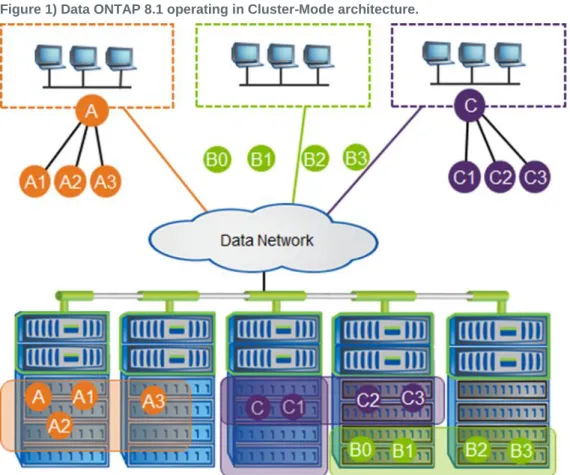
This document discusses the deployment of NetApp SnapManager for Exchange on Data ONTAP 8.1 operating in Cluster-Mode. Data ONTAP 8.1 operating in Cluster-Mode allows nondisruptive operations during storage infrastructure maintenance and upgrades using volume move and intercluster
asynchronous volume replication (replication between volumes hosted on different clusters). Figure 1 illustrates the architecture of Data ONTAP 8.1 operating in Cluster-Mode.
Figure 1) Data ONTAP 8.1 operating in Cluster-Mode architecture.
With the release of Data ONTAP 8.1 operating in Cluster-Mode, the solution provides enterprise-ready, unified scale-out storage. This solution is the basis for large, virtualized, shared storage infrastructure, and, most importantly, it is built on the solid foundation of Data ONTAP.
The following sections discuss Data ONTAP 8.1 operating in Mode and the benefits that Cluster-Mode provides to SME and Microsoft Exchange Server.
3 Benefits of Cluster-Mode
Some of the key benefits of Data ONTAP operating in Cluster-Mode include: Scalability
High availability Flexibility Multi-tenancy
3.1 Scalability
All storage controllers have physical limits to their expandability. Expandability is limited by the number of CPUs, memory slots, and space for disk shelves that define the maximum capacity and performance of the controller. If more storage or performance capacity is required, you might be able to add CPUs and memory or install additional disk shelves. Ultimately, however, the controller has no additional space for hardware. In this case, the only option to increase storage or performance capacity is to acquire another controller. One way to do this is to scale up.
Each additional controller is a completely independent management entity that doesn’t provide any shared storage resources. If the original controller must be replaced by a newer and larger controller, data migration is required to transfer data from the old controller to the new one. This is time consuming and disruptive and likely requires configuration changes on all the attached host systems. If the new controller coexists with the old controller, there are now two storage controllers that must be managed individually, but there are no built-in tools to balance or reassign workloads between them.
The situation worsens as the number of controllers increases. When scaling up, the operational burden increases as the environment expands. The result is an unbalanced environment that is difficult to manage.
Technology refresh cycles require substantial planning in advance, lengthy outages, and configuration changes that can introduce risk into the system. By contrast, Data ONTAP operating in Cluster-Mode provides a scale-out strategy, which means that as the storage environment grows, additional controllers are seamlessly added to the resource pool that resides on a shared storage infrastructure. Host and client connections, as well as datastores, can move nondisruptively anywhere in the resource pool, and existing workloads can be easily balanced over the available resources. New workloads can be easily deployed. Technology refreshes, such as replacing disk shelves and adding or completely replacing storage controllers, are accomplished while the environment remains online and serving data.
Data ONTAP operating in Cluster-Mode helps with the rapid and seamless deployment of new storage. It is built for continuous scale-out operations with no downtime, and it scales out transparently.
3.2 High Availability
Data ONTAP 8.1 operating in Cluster-Mode is architected with the high-availability (HA) requirements of today’s businesses in mind. Recovery capability is provided by a pair of nodes, or storage systems, called an HA pair. The HA pair is redundantly configured to serve data in case one of the nodes fails.
Operations such as volume movement, node failover, and switch failure can be performed without any disruption to the storage or applications.
Meet the needs of Microsoft Exchange Server data growth, and the increased and changing Exchange Server application workload, by adding more controllers or storage without any disruption to current applications. In virtualized Exchange environments especially, add client access servers (CASs) or hub transport servers to scale out the environments. This increases the Exchange Server application uptime and failover protection during hardware infrastructure maintenance and software upgrades using a highly available storage back end.
Storage failover protection is a core attribute of Cluster-Mode. HA pairs of controllers are the building blocks that form the storage cluster. This architecture enables transparent controller clustering and failover capability in which a failed storage controller causes its partner node to take over its disk arrays, volumes, and running services to provide continuous operation.
Cluster-Mode can scale up linearly as the number of nodes increases. To attain high availability, the layers in the setup also have the following redundant features:
Linear throughput scaling to multi-GB/sec
Linear scale performance for single volume with striping
Linear scale read performance with load-sharing mirrors and collective read/write performance in a single namespace
Table 1) Cluster-Mode components and features.
Component Feature
Component Feature
Host Ethernet port Network interface card (NIC) teaming (supported
systems only)
Server Windows® failover cluster manager
Ethernet Two Ethernet switches
Fibre Channel (FC) Two fabric switches
Storage systems Two-node Data ONTAP Cluster-Mode system
(minimum)
Logical interfaces (LIFs) in the storage systems Multiple ports mapped to the same LIF
3.3 Flexibility
Data ONTAP 8.1 operating in Cluster-Mode provides increased flexibility for storage operations by: Accommodating any mix of FC and SATA drives
Allowing nondisruptive data movement between tiers
Transparently accessing volumes on any node from any node Connecting many volumes into a single namespace
Moving volumes between nodes transparently
Offering vol move to move your existing mailboxes to a different storage tier altogether
3.4 Multi-Tenancy
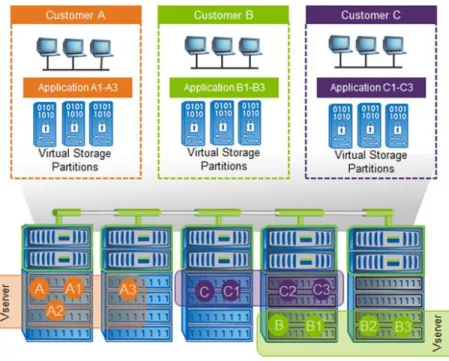
A cluster is composed of physical hardware, including storage controllers with attached disk shelves, NICs, and Flash Cache cards, which are optional. Together, these components create a physical resource pool that is virtualized as logical cluster resources to provide data access. Abstracting and virtualizing physical assets into logical resources provide flexibility and potential multi-tenancy in Data ONTAP, as well as the data motion ability that is at the heart of nondisruptive operations.
Figure 2) Cluster-Mode architecture.
Physical Cluster Components
Although there can be different types of storage controllers, they are, by default, all considered equivalent in the cluster configuration; they are all presented and managed as cluster nodes. Individual disks are managed by defining them into aggregates, which are groups of disks of a particular type that are
protected using NetApp RAID-DP®, as with NetApp Data ONTAP 7G and NetApp Data ONTAP operating in 7-Mode.
NICs and host bus adapters (HBAs) provide physical ports, such as Ethernet and FC, for connection to management and data networks. The physical components are visible only to cluster administrators and not directly to the applications and hosts that use the cluster. The physical components constitute a pool of resources from which are constructed the logical cluster resources. Applications and hosts access data only through virtual servers that contain volumes and logical interfaces.
Logical Cluster Components
The primary logical cluster component is the Vserver. Data ONTAP supports from one to hundreds of Vservers in a single cluster. Each Vserver enables one or more storage area network (SAN) and network-attached storage (NAS) access protocols and contains at least one volume and at least one LIF. The administration of each Vserver can also be delegated, if desired, so that separate administrators can be responsible for provisioning volumes and other Vserver operations. This is particularly appropriate for multi-tenanted environments or environments where workload separation is desired.
Data ONTAP operating in Cluster-Mode facilitates multi-tenancy at the storage layer by segregating storage entities such as aggregates, LIFs, LUNs, and volumes and containing them in a Vserver. Because each Vserver operates in its own namespace, each unit/customer mapped to a Vserver is completely isolated. Each Vserver supports role-based access control (RBAC), and specific protocols such as NFS, CIFS, iSCSI, FC, and FCoE can be assigned to it.
4 Cluster-Mode Terminology
Cluster. In Cluster-Mode a cluster is a group of connected nodes or storage systems that share a global namespace. The cluster can be managed as a single Vserver or multiple virtual servers, which enhance performance and reliability, and provide scalability benefits as well.
Command line interface (CLI). The Cluster-Mode CLI provides a command-based mechanism that is similar to the UNIX® tcsh shell because it provides tab completion, advanced queries, patterns, and wildcards in UNIX style.
Epsilon. Epsilon is an extra partial weight configured to one node. It does not determine the master, but it helps to form a majority. The epsilon node is epsilon for the entire cluster and not just for the individual replicated database (RDB) units. It is manually configurable, but can change automatically. To add an epsilon to a node, use the cluster modify command with –node and –epsilon parameters.
HA pair. A pair of nodes, or storage systems, redundantly configured to serve data for each other if one of the two nodes fails.
High availability. The recovery capability provided by a pair of nodes, or storage systems, called an HA pair, which are redundantly configured to serve data for each other if one of the two nodes fails.
LIF. A LIF is a logical interface that is mapped to a physical port. A physical port can have up to eight LIFs in Cluster-Mode. A LIF is required to access a Vserver. The three types of LIFs include cluster management, node management, and data management for Vserver.
Network. The cluster network connects nodes to form a cluster, and the data network connects the cluster to the client.
Quorum. A quorum is formed when a majority of the eligible nodes in a cluster are healthy and in contact with one another. There is one quorum per RDB ring at any given time. The node with the lowest site ID that is online is elected master, while the rest of the nodes are secondary RDB members.
RDB. RDB is a replicated database that stores and maintains the data that manages the cluster. The operations in an RDB are transactional in nature. There are four RDBs, including VLDB, VifMgr, Management, and SpinAuth. This is the key to maintaining high-performance consistency in a distributed environment. Each RDB unit has its own replication ring.
Ring. A ring is made up of one master, which is a read/write database, and other read-only databases. The writes go to the master and are then replicated to others in the ring through the cluster network.
SFO. An SFO is a storage failover. When two nodes are connected together, it makes an SFO pair. The SFO pair must be of the same controller model. It can be enabled from either node.
VIF. A VIF is a virtual interface, as opposed to network ports, which are physical. There are three types of VIFs and ports, including management, cluster, and data. Four physical ports can be grouped into a single VIF.
VLDB. A VLDB is a volume location database. A VLDB contains index information about which D-blade owns a volume and serves an aggregate. VLDB content is cached on each N-D-blade to speed up the data path.
Vserver. A Vserver is a secure, virtualized storage server assigned to a single tenant.
Web interface. The Cluster-Mode Web interface provides a model to interact with using a Web browser. Access the Web interface is through System Manager 2.0.
5 Sequence of Deployment on the Storage System
1. Set up the cluster environment. Refer to the ―Data ONTAP 8.1 Installation and Administration Guide,‖ available on the NetApp Support (formerly NOW®) site.
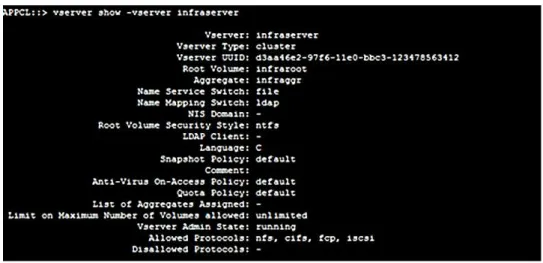
2. Create an aggregate. 3. Create a Vserver.
Figure 3) Sample Vserver.
5. Configure the network for the Vserver, including:
a. The data LIFs, which enable Vservers to serve data to the clients (iSCSI and FCP)
b. The management LIF, which allows SnapDrive® to communicate with the other LIFs to serve data 6. Create data volumes of the required size. SnapManager for Exchange coordinates with SnapDrive to
use these volumes to create and manage LUNs.
7. For data protection within the cluster, perform the following additional steps:
a. Create a volume in the Vserver for the secondary Vserver. Make sure that the property of that volume is of the DP type.
b. Establish a SnapMirror® relationship between the primary and the secondary by accessing the secondary system.
8. For intercluster SnapMirror replication, make sure that at least one intercluster management LIF is present in each node on both primary and secondary storage systems. For additional information, see subsequent sections.
For more information about data protection, refer to: Data ONTAP 8.1 Cluster-Mode Data Protection Guide SnapMirror FAQ
Note: SnapDrive does not support single sign on when connected to Data ONTAP Cluster-Mode. Users must configure user credentials for all cluster Vserver and Vserver management endpoints from the storage system that is accessed by SDW.
Best Practice
In the storage system, NetApp recommends at least four LIFs per Vserver: Two data LIFs
One management LIF
One intercluster LIF (for intercluster replication)
6 Cluster-Mode Limitations and Recommendations
This section describes the limitations of Cluster-Mode and provides recommendations for managing those limitations.
6.1 Limitations
Although Cluster-Mode provides many new features, some current limitations to keep in mind include: Large environments require multiple clusters.
Clusters don’t stretch beyond the data center in multisite configurations. Limits to the supported scale of clusters.
No IPv6 support.
Cluster-Mode–based storage systems don’t support NetApp SnapVault® . No support for file-based thin provisioning.
No support for VMDK on NFS and VMFS datastores residing on Cluster-Mode systems. Limits to different types of hardware and software used in a cluster.
Storing the RBAC configuration file in storage system root volume of the Vserver is not supported. User cannot establish a NetApp SnapMirror relationship between a 7-Mode source volume and a Cluster-Mode destination volume.
6.2 Recommendations
NetApp recommends the following settings to enhance Cluster-Mode operations:
Configure user credentials for all cluster server and Vserver management endpoints from the storage system accessed by NetApp SnapDrive for Windows and SnapManager for Exchange (SME). For a highly available connection to the storage system, NetApp requires installation of the supported version of multipathing software, such as Data ONTAP DSM 3.5 for Windows MPIO.
Asymmetric Logical Unit Access (ALUA) support is available on all Cluster-Mode configurations with Data ONTAP DSM, as well as with Microsoft DSM.
To perform LUN management tasks, there must be a minimum of one iSCSI LIF and one management LIF per Vserver.
Add the Cluster-Mode IP address and credentials (cluster server and Vserver credentials) along with the management LIF to SnapDrive > Transport Protocols Settings > Storage Systems.
Map the Vserver and cluster server IP address in the Domain Name Server (DNS), or explicitly specify it in the Windows host file, located in C:\WINDOWS\system32\drivers\etc.
The cutover window defined for a SAN volume must not exceed the expected timeout value on the host side. During the volume cutover phase, in volume move all input/output (I/O) access is queued, and requests are blocked to the source volume. SnapDrive sets a timeout value of 120 seconds on the host during the volume move. Also, when a SAN volume is moved, ALUA is used to optimize access to the volume.
Each node must have a data LIF for optimized access to the volume.
Snapshot™ copy scheduling can be performed only if cluster server credentials are provided. It is the responsibility of the cluster server administrator to manage space allocation on the Vservers.
Virtual guest machines residing on VMware® ESX® hosts are supported. However, this support is restricted to RDM LUNs only. Cluster-Mode does not currently support VMDK on NFS or VMFS datastores residing on Cluster-Mode systems.
Provide cluster server credentials in the SDW storage settings to receive NetApp AutoSupport™ alerts with Cluster-Mode.
Intercluster replication requires at least one intercluster LIF per node. The intercluster LIF can be assigned to a data port or a dedicated intercluster port.
Configure the Windows firewall to allow SnapDrive and SnapManager services for Windows communications.
7 Cluster-Mode with Microsoft Exchange Server
Cluster-Mode advantages for SnapManager for Exchange are summarized in the following sections.
7.1 Nondisruptive Operations
Provides 100% availability of Microsoft Exchange Server data during storage infrastructure
maintenance and upgrades. This means live migration of data volumes is possible without affecting data and user availability.
Vserver container now enables you to manage your service-level agreements (SLAs) effectively, in terms of recovery point objective (RPO), recovery time objective (RTO), and availability, by providing the ability to manage performance requirements by moving Vservers across the cluster nodes in order to balance the load.
Seamless failover protection helps make Microsoft Exchange Server data available even when failover occurs within the cluster.
Nondisruptive volume migration for Microsoft Exchange Server data is more efficient than disruptive move mailbox operations on Exchange Server. The vol move command can be used to move your existing mailboxes to a different storage tier altogether.
7.2 Operational Efficiency
Reduces infrastructure costs for Microsoft Exchange Server environments by:
Leveraging a mix of controller types in a single cluster according to specific workload needs Using tiered storage to match application data to your disk price/performance requirements Allows you to host multiple departments or customers securely on shared infrastructure:
Helps to securely segregate Microsoft Exchange Server application data using Vservers Provides role-based access control
8 SnapManager Dependency on SnapDrive
SME 6.0.2R1 directly communicates with SnapDrive for Windows for application-consistent Snapshot copies.
The SnapManager suite of products uses SnapDrive for application-consistent Snapshot copies. To reduce the performance overhead on the storage systems, NetApp recommends that you make sure there are no overlaps between the application-specific Snapshot copies and their respective products before the Snapshot copies are initiated.
9 Supported Software Versions for Windows
Table 2 shows the supported software versions for both 7-Mode and Cluster-Mode in a Windows environment.
Table 2) Cluster-Mode and 7-Mode software versions.
7-Mode Cluster-Mode
Data ONTAP 8.0 or earlier Data ONTAP 8.1
DSM 3.4 or earlier DSM 3.5
7-Mode Cluster-Mode
Windows Host Utility Kit 5.0 No longer required for DSM; the DSM 3.5 installer includes the MBRAlign tool and the LinuxGuestConfig.iso in the installation package
If the user has MSDSM installed, then Windows Host Utilities 6.0 must be installed
SnapManager for Exchange 6.0.2R1 SnapManager for Exchange 6.0.2R1
10 Exchange Server 2010 Architecture
Exchange Server 2010 includes the following server roles:
Client access servers (CASs). Support traditional components such as Post Office Protocol 3 (POP3) and Internet Message Access Protocol 4 (IMAP4), Exchange ActiveSync, Microsoft Outlook Web App, Outlook Anywhere, and several new features, including the RPC client access service and the Exchange control panel.
Edge transport servers. Handle message traffic to and from the Internet and run spam filters.
Hub transport servers. Perform internal message transfer, distribution list expansions, and message conversions between Internet mail and Exchange Server message formats.
Mailbox servers. Maintain mailbox store databases, provide client access servers with access to the data, and support access to public folders for Outlook clients.
Unified messaging servers. Integrate voice and fax with e-mail messaging and run Outlook voice access.
10.1 Database Availability Groups
Exchange Server 2007 introduced a built-in log shipping feature called continuous replication. Continuous replication, which was available in three forms—local continuous replication (LCR), cluster continuous replication (CCR), and standby continuous replication (SCR)—significantly reduced the cost of deploying a highly available Exchange infrastructure and provided a much improved deployment and management experience over previous versions of Exchange.
Although the introduction of continuous replication in Exchange Server 2007 did provide high availability, implementation was still a challenge due to the integration between Exchange and Windows failover clustering.
Exchange Server 2010 combines on-site data replication (CCR) and off-site data replication (SCR) into a single framework called a database availability group (DAG). A database availability group is a cluster of up to 16 nodes that provides automatic database-level failover.
DAGs use continuous replication and a subset of Windows failover clustering to provide continuous mailbox availability.
10.2 Personal Archive Mailbox
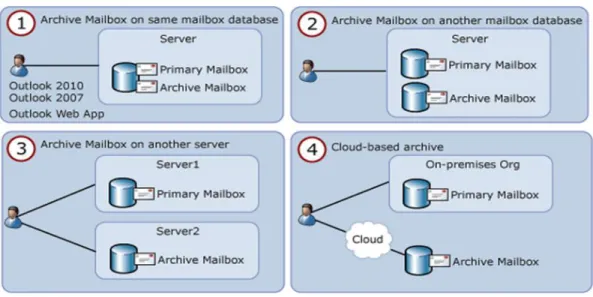
A personal archive is an additional mailbox associated with a user's primary mailbox. This new mailbox is known as an archive mailbox and is provisioned automatically for the user when the administrator
enables the personal archive feature.
Once the archive mailbox has been associated with the user account, mail can be moved by the user into the personal archive by dragging and dropping PST files or automatically through retention policies. Exchange Server 2010 SP1 allows the archive mailbox to be placed in a different database than the primary mailbox.
11 Exchange Server 2010 Planning Considerations
11.1 System Requirements
The system requirements for Exchange Server 2010 on NetApp storage systems are: Windows Server 2008 and Windows Server 2008 R2 64-bit edition.
Minimum and maximum page file size set to physical RAM plus 10MB.
Memory requirements vary depending on Exchange features that are installed; for detailed information about memory requirements for Exchange 2010, see the Microsoft TechNet article Understanding Memory Configurations and Exchange Performance.
Disk space depends upon the requirements; at least 1.2GB of free space is required on the drive on which you plan to install Exchange Server.
Disk partitions formatted as NTFS file systems.
For more detailed requirements, visit the Microsoft TechNet article Exchange 2010 System Requirements.
12 NetApp Storage Efficiencies
12.1 RAID-DP
RAID-DP technology prevents data loss when up to two drives fail per RAID group.
RAID-DP is integrated with the WAFL® file system so that the dedicated parity drives don't become a performance bottleneck. RAID-DP makes SATA disks an option for your enterprise storage. Exchange administrators can use less-expensive SATA without worrying about data loss and also lower their storage acquisition costs.
Note: SyncMirror® can be used along with RAID-DP to provide a second layer of mirrored protection for a more robust disk protection strategy.
12.2 Snapshot Technology
NetApp Snapshot technology provides low-cost, fast-backup, point-in-time copies of the file system (volume) or LUN by preserving Data ONTAP architecture WAFL consistency points.
No performance penalty is incurred to create Snapshot copies, because data is not moved, as it is with other copy-out technologies. The cost for Snapshot copies is only at the rate of block-level changes, not 100% for each backup as with mirror copies. This can result in savings in storage costs for backup and restore purposes and opens up a number of efficient data management possibilities.
Refer to the Data ONTAP 8.1 Cluster-Mode Data Protection Guide for more information on how to leverage NetApp Snapshot technology for data protection requirements for Microsoft Exchange Server 2010 environments.
12.3 Thin Provisioning
Thin provisioning, in a shared storage environment, is a method for optimizing utilization of available storage. It employs on-demand allocation of blocks of data versus the traditional method of allocating all of the blocks up front. This method eliminates almost all white space, which helps avoid poor utilization rates. Flexible volumes (FlexVol® volumes) are the enabling technology behind NetApp thin provisioning, which can be thought of as the virtualization layer of Data ONTAP. When a LUN is created, it does not dedicate specific blocks out of the NetApp volume for the LUN or for Snapshot copies of the LUN. Instead, it allocates the blocks from the NetApp aggregate when the data is actually written. This allows
the administrator to provision more storage space, as seen from the connected servers, than is actually physically present in the storage system.
12.4 Space Guarantee
The space guarantee is the enabler of thin provisioning. Space guarantees can be set at the volume or the LUN level, depending on the space guarantee requirements of the application. Typically, if the space guarantee at the volume level is set to ―volume,‖ the amount of space required by the flexible (or FlexVol) volume is available from its aggregate. This is the default setting for FlexVol volumes. When the space guarantee is set to ―volume,‖ the space is reserved from the aggregate’s available space at volume creation time.
When the space guarantee is set to ―none,‖ the volume reserves no space from the aggregate during volume creation. Space is first taken from the aggregate when data is actually written to the volume. Write operations to space-reserved LUNs in a volume with ―guarantee=none‖ fail if the containing aggregate does not have enough available space.
LUN reservation enables the LUN to have space in the volume, but ―guarantee=none‖ does not enable the volume to have space in the aggregate. When the space guarantee for the volume is set to ―File,‖ the aggregate enables space to be available to completely rewrite LUNs that have space reservation
enabled.
12.5 Fractional Reserve
Fractional reserve is a volume option that determines how much space Data ONTAP reserves for Snapshot overwrite data for LUNs, which can be used after all other space in the volume is used. The default value for fractional_reserve is 100%. However, using the autodelete functionality, the fractional reserve can be set to 0; through the command line interface (CLI), it can be set to anything from 0 through 100%.
12.6 Autodelete
This volume setting (available in Data ONTAP 7.1 and later) allows Data ONTAP to delete Snapshot copies if a threshold is met. This threshold is called a ―trigger‖ and can be set so that Snapshot copies are automatically deleted when one of the following conditions is met:
Volume. The volume is nearly full. This is reported in the first line for each volume in the df
command. It should be noted that the volume can be full even though there might still be space in the snap_reserve areas.
Snap_reserve. The snap reserve space is nearly full.
Space_reserve. The ―overwrite reserved‖ space is full. This is the space defined by the LUNs with
space reservations enabled and the fractional_reserve option. The reserve space is not filled until both the volume and the snap_reserve areas are full.
Note: The df command is available when you access NetApp storage through the CLI. Best Practice
NetApp strongly recommends setting the autodelete trigger to volume.
The order in which Snapshot copies are deleted is determined by the following three options:
Delete_order.
Defer_deleted.
This option allows the user to define a group of Snapshot copies that should first be deleted when no other Snapshot copies are available. It is possible to defer the deletion of user-created Snapshot copies, scheduled Snapshot copies, or Snapshot copies beginning with a configurable prefix.
Commitment.
This option determines how Snapshot copies used for SnapMirror and dump operations should be handled. If this option is set to ―try,‖ Snapshot copies are only deleted if they are not locked. If it is set to ―disrupt,‖ Snapshot copies are deleted even if they are locked.
Best Practice
When using SnapMirror products for replicating Microsoft Exchange Server 2010 databases, NetApp recommends not using the ―disrupt‖ option for commitment. This is because SnapMirror baseline Snapshot copies can be destroyed by autodelete even though they are the last Snapshot copies deleted. In many configurations, deleting the last SnapMirror Snapshot copy is not advised because a new full baseline copy is required to resume mirroring operations. If, for example, the source and destination are at different sites, recreating this baseline can be a time-consuming and costly process.
12.7 Autosize
This volume setting (available in Data ONTAP 7.1 and later) defines whether a volume should
automatically grow to avoid filling up to capacity. This option is available only for flexible volumes. It is possible to define how fast the volume should grow with the ―-i‖ option. The default growth increment is 5% of the volume size at creation. It is also possible to define how large the volume is allowed to grow with the ―-m‖ option. If volume autosize is enabled, the default maximum size to grow to is 120% of the original volume size.
Best Practice
There must be enough space available in the aggregate for the autosize option to succeed. NetApp recommends planning for additional buffer space when using thin provisioning for Microsoft Exchange Server 2010 environments.
12.8 NetApp FlexClone
A FlexClone® volume is a writable point-in-time Snapshot copy of a FlexVol volume or another FlexClone volume. FlexClone uses space very efficiently, leveraging the Data ONTAP architecture to store only data that changes between the parent and the clone. FlexClone volumes are great for any situation in which testing or development occurs, any situation in which progress is made by locking in incremental improvements, and any situation in which there is a desire to distribute data in changeable form without endangering the integrity of the original. A common scenario is to use FlexClone in an environment before committing a Microsoft Exchange Server 2010 rollup or hotfix into production.
FlexClone technology can be leveraged both at the primary storage system and at the SnapMirror destinations for effective utilization of resources. FlexClone can also be used for disaster recovery testing without affecting the operational continuity of the Microsoft Exchange Server 2010 environment.
FlexClone can be created from the storage controller console using the following command: volume clone create -vserver Vserver_name –flexclone
new_FlexClone_volume_name -parent-volume parent_volume_name [-parentsnapshot base_Snapshot_copy]
Refer to FlexClone documentation in the ―Data ONTAP C-Mode Administration Guide‖ for more detailed information on how FlexClone works and on command line references.
Best Practice
Use SnapDrive for Windows to create FlexClone volumes. This automates the creation of the FlexClone volumes and connects the LUNs within the clone to the test and development host.
12.9 NetApp Deduplication
The deduplication process stores only unique blocks of data in the volume and creates additional metadata during this process.
Each 4KB block in the storage system has a digital fingerprint, which is compared to other fingerprints on the volume. If two fingerprints are found to be the same, a byte-for-byte comparison is done of all bytes in the block. If they are an exact match, the duplicate block is discarded, and the space is reclaimed. The core enabling technology of deduplication is fingerprints. When deduplication runs for the first time on a FlexVol volume, it scans the blocks and creates a fingerprint database that contains a sorted list of all fingerprints for used blocks in the flexible volume.
Deduplication consumes system resources and can alter the data layout on disk. Due to the application I/O pattern and the effect of deduplication on the data layout, the read and write I/O performance can vary. You can use the volume efficiency on command to enable deduplication on a FlexVol volume.
Examples:
The following command enables deduplication on the volume VolA: volume efficiency on -vserver vs1 -volume VolA
Use the volume efficiency start command to start a deduplication operation.
The following command allows you to manually start the deduplication operation on the volume VolA: volume efficiency start -vserver vs1 -volume VolA
The following command starts the deduplication operation on the volume VolA and scans the existing data:
volume efficiency start -vserver vs1 -volume VolA -scan-old-data true
Note: Deduplication is transparent to Exchange, and the block changes are not recognized by Exchange. Therefore the Exchange database remains unchanged in size from the host’s perspective, even though there are capacity savings at the volume level.
Note: Tests have shown space savings on Exchange databases in the 15% to 35% range. Best Practices
NetApp recommends deduplication for database volumes, not for transaction log volumes. Turn scheduled deduplication on and schedule it for nonpeak hours (late at night).
Replication of a deduplicated volume is supported by using SnapMirror. However, NetApp does not recommend using deduplication with synchronous SnapMirror, since that could add substantial overhead to the storage subsystem and introduce performance overhead to Exchange Server 2010 databases. Refer to the Storage Management Guide for more detail on configuring deduplication.
13 NetApp Solution for Microsoft Exchange Server 2010
13.1 NetApp Storage Software and Tools
NetApp Windows Host Utilities Kit
This kit should be used in both physical and virtual environments; it configures Windows Server to access virtual disks on a NetApp storage system through the Fibre Channel, iSCSI, or FCoE protocol. It also helps to align the master boot record for the Microsoft VHD file layout, preventing it from getting out of alignment with the underlying NetApp LUN. This is very important for optimal I/O performance.
MPIO
The NetApp Windows Host Utilities Kit uses the Microsoft framework for MPIO, and it helps storage providers develop multiple paths to optimize connectivity with the storage arrays.
MPIO Load Balancing
This type of load balancing, supported by MPIO, uses multiple data paths between server and storage to provide greater throughput of data than could be achieved with only one connection.
MPIO-Based Fault-Tolerant Failover
In this scenario, multiple data paths to the storage are configured. If one path fails, the HBA or NIC fails over to the other path and resends any outstanding I/O.
For a server that has one or more HBAs or NICs, MPIO offers support for redundant switch fabrics or connections from the switch to the storage array.
For a server that has more than one HBA or NIC, MPIO also offers protection against the failure of one of those adapters directly within the server.
SnapDrive for Windows
This application helps with storage provisioning and managing disks in both physical and virtual
environments. SnapDrive for Windows manages the LUNs on the storage system, making them available as local disks on Windows hosts.
Here are the key features of SnapDrive for Windows:
Enhances online storage configuration, LUN expansion and shrinking; provides streamlined management
Works in conjunction with NetApp SnapMirror software to facilitate disaster recovery from either asynchronously or synchronously mirrored destination volumes
Enables management of SnapDrive for Windows on multiple hosts Enhances support on Microsoft cluster configurations
Simplifies iSCSI session management
Enables technology for SnapManager for Exchange products
13.2 SnapManager for Exchange Server Overview
SnapManager for Exchange provides an integrated data management solution for Microsoft Exchange Server 2010 that enhances the availability, scalability, and reliability of Exchange databases.
SnapManager for Exchange provides rapid online backup and restoration of databases, along with local or remote backup set mirroring for disaster recovery.
SnapManager for Exchange uses online Snapshot technologies that are part of Data ONTAP. It integrates with Exchange backup and restores APIs and the Volume Shadow Copy Service (VSS). SnapManager for Exchange uses SnapMirror to support disaster recovery.
SnapManager for Exchange provides the following data management capabilities: Migrating Exchange databases and transaction logs to NetApp LUNs
Backing up Exchange databases and transaction logs from NetApp LUNs Verifying Exchange databases and transaction logs in backup sets Managing backup sets
Archiving backup sets
Restoring Exchange databases and transaction logs from previously created backup sets Some of the new features released in SnapManager for Exchange 6.0.2 include:
Improved backup performance
Backup retention management enhancements Gapless DAG backup feature
Copy backup support
Enterprise monitoring and reporting enhancements
Business Continuance Module (BCM) enhancements for Exchange 2007
13.3 SnapManager for Exchange Server Architecture
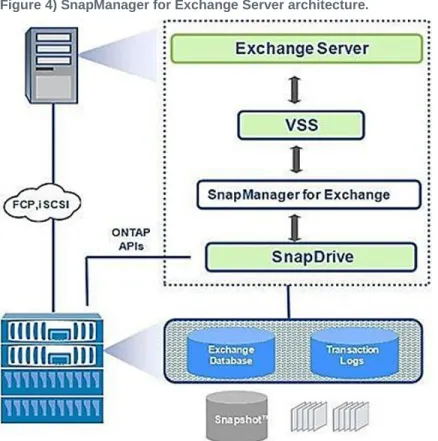
SnapManager for Microsoft Exchange supports both Microsoft Exchange Server 2007 and Microsoft Exchange Server 2010. SnapManager for Exchange is tightly integrated with Microsoft Exchange, which allows consistent online backups of Microsoft Exchange environments while leveraging NetApp Snapshot copy technology. SnapManager for Exchange is a VSS requestor, which means that it uses the VSS subsystem supported by Microsoft to initiate backups. SnapManager for Exchange works with a DAG, providing the ability to back up and restore data from both active database copies and passive database copies.
Figure 4) SnapManager for Exchange Server architecture.
13.4 SnapManager for Exchange Server Installation and Upgrade Considerations
For information about compatible versions of SnapManager for Exchange, SnapDrive for Windows, and Data ONTAP, see the SnapManager and SnapDrive Compatibility Matrix.Before upgrading SnapManager for Exchange, you should:
Back up the operating system installation on Exchange Server. This includes backing up all of the server system state information, which consists of the registry, the boot files, and the COM+ class registry.
Back up the data on the local drives on Exchange Server. Back up the boot and system drives.
Use your backup utility to create and maintain a current emergency repair disk (ERD). Best Practice
You must install SnapManager for Exchange and SnapDrive for Windows on all member servers of the DAG.
13.5 SnapManager for Exchange Management
The SnapManager for Exchange Service must be a member of the Exchange Server local administrators group.
13.6 Sizing and Storage Layout for Exchange Server 2010
Aggregate Recommendations
Fewer, larger aggregates maximize performance; however, they might not meet the data availability requirements set forth in the SLA agreement. In Exchange Server 2010 environments with multiple database copies, Microsoft no longer requires separating database and transaction log files to separate sets of disks. This means that database and transaction log volumes can be placed in the same
aggregate. Each database copy of the same database must be placed in a separate aggregate. Best Practices
NetApp recommends having at least 10% free space available in an aggregate hosting Exchange data. This allows the storage system to perform optimally.
On controllers that are isolated to Exchange Server, setting the global wafl.optimize_write_once flag to off can optimize random workloads. The flag must be set before Exchange aggregates are created. If Exchange aggregates are already present, reallocate –A –a must be run on each Exchange aggregate. This is a time-consuming process.
Volume Planning and Layout
Data ONTAP enables the creation of flexible volumes for managing data without the need to assign physical disks to the volumes. Instead, the flexible volumes (FlexVol volumes) enjoy performance benefits from a larger pool of physical disks called an aggregate. This results in the following additional benefits for Microsoft Exchange Server 2010 environments:
A large number of volumes can be created, all with independent Snapshot copy schedules and SnapMirror policies.
All volumes can be managed independently while receiving the maximum I/O benefit of a much larger pool of disks.
Best Practices
NetApp recommends separating database and transaction logs from different servers into separate volumes to prevent a potential ―busy‖ Snapshot copy problem. Utilizing separate volumes for each server reduces complexity, since there is no concern about Snapshot copy schedules overlapping different servers.
NetApp recommends having at least 10% free space available in a volume hosting Exchange data. This allows the storage system to perform optimally.
LUN Planning and Layout
A database and its corresponding transaction log must be placed on separate LUNs for SnapManager for Exchange. In environments with high LUN counts, transaction logs for multiple mailbox databases can be consolidated on a single LUN. NetApp recommends limiting the number of transaction log streams per LUN to fewer than 10.
Best Practices
When creating LUNs, use volume mount points. There are a finite number of drive letters, and in a DAG each database path must be the same on every server that has a copy of that database.
Place active and passive copies of the database in separate volumes.
Use larger databases. Microsoft supports up to 16TB databases with a best practice size of 2TB. Many customers, including NetApp IT, run Exchange Server 2010 with larger than 2TB databases on NetApp storage.
Do not create mount points for additional LUNs on another LUN that holds an Exchange Server 2010 database. If it becomes necessary to complete a restore of a database residing on a LUN with volume
mount points, the restore operation removes any mount points that were created after the backup, disrupting access to the data on the mounted volumes referenced by these volume mount points.
SnapInfo Data and LUN
The SnapInfo directory is the central repository for all SnapManager for Exchange–related activities. This directory contains the backup metadata and reports as well as truncated transaction log files.
In SnapManager for Exchange, if the SnapInfo directory is placed in the same LUN as its corresponding transaction log, then SnapManager for Exchange stores NTFS hard links to transaction log files in the SnapInfo directory during backup. This saves space and decreases transaction log backup time.
Best Practices
Place the transaction log files and the SnapInfo directory on the same LUN.
If a database’s transaction log files and the SnapInfo directory are placed on separate LUNs, place them both in the same volume.
Exchange 2010 Server Database Cache
The most successful predictors for Exchange Server 2010 mailbox user transactional IOPS requirements are the amount of database cache per mailbox and the number of messages each user sends and receives per day. Microsoft has guidance on the amount of database cache required for a particular user profile, which can be used to accurately size the RAM on the mailbox server. For more details, see the Microsoft TechNet article Understanding the Mailbox Database Cache.
Transaction Log Capacity Considerations
Microsoft has provided guidance on user profiles, in 50 messages per day increments, using a 75KB average message size. Each 50 messages per day cause approximately 10 transaction logs to be generated. For more details, see the Microsoft TechNet article Understanding Mailbox Database and Log Capacity Factors.
13.7 Capacity Planning
A properly sized Exchange environment must meet or exceed the customer SLA. For an environment to be properly sized, information from the customer environment is collected, and tools are used to convert that information into a physical storage recommendation.
Two primary tools should be utilized when planning an Exchange environment for a customer: The Microsoft Exchange 2010 Mailbox Server Role Requirements Calculator
The NetApp Exchange Sizing Tool; work with your local NetApp partner or your NetApp representative to enable proper sizing
The sizing information provided by these tools is an important component for planning an Exchange environment and provides a framework for storage group layout and LUN requirements. It is important to realize that the Microsoft storage calculator cannot accurately make recommendations on proprietary storage technology because the storage design largely depends on the type of storage array being used. When sizing Exchange Server deployments using NetApp storage, it is important to use the NetApp Exchange Sizing Tool with the data from the Microsoft Exchange 2010 Mailbox Server Role
Requirements Calculator. Best Practice
Consult a local NetApp Exchange expert or your NetApp partner to assist in accurately sizing Exchange Server 2010. Use the NetApp Sizing Tool for Exchange to size all Exchange Server deployments that use NetApp storage.
Backup Design Considerations
In this section we focus on the backup of databases and transaction logs on NetApp storage using SnapManager for Exchange. It is important to consider the following factors for planning a backup strategy:
SLA
High availability and disaster recovery planning Backup verification policy
The RTO to return a database to service is affected by the number of transaction logs that must be replaced. A more frequent backup window reduces the number of transaction logs that must be replaced, shrinking RTO.
Database Availability Group
In Exchange Server 2010, mailbox servers can be grouped to form a DAG. A DAG is a high-availability feature of Microsoft Exchange Server 2010 that provides database-level recovery from failures and data corruption. A DAG can contain up to 16 mailbox servers in which each server can have a copy of a database. The DAG is created for mailbox databases and not for public folder databases.
By means of the active manager, a DAG provides automatic recovery from a database, server, or network failure. The current active database and its copies use the same path on each server.
Database Verification
For databases in a DAG that has two or more healthy copies, the database consistency-checking step can even be skipped. If the database being backed up is a member of a DAG, and there are at least two viable copies of the database, the risk of not performing a database consistency check is minimal. The internal verification processes in Exchange 2010 greatly reduce the likelihood of database corruption in DAG configurations. So if the backup and restore application is backing up a database that has at least two good copies, the application doesn’t need to perform a database consistency check on the backed-up data. However, the application still must verify the checksum values for the log files that are being backed up. If your application is backing up a standalone database, which by definition has only one copy, the application must verify the consistency of both the database files and the log files.
A single Exchange mailbox server can run only one verification process at a time on a particular
verification server. A verification server can simultaneously run one verification job from each Exchange mailbox server. More than one verification server can be used in order to simultaneously verify more than one backup job on a single Exchange mailbox server. Many customers utilize virtual machines to offload the verification.
Preparing Exchange Server Databases for Migration to NetApp Storage
SnapManager for Exchange makes it easy to move databases from local storage to NetApp storage utilizing the configuration wizard. All the databases are automatically mounted once the migration is completed, and NetApp recommends backing up the databases soon after the migration.
Best Practices
The Exchange Server 2010 database and transaction log path must be unique for each database. SnapManager for Exchange uses a host-based licensing mechanism, which means SnapManager for
Exchange licenses should be purchased for each member server in the DAG even if SnapManager for Exchange is not intended to be installed on each member server.
Snapshot Retention Guidelines
Primary Storage
The RPO guides how frequently a backup is created. NetApp flexible volumes running Data ONTAP operating in Cluster-Mode can store a maximum of 255 Snapshot copies per flexible volume. The amount of storage needed for Snapshot copies depends on the rate of change.
Consult a local NetApp Exchange expert or your NetApp partner to provide accurate volume sizing and layout for Exchange environments.
Restore Guidelines
The SnapManager for Exchange restore functionality allows you to recover your Exchange databases and transaction logs from the backups that it created. There are two types of restore operations in SnapManager for Exchange:
Up to the minute. Selected by default, an up-to-the-minute restore mounts the database, and Exchange replays the transaction logs from the backup set and from the transaction log directory and applies them to the database. A contiguous set of transaction logs is required for an up-to-the-minute restore to succeed.
Point in time. This option allows you to restore your Exchange data to a chosen point in time. Any Exchange data past that point is not restored. This option is particularly useful when trying to restore to a point before something such as data corruption occurred. A point-in-time restore only replays and applies to the database those transaction logs that existed in the active file system when the backup was created up to the specified point in time. All transaction logs beyond that point in time are discarded.
Best Practice
When performing an up-to-the-minute restore, restore from your most recently verified backup to minimize the number of transaction logs that must be replayed.
Single Mailbox and Item-Level Recovery
The NetApp Single Mailbox Recovery (SMBR) tool allows the customer to extract e-mails and other items from an Exchange database and place them in a PST file or a live mailbox. In order to extract e-mail from an Exchange database, the LUN must be mounted using SnapDrive for Windows.
Best Practice
Use only SnapDrive for Windows to mount the LUN to access the Exchange databases.
Starting with Exchange Server 2010 SP1, the archive mailbox can be placed in a different database than a user’s primary mailbox. The steps shown in Figure 5 are necessary to import items to an archive mailbox.
Figure 5) SMBR recovery.
This is a two-step process:
1. Export the mail from EDB to a PST.
2. Run the following Exchange PowerShell cmdlet to import the PST directly to the archive mailbox by using the following command:
New-MailboxImportRequest -Mailbox “JohnDoe” –IsArchive -FilePath \\Server_name\PSTFileShare\John_Doe.pst
The IsArchive switch specifies that you are importing the PST file into the user's archive mailbox.
Troubleshooting
SnapManager for Exchange reports list the step-by-step details of every SnapManager for Exchange operation that is performed, their final status, and any error messages that are encountered during the operation. The SnapManager for Exchange report directory provides subfolders that group the reports for each operation type.
Use the following troubleshooting steps to gather additional information: 1. Enable debug logging on all nodes.
2. Restart the SME service on all nodes.
3. Identify which operation on which node failed, based on the SME operation sequence. 4. Go to the node with the failure and find the backup report and debug log under
\Backup\Server_name\, and \Debug\Server_name\.
5. Use the server-level backup report and debug log to find the root cause of the problem. For more information on troubleshooting, refer to the NetApp Knowledge Base.
14 Performance
Accurately sizing NetApp storage controllers for Exchange workloads is essential for good Exchange performance and to make certain that Exchange service levels are met. Consult a local NetApp Exchange expert to provide accurate performance sizing and layout for Exchange environments.
14.1 SATA Performance Considerations
SATA-based deployments of Exchange must take into account that SATA drives have a lower I/O profile than SAS and FC disk. The I/O profile of a 7,200-RPM SATA drive is around 45–55 IOPS at a 20ms response time.
Exchange 2010 utilizes background database maintenance (BDM) to maintain the consistency of the databases. BDM applies a per-database performance tax on the storage system that must be taken into account when sizing the storage for Exchange. Having fewer, larger databases in the Exchange database design helps reduce the amount of background database maintenance I/O, which in some cases can exceed the transactional I/O generated by users. This is typically seen in designs in which there are a large number of small databases.
To help improve the storage efficiency and read I/O performance and latency of SATA-based
deployments, Flash Cache should be used. Flash Cache is a read cache that can be installed on certain NetApp storage controllers. Flash Cache enables fewer SATA disks to be used in SATA-based
deployments, because a percentage of the Exchange database working set is cached in the Flash Cache, thus greatly reducing the amount of read I/O on the SATA disk. NetApp recommends Flash Cache and SATA for deployments exceeding 1,000 mailboxes or when SATA-based designs are bounded by performance instead of capacity.
14.2 Database Sizing Considerations
Using a smaller number of larger databases can help reduce the amount of background database maintenance I/O as well as reduce the complexity of the storage design. NetApp recommends using a database size of at least 2TB with at least two copies in a DAG, or 200GB for non-DAG databases. A database size of 2TB is a practical size that can be restored in minutes with SnapManager for Exchange. Microsoft recommends 2TB as a maximum size, but supports up to 16TB for databases on both Standard and Enterprise Server editions.
14.3 Aggregate Sizing and Configuration Considerations
Aggregates are sized for performance and storage capacity in storage designs that support Exchange workloads and also maintain data protection for the Exchange data.
As mentioned earlier in this document, Exchange databases and transaction logs can be placed on the same aggregate. There is marginal benefit in locating transaction logs and databases on separate aggregates. However, putting DAG database copies on separate aggregates and/or controllers enables at least one copy of the Exchange data to survive if an aggregate is lost due to a catastrophic failure. Placing database copies on separate aggregates also helps isolate background database maintenance I/O to the aggregates where the database copies are located.
If Exchange is virtualized, place the Exchange VMs on a separate aggregate from the Exchange data. Certain mailbox roles, such as the hub transport server, might affect Exchange performance if the virtual machine is located on the same aggregate as the Exchange data.
So that Exchange performance is not affected by disk drive reconstruction, determine that there are at least two spare disks per controller and that the Data ONTAP option disk.maint_center.enable is enabled. (It is on by default but requires two hot spares.) Maintenance Center is a feature in Data ONTAP that can prefail a disk if the disk does not pass a certain number of diagnostic tests. For more details on hot spares, see the System Management Guide for the version of Data ONTAP that is installed.
The aggregates for Exchange should be configured for the RAID-DP RAID level. This enables maximum data protection for the Exchange data so that an aggregate can survive a double disk failure in any RAID group of that aggregate.
The RAID group size of the aggregate affects the level of data protection, speed of recovery, and
trade-off of factors. Adding more data disks to a RAID group increases the striping of data across those disks, which typically improves I/O performance. Additionally, a smaller percentage of disks is used for parity rather than data. However, with more disks in a RAID group, there is a greater risk that one of the disks might fail. The recommendation is to use the default RAID group size when the Exchange aggregate is created, because this balances storage efficiency and performance.
Exchange workloads can run effectively on both 32-bit and 64-bit aggregates if the aggregates and controller heads are properly sized. NetApp recommends that 64-bit aggregates supporting an Exchange workload be used only in configurations that are supported in the NetApp Exchange sizing tool. This is so that the storage is properly sized for the anticipated Exchange workload. NetApp recommends consulting a local NetApp Exchange expert to provide accurate performance sizing when considering the use of 64-bit aggregates for Exchange environments.
14.4 Volume Configuration Considerations
NetApp recommends setting the volume option read_realloc on each database volume. This is
particularly helpful in environments with many databases and the corresponding sequential reads due to the background database maintenance.
15 Virtualization
15.1 Microsoft Support for Exchange 2010 in Virtualized Environments
The documentation concerning support for Exchange 2010 in virtualized environments can be found in the Microsoft TechNet article Exchange 2010 System Requirements.
Here is a high-level list of some important considerations:
Exchange Server 2010 SP2 virtual machines (including Exchange mailbox virtual machines that are part of a DAG) may be combined with host-based failover clustering and migration technology as long as the virtual machines are configured such that they do not save and restore state on disk when moved or taken offline.
All storage used by an Exchange guest machine for storage of Exchange data must be block-level storage because Exchange 2010 does not support the use of NAS volumes. Also, NAS storage that is presented to the guest as block-level storage through the hypervisor is not supported.
Microsoft does not support the use of dynamic virtual disks to store Exchange data.
Microsoft does not support the use of differencing disks or Snapshot copies of virtual disks storing Exchange data.
Microsoft does not support the use of virtual machine Snapshot copies of Exchange virtual machines. Microsoft recommends that both shared memory and hypervisor-based autotuning be disabled.
16 High Availability
In Exchange 2010, the DAG feature was implemented to support mailbox database resiliency, mailbox server resiliency, and site resiliency. The DAG consists of two or more servers, and each server can store up to one copy of each mailbox database.
Transaction log replication is used by the DAG so that each database copy is identical. The DAG also leverages a feature on the Exchange hub transport servers called shadow redundancy. Shadow
redundancy is enabled by default and is used to store copies of messages until the message is delivered and replicated to each DAG member.
The DAG Activation Manager manages the database and mailbox failover and switchover processes. A failover is an unplanned failure, and a switchover is a planned administrative activity to support
maintenance activities. The database and server failover process is an automatic process when a database or mailbox server incurs a failure. The order in which a database copy is activated is set by the administrator.
For more information on Exchange 2010 DAGs, refer to the Microsoft TechNet article Understanding Database Availability Groups.
16.1 Exchange 2010 Database Availability Group Deployment Scenarios
Single-Site Scenario
Deploying a two-node DAG with a minimum of two copies of each mailbox database in a single site is ideal for companies that want to achieve server- and application-level redundancy. In this situation, deploying a two-node DAG utilizing RAID-DP provides not only server- and application-level redundancy but double disk failure protection as well. Adding SnapManager for Exchange in a single-site scenario enables point-in-time restores without the added capacity requirements and complexity of a lagged copy.
Multisite Scenario
Extending a DAG across multiple data centers provides high availability of servers and storage
components and adds site resiliency. When planning a multisite scenario, NetApp recommends at least three mailbox servers as well as three copies of each mailbox database, two in the primary site and one in the secondary site. Adding at least two copies in both primary and secondary sites provides site resiliency while also providing high availability in each site.
For additional information on DAG layout planning, refer to the Microsoft TechNet article Database Availability Group Design Examples.
When designing the storage layout and data protection for a DAG scenario, use the following design considerations and best practices.
Table 3) DAG storage layout best practices. Deployment
Best practice In a multisite scenario, it is a best practice to
deploy at least three mailbox servers as well as three copies of each mailbox database, two in the primary site and one in the secondary site. Adding at least two copies in both primary and secondary sites provides site resiliency and also provides high availability in each site.
Storage Design
Best practice Design identical storage for active and passive
copies of the mailboxes in terms of capacity and performance.
Best practice Provision the active and passive LUNs identically
regarding path, capacity, and performance.
Best practice Place flexible volumes for active and passive
databases onto separate aggregates. If a single aggregate is lost, only the database copies on that aggregate are affected.
Volume Separation
Best practice Place active and passive copies of the database
Backup
Best practice Perform a SnapManager for Exchange full
backup on one copy of the database and a copy-only backup on the rest of the database copies.
Best practice Verification of database backups is not required if
Exchange 2010 is in a DAG configuration with at least two copies of the databases, with Exchange background database maintenance enabled. Verification of transaction log backups is still required.
Best practice Verification of database backups and transaction
log backups is required if Exchange 2010 is in a standalone (non-DAG) configuration.
Best practice In Exchange 2010 standalone environments
using SnapMirror, configure database backup and transaction log backup verification to occur on the SnapMirror destination storage.
17 Data Protection
Data protection is an important component of the solution, and Data ONTAP 8.1 offers these capabilities using SnapMirror.
17.1 SnapMirror
Some Snapshot copy tasks are for the cluster administrator to perform and cannot be performed by the Vserver administrator.
Stored data is susceptible to disaster, through either hardware failure or environmental catastrophe. You can use mirroring technology to create an identical second set of data to replace the primary set of data, should something happen to the primary set of data. In Data ONTAP Cluster-Mode, you can accumulate a maximum of 255 Snapshot copies of a regular FlexVol parent volume.
The number of Snapshot copies might approach the maximum if you do not remove older Snapshot copies. You can configure Data ONTAP to automatically delete older Snapshot copies as the number of Snapshot copies approaches the maximum.
Data ONTAP 8.1 operating in Cluster-Mode allows two kinds of replication:
Intercluster asynchronous volume replication. This is replication between volumes hosted on different clusters that enables disaster recovery replication to a cluster in a remote site. This type of replication requires one intercluster LIF per node, and it must use the data port or the dedicated intercluster LIF.
Intracluster replication. This is replication between two Vservers in the same cluster.
Note: You cannot establish a SnapMirror relationship between 7-Mode source volumes and Cluster-Mode destination volumes.
Best Practice
In the storage system, NetApp recommends at least four LIFs per Vserver, including: Two data LIFs
One management LIF