IBM
®Information Management Software
Virtualized Business
Intelligence with
InfoSphere Warehouse
Adriana Carvajal
Thomas Chong
Bring high performance business
intelligence into cloud
Manage thousands of users with
mixed workloads
Use rich data
management capabilities
Virtualized Business Intelligence with
InfoSphere Warehouse
October 2012
First Edition (October 2012)
This edition applies to Version 10.1 of IBM InfoSphere Warehouse (product number: 5724-E34).
Note: Before using this information and the product it supports, read the information in
Contents
Notices . . . vii
Trademarks . . . viii
Preface . . . ix
The team who wrote this book . . . ix
Acknowledgements . . . x
Now you can become a published author, too! . . . x
Comments welcome . . . xi
Stay connected to IBM Redbooks . . . xi
Chapter 1. Introduction to virtualized business intelligence . . . 1
1.1 The evolution to cloud computing . . . 2
1.1.1 Understanding cloud computing . . . 3
1.1.2 Reasons for adopting cloud computing . . . 7
1.2 Advantages and disadvantages of using a public cloud versus a private cloud . . . 10
1.2.1 Public cloud . . . 10
1.2.2 Private cloud . . . 13
1.2.3 Hybrid cloud . . . 15
1.3 Market growth and challenges . . . 15
1.4 Using IBM cloud enablement technologies for business intelligence . . . . 17
1.4.1 IBM cloud enablement technologies (hybrid cloud) . . . 18
1.4.2 IBM InfoSphere Warehouse 10.1 . . . 25
1.4.3 Feature enhancements in DB2 10.1 . . . 33
1.4.4 InfoSphere Warehouse companion products . . . 35
1.4.5 InfoSphere Warehouse editions and differences . . . 39
1.4.6 Subcapacity licensing options for virtualization . . . 43
1.4.7 IBM SmartCloud for System x and POWER platforms (private cloud)45 1.4.8 IBM SmartCloud Enterprise (public cloud) . . . 46
1.4.9 IBM Cloud Computing Reference Architecture . . . 47
1.5 Scope and business objectives . . . 50
Chapter 2. Planning the implementation and architecture of a virtualized BI cloud . . . 53
2.1 Planning implementation . . . 54
2.1.1 Defining the project scope. . . 54
2.1.2 Implementing the solution . . . 58
2.2 Cloud architecture . . . 62
2.2.2 Private cloud . . . 67
2.2.3 Hybrid cloud . . . 68
2.3 The role of virtualization and preferred practices . . . 68
2.3.1 Virtual Machine Templating. . . 70
2.3.2 Deciding what to virtualize . . . 71
2.3.3 How to virtualize . . . 71
2.3.4 Multi-tier architecture. . . 73
2.3.5 Physical architecture . . . 74
2.3.6 Architecting for high availability . . . 74
2.3.7 Architecting for future demand . . . 75
2.4 Virtualized business intelligence architecture . . . 76
2.4.1 Hardware components . . . 76
2.4.2 Software (middleware) components . . . 76
2.4.3 Example mainframe architecture . . . 78
2.4.4 Example server architecture . . . 79
Chapter 3. Implementation of a virtualized business intelligence cloud . 91 3.1 Implementing IBM InfoSphere Warehouse on virtualized environments. . 92
3.1.1 The database server tier . . . 96
3.1.2 The application server tier . . . 101
3.1.3 The client tier. . . 107
3.2 Implementing InfoSphere Warehouse Departmental Edition virtual image . . . 111
3.2.1 The virtual image OVF template . . . 112
3.2.2 Installing the vSphere administration client . . . 113
3.2.3 Deploying the InfoSphere Warehouse OVF template . . . 113
3.3 Implementing IBM Cognos Business Intelligence . . . 126
3.3.1 Installing IBM Cognos Business Intelligence 10 silently . . . 126
3.3.2 Installing Cognos Framework Manager . . . 130
3.4 Integrating additional software . . . 131
3.4.1 Web server . . . 131
3.4.2 Domain Name System server . . . 133
3.4.3 Time server . . . 133
3.4.4 Lightweight Directory Access Protocol . . . 134
3.4.5 Support software for providing high availability and resiliency . . . . 135
Chapter 4. Management fundamentals and preferred practices. . . 141
4.1 Provisioning and automation . . . 142
4.1.1 Architecture patterns . . . 142
4.1.2 Order of the startup operations . . . 145
4.1.3 Tasks requiring automation . . . 145
4.2 Multi-tenancy . . . 146
4.2.2 Databases . . . 148
4.3 Maintenance and monitoring . . . 148
4.3.1 Maintenance . . . 148
4.3.2 Monitoring . . . 150
Chapter 5. Service delivery model for virtualized business intelligence 157 5.1 Services delivery lifecycle . . . 158
5.2 Service delivery model . . . 161
5.2.1 Remote access . . . 163
5.2.2 Development tools that are available for a PaaS model . . . 164
5.2.3 Web tools that are available for SaaS . . . 179
5.3 Cloud services catalog using InfoSphere Warehouse. . . 181
5.3.1 Services catalog in an InfoSphere Warehouse virtualized environment 182 5.3.2 ETL and data warehouse services catalog . . . 187
5.3.3 Business intelligence services catalog . . . 209
5.3.4 ETL and Data Warehouse services catalog . . . 220
5.3.5 Business intelligence services catalog . . . 221
Related publications . . . 223
IBM Redbooks publications . . . 223
Other publications . . . 224
Online resources . . . 224
Notices
This information was developed for products and services offered in the U.S.A.
IBM may not offer the products, services, or features discussed in this document in other countries. Consult your local IBM representative for information on the products and services currently available in your area. Any reference to an IBM product, program, or service is not intended to state or imply that only that IBM product, program, or service may be used. Any functionally equivalent product, program, or service that does not infringe any IBM intellectual property right may be used instead. However, it is the user's responsibility to evaluate and verify the operation of any non-IBM product, program, or service.
IBM may have patents or pending patent applications covering subject matter described in this document. The furnishing of this document does not grant you any license to these patents. You can send license inquiries, in writing, to:
IBM Director of Licensing, IBM Corporation, North Castle Drive, Armonk, NY 10504-1785 U.S.A.
The following paragraph does not apply to the United Kingdom or any other country where such provisions are inconsistent with local law: INTERNATIONAL BUSINESS MACHINES CORPORATION PROVIDES THIS PUBLICATION "AS IS" WITHOUT WARRANTY OF ANY KIND, EITHER EXPRESS OR IMPLIED, INCLUDING, BUT NOT LIMITED TO, THE IMPLIED WARRANTIES OF NON-INFRINGEMENT, MERCHANTABILITY OR FITNESS FOR A PARTICULAR PURPOSE. Some states do not allow disclaimer of express or implied warranties in certain transactions, therefore, this statement may not apply to you.
This information could include technical inaccuracies or typographical errors. Changes are periodically made to the information herein; these changes will be incorporated in new editions of the publication. IBM may make
improvements and/or changes in the product(s) and/or the program(s) described in this publication at any time without notice.
Any references in this information to non-IBM websites are provided for convenience only and do not in any manner serve as an endorsement of those websites. The materials at those websites are not part of the materials for this IBM product and use of those websites is at your own risk.
IBM may use or distribute any of the information you supply in any way it believes appropriate without incurring any obligation to you.
Any performance data contained herein was determined in a controlled environment. Therefore, the results obtained in other operating environments may vary significantly. Some measurements may have been made on development-level systems and there is no guarantee that these measurements will be the same on generally available systems. Furthermore, some measurements may have been estimated through extrapolation. Actual results may vary. Users of this document should verify the applicable data for their specific environment. Information concerning non-IBM products was obtained from the suppliers of those products, their published announcements or other publicly available sources. IBM has not tested those products and cannot confirm the accuracy of performance, compatibility or any other claims related to non-IBM products. Questions on the capabilities of non-IBM products should be addressed to the suppliers of those products.
This information contains examples of data and reports used in daily business operations. To illustrate them as completely as possible, the examples include the names of individuals, companies, brands, and products. All of these names are fictitious and any similarity to the names and addresses used by an actual business enterprise is entirely coincidental.
COPYRIGHT LICENSE:
This information contains sample application programs in source language, which illustrate programming techniques on various operating platforms. You may copy, modify, and distribute these sample programs in any form without payment to IBM, for the purposes of developing, using, marketing or distributing application programs conforming to the application programming interface for the operating platform for which the sample programs are written. These examples have not been thoroughly tested under all conditions. IBM, therefore, cannot guarantee or imply reliability, serviceability, or function of these programs. You may copy, modify, and distribute these sample programs in any form without payment to IBM for the purposes of developing, using, marketing, or distributing application programs conforming to IBM's application programming interfaces.
Trademarks
IBM, the IBM logo, and ibm.com are trademarks or registered trademarks of International Business Machines Corporation in the United States, other countries, or both. These and other IBM trademarked terms are marked on their first occurrence in this information with the appropriate symbol (® or ™), indicating US registered or common law trademarks owned by IBM at the time this information was
published. Such trademarks may also be registered or common law trademarks in other countries. A current list of IBM trademarks is available on the Web at http://www.ibm.com/legal/copytrade.shtml
The following terms are trademarks of the International Business Machines Corporation in the United States, other countries, or both:
BladeCenter® ClearCase® CloudBurst® Cognos® DataStage® DB2® Guardium® IBM SmartCloud™ IBM® Informix® InfoSphere® Intelligent Miner® Optim™ Passport Advantage® PowerVM® POWER® PureSystems™ QualityStage® Rational Rose® Rational® Redbooks® Redbooks (logo) ® System p® System x® System z®
Systems Director VMControl™ Tivoli®
WebSphere® z/OS®
The following terms are trademarks of other companies:
Intel Xeon, Intel, Intel logo, Intel Inside logo, and Intel Centrino logo are trademarks or registered trademarks of Intel Corporation or its subsidiaries in the United States and other countries.
Linux is a trademark of Linus Torvalds in the United States, other countries, or both.
Microsoft, Windows, and the Windows logo are trademarks of Microsoft Corporation in the United States, other countries, or both.
Java, and all Java-based trademarks and logos are trademarks or registered trademarks of Oracle and/or its affiliates.
UNIX is a registered trademark of The Open Group in the United States and other countries. Other company, product, or service names may be trademarks or service marks of others.
Preface
With the benefit of advanced analytics such as online analytical processing (OLAP), data mining, and text analytics, the IBM® InfoSphere® Warehouse Enterprise Edition brings sophisticated business intelligence (BI) to warehouse users. InfoSphere Warehouse allows you to run extreme concurrent query volumes that can help answer questions for all types of business users, while consistently meeting service level requirements.
Combined with a virtualization platform and a solid BI solution, such as IBM Cognos®, you can deliver BI cloud services with improved flexibility and speed to your clients, thereby presenting a new avenue for which your services can be offered.
This IBM Redbooks® publication discusses the deployment of a BI cloud solution. It includes details such as understanding the architecture of a cloud, planning implementation, integrating various software components, and understanding the preferred practices of running a cloud deployment. Essentially, this book can be used as a guide by anyone who is interested in deploying a virtualized environment for a BI cloud solution.
The team who wrote this book
This book was produced by a team of specialists from around the world working at the International Technical Support Organization, San Jose Center.
Adriana Carvajal is a software developer in the Information
Management Technology Ecosystem team, where she provides support for IBM Information Management products on Linux and virtualization platforms. She has worked with IBM DB2®
implementations since 2007, and recently became involved in activities related to data warehousing, business intelligence and cloud computing. Adriana’s expertise in InfoSphere Warehouse and Cognos knowledge has allowed her to assist, teach, and set up various business intelligence implementations for customers and Business Partners.
Thomas Chong is an Automation and Integration Lead in the
Information Management Technology Ecosystem team, specializing in cloud computing enablement for various IBM middleware products such as IBM DB2. His tasks include providing education, best practices, and enablement and
integration of IBM middleware to IBM Business Partners looking to deliver their solutions on virtualized and cloud platforms.
Acknowledgements
Thanks to the following people for their contribution to this project: Boris Bialek
Melody Ng Kit Man Cheung Jason Chan Piotr Proski Chris Moon Hua Lu Daniel Piao Manasa Seethepalli
IBM Toronto Lab
Now you can become a published author, too!
Here’s an opportunity to spotlight your skills, grow your career, and become a published author—all at the same time! Join an ITSO residency project and help write a book in your area of expertise, while honing your experience using leading-edge technologies. Your efforts will help to increase product acceptance and customer satisfaction, as you expand your network of technical contacts and relationships. Residencies run from two to six weeks in length, and you can participate either in person or as a remote resident working from your home base.
Find out more about the residency program, browse the residency index, and apply online at:
Comments welcome
Your comments are important to us!
We want our books to be as helpful as possible. Send us your comments about this book or other IBM Redbooks publications in one of the following ways: Use the online Contact us review Redbooks form found at:
ibm.com/redbooks
Send your comments in an email to:
[email protected] Mail your comments to:
IBM Corporation, International Technical Support Organization Dept. HYTD Mail Station P099
2455 South Road
Poughkeepsie, NY 12601-5400
Stay connected to IBM Redbooks
Find us on Facebook:http://www.facebook.com/IBMRedbooks Follow us on Twitter:
http://twitter.com/ibmredbooks Look for us on LinkedIn:
http://www.linkedin.com/groups?home=&gid=2130806
Explore new Redbooks publications, residencies, and workshops with the IBM Redbooks weekly newsletter:
https://www.redbooks.ibm.com/Redbooks.nsf/subscribe?OpenForm Stay current on recent Redbooks publications with RSS Feeds:
Chapter 1.
Introduction to virtualized
business intelligence
Moving traditional business intelligence (BI) implementations into the cloud can accelerate and simplify deployment, give more users access to services on demand, and address users’ overall needs faster and more cheaply than hosting the infrastructures themselves. Transitioning into the cloud brings challenges, but these challenges can be minimized with clear scope and business objectives. This chapter introduces the concept of virtualized business intelligence and how it can support a cloud infrastructure to provide decision-making services anytime, anywhere.
The chapter includes the following sections: The evolution to cloud computing
Advantages and disadvantages of using a public cloud versus a private cloud Market growth and challenges
Using IBM cloud enablement technologies for business intelligence Scope and business objectives
1.1 The evolution to cloud computing
From software developers to marketing and sales reps to business decision makers, everyone in the industry seems to have a different perspective on what, exactly, cloud computing is. This book adopts the perspective that cloud
computing is not a new technology invented or built from scratch but rather an evolution of many combined technologies that have emerged over the past several decades. The evolving model was built upon virtualization, grid
computing, utility computing, and software as a service (SaaS), as illustrated in Figure 1-1.
Figure 1-1 The evolution to cloud computing
The origins of cloud computing can be traced back to as early as the 1980s, when the idea of
grid computing
emerged. Grid computing was put forth as an idea to solve particularly complex, individual problems. Grid computingtechnology pooled together a large number of systems using parallel computation.
The following decade saw the rise of utility computing, as popularized by IBM. By implementing control facilities and metering capabilities, servers and mainframes were offered as time-shares to large corporations, thereby enabling a renting model for computing resources.
In the 1990s,
virtualization
emerged as a technology able to abstract physical hardware into subcomponents such as storage and network resources. Later on,utility computing
combined with virtualization by adding metering capabilities, thereby enabling a virtual hardware rental model.Eventually, virtualization paved the way for the development of
software as a
service
(SaaS). In the early 2000s, SaaS became more prevalent in aconsumer’s everyday computing as services such as email, picture hosting, web hosting, and so on became more accessible to the general public.
The concept of cloud computing has evolved from the concepts of grid, virtualization, utility computing, and SaaS. The emerging model lets users access cloud services, whether SaaS or other
as-a-service
services, and also lets users deliver their own cloud services as well. The delivery platform has grown into its own marketplace and has evolved into a technology ecosystem where new software and services are being built and delivered every day.1.1.1 Understanding cloud computing
Consider the following technologies that support cloud computing to gain a better understanding of its key concepts:
Virtualization
From a computer science and engineering perspective,
virtualization
is a technique for simulating a physical computing environment using generated virtual resources. Although there are many types of virtualization, all virtualization accomplishes the following benefits:– Create a smaller working environment – Create a larger working environment
Creating multiple working environments from a single physical computing environment results in a smaller but similar working environment. In addition, building a working environment upon many physical computing environments creates a larger working environment. So virtualization, in a general sense, either creates a smaller or larger working environment that is similar to the underlying hardware.
Grid computing
Grid computing
handles computationally large problems or applications using the combined resources of a clustered set of servers, in parallel. Gridapplications generally must be customized to the requirements of the environment to be processed.
Grid computing requires the use of software that can divide and farm out pieces of a program as one large system image to several thousand
computers. With grid computing, if one piece of the software on a node fails, other pieces of the software on other nodes might fail. This concern can be alleviated if a component has a failover component on another node. However, problems can still arise if components rely on other pieces of software to accomplish one or more grid computing tasks. Large system
images and the associated hardware to operate and maintain them can contribute to large capital and operating expenses.
Cloud computing
Whereas grid computing focuses on processing one large problem or application,
cloud computing
focuses on using pooled computing resources to deliver a service to a user. A cloud environment virtualizes localinfrastructure to dynamically provide servers, storage, network, and other hardware, otherwise known as
infrastructure as a service
(IaaS). From there, subservices can be delivered, such as platform as a service (PaaS) and software as a service (SaaS). These services are usually delivered and accessed over a network, either the public Internet or a private intranet.Cloud computing attributes
From the perspective of a client or a user, an effective cloud computing platform has the following attributes:
Self-service on demand: A client must be able to gain access to a cloud’s resources or services. Access must be available 24x7, without requiring the help of a middleman, as though the resources and services belong to the client. This type of access is usually accomplished through a web interface or client-side software.
Task automation: Clients should be able to start resources and services with the push of a button. The processes that launch these services should be modularized in a way that allows arbritrary technical steps to be grouped together, automated, and abstracted away from the client, creating a seamless and hassle-free user experience.
Elastic scaling: As workloads increase, so do the amounts of resources that are required to process them. Clients with applications running on the cloud must be able to scale resources to the needs of the workload. This scaling involves features for adding memory, storage, and computing capacity. More advanced cloud solutions can offer a dynamically scaling infrastructure and can allow clients to add infrastructure resources without any downtime. Metering: Clients need to know what they are using and the costs that are
incurred. Metering is especially important if a cloud solution incorporates billing-by-the-hour or more fine-grained payment models. Metering is also important because it allows clients to understand their business operations better.
Focus on customer service: Any successful cloud computing service needs to have market demand and be easily usable from the client viewpoint.
The main aspect of cloud computing is the hosting of the physical infrastructure or the computing resources that provide the hosted services. Instead of being
third-party provider. This remote management allows the user to eliminate the initial cost of the physical computer resources, along with the cost in both money and time of managing and maintaining those resources. In a sense, cloud computing can be treated as an extension of virtualization.
Cloud computing models
Cloud computing has often been separated into the following types:
The
public cloud
is the model that comes to mind when most people hear the termcloud computing
. When a company chooses to implement a public cloud for hosting a solution, the solution will use cloud services that are provided by a third-party vendor through the public Internet, and the solution’s data will be stored remotely on the vendor’s site. A
private cloud
is similar to a public cloud. However, the term is often misinterpreted because clients have trouble differentiating between a local data center and a private cloud. Although a private cloud is indeed local, meaning that data is stored on-site at the company (the solution provider), it still exhibits the cloud computing attributes of an effective cloud solution described previously. In addition, services and resources of a private cloud, although delivered over a network, are generally accessible only through a private intranet. Private clouds can be company owned and operatedor they can be managed by a third-party vendor. The commonly accepted definition is that a private cloud solution’s data resides in-house. A
hybrid cloud
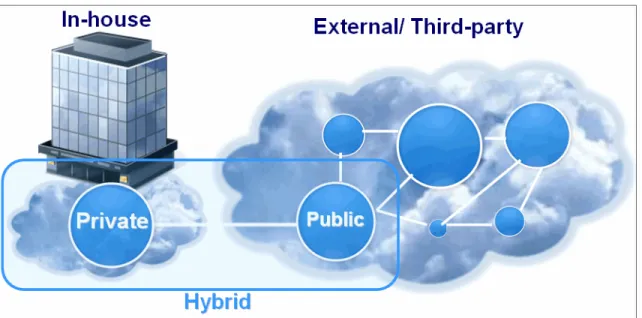
deployment uses both private cloud (in-house) resources and public cloud (external third-party) resources.Figure 1-2 illustrates these cloud computing models. Each model has advantages and disadvantages, which are described in greater depth in 1.2, “Advantages and disadvantages of using a public cloud versus a private cloud” on page 10.
Figure 1-2 Cloud computing models
Cloud service models
The following cloud service models are available today: Software as a service (SaaS)
In the SaaS model, cloud consumers use web-delivered applications without any control of the middleware, operating system, hardware, or networking behind them. Services range from web-based email to inventory control and even business processing. Because the applications and the data are hosted in the cloud, the user can use the service from anywhere over the Internet. Consumers of SaaS tend to be users. Business intelligence SaaS focuses on people working in business development and on line-of-business managers. Platform as a service (PaaS)
PaaS is a solution stack that consists of application development tools, database management systems, development and test environments, and other application services that aid in design, development, collaboration, testing, and so on. PaaS is usually offered as an Internet service to software and application developers to use to create applications.
Infrastructure as a service (IaaS)
IaaS provides computing resources, such as virtual server instances with unique IP addresses, blocks of storage, and processing power on demand. Application program interfaces (APIs) are made available to start, stop, access, and configure the virtual servers and storage. Consumers of IaaS tend to be system administrators and software developers.
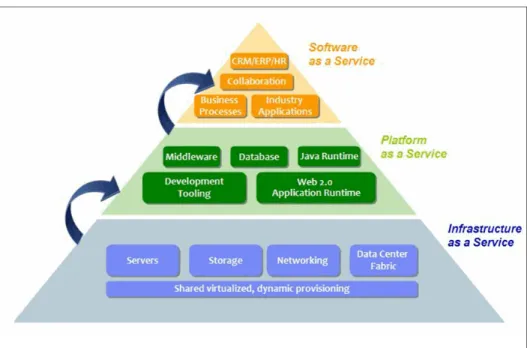
Figure 1-3 illustrates the typical elements that support each cloud service model.
Figure 1-3 Cloud service models: IaaS, PaaS, and SaaS
1.1.2 Reasons for adopting cloud computing
Simply put, cloud is hot right now, with a future that foresees mass adoption by organizations of all sizes, geographies, and industries. These organizations view cloud as a way to reduce costs and complexity of operating traditional IT
solutions. Applications for email, music, games, social networking, productivity, customer relationship management (CRM), and other services that were traditionally designed for desktops and servers are now being converted into cloud-based services.
This type of conversion is ultimately the result of the commodization of hardware over the past decade through virtualization. Cloud computing is essentially the vessel that has delivered virtualization to the masses. Thus, as cloud computing matures and as advances are made in the power, features, and usability of the
cloud, the infrastructure will shift from client to solution provider, ultimately allowing clients to focus more on the services that they want to use than on the hassle of managing those services.
Keep in mind the following reasons for adopting cloud computing:
You use services only when you need to and only pay for a resource or service when you use it.
Clients do not need to maintain or own the hardware to power the services they need, so they face lower up-front costs. Clients only deal with operational expenditure, not capital expenditure. Furthermore, clients can begin to see positive return on investment much more quickly than with a traditional datacenter deployment.
Resource efficiency and utilization are improved. Cloud computing, which uses virtualization, allows you to easily allocate resources dynamically. Being self-serviceable means cloud services are accessible at all times
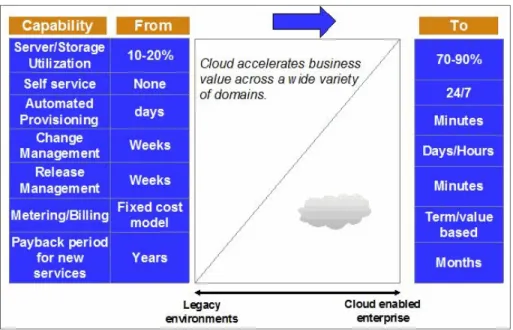
without the hassle of installing, setting up, and maintaining the service. Figure 1-4 illustrates how cloud adoption can accelerate its << whose? >>business value.
Figure 1-4 Adopting cloud computing
The main hindrance to cloud adoption remains the issue of security for sensitive data. Even industries that handle a lot of sensitive data, such as governments
and financial and healthcare companies, have use for cloud services for their non-sensitive data.
Today, companies are shifting from consuming in-house software to SaaS. By 2015, it is expected that companies will see cloud as a much greater force to impact their business models with more software being offered as services, as shown in Figure 1-5. This shift ultimately will reinvent how companies do
business in IT by increasing the number of projects implemented with some form of cloud computing.
Figure 1-5 Impact of cloud computing on corporate business models
To view a discussion about cloud computing trends, visit:
http://thoughtsoncloud.com/index.php/2011/12/executive-corner-dont-sett le-for-the-check-mark/
Small to medium sized businesses that find it too expensive to procure and maintain enterprise-level hardware might look to public cloud services as a cost-effective option for obtaining infrastructure to power enterprise-level services. Larger companies can implement private or public cloud services to enhance pre-existing solutions by adding scalability or redundancy or by offloading other workloads. Cloud services are so broad and useful that there is always a way to incorporate them to enhance an IT solution.
1.2 Advantages and disadvantages of using a public
cloud versus a private cloud
When considering whether to use a public or private cloud, you need to consider both the advantages and disadvantages of both types of environments.
1.2.1 Public cloud
A public cloud uses externally-owned resources from third-party service providers and is accessed through a subscription over the internet.
Advantages
A public cloud offers the following advantages: Elasticity
– Use what you need.
– Turn off (and stop paying for) resources that are unused.
– Add or change functionality without impacting existing functionality. High scalability
– Access the public cloud’s limitless resources. – No workload is too big or too small.
Flexible pricing
– Lowest up-front cost and capital expenditure. – Pay as you go.
– Lowest risk. Faster deployment
– Resources and services already available and ready to use.
– Custom services can be created quickly using pre-existing platform tools that are available on most public cloud providers.
Automatic and rapid provisioning
Properly configured, automated systems are geographically agnostic, offering a seamless user experience.
Global availability
Most public cloud providers have many data centers around the world, enabling network-efficient, global access to your services.
Disadvantages
A public cloud also has the following disadvantages: Lower degree of security, control, and technology
– Data is hosted off-site. Customers with sensitive data requirements might not be able to use the service.
– Systems are hosted off-site. Although many safeguards and features help ensure that services keep running, control is limited with respect to what you can and cannot do with your systems.
– Public clouds offer generic or cookie-cutter services that are usually not as customizable as an in-house deployment. For example, there is no ability to choose specific hardware components.
Highest long-term cost
A public cloud offering is the most expensive choice for handling a base (predictable) workload. You are essentially renting the infrastructure fully. When the term
cloud computing
is used, the public cloud deployment model is usually the first model that comes to mind. This model has single-handedly changed the face of modern computing. The public cloud has commoditized enterprise computing, which was once out of reach for small businesses. In addition, the public cloud model helps to overcome challenges, such as low server-utilization rates, operational inefficiencies, complex procurement processes, building and maintaining server environments, long application deployment times, and rising costs.Public cloud target users
The following companies are suitable for using public cloud services:
Small to medium sized companies that are looking to reduce initial project spending by reducing capital expenditure and maintenance costs and consuming resources only when needed
Public cloud services offer flexible pricing schemes that range from
pay-as-you-go to fixed-term commitments. Resources are largely maintained by the hosting provider, meaning reduced spending on in-house IT work. You can spin up the necessary cloud servers whenever customers request the service, and then shut down the resources when they are not needed. Companies looking for an agile development environment
Infrastructure, platforms, and software are already created and ready to run at the push of a button. For example, IBM DB2 images are offered on public cloud vendors such as Amazon Web Services, IBM SmartCloud™ Enterprise, and GoGrid cloud. You can get up and running with these images within minutes.
Companies looking for demonstration environments
If you have technology that needs to be showcased to a customer, the public cloud can fit perfectly with your need to build proofs of concept or
demonstrations. In addition, because services are accessed through the Internet, the services can be deployed anywhere, at any time.
Companies looking to deploy globally
Public cloud vendors often have data centers spread around the globe. Thus, you can design a solution to provide services to clients everywhere.
Large companies that are looking for ways to offload non-critical workloads For example, if certain data requires auxiliary batch processing, a public cloud can be employed to handle the work while the in-house data center
concentrates on more important activities.
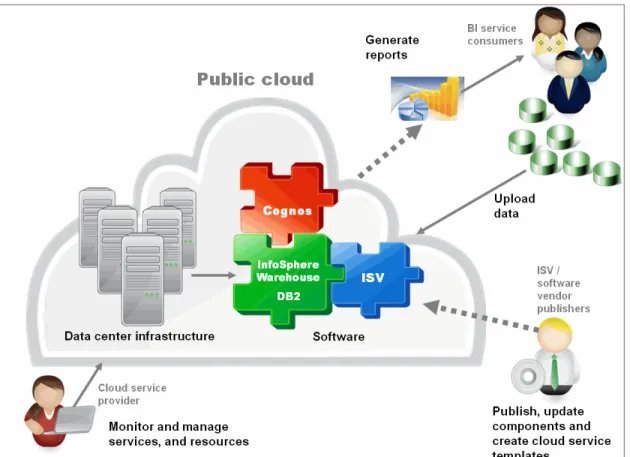
Figure 1-6 illustrates a high-level architecture of a public cloud for business intelligence.
1.2.2 Private cloud
With a private cloud, data is stored on site at the company. In addition, although services and resources are delivered through a network, these services and resources are generally accessible only through a private company intranet.
Advantages
A private cloud offers the following advantages: Capitalize on unused hardware
– Virtualization allows pool resources to be adapted for changing environments, for example from development to test and then to production
– Savings can be gained by reducing the number of inactive hardware instances
Highest degree of security, control, and technology customization – Data stored locally, systems run locally
– Restrict access easily – Start and stop resources
– Choose hardware, such as high-bandwidth networks, switches, consoles, CPU, memory, storage, and other types of hardware
Excellent resource efficiency
Provisioning is elastic, similar to the public cloud deployment Lowest long-term cost
– Most cost-effective choice for handling base (predictable) workloads, if system is fully used
– Reduced operational and capital costs thanks to improved cloud lifecycle and reduced complexity
Automatic and rapid provisioning
– Properly configured automated systems are geographically agnostic, offering a seamless end-user experience
– Drives operational efficiency and standardizes leading practices – Resources are provisioned on demand to optimize resource utilization
Disadvantages
A private cloud also has the following disadvantages: Limited scalability
Can scale only within the capacity of internal hosted resources Inflexible pricing
– Highest up front cost
– Hardware must be purchased before meeting any demand – Resource use is less efficient if supply is greater than demand Restricted to local use
Can be expensive and difficult to deploy at multiple locations globally Slower to deploy than public cloud
Many tools and services must be built from the ground up because it is a private deployment
Requires additional skills
Virtualization and cloud computing expertise is required to create and maintain a private cloud deployment
Private cloud target users
The following companies might benefit from a private cloud: Companies that handle sensitive data
Data in a private cloud is stored in house for the highest degree of security. Companies with large amounts of capital to spend on an IT infrastructure
With a private cloud, hardware must be purchased up front. Companies where workloads are predictable
A private cloud is not as flexible as a public cloud because purchased infrastructure has limitations.
Companies that are looking to save the most money in the long run
Private clouds do not have a rental model. Thus, no price markup is involved. You own the resources that you deploy.
Companies whose solutions require the highest degree of performance and customizability
1.2.3 Hybrid cloud
A hybrid cloud deployment is a cloud solution that is built on a base that uses a private cloud infrastructure backbone. It incorporates additional resources as needed from a public cloud infrastructure.
Advantages
A hybrid cloud offers the following advantages:
Base workload requirements are met with the highest degree of reliability Ability to respond to increasing workloads by using additional public cloud
resources
Ability to fall back on private cloud resources if public cloud resources are not available
Ability to comply with specific local laws, such as when sensitive financial and healthcare data must be kept in-house (less sensitive operations can be performed using a public cloud infrastructure)
Additional layer of disaster recovery when applications and data are in both the private and public cloud, allowing for failover
Disadvantages
The hybrid cloud also has the following disadvantages:
An increased complexity in application programming due to the need to create interfaces and automation scripts for both private and public cloud infrastructure, and then integrating them in a seamless manner
Data communication between the private and public cloud infrastructure will not be optimal due to geographical discrepancies
Best suited for stateless applications
Although public cloud deployments are elastic, scalable, and reduce capital expenditure, these benefits come at the cost of reduced performance and increased security risk. Private cloud solutions perform better and are more secure, but the infrastructure must be paid for up front. The hybrid cloud model attempts to bridge the gap between the two cloud models by extracting their advantages while reducing the impact of their disadvantages.
1.3 Market growth and challenges
Cloud computing is not just a technology. It is also a software delivery platform. As more software is made available as services, companies will shift from
consuming in-house resources to using externally-hosted resources. The cloud landscape will continue to evolve and grow.
New technology, such as cloud computing, is often accompanied by changes in its market and how the technology is consumed and delivered. These changes can create challenges when working with cloud environments. With respect to storage on public cloud, market predictions indicate that security will be a hurdle due to the nature of data ownership. Also, an increasing number of data centers are incorporating virtualization and cloud to increase agility and scalability while decreasing costs through resource efficiency.
Because private cloud deployments are already quite popular today, companies have high expectations for hybrid cloud deployments, either from building a hybrid solution from the ground up or from converting previous private cloud deployments to hybrid.
Finally, the mobile platform market is currently booming, with the popularization of smartphones. The cloud has basically instantiated itself as the de-facto method for delivering multimedia to these mobile devices. As the mobile market continues to grow, so too will the need for cloud computing services.
Cloud computing has also drawn attention to certain areas of security and how data is handled and kept. More specifically, new laws and regulations might be implemented regarding where clients’ sensitive data can be kept and who can keep it. For example, is it lawful to store financial data records on a third-party vendor infrastructure? Details regarding these issues can vary from region to region. So, be sure to understand the laws for the location where you are deploying your solution. Other issues can arise with respect to data privacy, especially when incorporating public cloud services.
SaaS is a result of a major trend in the evolution of software, specifically, to make software easier to access and use. As such, cloud services, although easily accessible and usable by today’s standards, might not be judged the same way years from now. Software must constantly be updated, methodologies must evolve, and the way customers consume this software will change. So offering a
When you are designing cloud applications: With all this talk about the
cloud, it might be hard to believe that cloud computing, as it stands today, is still in its infancy. In fact, despite all the vendors and hosting companies that dabble in cloud, no standardized API for managing cloud resources exists. This situation will change as cloud technology matures. For now, when developing cloud applications, design them with the cloud framework in mind but not necessarily with a specific cloud technology in mind, because the technology is constantly changing.
BI cloud solution, like any IT solution, involves constant change and evolution as the IT landscape changes.
Keep in mind the following challenges that you might encounter when implementing a cloud solution:
Scaling to future demands
Demand for cloud services will inevitably grow as more software and services are made available on the cloud. Business that offer cloud services will look for BI services that are easy to access.
Competing against other BI cloud solutions
The ISV solution for added value combined with a BI cloud deployment is essential to providing easier access for customers to consume services. Because the landscape for the cloud and BI services is constantly evolving, companies must continue to develop value-added services to stay
competitive.
Changes in hosting infrastructure
To ensure competitive performance of a BI cloud solution, the underlying infrastructure eventually needs to change or be upgraded. Consider how to handle these changes with the least impact on the solution and business. Changes in software and middleware
New software and middleware offer new features to help keep a BI cloud solution competitive. Consider how to incorporate these changes in a seamless and automated manner to ensure that business operations remain uninterrupted.
1.4 Using IBM cloud enablement technologies for
business intelligence
IBM cloud enablement technologies offer integrated solutions of hardware and software in areas of business intelligence, data warehousing, virtualization, and cloud computing. The design and architecture of these solutions minimize the risk and costs, from deployment to maintenance, by allowing you to invest in more efficient ways to deploy software and utilize IT resources.
Decision makers are looking for ways to access real-time and reliable BI services across the entire organization without the complex and expensive challenge of acquiring, deploying, and maintaining a traditional BI infrastructure. With IBM cloud enablement technologies, you can accelerate the deployment of your BI applications when you need to deliver business value quickly. These
technologies can add a greater value to the traditional enterprise software and allow you to deploy your BI applications using different methods and techniques, such as virtualization and cloud computing.
Figure 1-7 illustrates IBM deployment options for BI and data warehousing solutions.
Figure 1-7 IBM deployment options for business intelligence and data warehousing
With virtualization technology, you can ensure that your systems are fully utilized to optimize consumption and that they can accelerate the delivery of desired BI features. Using a virtualization strategy is one of the most common methods of delivering more efficient and affordable BI computing services. For more information, see:
http://www.ibm.com/systems/virtualization/index.html
1.4.1 IBM cloud enablement technologies (hybrid cloud)
The underlying technology for the cloud is not specified to the cloud service consumers; however, the cloud service provider needs to ensure that the cloud components can bear and adapt to the vision and strategy of a cloud
and scale on demand using a set of protocols and standards defined by the cloud service provider.
The cloud physical infrastructure consists of a data center with a pool of servers and storage systems. Those systems are connected to a high-speed network that can sustain high demand communication between all components inside the cloud. The cloud physical infrastructure can be used with virtualization software to bring together all or a subset of computing resources into a unified
environment capable of running several operating systems in parallel using a single centralized administration unit.
This administration unit can be integrated with cloud management software to provide control, security, and monitoring capabilities to the overall infrastructure. Additionally middleware software and applications can be installed within the operating system instances to help cloud consumers perform specific tasks. The combination of all these components represents the foundation that lies beneath any cloud offering for BI.
For more information about the cloud infrastructure, see:
http://www.ibm.com/cloud-computing/us/en/cloud-infrastructure.html
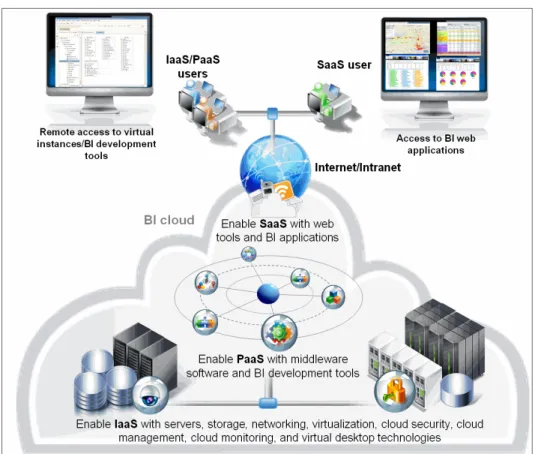
Figure 1-8 on page 20 illustrates the typical technologies needed to enable BI for IaaS, PaaS, and SaaS cloud service models. Each of the cloud service models can be designed with integrated IBM hardware and software solutions, and leading practices, to help you build a private or hybrid cloud for BI.
Figure 1-8 Typical technologies to enable BI for IaaS, PaaS, and SaaS delivery models
Technologies to enable your IaaS model
A set of servers, storage, and networking hardware provides a shared pool of resources (memory, disk storage capacity, and CPU) to offer computing power for an IaaS model. IBM hardware can be clustered and virtualized to maximize hardware efficiency, power, cooling, and space requirements of the computing resources. Some technologies that can help you enable your IaaS model are: Servers
A key benefit of the IBM servers is their broad support for a wide variety of hardware, operating systems, and virtualization software from IBM and third-party vendors. The physical server component can include, but is not limited to, IBM System z®, IBM System p®, IBM System x®, and IBM BladeCenter®. For more information, see:
Storage
IBM Disk Storage systems support large volumes of data capacity at fast performance rates. For more information, see:
http://www.ibm.com/systems/storage/index.html Networking
IBM 10 Gigabit Ethernet switches provide high-speed communications between all hardware components for bandwidth-intensive applications. For more information, see:
http://www.ibm.com/systems/networking/ Virtualization software
Control and improve the productivity of cross-hypervisor platforms with IBM Systems Director VMControl™. For more information, see:
http://www.ibm.com/systems/software/virtualization.html Cloud security
Traditional security technologies are not optimized to work with a virtual environment. IBM Security Virtual Server Protection for VMWare, IBM Injection Logic Engine, IBM Shellcode Heuristics and IBM Security Identity and Access Assurance allow you to secure and protect your virtual
environment from security threats. For more information, see:
http://www.ibm.com/software/tivoli/products/virtual-server-protectio n/
Cloud management
Manage automation, provisioning, and delivery of resources with IBM SmartCloud Provisioning, Tivoli® Service Automation Manager, IBM Service Delivery Manager, or Tivoli Usage and Accounting Manager. For more information, see the IBM SmartCloud provisioning website at:
http://www.ibm.com/software/tivoli/products/smartcloud-provisioning/ Cloud monitoring
Gain visibility and control of your cloud infrastructure with IBM Tivoli Application Performance Management. For more information, see:
Service portal and service catalog
IBM SmartCloud Control Desk provides management applications for service desk, self-service catalog, and business support services (customer account, order management, subscription management, billing, entitlement
management, and IT asset management). For more information, see:
http://www.ibm.com/software/tivoli/products/smartcloud-controldesk/ Pre-integrated solutions
Combine servers, storage, networking and virtualization, and management into a single infrastructure system with IBM SmartCloud Entry on Power, IBM SmartCloud Entry on x86, or IBM BladeCenter Foundation for cloud, and IBM PureSystems™. For more information, see the IBM SmartCloud Entry website at:
http://www.ibm.com/systems/x/solutions/cloud/starterkit/index.html
Additional information is available at the IBM PureSystems website:
http://www.ibm.com/ibm/puresystems/us/en/productfamily.html#!/subtab :ptab-product-family-rpanel-pureflex-system-link
Virtual desktop solutions
Simplify the adoption of a virtual desktop infrastructure with IBM Smart Cloud Desktop Infrastructure. For more information, see:
http://www.ibm.com/systems/x/solutions/desktopvirtualization/index.h tml
VM deployer appliance
IBM Workload Deployer is a hardware appliance with access to IBM
middleware virtual images and database patterns. For more information, see:
http://www.ibm.com/software/webservers/workload-deployer/index.html Public cloud
IBM SmartCloud Enterprise is the enterprise public cloud to access on-demand virtual servers and storage resources for development and test workloads. For more information, see:
http://www.ibm.com/services/us/en/cloud-enterprise/uses-development-and-test.html
Technologies to enable your PaaS model
Technologies to enable your PaaS model consist of database, application server, and development software to help business users to build applications. The following IBM middleware software offerings provide enterprise technologies to enable BI capabilities for a PaaS delivery model:
Data warehouse software
IBM InfoSphere Warehouse is a data management solution that supports high-performance BI applications. For more information, see:
http://www.ibm.com/software/data/infosphere/warehouse/ Application server software
IBM WebSphere® Application Server is a Java application server that provides a runtime environment for web applications. For more information, see:
http://www.ibm.com/software/webservers/appserv/wasfamily/ Business intelligence software
IBM Cognos Business Intelligence is a reporting and analysis solution that provides a collaborative BI workspace for all user reporting types. For more information, see:
http://www.ibm.com/software/analytics/cognos/business-intelligence/ Information integration software
IBM InfoSphere DataStage® and QualityStage® are data integration and cleansing solutions that collect, transform, and clean large volumes of data, ranging from simple to complex data structures. For more information, see:
http://www.ibm.com/software/data/infosphere/datastage/ http://www.ibm.com/software/data/infosphere/qualitystage/ Database security software
IBM InfoSphere Guardium® is a database security and monitoring solution that provides fine-grained database activity monitoring, database vulnerability assessments, and data encryption. For more information, see:
http://www.ibm.com/software/data/guardium/ Performance monitoring software
IBM Optim™ Performance Manager is a real-time monitoring and performance warehouse solution. For more information, see:
Identity management software
Tivoli Directory Server is an enterprise identify management solution that uses the Lightweight Directory Access Protocol to provide trusted-identity authentication. For more information, see:
http://www.ibm.com/software/tivoli/products/directory-server/ Pre-built data structures and applications
Industry Models and InfoSphere Warehouse Packs are data model blueprints that can accelerate the development of BI applications. For more information, see:
http://www.ibm.com/software/data/industry-models/
http://www.ibm.com/software/data/infosphere/warehouse/packs/ Concurrent versions system
IBM Rational® ClearCase® is a version control solution that provides workspace management and parallel development support. For more information, see:
http://www.ibm.com/software/awdtools/clearcase/ Front-end development tools
InfoSphere Warehouse Design Studio, Data Studio, and InfoSphere Data Architect are design and development tools that can be used to create BI applications and content on the cloud. For more information, visit the following websites:
http://www.ibm.com/software/data/optim/data-studio/ http://www.ibm.com/software/data/optim/data-architect/
Technologies to enable your SaaS model
In the SaaS delivery model, users can access applications using a thin client through a web browser, most commonly through a subscription fee. The SaaS applications are typically cloned to support scalability and manage a large number of users. Although the applications can share the underlying IaaS and PaaS infrastructure, each cloud user’s application is isolated to a sufficient degree that it can provide a unique BI application sandbox to the cloud service consumer. IBM Software provides some web tools to deliver BI and data warehousing capabilities:
Front-end web tools
Data Studio Web Console, InfoSphere Warehouse Administration Console, Optim Perfomance Web Console, and IBM Cognos Connection (Report Studio, Query Studio, Analysis Studio, and Business Insight) are web tools that can be used as a cloud front-end to run, administer, and monitor BI
applications. Many of these web tools are deployed as part of the IBM software to enable a SaaS model.
Front-end mobile tool
IBM Cognos Mobile extends IBM Cognos Business Intelligence by allowing users to consume its content on mobile devices without compromising security. For more information, see:
http://www.ibm.com/software/analytics/cognos/mobile/
1.4.2 IBM InfoSphere Warehouse 10.1
IBM InfoSphere Warehouse provides a foundation of trusted information that is built upon rich data management capabilities. This foundation can support BI in a cloud environment with high performance satisfaction. InfoSphere Warehouse enables massively parallel processing (MPP), which ensures that the initial investment can continue to perform as the volume of data grows and can satisfy multiple requests for large amounts of information. InfoSphere Warehouse is a suitable fit for BI on a cloud because of its ability to scale, share multiple tenants, and manage thousands of users with a variety of workloads and requirements. Figure 1-9 illustrates the InfoSphere Warehouse key components for a BI foundation.
You can use InfoSphere Warehouse to build a complete data warehousing and business analytics solution. The sections that follow highlight key components of the InfoSphere Warehouse solution.
IBM DB2 10.1 Enterprise Server
IBM DB2 is an industry-leading relational database management system (RDBMS) that ships with InfoSphere Warehouse to provide a common repository. This repository can be used to combine data from different systems, formats, structures, and vendors; it eliminates the need for heterogeneous queries against many operational data stores. DB2 has many characteristics that can help you to achieve the following benefits:
Lower the cost of managing data by automating administration. Reduce the cost of storage with data compression technologies.
Optimize workload execution and deliver scalability with data partitioning. The following DB2 10.1 features support and enhance BI cloud requirements: The database partitioning feature
This feature addresses performance requirements for large data warehouses by distributing data over multiple servers, also referred to as
nodes
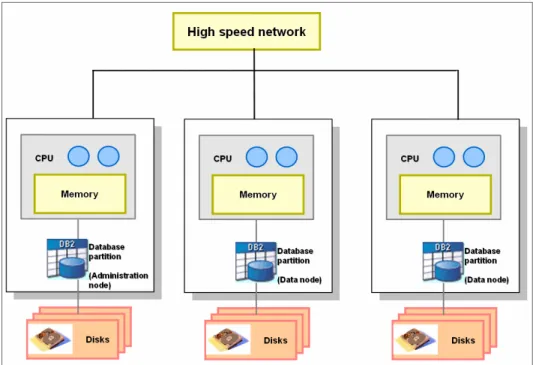
. More nodes means more processor, memory, and disk capacity is available to process more complex database workloads. These workloads can be distributed over many processors with their own memory and disk resources to enable hardware parallelism (see Figure 1-10). This type of distribution is called ashare nothing architecture
. Each system processes only its part of the query and returns the results to the administration node, which then performs the final processing before returning to the user application.Figure 1-10 The DB2 database partitioning feature
The database partitioning feature is suitable for large tables, such as fact tables, which often contain hundreds of millions or billions of rows, especially if there is significant scanning, aggregation, or complex calculations of the data before obtaining the final result. Taking advantage of the database partitioning feature allows you to achieve near linear scalability that lets you manage petabyte volumes of data while still meeting your SLAs.
Workload management
InfoSphere Warehouse was designed for high levels of user concurrency and mixed workloads, or
random I/O
, which is common in an enterprise data warehouse. DB2 Workload Manager allows administrators to prioritize queries coming from different users and applications and to control the number of underlying resources dedicated to those processes.This feature can help reduce the risk of SLA failure by prioritizing execution of business-critical workloads. Load balancing can result in better utilization of existing hardware, which can help delay a server upgrade. The warehouse’s
Important: The DB2 database partitioning feature is available only for use
within InfoSphere Warehouse. It cannot be acquired separately for inclusion with DB2.
design for high levels of concurrency together with workload management ensures business continuity, especially on peak hours.
Autonomics for performance tuning
The autonomics features in DB2 can help lower the cost of managing data in a warehouse by automating administration, increasing storage efficiency, and improving performance. By automating tasks, such as memory allocation, storage management, and business policy maintenance, DB2 can perform many management tasks itself, freeing up database administrators (DBAs) to focus on new projects.
Autonomics includes the following features:
– A self-tuning memory feature responds to significant changes in workload by dynamically distributing available memory resources among several memory consumers for the database. The DB2 self-tuning memory manager (STMM) can help you avoid critical impact to database response times that threaten your SLAs.
– A self-configuration feature automatically configures memory, storage, and maintenance operations in DB2 databases. This allows users to be confident that the DB2 databases and DB2 instances are configured correctly and enabled for a better automated operation.
Deep compression
Disk storage systems can often be the most expensive components of a database solution. Even a small reduction in the storage subsystem can result in substantial cost savings.
The DB2 Storage Optimization feature transparently compresses data on disk to decrease disk space and storage infrastructure requirements and improve query performance. The DB2 row compression feature allows storage savings using a dictionary-based symbol table that records repeated values and replaces that data with a small pointer to the values in the dictionary. Because data warehouses often contain many repeating patterns, high compression levels can be achieved. The feature is complemented by value, XML, index, and backup compression.
SQL Warehousing
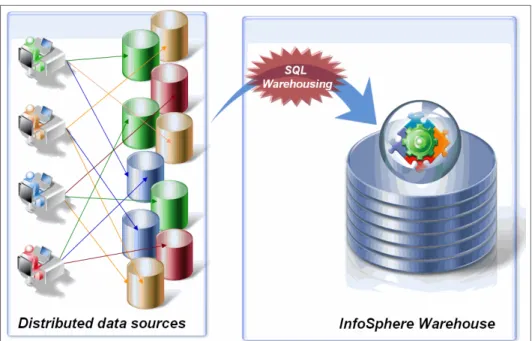
InfoSphere Warehouse uses a data warehouse industry process called extract, transform, and load (ETL), which allows you to extract data from disparate data sources, such as flat files and database management systems from different vendors, and to consolidate relevant information into a centralized data
warehouse, as shown in Figure 1-11. When a more complete set of information is used, business users can make better decisions in the everyday business operations.
Figure 1-11 SQL Warehousing to consolidate distributed data sources into InfoSphere Warehouse
SQL Warehousing allows you to accelerate the deployment of reusable and powerful warehouse applications that can execute multiple functions to consolidate individual silos of information into a common structure that is optimized for BI. SQL Warehousing provides you with the ability to visually design SQL-based data movement and transformation flows using a prebuilt library of functions.
The SQL Warehousing component consists of data flows, control flows, and data warehousing applications that can be optimized and executed in DB2. For more information, see “ETL development services with Design Studio” on page 200.
Business analytics
InfoSphere Warehouse is used as a data warehouse repository and it also integrates enhanced business analytics features, such as OLAP cube servers, data mining, and text analysis, as illustrated in Figure 1-12.
Figure 1-12 InfoSphere Warehouse business analytics components
InfoSphere Warehouse gives the user the ability to execute these complex analytics inside the DB2 database server, without requiring data extraction. The data-consuming process becomes less complex, accessible to the latest data, and scalable to large volumes of analysis.
InfoSphere Warehouse includes the following business analytics components: IBM Intelligent Miner®
This component is an extension to the SQL Warehousing component. It adds the ability to develop data mining models graphically, using mining flows to do data preparation, model creation, visualization, extraction, and scoring. Cubing Services
Cubing Services is a multidimensional analytics component built into InfoSphere Warehouse to deliver standard OLAP access using
multidimensional expressions (MDX) language, which enables support for drill-down, and slice-and-dice analysis. This component also enables the design of OLAP structures based on facts and dimensions physical tables, and provides wizards to optimize the OLAP processing.
Text analysis annotators
Unstructured text integration can enable a greater amount of knowledge because it is the fastest growing set of information for enterprises. Text analysis annotators are modules that analyze unstructured information to discover hidden knowledge from text-based data, such as call center logs, reports, claims, records, social media, and so on. They are based on a industry standard called
Unstructured Information Management Architecture
(UIMA), which defines a common interface that enables the development of new and reuse of existing annotators.
Design Studio
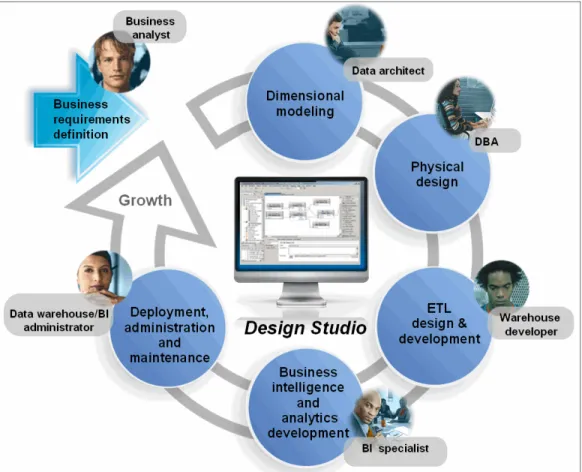
Design Studio is an integrated development environment (IDE) used to design, organize, and maintain your data warehouse projects for InfoSphere Warehouse. Design Studio has a unified graphical environment with built-in functions, which supports all users tasks for a typical data warehouse and BI project. This type of project often goes through multiple iterations of design when user requirements change over time. Consequently, Design Studio can create warehouse projects that can be replicated, recycled, and modified multiple times to accelerate the typical data warehouse development lifecycle tasks, such as dimensional modeling, physical database design, ETL design, and BI design, as illustrated in Figure 1-13 on page 32.
Figure 1-13 Design Studio accelerates the data warehouse development lifecycle tasks
Administration Console
Subsequent to the warehouse and BI applications design, the production environment of InfoSphere Warehouse is deployed, administered, and
maintained from a web-based administration tool, called
Administration Console
. This web tool allows the deployment and execution of warehouse applications and OLAP structures. It also enables administration of system resources, data source connections, and mining models, as shown in Figure 1-14.Figure 1-14 Administration Console capabilities
1.4.3 Feature enhancements in DB2 10.1
Today’s warehouse solutions demand features to handle different business insights and are increasingly challenged to contain costs and to demonstrate business value faster than before. DB2 10.1, as a part of InfoSphere Warehouse 10.1 includes the following enhancements that can help achieve these
objectives:
Continuous data ingest
The ingest utility allows the high-speed ingest of data from files and pipes into DB2 tables, using SQL-like commands to process large amounts of real-time data without affecting availability. It is a specialized utility for continually populating data warehouse tables with minimal impact on concurrent user workload and data server resources. Thus, it reduces the overall, end-to-end time from when the source data arrives to when it is in the warehouse and available for queries.
Multi-temperature storage
Data warehouses retain large volumes of data for real-time business
analytics. However, there is a strong tendency for a relatively small proportion of data to be hot data, and the majority of the data to be cold data. Current
data is often considered to be hot data, but it typically becomes cold as it ages. The challenge faced by organizations is prioritizing the storage of data. DB2 10.1 introduces a multi-temperature storage feature to achieve a better tradeoff between performance and cost for hot and cold data. Assign high-speed storage (for example, SSD) to critical business analytics and decision support systems (DSS).
Adaptive compression
Enhancements to the industry-leading compression technologies of InfoSphere Warehouse come with the adaptive compression feature, which can help further reduce storage needs. The enhancements are designed to deliver efficient compression of high amounts of new and changing data. The improved compression ratio can further help to reduce storage needs and allows for more data in memory, thus helping to increase performance. The adaptive compression approach also reduces the need for table
reorganization. As a consequence, the overall maintenance of compressed data is reduced, which can help achieve additional cost savings.
Row and column access control (RCAC)
DB2 10.1 provides critical enhancements to security and auditing. RCAC can help you further secure your data. RCAC is sometimes referred to as
fine-grained access control
.RCAC security allows you to create varying security rules at the data level. These security rules ensure that users in approved roles or groups see only the data that they are allowed to see. These rules also remove the security constraints and performance headaches that result from complex views and predicates.
Multi-core parallelism
Data warehouse workloads can benefit from parallelization. Multi-core parallelism is an improvement from query parallelism for a single-partition database or for partitions of a partitioned database. Multi-core parallelism is also called
intra-partition parallelism
orSMP parallelism
. Components can be run in parallel and factors are interrelated to enhance performance. Star schema optimizationDB2 10.1 has better detection and performance of star schemas, hash join improvements and a new zig-zag join mechanism, which result in minimal tuning on complex large-volume ad hoc queries. The zig-zag join calculates the cartesian product of the dimension tables, and then probes the fact table using a multi-column index, which efficiently queries large fact tables.
Time travel