This study examines the use and effectiveness of media tools employed in teaching.
Researchers believe more educators need to know how to use media in helping people learn. Digital-video enhanced instruction is but one step toward making this idea a real-time reality.
A two-part (pre-/and post) questionnaire was distributed to subjects in four classes and other learning environment settings and answers were compared to determine which students retained more content. A matrix table was generated to compare results.
The research confirms that after using digital media tools with instruction the reported results indicate an improved comprehension of content among students, per student feedback.
The addition of technology and multi-media within the classroom/educational environ-ment can serve as a reinforceenviron-ment tool that is capable, responsive, and reliable when it comes to meeting various teaching and learning objectives of the teacher, student, and educational body.
Headings:
Instructional Technology Cognition
DOES DIGITALLY ENHANCED INSTRUCTION BENEFIT STUDENT LEARNING?
By
Lee Etta R. Smith
A Master’s paper submitted to the faculty of the School of Information and Library Science of The University of North Carolina at Chapel Hill
in partial fulfillment of the requirements for the degree of Master of Science in
Information Science
Chapel Hill, North Carolina
April 2009
Approved by
Introduction
Researchers believe more educators need to know how to use media in helping people learn. Digital-video enhanced instruction is but one step toward making this idea a real-time reality. The world has become so reliant on computerization infrastructures ranging from education to entertainment and its accessibility to a waiting educational population is more in-demand than ever with an audience that continues to get younger with each passing year.
Therefore, in order for technology to become a more prominent fixture in the present day and future classrooms of tomorrow, educators must share in the responsibility to make that happen. Today, the ability to reinforce disseminated instruction to students is one of the most important advantages offered by use of digital tools. Also, with the usage of most enhancement tools comes another added advantage of enabling the recipients to periodically “teach themselves”; as well as for the learning process to continue outside of the physical classroom. Digitally enhanced instruction may allow colleges and
universities to become more academically successful as well as profitable, wherein the investments of incorporating enhanced instruction into the regular course curriculum benefit everyone.
Instructional Technology
an idea that was once suggested, but never materialized. All signs indicate that it is here to stay. Although there have been many different technologies used in schools over the years such as projectors, instructional radio and television, cassette tape players, and Video Cassette Records (VCRs), the personal computer was not introduced until the 1970s (Sharp, 2006). How much of a role do or should computer intervention and multimedia (new media) tools play when focusing on the dissemination of educational information on-line and within the traditional classroom today? Researchers continue to seek ways to effectively measure the efficiency of various modes of technically-based information provision associated with the learning experience. Does the implementation of technology make the overall learning process more effective for the student? Does digitally enhanced instruction benefit student learning? While these are both areas of interest, the primary purpose of this particular study focused on the use of specific media tools as they relate to constructively benefiting the student learning experience.
will lead to other significantly important discoveries and research findings in the study of Information and Library Science. The fundamental infrastructures of collective networks involved must be built stronger and then we must work collaboratively to support the translation and continued transference and influx of information. This massive, but worthwhile endeavor is the responsibility of such services as The University of North Carolina at Chapel Hill School of Nursing’s Information and Instructional Technologies Department (IIT). This type of support unit and/or other centers that offer such services provides important assets to the learning environment within the world of academia. The staff of such centers offers specialized services in preparing and providing materials, equipment, instruction, consultation, and support to faculty, students, and administrators for assistance in the dissemination of knowledge. They support many facets of the professional and academic communities and are continuously seeking state-of-the-art resources for the continued improvement of the learning experience. Above all, emphasis is placed on retrieval and management of resources that enable instructors to implement new concepts and methods for the benefit of the student.
some of the multimedia tools for higher learning purposes; more specifically, the programs of interests were Adobe Captivate 3.0 (formerly known as RoboDemo), Camtasia by Techsmith, AuthorPOINT (formerly known as AuthorGen), VoiceThread, and Elluminate Live! by Elluminate, Inc.
During this study each of the aforementioned tools were listed among the Top 100 Tools
for Learning of 2008 compiled by Jane Hart of the Center for Learning & Performance
Technologies. The Top 100 Tools list is a consolidation of favorite tools that have been recommended by 223 education and workplace teaching and learning professionals who shared their Top 10 Learning tools for professional and personal use. The number one and two tools on that list as of October, 2008 were Delicious and Firefox respectively. Both products are normally distributed without cost. Delicious is primarily a social and bookmarking-type tool and Firefox is considered to be the most commonly used Web browser according to 72.5% of the voters who contributed their preferences.
Table 1 displays the multimedia tools examined in this study listed in rank order with their most primary descriptors as indicated in the Top Tools for Learning 2008.
Table 1. Multimedia Learning Tools in Rank Order
Ranking Learning Tool Descriptors
23 VoiceThread Collaborative slideshows
26 Camtasia (Studio) Screen casting tool
32 Captivate Demo & scenario-based tool
51 Elluminate Web meeting & conferencing
100* AuthorPoint PowerPoint plug-in that creates
Flash presentations
The inclusion of these tools into one’s personal, academically-based, or business infrastructure is usually determined by available funding that is accessible to the recipients. However, all have free trial versions that can be accessed and downloaded very easily so one may acquire hands-on practice prior to investing financially into the purchase of the full programs. Their individual costs also varies according to purpose and are normally based on a license agreement ranging from $60 to $400 associated with individual and/or multiple users systems.
Adobe Captivate 3.0 is an e-learning tool created for Microsoft Windows (PC). Usually known as Captivate, this software is normally used for authoring demonstrations, tutorial-type simulations, randomized testing, case study presentations, and scenario scripting events. Many use the program for its screen casts or screen capturing, as well as podcasting capabilities. It allows one to add clickable hotspots, text entry boxes, video clips, and other animation elements such as rollovers and mouse movement that gives the impression that the movement is actually taking place as if in a real movie. It also allows the ability to create presentations using only voice-over or audio functions for the purpose of podcasting creation. It provides the ability to include images, Microsoft PowerPoint slides, video and audio into a real time recording session, as well as enables the editing of previously recorded presentations. Captivate uses Adobe Flash to compile all the data into files that are much smaller in file size than a “real movie” and can be posted onto the web if desired, usually without any difficulty.
tutorial and pre/review type exercises. It consists of five primary applications that work together to deliver a pretty unique end product. It provides the user with the capability of creating defined and/or full desktop screen captures by using such inclusive components as the audio editor, menu maker, player, recorder, and theater accessory. Another feature of this product is an additional applicator that can be acquired called Camtasia Studio which is designed to carry out the expert needs of the advanced user.
The program has the capability to perform many functions such as annotate, setting of a hotkey to carry out specific actions, narration during or after a particular action has been conducted, as well as add voice overlay, music, or other sound effects to the presenta-tions. This program enables one to conduct real-time recorded sessions of lessons and/or allow the program to create an end product by using merged screen captures for demonstration purposes. It is also possible to include within the Captivate slide still images, video clips, audio tracks and/or Microsoft PowerPoint slides.
other video source. When recording in real time sessions or using pre-recorded data, it is possible to include annotated actions within the multimedia presentation that correspond with the presenter’s exact narration. AuthorPOINT ultimately uses Adobe Flash to publish the raw data into a video that consolidates all the data, slides, video, and audio into one combined SWF.file that may be viewed in any browser. The original AuthorPoint parent file may also be edited at a later time with updated content.
VoiceThread, a multimedia tool that allows collaboration between presenters/instructors and students, seems to function somewhat as a blog-type program which makes it quite popular. It supports videos, text documentation and images, enabling participants the ability to deliver comments on the material that is presented by using microphone, telephone, text, audio or video options. VoiceThread files may be embedded on websites and/or converted to MPEGs for playing on media or DVD players.
Given the multiple features of the various programs of interest previously listed and defined, the following are possible outcomes derived from their usage:
Create system- and user-friendly methods for preparing learning resource video clips (for use by students or for the professional development of staff);
Assist in learning other languages such as with “repeat or rehearsed verbalization; Compile still images over a long period to produce time lapse movies;
Use video capturing software to record and analyze critical procedures and lectures;
Record difficult, dangerous or expensive to reconstruct experiments or activities (recorded with specialists, such as guest lecturers);
Capture lectures and the demonstration of skills that are quicker to learn by observation, but once captured may be reviewed at a later time for an intended population (e.g. the proper technique of washing hands);
Document and analyze student or teacher presentations;
Provide the option to interact in virtual, online classrooms over the Internet.
The following are possible curriculum advantages for conducting this study:
Students appreciate variety in their learning environment and physical surrounding;
Most educational audiences find that a mixture of text, still images, sound, and/or video is more interesting than 'chalk and talk';
Opportunities for higher level thinking can take place at locations other than in the traditional classroom setting;
Teachers and lecturers can/may find short digital video segments useful in customized e-learning sessions;
Students enjoy greater control over their learning (start, stop or replay video segments);
Validated digital educational resources can provide teachers and students with significant additional learning resources;
Helpful for teachers in providing students with more customized learning materials;
Instructional message(s) can be made available to multiple locations at once using various media methods to distribute the information;
When used appropriately as an extension of our human capability in the completion of tasks, one is less likely to become bored.
Literature Review
Cognition
The variable of video within the classroom was introduced some 40 years ago in the late 1950s to early 1960s. Though debates pertaining to video and its implementation into the educational realm continue, the primary motive of using this innovative tool is to enrich the learning experience and enhance the method by which content and information are administered. Weighing options for curriculum improvement within the classroom through various modes of technology is a legitimate concern and worth more research. Distinguishing criteria by weighing, organizing, and reviewing the content over and over again promotes sound decision-making opportunities. Without technology the capability to access massive amounts of information in a synchronous act within a few seconds would be otherwise impossible or the process would take outrageous, though legitimate amounts of time in order to perform the same function manually. It helps to have definite ideas or objectives of what is being attempted to improve or accomplish by conducting a course assessment or analysis to ascertain specific needs. Ultimately, the user determines the effectiveness of on-line content; however, it has become imperative that we learn how to interact with technological tools in order to make the learning experience more effective and memorable. What would we do without computers? How do we use the computers that already exist in our environment?
The article, Classroom and Support Innovation Using IP Video and Data Collaboration
Techniques written by J. Leonard, E. Riley and E.M. Staman in 2003 focuses immediate
encounter. There are many facets of DE, but the article notes that there are at least three common approaches to incorporating video over internet protocol (IP): live streaming video; interactive video; and video-on-demand. Video-on-demand continues to be very popular in the entertainment community today for viewing movies and playing games; Time Warner Cable and Direct TV are a couple of examples. In order to study the various aspects of DE, many universities have been experimenting with different formats to attempt to answer questions which determine the effectiveness of DE within the confines of the traditional classroom setting versus the on-line classroom environment. Experimentation has provided data for the preparation of such resources as frameworks for discussion tools and techniques as well as tailoring more precision devices for the implementation and evaluation of tools based upon yielded results linked to their use.
However, the time element also factors into the equation. In order for progress in technological instruction to occur, there must also be instructors knowledgeable, capable, and willing enough to institute this type of interactive curricula into their program. Another objective of this study is to denote the point as addressed within this particular article that resolves that most DE techniques tend to be asynchronous. They can also be used for synchronous activities. The ultimate foundational idea behind DE is to make information more readily accessible to the DE student anytime and anywhere. The same content may be accessed and utilized by many students at the same time within and outside of the classroom setting. DE tools used for web meeting spaces, e.g. (NetMeeting and on-line calendars, networked-data collaboration, video over IP and other tools) have been developed to carry out innovative functions that combine video with other Internet technologies usually applicable within the traditional and on-line class.
support the tools and techniques that are being administered and there must also be tech support personnel who are capable of supporting and performing the necessary maintenance functions on these systems of choice.
The various queries regarding the effectiveness and capability of video over IP are realistic and timely ones indeed. This topic is interesting and important to technology researchers, educators, and administrators because they are the innovators who must continue in the development of tools of the future that will meet the needs and demands of tomorrow’s students within and outside of the physical walls of what is considered to be the traditional classroom.
The variable of video’s primary uses is to enrich the learning experience and enhance the educational instrument by which the content and information are administered. The hierarchal structure for the common video approaches seems understandable. However, these approaches could also be replicated differently in future research after revamping by other investigators to include more appropriate elements that are representative for the users’ needs.
The authors of Classroom and Support Innovation Using IP Video and Data
Collaboration Techniques describe several scenarios that could improve the use of video
classroom of students with legislature members who were seated within their prospective DE individual offices.
The article also presents various capabilities through use of a grid or framework designed to analyze the three common video types: live streaming, video-on-demand, and interactive video. Documentation noting the three options was displayed using a rating scale of ranked terms such as: more, most, less, and least. Bandwidth requirements, easy use, cost of use and production cost were the specific areas of interest presented in the framework which determined:
Bandwidth requirements are the highest for interactive video.
Students of today are normally more familiar with the technologies of live streaming and video-on-demand than in times past.
Interactive video was found more challenging than other tools that were tested. Incurred cost resulting from interactive video is higher than that for the use of
video-on-demand and live streaming.
Bandwidth is a determining cost factor for the expense of many of those video approaches. However, today bandwidth costs are factored into various packaged deals in order to lower and defray the higher cost that would normally be passed on to the consumer or user.
Live streaming video takes less equipment also: Two computers:
• Small server
• Encoding computer system
Unfortunately, interactive video (point-to-point) still has considerable costs when compared to the other tool tested, (e.g. the teleconferencing of teacher/students using Adobe Connect, formerly known as Macromedia Breeze). All concerned participants should have Webcam accessibility and a computer durable enough to support live-video-type capabilities.
When it comes to interactive video, such as video conferencing, covering only three or four locations usually has the least impact on the persons and areas involved that manage the session(s). The authors experiences with IP Video were also reported in the form of a collaboration tool comparing asynchronous and synchronous approaches wherein it was determined that all three types of video technology are suited for video delivery, but not all of the three work as well in streaming and interactive activities. People still don’t fully understand or accept technological change. The authors believe that this undersight causes those in authority or in the positions to create environmental changes involving academia to be short-sighted in their planning. They must be made to see the whole picture and prepare for infrastructures and support that will last and easily conform to the recommended collective universal standards over future times.
better prepare their transferees for the challenge of going to four-year schools. Today, most four-year universities expect all incoming freshmen to come already familiar with new technology and prepared to take part within the race of technology with laptop in-hand.
Cummings and Buzzard address the issue of knowledge disparities. They believe that there is a wide disparity in student and instructor knowledge levels. Some students are bored because instructors are not knowledgeable enough to compete with their level of computer skills; some students are misplaced workers that have been forced to return for one reason or another, but find themselves outranked when it comes to computer skills with students half their age; and there are faculty members who want to move with the times, but their equipment is outdated or incompatible to meet the tasks at hand. They are forced to use a mismatch of equipment and software that refuses to easily communicate with other networked and connected entities. This article notes once again that one of the major, if not the biggest, problem that schools face with the updating of systems is lack of sufficient funding. There exist many reservoirs of funds that are available for assisting academic facilities with keeping up with the technology progression. But much of the expense is being directed to student tuition and fees. Cummings and Buzzard wanted to know when is enough, enough?
proven to be the best tool for teaching new skills, sharpening old ones, and for trouble-shooting problems. I have personally found that one-to-one hands-on instruction is really effective as well as individual, − paced instruction for faculty and staff and even the
individual learner, which brings us back to IP digital-video enhanced instruction.
In the article, The Use of Computer Tools to Support Meaningful Learning, Keengwe, Onchwari, and Wachira discuss several ways that the integration of technology tools into the classroom benefits the learning experience of students. Depending upon the subject matter, positive correlation has been reported between computer proficiency skills and academic achievement. Students who incorporated constructive strategies into their computer use reported significantly higher scores when compared to students who only used computer-based drill-and-practice programs to learn the content (Wenglinsky, 1998). Some researchers believe that the student learning processes can definitely benefit by technology when technology is used to constructively present complex problem-solving exercises.
well by allowing them to become empowered with technological training that advances their own professional skills and development.
Why should technology and teaching via the Internet be explored? Because there are unlimited advantages that can be achieved by everyone involved. Certain information transfers are more easily understood by students and participating audiences if they have visual supplements that serve as reinforcements to a given concept. Video is real-time capture of a procedure, demonstration, or performance such as a lecture for replay at a later date. Video and other multimedia tools are beneficial components that can aid in meeting the immediate needs and requirements of teachers, students, and other specific audiences from multiple populations.
However, researchers believe that more educators need to know how to use media in helping people learn. Learners of all ages are now required to synthesize more data in less time than ever before. Digital-video enhanced instruction is but one step toward making this once upon a time idea into a real-time reality. Why isn’t the traditional classroom way of teaching enough? Why move the classroom to the Web? This study provides evidence to answer these questions:
Research Questions:
1. Given the rapid changes and increased use of educational technology and for the current tech-saavy, are traditional teaching methods still effective?
Methodology
Information Literacy
The use of digitally and visually enhanced instruction can be highly motivational. However, for educational and academic purposes, it is of the utmost importance that there are clear learning benefits expected from the use of the technology. Another major benefit of technology is that it allows one the ability to store, copy, and/or transfer digital content without any loss of quality. The data collected from this study clearly indicate that by introducing multimedia tools into the traditional classroom, there is evidence that knowledge on specific subject matter is increased by the addition of such tools.
The study was conducted primarily at The University of North Carolina at Chapel Hill in Chapel Hill, NC, School of Nursing (eight subjects from UNC); however, a small population was student participants who were enrolled in a course taught in the spring semester of 2009 at North Carolina State University in Raleigh, North Carolina (four subjects). A total of 12 subjects participated in the study. Recruitment of subjects was facilitated with assistance from instructors. For assistance with designing effective pre− and post-knowledge-based questionnaires, the head investigator consulted with personnel of The University of North Carolina at Chapel Hill Odum Institute for Research in Social Science.
of the uestionnaires can be viewed as Appendix A (Part I) and as Appendix B (Part II).
elated to academic environments as a benefit to the overall student learning experience. after they had been distributed at the designated times set. The questionnaires were distributed via email and at that time students were also asked whether or not they would be willing to consent to participate in both parts. Only students who agreed to take both parts were accepted for the study in order to confirm that any changes in subject opinions were acquired from the same sources. The privacy of the participants and researchers was respected in order to receive authentic reactions as related to the study. Copies
q
The students completed questionnaire, Part I, at the beginning of their course sessions or area field of study. Approximately two months after the participants had appropriate opportunity to use the media tool of interest, they were requested to complete questionnaire, Part II. Subjects should have been able to complete Part I questionnaire within 20 minutes and Part II questionnaire within 10 minutes. Each IP digital-video multimedia tool(s) was reviewed by at least two students. Although some students may have had prior knowledge of a particular tool, the designer of the questionnaire took that fact under consideration when preparing the questions. All questions were prepared in a way that the answers would not focus on any particular “brand” of tool. The primary focus for this research was on the use of technological instruction methods and how they r
the ongoing question: Does Digitally Enhanced Instruction enefit Student Learning?
with and/or observed a session of a pic delivered by an unbiased presenter/instructor.
traditional classroom or online. Others looked at presentation content that used projected social, medical, or psychological risks to the study subjects. The product names of the tools being studied were: Adobe Captivate, Camtasia, AuthorPOINT, VoiceThread, and Elluminate Live! These tools are capable of supporting a variety of platform components that range from the incorporation of real-time video, screen captures or scanned visual images, text or another type of visual aid with the use of the multimedia tool Microsoft PowerPoint or another similar media program. Participant reactions and experiences interacting with the various tools within their coursework or work structure were used as a means to better answer
B
The first student questionnaire, Part I, was targeted for all students as a way of acquiring some overall participant general knowledge and familiarities with assisted instruction using media tools. Questions that made up Part II were administered to all students who had reviewed the subject matter accordingly. See Appendix B for a copy of the student post-test questionnaire. The students each interacted
to
Some students were responsible for interaction involvement away from the classroom,
online using AuthorPOINT and/or Elluminate Live! They were exposed to a full
PowerPoint slides with an embedded voice-over replay function which is one of the closest demonstrations of the traditional classroom experience today.
Results
Learning - Research
A total of 13 completed questionnaires were received for Part I-Pre component of the survey; however, only 12 of those 13 supplied an adequate email address so that follow-up contact could be made for the completion of Questionnaire Part II. Approximately two months later, Questionnaire Part II-Post questions were distributed to those students for which the lead investigator had email addresses. All questionnaires were received and the study results are based upon those student responses.
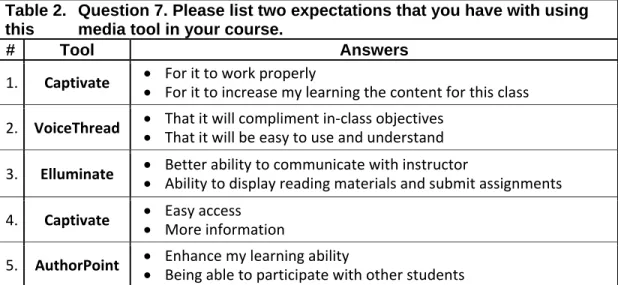
The data displayed in Table 2 show student feedback that lists two responses from their expectations related with the usage of the multimedia tools used in the courses and/or instruction to which they had been exposed. See Table 2.
Table 2. Question 7. Please list two expectations that you have with using this media tool in your course.
# Tool Answers
1. Captivate • • For it to work properly
For it to increase my learning the content for this class
2. VoiceThread • • That it will compliment in‐class objectives That it will be easy to use and understand
3. Elluminate • • Better ability to communicate with instructor
Ability to display reading materials and submit assignments
4. Captivate • • Easy access More information
5. AuthorPoint • • Enhance my learning ability
6. AuthorPoint
• Having a new style and way to present information that might
appeal to different learning styles
• To make the information more interesting and dynamic
7. Elluminate • • I would like to see how the Elluminate works as a meeting place It may be something I consider using in the future
8. Camtasia • • Preview use of equipment Review protocol/procedure
9. Elluminate • • That teachers respond quickly to emails and questions That teachers keep the information updates quickly
Based on the 13 initial responses, one hundred percent confirmed that they had previous exposure to tools that use text only, i.e. Microsoft Office Word docs; eighty-five percent (or 11 student) reported being familiar with tools that contained text and audio/voice capability; all students had knowledge of tools that use images/screen captures w/o audio/voice capability; and sixty-two percent (or 8 of the 13) had prior knowledge of tools that use video with visual/face and/or audio/voice capability.
Eleven of the 12 surveys completed displayed that 10 of those 11 students did believe that the media tools they used helped to make their coursework more understandable. Three of the twelve students reported that it was necessary for them to repeat some of their coursework more than once in order for them to understand the material. Thus, media tools made that possible. Course sessions were able to be viewed at a later time convenient to the students. None of the students who viewed the incorporation of video used with their specific media tools found it to be distracting and all agreed that they would consider attending additional courses that used media tools (technology) support in the future. The findings of this project report that there are positive results in promoting a sound argument for encouraging other instructors, educators, lecturers and even public speakers to use advanced technology to enhance their current products and methods of disseminating instruction and information.
Conclusion
References:
AuthorPOINT to Create Multimedia E-Learning Flash Presentations. (2007). Retrieved
November 17, 2008, from AuthorGEN Website: http://www.authorgen.com/authorpoint/
Barrance, T. (2003). Auckland College of Education – Digital video in the Classroom. Retrieved March 25, 2009, from Media Education Wales Website:
http://www.mediaed.org.uk/posted_documents/DigvidFAQ.html
Camtasia and PowerPoint – indezine.com – PowerPoint, Presentations. (2007-2009).
Retrieved November 17, 2008, from InDezine: Snagit by TechSmith Website: http://www.indezine.com/products/powerpoint/addin/camtasia.html
Captivate-Wikipedia, the free encyclopedia. (2007-2009) Adobe Captivate. Retrieved November 17, 2008, from Wikipedia: Official Website:
http://en.wikipedia.org/wiki/Captivate
Center for Learning & Performance Technologies. (2007-2009). Top 100 Tools for
Learning 2009. Retrieved November 17, 2008, from Centre for Learning &
Performance Technologies Website:
http://www.c4lpt.co.uk/recommended/top100.html
Cummings, D. & Buzzard, C. (2003). Technology, Students, and Faculty…How to Make It Happen!! Proceeding of the 2002 ASCUE Conference, Myrtle Beach, SC, 55-60. www.ascue.org
Nikos T. (2002). Digital Video in Education - Educational Technology Resources. Retrieved November 17, 2008 from Digital video in Education Website:
http://edtech.guhsd.net/video.html
Fidel, R., Pejtersen, A.M., Cleal, B., & Bruce, H. (2004). A Multidimensional Approach to the Study of Human-Information Interaction: A Case Study of Collaborative Information Retrieval. J of the American Society for Information Science & Technology. 55(11), 939-953.
Jones-Kavalier, B., & Flannigan, S. (2006) “Connecting the Digital Dots: Literacy of the 21st Century.” No. 2, Educause Quarterly, pp. 8-10.
Keengwe, J., Onchwari, G., & Wachira, P. (2008). The use of computer tools to support meaningful learning. AACE Journal, 16(1), 77-92.
Leonard, J., Riley, E., & Staman, E. M. (2003). Classroom and Support Innovation Using IP Video and Data Collaboration Techniques. Proceedings of the 4th Conference on
Information Technology Curriculum, Lafayette, Indiana, USA, October 16 - 18, 2003,
CITC4 '03. ACM Press, New York, NY, 142-150.
Reeves, T.C. (1998). The impact of media and technology in schools. Retrieved June 12, 2005, from http://it.coe.uga.edu/~treeves/edit6900/BertelsmannReeves98.pdf
Sharp, V. (2006). Computer education for teachers: Integrating technology into
classroom teaching (5th ed.). New York: McGraw-Hill.
VoiceThread – About (2009). Retrieved November 18, 2008, from Voicethread Website: http://voicethread.com/about
Wenglinsky, H. (1998). Does it compute? The relationship between educational
technology and student achievement in mathematics. Princeton, NJ: Educational
Appendix A
Questionnaire Part I
1) Have you ever used any type of media tool for class that incorporated text, images, audio and/or video?
Yes No
2) Which if any of the following types of technology have you ever been exposed to? Please check all that apply.
Tools that use text only option, i.e. Word docs Tools that use text and audio/voice option
Tools that use images/screen captures w/o audio/voice option Tools that use video with visual/face and/or audio/voice option
3) Which of the following media tools are you familiar with? Please check all that apply.
Adobe Captivate v2.0 or 3.0 Camtasia Studio
AuthorPoint VoiceThread Elluminate Live! None
4) How would you rank your knowledge/skill level of the following media tools, five being best?
1 2 3 4 5 Adobe Captivate v2.0 or 3.0
Camtasia Studio AuthorPoint VoiceThread Elluminate
5) Do you know the instructor's "objectives" for the coursework that you are about to begin?
Yes No
6) Do you think using a media tool (technology) will assist the instructor in accomplishing the course objectives?
7) Please list two expectations that you have with using this media tool in your course.
1. 2.
8) What is the likelihood that your expectations for this course will be met? Very Likely
Likely
Somewhat Likely
Undecided Somewhat Unlikely
Unlikely Very Unlikely
9) Overall, do you think using technology (electronic media tool) with instruction is beneficial?
Very Effective Effective
Somewhat Effective
Neither Effective nor Ineffective Somewhat Ineffective
Ineffective Very Ineffective
10) Please enter your name and email address for tracking and Part 2 re-contact purposes.
11) Please choose in which course you are enrolled.
N827 N985 N647 ECI-509B
None of the above
Appendix B
Questionnaire Part II
1) Had you ever used a media tool with coursework before?
Yes No
2) How easy was the media tool to use? Very Easy
Easy
Somewhat Easy Neutral
Somewhat Difficult Difficult
Very Difficult
3) Did the media tool used help to make your coursework more understandable?
Yes No
4) Did you have to repeat any coursework segment more than once in order to understand the material?
Yes No
5) If the media tool that you were exposed to used video, did you find it distracting?
Yes No
6) Would you consider attending additional courses that use media tool (technology) support in the future?