Mary E Peters. Public Libraries use of Web 2.0 Tools. A Master’s Paper for the M.S. in L.S degree. April, 2011. 62 pages. Advisor: Sandra Hughes-‐Hassell
This study examined public library websites for evidence of Web 2.0 tools in order to answer two research questions: Are public Libraries implementing Web 2.0 tools on their websites and how are Web 2.0 tools being used on public library websites? A content analysis was conducted on a sample of 78 public libraries compiled from Library Journals 2010 five-‐starred libraries. The results of this study indicate that public libraries are using Web 2.0 tools prolifically, especially Social Network Sites, and are using these tools for a variety of specific reasons.
Headings: Web 2.0
Public Libraries
PUBLIC LIBRARIES USE OF WEB 2.0 TOOLS
by Mary E Peters
A Master’s paper submitted to the faculty of the School of Information and Library Science of the University of North Carolina at Chapel Hill
in partial fulfillment of the requirements for the degree of Master of Science in
Library Science.
Chapel Hill, North Carolina April 2011
Approved by
_______________________________________ Sandra Hughes-‐Hassell
Table of Contents
Introduction...2
Objectives of Study ...3
Literature Review ...3
Methodology... 12
Results... 15
Discussion and Study Implications... 21
Conclusion... 25
References... 26
Appendices... 28
Appendix A... 30
Appendix B... 35
Appendix C ... 38
Introduction
With the introduction of Web 2.0 by Tim O’Reilly (2007) nearly ten years ago, the outpouring of Web 2.0 tools, or web tools that have an interactive quality, has been substantial. O’Reilly (2007) described these tools as those that “embraced the power of the web to harness collective intelligence” (p. 2). These tools vary from simple blogs and RSS feeds to complex and diverse social networks. These second-‐ generation Internet tools are aimed to “facilitate communication and to secure information sharing, interoperability and user centered design” (Tripathi and Kumar, 2010, p. 195).
For about as long as these tools have existed so has the belief that their use by libraries is beneficial. Librarians have touted the uses and benefits of Web 2.0 tools (Breeding 2010; Nguyen, 2008; Rivas, 2009). Yet there is still little evidence and research into their use in libraries, especially public libraries. Most relevant professional literature on Web 2.0 and libraries either detail the potential use of Web 2.0 in libraries, describes a case study of one tool in a library, or presents a list of best practices guide for libraries to implement Web 2.0 tools (Nguyen, 2008). This is especially true for public libraries. While some research has been completed in regard to the use of Web 2.0 tools in academic libraries, little has looked at the use of these tools in the public library sphere.
Objectives of the study
This study will examine public library web pages in order to answer the following questions:
1) Are public libraries implementing web 2.0 tools on their library websites? 2) How are Web 2.0 tools being used on public library websites?
Literature Review
There is limited empirical research specific to Web 2.0 use in public libraries. However, it is relevant to examine the professional literature that discusses the potential uses of Web 2.0 in libraries. It is also pertinent to examine the current research on the use of Web 2.0 tools in libraries. These studies focus on the two sides of Web 2.0 tools; the opinions of patron users and those of librarians using Web 2.0 tools. Finally, since this study will employ content analysis it is important to discuss other research that has used content analysis to examine library websites for the presence of Web 2.0 tools.
Introduction to Web 2.0 Tools:
This study will analyze the presence of the following Web 2.0 Tools: Social Network Sites (SNS), RSS Feeds, Blogs, Wikis, Video Tools and Video Sharing, and Photo Tools and Photo Sharing. Baumbach and Lee (2008) from the University of Central Florida created this list of tools and the definition of each on the wiki WebTools4U2Use. This wiki is consider a comprehensive resource regarding Web 2.0 tools (LeSueur, 2010)
Social Networks Sites
Social Network Sites, or SNS, are online communities or environments where users can seek out others and build connections with them. The sites are web based and offer services such as chat, messaging, video sharing, file sharing, blogging, discussion groups, photo sharing. Most social network sites consist of user profiles with basic user information, walls for posting messages, and photo sharing Some primary examples of SNS are Facebook, MySpace, Ning, LinkedIn, Twitter and LibraryThing (Baumbach and Lee, 2008).
RSS Feeds
Really simple syndication (RSS) is a family of web formats used to publish information about frequently updated works such as blog entries, news feeds, live audio, and video in standard formats (Baumbach and Lee, 2008). RSS feeds update users about the additions or changes that take place on websites of interest
Blogs
Blogs are online logs or journals, usually maintained by individuals, where entries are posted and normally displayed in reverse chronological order
(Baumbach and Lee, 2008). In 2008, over 133 million blogs were indexed with a new blog being created every second (Tripathi and Kumar, 2010).
Instant Messaging
Instant messaging allows online communication between two or more people using text or video based short messages via the web in real time (Tripathi and Kumar, 2010).
Wikis
Wikis enable users to add, edit, or rate content with simple tools-‐-‐text,
photos, graphics, videos, links and more. A wiki may be open to the public or limited to a group of subscribed users (Baumbach and Lee, 2008).
Video Tools
Video Tools and Video Sharing Tools are web sites and tools that allow users to upload video clips and store them on the hosting site's server (Baumbach and Lee, 2008).
Audio and Podcast
The word “podcast” comes from the amalgamation of the words iPod and broadcast (Tripathi and Kumar, 2010). However, podcasts can be played on computers and any mp3 player. This tool is used to exchange and share audio programs among patrons over the Internet (Tripathi and Kumar, 2010).
Opinion/ How libraries could be using Web 2.0 tools:
This literature is based upon the opinions of best practices for the use of Web 2.0 tools in libraries. Some of the authors gathered their information through
quantitative research. Others based their opinions on observation and experience. Marketing libraries and their activities with Web 2.0 Tools has been one of the foremost ideas circulating within library literature. Breeding (2010)
having a defined goal for using the tool and being selective about the tools that are utilized.
Other library professionals focus on additional uses for specific Web 2.0 tools in library settings. Chu and Meulemans (2008) suggest using the SNS MySpace and Facebook for “content delivery, reference assistance, outreach, and information literacy instruction” in academic libraries (p. 83). They promote creating pages on which librarians and students could interact. They cite the theory of “point-‐of-‐ need/just-‐in-‐time reference assistance” and going to where the students are to assist them as the basis for their recommendations (p. 81).
Hammond’s (2010) work focused on the best practices for blogging. In her work she described how to make the most impact with blogging. She cites
relevance, currency, two-‐way communication, and promotion as key in order to make a blog a success and get the most use of it. Like Breeding (2010), Hammond also advocated measuring the success of blogs by tracking users in and out of pages, surveying users, and through self-‐evaluation.
Tripathi and Kumar’s (2010) study provides a list of best practices
discovered from content analysis of the evidence of Web 2.0 tools on the academic library websites and gives advice on how to best use Web 2.0 tools. One of the most important pieces of advice they offered is that Web 2.0 tools should be used for a specific purpose and with set goals in mind. They advocated for the use of Web 2.0 tools in a number of ways varying from Wiki’s as subject guides for classes to the creation of blogs for specific library user groups.
Surveys of Librarians/ How librarians are using these tools
An area of research that has had recent expansion is the question of what tools are being used by librarians and why. Most studies survey working librarians and ask for their opinions and about their use habits. This research reveals the slow adaption of Web 2.0 Tools by many librarians, but also shows a growing prevalence of these tools in the field of librarianship.
Hammond (2010) conducted a study of blogs used by public libraries in the UK. By first identifying 20 library blogs and then checking the activity of the blogs after a year, Hammond (2010) found only 13 of the blogs still active. She then conducted an online survey to which 498 people. In response to the low number of blogs being used, many respondents cited problems with technology, time, and constrictions from within their organizations as issues that kept them from blogging.
Aharony (2009) sent surveys to 168 school, public, and academic librarians asking what Web 2.0 tools were used. He found that certain characteristics of librarians affected their adoption and use of Web 2.0 tools. These characteristics included “personality characteristics (resistance to change, cognitive appraisal, empowerment, and extroversion or introversion), computer expertise, motivation, importance, and the capacity to study and integrate different applications of Web 2.0 in the future” (p. 29). The study found that librarians who had a positive
tools for their libraries. The study also noted that these librarians are more frequently exposed to technological changes and understand that they should “master the newest technological applications and apply them in their changing work environment” (p. 34).
Charnigo and Barnett-‐Ellis (2007) surveyed 126 academic librarians to discover their feelings about the use of Facebook as a tool by libraries. They found that ”librarians were overwhelmingly aware of and moderately knowledgeable about Facebook” (p. 31). Fifty-‐one of these librarians thought that librarians should be attentive to Internet trends, like the use of Facebook by their patrons and by libraries (p. 29).
Hendrix et al (2009) preformed a survey of 72 Health Science librarians with the intent of discovering if Facebook was being used, and if so how. Only nine
libraries, or just 12.5 percent, reported that the library maintained a Facebook page. Those using Facebook used it “mainly to market the library, push out
announcements to library users, post photos, provide chat reference, and have a presence in the social network” (p.46).
Surveys of Students/ How people view libraries with Web 2.0
Connell (2009) surveyed 366 undergraduate students to find how they felt about libraries’ presence on SNS and how they would react to being contacted by librarians in academic libraries on sites like MySpace and Facebook. While most students indicated that they would be fine with being contacted, another group of 92 students (25.1 percent) stated that they would react negatively (p. 31). The authors caution librarians to proceed carefully making sure they understand the privacy and other concerns of students.
Chu and Meulemans (2008) conducted a survey of 89 students and a focus group of four students in order to understand their usage of social networks, like MySpace and Facebook. They found that student’s use of social networks for entertainment was very high, but most students expressed concern about adults, parents, and professors presence on the social networks.
Content Analysis of Library Websites for evidence of Web 2.0 Technology
The last area of research is that which involves content analysis of library websites. These studies are very pertinent to this research as templates. Most cover academic libraries, but some work is in the field of public libraries.
variables, RSS feeds, blogs, wikis, social tagging, instant messaging, and social networking services. Based on the evidence of Web 2.0 tools, the websites were appraised against an evaluation framework that defined specific user qualities. They found that most libraries used information sharing tools like RSS feeds, blogs, and instant messenger(IM). The study also judged how the presence of Web 2.0 tools added to the quality of websites and found that Web 2.0 tools increased the quality of library websites, especially the service quality.
Nguyen (2008) preformed a content analysis of 47 Australian academic library websites for the use of Web 2.0 tools. Nguyen (2008) developed a research tool that defined Web 2.0 tools and their potential uses on library websites. The study found that at least two-‐thirds of Australian university libraries deployed one or more Web 2.0 technologies. However, only four Web 2.0 technologies (RSS, blogs, instant messaging and podcasts) were used and most libraries used only one or two tools. Thirty of the 47 libraries used RSS making it the most popular tool. Nguyen hypothesized that this popularity is “due to its clear function, simplicity and easiness” (p. 641). On the other end of the spectrum, instant messaging was the least used tool with only five libraries. Nguyen credits this lack of use to the staff needed to support IM use.
by 121 of the libraries and was used by 43 percent of those libraries as a reference tool. Surprisingly, they found that 66 of the libraries (23.8 %) they studied did not use any Web 2.0 tools.
LeSueur (2010) looked for evidence of Web 2.0 Tools on school library websites and determined how high school media specialists were using these tools. She looked at two samples, a larger sample of 100 libraries and a smaller sample taken from a 2007 study on exemplary school library websites by Joyce Valenza. By using two samples, LeSueur was able to see how most high school libraries were using the tools and what were some best practices for the use of the tools. She found that only 23 of the 100 schools showed evidence of the use of at least one Web 2.0 tool (p. 25). Of the tools used, blogs and wikis were the most popular in that sample. In the Valenza sample, nine school library websites were analyzed; seven of those had evidence of Web 2.0 tool use. In that sample, blogs and social networks were used by six libraries and were the most popular tools.
Methodology
For this research, the content of the websites for public libraries will be examined for evidence of Web 2.0 tools. Content analysis is a way to systematically observe the occurrences of words, phrases, ideas, or themes in written
communications (Powell, 2004) and will provide an unobtrusive way to find which Web 2.0 tools are being used by the libraries in the sample. A checklist as the main research instrument will be developed based on other checklists and
website of each library in the sample will be accessed and examined for evidence of
Web 2.0 tools and their uses.
Research Sample
The libraries selected for this study were chosen from Library Journal’s (LJ) Index of Public Library Services 2010. This index is created using data from the Institute of Museum and Library Services (IMLS). To be scored on the LJ Index, a library must meet four criteria: 1) match the IMLS definition of a public library; 2) serve a population of at least 1000; 3) have total operating expenditures of at least $10,000; and 4) report all four of the service outputs on which the LJ Index is based Lyons and Lance, 2010). The LJ Index 2010 rated 7,407 libraries and identified 258 starred libraries. Libraries received five, four, or three stars based on four per capita service outputs: library visits, circulation, program attendance, and public Internet computer use (LJ Index 2010). A library's LJ Index score is based on the relationship among its four statistics and the averages of those statistics among its peer institutions based on total operating expenditures.
Libraries from each operating expenditure bracket of the LJ Index 2010 that received five and four stars were selected for inclusion in this study. These 87 libraries are rated at the top of their operating bracket and thus may be viewed as exemplary libraries. As such, they can be used as an approximation of the best public libraries in the country. The sample list can be found in Appendix A.
Research Instrument
A checklist was used to analyze the sample libraries’ websites for presence of certain Web 2.0 Tools and the intended uses of these tools. The checklist was
adapted from the tools used by Tripathi and Kumar (2010) in their study of Web 2.0 tool use in academic libraries. Tripathi and Kumar likewise had adapted their survey tool from the checklist previously used by Nguyen (2008) in the study of Australian academic libraries. For this study the checklist has been altered to include checkpoints for SNS and their use by the public libraries. The checklist was also edited to exclude checkpoints that were specifically relevant to academic libraries, like references to class study guides. The checklist consists of checkpoints or questions with alternative answers (Y=yes=1, N=no=0). The instrument used to collect data can be found in Appendix B.
Data Collection
The data was collected over a two-‐week period. First, the websites of each of sample libraries was accessed. If there was no website for the library, the library was coded as showing no evidence of Web 2.0 tools. For those libraries that had websites, the websites were scanned for evidence of the tools on the checklist and coded for their appropriate use. This was done for both the top-‐level homepages and sub level pages. Google’s search engine was also used to search each page for tools to ensure that none were overlooked.
Limitations
One limitation for using content analysis in this study is the changing nature of websites. Content analysis only offers a static view of the situation. The websites were only checked once. Therefore, the information gathered in this study provides a limited view of the websites at one moment in time.
Another limitation in the study is the restriction on the sample. Library Journal considers these libraries “starred” or exemplary, but there is some dispute over that assessment. The awards are based solely on the numerical values of library assessment like circulation and turnstile counts and ignore the ephemeral values like patron satisfaction.
Results Web 2.0 Tools Use
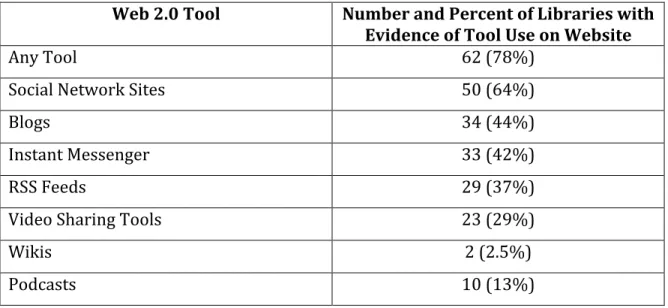
Of the 87 five and four starred public libraries, nine did not have library websites; therefore the total number of libraries analyzed for evidence of Web 2.0 tools is 78. Out of those 78 libraries, 62 of the library websites show evidence of at least one Web 2.0 tool. All the tools were used; SNS were utilized most frequently and Podcasts and Wikis were used the most infrequently (see Table 1). The rest of the tools, RSS feeds, Blogs, Video Sharing Tools, and Instant Messengers, were evident in relative equal frequency. Complete data from the Starred Libraries sample can be found in Appendix C.
Table 1 - Frequency of Tools Use (n=78)
Web 2.0 Tool Number and Percent of Libraries with Evidence of Tool Use on Website
Any Tool 62 (78%)
Social Network Sites 50 (64%)
Blogs 34 (44%)
Instant Messenger 33 (42%)
RSS Feeds 29 (37%)
Video Sharing Tools 23 (29%)
Wikis 2 (2.5%)
Podcasts 10 (13%)
Web 2.0 Tool Use by Library Expenditure
As Table 2 shows, the number of libraries with websites decreases as the expenditure range decreases. It is also evident from the table that the number of libraries that use any Web 2.0 tool also decreases as the expenditure range decreases.
Table 2- Tool Use for Expenditure Range Expenditure Range # of Starred Libraries
with websites
# of Libraries with Any Tool Use
$30,000,000+ 7 7
10,000,000-‐29,999,999 10 10
$5,000,000-‐9,999,999 10 10
$1,000,000-‐4,999,999 10 9
$400,000-‐999,999 10 9
$200,000-‐399,999 9 4
$100,000-‐199,999 8 7
$50,000-‐99,999 8 4
$10,000-‐49,999 6 2
Library Uses of Web 2.0 Tools
As the following discussion and series of tables show, the libraries used the Web 2.0 tools for a variety of reasons. The complete data of Web 2.0 tool use can be found in Appendix D.
RSS Feeds
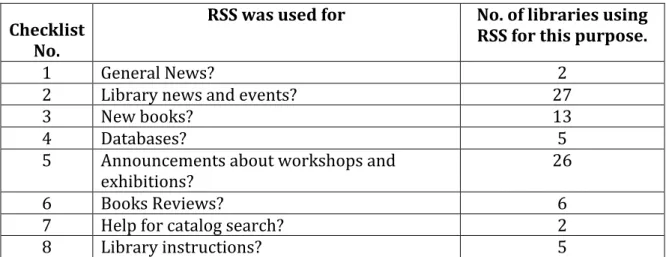
RSS Feeds were used by 29 of the public libraries (Table 3). The greatest use of RSS was for library news and events with 27 libraries using it in that manner. The second greatest use was as a way to advertise workshops and exhibitions. Many of the libraries used RSS Feeds on their calendar of events. Other libraries had RSS Feeds for their entire website, thus pushing information anytime the website was updated with news.
Table 3– RSS Feeds (n=29)
Checklist No.
RSS was used for No. of libraries using RSS for this purpose.
1 General News? 2
2 Library news and events? 27
3 New books? 13
4 Databases? 5
5 Announcements about workshops and
exhibitions? 26
6 Books Reviews? 6
7 Help for catalog search? 2
8 Library instructions? 5
Blogs
reviews of books. Library staff members most often wrote these, but there were some libraries that had patron-‐created content, especially on blogs aimed towards teens.
Table 4– Blogs (n=34) Checklist
No. Blogs were used for Blogs for this purpose. No. of libraries using
14 General Information? 15
15 Research tips? 14
16 New books? 14
17 Books Reviews? 28
18 Information literacy 11
19 Databases and e-‐resources? 9
20 Down time of servers/databases? 0
21 Hours of operation and holidays? 7
22 Information about employment and careers 2
Podcasts
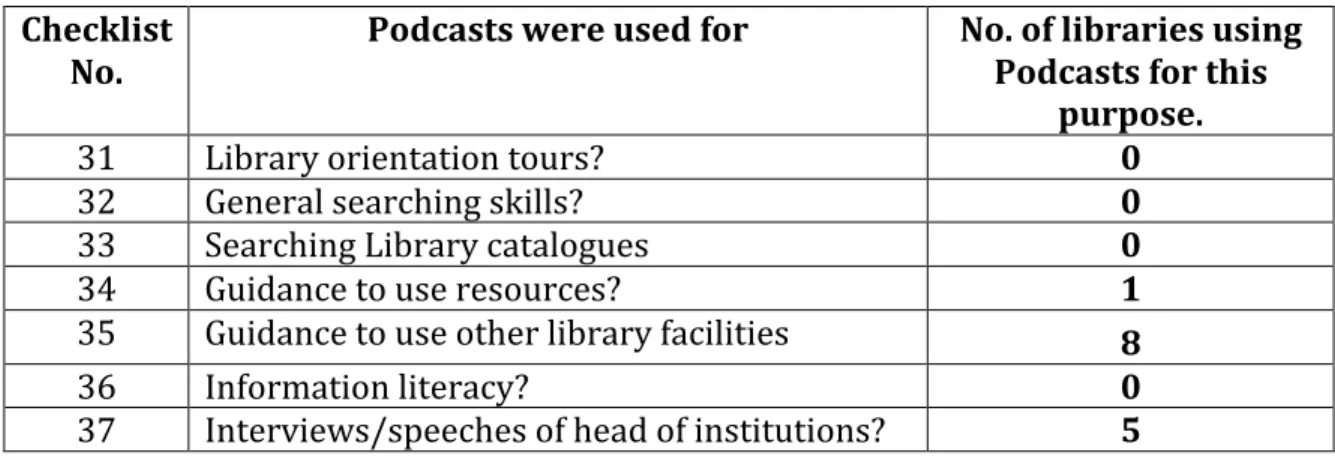
Only 10 of the public libraries in the sample used podcasts (Table 4). Table 5– Podcasts (n=10)
Checklist
No. Podcasts were used for No. of libraries using Podcasts for this purpose.
31 Library orientation tours? 0
32 General searching skills? 0
33 Searching Library catalogues 0
34 Guidance to use resources? 1
35 Guidance to use other library facilities 8
36 Information literacy? 0
37 Interviews/speeches of head of institutions? 5
library director, local artists, educators, and politicians. The lack of use of this tool could be due to the extra effort and equipment needed to create the podcasts.
Videos
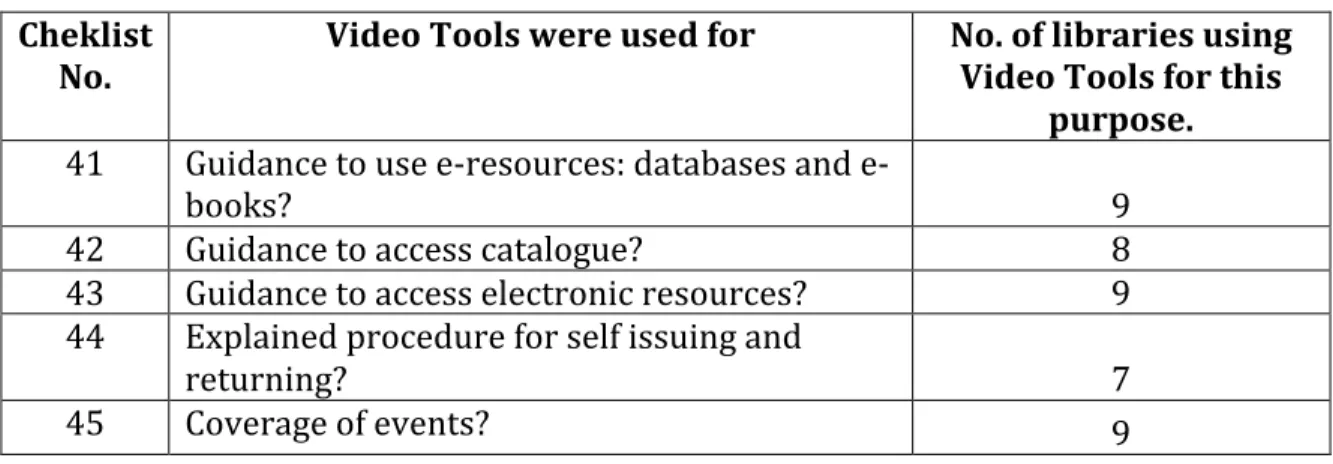
As shown in Table 6, libraries used video tools in a variety of ways almost equally. Most of the libraries used YouTube as the primary video-‐sharing tool. Though 23 libraries used the video tools, most of them only posted a few videos. These videos covered topics such as how to check out materials, use the online catalog, and use online resources, and video. Many contained footage documenting events held at the library.
Table 6– Video Tools (n=23) Cheklist
No. Video Tools were used for No. of libraries using Video Tools for this purpose. 41 Guidance to use e-‐resources: databases and e-‐
books? 9
42 Guidance to access catalogue? 8
43 Guidance to access electronic resources? 9
44 Explained procedure for self issuing and
returning? 7
45 Coverage of events? 9
Instant Messenger
usually staffed by the state library. Ohio public libraries are a prime example. Libraries in Ohio offer their patrons access to an IM reference services, called KnowItNow24X7, which is staffed by libraries across the state.
Table 7– Instant Messenger (n=33) Checklist
No. IM was used for No. of libraries using IM for this purpose.
46 Reference Services? 33
47 Advice of Library services? 25
48 Guidance to access resources? 32
49 Other? 15
Wikis
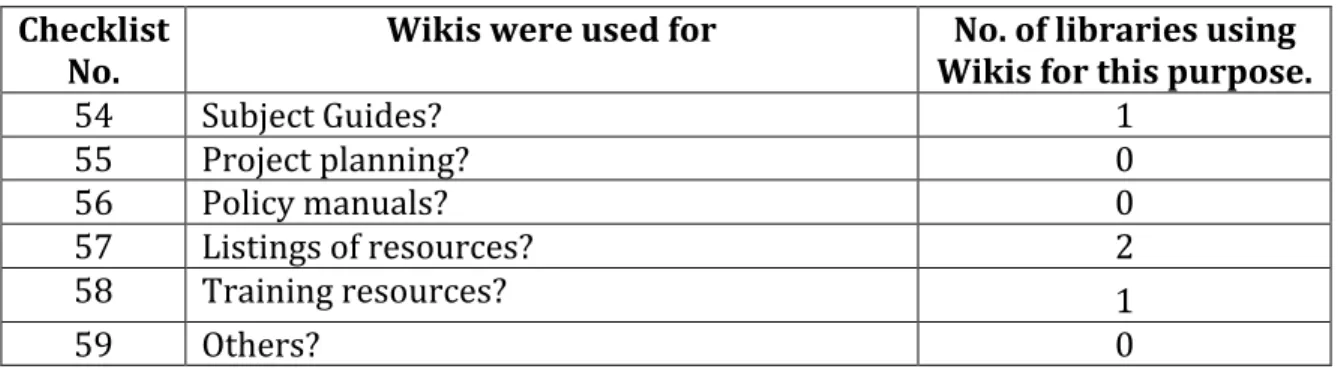
Wikis were the least used Web 2.0 tools with just 2 libraries in the sample utilizing them (Table 8).
Table 8– Wikis (n=2) Checklist
No. Wikis were used for Wikis for this purpose. No. of libraries using
54 Subject Guides? 1
55 Project planning? 0
56 Policy manuals? 0
57 Listings of resources? 2
58 Training resources? 1
59 Others? 0
According to Nguyen (2009), the lack of use of wikis by libraries could possibly be due to the problem of wikispam, or the unwanted editing of open wikis. This leads to a lot of time and effort needed to monitor wikis.
Social Network Sites
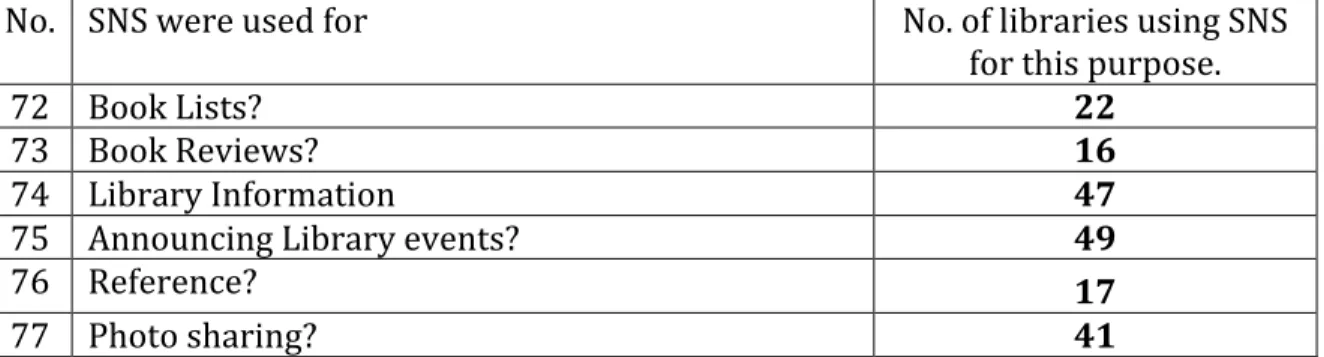
Social Network Sites (SNS) were the most popular Web 2.0 tool found on the library websites. As Table 9 shows, over half of the libraries’ websites showed evidence of the use of SNS. The two most commonly used were Facebook and Twitter. Most libraries had their own account page. The top uses of SNS were for announcing library events, usually through a post of the Library’s wall. After that the tools were used for posting general library information. The sites were also highly used for sharing photos, especially Facebook.
Table 9– Social Networking Sites (n= 50)
No. SNS were used for No. of libraries using SNS
for this purpose.
72 Book Lists? 22
73 Book Reviews? 16
74 Library Information 47
75 Announcing Library events? 49
76 Reference? 17
77 Photo sharing? 41
Discussion and Study Implications
Web 2.0 Tool on their website. The fact that these 87 top-‐rated libraries are using the tools indicates that they must be deemed useful, a finding that is consistent with previous studies discussed in the literature.
Looking at the results, we can see that some tools are used most regularly and how the libraries are using them. From this we can infer why these tools might be most popular.
Social Network Sites were the most used Web 2.0 tool. Of the 62 libraries that used some sort of Web 2.0 tool, 50 of those were using a social network site. The popularity of SNS among the libraries is no surprise. There are three main reasons that can easily explain the popularity of SNS amongst public libraries. First is the ease of use of SNS. The SNS used by the public libraries are free to the libraries and to the users. The sites can be accessed and edited from any computer with Internet access. The sites come with standardized settings that offer users a wide range of security settings. In this way, SNS offer better protection and need less monitoring than Wikis. A library’s activity on a SNS can be viewed by everyone or limited to whom the library chooses. Besides offering the library control of the public’s activity on the site, SNS also offer the library control, with passwords, over who on staff has access. SNS are easy to sign up for, easy to access, and easy to control.
information like hours and location to offering reference and information literacy instruction, libraries are utilizing the vast options available to them through SNS. The most evident reason for the popularity of SNS among public libraries is the SNS’s popularity with the patrons. Lenhart in the Pew Internet Study (2009) have found that 65% of teens and 35% of adult internet users use SNS. The libraries may simply be following the tenet of offering access on a website where users will most likely be visiting anyway.
Another implication from this study is how these tools are being used. Breeding (2010) suggested that the best use of Web 2.0 tools is to use them with a clearly defined goal in mind. The data shows that this suggestion is being followed. With the exception of video sharing tools, all of the tools were used for one or two specific purposes. This may be due partially because of the design of the tool and also by the variety of the tools that are used. Librarians may not use blogs for reference work, for example, because IM is more fitting for the rapid response patrons expect from reference librarians. SNS are not used for book reviews because they can be done better on a blog. The format and design of each tool suggests its most appropriate use. It is unclear if libraries set out using a tool with a specific goal in mind, are following the lead of other libraries and users, or just fitting a use with the best tool, but the outcomes are the same.
Kumar (2010) study, Instant Messaging was the most popular tool. In LeSueur’s (2010) study of school libraries, blogs were the most commonly used tools. In my study, SNS were the most popular Web 2.0 tools. The difference between the Nguyen (2008) and Tripathi and Kumar (2010) study shows how libraries are changing how they use these tools and how they may be adapting to the changing use of the tools by patrons. The difference among these studies may also be due to the differences in the philosophies, patrons, and resources of the differing types of libraries. Both academic and school libraries have educational purposes yet serve extremely different patrons. Public libraries usually have a more recreational purpose and diverse patrons. These differences could lead to the different approaches and uses of Web 2.0 tools in the libraries.
This research will hopefully prompt further exploration into the uses of Web 2.0 tools in libraries and how they can be beneficial to librarians and patrons. This study has looked at what Web 2.0 tools public libraries are using and how these libraries appear to by using these tools. The next step in research in this area would be how the patrons are using these tools offered by the libraries. We know that SNS are the most popular tools among the libraries, but are the patrons responding. Are the patrons using these tools to access the information given by the libraries? These questions must be assessed in future research.
Clearly, further research must be conducted to look beyond the library’s use of these tools and into the patron’s use and satisfaction.
Conclusion
The belief that Web 2.0 tools are beneficial and useful in libraries is abundantly clear. Librarians and information professionals have long touted the practically of these tools in a library setting (Breeding, 2010; Chu & Meulemans, 2008; Riva, 2009). Research has focused on the use of these tools in academic and school settings and found their use favorable (LeSueur, 2010; Nguyen, 2008; Tripathi & Kumar, 2010). The results of this study echoed these findings and show that public libraries are using these Web 2.0 tools.
References
Aharony, N. (2009). Web 2.0 use by librarians. Library & Information Science Research, 31(1), 29-‐37. doi:10.1016/j.lisr.2008.06.004
Baumbach D., & Lee, J. (2008). WebTools4U2Use. Retrieved from http://webtools4u2use.wikispaces.com/
Breeding, M. (2010). Taking the social web to the next level. Computers in Libraries, 30(7), 28-‐30. Retrieved from:
http://vnweb.hwwilsonweb.com.libproxy.lib.unc.edu/hww/jumpstart.jhtml?r ecid=0bc05f7a67b1790e06bc114cd79d5996a0fb2ee93099842e0f9bd6fef2f3 5c19dbfa8a9ad032e882&fmt=HPDF
Chu, M., & Meulemans, Y. N. (2008). The problems and potential of MySpace and facebook usage in academic libraries. Internet Reference Services Quarterly, 13(1), 69-‐85. doi:10.1300/J136v13n01_04
Chua, A. Y. K., & Goh, D. H. (2010). A study of web 2.0 applications in library websites. Library & Information Science Research, 32(3), 203-‐211. Retrieved from
Charnigo, L., & Barnett-‐Ellis, P. (2007). Checking out facebook.com: The impact of a digital trend on academic libraries. Information Technology and Libraries, 26(1), 23-‐34.
Connell, R. S. (2009). Academic libraries, facebook and MySpace, and student
outreach: A survey of student opinion. Portal: Libraries and the Academy, 9(1), 25-‐36. Retrieved from
http://muse.jhu.edu.libproxy.lib.unc.edu/journals/portal_libraries_and_the_ac ademy/
Hammond, S. (2010) Public library 2.0: Culture change? Ariadne (Online), (64), 1. Retrieved from http://www.ariadne.ac.uk/issue64/hammond/
Hendrix, D., Chiarella, D., Hasman, L., Murphy, S., & Zafron, M. L. (2009). Use of facebook in academic health sciences libraries. Journal of the Medical Library Association, 97(1), 44-‐47. Retrieved from
http://vnweb.hwwilsonweb.com.libproxy.lib.unc.edu/hww/jumpstart.jhtml?r ecid=0bc05f7a67b1790e06bc114cd79d59965b80b050e973ff1d320e6b6d91f 5d42d03b74f8ff89a6c62&fmt=C
Lenhart, A. (2009). Adults and Social Network Websites. Pew Internet and American Life Project. Retrieved 16 March, 2011, from
http://www.pewinternet.org/PPF/r/272/report_display.asp.
LeSueur, A. J. (2010). High School Libraries Use of Web 2.0 Tools. (Master’s thesis). University of North Carolina at Chapel Hill, Chapel Hill, NC.
http://www.libraryjournal.com/lj/articlereview/886939-‐ 457/americas_star_libraries_2010_the.html.csp
Nguyen, L. C. (2008). A survey of the application of web 2.0 in Australasian university libraries. Library Hi Tech, 26(4), 630-‐653. Retrieved from
https://auth.lib.unc.edu.libproxy.lib.unc.edu/ezproxy_auth.php?url=http://se arch.ebscohost.com.libproxy.lib.unc.edu/login.aspx?direct=true&db=lxh&AN= 36321886&site=ehost-‐live&scope=site
O’Reilly, T. (2005). What is Web 2.0?. Retrieved May 8, 2010, from http://oreilly.com/web2/archive/what-‐is-‐web-‐20.html.
Powell, R. R., & Connaway, L. S. (2004). Basic Research Methods for Librarians (4th ed.). Westport, Conn.: Libraries Unlimited.
Rivas, E. (2009). Use social media to enhance brand, business. Contractor Magazine, 56(12), 14-‐14. Retrieved from
https://auth.lib.unc.edu.libproxy.lib.unc.edu/ezproxy_auth.php?url=http://se arch.ebscohost.com.libproxy.lib.unc.edu/login.aspx?direct=true&db=buh&AN =47637465&site=ehost-‐live&scope=site
Tripathi, M., & Kumar, S. (2010). Use of web 2.0 tools in academic libraries: A reconnaissance of the international landscape. International Information & Library Review, 42(3), 195-‐207. Retrieved from
Xia, Z. D. (2009). Marketing library services through facebook groups. Library Management, 30(6-‐7), 469-‐478. Retrieved from
Appendix A - Research Sample
Expenditure Range
Library Library Website?(Y/N) Any Use of Web 2.0 Tools(Y/N) Cuyahoga County
Public Library, Parma
Y Y
Columbus Metropolitan Library
Y Y
Seattle Public
Library Y Y
Denver Public
Library Y Y
Cleveland Public
Library Y Y
Indianapolis-‐ Marion County Public Library
Y Y
$30,000,000+
PL of Cincinnati & Hamilton County
Y Y
Middle Country Public Library, Centereach
Y Y
Naperville Public
Library Y Y
Ann Arbor District
Library Y Y
Santa Monica
Public Library Y Y
Stark County District Library, Canton
Y Y
Mercer County Library,
Lawrenceville
Y Y
Akron-‐Summit County Public Library
Y Y
Arlington Heights Memorial Library
Y Y
$10,000,000-‐ 29,999,999
Schaumburg Township District Library
Allen County Public Library, Fort Wayne
Y Y
Upper Arlington
Public Library Y Y
Westerville Public
Library Y Y
Shaker Heights
Public Library Y Y
Worthington
Public Library Y Y
Plainview-‐Old Bethpage Public Library
Y Y
Washington-‐ Centerville Public Library
Y Y
Williamsburg
Regional Library Y Y
Cerritos Public
Library Y Y
Port Washington Public Library
Y Y
$5,000,000-‐ 9,999,999
Greenwich Library Y Y
Grandview Heights Public Library
Y Y
Avalon Free Public
Library Y Y
Port Jefferson Free
Library Y Y
Darien Library Y Y
San Miguel Library District #1/
Telluride
Y Y
Hays Public
Library Y Y
Wickliffe Public
Library Y Y
St. Helena Public
Library Y Y
Fayetteville Free Library
Y Y
$1,000,000-‐ 4,999,999
Spencer County
Island Free Library, New Shoreham
Y Y
Wellfleet Public
Library Y Y
Haines Borough
Public Library Y Y
Unakaska Public
Library Y N
Bernardsville
Public Library Y Y
Provincetown
Public Library Y Y
New Carlisle Public Library
Y Y
Amagansett Free
Library Y Y
Camden Public
Library Y Y
$400,000-‐ 999,999
Osterville Free
Library Y Y
Parker Public Library
Y Y
Elkhart/Morton County Library
Y N
West Tisbury Free PL, Vineyard Haven
Y Y
Marion Community Library
N N
Grand Marais Public Library
Y N
Monticello
Township Library
Y Y
Rock Creek Public
Library Y N
Page Public
Library Y N
Bee Cave Public
Library Y Y
$200,000-‐ 399,999
Bell Memorial Public Library, Mentone
Y N
$100,000-‐
Junction
Castleton Public
Library Y Y
Falconer Public
Library Y N
Seneca Free
Library Y Y
La Veta Regional
Library District Y Y
Central City Public
Library Y Y
Centerburg Public
Library N N
Falls City Library & Arts Center
Y Y
Sherburne Memorial, Killington
Y Y
Flomaton Public
Library N N
Fleming Community Library
(School/Public)
N N
Hartington Public
Library Y Y
Lincoln Public
Library Y Y
Pulaski Public
Library Y N
New Berlin
Library N N
Atkinson Public
Library Y N
Edgerton Public
Library Y Y
Jordan Bramley
Library Y N
Elbridge Free
Library Y Y
$50,000-‐99,999
Comfrey Community Library
Y N
$10,000-‐
Centerville Community Library
N N
Swink
School/Public Library
N N
Tappan-‐Spaulding Memorial Library, Newark Valley
Y N
Pima Public
Library Y Y
Buhler Public
Library Y N
Pelham Library Y N
Philmont Public
Library Y Y
Black Bridge
Library, Dime Box N N
Piedmont Public Library
Appendix B - Research Instrument
Checkpoints used to understand utilization of web 2.0 in academic libraries: I. Route map to fill the checkpoints
A. Does the Library use any type of web 2.0 technologies? If not, Please skip the entire survey.
B. Does the Library use RSS? If not please skip checkpoints from 1 to 12 C. Does the Library use blogs? If not please skip check-‐ points from 13 to 30 D. Does the Library use podcasts? If not please skip checkpoints from 31 to 40 E. Does the library use video sharing tools? If not please skip check-‐ points from 41to 45
F. Does the Library use IM? If not please skip checkpoints from 46 to 53 G. Does the Library use Wikis? If not please skip check-‐ points from 54 to 71
H. Does the Library us Social Network Sites? If not please skip check-‐ points 72-‐ 77 II. Checkpoints used
RSS use:
1. General news
2. Library news and events 3. List of new books
4. List of databases
5. Announcements about workshops and exhibitions 6. Book Reviews
7. Help for catalog search 8. Library instructions
9. Instructions given to use RSS
10. Links on library’s web site/pages to download RSS 11. Entries are classified to make access easy
12. Items in RSS are searchable
Blog use:
13. Blog accessible to all by default 14. General information
15. Research tips 16. List of new books
17. Book reviews/discussions 18. Information literacy
19. List of e-‐resources and databases 20. Down time of servers/databases 21. Hours of operation, holidays
22. Information about employment and careers 23. Instructions given to use blogs
24. Dates and time of postings of blog entries
Appendix B - Research Instrument
27. The latest postings are within the last week 28. Entries are brows able by topics
29. Blog links to Library’s homepage 30. Blog links to Library catalogue
Podcast use:
31. Library orientation tours 32. General searching skills 33. Searching Library catalogues 34. Guidance to use resources
35. Guidance to use other library facilities 36. Information literacy tutorials
37. Interviews/speeches of head of institutions 38. Instructions given to use podcasts
39. RSS feeds available for podcasts 40. Transcripts available for podcasts
Video Sharing Tools:
41. Guidance to use e-‐resources: databases and e-‐books 42. Guidance to access catalogue
43. Guidance to access electronic resources
44. Explained procedure for self issuing and returning 45. Footage of Library Events
Use of IM:
46. Reference services
47. Advice on Library services 48. Guidance to access resources
49.Others (date and time about upcoming events: lectures, free trial access, issues not cover in other items, etc.)
50. Instructions to use IM
51. Library offers text based chat 52. Library offers voice chat
53. Instant Messaging services are available for more than 8 h
Use of Wikis:
54. As subject guides 55. Project planning 56. Policy manuals 57. Listings of resource 58. Training resources
59. Others (information about writing styles, plagiarism and such issues not covered in other items)
Appendix B - Research Instrument
61. Library designs its own Wiki
62. Allows users to edit contents of Wiki 63. Provide tools to format text and images 64. Enable users to upload files
65. Users can recall earlier page on wikis
66. Provide RSS feeds for new and updated information on Wiki 67. Provide keyword search engine
68. Link to Library home page 69. Requires users to register
70. Have statement about copyright and content ownership 71. Is social book marking available?
Use of Social Networking 72. Use for book list 73. Use for book reviews 74. Use for library information
75. Use for announcing library events 76. Use for reference
Appendi
x C
- W
eb
2
.0
T
oo
ls
D
at
a
Appendi
x C
- W
eb
2
.0
T
oo
ls
D
at
a
Appendi
x C
- W
eb
2
.0
T
oo
ls
D
at
a
Appendi
x C
- W
eb
2
.0
T
oo
ls
D
at
a
Ap
pe
nd
ix
C
-‐ Web 2
.0
Tool
s
Da
ta
Ap
pe
nd
ix
C
-‐ Web 2
.0
Tools
D
ata
Ap
pe
nd
ix
C
-‐ Web 2
.0
Tools
D
ata
Ap
pe
nd
ix
C
-‐ Web 2
.0
Tools
D
ata
Ap
pe
nd
ix
C
-‐ Web 2
.0
Tools
D
ata
Ap
pe
nd
ix
C
-‐ Web 2
.0
Tools
D
ata
Ap
pe
nd
ix
C
–
Web 2
.0
Tools
D
ata
Ap
pe
nd
ix
C
-‐ Web 2
.0
Tools
D
ata
Ap
pe
nd
ix
C
-‐ We
b 2
.0
T
oo
ls
D
ata
Ap
pe
nd
ix
C
-‐ Web 2
.0
Tools
D
ata
Ap
pe
nd
ix
C
-‐ Web 2
.0
Tools
D
ata
Ap
pe
nd
ix
C
-‐ Web 2
.0
Tools
D
ata
Ap
pe
nd
ix
C
-‐ Web 2
.0
Tools
D
ata