HP NonStop XML Parser User Guide
HP Part Number: 731047-001 Published: August 2013
© Copyright 2013 Hewlett-Packard Development Company, L.P. Legal Notice
Confidential computer software. Valid license from HP required for possession, use or copying. Consistent with FAR 12.211 and 12.212, Commercial Computer Software, Computer Software Documentation, and Technical Data for Commercial Items are licensed to the U.S. Government under vendor's standard commercial license.
The information contained herein is subject to change without notice. The only warranties for HP products and services are set forth in the express warranty statements accompanying such products and services. Nothing herein should be construed as constituting an additional warranty. HP shall not be liable for technical or editorial errors or omissions contained herein.
Export of the information contained in this publication may require authorization from the U.S. Department of Commerce. Microsoft, Windows, and Windows NT are U.S. registered trademarks of Microsoft Corporation.
Intel, Pentium, and Celeron are trademarks or registered trademarks of Intel Corporation or its subsidiaries in the United States and other countries. Java is a registered trademark of Oracle and/or its affiliates.
Motif, OSF/1, UNIX, X/Open, and the "X" device are registered trademarks, and IT DialTone and The Open Group are trademarks of The Open Group in the U.S. and other countries.
Open Software Foundation, OSF, the OSF logo, OSF/1, OSF/Motif, and Motif are trademarks of the Open Software Foundation, Inc. OSF MAKES NO WARRANTY OF ANY KIND WITH REGARD TO THE OSF MATERIAL PROVIDED HEREIN, INCLUDING, BUT NOT LIMITED TO, THE IMPLIED WARRANTIES OF MERCHANTABILITY AND FITNESS FOR A PARTICULAR PURPOSE. OSF shall not be liable for errors contained herein or for incidental consequential damages in connection with the furnishing, performance, or use of this material.
JBoss and Hibernate are registered trademarks and servicemarks of Red Hat, Inc. Spring Framework is an open source project and is a trademark of Interface 21.
© 1990, 1991, 1992, 1993 Open Software Foundation, Inc. The OSF documentation and the OSF software to which it relates are derived in part from materials supplied by the following:© 1987, 1988, 1989 Carnegie-Mellon University. © 1989, 1990, 1991 Digital Equipment Corporation. © 1985, 1988, 1989, 1990 Encore Computer Corporation. © 1988 Free Software Foundation, Inc. © 1987, 1988, 1989, 1990, 1991
Hewlett-Packard Company. © 1985, 1987, 1988, 1989, 1990, 1991, 1992 International Business Machines Corporation. © 1988, 1989 Massachusetts Institute of Technology. © 1988, 1989, 1990 Mentat Inc. © 1988 Microsoft Corporation. © 1987, 1988, 1989, 1990, 1991, 1992 SecureWare, Inc. © 1990, 1991 Siemens Nixdorf Informationssysteme AG. © 1986, 1989, 1996, 1997 Sun Microsystems, Inc. © 1989, 1990, 1991 Transarc Corporation.OSF software and documentation are based in part on the Fourth Berkeley Software Distribution under license from The Regents of the University of California. OSF acknowledges the following individuals and institutions for their role in its development: Kenneth C.R.C. Arnold, Gregory S. Couch, Conrad C. Huang, Ed James, Symmetric Computer Systems, Robert Elz. © 1980, 1981, 1982, 1983, 1985, 1986, 1987, 1988, 1989 Regents of the University of California.
Contents
About this document...4
Supported Release Version Updates (RVUs)...4
Intended audience...4
Document organization...4
Notation conventions...4
Related information...5
Publishing history...6
HP encourages your comments...6
1 Introduction...7
International Components for Unicode...7
Xerces-C++...7
2 Installation...8
Pre-requisites...8
Installing the NonStop XML Parser...8
Extracting the PAX files...8
Verifying the extracted files...10
3 Sample applications...13
Building the ICU samples...13
ICU configuration helper script...14
Running the ICU samples...14
Building the Xerces-C++ samples...15
Running the Xerces-C++ samples...16
A Sample defs.mk file...17
Index...19
About this document
This guide contains NonStop specific installation instructions for NonStop XML Parser (T0970). It contains a brief overview of the open source products, International Components for Unicode (ICU) and Xerces-C++ libraries, used for building the NonStop XML parser. It also provides instructions on how to build and execute the samples provided with the product.
Supported Release Version Updates (RVUs)
This manual supports J06.16 and all subsequent J-series RVUs, and H06.27 and all subsequent H-series RVUs, until otherwise indicated by its replacement publications.
Intended audience
This manual is intended for users developing XML applications on NonStop.
Document organization
This manual is organized as follows:
This chapter provides a brief overview about the supported open source products.
“Introduction” (page 7)
This chapter provides the procedure to install NonStop XML Parser on the NonStop system.
“Installation” (page 8)
This chapter provides information about how to build and run the samples packaged with NonStop XML Parser. “Sample applications” (page 13)
This appendix provides an example of the definition file used for building the samples.
“Sampledefs.mkfile” (page 17)
Notation conventions
Bold Type
Bold typewithin text indicates terms defined in the Glossary. For example: abstract class
Computer Type
Computer typeletters within text indicate keywords, reserved words, command names, class names, and method names; enter these items exactly as shown. For example:
myfile.jar
Italic Computer Type
Italic computer typeletters in syntax descriptions or text indicate variable items that you supply. For example:
pathname
[ ] Brackets
Brackets enclose optional syntax items. For example:
jdb [options]
A group of items enclosed in brackets is a list from which you can choose one item or none. Items are separated by vertical lines. For example:
where [threadID|all]
{ } Braces
A group of items enclosed in braces is a list from which you must choose one item. For example:
-c identity {true|false}
| Vertical Line
A vertical line separates alternatives in a list that is enclosed in brackets or braces. For example:
where [threadID|all]
... Ellipsis
An ellipsis immediately following a pair of brackets or braces indicates that you can repeat the enclosed sequence of syntax items any number of times. For example:
print {objectID|objectName} ...
An ellipsis immediately following a single syntax item indicates that you can repeat that syntax item any number of times. For example:
dump objectID ...
Punctuation
Parentheses, commas, equal signs, and other symbols not previously described must be entered as shown. For example:
-D propertyName=newValue
Item Spacing
Spaces shown between items are required unless one of the items is a punctuation symbol such as a parenthesis or comma. If there is no space between two items, spaces are not permitted. In the following example, spaces are not permitted before or after the period:
subvolume-name.filename
Line Spacing
If the syntax of a command is too long to fit on a single line, each line that is to be continued on the next line ends with a back slash (\) and each continuation line begins with a greater-than symbol (>). For example:
/usr/bin/c89 -c -g -I /usr/tandem/java/include \ > -I /usr/tandem/java/include/oss -I . \
> -Wextensions -D_XOPEN_SOURCE_EXTENDED=1 jnative01.jar
Related information
For more information about ICU and Xerces-C++ libraries, see: • http://site.icu-project.org/
• http://xerces.apache.org/xerces-c/
Publishing history
Publication Date Product Version Part Number August 2013 1.0 731047-001HP encourages your comments
HP encourages your comments concerning this document. We are committed to providing documentation that meets your needs. Send any errors found, suggestions for improvement, or compliments [email protected].
Include the document title, part number, and any comment, error found, or suggestion for improvement you have concerning this document.
1 Introduction
The NonStop XML parser (T0970H01) is based on the Apache Xerces-C++ open source parser, version 3.1.1, and IBM's open source International Components for Unicode (ICU), version 50.1.2. This product is available along with the existing two XML parsers listed below, which are available as two different T-numbers, each supporting a particular floating-point type.
• T0535: XML Parser with TANDEM float • T0563: XML Parser with IEEE float
The new XML Parser T0970 provides both IEEE and TANDEM floating-point types in the same T-number.
The following table provides a comparison of the earlier XML Parsers and the current XML Parser:
Floating-point support ICU version Xerces-C++ version Product Name Product T-number TANDEM 2.6.1 2.4.0 XML Parser T0535 IEEE 2.6.1 2.4.0 XML Parser T0563 IEEE, TANDEM 50.1.2 3.1.1 XML Parser T0970
NOTE: This manual is applicable only for the new XML Parser T0970.
International Components for Unicode
ICU is a widely used set of C/C++ libraries providing unicode and globalization support for software applications. It is portable and provides the same result to applications on all platforms. ICU is released under a non-restrictive open source license that is suitable for use with both commercial software and with other open source or free software.
For more information about ICU, seehttp://site.icu-project.org/.
For licensing information of ICU, seehttp://source.icu-project.org/repos/icu/icu/trunk/license.html.
Xerces-C++
Xerces-C++ is a validating XML parser written in a portable subset of C++. Xerces-C++ makes it easy for applications to read and write XML data. It provides a shared library, which is used to parse, generate, manipulate, and validate XML documents using the DOM, SAX, and SAX2 APIs. Xerces-C++ conforms to the XML 1.0 recommendation and many associated standards.
The parser provides high performance, modularity, and scalability.
For more information about Xerces-C++, seehttp://xerces.apache.org/xerces-c/. Xerces-C++ is available under theApache Software License, Version 2.0.
2 Installation
This chapter describes the procedure to install and verify the NonStop XML Parser on NonStop systems.
Pre-requisites
Before getting started, ensure that you have the following software installed on the NonStop system: • Open System Services (OSS) environment running a H06.27 or J06.16 RVU or later
• c89 C++ compiler
• OSS Core Utilities (T1202)
• C++ runtime library version 2 and version 3
Installing the NonStop XML Parser
Installing the NonStop XML Parser on a NonStop system involves: • “Extracting the PAX files” (page 8)
• “Verifying the extracted files” (page 10)
Extracting the PAX files
You can extract the PAX files to one of the following directories: • The OSS directory using DSM/SCM
• A user-specified installation directory using DSM/SCM and PINSTALL • The OSS directory using the COPYOSS command
Extracting the PAX files to the OSS directory using DSM/SCM
Perform the following steps to extract the PAX files to the standard OSS directory (/usr/tandem/ xml/t0970h01) using the Distributed Systems Management/Software Configuration Manager
(DSM/SCM):
1. Obtain the following product files from the disk (distribution subvolume (DSV) locations) or tape:
Contents of the PAX PAX files
ICU samples, license information, ICU data, and ICU header files
ICUCPAX
ICU libraries and tools built with IEEE float and C++ libraries version2 and version3
ICUIPAX
ICU libraries and tools built with Tandem float and C++ libraries version2 and version3
ICUTPAX
Xerces-C++ samples, license information, Xerces-C++ documentation, and Xerces-C++ header files
XERCPAX
Xerces-C++ libraries built with IEEE float and C++ libraries version2 and version3
XERIPAX
Xerces-C++ libraries built with Tandem float and C++ libraries version2 and version3
XERTPAX
2. In the DSM/SCM planner interface, select theManage OSS Filesoption for the target configuration.
NOTE: If you do not select theManage OSS Filesoption in the DSM/SCM planner interface, DSM/SCM places the PAX files in the Guardian subvolume $ISV.ZOSSUTL (where, ISV is the installation volume). You must then use theCOPYOSScommand to extract and place the contents of the PAX files to the OSS file system.
3. Copy the files to the NonStop system.
4. Run theBuild request and theApplyrequest on the configuration revision.
5. RunZPHIRNMto rename the product files.
For more information about using DSM/SCM, see the DSM/SCM User’s Guide.
Extracting the PAX files to a user-specified installation directory using DSM/SCM and
PINSTALL
1. Obtain the product files from the disk (DSV locations) or tape.
2. In the DSM/SCM planner interface, clear theManage OSS Filesoption for the target configuration, if selected.
3. Copy the files to the NonStop system.
4. Run theBuild request and theApplyrequest on the configuration revision. 5. RunZPHIRNMto rename the product files.
6. UsePINSTALLto extract the PAX files to the OSS file system as follows:
1. Log on to the NonStop system as super user.
TACL> LOGON SUPER.SUPER
2. Go to the Guardian subvolume $ISV.ZOSSUTL.
TACL> VOLUME $ISV.ZOSSUTL
where, ISV is the installation volume.
3. Extract the PAX files using the PINSTALL utility.
TACL> PINSTALL -s:/usr/tandem/xml/t0970h01:<install-dir>: -rvf
<PAX files> where,
<install-dir>: the user-specified installation directory,
<PAX files>: all PAX files specified one by one, separated by space.
The PINSTALL utility extracts the product files from the PAX files and places them in the user-specified directory.
For more information about using DSM/SCM, see the DSM/SCM User’s Guide.
For more information about using PINSTALL, see the Open System Services Management and
Operations Guide.
Extracting the PAX files to the OSS directory using the
COPYOSS
command
1. Log on to the NonStop system as super user.
TACL> LOGON SUPER.SUPER
2. Go to the Guardian subvolume $ISV.ZOSSUTL.
TACL> VOLUME $ISV.ZOSSUTL
where, ISV is the installation volume.
3. Extract the PAX files using the TACL macro COPYOSS.
TACL> RUN COPYOSS <PAX files>
where,
<PAX files>: all PAX files specified one by one, separated by space.
TheCOPYOSScommand extracts the product files from the PAX files and places them in the/usr/ tandem/xml/t0970h01OSS directory.
For more information about using theCOPYOSScommand, see the Open System Services
Management and Operations Guide.
Verifying the extracted files
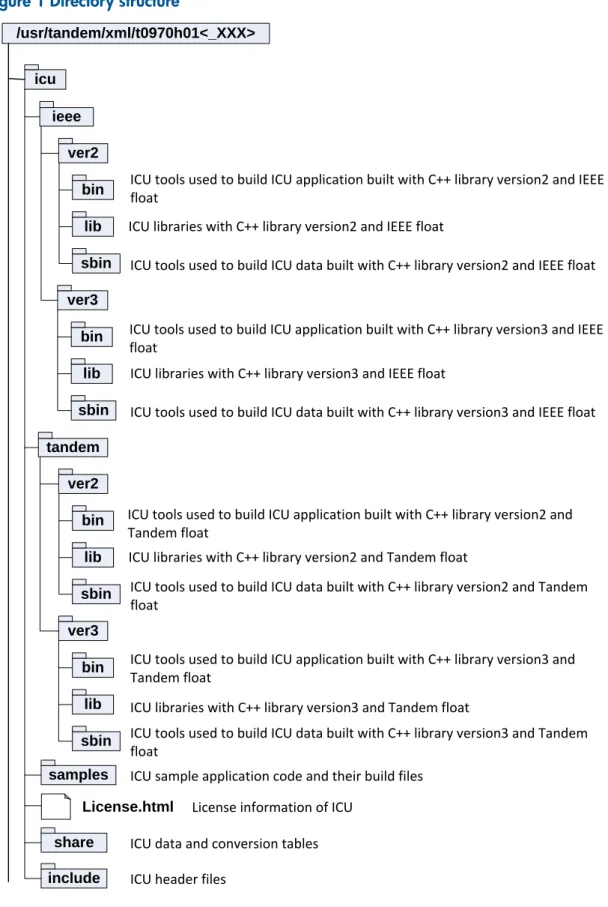
Verify that all the files and directories are extracted in the
<NonStop_XML_Parser_Installation_Directory>. This is the directory where XML Parser is installed, for example,/usr/tandem/xml/t0970h01.Figure 1 (page 11) illustrates the directory structure.
Figure 1 Directory structure icu ieee ver2 bin lib sbin ver3 bin lib sbin tandem ver2 bin lib sbin ver3 bin lib sbin samples share include License.html
ICU tools used to build ICU application built with C++ library version2 and IEEE float
ICU libraries with C++ library version2 and IEEE float
ICU tools used to build ICU data built with C++ library version2 and IEEE float
ICU tools used to build ICU application built with C++ library version3 and IEEE float
ICU libraries with C++ library version3 and IEEE float
ICU tools used to build ICU data built with C++ library version3 and IEEE float
ICU tools used to build ICU application built with C++ library version2 and Tandem float
ICU libraries with C++ library version2 and Tandem float
ICU tools used to build ICU data built with C++ library version2 and Tandem float
ICU tools used to build ICU application built with C++ library version3 and Tandem float
ICU libraries with C++ library version3 and Tandem float
ICU tools used to build ICU data built with C++ library version3 and Tandem float
ICU sample application code and their build files License information of ICU
ICU data and conversion tables ICU header files
/usr/tandem/xml/t0970h01<_XXX>
xercesc ieee ver2 lib ver3 lib bin tandem ver2 lib ver3 lib samples doc include LICENSE
Xerces-C++ libraries with C++ library version2 and IEEE float
Xerces-C++ libraries with C++ library version3 and IEEE float
Xerces C++ samples built with C++ library version3 and IEEE float
Xerces-C++ libraries with C++ library version2 and Tandem float
Xerces-C++ libraries with C++ library version3 and Tandem float Xerces-C++ sample application code and their build files License information of XERCESC
Xerces-C++ open source documentation
3 Sample applications
The NonStop XML Parser is packaged with sample applications. You can use the sample applications to get started with the NonStop XML Parser. These sample applications demonstrate the important features of the parser.
You can build all the samples simultaneously or build each sample individually. However, you must set some key environment variables before building the samples.
This section includes information about: • building and running the ICU samples
• building and running the Xerces-C++ samples
NOTE: Before building the samples, copy thesamples directory and sub-directories to an OSS location where you have read, write, and execute permissions.
Building the ICU samples
The NonStop XML Parser is packaged with the following ICU samples. These samples are available in the<ICUROOT>/samples directory, where ICUROOT is the
<NonStop_XML_Parser_Installation_Directory>/icudirectory.
Sample exe filename Function
Sample
break Demonstrates how to use BreakIterators in C and C++
break
icucal Prints out a calendar
cal
case Demonstrates how to do Unicode case conversion in C and C++
case
csdet Demonstrates using ICU's CharSet Detection API
csdet
icudate Prints out the current date, localized
date
datefmt Demonstrates the use of the date formatting API
datefmt
msgfmt Demonstrates the use of the message format
msgfmt
numfmt Demonstrates the use of the number format
numfmt
props Demonstrates the use of Unicode properties
props
strsrch Demonstrates how to search for patterns in Unicode text using the usearch interface
strsrch
translit Demonstrates the use of ICU transliteration
translit
uciter8 Demonstrates how to read 8-bit Unicode text
uciter8
ucnv Demonstrates the use of ICU codepage conversion
ucnv
writer, reader Demonstrates the use of ICU low level data routines
udata
ufortune Demonstrates packaging and use of resources in an application
ufortune
ugrep Demonstrates ICU regular expressions
ugrep
uresb Demonstrates building and loading resource bundles
uresb
ustring Demonstrates ICU string manipulation functions
ustring
Perform the following steps before building the samples:
• Copy the samplesdirectory and sub-directories to an OSS location where you have read, write, and execute permissions. This location is referred to as
<icu_user_location>/samples.
• Set the ICUROOT and ICU_DATA environment variables by entering the following commands:
OSS> export ICUROOT=/usr/tandem/xml/T0970H01/icu OSS> export ICU_DATA=$ICUROOT/share/icu/50.1.2/
You can build the samples with different combinations of libraries that are available. You can compile the samples by setting the values of theFLOATandVERSIONvariables in the
<icu_user_location>/samples/defs.mkfile. For a sampledefs.mkfile, see appendix
“Sampledefs.mkfile” (page 17).
The following table lists the valid values for these variables. You can define a combination of these values for building the samples. Default values are set in thedefs.mk file. If you do not change
these values, the default values are used.
Valid values Variable
ieee, tandem. Default isieee. FLOAT
2, 3. Default is3. VERSION
NOTE:
• The value of each variable in thedefs.mk file is case sensitive. • There is no support for ICU on Guardian platform.
After setting the required values, execute the following command to build all samples from the <icu_user_location>/samplesdirectory:
OSS> make all
To build a particular sample, use the following command:
OSS> make <sample_name>-sample
ICU configuration helper script
The ICU configuration helper script (icu-configscript) is available in thebinfolder of each ICU variant. It simplifies the task of building and linking the object files against ICU as compared to manually configuring user makefiles or equivalent. Asicu-configis an executable script, it locates the ICU libraries and headers by using the system PATH variable. Usingicu-configis convenient for trivial, single-file programs using ICU.
icu-configcan be used with or without a makefile. If it is used without a makefile, the following
command is sufficient for building a single-file C++ program against ICU (For example, icu/source/samples/ufortune/ufortune.cpp):
`icu-config --cxx --cxxflags --cppflags --ldflags` -o ufortune ufortune.cpp
Mostly,icu-configis called from within a makefile, and used to set up variables. For more information onicu-configtool, see icu-config --help.
Running the ICU samples
When you build the samples, the executable files are created in the
<icu_user_location>/samples/<sample-dir>directory, where<sample-dir>is the respective directory of each sample.
You can execute the samples from OSS command line directly as follows:
OSS> cd <icu_user_location>/samples/<sample-dir> OSS> ./<sample exe file>
Building the Xerces-C++ samples
The NonStop XML Parser is packaged with the following Xerces-C++ samples. These samples are available in the<XERCESCROOT>/samplesdirectory, where XERCESCROOT is the
<NonStop_XML_Parser_Installation_Directory>/xercescdirectory.
Function Sample
Creates a DOM tree in memory from scratch. CreateDOMDocument
Counts the elements in an XML file. DOMCount
Parses an XML file and prints it. DOMPrint
Displays how to enumerate the markup declarations in a DTD validator. EnumVal
Parses XML in a memory buffer and prints the number of elements and attributes. MemParse
Demonstrates progressive parsing. PParse
Parses the specified XML file, and exposes the PSVI and Schema Component Model information. PSVIWriter
Redirects the input stream for external entities. Redirect
Parses an XML file and prints out a count of the number of elements and characters in the file. SAX2Count
Parses an XML file and prints it. SAX2Print
Counts the elements, attributes, spaces, and characters of a given XML file. SAXCount
Parses an XML file and prints it. SAXPrint
Parses the specified XSD file, then shows how to access the Schema Content Model information. SCMPrint
Displays how to enumerate the markup declarations in a Schema Grammar. SEnumVal
Demonstrates streaming XML data from the standard input. StdInParse
Converts an input XML file into an expanded output XML file. Xinclude
Perform the following steps before building the samples:
• Copy the samplesdirectory and sub-directories to an OSS location where you have read, write, and execute permissions. This location is referred to as
<xercesc_user_location>/samples.
• Set the XERCESCROOT environment variable by entering the following command:
OSS> export XERCESCROOT=/usr/tandem/xml/T0970H01/xercesc
If you want to build these samples with ICU support, then set the ICUROOT and ICU_DATA environment variables by entering the following commands:
OSS> export ICUROOT=/usr/tandem/xml/T0970H01/icu OSS> export ICU_DATA=$ICUROOT/share/icu/50.1.2/
You can build the samples with different combinations of libraries that are available. You can compile the samples by setting the values of theFLOAT,VERSION,ICU_SUPPORT, andPLATFORM
variables in the<xercesc_user_location>/samples/defs.mkfile. For a sampledefs.mk
file, see appendix“Sampledefs.mkfile” (page 17).
The following table lists the valid values for these variables. You can define a combination of these values for building the samples. Default values are set in thedefs.mk file. If you do not change these values, the default values are used.
Valid values Variable
ieee, tandem. Default isieee. FLOAT
2, 3. Default is3. VERSION
yes, no. Default isno. ICU_SUPPORT
oss, guardian. Default isoss. Forguardian, ICU_SUPPORT variable must be set tono.
PLATFORM
NOTE:
• The value of each variable in thedefs.mk file is case sensitive.
• There is no support for ICU on guardian platform.
After setting the required values, execute the following command to build all samples from the <xercesc_user_location>/samplesdirectory:
OSS> make
To build a particular sample, use the following command:
OSS> make <sample_name>
NOTE: When building an executable on Guardian, you must not return a non-zero value from the main() function as it results in abend. For more information, see the Guardian Procedure Calls
Reference manual and the CRE Programmer's Guide.
Running the Xerces-C++ samples
When you build the samples, the executable files are created in the
<xercesc_user_location>/samplesdirectory. If you have built OSS executable samples, you can execute them from the OSS command line directly as follows:
OSS> ./<sample exe file>
If you have built Guardian executable samples, then perform the following steps:
1. Copy the executable to the Guardian location in binary mode.
OSS> cp <sample exe file> /G/<volname>/<subvolname>/<filename>
NOTE: Guardian does not accept more than 8 characters as file name. If there are other data files such as xml and dtd, you must copy them as well.
2. Go to the Guardian prompt, change the file code to TNS/E executable.
TACL> fup alter <filename>, code 800
3. Execute the sample.
A Sample
defs.mk
file
This appendix provides an example of the definition files used for building the samples.
For ICU:
A sampledefs.mkfile is located in the<icu_user_location>/samples/directory and is shown here: FLOAT=ieee VERSION=3 CXX=c++ CC=cc MAKE=make ifeq ($(FLOAT),ieee) FLOATING_POINT=IEEE endif ifeq ($(FLOAT),tandem) FLOATING_POINT=Tandem endif ifeq ($(VERSION),2) VER2DEF=-D_USER_CRTL_VERSION2 endif
CPP_FLAGS= -Wsystype=oss -Wtarget=tns/e -I$(ICUROOT)/include $(VER2DEF) -Woptimize=1 -W$(FLOATING_POINT)_float -g -Wversion$(VERSION) -Winline -Ww -Wrefalign=8 -Wenv=common -Wfieldalign=auto
C_FLAGS= -Wsystype=oss -Wtarget=tns/e -I$(ICUROOT)/include $(VER2DEF) -Woptimize=1 -W$(FLOATING_POINT)_float -g -Winline -Ww -Wrefalign=8 -Wenv=common -Wfieldalign=auto -Wallow_cplusplus_comments
LINK_FLAGS= -L$(ICUROOT)/$(FLOAT)/ver$(VERSION)/lib -licui18n -licuuc
-licudata -licuio -licui18n -licuuc -lput -lm -Wsystype=oss -Wtarget=tns/e -Wcall_shared -Weld=-bLocalized -Weld="-unres_symbols Error"
-Weld=-Noverbose -Winspect -Whighpin=on -Whighrequesters=on -Wcplusplus -Wversion$(VERSION)
For Xerces-C++
A sampledefs.mkfile is located in the<xercesc_user_location>/samples/directory and is shown here: FLOAT=ieee VERSION=3 ICU_SUPPORT=no PLATFORM=oss CXX=c89 CC=c89 MAKE=make ifeq ($(FLOAT),ieee) FLOATING_POINT=IEEE endif ifeq ($(FLOAT),tandem) FLOATING_POINT=Tandem endif ifeq ($(VERSION),2) VER2DEF=-D_USER_CRTL_VERSION2 17
endif
ifeq ($(ICU_SUPPORT),no) XLIB=xerces-c
else
XLIB=icuxerces-c -L$(ICUROOT)/$(FLOAT)/ver$(VERSION)/lib -licui18n -licuuc -licudata -licuio -licui18n -licuuc -lm -lput -lZRLDDLL
endif ifeq ($(PLATFORM),guardian) PUTILS=GuardianTandemPlatformUtils.o PGUARD=-D_GUARDIAN_SYSTYPE=1 else PUTILS=OssTandemPlatformUtils.o endif
CPP_FLAGS= -Wsystype=$(PLATFORM) -Wtarget=tns/e -I$(XERCESCROOT)/include -DHAVE_CONFIG_H $(VER2DEF) $(PGUARD) -Woptimize=1 -W$(FLOATING_POINT)_float -g -Wversion$(VERSION) -Winline -Ww -Wrefalign=8 -Wenv=common -Wfieldalign=auto LINK_FLAGS= $(XERCESCROOT)/$(FLOAT)/ver$(VERSION)/lib/$(PUTILS)
-Weld=-allow_duplicate_procs -Wsystype=$(PLATFORM) -L$(XERCESCROOT)/$(FLOAT)/ver$(VERSION)/lib -l$(XLIB)
-Wtarget=tns/e -Weld=-bLocalized -Weld="-unres_symbols error"
-Weld=-Noverbose -Winspect -Whighpin=on -Whighrequesters=on -Wcplusplus -Wversion$(VERSION)
Index
B
building ICU samples,13
building Xerces samples,15
D
defs.mk,17
ICU,17
Xerces-C++,17
E
extracting the PAX files,8
I
ICU,7
installation
extracting PAX files,8
pre-requisites,8
verifying product files,10
installing XML Parser,8
International Components for Unicode,7
P
PAX files
extracting,8
R
running ICU samples,14
running Xerces samples,16
S
sample applications,13 build ICU,13 build Xerces,15 run ICU,14 run Xerces,16V
verifying the extracted files,10