A Byte of Python
A Byte of Python
Swaroop C H
Copyright © 2003-2005 Swaroop C H
Abstract
This book will help you to learn the Python programming language, whether you are new to computers or are an experienced programmer.
Table of Contents
Preface ... x
Who This Book Is For ... x
History Lesson ... x
Status of the book ... x
Official Website ... xi
License Terms ... xi
Feedback ... xi
Something To Think About ... xi
1. Introduction ... 1
Introduction ... 1
Features of Python ... 1
Summary ... 2
Why not Perl? ... 3
What Programmers Say ... 3
2. Installing Python ... 4
For Linux/BSD users ... 4
For Windows Users ... 4
Summary ... 5
3. First Steps ... 6
Introduction ... 6
Using the interpreter prompt ... 6
Choosing an Editor ... 6
Using a Source File ... 7
Output ... 7
How It Works ... 8
Executable Python programs ... 8
Getting Help ... 9
Summary ... 10
4. The Basics ... 11
Literal Constants ... 11
Numbers ... 11
Strings ... 11
Variables ... 13
Identifier Naming ... 13
Data Types ... 14
Objects ... 14
Output ... 15
How It Works ... 15
Logical and Physical Lines ... 15
Indentation ... 17
Summary ... 18
5. Operators and Expressions ... 19
Introduction ... 19
Operators ... 19
Operator Precedence ... 21
Order of Evaluation ... 22
Associativity ... 22
Expressions ... 22
Using Expressions ... 22
Summary ... 23
6. Control Flow ... 24
Introduction ... 24
Using the if statement ... 24
How It Works ... 25
The while statement ... 26
Using the while statement ... 26
The for loop ... 27
Using the for statement ... 27
The break statement ... 28
Using the break statement ... 28
The continue statement ... 30
Using the continue statement ... 30
Summary ... 30
7. Functions ... 32
Introduction ... 32
Defining a Function ... 32
Function Parameters ... 32
Using Function Parameters ... 33
Local Variables ... 33
Using Local Variables ... 34
Using the global statement ... 34
Default Argument Values ... 35
Using Default Argument Values ... 35
Keyword Arguments ... 36
Using Keyword Arguments ... 37
The return statement ... 37
Using the literal statement ... 38
DocStrings ... 38
Using DocStrings ... 39
Summary ... 40
8. Modules ... 41
Introduction ... 41
Using the sys module ... 41
Byte-compiled .pyc files ... 42
The from..import statement ... 42
A module's __name__ ... 42
Using a module's __name__ ... 43
Making your own Modules ... 43
Creating your own Modules ... 43
from..import ... 44
The dir() function ... 45
Using the dir function ... 45
Summary ... 46
9. Data Structures ... 47
Introduction ... 47
List ... 47
Quick introduction to Objects and Classes ... 47
Using Lists ... 47
Tuple ... 49
Using Tuples ... 49
Tuples and the print statement ... 50
Dictionary ... 51
Using Dictionaries ... 51
Sequences ... 53
Using Sequences ... 53
References ... 54
Objects and References ... 55
More about Strings ... 56
String Methods ... 56
10. Problem Solving - Writing a Python Script ... 58
The Problem ... 58
The Solution ... 58
First Version ... 58
Second Version ... 60
Third Version ... 61
Fourth Version ... 63
More Refinements ... 64
The Software Development Process ... 65
Summary ... 65
11. Object-Oriented Programming ... 67
Introduction ... 67
The self ... 67
Classes ... 68
Creating a Class ... 68
object Methods ... 69
Using Object Methds ... 69
The __init__ method ... 69
Using the __init__ method ... 69
Class and Object Variables ... 70
Using Class and Object Variables ... 71
Inheritance ... 73
Using Inheritance ... 73
Summary ... 75
12. Input/Output ... 76
Files ... 76
Using file ... 76
Pickle ... 77
Pickling and Unpickling ... 77
Summary ... 78
13. Exceptions ... 79
Errors ... 79
Try..Except ... 79
Handling Exceptions ... 79
Raising Exceptions ... 80
How To Raise Exceptions ... 81
Try..Finally ... 82
Using Finally ... 82
Summary ... 83
14. The Python Standard Library ... 84
Introduction ... 84
The sys module ... 84
Command Line Arguments ... 84
More sys ... 86
The os module ... 86
Summary ... 87
15. More Python ... 88
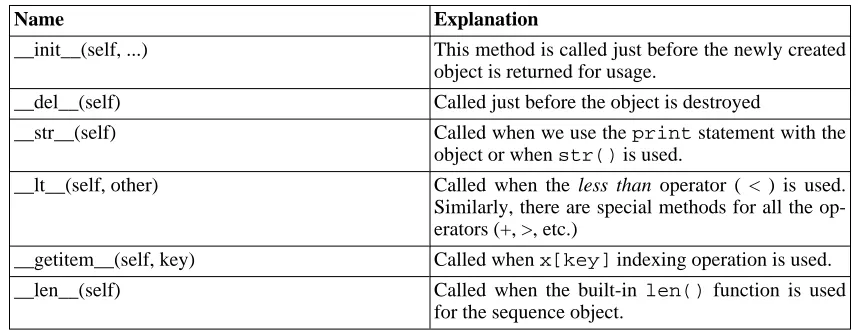
Special Methods ... 88
Single Statement Blocks ... 88
List Comprehension ... 89
Using List Comprehensions ... 89
Receiving Tuples and Lists in Functions ... 89
Lambda Forms ... 90
Using Lambda Forms ... 90
The exec and eval statements ... 91
The assert statement ... 91
The repr function ... 91
16. What Next? ... 93
Graphical Software ... 93
Summary of GUI Tools ... 94
Explore More ... 94
Summary ... 95
A. Free/Libré and Open Source Software (FLOSS) ... 96
B. About ... 98
Colophon ... 98
About the Author ... 98
C. Revision History ... 99
List of Tables
List of Examples
3.1. Using the python interpreter prompt ... 6
3.2. Using a Source File ... 7
4.1. Using Variables and Literal constants ... 14
5.1. Using Expressions ... 22
6.1. Using the if statement ... 24
6.2. Using the while statement ... 26
6.3. Using the for statement ... 27
6.4. Using the break statement ... 29
6.5. Using the continue statement ... 30
7.1. Defining a function ... 32
7.2. Using Function Parameters ... 33
7.3. Using Local Variables ... 34
7.4. Using the global statement ... 35
7.5. Using Default Argument Values ... 36
7.6. Using Keyword Arguments ... 37
7.7. Using the literal statement ... 38
7.8. Using DocStrings ... 39
8.1. Using the sys module ... 41
8.2. Using a module's __name__ ... 43
8.3. How to create your own module ... 43
8.4. Using the dir function ... 45
9.1. Using lists ... 47
9.2. Using Tuples ... 49
9.3. Output using tuples ... 50
9.4. Using dictionaries ... 51
9.5. Using Sequences ... 53
9.6. Objects and References ... 55
9.7. String Methods ... 56
10.1. Backup Script - The First Version ... 58
10.2. Backup Script - The Second Version ... 60
10.3. Backup Script - The Third Version (does not work!) ... 62
10.4. Backup Script - The Fourth Version ... 63
11.1. Creating a Class ... 68
11.2. Using Object Methods ... 69
11.3. Using the __init__ method ... 69
11.4. Using Class and Object Variables ... 71
11.5. Using Inheritance ... 73
12.1. Using files ... 76
12.2. Pickling and Unpickling ... 77
13.1. Handling Exceptions ... 80
13.2. How to Raise Exceptions ... 81
13.3. Using Finally ... 82
14.1. Using sys.argv ... 84
15.1. Using List Comprehensions ... 89
Preface
Python is probably one of the few programming languages which is both simple and powerful. This is good for both and beginners as well as experts, and more importantly, is fun to program with. This book aims to help you learn this wonderful language and show how to get things done quickly and painlessly -in effect 'The Perfect Anti-venom to your programm-ing problems'.
Who This Book Is For
This book serves as a guide or tutorial to the Python programming language. It is mainly targeted at newbies. It is useful for experienced programmers as well.
The aim is that if all you know about computers is how to save text files, then you can learn Python from this book. If you have previous programming experience, then you can also learn Python from this book.
If you do have previous programming experience, you will be interested in the differences between Py-thon and your favorite programming language - I have highlighted many such differences. A little warn-ing though, Python is soon gowarn-ing to become your favorite programmwarn-ing language!
History Lesson
I first started with Python when I needed to write an installer for my software Diamond [http://www.g2swaroop.net/software/] so that I could make the installation easy. I had to choose between Python and Perl bindings for the Qt library. I did some research on the web and I came across an article where Eric S. Raymond, the famous and respected hacker, talked about how Python has be-come his favorite programming language. I also found out that the PyQt bindings were very good com-pared to Perl-Qt. So, I decided that Python was the language for me.
Then, I started searching for a good book on Python. I couldn't find any! I did find some O'Reilly books but they were either too expensive or were more like a reference manual than a guide. So, I settled for the documentation that came with Python. However, it was too brief and small. It did give a good idea about Python but was not complete. I managed with it since I had previous programming experience, but it was unsuitable for newbies.
About six months after my first brush with Python, I installed the (then) latest Red Hat 9.0 Linux and I was playing around with KWord. I got excited about it and suddenly got the idea of writing some stuff on Python. I started writing a few pages but it quickly became 30 pages long. Then, I became serious about making it more useful in a book form. After a lot of rewrites, it has reached a stage where it has become a useful guide to learning the Python language. I consider this book to be my contribution and tribute to the open source community.
This book started out as my personal notes on Python and I still consider it in the same way, although I've taken a lot of effort to make it more palatable to others :)
In the true spirit of open source, I have received lots of constructive suggestions, criticisms and feedback from enthusiastic readers which has helped me improve this book a lot.
Status of the book
This book is a work-in-progress. Many chapters are constantly being changed and improved. However, the book has matured a lot. You should be able to learn Python easily from this book. Please do tell me if you find any part of the book to be incorrect or incomprehensible.
Construct-or.
Official Website
The official website of the book is www.byteofpython.info [http://www.byteofpython.info] . From the website, you can read the whole book online or you can download the latest versions of the book, and also send me feedback.
License Terms
This book is licensed under the Creative Commons Attribution-NonCommercial-ShareAlike License 2.0 [http://creativecommons.org/licenses/by-nc-sa/2.0/] .
Basically, you are free to copy, distribute, and display the book, as long as you give credit to me. The re-strictions are that you cannot use the book for commercial purposes without my permission. You are free to modify and build upon this work, provided that you clearly mark all changes and release the modified work under the same license as this book.
Please visit the Creative Commons website [http://creativecommons.org/licenses/by-nc-sa/2.0/] for the full and exact text of the license, or for an easy-to-understand version. There is even a comic strip ex-plaining the terms of the license.
Feedback
I have put in a lot of effort to make this book as interesting and as accurate as possible. However, if you find some material to be inconsistent or incorrect, or simply needs improvement, then please do inform me, so that I can make suitable improvements. You can reach me at
Something To Think About
There are two ways of constructing a software design: one way is to make it so simple that there are obviously no deficiencies; the other is to make it so complicated that there are no obvious deficiencies.
—C. A. R. Hoare
Success in life is a matter not so much of talent and opportunity as of concentration and perseverance.
Chapter 1. Introduction
Introduction
Python is one of those rare languages which can claim to be both simple and powerful. You will find that you will be pleasantly surprised on how easy it is to concentrate on the solution to the problem rather than the syntax and structure of the language you are programming in.
The official introduction to Python is
Python is an easy to learn, powerful programming language. It has efficient high-level data structures and a simple but effective approach to object-oriented programming. Python's elegant syntax and dynamic typing, together with its interpreted nature, make it an ideal language for scripting and rapid application development in many areas on most platforms.
I will discuss most of these features in more detail in the next section.
Note
Guido van Rossum, the creator of the Python language, named the language after the BBC show "Monty Python's Flying Circus ". He doesn't particularly like snakes that kill animals for food by winding their long bodies around them and crushing them.
Features of Python
Simple Python is a simple and minimalistic language. Reading a good Python program feels almost like reading English, although very strict English! This pseudo-code nature of Python is one of its greatest strengths. It al-lows you to concentrate on the solution to the problem rather than the language itself.
Easy to Learn As you will see, Python is extremely easy to get started with. Python has an extraordinarily simple syntax, as already mentioned.
Free and Open Source Python is an example of a FLOSS (Free/Libré and Open Source Soft-ware). In simple terms, you can freely distribute copies of this software, read it's source code, make changes to it, use pieces of it in new free programs, and that you know you can do these things. FLOSS is based on the concept of a community which shares knowledge. This is one of the reasons why Python is so good - it has been created and is con-stantly improved by a community who just want to see a better Python.
High-level Language When you write programs in Python, you never need to bother about the low-level details such as managing the memory used by your program, etc.
Portable Due to its open-source nature, Python has been ported (i.e. changed to make it work on) to many platforms. All your Python programs can work on any of these platforms without requiring any changes at all if you are careful enough to avoid any system-dependent features.
Windows CE and even PocketPC !
Interpreted This requires a bit of explanation.
A program written in a compiled language like C or C++ is converted from the source language i.e. C or C++ into a language that is spoken by your computer (binary code i.e. 0s and 1s) using a compiler with various flags and options. When you run the program, the linker/loader software copies the program from hard disk to memory and starts run-ning it.
Python, on the other hand, does not need compilation to binary. You just run the program directly from the source code. Internally, Python converts the source code into an intermediate form called bytecodes and then translates this into the native language of your computer and then runs it. All this, actually, makes using Python much easier since you don't have to worry about compiling the program, making sure that the proper libraries are linked and loaded, etc, etc. This also makes your thon programs much more portable, since you can just copy your Py-thon program onto another computer and it just works!
Object Oriented Python supports procedure-oriented programming as well as object-oriented programming. In procedure-object-oriented languages, the program is built around procedures or functions which are nothing but reusable pieces of programs. In object-oriented languages, the program is built around objects which combine data and functionality. Python has a very powerful but simplistic way of doing OOP, especially when compared to big languages like C++ or Java.
Extensible If you need a critical piece of code to run very fast or want to have some piece of algorithm not to be open, you can code that part of your pro-gram in C or C++ and then use them from your Python propro-gram.
Embeddable You can embed Python within your C/C++ programs to give 'scripting' capabilities for your program's users.
Extensive Libraries The Python Standard Library is huge indeed. It can help you do various things involving regular expressions, documentation generation, unit testing, threading, databases, web browsers, CGI, ftp, email, XML, XML-RPC, HTML, WAV files, cryptography, GUI (graphical user in-terfaces), Tk, and other system-dependent stuff. Remember, all this is always available wherever Python is installed. This is called the 'Batter-ies Included' philosophy of Python.
Besides, the standard library, there are various other high-quality librar-ies such as wxPython [http://www.wxpython.org], Twisted [http://www.twistedmatrix.com/products/twisted], Python Imaging Lib-rary [http://www.pythonware.com/products/pil/index.htm] and many more.
Summary
Python is indeed an exciting and powerful language. It has the right combination of performance and features that make writing programs in Python both fun and easy.
Why not Perl?
If you didn't know already, Perl is another extremely popular open source interpreted programming lan-guage.
If you have ever tried writing a large program in Perl, you would have answered this question yourself! In other words, Perl programs are easy when they are small and it excels at small hacks and scripts to 'get work done'. However, they quickly become unwieldy once you start writing bigger programs and I am speaking this out of experience of writing large Perl programs at Yahoo!
When compared to Perl, Python programs are definitely simpler, clearer, easier to write and hence more understandable and maintainable. I do admire Perl and I do use it on a daily basis for various things but whenever I write a program, I always start thinking in terms of Python because it has become so natural for me. Perl has undergone so many hacks and changes, that it feels like it is one big (but one hell of a) hack. Sadly, the upcoming Perl 6 does not seem to be making any improvements regarding this.
The only and very significant advantage that I feel Perl has, is its huge CPAN [http://cpan.perl.org] lib-rary - the Comprehensive Perl Archive Network. As the name suggests, this is a humongous collection of Perl modules and it is simply mind-boggling because of its sheer size and depth - you can do virtually anything you can do with a computer using these modules. One of the reasons that Perl has more librar-ies than Python is that it has been around for a much longer time than Python. Maybe I should suggest a port-Perl-modules-to-Python hackathon on comp.lang.python [http://groups.google.com/groups?q=comp.lang.python] :)
Also, the new Parrot virtual machine [http://www.parrotcode.org] is designed to run both the completely redesigned Perl 6 as well as Python and other interpreted languages like Ruby, PHP and Tcl. What this means to you is that maybe you will be able to use all Perl modules from Python in the future, so that will give you the best of both worlds - the powerful CPAN library combined with the powerful Python language. However, we will have to just wait and see what happens.
What Programmers Say
You may find it interesting to read what great hackers like ESR have to say about Python:
• Eric S. Raymond is the author of 'The Cathedral and the Bazaar' and is also the person who coined
the term 'Open Source'. He says that Python has become his favorite programming language [http://www.linuxjournal.com/article.php?sid=3882]. This article was the real inspiration for my first brush with Python.
• Bruce Eckel is the author of the famous 'Thinking in Java' and 'Thinking in C++' books. He says
that no language has made him more productive than Python. He says that Python is perhaps the only language that focuses on making things easier for the programmer. Read the complete interview [http://www.artima.com/intv/aboutme.html] for more details.
• Peter Norvig is a well-known Lisp author and Director of Search Quality at Google (thanks to
Guido van Rossum for pointing that out). He says that Python has always been an integral part of Google. You can actually verify this statement by looking at the Google Jobs [http://www.google.com/jobs/index.html] page which lists Python knowledge as a requirement for software engineers.
• Bruce Perens is a co-founder of OpenSource.org and the UserLinux project. UserLinux aims to
cre-ate a standardized Linux distribution supported by multiple vendors. Python has becre-aten contenders like Perl and Ruby to become the main programming language that will be supported by UserLinux.
Chapter 2. Installing Python
For Linux/BSD users
If you are using a Linux distribution such as Fedora or Mandrake or {put your choice here}, or a BSD system such as FreeBSD, then you probably already have Python installed on your system.
To test if you have Python already installed on your Linux box, open a shell program (like konsole or gnome-terminal) and enter the command python -V as shown below.
$ python -V Python 2.3.4
Note
$is the prompt of the shell. It will be different for you depending on the settings of your OS, hence I will indicate the prompt by just the$symbol.
If you see some version information like the one shown above, then you have Python installed already.
However, if you get a message like this one:
$ python -V
bash: python: command not found
then, you don't have Python installed. This is highly unlikely but possible.
In this case, you have two ways of installing Python on your system.
• Install the binary packages using the package management software that comes with your OS, such as yum in Fedora Linux, urpmi in Mandrake Linux, apt-get in Debian Linux, pkg_add in FreeBSD, etc. Note that you will need an internet connection to use this method.
Alternatively, you can download the binaries from somewhere else and then copy to your PC and in-stall it.
• You can compile Python from the source code [http://www.python.org/download/] and install it. The compilation instructions are provided at the website.
For Windows Users
Caution
When you are given the option of unchecking any optional components, don't uncheck any! Some of these components can be useful for you, especially IDLE.
An interesting fact is that about 70% of Python downloads are by Windows users. Of course, this doesn't give the complete picture since almost all Linux users will have Python installed already on their sys-tems by default.
Using Python in the Windows command line
If you want to be able to use Python from the Windows command line, then you need to set the PATH variable appropriately.
For Windows 2000, XP, 2003 , click on Control Panel -> System -> Advanced -> Environment Variables. Click on the variable named PATH in the 'System Variables' section, then select Edit and add ;C:\Python23 (without the quotes) to the end of what is already there. Of course, use the appropriate directory name.
For older versions of Windows, add the following line to the file C:\AUTOEXEC.BAT : 'PATH=%PATH%;C:\Python23' (without the quotes) and restart the system. For Windows NT, use theAUTOEXEC.NTfile.
Summary
For a Linux system, you most probably already have Python installed on your system. Otherwise, you can install it using the package management software that comes with your distribution. For a Windows system, installing Python is as easy as downloading the installer and double-clicking on it. From now on, we will assume that you have Python installed on your system.
Next, we will write our first Python program.
Chapter 3. First Steps
Introduction
We will now see how to run a traditional 'Hello World' program in Python. This will teach you how to write, save and run Python programs.
There are two ways of using Python to run your program - using the interactive interpreter prompt or us-ing a source file. We will now see how to use both the methods.
Using the interpreter prompt
Start the intepreter on the command line by entering python at the shell prompt. Now enter print 'Hello World'followed by the Enter key. You should see the wordsHello Worldas output. For Windows users, you can run the interpreter in the command line if you have set thePATHvariable appropriately. Alternatively, you can use the IDLE program. IDLE is short for Integrated DeveLopment Environment. Click on Start -> Programs -> Python 2.3 -> IDLE (Python GUI). Linux users can use IDLE too.
Note that the <<< signs are the prompt for entering Python statements.
Example 3.1. Using the python interpreter prompt
$ python
Python 2.3.4 (#1, Oct 26 2004, 16:42:40)
[GCC 3.4.2 20041017 (Red Hat 3.4.2-6.fc3)] on linux2
Type "help", "copyright", "credits" or "license" for more information. >>> print 'hello world'
hello world >>>
Notice that Python gives you the output of the line immediately! What you just entered is a single Py-thon statement. We useprint to (unsurprisingly) print any value that you supply to it. Here, we are supplying the textHello Worldand this is promptly printed to the screen.
How to quit the Python prompt
To exit the prompt, press Ctrl-d if you are using IDLE or are using a Linux/BSD shell. In case of the Windows command prompt, press Ctrl-z followed by Enter.
Choosing an Editor
one of the leading Perl6/Parrot hackers and the author of the amazing 'Beginning Perl' book
One of the very basic requirements is syntax highlighting where all the different parts of your Python program are colorized so that you can see your program and visualize its running.
If you are using Windows, then I suggest that you use IDLE. IDLE does syntax highlighting and a lot more such as allowing you to run your programs within IDLE among other things. A special note: don't
use Notepad - it is a bad choice because it does not do syntax highlighting and also importantly it does
not support indentation of the text which is very important in our case as we will see later. Good editors such as IDLE (and also VIM) will automatically help you do this.
If you are using Linux/FreeBSD, then you have a lot of choices for an editor. If you are an experienced programmer, then you must be already using VIM or Emacs. Needless to say, these are two of the most powerful editors and you will be benefitted by using them to write your Python programs. I personally use VIM for most of my programs. If you are a beginner programmer, then you can use Kate which is one of my favorites. In case you are willing to take the time to learn VIM or Emacs, then I highly re-commend that you do learn to use either of them as it will be very useful for you in the long run.
If you still want to explore other choices of an editor, see the comprehensive list of Python editors [http://www.python.org/cgi-bin/moinmoin/PythonEditors] and make your choice. You can also choose an IDE (Integrated Development Environment) for Python. See the comprehensive list of IDEs that sup-port Python [http://www.python.org/cgi-bin/moinmoin/IntegratedDevelopmentEnvironments] for more details. Once you start writing large Python programs, IDEs can be very useful indeed.
I repeat once again, please choose a proper editor - it can make writing Python programs more fun and easy.
Using a Source File
Now let's get back to programming. There is a tradition that whenever you learn a new programming language, the first program that you write and run is the 'Hello World' program - all it does is just say 'Hello World' when you run it. As Simon Cozens 1puts it, it is the 'traditional incantation to the
pro-gramming gods to help you learn the language better' :) .
Start your choice of editor, enter the following program and save it ashelloworld.py
Example 3.2. Using a Source File
#!/usr/bin/python
# Filename : helloworld.py print 'Hello World'
(Source file: code/helloworld.py)
Run this program by opening a shell (Linux terminal or DOS prompt) and entering the command
py-thonhelloworld.py. If you are using IDLE, use the menu Edit -> Run Script or the keyboard
short-cut Ctrl-F5. The output is as shown below.
Output
$ python helloworld.py Hello World
If you got the output as shown above, congratulations! - you have successfully run your first Python pro-gram.
In case you got an error, please type the above program exactly as shown and above and run the program again. Note that Python is case-sensitive i.e.printis not the same asPrint- note the lowercasepin the former and the uppercasePin the latter. Also, ensure there are no spaces or tabs before the first char-acter in each line - we will see why this is important later.
How It Works
Let us consider the first two lines of the program. These are called comments - anything to the right of the#symbol is a comment and is mainly useful as notes for the reader of the program.
Python does not use comments except for the special case of the first line here. It is called the shebang
line - whenever the first two characters of the source file are#!followed by the location of a program, this tells your Linux/Unix system that this program should be run with this interpreter when you execute the program. This is explained in detail in the next section. Note that you can always run the program on any platform by specifying the interpreter directly on the command line such as the command python
helloworld.py.
Important
Use comments sensibly in your program to explain some important details of your program -this is useful for readers of your program so that they can easily understand what the program is doing. Remember, that person can be yourself after six months!
The comments are followed by a Python statement - this just prints the text 'Hello World'. The
printis actually an operator and'Hello World'is referred to as a string - don't worry, we will ex-plore these terminologies in detail later.
Executable Python programs
This applies only to Linux/Unix users but Windows users might be curious as well about the first line of the program. First, we have to give the program executable permission using the chmod command then
run the source program.
$ chmod a+x helloworld.py $ ./helloworld.py
Hello World
The chmod command is used here to change the mode of the file by giving execute permission to all users of the system. Then, we execute the program directly by specifying the location of the source file. We use the./to indicate that the program is located in the current directory.
will still work since the system knows that it has to run the program using the interpreter whose location is specified in the first line in the source file.
You are now able to run the program as long as you know the exact path of the program - but what if you wanted to be able to run the program from anywhere? You can do this by storing the program in one of the directories listed in thePATHenvironment variable. Whenever you run any program, the system looks for that program in each of the directories listed in thePATHenvironment variable and then runs that program. We can make this program available everywhere by simply copying this source file to one of the directories listed inPATH.
$ echo $PATH
/opt/mono/bin:/usr/local/bin:/usr/bin:/bin:/usr/X11R6/bin:/home/swaroop/bin $ cp helloworld.py /home/swaroop/bin/helloworld
$ helloworld Hello World
We can display thePATHvariable using the echo command and prefixing the variable name by$to in-dicate to the shell that we need the value of this variable. We see that/home/swaroop/binis one of the directories in the PATH variable where swaroop is the username I am using in my system. There will usually be a similar directory for your username on your system. Alternatively, you can add a dir-ectory of your choice to the PATH variable - this can be done by running
PATH=$PATH:/home/swaroop/mydir where'/home/swaroop/mydir'is the directory I want to add to thePATHvariable.
This method is very useful if you want to write useful scripts that you want to run the program anytime, anywhere. It is like creating your own commands just like cd or any other commands that you use in the Linux terminal or DOS prompt.
Caution
W.r.t. Python, a program or a script or software all mean the same thing.
Getting Help
If you need quick information about any function or statement in Python, then you can use the built-in
helpfunctionality. This is very useful especially when using the interpreter prompt. For example, run
help(str)- this displays the help for thestrclass which is used to store all text (strings) that you use in your program. Classes will be explained in detail in the chapter on object-oriented programming.
Note
Press q to exit the help.
Similarly, you can obtain information about almost anything in Python. Use help() to learn more about usinghelpitself!
In case you need to get help for operators likeprint, then you need to set thePYTHONDOCS environ-ment variable appropriately. This can be done easily on Linux/Unix using the env command.
$ env PYTHONDOCS=/usr/share/doc/python-docs-2.3.4/html/ python Python 2.3.4 (#1, Oct 26 2004, 16:42:40)
[GCC 3.4.2 20041017 (Red Hat 3.4.2-6.fc3)] on linux2
Type "help", "copyright", "credits" or "license" for more information. >>> help('print')
You will notice that I have used quotes to specify'print'so that Python can understand that I want to fetch help about 'print' and I am not asking it to print something.
Note that the location I have used is the location in Fedora Core 3 Linux - it may be different for differ-ent distributions and versions.
Summary
You should now be able to write, save and run Python programs at ease. Now that you are a Python user, let's learn some more Python concepts.
Chapter 4. The Basics
Just printing 'Hello World' is not enough, is it? You want to do more than that - you want to take some input, manipulate it and get something out of it. We can achieve this in Python using constants and vari-ables.
Literal Constants
An example of a literal constant is a number like5,1.23,9.25e-3or a string like'This is a string'or"It's a string!". It is called a literal because it is literal - you use its value liter-ally. The number2always represents itself and nothing else - it is a constant because its value cannot be changed. Hence, all these are referred to as literal constants.
Numbers
Numbers in Python are of four types - integers, long integers, floating point and complex numbers.
• Examples of integers are2which are just whole numbers. • Long integers are just bigger whole numbers.
• Examples of floating point numbers (or floats for short) are3.23and52.3E-4. TheEnotation in-dicates powers of 10. In this case,52.3E-4means52.3 * 10-4.
• Examples of complex numbers are(-5+4j)and(2.3 - 4.6j)
Strings
A string is a sequence of characters. Strings are basically just a bunch of words.
I can almost guarantee that you will be using strings in almost every Python program that you write, so pay attention to the following part. Here's how you use strings in Python:
•
Using Single Quotes (')
You can specify strings using single quotes such as'Quote me on this'. All white space i.e. spaces and tabs are preserved as-is.
•
Using Double Quotes (")
Strings in double quotes work exactly the same way as strings in single quotes. An example is
"What's your name?"
•
Using Triple Quotes ('''or""")
'''This is a multi-line string. This is the first line. This is the second line.
"What's your name?," I asked. He said "Bond, James Bond." '''
•
Escape Sequences
Suppose, you want to have a string which contains a single quote ('), how will you specify this string? For example, the string isWhat's your name?. You cannot specify 'What's your name?'because Python will be confused as to where the string starts and ends. So, you will have to specify that this single quote does not indicate the end of the string. This can be done with the help of what is called an escape sequence. You specify the single quote as\' - notice the backslash. Now, you can specify the string as'What\'s your name?'.
Another way of specifying this specific string would be "What's your name?" i.e. using double quotes. Similarly, you have to use an escape sequence forusing a double quote itself in a double quoted string. Also, you have to indicate the backslash itself using the escape sequence\\. What if you wanted to specify a two-line string? One way is to use a triple-quoted string as shown above or you can use an escape sequence for the newline character -\nto indicate the start of a new line. An example isThis is the first line\nThis is the second line. Another useful escape sequence to know is the tab -\t. There are many more escape sequences but I have mentioned only the most useful ones here.
One thing to note is that in a string, a single backslash at the end of the line indicates that the string is continued in the next line, but no newline is added. For example,
"This is the first sentence.\ This is the second sentence."
is equivalent to "This is the first sentence. This is the second sen-tence."
•
Raw Strings
If you need to specify some strings where no special processing such as escape sequences are handled, then what you need is to specify a raw string by prefixingrorRto the string. An example isr"Newlines are indicated by \n".
•
Unicode Strings
Unicode is a standard way of writing international text. If you want to write text in your native lan-guage such as Hindi or Arabic, then you need to have a Unicode-enabled text editor. Similarly, Py-thon allows you to handle Unicode text - all you need to do is prefixuorU. For example,u"This is a Unicode string.".
Remember to use Unicode strings when you are dealing with text files, especially when you know that the file will contain text written in languages other than English.
•
Strings are immutable
This means that once you have created a string, you cannot change it. Although this might seem like a bad thing, it really isn't. We will see why this is not a limitation in the various programs that we see later on.
•
String literal concatenation
If you place two string literals side by side, they are automatically concatenated by Python. For ex-ample, 'What\'s' 'your name?' is automatically converted in to "What's your name?".
Note for C/C++ Programmers
There is no separatechardata type in Python. There is no real need for it and I am sure you won't miss it.
Note for Perl/PHP Programmers
Remember that single-quoted strings and double-quoted strings are the same - they do not dif-fer in any way.
Note for Regular Expression Users
Always use raw strings when dealing with regular expressions. Otherwise, a lot of backwhack-ing may be required. For example, backreferences can be referred to as'\\1'orr'\1'.
Variables
Using just literal constants can soon become boring - we need some way of storing any information and manipulate them as well. This is where variables come into the picture. Variables are exactly what they mean - their value can vary i.e. you can store anything using a variable. Variables are just parts of your computer's memory where you store some information. Unlike literal constants, you need some method of accessing these variables and hence you give them names.
Identifier Naming
Variables are examples of identifiers. Identifiers are names given to identify something. There are some rules you have to follow for naming identifiers:
• The first character of the identifier must be a letter of the alphabet (upper or lowercase) or an under-score ('_').
• The rest of the identifier name can consist of letters (upper or lowercase), underscores ('_') or digits (0-9).
• Identifier names are case-sensitive. For example,mynameandmyNameare not the same. Note the lowercasenin the former and the uppercaseNin te latter.
• Examples of valid identifier names arei,__my_name,name_23anda1b2_c3.
• Examples of invalid identifier names are2things,this is spaced outandmy-name.
Data Types
Variables can hold values of different types called data types. The basic types are numbers and strings, which we have already discussed. In later chapters, we will see how to create our own types using classes.
Objects
Remember, Python refers to anything used in a program as an object. This is meant in the generic sense. Instead of saying 'the something', we say 'the object'.
Note for Object Oriented Programming users
Python is strongly object-oriented in the sense that everything is an object including numbers, strings and even functions.
We will now see how to use variables along with literal constants. Save the following example and run the program.
How to write Python programs
Henceforth, the standard procedure to save and run a Python program is as follows:
1. Open your favorite editor.
2. Enter the program code given in the example.
3. Save it as a file with the filename mentioned in the comment. I follow the convention of having all Python programs saved with the extension.py.
4. Run the interpreter with the command pythonprogram.pyor use IDLE to run the pro-grams. You can also use the executable method as explained earlier.
Example 4.1. Using Variables and Literal constants
# Filename : var.py i = 5
print i i = i + 1 print i
s = '''This is a multi-line string. This is the second line.'''
print s
Output
$ python var.py 5
6
This is a multi-line string. This is the second line.
How It Works
Here's how this program works. First, we assign the literal constant value5to the variableiusing the assignment operator (=). This line is called a statement because it states that something should be done and in this case, we connect the variable nameito the value5. Next, we print the value ofiusing the
printstatement which, unsurprisingly, just prints the value of the variable to the screen.
The we add1to the value stored iniand store it back. We then print it and expectedly, we get the value
6.
Similarly, we assign the literal string to the variablesand then print it.
Note for C/C++ Programmers
Variables are used by just assigning them a value. No declaration or data type definition is needed/used.
Logical and Physical Lines
A physical line is what you see when you write the program. A logical line is what Python sees as a single statement. Python implicitly assumes that each physical line corresponds to a logical line.
An example of a logical line is a statement likeprint 'Hello World'- if this was on a line by it-self (as you see it in an editor), then this also corresponds to a physical line.
Implicitly, Python encourages the use of a single statement per line which makes code more readable.
If you want to specify more than one logical line on a single physical line, then you have to explicitly specify this using a semicolon (;) which indicates the end of a logical line/statement. For example,
i = 5 print i
is effectively same as
i = 5; print i;
and the same can be written as
i = 5; print i;
or even
i = 5; print i
However, I strongly recommend that you stick to writing a single logical line in a single physical line
only. Use more than one physical line for a single logical line only if the logical line is really long. The
idea is to avoid the semicolon as far as possible since it leads to more readable code. In fact, I have
nev-er used or even seen a semicolon in a Python program.
An example of writing a logical line spanning many physical lines follows. This is referred to as explicit
line joining.
s = 'This is a string. \ This continues the string.' print s
This gives the output:
This is a string. This continues the string.
Similarly,
print \ i
is the same as
print i
Sometimes, there is an implicit assumption where you don't need to use a backslash. This is the case where the logical line uses parentheses, square brackets or curly braces. This is is called implicit line
joining. You can see this in action when we write programs using lists in later chapters.
Indentation
Whitespace is important in Python. Actually, whitespace at the beginning of the line is important. This is called indentation. Leading whitespace (spaces and tabs) at the beginning of the logical line is used to determine the indentation level of the logical line, which in turn is used to determine the group-ing of statements.
This means that statements which go together must have the same indentation. Each such set of state-ments is called a block. We will see examples of how blocks are important in later chapters.
One thing you should remember is how wrong indentation can give rise to errors. For example:
i = 5
print 'Value is', i # Error! Notice a single space at the start of the line print 'I repeat, the value is', i
When you run this, you get the following error:
File "whitespace.py", line 4
print 'Value is', i # Error! Notice a single space at the start of the line ^
SyntaxError: invalid syntax
Notice that there is a single space at the beginning of the second line. The error indicated by Python tells us that the syntax of the program is invalid i.e. the program was not properly written. What this means to you is that you cannot arbitrarily start new blocks of statements (except for the main block which you have been using all along, of course). Cases where you can use new blocks will be detailed in later chapters such as the control flow chapter.
How to indent
Do not use a mixture of tabs and spaces for the indentation as it does not work across different platforms properly. I strongly recommend that you use a single tab or two or four spaces for each indentation level.
Choose any of these three indentation styles. More importantly, choose one and use it
consist-ently i.e. use that indentation style only.
Summary
Now that we have gone through many nitty-gritty details, we can move on to more interesting stuff such as control flow statements. Be sure to become comfortable with what you have read in this chapter.
Chapter 5. Operators and Expressions
Introduction
Most statements (logical lines) that you write will contain expressions. A simple example of an expres-sion is2 + 3. An expression can be broken down into operators and operands.
Operators are functionality that do something and can be represented by symbols such as+or by special keywords. Operators require some data to operate on and such data are called operands. In this case,2
and3are the operands.
Operators
We will briefly take a look at the operators and their usage:
Tip
You can evaluate the expressions given in the examples using the interpreter interactively. For example, to test the expression2 + 3, use the interactive Python interpreter prompt:
>>> 2 + 3 5
>>> 3 * 5 15
[image:30.612.121.542.480.729.2]>>>
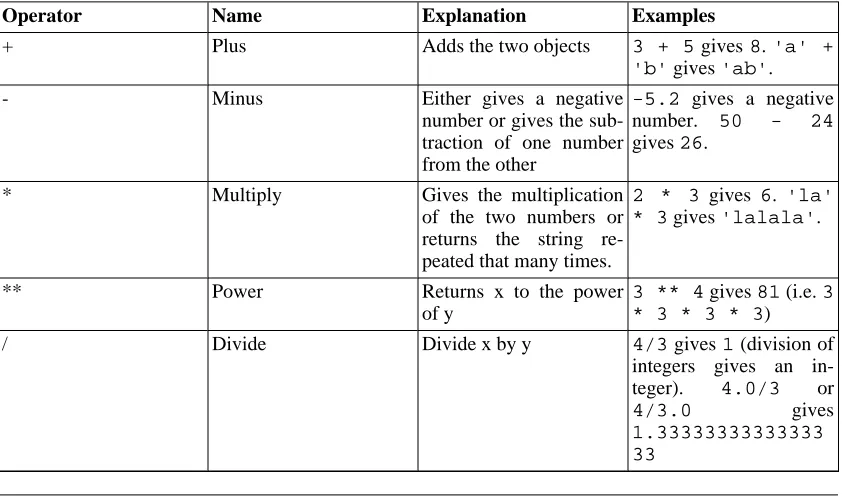
Table 5.1. Operators and their usage
Operator Name Explanation Examples
+ Plus Adds the two objects 3 + 5gives8.'a' +
'b'gives'ab'.
- Minus Either gives a negative
number or gives the sub-traction of one number from the other
-5.2 gives a negative number. 50 - 24
gives26.
* Multiply Gives the multiplication
of the two numbers or returns the string re-peated that many times.
2 * 3 gives 6. 'la' * 3gives'lalala'.
** Power Returns x to the power
of y
3 ** 4gives81(i.e.3 * 3 * 3 * 3)
/ Divide Divide x by y 4/3gives1(division of
integers gives an in-teger). 4.0/3 or
4/3.0 gives
Operator Name Explanation Examples
// Floor Division Returns the floor of the quotient
4 // 3.0gives1.0
% Modulo Returns the remainder of
the division
8%3 gives 2. -25.5%2.25gives 1.5
. << Left Shift Shifts the bits of the
number to the left by the number of bits specified. (Each number is repres-ented in memory by bits or binary digits i.e. 0 and 1)
2 << 2gives8. -2is represented by 10 in bits. Left shifting by 2 bits gives 1000 which represents the decimal8.
>> Right Shift Shifts the bits of the number to the right by the number of bits spe-cified.
11 >> 1gives5 -11
is represented in bits by
1011 which when right shifted by 1 bit gives
101 which is nothing but decimal5.
& Bitwise AND Bitwise AND of the
numbers
5 & 3gives1.
| Bit-wise OR Bitwise OR of the
num-bers
5 | 3gives7
^ Bit-wise XOR 5 ^ 3gives6
~ Bit-wise invert The bit-wise inversion of x is -(x+1)
~5gives-6. < Less Than Returns whether x is less
than y. All comparison operators return 1 for true and 0 for false. This is equivalent to the spe-cial variables Trueand
False respectively. Note the capitalization of these variables' names.
5 < 3 gives 0 (i.e.
False) and 3 < 5
gives 1 (i.e. True). Comparisons can be chained arbitrarily: 3 < 5 < 7 givesTrue.
> Greater Than Returns whether x is greater than y
5 < 3returnsTrue. If both operands are num-bers, they are first con-verted to a common type. Otherwise, it al-ways returnsFalse. <= Less Than or Equal To Returns whether x is less
than or equal to y
x = 3; y = 6; x <= yreturnsTrue. >= Greater Than or Equal
To
Returns whether x is greater than or equal to y
x = 4; y = 3; x >= 3 re-turnsTrue.
== Equal To Compares if the objects
are equal
Operator Name Explanation Examples
turnsTrue. != Not Equal To Compares if the objects
are not equal
x = 2; y = 3; x != yreturnsTrue. not Boolean NOT If x is True, it returns
False. If x is False, it returnsTrue.
x = True; not y
returnsFalse.
and Boolean AND x and y returns
False if x is False, else it returns evaluation of y
x = False; y = True; x and y re-turns False since x is False. In this case, Py-thon will not evaluate y since it knows that the value of the expression will has to be false (since x is False). This is called short-circuit eval-uation.
or Boolean OR If x is True, it returns True, else it returns eval-uation of y
x = True; y = False; x or y re-turns True. Short-cir-cuit evaluation applies here as well.
Operator Precedence
If you had an expression such as2 + 3 * 4, is the addition done first or the multiplication? Our high school maths tells us that the multiplication should be done first - this means that the multiplication op-erator has higher precedence than the addition opop-erator.
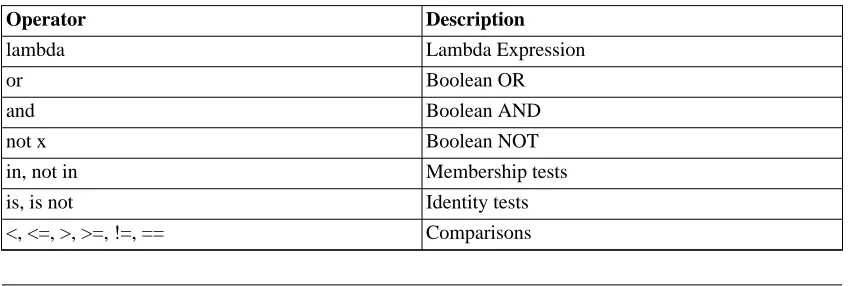
The following table gives the operator precedence table for Python, from the lowest precedence (least binding) to the highest precedence (most binding). This means that in a given expression, Python will first evaluate the operators lower in the table before the operators listed higher in the table.
[image:32.612.119.553.585.728.2]The following table (same as the one in the Python reference manual) is provided for the sake of com-pleteness. However, I advise you to use parentheses for grouping of operators and operands in order to explicitly specify the precedence and to make the program as readable as possible. For example, 2 + (3 * 4)is definitely more clearer than2 + 3 * 4. As with everything else, the parentheses shold be used sensibly and should not be redundant (as in2 + (3 + 4)).
Table 5.2. Operator Precedence
Operator Description
lambda Lambda Expression
or Boolean OR
and Boolean AND
not x Boolean NOT
in, not in Membership tests
is, is not Identity tests
Operator Description
| Bitwise OR
^ Bitwise XOR
& Bitwise AND
<<, >> Shifts
+, - Addition and subtraction
*, /, % Multiplication, Division and Remainder
+x, -x Positive, Negative
~x Bitwise NOT
** Exponentiation
x.attribute Attribute reference
x[index] Subscription
x[index:index] Slicing
f(arguments ...) Function call
(expressions, ...) Binding or tuple display [expressions, ...] List display
{key:datum, ...} Dictionary display `expressions, ...` String conversion
The operators which we have not already come across will be explained in later chapters.
Operators with the same same precedence are listed in the same row in the above table. For example,+
and-have the same precedence.
Order of Evaluation
By default, the operator precedence table decides which operators are evaluated before others. However, if you want to change the orer in which they are evaluated, you can use parentheses. For example, if you want addition to be evaluated before multiplication in an expression, then you can write something like
(2 + 3) * 4.
Associativity
Operators are usually associated from left to right i.e. operators with same precedence are evaluated in a left to right manner. For example,2 + 3 + 4is evaluated as (2 + 3) + 4. Some operators like assignment operators have right to left associativity i.e.a = b = cis treated asa = (b = c).
Expressions
Using Expressions
Example 5.1. Using Expressions
#!/usr/bin/python
# Filename: expression.py length = 5
breadth = 2
area = length * breadth print 'Area is', area
print 'Perimeter is', 2 * (length + breadth)
Output
$ python expression.py Area is 10
Perimeter is 14
How It Works
The length and breadth of the rectangle are stored in variables by the same name. We use these to calcu-late the area and perimieter of the rectangle with the help of expressions. We store the result of the ex-pressionlength * breadthin the variableareaand then print it using theprintstatement. In the second case, we directly use the value of the expression2 * (length + breadth)in the print statement.
Also, notice how Python 'pretty-prints' the output. Even though we have not specified a space between
'Area is'and the variablearea, Python puts it for us so that we get a clean nice output and the pro-gram is much more readable this way (since we don't need to worry about spacing in the output). This is an example of how Python makes life easy for the programmer.
Summary
We have seen how to use operators, operands and expressions - these are the basic building blocks of any program. Next, we will see how to make use of these in our programs using statements.
Chapter 6. Control Flow
Introduction
In the programs we have seen till now, there has always been a series of statements and Python faith-fully executes them in the same order. What if you wanted to change the flow of how it works? For ex-ample, you want the program to take some decisions and do different things depending on different situ-ations such as printing 'Good Morning' or 'Good Evening' depending on the time of the day?
As you might have guessed, this is achieved using control flow statements. There are three control flow statements in Python -if,forandwhile.
The if statement
Theifstatement is used to check a condition and if the condition is true, we run a block of statements (called the if-block), else we process another block of statements (called the else-block). The else clause is optional.
Using the if statement
Example 6.1. Using the if statement
#!/usr/bin/python # Filename: if.py number = 23
guess = int(raw_input('Enter an integer : ')) if guess == number:
print 'Congratulations, you guessed it.' # New block starts here print "(but you do not win any prizes!)" # New block ends here elif guess < number:
print 'No, it is a little higher than that' # Another block # You can do whatever you want in a block ...
else:
print 'No, it is a little lower than that' # you must have guess > number to reach here print 'Done'
# This last statement is always executed, after the if statement is executed
Output
$ python if.py
Enter an integer : 50
Done
$ python if.py
Enter an integer : 22
No, it is a little higher than that Done
$ python if.py
Enter an integer : 23
Congratulations, you guessed it. (but you do not win any prizes!) Done
How It Works
In this program, we take guesses from the user and check if it is the number that we have. We set the variable number to any integer we want, say 23. Then, we take the user's guess using the
raw_input()function. Functions are just reusable pieces of programs. We'll read more about them in the next chapter.
We supply a string to the built-inraw_inputfunction which prints it to the screen and waits for input from the user. Once we enter something and press enter, the function returns the input which in the case ofraw_inputis a string. We then convert this string to an integer usingintand then store it in the variableguess. Actually, theintis a class but all you need to know right now is that you can use it to convert a string to an integer (assuming the string contains a valid integer in the text).
Next, we compare the guess of the user with the number we have chosen. If they are equal, we print a success message. Notice that we use indentation levels to tell Python which statements belong to which block. This is why indentation is so important in Python. I hope you are sticking to 'one tab per indenta-tion level' rule. Are you?
Notice how theifstatement contains a colon at the end - we are indicating to Python that a block of statements follows.
Then, we check if the guess is less than the number, and if so, we inform the user to guess a little higher than that. What we have used here is theelifclause which actually combines two relatedif else-if elsestatements into one combinedif-elif-else statement. This makes the program easier and reduces the amount of indentation required.
Theelifandelsestatements must also have a colon at the end of the logical line followed by their corresponding block of statements (with proper indentation, of course)
You can have anotherifstatement inside the if-block of an ifstatement and so on - this is called a nestedifstatement.
Remember that theelifandelseparts are optional. A minival validifstatement is
if True:
print 'Yes, it is true'
After Python has finished executing the complete if statement along with the assocated elif and
elseclauses, it moves on to the next statement in the block containing theifstatement. In this case, it is the main block where execution of the program starts and the next statement is theprint 'Done'
Although this is a very simple program, I have been pointing out a lot of things that you should notice even in this simple program. All these are pretty straightforward (and surprisingly simple for those of you from C/C++ backgrounds) and requires you to become aware of all these initially, but after that, you will become comfortable with it and it'll feel 'natural' to you.
Note for C/C++ Programmers
There is noswitchstatement in Python. You can use anif..elif..elsestatement to do the same thing (and in some cases, use a dictionary to do it quickly)
The while statement
Thewhilestatement allows you to repeatedly execute a block of statements as long as a condition is true. Awhilestatement is an example of what is called a looping statement. Awhilestatement can have an optionalelseclause.
Using the while statement
Example 6.2. Using the while statement
#!/usr/bin/python # Filename: while.py number = 23
running = True while running:
guess = int(raw_input('Enter an integer : ')) if guess == number:
print 'Congratulations, you guessed it.'
running = False # this causes the while loop to stop elif guess < number:
print 'No, it is a little higher than that.' else:
print 'No, it is a little lower than that.' else:
print 'The while loop is over.'
# Do anything else you want to do here print 'Done'
Output
$ python while.py Enter an integer : 50
No, it is a little lower than that. Enter an integer : 22
No, it is a little higher than that.
Enter an integer : 23
Congratulations, you guessed it. The while loop is over.
Done
How It Works
In this program, we are still playing the guessing game, but the advantage is that the user is allowed to keep guessing until he guesses correctly - there is no need to repeatedly execute the program for each guess as we have done previously. This aptly demonstrates the use of thewhilestatement.
We move theraw_inputandifstatements to inside thewhileloop and set the variablerunning
toTruebefore the while loop. First, we check if the variablerunningisTrueand then proceed to execute the corresponding while-block. After this block is executed, the condition is again checked which in this case is therunningvariable. If it is true, we execute the while-block again, else we con-tinue to execute the optional else-block and then concon-tinue to the next statement.
Theelseblock is executed when thewhileloop condition becomesFalse- this may even be the first time that the condition is checked. If there is anelseclause for awhileloop, it is always ex-ecuted unless you have awhileloop which loops forever without ever breaking out!
TheTrueandFalseare called Boolean types and you can consider them to be equivalent to the value
1and0respecitvely. It's important to use these where the condition or checking is important and not the actual value such as1.
The else-block is actually redundant since you can put those statements in the same block (as thewhile
statement) after thewhilestatement to get the same effect.
Note for C/C++ Programmers
Remember that you can have anelseclause for thewhileloop.
The for loop
Thefor..instatement is another looping statement which iterates over a sequence of objects i.e. go through each item in a sequence. We will see more about sequences in detail in later chapters. What you need to know right now is that a sequence is just an ordered collection of items.
Using the for statement
Example 6.3. Using the for statement
#!/usr/bin/python # Filename: for.py for i in range(1, 5):
print i else:
print 'The for loop is over'
Output
$ python for.py 1
2 3 4
The for loop is over
How It Works
In this program, we are printing a sequence of numbers. We generate this sequence of numbers using hte built-inrangefunction.
What we do here is supply it two numbers andrangereturns a sequence of numbers starting from the first number and up to the second number. For example, range(1,5)gives the sequence[1, 2, 3, 4]. By default,rangetakes a step count of 1. If we supply a third number torange, then that be-comes the step count. For example,range(1,5,2)gives[1,3]. Remember that the range extends
up to the second number i.e. it does not include the second number.
Theforloop then iterates over this range -for i in range(1,5)is equivalent tofor i in [1, 2, 3, 4]which is like assigning each number (or object) in the sequence to i, one at a time, and then executing the block of statements for each value ofi. In this case, we just print the value in the block of statements.
Remember that theelsepart is optional. When included, it is always executed once after theforloop is over unless a break statement is encountered.
Remember that thefor..inloop works for any sequence. Here, we have a list of numbers generated by the built-inrangefunction, but in general we can use any kind of sequence of any kind of objects! We will explore this idea in detail in later chapters.
Note for C/C++/Java/C# Programmers
The Python forloop is radically different from the C/C++for loop. C# programmers will note that theforloop in Python is similar to theforeachloop in C#. Java programmers will note that the same is similar tofor (int i : IntArray)in Java 1.5 .
In C/C++, if you want to writefor (int i = 0; i < 5; i++), then in Python you write justfor i in range(0,5). As you can see, theforloop is simpler, more express-ive and less error prone in Python.
The break statement
Thebreakstatement is used to break out of a loop statement i.e. stop the execution of a looping state-ment, even if the loop condition has not becomeFalseor the sequence of items has been completely iterated over.
An important note is that if you break out of afororwhileloop, any corresponding loopelseblock is not executed.
Using the break statement
Example 6.4. Using the break statement
#!/usr/bin/python # Filename: break.py while True:
s = raw_input('Enter something : ') if s == 'quit':
break
print 'Length of the string is', len(s) print 'Done'
Output
$ python break.py
Enter something : Programming is fun Length of the string is 18
Enter something : When the work is done Length of the string is 21
Enter something : if you wanna make your work also fun: Length of the string is 37
Enter something : use Python! Length of the string is 12
Enter something : quit Done
How It Works
In this program, we repeatedly take the user's input and print the length of each input each time. We are providing a special condition to stop the program by checking if the user input is'quit'. We stop the program by breaking out of the loop and reach the end of the program.
The length of the input string can be found out using the built-inlenfunction. Remember that thebreakstatement can be used with theforloop as well.
G2's Poetic Python
The input I have used here is a mini poem I have written called G2's Poetic Python:
Programming is fun When the work is done
if you wanna make your work also fun: use Python!
The continue statement
The continuestatement is used to tell Python to skip the rest of the statements in the current loop block and to continue to the next iteration of the loop.
Using the continue statement
Example 6.5. Using the continue statement
#!/usr/bin/python
# Filename: continue.py while True:
s = raw_input('Enter something : ') if s == 'quit':
break if len(s) < 3:
continue
print 'Input is of sufficient length' # Do other kinds of processing here...
Output
$ python continue.py Enter something : a Enter something : 12 Enter something : abc
Input is of sufficient length Enter something : quit
How It Works
In this program, we accept input from the user, but we process them only if they are at least 3 characters long. So, we use the built-inlenfunction to get the length and if the length is less than 3, we skip the rest of the statements in the block by using thecontinuestatement. Otherwise, the rest of the state-ments in the loop are executed and we can do any kind of processing we want to do here.
Note that thecontinuestatement works with theforloop as well.
Summary
We have seen how to use the three control flow statements -if,whileandforalong with their asso-ciatedbreakandcontinuestatements. These are some of the most often used parts of Python and hence, becoming comfortable with them is essential.
Chapter 7. Functions
Introduction
Functions are reusable pieces of programs. They allow you to give a name to a block of statements and you can run that block using that name anywhere in your program and any number of times. This is known as calling the function. We have already used many built-in functions such as the len and
range.
Functions are defined using thedefkeyword. This is followed by an identifier name for the function followed by a pair of parentheses which may enclose some names of variables and the line ends with a colon. Next follows the block of statements that are part of this function. An example will show that this is actually very simple:
Defining a Function
Example 7.1. Defining a function
#!/usr/bin/python
# Filename: function1.py def sayHello():
print 'Hello World!' # block belonging to the function # End of function
sayHello() # call the function
Output
$ python function1.py Hello World!
How It Works
We define a function called sayHello using the syntax as explained above. This function takes no parameters and hence there are no variables declared in the parentheses. Parameters to functions are just input to the function so that we can pass in different values to it and get back corresponding results.
Function Parameters
A function can take parameters which are just values you supply to the function so that the function can
these variables are defined when we call the function and are not assigned values within the function it-self.
Parameters are specified within the pair of parentheses in the function definition, separated by commas. When we call the function, we supply the values in the same way. Note the terminology used - the names given in the function definition are called parameters whereas the values you supply in the func-tion call are called arguments.
Using Function Parameters
Example 7.2. Using Function Parameters
#!/usr/bin/python
# Filename: func_param.py def printMax(a, b):
if a > b:
print a, 'is maximum' else:
print b, 'is maximum'
printMax(3, 4) # directly give literal values x = 5
y = 7
printMax(x, y) # give variables as arguments
Output
$ python func_param.py 4 is maximum
7 is maximum
How It Works
Here, we define a function calledprintMaxwhere we take two parameters calledaandb. We find out the greater number using a simpleif..elsestatement and then print the bigger number.