Interaction in Motion: Designing Truly Mobile Interaction
Joe Marshall
School of Computer Science
University of Nottingham, UK
[email protected]
Alexandru Dancu
t2i Lab, Dept. of Applied IT
Chalmers University, Sweden
[email protected]
Florian “Floyd” Mueller
Exertion Games Lab
RMIT, Melbourne, Australia
[email protected]
ABSTRACT
The use of technology while being mobile now takes place in many areas of people’s lives in a wide range of scenarios, for example users cycle, climb, run and even swim while interacting with devices. Conflict between locomotion and system use can reduce interaction performance and also the ability to safely move. We discuss the risks of such “interaction in motion”, which we argue make it desirable to design with locomotion in mind. To aid such design we present a taxonomy and framework based on two key dimensions: relation of interaction task to locomotion task, and the amount that a locomotion activity inhibits use of input and output interfaces. We accompany this with four strategies for interaction in motion. With this work, we ultimately aim to enhance our understanding of what being “mobile” actually means for interaction, and help practitioners design truly mobile interactions.
Author Keywords
Mobile; interaction; locomotion; motion. ACM Classification Keywords
H.5.2 User Interfaces: Theory and methods INTRODUCTION
In addition to common activities such as walking [27] and cycling [16,60], mobile systems are increasingly built for use during complex and intense types of locomotion such as rock climbing [33,35], skiing [59] and even swimming [13]. Even commodity smartphones are commonly used whilst moving [23,71]. What this means for designers is that it is increasingly important to consider how users will move whilst interacting with systems, and how to make designs work given user locomotion. We previously argued [43] that many designs described as being mobile, whilst they
are portable, are in fact designed to only be actively used whilst being stationary. Whilst “stop to interact” may be the best design in some cases, ignoring the reality that people do interact with devices whilst moving causes bad designs in two ways: firstly, it causes safety and practical
problems; studies have shown reduced safety when cycling [71], driving [54] and walking [30] due to device use. Secondly, even simple activities like walking decrease users’ abilities to interact with systems [49,65]; hence the result is often a non-optimal user experience.
In this paper, by mobile interactive system we mean a digital system designed to be used while those interacting with the system perform some kind of locomotion. How they move is termed the locomotion activity, such as walking, running, driving or cycling. Active use of a mobile interactive system while moving is interaction in motion. We include in this definition fixed systems where users may move within a wide area whilst interacting, so their interaction with the system is mobile even though sensing is embedded in the environment. We exclude fixed location systems involving gross motor movement without parallel locomotion activity such as Wii Fit [53] and BodyBug [40]. Contribution
The contribution of this paper is a structured framework for the consideration of mobility in interaction design, based on the following two dimensions:
1) To what extent is the interaction task related to the locomotion task?
2) To what extent does the locomotion activity inhibit the ability of the user to interact with a system? Relation between interaction and locomotion tasks (or not) is key to design for movement, because of the following:
If an interface is strongly related to the locomotion, this may provide greater opportunities for designing for physical and attentional constraints of the activity, for example by creating hands free technology for skiing embedded in goggles that a person already wears. The more strongly related interaction is to the
locomotion, the more the interaction itself is likely to be continually dependent on how and where a person is moving.
The level of inhibition by locomotion is important because: The range of physical possibilities for active
interaction with systems is radically different in constrained activities such as swimming compared to less constrained activities such as walking. Different modes of locomotion place different
physical and mental demands on users, which affects their ability to attend to systems.
Permission to make digital or hard copies of all or part of this work for personal or classroom use is granted without fee provided that copies are not made or distributed for profit or commercial advantage and that copies bear this notice and the full citation on the first page. Copyrights for components of this work owned by others than the author(s) must be honored. Abstracting with credit is permitted. To copy otherwise, or republish, to post on servers or to redistribute to lists, requires prior specific permission and/or a fee. Request permissions from
DIS '16, June 04 - 08, 2016, Brisbane, QLD, Australia
Copyright is held by the owner/author(s). Publication rights licensed to ACM.
DESIGN FOR LOCOMOTION
Locomotion is a key human experience, vital not only for our ability to get places, it also plays a strong role in human cognitive and social development [14] and through sport and exercise can be a major source of enjoyment and support healthy lifestyles. We would argue that the design of current mobile devices, although portable and wearable often inhibits movement or is poorly suited to locomotion. For example wrist worn wearables are often hard to interact with whilst running or cycling, where hand position is constrained, voice and gesture controls for smart glasses are poorly designed for use when moving outdoors in noisy environments, and despite advertising for waterproof mobile phones showing people swimming, they are typically poorly designed for use in water.
Drawing on a set of examples from interaction design research and existing products, we develop a taxonomy that demonstrates how current approaches to mobile design fit on these dimensions. We then discuss why a designer might choose to design for interaction in motion from a safety and risk point of view, and follow this with a set of 4 strategies to make interaction design sensitive to user locomotion. RELATED WORK
In this section we discuss conceptual HCI work relating to locomotion. Systems are discussed in the taxonomy section that follows, so are not described here.
Full Body and Movement Based interaction
The use of the whole body to interact with a system has been studied by various authors. Moen et al. [46] present a discussion of various criteria for movement based design. This motivates both why one might encourage movement interaction, (because it is fun and fulfilling) and discusses various ways to support users in performing a wide range of interesting movements.
Moen et al. argue that the “primary reason for movement” is that “it is fun”. Höök’s call for somaesthetic design [28] discusses the creation of interactive experiences which aim to foreground the bodily experience, to “deepen our understanding and engagement with ourselves”. Whilst our focus here is not purely on movement for the sake of movement, these authors highlight that awareness of the movement itself is key to design for interaction in motion. This point is echoed by Hummels et al. [29], who present a detailed discussion of why we might want to design for movement, arguing that all interaction should be designed with consideration for how the user moves during interaction. They describe four modes of analysis for interaction: the physical and experiential style of the interaction used, whether the activity is goal focused or experience focused, who is the person interacting with the product, and contextual factors such as where and when the product is used. We draw on this work and extend the focus in particular to locomotion which occurs concurrently to the interaction with a digital system, but is not necessarily part of the interaction itself.
Further to this, when trying to understand how locomotion affects interaction, we can make use of work which discusses how to understand and describe underlying movements, for example Alaoui et al. [1] discuss the use of dance inspired ‘movement qualities’ as an analysis and design tool for physical interaction. Beyond the HCI field, we can also potentially make use of kinesiology and neurobiology descriptions of how people move, such as put forward by Massion, [44] who provide detailed descriptions of the complex nature of seemingly simple motor skills. Our previous work on interaction in motion [43] has also informed this paper. In it, we describe 4 challenges produced by locomotion: the cognitive load of locomotion, the physical constraints on the body of locomotion, the fact that people must pay attention to the terrain that they are moving over (Figure 1), and the fact that movement occurs with or around other people.
Bicycle and automotive interface guidelines
[image:2.612.318.558.476.679.2]Prior research around the tension between locomotion and paying attention to interfaces, has been investigated in the automotive and bicycle domains. For example, there are various guidelines for the design of user interfaces in cars such as the SAE standard 2364 [62] that suggests that for safety purposes user interface tasks for cars should take a maximum of 15 seconds to complete. Another example is guidelines from Green et al. [26] who break down possible interaction tasks into those they believe are acceptable whilst driving (such as changing the volume of the radio), and tasks which must be performed while being stationary (such as setting a destination in a navigation system). Rowland et al.’s study of two cycling-based technology experiences [60] discusses how demands of cycling impact on people’s ability to interact, presenting a series of lessons for cycling design in response.
RISKS OF INTERACTION IN MOTION
First, we need to consider whether interaction in motion design is the right thing to do. The key thing to consider here is what additional risk, if any, is posed by the combination of locomotion and interaction and whether that risk is worth it. Whilst we may aim to minimize the impact of interaction on people’s ability to move, any attention paid to an interactive system has the potential to create a physical risk to the user as a result of the diverted focus on the locomotion activity. Locomotion always happens in a physical space that contains potential obstacles, and even when in controlled environments, taking attention away from locomotion affects the movement. Studies of driving behavior have shown that even completely hands free telephone conversations and listening to music impair driving performance [6,54]. Similarly for pedestrians, listening to music and texting while walking can reduce the ability to walk safely [66], and using smart eyewear is likely to reduce the ability to avoid obstacles while walking [61]. Conversely locomotion is extremely likely to reduce people’s performance at interactive tasks, making it more difficult to read screens and interact with devices [65]. So, given all interactions are likely to reduce locomotion performance and locomotion has negative effects on interaction performance, why would we argue for the design of interaction in motion experiences, and how might we decide what level of performance impairment and risk in the motion activity is acceptable to us? In this section we discuss 6 potential ways to consider what is an acceptable level of risk when designing systems.
Risk versus benefit of movement
Many locomotion activities have major physical and mental health benefits – for example cycling has real risk of injury or death, however in the long term the health benefits of regular cycling lead to people overall being healthier and living longer [11]. If our designs facilitate or encourage people to use active modes of transportation, or to undertake enjoyable locomotion activities, a similar argument may hold, even if they are at higher risk of injury. Risk versus benefit of interaction
The use of car music systems and hands free phones make car driving more dangerous [6,54]. However they are widely used and legal in most countries. Clearly this implies a general view of society and regulators that the benefits of music in the car or communication with others is a greater benefit than the risk.
Reduction of existing risks
A major reason hands free phones are legal in cars despite safety problems is the greater risk posed by handheld phones. So whilst the absolute risk of hands free communication is greater than not communicating by phone, if we assume that people will communicate by phone whilst driving regardless, suddenly there is a strong argument for hands free systems. Similarly with alternative notification systems like watches and glasses; they are
certainly more risky than not checking notifications, but compared to taking out a smartphone and checking that, in many situations they may be less risky.
Comparison against existing risks
A common way of deciding if a risk is acceptable is to compare it against existing risks. This is even made explicit in driver safety standards such as SAE 2364 [62], which sets 15 seconds as a reasonable time for an interaction to take, based on the time that a typical user takes to adjust a car radio, an acceptable existing risk.
Risk taking as an end in itself
In I Seek the Nerves Under Your Skin [41], participants were encouraged to run as fast as they possibly in crowded environments full of bystanders and fellow runners, littered with obstacles. The additional risk was a major part of what made this experience so thrilling. Dangerous and exciting locomotion activities such as extreme sports are a major part of human culture [67], and we believe that the creation of technology to support and even encourage such risk taking is a valid design goal in itself.
Risks of Collocated interaction With Others
A TAXONOMY OF MOBILE INTERACTION
In this section, we present two dimensions of mobile interaction, and populate the space defined by these dimensions with existing systems to create a taxonomy of mobile interactions. As we are interested in interaction while being mobile, we assume the user has two underlying tasks (which may or may not be related), firstly to engage in locomotion, such as walking, cycling or driving, and secondly to perform an interaction with a digital system. Dimension 1: To what extent is the interaction task related to the locomotion task
A key feature of smart watches is the ability to notify users of information such as email, SMS messages and calls. This interaction is largely unrelated to the locomotion of the user. In contrast, when developing navigation applications the locomotion of the user is more strongly related to the interaction task, it is more of an integrated movement based interaction as described by Moen et al. [46]. We define 4 points of interest along this dimension:
Unrelated – as in our example with the notifications on the smart watches, there is no sensing of locomotion or adaptability to it.
Weakly related – locomotion and interaction are related but with no immediate system response to movement, for example looking up nearby places on maps, or tracking movement with a GPS. Strongly related – there is a real-time feedback
loop between interaction and locomotion, as seen in turn by turn navigation where the interface is telling the person where to turn, and the person is feeding back to it with their movements [7]. Encouragement - Exertion games such as Jogging
Over a Distance [48] or fitness systems which directly encourage players to move, such as the Zombies Run game [2], may be seen as even more highly related interaction tasks, as interaction with the system is the reason locomotion is occurring. Figure 2 visualizes these properties along the dimension. Dimension 2: To what extent does the locomotion activity inhibit the ability of the user to interact with a system?
As Massion et al. [44] describe, locomotion is a highly complex activity. The demands of locomotion activities can inhibit interaction in many ways [43]. At the low end of this dimension, we can consider a person sitting down indoors, they are largely unconstrained in their interaction. Next, we consider a person walking outside; to do this, they must pay a certain level of attention to their surroundings which constrains their vision, but largely have the ability to move their hands to manipulate devices, address speech
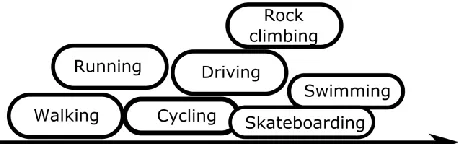
recognition interfaces etc. Tasks such as driving or running constrain us further by dictating what we do with hands and feet. At extremes, we can consider swimming, a swimmer is highly constrained in body position, visibility, ability to hear or speak; in cold water, they may even lack the sensitivity to feel tactile sensations; swimming also constrains people’s ability to stop (without drowning) [43]. We define 3 points of particular interest along this dimension:
Weak Constraints – activity constrains the user by requiring attention only (e.g. walking with phone) Strong Constraints – activity places constraints on
what the person can do physically (e.g. driving requires hands on the wheel)
Extreme Constraints – activity places extreme constraints on what people can look at, whether they can stop doing the activity or requires constant mental focus.
Figure 3 plots on this dimension various locomotion activities mentioned in previous HCI work. This has an element of subjectivity, for example here we have plotted cycling as being slightly less constrained than driving despite them having largely similar physical constraints, as cyclists typically have a greater ability to stop and interact if needed (as mentioned in [60]). Similarly, street skateboarding [58] has been plotted as requiring more constraints than cycling, because whilst it is hands free, it is much harder to hold or use a device whilst using the full body to do a trick. Swimming is plotted as being more constraining than rock climbing, because whilst dynamic climbing moves require the full body, when not on an overhang or mid move, climbing provides many points at which climbers are free to use and look at digital equipment, something evidenced by the highly active documentary culture described by Byrne et al. [9].
[image:4.612.323.552.609.681.2]If we consider different modalities of input which do not require physical gestures, such as speech, or outputs which do not require visual sensing such as audio and haptics, this ordering may change slightly, for example the enclosed cockpit of a car can be ideal for speech input, whereas a combination of environmental noise and the changes in voice due to being low on breath make speech input difficult during running.
[image:4.612.53.289.662.696.2]POPULATING OUR TAXONOMY
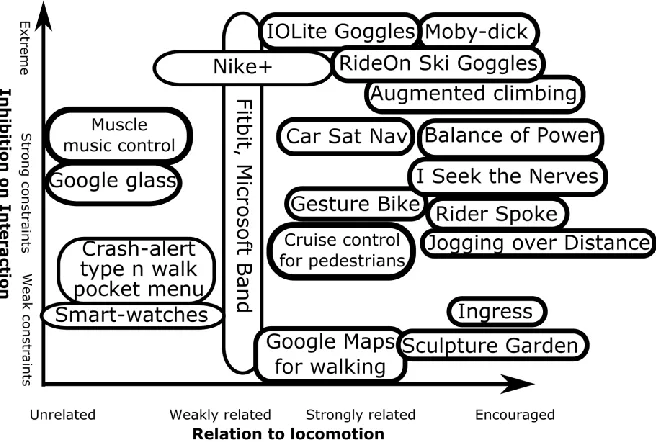
In this section, we discuss a selection of existing systems designed to be used during locomotion, and discuss where they fit in the taxonomy. This is not an exhaustive list, but is designed to illustrate a range of activities supported by popular existing systems from both industry and research, including work from our own practices (Figures 5,6,7,8,9). Figure 4 shows how systems discussed in the paper fit on the two dimensions of our taxonomy, this may be useful to refer back to whilst reading the following sections.
Navigation Systems
A classic example of an interaction that directly responds to locomotion activity is a navigation system. Navigation systems exist for most modes of transport; in this section we describe navigation aids designed for various modes of mobility, and show how the constraints of each locomotion activity led to very different designs.
Google Maps Navigation
Google Maps [25] is a smartphone application which provides maps and navigation directions for walking, cycling and driving. Google Maps illustrates how different locomotion activities place different constraints on the interaction - In walking mode, the interface is largely unconstrained, and users can browse maps, search, and use navigation freely. In driving mode, the phone must be mounted on the car and operates basically as a car satnav device - the user is given strict instructions only to touch the screen whilst not driving, so can only follow turn by turn directions or use voice commands to search for a new destination. It is also possible to use turn by turn navigation for cycling, including a version that uses.Google Glass.
Ride-On Ski Goggles
The Ride-On Augmented Reality Goggles [59] are designed for skiing. They allow users to navigate whilst skiing, using augmented reality visual cues overlaid on the real world showing which direction to turn for particular ski runs, and also to play games such as skiing down a virtual slalom course. Interaction with the goggles is highly constrained because typically users will be wearing gloves and in windy environments in which speech recognition is unlikely to work well. Because of this, interaction with the Ride-On goggles while moving is done purely through skiing directions, with additional features which are accessed via eye movements while stopped.
IOLite and OnCourse Swimming Goggles
[image:5.612.141.469.64.285.2]In open water swimming, swimmers are at a low level in the water, with their head underwater most of the time. A key challenge is to navigate a course in straight lines with limited ability to sight landmarks. Two competing wearable products exist which aim to help swimmers maintain their course, the OnCourse [55] and IOLite [31] goggles . Due to the unique and extreme constraints of swimming these navigation aids are very different to land-based satnavs. Both use LEDs in the goggles to show if the swimmer is drifting off a course made out of a series of straight lines. They differ slightly in how one sets the course – in the OnCourse goggles, swimmers must look in the direction they wish to swim and press a button on the goggles each time they turn a corner, interrupting their swimming; the IOLite goggles in contrast only allow interaction by swimming, with the course changing when the goggles detect a sharp turn.
Gesture Bike and Smart Flashlight
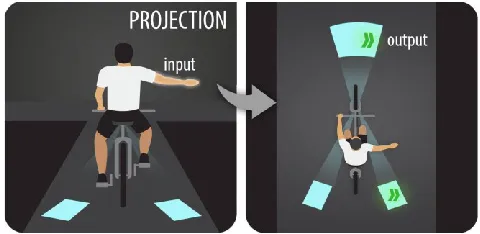
Dancu et al. [16,17] argue that for cycling navigation, many environmental and personal factors, such as how busy a street is, how direct a route is and what kind of route a rider likes, mean that it is more appropriate for cycling navigation to provide a full map including context around the rider rather than to use car style turn by turn navigation. Their cycle navigation systems use a projector shining a large map onto the road showing the area around the rider. This caters for the fact that the rider is constrained by their cycling to look forward most of the time by placing the interface close to where they are looking [16]. In Gesture Bike [17] (Figure 5), they further add detection of standard cycling turn signal gestures, using these to support the activity of cycling by projecting arrows on the road to show other users how the rider is turning.
Notifications, Interruptions and Messages
Several different types of devices offer support for basic smartphone operations like receiving notifications and/or sending text messages. These systems support movement by reducing the frequency that a user has to get their smartphone out of their pocket, or making it easier to move whilst using a phone. These applications are largely not strongly related to locomotion.
Smartwatches
Smartwatches, such as the Pebble Watch and Apple Watch are primarily devices that show notifications on the user’s wrist, and notify by sound or haptic feedback of events like messages and incoming calls. By removing the need to get out a smartphone, they offer a quick ability to see messages whilst moving, as long as constraints of the activity on hand position or where it is possible to look do not obstruct this. Head mounted displays and glasses
Head mounted displays can also be used for smartphone type functions; they have the advantage over watches that visuals can be seen largely hands free. As an example Google’s Glass [17] displays a small screen on the periphery of the user’s vision, which can be used to see notifications and information such as navigation directions. Voice control allows it to take input. Glasses require a shift in visual focus for interaction versus locomotion, which may take time away from both. Glasses based notification system NotifEye [38] uses deliberately unobtrusive notifications that float across the user’s vision which aims to minimize the amount users must shift their visual focus. Smartphone Walking apps
Type-n-walk [12] is a smartphone application which displays a video feed from the rear camera of the phone behind a window in which email or SMS messages may be written. This is designed to allow users to get around the constraints imposed by needing to see the street in front of them while walking. The CrashAlert [27] research prototype does a similar thing but uses phone-mounted sensors in order to detect oncoming obstacles and displays on-screen information relating to these obstacles – the study
demonstrated that walkers were able to walk and interact with the device successfully with significantly less need to look up or slow down.
PocketMenu [57] is designed to allow ‘in-pocket interaction’ with music players, using fixed screen positions and tactile and audio feedback to allow users to select music tracks and pause & play on a smartphone whilst the phone is in their pocket. PocketTouch [63] extends this by allowing for capacitive sensing through the fabric of the pocket so users do not even need to touch their phone. All the above applications require hand input on the devices, so are limited to locomotion activities that do not constrain the hands, meaning that they are only suitable for less constraining forms of movement like walking or jogging.
Direct Body Interfaces
One alternative approach to mobile interfaces is to interface systems directly to the body’s electrical signals. For example Saponas et al. [64] describe a music control interface using detection of arm muscle activation, which they argue could enable hands and screen free interaction while jogging. Cruise Control for Pedestrians [56] takes an alternative approach to bodily interfacing, directly controlling the movement of someone walking by electrically stimulating their leg muscles. Proprioceptive interaction [36] goes beyond this, in using a combination of sensing hand posture, and electronic muscle stimulation to force hand posture changes, allowing both input and output to occur via the user’s wrist.
Sports and Activity Trackers
There are many smartphone applications and devices that measure locomotion activity such as distance and speed of running or cycling, or the number of steps taken. They typically fit into two broad categories:
Sports Tracking Devices and Applications
[image:6.612.318.558.577.694.2]Sports trackers such as Nike+ [52] are aimed at people doing targeted workouts. They record how much exertion someone does during a workout, by recording data such as heart rate, speed and distance. Some including Strava [69], Endomondo [19] and Nike+ [52] include competition features so that users can compete against each other. Interaction with these systems typically only has a weak
relation to the locomotion activity, as they purely record exercise, and the user does not respond to the sports tracker during their exercise.
Activity Trackers
Activity trackers are wearables (such as the Fitbit [21] and Microsoft Band [45]) or smartphone apps that rather than tracking discrete sporting activity sessions, instead track the user’s whole life, capturing data related to locomotion such as steps and distance walked during a day. Again, direct interaction with such devices is typically done offline at specific intervals, for example when checking heart rate or number of steps over the day. In Figure 4, these are shown on all levels of dimension 2, because they are designed to be used both during extreme exercise, and also to measure more everyday movement.
Exertion Games
There are a wide variety of games that go beyond responding to locomotion to deliberately encouraging it. Both these sport-focused ‘exertion games’ [47] and sports/activity trackers typically have an explicit aim to encourage people to exercise; exertion games differ from tracking applications in that the feedback is real-time and directly responds to player movements and exertion. Mobile Exertion Games
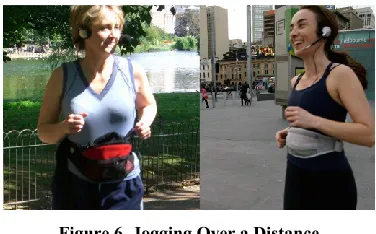
The gaming mode of the Ride-On [59] ski goggles encourages people to ski down particular tracks and ski from side to side to hit a virtual slalom track. The way that it encourages and responds to exertion allows the playing of a game without any input to the system other than rider movement, in a situation where the locomotion activity severely constrains all other forms of interaction. Jogging Over a Distance (Figure 6) [48] also uses running as a control method to allow two people jogging in different locations to run together, able to hear audio from each other, with runners who are working harder appearing to move in front of and away from the other runner through their headphones. MobyDick [13] is a multi-player swimming pool game in which players must swim particular strokes in order to capture a virtual sea creature and duck underwater to avoid its fiery breath. Players hear the game events through waterproof headphones as they swim and must collaborate in order to capture the sea creature without getting killed by it. Another swimming game, Swimoid [70], makes use of a swimming robotic display, located in the pool below the swimmer.
As well as mobile device-based exertion games, some games exist which instrument the environment and track players’ movement in the space. Despite different user interfaces, these create similar challenges to those of mobile exertion games, in that people are inhibited in their ability to directly interact with systems by their locomotion. For example, Balance of Power [42] (Figure 7) is a game for 4 or more players, played in a squash court. In Balance of Power, two teams must try and physically move the opposing team to their side to score points. The locomotion activity here combines running with physical contact and play-fighting. This combination makes it hard for players to always hear audio cues, and they often cannot even look at the large projection screen used in the game. Because of this the game combines both display types, with very loud audio plus a projection screen showing current game status that is designed to be visible in the very brief glances that players have time for.
Another situated exertion game is the Augmented Climbing Wall [33], a physical climbing wall which has visual tracking and projections added to it. The projections are used to create games in which the player must climb fast to avoid being caught by a virtual chainsaw. This again purely tracks the motion activity as input, in order to allow the player freedom to move their whole body as required in climbing and projects directly onto the wall, so that it is in line of sight.
Artistic Movement Experiences
As well as sport-focused exertion games, there are a large number of artistic experiences and pervasive games that, whilst they are not primarily focused on exertion, do also require users to perform locomotion whilst playing them. Pervasive Games
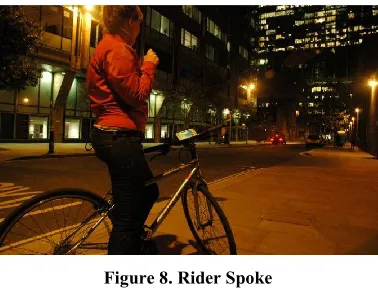
[image:7.612.80.268.59.176.2]Rider Spoke [60] (Figure 8) is a pervasive game for cyclists. In Rider Spoke, people are given a bike with a handlebar mounted computer, and are sent cycling round a city at night, hearing audio instructions, and responding by using the touchscreen and talking into a microphone when stopped. Rider Spoke uses a “stop to interact” paradigm, where riders can hear music and instructions from the system while riding, but are instructed to only interact with
[image:7.612.320.556.61.195.2]the system while stopped. Even with that safeguard, riders did occasionally find the audio dangerously distracting [60]. Ingress [51] is a long term massively multiplayer online game in which players must physically visit points of interest located in the real world in order to capture territory. In contrast to the exertion games described above, Ingress does not require players to move quickly, because of this there are few constraints on the interaction so it can use a relatively traditional handheld mobile interface. Artistic Experiences
Fosh et al.’s sculpture garden experience [22] uses a relatively standard touchscreen interface with an audio soundtrack, as people are moving slowly and have the time to look down at the screen when they need to.
A more intense-effort artistic experience is the ‘running poetry’ game I Seek the Nerves Under Your Skin [41] (Figure 9). This is a purely movement controlled experience; it deliberately exploits the fact that users struggle to combine sprinting hard in complex environments with listening to an audio track of performance poetry, to create an “intense” experience. 4 DESIGN STRATEGIES FOR INTERACTION IN MOTION In this section we describe four interaction in motion strategies. Each address one extreme of our taxonomy dimensions (see Fig. 10). They may be useful to designers depending on the application type they are building and locomotion activities they anticipate occurring.
These strategies may be of use to designers both when considering how to design a system given the anticipated user locomotion, and also when altering a system to account
for interaction issues that occur when it is used during locomotion.
As an example of use of this framework when designing a system, we could consider the design of a signaling device for cycling. An obvious idea would be to fit buttons to the handlebars (as in commercial devices). However, cycling creates constraints on hand interaction, particular at points when one may wish to manouvre. We could instead apply our strategy “use Locomotion Activity as Primary Interaction Channel”, and build a system which sensed existing cycling manouvres (as we did in [17]).
As an example of how using the framework to identify alterations to a design might work, Colley et al. [15] describe modified touch screen displays for cars. Such screens typically require the user to look at them, which makes them hard to use while driving [15]. Colley et al. modified a touchscreen car interface so that sliding different fingers controlled features such as temperature, fan speed and music volume to allow them to be used eyes free. This alteration could be suggested by our strategy “adapt interaction to modalities and locations that are easily accessible whilst moving”.
High relation to locomotion, highly constrained interaction – Tailored Solutions
When creating specialized interactions to support forms of movement that place a lot of constraints on the user, we are likely to require solutions that are strongly tailored to the expected locomotion activity. Three ways in which we could do this are:
[image:8.612.79.268.59.204.2]Use Locomotion Activity as Primary Interaction Channel Early designers of car navigation systems envisaged them as being a source of instructions which the driver would follow [26], in part because prior to GPS being widely available, the car had limited knowledge of where it was being driven. With modern GPS based systems, drivers no longer blindly follow directions, and instead engage in a dialog with the system, for example driving down a ‘wrong’
[image:8.612.327.542.520.695.2]Figure 9. I Seek the Nerves Under Your Skin Figure 8. Rider Spoke
[image:8.612.54.285.588.698.2]road to communicate desire to use a different route [7]. The IOLite swimming goggles similarly allow a user to instruct them that they wish to swim in a different direction by turning and swimming that way. Gesture Bike [17] also exploits natural movements of cycling, in this case gestures that cyclists use to indicate turning. Another bike visibility aid from Busch und Muller [8] uses accelerometers to detect cycle braking and light a car style brake light. Create custom physical or multi-modal interfaces
In contrast to the IOLite goggles [31], the OnCourse goggles [55] perform the same task of helping swimmers swim straight, but rather than automatically judge a turn has occurred, they instead require the user to push a waterproof button on the goggles. Whilst this means an extra action is required by the swimmer, it also avoids problems with sensor based interaction such as the sensor detecting another event as being an attempt to communicate a turn to the system, Bellotti et al [4] discuss this when they describe how sensor based systems can make it hard to ‘not address’ the system.
At many points when interaction is highly constrained a multi-modal interface which is tailored to the demands of the locomotion activity may be appropriate. For example in cars, use of speech recognition as an extra input is obviously useful allowing drivers to keep their hands on the wheel whilst controlling the system. Similarly for outputs we may wish to consider multiple modalities; as we discuss in relation to Balance of Power, the character of different outputs gives them different value; a screen or other visual output is persistent, meaning people can glance at it when the demands of the motion activity permit. Audio and haptic feedback in contrast are momentary, meaning that if they are missed they are lost, but have the advantage that in low noise environments they do not require eyes to be taken off the locomotion activity.
Avoid distracting from or spoiling the locomotion activity Many locomotion activities are pleasurable activities in themselves [46]. When designing interactive systems for use during such activities, we should consider how their use impacts enjoyment of the activity itself. As an example of user concerns about this, in some presentations of the running system I Seek the Nerves, some runners refused to use it because the headphones blocked out external sound which they felt would ruin the running experience [41]. Distraction from the activity can also be a safety risk – particularly when using visual interfaces, we must be aware that even AR and see through interfaces must be carefully designed to avoid such distraction [61].
Low relation to locomotion, highly constrained interaction – Design for The Danger Zone
When dealing with constrained interaction, such as driving, swimming, climbing or cycling, we have to seriously consider whether it is sensible or safe to create interactions to support tasks that are unrelated to the locomotion task itself and may distract participants. For this reason, we call
this rather dramatically “THE DANGER ZONE”. For example the safety and usefulness of wearable technology in cars is a subject of current debate [10]. We could argue that in many cases devices designed to allow people to perform general tasks in such situations may be a positive thing, as rather than create new distractions, they may allow people who would otherwise be using general purpose systems in an unsafe manner, such as sending text messages while driving, something that in some countries 30% of drivers admit to doing [23]. Whilst the task may be unrelated to the locomotion activity, it is likely that we will still need to consider what types of locomotion activity we wish to support when designing for this style of interaction. Three ways in which we can design for the “Danger Zone” are:
Create systems that are aware of locomotion task load Kim et al. [34] describe a system for cars which uses a range of sensors and a machine learning classifier to identify moments when driving is taking less effort, which they argue would be good moments to interrupt people. Similarly when cycling, one could restrict moments where systems encouraged interaction to occur when stopped, and restrict interruptions to when on less busy roads.
Adapt interaction to modalities and locations that are easily accessible whilst moving
Dancu et al.’s Smart Flashlight [16] presents information directly on the road that a cyclist is travelling along. Similarly heads up displays in cars [72], smart glasses [24] and similar devices aim to present visual information in places where people are already looking. This is in contrast to early pervasive games, which often required people to run around whilst looking at device screens, which in several cases was reported to have endangered participants [3,5]. We can also adapt how users interact with devices as with Colley et al.’s eyes free car touchscreen [15], which removes the need to look to interact.
High relation to locomotion, weakly constrained interaction – Create Flexible Movement Based Designs In this situation, we are creating a movement controlled system which is only designed for low intensity movement. Here we need to consider what is the purpose of the locomotion – is it to get to places, for exercise, for enjoyment of the outdoors. Interaction is not highly constrained, so the strategies below are less about purely handling the combination of interaction and locomotion activity, and more about how to design the interaction so that it is sensitive to the fact of movement.
Consider the aesthetics of interaction
In situations where interaction is less constrained by the practicalities of dual locomotion and interaction, we have more freedom to consider the aesthetics of combining interaction and locomotion. As examples of this, in Ingress [51], the ‘scanner’ smartphone application is modeled after handheld scanning devices used in science fiction such as Star Trek’s ‘tri-corders’ and the ‘alien trackers’ in Ridley Scott’s Aliens. This creates an aesthetic reason for the need to hold the phone in front of you and interact with it while you play the game.
Design for awareness of surroundings
When we move, whether it is for navigation or for entertainment or sport, awareness of our surroundings is important. Applying a ‘head-up’ [68] interaction style is one way to achieve this, by using audio feedback or head mounted wearables. Mobile art work “A Conversation Between Trees” [32] takes an alternative approach, in that it uses screen based interaction, but regularly asks the user to point the phone camera at interesting things – participants reported that this created a deep engagement with the forest in which they were walking.
Design for the “pleasure of motion” [46]
Moen et al. [46] ask the question – why use movement as an interaction? Whilst in the case of locomotion, there are clearly some more prosaic reasons why movement may be a useful part of an interaction, such as navigation, in other interactions, the primary reason for movement is that it is fun, and even when it is not, we should be aware of the pleasures of even practical locomotion..
Low relation to locomotion, weakly constrained interaction – Design General Interaction Aids
When designing for interactions that place only weak constraints on interaction, it is possible to create quite general solutions. This area is essentially where most existing wearables, smart glasses, mobile phone walking apps etc. succeed, where there is a low level of interaction constraints caused by the locomotion activity, so people are able to successfully interact with quite generic interfaces. This type of interaction is probably the most commonly targeted area, and as such is relatively well understood. Because of this, the following three design strategies largely describe ways in which current technology aims to make things better in this kind of situation.
Fix limitations your application places on locomotion
Apps such as CrashAlert [27] and Type n Walk [12] address a key restriction that touchscreen text input interfaces have, that they require the user to watch the screen which makes it hard to walk safely. Glass’s voice input and face mounted display aims to do the same thing. Reduce unnecessary interruptions
The most important feature of smartwatches is their handling of notifications, allowing people to avoid taking out other mobile devices. However, with multiple applications installed on an accompanying phone, a very large number of notifications may be received. Key to the design of smartwatches is the ability to filter notifications and select what is and is not an important enough interruption to be worth putting on the watch.
Be realistic about where and when the system will be used Existing research demonstrates that almost all mobile systems are used while moving, even in more constrained locomotion activities such as cycling or driving [23,71]. As designers, we cannot ignore the reality of device use; we should either design to support locomotion use cases, or perhaps consider how our designs can encourage users not to do so in the case we judge it to be too risky.
CONCLUSIONS
Locomotion is a central human need and ability, being one of the main ways we interact with the physical world around us. Designing interactive products and experiences that support locomotion is not only an opportunity for designers, but is a requirement of a society that employs interactive devices at all times. Failure to design systems with movement in mind may increase risk of both interaction problems and unsafe device use. We believe that by taking a principled approach to designing for those moments when people are moving whilst interacting, designers have the power both to effectively support people’s existing motion and interactive activities, and also to create systems which may inspire new and exciting locomotion based experiences.
ACKNOWLEDGEMENTS
Joe Marshall is supported by The Leverhulme Trust (ECF/2012-677). Florian 'Floyd' Mueller acknowledges support from the Australian Research Council Grant LP130100743. Alexandru Dancu thanks EU FP7 People Programme (Marie Curie Actions) under REA Grant Agreement 290227. All authors thank Adviye Ayça Ünlüer for the Gesture Bike illustration
REFERENCES
1. Sarah Fdili Alaoui, Baptiste Caramiaux, Marcos Serrano, and Frédéric Bevilacqua. 2012. Movement qualities as interaction modality. Proceedings of the Designing Interactive Systems Conference on - DIS ’12, ACM Press, 761.
3. Rafael A. Ballagas, Sven G. Kratz, Jan Borchers, et al. 2007. REXplorer. CHI ’07 extended abstracts on Human factors in computing systems - CHI '07, ACM Press, 1929. http://doi.org/10.1145/1240866.1240927 4. Victoria Bellotti, Maribeth Back, W. Keith Edwards,
Rebecca E. Grinter, Austin Henderson, and Cristina Lopes. 2002. Making sense of sensing systems.
Proceedings of the SIGCHI conference on Human factors in computing systems Changing our world, changing ourselves - CHI ’02, ACM Press, 415. http://doi.org/10.1145/503376.503450
5. Stephen Boyd Davis, Magnus Moar, John Cox, et al. 2005. ’Ere be dragons. Proceedings of the 13th annual ACM international conference on Multimedia - MULTIMEDIA ’05, ACM Press, 1059. http://doi.org/10.1145/1101149.1101376
6. Warren Brodsky and Micha Kizner. 2012. Exploring an alternative in-car music background designed for driver safety. Transportation Research Part F: Traffic Psychology and Behaviour 15, 2: 162–173. http://doi.org/10.1016/j.trf.2011.12.001
7. Barry Brown and Eric Laurier. 2012. The normal natural troubles of driving with GPS. Proceedings of the 2012 ACM annual conference on Human Factors in Computing Systems - CHI ’12, ACM Press, 1621. http://doi.org/10.1145/2207676.2208285
8. Busch & Müller. 2014. BrakeTec. Retrieved September 22, 2015 from
http://www.bumm.de/innovation-original/braketec.html 9. Richard Byrne and Florian “Floyd” Mueller. 2014.
Designing Digital Climbing Experiences through Understanding Rock Climbing Motivation. In
Entertainment Computing – ICEC 2014, Yusuf Pisan, Nikitas M. Sgouros and Tim Marsh (eds.). Springer Berlin Heidelberg, Berlin, Heidelberg, 92–99. http://doi.org/10.1007/978-3-662-45212-7 10. Maurizio Caon, Michele Tagliabue, Leonardo
Angelini, Paolo Perego, Elena Mugellini, and Giuseppe Andreoni. 2014. Wearable Technologies for
Automotive User Interfaces: Danger or Opportunity?
Proceedings of the 6th International Conference on Automotive User Interfaces and Interactive Vehicular Applications - AutomotiveUI ’14, ACM Press, 1–5. http://doi.org/10.1145/2667239.2667314
11. Nick Cavill and Adrian Davis. 2007. Cycling and Health - What´s the evidence. Retrieved from www.cyclingengland.co.uk
12. CGActive LLC. 2009. Type n Walk. Retrieved from http://www.type-n-walk.com/
13. Woohyeok Choi, Jeungmin Oh, Taiwoo Park, et al. 2014. MobyDick. Proceedings of the 12th ACM Conference on Embedded Network Sensor Systems -
SenSys ’14, ACM Press, 76–90.
http://doi.org/10.1145/2668332.2668352
14. Melissa W Clearfield. 2011. Learning to walk changes infants’ social interactions. Infant behavior &
development 34, 1: 15–25.
http://doi.org/10.1016/j.infbeh.2010.04.008 15. Ashley Colley, Jani Väyrynen, and Jonna Häkkilä.
2015. In-Car Touch Screen Interaction. Proceedings of the 4th International Symposium on Pervasive Displays - PerDis ’15, ACM Press, 131–137.
http://doi.org/10.1145/2757710.2757724
16. Alexandru Dancu, Zlatko Franjcic, and Morten Fjeld. 2014. Smart flashlight. Proceedings of the 32nd annual ACM conference on Human factors in computing systems - CHI ’14, ACM Press, 3627–3630. http://doi.org/10.1145/2556288.2557289 17. Alexandru Dancu, Velko Vechev, Adviye Ayca
Unluer, et al. 2015. Gesture Bike : Examining
Projection Surfaces and Turn Signal Systems for Urban Cycling (in press). Intelligent Tabletops and Surfaces, ACM.
18. Tamara Denning, Zakariya Dehlawi, and Tadayoshi Kohno. 2014. In situ with bystanders of augmented reality glasses. Proceedings of the 32nd annual ACM conference on Human factors in computing systems - CHI ’14, ACM Press, 2377–2386.
http://doi.org/10.1145/2556288.2557352
19. Endomondo. 2007. Endomondo. Retrieved January 21, 2015 from http://www.endomondo.com/about
20. M. Esbjörnsson, O. Juhlin, and A. Weilenmann. 2007. Drivers Using Mobile Phones in Traffic: An
Ethnographic Study of Interactional Adaptation.
International Journal of Human-Computer Interaction
22, 1-2: 37–58.
http://doi.org/10.1080/10447310709336954 21. Fitbit Inc. 2008. Fitbit Tracker. Retrieved from
http://www.fitbit.com
22. Lesley Fosh, Steve Benford, Stuart Reeves, Boriana Koleva, and Patrick Brundell. 2013. see me, feel me, touch me, hear me. Proceedings of the SIGCHI Conference on Human Factors in Computing Systems - CHI ’13, ACM Press, 149.
http://doi.org/10.1145/2470654.2470675 23. Thomas R Frieden, Harold W Jaffe, James W
Stephens, Denise M Cardo, and Stephanie Zaza. 2013. Mobile device use while driving--United States and seven European countries, 2011. MMWR. Morbidity and mortality weekly report 62, 10: 177–82. Retrieved September 21, 2015 from
http://www.ncbi.nlm.nih.gov/pubmed/23486382 24. Google. 2013. Glass. Retrieved from
25. Google. 2015. Maps. Retrieved from
https://play.google.com/store/apps/details?id=com.goo gle.android.apps.maps
26. P Green, W Levison, G Paelke, and C Serafin. 1994. Suggested human factors design guidelines for driver information systems. The University of Michigan …. Retrieved September 21, 2015 from
http://citeseerx.ist.psu.edu/viewdoc/download?doi=10. 1.1.97.6518&rep=rep1&type=pdf
27. Juan David Hincapié-Ramos and Pourang Irani. 2013. CrashAlert. Proceedings of the SIGCHI Conference on Human Factors in Computing Systems - CHI ’13, ACM Press, 3385.
http://doi.org/10.1145/2470654.2466463
28. Kristina Höök, Anna Ståhl, Martin Jonsson, Johanna Mercurio, Anna Karlsson, and Eva-Carin Banka Johnson. 2015. Somaesthetic design. interactions 22, 4: 26–33. http://doi.org/10.1145/2770888
29. Caroline Hummels, Kees C. J. Overbeeke, and Sietske Klooster. 2006. Move to get moved: a search for methods, tools and knowledge to design for expressive and rich movement-based interaction. Personal and Ubiquitous Computing 11, 8: 677–690.
http://doi.org/10.1007/s00779-006-0135-y
30. Ira E. Hyman, S. Matthew Boss, Breanne M. Wise, Kira E. McKenzie, and Jenna M. Caggiano. 2009. Did you see the unicycling clown? Inattentional blindness while walking and talking on a cell phone. Applied Cognitive Psychology 24, 5: 597–607.
http://doi.org/10.1002/acp.1638
31. IOLite. IOLite Goggles. Retrieved September 24, 2015 from http://www.swimiolite.com/
32. Rachel Jacobs, Steve Benford, Mark Selby, Michael Golembewski, Dominic Price, and Gabriella Giannachi. 2013. A conversation between trees.
Proceedings of the SIGCHI Conference on Human Factors in Computing Systems - CHI ’13, ACM Press, 129. http://doi.org/10.1145/2470654.2470673
33. Raine Kajastila and Perttu Hämäläinen. 2015. Motion games in real sports environments. interactions 22, 2: 44–47. http://doi.org/10.1145/2731182
34. SeungJun Kim, Jaemin Chun, and Anind K. Dey. 2015. Sensors Know When to Interrupt You in the Car.
Proceedings of the 33rd Annual ACM Conference on Human Factors in Computing Systems - CHI ’15, ACM Press, 487–496.
http://doi.org/10.1145/2702123.2702409
35. Felix Kosmalla, Florian Daiber, and Antonio Krüger. 2015. ClimbSense. Proceedings of the 33rd Annual ACM Conference on Human Factors in Computing Systems - CHI ’15, ACM Press, 2033–2042. http://doi.org/10.1145/2702123.2702311
36. Pedro Lopes, Alexandra Ion, Willi Müller, Daniel Hoffmann, Patrik Jonell, and Patrick Baudisch. 2015. Proprioceptive Interaction. Proceedings of the 33rd Annual ACM Conference Extended Abstracts on Human Factors in Computing Systems - CHI EA ’15, ACM Press, 175–175.
http://doi.org/10.1145/2702613.2732490
37. Andrés Lucero, Matt Jones, Tero Jokela, and Simon Robinson. 2013. Mobile collocated interactions.
interactions 20, 2: 26.
http://doi.org/10.1145/2427076.2427083 38. Andrés Lucero and Akos Vetek. 2014. NotifEye.
Proceedings of the 11th Conference on Advances in Computer Entertainment Technology - ACE ’14, ACM Press, 1–10. http://doi.org/10.1145/2663806.2663824 39. Sus Lundgren, Joel E. Fischer, Stuart Reeves, and Olof
Torgersson. 2015. Designing Mobile Experiences for Collocated Interaction. Proceedings of the 18th ACM Conference on Computer Supported Cooperative Work & Social Computing - CSCW ’15, ACM Press, 496– 507. http://doi.org/10.1145/2675133.2675171 40. Elena Márquez Segura, Annika Waern, Jin Moen, and
Carolina Johansson. 2013. The design space of body games. Proceedings of the SIGCHI Conference on Human Factors in Computing Systems - CHI ’13, ACM Press, 3365.
http://doi.org/10.1145/2470654.2466461
41. Joe Marshall and Steve Benford. 2011. Using fast interaction to create intense experiences. Proceedings of the 2011 annual conference on Human factors in computing systems - CHI ’11, ACM Press, 1255. http://doi.org/10.1145/1978942.1979129
42. Joe Marshall, Conor Linehan, and Adrian Hazzard. 2016. Designing Brutal Multiplayer Video Games. CHI ’16 Proceedings of the SIGCHI Conference on Human Factors in Computing Systems.
http://doi.org/10.1145/2858036.2858080 43. Joe Marshall and Paul Tennent. 2013. Mobile
interaction does not exist. CHI ’13 Extended Abstracts on Human Factors in Computing Systems on - CHI EA '13, ACM Press, 2069.
http://doi.org/10.1145/2468356.2468725
44. J Massion. 1992. Movement, posture and equilibrium: interaction and coordination. Progress in neurobiology
38, 1: 35–56. Retrieved August 13, 2015 from http://www.ncbi.nlm.nih.gov/pubmed/1736324 45. Microsoft. 2014. Microsoft Band. 46. Jin Moen. 2007. From hand-held to body-worn.
Proceedings of the 1st international conference on Tangible and embedded interaction - TEI ’07, ACM Press, 251. http://doi.org/10.1145/1226969.1227021 47. Florian Mueller, Darren Edge, Frank Vetere, et al.
annual conference on Human factors in computing systems - CHI ’11, ACM Press, 2651.
http://doi.org/10.1145/1978942.1979330 48. Florian Mueller, Shannon O’Brien, and Alex
Thorogood. 2007. Jogging over a distance. CHI ’07 extended abstracts on Human factors in computing systems - CHI '07, ACM Press, 1989.
http://doi.org/10.1145/1240866.1240937 49. Terhi Mustonen, Maria Olkkonen, and Jukka
Hakkinen. 2004. Examining mobile phone text legibility while walking. Extended abstracts of the 2004 conference on Human factors and computing systems - CHI ’04, ACM Press, 1243.
http://doi.org/10.1145/985921.986034
50. Tamer Nadeem, Sasan Dashtinezhad, Chunyuan Liao, and Liviu Iftode. 2004. TrafficView. ACM
SIGMOBILE Mobile Computing and Communications Review 8, 3: 6.
http://doi.org/10.1145/1031483.1031487 51. Niantic Labs. 2012. Ingress. Retrieved from
http://www.ingress.com 52. Nike. 2006. Nike+.
53. Nintendo. 2007. Wii Fit.
54. Luis Nunes and Miguel Angel Recarte. 2002. Cognitive demands of hands-free-phone conversation while driving. Transportation Research Part F: Traffic Psychology and Behaviour 5, 2: 133–144.
http://doi.org/10.1016/S1369-8478(02)00012-8 55. OnCourse. On Course Goggles. Retrieved from
http://www.oncoursegoggles.com/
56. Max Pfeiffer, Tim Dünte, Stefan Schneegass, Florian Alt, and Michael Rohs. 2015. Cruise Control for Pedestrians. Proceedings of the 33rd Annual ACM Conference on Human Factors in Computing Systems - CHI ’15, ACM Press, 2505–2514.
http://doi.org/10.1145/2702123.2702190 57. Martin Pielot, Anastasia Kazakova, Tobias
Hesselmann, Wilko Heuten, and Susanne Boll. 2012. PocketMenu. Proceedings of the 14th international conference on Human-computer interaction with mobile devices and services - MobileHCI ’12, ACM Press, 327. http://doi.org/10.1145/2371574.2371624 58. Sebastiaan Pijnappel and Florian Mueller. 2013. 4
design themes for skateboarding. CHI ’13 Proceedings of the SIGCHI Conference on Human Factors in Computing Systems, ACM, 1271–1274.
http://doi.org/10.1145/2466110.2466165
59. Ride-on Vision. 2015. Ride-on Augmented Reality Goggles. Retrieved from
https://www.rideonvision.com/
60. Duncan Rowland, Martin Flintham, Leif Oppermann, et al. 2009. Ubikequitous Computing : Designing
Interactive Experiences for Cyclists. Proceedings of Mobile HCI ’09, ACM.
http://doi.org/10.1145/1613858.1613886
61. Eric E. Sabelman and Roger Lam. 2015. The real-life dangers of augmented reality. IEEE Spectrum 52, 7: 48–53. http://doi.org/10.1109/MSPEC.2015.7131695 62. SAE. 2001. SAE Recommended Practice Navigation
and Route Guidance Function Accessibility While Driving (SAE 2364).
63. T. Scott Saponas, Chris Harrison, and Hrvoje Benko. 2011. PocketTouch. Proceedings of the 24th annual ACM symposium on User interface software and technology - UIST ’11, ACM Press, 303. http://doi.org/10.1145/2047196.2047235
64. T. Scott Saponas, Desney S. Tan, Dan Morris, Ravin Balakrishnan, Jim Turner, and James A. Landay. 2009. Enabling always-available input with muscle-computer interfaces. Proceedings of the 22nd annual ACM symposium on User interface software and technology - UIST ’09, ACM Press, 167.
http://doi.org/10.1145/1622176.1622208 65. Bastian Schildbach and Enrico Rukzio. 2010.
Investigating selection and reading performance on a mobile phone while walking. Proceedings of the 12th international conference on Human computer interaction with mobile devices and services - MobileHCI ’10, ACM Press, 93.
http://doi.org/10.1145/1851600.1851619
66. David C Schwebel, Despina Stavrinos, Katherine W Byington, Tiffany Davis, Elizabeth E O’Neal, and Desiree de Jong. 2012. Distraction and pedestrian safety: how talking on the phone, texting, and listening to music impact crossing the street. Accident; analysis and prevention 45: 266–71.
http://doi.org/10.1016/j.aap.2011.07.011
67. Donald R. Self, Electra De Vries Henry, Carolyn Sara Findley, and Erin Reilly. 2007. Thrill seeking: the type T personality and extreme sports. International Journal of Sport Management and Marketing 2, 1/2: 175. http://doi.org/10.1504/IJSMM.2007.011397
68. Iris Soute, Panos Markopoulos, and Remco Magielse. 2009. Head Up Games: combining the best of both worlds by merging traditional and digital play.
Personal and Ubiquitous Computing 14, 5: 435–444. http://doi.org/10.1007/s00779-009-0265-0
69. Strava. 2009. Strava. Retrieved January 21, 2015 from http://www.strava.com/about
70. Yu Ukai and Jun Rekimoto. 2013. Swimoid.
Proceedings of the 4th Augmented Human
International Conference on - AH ’13, ACM Press, 170–177. http://doi.org/10.1145/2459236.2459265 71. Dick de Waard, Paul Schepers, Wieke Ormel, and
cycling: Incidence and effects on behaviour and safety.
Ergonomics. Retrieved September 21, 2015 from http://www.tandfonline.com/doi/abs/10.1080/00140130 903381180#.Vf_msd9VhBc
72. Wen Wu, Fabian Blaicher, Jie Yang, Thomas Seder, and Dehua Cui. 2009. A prototype of landmark-based
car navigation using a full-windshield head-up display system. Proceedings of the 2009 workshop on Ambient media computing - AMC ’09, ACM Press, 21.
![Figure 1. Terrain can affect our ability to interact (from [43])](https://thumb-us.123doks.com/thumbv2/123dok_us/8652086.373736/2.612.318.558.476.679/figure-terrain-affect-ability-interact.webp)