CON TEN T S
PREFACE
1. I NTRODUCTI ON
1..1 1.2 1.3 1.4
Beginnings.
General Characteristics. Definitions and Standards. Organization of the Book. 2. FORTH OVERVIEW
2.1 Words and the Dictionary.
2.2 The Stack.
2.3 Block Storage.
2.4 Defining new Words.
2.5 Storing and retrieving data in memory.
2.6 Controlling Forth - - The Text Interpreter. 2.7 Terminal Output.
2.8 Conditional Branches. 2.9 The Editor.
THE STRUCTURE OF FORTH 3.1 General Re~arks.
3.2 the Stacks. 3.3 The Dictionary.
3.3.1 Branch Structure. 3.3.2 Header Section.
3.3.3 Code and Parameter Sections.
3.3.4 Expanding and Contracting the Dictionary. 3.4 Program Control -- The Addr-ess Interpreter'. 3.5 The Te)·:t Interpreter.
3.6 Error Messages -- ABORT. 3.7 Bloc~ Input/Output.
3"8 Forth Assemblers.
3.9 Compilation of : Words. 3.10 Defining Words -- ;CODE. 3.11 Branches in : Words.
3.11.1 An Unconditional Branch.
3. 11. 2 Conditional Branches.
3.12 Interfacing with an Operating System.
3.12.1 To Stand Alone or Not to Stand Alone. 3.12.2 OS Interfacing Techniques.
3.13 Multipro(;;Iramming and Real-Time Applications. 3.13.1 Priority Scheduling.
3.13.2 Round-Robin Scheduling.
3.13.3 Scheduling through Operating Systems.
4.1 Introduction.
4.2 Notation.
4.3 Standard Vocabulary List.
4.4 Special vocabularies. 4.4.1 Standard Editor.
4.4.2
4.4.3 4.4.4
4.4.5
Character Strings. The Extended Editor. Deferred Operations. File System.
5. Advanced Topic: Larger Forth Systems;.
5.1 Why Larger Forth Systems?
5.2 Forth for' VAX-ll.
5.2. 1
I:" ...., "")
...
..:...
..:..5.2.3 5.2.4
~ ~ ~ 0 • ..::.0
Te>:t Files Data Width
Address Interpreter In--Line Code
Operating System Interface
A P PEN D I e E S
A. PDP-l1 Iml=)]_ementation. B. Forth Bibliography.
4--1 4-1
4-2
4-31 4-::1
4-32 4--35
4-38
4-39
PREFACE
Forth is a computer language and programming style that
produces ef·fic:ient programs and allows programmers to wor-k very productively. At the same time~ i t i s unor-thodm·( ~ rEsi stant to
standardization~ and difficult to describe. In a profession (and hobby) f i l l e d with individLlalists~ Forth almost enCOLtra9E'S
per-sana.l and non-standard computi ng.
With al 1 i t s peculiarities and despite i t s uneven
Forth has grown from a specialized labor-atory acceptance,
minicomputer system in the early 19705 to a widely popular language for both mini and mi crocomputers. Con temp or al~y
implementations range from the smallest 8-bit machines to 32-bit superminicomputers and even some mainframe systems. Forth systems have found significant application in commercial markets. but their peak acceptance (in numbers~
personal computer world.
at least) has been in the
This book addresses two needs. First, i t provides a mati
VB-tion and descripVB-tion for the basic Forth vocabulary, as embodied in the Forth-79 standard. The treatment is conCIse and directed toward readers with some familiarity with computing~ but i t
should be accessible to newcomers with general mathematical back-ground.
The second purpose of this wor~ is to satisfy the curiosity
for different processors.
descr-iption cof Forth is based con ten years of e?:perience at the Owens Valley Radio Observatory <OVRO) and the Jet Propulsion Laboratory (JPL) of the California Institute of Technology. Based on a presentation of Charles Moore at the U.S. Nati onal Radio Astronomy Observatory in 1972 and Moore's assembler-coded IBM 360 version~ we undertook a series cof implementations that began with the DEC PDP-10 and the SDS 920. The PDP-lO was a convenient timesharing development system~ while SDS 920 Forth successfully controlled the OVRO 40-meter
telescope for many years.
H.
w.
Hammond continued with our first DEC PDP-11radio
system, which still provides control and data collection for the dual
27-me-t.E:r radio interferometer at OVRO. Yet another generation cof
Forth~ r-unning under the RT-l1 oper-ating system~ supports an
OVRD/,]PL pl'"·ocessor for Very Long Baseline Intel'"·feromet.ry (VLBI) ~
accepting 20 million samples per second of digit"'.l data or"igina.--· ting at observatories arbund the world.
Further developments at OVRO have led to a distributed
networ~· cof more than 7 DEC LSI-!! computers running self-contained For-th systems under the directfon of a central F'DF'-!!
whose For-th system runs under the RSX-11/M operating system. Currently, JF'L and OVRO are readying a DEC VAX-11/VMS Forth program to control a new generation VLBI processor handling more than BOO million samples per second.
Cal tech Forth Preface-3
incorporates some~ but not all of the features described in this book.
While developments werE' occLlring at Caltech~ Forth was evol-ving in various directions in other user communities. Vocabu-laries naturally tended to diverge as the larger Forth community shi fted to 8- and 16-bit microcomputers~ especially "personal" computers, while Cal tech worked with Forth under operating sys-tems and running on larger processors, such as the 32-bit VAX-11. With the publication of the Forth-79 standard, however, there has been a convergence of vocabularies and synta}:, even though the language retains the flexibility that allows i t to expand and adapt to new problems and computing environments.
I would like to thank H.
w.
Hammond, D. H. Rogstad, and J.Ln Vavrus who have been responsible for many of the developments i n PDP-II and VAX-I! versions of Forth.
Martin S. Ewing
1.1 BEGINNINGS.
In the early 1970s~ Charles Moore revealed a new and icono-clastic approach to pr-ogramming computers. The environment In
which Moor-e worked was that of a national scientific labor-story
(the U.S. National Radio Astronomy Observatory) that was
begin-ning to apply early It,-bit minicomputers for data collect.ion and
instrument control.
Progr-amming the new minicomputers was an arduous process, styled after earli.er e:>:perience with second- and third-generation
mainfr-ames (IBM 7040 and 360 series), Since the new small sys-terns could not Llsefully support Fortran or Algol compilers (which at that time wer-e lar-~Iely unsuitable for real-time operat.ions.),
they had to be programmed with machine language assemblers. Input would be on pLlnched cards or" paper tape; the operating
system~ if any ~ would reside on magnetic tape. Programs would oft.en be assembled on mainframe computers and transported on tE!pe or cards to the minicomputer. This process was so laborious~ and debugginq tools were so limited, that minicomputer simulator programs running on mainframes were sometimes the most efficient. way to check out new programs.
Moore unclerstood that there should be a better way to pro-gram small machines. He developed a uniquE' set of tools to per""mit efficient prDgramming~ but.~ more important, a new gtl::!.§: of working, which brought the programmer into intimate contact with his object code and the machine on which i t ran.
Cal tech For-th 1-2
gener-ation" softwar-e; one letter- had to be r-emoved to f i t a 5-char-acter- field in the IBM 1130 computer- that was used for ear-Iv development.
For-th has been r-efined and tr-anspor-ted to near-Iy all types of small computers. The language has been adopted in many envi-r-onments besides the scientific labor-atory: microprocessor de-velopment systems fo,.- industry, and personal computer-s a,.-e two major- e:<amples.
1 • 2 GENERAL CHARACTER I STI CS.
Fo,.-th e>:ists in numerous varying implementations, but a
numbe,.- of distinctive featu,.-es are common to most For-th systems.
1. Forth is at heart an inter-active system. You prepare programs through an on-line editor and are able to compile them rapidly. This approach was almost revolutionary in Forth's early days. Even now, the For-th pr-ogrammer spends much less time going through the mechanics of editing, compiling, linking, and testing new code than does a Fortran pr-ogrammer.
"'
~. For-th's basic
uni ts of code, "words." tend to have short definitions - a few lines each. As you enter a new word definition, i t is natural to
ma~:e an immediate test of its oper-ation. Program modula,.-ity is encour-aged because wor-ds tend to be si mpl e ancl logically well-defined; they can be tested e:-:haustively before being Llsed in
higher-level constructs.
i nput ~ you must type parameters g~fQ!:~ a command word that erates on To users accustomed to other high-level
op-1 an-guages, this makes Forth programs somewhat difficult to read. In
practice~ however, the transition to Forth's parameter ordering is no more difficult thatn switching from a Instruments (algebraic) pocket calculator to a Hewlett-Packard (RF'N) unit. The push-down stack simplifies communication and facilitates program re-entrancy~ allowing code to be shared between multiple tasks in a real-time or timesharing environment.
4. Only the most basic program
branches and loops are provided in Forth. It is difficult and unnatur"al to write Forth that is not well-structured. (Unfor-tunately, this does not mean that all Forth programs are clear!)
5. r;.0..t~[l2iQiLi.t:t~ Forth has built-in capabilies for
e>(ten-£-1 on to new data and operation types. List processing and data
base management are examples of extensions that are possible with thi!:. technique.
6. tLLu.§Q !:::H .. 9b.= ~m! bg"tI"::"b§~~l.. E!:Q9r:.~I!!I!!i.!J.g.!.. Forth war"ds can be defined either as combinations of basic Forth vocabulary wards (the "high-level" approach) or directly as machine-language in-structions ("law-level"), In a natural way, you can shift be-tween compact (and readable) high-level code and very fast mach-ine code.
7. t1~~b.i!J.§'. .!.!J.9§f1.§'.!J.9§'.[l!;"~"~ Hi gh-l eve I Forth programs
Cal tech Forth 1-4
1.3 DEFINITION AND STANDARDS.
Forth is a very personal and malleable language that has historically resisted being formalized with the precision of some high-level languages, such as Pascal or Ada. In the hands of an
e>:pert~ Forth can easily be recast into for-ms which emphasize one
oc another desireable attribute, but which lose compatibility with "mainstream" Forth.
Despite i t s susceptability to rapid evolution, Forth
has:-been regularized with some success through the work of the "Forth Standar·ds Team." This private group published the Forth-79 docu-ment which forms the basis of the notation and vocabulary Llsed in this book.
1.4 ORGANIZATION OF THE ~OOK
Chapter 2 is an introduction for the new user of Forth. That chapter and the vDcabulary l i s t s of Chapter 4 should provide
you with enough information to begin programming at a Forth termi nal .
Chapter· 3 provides more detailed descriptions of the internal mechanisms of Forth; the presentation assumes some prac-tical knowledge of Forth. This chapter should help you i f you develop or maintain Forth systems.
Chapter· 4 contains the standard Forth vocabulary,
Fort.h-79, and additions that have proven useful at Caltech-DVRO and
JPL.
Appendix A provides details of a PDP-l1 implementation~
including a PDP-11 Forth assembler. bibliography of the Forth literature.
CHAPTER 2 FORTH OVERVIEW
2.1 WORDS AND THE DICTIONARY.
The centr-al element of the For-th system is the Forth wor-d is like a subr-outine or- pr-oc:edur-e in
other-e>~ecuting, or calling, a wor-d causes a definite
"wor-d". A
languages; sequence of actions to be per-for-med. The r-eason for- calling a Forth r-outine a "word" is that i t nearly always has a name that is known to the keyboard interpreter: i t can be e:~ecuted simply by typing its name. Thus Forth words are equivalent to words of te>:t that you can type on the keyboard.
NOTE, You must be ~areful to distinguish a "Forth word" ,
which is to be executed like a subr-outine, a "memory wor-d" , which is a unit of stor-age (e.q., 16
bits).
War-ds ar-e defined in the For-th "dictionar-y", which. 1 i ke
or-dinar-y dictionar-ies~ is a table of wor-d-names and their- defini-tions. Two types of definitions occur- in the For-th dictionary.
are defined War-ds may be def i ned in terms of other wor-ds tha.t
earlier·. Dr words may be defined by a sequence of machine lan-guage instr-uctions. Ultimately, of course. all For-th war-ds must r-esolve into machine instructions.
As a For-th user-, you type in wOI~ds or, mar-I? precisely, te)·:t
n2l-tion of letters, numbers, or- other- characters can be used to name a word. One character, normally "blank" or- "space", is r-eserved to separate tokens. A few other character-s are reser-ved to let
you correct errors in typing. Under DEC operating systems "del"
or "r-ubout" lets you retract t.he last character- you typed, and
"CTRL-LJ" or ""'Utl
cancels the entir-e cur-rent line you are typing. One r'ule for r-ecognizing Forth wor'd names may be unfamiliar. Words are distinguished on the basis of their- fir-st
N
character-s and their total length. In many Forth var-iations, N=3, while in the Caltec:h-OVRO systems discussed here, The number ofcharacters to recognize is a tr-adeoff between memory savings and freedom in choosing names. E>(amples of recognizable and disting-uishable Forth wor-d names are presented in Fig. 2.1.
lA?:])XX. :
X
FOURTEEN
ABCDEFG ABCDXXX ABCDEFG ABCDEFGH
SOME-ARE-LONG
#
SUM
(recogni z<3.bl e wor-ds)
(equivalent - - not distinguishable)
(not equivalent -- distinguishable)
Fig. 2.1 Recognition and Distinction of Forth wor·ds.
I f you type i n a token (sequence of char-acters) that can"t be found in the dictionary, Forth sees if i t maJ(ES sense as a
number. If so, the token i.s converted from ASCI I to bi. nary and
Cal tech Forth 2-3
standard error message -- a question mark.
2.2 THE STACI·<'
Numbers and other data are normally handled through t.he Forth "stack". This is a so-called "pLIsh-down" stack. Such stack is a way to store data such that the most recently
items are immediately accessible. New data is pushed down on top of 01 der items. When an item is no longer requir-ed~ i t is "pop-ped" from the top of the stack, making older items available again. In other words. the push-down stack is a last-in first-out queue.
The purpose of the stack is to provide you with an efficient means of handling data and intermediate results in the course of a calculation. Labelled variables to hold intermediate data ace
not required in most cases. Since the space used by the stac~ is shar-ed by nearly all Forth words,
in memory.
there is a considerable saving
Most Forth wor-ds 8perat.e on input data you supply on the stack, pop the input data, and push the results onto the stack.
Foe simplicity, the Forth convention is that you must type the arguments of a function (Forth word) before you type the wor-d itself; i . e. you must give commands in "rever-se Polish
nota-t i on". As an example, the algebr-aic expr-ession
1 + 2
*
3 + 4 )may be wr-i tten
-BLOCf: STORAGE.
In most practical applications Forth requires an au>:iliary mass-storage device. Various devices such as floppy disks~ hard disks, DC magnetic tape~ ma.y be used, but some random-access technique is required.
The storage device is divided into fixed-length "blocks", normally 512 words = 1024 bytes long. These blocks may be used
as sort of "virtual memory", i . e. ~ you may store data in
blocks when you don't have enough room in main memory. Blocks are suitEl.ble fOf""· holding large amounts of business or
e>:perimE~n-tal data~ f or e)·: amp 1 e. They are also used for the Forth system itself: the Forth binary object program and the Forth source (te;.:t) foc loading the standard system and for users' applica-tions. When a Forth bl·ock is used to hold text~ i t is called a
"sc:reen. "
Forth handles i t s transactions with the block storage device in a simple and device-independent way. Bloc~:s are simply num·-bered sequentially from 0 to some high number. Two buffers in
main memory hold the last two blocks you have used. In or-der to retrieve a new block. you type ~LQ~~*~ which takes the number you have put on the top of the stack as a block number~ reads t.he
block into a buffer~ and returns the address of that buffer on
t.op of the stack. If there are multiple disk drives in a Fort.h
syst.em~ they are normally treated together as a single unit. Floppy disk drive "O"~ for example~ might be accessed as blocks 0 - 300, while drive "1" might be 1000 - 1300.
*
Forth words written in this text will be written in capitalsCal tech Forth 2-5
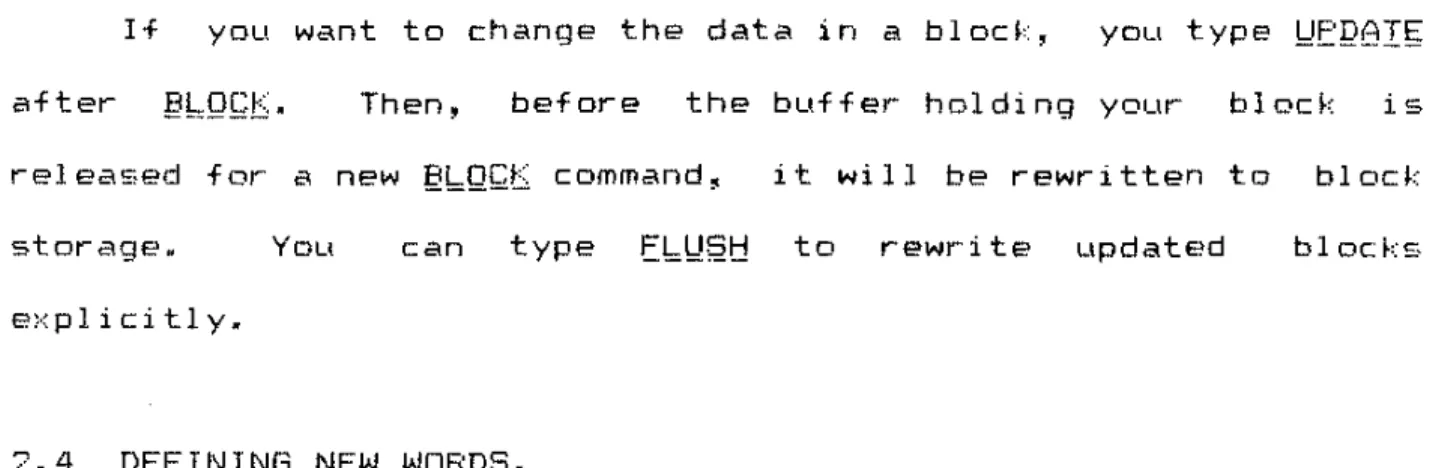
I f you want to change the data in a block, you type
!:JEJ2BIs
after Then, before the buffer holding your block i sreleased for a new ~bQ~t command, i t will be rewritten to block storage.
E)<pl i ci tl y.
You can type
Eb\Jf2t:!
to rewrite updated blocks2.4 DEFINING NEW WORDS.
The "standard" Forth syst.em has around 200 words defined in its dict.ionary. These provide the functions most commonly needed in useful application programs. "Writing" a Forth program act-ually consists of defining new Forth words, which draw on the old vDcabular-y, and which in turn may be used to define even more complex applications.
Forth provides a number of ways of defining new words. The language even gives you ways of defining words that. define words.
(It is an extensible language.)
The word ~QQ~ permits you to define word!::; whose actions are
e~·:pressE'cI directly in machine- or assembly-language (terms used
synonymou~31 y).
hQJ2S
words are clearly machine-dependent., they give you the means to get. m<3>:imum e)":ecut:ion speed. I ftightest. loops of your- program are in ~QQs words, you may
but. the find that your Forth progr-am is as fast as a pure assembler progr-am.
. . . • • • 1 • • • • • • . • . 2 • • • • • • • • • 3 • • • • • • • • • 4 . . . . • . . • . 5 . . . . • . . . . 6 ••••
1234567890123456789012345678901234567890123456789012345678901234
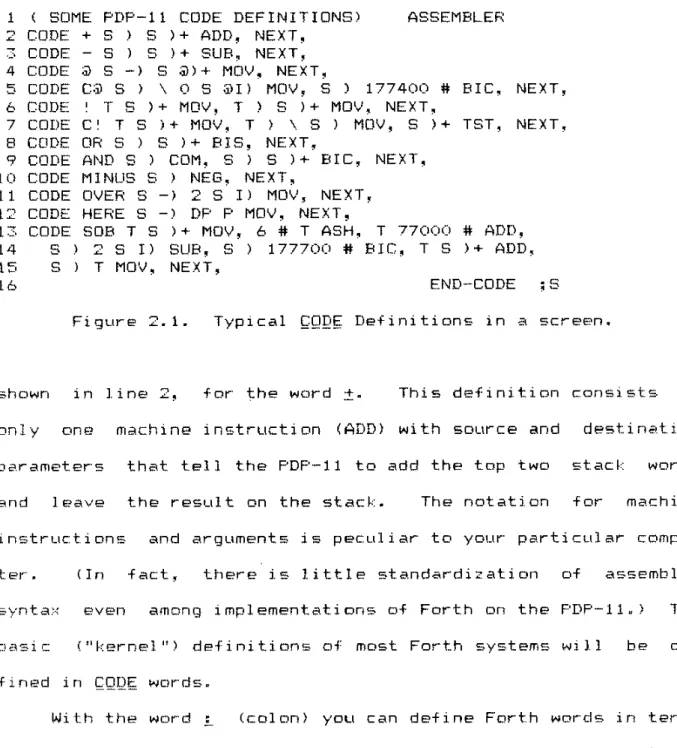
1 ( SOME PDP-11 CODE DEFINITIONS) ASSEMBLER
2 CODE + S ) S )+ ADD, NEXT,
~ CODE S ) S )+ SUB~ NEXT~
4 CODE @ S -) S @)+ MOV~ NEXT,
5 CODE C@ S ) \ 0 S @I) MOV~ S ) 177400 # BIC~ NEXT~
6 CODE! T S )+ MOV~ T ) S )+ MOV~ NEXT,
7 CODE C! T S )+ MOV, T ) \ S ) MOV, S )+ TST, NEXT.
8 CODE OR S ) S )+ BIS, NEXT,
9 CODE AND S ) COM, S ) S )+ BIC, NEXT,
10 CODE MINUS S ) NEG, NEXT,
11 CODE OVER S -) 2 S I) MOV, NEXT,
12 CODE HERE S -) DF' F' MOV, NEXT,
13 CODE SOB T S )+ MOV, 6 # T ASH~ T 77000 # ADD, 14 S ) 2 S I) SUB, S 177700 # BIC, T S )+ ADD, 15 S) T MOV, NEXT,
16 END-CODE ;8
Figure 2.1. Typical ~gQ~ Definitions in a screen.
shown in line 2, for the word
:t.
This definition consists ofonly one machine instruction (ADD) with source and destination
parameters that tell the PDP-11 to add the top two stack words and leave the result on the stack. The notation for m2l.chine instrLlctions and arguments is peculiar to your particular cornpu-ter. (In fact, there is l i t t l e standardization of assembler' synta.'< even amon(J implementations of Forth on the PDP-ll.) The
bas i c: ("kernel") definitions of most Forth systems will fined in ~QQ~ words.
Wi th the word : (colon) you can define Forth words in terms of other Forth words. Colon definitions are much better stand-a,dized among Forth implementations and are relatively machine independent. They do not have the full speed of a ~QQ~ word~ but they are much easier to write. Colon words often use less memory than ~QP"~ words.
Cal tech Forth 2-7
in a ! definition take one memory word. This memory word holds a
pointE~r to (address of) the Forth word that is to be invoked. The computer operates in an interpretive mode while a ! word is being e~~ec:uted: a sequence of pointers controls the computer. The interpreter overhead is quite tolerable in most cases ranging from 2 to 8 microseconds for the PDP-11/40 version. These figures are comparable to and often somewhat better than equivalent subroutine calls in assembler language.
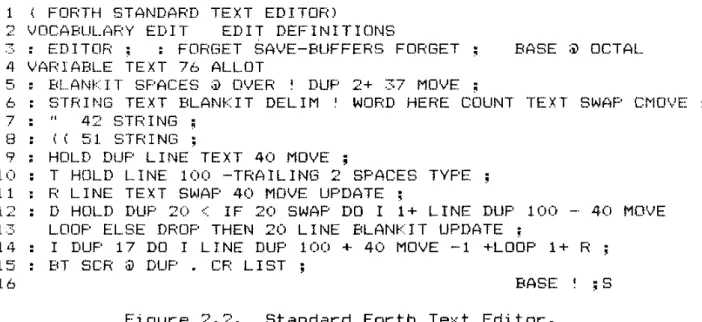
Figure 2.2 gives an example of the use of colon definitions. In fact. this one screen is a complete text editor for Forth
screens~ showing how succinctly i t is possible to write useful applications programs in Forth. The standard text editor is described more fully in Section 2.9 •
• • • • • • • • • 1 • • • • . . • . • 2 • • • • • • . . • 3 • • • • • • • • • 4 • • • • • • • • • 5 • • . • • • • • • 6 ••••
1234567890123456789012345678901234567890123456789012345678901234 ( FORTH STANDARD TEXT EDITOR)
2 VOCABUl_,;RY EDIT EDIT DEFINITIONS
" : ED I TOR; : FOFIGET SAVE -BUFFERS FORGET BASE :. OCTAL
4 VARIABLE TEXT 76 ALLOT
EtLANf:::r T SPACES ;J) OVER ~ DUP 2+ 37 MOVE
6 STRING TEXT BLANI<IT DELIM ! WORD HERE COUNT TEXT SWAP CMOVE 7 42 STRING ;
B ( i 51 STR I NG ;
9 : HOLD DUP LINE TEXT 40 MOVE ;
10 T HOLD LINE 100 -TRAILING 2 SPACES TYPE
11 R LINE TEXT SWAF' 40 MOVE UPDATE ;
12 D HOLD DUP 20 <: IF 20 SWAP DO I 1+ LINE DUP 100 _. 40 MOVE
13 LC!OF' ELSE DROF' THEN 20 LINE BLANnT UPDATE;
14 I DUP 17 DO I LINE DUP 100 + 40 MOVE -1 +LOOP 1 + R ; 15 BT SCR ;j) DUP . CP LIST
16 BASE I ; S
Another useful Forth colon definition is
Here the word ~ (period) is defined as the sequence !:Q!.'1~.~.8.I. where these words are assumec:1 present in the dictionary when you type in the e:·:ample. Semicolon (L) I S a word
with the special meaning: "end ~ definition".
There are other~ more specialized, ways to define Forth words. Numeric constants can be defined with the word ~Q~5Ie~I. For example,
defines the Forth word El=Illj~Q=!'QQQ.Q. Whenever you type this word, the constant value 31415 will be pushed on the stack.
Often you find that i t is awkward to have all your data on the stack at once. You C<3.n store dat.a in single named memory words. The Forth word ~BBIBf!'=!; I ats YOLl res-,erve and name such
locations. Type
to define the Forth word
Q.
When you typeQ,
the address of the storage location corresponding to Q is pushed on the stack.storage area is two bytes long.
This
If you need to reserve a multiword block of memory for data, you can LIse B~'=QI:
Cal t.ech Forth 2-9
2.5 STORING AND RETRIEVING DATA IN MEMORY.
The word ~ (called "fetch") is provided so you can "read out" data from any address. You type
where <address> is any valid memory address to retrieve the data stored there. (The data r-eplaces <addr-ess> on the stack.) Thus type
to get the integer in variable
Q.
To "store" data from the :itack into a location in memory you type
Here <value> is stored in location <address) More concretely~ 1.~.e
g
1.
stores a new value (148) in variable
g.
(Note that both "148"and
9
push numbers on the stack. The "store" word [lJ stores the data away and then pops both input quantitites from the stack.)Another l i t t l e program might run
~BB16~b~ 6~b
1
e~b1
B~b P !::J.lNJJ§ B~.~ 1
In the first line B~b is defined (~B8!6~b~ 6~b) and set to the value 1. In the second, the address of the integer 1S
placed on the stack, the value at that address is fetched
2.6
CONTROLLING FORTH -- THE TEXT INTERPRETER.
You normally control a Forth computer from your termi nal . The system is idle and listening for anything from the keyboard until you type in a complete line. When Forth gets a full line (ended with "return")~ i t attempts to e>:ecute the wards (oc convert. the numbers) you have typed.
Many times you wjll want to avoid typing long~ standard~ Dr repetitive sequences of words. For e>:ample, once
debugged a new word, you don't want to have to type i t in again. The Forth te;·:t editor (described below) lets you store away the program in source text form in a block (screen). To def i ne the word, or collection of words, in the future all you need to do is type
i s a word that temporarily redirects Forth's
interpreter away from your terminal to the screen number yDL! f;pecify. Almost any user commands (Forth words) you could type directly can be executed· from a block via
lQ6Q.
Each screen to be loaded may end with the special word ~5.
which restores the text interpreter to the source previously in effect. I f
.t9
is not found, i nterpretati on of the =;creen ends after the last line. Note that ~QBRs may be nested; a blocI-:: to be loaded may contain !o:QBf)s itself.A screen might contain the following text:
I f you were to load this screen. Forth's response would be to
Cal tech Forth 2-11
type the result (4) on the typewriter. After this, screen number
13 is loaded (wi th what.ever commands are contai ned there).
2.7 TERMINAL OUTPUT.
Output from Forth normally comes to your terminal.
A
few basic words will suffice for many applications.number from the stack with the word ~ (period).
You can type a
Quest. i on mar k ?
uses an address on the stack and types the number that lies at that address.
The base used for numeric input and output is determined by
the variable I289~' I289~ may have any value from 2 thr-ough 10.
Some implement.ations allow base 16 as well. The special words
QGIfl.1: ,
R~~I~Bb, and ~~! let you set I2B§~ automatically to 8, 10~ or 16~ respectively. The de·fault number bCl.se is normallydeci-mal, but you should check this on your system.
For typing arbitrary strings of characters you may use IYE~. ItE~ takes two numbers on the stack:
~~l2.Qi.!J.igC2 :££.b.~c§.£.i~r.:. I.;Q~Qi2 IY.E~
In most Forth systems, a pointer for a character string is simply the byte address of the beginning of the string. Beginning with the specified character,
characters until the count is satisfied.
IY.E~ puts out sequential
In some "traditional" Forth systems, terminal save space by using the same buffer in main
input memory.
and To
out.put
avoid pr-oblems in these systems you should use only one output word on a command line; you should place an output word at the
typed in as one line will give you only "123" on youI'"" terminal. This is because the part of the command line containing "456
"
is obliterated when Forth writes "123" into the buffer for typing.2. B CONDITIONAL BRANCHES.
Forth gives you several means to direct the flow of The methods described here wor~ only within definitions;
assembl ers.
other similar words are available in the Forth
The simplest conditional branch is specified by the words
!;I!;§l~ and
Wt'JII!::.
Consi der the foIl owi ng e>: ampl e:l..
l;;1;ijt!Ebl;;
1 lll;;l;;ll\i 1
=
QI,JE I,JI\iIlb QBoE L
~~~l~ signals the beginning of a loop. the
!:Jt:lIlb
(during e:·:ecLltion of ~~e1jEbl;:).When the program gets to control will return to the £~~.§lt;.! if and only if the cut'"Tent stack value is zero. The value is popped after testing jLlst as most Forth words pop their input arguments.
This is what happens when YOLI e:·:ecute ~~8t1E!::~: The val u€'~ 1
1S pushed on the stack and the program enters the loop. Again, 1
is pushed.~ then subtracted from 1 to leavE' O. The 0 valuE' is dupl. icated
Q2WE)
and tested by!:Jt:!II!:::;
then the duplicated valuE'15 popped from the stack. Since W~II!:: found a O~ control returns
1 is again subtracted, leaving -1. W~II!:: finds -1 and control passes through to QBQE where the remaining -1 value is popped. Control returns to the calling word. E'. g. ~ to the
Cal tech For-th 2-13
The ~.I;§l~
-
b!~I16 constr-uction is useful for- progr-am loopswhere the loop termi nat ion cond i t i on can conven i ent 1 y be e;·: pr-es-sed by leaving a zero or- non-zero value on the stack.
A
var-iant of§!;:!2.!t:J
=
!J~Ilb i s useful for- situations in which the ter-mination condition is gener-ated in the body of the loop. You may pr-ogr-am the following:<: cond i t i on > ~!::!Jb!;; •
• B!;;E!;;BI .
If <condition> produces a non-zer-o result on the stack~ e>:ecution continues with the code between !~:H::!16!;; and
B!;:E:!;'6I,
and the loop is repeat.ed from £~~§It:J. If <condition> i s zero, the remaining loop code is skipped, and excution continues following B~E~8!.A looping facility more like the Fortran "do-loop" is provided through the wor-ds QQ,
bQQE:,
and ~bQQE:.~ ~!~ ~
Q QQ
!
~bQQE:
LAnot.her e>:ample::
When you e>:ec.ute ~X£, the constants 5 and (I ar-e pushed on the stack.
1 • then tests i t against the 1 i mi t. I f the new i nde>: value is s t i l l 1 ess than the limi.t, control returns to the Q[) ( i . e . , to the point jLlst a.fter :QQ) • Otherwise the 1 i mi t and i nde>: are popped from the internal stack and control passes out of the loop.
Thus when you execute ~XZ~ you get
o
1 2 3 4NOTE: The i nde~: of a QQ stops one shor-t of the Ii mi t. The limit gives the number- of times the loop is e:·(ecuted if the initial index is O. The r-ange of a loop I S
always executed at least once.
War-ds ~ and
L
ar-e defined likeI
to let you r-etr-ieve indicesin nested QQ loops. In the wor-d
!;X::,
defined as.:.
"z;;;
;:;
~ QQ 7"
1
QQ1 =1
QQI
~J
~L
~!eB
bQQE bQQE bQQE ~I
r-etr-ieves the i nner-mo!::,t i ndex ~J
the neNt outer-, and I" " t.heouter-most;
!:.8
causes a car-r-iage r-et.urn. ~~~ should give you the following output. (Again, each index stops one short of itslimit.)
-1 1 7
'-'
0 1 c'
-1 2 3 (I 2 c'
-1 1 4 (> 1 4
-1 2 4
(I 2 4
If you need an incr-ement other than +1 in your loop, you can
LIse ::thQQE. Her-e is an e~:ample:
Here again 0 is the limit and 5 the initial index for the loop. eNcept that :tbQQE takes the cLlrrent stack value to be the loop incr-ement.
:tbQQE tests the index in a way that depends on the sign of
Cal tech Forth 2-15
is the same as for
kQQE;
when the increment is Q~g£t~~€, thE' loop will run once with the index equal to the limit. Thus the output of EX~ is5 4 3 2 1 (1
Variable increments are also possible with ~kggE: whatever wor-d
1 5 left on the stac~, when
±,=QQE
is e>:ecuted will be used for theincrement.
The general conditional branch in Forth will be familiar to Llsers of Al gal or PLI 1: an IE - It:!!;~ - ~'=J2f,; constr-uction. Assume that ImJ!;=g!:::B!::!§~ and EB!:::§£;=b!:::B!::!§!; are words that have previously been defined; then define £~~ as follows:
When you run f,;X~~ IE tests <and pops) the current stack value;
In general~ control flows as shown in the following line
-if <value> = 0
l---l
v
<value> IF (true-code> ELSE <false-code> THEN
l---l
In some cases you only need to test for a "true" condition~
e. g. ~
Here !By~=glBY§~ 1S run if and only if the current stack value is
non-zero ("true"). The logical diagram is
if <valLIe"> = 0
:---:
v
A more realistic example of a program uSlng conditional branches might look like this:
E!lt/!:IIQt!
takes the current stack value (say 1i) as input andreturns
o
if 1i ) = (greater than or equal to) 0, and(Fortran notation)
Let. us briefly explain what happens in
E!lt/!:IIQt:!.
The word <:is a binary function that returns 1 if the next-to-current stack value is less than the current value; otherwise i t returns 0.
tllt:!!d§
replaces the current stack value with its negative~ and!
returns the product of the top two values.
When you e}: ecuted E!d~~IJQ~, the input val ue i s
dupl icated and tested against 0
(2
~).I f " 0,
returns 1 ~ and
IE
will transfer control to the true-clause( tH. t:HJ £\) • The current s~ack value at this time will be K. since
both <: and
IE
will have popped the stacktlIt!!d9
then negates 1i~and control bypasses the ~~§~ clause (the false-clause) and resumes fall owi ng
It!r;:ri.
The current stack value (-~) is then cubed(Q!dE .Q!JE
!
!),
andE!Jt!bIIQt!
is done.On the other hand, if K were )= 0,
IE
would transfer to the false-clauseq;1!'lQ!"
Q). Here li is popped and replaced with O.Control then passes over It!gt!,
o
is cubed, leaving 0 on thestack. U. ke Fortran and other common languages, Forth lets you
Cal tech Forth 2-17
range of all the branches and loops that contain it. For E'>: amp 1 e ~
...
DO IF IF THEN ELSE THEN LOOF'N.L.=! ~ 3 3 2 2 1
is a valid ordering. (Note the indication of nesting levels.) The following is in~§!i~:
QQ ..•
IE ... LQQE ...
IH~~'"
In this case the range if the IE-I~~N does not lie within the range of the QQ-bQQE.
Unlike Fortran~ Forth does not 1 et you "GO TO" em arbi trary location with a statement label (number). In general,
IE
is the only way you have to ma,ke a forward jump. The loss is not seriOLlS if you take care to "structure" your progr-ams -- i t turns out that most "GO T05" al~e unnecessary.2.9 THE EDITOR.
In prEceding sections~ the Forth block storage scheme was introduced, A ma.jor use for- block storage is to hold te>:t data, called sc!'"'een!::;, of which For-th source code is an e~-:ample. The way you can enter and modify text in Forth screens is with a Forth text editor-.
Many cliffer"ent Forth editors have been written.
!'lost computer systems now support either"" fast (9,600 baud) serial terminals~ or memor""y-mapped display terminals. Such dis-plays enable you to use "screen editors" that, show an entire screen at a time and immediately update the full screen whenever you change any part.
A
flashing cursor indicates where you may enter By typing control keys you can reposition the cursor at any place on the screen. Screen edi tors havE-~ been written in FOr""th, but a detailed description is beyond the scope of this book.The standard block length for Forth systems is 512 16-bit words
=
1024 8-bit characters. For use as a te>:t screen a block is conventionally divided into 16 lines of 64 characters. Divi-sion of text into lines is only for convenient display; as faras the Forth interpreter is concerned, the 64th character" of line is immediately adjacent to the first character of the next line.
The variable ~g8 is used to hold the Forth block to be
edited~ thus to edit block we type
If you want to l i s t the entire block you type
Bs a side effect bIgI. sets §Q8 to equal the specified block. To
l i s t blocks 35 through 40 at once, you type
To l i s t just one line (say the 5th) of the current block,
Ca1tec:h Forth 2-19
You can delete the second line by typing
~ deletes the line by moving up all the lines following the one you del ete. The last line (16) should be filled with blanks.
To enter new te>:t into a block you first need the special words
"
ori
to put a line of text into an internal buffer. QLlote (~) enters all text up to the next quote into the buffer. Left parenthesis (1) does the same except that the text line must be terminated with a right parenthesis (L). Thus:: It:!l§ 1§ 6 Il;n §IB1t!§::
and
1 It:!l§ 1§ 6 II;KI §IBlt!§L
both place
"THIS IS A TEXT STRING"
(without quotation marks) into the buffer" If needed, blanks are added to the right to make 64Note that, like any words, ~ and
1
must have a blank following in the input. The text string to go into the buffer begj, ns Eft.!E!: thi s necessary bl ank. The ~ or 1 that termi nates the text is just a "delimiter"; i t needs no preceding blank.Once you haVe got the new te>:t entered in the bLlffer with" or
i,
you may LIse i t to replace (8) an e~dsting line or to insertfollowing an existing line. To replace line 3 of bIDC~( 10
with "FDD BAR", yOLI could type
" EQQ
~BB~:::;: B·
To insert
·'THIS IS A
QUOTE: ,,~ after line 12 of block 1n(Here you must use the
i -
1 construction to enter a string containing a quote.)!
inserts the line following line 12 by first moving lines 13 through 15 down one.lost.
The old line 16 is
After a l o r
Q
operation the line that was typed or deleted is automatically copied into the internal buffer~ ready for a possibleB
or I· For e>:ample1.~
Q
£
!
has the effect of moving line 14 to line 3, with lines 4 - 13
moving down one.
After an editing session you should be careful that the updated blocks are actually written back into block storage. Forth usually takes care of this correctly~ but you still may
want to type §6~~=~YEEgB§ to make certain. You get rid of the editor by typing
EQB§E;.I £.!21.IQB:,
i.eq the editor's dictionaryCHAPTER 3
THE STRUCTURE OF FORTH.
This chapter more thoroughly describes the Forth system. The ,..-eader should be familiar with the preceding chapters and
should have had a significant amount of "hands-on" e;.:peri ence with a Forth computer. The present.ation is intended for imple'-menters and systems programmers, but. i t should be useful to more casual programmers who want to know how to make the most ef f i
-cient USE' of Forth.
3.1 GENERAL REMARKS.
I t i s important. to stress that Forth is a campI et.e
pI'· og r amm l n 9 not merely a language. In some version=.~~
Forth provi des all the software functions of the computer on
whi.ch i t is run. This includes preparation of programs ( te>:t
editing) • campi 1 at i on (or assembly) of programs~ debugging and input/output operati ons through direct-access or typewriter-device!:;. In other- versions of For-th, including several Cal
tech-OVRO systems~ Forth runs as a pr-oce~s or task uncler- a oper-ating system. The oper-ating system provides
inter-faces for- 110, scheduling~ and memDr-y management.
standi:lrd standar-d
Forth has been designed ar-Dunel certain basic concepts which ser-ve to distinguish i t from other- systems. These include the di cti ona!'"'y,
compilation.
the addr-E'ss Less cruci al
i nterprete!'"", and the technique but s t i l l distinctive featur-es blocl·· 110, the parameter- stack~ the text interpr-eter, and
assembly technique.
of
are
Such featu~es do not ~eally define a language. There 1§ a For-th language. however-. In this language concrete war-ds ace defined. such as", ±~ and QQ. In this light~ Forth may be compared with other pr-ogr-amming languages like For-tran~ Basic, or Algol. The For-th language could in principle be implemented with
compiler- like a For-tran compiler~ and run like Fortran in
pr-ocessor- • But distinct.ive incremental
compile/debug approach is mLlch more productive and is well suited to the way real minicomputer-s ar-e used.
3.2 THE STACKS.
Moder-n minicomputers generally have very flexible addressing methods; these a~e heavily used in Forth systems. An i mportc.>.nt e;.; amp Ie is the use of push-down stacks. Most Forth systems use two stacks extensively: a parameter stac~ and a return stack.
The pari:>.meter stac:k~ often simply called "the stac:I .. ". is t.he
one most visible to the applications pr-ogr-ammer. It l S used as
the primar-y vehicle for input and output data for Forth words. Usually data types such as integer. double p~ecision integer~ and floating point intermixed fr-eely on the stack. Conte>:t. usually suffices to distinguish types.
The push-down stack accounts for- the reverse
Polish notation of Forth. That is~ all parameters must be placed
on the stac~ befor-e they ar-e operated upon. Thus the algebr2.ic e;.; pressi on
For-t.h Manual
._'
. .;,The advantages derived from the stacK technique include simplicity in the compiler, easy addressing at execution time. economy of main storage, and ease of providing reentrant code for real-time systems. Against such advantages must be counted the inconvenience, especially for new Forth programmers, of placing all the arguments before the operators.
high limit
increasing memory
addresses
low limit
Figure 3.1.
,
...
.. '. return stack (grows upward)
v
v parameter stack v (grows downward)
(available space)
A user application dictionary
(grows upward)
.c ••
I • • • • • • • • • • • • • • • • • • • • • • • • • • • • • • •
,
"standard" Forth dictionary
I • • • • • • • • • • • • • • • • • • • • • • • • • • • • • • •
Forth object dictionary (kernel)
block buffer 2 block buffer 1
Memory layout of a typical Forth system.
The "return stack" is separate from the parameter stack; i t
is used primarily for the el-:ecution of I.-words; this application is described later in this chapter.
Various other information may be placed on the return stack. Thi s stack is normally used to hold indices and limits for llQ loops. Using the return stack for this purpose~ the implementer avoids having the loop information on thE> parameter- stack where i t might lie in the way of data for other calculations.
Forth Manual 3-5
the reverse effect.
, .• ,. THE D l e n ONARY •
The Forth dictionary is the heart of the system. All programs written in Forth appear as words or collections of words
in the dictionary. The organization of the dictionary and the details of dictionary entries differ between various Forth imp I ementat ion!:;. In this Section we will principally describe the Caltech-DVRO Forth for the Digital Equipment Corporation
PDP-11.
Branch Structure.
Forth dictionaries are organized as threaded lists each of
whose elements is the definition of a word. The simplest 1 i st structure would have a single linear thread connecting the Forth words in the order they have been defined. Few Forth systems use
this s.imple method~ since efficiency in search time and memcwy space can be gained rather easily.
:---:
o
,---,
,
,] parm lfields ]
1---:
link
1---]
I par-m lfields :
1---:
link
1---:
: parm :fields 1l---]
:---]
1 ink
1 - - - . - - :
: parm lfields :
:---:
<--<:---]
o
: parm lfields : ]---1
1---]
link
1---]
: parm lfields :
]---:
---:
link- - - ]
parm fields :
---:
:---]
,,
linh1---:
: parm lfields :
1---]
' : .
-
<--- <--- <--- <--- <--- <--- <--- l
(>
- - - ]
parm fields ]
- - - ]
] - - - ] : link
1---:
: parm :fields] ] - - - ] - - - ] link - - - ] parm f i e l d s :---1
:---]
1 ink:---:
: parm lfields : : - - - 1
-::
--
.,"-- <"--HEAD VECTOR1---1---:--
-:---:
HEAD<O) HEAD (1) : HEAD (15)
:---l---J--
-:---J
Fig. 3.2 Dictionary Organization.
The diLtionary is split into 16 threads or branches. The branLh in whiLh a word appears is a function of i t s name. Thus to find a particular word by name, i t is only neLessar-y to search one branch. (The scheme amounts to a "hash code" for BLcessing words by name.)
Forth Manual 3-7
definition is a pointer to the next previous word in the same branch. (The exact target of the link may not be the link of the previous word; some versions have the link pointing to the previous link plus one~ for instance.) Each b!'"'anch termi nat.es with a word having zero link field. Definitions in different branches may be interleaved arbitrarily in memory.
A different dictionary organization has been adopted by most Forth users. The principle is to divide the dictionary into branches similar to those discussed above. In this scheme the branch in which a given word appears is under control of the USEr. The programmer segregates words according to the conte~[t
Df t.heir application; such gr·oupi ngs are known as "voca.bul ari es". The words ~Q~B~!Jb:B8:r and QS:El~.!I'!Q~§ control t.he
)---:
central vocabulary
(FORTH)
:---)
\---\
\---:
more
(FORTH)
:---:
)---:
:---:
editor-: vocabular-y
(EDITOR)
:---:
HEAD (ED ITOR)
]---)
: mor-e (FORTH)
:---:
HEAD(FORTH)
:---)
assembler ) vocabulary
(ASSEMBLER)
:---:
HEAD (ASSE~lBLER)
Fig. 3.3 VOCABULARY br-anching.
The number- of HEAD point.ers is unlimited; each one points to the last wor-d defined in a d~ctionar-y branch. Br-anches mer-ge as you trace back in memor-y until finally all sear-ches end at the first For-th word in the r-oot (FORTH) segment.
A
For-th word 1n one br-anch cannot execute (or interfere with) a word in another par-ailel branch except by explicit ar-r-angement. Thus the~Q[B~~~BBY arr-angement gives you some pr-ogram secur-ity and can eliminate problems with unintentional multiple wor-d definitions.
Ther-e are just two circumstances in which you Ilave to specify what branch you ar-e using. Most obvi Dusl y~ you need to say what branch the i nterpeter wi 11 search when you type Cl. Forth
word. Only one br-anch and its HEAD are active at a time. Thus if
For-th I'lanLlal 3-9
wor-d defined only in the ASSEMBLER br-anch. The other- cir-cumstance is when you ar-e definining new wor-ds;
compiled into?
what br-anch should they be
The br-anches in effect for- wor-d look-ups and for- compiling do not have to be the same. For- example, you may wish to use the ASSEMBLER vocabul ar-y when you are campi 1 i ng a ~QQ~ wor--d in some other- bl~anch.
We br-iefly descr-ibe the action of and
)2t;:ElbiII1QbI§·
If you type\lQ(;2Bl2lJbBBt
mid
a new br-anch of the dictionar-y is for-med. The br-anch leaves the cur-r-ent dictionar-y br-anch
<EQ8It!
or- the last one specified by at its eurrent head. A new Forth word Egg iscr-eated. When you type
EQQ,
the dictionary br-anch to be used for further dictionary searches is switched to the EQQ branch, i . e. ~the one you've just cr-eated. Similarly, any time you type EQBI~~ B§§5;rj~bs8~ etc., you switch to the corresponding branch.
If you type Q~EI~IIIQt;!§~ the dictionary branch to be used for- !;.Q!l\12.iJ_io.Q is swi tched to the curr-ent br-anch used for
2~2r_!;bi[lQ •
3.3.2 Header Section.
header- ar-e r-equir-ed in most cases~ even when we lise 4 char-acter-s plus count for a wor-d name.*
*Pr-evious For-th implementations for- i6-bit computer-s have gener-all y requir-ed - 5 wor-ds for- header- and typically r-ecognized only the first 3 char-acters plus count. The cor-e savings for the Cal tech-OVRO PDP-i1 system may e)·:ceed
l~OOO memo,y wor-ds in a lar-ge Forth application.
Each wo,d definition In the 16-way PDP-11 di ct i oni:\r-y contains a "heade," which defines the wor-d name (fir-st 4
Forth Manual
---
BJT NUMBER---1 1 1 1 1 1 0 0 0 (> (I 0 0 0 0 (;
~
~ 4 '3 2 1 0 9 8 7 6 5 4 ~ 2 1 0
l--.--.--.--.--.--.--.--.--.--.--.--.--.--.--.--I
I C 1" C2 C3 I C4
I high:
1--.--.--
--.-- --.-- --.--
--.--.--1
C4 low L' IF' : OFFSET LI Nf<
--.--
--.--
--.--.--.--.--1
BEGIN MACHINE INSTRUCTIONS
1, PARArlETERS
First four characters of word name: Cl = Cl'
*
16 + THREAD#C2~ C3. C4
3-11
WORD 1
WORD 2
THREAD# (0 - 15) is the thread in which the word is found.
Characters are 6-bit ASCII codes. Length of word name:
L L' + 4 i f L'
,.,
. 04 i f L' = 0, C4
<>
blank3 if L' = O. C4 = b 1 an k ~
C3
<
>
blank= 2 if L' = 0, C4 = C3 = blank C2 <: .~ blank
1 if L' = 0, C4 = C3 =
C2 = blank
Range of L is 1 11 charact.ers. Names wi th identlcal first 4 characters and lengths greater than or
equal to 11 are indistinguishable.
Fig 3.4 Dictionary Header for PDP-II (part 1)
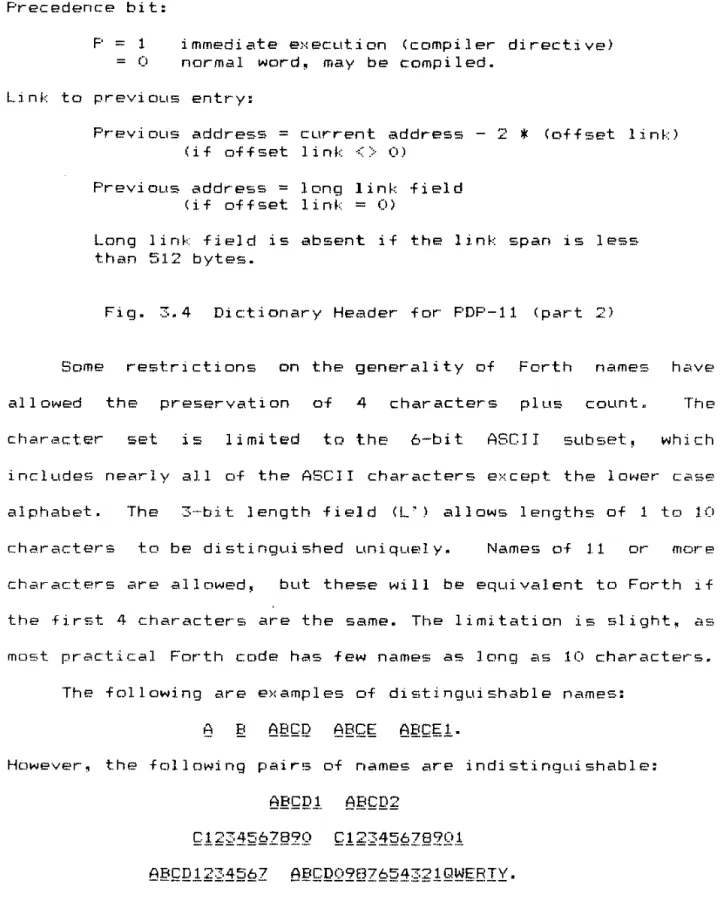
Precedence bit:
F' = 1
o
immediate normal word~ e~{ecLltion may be compiled. (compiler directive)Link to previous entry:
Previous address
=
cLlrrent address (if offset link<>
0)2
*
(offset link)PrevioLls address
=
long link field (if offset link = 0)Long link field is absent if the link span is less than 512 bytes.
Fig. 3.4 Dictionary Header for PDP-II (part 2)
Some restrictions on the generality of Forth names have allowed the preservation of 4 characters plus count~ The character set is limited
tD
the 6-bit ASCII subset, which includes nearly all of the ASCII characters except the lower case al phabet. The 3-bit length field (L') allows lengths of 1 to 10characters to be distinguished uniquely. Names of 11 or more characters are allowed, but these will be equivalent to Forth if the first 4 characters are the same. The limitation is slight, as most practical Forth code has few names as long as 10 characters.
The following are examples of distinguishable names:
However, the following pairs of names are indistinguishable:
Forth Manua.l 3-13
into two words. This is accomplished easily since a natural "key" or hash code for choosing a dictionary branch for a Forth word is one of the characters of the name. In particular the 4 low-order bits of the first character are distributed fairly randomly and are suited for the purpose.
function:
We define the following
THREAD# = HASH( NAME)
where the hashing function "HASH" is just equal to the number e;<pressed by the 4 low-order bits of the first character of the
"NAME" string.
If the HASH function is used to select a branch for the word
entry~ the Forth word header does not need to contain those bits selected by HASH; the~ would be redundant. Thus the field C1'
Fig. 3.4 contains only the two highest order bits of the first character; the low-order bits are implied from conte>(t~
that is~
One
from the thread number.
bit of the Forth word header 15 reserved for
"precedence". Normally this bit is zero~ but for "immediate" words the bit is one. This bit has speci",l i mport.ance for campi. 1 ati on; i t is discussed below in Section 3.9.
The fin"'l header field consists of 8 bits reserved for the offset link. The link points to the last previous word in the same dictionary thread. In most cases the memory spanned by the
complete byte address that may direct the dictionary search anywhere in memory. In the special case of the first word (foot) of a dictionary thread, both the offset and the long link field ar-e zero.
3.3.3 Code And Par-ameter Sections.
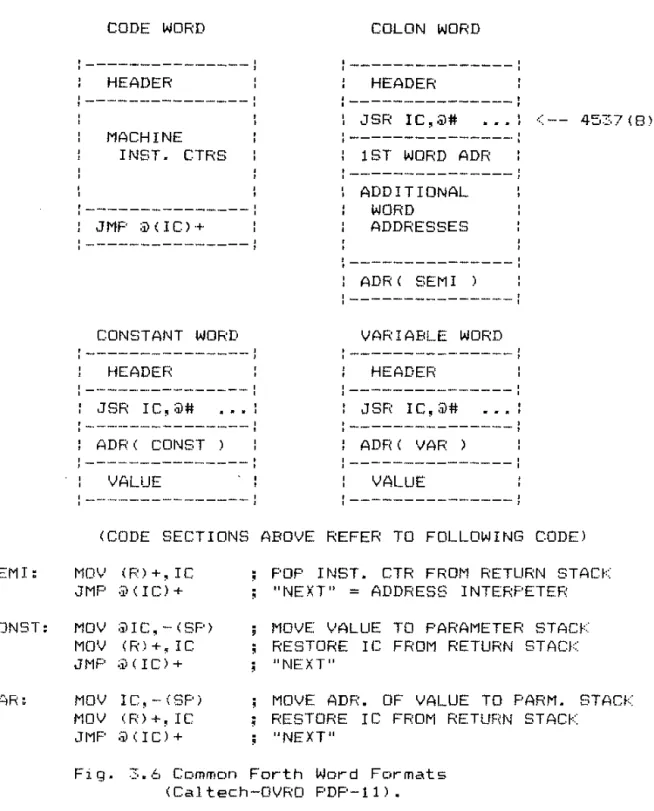
A complete dictionary entry contains one or two sections in addition to the header discussed above. These are shown schematically in Fig. ._'. -:r """ ~.
Fig.
---1
HEADER
\---(2 OR 3 LOCATIONS)
:---1
CODE SECT! ON
---
:
(1 OR MORE LOCATIONS)::
--_._._._-_.-:---:
PARAMETER SECTION (OPTIONAL)
General Forth Dictionary Entry.
Evel'·Y wor-d must contain a I;.QQ~ 2~«;.t .. ;LQlJ.; this is one or- more m2chine instructions that are e~ecuted when t.he Forth word i s
invoked. The address of the first location of the code section
I S the one compiled into address sequences in L efinitions (see
Forth Manual 3-15
see Section 3.4). Other
additional
kinds of words, in particular L words, require
QeC~m§t§c §§£t~QD in their dictionary entries. In
an
words the parameter section contains compiled direct the execution of the address interpreter.
addresses which Words defined
by ~Bt~:IB~'=~ or ~Q~§IB~I use locations in the parameter section to
hal d data"
SEMI:
CONST:
VAR:
CODE WORD
J---HEADER
)---MACHINE INST. CTRS
]---:
: JMF :i)(IC)+
:---)
CONSTANT WORD
:---]
HEADER
:---:
: JSR IC,@#
.
.
.
,,
:---]
] ADP( CONST )
)---:
VALUE
:---]
COLON WORD
]---:
HEADER
)---J
: JSR IC,@#
.
. .
,
,
)---:
: 1 ST WORD ADR
)---:
ADDITIONAL WORD
ADDRESSES
:---:
: ADR' SEM I )
:---:
VARIABLE WORD
)---:
HEADER
JSF( IC,@#
. .
.
,
,
---:
ADF< ( VAR )
---)
VALUE
---)
'. - - 45:-·7 (8)
(CODE SECTIONS ABOVE REFER TO FOLLOWING CODE)
MOV (R) +, IC JMP ;iI(IC)+ MOV ;ilIC, - (SP) MOV (R) +, IC JMF' ;.v(IC)+ MOV IC,-(SP) MOV (R) +, IC JMF' ;iI<IC)+
FOP I NST. CTR FRO~l RETURN STACf< "NEXT"
=
ADDRESS INTERPETEP MOVE ,'ALUE TO PAPAMETER STAG RESTORE IC FROM RETURN STACK "NEXT"MOVE ADP. OF VALUE TO PARM. STACK RESTORE Ie FROM RETUF(N STACb::
"NEXT"
Fig. 3.6 Common For-th Wor-d For-mats (Cal tech-DVRO PDF'-ll).
Forth Manual 3-17
interpreter. I t turns out that the PDP-II instruction JSR
IC,@#address has precisely the right action to start the address interpreter; i t saves the instruction counter on the return stack and directs e~(ecution t.o the code located by the first address of the address sequence.
3.3.4 Expanding And Contracting The Dictionary.
The Forth dictionary is initially set up when the program is fi rst
called
loaded. This dictionary and i t s associated code are the program" DC "kernel" . Foe Caltech-DVRO
systems the
"object
kernel is defined in assembly language. Other Forth systems sometimes use so-called "Metaforth", which is a
program that cross-compiles code from one Forth computer to
genera.te a new kernel foe another (DC possibly the same)
computer.
YOL.1 e;.:tend the dictionary by e:·(ecuting "defining words" words that define new dictionary entries. You can do this directly from a terminal (typing ~, !::QQ~, etc.) or indirect.ly by
~.Q8.Qi ng blocks that contain defining words. The defining words ha,vE' the.1 ogi c requi red to compute the proper threc\d number and to enter a new element in the corresponding dictionary branch.
At
times you need to truncate the dictionary and free up memory i;\reas. You do this with EQ8~~I. TypeEQB§I;I !lBB
to look up ~BB in the dic:tionar-y and truncate ~Ll branches at the highest possible memory addresses lower than the beginning of
!leBo
are deleted. Judicious use of EQB§~I gives you a simple overlay capability in Forth.
3.4 PROGRAM CONTROL -- THE ADDRESS INTERPRETER.
Another central element of the Forth system is the function This code directs the execution of Forth words from address sequences in memory. The normal termination of every ~QQs word is an invocation of the addr·ess
interpreter.
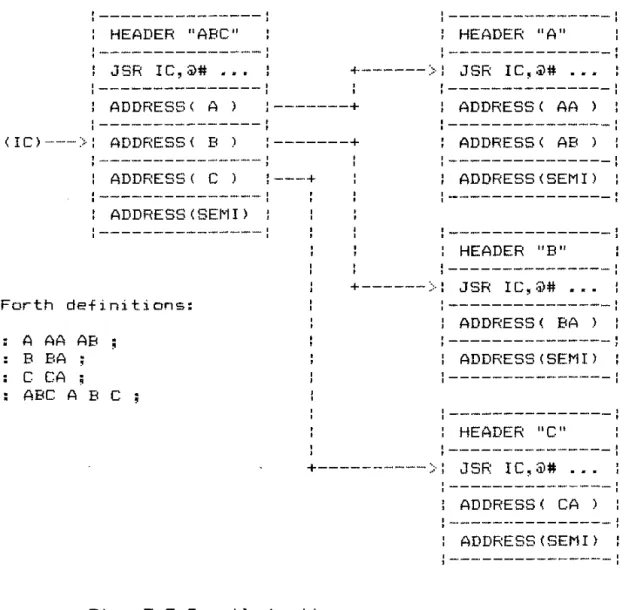
The interpreter opera.tes on a sequence of memory addresses which lie in consecutive words of main memory. Such an address sequence is the parameter field of a ! word. Each address points to the code section of an earlier dictionary entry.
3.7. )
For-th Manual 3-19
]---1
]---1
HEADER "ABC" l HEADER "A"
]---1 JSR IC,@# •••
+--->:
JSR IC,@# .••1---:
ADDRESS < A ) ---+ : ADDRESS ( AA )
:---:
(ICI---) ADDRESS ( B ) ---+ : ADDRESS ( AB )
]---]
ADDRESS ( C ) ,---+ : ADDRESS (SEM II
---]
ADDRESS (SEm )
---:
For-th definitions: A AA AB
B BA C CA
ABC ABC
:---:
1---]
: HEADER "B"
1---:
+--->:
JSR IC,@# ••.:---:
: ADDRESS ( BA )
]---:
: ADDRESS (SEM [ 1
1---:
:---:
: HEADER "C"
:---:
+--->:
JSR
IC,@# . . .:---:
: ADDRESS ( CA )
]---]
: ADDRESS (SEMI)
]---:
Fig. 3.7 Compilec;l addr-ess sequences.
In each definition an addr-ess sequence specifies For-th wor-ds to be r-un when the _ wor-d itself is e}(ecut.ed.
the
I . e. ,
if e~~ is defined L 6~~
B
~ ~ L' the addr-esses of wor-ds6,
~. ~, and i ar-e found in the par-ameter field of 6~~. These addr-esses define what actions occur- when 6~~ i s e~(ecuted.We can descr-ibe the effect of the
AI
1n the following"Instructions" to the AI are just the addresses of For·th words.
The Forth interpreter- must pick up the addr-ess that
Ie
points to. increment IC to point to the next address in sequence~
and finally jump to the code specified by the first address. In terms of Fig. 3.7~ the ne)·( t i nvoc:at i on of the i nterprete,r wi 11 pick up the address of the word ~~ IC will be incremented to point to the next address (address of
g),
and control passes to the JSR instruction in the code section of f!.**Most Forth imp 1 ementati on:; use a slightly different algorithm foe the AI. In these systems, the first word of the
code section is always instead of an
instruction. The add~ess in turn points to the actual code to be e~<ecuted. Thus the AI jump instruction must be a double indirect jump.
In
implementing the Caltech-DVRO system for the PDP-1!, we found that core and speed savings could be achie-ved through adopting the. technique described here.Several computer:; are so appropri atel y desi gned that the entire AI function can be achieved in a single instruction. The DEC PDP-11 and PDP-10 are examples. Fig. 3.8 displays the AIs