Case Study
Building understanding through an ecology of
technologies
Don Passey
Department of Educational Research, Lancaster University i
Acknowledgements
Department of Educational Research, Lancaster University iii Contents
1. Executive Summary 1
2. Introduction 3
2. The Case Study 4
4. Key Points 15
Department of Educational Research, Lancaster University 1 1. EXECUTIVE SUMMARY
This case study is one of a number of research reports investigating uses of digital technologies in schools. A case study has been selected for this element of the wider research study, as it provides evidence about uses and outcomes with a single class of pupils in one school, in the state of Nordrhein-Westfalen, Germany. An ecology of technologies (a SMART interactive flat panel, a SMART interactive whiteboard, twelve Samsung Galaxy Tab A tablets, and an associated VLE) were linked and used with a class of 17-18-year-old final year Abitur pupils in an English major course. The technologies supported a number of learning activities that were designed by the teacher to help pupils develop more effective answering of test and examination questions, analysing text and structuring answers in English.
The technologies were shown to support individual and small group work, class discussions, collating detail, structuring writing and answers, reviewing notes that were saved online, and accessing notes for revision for tests and examinations. The teacher reported that the technologies supported these activities, and that they had a positive influence on some pupils in test and final Abitur examination results. Those pupils not influenced to the same extent were not negatively affected; their scores remained more constant. Statistical tests showed that for ‘influenced’ pupils, their increased results were statistically significantly different from those pupils ‘not influenced’, both at p<0.05 and p<0.01 levels.
Pupils reported that they were involved in more discussions in lessons, both with the teacher and with other pupils, they were more motivated to take part, and understood the topic and subject better, but also spent more time taking notes. Pupils reported benefits from discussing points together, writing collated notes together, creating assignments, and revisiting or revising notes afterwards. They felt that initial discussion in pairs provided a good background to a topic or a text, and that the teacher collecting and appropriately collating ideas together from each pair or small group helped them build on their initial background and understanding, allowing them to capture a bigger picture and more detail by adding others’ ideas.
Some initial technological and physical issues were quickly addressed by the teacher, for example, glare from sunlight on both interactive screens was addressed by repositioning the boards. A very small number of pupils (only one response in the questionnaires) appeared to have difficulty in moving to an alternative approach to writing notes: they felt they needed handwritten notes for revision but moving from copying notes in class to copy-writing notes from online sources when they wanted to do revision appeared to be a challenge for them.
Department of Educational Research, Lancaster University 3 2. INTRODUCTION
A brief background
This case study is one of a number of reports arising from research being conducted on uses of technologies in schools – particularly focusing on uses of interactive whiteboards (SMART interactive flat panels and whiteboards), when they are used alone or associated with other technologies (tablets and other mobile devices, teacher laptops, document cameras, and virtual learning environments).
Reports so far have detailed educational, learning and teaching outcomes arising in:
• A primary school in England (reported in full in Passey, 2015).
• A secondary school in Germany (reported in full in English in Passey, 2016, in full in German in Passey, 2017, and as a short case study in English and in German published by SMART Technologies).
Research design and methods
The aim of a follow-on study was to explore how teachers would develop:
• Learning and teaching uses through a wider technology-based ecology using SMART interactive whiteboards or flat panels as well as tablets and a virtual learning environment.
• Uses for a wider range of topics or other subject areas.
The ecology of technologies has been a focus of previous research (although not named in this way). While Luckin (2010) has explored ecologies from a learner-centred perspective, and Davies (2017) has explored an ecosystem and change perspective, this case study explores the interaction of pupils and teacher with an ecology of specific technologies that is defined within a school classroom.
The research design and methods adopted were similar to those used in the earlier studies. The design and methods followed Yin (1994). Evidence for the case study was gathered through:
• Discussion with and email details sent from the lead teacher about the progress of the initiative.
• Questionnaires completed by pupils when they started to use tablets and after three months of use.
• Discussion with pupil groups about the outcomes of uses of the technologies.
• Documentary evidence provided by the teacher.
This case study is the first of a number of intended reports arising from this follow-on study. Additional future reports will focus on strategic development of technology uses across the school, and subject-specific uses highlighted by teachers and pupils as those offering particular benefits to their teaching or learning.
Department of Educational Research, Lancaster University 4 3. THE CASE STUDY
The school
This case study is set in a secondary school in the state of Nordrhein-Westfalen (NRW) in Germany. The school prepares pupils for entry to university. There are eight year groups in the school, across the 10-18-year-old age range (from Year 5 to Year 12). The last two year groups, the 16-18-year-old age range (Years 11 and 12) take courses that count towards their final school examination award (Abitur). Passing this examination enables them to apply for university entry.
This case study explores uses of an ecology of technologies by a Year 12 class (17-18-year-old pupils), in their final year in the school. The pupil class (a mixed class of girls and boys) are taking a major course in English.
The facilities
The teacher’s room was equipped with an ecology of technologies (some as shown in Figure 1). This comprised a smaller SMART interactive flat panel (IFP) in the front left-hand corner of the room and a larger SMART interactive whiteboard (IWB) centrally placed at the front of the room, both mobile on wheels. The teacher used a laptop, and had access to a set of 12 tablets (Samsung Galaxy Tab A), which she brought into the room in a travel case. The tablets were used by the pupils as and when they were felt to be of help in a lesson. The technologies (tablets with the SMART IFP and IWB) were linked by the school network, and were also supported by a virtual learning environment (VLE).
Figure 1: The IWB, teacher laptop, document camera and a tablet in the teacher’s room
Department of Educational Research, Lancaster University 5 The teaching and learning activities
The way the teacher used the ecology of technologies to support the answering of test and examination questions, analysing text and structuring answers in English was highlighted by the pupils and teacher as being particularly helpful.
The teacher had recognised that pupils needed support in more effectively answering test and examination questions, analysing text and structuring answers in English. So she devised a series of activities across a three-month period, which she felt would help them to do this. She used the ecology of technologies to support these activities and the teaching and learning practices involved in each one.
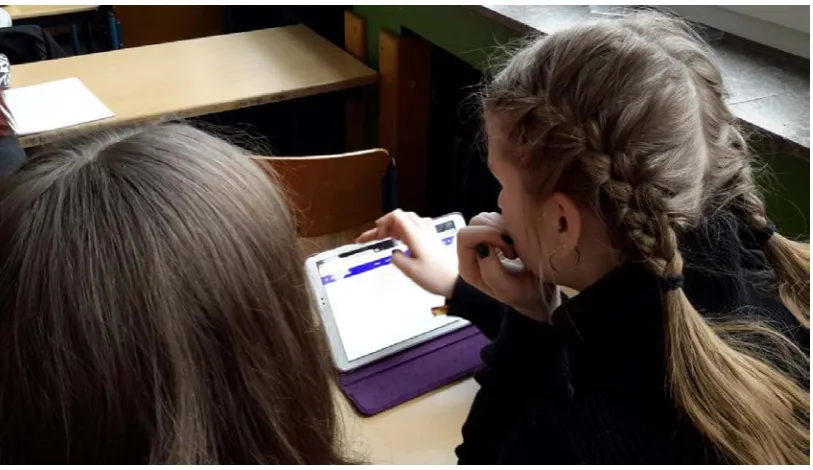
[image:11.595.96.503.289.524.2]In one activity, pupils needed to undertake an analysis of a text on ‘Global Warming is a Misleading Term’. Initially, they worked in pairs (see Figure 2) or threes on this activity. They read the text on the tablet (without initially making notes or highlighting words or phrases).
Figure 2: A pair of pupils reading the text on the tablet
The pupils then re-read the text, but this time they took notes that related to the three questions they needed to ask and answer:
• Summarise the main points.
• Analyse the text according to the focus of the test question (which might be, for example, structure, or use of stylistic devices, or how the text influences the reader, or use of language).
• Comment on the message of the text in view of what you have learned about the topic in class.
Department of Educational Research, Lancaster University 6 Figure 3: Pupils record their notes either on the tablet or on paper
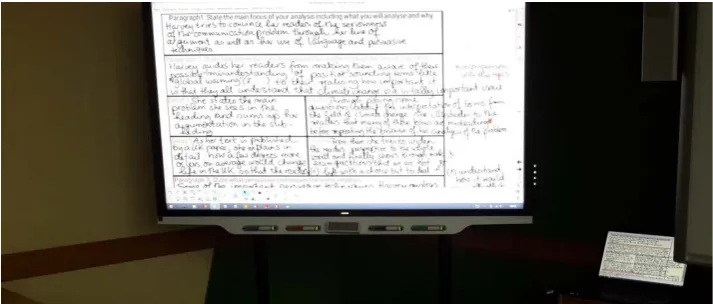
The teacher then opened up a class-wide discussion, taking points in turn from each group of pupils. As the pupils recounted their points, the teacher collated these and the results of the discussions, writing down notes alongside the test or examination questions, to show pupils what points could be made when answering each individual question (see Figure 4). She used different colours to highlight points that would address each of the three questions (summarise the main points; analyse the text according to the focus required; comment on the main message).
Figure 4: The teacher’s notes on the right associated with each test or examination question
Department of Educational Research, Lancaster University 7 Figure 5: The notes are saved onto a VLE
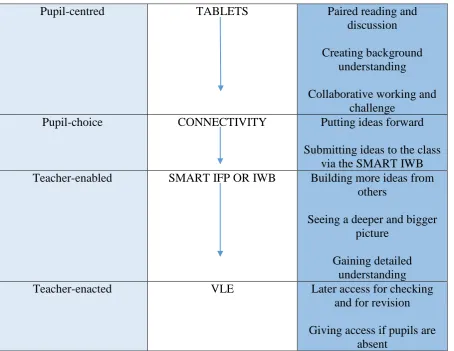
Overall, the process can be summarised as a progression of teacher-supported learning elements across a single activity, involving the use of the different technologies across the range of technologies available - tablets, connectivity, SMART IFP or IWB, and then the VLE (see Figure 6).
Pupil-centred TABLETS Paired reading and
discussion
Creating background understanding
Collaborative working and challenge
Pupil-choice CONNECTIVITY Putting ideas forward
Submitting ideas to the class via the SMART IWB Teacher-enabled SMART IFP OR IWB Building more ideas from
others
Seeing a deeper and bigger picture
Gaining detailed understanding
Teacher-enacted VLE Later access for checking
and for revision
Giving access if pupils are absent
[image:13.595.68.523.368.719.2]Department of Educational Research, Lancaster University 8 Other activities, again focusing on the need to support more effective answering of test and examination questions, analysing text and structuring answers in English, involved the same overall structure, but with some differences. For example, in one activity, pupil notes from their reading of the texts were sent in to the teacher via a VLE. In this way, the teacher could draw out key points from all the responses, and collate them again, so the pupils could see how the teacher was drawing out specific points to address specific test questions.
[image:14.595.119.476.208.360.2]Another variation used, where the teacher used a form of scaffolding – a table – demonstrated to pupils how to structure their findings into an essay (see Figure 7).
Figure 7: A table to help structuring findings when answering specific test questions
Teacher responses
The teacher reported positively on the ways the technologies supported this range of activities. She said that the technologies enabled the visualisation of the outcome of a discussion to a greater extent. For example, she could use a scaffolding structure easily, so that outcomes could be seen more easily, with greater clarity. She said she could toggle between the text itself and the collation of the notes, either doing this on the same board, or by using the two boards, or the pupils could use a tablet for reading the text while she used the SMART IFP or IWB to draw points together. She indicated that colour was easy to use, and helped to differentiate points that referred to the different aspects that had to be analysed (using a different colour for each of these aspects). She highlighted the fact that the outcomes of the discussion could be shown quite expansively, without loss of visibility (she could manipulate the SMART IFP or the IWB, focusing in, focusing out, etc.).
The key points where she felt the activities made the difference were:
• Discussing points together – capturing these from pupil notes and sharing these.
• Writing collated or discussed points down together – on the SMART IFP or IWB, and colouring to identify how they related to different questions.
• Creating assignments afterwards – as they provided individual practice for the pupils.
Department of Educational Research, Lancaster University 9 The teacher felt that from the activities undertaken, and the ways the technologies supported these, the pupils had achieved a more effective internal structure to support their writing – that following these activities they were demonstrating abilities to analyse and structure, even without the need to make notes or to colour or highlight specific points before collating them.
Test and Abitur results
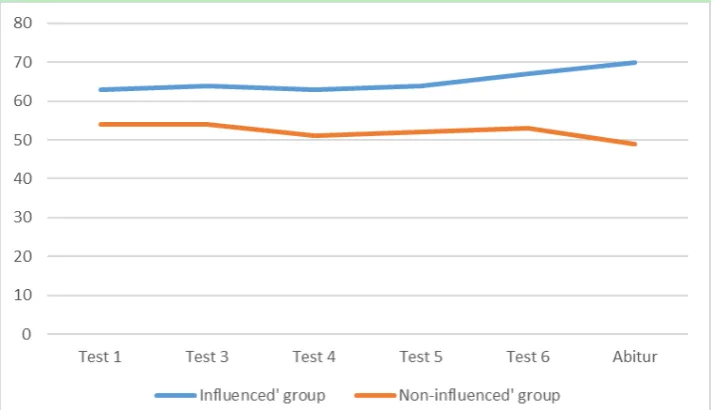
Test and Abitur results confirmed the beliefs that the teacher reported. During the 2-year course, pupils needed to complete 6 written tests (3 each year) before they sat their final Abitur examination. Nineteen pupils were in the class across the entire 2-year period, and their test and Abitur total average results were remarkably consistent across the course: Test 1 (59%); Test 3 (60%); Test 4 (58%); Test 5 (59%); Test 6 (61%); Abitur (61%). (It should be noted that Test 2 results have not been included, as some pupils were not involved in this test, for reasons stated later in this sub-section.) The teacher indicated that she felt that some pupils benefited more than others from the learning activities she focused on following Test 5. In order to explore whether some pupils might have benefited more, using the anonymised data, pupils who appeared to have gained more from the activities were placed by the researcher into an ‘influenced’ group (11 in number), while those who did not were placed into a ‘non-influenced’ group (8 in number).
[image:15.595.120.477.526.731.2]The ‘influenced’ group’s average total results were: Test 1 (63%); Test 3 (64%); Test 4 (63%); Test 5 (64%); Test 6 (67%); Abitur (70%). The rise in average results for the ‘influenced’ group in Test 6 and Abitur accord with the teacher’s view that pupils were gaining from the learning activities using the ecology of technologies. Between Test 1 and the Abitur examination, the ‘influenced’ group’s results improved by 7%. The ‘non-influenced’ group’s average total results were: Test 1 (54%); Test 3 (54%); Test 4 (51%); Test 5 (52%); Test 6 (53%); Abitur (49%). Between Test 1 and the Abitur examination, the ‘non-influenced’ group’s results went down by 5%, which is in line with what the teacher anticipated as expectations for improvement rose; in other words, pupil work was not negatively affected, but results were affected by increased expectation. The majority of pupils in the class (11 out of 19) were, therefore, positively influenced by the learning activities using the ecology of technologies (illustrated in Figure 8).
Department of Educational Research, Lancaster University 10 Although the results show differences between the two groups, this could, of course, have happened by chance. Two-tailed t-tests were run on the results, to see if any differences were statistically significant. The results are shown in Table 1.
Table 1: T-test results comparing total results of ‘influenced’ with ‘non-influenced’ groups
Test or Abitur T-test result for the ‘influenced’
versus ‘non-influenced’ group
Test 1 t=-1.29197; p=.213657
Test 2 1 t=2.593; p=.025004*
Test 3 t=-1.62808; p=.121899
Test 4 t=-2.66811; p=.016218*
Test 5 t=-2.58869; p=.019122*
Test 6 t=-2.47154; p=.024322*
Abitur t=-4.52501; p=.000299**
Note: * shows statistically significant difference at p<0.05 level; ** shows statistically significant difference at p<0.01 level; 1 these test results were affected by five pupils not being included because of choosing coursework instead of the written test, so they cannot be interpreted in the same way, and have not been included in further analysis
The results in Table 1 show that there was no statistically significant difference between the two groups when pupils completed Test 1 (there was more than a 20% probability of this difference occurring by chance). However, between Test 1 and Test 6, differences became more accentuated, with a greater than 10% probability of difference occurring by chance for Test 3 (not statistically significant), but less than 5% probability of differences occurring by chance in Tests 4, 5 and 6 (at a statistical significant level). By the time the pupils sat their Abitur results, there was a very high statistically significant difference at the p<0.01 level. So, while the data indicate that the ‘non-influenced’ group was not disadvantaged by the learning activities using the technologies (their results were regarded as being consistent, although expectations rose between Test 1 and Test 6 which created a reduction in results), the data indicate that the learning activities using the ecology of technologies significantly enhanced the outcomes for the ‘influenced’ group.
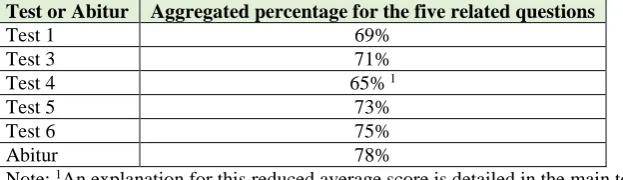
In the tests and the Abitur examination, five specific marking criteria relate to the intentions of the learning activities undertaken: referring to the questions consistently and explicitly; using the correct text format (summary, analysis, comment); structuring the text according to the task and so that it is easy for the reader to follow the train of thought; writing precisely and to the point without digressing; and using varied and precise vocabulary to structure the text and suitable to the text format (summary, analysis, comment). The aggregated results from these five criteria for the ‘influenced’ group are shown in Table 2.
Table 2: Aggregated results for the five related criteria within the tests and Abitur examination for the ‘influenced’ group
Test or Abitur Aggregated percentage for the five related questions
Test 1 69%
Test 3 71%
Test 4 65% 1
Test 5 73%
Test 6 75%
Abitur 78%
Note: 1An explanation for this reduced average score is detailed in the main text
Department of Educational Research, Lancaster University 11 results (with the exception of Test 4). Test 4 followed Test 3 four months later, which included a six-and-a-half week summer break. At the beginning of the term following the summer break, the pupils did not focus on summary, analysis and comment activities. The teacher noticed a reduction in pupil results related to the relevant marking criteria in Test 4, so the teacher then enhanced the summary, analysis and comment work. The renewed focus supported pupils, with subsequent increases in results from Test 5 onwards, benefiting the majority of the pupils (11 out of 19), those in the ‘influenced’ group.
Pupil responses
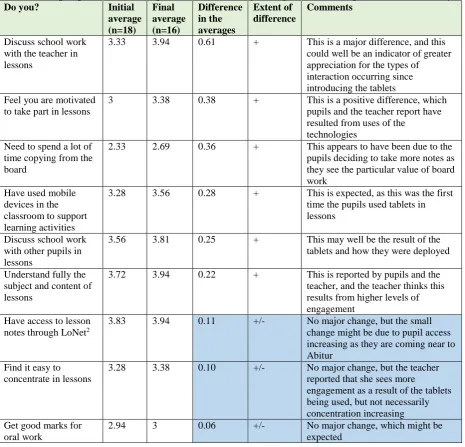
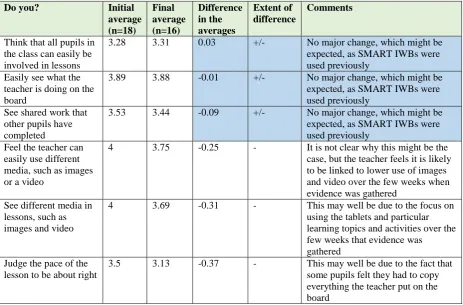
[image:17.595.67.533.305.752.2]Considering how the pupils responded to the learning activities using the ecology of technologies, pupil comments were gathered from questionnaires, and from discussions. In terms of the questionnaires, comparing initial and final questionnaire responses (averages) between the first questionnaire run in January 2018 and the second run in March 2018 (8 weeks later), there was a marked positive difference with some, while in others there was no appreciable difference, and yet in others a marked negative difference (as shown in Table 3).
Table 3: Pupil questionnaire responses and how they changed across the period of the activity
Do you? Initial
average (n=18) Final average (n=16) Difference in the averages Extent of difference Comments
Discuss school work with the teacher in lessons
3.33 3.94 0.61 + This is a major difference, and this could well be an indicator of greater appreciation for the types of interaction occurring since introducing the tablets Feel you are motivated
to take part in lessons
3 3.38 0.38 + This is a positive difference, which pupils and the teacher report have resulted from uses of the
technologies Need to spend a lot of
time copying from the board
2.33 2.69 0.36 + This appears to have been due to the pupils deciding to take more notes as they see the particular value of board work
Have used mobile devices in the classroom to support learning activities
3.28 3.56 0.28 + This is expected, as this was the first time the pupils used tablets in lessons
Discuss school work with other pupils in lessons
3.56 3.81 0.25 + This may well be the result of the tablets and how they were deployed Understand fully the
subject and content of lessons
3.72 3.94 0.22 + This is reported by pupils and the teacher, and the teacher thinks this results from higher levels of engagement
Have access to lesson notes through LoNet2
3.83 3.94 0.11 +/- No major change, but the small change might be due to pupil access increasing as they are coming near to Abitur
Find it easy to concentrate in lessons
3.28 3.38 0.10 +/- No major change, but the teacher reported that she sees more
engagement as a result of the tablets being used, but not necessarily concentration increasing Get good marks for
oral work
Department of Educational Research, Lancaster University 12
Do you? Initial
average (n=18) Final average (n=16) Difference in the averages Extent of difference Comments
Think that all pupils in the class can easily be involved in lessons
3.28 3.31 0.03 +/- No major change, which might be expected, as SMART IWBs were used previously
Easily see what the teacher is doing on the board
3.89 3.88 -0.01 +/- No major change, which might be expected, as SMART IWBs were used previously
See shared work that other pupils have completed
3.53 3.44 -0.09 +/- No major change, which might be expected, as SMART IWBs were used previously
Feel the teacher can easily use different media, such as images or a video
4 3.75 -0.25 - It is not clear why this might be the case, but the teacher feels it is likely to be linked to lower use of images and video over the few weeks when evidence was gathered
See different media in lessons, such as images and video
4 3.69 -0.31 - This may well be due to the focus on using the tablets and particular learning topics and activities over the few weeks that evidence was gathered
Judge the pace of the lesson to be about right
3.5 3.13 -0.37 - This may well be due to the fact that some pupils felt they had to copy everything the teacher put on the board
The responses shown in Table 1, where there were major shifts, concurred with the responses that the teacher gave. The pupils said that they:
• Were involved in more discussion in the lessons, with the teacher and with other pupils.
• More motivated to take part.
• Spent time taking notes.
• Understood the topic and subject better.
[image:18.595.67.531.70.375.2] [image:18.595.67.495.586.766.2]Pupils were asked in the questionnaire how digital technologies had helped them in their school work. Their responses are shown in Table 4. Pupils in these responses not only focus on the short time in which the data were gathered (January to March 2018), they commented on their work across the two years of the course (for example, indicating use of video).
Table 4: Pupil responses on how technologies have helped their topic work (n=16)
Response Frequency (in an
open-ended question) Interact more easily and collate points from the whole group 7
Watching and using videos (to analyse a scene) 5
Easier to take down (good) notes from the SMART IFP/IWB 5 Access after lessons allows you to prepare for examinations 4
Analysing texts 3
Allows you to work faster 3
Easier to work in pairs or groups when using tablets 2
Comparing two texts 1
Enjoying lessons or school 1
Easy to discuss answers when these are written on the SMART IFP/IWB 1 SMART IFP/IWB allows complex tasks to be shown in detail 1
Department of Educational Research, Lancaster University 13 It is notable that the pupil responses here relate very strongly to the advantages that the teacher highlighted:
• Discussing points together – capturing these from pupil notes and sharing these.
• Visualising in different ways.
• Writing collated or discussed points down together – on the SMART IFP or IWB, and colouring to identify how they related to different questions.
• Creating assignments and revisiting or revising afterwards using the notes saved to a VLE – as they provided individual practice for the pupils.
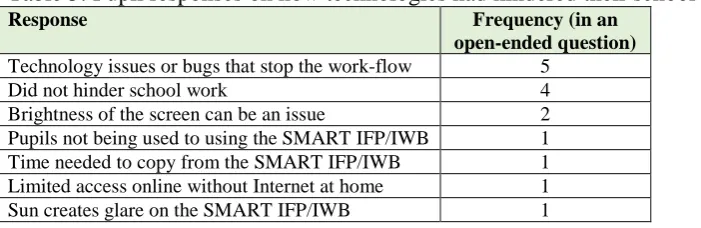
[image:19.595.67.418.271.385.2]Pupils were also asked in the questionnaire how the digital technologies hindered their school work. Their responses are shown in Table 5.
Table 5: Pupil responses on how technologies had hindered their school work (n=16)
Response Frequency (in an
open-ended question) Technology issues or bugs that stop the work-flow 5
Did not hinder school work 4
Brightness of the screen can be an issue 2 Pupils not being used to using the SMART IFP/IWB 1 Time needed to copy from the SMART IFP/IWB 1 Limited access online without Internet at home 1 Sun creates glare on the SMART IFP/IWB 1
The pupils highlighted certain disadvantages, although it should be recognised that these responses were gathered only during the initial stages of the trial of tablets, so some initial issues would be expected to arise at that time. The teacher was aware of these and quickly resolved many of these by the time the trial work with the tablets had finished. Key concerns that the pupils raised were:
• Issues when the technology does not work, or when it needs to be tested or piloted.
• At certain angles, external sunlight can create glare on both the SMART IFP and IWB surfaces.
• Some pupils seem to want time to copy notes in lessons, rather than accessing them afterwards. This latter point seems to be concerned with a minority of pupils, and seems also to indicate that pupils wish to use time in lessons for copying and try to avoid doing this outside lessons. This is illustrated by this specific comment from one pupil: “As for me I can only memorise things if I have written them down or if I got them on a worksheet. So whenever I want to study for an exam, I have to look through everything we have done online and write it down. It is twice as much work.”
Department of Educational Research, Lancaster University 14 Further details arose from a small group discussion with 4 girls from the class. They commented that they had not had any problem with the tablets, because they used similar devices at home. They felt that initial discussion in pairs provided a good background to a topic/text so that these ideas could be submitted to the SMART IFP/IWB, and that collecting ideas together from the class helped – it built on initial background and understanding, adding extra detail, so that they could then capture the bigger picture and more detail. However, they had found the tablets difficult to write on, and felt a keyboard should be used instead for this.
They recommended separating home and personal devices from school tablets, as personal devices were used for different purposes and times, and separating them then did not encroach on their other uses, with teacher demands kept separate. They felt that typing is now an important need for all pupils. Online access was felt to be particularly useful for revision, picking up on details, or to review or check on previous work.
They saw the ecology of technologies as the future. In terms of the technologies they used, they felt that tablets were better than smartphones, and that schools should, therefore, invest in tablets, SMART IFPs or IWBs, and a VLE. One particular reason for this recommendation was that it might be difficult to connect personal mobiles to the school network, and also, that uploading via the network on mobiles can be much slower.
Department of Educational Research, Lancaster University 15 4. KEY POINTS
Key points summarising the case study and its findings are:
• An ecology of technologies (linked SMART IFP and IWB, Samsung Galaxy Tab A tablets, and an associated VLE) were used with a class of Year 12 (17-18-year-old, final year Abitur) pupils in an English major course.
• The technologies were used to support specific pupil needs with regard to developing more effective answering of test and examination questions, analysing text and structuring answers in English.
• The teacher created a series of specific learning activities to support this need, involving the technologies in a range of ways.
• In general, from across the range of activities, the technologies were shown to support individual and small group work, discussing points together with the whole class, writing collated or discussed points down together with the whole class, offering visual structures through scaffolding or colour, creating assignments afterwards using the notes saved, and having access to notes for revision for tests and examinations.
• The teacher reported that the technologies had supported activities that clearly made a positive difference to some pupils in both the last test and final Abitur examination results. She also stated that other pupils were not negatively affected; their scores remained the same. Statistical tests show that the increased results for these ‘influenced’ pupils were statistically significant, both at p<0.05 and p<0.01 levels.
• Pupils indicated that they were involved in more discussion in the lessons, with the teacher and with other pupils, they were more motivated to take part and understood the topic and subject better, but also spent time taking notes.
• Both pupils and the teacher reported the same forms of advantages arising. Pupils reported benefits from discussing points together, visualising in different ways, writing collated notes together, creating assignments and revisiting or revising notes afterwards.
• Pupils reported that in these activities, initial discussion in pairs provided a good background to a topic/text so that their ideas could be submitted to the SMART IFP/IWB, and that collecting ideas together from the class helped – it built on the initial background and understanding, adding extra detail, so that they could then capture the bigger picture and more detail. However, they had found the tablets difficult to write on, and felt a keyboard should be used instead for this.
• Issues can arise, particularly technological and physical issues such as glare from sunlight on both IFP and IWB screens, and teachers need to be aware of these and how to address them quickly.
• Some pupils may have more difficulty in moving to an alternative approach to writing notes; they may need support to help them to move from copying notes in class, to copy-writing notes from online sources if they wish to do revision in this way.
Department of Educational Research, Lancaster University 16
Department of Educational Research, Lancaster University 17
References
Adelman, C., Jenkins, D. and Kemmis, S. (1980). Rethinking case study: notes from the second Cambridge conference. In H. Simons (Ed.). Towards a Science of the Singular. Centre for Applied Research in Education, University of East Anglia, 45-61.
Creswell, J.W. (1994). Research Design: Qualitative and Quantitative Approaches. Thousand Oaks, CA: Sage Publications.
Davies, N. (2018). Digital Technologies and Change in Education: The Arena Framework. New York, NY: Routledge.
Luckin, R. (2010). Re-Designing Learning Contexts: Technology-Rich, Learner-Centred Ecologies. New York, NY: Routledge.
Marshall, C. and Rossman, G.B. (2006). Designing Qualitative Research (5th edition). Thousand Oaks, CA: Sage Publications.
Passey, D. (2015). Digital technologies, collaborative endeavour and school improvement: A case study of Pheasey Park Farm Primary School. Bagshot: Steljes.
Passey, D. (2016). Collaboration, visibility, inclusivity and efficiencies: A case study of a secondary school in Germany using interactive whiteboards. Lancaster: Lancaster University. http://eprints.lancs.ac.uk/83695/1/German_School_Report_Final.pdf.
Passey, D. (2017). Zusammenarbeit, Sichtbarkeit, Einbindung und Effizienz: Fallstudie zur Verwendung interaktiver Whiteboards an einem Gymnasium in Deutschland. Lancaster: Lancaster University.
http://eprints.lancs.ac.uk/87155/1/Fallstudie_der_Lancaster_University_zur_Verwendun g_interaktiver_Whiteboards_an_dt_Gymnasium_final.pdf
Department of Educational Research, Lancaster University 18 21st August 2018
Any correspondence about this report should be addressed to the author: Don Passey
Professor of Technology Enhanced Learning Department of Educational Research