INTERACTIVE EDUCATION ON THE WEB - EXPERIENCES IN DEVELOPMENT AND
APPLICATION OF A COMPUTER ASSISTED TRAINING COURSE FOR REMOTE SENSING
Gerhard KOENIG
Technical University Berlin, Germany Department of Photogrammetry and Cartography
[email protected] Working Group VI/2
KEY WORDS: Remote and web teaching, CBT, Remote Sensing, Internet, World Wide Web.
ABSTRACT
The World Wide Web provides new opportunities, which can contribute to combining lectures and seminars with the newest trends in science and technology worldwide. Consequently, PCs or workstations with Internet access may also be used as prerequisites for offering an open access for lectures and courses not only to students but also to the interested public. This assumes the development of high quality training software, with attractive design, graphics, animations, audio and video components to stimulate student's motivation. Additionally a high level of interactivity is necessary to involve students in the learning process.
The Technical University Berlin (TUB) has set up a computer based training system for remote sensing. Presently the tutorial focuses on fundamentals of remote sensing, discusses image acquisition by means of different sensor systems, and gives an introduction to basic preprocessing and interpretation steps. Functionality will be added continuously as required.
This paper outlines ideas with regard to general guidelines for training objectives, interactive user control and guidance as well as design aspects. It gives an overview of the user interface and the topics already implemented. Presenting course examples, the paper reports on the TUB's experience in setting up teaching software.
1 INTRODUCTION
At present, universities in Germany are facing two major challenges:
- Traditional learning methods (students attend lectures, carry out exercises and contribute to seminars) can only partly keep pace with the exploding variety of information.
- Education budget cuts result in less staff as well as difficulties in setting up and updating the necessary infrastructure. The situation is further aggravated by an ever increasing number of students.
The efficient use of electronic media may, therefore, play an important role to help improve the situation. The world wide web provides new opportunities, which can contribute to combining lectures and seminars with the newest trends in science and technology worldwide. Especially proceedings on conferences and symposiums or reports on research activities are increasingly being published on internet homepages. This provides students as well as the scientific community with a new medium for quick and efficient information retrieval which is widely accepted. Consequently, PCs or workstations combined with internet access may also be used as prerequisites for offering an open access for lectures and courses not only to students but also to the interested public. This can considerably support the social task of creating the conditions for life-long learning.
Courses published on the web offer even more advantages:
- Once on the web training material is readily accessible by students any time.
- Courses are independent of location, meaning not restricted to classes; information from anywhere in the world can be accessed from any computer.
- The centralized database of educational resources allows for continuous and easy updating of learning materials. - Extendable knowledge modules may be developed step by step, and by different authors.
- A multimedia environment is platform independent and available on all existing operating systems, costs for adaptation can be avoided.
- Relatively low costs for hardware and software allow a wide distribution of courses.
- Computer based tutorials may help in preparing for classes and perhaps will stimulate further studies.
All these advantages assume independent and responsible - adaptive - learning on behalf of the students which will lead to new forms of cooperation between student and teacher.
The development of state-of-the-art courses presents a great challenge to trainers and instructors. Acceptance of internet based learning software can only be achieved if students' motivation is stimulated by combining attractive design with graphics, animations, audio and video components. Additionally, a high level of interactivity is necessary to actively involve students in the learning process.
Developments of the last years indicate, that several institutes - Höhle (1999), Hassenpflug (1998), Kainz (1996), MacLaren (1998), Pohl (1999) - face the challenge of setting up computer based training (CBT) tutorials for remote sensing and its application. In general English is the teaching language. To accommodate the German market, the Photogrammetric Department at the TUB has set up a learning program which will be translated into the English language at a later stage.
The computer-based learning program is not intended to replace the TUB's conventional courses. It is rather an attempt to complement the conventional methods. Presently the tutorial focuses on fundamentals of remote sensing, discusses image acquisition by means of different sensor systems, and gives an introduction to basic pre-processing steps. Functionality will be added continuously as required.
2 CONCEPT
2.1 General Guidelines
The development of learning software is a complex process, which can only be successfully accomplished by a team of developers with different professional backgrounds. Photogrammetrists, remote sensing experts, computer scientists, and graphic artists must work together to come up with attractive results.
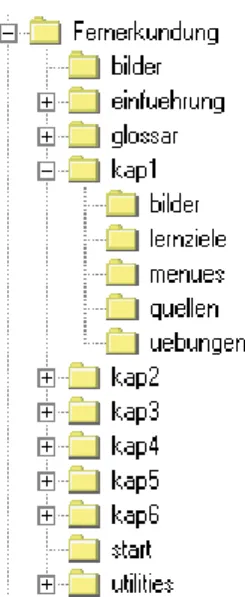
Also of importance is a clear outline which defines guidelines with regard to the extent, functionality, organization, and visual appearance of the tutorial. Rules regarding the division of the course into chapters (Fig. 1), naming conventions, fonts etc. were set in advance to guarantee a standardized design.
After presenting the physical principles of remote sensing different remote sensing systems are introduced: A short introduction to photographic systems is given, focusing on film exposure, spectral sensitivity of black & white and color films, camera systems, and air-photo techniques. The following chapters introduce the most common scanning systems, including microwave sensing. Chapters devoted to digital image processing techniques, fundamentals of photogrammetry, and an introduction to image interpretation complete the training course.
Each chapter is divided into different lessons, which are again divided into several pages illustrating the logical steps. Particular attention is given to restricting the individual topics to one page in order to avoid confusing scrolling.
2.2 Screen Design
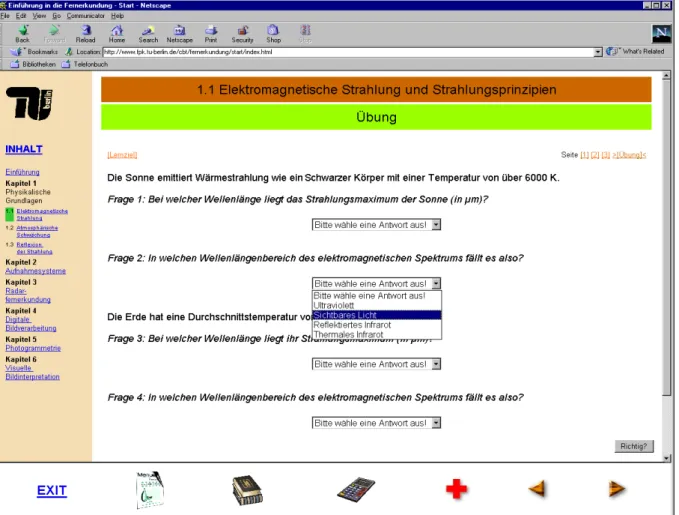
The tutorial must be clear and self-explanatory to the course participants. An unambiguous screen design is an important requirement for successful learning. Therefore, the screen is divided into different sections (Fig. 2). The left frame includes the table of contents. Its appearance varies depending on the selected chapter and is modified dynamically as the
student moves from one chapter to another. Colored highlighting is used for emphasis which allows for easy orientation and marking of the lessons completed at first glance.
Other information and navigation tools which influence the sequence of the program are available at the bottom of the frame. If required, operating instructions, the main menu, access to the glossary, or a calculator are retrieved by clicking the relevant button. Arrow buttons which allow for scrolling to previous or following pages are also integrated in this frame. Additional information such as the page number of a lesson displayed in the upper right section of the main frame. Using these control buttons, students are able to move back and forth between lessons or chapters at their own pace.
Figure 2: Frame structure, test page
Exercises conclude the lessons. These are mostly multiple choice questions, which may require calculations to come up with the correct solution. Fig. 2 shows a 'drop-down-list' as a means of selecting an answer to a question. The evaluation of the answer follows immediately. In case of an incorrect answer the student receives tips as to which chapters he or she may need to go over again in order to successfully complete the lesson.
3 IMPLEMENTATION
Implementing the training program is based on HyperText Markup Language (HTML). But HTML allows placing of static pages only. Therefore, it was necessary to apply further technologies and extensions to build attractive lessons which allow for user intervention. Some of these techniques are discussed and explained with the help of tutorial examples in the following paragraphs.
3.1 Animations
Sequences of pictures attract the students' attention and are often a good means of easily explaining a complex subject. An animation is composed of a sequence of frames which must be created separately using a graphics program. Animations are usually stored in GIF89-format which is a useful format for saving disk space. In addition, another
program is needed to put the images together to form the frames of the animation. Several programs are available for this such as Adobe ImageReady. GIF animations are included in the HTML source as normal images, allowing web browser interpretation.
GIF animations are frequently used, e.g. as an illustration of electromagnetic energy traveling in a harmonic, sinusoidal fashion (Fig. 3).
Figure 3: Animated GIF-graphic (layer 28 and 47)
3.2 CGI
The Common Gateway Interface (CGI) permits interactivity between a client and a host operating system through the WWW. During the course it is used for evaluating lesson tests. First, the student makes a choice by selecting an answer from the 'pull-down-list' (Fig. 2). When the student clicks the ‚Richtig‘-button indicating which answer should be submitted, the information is sent to a server for processing. So called forms allow for user answers to be passed along from the browser to a Perl script, which is responsible for comparing the answer submitted with the correct answer stored in an answer file. The Perl script also generates a HTML-file which is sent back to the browser to inform the course participant about test result and, if necessary informs the student as to which lessons to go over again to obtain the correct answer. This concept allows an immediate evaluation of the learning process.
The following example shows part of the code necessary for selecting and processing an answer from the 'drop-down-list' shown in Fig. 2. Note that the form construct is used. The Perl script u11.pl is responsible for evaluation and comparison of correct answers with the answer file U112.
<FORM METHOD="POST" ACTION="/cgi-bin/u11.pl"> <P>
<I><FONT SIZE="+1">Frage 2: In welchen Wellenlängenbereich des elektromagnetischen Spektrums fällt es also?</FONT></I></P> <CENTER><P ALIGN="CENTER">
<SELECT NAME="U112">
<OPTION>Bitte wähle eine Antwort aus! <OPTION>Ultraviolett <OPTION>Sichtbares Licht <OPTION>Reflektiertes Infrarot <OPTION>Thermales Infrarot </SELECT></P> </CENTER> </P> <P><TABLE WIDTH="100%" > <TR>
<TD ALIGN=RIGHT> <span style="color:blue">
<B><INPUT TYPE="SUBMIT" VALUE="Richtig?"></B></TD> </TR>
</TABLE></P> </FORM>
3.3 JavaScript
JavaScript is a compact, object-based scripting language which allows to design dynamic Web pages. JavaScript statements can recognize and respond to user events such as mouse clicks, form input, and page navigation, allowing for construction of interactive documents. They can be directly embedded into a HTML source. Modern WWW-browsers take care of interpreting the code at runtime. Unfortunately the performance of browsers greatly varies which in some cases leads to difficulties in interpretation and program crashes. These problems can be avoided by evaluating and carefully testing the code within different browser environments.
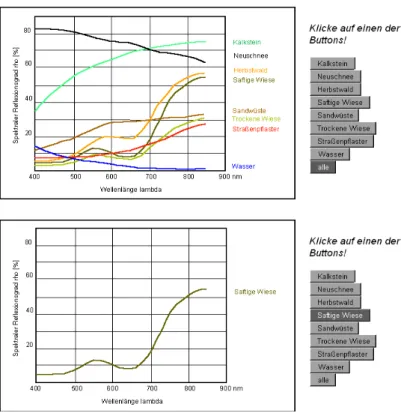
JavaScript is used in several parts of the remote sensing tutorial: E.g. simple mathematical conversions are performed with the help of click buttons, and the calculator is programmed in JavaScript. JavaScript is also chosen for two other tasks: When using graphics, authors often have to compromise between the space available for the image on screen and the readability of the contents. In many cases this problem is solved by displaying similar graphics one after another. This slideshow-effect which is triggered by mouse click, makes it possible to bring out important details of interest. For example, Fig. 4a/b illustrate how reflection spectra of selected objects are displayed by clicking the appropriate button.
JavaScript is further of importance for page navigation. If the student proceeds to the next lesson or chapter the main frame must be updated and the table of contents must be changed. JavaScript allows to easily alter the contents of several frames simultaneously.
3.4 Java
Java is an object-oriented programming language, highly suited for web applications. Java programs are compiled into an intermediate language called Java bytecodes which is machine independent (write once, run anywhere). At runtime, the bytecodes are translated into instructions for the particular platform. Bytecodes can run on any machine that has a Java interpreter, which means an implementation of the Java Virtual Machine. The code is either executed as an application which runs stand-alone from the command line or as an applet that runs under a Web browser. The latter makes Java programs interesting for computer based training courses. Applets are embedded in a HTML document using the <applet> - tag. Because the platform-independent bytecodes need to be interpreted, Java is generally slower than native code (10-20 times slower than C). However, smart compilers, well-tuned interpreters, and just-in-time bytecode compilers can bring Java's performance close to that of native code without threatening its portability.
To date the TUB has not yet developed its own Java-Applets. But the TUB has integrated links to other authors e.g. to LDIPInter (Höhle, 1999) and to NASA’s J-Track 3D, a Java Applet visualizing the tracks of all satellites known to NASA, really makes the subject come alive. (http://liftoff.msfc.nasa.gov/realtime/jtrack/3d/JTrack3d.html).
3.5 Plug-ins
As mentioned earlier, user attention to CBT-pages rises with the variety that the training course offers. This can include audio data where applicable, but video animations, movies, 3D data etc. can especially contribute to a better understanding of the course material. Generally web browsers do not support these specific file formats and have to be extended by plug-ins. Plug-ins are software programs that can be added to the browser to increase the types of files it can read. For instance, in order to include vector based animations, Macromedia Flash is needed, Real Player is required
Figure 4a: Reflectance spectra
to stream audio and video data, or Cosmo Player to add three-dimensional VRML graphics. Even Authorware designed tutorials, such as PRONET (Kainz, 1996) can now be made accessible over the Web after implementation of the Shockwave plug-in.
In general, free readers for the above mentioned applications are available for PC and Macintosh computers. In many cases UNIX is not supported, which unfortunately is an undesirable restriction.
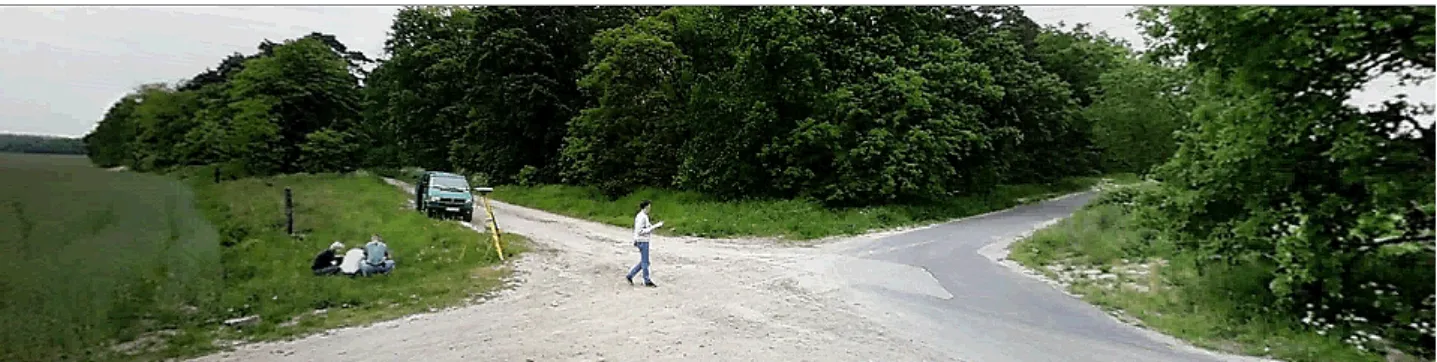
The TUB's tutorial uses QuickTime VR files for walking through navigable 360 degree panorama (Fig. 5). So called ‘hot spots’ allow the user to move from one image to another. For display purposes, the QuickTime plug-in is needed, which is Apple Computer's standard for digital audio, video and animation. In oder to get an overview of the area covered by the remote sensing imagery, the student now is able to look around in each direction of the panorama. This may be a good means to help the student familiarize himself or herself with the objects on the ground and thus with the spectral reflectance of these objects. Further it can help the student to define training classes and to understand how to identify optimal ground control points for image rectification.
Figure 5: Part of a 360 degree Quicktime VR image
4
CONCLUSIONSThe demand for a life time of studying makes it necessary to use WWW technologies for a quick and efficient distribution of training materials. Faced with this challenge the Photogrammetric Department at the TUB is involved in the development of an Internet based training program covering various remote sensing topics. It forms the basis for future extensions and is open to new topics and updates which can easily be integrated. The authors used standardized HTML commands to avoid incompatibilities, which arise from the attempts of leading browser manufacturers to establish own developments as pseudo-standards. Implementation especially was done without using different dynamic HTML features. New standards, confirmed by W3-consortium certainly will influence our future work.
Some other unsolved tasks concern user administration and the introduction of individual report files documenting students' progress and performance. Further communication between students and authors needs to be optimized, to allow for a closer contact between course participants and lecturers and to provide a forum for discussions and problem solving.
Our tutorial is accepted by students of Geodesy as additional input for preparing for their examinations. In general, the tutorial has been well received, and constructive critique from users has already led to improvements of the course. There is, of course, still much more room for improvement and we welcome any suggestions or comments.
SELECTED LINKS TO WEB-BASED CBT-SITES FOR REMOTE SENSING Höhle:http://sunsite.auc.dk/LDIPInter
EU Castle-Projekt:http://castle.nlr.nl
National Learning Network:http://www.nln.met.ed.ac.uk
The Remote Sensing Core Curriculum:http://www.umbc.edu/rscc
Canada Centre for Remote Sensing (CCRS):http://www.ccrs.nrcan.gc.ca/ccrs/eduref/tutorial/indexe.html Pronet:http://pronet.itc.nl/pronet-cce/main.htm
REFERENCES
Cho, K., Murai, S. (1997): Toward the optimization of PC-based training. ISPRS Journal of Photogrammetry & Remote Sensing 52, pp. 247-252.
Foresman, T.W. et al. (1997): Internet teaching foundation for the Remote Sensing Core Curriculum program. ISPRS Journal of Photogrammetry & Remote Sensing 52, pp. 294-300.
Höhle, J. (1997): Computer-assisted teaching and learning in photogrammetry. ISPRS Journal of Photogrammetry & Remote Sensing 52, pp. 266-276.
Höhle, J. (1999): Rechnerunterstütztes Lernen und Lehren über digitale Photogrammetrie mit PC und Internet. Photogrammetrie, Fernerkundung, Geoinformation (PFP), 3/1999, S. 201-205.
Hassenpflug, W., Riechelmann, L., John W. D. (1998): CASTLE - die Entwicklung eines tele-interaktiven Kurses zur Einführung in die Fernerkundung. Publikationen der DGPF, Band 6, S. 365-369.
Kainz, W., Antimisiaris, N.G., Samara, V. (1996): PRONET – Multimedia computer based on-line training and support service for professionals. IAPRS, Vol. 31, Part B6, Vienna, pp. 74-78.
MacLaren, I., Duncan, Ch., Vaughan, R. (1998): Using the World Wide Web for remote sensing education and training. In Gudmandsen, P.: Future Trends in Remote Sensing, pp. 463-467.
Pohl, Ch. (1999): Multimedia Tutorials as modern tools in education and training. ITC News, Dec. 1999, pp. 2-3. Stubkjaer, E. (1997): The World Wide Web and university education in remote sensing. ISPRS Journal of Photogrammetry & Remote Sensing 52, pp 281-293.