Immersive Virtual Environments
Adalberto L. Simeone
KU Leuven, Belgium [email protected]Marco Speicher
DHfPG, Germany [email protected]Andreea Molnar
Swinburne University, AustraliaAdriana Wilde
University of Southampton, UKUniversity of St Andrews, UK [email protected]
Florian Daiber
DFKI, Germany [email protected]ABSTRACT
This work studies the role of a human instructor within an im-mersive VR lesson. Our system allows the instructor to perform “contact teaching” by demonstrating concepts through interaction with the environment, and the student to experiment with interac-tion prompts. We conducted a between-subjects user study with two groups of students: one experienced the VR lesson while im-mersed together with an instructor; the other experienced the same contents demonstrated through animation sequences simulating the actions that the instructor would take. Results show that the Two-User version received significantly higher scores than the Single-User version in terms of overall preference, clarity, and help-fulness of the explanations. When immersed together with an in-structor, users were more inclined to engage and progress further with the interaction prompts, than when the instructor was absent. Based on the analysis of videos and interviews, we identified design recommendations for future immersive VR educational experiences.
CCS CONCEPTS
•Human-centered computing→Virtual reality; •Applied computing→Interactive learning environments.
KEYWORDS
Virtual Reality; Learning; Educational Virtual Environments
ACM Reference Format:
Adalberto L. Simeone, Marco Speicher, Andreea Molnar, Adriana Wilde, and Florian Daiber. 2019. LIVE: the Human Role in Learning in Immersive Virtual Environments. InSymposium on Spatial User Interaction (SUI ’19), October 19–20, 2019, New Orleans, LA, USA.ACM, New York, NY, USA, 11 pages. https://doi.org/10.1145/3357251.3357590
1
INTRODUCTION
The use of technology to enhance learning has attracted research interest since the 1980s. The range of methods explored broadens
Permission to make digital or hard copies of all or part of this work for personal or classroom use is granted without fee provided that copies are not made or distributed for profit or commercial advantage and that copies bear this notice and the full citation on the first page. Copyrights for components of this work owned by others than ACM must be honored. Abstracting with credit is permitted. To copy otherwise, or republish, to post on servers or to redistribute to lists, requires prior specific permission and/or a fee. Request permissions from [email protected].
SUI ’19, October 19–20, 2019, New Orleans, LA, USA
[image:1.612.318.559.230.366.2]© 2019 Association for Computing Machinery. ACM ISBN 978-1-4503-6975-6/19/10. . . $15.00 https://doi.org/10.1145/3357251.3357590
Figure 1: A participant experiments with a teleportation technique in theSingle-User version (left). The instructor demonstrates object manipulation to a participant, as seen from their perspective in theTwo-Userversion (right).
as fast as technology advances, encompassing new devices and approaches: from computers and smartphones to the consumer-grade Head-Mounted Displays (HMD) of today. Early efforts in using Virtual Reality (VR) to support education aimed at designing immersive “virtual” classrooms [35], or learning experiences set in non-immersive multi-user settings such as “Second Life” [12, 29].
The availability of affordable HMDs has made their large-scale use economically viable. We envision a near future in which stu-dents and instructors could both be immersed in a Virtual En-vironment (VE). There are reasons to think that this would im-prove the way we communicate concepts that are inherently three-dimensional, as suggested by existing evidence that VR could help reduce the performance gap between the students struggling with spatial ability and those who do not [7]. However, available com-mercial VR educational systems are typically designed for distance learning, based on pre-recorded media, or using “virtual tours” as a style of teaching delivery. Current research provides no examples of VR systems supporting free-form teaching in multi-user envi-ronments, with most focusing on game-like scenarios [16, 29, 30].
allowing instructors to deliver their explanations of the subject material by interacting with the VE, in what could be described as a “live performance in VR” (see Figure 1).
In this vision of learning, we focused on exploring the design space of contact teaching in VR. We designed two versions of our VR educational system,LIVE(Learning in Immersive Virtual
Environ-ments— source code available at https://github.com/AriaXR/Live).
Both focus on a 3D Interaction lesson structured in four parts, each dedicated to one of its fundamental tasks and the related interaction techniques [23]. The key difference between the two versions is the presence or absence of a human instructor. In theTwo-User ver-sion, the instructor demonstrates a set of interaction techniques by directly interacting with the VE. In theSingle-Userversion, demon-strations are delivered via animation sequences, i.e. not as recorded videos but as pre-defined keyframed sequences that replicate the ac-tions in the 3D world the human instructors would have performed. Both allow users to experiment with the interaction techniques through a series of “interactive prompts”.
This paper makes the following contributions. We describe a design of a VR lesson based on the idea of connecting different “VR slides”, each providing the scenario supporting teaching and student experimentation. We report the results of a between-groups study in which 36 participants were randomly assigned to one of the two versions. Our main goal was to evaluate how having a human instructor in the system affected the way students used it. We measured the time users spent in the system and how far they progressed in performing the tasks required. Results show that users engaged with the interaction prompts for significantly more time and progressed further in theTwo-Userversion. Overall the
Two-Userversion was rated significantly higher than theSingle-User
version in terms of subjective preference, clarity and helpfulness of the explanations provided in the system. We also analysed the interviews and the first-person VR video recordings to identify the issues that affected the user experience, which we present as a set of guidelines for the design of future immersive learning experiences.
2
RELATED WORK
In the following, we discuss the related work from the perspec-tive of both academic and commercial works featuring VR-based “Educational Virtual Environments” (EVEs).
EVEs can stimulate interactivity [36] and experience situations that cannot be accessed physically [16], providing 3D spatial interac-tion, immersion and real-time interaction [31]. Immersing students in the educational process is associated with higher mastery and knowledge retention [11, 29]. VR allows users to interact with the environment and its objects, constructing knowledge via this inter-action [41], allowing for a constructivist approach to learning. As VR facilitate learning by doing, students are more likely to learn new concepts [6]. Despite recent progress, Fowler argues that there is still a lack of a VR “pedagogy” taking into account the unique requirements of this medium [15].
Mikropolous and Natsis [30] surveyed over 41 works in 2011 and found that only 16 of these use immersive or semi-immersive visu-alizations. The authors conclude that more empirical studies in this field are necessary to highlight the advantages of VR. Indeed, the research community focused mostly on non-immersive educational
experiences [11, 29], by studying learning in multi-user online “vir-tual worlds” such as Second Life as examples of VR technologies even though these were experienced through regular computer screens and systems [12, 21, 25, 35], or 360° videos experienced through VR headsets [17]. Although in a broader sense any kind of environment created through computer graphics could be defined as an example of a “virtual reality”, with this work we want to stress the difference between the use of non-immersive or semi-immersive VR technologies and the novelty of using semi-immersive VR technologies as enabled by the use of HMDs to support “VR contact teaching” in EVEs, as demonstrated in this work.
2.1
Immersive Educational Virtual
Environments
An initial exploration of collaboration within immersive EVEs was reported by Jackson and Fagan in 2000 [19]. Their study provides in-formal insights into the use of a VR application focusing on climate change, experienced by three groups of participants (single users, two student peers, and a student plus an instructor). The authors concluded that significant technological breakthroughs in VR were necessary before EVEs could become viable. However, later studies found positive evidence that shared learning experiences can facili-tate social interaction [11, 29]. In our work, we did not study the representation of the avatar used for the instructor (as this would warrant its own study). We studied the effect of a human instructor in an EVE, which led us to choose a neutral abstract representation (see Figure 2). Bailensonet al.showed that realistic instructors can engage students more via augmented social perception and that the behaviour of co-learners affects learning outcomes [3].
A successive 2015 survey reviewed works published in 2013-2014 [16]. However, several were still work-in-progress and lacked formal evaluations or longitudinal studies. The authors also found that a limited number of these focused on children (10-17 years old) but none with under 10s. A study by Passiget al.[32] focuses on a Cognitive Modifiability Battery test administered to children between six and nine years. The test requires children to solve a series of problems through the manipulation of blocks. The study compared a HMD version to a 2D and a tangible blocks alternative. Results show that the HMD version showed significantly more improvement than the 2D version. Vishvanathet al.[40] report the introduction of low-cost VR (through Google Cardboard) in an after-school learning centre in Mumbai, India. The VR experience chosen was “Google Expeditions” which was positively received by the 16 children (6thand 7thgrades) who took part in the study. Chenget al.compared a VR version of “Crystallise” (a game dedicated to learning Japanese) to a non-VR version [9]. Although VR did not improve learning outcomes, they found that participants felt more immersed in Japanese culture while in VR. Bertrandet al.[4] looked at whether presentation methods (head-mounted display or immersive display) affected learning outcomes, finding that HMD users performed faster and more accurately with a HMD.
Liaoet al.studied the introduction of virtual classmates for a VR
of a non-immersed teacher to a standalone experience based on pre-recorded video of the teacher’s explanations [5]. They found that the live version led to better gains in terms of learning outcomes. Our work differentiates from these in its focus on isolating the effect of the presence of a human instructor that is immersed in the VE together with the student, and how this affects the use of the system. Our research characterises the aspects of designing and supporting this novel approach of contact teaching in VR, which is missing from the above research.
2.2
Commercial Virtual Reality Systems
We tested a number of VR educational systems that were avail-able on theSteam VR Storeat the time of writing.Engage[18] is a free multi-user “presentation platform” that uses pre-designed VR lessons that can be experienced either in a traditional classroom or in a contextual environment. Lessons can make use of “super-natural” animations of 3D objects to highlight the remarks of the lessonr’s 3D avatar. The second type of experience is similar to a virtual tour. Both offer limited interactivity: users can pick up and inspect objects and move about the VE.Edmersiv[14] is a VR learning application that shares some similarities to the design and structure of our system. It features a large VE that is traversable through teleportation via navigational markers. These lead to inter-active prompts, such as objects that can be manipulated to highlight specific concepts.
BothBuzz Aldrin: Cycling Pathways to Mars[1] andThe Body
VR: Journey Inside a Cell[37] follow the “virtual tour” approach,
guiding the user on a tour of a potential Mars Colony or of the hu-man body at different levels of miniaturisation.The Stanford Ocean
Acidification Experienceis an interactive VR experience which
de-scribes how climate change affects underwater ecosystems [39]. Touching 3D objects allows the user to progress in the lesson. A successive research project based on this material found that the use of immersive VR was beneficial in helping users learn and foster interest about the acidification process [27].
The above applications represent the current state of the art for immersive EVEs. However, with the exception of the study by Markowitzet al.[27], the rest have not been the subject of a formal evaluation. Our research aims at formally evaluating two different designs for EVEs: an individual learning experience based on a pre-scripted narrative similar to the commercial works previously described and one supported by a human instructor.
3
SYSTEM
We posit that VR is especially suited to support the teaching of concepts that are inherently three-dimensional. The design of the system supporting contact teaching in VR described in the following can also be applied to other subject areas, either in the sciences or the humanities.
We chose 3D Interaction as the subject material because the project aimed at enhancing the learning offer of a university course on topics related to VR and 3D Interaction. In our specific imple-mentation, the system allows students to learn about the fundamen-tal 3D tasks of 3D Interaction [23] through experimentation with some related interaction techniques, while immersed in VR. Three-Dimensional Interaction is a subject taught at various academic
institutions throughout the world, either as a course in its own right or as part of other closely related subjects such as Augmented and Virtual Reality.
3.1
User Roles
We developed our VR prototype so that it could support both co-located multi-user learning experiences and students learning on their own. In our VR multi-user learning experience, two or more participants are located in the same physical environment, and experience the same VE. The“instructor”user assumes the role of the teacher and is in charge of providing the actual oral explanation, performing demonstrations, and also controlling the progression of the lesson. The“student”user, as the name implies, is the one participating to the VR lesson with the intent of learning new knowledge. Although we tested our system with two simultaneous users (the instructor and the student), it can support more. With sufficient resources, VR multi-user systems have been shown to support 30 co-located users [26].
Since the study of user representation in an educational setting is an area that warrants its own specific studies [30], we opted for an abstract avatar: a blue floating “orb” (in correspondence of the user’s headset, see Figure 1), next to which the movement and appearance of that user’s controllers are tracked.
3.2
VR Lesson steps
A “VR lesson” in the LIVE system is structured as a succession of several “steps”. Each step can be compared to an informative slide in a presentation. Where a conventional slide can use supporting media such as images, video, or audio, VR material can additionally include dynamic changes to the users, to the environment, and to the information they have available. Each step can be a combination of one or more of these elements. These are:
Information: the contextual media shown in the information window linked to the controller assigned to the non-dominant hand. Our prototype supports text and audio materials, but future versions can conceivably include other types of media.
Environment: these can either be pre-defined animations show-ing changes to the environment (e.g., animatshow-ing the introduction of an object needed to support the explanation of a concept, or transitioning to a different layout of a VE, etc.) or demonstrations, typically used in the single-user version (e.g., an animation of a hand grabbing an object and placing it in a specific container, or a controller showing how to interact with an object-based menu).
Users and System: these specify which changes to apply to users (e.g., switching to a different controller technique, for example from a controller displaying a pointer to interact with a world-based 3DUI from a distance, to a controller capable of manipulating objects at arm’s reach) and to the state of the system (e.g., whether or not to allow interaction with specific objects; resetting the state of an object so that users might repeat a particular task again, etc.).
duration of each voice clip, and set the advance button to appear after three seconds past the length of each clip, in order to avoid users progressing too quickly by mistake.
In all other cases, users cannot advance until they have satisfied the conditions, which are checked every second by the system. If these checks return with success, the advance button appears on the 3D UI attached to the non-dominant controller. In theTwo-User version, it is the instructor user that is shown the advance button, whereas in theSingle-User case, the button is shown to the user directly. Further, whenever the information window is updated or the advance button appears, the controller vibrates briefly.
3.3
User Interface
We used the Vive’s two controllers as input devices. Depending on the 3D interaction technique in use, the appearance and capabilities of the controller associated to the dominant hand can change. The appearance of the controller assigned to the non-dominant hand displays a floating window containing textual information related to the current step of the lesson, and a button that allows users to progress to the next step, after meeting the requirements. In
theTwo-Userversion, this button is only shown in the instructor’s
interface. The information shown in the non-dominant controller contains the text of the oral explanations the instructor will give. In theSingle-Userversion, audio explanations were provided by playing the associated clip, recorded with a synthesised male voice.
4
THE IMMERSIVE VR LESSON ON 3D
INTERACTION
University courses on 3D Interaction and related topics will most likely dedicate one or more lessons to the four fundamental tasks of 3D Interaction, Selection, Manipulation, Navigation, and System-Control, as described in LaViolaet al.’s book titled “3D User In-terface: Theory and Practice” (2ndedition) [23]. We designed two different versions of a lesson on this topic using the same source ma-terial: one where an instructor and a student are both present in the same VE while co-located in the same real environment (Two-User) and one where the student is the only user present (Single-User).
[image:4.612.320.559.87.219.2]With no prior examples of lessons delivered in immersive VR, the design of ours was informed by the theory of “Experiential Learning” [22] and addresses the three learning stages introduced by Fowler: conceptualisation, construction, and dialogue [15]. Each scenario presents a set of key concepts and interaction techniques. The techniques are then demonstrated either by the instructor who directly interacts with the environment (Two-Userversion), or by means of an in-world animation that replicates the actions the instructor would have taken (Single-Userversion). The demonstra-tion discusses and highlights the algorithmic underpinning of the interaction technique. Students can then construe meaning via ex-perimentation through interactive prompts where they can apply the interaction technique to solve various tasks, which we refer to as “interaction prompts”. Subsequently students are encouraged to reflect on what they have seen and experimented with, before moving to the next scenario. Participants advance by satisfying the minimum requirements and then either communicating their intent to the instructor or by pressing an advance button (Single-User).
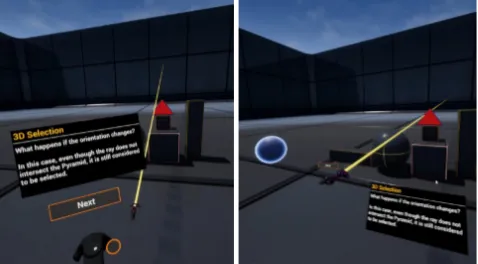
Figure 2:Selectionscenario. Left: ray-casting demonstrated via an animation (Single-User). Right: the instructor demon-strates the concept with the controller (Two-User).
4.1
Selection
The selection scenario focuses on selection by ray-casting against a bounding box enclosing a three-dimensional primitive. In this scenario, the concept of ray-casting and the challenges of selecting objects by means of less-accurate bounding boxes is introduced by showing how the ray emanating from the controller intersects the displayed objects.
The objects visible in Figure 2 reacts to an intersection with the ray by changing their colour from black to red (and vice versa when they are no longer intersected). To demonstrate the common prac-tice of determining an intersection by testing against a bounding box, the ray changes its orientation in such a way to still intersect the bounding box without intersecting the 3D model (a pyramid). Afterwards, the user is given the opportunity of experimenting by aiming the controller at any object and pressing the trigger to select it, which will show the associated bounding box. After having selected at least one object, the scenario can conclude.
These actions are either performed by the instructor in the Two-Userversion, or by a controller which appears in the scene in the
Single-Userversion.
4.2
Manipulation
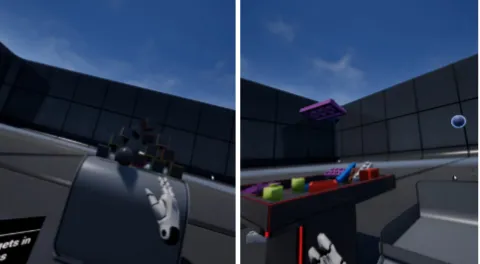
In this scenario two manipulation techniques are demonstrated. One is based on the hand metaphor to interact with objects at arms’ reach, and the other is theGo-Gotechnique by Poupyrevet al.[34] to interact with objects farther away.
Figure 3:Manipulation scenario. Left: the user throws an object at a target (Single-User). Right: the instructor demon-strates theGoGotechnique (Two-User).
A second interaction prompt is based on theGo-Gotechnique [34], and allows users to manipulate distant objects through a non-linear mapping based on the controller’s distance to the user’s body. The demonstration thus explains the concept of the non-linear-mapping and its implementation. The user is asked to use the Go-Go technique to sort a set of 24 Lego® bricks from plates, in the two containers (see Figure 3, right). In both prompts users can continue after having moved a brick from one container to another at least once.
4.3
Navigation
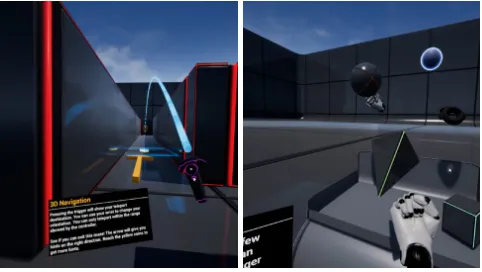
In this scenario the user learns about three navigational tech-niques: “on-rails” navigation, a “teleport” technique, and the World-in-Miniature (WiM) [33]. The on-rails technique moves the user through a series of “gates” placed along a pre-defined route. As the user’s involvement is passive, we did not consider it as an in-teraction prompt. To introduce the second technique, a labyrinth emerges from the floor. An animation of a controller or the in-structor will then demonstrate the teleport technique (based on the implementation available in the Unreal Engine (see Figure 4, right). The demonstrations introduce the problem of moving in VEs, and how these solutions address the quintessential problem of VR locomotion, the disparity between the VE and the physical space available. The differences between a pre-defined navigational path, and the use of an interaction technique which instead allows the user to choose its teleportation location are discussed, along with an explanation of how this location is calculated. The user is then asked to find the exit. To facilitate this task, a set of eight waypoints (shown as rotating coins) are placed in the labyrinth. An arrow in the user’s view indicates the direction of the following one. In the
Two-Userversion, the instructor followed the user a few virtual
steps behind.
[image:5.612.55.295.87.219.2]Successively, the user is presented with the World-in-Miniature (WiM) technique (see Figure 4, left). The demonstration introduces the concept of a WiM and how it provides an alternative method of locomotion. The controller in the user’s dominant hand is replaced by a miniature version of the VE. In theSingle-Userversion, a com-bination of text, audio and animations illustrate how the technique works. In theTwo-Userversion, the instructor teleports next to the
Figure 4: Navigation scenario. Left: World-in-Miniature technique (Single-User). Right: the user explores the labyrinth together with the instructor (Two-User).
user and explains the technique with their own WiM-controller. Users can choose their target location by moving an indicator that appears when they touch the trackpad. They can move it forward by touching the top of the trackpad, and rotate via the left or right areas. The bottom part allows backtracking. Once the location is chosen they can teleport themselves there by pressing the trigger. Both prompts can be completed once at least one waypoint has been reached.
4.4
System-Control
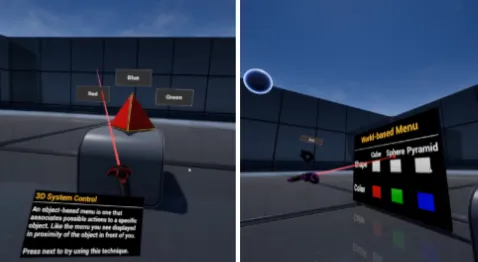
In this scenario, users learn the concept of System-Control and how these methods are used to affect the state of a system. The demonstration focuses on three different types of 3D menus and how their design differs from conventional WIMP-based 2D im-plementations. These 3D menus are differentiated by where they are anchored to, following a taxonomy described by Dachseltet al. [10]: device-based menus, object-based menus, and world-based menus. Users can then experiment through three related interaction prompts. In theTwo-Userversion, the instructor demonstrates each menu by using their own controller. In theSingle-Userversion, an animated controller interacts with the menu options. These menus affect the appearance of a demonstrator object placed in front of the user (see Figure 5, left). Users are able to progress only after having used each technique at least once.
The first is a device-based radial menu displaying three primitive solids (a cube, a pyramid, and a sphere) around the controller. Users can choose the desired option with the trackpad. The demonstrator object will change shape accordingly. The second is an object-based menu. Three 2D buttons appear around the object whenever it is intersected by a pointer controller. Each option is associated with a colour the user can apply to the demonstrator object. The third is a world-based menu (see Figure 5, right) where two rows of widgets replicate the functionality of the previous prompts.
5
USER STUDY
Figure 5:System-Controlscenario. Left: animation demon-strating the object-based menu (Single-User). Right: the in-structor demonstrates a world-based menu (Two-User).
materials; 2)analyse user interactions with the system, by measuring the potential for engagement in terms of time users spent interact-ing with the system , and how far they progressed in performinteract-ing repeatable tasks (the brick-sorting and the navigation prompts).
We ran a between-groups study involving two versions of the same learning material. In one group participants were paired with a human instructor, who performed the concept demonstration by following a pre-defined script (Two-User). In the other group the demonstrations were recorded using key-framed animations that re-enacted the same actions that would have been performed by the instructor and then played back to the user (Single-User). These animations were not video recordings but pre-scripted sequences of object movements and status changes (in the Unreal Engine these are calledLevel Sequences, equivalent to Unity’sTimelines). Indeed, in both versions, participants were at all times immersed in VR.
We do not include a conventional lesson because our indepen-dent variable is represented by the presence (or absence) of a real human instructor. A conventional lesson would alter not only the medium through which it is enabled, but also employ different methods for the three learning stages, as described by Fowler [15], thus making a direct comparison problematic.
5.1
Apparatus
To build the system for the VR lesson, we used the Unreal Engine (“Unreal” henceforth). All of the logic for the system was created usingBlueprints, Unreal’s visual programming language. All assets used in the created VEs come from Unreal’s “Content Examples” or other free sources. A VR lesson in our system can be created by defining the logic for the four elements we previously defined in Section 3.2. The four scenarios have eight steps and involve one to three interaction prompts. We used two PCs with nVidia GTX 1070s, each connected to an HTC Vive headset. In theTwo-User version, the participant acting as student used the server PC in order to minimise any issue related to network latency, and the instructor used the second machine. Any interaction performed by the student would be replicated to the instructor’s PC and vice versa. Both VR systems ran at over 60 fps.
5.2
Participants
We recruited a total of 36 participants (14 female) aged 19-51 (M= 30.67,SD=8.75): 18 each for the single and two-user VR groups. Participants were randomly assigned to one of the two groups. They were compensated with a voucher for an online retailer. Their self-reported knowledge of 3D Interaction concepts was as follows, on a scale from 1 (lowest) to 7 (highest:Two-User,M=3.85,SD=
1.95;Single-User,M : 3.22,SD=2.05. Their familiarity with VR
technologies and computer games were, respectively:Two-User,
M =4.30,SD =1.81−M = 5.50,SD = 1.88;Single-User,M =
3.44,SD=2.15−M=5.47,SD=1.91.
5.3
Task & Procedure
Participants were introduced to the experiment process and were asked for their informed consent to being recorded and having their data collected for further analysis, in addition to filling a demographics questionnaire.
In theTwo-Userversion, both the students and the instructor were sitting on chairs placed in the middle of the tracking space. They were given the two Vive controllers and received an expla-nation of the differences between the controller assigned to the non-dominant hand and the one assigned to the dominant hand. The instructor was placed in the corresponding location in the physical environment to maintain the same spatial relationship they had in the VE. The demonstrations performed by the instruc-tor followed a pre-defined script and were rehearsed to have a duration comparable to the pre-recorded animations. However, as they were performed by a human instructor, it was not possible to replicate them identically. The instructor only engaged the student in conversation to provide the oral explanations supporting the demonstrations.
In theSingle-Userversion, the student participant was similarly sitting on a chair in the middle of the tracking space. In addition to the controllers, they wore a headphone to listen to the pre-recorded voice explanations. The student started the lesson while always facing towards the location in the VE where the interaction would take place.
After the lesson finished, all participants filled out a question-naire about clarity, appreciation, and usefulness of the textual expla-nations, the demonstrations, the interactive prompts, and how well they performed and how much they appreciated the experience. The VR lesson lasted on average 20 minutes, and the study took on average 45 minutes in total, as we conducted a semi-scripted interview with each participant to discuss their experience and elicit feedback on the system.
5.4
Video analysis
We recorded each participant’s first-person view from the VE. These videos were analysed from both a qualitative and quantitative per-spective. With the objective of understanding how to improve the design an immersive EVE, we identified all events indicating issues in following the demonstrations and interacting with the system.
0 60 120 180 240
Selection Manipulation Navigation System−Control Scenario
Time (s)
[image:7.612.318.555.84.238.2]Group: Single−User VR Two−User VR Interaction Time
Figure 6: Times users spent interacting, grouped by scenario and whether they were in theSingleorTwo-Usercondition.
0 30 60 90 120
Selection Manipulation Navigation System−Control Scenario
Time (s)
[image:7.612.58.297.86.237.2]Group: Single−User VR Two−User VR Information Window Time
Figure 7: Time of full visibility of the Information Window in the foreground (by scenario and group).
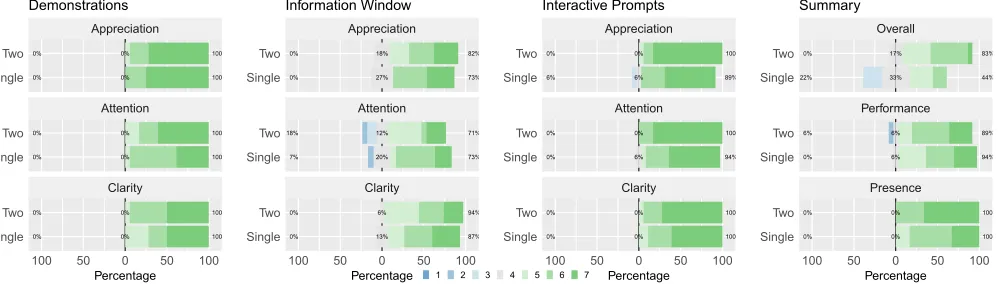
0% 0% 100% 100% 0% 0% 0% 0% 100% 100% 0% 0% 0% 0% 100% 100% 0% 0% Clarity Attention Appreciation
100 50 0 50 100 Single Two Single Two Single Two Percentage Demonstrations 0% 0% 73% 82% 27% 18% 7% 18% 73% 71% 20% 12% 0% 0% 87% 94% 13% 6% Clarity Attention Appreciation
100 50 0 50 100 Single Two Single Two Single Two Percentage Information Window 6% 0% 89% 100% 6% 0% 0% 0% 94% 100% 6% 0% 0% 0% 100% 100% 0% 0% Clarity Attention Appreciation
100 50 0 50 100 Single Two Single Two Single Two Percentage Interactive Prompts 22% 0% 44% 83% 33% 17% 0% 6% 94% 89% 6% 6% 0% 0% 100% 100% 0% 0% Presence Performance Overall
100 50 0 50 100 Single Two Single Two Single Two Percentage
1 2 3 4 5 6 7
Summary
Figure 8: Distribution of questionnaire responses.
how far user progressed in tasks that had a goal. For the manipula-tion task (see Secmanipula-tion 4.2), the number of bricks and plates moved to the correct position; for the navigation task (see Section 4.3), the number of coins reached. To extract these interaction times we used explicit video clues visible in the videos (such as an object being grabbed or released, a command being selected, etc.).
We also measured the time that the information window was focused on. Presenting information through text is a fundamental characteristic of conventional lessons. However, in a VE it is a non-trivial problem [20]. Understanding how users interacted with the information windows can provide insights on how to improve this aspect of VR educational system.
Since we did not have access to a VR eye-tracker, we analysed the explicit interaction cues in the video. For example, if users were clearly manipulating an object while the information window was in the foreground, we did not include those intervals in the measurements for the interaction window. In both cases, times are accurate within 10 ms and were taken in correspondence of each interaction prompt and aggregated per scenario.
6
RESULTS
In this section, we present the quantitative results we collected by analysing the video recordings and the questionnaire data. In order to analyse their interaction behaviour, we coded each user’s activity as described in Section 5.4. From the video recordings, we assigned codes to each segment of time in which users were either busy interacting, looking at the user interface, or idle.
A Shapiro-Wilk normality test was performed on the quantitative data. Since the assumption of normality was violated (p<0.01) we used non-parametric tests (Mann-Whitney U Test) for the analysis of both questionnaires and other data logged in the system.
6.1
Interaction Behaviour in VR
For each of the four scenarios, participants from theTwo-Usergroup spent significantly more time (p≤0.01,r1=0.22−0.36, minimum and maximum for the four tasks) engaging with the interaction prompts (see Figure 6), an average difference of 66%. In both cases, before starting, participants were instructed that they could interact
[image:7.612.59.558.296.438.2]as long (or as little) as they wanted, and only the “net” times were measured (see Section 5.4).
In order to further characterise the quality of the time spent engaged with these interaction prompts, we analysed whether progress towards two repeatable tasks differed between groups. These were the brick-sorting and the labyrinth interaction prompts, as they exemplified more complex tasks which needed the user to perform a set of actions in order to be completed. The other tasks were structured in such a way that successful completion could be achieved by a single action (e.g., selecting an object, throwing an object to the stack, teleporting to the exit of the maze with the WiM, activating the option of the menus).
There was a significant difference in the number of bricks sorted in the manipulation task (W =22.5,p<0.01,r=0.47). Participants in theSingle-Usergroup moved an average of 4.53 (SD = 3.50) bricks, as opposed to the 10.64 (SD=3.67) of theTwo-Usergroup, of the 24 bricks that were randomly distributed between the two containers. There was a similar significant difference in terms of “coins” collected in the navigation task, where the set of eight coins represented a sequence of waypoints to follow in order to exit the labyrinth (W =50,p=0.01,r =0.33). Participants in the Single-Usergroup reached an average of 4.47 waypoints (SD=2.50) with three participants managing to exit the maze, while those in the
Two-Usergroup reached an average of 6.79 waypoints (SD=1.81),
with nine who found the exit.
We also found significant differences (see Figure 7) in terms of the interval of time in which the information window was completely visible in the foreground, per scenario (p≤0.01,r=0.22−0.32). In both theSingleandTwo-Userversions, the information window showed the textual captions to the voice-overs/oral explanations. Participants from theSingle-Usergroup spent, on average, more than twice as much time (125%) with the window in the foreground.
6.2
Questionnaires
After the VR lesson, participants were asked to complete an exit questionnaire collecting their subjective feedback on two aspects of their experience by expressing a score on a 1 to 7 scale (1: lowest, 7: highest; see Figure 8).
The first focused on evaluating how features such as the
demon-strations, theinformation window, and theinteraction promptswere
received by users. The questions asked to which extent they found the feature to be:clear, unambiguous, and easy to follow; whether
ithelped to solve the task; whether it wasappreciated; the
ex-tent to which it captured theirattention. These features all re-ceived high scores. We found significant differences (W =85,p= 0.01,r =0.43) on theclarityof the explanations. Participants of
theTwo-Usergroup found the explanations to have a higher
clar-ity (M = 6.44,SD = 0.75) than those in theSingle-User group (M=5.72,SD=0.83). Similarly, they rated thehelpfulnessof the explanations significantly higher (W =88,p=0.01,r=0.42) than those in theSingle-Usergroup. These received mean scores of 6.50 (SD =0.79) in theTwo-Usergroup, and 5.89 (SD =0.76) in the
Single-Usergroup. The content of these explanation was identical,
while the delivery varied between the two groups.
The second aspect focused on evaluating participants’ subjective assessment of theirperformancewith the interaction prompts, their
feeling ofpresence, and theiroverall preferenceof the system. Partici-pants felt they performed significantly better (W =78,p<0.01,r= 0.46) in theTwo-Usergroup (M=5.39,SD=0.85) than the Single-Usergroup (M=4.39,SD=1.04). Finally, participants expressed a significantly higher overall preference (W=99,p=0.03,r=0.37) for theTwo-Usersystem (M =6.67,SD=0.49) than those in the
Single-Usergroup (M=6.17,SD=0.71). No significant differences
were found in terms of subjective feeling ofpresence(p=0.80).
7
DISCUSSION
Thanks to the increasing affordability of VR technologies, instru-menting a classroom with HMDs to allow students to experience a shared VE has become feasible. Due to the broad scope of this area, we focused on how the presence or absence of a human instructor affects user interaction behaviour. In the following we discuss the results from the perspective of the role of the instructor user and of teaching in VR. We further provide guidelines for the design of future EVEs and a discussion of the limitations and ethical concerns of such a system.
7.1
Contact Teaching in VR
This work represents one of the first attempts of studying the impact of contact teaching in VR, where the majority of works in the same area have focused on the use of pre-scripted learning narratives. Results show that the presence of an instructor has beneficial effects.
User Engagement— We analysed the time spent interacting with
the lesson’s content to understand whether any difference in terms of usage behaviour existed between the two variants of the system. The aim of the interaction prompts was to provide opportunities for experimentation, so that participants could understand or become familiar with various 3D interaction techniques. They spent 66% more time engaging with the interaction prompts. While more time spent interacting does not necessarily reflect on the quality of that time, when analysing how far users progressed with the repeatable prompts, those who were immersed together with the instructor user showed a greater propension to actually engage with it and complete the task while under no obligation to do so. In the manipulation task, eleven out of the nineteen users in the Single-Usergroup moved fewer than five bricks (the minimum number of bricks moved in theTwo-Usergroup) and four in the manipulation task reached fewer than three coins (likewise, the minimum number of coins reached in the other group, out of eight).
The videos show that the reason why participants of the Single-Usergroup engaged less with the interaction prompts is because they tended to progress as soon as the minimum conditions were met. This is also highlighted by the self-reported performance score, indicating that participants were aware that they tended to rush through the prompts. Conversely, those who appreciated the Single-Userversion of the system cited the lack of an authoritative figure, which increased the feeling of being “alone” in the VE, and relieved them of pressure. Indeed, during the post-hoc interviews we in-quired on this aspect, and being able to learn at one’s own pace was considered as positive by our participants.
by the significantly higher preference for theTwo-Userversion. Participant #9 commented:“It was helpful having an expert there as it gives you confidence that you are doing it right, and you are not
[improvising] your way through it.”The explanations were also
con-sidered significantly better in terms of both clarity and helpfulness when provided by the instructor rather than by a recorded voice. While the content was the same, these scores might have been affected by the delivery of the synthesized voice. However, in a real use-case, a real instructor would be able to provide clarifications and react to unforeseen situations, whereas the individual user learning experience would be more limited in this regard. Further research is necessary to ascertain whether this preference for the presence of an instructor would also translate into better learning outcomes in the long term.
VR Supported Teaching— The first striking difference with
con-ventional teaching is the difficulty in “reading the room”. In the system, avatars had a minimalist representation (a sphere) as we felt the problem of how to depict users goes beyond the scope of this work. The representation used allowed mutual recognition of the avatar’s orientation by means of the tracked controllers, which however was only an estimate. Even when using more realistic avatars, understanding gaze in collaborative VE is a non-trivial problem [2, 3]. Although it might raise ethical concerns (which we discuss subsequently), visualising students’ gazes — whether they are looking at the subject material, rather than at the instructor — might help instructors decide the pace of the lesson.
Spatial Awareness— When both the instructor and students
are in a VE as opposed to a classroom, the issue of the respective spatial location becomes a challenging issue. In a large VE with a non-trivial layout (such as the labyrinth, but this could apply to other environments) once the user is out of view, they have to be actively searched for in order for the instructor to return to them. The use of teleportation techniques, such as in the navigation scenarios can further exacerbate this problem, as users can have virtual locations and orientations that are no longer reflective of the physical counterparts.
7.2
Guidelines for the Design of Immersive
Educational Virtual Environments
We reviewed the first-person recordings of each participant’s expe-rience in the lesson. The following is a list of those issues which were most common among users.
Affordances of Virtual Objects— Reviewing the videos highlighted
how participants in both groups attempted to interact with objects in ways we did not anticipate. This happened most notably in two circumstances. In the first, users attempted to grab objects which were moving as part of a scripted animation, due to them being sim-ilar in appearance with those objects they were interacting with in a previous step. In the second, we noticed that some users attempted to interact with the object around which a menu was displayed (in the System-Control scenario). Since the buttons around the object were interactive, it might have led users to think the interaction capabilities extended to the 3D object as well.
Affordances of virtual objects are not as clear or as widely recog-nised as those portrayed by the elements of a WIMP user interface. This suggest that if there are both interactive and non-interactive
objects in a VE, the interactive ones should have a different design or distinctive features (such as highlighting metaphors) that more clearly communicate their interactive potential.
Rehersals— Participants suggested that there could have been
a further interaction prompt allowing users the opportunity to compare different techniques by switching between them and re-ceiving improved feedback. In our system, technique switching was determined by the logic defined in the specific scenario, for both versions. At each step, the lesson designer could decide which technique each user would use. However, it was not possible to arbi-trarily switch. We think that this support should be controlled and allowed only in specific “consolidation” interactive prompts. In the
Two-Userversion, there is a stronger use-case for this feature. The
instructor can use this feature to explain any difference between techniques, but also to address any impromptu situation that might arise. For example, moving an object with a manipulation technique to a specific position, even though the lesson is not about the con-cept of manipulation. Regarding the second point, participant #27 desired more informative visual feedback on their progression in the interaction prompt. This participant was confused by the red accent in the containers of theManipulationscenario (see Figure 3) which he assumed would turn green after completing the task, but were instead simply decorative.
Information Window— Since results showed that the information
window was focused at for a significantly shorter amount of time when the instructor was present, we think the approach must be re-thought. In theSingle-User, the information window became the crucial point of the system as it allowed users to control the pro-gression, as well as check the requirements. In theTwo-Userversion instead, the focus of the attention during the explanation was the instructor, therefore participants rarely glanced at the information window. Given these observations, placing contextual information where the user is likely to look could be more useful for 3D UIs supporting EVEs in which an instructor is also present, than the device-based approach used in this prototype.
Design of the VR Lesson— The design approach attempted to
reproduce the practice of designing supporting slides for a con-ventional lesson. This approach supported well a lesson structured around a pre-defined narrative. However, due the controlled nature of the experiment, aspects such as classroom discussions, requests for clarifications, individual tests, etc. were not considered.
7.3
Limitations of the LIVE System
Besides the equipment cost, the single major limiting factor is the time necessary to build the VR learning materials. In this research, from design to implementation and testing of the VR versions, it took nine months (not full-time) for one of the authors to produce a twenty minute VR lesson. However, the VR framework had to be built from the ground up, the design of the concept of a VR lesson had to be researched, and the material created. It is conceivable that the design of new lessons will take less time, especially if using an established framework such as the one we built. However, our questionnaire results indicate that these drawbacks are balanced by the attractiveness and overall preference of the VR systems, factors that can improve students’ overall experience.
7.4
Ethical Implications
We have discussed how it could be possible to design an improved version of a VR educational system. Since VR provides the means to obtain much more information from its users than it would otherwise be realistically possible in a conventional setting, we want to highlight that the potential exists for this to be misused.
This data, in the form of positional tracking, eye gaze, and other data that might come from sensors that will be embedded in present and future headsets, can be used “for good” to improve their ex-perience. On the other hand, it could be used to give instructors access to supernatural capabilities. It can become possible to know whether students are paying attention and take action if not, be aware of and record each student’s exact interaction in the sys-tem. VR has also opened up new avenues for harassment in social settings [28].
If immersive EVE systems such as the one we presented become mainstream, then it should be in the interest of policy-makers, educational staff, and students, that access to this data be justified and used not to force behaviour compliance but to provide helpful assistance or guidance.
8
CONCLUSION
We investigated how the presence or absence of a human instructor affects how students interact in an immersive VR lesson focused on the topic of 3D Interaction. We built a two-user and a single-user version. In the former, the instructor demonstrates concepts by interacting with the environment, in the latter, a sequence of animations simulate the actions the instructor would take.
Participants who were immersed in the two-user version showed a higher propensity for engaging with the interactive prompts, tasks which allowed the student user to experiment with the concepts just explained. They were more likely to progress further towards the completion of repeatable tasks when the instructor was present than when they were absent. Furthermore, we analysed the participants’ first-person videos and identified a set of guidelines on the design of future VR-based educational systems and immersive lessons.
Overall, the two-user version was rated significantly higher than the scores received by the single-user version. Likewise, the clarity and helpfulness of the explanations provided in the system were better appreciated in the two-user version. While further research is necessary to evaluate the effectiveness of VR learning in improving
student outcomes in the long-term, these results show that the inclusion of a human instructor was beneficial to the experience.
REFERENCES
[1] 8i. 2017.Buzz Aldrin: Cycling Pathways to Mars. Retrieved 18/08/2019 from https://store.steampowered.com/app/608000/Buzz_Aldrin_Cycling_Pathways_ to_Mars/
[2] Jeremy N. Bailenson, Andrew C. Beall, Jack Loomis, Jim Blascovich, and Matthew Turk. 2005. Transformed Social Interaction, Augmented Gaze, and Social Influence in Immersive Virtual Environments.Human Communication Research31, 4 (Oct. 2005), 511–537. https://doi.org/10.1111/j.1468-2958.2005.tb00881.x 00138. [3] Jeremy N. Bailenson, Nick Yee, Jim Blascovich, Andrew C. Beall, Nicole Lundblad,
and Michael Jin. 2008. The Use of Immersive Virtual Reality in the Learning Sciences: Digital Transformations of Teachers, Students, and Social Context.
Journal of the Learning Sciences17, 1 (Feb. 2008), 102–141. https://doi.org/10. 1080/10508400701793141
[4] Jeffrey Bertrand, Ayush Bhargava, Kapil Chalil Madathil, Anand Gramopadhye, and Sabarish V. Babu. 2017. The effects of presentation method and simulation fidelity on psychomotor education in a bimanual metrology training simulation. In2017 IEEE Symposium on 3D User Interfaces (3DUI). IEEE, Los Angeles, CA, USA, 59–68. https://doi.org/10.1109/3DUI.2017.7893318
[5] Christoph W. Borst, Nicholas G. Lipari, and Jason W. Woodworth. 2018. Teacher-Guided Educational VR: Assessment of live and prerecorded teachers guiding virtual field trips. InIEEE Conference on Virtual Reality and 3D User Interfaces (VR). IEEE, 467–474. https://doi.org/10.1109/VR.2018.8448286
[6] Jerome Seymour Bruner. 1966.Toward a theory of instruction. Vol. 59. Harvard University Press, Cambridge, MA, US.
[7] Chwen Jen Chen. 2006. The design, development and evaluation of a virtual reality based learning environment.Australasian Journal of Educational Technology22, 1 (April 2006), 39–63. https://doi.org/10.14742/ajet.1306
[8] Yi-Ting Chen, Chi-Hsuan Hsu, Chih-Han Chung, Yu-Shuen Wang, and Sabarish V. Babu. 2019. iVRNote: Design, Creation and Evaluation of an Interactive Note-Taking Interface for Study and Reflection in VR Learning Environments. InIEEE Conference on Virtual Reality and 3D User Interfaces (VR). IEEE.
[9] Alan Cheng, Lei Yang, and Erik Andersen. 2017. Teaching Language and Culture with a Virtual Reality Game. InProceedings of the 2017 CHI Conference on Human Factors in Computing Systems - CHI ’17. ACM Press, Denver, Colorado, USA, 541–549. https://doi.org/10.1145/3025453.3025857
[10] Raimund Dachselt and Anett Hübner. 2007. Three-dimensional menus: A survey and taxonomy.Computers & Graphics31, 1 (Jan. 2007), 53–65. https://doi.org/ 10.1016/j.cag.2006.09.006
[11] Barney Dalgarno and Mark J. W. Lee. 2010. What are the learning affordances of 3-D virtual environments?British Journal of Educational Technology41, 1 (Jan. 2010), 10–32. https://doi.org/10.1111/j.1467-8535.2009.01038.x
[12] Andrea De Lucia, Rita Francese, Ignazio Passero, and Genoveffa Tortora. 2009. Development and evaluation of a virtual campus on Second Life: The case of SecondDMI.Computers & Education52, 1 (Jan. 2009), 220–233. https://doi.org/ 10.1016/j.compedu.2008.08.001
[13] Kevin Doherty and Gavin Doherty. 2018. Engagement in HCI: conception, theory and measurement.ACM Computing Surveys (CSUR)51, 5 (2018), 99.
[14] Evobooks. 2017.Edmersiv. Retrieved 18/08/2019 from https://store.steampowered. com/app/542170/Edmersiv/
[15] Chris Fowler. 2015. Virtual reality and learning: Where is the pedagogy?: Learning activities in 3-D virtual worlds.British Journal of Educational Technology46, 2 (March 2015), 412–422. https://doi.org/10.1111/bjet.12135
[16] Laura Freina and Michela Ott. 2015. A literature review on immersive virtual reality in education: state of the art and perspectives. InThe International Scientific Conference eLearning and Software for Education, Vol. 1. “Carol I” National Defence University, 133.
[17] Paula Hodgson, Vivian W.Y. Lee, Johnson C.S. Chan, Agnes Fong, Cindi S.Y. Tang, Leo Chan, and Cathy Wong. 2019. Immersive Virtual Reality (IVR) in Higher Education: Development and Implementation. InAugmented Reality and Virtual Reality. Springer, 161–173.
[18] Immersive VR Education. 2017. Engage. Retrieved 18/08/2019 from https: //store.steampowered.com/app/449130/ENGAGE/
[19] Randolph L. Jackson and Eileen Fagan. 2000. Collaboration and learning within immersive virtual reality. InProceedings of the third international conference on Collaborative virtual environments - CVE ’00. ACM Press, San Francisco, California, United States, 83–92. https://doi.org/10.1145/351006.351018
[20] Jacek Jankowski, Krystian Samp, Izabela Irzynska, Marek Jozwowicz, and Stefan Decker. 2010. Integrating text with video and 3D graphics: documenting patient encounter during trauma resuscitation. InProceedings of the 28th international conference on Human factors in computing systems - CHI ’10. ACM Press, Atlanta, Georgia, USA, 1321. https://doi.org/10.1145/1753326.1753524 00000. [21] Fengfeng Ke, Sungwoong Lee, and Xinhao Xu. 2016. Teaching training in a
62 (2016), 212–220.
[22] David A. Kolb. 2014.Experiential learning: Experience as the source of learning and development. FT press.
[23] Joseph J. LaViola Jr, Ernst Kruijff, Ryan P. McMahan, Doug Bowman, and Ivan P. Poupyrev. 2017.3D user interfaces: theory and practice. Addison-Wesley Profes-sional.
[24] Meng-Yun Liao, Ching-Ying Sung, Hao-Chuan Wang, and Wen-Chieh Lin. 2019. Virtual Classmates: Embodying Historical Learners’ Messages as Learning Com-panions in a VR Classroom through Comment Mapping. InProceedings of IEEE Virtual Reality. IEEE.
[25] Daniel Livingstone, Jeremy Kemp, and Edmund Edgar. 2008. From multi-user virtual environment to 3D virtual learning environment. ALT-J16, 3 (2008), 139–150.
[26] David Lobser, Ken Perlin, Lily Fang, and Christopher Romero. 2017. FLOCK: a location-based, multi-user VR experience. InACM SIGGRAPH 2017 VR Village. ACM, 6.
[27] David Matthew Markowitz, Rob Laha, Brian P. Perone, Roy D. Pea, and Jeremy N. Bailenson. 2018. Immersive Virtual Reality Field Trips Facilitate Learning About Climate Change.Frontiers in Psychology9 (2018), 2364.
[28] Joshua McVeigh-Schultz, Elena Márquez Segura, Nick Merrill, and Katherine Isbister. 2018. What’s It Mean to "Be Social" in VR?: Mapping the Social VR Design Ecology. InProceedings of the 19th International ACM SIGACCESS Conference on Computers and Accessibility - DIS ’18. ACM Press, Hong Kong, China, 289–294. https://doi.org/10.1145/3197391.3205451 00000.
[29] Zahira Merchant, Ernest T. Goetz, Lauren Cifuentes, Wendy Keeney-Kennicutt, and Trina J. Davis. 2014. Effectiveness of virtual reality-based instruction on students’ learning outcomes in K-12 and higher education: A meta-analysis.
Computers & Education70 (Jan. 2014), 29–40. https://doi.org/10.1016/j.compedu. 2013.07.033
[30] Tassos A. Mikropoulos and Antonis Natsis. 2011. Educational virtual environ-ments: A ten-year review of empirical research (1999-2009).Computers & Educa-tion56, 3 (April 2011), 769–780. https://doi.org/10.1016/j.compedu.2010.10.020 [31] Antonis Natsis, Ioannis Vrellis, Nikiforos M. Papachristos, and Tassos A.
Mikropoulos. 2012. Technological Factors, User Characteristics and Didac-tic Strategies in Educational Virtual Environments. In2012 IEEE 12th Interna-tional Conference on Advanced Learning Technologies. IEEE, Rome, Italy, 531–535. https://doi.org/10.1109/ICALT.2012.67
[32] David Passig, David Tzuriel, and Ganit Eshel-Kedmi. 2016. Improving children’s cognitive modifiability by dynamic assessment in 3D Immersive Virtual Reality environments.Computers & Education95 (April 2016), 296–308. https://doi.org/ 10.1016/j.compedu.2016.01.009
[33] Randy Pausch, Tommy Burnette, Dan Brockway, and Michael E. Weiblen. 1995. Navigation and locomotion in virtual worlds via flight into hand-held miniatures. InProceedings of the 22nd annual conference on Computer graphics and interactive techniques - SIGGRAPH ’95. ACM Press, Not Known, 399–400. https://doi.org/ 10.1145/218380.218495
[34] Ivan Poupyrev, Mark Billinghurst, Suzanne Weghorst, and Tadao Ichikawa. 1996. The go-go interaction technique: non-linear mapping for direct manipulation in VR. InProceedings of the 9th annual ACM symposium on User interface software and technology - UIST ’96. ACM Press, Seattle, Washington, United States, 79–80. https://doi.org/10.1145/237091.237102
[35] Albert A. Rizzo, Todd Bowerly, J. Galen Buckwalter, Dean Klimchuk, Roman Mitura, and Thomas D. Parsons. 2006. A Virtual Reality Scenario for All Seasons: The Virtual Classroom.CNS Spectrums11, 01 (Jan. 2006), 35–44. https://doi.org/ 10.1017/S1092852900024196
[36] Maria Roussou. 2004. Learning by doing and learning through play: an ex-ploration of interactivity in virtual environments for children. Computers in Entertainment2, 1 (Jan. 2004), 10. https://doi.org/10.1145/973801.973818 [37] The Body VR LLC. 2017. The Body VR: Journey Inside a Cell. Retrieved
18/08/2019 from https://store.steampowered.com/app/451980/The_Body_VR_ Journey_Inside_a_Cell/
[38] Maciej Tomczak and Ewa Tomczak. 2014. The need to report effect size estimates revisited.Trends in Sport Sciences21, 1 (2014).
[39] Virtual Human Interaction Lab. 2016.The Stanford Ocean Acidification Experience. Retrieved 18/08/2019 from https://store.steampowered.com/app/409020/The_ Stanford_Ocean_Acidification_Experience/
[40] Aditya Vishwanath, Matthew Kam, and Neha Kumar. 2017. Examining Low-Cost Virtual Reality for Learning in Low-Resource Environments. InProceedings of the 2017 Conference on Designing Interactive Systems - DIS ’17. ACM Press, Edinburgh, United Kingdom, 1277–1281. https://doi.org/10.1145/3064663.3064696 [41] William Winn. 1993. A conceptual basis for educational applications of virtual