User Support for Managed Immersive Education:
An Evaluation of in-World Training for OpenSim
Indika Perera, Dulani Meedeniya (University of Moratuwa, Moratuwa, Sri Lanka
[email protected], [email protected])
Colin Allison, Alan Miller (University of St Andrews, UK
[email protected], [email protected])
Abstract: Supporting users for a competent interaction with 3 dimensional virtual worlds can increase their user experience within the immersive education environment. User manuals and other guide documents are popular supporting instruments for training new users of a software system. Quite often these documents have many screenshots of the application user interface which are used to steer a new user through sequential orders of actions. However, for complex scenarios of user interactions, such as those found in virtual worlds, these types of documents can become unhelpfully lengthy and unintuitive. The first part of this research was a comparative analysis of traditional document-based user support with an in-world approach; a prototype training island was developed in OpenSim and evaluated for its training support against the OpenSim user guide documents. The results suggested in-world training can be a better option of training for OpenSim than training documents. Second part of this research was to evaluate a completed training environment, which consist of two OpenSim islands, one for basic user training and one for training advanced OpenSim management. The results suggested that training for advanced OpenSim management, which is not covered in user guide documents, make users competent for managing their immersive environment. The final part of the research, a case study, examined the effective use of this complete training environment for module teaching and learner support. The results suggest that for learning the skills essential for productive use of OpenSim-based educational environments, an in-world approach covering advanced management functions of OpenSim is likely to be a better option than traditional user manuals for the future needs for immersive education as a mainstream practice.
Keywords: OpenSim, User Training, Virtual Worlds, Immersive Education, In-world Training Categories: L.3.0, L.3.6, L.3.7, L.5.0, L.5.1
1
Introduction
can be challenged by the large set of environment interaction activities to be mastered within a short time span [Perera, 12a]. To overcome this challenge a set of immersive environments in OpenSim [OpenSim, 10] was developed for user support and evaluated those for managed immersive learning in OpenSim.
With the previous observations and related work elaborated in Section 2 below, it was decided to develop in-world user support for OpenSim environments (compatible with Second Life [Linden_Labs, 03]); This training environment will be made available for public use for free and can be extended for future requirements of customised OpenSim training sessions as part of different immersive education use scenarios. To set a baseline for evaluating the usefulness of the development a pre-test was conducted to compare in-world training and user guide documents; it was hypothesised that in-world training tend to be a better method than documents. As the second phase of this research, considering the findings of the pre-test, a training environment with complete coverage of both basic and advanced management functions of OpenSim was developed and evaluated for its unique training offer to conduct managed learning in OpenSim; it was hypothesised that OpenSim management training is required for complete user training for OpenSim. Thirdly, further evaluation of the training environment was carried out with actual module teaching in OpenSim as two case studies.
The paper is arranged as follows: Section 2 initiates the discussion on the need for efficient and effective user training for virtual worlds in general and for OpenSim in particular with an overview on related work. Section 3 presents a comparative model that was developed to examine in-world training against document based user training for OpenSim; details of the prototype island created and the experiments carried out are also included. Section 4 presents the analysis of the results obtained from the experiment presented in Section 3. Section 5 elaborates the second part of the research, i.e., the development of the training environment, which consists of two islands, one for basic user training and the other for advanced OpenSim training. It also presents the evaluation of the two islands with the particular focus on user support gained for OpenSim management; the experiment carried out in this regard is also presented. Section 6 describes the two case studies conducted to explore the user support gained from the training environment for actual module teaching and course development in university context. Finally, Conclusion concludes the paper.
2
User Training for Virtual Worlds: The Background
actions. This is now augmented by a community-based wiki and short video clips. The other method SL uses is to direct new avatars into a uniquely designed region known as Help Island. Help Island in SL is intended to be the first place an avatar interacts with the SL environment if they register through the standard process; an exception is, an institution can have its own SL registration in which new users can be directly located into SL regions thereby bypassing Help Island.
Help Island provides training for basic functions and free content such as inventory items, body shapes and clothes for avatar customisation and opportunities to receive rewards in Linden$; these are used to motivate new users to actively engage in the Linden Labs economic model through the SL Marketplace. This is a major drawback of SL Help Island for the use cases of immersive education. This can tempt some students to engage in game-like behaviour, which they may not have even imagined to be possible had they not been exposed to Help Island. Furthermore, there is no guarantee that an academically motivated group of users will be on hand in Help Island when a new student enters SL; this can negatively affect a student, shaping their behaviour towards non-educational practices in the virtual world. Because of these reasons, universities often bypass Help Island and locate students directly on their educational islands and provide them with a user guide document for basic tasks.
A survey after a training session for 14 novice users of SL has reported that users were very confident in doing basic avatar functions after the training whereas for advanced functions there still were some challenges for the users [Ritzema, 08]. Importantly the authors indicate that they abandoned the idea of using Linden Lab help guides and tutorials as those can actually complicate the user training [Ritzema, 08]. In a another research, training on SL for 11 participants was conducted as one-to-one sessions; the authors highlight the steep learning curve of SL and identified two broader training challenges: difficulty in understanding the metaphor and technical skills [Wiecha, 10]. Several research studies have highlighted the need for appropriate training method addressing SL (OpenSim) steep learning curve thereby overcoming the barriers for immersive education [Andreas, 10][Berge, 08]. However, there does not appear to be any particular research data on evaluating Help Island (in-world training) compared with the user guide document for training new users; the first part of this research (presented in Sections 3 and 4) explore that with respect to OpenSim.
In general SL is now seen as relatively unsuitable for educational purposes when compared with OpenSim [Allison, 10], scoring poorly on issues such as commercial cost, programmability, content management, scalability and manageability. However, the lack of suitable training materials for helping students learn how to competently interact with OpenSim is an area where OpenSim currently trails SL. For locally managed OpenSim based educational environments there is no Help Island for new users. Because of the similar functionality between SL and OpenSim and their shared client applications, OpenSim users can use the SL user guide document. However, further information such as the OpenSim grid location URL and avatar user credentials have to be added to the document; resources and staffing for preparing an immersive education session in SL (and OpenSim) can be substantial [Ritzema, 08].
interacting with the environment. It is evident that the document, although it includes the necessary information for completely new users in a detailed manner, is not effective for learning essential OpenSim interactions. Even SL Official Guide [Rymaszewski, 07], an easily readable textbook found to be cumbersome for an in-world learning session [Perera, 12b]. Often, the first half of a laboratory session is used by students getting familiar with these OpenSim functions; this can take up the entire session for some students who may find it more challenging to map the training information from the guide onto the skills they practice in-world [Perera, 12b]. Moreover, a greater number of support academics (lecturers, tutors, demonstrators) are usually required to help the students in building their confidence in using the learning environment during the lab session.
In SL with Help Island content, individual users train themselves without additional support mastering the various basic functions available at the client side. Also, the SL user guide and wiki have been popular places that SL users look at to clarify their doubts about the environment and how to achieve their preferred behaviours. Moreover, Second Life discontinued its in-world mentor program claiming that Help Island is sufficient for the training needs of new users. Because of these observations a Help Island type training environment but without the weakness of SL Help Island has become essential for OpenSim based immersive education. Following sections present the work on developing such training environment and evaluation.
3
Document vs In-World: a Comparative Model
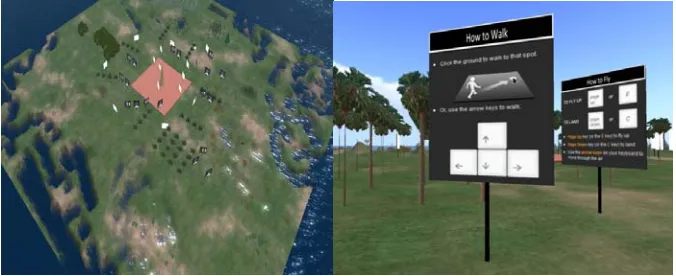
A prototype OpenSim region with basic information about avatar interactions was developed. The objective was to examine user performance on completing a given set of tasks in-world after visiting the training island. To compare the performance, a controlled study was carried out using the SL user guide. For accuracy the same training content from the user guide was selected and put on display-boards in-world. This way the participants of the two samples, i.e. experiment sample and control sample, see the same training content but in two different mediums, one in OpenSim and the other in a document. Because of this a performance variance between the two groups is more likely to be due to the different training approaches and less due to the contents or tasks. Fig. 1 shows an aerial view of the prototype island with scattered training content displays and a close up view of the first display the avatars see when they enter the island; it helps avatars to explore the environment. Lines of trees were used to separate different categories adding a more immersive flavour into the training experience instead of forcing them to follow a sequential path as happens in the printed document.
10 voluntary student (undergraduates) participants, 4 females and 6 males, between 18 and 23 years of age, with no prior experience with OpenSim (or SL) were identified for this pre study. 5 participants were selected randomly for two groups: a group to access the training island and the other group to refer to the user guide. The two groups were named Group-Doc (the group that used the user guide document) and Group-Island (the one that used the island for training). Participants were encoded according to their groups: i.e., Group-Doc {U-d1, U-d2, U-d3, U-d4, U-d5} and Group-Island {U-i1, U-i2, U-i3, U-i4, U-i5}.
Figure 1: Pre-test Prototype Island and a training guide at the arrival point
The experimental set-up allocated each participant a 30 minute session – 15 minutes to get familiar with the environment using the training material provided (either user guide or training island) and the rest of the time (15 minutes) to follow a set of tasks on a separate island. Individual user sessions were essential since we examined user performance; this arrangement provided a uniform test environment with equal load on the server minimising errors due to variations of server and client performance.
To compare user performance between the two groups five of the most basic tasks that any avatar should be able to perform confidently for successful engagement with the environment were selected. Walking and flying were selected as the two important tasks that enable avatars to explore the environment. Object creation and being able to perform basic editing on the created object were also selected as essential skills. Finally, a task with basic communication inside OpenSim – Instant Messaging (IM) and chat - was selected. The task scenario in brief was as follows:
When you arrive at Test Island you will be located at a starting place. Please complete the following tasks as soon as possible.
1. Your first task is to walk along the road until the end of the road. Please make sure you walk on the middle of the path marked by white dashes on the black tarmac.
2. At the end of this road you will see a signpost asking you to fly over the sea to the island. Please do so and land on the exact location marked with a signpost on the island.
3. Now create an object (cube) on the ground and follow the instructions given on the relevant signpost to edit your cube.
4. Start walking on the second road until you reach its end.
5. Perform the tasks on IM and chat as instructed by the signpost at the end of the road.
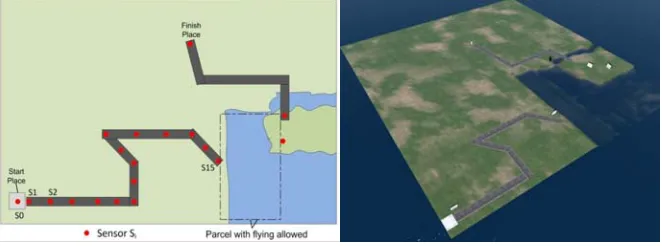
Figure 2: Design map of Test Island for the pre-test evaluation
For task 3, object edit was required to reshape the cube with given dimensions (x, y, z with 2 decimal place accuracy), reposition it on a given location (x, y, z coordinates, with 2 decimal place accuracy) and re-colour only a selected face (the top face) of the object in red. Task 5 included sending an IM with the given text to a previously added friend in the avatar friend list – Test User, and publish the text Task completed using the chat channel in-world. At the beginning of each task these specifications were displayed to the participants using signposts at the relevant locations.
The task environment (Test Island) was designed using the task list to place performance monitors. Fig. 2 shows the map of the island. The red colour circles represent the sensor locations to capture the avatar movement times during the experiment. To make sure the participants do not fly when they are meant to be walking, the region was divided into two parcels: the one shown on the map has been set up to allow avatar flying, and the rest of the land (the other parcel) has restricted settings for flying. A set of sensor objects were deployed as shown in Fig. 2.
The Linden Scripting Language (LSL) [Linden_Labs, 03] sensor function llSensorRepeat() was used to implement the sensor functionality with parameters of 1.0m range from the sensor and time interval of 0.1 seconds to repeat the scanning. When an avatar is detected by the sensor it triggers the required functionality as defined in the event call. The LSL llGetTimestamp() function was used to obtain the timestamp of the avatar detection, which is within 1ms accuracy.
Angular bends on the path are used to evaluate avatar movement performance. Sensor scripts were embedded in cubic prims of 0.5m of size. To conceal the sensor locations, these cubic prims were made transparent and were half-buried in the middle of the path at planned locations making all the sensors deployed at the same height (z-axis) along the path. The sensors were not distributed in equal distances from each other but according to the path segment and the bends. Timestamps of object creation, object edit and communication (IM and chat) were traced through the object profile and island chat history.
As a summary, following measures were taken for each participant: Avatar walking times to reach each sensor along the given path; Avatar flying duration starting from the 15th sensor at the end of walking path to reach the destination point
of flying; Time taken to create, edit and manage the content object given; and finally the time taken to complete the IM and chat tasks given at the end of the tasks list.
4
Results and Analysis: Document vs In-world Training
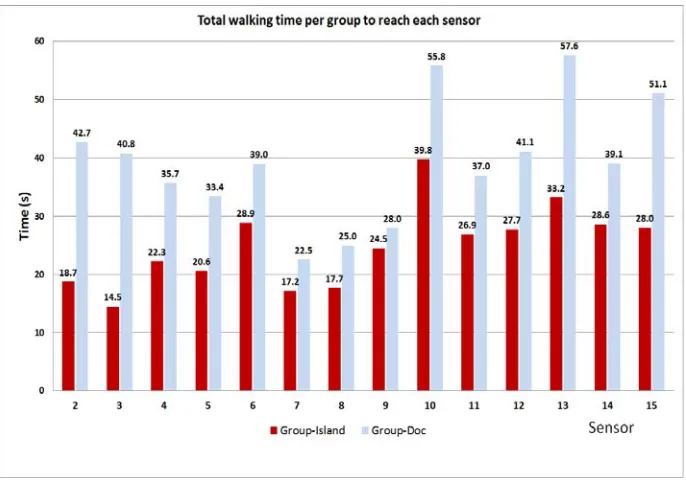
[image:7.595.133.476.242.482.2]The first analysis was performed on the times that each user spent in reaching the first set of sensors on the walking path. The total user times per group for reaching each sensor are shown in Fig. 3. The distributions generally indicate a higher amount of time for Group-Doc than Group-Island. Also the variance of times per sensor is considerably higher for users from Group-Doc compared to Group-Island.
Figure 3: Walking time per group (total) to reach a sensor from the previous sensor
The distribution of average times for each sensor for the two groups is shown in Fig. 4. A clear difference in the mean times can be seen during the early stage of walking. Until the 5th sensor the participants from Group-Doc showed much longer times compared to Group-Island to reach sensors while walking on the middle of the path. From the 5th sensor to the 14th sensor the time distributions are somewhat similar in their trends but with a reasonable time difference. This may have been due to the fact that the Group-Doc users gained an opportunity to train further during their walk within the first few sensors; yet, the time taken is higher compared to the other group, although the difference is in the range of a few seconds.
helped to explain the reason for this. The users from Group-Doc often got slowed down at the end of the walk trying to figure out of how to fly for the next phase of the task. In contrast the users from Group-Island confidently finished walking and started their flying without hesitation. Both groups showed increased times for passing the sensors 6, 10 and 13. These sensors are located at the bends of the path that require extra avatar control effort to maintain their trajectory.
Figure 4: Average times taken by each group to reach sensors
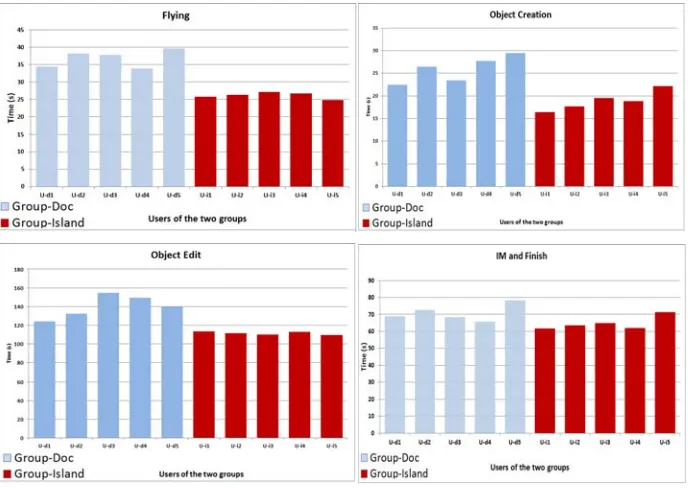
A comparison of avatar flying time between the two groups is shown in Fig. 5. The Group-Island users showed lower times compared to the users from the other group; Moreover, the users of Group-Island show a lower variance in time against the other group; in fact, since the flying path was a straight line, these users showed more confidence in doing their task quickly and on a straight path while the users who trained from the guide document showed some tremble in all directions during their flying.
Fig. 5 also shows the times spent by each user for object creation and the required editing tasks, respectively. For both tasks, all users from Group-Island showed much less time than the other group of users. For object creation the time difference was slightly lower since it comprised a single task. However, for object editing, which included a few tasks, the time difference between the two groups is high. Also the variance of times is lower with users from Island. For example, most Group-Island users carried out the object resize and re-position task in a single try through typing the exact figures, while the other group (Group-Doc) tried to drag and resize using the mouse showing a poorer understanding of the system which resulted in a trial and error approach.
At the end of the object-editing task users were asked to move along the exit path and carry out IM and chat to finish the task session (time per each participant is shown in Fig.5.). U-d3 and U-d4 show a lesser time than U-i5, which is an interesting observation. However, when closely examined it was identified that these two users from the Doc group did not complete the IM messaging and abandoned it. Further details about task completion will be discussed later.
Figure 5: Average time taken by the two groups for Flying, Object Creation, Object Edit and IM & Finish
Following mean completion times were reported by the two groups respectively: Group-Doc {Flying = 36.78s, Object Creation = 25.90s, Object Edit = 140.04s, IM and Finish = 70.75s}; Group-Island {Flying = 26.16s, Object Creation = 18.91s, Object Edit = 111.49s, IM and Finish = 64.70s}. Statistics of the entire task for the two groups are as follows: Group-Island {Mean total time = 291.07s, standard deviation = 5.76, Std. Error of mean = 2.58} and Group-Doc {Mean total time = 383.44s, standard deviation = 11.07, Std. Error of mean = 4.95}. ANOVA test result (p<0.01) suggested to reject the hypothesis that there is no mean difference in user performance; hence we can conclude that in-world training helps users perform better when they engage in OpenSim with basic avatar tasks.
change, object editing, etc., seem to be the most challenging for those participants. In contrast, only one participant from the Group-Island use failed to complete re-colouring or the object (as part of the object edit).
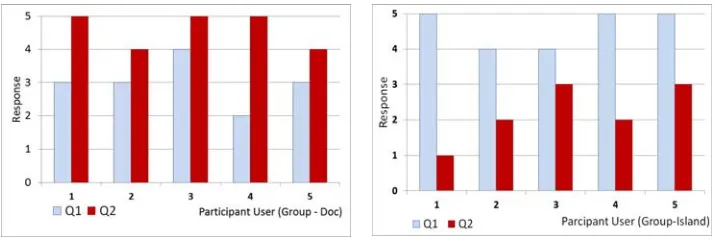
A brief questionnaire was given at the end to examine the participant opinions. The first question asks about the support they received from the user guidance approach and the second question asks their opinion about the alternative approach (either document or island) instead of what they had. This alternative arrangement of questions helps the participants to compare their experience and respond highlighting their preferred method of receiving OpenSim training. The questions were designed with Likert scale answers at 5 levels: Strongly Disagree (1), Disagree (2), Neither Agree nor Disagree (3), Agree (4) and Strongly Agree (5).
The following two questions were given to the Group–Doc participants:
Q1 – The guidance document helped me to complete the tasks inside the MUVE comfortably
Q2 – A training island would have been a better and more usable method for me to train myself for the tasks
Whereas the following two questions were given to the Group–Island participants:
Q1 – The training island helped me to complete the tasks inside the MUVE comfortably
Q2 – A user guidance document would have been a better and more usable method for me to train myself for the tasks
[image:10.595.130.491.406.527.2]The responses from both groups are shown in Fig. 7.
Figure 6: User feedback for the questionnaires (left: Doc, right: Group-Island)
the training provided through the island. The majority strongly agreed in this view and also disagreed with using a user guide document instead.
The results of this first study (pre-test) of the research indicated that in-world training can offer comparatively better training experience for basic OpenSim interaction than user guide documents. However, there is a need for examining the impact of training support for OpenSim management tasks, which are not included in Help Island type environments or usual user guide documents. For this need, a further study was carried out by developing and evaluating two OpenSim islands for training basic and advanced OpenSim tasks; the next section presents the details of the study.
5
A Training Environment for Managed Learning in OpenSim
An improvement suggested by the participants of the previous study was to design a more formal educational environment layout and cover advanced OpenSim training. It was thought that having a campus like training environment would encourage students to have immersive educational flavour intuitively. Therefore, an educationally oriented OpenSim training environment was developed with training areas and content for both basic user training and advanced management training needs involving a large number of unique functions and their complex interrelationships. Furthermore, the ways in which a user can try these functions through the client UI also need to be provided as part of the training. In fact, it can be considered as an effective and convenient way to tell a user about how to practice these functions, since the UI widgets are the only available mechanism to manage an OpenSim environment from the client side. Moreover, the need for separating basic users (usually students) from advanced users (usually academics and module coordinators) was also identified for certain educational scenarios. In particular, if the OpenSim component of a module has a low weight then asking students to learn advanced functions may be unnecessary. This research hypothesised that for OpenSim based virtual regions there should be advanced training support beyond SL Help Island type basic training. Therefore, this second part of the study was carried out to examine the benefit an OpenSim user get by having a dedicated island for training advanced OpenSim management.
5.1 The Training Environment for OpenSim
Training content and activities provided in these islands are designed in a way such that by completing a session on these two islands will make a user competent enough to use and manage OpenSim regions comfortably. As mentioned above, to test the study hypothesis a comparative evaluation of the two training islands was carried out. For this evaluation purpose, a special island to conduct the user experiment sessions was also developed. After the training session, users were located at this experiment island and given a common task sheet to complete while their task data is captured.
Figure 7: Training Environment and Training Content being viewed
5.2 Evaluation
This experiment was carried out with two samples, control and experiment. The experiment population consisted of academic staff, teaching and research fellows, and PG Tutors. The selection of these institutional roles was mainly based on the management tasks they typically practice in academic environments. At the same time, in the institutional context there can be instances where people play multiple roles and also may interchange when a need arises. Therefore, considering these possibilities these types of roles were taken as a single participant population without any role-based discretion for the objectives of the experiment.
Sample size was planned for an effect size of (Cohen’s d) = 0.75, statistical power level (1-β) = 0.8, and probability level α = 0.05; hence, the minimum sample size required is 30 participants per group (60 for the total). 70 participants were aimed for (35 per group) as the target total. Users who had no previous experience of using OpenSim or SL were selected with 14 academic staff members, 20 teaching and research fellows and 36 PG tutors in this total of 70. These 70 participants were equally divided into two groups in random selection; i.e., 7 academic staff, 10 teaching and research fellows and 18 PG tutors were assigned randomly per sample.
minutes of training both groups were given the task scenario and the participants were teleported to Experiment Island to perform the required tasks. At the end of the task a set of MCQs (10) were given through Sloodle mediation (between OpenSim and Moodle). A strict procedure was followed to stop users at the end of 20 minutes.
Task Intro-Island Score (%)
Mgt-Island Score (%)
∆ (%) F Sig.
1 Role Assignment 48.04 64.22 16.18 17.67 .000
2 Parcel Management 50.29 79.41 29.12 36.03 .000
3 Teleport Management 57.35 73.53 16.17 5.16 .026
4 Land Management 34.41 54.41 20.00 21.09 .000
5 Communication Settings
66.18 83.82 17.64 4.52 .037
6 Content and Media
Management 47.06 73.53 26.47 11.09 .001
7 Group Management I 46.57 69.61 23.04 9.81 .003 8 Group Management II 32.35 55.88 23.53 21.64 .000 9 Advanced Content
Management 51.29 76.65 25.36 43.73 .000
10 Administrative Powers
and God Tools 19.12 74.51 55.39 153.60 .000
[image:13.595.129.478.161.389.2]MCQ scores: 37.35 63.52 26.17 89.00 .000
Table 1: Tasks Scores comparison between the two groups
Ten main tasks, listed in Table 1, were given as the task scenario to carry out within Experiment Island. In brief, due to the available space the tasks were as follows: Role Assignment – to assign avatars for different roles e.g., Land Owner; Parcel Management – to create, edit land parcels; Teleport Management – to set and edit teleporting links; Land Management – to assign, modify and manage parcels and the region; Communication Settings – to set suitable avatar and environment communication settings for education, e.g., disabling promiscuous chat mode; Content and Media Management – to set different media types for learning content delivery; Group Management I – to create groups and assign avatars to those, e.g., Tutorial Staff Group; Group Management II – to set and manage group land, content and access ownership; Advanced Content Management – to set and manage complex object editing and access controls; Administrative Powers and God Tools – to gain region administrator privileges and override group, land, content and user settings. Both groups were given this task set and evaluated using a common marking scheme for the 10 tasks and MCQ set. Two results sets, one from each group, which were deemed to be incomplete, were removed from the final analysis. Mean scores (%) reported by the two groups for each task and for the MCQ set is shown in Table 1.
33.206. The respective standard deviations are σ1= 2.790 (Intro Island) and σ2= 3.389 (Mgt-Island). The One Sample Kolmogorov-Smirnov test indicated that the final score data samples are normally distributed (α = .06) while the Levene Test for homogeneity indicated that the variances of the two samples are not significantly different (p>.05) fulfilling the assumptions of ANOVA. ANOVA test reported statistically significant mean difference between the group scores (F=311.88, p<.001). Therefore it indicates that the provision of management training seems to be important for making the users competent for conducting managed learning in OpenSim. Furthermore, the prepared tool support sufficiently enhances the user capabilities in performing these management tasks in OpenSim compared to the existing standard practices for training users. Each subtask performance and MCQ results indicate a better performance by Mgt-Island group, particularly with complex MUVE management tasks for learning.
A usability analysis was performed using System Usability Score (SUS) questionnaire [Brooke, 96]. It consists of 10 questions: alternatively arranged 5 supporting (odd numbered questions with positive wordings) and 5 opposing statements (even numbered questions with negative wordings) aimed at the examined system usability. It evaluates the responses through 5-point Likert scale from Strongly Disagree (1) to Strongly Agree (5). For positively-worded items (1, 3, 5, 7 and 9), the score contribution is the scale position minus 1; i.e., {0, 1, 2, 3, 4}. For negatively-worded items (2, 4, 6, 8 and 10), it is 5 minus the scale position {4, 3, 2, 1, 0}. To get the overall SUS score, first add all the score values and then multiply the sum by 2.5. SUS scores range from 0 to 100 (0-lowest, 100-highest usability).
The mean SUS scores are: for Intro-Island group = 73.06 and Mgt-Island group = 76.18; these were compared statistically using ANOVA and resulted in the mean difference between the SUS values of the two groups are not statistically significant (F=3.85, α=.55). This suggests that both islands are more or less equally usable for the purpose of training. We can see that both environments followed the same design architecture, the same ways of presenting content and were situated in the same server-client environment of OpenSim; only the training content was different. Therefore, from a usability perspective the islands are more likely to be equally usable, which was found to be true statistically as per the analysis. Both islands reported the mean score of 74.89 suggesting a very good usability.
6
User Support for Module Teaching
One of the limiting factors with the experiments was that users had a relatively small time period to experience the environment, although it was quite sufficient for the expected tasks. In order to try the developed training environment within actual university education process, two case studies that used these islands as the main form of training for OpenSim management were conducted as the final phase of this research.
6.1 Developing Educational Regions in OpenSim for Module Teaching
develop teaching and learner support content to be used in module teaching. These PG students from School of CS, University of St Andrews were new to MUVEs and haven’t had prior experience with OpenSim or similar 3D virtual worlds. The duration of each project was 12 weeks; the first 2 weeks were used for project familiarisation and literature survey tasks. Since they had not used Second Life or OpenSim before, therefore they fitted our requirements. They were asked to first access the OpenSim grid with the environment and then allowed them to keep a local installation on their computers for practice. It was decided to let them use the entire project familiarisation phase (i.e., 2 weeks) which was the standard time given for all of the taught MSc projects at the school.
These participants provided their feedback at the end of their learning content development for a range of undergraduate module teaching; the following scores were reported for each participant for SUS: Participant1 (95.0), Participant2 (97.5), Participant3 (90.0) and Participant4 (87.5). They reported that they could complete their OpenSim training between 4-5 days instead of the project familiarisation 2 weeks they were given for (gained 64.28% - 71.43% of time saving, which they used for their project design work and further literature survey). Although it is a rough measure it may indicate the value of training they received.
The feedback through unstructured and unguided discussions indicated that they could clearly state their design and development plans focusing on the expected learning outcomes of the regions by making the assumption that the students who visit their regions have already trained for environment interaction and management through our training islands. They also indicated what they had to include in these prerequisites, i.e., without the training content provided in our training islands for their island designs they would not have been able to complete their projects.
6.2 Teaching Software Process Models in-world
CS4222 Software Process Management is a fourth year (honours) optional module for the BSc Engineering students specialising Computer Science and Engineering (CSE) at the Dept. of CSE, University of Moratuwa, Sri Lanka. The module coordinator, lecturers and tutors of CS4222, five members of staff altogether, introduced an OpenSim region to let student explore the norms and nature of different software process models, including: Waterfall method, Spiral Model, Rational Unified Process (RUP), SCRUM, and XP. This OpenSim based learning activity was challenging since both the students and academic staff were new to OpenSim and MUVEs. Therefore, the OpenSim training environment was used to support these academics for their course activities in the planned OpenSim region.
role-play items for that process model. For example, in the land parcel for RUP, the process artefact simulations for RUP were deployed.
The students were also allowed to explore the training environment before their learning activities. It was observed that students actively engaged in the given learning tasks with high confidence; given the fact that these students had not had prior experience with 3D virtual environments for their learning it was a significant challenge for them but this credit bearing learning activity was a success. Even the slightest error or difficulty could have resulted in reducing the students’ trust in the learning environment. All the students successfully completed the task with majority scoring over 60% summative assessment grade point. Students reported positive feedback on using OpenSim for learning while appreciating the training support they received prior to the learning activity through the training environment.
Following a qualitative approach with open ended interviewing we gathered the feedback from academic staff (5 staff members) that developed and conducted this learning activity in OpenSim. In general they were very satisfied with the overall experience they had with OpenSim and the learning activity they conducted. They also indicated they believed OpenSim based teaching and learning within the university education system had a promising future. With respect to the training they had received through our training environment they unanimously agreed that if they had not been given our training environment to develop their competencies, there were several points when they would have abandoned OpenSim and used a more conventional learning approach instead. They reported that the reason for such a view was mainly because of the complex management settings in OpenSim and the potentially steep learning curve a new user has to go through with it. One response: [“…I couldn’t imagine how to make this OpenSim Island for the SPM module without the support we had from that training island. The training we had was intuitive since we were inside OpenSim…”]. These views affirm our research hypothesis that in-world training can provide effective user support for educational uses of OpenSim.
The work mentioned in these two case studies utilised our training environment extensively; the developers commended the support they received from the training environment; further evidence for the value of this training support not only to use and manage but also to develop and extend OpenSim based learning environments.
7
Conclusions
In order to establish a baseline for developing an effective training environment for new users of educationally oriented virtual worlds a comparison was carried out between document-based and in-world approaches. The participants that tried the document-based approach showed some difficulty in completing the relatively complex tasks. It was further observed that participants who had experienced the in-world training island showed more confidence in completing the tasks in comparison to the other sample.
An academically oriented complete training environment comprising of two OpenSim regions for introductory training and training on advanced management tasks of OpenSim was developed. An experiment was carried out evaluating the unique training support provided by using training content on OpenSim management.
From the user performance it was observed that further to providing in-world training it is essential to incorporate training on complex OpenSim management for successful use of OpenSim based managed learning activities. Two case studies were done on the further use of the training environment developed for module teaching. The user feedback and observations reinforced the previous findings of this study.
With the training environment and findings of its evaluation this research can be considered as making original contributions to OpenSim based teaching and learner support. The developed training environment can be used as a common platform for user training needs in any OpenSim based learning environment; it can be arranged to act as the first place for new users to visit allowing them to learn how to interact competently with the immersive virtual environment before starting their educational activities as well as complex management tasks of the educational region management should the users require to perform those. The training environment is hosted in the Open Virtual World (OVW) group’s OpenSim Grid at the University of St Andrews with public access; an OpenSim archive of the training environment (.oar file) will be made available at OVW website [OVW, 13] for public users to download for free and reuse the training environment. We take it as an important contribution of this this research to the research and practitioner community of OpenSim based immersive education addressing the challenge of OpenSim user training for mainstream educational requirements.
The future extensions of this study will investigate and develop strategies for domain specific training support prior to learning activities of advanced module teaching in OpenSim. In addition to the training environment that we have developed these arrangements can provide students with a useful familiarity specific to their course topic prior to engaging in their learning tasks.
Acknowledgements
Part of this research was support by the Commonwealth Scholarship (UK) and SICSA Prize studentship.
References
[Allison, 10] Allison, C., Sturgeon, T., Miller A., Perera, G.I.U.S., and Nicoll, J.R.: Educationally Enhanced Virtual Worlds, in 40th IEEE Frontiers in Education Conference, 2010. FIE '10, IEEE: Washington 2010
[Andreas, 10] Andreas, K., Tsiatsos, T., Terzidou, T., Pomportsis A.: Fostering collaborative learning in Second Life: Metaphors and affordances, Computers and Education, 55(2), 603-615, 2010
[Berge, 08] Berge, Z.: Multi-User Virtual Environments for Education and Training? A Critical Review of Second Life, Educational Technology, 48(3):27-31, 2008
[Brooke, 96] Brooke, J.: SUS: a "quick and dirty" usability scale, in Usability Evaluation in Industry P.W. Jordan, et al., Editors, Taylor & Francis, London, p. 189-194, 1996
[Kennedy, 13] Kennedy, S.E., Fawcett, R., Miller, A.H.D., Sweetman, R.J., Dow, L., Oliver, I., McCaffery, J.P., Allison, C.: Exploring Canons and Cathedrals with Open Virtual Worlds: The Recreation of St Andrews Cathedral, St Andrews Day, 1318, in UNESCO Congress on Digital Heritage 2013.
[Kirriemuir, 10] Kirriemuir, J.: Virtual world activity in UK universities and colleges - Virtual teaching in uncertain times, Snapshot #8 of virtual world use in UK Higher and Further Education. Virtual World Watch, Eduserv,. Snapshot #8(Spring 2010): p. 1-45. 2010
[Linden_Labs, 03] Linden_Labs: Second Life, 2003 [cited Oct. 2013], www.secondlife.com
[Linden_Labs, 13] Linden_Labs: Quick Start Guide, 2013 [cited 2013 October], http://community.secondlife.com/t5/English-Knowledge-Base/Second-Life-Quickstart/ta-p/1087919#Section_.3.
[Linden_Labs, 03] Linden_Labs: Linden Scripting Language, 2003 [cited 2013 October], http://secondlife.com/whatis/scripting.php.
[McCaffery, 11] McCaffery, J.P., Miller, A.H.D., Allison, C.: Extending the Use of Virtual Worlds as an Educational Platform - Network Island: An Advanced Learning Environment for Teaching Internet Routing Algorithms, in proc. of 3rd CSEDU, SciTePress, 2011
[Meedeniya, 13] Meedeniya, D., Perera I.: Model based software design: Tool support for scripting in immersive environments, In 8th ICIIS, IEEE, p. 148-153, 2013
[OpenSim, 10] The_Open_Simulator: OpenSim: 2010 [cited 20013 October]. http://opensimulator.org/wiki/Main_Page.
[OVW, 13] The Open Virtual Worlds group, University of St Andrews, 2013, [available at] https://blogs.cs.st-andrews.ac.uk/openvirtualworlds/
[Perera, 12a] Perera, I., Allison C., Miller A.: Effective Policy Based Management of 3D MULE - An Exploratory Study Towards Developing Student Supportive Policy Considerations in 4th CSEDU2012, INSTICC. p. 193-199, 2012
[Perera, 12b] Perera, I., Allison C., Ajinomoh, O. Miller, A.: Managing 3D Multi User Learning Environments - A Case Study on Training Disaster Management. iJET 7(3): 25-34, 2012
[Rymaszewski, 07] Rymaszewski, M., Wagner J. A., Wallace M., Winters, C., Ondrejka, C., Batstone-Cunningham, B.: Second Life: The Official Guide, Wiley, 2007
[Ritzema, 08] Ritzema, T., Harris, B.: The use of Second Life for distance education. J. Comput. Sci. Coll. 23(6), 110-116, 2008