Developing a Ready2Help Application
Freek Boelders
University of Twente
Enschede, the Netherlands
E-mail: [email protected]
Date: February 2, 2018
Status: Final
Abstract
Approaching citizens to help during emergency situations can be useful for formal response orga-nizations. Citizens can identify help requests in society and at the same time they are capable of resolving them. The Netherlands Red Cross currently has a platform called Ready2Help, which can activate these citizens, but does not yet have an application in which a match can be made between help requests and help offers.
This thesis investigated how a (web-)application could contribute in identifying and resolving help requests in society. Research was conducted to determine which methods could be used to match and activate volunteers. Several lo-fi prototypes were developed and evaluated using an iterative approach. These results were used to determine the requirements and scenarios for the hi-fi prototype. A highly interactive hi-fi prototype was developed, which was be evaluated by a target-group of Ready2Helpers.
Acknowledgement
Definitions
Throughout this thesis several definitions are used referencing to organizational structures of the Netherlands Red Cross and design principles:
The Netherlands Red Cross:The national Red Cross non-governmental-organization of the Nether-lands. (hereafter referred to as: the Red Cross)
Ready2Help team: A project team within the Red Cross organization which performs all the Ready2Help activities.
Ready2Help platform: The platform which has been developed by the Ready2Help team, this platform does not include a Ready2Help application.
Ready2Help application: The (web-)application (prototype) which is going to be developed in this thesis.
Ready2Help action:An action in which Ready2Helpers are alerted to resolve a certain help request.
Ready2Helpers: Citizens who have signed up to be a Ready2Helper, they can be alerted by the Ready2Help team to participate in a Ready2Help action.
Lo-fi prototype: A low-fidelity prototype is a quick and easy tangible representation of a con-cept, which is created to get quick feedback.
Contents
List of Figures 8
List of Tables 8
1 Introduction 9
1.1 Organizing volunteer responses . . . 9
1.2 Ready2Help platform . . . 9
1.3 Aim of thesis . . . 9
1.4 Research Questions . . . 10
1.5 Outline of document . . . 10
2 State of the Art 12 2.1 Identifying help requests in society . . . 12
2.2 Resolving help requests using volunteers . . . 12
2.3 Activating volunteers to resolve help requests . . . 13
2.4 Semi-coordinating volunteers . . . 13
2.5 Conclusion . . . 14
3 Methods and Techniques 15 3.1 Design process of Creative Technology . . . 15
3.2 Context Analysis . . . 16
3.3 Ideation . . . 16
3.3.1 Co-creation session . . . 16
3.3.2 Expert interviews . . . 16
3.4 Specification . . . 17
3.5 Realization . . . 17
3.6 Evaluation . . . 17
4 Context Analysis 19 4.1 Stakeholders . . . 19
4.2 Ethical considerations . . . 19
4.2.1 Moral significance . . . 19
4.2.2 Persuasive design . . . 19
4.2.3 Accessibility . . . 20
4.2.4 Intentional Abuse . . . 20
4.2.5 Trade-offs . . . 21
4.3 Existing applications and websites . . . 22
5 Ideation 23 5.1 Co-creation session . . . 23
5.2 Expert interviews . . . 23
5.3 User values . . . 24
5.4 Personas . . . 25
6 Specification 26
6.1 Paper lo-fi prototypes . . . 26
6.2 Interactive lo-fi prototype . . . 26
6.3 Goals of application . . . 26
6.4 Requirements . . . 27
6.4.1 Functional requirements . . . 27
6.4.2 Technical requirements . . . 27
6.5 Scenarios . . . 28
6.5.1 Use cases functionality overview . . . 28
6.5.2 Scenario 1: User reports help request . . . 29
6.5.3 Scenario 2: User responds to help request . . . 29
6.5.4 Scenario 3: User provides skill set . . . 29
6.5.5 Scenario 4: Red Cross moderates help requests . . . 29
6.6 Flow chart . . . 30
7 Realization 31 7.1 Platform selection . . . 31
7.2 Web technology . . . 32
7.3 Technology front-end . . . 32
7.4 Technology back-end . . . 33
7.5 Verifying functional requirements . . . 33
7.6 Accessing the hi-fi prototype . . . 34
8 Evaluation 35 8.1 Goal of hi-fi prototype testing . . . 35
8.2 Results of hi-fi prototype testing . . . 35
8.2.1 Survey . . . 35
8.2.2 Suggestions . . . 39
9 Conclusion 40 9.1 Discussion . . . 40
9.2 Recommendations . . . 41
9.2.1 Further development . . . 42
10 References 43
A Creative Technology Design Process 45
B Main points co-creation session 46
C Summary co-creation session 47
D Platform Analysis 51
E Personas 52
F Average importance level of user values 54
H Flow chart Ready2Help application 57
I Introduction message displayed during hi-fi user test 58
J Application views as used during the hi-fi user test 59
K README.md file 62
L Feedback survey used during hi-fi user test 65
M Hi-fi user test results table 67
List of Figures
1 Creative Technology Design Process (enlargement: Appendix A) . . . 15
2 Current user journey . . . 25
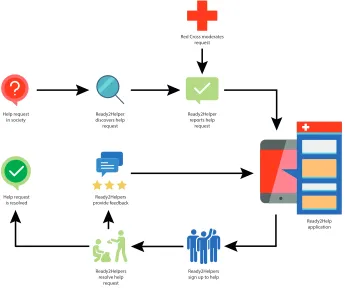
3 Flow chart of Ready2Help application (enlargement: Appendix H) . . . 30
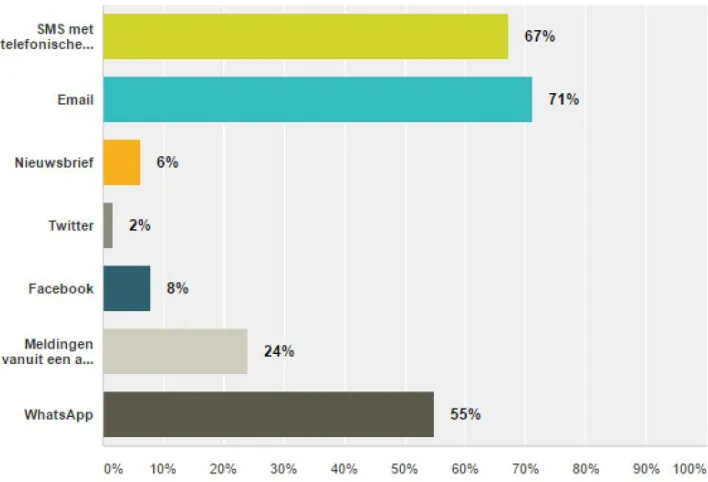
4 Survey Question: Ready2Help now contacts you by e-mail, SMS or by a phone call. In what way would you prefer to be contacted? (multiple answers possible) . . . 31
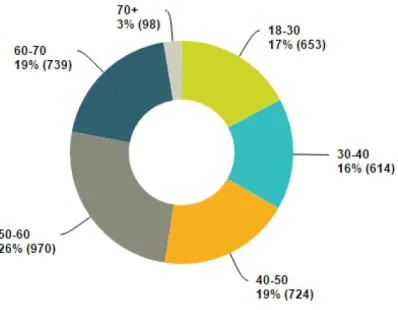
5 Survey question: Within what age category do you belong? . . . 32
6 Distribution of operation systems during the user test . . . 35
7 Distribution rating: How would you rate the idea of matching help requests and help offers using a website? . . . 36
8 Distribution rating: How would you rate the usability (user-friendliness) of this website? . . . 37
9 Distribution rating: I would use the Ready2Help website when it is further developed 38 10 Distribution rating: Would you post a help request on the Ready2Help website? . . . 38
11 Distribution rating: Would you respond to a help request on the Ready2Help website? 39
List of Tables
1 Average importance level of user values . . . 242 Functional requirements . . . 27
3 Use cases . . . 28
4 Functional requirements check . . . 34
5 Categorization of comments: How would you rate the idea of matching help requests and help offers using a website? . . . 36
6 Categorization of comments: How would you rate the usability (user-friendliness) of this website? . . . 37
7 Survey suggestions . . . 39
1
Introduction
1.1
Organizing volunteer responses
Over the last decade, the traditional way of organizing volunteer responses has been complemented by voluntary citizen initiatives on digital platforms. This provides new possibilities for formal response organizations (such as: emergency services, governments, the Red Cross) in solving help requests in society by organizing local community involvement. Voluntary citizen initiatives are able to quickly activate a large number of volunteers, but the effectiveness of these initiatives are often a sub-optimal solution when looked at from a higher perspective.
1.2
Ready2Help platform
The Red Cross has developed Ready2Help [1], a platform which can alert volunteers (Ready2Helpers) when the Red Cross identifies a certain help request which needs to be resolved. This platform has proven to be useful in quickly activating volunteers when needed to help resolving a certain help request. Currently, more than 39.000 volunteers have signed up for the Ready2Help platform, which provides the Red Cross with a large group of volunteers who can be activated quickly and effectively.
Ironically enough, the Red Cross kept using the top-down approach for the Ready2Help plat-form, given the original bottom-up nature of the initiative. The Red Cross tries to create and coordinate all the help actions, instead of providing the possibility for Ready2Helpers to create their own actions. Because of this fact the Red Cross and society cannot fully benefit from the knowledge and skills that all the Ready2Helpers possess. To achieve a more optimal solution a bridge must be made between formal response organizations and volunteers. This makes it pos-sible to combine a bottom-up and top-down approach when looking at resolving help requests in society. A (web-)application could be used to create this bridge and combine the bottom-up and top-down approach.
1.3
Aim of thesis
1.4
Research Questions
The main research question which will be answered in this thesis, can be described as:
How can a (web-)application contribute in identifying help requests in society within the scope of the response organization and contribute in resolving these requests by activating volunteers with the appropriate skillsets?
This research question is formulated generically to make it scientifically relevant for different platforms and response organizations. The thesis itself will specifically focus on the Red Cross as a response organization and Ready2Helpers as volunteers. In such a way the (web-)application prototype can be applied and tested using a real-life situation, which leads to more useful insights.
Two research sub questions have been formulated to obtain the answer of the main research question:
• How can Ready2Helpers identify help requests in society and properly report them to the Red Cross in
an organized way?
• How can help request be resolved using Ready2Helpers with their skillsets?
1.5
Outline of document
The ’State of the Art’ chapter consists out of four sections. The first section will explore different methods on how help requests can be identified within society. The second section will investigate the different methods that can be applied to resolve these help requests. The third section will determine the different aspects that motivate volunteers to resolve help requests. The last section will connect formal response organizations with volunteers in such a way that the volunteers can be semi-coordinated.
The ’Methods and Techniques’ chapter will provide an overview of the methods and techniques that will be used throughout this thesis. The methods and techniques discussed in that chapter will be applied in the successive chapters. This approach is novel because a wide variety of methods and techniques will be used, that all excel during different phases of the design process.
The context analysis chapter will provide an overview of the context in which the application is going to be deployed. Stakeholders will be defined to determine who are directly and indirectly affected by the application. Furthermore, this chapter will look at the ethical consideration, which should be taken into account. Moreover, an analysis will be done on other application with a similar goal within the Netherlands.
The ideation chapter will explore the idea of creating a (web-)application in more detail. A co-creation session will be performed to gain more insights on what the Ready2Helpers objectively expect from the Ready2Help platform. Moreover, interviews with the Ready2Help team will be conducted to gain more insights of their current way of working. Based on these insights, personas, user values and a user journey will be formulated.
Subsequently, the realization chapter will use the results of the specification chapter to develop a hi-fi prototype. This chapter will provide insights on how the hi-fi application prototype is devel-oped and what decisions have been made to make sure it is in line with the specifications.
In the evaluation chapter, the hi-fi prototype will be tested by the target group (Ready2Helpers). This evaluation will be done using digital surveys and feedback mechanisms to provide insights from the Ready2Helpers. Several closed- and open questions will be asked to assess if all the spec-ifications were met.
2
State of the Art
2.1
Identifying help requests in society
Formal response organizations (like the Red Cross) could use at least three methods to identify help requests within society. The first method is gathering information from social media as described by several studies [2, 3, 4]. Shimak et al. [2] indicate that social media data-mining is the easiest way of crowd sourcing, looked at from an organizational point of view. This because all the information will automatically appear on social media, even if nobody explicitly asks to put this information on there. In addition, Gao et al. [3] argue that social media is an open and convenient way to collect various sources of information within a short period of time. The risk of using this method is that the information might be inaccurate and hard to verify. Besides, it appears to be hard to filter out only the relevant information from the huge amount of data available [3].
The second method is actively involving citizens by giving them specific tasks. Majchrzak et al. [5] argue that actively involving citizens could be of great benefit. Instead of passively scanning social media, the research points out that activating citizens for a specific task can lead to more accurate and useful information for the formal response organizations. Several (online) mapping-platforms could be used to ask citizens to report certain help requests on specific locations.
The third method is connecting information and creating awareness among the stakeholders. Streefkerk et al. [6] suggest that mutual awareness and situational overview are important to com-munication between stakeholders. During a disaster there are a lot of different stakeholders, who all need to cooperate and communicate to resolve the help requests which are occurring. For formal response organizations it is important to communicate clearly, but also to clearly listen to citizens and volunteers.
The different methods can be divided in an active and passive group, which can contribute in determining the best methods for the Ready2Help application. The active methods [5, 6] try to actively involve citizens in reporting help requests, while the passive methods [3, 2, 4] only observe what is occurring at the moment. These two groups can be evaluated against, the already existing, Ready2Help platform. The current platform holds the big advantage that it consists of out of 39.000 volunteers who are eager to help, but these volunteers do not get enough chances to participate. This makes the active group more suitable for the Ready2Help application, because this will im-prove the participation of the Ready2Helpers. Thus, the remainder of this chapter will explicitly focus on the active methods using volunteers.
2.2
Resolving help requests using volunteers
first two methods, by semi-coordinating volunteers using crowd-tasking with well-defined tasks. There is already a platform operating well in this area, which provides useful insights for the de-velopment of the Ready2Help application. This platform is called Ushahidi [9], it demonstrates how open source software can be used during crisis situations and shows the potential of crowd-sourcing [10]. The platform serves as an example on how the different methods could be incorporated into a crisis mapping application. A significant risk of using these maps is, that multiple stakeholders are resolving the same help request at the same time, without being aware of this fact. Nevertheless, mapping the information could be helpful for the Ready2Help application. This makes it possible for the Ready2Helpers to find requests which are close to their current location and for the Red Cross to semi-coordinate the requests. Altogether, resolving help requests using citizens could possibly be of great value and the feasibility is proven by Ushahidi, but it also involves some risks.
2.3
Activating volunteers to resolve help requests
As described in the last paragraph, using citizens to resolve help requests can be useful, but still the citizens need to be intrinsically motivated to start resolving these requests. Assuming that all citizens want to help each other would be naïve. There are at least five different aspects that could help to active the volunteers.
The first three aspects are described by Malone et al. [11] as ’money, love and glory’. The promise of receiving money is an important motivator for employees of traditional organizations, but conflicts with the idea of voluntarily helping fellow human beings. The love component can be described as ’enjoyment of an activity’, ’socializing with others’ and ’contributing to a cause larger than themselves’, which is rather suitable for voluntary citizen involvement. Glory can be obtained by receiving recognition from others, like fellow citizens or formal response organizations.
The fourth aspect is ’personal commitment’ [5], when a disaster directly affects the wellbeing of individuals, they are more likely to also act to resolve the burden of the disaster. The last aspect is ’making citizens aware of their own competence’ [6], the spontaneous volunteers need to be made aware of their own disaster recovery skills. This can be done by showing them in what way they can contribute in resolving help requests. Altogether, these aspects could possibly contribute in higher citizens involvement to resolve help requests in society.
2.4
Semi-coordinating volunteers
2.5
Conclusion
The purpose of this chapter was to explore literature on identifying and resolving help requests using volunteers (bottom-up). It can be concluded that there are several methods that can be used to achieve this goal. These methods could be used to properly determine the desired functionality for the Ready2Help application. The main functionality would be to provide the Ready2Helpers with the possibility to actively report help requests. This method is chosen, instead of passively monitoring social media, because of the large number of volunteers that already signed up for the Ready2Help platform. Besides, the information posted on social media is not reliable enough and it is hard to filter out the relevant information.
It is important to provide the Ready2Helpers with the ability to share and resolve help requests. Developing an application in such a way provides Ready2Helpers to; be semi-coordinated, have relevant information, be able to share information and have well-defined tasks. The application will activate these volunteers by triggering several aspects which motivate them. These aspects are: ’love, glory, personal commitment and awareness of own competence’. When specifying the requirements of the application these factors should be taken into account.
3
Methods and Techniques
3.1
Design process of Creative Technology
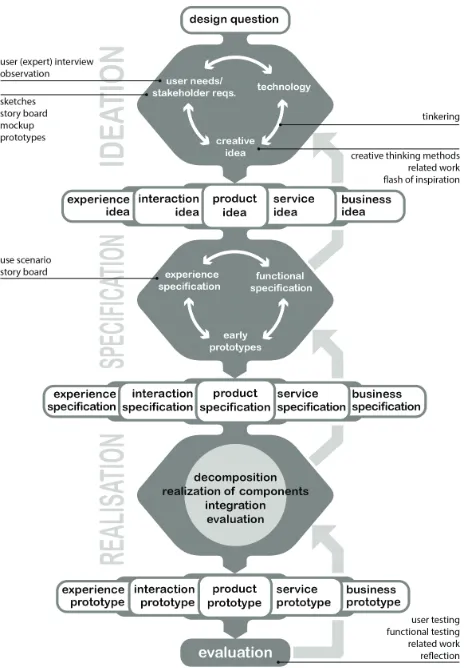
[image:15.612.191.424.350.684.2]The design process of Creative Technology is applied in this thesis, as described by A. Mader and W. Eggink [13]. The graphical version of this design process can be found in Figure 1. On the highest level the design process consists out of four phases: Ideation, Specification, Realization and Evaluation. Every phase consists out of different methods that can be applied to provide useful information for the design process. These phases are not executed as a linear process, but are exe-cuted simultaneously. This does not mean they are done at random, they are interconnected with each other. It is part of nested problem solving, when a question is answered in the ’Ideation phase’ this raises subsequently a ’Specification phase’-question, which then can lead back to a ’Ideation phase’-question. Hence switching between the phases can be easily done and will improve the quality of the prototypes. Within the different design phases, it is possible to be more divergent or convergent. When divergent, you are opened up and you are able to observe a wide variety of inputs. This diverse and broad spectrum of information can then be converted to reduce the design space until a specific solution is reached. In such a way an open mind is possible, but you will still end up with a specific solution. The individual methods that will be used in each phase will be elaborated in the following sections of this chapter.
3.2
Context Analysis
The contexts analysis chapter used several methods to understand the context in which the appli-cation has been developed. Stakeholders were identified by performing expert interviews with the Ready2Help team. These interviews were used as a guideline for determining the primary and secondary stakeholders. Besides, the ethical side of the application was investigated by exploring literature and conceptualizing the impact which the application might have. At last, existing appli-cations in the field of resolving help requests were explored and investigated. This has been done based on a market research with help of the Ready2Help team.
3.3
Ideation
The ideation phase explored the possibilities which have been applied to improve the Ready2Help platform as it is. The first part of the ideation was done in a divergent design space, to obtain as much information about the platform as possible. This has been done by performing a co-creation session and expert meetings. Subsequently, the design spaced became convergent again and personas, user values and a user journey were formulated.
3.3.1 Co-creation session
During the ideation phase it was important to create a bridge between the technology and the needs of the users. To determine the needs of the users a co-creation session was conducted (Appendix C). This session was aimed at tinkering a small group of Ready2Helpers in a creative setting. They were given four exercises to help them to provide input in a non-restricting way.
The first exercise was filling in a persona form. These persona forms were later used to create actual target group personas.
The second exercise entailed creating a ’value circle’, to determine what their motives were for volunteering. The target group individually received an A4-paper with a big circle in the middle and a sticker sheet containing different motives to perform volunteering work. The target group was given the task to place the stickers in the circle, where closer to the middle meant ’important’ and more to the outside meant ’unimportant’.
The third exercise was X&Y Mapping, to determine what kind of volunteering activities they preferred to participate in. This exercise has been done in pairs, to engage the target group to have a discussion. Every pair received an A2-paper with a X-axis (ranging from ’fun’ to ’not fun’) and Y-axis (ranging from ’important’ to ’unimportant’). They received post-its containing volunteering actions which fit within the scope of Ready2Help. The target group had to place the post-its somewhere in the X&Y-plane.
The fourth and last exercise was discussing the user journey as it is currently implemented. This user journey was discussed step-by-step plenary. When the target group wanted to provide feedback on a step they could start talking, and there was the possibility to discuss with other users of the target group. This exercise served as a semi-open discussion to determine the current issues with the platform.
3.3.2 Expert interviews
ask questions to obtain more information on how certain thing currently work. Moreover, several meetings were conducted with the head of the Ready2Help team, the application manager of the Red Cross and several members of the Ready2Help team.
3.4
Specification
During the specification phase several lo-fi prototypes have been created, and a short evaluation and feedback-loop is applied. This method provides the possibility to quickly iterate the prototypes and fine-tune the functionality and requirements based on the feedback of the target group. These test eventually lead towards goals, requirements and scenarios that will be applied to create a hi-fi prototype in the realization phase.
The first lo-fi prototypes have been created using quick drawings of the user interface. These prototypes were tested by asking users if they found the interfaces intuitive. These quick drawings were transformed into a lo-fi digital interactive prototype. This interactive prototype has been developed using Justinmind prototyper [14]. With this tool it becomes easy to create a mock-up user-interface because you are able to use drag-and-drop features to quickly build the interfaces. In such a way, it is possible to test different views without implementing the functionalities.
The MoSCoW method [15] has been used to prioritize the functional requirements. This to obtain understanding on how various stakeholders rate the importance on the realization of each requirement. This method uses four prioritization categories: ’Must have, Should have, Could have and Won’t have’. By placing the requirements in these categories, it is possible to determine a minimum viable product (must haves). When the must-have requirements have been accomplished, the should- and could-have requirements can be developed.
3.5
Realization
During the realization phase the specifications (goals, requirements and scenarios) were translated into a hi-fi prototype. To make this translation, technical solutions were explored, compared and selected. The building of the hi-fi prototype has been done using the Angular 4 Framework [16].
3.6
Evaluation
The hi-fi prototype testing has been done using digital user feedback. 1235 out of the 39.000 (3%) Ready2Helpers were selected to test the prototype. This selection has been done by selecting the Ready2Helpers living in the province ’Friesland’ as target group. This target group received an e-mail from the Red Cross asking them to participate in the prototype test. The e-mail contained a link to a web server which was running the application prototype. When the users entered the application an additional message was displayed (Appendix I). This message informed the users that the application is a prototype and that it would be appreciated if they provided feedback.
The ’Incoming Feedback’ feature was used to generate a button on the right side of the screen. When the user clicks on this button, the user will be asked how he or she experienced this specific page. Five rating icons were displayed ranging from ’bad’ to ’amazing’. When the user clicks on a specific icon, a text input field appears asking the user to ’tell about their experience’. The rating and textual feedback are saved together in Hotjar.
The ’Surveys’ feature was used to generate a feedback survey which the users could fill in af-ter testing the prototype. A link to this survey was embedded in the header of the prototype application. Moreover, when the user tried to leave the application a pop-up appeared asking the user to fill in the survey. The full list of questions asked in the survey can been found in Appendix L. Seven closed-ended questions were asked, to gain insights on how the users would rate the idea, the website and the likeliness that they would use the application when further developed. Five open-ended questions were asked, to gain insights on why the users had chosen a certain rating and to provide them with the possibility to give suggestions and critics.
4
Context Analysis
4.1
Stakeholders
Several stakeholders can be identified and they should be taken into consideration during the devel-opment of the application prototype. Stakeholders can be defined as individuals or organizations that have a stake in a particular system. These stakeholders can be divided between ’primary stakeholders’ and ’secondary stakeholders’. The primary stakeholders are parties that are actively engaged with the system and depended on it. The secondary stakeholders are parties that are not actively engaged or depend on it, but they can still influence the outcome of the system. The primary and secondary stakeholders can be defined as following:
Primary stakeholders:
• The Netherlands Red Cross
• Ready2Help team
• Ready2Helpers
Secondary stakeholders:
• Organizations collaborating with the Netherlands Red Cross
• Citizens of the Netherlands who are in need of help
4.2
Ethical considerations
4.2.1 Moral significanceThe application could have a big moral significance once it is fully deployed within the Netherlands. As a NGO the Red Cross wants to help citizens who are in need of humanitarian help. The application will serve as a tool to resolve humanitarian help requests within society, which could have a big moral significance. Help requests within society which are not resolved currently, can be solved using the applications matching algorithm. It will serve as a bridge between help requests and help offers.
This matching has the potential to improve the wellbeing of individuals and resolve their suffer-ing. Helping fellow citizens that suffer can be seen as having a positive moral impact. This behavior can be seen as right because, looked at from a utilitarianism point of view, the overall consequences of these actions are positive. It increases the wellbeing of the people that suffer, which eventually will increase the wellbeing of society as a whole. Resolving help request will not only benefit the people that suffer, but also the people who helped resolving it. They will get the feeling of satisfac-tion and appreciasatisfac-tion, which will improve their wellbeing. This can also be seen as a positive moral impact for the individual and society.
4.2.2 Persuasive design
triggers. These factors should be embedded within the design of the application to obtain the desired behavior of the users.
Firstly, how will users be motivated to use the application? The users have a rather high ability to sign-up for the platform because this can be done easily by using their social media credentials. The motivation to do so is rather low because signing-up for an application is a boring process and will only be done when there are clear benefits for the user. The Red Cross needs to send out messages (triggers) to citizens to ask them to sign-up for the application. The timing of these messages is crucial, when the messages are send out during an emergency situation (refugee crisis, storm, high water, etc.), citizens have a raised feeling of wanting to help other people. This is the perfect moment to trigger citizens to sign up for the application.
Secondly, how would the application influence the users to offer help, which they normally would not offer? The users have a low ability to perform this behavior. This because it takes a lot of effort to help, especially if the user is not used to helping other people. On the other side, the motivation of the users could be rather high. They already decided to use the platform and signed-in with their credentials. They have an intrinsic need to help other people. The application should be focused on making the ability level as high as possible. This can be done by actively providing the users with clear information on how they can exactly help. The application should trigger the user with a notification when a help request was posted which matches the skills the user has. In such a way, the users are triggered by their own abilities and how these could be used to help other people in society.
4.2.3 Accessibility
When citizens want to report a help request they need to sign up to become a Ready2Helper. This raises the question: ’Is it fair for users to be only able to submit requests when they have an account?’. This can result in an in-group (Ready2Helpers) and an out-group (the rest of society). It could be argued that everybody in society should be able to report help requests. Creating an account could make the application less accessible because citizens might only want to report something without directly becoming part of the Ready2Help community. On the other side, when looked at web applications nowadays it becomes clear that in the majority of websites an account is needed to post something. It has become the standard for websites to make the user login first, before they can perform certain actions.
Moreover, logging-in has become easier using social media login buttons. You do not have to provide a username and password anymore, a user can use their credentials of a certain social media platform which the user has already singed in for. This social-media login makes logging-in easier, but creates the risk of privacy violation. Data which is provided on the social media platforms can potentially be seen by the Ready2Help application and be used for different purposes. It should be made clear to the user that their social media information will not become available for the Red Cross and it is only used to login onto their account. This statement could take possible issues away for users that are concerned about their privacy.
4.2.4 Intentional Abuse
request is posted on the platform it causes a risk for the Ready2Helper who is going to resolve the help request. When these situations go wrong it could potentially harm the reputation of the Red Cross and reduce the usage of the application.
This intentional abuse can be repelled using moderation of the help requests. Before a Ready2Helper can publish a help request it will be reviewed by the Red Cross. They will determine if the help request fits within the scope of the Red Cross, and if the help request does not cause a (big) risk for the helpers. They might ask the Ready2Helper who submits the request to provide additional information if something is unclear, or to verify if the posted request is valid. When this is verified, the help request will become visible on the platform. This moderation method poses some limits on how effective it is, this because they are not able to verify every aspect of the request. There are always things that can go wrong, and they can never give a 100 percent certainty that nothing will happen to the helpers.
4.2.5 Trade-offs
The application should make a trade-off between the necessity of a certain help requests and the vision of the Red Cross. It is important that all the help requests fit within the scope of the Red Cross. This scope can be defined by their seven principles: Humanity, Impartiality, Neutrality, Independence, Voluntary service, Unity and Universality (International Federation of Red Cross and Red Crescent Societies, 2016). It is a challenge to translate these principles to practical cri-teria to determine if help requests fit within this scope. Especially determining if a help request is humanitarian help (’noodhulp’ in Dutch) instead of civilian help (’burgerhulp’ in Dutch). It could be argued that civilian help is not within the scope of the Red Cross and they should only provide humanitarian help. When the platform only should be filled with humanitarian help it would rarely be used because there are not a lot of emergencies within The Netherlands in which humanitarian help is needed. When civilian help is also included this means the platform could be more actively used by the Ready2Helpers. This because help requests like ’helping an elderly neighbor’, ’providing a Christmas dinner for homeless people’ and ’educating children about the importance of first aid’ are now within the scope of the application. The Red Cross should have a clear internal vision in how they want to handle this trade-off.
4.3
Existing applications and websites
A platform analysis has been performed (Appendix D), to create an overview of the existing applications in the field of connecting help requests and offers within the Netherlands. This analysis provides useful insights about the already existing applications and their characteristics. It can be observed that the ’kind of requests’ among the applications differs significantly. They all seem to have a specific niche in which they operate. This differentiation can also be seen in the ’visions’ of the applications. The common denominator is that they all want to help people in a certain way. It can be observed that all applications ask the user to sign-in before being able to participate.
5
Ideation
5.1
Co-creation session
In collaboration with M. Wijnands a co-creation session has been conducted. A list with the most significant observations can be found in Appendix B. The full proceedings of this session can be found in Appendix C.
This session revealed that the Ready2Helpers appreciated the flexibility and importance of the Ready2Help actions. How much a certain Ready2Help action was appreciated depended largely on the skills which the Ready2Helpers possessed. They would appreciate an action more if they could use their skills. Thus, creating a match between their skills and the skills needed to resolve a help request would be useful. These insights could be used to determine what functionalities the prototypes should entail.
In addition, the Ready2Helpers reported that they were not satisfied with the communication of the Red Cross. Certain things were unclear and they found it hard to get in contact with somebody of the Ready2Help team who could answer their questions. Furthermore, the Ready2Helpers wanted to have the opportunity to sign-up for help actions themselves. They wanted to do something, but they never got the chance to come into action. Having a (web-)application in which they could sign-up for Ready2Help actions could resolve this need.
5.2
Expert interviews
During the ideation phase I conducted several expert interviews with the head of the Ready2Help team, different members of the Ready2Help team and the application manager of the Red Cross. I also attended all the weekly meetings of the Ready2Help team. It could be observed that depending on who you were asking specific things, conflicting visions occurred. Between the Ready2Help team and the Red Cross the definitions of which help should be provided by the Red Cross differed. The vision of the Ready2Help team will be used as guideline, because the application will serve the Ready2Helpers and not the ’regular’ Red Cross volunteers.
The Ready2Help team wanted to identify more help requests in society, such that more indi-viduals could be helped. Moreover, the wanted to create a better match between help requests and help offers. This better match could be created by getting to know the Ready2Helpers better, by providing them with the possibility to report their skills. When these skills are provided, specific Ready2Helpers can be alerted for specific help requests.
5.3
User values
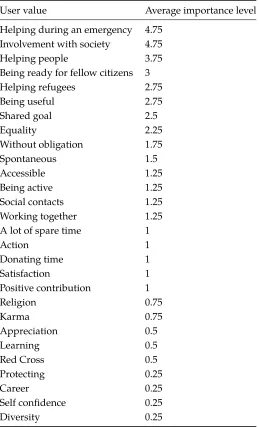
The co-creation session included an exercise to determine the user values of the Ready2Helpers. Table 1 summarizes the results, based on the full results in Appendix F. The ’average importance level’ is the average score which has been given for a certain ’user value’. This score ranges from ’Very important (5)’ to ’Not important (0)’.
[image:24.612.178.437.231.658.2]Four of the user values gained an average score of 3 or higher. These four user values are ’Helping during an emergency’, ’Involvement with society’, ’Helping people’ and ’Being ready for fellow citizens’. These main values will be taken as a guideline while developing the lo-fi and hi-fi prototypes.
Table 1: Average importance level of user values
User value Average importance level
Helping during an emergency 4.75
Involvement with society 4.75
Helping people 3.75
Being ready for fellow citizens 3
Helping refugees 2.75
Being useful 2.75
Shared goal 2.5
Equality 2.25
Without obligation 1.75
Spontaneous 1.5
Accessible 1.25
Being active 1.25
Social contacts 1.25
Working together 1.25
A lot of spare time 1
Action 1
Donating time 1
Satisfaction 1
Positive contribution 1
Religion 0.75
Karma 0.75
Appreciation 0.5
Learning 0.5
Red Cross 0.5
Protecting 0.25
Career 0.25
Self confidence 0.25
5.4
Personas
Based on the co-creation session, expert meetings and a non-public research conducted by the Red Cross, personas have been created. The persona template of the University of Warwick [20] has been used as a guideline for the personas. This template is specifically focused on creating personas for (web-)application. Two personas were created and can be found in Appendix E. The first persona, Marianne, is a young professional who is too busy to do volunteering work because of her job. The second persona, Ronald, is a retired men, who has sufficient time to do volunteering work. Both personas address different target groups, which entail the main two groups visible in the Ready2Help demographic.
5.5
User journey
Currently the user journey of Ready2Help is simplistic (figure 2). The Ready2Helpers do not have the chance to actively sign-up for help actions. They are only alerted when there is an emergency situation occurring in which the Red Cross could use the help of Ready2Helpers nearby. When they engage in a help action, most of the Ready2Helpers are satisfied with the tasks they could perform. This has been concluded based on a evaluation from which the Ready2Helpers receive after participating in a help action.
6
Specification
6.1
Paper lo-fi prototypes
Several lo-fi paper prototypes have been created using quick drawings of the user interface. This way of prototyping has been done to quickly iterate and fine-tune the functionality and requirements based on the feedback of the target group. These prototypes were tested by asking users if the found the interfaces intuitive and what could be improved. Based on this feedback the lo-fi prototypes were iterated in such a way that they became more clear and intuitive.
6.2
Interactive lo-fi prototype
The final version of the paper prototypes was transformed into an interactive lo-fi prototype. The URL of this interactive prototype and screenshots can be found in Appendix G. This prototype has been tested by the Ready2Help team during a dedicated meeting. The different views were demonstrated and the functionality which was going to be developed was explained to them. The Ready2Help team was able to provide useful feedback and questions during this meeting. Their first question was ’How do you think that help requests will end up in the system?’, this was a valid question, because without a supply of help requests the system would be useless. This prototype was based on the idea that Ready2Helpers would identify and report help requests in the application. This idea could be extended by also proving access to organizations related to the Red Cross (like: the police, district nurses, hospitals). These organizations could also report help requests which they must face while performing their profession.
Moreover, they asked question about the scope of the help requests, which requests do you allow and which ones do you reject? This instantly led to a discussion among the team members, the Ready2Help team did not have a single clear definition themselves. This meant that the scope could be variable without the need of restricting the scope before testing the application. Overall, the Ready2Help team agreed that the help requests should fit within their seven core principals and it should concern humanitarian help.
Furthermore, a question was raised, if it was possible to connect the hi-fi prototype with their internal database system. This system, called Tools, contains all the user information about the Ready2Helpers. It would be necessary to connect with Tools to make sure the users were able to login using their current credentials. Realizing this connection largely depended on the question if the Tools system had an already existing API, which the application could connect to.
The Ready2Help team was enthusiastic about the fact that the application could create a better match between help requests and help offers. Moreover, they saw great potential of getting to know the Ready2Help users better, by providing them the opportunity to fill in their skill-sets.
6.3
Goals of application
It is important to define clear goals, which act as an overarching guideline for the requirements. In such a way the goals can provide an ideal situation and the requirements can be specific regarding certain functionalities.
The overarching goals of the application can be formulated as:
• Provide the Red Cross with an application in which Ready2Helpers can identify help requests in society, which are not visible from the top-down perspective of the Red Cross.
• Provide Ready2Helpers with the knowledge to identify a certain local problem, and how they can turn this into a Ready2Help action.
• Give the Ready2Helpers the ability to provide their skill set, such that the Red Cross can specifically target certain Ready2Helpers for certain Ready2Help actions.
6.4
Requirements
6.4.1 Functional requirements
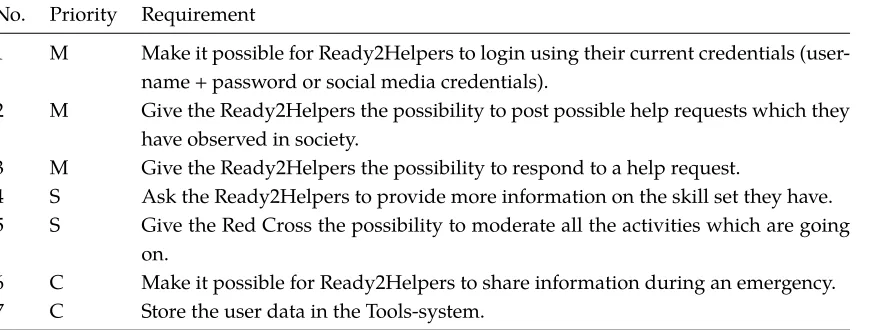
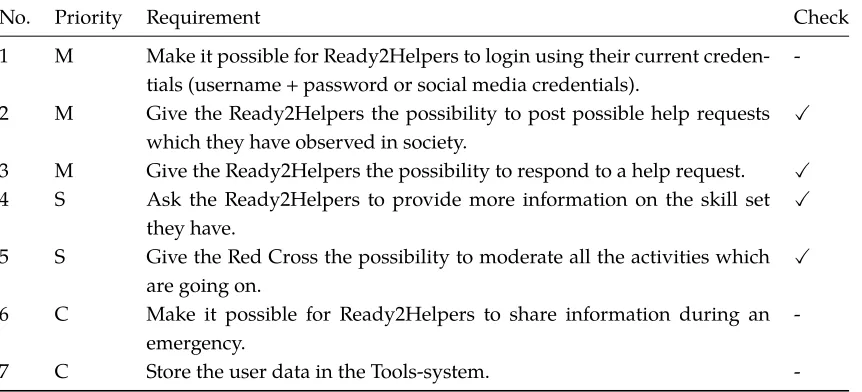
[image:27.612.95.531.353.518.2]Functional requirements have been formulated (see Table: 2) to determine which functionalities the application should have to be successful. They are prioritized using four categories: Must have (M), Should have (S), Could have (C) and Won’t have (W). These requirements are based on the knowledge gained in the ’State of the Art’-, ’Context analysis’-, ’Ideation’-chapters and the lo-fi prototypes. During the development of the hi-fi prototype these requirements should be transformed into actual application functions.
Table 2: Functional requirements
No. Priority Requirement
1 M Make it possible for Ready2Helpers to login using their current credentials (user-name + password or social media credentials).
2 M Give the Ready2Helpers the possibility to post possible help requests which they have observed in society.
3 M Give the Ready2Helpers the possibility to respond to a help request.
4 S Ask the Ready2Helpers to provide more information on the skill set they have. 5 S Give the Red Cross the possibility to moderate all the activities which are going
on.
6 C Make it possible for Ready2Helpers to share information during an emergency.
7 C Store the user data in the Tools-system.
6.4.2 Technical requirements
Besides the functional requirements, technical requirements should also be formulated. These tech-nical requirements do not concern the actual functionality of the application, but they should be the foundation on which the functions can be build. Important aspects like privacy and security should be incorporated into these technical requirements.
The technical requirements can be formulated as:
• The web-application will use up-to-date, but stable web techniques. In this case; using the Angular 4 framework in combination with a no-SQL-database (Firebase).
• The login process should communicate with the Tools-system using OAuth2.0 or an equiva-lent.
• The privacy of the users is important and should be in all times be protected from theft and hacks.
• The applications should be protected with the HTTPS-protocol.
• During an emergency, many request could occur, the application should be able to handle all these requests. (Thus, the application should be scalable)
6.5
Scenarios
6.5.1 Use cases functionality overview
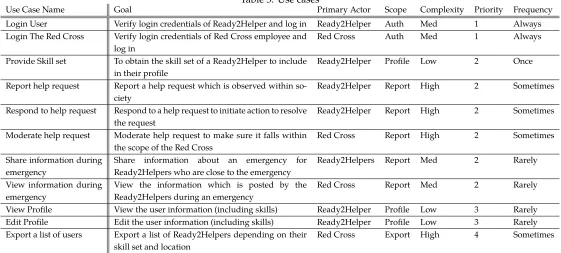
[image:28.612.26.587.388.641.2]Before scenarios can be created, it is important to define the different use case functionalities (table 3). The hi-fi prototype should provide the possibility to the primary actor to reach a specified goal based on a certain use case. The use cases are prioritized, to create an overview on how important the use cases are for the functionality of the prototype. The use cases have a scope, which makes it easy to translate the use cases into a function classes while developing the hi-fi prototype.
Table 3: Use cases
Use Case Name Goal Primary Actor Scope Complexity Priority Frequency
Login User Verify login credentials of Ready2Helper and log in Ready2Helper Auth Med 1 Always Login The Red Cross Verify login credentials of Red Cross employee and
log in
Red Cross Auth Med 1 Always
Provide Skill set To obtain the skill set of a Ready2Helper to include in their profile
Ready2Helper Profile Low 2 Once
Report help request Report a help request which is observed within so-ciety
Ready2Helper Report High 2 Sometimes
Respond to help request Respond to a help request to initiate action to resolve the request
Ready2Helper Report High 2 Sometimes
Moderate help request Moderate help request to make sure it falls within the scope of the Red Cross
Red Cross Report High 2 Sometimes
Share information during emergency
Share information about an emergency for Ready2Helpers who are close to the emergency
Ready2Helpers Report Med 2 Rarely
View information during emergency
View the information which is posted by the Ready2Helpers during an emergency
Red Cross Report Med 2 Rarely
View Profile View the user information (including skills) Ready2Helper Profile Low 3 Rarely Edit Profile Edit the user information (including skills) Ready2Helper Profile Low 3 Rarely Export a list of users Export a list of Ready2Helpers depending on their
skill set and location
With all these use cases specified, four scenarios can be developed consisting out of the different use cases. These scenarios will be used as a guideline while developing the hi-fi prototype.
6.5.2 Scenario 1: User reports help request
1. User observes a help request in society and wants to report it
2. User provides login credentials to the Ready2Help web-application(Login User)
3. User clicks on ’Report Help Request’
4. The user provides a description, location, title of the help request and clicks ’Submit’(Report help request)
5. The application will process the new request and makes it visible for other Ready2Helpers
6.5.3 Scenario 2: User responds to help request
1. User provides login credentials to the Ready2Help web-application(Login User)
2. User clicks on ’Show Current Help Requests’
3. The application shows all the help requests, sorted by distance from the Ready2Helper
4. User clicks on a specific request
5. User responds to the help request to join an action(Respond to help request)
6. The application will process the new response
6.5.4 Scenario 3: User provides skill set
1. User provides login credentials for the first time to the Ready2Help web-application(Login User)
2. The application asks the user to ’Provide skill set’
3. User clicks on ’Next’
4. User fills in the skill sets which he/she has, based on predefined dynamic skills(Provide Skill set)
5. The application saves the skill sets to the user in the Tools system
6.5.5 Scenario 4: Red Cross moderates help requests
1. Red Cross employee provides login credentials to the Ready2Help web-application(Login the Red Cross)
2. Red Cross employee clicks on ’Show Current Help Requests’
3. The application shows all the help requests, sorted by relevance
4. Red Cross employee clicks on a specific request
5. Red Cross employee can moderate this request, provided with the options to ’Edit’, ’Delete’, ’Respond’ and possibly additional actions(Moderate help request)
6.6
Flow chart
To determine a proper workflow based on the scenarios, a flow chart has been made. This flow chart visualizes all the steps that are needed to resolve a help request. The flow chart starts with a help request in society, an individual or organization has a certain problem, which is currently not solved. Next, a Ready2Helper discovers the help requests and reports this problem to the Ready2Help application (scenario 1). Before the help request becomes visible in the application, the Red Cross moderates the request (scenario 4). They can determine to reject or approve the help requests. When accepted, the help request become visible in the Ready2Help application. Other Ready2Helpers can now sign-up to help resolving this help request (scenario 3). When enough Ready2Helpers have signed up, they can start resolving the help request. After resolving, they are given the possibility to provide feedback on resolving the help request. As a last step, the help request is resolved and the Ready2Helpers were able to help people who needed help.
Help request
in society Ready2Helper discovers help request
Ready2Helper reports help
request
Ready2Help application Red Cross moderates
request
Ready2Helpers resolve help
request
Ready2Helpers sign up to help Help request
[image:30.612.136.481.262.557.2]is resolved provide feedbackReady2Helpers
7
Realization
7.1
Platform selection
To translate the specifications into a hi-fi prototype decisions have to be made regarding the tech-nology that is going to be used. The first step is to determine if the application should be a computer-application (Windows, OS X, Linux), mobile-phone-app (Android, IOS, Windows Phone) or a web-application. This decision can be based on a research that has been conducted by S. van Gooswillingen commissioned by the Red Cross. This research is not publicly available, but two figures were used in this paper.
Figure 4 provides information on how Ready2Helpers want to be contacted. It can be observed that a large portion of Ready2Helper wants to be contacted using a mobile device (SMS, Whatsapp, possibly email). Figure 5 provides information about the age distribution of the Ready2Helpers, it can be concluded that all the age categories (with the exception of 70+) are represented with 16% or more. Elderly people (60+), generally speaking, struggle more using a smartphone or do not own one (as discovered during the co-creation session). These people should also be able to use the application, because they are an important target group for the Ready2Help platform.
[image:31.612.129.483.411.652.2]Based on these figures, can be concluded that a computer-application should be avoided, this because many Ready2Helpers want to receive information on their mobile phone. A mobile-phone-app is also not a satisfactory solution because it might exclude an elderly group of Ready2Helpers, because they do not have the skills or mobile devices to use the platform. A web-application can provide the best of both worlds when it is designed as a responsive application. When designed responsively, the application will automatically adapt to the screen size of the device. In such a way, it can be properly used on smartphones, tablets and computers.
Figure 5: Survey question: Within what age category do you belong?
7.2
Web technology
When developing a web-application it is important to build it according to the web standards nowadays, this to make sure the application could be safely and effectively be used in the future. M. Hoque [21] analyzed the web standards in 2017. This research provided a limited, but recent overview, of the available web standards nowadays. Based on his analysis and personal experience the web technologies in the coming paragraphs are selected.
7.3
Technology front-end
The front-end of the application will be build using the Angular 4 Framework [16]. This Angular 4 Framework is based on TypeScript [22], which is a superset of JavaScript [23]. This makes it possible to use object-oriented programming and typing in javascript. This makes it easier to write clean and stable code, with the freedom of using plain JavaScript as well.
Angular 4 projects compile to a single page application, but due to the extended routing possi-bilities it is possible to use different URLs for different views. Moreover, it can use Ahead-of-Time (AOT) compilation and lazy-loading to make sure the user experiences a smooth web experience without waiting for the whole application to load.
All the users and objects will be stored using Google Firebase [24]. Integration with angular 4 and Firebase can be done using the Firebase JavaScript SDK [25]. Using an external non-SQL database saves time in developing and maintaining a database-system. In Firebase the permissions for each user and their read/write rights can be set by defining some database rules. Which makes interacting between the front-end and the database easy.
7.4
Technology back-end
The back-end of the application will be build using Node.js [26]. It is a JavaScript runtime build on Chrome’s V8 JavaScript engine [27], which has the functionality to have a non-blocking I/O model that makes it a lightweight back-end. This is very useful to make the application scalable for a large number of users. Using Express [28], which is a web-application framework, it is easy to create a REST-API. This makes communication with the front-end possible using normal HTTP calls. For example a HTTP POST request to ’https://back-end.nl/API/match’ from the front-end can easily received using the following code running in the back-end:
1 // Load Express Dependency
2 var express = require (’ express ’);
3
4 // Init app
5 var app = express () ;
6
7 // Receive ’ match ’ POST - request form front - end
8 app . post (’/ API / match ’, function(req , res ){
9 var requestId = req . body . id ;
10 var skillsetsNeededIds = req . body . skillsets_needed_ids ;
11
12 // Create a match between help request and user with certain skills
13 match ( requestId , skillsetsNeededIds ) {
14 res . send (true);
15 }
16 17 }
18
19 // Launches the app on port 80.
20 var port = 80;
21 var ip = process . env . OPENSHIFT_NODEJS_IP ;
22
23 app . listen ( port , ip , function() {
24 console . log (’ Express server listening on %d ’, port );
25 }) ;
Building the back-end as a REST-API provides the possibility to quickly develop new functionalities (like matching algorithms, sending e-mails, sending text messages). For this prototype it is not further developed, but this could be done in future work.
7.5
Verifying functional requirements
The requirements 2 to 5 have been met and are fully operational in the hi-fi prototype. The requirements 6 and 7 have not been realized because of the limited time available to develop an application during this thesis. These requirements should be further implemented in future versions of the application.
Table 4: Functional requirements check
No. Priority Requirement Check
1 M Make it possible for Ready2Helpers to login using their current creden-tials (username + password or social media credencreden-tials).
-2 M Give the Ready2Helpers the possibility to post possible help requests which they have observed in society.
X
3 M Give the Ready2Helpers the possibility to respond to a help request. X
4 S Ask the Ready2Helpers to provide more information on the skill set
they have.
X
5 S Give the Red Cross the possibility to moderate all the activities which are going on.
X
6 C Make it possible for Ready2Helpers to share information during an
emergency.
-7 C Store the user data in the Tools-system.
-7.6
Accessing the hi-fi prototype
The front-end and back-end are both hosted on a private dedicated server for testing purposes. A functioning version of the hi-fi prototype can be found by visiting the following website:
https://ready2help.freekboelders.nl/.
Views (screenshots) of the application can be found in Appendix J.
The full source code of the hi-fi prototype can be made available on request by sending an e-mail to [email protected]
8
Evaluation
8.1
Goal of hi-fi prototype testing
Evaluating the hi-fi prototype has three objectives. The first objective is to determine if the require-ments are met, and if not, why this is caused. Scenario 1-3 (as described in section 6.5) will be tested by the Ready2Helpers. When they can perform these scenarios most of the requirements will be met (because they describe a certain usage of the application). The second objective is to determine the usability level of the website. It should be determined if the application is user friendly for the diverse target group. The last objective is to validate the idea that Ready2Helpers are willing to create and respond to help requests.
8.2
Results of hi-fi prototype testing
In total 159 users out of the 1235 users (13%) visited the hi-fi prototype website. Out of these 159 users, 34 users (21%) provided feedback on the hi-fi prototype using the ’Survey’ (see Appendix M). None of the users (0%) used the possibility to provide feedback using the ’Incoming Feedback’ method. Because of this, there were no results obtained using the ’Incoming Feedback’ method.
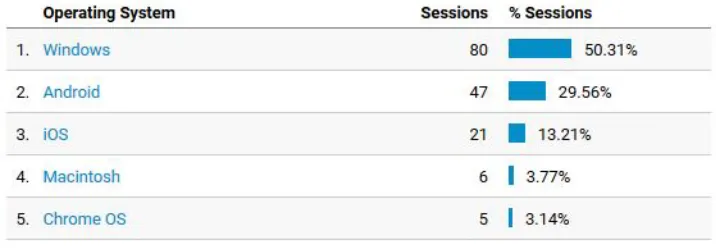
[image:35.612.126.484.429.553.2]The average session duration of the 159 users was 5 minutes and 9 seconds. The users spend most of their time on the survey page (2 minutes and 15 seconds). Out of all users, 57% used a desktop-device (Windows, Macintosh, Chrome OS) to approach the website, the rest of the users (43%) used a mobile device (Android, iOS) (see Figure 6). On mobile devices the time spend on the website was significantly lower (1 minute and 41 seconds) in comparison with the desktop-devices (9 minutes and 8 seconds). Thus, it can be observed that users are more likely to explore the website and provide feedback on desktop-devices in comparison with mobile-devices.
Figure 6: Distribution of operation systems during the user test
8.2.1 Survey
How would you rate the idea of matching help requests and help offers using a website?
Figure 7: Distribution rating: How would you rate the idea of matching help requests and help offers using a website?
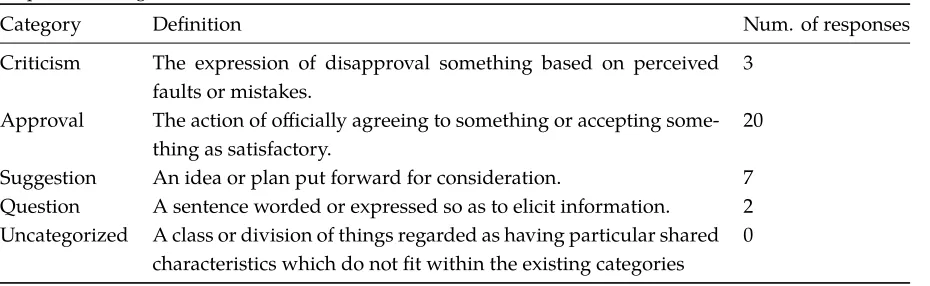
The target group was asked to motivate why they had given a certain rating. All these responses were gathered and divided into five categories. By counting the number of responses for each category, insights can be obtained regarding the general opinion of the target group. These results can be found in Table 5, this table has been created based on the categorical distribution of responses as listed in Appendix N. It can be observed that 63% (20 responses) of the responses are approving the idea of having a website that matches help requests and help offers. Only 9% (3 responses) of the respondents have critical thoughts on this idea.
Moreover, several suggestions have been made by the respondents on what is missing, and what was not clearly communicated during the hi-fi prototype testing. The respondents point out the importance of moderation, the help requests should be filtered to avoid abuse. This feature was already developed but was not used during the hi-fi prototype test. This because moderation of help requests takes time, which could result in respondents not coming back to fill in the survey. Besides, respondents provided the suggestion to receive a notification when new help requests are available by e-mail, Whatsapp or SMS. This feature should be included in the requirements for further development of the application.
Table 5: Categorization of comments: How would you rate the idea of matching help requests and help offers using a website?
Category Definition Num. of responses
Criticism The expression of disapproval something based on perceived faults or mistakes.
3
Approval The action of officially agreeing to something or accepting some-thing as satisfactory.
20
Suggestion An idea or plan put forward for consideration. 7
Question A sentence worded or expressed so as to elicit information. 2 Uncategorized A class or division of things regarded as having particular shared
characteristics which do not fit within the existing categories
[image:36.612.90.555.498.641.2]How would you rate the usability (user-friendliness) of this website?
[image:37.612.163.452.149.273.2]Measuring the usability of the hi-fi prototype is important to determine if the requirements are met and the system is user friendly. This question can be compared with the first question to check if the ’idea’ correlates with the reality as developed in the hi-fi prototype. The average rating of the users was a 7.4 (see Figure 8). This is 0.7 points lower in comparison with the first question.
Figure 8: Distribution rating: How would you rate the usability (user-friendliness) of this website?
To get insights on why this score is lower, the users were asked to motivate their score. These results were categorized using the same method as used for question one, the results are listed in Table 6. The largest group 55% (18 responses) approves with the usability of the website. Their feedback can be formulated as ’clear, easy to use, fast, user friendly, well readable and easy to access’. The second largest group of 18% (6 responses) has critics on the usability of the website. They find the website ’unclear, hard to find information, were not able to post a help request and it took them a long time to understand). This feedback is the totally opposite of the approving group. It should be further investigated why this group did not approve the usability of the application and what could be improved to obtain a higher usability.
Table 6: Categorization of comments: How would you rate the usability (user-friendliness) of this website?
Category Definition Num. of responses
Criticism The expression of disapproval something on the basis of per-ceived faults or mistakes.
6
Approval The action of officially agreeing to something or accepting some-thing as satisfactory.
18
Suggestion An idea or plan put forward for consideration. 3
Question A sentence worded or expressed so as to elicit information. 1 Uncategorized A class or division of things regarded as having particular shared
characteristics which do not fit within the existing categories
[image:37.612.93.548.485.628.2]I would use the Ready2Help website when it is further developed
[image:38.612.161.454.150.273.2]This statement was asked to verify if the Ready2Helpers are willing enough to use the platform once it is further developed. The average rating was an 8.2 (see Figure 9). This score indicates that among the respondents the willingness of using the website is rather high. Which proves that there is a significant need of having a Ready2Help web-application.
Figure 9: Distribution rating: I would use the Ready2Help website when it is further developed
Would you post a help request on the Ready2Help website?
[image:38.612.162.452.436.559.2]This question was asked to determine if the Ready2Helpers are willing to post help requests themselves. The previous question showed that they were willing to use the platform, but this question shows that they are not as willing to post help requests themselves. The average score of this question is significantly lower in comparison with the other questions, namely a 6.4 (see Figure 10). Unfortunately, this questions did not have a follow-up question to ask why the users had chosen these scores.
Would you respond to a help request on the Ready2Help website?
[image:39.612.162.454.149.273.2]This question was asked to determine if the Ready2Helpers are willing to actively respond to help requests posted on the website. The average score of this question was an 8.2 (see Figure 11). It can be observed that the users mainly like the aspect of responding to existing help requests instead of creating new ones themselves.
Figure 11: Distribution rating: Would you respond to a help request on the Ready2Help website?
8.2.2 Suggestions
The results of the survey (see Appendix M) also include useful suggestions by the Ready2Helpers. Several open questions were asked to provoke the users to think about solutions and improvements themselves. Their suggestions can be used to determine requirements for further development of the application. The most relevant suggestions are accumulated in Table 7.
Table 7: Survey suggestions
No. Suggestion Amount of times suggested
1 Whatsapp notifications 5
2 E-mail notifications 4
3 More explanation 3
4 Create an app 2
5 SMS notifications 2
6 Determine location of mobile phone 1
7 Notify other citizens about help requests 1
8 More possibilities for skills 1
[image:39.612.142.476.437.607.2]