Internship report: Design of a Matlab
based graphical user interface for
visualization and enhancement of floor
dynamics
F.B.Koopman
s0166626
Document name: Report_fkoo.docx
Date: 23 July 2018
MECAL, Enschede, The Netherlands
Supervisor Mecal: Servaas Bank
Internship period: 1/5/2018-31/7/2018
University of Twente
Faculty of Engineering Technology
Form ID: HTS-QF-014-v3 Form Issued: January 2017
Report_fkoo.docx ©MECAL 2018 Confidential
Page 2 of 151
Internship report: Design of a Matlab based graphical
user interface for visualization and enhancement of
floor dynamics
Document name:
Report_fkoo.docx
Date:
23/07/18
Written by:
Frederik Koopman, MECAL, Enschede, The Netherlands
Reviewed by:
Servaas Bank, MECAL, Enschede, The Netherlands
Approved by:
Servaas Bank, MECAL, Enschede, The Netherlands
Document by:
MECAL, Enschede, The Netherlands
Mailing list:
MECAL (1x)
Pages incl. cover:
151
Keywords:
Floor vibrations, floor vibrations reduction, floor dynamics
Language:
English
Software version:
Microsoft Word 2016
Contributing Authors
Name Author
Part(s) of this document
Frederik Koopman
All
Document change and history record
Version
Date
Page (s)
Short description
1.0
23/07/18
151
First Issue
©MECAL 2018. All rights reserved.
Form ID: HTS-QF-014-v3 Form Issued: January 2017
Report_fkoo.docx ©MECAL 2018 Confidential
Page 3 of 151
Summary
Form ID: HTS-QF-014-v3 Form Issued: January 2017
Report_fkoo.docx ©MECAL 2018 Confidential
Page 4 of 151
Table of contents
Summary ... 3
Preface and acknowledgements ... 6
Chapter 1 Introduction ... 7
1.1
Assignment description ... 7
1.2
Outline of the report ... 7
Chapter 2 Floor insight GUI ... 8
2.1
Existing version: 1D ... 8
2.2
First new version: 2D ... 9
2.3
Second new version: 2D with floor parameters ... 11
2.4
Third new version: 3D with floor parameters ... 11
2.5
Fourth new version: 3D with floor parameters and not square floors ... 12
Chapter 3 Floor model estimation ... 14
3.1
Higher DOF systems ... 14
3.2
Matrices estimation ... 15
Chapter 4 Matlab based GUI ... 17
4.1
Loading of data ... 17
4.2
GUI functions ... 19
4.2.1
Plotting frf for z, v and/or a with coherence ... 19
4.2.2
Run ODS ... 19
4.2.3
Adding a point mass, frames or point stiffness ... 19
4.2.4
Add of EQs ... 19
4.2.5
Plot sensitivity ... 20
4.2.6
Plot vibrations ... 20
4.2.7
Plot EQ forces ... 20
4.2.8
Save session ... 21
4.3
Code ... 21
Chapter 5 Test case ... 22
Chapter 6 Conclusions and recommendations ... 25
6.1.1
Conclusions ... 25
6.1.2
Recommendations... 25
6.1.3
Experiment ... 25
6.1.4
Retuning of tunable EQs ... 25
Form ID: HTS-QF-014-v3 Form Issued: January 2017
Report_fkoo.docx ©MECAL 2018 Confidential
Page 5 of 151
6.1.6
Loading of vibration levels specification ... 26
6.1.7
Adding of point damper and damper parameter to frame ... 26
References ... 27
Appendix A MECAL ... 28
Appendix B Reflection... 29
Appendix C Matlab floor insight GUI code 2D Version ... 30
Appendix D Matlab floor insight GUI code 2D Version with floor parameters ... 38
Appendix E Matlab floor insight GUI code 3D Version with floor parameters ... 46
Appendix F Function globalMatrixBuilder code ... 55
Appendix G Matlab floor insight GUI code 3D Version with floor parameters and variable floor size57
Appendix H Equations.pdf ... 67
Appendix I High to low order estimation Matlab code ... 68
Appendix J Matrices estimation Matlab code ... 71
Appendix K GUI code ... 74
Appendix L Test case table Matrices estimation Matlab script ... 149
Figure 1: 1D floor GUI ... 8
Figure 2: 1D floor system ... 8
Figure 3: 2D floor system ... 9
Figure 4: 2D floor GUI ... 10
Figure 5: floor support assumption ... 10
Figure 6: 2D floor GUI with floor parameters ... 11
Figure 7: 3D floor GUI ... 12
Figure 8: 3D floor GUI for not square floors ... 13
Figure 9: Dual beam element system ... 14
Figure 10: high to low DOF system ... 14
Figure 11: Measurement points example ... 18
Figure 12: Closed-loop system, altered from [6] ... 20
Figure 13: Test case table with SpecTest hammer and sensors ... 22
Figure 14: Table grid ... 23
Figure 15: Table Co-located transfers ... 23
Figure 16: MECAL organogram ... 28
Form ID: HTS-QF-014-v3 Form Issued: January 2017
Report_fkoo.docx ©MECAL 2018 Confidential
Page 6 of 151
Preface and acknowledgements
This report is drafted for MECAL and University of Twente, as a conclusion of my 3 months internship
at MECAL from May 1, 2018 until July 31, 2018. During the final year of the master Mechanical
Engineering (Mechanics of Solids, Surfaces and Systems) at the University of Twente, an internship at
an external party must be done. The goal of this internship is to acquiring work experience outside
University of Twente of a trainee or recently graduated engineer level with the main objective of
putting acquired knowledge and skills into practice while the experiences of applying and writing
reports as well as working in expert teams play an important role too.
I chose to do my internship at MECAL since my internship options abroad were cancelled and I needed
an internship fast, this was possible at MECAL. Nevertheless I had a great time during my internship.
While my master was focused mainly on mechatronics this internship was mostly dynamics.
Information on MECAL can be found in Appendix A.
Acknowledgments
The opportunity for doing my internship at MECAL was a great chance for learning and professional
development. Therefore, I consider myself as a very lucky individual as I was provided with an
opportunity to be a part of it. I am also grateful for having a chance to meet so many wonderful people
and professionals who led me though this internship period.
Form ID: HTS-QF-014-v3 Form Issued: January 2017
Report_fkoo.docx ©MECAL 2018 Confidential
Page 7 of 151
Chapter 1
Introduction
Mecal High-tech/Systems solves vibration problems for the semiconductor fabrication industry. Mostly the
vibration problems are solved with machine support frames or pedestals, structural building improvements
or by use of EQUALIZER(s) [1] (EQ). The EQ is an active inertial damper system. A big disadvantage of this
method is that it is very time consuming [2].
To get the best results with the EQ the floor needs to be modeled. At the moment this is done based on fitted
FEM calculations, or the EQ are placed using common sense. Previous interns have tried to using the modal
description [3] to get an model for the floor. This method works by getting the mode shapes at the
corresponding eigenfrequencies. The more eigenmodes are known the more accurate the model becomes.
A big advantage of this method is that not all transfer needs to be known just all transfer from all inputs to a
single output. The eigenfrequencies are found by looking for peaks in the absolute value of the transfer or
points were the phase of the transfer passes the points -90 or 90 degrees with a negative slope. The
corresponding mode shapes are gotten by taking the imaginary part of the transfer at these frequency. This
method is known under the name quadrature picking.
While this method works well in theory, in practice there are a few issues. Firstly with systems that have a
lot of damping or having eigenfrequencies that are close together the eigenfrequencies are not easily
identified which can lead to missing eigenmodes. Also the transfers need to have enough eigenfrequencies
to get enough eigenmodes, so measurements needs to have high frequency data.
1.1
Assignment description
At the starting of this internship the assignment was only a global descripting because it was yet unsure
which direction this internship will take. The general idea was to get an even better understanding of
vibrations in floors, how to model it and to be able to measure these vibrations and process the results more
efficiently. This last step is still done with custom Matlab scripts, FEM calculations and simple tests for each
case.
1.2
Outline of the report
Form ID: HTS-QF-014-v3 Form Issued: January 2017
Report_fkoo.docx ©MECAL 2018 Confidential
Page 8 of 151
Chapter 2
Floor insight GUI
2.1
Existing version: 1D
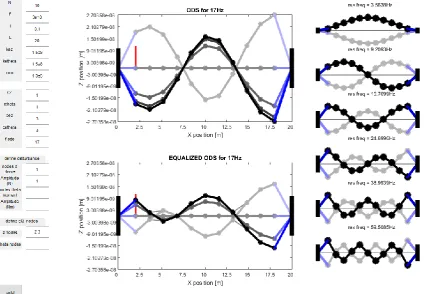
[image:8.595.74.465.302.570.2]The original floor GUI, see Figure 1, made by Servaas Bank is an insight tool for vibrations in a floor. This GUI
approximates the floor as a series of masses connected by springs that only move in the vertical direction,
see Figure 2. The floor is assumed to be homogeneous in mass and stiffness. The floor is connected to the
fixed world by support springs. The tool asks the user for the number of masses it should use, the stiffness
in the middle of the floor the support spring stiffness, the total mass of the floor and the damping coefficient
for both the floor and support.
Figure 1: 1D floor GUI
The tool calculates the first six eigenmodes of the system and displays them on the right. Also the user can
give 1 or more harmonic forces on the masses and the response is calculated and displayed in the middle top
figure. The user can also give the locations of EQs and the response with the EQs is calculated in the middle
bottom figure.
Form ID: HTS-QF-014-v3 Form Issued: January 2017
Report_fkoo.docx ©MECAL 2018 Confidential
Page 9 of 151
The tool works by making a global stiffness, damping and mass matrices from the inputs. Then the
eigenmodes and eigenfrequencies are calculated by the function eig from Matlab from the mass and stiffness
matrix. The harmonic response is calculated by making the dynamic matrix from equation:
𝐷(𝜔) = −𝜔
2𝑀 + 𝑖𝜔𝐶 + 𝐾
Since the user has given the frequency this can be solved. Next the external force vector is made from the
user input and the response is calculated from D\F and animated. The same is done for the animation for the
response with EQs. For this it is assumed that the stiffness of a point where an EQ is placed will become 10
times as stiff as before. Therefore only the stiffness matrix is altered. The EQ can in this case be thought of
as an extra spring connecting the point it is placed on to the fixed world.
2.2
First new version: 2D
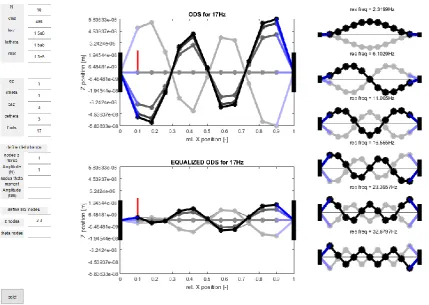
[image:9.595.231.408.487.633.2]To get even better insight in the vibrations of floor this tool was adjusted to be 2D. A rotation was added.
For this the floor is assumed to be a series of beam elements connected to the fixed world by translation and
rotation springs, see Figure 3.
Figure 3: 2D floor system
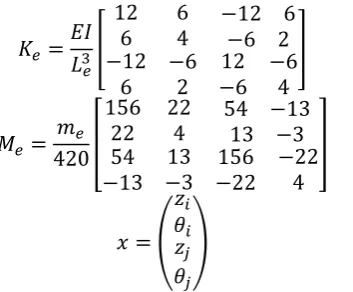
The beam elements has the element stiffness, mass matrix [4] with coordinate system where the beam is
connected between node i and j:
𝐾
𝑒=
𝐸𝐼
𝐿
𝑒3[
12
6
−12 6
6
4
−6 2
−12
6
−6
2
12
−6
−6
4
]
𝑀
𝑒=
𝑚
𝑒420
[
156
22
54 −13
22
4
13 −3
54
−13
13
−3
156
−22
−22
4
]
𝑥 = (
𝑧
𝑖𝜃
𝑖𝑧
𝑗𝜃
𝑗)
Form ID: HTS-QF-014-v3 Form Issued: January 2017
Report_fkoo.docx ©MECAL 2018 Confidential
[image:10.595.75.505.140.445.2]Page 10 of 151
Figure 4: 2D floor GUI
It is assumed the floor can be approximated by a beam supporting in the way shown in Figure 5. For this case
the factor EI is calculated from the stiffness in the middle by using the beam bending formula
𝑣
𝑚𝑎𝑥=
−𝑃𝐿
348𝐸𝐼
→ 𝐸𝐼 =
−𝑃𝐿
348𝑣
𝑚𝑎𝑥=
𝑘
𝑚𝑖𝑑𝐿
3
48
Figure 5: floor support assumption
Filling the found expression into the beam element stiffness matrix and using
𝐿
𝑒= 𝐿 𝑁
⁄
the leading factor
of the stiffness matrix becomes
𝑘
𝑚𝑖𝑑𝑁
3⁄
48
. The code for this tool is placed in Appendix C.
[image:10.595.77.467.488.657.2]Form ID: HTS-QF-014-v3 Form Issued: January 2017
Report_fkoo.docx ©MECAL 2018 Confidential
Page 11 of 151
the disturbance force. Since both need to be placed outside a zero vertical movement point. The location of
these points depends on the frequency of the disturbance force.
2.3
Second new version: 2D with floor parameters
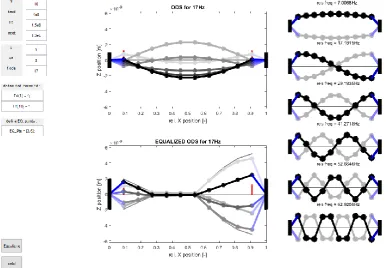
[image:11.595.77.504.272.566.2]The next version of the tool, see Figure 6, was altered by no longer using the stiffness in the middle of the
floor but the user should give values for the parameters E (Youngs modulus), I (area moment of inertia) and
L (floor length). No other adjustments were made. Although this tool does not give much more insight then
the previous versions of the tool, it can be used for a real floor for a first estimate.
Figure 6: 2D floor GUI with floor parameters
2.4
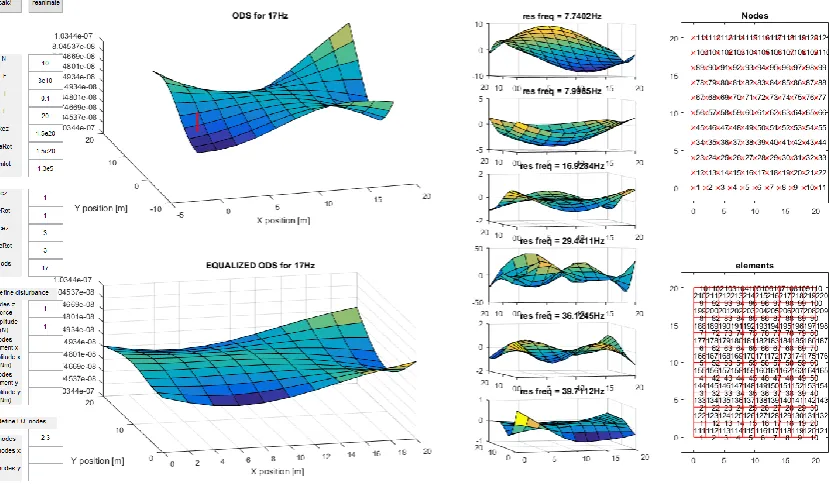
Third new version: 3D with floor parameters
Form ID: HTS-QF-014-v3 Form Issued: January 2017
Report_fkoo.docx ©MECAL 2018 Confidential
[image:12.595.81.496.144.387.2]Page 12 of 151
Figure 7: 3D floor GUI
2.5
Fourth new version: 3D with floor parameters and not square floors
Form ID: HTS-QF-014-v3 Form Issued: January 2017
Report_fkoo.docx ©MECAL 2018 Confidential
[image:13.595.77.499.146.397.2]Page 13 of 151
Form ID: HTS-QF-014-v3 Form Issued: January 2017
Report_fkoo.docx ©MECAL 2018 Confidential
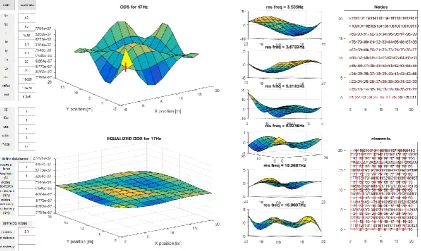
Page 14 of 151
Chapter 3
Floor model estimation
As already stated in Chapter 1 previous interns had tried to get a floor model by using modal analysis. This
method had problems if floors have a lot of damping and/or when the eigenfrequencies are close together.
Therefore, either this method needs to be adjusted to be able to handle this, or another method needs to
used. A new method of estimating mass, stiffness and damping matrices directly from the frequency
response functions (frf) was derived. For this method to work, it could be necessary that a higher DOF system
can be estimated by one of a lower. Since not all DOF are always measured. For instance of the floor it would
be very handy if only a system of vertical forces and displacements can accurately describe the system since
these are easily measured. However the forces will also result in rotations which are now ignored.
3.1
Higher DOF systems
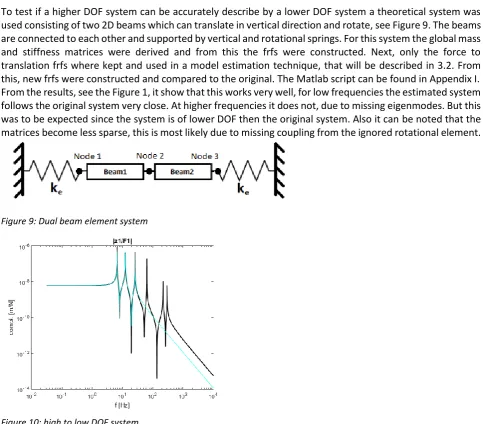
To test if a higher DOF system can be accurately describe by a lower DOF system a theoretical system was
used consisting of two 2D beams which can translate in vertical direction and rotate, see Figure 9. The beams
are connected to each other and supported by vertical and rotational springs. For this system the global mass
and stiffness matrices were derived and from this the frfs were constructed. Next, only the force to
translation frfs where kept and used in a model estimation technique, that will be described in 3.2. From
this, new frfs were constructed and compared to the original. The Matlab script can be found in Appendix I.
From the results, see the Figure 1, it show that this works very well, for low frequencies the estimated system
follows the original system very close. At higher frequencies it does not, due to missing eigenmodes. But this
was to be expected since the system is of lower DOF then the original system. Also it can be noted that the
matrices become less sparse, this is most likely due to missing coupling from the ignored rotational element.
[image:14.595.71.555.333.757.2]Figure 9: Dual beam element system
Form ID: HTS-QF-014-v3 Form Issued: January 2017
Report_fkoo.docx ©MECAL 2018 Confidential
Page 15 of 151
3.2
Matrices estimation
Example
The methods explained here are tested on a
theoretical system. The Matlab code can be found
in Appendix J. This theoretical system has the
following matrices:
𝐾 = 10
8[
3.5 −2
0
−2
4
−2
0
−2 3.5
]
𝑀 = 10
4[
2.4143 0.8357
0.8357 4.8286 0.8357
0
0
0.8357 2.4143
]
𝐶 = 10
5[
6
−3
0
−3
6
−3
0
−3
6
]
For F
l=0.7463Hz the stiffness matrix is estimated at
𝐾 = 10
8[
3.4948
−2.0019
0
−2.0019
3.9895
−2.0019
0
−2.0019
3.4948
]
While the chosen frequency may seems like a low
frequency to get accurate results on, one should
keep in mind the chosen example system has a low
first eigenfrequency of 7Hz thus this the stiffness
matrix is estimated at approximant 1/10 of it and
has proven to be accurate.
The mass matrix at f
h=118.5870Hz, which is
approximant 4 times the highest eigenmode, is
estimate to be
𝑀 = 10
4[
−0.8735
2.3550
−0.8735
4.7655
−0.8735
0
0
−0.8735
2.355
]
This is close in value but the cross terms do not
have the correct sign. When not the absolute value
is used but the real value instead this problem
does not show and the matrix becomes
𝑀 = 10
4[
2.3552 0.8685 0.0012
0.8685 4.7609 0.8685
0.0012 0.8685 2.3552
]
For f
2=2.6498Hz the damping matrix becomes
𝐶 = 10
5∗
[
6 + 3.7078𝑖
−3 + 1.2779𝑖
0
−3 + 1.2779𝑖
6 + 7.4077𝑖
−3 + 1.2779𝑖
0
−3 + 1.2779𝑖
6 + 3.7078𝑖
]
TheoryAnother method than the modal analysis was
though out to get a model. While the modal
analysis has the advantage that only a single row
or column of the frf matrix needs to be known this
will not be the case with the following methods.
To get a model of the floor the stiffness and mass
matrix were estimated by taking the transfer
equation
𝑓𝑟𝑓(𝑠) = (𝑀𝑠
2+ 𝐶𝑠 + 𝐾)
−1And inverting it
𝑓𝑟𝑓(𝑠)
−1= 𝑀𝑠
2+ 𝐶𝑠 + 𝐾
At low frequencies (s≈0) the stiffness matrix is
dominating the equation. Therefore it can be
estimated by
𝐾 ≈ |𝑓𝑟𝑓(𝑓
𝑙)|
−1Where F
lis a low frequency. A similar trick can be
done for estimating the mass matrix. The first
equation is multiplied with s
2resulting in
𝑠
2𝑓𝑟𝑓(𝑠) = (𝑀 +
𝐶
𝑠
+
𝐾
𝑠
2)
−1Inverting gives
(𝑠
2𝑓𝑟𝑓(𝑠))
−1= 𝑀 +
𝐶
𝑠
+
𝐾
𝑠
2At high frequencies (s≈i∞) the mass matrix will
become dominant. Therefore the it can be
estimated by
𝑀 ≈ | − (2𝜋𝑓
ℎ)
2∗ 𝑓𝑟𝑓(𝑓
ℎ)|
−1Where f
his at high frequency. This method works
again well for a theoretical system as can be seen
in the example but not in practice, as will be
addressed in Chapter 5, due to missing high
frequency data. Therefore this method is adjusted
to work with low frequency data. This was done by
still using the same method to get the stiffness
matrix at f
land using the result to estimate the
damping matrix at a slightly higher frequency f
2with
𝐶 =
𝑓𝑟𝑓(𝑓
2)
−1
− 𝐾
Form ID: HTS-QF-014-v3 Form Issued: January 2017
Report_fkoo.docx ©MECAL 2018 Confidential
Page 16 of 151
From this the mass matrix is estimated at again a
higher frequency f
3with
𝑀 =
𝑓𝑟𝑓(𝑓
3)
−1− 𝐾
2𝜋𝑖𝑓
3− 𝐶
2𝜋𝑖𝑓
3For a theoretical system this did gives acceptable
results, however for a real system the choices for
the frequencies to estimate the matrices influence
the result. This method is adjusted once again by
using a least square estimate (LSE) method to
estimate the matrices, so the values for the
matrices are estimated over a frequency range
instead of at three points. This was done by using
the equation
𝑓𝑟𝑓(𝑠)
−1= 𝑀𝑠
2+ 𝐶𝑠 + 𝐾
And rewriting the series of matrices frf(s)
-1to the
series of vector
𝑌(𝑠) = [𝑓𝑟𝑓(𝑠)
11−1: 𝑓𝑟𝑓(𝑠)
1𝑛−1𝑓𝑟𝑓(𝑠)
21−1: 𝑓𝑟𝑓(𝑠)
2𝑛−1… . 𝑓𝑟𝑓(𝑠)
𝑛1−1: 𝑓𝑟𝑓(𝑠)
𝑛𝑛−1]
Next the series of vectors are made in a matrix by
placing each vector for a s in a row. The matrix
𝛷 = [−(2𝜋𝑓)
22𝜋𝑓𝑖 𝟏]
Where
1
is a column vector of ones. Next using LSE
give the values for matrices by
𝜃 = 𝛷\𝑌
Where
[𝑀
11: 𝑀
1𝑛𝑀
21: 𝑀
2𝑛… 𝑀
𝑛1: 𝑀
𝑛𝑛] =
𝜃
11: 𝜃
1𝑛,
[𝐶
11: 𝐶
1𝑛𝐶
21: 𝐶
2𝑛… 𝐶
𝑛1: 𝐶
𝑛𝑛] = 𝜃
21: 𝜃
2𝑛and
[𝐾
11: 𝐾
1𝑛𝐾
21: 𝐾
2𝑛… 𝐾
𝑛1: 𝐾
𝑛𝑛] =
𝜃
31: 𝜃
3𝑛While this method works very well on the
theoretical system. On a real system it does not
give useful results, see Chapter 5, since all the
matrices had become complex and when looking
at the eigenmodes showed no expected modes.
However the idea of this method by first inverting
the system of frfs to get the dynamic matrices is
useful since the result can be used to add elements
to the existing measured system. On this principle
the Matlab based GUI for visualization and
enhancement of floor dynamics is based, as will be
explained in detail in Chapter 4.
The matrix has become complex the real part is
exactly the original matrix thus this method works
well in theory.
For f3=17.7266Hz the mass matrix is estimated to
be
𝑀 = 10
4[
2.0772 0.7195
0
0.7195 4.1550 0.7195
0
0.7195 2.0772
]
Which is acceptable but could be better.
The LSE method resulted in the matrices
𝑀 = 10
4[
2.4143 0.8357
0.8357 4.8286 0.8357
0
0
0.8357 2.4143
]
𝐶 = 10
5[
6
−3
0
−3
6
−3
0
−3
6
]
𝐾 = 10
8[
3.5 −2
−2
4
−2
0
0
−2 3.5
]
Form ID: HTS-QF-014-v3 Form Issued: January 2017
Report_fkoo.docx ©MECAL 2018 Confidential
Page 17 of 151
Chapter 4
Matlab based GUI
The biggest contribution of this internship is the Matlab based GUI for visualization and enhancement
of floor dynamics. This GUI is based on the principle of inverting a system of frfs to get the
corresponding dynamic matrix. Next this matrix can be altered to simulate alterations of the system.
The GUI should have the following features and/or options:
•
Load measurement data from 3 sources:
o
Mat file
o
SpecTest measurements
o
Workspace
•
Drawing of a map with measurement points and displaying added elements
•
Allow user to draw and write on map
•
Plot user chosen frfs for z, v and/or a with coherence
•
Show user which frfs is the largest before and after altering the frfs over a chosen frequency range
•
Run Operating Deflection Shapes (ODS) for a user chosen external force vector and frequency
•
Allow user to add elements (point masses, point stiffness, frames and EQs)
•
Adding of simple EQs
•
Adding of tunable EQs the tuning should have the same interface as currently used interface
•
Plot sensitivity
•
Plot vibration forces
•
Plot vibrations
•
Plot EQs forces
•
Save session
4.1
Loading of data
Form ID: HTS-QF-014-v3 Form Issued: January 2017
Report_fkoo.docx ©MECAL 2018 Confidential
Page 18 of 151
Variable name
Function
Data format
frf
Frf data
N*N*Nf complex double
Coh
Coherence data
N*N*Nf complex double
f
Frequency array
Nf double
X
X values of the measurement points Ny*Nx double
Y
Y values of the measurement points Ny*Nx double
VibF
Vibration force levels
N*Nf complex double
Optional
EQ
EQ data
Neq struct; EQ.point double; EQ.transfer Nf
complex double or EQ.stiffness double
floorVar
Floor drawings data
Nfloor struct; floorVar.x double array;
floorVar.x double array; floorVar.text string
massPoints
Point mass locations
Char array with values “
loc1 loc2 … locm
”
mass
Point mass
Char array with values “
mass1 mass2 …
massm
”
frameLoc1
Frame location 1
Char array with values “
loc11 loc12 … loc1f
”
frameLoc2
Frame location 2
Char array with values “
loc21 loc22 … loc2f
”
frameMass
Frame mass
Char array with values “
mass1 mass2 …
massf
”
frameStiff
Frame stiffness
Char array with values “
stiff1 stiff2 … stifff
”
stiffPoint
Point stiffness location
Char array with values “
loc1 loc2 … lock
”
[image:18.595.69.534.128.596.2]stiffPointValue
Point stiffness
Char array with values “
stiff1 stiff2 … stiffk
”
Table 1: Data format GUI
Figure 11: Measurement points example
Form ID: HTS-QF-014-v3 Form Issued: January 2017
Report_fkoo.docx ©MECAL 2018 Confidential
Page 19 of 151
variables frf, Coh and f are calculated. The variables X and Y are calculated with the function meshgrid
and user given parameters of the floor. It assumed that the measurement points are evenly spaced.
VibF is calculated from the frf and the vibration levels by use of
𝑥
𝑑= 𝑓𝑟𝑓 ∗ 𝐹
𝑑→ 𝑓𝑟𝑓
−1∗ 𝑥
𝑑= 𝑓𝑟𝑓
−1∗ 𝑓𝑟𝑓 ∗ 𝐹
𝑑= 𝐹
𝑑→ 𝐹
𝑑= 𝑓𝑟𝑓
−1∗ 𝑥
𝑑Where F
dis the disturbance forces and x
dthe disturbance displacement or the vibrations level.
4.2
GUI functions
In this section the inner workings of some GUI functions is explained. Only the more complicated
functions are elaborated. A complete user manual exist [5]. In this manual it is explained what the GUI
can do and how it should be used.
4.2.1
Plotting frf for z, v and/or a with coherence
The frf(s) can be convered from displacement to velocity or acceleration by multiplying with
2𝜋𝑖𝑓
or
−(2𝜋𝑓)
2respectively.
4.2.2
Run ODS
The ODS is calculated with
𝑂𝐷𝑆(𝑠) = 𝑓𝑟𝑓(𝑠) ∗ 𝐹
. Where F is the external force vector. The result is a
complex number. From this the displacement is calculated with
|𝑂𝐷𝑆(𝑠)|cos (∠𝑂𝐷𝑆(𝑠) + 𝜑)
. The
simulation is run by running ϕ from 0 till 2π and plotting the result.
4.2.3
Adding a point mass, frames or point stiffness
A point mass, frames or point stiffness can be added by inverting a system of frfs to get the dynamic
matrices and adjusting it to the added elements and inverting the result back to get a new system of
frfs as already stated in Chapter 3. This is the easiest for a point stiffness, the value of the stiffness is
simply added to the collocated entry in the dynamic matrix for all frequencies. For the point was this
is only slightly more complicated since the value that needs to be added to the collocated entry on
the dynamic matrix is not the same for all frequencies. This value is easily calculated by:
𝐷
𝑎𝑑𝑑(𝑓) = −𝑚(2𝜋𝑓)
2The frame is the most complicated since it adds both mass and stiffness. For the mass a simple lumped
mass assumption is made and thus the mass is evenly split on both points from the frame. This results
into two point masses which can be added. For the stiffness it is slight more complicated than the
point stiffness. The stiffness is still added to both collocated entries but on the cross terms it is
subtracted. This is the same as with the well know element stiffness matrix:
𝑘
𝑒= [
−𝑘
𝑘
−𝑘
𝑘
]
4.2.4
Add of EQs
Form ID: HTS-QF-014-v3 Form Issued: January 2017
Report_fkoo.docx ©MECAL 2018 Confidential
Page 20 of 151
converted to velocity by multiplying with
2𝜋𝑖𝑓
. This is done since the sensor used by the EQs is a
velocity sensor. Next the user can design a controller by adjusting gain and adding filters. The following
filter types can be added: lag, lead, 1
storder low pass, 2
ndorder low pass, 1
storder high pass, notch
and 2
ndorder filter. For most filter types five filters can be added with exception of the notch of which
20 can be added. While the user is designing the controller the open-loop transfer, sensitivity and
controller are plotted and kept up to date. After the user is finished, he can save the controller. The
controller settings are saved to a text file which can be used by the EQ software. This GUI uses the
controller transfer to be added to the dynamic matrix after multiplication with
2𝜋𝑖𝑓
to compensate
for the fact the controller was designed for the velocity and not for the displacement. Just like it is
done on real systems the EQs are placed and tuned sequential. Thus the order of placement is of
importance.
4.2.5
Plot sensitivity
For a closed-loop system, see Figure 12, the sensitivity can be calculated with
𝑆(𝑠) = (𝟏 + 𝐶(𝑠)𝑃(𝑠))
−1And the closed-loop transfer is
𝑓𝑟𝑓(𝑠) = (𝟏 + 𝐶(𝑠)𝑃(𝑠))
−1𝑃(𝑠)
Therefore
𝑓𝑟𝑓(𝑠) = 𝑆(𝑠)𝑃(𝑠) → 𝑆(𝑠) = 𝑓𝑟𝑓(𝑠)𝑃
−1(𝑠)
[image:20.595.80.444.447.575.2]Or in words the sensitivity is the new transfer or transmissibility multiplied with the inverse of the old
transfer or plant.
Figure 12: Closed-loop system, altered from [6]
4.2.6
Plot vibrations
The vibrations can easily be plotted since the disturbances are calculated to forces so the new
vibration levels are simply
𝑍(𝑠) = 𝑓𝑟𝑓(𝑠)𝐹
𝑑4.2.7
Plot EQ forces
From Figure 12 it can be derived the EQ forces can be calculated with (first deriving the transfer from
F(s) to the output of C(s) and then multiplying with the vibration forces)
𝐹
𝐸𝑄= (𝟏 + 𝐶(𝑠)𝑃(𝑠))
−1Form ID: HTS-QF-014-v3 Form Issued: January 2017
Report_fkoo.docx ©MECAL 2018 Confidential
Page 21 of 151
4.2.8
Save session
When saving a session a Mat file is made with data as described in Table 1. However open plots are
not saved.
4.3
Code
Form ID: HTS-QF-014-v3 Form Issued: January 2017
Report_fkoo.docx ©MECAL 2018 Confidential
Page 22 of 151
Chapter 5
Test case
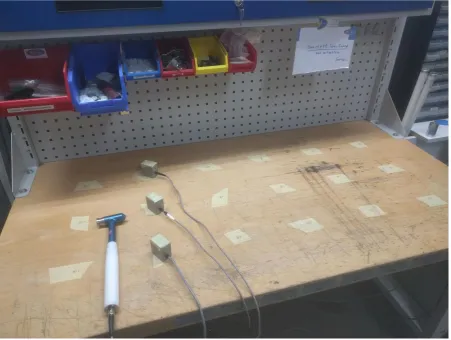
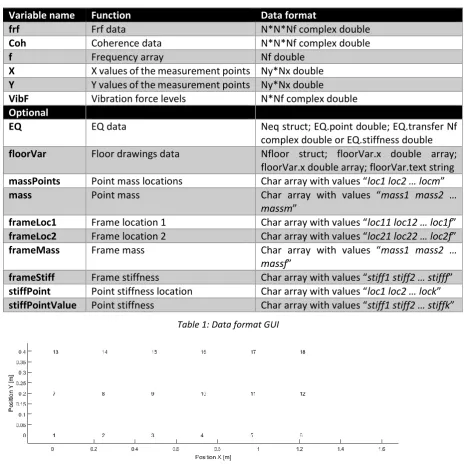
[image:22.595.74.526.250.590.2]As a test case a table, see Figure 13, in the lab was used. On this table 18 locations where marked
according the grid in Figure 14. For this setup all frfs and vibration levels where measured using
SpecTest. From these measurements the matrices where tried to be derived using the methods from
Chapter 3. The Matlab script for this can be found in Appendix L.
Form ID: HTS-QF-014-v3 Form Issued: January 2017
Report_fkoo.docx ©MECAL 2018 Confidential
[image:23.595.75.491.134.312.2]Page 23 of 151
Figure 14: Table grid
In Figure 15 top left the co-located transfers are plotted from the measurements of the table. One can
see a distinctive resonance peak at 58Hz. This peak should therefore be visible in all estimation
methods or else it is not a good method.
Figure 15: Table Co-located transfers
[image:23.595.89.508.379.712.2]Form ID: HTS-QF-014-v3 Form Issued: January 2017
Report_fkoo.docx ©MECAL 2018 Confidential
Page 24 of 151
the resonance peak is at the wrong location. Therefore it can be concluded that this method does not
work on a real system.
The second method works significantly better as can be seen from the co-located transfer in Figure 15
bottom left. However the peak is still not at the correct location and also there is a lot unexpected
dynamic behaviour. Thus is concluded that this method does not lead to good results on a real system.
With final method, see Figure 15 bottom right
Error! Reference source not found.
, shows less u
nexpected dynamic behaviour. But the peak is still not at the correct location so this method also not
works on a real system.
Form ID: HTS-QF-014-v3 Form Issued: January 2017
Report_fkoo.docx ©MECAL 2018 Confidential
Page 25 of 151
Chapter 6
Conclusions and
recommendations
6.1.1
Conclusions
The GUI made works well, the user can easily see how the floor would react to an altered situation.
Also the vibration levels can be obtained for the altered situation. Although the GUI is a great insight
tool, the placement for the EQ is still difficult since it is still not automated and the results dependent
on a lot of variables, e.g. disturbance source locations and local stiffness. When placing EQs one will
want to place as few as possible to cut cost, but also one needs to get the vibration levels within
specification.
6.1.2
Recommendations
The main recommendations for are
1.
Run an experiment to test if the disturbance location estimation works
2.
Retuning of tunable EQs
3.
Automatization of EQ placement or a procedure
4.
Loading of vibration levels specification
5.
Adding of point damper and damper parameter to frame
6.1.3
Experiment
In the GUI the disturbance forces are estimated from the frfs and vibration levels with
𝐹
𝑑= 𝑓𝑟𝑓
−1∗ 𝑥
𝑑It would be best to check if this idea also works on a real system. A simple way to do this is by making
a system with a known disturbance source, for instance a shaker. From the measurements of this real
system one should be able to reconstruct the disturbance force. A beginning was made with this
experiment but it has not proven to be successful. This is most likely due to not syncing of the phase.
Since there are more measurement points then sensors the vibration level measurement have to take
place in multiple measurements. To sync the phase the multiple experiments should have a common
sensor the measure the phase shift between measurements.
6.1.4
Retuning of tunable EQs
At the moment when a tunable EQ is placed it cannot be changed but it can be deleted. So if one
wants to adjust a tunable EQ one has to delete it and rebuild it from scratch. Also one cannot see how
the original EQ was constructed. Therefore it would be best if the original EQ could be loaded and
adjusted.
6.1.5
Automatization of EQ placement or a procedure
Form ID: HTS-QF-014-v3 Form Issued: January 2017
Report_fkoo.docx ©MECAL 2018 Confidential
Page 26 of 151
where the floor vibration levels are above specification. Although the last points does not need to
have to any vibration entry points but due to large transfers can become above specification.
6.1.6
Loading of vibration levels specification
At the moment it is up to the user if the vibration levels specification are met. Therefore it would be
best to be able to load the specifications into the GUI. Also when this is added it would be best to also
give the user cues when the specifications are met and which locations are out of bounds.
6.1.7
Adding of point damper and damper parameter to frame
Form ID: HTS-QF-014-v3 Form Issued: January 2017
Report_fkoo.docx ©MECAL 2018 Confidential
Page 27 of 151
References
[1]
S. Bank, Active Vibration Solutions, Eindhoven: Precisiebeurs, 2017.
[2]
R. Giesen, “Modal analysis techniques for (damped) floors,” 2017.
[3]
C. Felippa, “Introduction to Aerospace Structures,” 16 August 2017. [Online]. Available:
https://www.colorado.edu/engineering/CAS/courses.d/Structures.d/Home.html. [Accessed 2 Juli
2018].
[4]
J. Schilder, “Reader Dynamics 3 Flexible multibody dynamics,” p. 98.
[5] F. Koopman, Manual: Floor dynamics and vibration GUI V2, Enschede: MECAL, 2018.
[6]
Skorkmaz,
“wikimedia,”
9
December
2011.
[Online].
Available:
https://commons.wikimedia.org/wiki/File:Closed_Loop_Block_Deriv.png. [Accessed 9 July 2018].
[7]
“MECAL,” 2015. [Online]. Available: mecal.eu. [Accessed 9 July 2018].
[8]
“MECAL
High-tech/Systems,”
2015.
[Online].
Available:
http://www.mecal.eu/high-tech#hightechsystemdevelopment. [Accessed 9 July 2018].
Form ID: HTS-QF-014-v3 Form Issued: January 2017
Report_fkoo.docx ©MECAL 2018 Confidential
Page 28 of 151
Appendix A
MECAL
MECAL [7] is founded in 1989 and the name MECAL comes from (
ME
chanical
CAL
culation). MECAL focussed
in the past on providing strength calculations and dynamic simulations performed on structures The plan
was to build a company with at most a dozen employees working in the consultancy sector. The company
was very focused on the competency and didn’t have a specific market orientation, so they would take on
any assignments or projects. But MECAL grew and became aware that it wasn’t possible to be specialized in
every field, so MECAL needed to specify. The conclusion was that MECAL strongly manifested with its
knowledge in two segments, namely the Wind and Semiconductor Market.
[image:28.595.75.539.360.681.2]MECAL organogram is displayed in Figure 16. This internship took place in Enschede under Hightech/ Systems
[8].
Form ID: HTS-QF-014-v3 Form Issued: January 2017
Report_fkoo.docx ©MECAL 2018 Confidential
Page 29 of 151
Appendix B
Reflection
The time I spent at MECAL I have gained first-hand experience of the many aspects going in a project and the
general process. From this I learned what to expect later in my working life and what I want in it. This is a
valuable lesson that I learned during my 3 month internship.
Looking back at the beginning of my internship it was difficult to start since the assignment was not yet fixed.
Since it was unclear at that moment which direction this internship would take. However starting from the
work of previous intern I had several ideas to add my part in a better understanding and modelling the
dynamics of floors.
From my supervisor I learned a lot about dynamics, being more distrustful to strange results, and the
importance of good visualization.
During this internship I had the chance to put several things I learned during my study into practice. For
instance the getting the equation of motion for a system, system identification and Matlab programming.
Most of my time I spent in Matlab either programming or processing results, but I also spent some time in
the lab doing experiments and doing research.
Although there was a positive working atmosphere, my project was highly individual. Therefore I missed
working within a team. This would be something I do not want in my working life later.
I think I functioned well despite my personal problem of suffering from depression. I do not think that this
had a vast impact on my internship as in it was mostly only noticeable when I was away for counselling.
Form ID: HTS-QF-014-v3 Form Issued: January 2017
Report_fkoo.docx ©MECAL 2018 Confidential
Page 30 of 151
Appendix C
Matlab floor insight GUI code 2D
Version
The function below uses the function circular_arrow [9].
function twoD_floor_gui()
% twoD_floor_gui() %
% UI function to calculate mode shapes and
% Operating Deflection Shapes(ODS)of a two-dimensional floor % under force loading and with Equalizer
% The floor has only a length, not width, and can move only in z and % theta. Forces only in z direction and stiffness in theta
%
% INPUT:
% for modal plots needed
% N : number of beam elements
% kmid : approx. stiffness mid floor of only floor = 4k/N [N/m]
% kez : edge stiffness between wall an first/last mass in z direction [N/m]
% ketheta : edge stiffness between wall an first/last mass in theta direction [Nm/rad] % mtot : total mass floor [kg]
%
% derived param's
% Ke : element stiffness matrix
% m : mass of each indiv. mass element = mtot/N [kg] % Me : element mass matrix
% K : global stiffness matrix % M : global mass matrix %
% for ODS also needed
% cez : dampingconstant between edge and first element in z [-] % cetheta : dampingconstant between edge and first element in theta [-] % cz : damping between mass elements [-] cz = sqrt(m*k)/q [N/(m/s)]
% ctheta : damping between mass elements [-] ctheta = sqrt(m*k)/q [Nm/(rad/s)] % fods : disturbance frequency [Hz]
% Fdp : array with applied disturbance forces nodes (for ODS only) % FdA : array with applied disturbance forces amplitude (for ODS only) % Mdp : array with applied disturbance moments nodes (for ODS only) % MdA : array with applied disturbance moments amplitude (for ODS only) %
% for EQUALIZED ODS also needed
% EQ_Ptsz : z nodes which are equalized
% EQ_Ptstheta : theta nodes which are equalized %
Form ID: HTS-QF-014-v3 Form Issued: January 2017
Report_fkoo.docx ©MECAL 2018 Confidential
Page 31 of 151 % || - - - ... - - - ||
%
% with || = wall, - = element %
% Z = array with Z positions for mass 1..N % only Z movement is allowed by the springs %
%
% OUTPUT:
% resonance frequencies
% mode shapes visualized in a plot % ODS
%
% METHOD
% (-1*lbd*M + K)*Z = F % with lbd = w^2 and -1 = i^2
% eigen freq and mode shapes follow from the determinant % of the dynamic matrix: D = K-lbd*M
% this can be computed with the eig(K,M) function in Octave/Matlab %
% For the ODS the follwing formula holds: % (-w^2*M+iw*C +K)*Z = F
% with C being the damping matrix
% Z movements can be calculated by Z = ( )\F %
% For the Equalized ODS:
% - the collocated percieved stiffness is calculated % compliance = K\F, stiffn = 1/compliance(i)
% - A stiffness (to earth) is added to the stiffness marix K
% which is 10 times greater than the perceived stiffness at that point % and frequency.
% this is the same as Sensitivity = 10 % K(i,i) = K(i,i) + stiffn
% Mark that the order in which points are being equalized is not trivial %
% ver 1 fkoo 3-7-2018
close all
global h;
% Define input parameters and UI
h.fig1 = figure('position',[10 10 1200 800],'name','TwoD floor GUI'); % button Calc
h.but= uicontrol('style','pushbutton','position', [10 10 60 40 ],'string','calc!'); set(h.but,'Callback',@CalcCallback);
% edit box N and text 'N'
h.t1 = uicontrol('style', 'text','position',[ 10 750,60,30],'string','N '); h.edN = uicontrol('style','edit', 'position',[ 80,750,60,30],'string','10'); % edit box and text kmid
h.t2 = uicontrol('style', 'text','position',[ 10 720,60,30],'string','kmid'); h.edkmid = uicontrol('style','edit', 'position',[ 80,720,60,30],'string','4e8'); % edit box and text kez
Form ID: HTS-QF-014-v3 Form Issued: January 2017
Report_fkoo.docx ©MECAL 2018 Confidential
Page 32 of 151 h.edkez = uicontrol('style','edit', 'position',[ 80,690,60,30],'string','1.5e8');
% edit box and text ketheta
h.t4 = uicontrol('style', 'text','position',[ 10 660,60,30],'string','ketheta '); h.edketheta = uicontrol('style','edit', 'position',[ 80,660,60,30],'string','1.5e8'); % edit box and text m
h.t5 = uicontrol('style', 'text','position',[ 10 630,60,30],'string','mtot'); h.edm = uicontrol('style','edit', 'position',[ 80,630,60,30],'string','1.3e5'); % axes for modal plot
%h.ax1 = axes('units','pixels','position',[ 180,50, 1000,700]); %get(h.ax1,'position')
h.t6 = uicontrol('style', 'text','position',[ 10 560,60,30],'string','cz '); h.edqz = uicontrol('style','edit', 'position',[ 80,560,60,30],'string','1'); h.t7 = uicontrol('style', 'text','position',[ 10 530,60,30],'string','ctheta '); h.edqtheta = uicontrol('style','edit', 'position',[ 80,530,60,30],'string','1'); h.t8 = uicontrol('style', 'text','position',[ 10 500,60,30],'string','cez '); h.edqez = uicontrol('style','edit', 'position',[ 80,500,60,30],'string','3'); h.t9 = uicontrol('style', 'text','position',[ 10 470,60,30],'string','cetheta '); h.edqetheta = uicontrol('style','edit', 'position',[ 80,470,60,30],'string','3'); h.t10 = uicontrol('style', 'text','position',[ 10 440,60,30],'string','f ods '); h.edfods = uicontrol('style','edit', 'position',[ 80,440,60,30],'string','17'); % disturbance forces
h.t11 = uicontrol('style', 'text','position',[ 10 400,120,20],'string','define disturbance'); h.t12 = uicontrol('style', 'text','position',[ 10 370,60,30],'string','nodes z force'); h.edFdp = uicontrol('style','edit', 'position',[ 80,370,60,30],'string','1');
h.t13 = uicontrol('style', 'text','position',[ 10 340,60,30],'string','Amplitude (N) '); h.edFdA = uicontrol('style','edit', 'position',[ 80,340,60,30],'string','1');
h.t14 = uicontrol('style', 'text','position',[ 10 310,60,30],'string','nodes theta moment'); h.edMdp = uicontrol('style','edit', 'position',[ 80,310,60,30],'string','');
h.t15 = uicontrol('style', 'text','position',[ 10 280,60,30],'string','Amplitude (Nm)'); h.edMdA = uicontrol('style','edit', 'position',[ 80,280,60,30],'string','');
% EQUALIZER points
h.t16 = uicontrol('style', 'text','position',[ 10 240,120,20],'string','define EQ. nodes'); h.t17 = uicontrol('style', 'text','position',[ 10 210,60,20],'string','z nodes');
h.edPtsz = uicontrol('style','edit', 'position',[ 80,210,60,30],'string','2 3'); h.t18 = uicontrol('style', 'text','position',[ 10 180,60,20],'string','theta nodes'); h.edPtstheta = uicontrol('style','edit', 'position',[ 80,180,60,30],'string','');
% calculation is done in the function CalcCallback
end % function OneD_floor_gui
function CalcCallback(~,~)
global h; % handle to figure
% input for modeshapes
N = str2num(get(h.edN,'string')); kmid = str2num(get(h.edkmid,'string')); kez = str2num(get(h.edkez,'string'));
Form ID: HTS-QF-014-v3 Form Issued: January 2017
Report_fkoo.docx ©MECAL 2018 Confidential
Page 33 of 151 m = str2num(get(h.edm,'string'));
me = m/N;
% Element matricies
Ke=kmid*N^3/48*[12 6 -12 6 ; 6 4 -6 2 ; -12 -6 12 -6 ; 6 2 -6 4]; Me=me/420*[156 22 54 -13 ; 22 4 13 -3 ; 54 13 156 -22 ; -13 -3 -22 4];
% input for ODS
cz = str2num(get(h.edqz,'string'));
ctheta = str2num(get(h.edqtheta,'string')); cez = str2num(get(h.edqez,'string'));
cetheta = str2num(get(h.edqetheta,'string')); fods = str2num(get(h.edfods,'string'));
% Distrubance forces Fd = zeros(2*N+2,1);
edFdp = str2num(get(h.edFdp,'string')); edFdA = str2num(get(h.edFdA,'string')); Fd(2*edFdp-1)=edFdA;
% Distrubance moments
edMdp = str2num(get(h.edMdp,'string')); edMdA = str2num(get(h.edMdA,'string')); Fd(2*edMdp)=edMdA;
% check dat Fd niet per ongeluk te groot wordt
if length(Fd) > 2*N+2 Fd = Fd(1:2*N);
end
% EQ points
edPtsz = str2num(get(h.edPtsz,'string'));
edPtstheta = str2num(get(h.edPtstheta,'string'));
EQ_Pts = sort([2*edPtsz-1 2*edPtstheta]); dx = 1/(N);
x = linspace(dx,1-dx,N+1); xleft = [0 dx];
xright = [1-dx 1];
% FILL in the modal masses M and K M= zeros(2*N+2,2*N+2);
K=M;
for i = 1:N
M(2*i-1:2*i+2,2*i-1:2*i+2) = M(2*i-1:2*i+2,2*i-1:2*i+2) + Me; K(2*i-1:2*i+2,2*i-1:2*i+2) = K(2*i-1:2*i+2,2*i-1:2*i+2) + Ke;
end
K(1,1) = K(1,1)+kez; K(2,2) = K(2,2)+ketheta;
Form ID: HTS-QF-014-v3 Form Issued: January 2017
Report_fkoo.docx ©MECAL 2018 Confidential
Page 34 of 151 % compute eigen freq and mode shapes with magical eig function
[v,lbd] = eig(K,M); fres=zeros(1,length(lbd));
for i = 1:length(lbd)
fres(i) = sqrt(lbd(i,i))/(2*pi);
end
% plot first 6 (if available) modes on separate figure nplt = min(6,length(lbd));
for i = 1:nplt
subplot(nplt,3,3+3*(i-1)); hold off;
a = v(:,i)/v(1,i);
% eerst andere kant op in grijs plot(x,-a(1:2:end-1),'-o','color',
[0.7,0.7,0.7],'linewidth',4,'markersize',8,'markerfacecolor',[0.7,0.7,0.7]); hold on; % the masses with k's
plot(xleft,[0 -a(1)],'color',[.5,0.5,1],'linewidth',5); % left end plot(xright,[-a(end-1),0],'color',[.5,0.5,1],'linewidth',5); % right end % dan ene kant op
plot(x,a(1:2:end-1),'-ok','linewidth',4,'markersize',10,'markerfacecolor','k'); hold on; % the masses with k's
plot(xleft,[0 a(1)],'color',[0,0,0.8],'linewidth',5); % left end plot(xright,[a(end-1),0],'color',[0,0,0.8],'linewidth',5); % right end plot ([0,0],[-.5 .5],'k','linewidth',8); % wall
plot ([1,1],[-.5 .5],'k','linewidth',8); % wall plot([0 1],[0 0],'k');
xlim([0 1]);ylim([-1.2*max(abs(a)) 1.2*max(abs(a))]);
text(0.3,2*max(abs(a)),['res freq = ' num2str(fres(i)) 'Hz']); set(gca,'visible','off');
end
% ODS
% Fill in the C matrix
% elements C matrix Ce=zeros(4);
Ce(1:2:3,1:2:3)=[cz -cz;-cz cz];
Ce(2:2:4,2:2:4)=[ctheta -ctheta;-ctheta ctheta];
C=zeros(2*N+2,2*N+2);
for i = 1:N
C(2*i-1:2*i+2,2*i-1:2*i+2) = C(2*i-1:2*i+2,2*i-1:2*i+2) + Ce;
end
C(1,1) = C(1,1)+cez; C(2,2) = C(2,2)+cetheta;
Form ID: HTS-QF-014-v3 Form Issued: January 2017
Report_fkoo.docx ©MECAL 2018 Confidential
Page 35 of 151 % Now calculate the deflection shape
w = 2*pi*fods;
D = -w^2*M + 1i*w*C+K; Z = D\Fd;
% Plot the ODS
% because not all masses move either the same way or the opposite way % we need to take into account the phase.
% We do this by plotting different points in time ( = different values for the phase) hods(1)= subplot(2,6,[2,3,4]);
hold off;
scalingy = 0.5/max(abs(Z(1:2:end-1))); scalingF = 0.5/max(Fd);
plot([0 1],[0 0],'k'); hold on; % 0 -line
for i = 1:N+1
% plot applied forces if Fd(2*i-1) ~= 0
plot([x(i) x(i)],[0 0.4*scalingF*Fd(2*i-1)],'r','linewidth',3); end % if
% plot applied moments if Fd(2*i) ~= 0
circular_arrow(gcf,0.1*scalingF*Fd(2*i),[x(i) 0],0,170,-1,'r'); end % if
end % for % boundary
% plot(x,abs(Z),'.-','color',[0.6 0.5 0.6],'linewidth',2); % plot(x,-abs(Z),'.-','color',[0.6 0.5 0.6],'linewidth',2);
Nl = 5; % number of lines in the plot 36 for each 10 degrees phi = [-1.5*pi,-pi,-pi/2,-pi/4,-pi/8];
for i = 1: Nl
plot(x,scalingy*abs(Z(1:2:end-1)).*cos(phi(i)+angle(Z(1:2:end-1))),'-o','color', [1-i/(1.3*Nl),1-i/(1.3*Nl),1-i/(1.3*Nl)],'linewidth',4);
hold on;
plot([0 dx],scalingy*[0 abs(Z(1)).*cos(phi(i)+angle(Z(1)))],'color' ,[1-i/(1.3*Nl),1-i/(1.3*Nl),1],'linewidth',4);
plot([1-dx 1],scalingy*[abs(Z(end-1)).*cos(phi(i)+angle(Z(end-1))) 0],'color' ,[1-i/(1.3*Nl),1-i/(1.3*Nl),1],'linewidth',4);hold on;
end
%plot(x,abs(Z).*cos(angle(Z)),'-o','color', [0 0 0 ],'linewidth',4);
%plot([1-dx 1],[abs(Z(N)).*cos(angle(Z(N))) 0],'color',[0,0,1],'linewidth',4); %plot([0 dx],[0 abs(Z(1)).*cos(angle(Z(1)))],'color',[0,0, 1],'linewidth',4);
% test with animation, plot only first moment, phi = 0 phi = 0;
h1= plot(x,scalingy*abs(Z(1:2:end-1)).*cos(phi+angle(Z(1:2:end-1))),'-ok', 'linewidth',4); h2 = plot([0 x(1)],scalingy*[0 abs(Z(1))*cos(phi+angle(Z(1)))],'-b','linewidth',4);
Form ID: HTS-QF-014-v3 Form Issued: January 2017
Report_fkoo.docx ©MECAL 2018 Confidential
Page 36 of 151 ylim([-0.5,0.5]);
plot ([0,0],[-0.5/3 0.5/3],'k','linewidth',8); % wall plot ([1,1],[-0.5/3 0.5/3],'k','linewidth',8); % wall
title(['ODS for ' num2str(fods) 'Hz']);
ylabel('Z position [m]'); xlabel('rel. X position [-]'); set(gca,'YTick',linspace(-0.5,0.5,10));
set(gca,'YTickLabel',linspace(-1/scalingy,1/scalingy,10)); Zorig= Z; % keep track of original movement
% Now calc forces needed for EQ
for i =1: length(EQ_Pts)
pt= EQ_Pts(i); % point to equalize %zpt = Z(pt); % movement of that point
Fhlp = zeros(2*N+2,1); Fhlp(pt) =1; % F for collocated stiffness Zcol = D\Fhlp; % collocated compl. z/F for point pt for f=fods;
keq = 10/Zcol(pt); % 10 times complex stiffness %10/abs(Zcol(pt)); % equivalent stiffness of active eq
K(pt,pt) = K(pt,pt) +keq;
end
% calculate new system ( with changed K matrix) D = -w^2*M + 1i*w*C+K;
Z = D\Fd; % calc new resulting movement
% now plot
hods(2) = subplot(2,6,[8,9,10]); linkaxes(hods,'y');
hold off;
plot([0 1],[0 0],'k'); hold on;% 0 -line
for i = 1:N+1
% plot applied forces if Fd(2*i-1) ~= 0
plot([x(i) x(i)],[0 0.4*scalingF*Fd(2*i-1)],'r','linewidth',3); end % if
% plot applied moments if Fd(2*i) ~= 0
circular_arrow(gcf,0.1*scalingF*Fd(2*i),[x(i) 0],0,170,-1,'r'); end % if
end % for
scalingy = 0.5/max(abs([Z(1:2:end-1);Zorig(1:2:end-1)])); % boundary
plot(x,scalingy*abs(Z(1:2:end-1)),'.-','color',[0.6 0.5 0.6],'linewidth',2); plot(x,-scalingy*abs(Z(1:2:end-1)),'.-','color',[0.6 0.5 0.6],'linewidth',2); Nl = 5; % number of lines in the plot 36 for each 10 degrees
phi = [-1.5*pi,-pi,-pi/2,-pi/4,-pi/8];
for i = 1: Nl
h5= plot(x,scalingy*abs(Z(1:2:end-1)).*cos(phi(i)+angle(Z(1:2:end-1))),'-o','color', [1-i/(1.3*Nl),1-i/(1.3*Nl),1-i/(1.3*Nl)],'linewidth',4);
hold on;
Form ID: HTS-QF-014-v3 Form Issued: January 2017
Report_fkoo.docx ©MECAL 2018 Confidential
Page 37 of 151 h7 =plot([1-dx 1],scalingy*[abs(Z(end-1)).*cos(phi(i)+angle(Z(end-1))) 0],'color' ,[1-i/(1.3*Nl),1-i/(1.3*Nl),1],'linewidth',4);hold on;
end
plot(x,scalingy*abs(Z(1:2:end-1)).*cos(angle(Z(1:2:end-1))),'-o','color', [0 0 0 ],'linewidth',4); plot([0 dx],scalingy*[0 abs(Z(1)).*cos(angle(Z(1)))],'color',[0,0, 1],'linewidth',4);
plot([1-dx 1],scalingy*[abs(Z(end-1)).*cos(angle(Z(end-1))) 0],'color',[0,0,1],'linewidth',4);
ylim([-0.5,0.5]);
plot ([0,0],[-0.5/3 0.5/3],'k','linewidth',8); % wall plot ([1,1],[-0.5/3 0.5/3],'k','linewidth',8); % wall
title(['EQUALIZED ODS for ' num2str(fods) 'Hz']); ylabel('Z position [m]'); xlabel('rel. X position [-]'); set(gca,'YTick',linspace(-0.5,0.5,10));
set(gca,'YTickLabel',linspace(-1/scalingy,1/scalingy,10));
% Now animate!
for i = 1: 80 phi = i*2*pi/40; pause(0.15);
set(h1,'ydata',scalingy*abs(Zods(1:2:end-1)).*cos(phi+angle(Zods(1:2:end-1)))); set(h2 ,'ydata',scalingy*[ 0 abs(Zods(1)).*cos(phi+angle(Zods(1)))]);
set(h3 ,'ydata',scalingy*[ abs(Zods(end-1)).*cos(phi+angle(Zods(end-1))) 0]);
set(h5,'ydata', scalingy*abs(Z(1:2:end-1)).*cos(phi+angle(Z(1:2:end-1)))); set(h6, 'ydata',scalingy*[0 abs(Z(1)).*cos(phi+angle(Z(1)))]);
set(h7, 'ydata',scalingy*[abs(Z(end-1)).*cos(phi+angle(Z(end-1))) 0]);
end
Form ID: HTS-QF-014-v3 Form Issued: January 2017
Report_fkoo.docx ©MECAL 2018 Confidential
Page 38 of 151
Appendix D
Matlab floor insight GUI code 2D
Version with floor parameters
The function below uses the function circular_arrow [9].
function twoD_floor_gui_floorParameters()
% twoD_floor_gui() %
% UI function to calculate mode shapes and
% Operating Deflection Shapes(ODS)of a two-dimensional floor % under force loading and with Equalizer
% The floor has only a length, not width, and can move only in z and % theta. Forces only in z direction and stiffness in theta
%
% INPUT:
% for modal plots needed
% N : number of beam elements % E : yield modulus [Pa]
% I : second moment of area [m^4] % L : floor length [m]
% kez : edge stiffness between wall an first/last mass in z direction [N/m]
% ketheta : edge stiffness between wall an first/last mass in theta direction [Nm/rad] % mtot : total mass floor [kg]
%
% derived param's
% Ke : element stiffness matrix
% m : mass of each indiv. mass element = mtot/N [kg] % Me : element mass matrix
% K : global stiffness matrix % M : global mass matrix %
% for ODS also needed
% cez : dampingconstant between edge and first element in z [-] % cetheta : dampingconstant between edge and first element in theta [-] % cz : damping between mass elements [-] cz = sqrt(m*k)/q [N/(m/s)]
% ctheta : damping between mass elements [-] ctheta = sqrt(m*k)/q [Nm/(rad/s)] % fods : disturbance frequency [Hz]
% Fdp : array with applied disturbance forces nodes (for ODS only) % FdA : array with applied disturbance forces amplitude (for ODS only) % Mdp : array with applied disturbance moments nodes (for ODS only) % MdA : array with applied disturbance moments amplitude (for ODS only) %
% for EQUALIZED ODS also needed
% EQ_Ptsz : z nodes which are equalized
% EQ_Ptstheta : theta nodes which are equalized %
Form ID: HTS-QF-014-v3 Form Issued: January 2017
Report_fkoo.docx ©MECAL 2018 Confidential
Page 39 of 151 %
% || - - - ... - - - || %
% with || = wall, - = element %
% Z = array with Z positions for mass 1..N % only Z movement is allowed by the springs %
%
% OUTPUT:
% resonance frequencies
% mode shapes visualized in a plot % ODS
%
% METHOD
% (-1*lbd*M + K)*Z = F % with lbd = w^2 and -1 = i^2
% eigen freq and mode shapes follow from the determinant % of the dynamic matrix: D = K-lbd*M
% this can be computed with the eig(K,M) function in Octave/Matlab %
% For the ODS the follwing formula holds: % (-w^2*M+iw*C +K)*Z = F
% with C being the damping matrix
% Z movements can be calculated by Z = ( )\F %
% For the Equalized ODS:
% - the collocated percieved stiffness is calculated % compliance = K\F, stiffn = 1/compliance(i)
% - A stiffness (to earth) is added to the stiffness marix K
% which is 10 times greater than the perceived stiffness at that point % and frequency.
% this is the same as Sensitivity = 10 % K(i,i) = K(i,i) + stiffn
% Mark that the order in which points are being equalized is not trivial %
% ver 1 fkoo 3-7-2018
close all
global h;
% Define input parameters and UI
h.fig1 = figure('position',[10 10 1200 800],'name','TwoD floor GUI with parameters'); % button Calc
h.but= uicontrol('style','pushbutton','position', [10 10 60 40 ],'string','calc!'); set(h.but,'Callback',@CalcCallback);
% edit box N and text 'N'
h.t1 = uicontrol('style', 'text','position',[ 10 750,60,30],'string','N '); h.edN = uicontrol('style','edit', 'position',[ 80,750,60,30],'string','10'); % edit box and text E
Form ID: HTS-QF-014-v3 Form Issued: January 2017
Report_fkoo.docx ©MECAL 2018 Confidential
Page 40 of 151 h.t3 = uicontrol('style', 'text','position',[ 10 690,60,30],'string','I');
h.I = uicontrol('style','edit', 'position',[ 80,690,60,30],'string','0.1'); % edit box and text L
h.t4 = uicontrol('style', 'text','position',[ 10 660,60,30],'string','L'); h.L = uicontrol('style','edit', 'position',[ 80,660,60,30],'string','20'); % edit box and text kez
h.t5 = uicontrol('style', 'text','position',[ 10 630,60,30],'string','kez '); h.edkez = uicontrol('style','edit', 'position',[ 80,630,60,30],'string','1.5e8'); % edit box and text ketheta
h.t6 = uicontrol('style', 'text','position',[ 10 600,60,30],'string','ketheta '); h.edketheta = uicontrol('style','edit', 'position',[ 80,600,60,30],'string','1.5e8'); % edit box and text m
h.t7 = uicontrol('style', 'text','position',[ 10 570,60,30],'string','mtot'); h.edm = uicontrol('style','edit', 'position',[ 80,570,60,30],'string','1.3e5'); % axes for modal plot
%h.ax1 = axes('units','pixels','position',[ 180,50, 1000,700]); %get(h.ax1,'position')
h.t8 = uicontrol('style', 'text','position',[ 10 520,60,30],'string','cz '); h.edqz = uicontrol('style','edit', 'position',[ 80,520,60,30],'string','1'); h.t9 = uicontrol('style', 'text','position',[ 10 490,60,30],'string','ctheta '); h.edqtheta = uicontrol('style','edit', 'position',[ 80,490,60,30],'string','1'); h.t10 = uicontrol('style', 'text','position',[ 10 460,60,30],'string','cez '); h.edqez = uicontrol('style','edit', 'position',[ 80,460,60,30],'string','3'); h.t11 = uicontrol('style', 'text','position',[ 10 430,60,30],'string','cetheta '); h.edqetheta = uicontrol('style','edit', 'position',[ 80,430,60,30],'string','3'); h.t12 = uicontrol('style', 'text','position',[ 10 400,60,30],'string','f ods '); h.edfods = uicontrol('style','edit', 'position',[ 80,400,60,30],'string','17'); % disturbance forces
h.t13 = uicontrol('style', 'text','position',[ 10 360,120,20],'string','define disturbance'); h.t14 = uicontrol('style', 'text','position',[ 10 330,60,30],'string','nodes z force'); h.edFdp = uicontrol('style','edit', 'position',[ 80,330,60,30],'string','1');
h.t15 = uicontrol('style', 'text','position',[ 10 300,60,30],'string','Amplitude (N) '); h.edFdA = uicontrol('style','edit', 'position',[ 80,300,60,30],'string','1');
h.t16 = uicontrol('style', 'text','position',[ 10 270,60,30],'string','nodes theta moment'); h.edMdp = uicontrol('style','edit', 'position',[ 80,270,60,30],'string','');
h.t17 = uicontrol('style', 'text','position',[ 10 240,60,30],'string','Amplitude (Nm)'); h.edMdA = uicontrol('style','edit', 'position',[ 80,240,60,30],'string','');
% EQUALIZER points
h.t18 = uicontrol('style', 'text','position',[ 10 200,120,20],'string','define EQ. nodes'); h.t18 = uicontrol('style', 'text','position',[ 10 170,60,20],'string','z nodes');
h.edPtsz = uicontrol('style','edit', 'position',[ 80,170,60,30],'string','2 3'); h.t19 = uicontrol('style', 'text','position',[ 10 140,60,20],'string','theta nodes'); h.edPtstheta = uicontrol('style','edit', 'position',[ 80,140,60,30],'string','');
% calculation is done in the function CalcCallback
end % function OneD_floor_gui
function CalcCallback(~,~)
![Figure 12: Closed-loop system, altered from [6]](https://thumb-us.123doks.com/thumbv2/123dok_us/9691802.470527/20.595.80.444.447.575/figure-closed-loop-system-altered-from.webp)