Evaluation of TraceMatch
CHRISTOPHER CLARKE,
Lancaster UniversityALESSIO BELLINO,
Università di Milano-BicoccaAUGUSTO ESTEVES,
Edinburgh Napier UniversityHANS GELLERSEN,
Lancaster UniversityIn this work we consider how users can use body movement for remote control with minimal effort and maximum flexibility.
TraceMatch is a novel technique where the interface displays available controls as circular widgets with orbiting targets, and where
users can trigger a control by mimicking the displayed motion. The technique uses computer vision to detect circular motion as a
uniform type of input, but is highly appropriable as users can produce matching motion with any part of their body. We present three
studies that investigate input performance with different parts of the body, user preferences, and spontaneous choice of movements
for input in realistic application scenarios. The results show that users can provide effective input with their head, hands and while
holding objects, that multiple controls can be effectively distinguished by the difference in presented phase and direction of movement,
and that users choose and switch modes of input seamlessly.
CCS Concepts: •Human-centered computing→Interaction devices;Gestural input;Ubiquitous and mobile computing; Additional Key Words and Phrases: User input; Input techniques; Remote control; Movement correlation; Motion correlation; Motion
matching; Path mimicry; Gesture input; Vision-based interfaces; Computer vision; User evaluation
ACM Reference format:
Christopher Clarke, Alessio Bellino, Augusto Esteves, and Hans Gellersen. 2017. Remote Control by Body Movement in Synchrony with
Orbiting Widgets: an Evaluation of TraceMatch.Proc. ACM Interact. Mob. Wearable Ubiquitous Technol.1, 3, Article 45 (September 2017),
23 pages.
https://doi.org/10.1145/3130910
1 INTRODUCTION
Remote control is a perennial problem. The first remote control introduced into people’s everyday lives, in 1950 by
Zenith Radio Corporation, was aptly named “Lazy Bones" because remote controls aim to empower users with instant
control while remaining comfortable [20]. TraceMatch is a recently introduced touchless remote control technique
that expands on the idea of enabling user control in a manner that does not require users “to go out of their way”. The
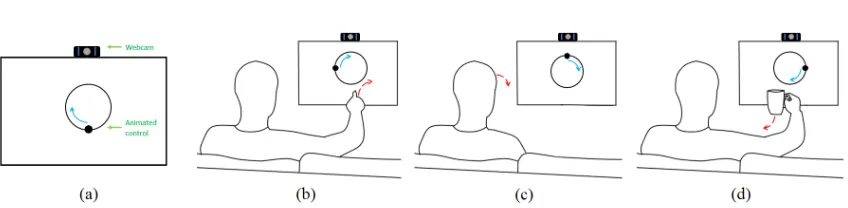
principle behind the technique is simple (see Fig. 1): a control is presented to the user as a circular widget with an
orbiting target, and the user can trigger input by performing any movement in synchrony with the displayed motion.
What distinguishesTraceMatchas a remote input technique is the use of uniform movement that is highly appropriable.
Author’s addresses: C. Clarke and H. Gellersen, School of Computing and Communications, InfoLab21, Lancaster University, Lancaster, United Kingdom, LA1 4WA; A. Bellino, Department of Informatics, Systems and Communication (DISCo), Università di Milano-Bicocca, Milano, Lombardy, Italy; A. Esteves, Centre for Interaction Design, Edinburgh Napier University, 10 Colinton Rd, Edinburgh, United Kingdom, EH10 5DT.
© 2017 Association for Computing Machinery. Manuscript submitted to ACM
Fig. 1. TraceMatch provides a uniform means of remote control that users can appropriate flexibly: (a) Controls are displayed as orbiting widgets; (b) Users simply mimic the motion of a control to trigger input; (c) Users can use any part of their body for input, for example their head if their hands are occupied; (d) Users can gesture input with a hand without having to put down any object they might be holding.
It relies on a single form of rhythmic motion, but users can perform such movement with different parts of their body
without needing to pick up any device or put down any objects they might already be holding.
TraceMatch leverages insight from prior work onmotion correlationas an input mechanism [32]. Feketeet al.
reflected on the principles by which users’ input is matched with output presented for selection, and highlighted how
matching based on corresponding motion contrasts conventional spatial or semantic matching [9]. Carteret al.adopted
motion correlation for distal input with hand/arm gestures, and demonstrated how this enables a new form of gestural
interaction – one that is neither cursor-based for pointing, nor based on a discrete gesture set the user would have to
learn [5]. Esteveset al.introducedOrbitsas a new type of widget that displays input options as small targets orbiting
the widget on a circular path [8]. Although originally designed for input by gaze, Orbits are equally compelling for
gestural interaction. Their circular design gives them a consistent button-like appearance for display, while different
input options can be encoded in the direction, phase and speed of the orbiting targets.
The principal motivation for TraceMatch is to enable users to select a displayed control with minimal effort (a small
circular movement) and maximum flexibility (freedom to perform the movement in ways that are convenient in any
given situation). Previous work has laid a foundation for the technique with the introduction of a computer vision
system for detection and matching of movement that corresponds with presented Orbits [7]. The system requires
only a general-purpose camera and does not assume any particular distance or posture of the user. Figure 2 illustrates
the computer vision approach with feature detection, optical flow processing and model-fitting stages. The system
is effectively a sensor for specific forms of motion and was evaluated for its sensitivity, showing that user-generated
Fig. 2. The stages of TraceMatch for matching the motion of an Orbit using a mobile phone. Left: Features (blue) are detected using the FAST feature detector. Centre: Moving features (green) are compared with the motion of an Orbit using the Pearson correlation. Right: The first feature to be matched is shown with its trajectory (green) and a fitted circle (red) found using RANSAC with inlier thresholds (blue).
[image:2.612.110.539.514.602.2]motion produced in response to an Orbit can be reliably detected, while avoiding false activations by other movement
in the environment.
In this paper, we focus on understanding user performance with TraceMatch as an interaction technique. The central
premise of the technique is abstraction from the different ways in which users might want to produce input. This
raises the question of how effective users are in producing input with different parts of their body and under different
conditions, and what their preferences and spontaneous choices are. The other defining property of TraceMatch is that
it uses circular motion. This is a motion we would not expect to be produced accidentally (thus avoiding the Midas
touch effect) and that provides uniformity across the different ways of performing movement. However, circular motion
limits variation of input, prompting questions of how reliably users are able to select one among multiple orbiting
targets that vary in direction, phase and speed of movement, and how many targets can be presented at the same time
without degrading input performance.
We present three studies that shed light on these questions and provide insight into user performance and preference,
and support of ‘multiple choice’ tasks. The first study is a controlled experiment in which we assess users’ performance
for selection of one among multiple presented Orbits with different body movements, and while holding objects. The
study shows that users are effective with the technique across different movement modalities and gives insight into
effects of movement condition, speed of displayed motion, and number of simultaneously presented targets on input
performance. The second study engaged users with two interactive TV application prototypes with Orbits embedded
for control, to gain insight into spontaneous choice of movements in realistic application contexts. The third study
explored Orbit variants that integrate multiple targets in one widget for more expressive input, and probe into the use
of direction, colour and speed to convey and provide multiple input options in a single Orbit.
In sum, the contributions of the article are:
• A validation of TraceMatch, showing that users are effective at selecting input by synchronising with displayed
motion using different types of movement;
• Insight into how different ways of performing matching motion, with head, hand, or while holding objects, affect
performance, and into preferences and spontaneous choices of different body movements for input;
• An exploration of ways in which the technique can be extended from binary selection to multi-level input
displayed within one orbiting widget;
• Design guidelines distilled from the observations made across the reported studies.
2 BACKGROUND AND RELATED WORK
TraceMatch is a technique for discrete input, i.e. for selection of one target among multiple available options. For a
system to be able to differentiate which option is being selected, it needs to have a way of matching the user’s input
against the available targets. In conventional user interfaces, this match is either spatial (the user points at the position
of a target) or semantic (the input is linked to a target by its meaning, for example when we press a button on a remote
control, or type in a command) [9, 32]. The approach in TraceMatch is fundamentally different: the user’s input is
matched against available targets based on motion. Input options are displayed with distinct motion patterns, and
synchronous movement by the user determines the selection. To contextualise our contribution, we provide background
on motion correlation, discuss how TraceMatch is positioned as a gestural interaction technique, and briefly reflect on
other related work.
2.1 Motion Correlation as Input Method
The principle of motion correlation for selection has been explored in a variety of prior works. Early works introduced
the principle as enabling “pointing without a pointer” and “motion-pointing” [9, 37, 38], inspired by perceptual control
theory [19] and naturally harmonic human motor behaviour [11]. Recent work adopted motion correlation for
gaze-and gesture-based interaction [5, 8, 25, 33, 34], leveraging human natural ability to smoothly follow motion with their
eyes and hands. This prior body of work, recently reviewed in depth by Velloso et al. [32], demonstrated advantages of
motion correlation: the high discoverability of the available gestures as they are continuously displayed [5, 9]; implicit
coupling of input and output coordinate spaces without need for calibration [8, 34]; usability with feedback modalities
that are not suited for pointing [33, 38]; no split of attention between a cursor and a target [9]; and the capacity for
multi-user input [5]. TraceMatch inherits these advantages, and in addition highlights how movement correlation
supports a decoupling of the interface from the modality by which the matching movement is produced.
Motion correlation is a generic interaction principle, and not tied to any particular modality and application.
It was first demonstrated in conventional desktop settings for selection of animated widgets by matching mouse
movement [9, 37, 38]. It has since been studied for spontaneous touchless interaction with public displays [5, 35], input
“at a glance” on smartwatches [8], and control of diverse types of devices in a smart environment [33]. Most of these
works focused on gaze as input modality, leveraging specific properties of human smooth pursuit eye movement,
whereasPathSyncwas first to adapt the concept for remote touchless input with mid-air gestures [5]. That work
had focussed on hand gestures, whereas we consider body movement more generally, including head movement,
movement with dominant and non-dominant hands, and movement while holding objects. Beyond the previously
studied application settings, we focus on remote control of interactive TV as a compelling context for casual interaction,
but note that TraceMatch has wider application.
TraceMatch was developed to make motion correlation work with any form of movement a user could produce
with their bodies, “from head to toe”. A first work published on TraceMatch introduced the concept and described the
computer vision system through which it is implemented (see Fig. 2). The system uses a standard camera mounted on the
target display as input device, and analyses the visual scene in front of the screen for any occurence of circular motion
that is then matched against any motion displayed on-screen. From a technical point of view, the system is a smart
sensor for detection of specific forms of motion, and the original publication provided an evaluation of the sensor’s
detection performance, i.e. it’s sensitivity. For that evaluation, data was collected from users following a displayed
motion with different parts of their body, however in a non-interactive manner (without feedback, and without any
notion of task completion). The evaluation established that the system is capable of detecting a target motion pattern
irrespective of the body movement by which it is produced. The work presented here builds on that result and focuses
on evaluation of TraceMatch interaction – how users perform when they use TraceMatch for actual selection tasks.
While the previous evaluation had measured sensitivity of the computer vision technique, we are concerned here with
measuring task success.
2.2 Touchless Gestural Interaction
TraceMatch is a technique for remote control via body movements. There has been a plethora of work on touchless
interaction using gestures, spurred by advances in real-time hand and body tracking that enable recognition of human
gestures from a distance [29, 30]. Most gestural interaction techniques are either cursor-based or based on discrete
gesture libraries [5], corresponding to the principles of spatial versus semantic matching noted above. In cursor-based
pointing, the position of the user’s hand controls the position of an on-screen cursor. From then on, the interaction is
similar to a desktop mouse, though another modality is often necessary for the confirmation of the selection once the
cursor hovers the target, to avoid the Midas Touch. Touchless pointing requires a mapping of the user’s movement to
the display which can be problematic to establish and lead to use of larger than comfortable movements, and exacerbate
fatigue issues.PathSyncwas first to show both Midas Touch and mapping issues are circumvented by matching input
based on corresponding motion, in contrast to corresponding position. TraceMatch applies the same principle: the
matching is based on the shape and temporal execution of the motion gesture but independent of size, allowing even
large motions to be synchronised with small gestures, overcoming any need for large or exaggerated movements by the
user.
The conventional alternative to pointing is to use discrete gesture libraries, where each gesture represents a discrete
input or command. In interfaces based on such gestures, the system waits until a movement it recognises has been
performed by the user and then responds with the corresponding action. This requires the system to be trained
for detection of a pre-defined set of gestures, and users to be able to remember and recall the gestures they need.
This has widely discussed usability issues [23], including questions of how gestures are revealed, discovered and
learned [1, 2, 36]. The use of motion correlation addresses these issues: rather than the user learning discrete gestures
they are interactively guided to synchronise with a displayed gesture, providing a gesture interface that is self-revealing
and highly discoverable [5]. TraceMatch relies on circular motion as single form of gesture that can be performed
scale-invariant, limiting expressivity to variation in phase, speed and direction of the movement. This starkly contrasts
the use of symbolic gestures that rely on a larger variety of gesture shapes, for example to represent alphanumeric
inputs [39]. Symbolic gesture can enable “spelling out” of more expressive input but are more cumbersome to use –
requiring prior knowledge of the gesture shapes, larger movements to execute them, and care to produce them in a
manner that avoids misclassification by the recognition system. These issues are avoided in TraceMatch through the
use of a uniform type of movement that can be varied to allow for selection from among alternatives.
In this work we specifically consider TV control as a context for touchless interaction. TV control, and more generally
smart home interactions, provides a challenging context for interaction design where users tend to act spontaneously
and upon impulse. Research has highlighted how users desire instant control “right now” with minimal action, and “right
here” without having to go out of their ways [18]. Freeman and Weissman were first to explore the idea of controlling
a television using hand gestures over 20 years ago [10], observing fatigue issues now often referred to as “gorilla
arm" [12, 13]. More recent research on the topic has largely focussed on library-based gestural techniques [6, 16, 17]
and highlighted issues with learning and remembering of gestures and gesture-to-function mappings [31]. TraceMatch
avoids these issues, as the movements employed as input are small and periodic, and guided by the visual display of
animated controls.
2.3 Related Work
TraceMatch uses motion correlation for selecting inputs represented by on-screen controls. In related work, motion
matching has been used for interaction across devices, such as pairing by corresponding motion [15, 22], synchronous
gestures across devices [14], and motion-based fusion of inputs in cross-device interaction techniques [27, 28].
Corre-lation of movements has also been used to determine user and device reCorre-lationships, for example for disambiguation
of multi-user input on shared displays by matching user movement (tracked with a depth camera) with the motion
of their devices (tracked with built-in sensors) [26]. These works all have in common that they demonstrate motion
correlation of different input signals, contrasting our focus on matching of input and output.
Some prior work is related to presenting motion to the user for reproduction. Many pairing techniques are based on
one device presenting a secret that the user has to input on the other. Patel et al. presented a variant where the user’s
phone prompts a terminal to display a gesture, which the user has to reproduce with their phone in hand to authenticate
it for pairing [24]. We also note related work on the coupling of input and output by periodic motion.Resonant Bits
explores this in terms of resonance and how a system’s continuous feedback can guide the user’s rhythmic input [4].
CycloStaruses continuous closed loop motion to support panning and zooming in touch interfaces in a clutch-free
manner [21].
3 PARTICIPANTS AND APPARATUS
Twenty participants (10M/10F) aged between 21 and 54 years (mean=29.4, sd=8.21) were selected to take part in the
studies. Eighteen participants were right-handed and two were left-handed. None of the users had previous experience
with, or knowledge of, the TraceMatch system. All three studies were undertaken sequentially by participants in one
sitting, and took approximately one hour to complete per participant. Participants were compensated with £10.
The studies took place in a lab designed to represent a living room scenario. A 55" Smart TV (1920x1080) was used as the display, with a couch placed 2.23m from the TV (based on a TV size to viewing distance calculator). An unmodified,
off-the-shelf web camera was mounted on top of the TV. The camera captured a 640×480 region of interest in the centre
of a 1920×1080 image to control that only movement related to the simulated application setting was captured.
4 STUDY ONE - TASK SUCCESS WITH DIFFERENT BODY MOVEMENTS
To study how effective users are in producing input with different parts of their body under different conditions,
participants performed a series of trials which required them to follow the motion of a randomly selected target Orbit
from multiple presented Orbits. During the study, we measured the task success rate whilst varying the motion of the
displayed Orbits with respect to their size, i.e. the radius of the Orbit (25 and 50px), orbital speed (2 and 4 seconds
per cycle), direction (clockwise and anti-clockwise), and the number of Orbits (2, 4, 6, 8, and 4 plus 4) displayed
simultaneously.
We maximised the phase difference between Orbits by 360°/n, where n is the number of Orbits displayed simultane-ously in the same direction. The “4 plus 4” variable consisted of four Orbits rotating clockwise, and four anti-clockwise,
displayed simultaneously with a 90° phase difference. This was included to investigate if the number of Orbits displayed
simultaneously affected the participants’ performance. We expected this combination to have similar results to when
four Orbits of one direction were displayed.
The type of movement (head, dominant hand, non-dominant hand, mobile phone-in-hand and cup-in-hand)
participants used to match the motion of the Orbits was also varied. We used the cup and mobile phone as everyday
objects that users would likely use for multi-tasking whilst interacting with the system in a real-life setting, e.g.
drinking or sending a message. The cup was half filled with water to simulate the participants holding a drink, and
the experimenter’s Samsung Galaxy S5 was used in the event a participant did not have a mobile phone. In total, this
resulted in 2×2×2×5×5=200 trials per participant, and 20×200=4000 trials for the study.
4.1 Study One - Procedure
Upon arrival, participants signed a consent form and completed a demographics questionnaire. They were then presented
with a basic overview of TraceMatch, which did not include any technical detail. Participants were instructed to find a
comfortable position anywhere on the couch. Participants were not given instructions on how to perform the type of
movements, but were told that the size of their movement did not have to correlate with the size of the Orbits. Following
the introduction, participants took part in a practice session which involved all the variables, excluding number of
Orbits, used for the trials. Participants spent, on average, less than four minutes during the practice session.
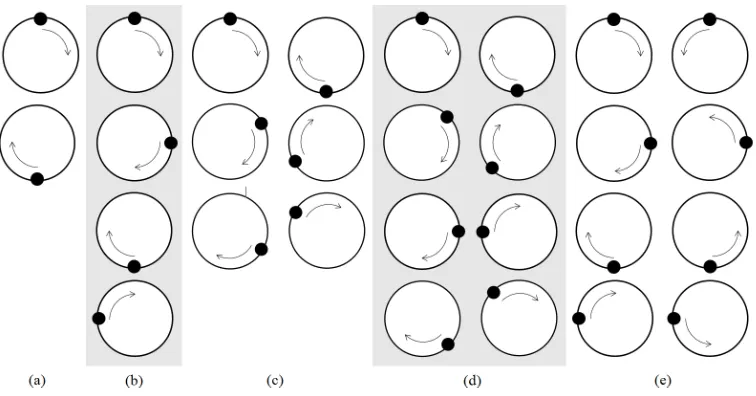
For each trial, a number of Orbits were presented simultaneously to the participants (see Fig. 3), with a target Orbit
highlighted in blue. If the participant successfully matched the motion of the target Orbit it turned green and the next
trial was presented. If the participant activated an Orbit other than the target, the Orbit they activated flashed red and
the trial was unsuccessful. The task was not completed until the participant successfully matched the motion of an
Orbit, or ten seconds elapsed. A three second countdown preceded each trial.
A balanced Latin Square design was used to counter balance the different types of movement and minimize carry
over effects. A 5×5 Latin square and its mirror image were used, resulting in multiples of 10 participants required for
counterbalancing the type of movement. Participants completed trials in ten blocks, one block for each combination of
speed and type of movement. Ten participants, counterbalanced for type of movement, performed the trials with slow
Orbits (4 seconds per cycle) followed by fast Orbits (2 seconds per cycle), the other ten, also counterbalanced for type of
movement, performed the opposite. For a given speed, participants used all types of movement before changing speeds.
For each block, participants were presented with each number of Orbits in order (i.e. 2, 4, 6, 8, then 4 plus 4), for large
Orbits (50px) first and then with small Orbits (25px). All Orbits presented to participants rotated in the same direction
when displayed on the screen, with the exception of the 4 plus 4 variable. Participants were shown both clockwise and
anti-clockwise directions for each size, the order of which was determined randomly. The 4 plus 4 configuration was
displayed twice per size, the first with the target Orbit rotating in one direction, the next with it rotating in the other
direction. The ordering of the rotation of direction for the target Orbit was randomised.
After each block, participants completed a questionnaire consisting of six 5-point Likert items:
• I felt comfortable following the targets
• I felt confident following the targets
[image:7.612.96.474.437.635.2]• I found it easy to synchronise with the position of the targets
Fig. 3. Configurations for the number of Orbits: (a) two, (b) four, (c) six, (d) eight, and (e) four plus four. Orbits shown rotating clockwise, with the exception of (e) where Orbits rotate in both directions.
• I found it easy to follow the movement of the targets
• It was not physically demanding
• It was not mentally demanding
After all of the trials were completed, participants were verbally asked about their preferred type of movement and
speed.
4.2 Study One - Results
We used a four-way repeated measures ANOVA, Greenhouse-Geiser-corrected in the cases where Mauchly’s test
indicated a violation of sphericity and with Bonferroni-corrected post-hoc tests where applicable, to test for the effects
of the type of movement, speed, size, and number of Orbits, averaged over direction (clockwise and anti-clockwise), on
the task success rate. The task success rate is the number of times the participants correctly selected the target Orbit,
divided by the total number of trials. A trial was deemed unsuccessful if the participant did not activate an Orbit within
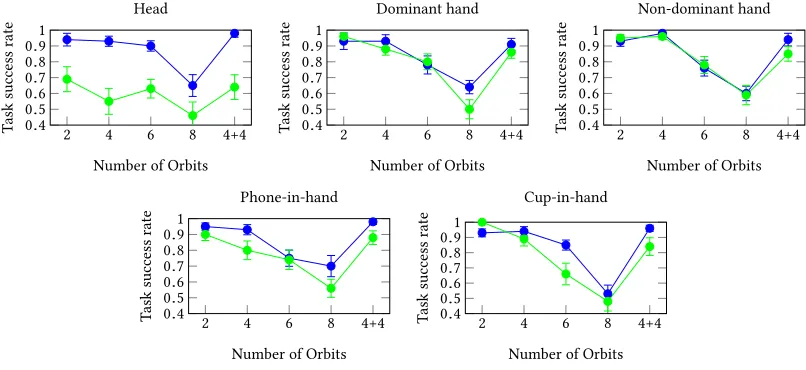
10 seconds, or if an Orbit other than the target was activated. Figure 4 shows the task success rate for each type of
movement across all variables after averaging for size and direction.
We found significant main effects for speed (F1,19=7.72,p=.012), and number of Orbits (F4,76=103.01,p< .001). There were no significant main effects for size (F1,19=2.935,p=.103), or type of movement (F2.57,48.79=2.92,p=.051). In general, participants performed significantly better with the slow speed (85%) compared with the fast speed (76%).
As we expected, participants performed significantly worse when selecting the target from 8 Orbits (57%) compared
with all others, atp< .001. We also observed a significant difference when participants selected a target from 6 Orbits (76%) compared with all others atp< .001. There were no further significant differences when selecting a target from 2 (92%), 4 (88%) or 4 plus 4 (88%) Orbits.
We observed significant two-way interactions for type of movement x speed (F4,76 = 8.77,p < .001), type of movement x number of Orbits (F7.50,142.51=2.56,p=.014), and speed x number of Orbits (F2.74,52.12=3.04,p=.041).
2 4 6 8 4+4
0.4 0.5 0.6 0.7 0.8 0.9 1
Number of Orbits
T
ask
success
rate
Head
2 4 6 8 4+4
0.4 0.5 0.6 0.7 0.8 0.9 1
Number of Orbits
T
ask
success
rate
Dominant hand
2 4 6 8 4+4
0.4 0.5 0.6 0.7 0.8 0.9 1
Number of Orbits
T
ask
success
rate
Non-dominant hand
2 4 6 8 4+4
0.4 0.5 0.6 0.7 0.8 0.9 1
Number of Orbits
T
ask
success
rate
Phone-in-hand
2 4 6 8 4+4
0.4 0.5 0.6 0.7 0.8 0.9 1
Number of Orbits
T
ask
success
rate
[image:8.612.124.527.443.628.2]Cup-in-hand
Fig. 4. Task success rate for each type of movement when following slow (blue), and fast (green) Orbits, averaged for size and direction, plotted against each level of the number of Orbits variable. Standard error is shown with error bars.
There were no other significant interactions. We further investigate the simple main effects for the types of movement,
proceeded by simple main effects for both speeds and all number of Orbits.
4.2.1 Type of Movement.We found no significant simple main effect for slow movements, when averaging over
size and number of Orbits, between the head (88%), dominant hand (84%), non-dominant hand (84%), phone-in-hand
(86%), and cup-in-hand (84%), (F2.26,42.97=0.85,p=.45). However, for fast movements there was a significant simple main effect for types of movement (F2.26,42.97=6.52,p=.002). Participants performed significantly worse with the fast head movement (59%) compared with the fast dominant hand (80%), and fast non-dominant hand (83%) movements,
atp=.04 andp=.021 respectively. We found no significant differences between the fast head movement and the fast phone-in-hand (78%) or fast cup-in-hand movements (77%).
4.2.2 Head. For the head movement, we found significant simple main effects for speed (F1,19=15.31,p=.001), and number of Orbits (F4,76=14.97,p< .001). Participants performed significantly better with the slow head movement (88%) compared with the fast (59%). Participants were significantly worse when using the head movement (averaged
over speed) to select a target from 8 Orbits (56%) compared with 2 (81%), 4 (74%), 6 (76%), or 4 plus 4 Orbits (81%), at the
p< .005 level.
4.2.3 Dominant Hand. For the dominant hand movement, we found a significant simple main effect for the number
of Orbits (F2.89,58.84=27.40,p< .001), but no simple main effect for speed. The task success rate was significantly lower when participants selected a target from 6 Orbits (79%) compared with 2 Orbits (94%), atp= .013, but was significantly higher compared with selecting a target from 8 Orbits (57%), atp=.006. We also observed that the task success rate was significantly lower when selecting a target from 8 Orbits compared to all others, including 4 (90%) and
4 plus 4 Orbits (88%), atp< .01.
4.2.4 Non-dominant Hand.For the non-dominant hand movement, we found a significant simple main effect for the
number of Orbits (F2.55,48.44=25.52,p< .001), but no significant simple main effect for speed. Selecting a target from 6 Orbits (77%) resulted in a significantly lower task success rate compared with 2 Orbits (94%), and 4 Orbits (97%), at
p=.011 andp=.001 respectively. The task success rate for selecting a target from 8 Orbits (59%) was significantly
lower than 2, 4, and 4 plus 4 (89%) Orbits atp< .001. There was no significant difference between 6 and 8 Orbits.
4.2.5 Mobile Phone-in-hand.For the mobile phone-in-hand movement, we found significant simple main effects
for both speed (F1,19=5.84,p=.026), and number of Orbits (F4,76=18.11,p< .001). Selecting a slow moving target resulted in a significantly higher task success rate (86%) compared with selecting a fast moving target (78%). Selecting a
target from 6 Orbits (74%) resulted in a significantly lower task success rate compared with 2 (93%), 4 (86%), and 4 plus 4
Orbits (93%), atp=.005,p=.044, andp=.002 respectively. We also found a significantly lower task success rate when participants selected a target from 8 Orbits (63%) compared with 2, 4, and 4 plus 4 Orbits atp<0.005. There was no significant difference between selecting a target 6 or 8 Orbits.
4.2.6 Cup-in-hand.For the cup-in-hand movement, we found a significant simple main effect for the number of
Orbits (F4,76=42.91,p< .001), but no significant simple main effect for speed. Selecting a target from 8 Orbits (50%) resulted in a significantly lower task success rate compared with all others forp< .001. In addition, the task success rate as a result of selecting a target from 6 Orbits (76%) was significantly lower compared to 2 Orbits (96%) atp=.003, and both 4 Orbits (91%) and 4 plus 4 Orbits (90%) atp=.13.
4.2.7 Speed x Number of Orbits.For the slow speed, there was a significant simple main effect for number of Orbits
when averaging types of movement and size (F2.31,43.96=69.33,p< .001). The task success rate was significantly lower for 8 Orbits (62%) compared with all others at p<.001, and for 6 Orbits (80%) and all others atp< .001. There were no other significant differences between selecting a target from 2 (93%), 4 (94%), and 4 plus 4 (95%) Orbits.
There was also a significant simple main effect for number of Orbits for the fast speed (F4,76=55.27,p< .001). Post-hoc tests revealed a significant difference between 8 Orbits (52%) and all others atp< .001. The task success rate was also significant lower when selecting a target from 6 Orbits (72%) compared with selecting a target from 2 (90%), 4
(82%), or 4 plus 4 Orbits (81%), atp=.001,p=.002, andp=.019 respectively.
When taking all sizes and types of movement into account, there was a significant simple main effect for speed
when selecting a target from 4 Orbits, (F1,19=11.95,p=.003). Slow moving targets (94%) resulted in a significantly higher task success rate compared with fast moving targets (82%). Slower moving targets (95%) also resulted in a
significantly higher task success rate than the faster moving targets (81%) when selecting a target from 4 plus 4 Orbits,
(F1,19=18.48,p< .001). There were no significant simple main effects for speed for 2, 6, or 8 Orbits.
4.3 Activation Time
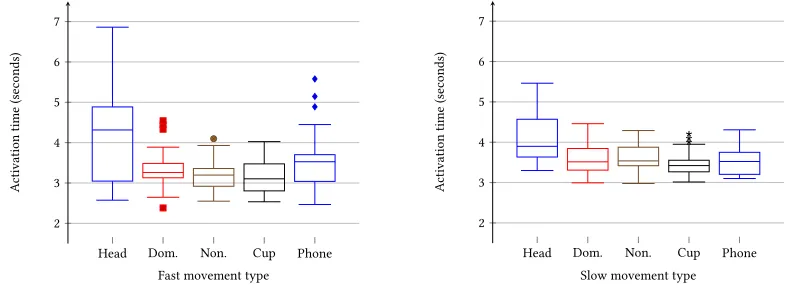
Figure 5 shows the activation times for successful trials. Average activation times across all users are reported in brackets.
The minimum time for activation of the slow and fast Orbits was 2 and 1 seconds respectively. For fast movements, it
takes the head movements (4.1s) longer to acquire than the dominant hand (3.3s), non-dominant hand (3.2s), phone
(3.5s) and the cup (3.2s). As figure 5 illustrates, there were participants who achieved activation times with the head
matching those of the other input modalities. For slow movements, the head (4.1s) was once again slower than the
dominant hand (3.6s), non-dominant hand (3.6s), phone (3.5s) and cup (3.5s). The spread of activation times for the slow
head movement is less than the faster Orbit, but still larger than those of the other input modalities for the slow speed.
4.4 User Preferences
The most popular type of movement was the dominant hand (12), followed by the head (3) and phone-in-hand (3), and
finally the cup-in-hand (2). No participant selected the non-dominant hand as their favourite type of movement to
use. Ten participants preferred the faster targets, and ten participants preferred the slower. Six participants preferred
the faster targets with the dominant hand movement, whereas the other six preferred the slower targets. All of the
Head Dom. Non. Cup Phone 2
3 4 5 6 7
Fast movement type
A
ctivation
time
(
se
conds)
Head Dom. Non. Cup Phone 2
3 4 5 6 7
Slow movement type
A
ctivation
time
(
se
[image:10.612.127.521.494.638.2]conds)
participants who selected the head movement preferred the slower targets, and all of the participants who selected the
cup-in-hand preferred the faster targets. One participant preferred the slow targets with the phone-in-hand movement,
with the remaining two preferring the faster targets.
4.5 Likert Item Responses
We performed a Friedman test on each Likert item to investigate participants’ responses for the types of movement and
speeds, see Fig. 6. Pairwise comparisons were performed with a Bonferroni correction for multiple comparisons.
Participant responses to the comfort Likert item were significantly different across the movement speed combinations,
χ2
(9)=41.15,p< .0005. Responses for the fast head movement (Mdn = 3) were significantly lower than both slow phone-in-hand (Mdn = 5) and fast dominant hand movements (Mdn = 5), atp=.041 andp=.028 respectively.
There was a significant difference in responses when participants were asked how easy it was to synchronise with
the target,χ2(9)=28.92,p=.001. Participants felt it was significantly harder to synchronise with the target using the fast head movement (Mdn = 3), compared with both slow dominant hand movement (Mdn = 5) and fast dominant hand
movements (Mdn = 5), atp=.021 andp=.008 respectively.
When participants were asked how easy it was to follow the target, responses were significantly different based on
speed and input modality,χ2(9)=34.18,p< .0005. Participants felt it was significantly harder to follow the target with the fast head movement compared with both slow (Mdn. = 5) and fast (Mdn. 4.5) cup-in-hand movements, atp=.023 andp=.014, and compared with both slow (Mdn = 5) and fast (Mdn = 4.5) dominant hand movements, atp=.012 and
I felt comfortable following the targets I felt confident following the targets
Head Dom. Non. Phone Cup
0 5 10 15 20 # participants
Head Dom. Non. Phone Cup
0 5 10 15 20 # participants
I found it easy to synchronise with the position of the targets
I found it easy to follow the movement of the target
Head Dom. Non. Phone Cup
0 5 10 15 20 # participants
Head Dom. Non. Phone Cup
0 5 10 15 20 # participants
It was not physically demanding It was not mentally demanding
Head Dom. Non. Phone Cup
0 5 10 15 20 # participants
Head Dom. Non. Phone Cup
[image:11.612.90.489.365.628.2]0 5 10 15 20 # participants
Fig. 6. Stacked bar charts showing responses to the Likert items for different types of movement and speed.
p=.014 respectively. The fast head movement (Mdn = 3) also received significantly worse responses compared with
the slow non-dominant hand (Mdn = 5), and slow phone-in-hand movement (Mdn = 5), atp=.031 andp=.028. There was a significant difference when participants were asked about the physical demand of using the movement
and speed combinations to select a target,χ2(9)=32.74,p< .0005. Participants reported significantly more physical demand for the fast head movement (Mdn = 3) compared with the fast dominant hand movement (Mdn = 5) atp=.049. Although there were significant differences between responses to the confidence and mental demand Likert items,
χ2(
9)=30.31,p< .0005 andχ2(9)=32.55,p< .0005 respectively, post-hoc tests revealed no significant differences between speed and movement combinations after accounting for multiple comparisons.
4.6 Study One - Discussion
The results show that holding an object does not significantly affect the task success rate, nor does using the
non-dominant hand – unlike other tasks such as writing in which the non-non-dominant hand performs significantly worse. This
highlights the ability to abstract from input modality, and provides users with various means by which to successfully
interact with the system in the event their preferred input modality can not be used (e.g. when performing other tasks).
Interestingly, we observed that using the head achieved the highest task success rate for slow movements, but the
lowest task success rate for fast movements. Many users reported that the fast head movement was "uncomfortable" and
felt "unnatural". The low task success rate can be, in part, explained by the way some users performed this movement.
The experimenter noted that during the trials, the output of the system (not seen by participants) was reporting that
the participants’ fast head movements were passing the Pearson threshold, however no activation occurred. This infers
that the participants were following the motion of the target, however their movements were not circular enough to
pass the circle fitting stage of the matching process, i.e. the movements were elliptical. This is further exaggerated
because fast Orbits require more constrictive parameters, compared with slow Orbits, to avoid accidental matching
with background movements [7].
The task success rate across all sizes and number of Orbits when taking into account participants’ preference for
type of movement and speed is 87%. This rises again to 97% for participants’ preferred type of movement and speed
across both sizes if we only consider selecting a target from 2, 4, and 4 plus 4 Orbits (99% for 2, 96% for 4 and 95% for 4
plus 4). This demonstrates that, despite TraceMatch’s generic approach, users can successfully interact with the system
using their preferred type of movement.
We observed individual differences between participants depending on the type of movement used. The participant
with the best overall task success rate across all variables had a task success rate of 90%, whereas the worst had a task
success rate of 67%. However, for the participant with the lowest overall task success rate, the task success rate for their
preferred movement and speed was 85% across all variables (100% excluding when they selected a target from 6 and 8
Orbits). This is an example of when a participant had a much lower task success rate for other types of movement and
speed combinations, as can be seen by the low average, yet there was at least one type of movement for which they
achieved a very high task success rate.
According to the responses to the Likert items, there were no significant differences found other than for the fast
head movement. This validates the idea of abstracting from input modality and providing the user with a choice of how
to interact with the system or, in the event the user is performing another task, allowing the user to continue interacting
with the system whilst holding an object. The different preferences we observed for the speed of the Orbits could easily
be implemented using a "settings" option, allowing users to tailor the system based on their personal preferences.
When discussing their favourite type of movement, one participant thought that their preference would depend on
whether or not they were in a social situation. The participant preferred the slow head movement due to the “low-effort”
involved, however, they stated that in a social situation they would rather use the hand gesture. This is because they
would only need to glance at the Orbit to be able to follow the target, thus allowing them to control the system whilst
maintaining their interaction in the social situation. This is another advantage of abstracting from the input modality,
allowing users to interact in different ways depending on the situation.
The activation time in TraceMatch consists of the time taken for the user to locate the control they wish to activate,
to position their desired input modality (e.g. raise their hand), to start synchronisation with the Orbit, and to maintain
synchronisation for the required amount of time (i.e. half an Orbit). Before starting the synchronisation, users may wait
and choose to start the movement at a salient point, e.g. when the target is at the top of the Orbit. Interestingly, one
would expect the slower times to be around one second slower for the slow Orbits due to the extra time required to
synchronise with half an Orbit, 1s and 2s for fast and slow Orbits respectively. However, we observed a difference of
less than half a second, suggesting that the slower Orbits are easier to synchronise with than the faster Orbits, as all
other factors that contribute to the acquisition time remain the same (e.g. finding the target and positioning the input
modality).
5 STUDY TWO - CHOICE OF MOVEMENT FOR INTERACTION
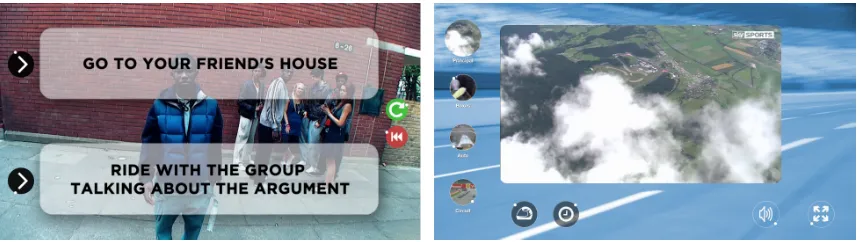
To investigate how participants interacted with the system using real-world applications we used two prototypes,
an Interactive Story and a Formula 1 Multi-screen application. Participants were free to use any type of movement
to interact with the prototypes. Participants were instructed to inform the experimenter in the event of an incorrect
activation, i.e. the wrong Orbit is activated when trying to activate an Orbit, or a false activation, i.e. an Orbit is activated
when not trying to activate an Orbit. The Orbits used for the prototypes had a radius of 50px and speed of 3 seconds
per cycle.
5.1 Interactive Story
The aim of the first prototype was to assess how users interact with the system given an application in which the
participant has minimal interaction. For this, we used an interactive video series about knife crime filmed from a
[image:13.612.74.504.491.612.2]teenager’s point of view [3]. Participants are shown a film, during which they are offered a series of choices throughout
Fig. 7. Prototypes for the second study. Left: Interface for the Interactive Story prototype with Orbits for selecting an action (left of the screen), and for restarting the story from the beginning or replaying the last section (right of the screen). Right: Interface for the Formula 1 Multi-screen prototype with Orbits for changing the main display (left), muting the volume (second from right), and enlarging the display to full-screen mode (right).
which influence the outcome. In order to choose which route to pick users are presented with a textual description
and associated Orbit to select an action, see Figure 7. Two additional Orbits were added to restart the story from the
beginning, or replay the last video section. Participants were instructed to choose whichever actions they preferred,
and that their choices were not being recorded. At the end of the story, participants were presented with four 5-point
Likert items:
• I felt comfortable following the targets
• I felt confident following the targets
• It was not physically demanding
• It was not mentally demanding
5.2 Formula 1 Multi-screen Application
The second prototype was a Formula 1 Multi-screen application, see Figure 7. The aim of this prototype was to present
an application to users with a large number of Orbits (8) displayed simultaneously on the screen. The interface allowed
participants to choose between four different camera angles, a timing screen and the track layout. Controls for muting
the sound and enlarging the main window were also included. Participants were instructed to select each Orbit at
least once in any order and to watch the videos if they desired. Once the participant had finished interacting with the
prototype, they completed the same Likert items used for theInteractive Storyprototype.
5.3 Study Two - Results
The task success rate for the Interactive Story application was 100%, out of 70 activations, see Table 1. The most
commonly used type of movement for activating the controls was the dominant hand, which was used for 70% of the
activations. The cup was the only type of movement that was not used by any of the participants. Four participants
used more than one input modality throughout the duration of the interactive story.
According to responses from the Likert items, most participants felt comfortable (Mdn = 4.5) and confident (Mdn =
5) with the interactive story. Participants did not report any physical (Mdn = 5) or mental demand (Mdn = 5) with a
bottom-two-box score of 0% for all Likert items relating to the interactive story.
When faced with multiple Orbits simultaneously during the Formula 1 multi-screen application, participants achieved
a task success rate of 97% out of 293 activations. Three participants encountered one incorrect activation, and two
participants encountered two incorrect activations. During the Formula 1 multi-screen prototype, participants used
Table 1. Results for the second study, showing the different types of movement used to activate the Orbits and the overall task success rate.
Interactive Story
Formula 1 Multi-Screen
Numb
er
of
activations
Head 5 (7%) 18 (6%) Dom. hand 49 (70%) 223 (76%)
Non. hand 6 (9%) 22 (8%) Phone 10 (14%) 28 (10%) Cup 0 (0%) 0 (0%) Foot 0 (0%) 2 (1%)
Total activations 70 293 Incorrect activations 0 8
False activations 0 0 Task success rate 100% 97%
a wide variety of movements, including a participant who successfully activated an Orbit with their foot. The most
frequently used type of movement was, again, the dominant hand which was used for 76% of all activations.
For the Formula 1 multi-screen, the majority of participants did not report any physical (Mdn = 5) or mental (Mdn =
5) demand, and reported that they felt comfortable (Mdn = 5) and confident (Mdn = 5). One participant disagreed that
they felt comfortable, and thought the Formula 1 multi-screen application was mentally (2) and physically demanding
(2). The participant reported that it was much harder to follow targets with a video in the middle of the Orbit (for the
Orbits which previewed video content). We observed nine participants using multiple input modalities when interacting
with the Formula 1 Multi-screen prototype.
The type of movement predominantly used to interact with the prototypes was not the preferred type of movement
of the participant in all cases. Two of the participants who preferred the cup object used their dominant hand to interact
with the prototypes, with the third choosing to use their smartphone. Only one out of the three participants who
preferred the head movement used their head to activate the Orbits for the majority of the time, the remaining two used
their dominant hands for the majority of the time when interacting with the prototypes. One of the participants who
preferred the phone-in-hand movement predominantly used their non-dominant hand to activate the Orbits during the
prototypes.
5.4 Study Two - Discussion
When users were given the freedom to interact with the system in a more natural setting, we observed that not all
participants used their preferred type of movement reported during the first study. In the case of the head movement,
this could be due to the increased speed (3 second per cycle) used for the prototypes, because all those who preferred
the head movement also preferred the slower moving targets (4 seconds per cycle).
With the exception of one participant, those who preferred objects did not actively seek out their preferred objects
to interact with the system, instead choosing to perform the movements without an object or with a different object.
This demonstrates the flexibility when it comes to choice of input modality and shows that users, although reportedly
preferring one type of movement, can easily adapt to different types of movement.
One participant used the head movement, their preferred movement, during the interactive story, however switched
to the dominant hand when interacting with the Formula 1 multi-screen application. We also saw similar behaviour with
participants switching from their non-dominant hand in the interactive story, to their dominant hand in the Formula 1
multi-screen application. The story application is much more relaxed and requires less input than the multi-screen
application, which could suggest that users change their type of movement depending on the context.
We observed four participants using different hands depending on the location of the Orbit they were trying to
activate. When questioned about this, participants reported that they instinctively changed which hand they used
based on the location of the Orbit on the screen. We also observed one participant who used their foot to activate the
multi-screen prototype, in an explorative manner.
6 STUDY THREE - MULTI-LEVEL INPUT
To gain insight into how multiple targets on a single Orbit can be used for more expressive input we used two prototypes,
a Video Control and an Information Popup application. We can display information with the Orbits themselves, e.g.
through the use of background icons, but our aim here is to investigate whether additional information can be conveyed
through the movement and colour of multiple targets orbiting around a single Orbit without the participants having
prior knowledge of the functionality of the different targets.
Fig. 8. Prototypes for the third study. Left: Interface for the video control prototype with Orbits for skipping backwards (left), skipping forward (right), play/pause (middle) and for hiding the controls (top-right). Right: Interface for the information popup with Orbits for opening the popup (left) and closing the popup (top-right). The Orbit used to open the popup is shown for illustration and would not be visible at the same time.
6.1 Video Control
The aim of the Video Control prototype was to simultaneously present Orbits with different sizes and speeds to the
participants. For this, we designed a video controller which allowed the user to play, pause, skip forwards or skip
backwards, see Figure 8. We chose skipping forwards and backwards to provide a non-continuous method of control, as
opposed to rewinding or fast forwarding.
For skipping forwards, three clockwise Orbits were used with different speeds and sizes. The small, medium and
large Orbits rotated with speeds of 4, 3, and 2 seconds per cycle respectively. The larger, faster Orbit skipped the
video forward by 30 seconds, the medium sized Orbit by 15 seconds, and the smaller, slower Orbit by 5 seconds. For
skipping backwards the Orbits operated the same way but rotated anticlockwise. The participants were not told about
the functionality of the Orbits prior to their interaction with the prototype, however the number of seconds skipped
was displayed in the middle of the Orbit when the control was activated, i.e. "5s" is displayed if the small, slow Orbit is
activated.
Participants were asked to interact with the Video Control for two minutes. They were then verbally asked if they
had understood the functionality of the Orbits for skipping forwards and backwards (i.e. the quicker the speed and
larger the size the greater amount the video was skipped) when they first saw the controls, and after they had finished
with the prototype. They were then verbally asked whether they thought the functionality of the different sizes and
speeds made sense.
6.2 Information Popup
The final prototype was used to test whether the colour of the targets could be used for selection or rejection of a popup.
This was achieved using a prototype that allowed the participant to view additional information on a subject at four
key points during a video, see Figure 8. The Orbits used for the Information Popup application had a radius of 50px and
speed of 3 seconds per cycle.
For each key point, an Orbit with a red and a green target was displayed. If the participant selected the green target,
the additional information would appear. If the participant selected the red target, the Orbit disappeared. We also varied
how the red and green target orbited to find out which participants preferred. In two out of the four cases, the targets
Table 2. Results for the third study, showing the types of movement used to activate the Orbits and the overall task success rate.
Video Control
Information Popup
Numb
er
of
activations
Head 30 (7%) 14 (10%) Dom. hand 325 (76%) 95 (70%) Non. hand 30 (7%) 5 (4%)
Phone 36 (8%) 18 (13%) Cup 4 (1%) 2 (1%) Foot 0 (0%) 2 (1%)
Total Activations 425 136 Incorrect activations 36 0
False activations 0 0 Task success rate 92% 100%
rotated clockwise with an offset of 180°. In the remaining two cases, the green target rotated clockwise and the red
target rotated anti-clockwise. The order in which the participants were shown the targets was counterbalanced.
Following the video, participants were asked whether they had understood the functionality of the red and green
targets when they first appeared, or at the end of the video. They were then asked which method of target rotation they
preferred, i.e. same direction or opposite direction, and why.
6.3 Study Three - Results
The video control prototype suffered the most incorrect activations (36), only three participants had no incorrect
activations, resulting in a task success rate of 92% out of 425 activations, see Table 2. We observed four participants
using more than one input modality to activate the controls, with the dominant hand being the most predominantly
used type of movement accounting for 76% of all activations.
Ten participants reported that they understood the functionality of the video controls when they appeared, whereas
seven did not understand the functionality until they activated the Orbits. Three participants did not understand the
functionality of the controls, even after interacting with the prototype. The three participants who did not understand
the functionality reported that they thought the different speed and sizes of Orbits were available to allow the user to
choose whichever they prefer. Of the participants that understood the functionality, nine reported that they understood
it because of the speed of the Orbits (i.e. the quicker the speed, the larger the effect) and six reported that it was because
of the size (i.e. the bigger the size, the larger the effect). Two participants reported that the combination of speed and
size led them to understand the functionality.
Users achieved a task success rate of 100% out of 136 activations when interacting with the Information Popup
prototype. The most frequently used type of movement was the dominant hand, accounting for 70% of all activations.
Five users activated the Orbits with more than one input modality, including one participant who used their foot to
activate an Orbit (a different participant to the one who used the foot in the second study).
Fifteen participants reported that they understood the concept of the green and red targets to open or close the
information popup. The remaining five reported that they did not understand the concept until they had activated one
of the targets. Sixteen participants preferred it when the red and green targets rotated in opposite ways, reporting that
it required less effort to trigger the correct target because there was no chance of getting it wrong. Three participants
preferred it when the red and green target rotated in the same direction because it was more aesthetically pleasing. One
participant had no preference, reporting that it was more aesthetically pleasing for the same way but at the same time
it was easy to select a target when they rotated in opposite directions.
6.4 Study Three - Discussion
We have demonstrated that multiple input options can be expressed using multiple targets for the Orbits. This enables
multiple targets to be located around a single Orbit which reduces the screen space required for the interface, and
provides greater flexibility for designers.
It is interesting to note that the participants understanding of the video control functionality was predominantly
due to either the size or the speed, but rarely both. This suggests that using a combination of size and speed is
advantageous, because perception of the functionality of the different properties of the Orbits are not consistent across
users. One participant noted that there could be an issue for the colour-blind with the red and green targets used in the
information popup application, however they suggested simple tick and cross icons could also be used to convey the
same information.
The ability to have multiple speeds of Orbits display simultaneously is desirable because it potentially allows for a
greater number of Orbits to be displayed on the screen at any given moment. However, we noted that during the video
control prototype a relatively large number of incorrect activations was a result of the users triggering a faster target
that was in the process of overlapping a slower target, or vice versa. Whereas this might not be an ideal solution for
increasing the number of controls, the task success rate remained above 90%.
7 DESIGN GUIDELINES
The set of studies presented give insight into design choices, from which we distill guidelines for the design of interfaces
based on TraceMatch.
We reflect insights on the following properties:
• Speed– What is the best speed to use?
• Number of Orbits– How many Orbits should be displayed simultaneously?
• Size and Position– Does the size and position of the Orbits make a difference?
• Multi-Level Input– How should one convey additional information using the Orbits for multi-level input?
• Interface visibility– Should the interface be visible at all times?
7.1 Speed
There are implications on the types of input modality that can be used based upon the speed of the Orbits. The majority
of participants did not perform well with fast head movements, therefore the use of fast Orbits could inadvertently limit
the number of input modalities that can be used with the system. The slower Orbits achieved a significantly higher task
success rate across all movement types, however we observed an even split with regards to participant preference for
speed suggesting one speed does not suit all.
In the second and third studies we observed participants using different types of movement to interact with the
system in a context where they were not performing other tasks other than interacting with the applications. The varied
use of different input modalities can, in part, be explained by possible order and novelty effects of having completed
the first study and using the system for the first time. However, in real-world deployments users may be performing
other tasks with their hands when interacting with the system, such as eating, drinking, cooking, or in a public display
context the user may have bags of shopping or be carrying or attending to a young infant. In this context, slower Orbits
would allow users to fully utilise the principle of input modality abstraction.
This presents a conundrum to designers – what if the user performs better with the slower Orbits but prefers the
faster Orbits? Here we invoke the popular saying –“the customer is always right”. If a user prefers faster Orbits then
they should be able to configure the system in a personalised manner. This can be achieved using a “settings” Orbit
to allow the user to configure the speed on-the-fly to a configuration which they feel most comfortable using. An
alternative approach would be to use two sets of Orbits with both slow and fast moving targets, however this could
make the interface confusing. For public displays users should not be expected to have to configure the interface before
commencing interaction. We therefore advise that the default speed of the Orbits are set to slow in this context, because
of the higher task success rate and full utilisation of input modality abstraction.
7.2 Number of Orbits
Based on our findings in the first study, we would recommend a default maximum limit of eight simultaneous Orbits
(four clockwise and four anti-clockwise) presented on an interface when using only one Orbit speed. However, the
speed of the Orbits is a factor when considering how many Orbits should be displayed simultaneously. Six orbits
(allowing for 12 simultaneously) achieved a task success rate of 80% across all movement types for slow speeds, with
seven participants (35%) achieving an average task success rate of at least 90% with six orbits across all movement
types, and only three (15%) participants achieving a task success rate of less than 75%. In contrast, only two participants
achieved a high task success rate (>90%) when using fast movement types. Therefore, we would only recommend
increasing the capacity to twelve Orbits (six clockwise, six anticlockwise) when using slow moving targets and if the
application necessitated the increased capacity.
The use of different speeds for the Orbits, such as shown in the third study, also has the potential to increase the
capacity of the number of simultaneously displayed Orbits, however one must take care in ensure the difference in
speeds is sufficient enough to avoid false activations occurring due to the overlapping trajectories. In the third study,
we used a time difference of 1 second between the speeds, however a larger offset may result in a much lower false
activation rate. We therefore recommend a minimum difference of at least 2 seconds between the speeds of the Orbits.
If using this approach, a practical capacity of sixteen simultaneous Orbits could be displayed using two sets of Orbits
with different speeds. Although we have only studied circular Orbits in this work, additional shapes could be used
in addition to circular Orbits to extend the maximum capacity, as long as the system can accurately differentiate the
different trajectories.
7.3 Size and Position
Our results show that the size of the Orbits does not affect task success rate and should therefore be designed according
to the application. Smaller orbits may take up less screen space, however a user’s ability to accurately identify the
Orbits’ trajectories should be taken into account. We observed interesting user behaviour during the second and third
studies with some users changing input modalities depending on the position of the Orbit on the screen. Based on this,
one might consider placing the Orbits centrally where possible so that a user’s input modality is not influenced by the
position of the Orbits on the screen.
7.4 Multi-Level Input
Study three shows how colour, speed and size can convey additional information to the user for multi-level input.
When using different speeds to convey additional information it is important to consider the difference in speed of the
Orbits to avoid false activations that occur as a result of the trajectories overlapping. In contrast, size has been shown
to have no significant effect on task success rate, therefore this is a “safer” way in which additional information can be
conveyed. The downside to this is that not all users understood the implicit information conveyed through the size or
speed alone, therefore it is important to utilise both properties. Some participants understood the concept of using
colours to convey information, however this is limited and could pose an issue for users who are colour blind. Instead
we recommend using icons for the targets of the Orbits to convey information more explicitly.
7.5 Interface Visibility
The dynamic nature of Orbits could be distracting to users who have no intention of interacting with the system for
prolonged periods. This can be mitigated by assigning an Orbit to close the interface (and hide the Orbits), or implement
a time-out to hide the Orbits when no input is detected for a predetermined amount of time. In order to display the
interface a generic gesture (e.g. a circular movement performed at any speed) can be used. For public displays, users are
likely to interact with the display for shorter periods of time and therefore it may not be necessary to hide the interface.
8 DISCUSSION
In this paper, we have evaluated TraceMatch, a novel touchless interaction technique which abstracts from any specific
input modality. We have demonstrated that participants were able to select a target from eight Orbits (four in both
directions) with an average task success rate of 88% across all sizes, speeds, and types of movement during a controlled
experiment. The flexibility to successfully interact with a wide variety of different movement types is advantageous
as we observed that participants had different preferences for their preferred type of movement. When users were
provided the freedom to interact with TraceMatch in a naturalistic application context, users achieved a task success
rate of>97% using standard Orbits with a variety of different movements, and>92% with Orbits using targets with
different speeds and sizes displayed simultaneously.
We have studied TraceMatch in the context of Interactive TV, however the interaction approach can be used for a
wide variety of devices, requiring only a webcam and a method for displaying the Orbits (not just limited to screens).
We have shown that the size of the Orbits has no significant effect on task success rate, and that the colour, speed, and
size of the targets of an Orbit can be used to convey additional information regarding its functionality for use with
multi-level input. This affords designers the flexibility to design interfaces to constraints, and has wider implications,
especially on smaller devices.
The intuitiveness and high discoverability of TraceMatch enables the technique to be extended into spontaneous
interaction environments, such as public displays. Our study has focussed on single users in the camera’s field of view,
however the generic nature of TraceMatch enables multi-user applications. TraceMatch’s ability to abstract from a
specific input modality, enables users to use any type of object. Specific applications, such as interactive games, could
be developed for children in which their favourite toys, or objects relating to the game, could be used as input control.
It also has the potential as an interaction technique for users for which conventional gestural input is not suitable, e.g.
amputees.
Lastly, we identify two limitations in our studies. Movement correlation techniques, in general, are not ideally suited
for continuous controls, e.g. changing volume, because they require the user to continuously follow the target for
prolonged periods. For this reason, we opted for skipping forward and backwards rather than fast-forwarding and
rewinding in the Video Control prototype. However, it is not intended that the TraceMatch control replaces existing
input controls for television, i.e. the remote control, rather it compliments existing input methods by offering a method
of low-effort gestural control for simple mundane tasks.
The second limitation is that we only consider circular motion. The extra stage of fitting a circle to the user’s motion
is required to reduce the chance of false activations as a result of detecting motion indiscriminately. TraceMatch can be
extended to non-circular motion in the case of periodic Orbits by replacing the circle fitting stage with the required
shape. However, to match against aperiodic shapes, e.g. random movement, the system would require a more refined
matching process to minimise false activations.
9 CONCLUSION
Previous work has shown users are capable of following Orbits with specific input modadlities, e.g. their eyes [8] or
hands [5]. In this paper we have shown that TraceMatch successfully extends this to any type of motion that the user
can generate, including their head, whilst holding objects, and even their feet. We have contributed an experimental
evaluation of how users interact with the TraceMatch system, focussing on interactive TV, demonstrating that it is a
robust technique for a variety of different input modalities, whilst providing users with the freedom to interact with the
system however they desire. TraceMatch offers key advantages for low-effort interaction when performing mundane
tasks, and has the ability to act as an input to a world of many devices.