FLOATING POINT
SYSTEMS,
INC.
Program
Cevelopment
by FPS
Technical Publications Staff
Program
Development
SoftVJare
Manual
NOTICE
Publication No. 860-7292-002
September, 1978
The material in this manual is for
information purposes only and is
subject to change without notice.
Floating Point SystemsJ Inc. assumes
no responsibility for any errors
which may appear in this publication.
Copyright
©
1978 by Floating Point Systems, Inc.
Beaverton, Oregon 97005
All rights reserved. No part of
thispublication
may be reproduced in any form or by any means
without permission in writing from the publis.ner.
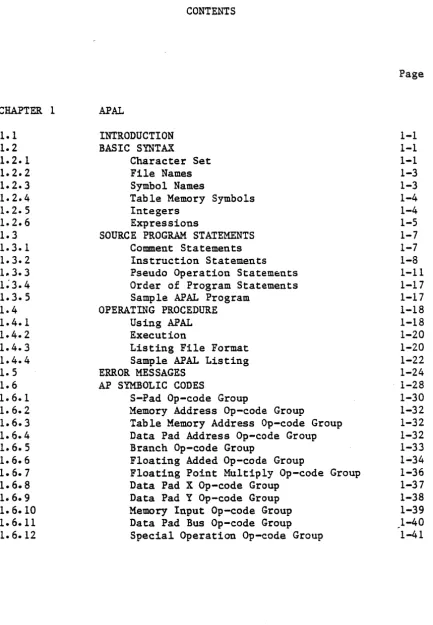
CONTENTS
CHAPTER 1 APAL
1.1 1.2 1.2.1 1.2.2 1.2.3 1.2.4 1.2. 5 1.2.6 1.3 1.3.1 1.3.2 1 .. 3.3
1~3.4 1.3.5 1.4 1.4.1 1.4.2 1.4.3 1.4.4 1.5 1.6 1.6.1 1.6.2 1.6.3 1.6.4 1.6.5 1.6.6 1.6.7 1.6.8 1.6.9 1.6. 10
1.6. 11
1.6.12
INTRODUCTION BASIC SYNTAX
Character Set File Names Symbol Names
Table Memory Symbols Integers
Expressions
SOURCE PROGRAM STATEMENTS Comment Statements Instruction Statements Pseudo Operation Statem=nts Order of Program Statements Sample APAL Program
OPERATING PROCEDURE Using APAL Execution
Listing File Format Sample APAL Listing ERROR MESSAGES
AP SYMBOLIC CODES
S-Pad Op-code Group
Memory Address Op-code Group
Table Memory Address Op-code Group Data Pad Address Op-code Group Branch Op-code Group
Floating Added Op-code Group
Floating Point Multiply Op-code Group Data Pad X Op-code Group
Data Pad Y Op-code Group Memory Input Op-code Group Data Pad Bus Op-code Group Special Operation Op-code Group
[image:4.617.98.531.70.694.2]CHAPTER 2 2.1 2.2 2.2.1 2.2.2 2.2.3 2.2.4 2.2.5 2.2.6 2.2.7 2.2.8 2.2.9 2 .. 2.10 2.2.11 2.2.12 2.3 2.4 2.5 2.5.1 2.5.2 2.5.3 2.5.4 2.5.5 2.5.6 2.5. 7 2.5.8 2.5.9 2.5.10 CHAPTER 3
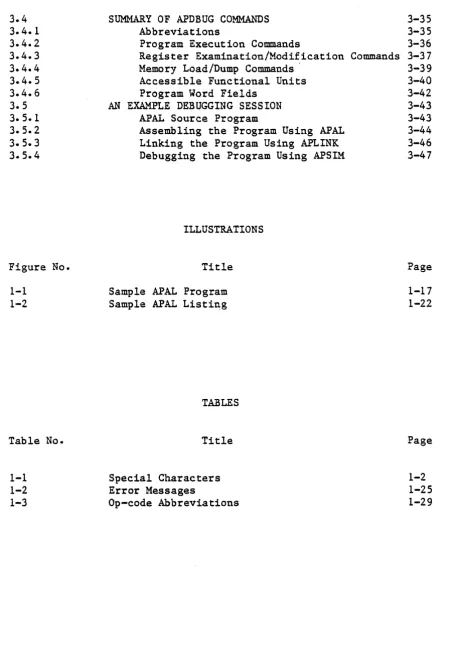
3.1 3.2 3.2.1 3.2.2 3.2.3 3.2.4 3.2.5 3.2.6 3.2.7 3.2.8 3.2.9 3.3 3.3.1 3.3.2 3.3.3 3.,3.4 3.3.5
FPS 860-7292
APLINK
INTRODUCTION
OPERATING PROCEDURE Load L
Symbols S Undefined U Next Base B Reset R Force F Memory M END E
END with Assembly Code A Number Radix N
Exit X
An Example Loading Session ERROR MESSAGES
SUMMARY OF APLINK COMMANDS
RELOCATABLE OBJECT CODE BLOCK TYPES Code Block (0)
End Block (1) Title Block (3)
Entry Symbol Block (4)
External Symbol Block (5)
Library Start Block (6)
Library End Block (7)
Example Relocatable Object Program Example of E Output
Example of APLINK output APSIM AND APDBUG
INTRODUCTION
OPERATING PROCEDURE
Monitoring Registers and Memory Locati~ns
Open and Examine (E)
Examine/Next, Last, and Re-examine (+,-,.) Change (C)
Set Program Source Offset (0)
Changing Input/Output Formats Set Radix (N)
Set/Reset Floating Point I/O (F) Set/Reset Program Word Field I/O (V)
MEMORY LOADING AND DUMPING Yank From a File (Y)
Write to a File (W) Zero the
AP
(Z)Preparing Data Files for Yanking Executing Programs
3.4 3.4.1 3.4.2 3.4.3 3.4.4 3.4.5 3.4.6 3.5 3.5.1 3.5.2 3.5.3 3.5.4
Figure No.
1-1 1-2
Table No.
1-1 1-2 1-3
SUMMARY OF APDBUG COMMANDS Abbreviations
Program Execution Commands
Register Examination/Modification Commands Hemory Load/Dump Commands'
Accessible Functional Units Program Word Fields
AN Ex&~PLE DEBUGGING SESSION APAL Source Program
Assembling the Program Using APAL Linking the Program Using APLINK Debugging the Program Using APSIM
ILLUSTRATIONS
Title
Sample APAL Program Sample APAL Listing
TABLES
Title
Special Characters Error Messages
Op-code Abbreviations
[image:6.615.81.542.55.723.2]CHAPTER 1
APAL
1.1 INTRODUCTION
Array Processor Assembly Language (APAL) is an unconventional assembly language and poses certain difficulties to programmers. In particular, the capability of the AP to process several instructions simultaneously needs attention.
APAL code is compiled on the host system for execution on the array processor. APAL requires about 24K of memory on typical 16-bit mini-computers.
1.2 BASIC SYNTAX
This section presents the grammar of APAL.
1.2.1 CHARACTER SET
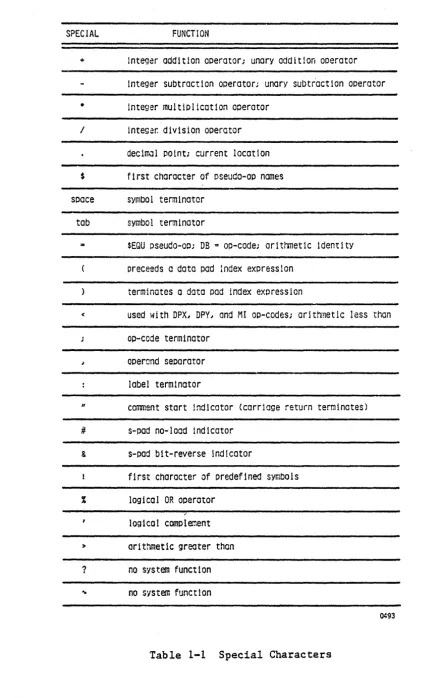
APAL recognizes the following characters:
alphabetic A through Z numeric 0 through 9
SPECIAL FUNCTION
+ Integer addition operator; unary addition operator
integer subtractIon operator; unary subtr'actlon operator
• integer multiplication operator
/ Integ~r. division operator
decimol point; current location
$ first character of pseudo-ap names
space symbol terminator
tab symbol terminator
$EQU pseudo-co; DB = oo-code; arltrmetic identity Dreceeds a data pad index expression
terminates a data pad index expression
< used with DPXI DPYI and MI oD-codes; aritt-mletic less than
ap-code terminator
operand separator
label terminator
" comment start indicator (carriage return terminates)
# s-pad no-locd indicator
& s-pad bit-reverse indicator
first character of predefined symbols
logical OR operator
logical complement
> ar1thmetic greater than
? no system function ~ no system function
0493
Table 1-1 Special Characters
[image:9.618.66.508.47.745.2]1.2.2 FILE NAMES
File names may contain 30 characters, including special characters and numbers. On systems where programmed file assignment is not allowed or is very difficult, the user must enter the number of the logical unit of a file he assigned prior to calling APAL.
A special symbol (which is different for each host system) exists for referencing the user terminal (for example: TT: for the PDP11). Examples:
RUNNER RUNNER.OBJ
P38 CHANNEL
1.2.3 SYMBOL NAMES
Symbol names may be of any length; however, only the first six characters of a name are significant. The first character of a name must be alphabetic. The subsequent characters may be either alphabetic or numeric.
Examples:
LOOP
A6
STARTHERE
A symbol can be created and given a value by:
• 'defining it with the $EQU pseudo-op • using as a label
1.2.4 TABLE MEMORY SYMBOLS
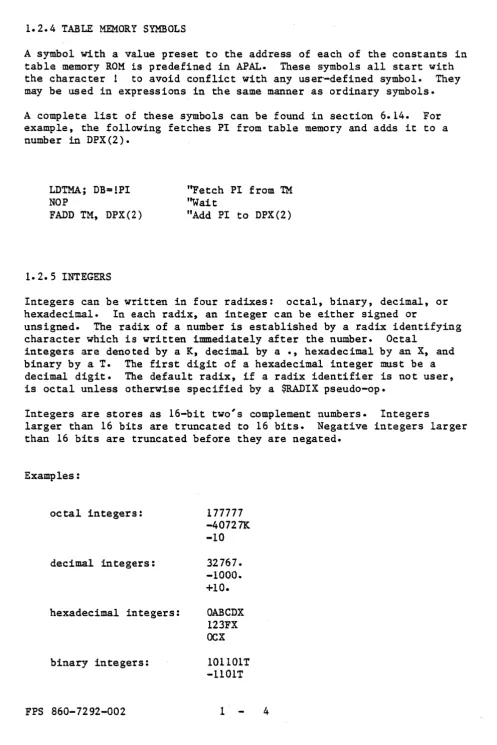
A symbol with a value preset to the address of each of the constants in table memory ROM 1s predefined in APAL. These symbols all start with the character! to avoid conflict with any user'-defined symbol. They may be used in expressions in the same manner as ordinary symbols.
A complete list of these symbols can be found in section 6.14. For example, the following fetches PI from table memory and adds it to a number in DPX(2).
LDTMAj DB=!PI NOP
FADD
TM,
DPX(2)1.2.5 INTEGERS
"Fetch PI from TM
''Wait
"Add PI to DPX(2)
Integers can be written in four radixes: octal, binary, decimal, or hexadecimal. In each radix, an integer can be either signed or
unsigned. The radix of a number is established by a radix identifying character which is written immediately after the number. Octal
integers are denoted by a K, decimal by a ., hexadecimal by an X, and binary by a T. The first digit of a hexadecimal integer must be a decimal digit. The default radix, if a radix identifier is not user, is octal unless otherwise specified by a $RADIX pseudo-ope
Integers are stores as 16-bit two's complement numbers. Integers
larger than 16 bits are truncated to 16 bits. Negative integers larger than 16 bits are truncated before they are negated.
Examples:
octal integers: 177777
-40727K -10
decimal integers: 32767. -1000. +10.
hexadecimal integers: OABCDX 123FX OCX
binary integers: 101101T
-1101T
[image:11.615.59.557.46.792.2]1.2.6 EXPRESSIONS
Expressions are symbolic representations of numbers. They are made of operands and operators.
1.2.6.1 Operands
Operands are symbol names, numbers or the location counter (denoted by
.
).
Examples:
TBLADR
1.2.6.2 Operators
Operators are of two types: unary and binary.
Unary Operators
,
logical complement
+
positive reminder (+3K,+10.)gives negative of a number (-15X,-777)
Binary Operators
Standard
+
*
/
Arithmetic operators
addition subtraction multiplication division
standard arithmetic relations, which return a value of one if the relation is true, and zero if the relation is false. For example, B $EQU 6<10 sets B to 1
< less than
= equals
> greater than
Some expressions are:
TBLADR+3F
• +
9.LOOP + 6
*
A(34 - lOX)
*
2Expressions are evaluated left to right in 16-bit two's complement arithmetic according to FORTRAN precedence standards and parenthesis may be used liberally.
NOTE
Only the low order 16 bits are used if an
expression results in a value larger than 65535.
1.3 SOURCE PROGRAM STATEMENTS
APAL source statements may be divided into three categories:
• comment statements • instruction statements • pseudo-op statements
Comment statements allow program documentation. Instruction statements make up the actual symbolic machine code. Pseudo-ops provide
directives to APAL during the assembly process.
APAL statements are free format; spaces and tabs may be used as desired to improve legibility.
1.3.1 COMMENT STATEMENTS
Everything on a line following a quote mark (n). is treated as a comment by APAL. A line which contains only comments, or a line that is
1.3.2 INSTRUCTION STATEMENTS
An APAL assembly language instruction statement has the format:
label: Op-code fields "Comments
The label and comments are optional. The assembler processes the op-code fields and generates one 64-bit instruction word for each instruction statement.
1.3.2.1 Label Field
A label is a user-defined symbol which is assigned the value of the current location counter and entered into the user symbol table. A label is a symbolic means of referring to a specific location within a program. If present, a label always occurs first in an instruction statement and must be terminated by a colon. For example, assume the following instruction statement is entered.
LOOP: FADD DPX, DPY "LOOP HERE
If the current location is 76, value of 76 is assigned to symbol LOOP.
1.3.2.2 Op-code Field (Operation Code Field)
The op-code field follows the label field in an instruction statement and contains one or more AP op-code mnemonics. Individual op-codes in an instruction are separated by a semi-colon. For example, the
following two groups of op-codes are equivalent. The absence of a semi-colon following an op-code terminates the instruction.
LOOP: or
LOOP:
FADD DPX, DPY; FMUL TM, MD; BFGT DONE
FADD DPX, DPY;
FMUL TM, MD;
BFGT DONE
Each is one instruction statement, which assembles into one 64-bit instruction word. Thus, one instruction statement may be continued over as many lines as desired to achieve a readable program document. The absence of semi-colon after the last op-code signals the assembler
that the instruction is ended.
Op-codes may be written in any order within an instruction. The assembler flags any conflicting op-codes with an error message.
Some op-codes require operands as arguments. The operand is separated from the op-code by a space or tab and from another operand by a comma. Some example op-codes are:
no operands: one operand: two operands:
HALT; RETURN
FABS MD; BFGT LOOP
FADD DPX, DPY; EMUL TM, MD
If an operand is missing or improper, the assembler generates an appropriate error message.
1.3.2.3 Comment Field
The remainder of any line following a quote mark (") is treated as a comment by the assembler and is ignored. The comment field is
terminated by a carriage return. Thus, the previous example can be written:
LOOP: FADD DPS, DPY;
FMUL TM, MD;
BFG! DONE
"DO AN ADD
"AJ.~ A MUL TIPL Y
"AND A BRANCH
"ALL IN ONE INSTRUCTION
An instruction is ended by the absence of a semi-colon following the last op-code.
1.3.3 PSEUDO-oPERATION STATEMENTS
Pseudo-operations are directives to the assembler which control certain aspects of the assembly translation process. Each pseudo-op must
appear on a separate line in the source text. All pseudo-op names start with a
"$".
As with instruction statements, pseudo-op statements may be labeled and have comments.This operator equates a symbol with an expression. If user defined symbols are used in the expression, they must have been previously defined in the program.
Examples:
A $EQU 321
LOOP $EQU LOC + 3
HERE $EQU • - 3
MASK $EQU 132 *3+6
Alternatively, the character n:an may be used in place of "$EQU":
Examples:
$LOC sets the current location counter to the value of an expression. If symbols are used in the expression they must.have been previously defined in the program.
Examples:
$LOC 3-00
$LOC • + 6 ''LEA VE NEXT S IX UNUSED
$LOC LOOP
+
10NOTE
$LOC should not be set to an absolute address, as in the first example, if the assembly output is to be linked re10catably with other programs.
$END causes APAL to terminate the assembly.
This operator defines 64 bits of data to fill one program word. The data must consist of four 16-bit integers or integer expressions which represent the four 16-bit quarters of a program word. The four
expressions are separated by commas.
Examples:
$VAL -377, 104763, 10., LOOP
+
6$VAL 0, 0, 2000, 33
This operator fills the right-most 38 bits of a program word with a specified floating point number. The left-most 26 bits of the word are cleared.
Examples:
$FP 6.0023E23 $FP 2
$FP E-17
PI: $FP 3.141592653 "PI
A floating point number (for example, a constant for an algorithm) can be read out of program source memory and onto the data pad bus using a
RPSF op-code. As an example, to load the contents of location PI into data pad X:
RPSF PI; DPX<DB "GET PI INTO DPX
1.3.3.6 $TITLE
This pseudo-op names a program. The name need not be unique among the other symbols in the program. The $TITLE pseudo-op must occur as the first statement in a program.
Examples:
$TITLE FFT
1.3.3.7 $ENTRY
This pseudo-op declares a symbol to be global, that is, a symbol which is defined in this program and may be referenced by other separately assembled programs.. The identified symbols mus't be defined in this program either by an $EQU pseudo-op or by their use as a label. $ENTRY pseudo-ops must occur before any instruction statements in the program.
If a symbol is to be an entry point for host computer FORTRAN calls, it must be the first entry symbol defined. Following the symbol name must be the number of s-pad parameters expected in the call. This may be a number from 0-178, and is separated from the symbol name by a comma.
Examples:
$ENTRY A $ENTRY B,6
$ENTRY
e,o
'~xpect 6 s-pad parameters "Expect 0 s-pad parameters
This pseudo-op declares global symbols which are referenced by this program, but are defined by another separately assembled program. $EX! pseudo-ops must occur in the program before any instruction statements. Symbol names are separated by commas.
Examples:
$EXT FLOAT, SCALE, FFT $EXT DIVIDE
1.3.3.9 $INSERT
This pseudo-op causes source to be read from the designated file. The line number is reset. When end-of-file is encountered source is again read from the file originally specified in the APAL call. The line count is set to its original value when the end of the $INSERT file is reached. Also, when the $INSERT file is reached during Pass 1 of assembly the line containing the $INSERT is written to the terminal. When its end is reached, the message "END $INSERT" is written in the listing. (This happens during Pass 2, also.)
Example:
$INSERT FILEA
1.3.3.10 $RADIX
$RADIX changes the default number radix to the value of the expression. It is entered and evaluated in base 10. It must be either 8, 10, or
16.
Example:
$RADIX 10 $RADIX 16
1.3.3.11 $IF ••• $ENDIF
This allows conditional assembly. If the expression which follows $IF evaluates to zero, any subsequent source lines up to $ENDIF are not assembled. They do, however, appear on the listing.
Examples:
1.3.3.12 $PAGE
$PAGE begins a new page on the listing.
1.3.3.13 $BOX ••• $ENDBOX
All source lines found between $BOX and $ENDBOX statements are considered comments and are surrounded by a box of asterisks when a listing is produced. They may be used to improve readability of the listing.
1.3.3.14 $LIST and$NOLIST
Source occurring after a $NOLIST does not appear on the listing file. The presence of a $LIST terminates this condition. Source occurring after a $LIST does appear on the listing file. If no listing was specified in the call to APAL, neither of these has any effect.
1.3.3.15 $LIB ••• $ENDLIB
These two pseudo-ops cause loader library blocks and end library blocks to be written to the object file. APLINK treats an object module preceded by a library block as a library, and loads only those routines that satisfy unsatisfied externals.
1.3.3.16 Dummy FMUL and rAnD Pushers
When programming pipelines as desribed in.Part One of the Programmer's Reference Manual, it is convenient for readability to include in the code all the FMULs and FADDs that are used as pushers in any of the columns of the handwritten pipelines. These are coded without parentheses.
Any
FMUL or FADD without arguments does not conflict with other arithmetic arguments of like type and is completely ignored unless it is the only op-code of its type.Example:
FADD DPXl, DPYl; FMUL FM,FA; FADD
In this example the last FADD is ignored.
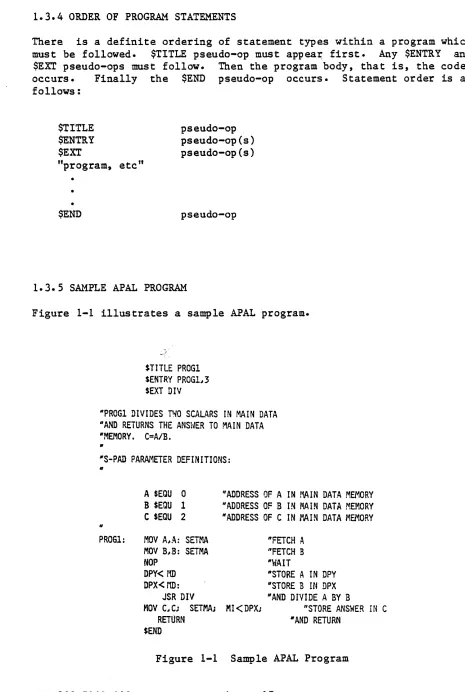
1.3.4 ORDER OF PROGRAM STATEMENTS
There is a definite ordering of statement types within a program which must be followed. $TITLE pseudo-op must appea~ first.
Any
$ENTRY and $EX! pseudo-ops must follow. Then the program body, that is, the code, occurs. Finally the $END pseudo-op occurs. Statement order is as follows:$TITLE
$ENTRY
$EXT
pseudo-op pseudo-op(s) pseudo-op(s) "program, etc"
$END pseudo-op
[image:24.612.58.523.68.760.2]1.3. 5 SAMPLE AP AL PROGRAM
Figure 1-1 illustrates a sample APAL program.
$TJTLE PROGI SENTRY PROGl,3 $EXT DIV
"PROGI DIVIDES T'40 SCAL4RS IN MAIN DATA "AND RETURNS THE ANSt~ER TO MAIN DATA "MEMORY. C=A/B.
"
"S-PAD PA~1ETER DEFINITIONS:
"
"
PROGl:
A $EQU 0
B $EQU 1
C $EQU 2
MOV A,A: SETMA MOV B,B: SETMA NOP
DPY< rID DPX< rID:
"ADDRESS OF A IN MIN DATA MEMORY "ADDRESS OF B IN MAIN DATA MEMORY "ADDRESS OF C IN MAIN DATA M8~ORY
"FETCH A "FETCH B "~/AIT
1.4 OPERATING PROCEDURES
This section describes the operation of APAL.
1.4.1 USING APAL
APAL assembles a file of source code into a relocatable object file. Optionally an assembly listing is produced.
APAL first requests the names of the three files to be used for source, oject, and listing and errors respectively. The program requests the name of the source file by outputting to the user console:
SOURCE FILE=
The user responds by entering the desired program file name. APAL then requests the name of the file to receive the relocatable object module by outputting:
OBJECT FILE=
The user responds by entering the desired object file name. APAL then requests the name of the file to receive the assembly listing by outputting:
LISTING AND ERROR FILE=
The user replies by entering the name of the desired listing file. If
ApAL cannot find or assign the requested file it outputs the message "FILE NOT FOUND OR. UNAVAILABLE" and repeats its request.
APAL then outputs:
LISTING? (Y IN)
A response of Y(cr) yields a full assembly listing, symbol table, and any error messages. An N(cr) suppresses the assembly and symbol table listings and writes any error messages to the listing file.
Finally, if a listing was requested, APAL outputs:
LISTING RADIX? (8,10,16)
A response of "8" causes the assembly listing to be done in octal; a "10" specifies decimal; and a "16", hexadecimal.
APAL responds to invalid input with ??? and repeats the request.
The following is an example of a dialogue with APAL. The user desires to assemble an AP program on file FFT.AP and write the object output into file FFT.RB. The listing is placed on file FFT.LS. Of course, the precise details of how files and devices are named depends on the particular operating system being used. The messages printed by the computer are underlined for clarity; the (cr) indicates a carriage return.
APAL
SOURCE FILE
=
FFT.AP(cr) OBJECT FILE=
FFT.RB(cr) LISTING FILE=
FFT.LSLISTING? Y(cr)
1.4.2 EXECUTION
If a fatal error occurs, the message "RUN ABORTED" is displayed at the terminal and control is returned to the operating system.
1.4.3 LISTING FILE FORMAT
APAL is a two-pass assembler. When APAL is called, it outputs:
APAL (version)
(version) is the version number of the assembler being used. Any
errors detected during pass 1 are output next. The assembly listing (if requested) follows and is interspersed with pass 2 error messages. The listing contains the following information for each program statement:
first column
source code
line number
FPS 860-7292-002
second column
program source address
(location counter)
1
third column
assembled program
20
fourth column
For program instruction statements, the assembled data is presented as four numbers representing bits 0-15, 16-31, 32-47 and 48-63 of each program source word.
At the end of pass two, APAL outputs
(num) ERROR(S) FOR (title)
(num) is the number of errors detected and (title) is specified by the
$TITLE pseudo-op in the last routine assembled. Finally, APAL outputs:
SYMBOL NAME
Followed by the symbol table:
first column
symbol name
second column
symbol value
third column
symbol type
blank - local symbol EXT - external symbol
ENT - entry symbol
1.4.4 SAMPLE APAL LISTING
Figure 1-2 contains a sample APAL listing.
APAL REV 2.1 PROG1 03/13178 11:49
PAGE 0001
PASS1 PASS2
00001 $TITLE PROG1
00002 $ENTRY PROGl,,3
00003 $EXT DIV
00004
00005 "PROGl DIVIDES TWO SCALARS I~ MAIN DATA 00006 "AND RETURNS THE MIS~~ER TO MAIN DATA 00007 "MEMORY. C=A/B.
00008 "
00009 ItS-PAD PARAMETER DEFINITIONS:
00010 II
00011 000000 A $EQU
a
"ADDRESS OF A IN MAIN DATA MEMORY00012 000001 B $EQU 1 "ADDRESS OF B IN MAIN DATA MEMORY
00013 000002 C $EQU 2 "ADDRESS OF C IN ~~IN DATA MEMORY
00014 "
00015 000000 040000 "PROGl: MOV AlA; SETMA "FETCH A 000000
000000 000060
00016 000001 040104 MOV BIB; SETMA "FETCH B
000000 000000 000060
00017 000002 000000 NOP "WAIT
000000 000000 000000
·00018 000003 000000 DPY<MD "STORE A IN DPY 000000
015000 1000000
Figure 1-2 Sample APAL Listing
00019 000004 011014 00020 000000 045004 177777
00021 000005 040210 000000 003400 003600
00022 000006 000000 000340 000000 000000
00023
0000 ERROR (S) FOR PROGl,.
SYMBOL VALUE
DIV 000000 EXT
A 000000
B 000001
C 000002
PROGI 000000 E~T
DPX<MD;
JSR DIV
"STORE B IN DPX "AND DIVIDE A BY B
MOV CIC; SETMA; MI<DPX "STORE ANSWER IN C
RETURt4 "AND RETURN
$END
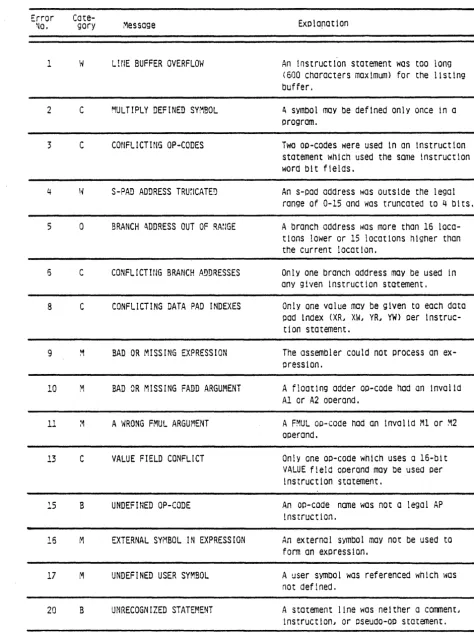
1.5 ERROR MESSAGES
APAL error messages are printed in the listing following the illegal statement.
There are five basic error classes, which are listed in the following along with the action taken by the assembler:
a -
Out of range: an illegal numeric value was truncated to the proper rangeC - Conflicting definitions: the first definition was used
M - Missing (or improper) argument: a value of zero was used
B - Bad syntax: the bad op-code field or pseudo-op was ignored
W - Warning of improper usage
The actual diagnostic takes the following form:
***
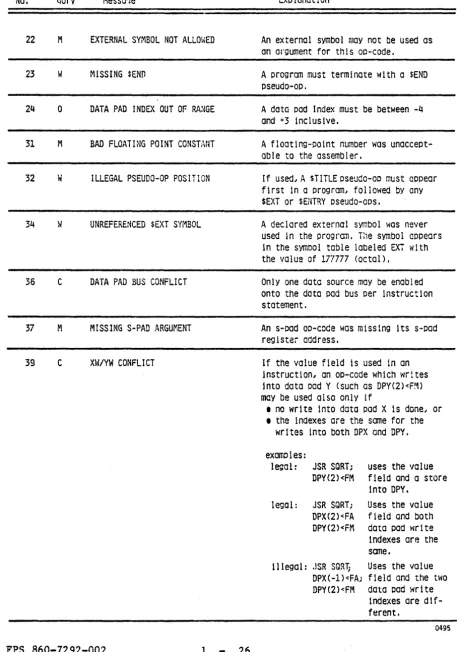
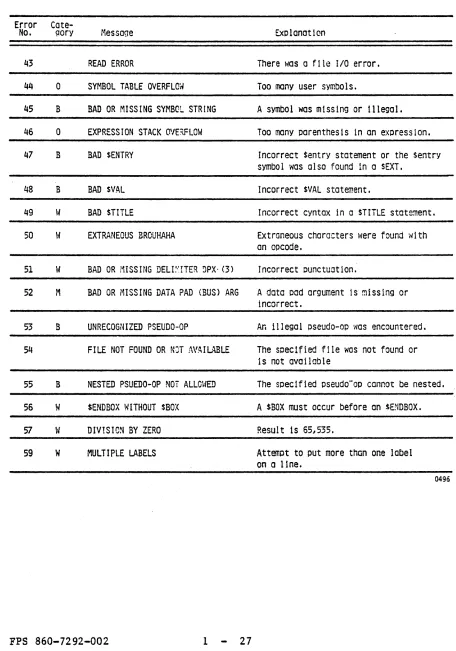
c msg nn ON LINE nnnnnwhere c is the error class, msg is the error message, nn is the error number, and nnnnn is the number of the erroneous line. The assembler error messages, along with an explanation as to the possible causes and/or cures, are given in Table 1-2.
Table 1-2 ErTor Messages Error ~o. 1 2 3 4 5 5 8 9 10 11 13 15 16
Cate-gory Message
W L!NE BUFFER OVERFLOW
C MULTIPLY DEFINED SYMBOL
c
CONFLICTING OP-CODESS-PAD ADDRESS TRUrICATE!)
o BRANCH ll.DDRESS OUT OF R.I\~IGE
C CONFLICTING BRANCH ADDRESSES
C CONFLICTING DATA PAD INDEXES
BAD OR MISSING EXPRESSION
BAD OR MISSING FADD ARGUMENT
A WRONG FMUL ARGUMENT
C VALUE FIELD CONFLICT
B UNDEFINED OP-CODE
M EXTERNAL SYMBOL IN EXPRESSION
Exolaration
An instruct10n statement was too long (600 characters maximum) for the I1st1ng buffer.
~ Symbol may be def1ned only once in a
orogram.
Two oo-codes were used 1n an 1nstruction statement \'4hlch used the same instruction word bit fields.
An s-pad address was outside the legal range of 0-15 and was truncated to 4 bits.
A branch address was more than 16 loca-tions lower or 15 locations higher than the current location.
Only one branch address may be used in any given instruction statement.
Only one value may be given to each data pad Index (XR~ XW~ YRI YW) per instruc-t i on sinstruc-tainstruc-temeninstruc-t.
The assembler could not orocess an ex-pressIon.
A floatIng adder op-code had an Invalid Al or A2 operand.
A FMUL oD-code had an invalid Ml or ~2 operand.
Only one oo-code which uses a I6-bit VALUE field operand may be used per instruction statement.
An op-code name was not a legal AP instruction.
[image:32.617.63.537.98.731.2]Table 1-2 Error Messages (cont.)
Error
Cate-Na. qory Messo1e
22 M EXTERNAL SYMBOL NOT ALLQ\~ED
23 W f1ISSING $ENO
24 0 DATA PAD INDEX OUT OF RA~GE
31 M BAD FLOATING POINT CONSTANT
32 W ILLEGAL PSEUDO-OP POSITION
34 W UNREFERENCED SEXT SYMBOL
36 C DATA PAD BUS CONFLICT
37 M MISSING S-PAD ARGUMENT
39 C XW/YW CONFLICT
FPS 860-7292-002 1 26
Explanat10n
An external symbol may not be used as an argument for this op-code.
A program must terminate with a $END
pseudo-ap.
A data pad Index must be between -4 and +3 inclusive.
A floating-potnt nlrnber was unaccePt-able to the assembler.
If used" A $TITLE pseudo-op must appear first 1n a program} followed by any $EXT or $ENTRY pseudo-oDS.
A declared external symbol was never used In the program. T:,e symbol appears in the symbol table labeled EXT with the value of 177777 (octal).
Only one data source may be enabled onto the data pad bus per instruction statement.
An s-pad aD-code was missing its s-pad register address.
If the volue field is used In on instruction" an op-cede which writes into dato pad Y (such as DPY(2)<F~) may be used also only if
• no write into data pad X 1s done" or • the indexes are the same for the
writes into both DPX and DPY.
examoles:
legal: JSR SORT; uses the value DPY(2)<FM fIeld and a store
Into DPY. legal: JSR SQRT; Uses the value
DPX(2)<FA field and both DPY(2)<FM data pad 'flri te indexes are the some.
Illegal: .!SR SORT; Uses the value DPX(-l)<FA; field and the two DPY(2)<FM data pad write
indexes are
dtf-ferent.
[image:33.617.83.540.119.771.2]Table 1-2 Error Messages (cont.)
Error
Cate-No. ~ory :1essage Explanation
43 READ ERROR There was a fIle 1/0 error.
44 0 SY~lBOL TABLE OVERFLOri Too many user symbols.
45 B BAD OR MISSING SYMBOL STRING A symbol was mIssIng or Illegal.
46 a EXPRESSION STACK O'lE:\FLOW Too many parenthesis in an expression.
47 B BAD SENTRY Incorrect $entry statement or the Sentry symbol was also found 1n a SEXT.
48 B BAD SVAL Incorrect $VAL statement.
49 W BAD sTITLE Incorrect cyntax In a STITLE state~ent.
50 \~ EXTRANEOUS BROUHAHA Extraneous characters were found \'Ii th an opcode.
51 W BAD OR MISSING DELI~ITER ~PX' (3) Incorrect punctuation.
52 M BAD OR MISSING DATA PAD (BUS) ARG A data Dad argument 1s missing or incorrect.
53 B UNRECOGNIZED PSEUDO-OP An illegal pseudo-aD was encountered.
54 FILE NOT FOUND OR NJT AV.~IL~LE The specified file was not found or 1s not available
55 B NESTED PSUEDO-OP NOT ALLm/ED The specIfied pseudo"oD cannot be nested.
56 W $ENDBOX WITHOUT $BOX A $BOX must occur before an $PlDBOX.
57 \~ DIV!SIC~ BY ZERO Result 1s 651535.
59 W MULTIPLE LABELS Attempt to put more than one label on a line.
[image:34.612.83.539.123.774.2]1.6 AP SYMBOLIC CODES
The various AP op-codes may be divided into 13 groups. One op-code from each group may be used in any given instruction statement, unless otherwise stated.
The following conventions are used throughout this chapter:
{ } Indicates optional operands or mnemonics. The item enclosed in the brackets (for example, {H}) mayor may not be entered,
depending upon whether or not the associated option is desired.
Under the headings "Function" and ''Meaning,'' upper case characters are used to indicate the origin of the mnemonic code names.
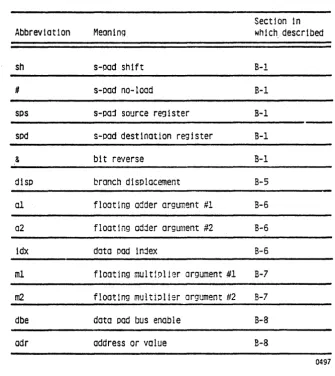
The list of abbreviations contained in Table 1-3 are used to facilitate the op-code descriptions. They are explained later when the op-code group first appears.
Table 1-3 Op-code Abbreviations
SectIon In
AbbrevIation Meaning whIch. descrIbed
sh s-oad shift B-1
# s-pad no-load B-1
SPS s-paj source register B-1
spd s-pad destination register B-1
& bit reverse B-1
dlsp branch displacement B-5
01 floating adder argument #1 B-6
02 floating adder argument #2 B-6
idx data pad index B-6
ml floating mult1~lier argument #1 B-7
m2 float1ng multiolier argument #2 B-7
dbe data pad bus enable B-8
odr address or value B-8
[image:36.615.136.471.116.491.2]1.6.1 S-PAD OP-CODE GROUP
Purpose: s-pad integer arithmetic
Double Operand Op-codes
ADD{sh}{U}{&}sps,spd SUB{sh}{U}{&}sps,spd MOV{sh}{U}{&}sps,spd AND{sh}{ /I}{ & }sps, spd OR{sh}{#}{&}sps,spd EQV{sh}{#}{&}sps,spd
Single Operand Op-codes
CLR{sh}{II} spd INC{sh}{/I} spd DEC {sh}{ II} spd COM{sh}{/I} spd
Function
ADD sps to spd
SUBtract sps from spd MOVe sps tp spd
AND sps tp spd OR sps to spd
EQuiValence sps to spd
Function
Clear spd INCrement spd DECrement spd COMplement spd
The result of the above op-codes is SPFN (s-pad function).
Miscellaneous Op-Codes Function
LDSPNL LoaD Spd from PaNeL bus
LDSPE LoaD SPd from data pad bus Exponent
LDSPI LoaD SPd from data pad bus Integer
(low 16-bit)
LDSPT LoaD SPd from data pad bus Table
look-up bits
WRTEXP enable WRiTe of EXPonent only into
DPX, DPY or MI
WRTHMN 'enable WRiTe of High MaNtissa only
into DPX, DPY or MI
WRTLMN enable WRiTe of Low MaNtissa only
into DPX, DPY or MI
Abbreviations:
sh
Meaning
s-pad shift:
Choices
(omitted)
L
R
RR
Meaning
no shift
shift SPFN left once shift SPFN right once shift SPFN right twice
H s-pad no-load: if present, do not load SPFN into spd (s-pad destination register)- If specified, a branch group op-code may not be used in the same instruction
statement-sps s-pad source register: a name, number, or expression specifying a register number between 0 and
178-spd s-pad destination register: a name, number, or expression specifying a register number between 0 and
178-SPFN is loaded into the s-pad destination register unless s-pad no-load (#) is
specified-& Bit reverse: if present, bit reverse the contents of sps before using- The bit reverse is done as specified by bits 13-15 of the internal status
register-Examples:
MOV 3,6 SUBL 1,15
ADDLH &PTR, BASE DEC CTR
CLR 9.
1.6.2 MEMORY ADDRESS OP-CODE GROUP Purpose:
Op-codes INCMA DECMA SETMA
initiate main data memory cycles Function
INCrement Memory Address DECrement Memory Address SET Memory Address from SPFN
1.6.3 TABLE MEMORY ADDRESS OP-CODE GROUP Purpose:
Op-codes INCTMA DECTMA SETTMA
initiate table memory fetches Function
INCrement Table Memory Address DECrement Table Memory Address SET Table Memory Address from SPFN
1. 6. 4 DATA PAD ADDRESS OP-CODE GROUP
Purpose: change the DPA (data pad address) register
Op-codes INCDPA DECDPA SETDPA
FPS 860-7292-002
Function
INCrement data pad Address DECrement data pad Address SET data pad Address from SPFN
1.6.5 BRANCH OP-CODE GROUP
Purpose: conditional branches
Op-code Function
BR disp Branch unconditionally
BINTRQ disp Branch on INTerrupt ReQuest flag non-zero BION disp Branch if I/O data ready flag Non-zero BIOZ disp Branch if I/O data ready flag Zero BFPE disp Branch on Floating Point Error
BFEQ disp Branch on Floating adder EQual to zero BFNE disp Branch on Floating adder Not Equal to zero BFGE disp Branch on Floating adder Greater or Equal to BFGT disp Branch on Floating adder Greater than zero BEQ disp Branch on s-pad function EQual to zero BNE disp Branch on s-pad function Not Equal to zero BGE disp Branch on s-pad function Greater or Equal to BGT disp Branch on s-pad function Greater than zero
RETURN RETURN from subroutine
Abbreviation:
disp branch displacement: The branch target address, an address between 16 locations behind and 15 locations ahead of the current location.
Examples:
BR LOOP BGT .+3 BFNE A-4
zero
1.6.6 FLOATING ADDER OP-CODE GROUP
Purpose: floating-point adds
Double Operand Op-codes
Op-codes FADD FSUB FSUBR FAND FOR FEQV Function
a1,a2 Floating ADD (al+a2) al,a2 Floating SUBtract (al-a2)
a1,a2 Floating SUBtract Reverse (a2-al) al,a2 Floating AND (al and a2)
al,a2 Floating OR (al or a2)
al,a2 Floating EquiValence (al eqv a2)
Single Operand Op-codes
Op-codes FIX FIXT FSCALE FSCLT FSM2C F2CSM FABS a2 a2 a2 a2 a2 a2 a2
Adder OperandS:
operand Meaning
Function
FIX a2 to an integer
FIX a2 to an integer (Truncated) Floating SCALE of a2
Floating SCALE of a2, (Truncated) .
Format conversion, Signed Magnitude to 2's complement Format conversion, 2's complement to signed magnitude Floating ABSolute value
al floating adder argument no. l:
Choices
NC
FM
DPX {(idx)} DPY {(idx)}
TM
ZERO
FPS 860-7292-002
Meaning
No Change (use previous al) Floating Multiplier output Data Pad X
Data Pad Y
Table Memory data floating-point ZERO
[image:41.612.65.550.27.778.2]Operand Meaning
a2 adder argument no. 2:
Choices Meaning
NC No Change (use previous a2)
FA Floating Adder output
DPX {(idx) } Data Pad X DPY {(idx)} Data Pad Y
TM Table Memory data
ZERO floating ZERO
MDPX { (idx) } use Mantissa from data pad X, and exponent from SPFN EDPX {(idx)} use Exponent data pad X, and
mantissa from SPFN
Abbreviation:
idx
Examples:
Meaning
data pad index: a name, expression, or number which lies in a range of -4 to +3.
FADD TM,MD
FSUB DPX(3), DPY(-4) FEQV DPX, DPY(C)
FAND ZERO, MDPX(2) FSUBR NC,FA
FADD
[image:42.615.72.515.58.783.2]1.6.7 FLOATING POINT MULTIPLY OP-CODE GROUP
Purpose: floating point mUltiplies
Op-code Function
FMUL m1,m2 Floating MULtiply m1 times m2
Multiplier Operands:
Operand Meaning
m1 Multiplier-operand no. 1
Choices
FM
DPX{(idx)} DPY{(idx)}
TM
Meaning
Floating Multiplier output data pad X
data pad Y
Table Memory
m2 Multiplier-operand no. 2
Examples:
Choices
FA
DPX{(idx)} DPY{ (idx)}
MD
FMUL TM, MD
FMUL DPX (AR),DPY (BI)
FMUL
FPS 860-7292-002
Meaning
Floating Adder output data pad X
data pad
Y
Memory Data
1.6.8 DATA PAD X OP-CODE GROUP
Purpose: storing into data pad X
OF-code Function
DPX{(idx)}<opt Store opt into Data Pad
X. One of the following must be used for opt.
Opt Meaning
FA Floating Adder Output FM Floating Multiplier outut DB Data pad Bus
dbe Data Pad bus Enable
This has the same effect as an explicit data pad bus op-code. One choice of data pad bus enable may be made per instruction statement.
Choices Meaning
ZERO floating ZERO
adr An address or
Examples:
DPX(3)<EM DPX(-2)<SPFN DPX MD
DPX(1)<DPY (-2) DPX(-2)< -123
1.6.9 DATA PAD Y OP-CODE GROUP
Purpose: storing into data pad Y
OF-code Function
DPY{ (idx) }<opt
Examples:
DPY(-2)<FA DPY<MD DPY(2)<TM DPY (1 )<39
FPS 860-7292-002
Store opt into data pad
Y. The possibilities for opt are the same as those described in Section 1.6.8.
1.6.10 MEMORY INPUT OP-CODE GROUP
Purpose: writing into main data memory
OF-codes Function
MI<FA
MI<FM
MI<DB MI<dbe
Move Floating Adder output to the Memory Input register
Move Floating Multiplier output to the Memory Input register
Move data pad Bus to the Memory Input Register Move dbe to the Memory Input Register
To effect a memory write, an op-code from the memory address group or an LDMA op-code must be included in the instruction statement to supply the memory address.
Examples:
1.6.11 DATA PAD BUS OP-CODE GROUP
Purpose: explicitly enable data onto the data pad bus
OF-codes Function
DB=ZERO DB=adr
DB=DPX{ (idx) } DB=DPY { (idx) }
DB=MD
DB=SPFN
DB=TM
enable ZERO onto the data pad bus enable adr onto the data pad bus
enable Data Pad X onto the data pad bus enable Data Pad Y onto the data pad bus enable Memory Data onto the data pad bus enable S-Pad Function onto the data pad bus enable Table Memory data onto the data pad bus
As mentioned earlier, only one data source may be enabled onto the data pad bus per instruction statement.
Examples:
DB = 37
DB
=
DPX(-2) DB = MDDB = SPFN
1.6.12 SPECIAL OPERATION OP-CODE GROUP
If an op-code from this group is chosen t an s-pad group op-code can not be used in the same instruction statement.
1.6.12.1 Special Tests
Purpose: additional conditional branches
Op-codes Function
BFLT disp Branch on Floating adder Less Than zero BLT disp Branch on s-pad function Less Than zero BNC disp Branch on Non-zero Carry bit
BZC disp Branch on Zero Carry bit
BDBN disp Branch if Data pad Bus Negative BDBZ disp Branch if Data pad Bus Zero
BIFN disp Branch if Inverse FFT flag Non zero BIFZ disp Branch if Inverse FFT flag Zero BFLO disp Branch if FLag 0 is 1
BFL1 disp Branch if FLag 1 is 1 BFL2 disp Branch if FLag 2 is 1 BFL3 disp Branch if FLag 3 is 1
If one of these tests is used along with a test from the branch groupt the conditions are OR'd. In this case, only one of the branch op-codes need have the target address as an operand.
Examples:
BNC ODD
1.6.12.2 SETPSA
Purpose: jumps and subroutine jumps
Op-codes
JMP{A} adr
JMPr
JMPP
JSR{A} adr JSRT
JSRP
Examples:
JMP LOOP
+
3JSR FFT JMPS 300
1.6.12.3 SETEXIT
Function
JuMP to JuMP to
JuMP to JumP to JumP to JumP to
location adr location whose location whose SubRoutine at SubRoutine at SubRoutine at
Purpose: alter a subroutine return
Op-codes Function
SETEX{A} adr SET subroutine EXit to
SETEXT SET subroutine EXit to
SETEXP SET subroutine EXit to
Example:
SETEX BAD
FPS 860-7292-002 1 42
address is in
TMA
address is on the Panel bus location adr
address in Tma
address on Panel bus
adr
contents of Tma
1.6.12.4 Program Source
Purpose: read/write program source memory
Op-codes Function
RPSL{A} adr RPSF{A} adr
RPSLT RPSFT
RPSLP RPSFP
Read Program Source Left half of location adr Read Program Source Floating-point number
from location adr
Read Program Source Left half at address in Tma Read program Source Floating point number
at address in Tma
Read Program Source Left half at address on Panel bus Read Program Source Floating-point number at address
on Panel bus
These op-codes read onto the data pad bus
Op-codes Function
LPSL{A} adr Load Program Source Left half of location adr LPSR{A} adr Load Program Source Right half of location adr LPSLT Load Program Source Left half pointed at by Tma LPSRT Load Program Source Right half pointed at by Tma LPSLP Load Program Source Left half pointed at by Panel bus LPSRP Load Program Source Right half pointed at by Panel bus
These op-codes load from the data pad bus.
Example:
1.6.12.5 PS Odd and Even
Purpose: reading the host panel sWitches into program source memory, writing program source to the panel lites.
Op-codes Function
RPSO{A} adr Read Program Source quarter 0 from location adr RPSl{A} adr Read Program Source quarter 1 from location adr RPS2{A} adr Read Program Source quarter -2 from location adr RPS3{A} adr Read Program Source quarter 3 from location adr RPSOT Read Program Source quarter 0 from address in Tma RPS1T Read Program Source quarter 1 from address in Tma RPS2T Read Program Source quarter 2 from address in Tma RPS3T Read Program Source quarter 3 from address in Tma WRSO{A} adr Write Program Source quarter 0 into location adr WPS1{A} adr Write Program Source quarter 1 into location adr WPS2{A} adr Write Program Source quarter 2 into location adr WPS3{A} adr Write Program Source quarter 3 into location adr WPSOT Write Program Source quarter 0 into address in Tma WPS1T Write Program Source quarter 1 into address in Tma WPS2T Write Program Source quarter 2 into address in Tma WPS3T Write Program Source quarter 3 into address in Tma
1.6.12.6 Hostpanel
Purpose: reading the host panel SWitches, writing to the host
panel lites
Op-codes
PNLLIT DBELIT DBHLIT DBLLIT SwnB SWDBE SwnBH SWDBL
FPS 860-7292-002
Function
PaNel bus to LITes
Data pad Bus Exponent to LITes Data pad Bus High mantissa to LITes Data pad Bus Low mantissa to LITes SWitches to Data pad Bus
SWitches to Data pad Bus Exponent SWitches to Data pad Bus High mantissa SWitches to Data pad Bus Low mantissa
1.6.12.7 Miscellaneous
Op-codes Function
SPNDAV Spin until MD available
1.6.13 I/O OP-CODE GROUP
If an op-code is used from this group, a Floating Adder op-code can not be used in the same instruction statement.
1.6.13.1 Load REG, Read REG
Purpose: reading/writing various internal registers
Op-codes
LDSPD
LDMA
LDTMA LDDPA LDSP LDAPS LDDA
Function
LoaD s-pad Destination address register LoaD Memory Address register
LoaD Table Memory Address register LoaD Data Pad Address register
LoaD s-pad register pointed at by spd LoaD AP Status register
LoaD I/O Device Address
The above op-codes load from the data pad bus.
Op-codes
RPSA
RSPD
RMA RTMA RDPARSPFN
Function
Read Program Source Address Read s-pad Destination register Read Memory Address register
1.6.13.2 INOUT
Purpose: program contol/input output of data
Op-codes
OUT SPNOUT OUTDA SPOTDA
Function
OUTput data
SPiN until device ready, then OUTput data OUTput data, then set DA to spfn
SPin until device ready, OuTput data, then set DA to spfn
The above write to the I/O device specified by the device address register (DA) whatever data is enabled onto the data pad bus.
Op-codes
IN SPININ INDA SPINDA
Function
INput data
SPIN until device ready, then INput data INput data, then set DA to spfn
SPin until device ready, the INput data, then set DA to spfn
These instructions put data onto the input bus from the I/O device specified by the device address register (DA). To be used the data must be put onto the data pad bus, and from there moved to a register or memory.
Example:
IN; DPX(2)<INBS "READ I/O DATA INTO DPX
1.6.13.3 SENSE
Purpose: sensing an I/O device condition
Op-codes
SNSA SPINA SNSADA SPNADA SNSB SPINB SNSBDA SPNBDA
1.6.13.4 FLAG
Function
SeNSe condition A SPIN on condition A
SeNSe condition A, then set DA to spfn SPIN on condition A, then set DA to spfn SeNSe condition B
SPIN on condition B
SeNSe condition B, then set DA to spfn SPIN on condition B, then set DA to spfn
Purpose: set/reset of program flags
Op-codes Function
SFLO Set Flag 0
SFLl Set Flag 1
SFL2 Set Flag 2
SFL3 Set Flag 3
CFLO Clear Flag 0
CFLl Clear Flag 1
CFL2 Clear Flag 2
1.6.13.5 CONTROL
Purpose: miscellaneous control functions
Op-code
HALT
lORST lNTEN lNTA REFR WRTEX
WRTMN
SPMDAV
Functions
HALT processor I/O ReSeT
INTerrupt ENable INTerrupt Acknowledge memory REFResh synch
enable WRiTe of Exponent only into DPX, DPY or MI enable WRiTe of MaNtissa only into DPX, DPY or MI SPin until a Main Data memory cycle AVailable
1.6.13.6 Miscellaneous
Purpose: miscellaneous control functions
Op-codes Functions
REnT read subroutine exit into panel bus
1.6.14 TABLE MEMORY
This section lists the constants and functions available in table memory.
1.6.14.1 Constants
CONSTANT VALUE IN 2K TABLE MEUOR Y SYMBOL REPRESENTED TABLE MEMORY ROM ADDRESS (OCTAL)
!ZERO ZERO 0.0 4371
lONE ONE 1.0 4001
!TWO TWO 2.0 4002
!THREE THREE 3.0 4441
I FOUR FOUR 4.0 4442
!FlVE FIVE 5.0 4443
!SIX SIX 6.0 4444
!SEVEN SEVEN 7.0 4445
!EIGHT EIGHT 8.0 4446
!NINE NINE 9.0 4447
I TEN TEN 10.0 4450
!SIXTN SIXTEEN 16.0 4451
!HALF HALF 0.5 4427
!THIRD ONE THIRD .333333333 4430
!FOURTH ONE FOURTH 0.254431
!FIFTH ONE FIFTH 0.2 4432
!SIXTH ONE SIxrH 0.166666667 4433 !SVNTH ONE SEVENTH 0.142857143 4434 !EGHTH ONE EIGHTH 0.125 4435 !NINTH ONE NINTH 0.111111111 4436
!TENTH ONE TENTH 0.1 4437
!SXNTH ONE SIXTEENTH 0.0625 4440 !SQRT2 SQRT (2) 1.414213562 4203 SQRT3 SQRT (3) 1.732050808 4422 SQRTS SQRT (5) 2.236067977 4423 SQTI0 SQRT (10) 3. 162277660 4424 ISQT2 1.0/SQRT(2) 0.707106781 4206 ISQT3 1.0/SQRT(3) 0.577350269 4452 ISQT5 I.0/SQRT(5) 0.447213596 4453 ISQIO I.0/SQRT(10) 0.316227766 4454 .CBT2 CBRT (2) 1.259921050 4417 !CBT3 CBRT (3) 1.442249570 4420 !QDRT2 (2.0)**1/4 1.189207115 4421 !LOG2E LOG2(E) 1.442695041 4317 lLOG2 LOG10(2) 0.301029996 4411 !LOGE LOG10(E) 0.434294482 4337 1LN2 LN (2) 0.693147181 4336 !LN3 LN(3) 1.098612289 4407 !LN10 LN(10) 2.302585093 4410
!PI4 PI 14 O. 785398164 4373 !PII80 PI/180 0.017453293 4413 !PISQ PI **2 9.869604404 4414 !SQTPI SQRT (PI) 1.772453851 4416 !LNPI LN (PI) 1. 144729886 4406 !GAMMA GAMMA 0.577215663 4425
!PHI PHI 1.618033989 4426
1.6.14.2 Elementary Function Tables
ELEMENTARY TABLE MEMORY SYMBOL FUNCTION ADDRESS (OCTAL)
!DIV DIVIDE 4000
!SQRT SQUARE ROOT 4202 1SNes SIN
Icos
14306!LOG LOGARITHM 4333 IEXP EXPONENTIAL 4317 !ATAN ARC TANGENT 4365
1.6.14.3 Size of Installed FFT Cosine Table
SYMBOL SIZE (TYPICAL) !FFTSZ 2048 - 4000 (octal)
[image:57.613.69.540.35.778.2]CHAPTER 2
APLINK
2.1 INTRODUCTION
APLINK links together separate object modules produced by APAL into a single load module for execution by the AP hardware or the simulator.
The user can separately code and assemble a main line program and the associated subroutines and later link them together for execution. APLINK serves this purpose by performing the following tasks:
• relocating each object module and assigning absolute addresses
• linking the modules together by correlating global entry symbols defined in one module with external symbols referenced in
another module
• selectively loading modules from program library
• optionally producing a load map showing the layout of the load module
2.2 OPERATING PROCEDURE
Program modules are linked interactively via a dialogue between the user and APLINK. The user enters a series of commands which direct the linking process.
When execution begias, APLINK outputs:
APLINK version
*
The version is the version number of APLINK. The asterisk (*) indicates that the program is ready to accept commands. After each user command, an
*
is output when that command has been executed and APAL is ready for a new command. An illegal command causes a"?"
to be output.To load relocatable programs and prepare them for execution, the user would normally follow the procedure outlined below.
1. Using ~he L (load) command, load the file or files containing the desired main program, required subroutines, and library subprograms, if any. If a fatal error occurs during this step, reinitialize using the R command and repeat this step.
2. Using the U (undefined) command, check to see if any global symbols are still undefined. If nothing is output from this command, continue to step 3. If any symbols are output, it usually means that there was an error in one or more of the programs loaded or that the loading sequence was wrong. In
these cases, correct the er.ror and restart the loading operation from step 1.
3. Obtain the memory limits of the loaded program or a loader map by using the M (memory) or S (symbols) command.
4. Complete and output the load module by using the E (end) or by A command. Note the values of HIGH and START as well as the possible presence of any remaining undefined symbols.
5. Return to the operating system-with an X (exit) command.
The individual APLINK commands are described in the following sub-sections, and a complete example loading session is given in section 2.2.12.
The following abbreviations are used in the following sub-sections:
Abbreviations
(filename)
(cr)
*
Meaning
A user-specified input or output file. The (filename) follows whatever naming conventions exist for the particular host computer
operating systems.
carriage return
This is the terminal prompt indicating that the terminal is ready for input.
Indicates characters output by the program.
The examples given are illustrative only, as file and I/O device names vary from system to system.
2.2.1 LOAD L
To load a program module, or a program library, enter:
L (cr)
(filename) (cr)
where (filename) is the name of the file containing the desired program or library.
Example:
*
L (cr)
FFT.RB (cr)
2.2.2 SYMBOLS S
To output the global (external and entry) symbols enter:
5 (cr)
(filename) (cr)
where (filename) is the name of the file (or I/O device) to receive the symbol listing. The output of the loader map is as follows.
HIGH = aaaaaa SYMBOL TABLE
SYMBOL VALUE
ssssss
where:
aaaaaa
ssssss
nnnnnn
u
Example:
*
S (cr)
TP: (cr)
nnnnnn
highest program address so far loaded. Normally, the next program is loaded starting at location HIGH+l.
symbol name
symbol value; if undefined, the last location loaded which referenced this symbol.
if present indicates the symbol is as yet undefined.
This example lists the loader symbol table at the terminal.
2.2.3 UNDEFINED U
To output to the console any presently undefined global symbols, enter:
U (cr)
(filename) (cr)
where (filename) is the file to receive the list of undefined symbols. The list format is:
ssssss nnnnnn
where ssssss is the symbol name and nnnnnn is the location of the last program instruction which referenced the symbol.
Example:
*
T (cr)
TP: (cr)
This example lists the names of any undefined symbols at the terminal.
2.2.4 NEXT BASE B
To specify a base address at which to load the next program, enter:
B (cr)
(lac) (cr)
where (loc) is the location specified.
Example:
*
B (cr) 200 (cr)
2.2.5 RESET R
To reset APLINK, enter:
R(cr)
This reinitializes the program to its initial state. The symbol table is cleared, any previously loaded programs are disregarded, and the next location is set to zero. This command must be given following a fatal error.
2.2.6 FORCE F
To force loading of a program module from a library, enter:
F (cr)
(name) (cr)
where (name) is the name of the symbol to be forced. This command enters (name) into the symbol table as an external symbol. This causes the loading of a library program which has (name) as an entry symbol.
Example:
*
F(cr) DOTPRD(cr)
forces the loading of any program defining symbol DOTPRD from any subsequently loaded library file.
2.2.7 MEMORY M
To get the address of the highest program source memory location so far loaded, enter:
M (cr)
The information is printed as follows:
HIGH
=
aaaaaawhere aaaaaa is the highest address so far loaded, and bbbbbb, if present, is the load module starting address.
2.2.8 END E
To end a load module and output the completed load module for use with APDBUG or APSIM, enter:
E (cr)
(filename) (cr)
where (filename) is the name of the file to receive the loader output. The output is a core image which can be loaded by APDBUG and executed by either the simulator APSIM or the hardware.
APLINK outputs the following information to the user console:
HIGH
=
aaaaaawhere aaaaaa is the highest program address loaded. If any symbols were still undefined, APLINK outputs:
(num) UNDEFINED SYMBOLS
where (num) is the number still undefined. A value of 0 was used in linking these undefined symbols.
Example:
*
/I (cr) SAVE
stores the completed load module into file SAVE.
The E (or A) command causes links between global symbols in the completed load module to be frozen. The load module can be output again (with another E or A) but no further links can be added (with an
L) •
2.2.9 END WITH ASS&~LY CODE A
To end a load module and output the completed load module as host computer assembly code (for use with APEX), enter:
A (cr)
(filename) (cr)
where (filename) is the name of the file to receive the loader output. This output is a short host assembly (or possibly FORTRAN) language subroutine, which is the linkage between host computer FORTRAN calls and the AP executive. The AP code from the load module follows the host subroutine as assembly language data statements.
Information concerning the highest address loaded into, and any undefined symbols, are output to the user console as described above for the E command.
2.2.10 NUMBER RADIX N
To set the radix for numeric input/output to and from the user console, enter:
N (cr)
(radix) (cr)
where (radix) is either 8 (for octal), 10 (for decimal), or 16 (for hexadecimal). The default radix for user I/O is set to either of these choices at installation.
To exit to the operating system, enter:
X(cr)
Notice that the X command does not cause any output. The E or A command must be used to output a load module.
2.2.12 AN EXAMPLE LOADING SESSION
OK, APLINK GO
APLINK REV 2
*
L PROGl.OBJ*
U TTY DIV*
L APLIB000004 U
LOAD COMPLETE
*
S
TTY
HIGH=000042
E
SYMBOL TABLE
SYMBOL VALUE PROGI 000000 DIV 000007
*
PROG 1. SOURCE
PROGl HIGH=000042
*
A
PROGl.APSIM
PROGI HIGH=000042
*
Call LINKER
Load PROGl.OBJ
Output any undefined symbols to the terminal
DIV subroutine is undefined Load DIV
from subroutine library
Output global External and Entry symbols
Create PROGl.APSIM to run on the simulator
Create PROG1.SOURCE (host FORTRAN or assembler) to run on host system
2.3 ERROR MESSAGES
Any deviation from the prescribed command syntax causes APLINK to
output a
"?"
to the user console. The illegal command is ignored, and APLINK outputs an*"
to indicate its readiness to accept a new command.If a specified filename cannot be found or is otherwise unavailable for use, the message:
FILE NOT FOUND!!!
is output and the command is ignored.
The specific error messages output by APLINK are the result of loading errors detected during execution of an L (load) command. There are two classes of loading errors:
F - fatal. Reinitialization of the loader (the R command) is required before loading can continue.
W - warning. An advisory message indicating a non-error.
Any fatal error detected during loading causes immediate termination of the L (load) command following the error message. If the user attempts to execute another L command, the program outputs the message:
RESET!! !
and ignores the command. After the user reinitializes the loader (R command)" he must reload any programs loaded up to that point.
Following are the error messages, along with notes of explanation for each:
F SYMBOL TABLE OVERFLOW
The loader symbol table is full. The only recourse is to recompile APLINK with a longer symbol table size.
F PROGRAM MEMORY OVERFLOW nnnnnn
An
attempt was made to load the upper limit of program source memory. The load module is too large to fit in program source memory. nnnnnn is the memory location involved.F OVERWRITE nnnnnn
An attempt was made to overwrite a previously loaded program memory location. The loader does not permit any given program memory location to be loaded more than once. nnnnnn is the program memory location involved.
F ILLEGAL BLOCK TYPE nnnnnn