Juneau
Bak
er
Ng
Soto
Wierzbic
ki
The Definitive Guide to
Jython
Companion eBook Available
this print for content only—size & color not accurate
CYANMAGENTA
YELLOW BLACK PANTONE 123 C
BOOKS FOR PROFESSIONALS BY PROFESSIONALS
®The Definitive Guide to Jython:
Python for the Java
™
Platform
Dear Reader,
With Jython you enjoy the increased productivity and clarity of Python, and the ability to integrate with existing Java™ libraries. You get the best of both worlds: the elegance of Python, and the enterprise-readiness and maturity of the JVM. The Definitive Guide to Jython explores the Python programming lan-guage from the ground up, pointing out along the way details that are specific to Jython. If you are unfamiliar with the Python language, then you can get started here, but you will also learn about the differences between Jython and standard CPython as you go.
Once you have the basics of the language, you’ll want to put it into use. This book covers a variety of topics which will help you harness the power of Jython. You will learn how to develop dynamic applications and scripts, and access data-bases from Jython to build powerful database applications. Fundamental to get-ting the most out of Jython is Java integration, and this book encourages you to use Java within Jython code as well as Jython within Java code.
Jython has matured a lot between the last couple of versions and it is now compliant with modern versions of the Python language. This means that you can now take advantage of Python frameworks such as Django and Pylons, which are both covered in this book. We will also provide you with a foundation to begin using Java Servlet and Java Swing technologies with Jython.
We hope you enjoy this book and that it helps Jython to become as useful to you as it is to us!
Josh Juneau, Jim Baker, Victor Ng, Leo Soto, and Frank Wierzbicki
US $54.99
Shelve in: Java, Python
User level:
Beginner – Intermediate www.apress.com Available online at www.jythonbook.com
SOURCE CODE ONLINE
Companion eBook
See last page for details on $10 eBook version
ISBN 978-1-4302-2527-0
9 781430 225270
5 54 9 9
RELA
TED
TITLES
spine = 1.03125" 544 page count
Josh Juneau, Jim Baker, Victor Ng,
Leo Soto, Frank Wierzbicki
Foreword by Ted Leung
Enjoy the power and flexibility
of Python on the JVM
Covers
Jython 2.5
The Definitive Guide to
Jython
Python for the Java
™
Platform
The Definitive Guide to
Jython
Python for the Java™ Platform
■ ■ ■
ii
The Definitive Guide to Jython: Python for the Java™ Platform
Copyright © 2010 by Josh Juneau, Jim Baker, Victor Ng, Leo Soto, Frank Wierzbicki
All rights reserved. No part of this work may be reproduced or transmitted in any form or by any means, electronic or mechanical, including photocopying, recording, or by any information storage or retrieval system, without the prior written permission of the copyright owner and the publisher.
ISBN-13 (pbk): 978-1-4302-2527-0
ISBN-13 (electronic): 978-1-4302-2528-7
Printed and bound in the United States of America 9 8 7 6 5 4 3 2 1
Trademarked names may appear in this book. Rather than use a trademark symbol with every
occurrence of a trademarked name, we use the names only in an editorial fashion and to the benefit of the trademark owner, with no intention of infringement of the trademark.
Java™ and all Java-based marks are trademarks or registered trademarks of Sun Microsystems, Inc., in the US and other countries. Apress, Inc., is not affiliated with Sun Microsystems, Inc., and this book was written without endorsement from Sun Microsystems, Inc.
President and Publisher: Paul Manning Lead Editors: Steve Anglin, Duncan Parkes
Technical Reviewers: Mark Ramm, Tobias Ivarsson
Editorial Board: Clay Andres, Steve Anglin, Mark Beckner, Ewan Buckingham, Gary Cornell, Jonathan Gennick, Jonathan Hassell, Michelle Lowman, Matthew Moodie, Duncan Parkes, Jeffrey Pepper, Frank Pohlmann, Douglas Pundick, Ben Renow-Clarke, Dominic Shakeshaft, Matt Wade, Tom Welsh
Coordinating Editor: Mary Tobin Copy Editor: Tracy Brown Collins Indexer: BIM Indexers and e-Services Artist: April Milne
Cover Designer: Anna Ishchenko
Distributed to the book trade worldwide by Springer-Verlag New York, Inc., 233 Spring Street, 6th Floor, New York, NY 10013. Phone 1-800-SPRINGER, fax 201-348-4505, e-mail [email protected], or visit http://www.springeronline.com.
For information on translations, please e-mail [email protected], or visit http://www.apress.com.
Apress and friends of ED books may be purchased in bulk for academic, corporate, or promotional use. eBook versions and licenses are also available for most titles. For more information, reference our Special Bulk Sales–eBook Licensing web page at http://www.apress.com/info/bulksales.
The information in this book is distributed on an “as is” basis, without warranty. Although every precaution has been taken in the preparation of this work, neither the author(s) nor Apress shall have any liability to any person or entity with respect to any loss or damage caused or alleged to be caused directly or indirectly by the information contained in this work.
This book is available online under the Creative Commons Attribution-Share Alike license
■
iii
Contents at a Glance
Contents at a Glance...iii
Contents ... v
Foreword ... xix
About the Authors... xx
About the Technical Reviewers... xxii
Acknowledgments ... xxiii
Introduction... xxvi
Part I: Jython Basics: Learning the Language...1
■Chapter 1: Language and Syntax...3
■Chapter 2: Data Types and Referencing ...25
■Chapter 3: Operators, Expressions, and Program Flow ...59
■Chapter 4: Defining Functions and Using Built-ins ...81
■Chapter 5: Input and Output...105
■Chapter 6: Object-Oriented Jython ...113
■Chapter 7: Exception Handling and Debugging...133
■Chapter 8: Modules and Packages for Code Reuse ...151
Part II: Using the Language ...163
■Chapter 9: Scripting With Jython...165
■Chapter 10: Jython and Java Integration ...175
■Chapter 11: Using Jython in an IDE ...197
■Chapter 12: Databases and Jython: Object Relational Mapping and Using JDBC ...231
Part III: Developing Applications with Jython ...263
■Chapter 13: Simple Web Applications ...265
■Chapter 14: Web Applications With Django...281
■Chapter 15: Introduction to Pylons ...327
iv
■Chapter 17: Deployment Targets ...359
Part IV: Strategy and Technique...377
■Chapter 18: Testing and Continuous Integration ...379
■Chapter 19: Concurrency...413
■Appendix A: Using Other Tools with Jython ...437
■Appendix B: Jython Cookbook ...445
■Appendix C: Built-in Functions ...463
■
v
Contents
Contents at a Glance...iii
Contents ... v
Foreword ... xix
About the Authors... xx
About the Technical Reviewers... xxii
Acknowledgments ... xxiii
Introduction... xxvi
Part I: Jython Basics: Learning the Language...1
■Chapter 1: Language and Syntax...3
The Difference between Jython and Python... 4
Installing and Configuring Jython ... 4
Identifiers and Declaring Variables ... 5
Reserved Words... 6
Coding Structure ... 6
Operators... 8
Expressions ... 8
Functions ... 9
Classes ... 10
Statements ... 11
if-elif-else Statement ... 12
print Statement... 13
try-except-finally ... 15
raise Statement ... 16
import Statement ... 17
Iteration ... 17
While Loop... 19
For Loop ... 20
vi
Other Python Statements ... 21
Documenting Code... 22
Python Help ... 23
Summary ... 24
■Chapter 2: Data Types and Referencing ...25
Python Data Types ... 25
Strings and String Methods... 27
String Formatting... 31
Lists, Dictionaries, Sets, and Tuples... 33
Lists ... 33
List Comprehensions ... 40
Tuples ... 41
Dictionaries ... 42
Sets ... 45
Ranges ... 48
Range Format ... 49
Jython-specific Collections ... 50
Files... 52
Iterators ... 54
Referencing and Copies ... 55
Garbage Collection... 57
Summary ... 58
■Chapter 3: Operators, Expressions, and Program Flow ...59
Types of Expressions ... 59
Mathematical Operations ... 59
Comparison Operators ... 63
Bitwise Operators ... 65
Augmented Assignment ... 66
Boolean Expressions ... 68
Conversions ... 70
Using Expressions to Control Program Flow... 72
if-elif-else Statement ... 72
while Loop ... 73
continue Statement... 74
■ CONTENTS
vii
for Loop ... 76
Example Code... 77
Summary ... 79
■Chapter 4: Defining Functions and Using Built-ins ...81
Function Syntax and Basics... 81
The def Keyword... 82
Naming the Function... 82
Function Parameters and Calling Functions... 84
Recursive Function Calls ... 86
Function Body... 86
Documenting Functions ... 86
Returning Values... 87
Introducing Variables ... 88
Other Statements... 89
Empty Functions ... 89
Miscellaneous Information for the Curious Reader... 90
Built-in Functions... 90
Alternative Ways to Define Functions ... 90
Lambda Functions ... 91
Generator Functions... 91
Defining Generators ... 92
Generator Expressions ... 95
Namespaces, Nested Scopes, and Closures ... 95
Function Decorators... 96
Coroutines ... 99
Decorators in Coroutines... 101
Coroutine Example... 102
Summary ... 102
■Chapter 5: Input and Output...105
Input from the Keyboard... 105
sys.stdin and raw_input... 105
Obtaining Variables from Jython Environment ... 106
File I/O ... 107
Pickle... 110
viii
Summary ... 112
■Chapter 6: Object-Oriented Jython ...113
Basic Syntax ... 113
Object Attribute Lookups ... 117
Inheritance and Overloading... 119
Underscore Methods ... 121
Protocols... 123
Default Arguments ... 127
Runtime Binding of Methods ... 128
Caching Attribute Access ... 128
Summary ... 131
■Chapter 7: Exception Handling and Debugging...133
Exception Handling Syntax and Differences with Java ... 133
Catching Exceptions... 134
Raising Exceptions... 142
Defining Your Own Exceptions... 143
Issuing Warnings ... 143
Assertions and Debugging... 148
Context Managers... 148
Summary ... 150
■Chapter 8: Modules and Packages for Code Reuse ...151
Imports for Reuse ... 151
Import Basics... 151
breakfast.py... 151
The Import Statement ... 153
An Example Program... 153
greetings.py... 154
greet/__init__.py... 154
greet/hello.py... 154
greet/people.py... 154
Trying Out the Example Code ... 154
Types of Import Statements ... 155
From Import Statements ... 155
■ CONTENTS
ix
Aliasing Import Statements ... 156
Hiding Module Names ... 157
Module Search Path, Compilation, and Loading... 157
Java Import Example ... 157
Module Search Path and Loading... 158
Java Package Scanning ... 158
How Jython Finds the Jars and Classes to Scan ... 159
Compilation ... 160
Python Modules and Packages versus Java Packages... 160
sys.path... 160
Naming Python Modules and Packages... 160
Proper Python Naming ... 161
Advanced Import Manipulation ... 161
Import Hooks ... 161
sys.path_hooks... 161
sys.meta_path ... 162
Summary ... 162
Part II: Using the Language ...163
■Chapter 9: Scripting With Jython...165
Getting the Arguments Passed to a Script ... 165
Searching for a File ... 166
Manipulating Files... 167
Making a Script a Module ... 168
Parsing Commandline Options ... 169
Compiling Java Source... 170
Example Script: Builder.py ... 170
HelloWorld.java ... 172
Summary ... 173
■Chapter 10: Jython and Java Integration ...175
Using Java Within Jython Applications ... 175
Using Jython Within Java Applications ... 178
Object Factories... 179
One-to-One Jython Object Factories ... 179
x
Making Use of a Loosely Coupled Object Factory ... 182
More Efficient Version of Loosely Coupled Object Factory... 186
Returning __doc__ Strings ... 188
Applying the Design to Different Object Types ... 190
JSR-223 ... 192
Utilizing PythonInterpreter ... 193
Summary ... 195
■Chapter 11: Using Jython in an IDE ...197
Eclipse ... 197
Installing PyDev ... 197
Minimal Configuration ... 198
Hello PyDev!: Creating Projects and Executing Modules ... 200
Passing Command-line Arguments and Customizing Execution... 201
Playing with the Editor ... 202
A Bit of Structure: Packages, Modules, and Navigation... 204
Testing ... 207
Adding Java Libraries to the Project ... 210
Debugging ... 211
Conclusion about Eclipse ... 213
Netbeans ... 213
IDE Installation and Configuration... 214
Advanced Python Options... 215
General Python Usage ... 216
Standalone Jython Apps... 216
Jython and Java Integrated Apps ... 221
Using a JAR or Java Project in Your Jython App ... 221
Using Jython in Java ... 222
The Netbeans Python Debugger ... 223
Other Netbeans Python Features ... 228
Summary ... 228
■Chapter 12: Databases and Jython: Object Relational Mapping and Using JDBC ...231
ZxJDBC—Using Python’s DB API via JDBC... 231
Getting Started... 232
Connections... 233
■ CONTENTS
xi
Cursors... 237
Creating and Executing Queries ... 240
Prepared Statements ... 243
Resource Management ... 243
Metadata ... 244
Data Manipulation Language and Data Definition Language ... 245
Calling Procedures... 246
Customizing zxJDBC Calls... 247
History ... 249
Object Relational Mapping... 249
SqlAlchemy... 249
Installation ... 249
Using SqlAlchemy ... 250
Hibernate ... 254
Entity Classes and Hibernate Configuration ... 254
Jython Implementation Using the Java Entity Classes... 256
Summary ... 261
Part III: Developing Applications with Jython ...263
■Chapter 13: Simple Web Applications ...265
Servlets ... 265
Configuring Your Web Application for Jython Servlets... 266
Writing a Simple Servlet... 266
Using JSP with Jython ... 268
Configuring for JSP ... 269
Coding the Controller/View... 269
Applets and Java Web Start ... 272
Coding a Simple GUI-Based Web Application... 272
Object Factory Application Design ... 272
Distributing via Standalone JAR ... 276
WSGI and Modjy... 276
Running a Modjy Application in Glassfish ... 277
Summary ... 280
■Chapter 14: Web Applications With Django...281
xii
A Quick Tour of Django ... 282
Starting a Project (and an “App”) ... 283
Models... 284
Bonus: The Admin... 287
Views and Templates ... 292
Reusing Templates Without “include”: Template Inheritance... 297
Forms ... 300
Feeds... 302
Comments ... 304
And More... ... 306
J2EE Deployment and Integration... 307
Deploying Your First Application... 308
Disabling PostgreSQL Logins ... 308
A Note About WAR Files ... 309
Extended Installation... 311
Connection Pooling With JavaEE ... 312
Dealing With Long-running Tasks ... 315
Thread Pools... 315
Passing Messages Across Process Boundaries... 318
Summary ... 325
■Chapter 15: Introduction to Pylons ...327
A Guide for the Impatient ... 327
A Note about Paste ... 329
Pylons MVC... 329
An Interlude into Java’s Memory Model... 330
Invoking the Pylons Shell ... 331
request.GET ... 332
request.POST... 332
request.params... 332
request.headers... 333
Context Variables and Application Globals ... 333
Routes ... 333
Controllers and Templates ... 334
Adding a JSON API... 340
■ CONTENTS
xiii
Deployment into a Servlet Container ... 346
Summary ... 346
■Chapter 16: GUI Applications ...347
Summary ... 357
■Chapter 17: Deployment Targets ...359
Application Servers ... 359
Tomcat ... 360
Deploying Web Start ... 360
Deploying a WAR or Exploded Directory Application ... 360
Glassfish... 361
Deploying Web Start ... 361
WAR File and Exploded Directory Deployment ... 362
Glassfish v3 Django Deployment ... 362
Other Java Application Servers ... 362
Google App Engine... 362
Starting With an SDK Demo ... 363
Deploying to the Cloud ... 363
Working With a Project... 364
Object Factories with App Engine ... 365
Using PyServlet Mapping ... 365
Example Jython Servlet Application for App Engine ... 366
Using Eclipse ... 369
Deploy Modjy to GAE... 370
Java Store... 370
Deploying a Single JAR ... 371
Mobile... 375
Summary ... 375
Part IV: Strategy and Technique...377
■Chapter 18: Testing and Continuous Integration ...379
Python Testing Tools... 379
UnitTest ... 379
Doctests ... 384
A Complete Example ... 388
xiv
Integration with Java?... 400
Continuous Integration ... 401
Hudson ... 401
Getting Hudson ... 401
Installing the Jython Plug-in... 402
Creating a Hudson Job for a Jython Project ... 403
Using Nose on Hudson ... 407
Summary ... 410
■Chapter 19: Concurrency...413
Java or Python APIs?... 414
Working With Threads... 414
Thread Locals ... 416
No Global Interpreter Lock... 417
Module Import Lock ... 417
Working With Tasks ... 418
Thread Safety ... 422
Synchronization ... 423
Deadlocks... 426
Other Synchronization Objects ... 427
Atomic Operations ... 431
Thread Confinement ... 432
Python Memory Model ... 433
Interruption ... 433
Summary ... 436
■Appendix A: Using Other Tools with Jython ...437
The Jython Registry ... 437
Registry Properties... 437
python.cachedir ... 437
python.verbose ... 437
python.security.respectJavaAccessibility... 438
python.jythonc.compiler... 438
python.jythonc.classpath ... 438
python.jythonc.compileropts ... 438
python.console ... 438
■ CONTENTS
xv
Finding the Registry File... 438
Setuptools... 438
Virtualenv... 442
■Appendix B: Jython Cookbook ...445
Logging... 445
Using log4j with Jython, Josh Juneau ... 445
Setting Up Your Environment ... 445
Using log4j in a Jython Application... 446
Working with Spreadsheets... 447
Creating and Reading Spreadsheets Using Apache Poi ... 447
Create Spreadsheet ... 447
Read an Excel File... 449
Jython and XML ... 450
Writing and Parsing RSS with ROME, Josh Juneau... 450
Setting up the CLASSPATH... 450
Parsing Feeds ... 450
Creating Feeds... 451
Summary... 454
Working with CLASSPATH ... 454
Using the CLASSPATH, Steve Langer... 454
What to Do?... 454
Method ... 454
Summary... 456
Ant... 456
Writing Ant Tasks with Jython, Ed Takema... 456
Writing Custom Ant Tasks ... 457
Setup Development Environment ... 457
SimpleTask Jython Class ... 457
Compiling Jython Code to a Jar... 458
Build.XML File to Use the Task... 458
A Task Container Task ... 458
Build.XML File to Use the TaskContainer ... 459
Things to Look Out For... 460
Summary... 461
xvi
Using Django in Netbeans, Josh Juneau... 461
■Appendix C: Built-in Functions ...463
Constructor Functions ... 463
bool([x]) ... 463
chr(i) ... 463
complex([real[, imag]]) ... 464
dict([arg])... 464
file(filename[, mode[, bufsize]])... 464
float([x]) ... 464
frozenset([iterable])... 464
int([x[, radix]]) ... 464
iter(o[, sentinel])... 465
list([iterable])... 465
object() ... 465
open(filename[, mode[, bufsize]]) ... 465
range([start,] stop[, step])... 466
set([iterable]) ... 466
slice([start,] stop[, step]) ... 466
str([object]) ... 467
tuple([iterable]) ... 467
type(name, bases, dict)... 467
unichr(i) ... 467
unicode([object[, encoding [, errors]]])... 467
xrange([start,] stop[, step])... 468
Math Built-in Functions ... 468
abs(x)... 468
cmp(x, y)... 468
divmod(a, b)... 468
pow(x, y[, z]) ... 468
round(x[, n]) ... 469
Functions on Iterables ... 469
all(iterable)... 469
any(iterable)... 469
enumerate(sequence[, start=0])... 469
■ CONTENTS
xvii
map(function, iterable, ...) ... 470
max(iterable[, key])or max([, arg, ...][, key])... 470
min(iterable[, key]) or min([, arg, ...][, key]) ... 470
reduce(function, iterable[, initializer]) ... 470
reversed(seq)... 470
sorted(iterable[, cmp[, key[, reverse]]])... 470
sum(iterable[, start=0]) ... 471
zip([iterable, ...])... 471
Conversion Functions... 472
hex(x)... 472
long([x[, radix]])... 472
oct(x) ... 472
ord(c) ... 472
Functions for Working with Code... 472
classmethod(function)... 472
compile(source, filename, mode[, flags[, dont_inherit]]) ... 473
eval(expression[, globals[, locals]])... 474
execfile(filename[, globals[, locals]]) ... 474
property([fget[, fset[, fdel[, doc]]]]) ... 475
staticmethod(function) ... 476
super(type[, object-or-type]) ... 476
Input Functions ... 477
input([prompt])... 477
raw_input([prompt]) ... 477
Functions for Working with Modules and Objects ... 478
callable(object)... 478
delattr(object, name)... 478
dir([object]) ... 478
getattr(object, name[, default]) ... 479
globals()... 479
hasattr(object, name) ... 479
hash(object) ... 480
help([object])... 480
id(object)... 480
xviii
issubclass(class, classinfo) ... 480
len(s) ... 480
locals()... 481
reload(module)... 481
repr(object) ... 482
setattr(object, name, value)... 482
type(object)... 482
vars([object])... 482
__import__(name[, globals[, locals[, fromlist[, level]]]])... 483
Index...485
■
xix
Foreword
I started using Python in 2003, and I fell in love with the language for a variety of reasons. The elegance of Python’s whitespace based syntax, the well conceived built in data types, and a beautiful set of library functions. Since that time, many other people have discovered or rediscovered Python. At the time of this writing, the software industry is well into a resurgence of dynamically typed languages: Ruby, PHP, and Python.
It wasn’t until I attended my first PyCon in 2004 that I became aware of Jython. People were glad of the ability to run Python programs on the Java Virtual Machine (JVM), but were wistful because at the time Jython was lagging behind the native C Python (CPython) interpreter in terms of supporting recent versions of the language. Jython was maintained by a series of individual developers, but the task of staying current with CPython was really too much for any single person. In December 2005, Frank Wierzbicki took over as the lead developer for Jython, and over the next few years managed to foster a community of developers for Jython. The authors of this book are some of the members of that community. In June of 2009, the Jython community released Jython 2.5, which implemented the same language as CPython 2.5. This was a major leap forward, bringing Jython much closer to feature parity with CPython, and laying a foundation for catching up the rest of the way with CPython. Jython 2.5 is able to run many of the most popular Python packages, including Django, Pylons, and SQLAlchemy.
Jython makes for a best of both worlds bridge between the elegant, expressive code of the Python world and the “enterprise ready” Java world. Developers who work in organizations where Java is already in use can now take advantage of the expressiveness and conciseness of Python by running their Python programs on Jython. Jython provides easy integration and interoperability between Python code and existing Java code.
Jython also has something to offer existing Python programmers, namely access to the very rich ecosystem of the Java Virtual Machine. There is an enormous amount of Java code out in the world. There are libraries for every task imaginable, and more. Jython gives Python programmers a way to tap into these libraries, saving both development and testing time. Web applications running on Jython can also take advantage of the scalability benefits of Java web containers such as Tomcat or GlassFish.
Things are looking very bright for Jython, and this book is a timely resource for people interested in taking advantage of the benefits that Jython has to offer.
xx
About the Authors
■ Josh Juneau has been a software developer since the mid-1990s. He graduated from Northern Illinois University with a degree in Computer Science. His career began as an Oracle database administrator which later led into PL/SQL
development and database programming. Josh began to use Java along with PL/SQL for developing web applications, and later shifted to Java as a primary base for application development. Josh has worked with Java in the form of web, GUI, and command-line programming for several years. During his tenure as a Java developer, he has worked with many frameworks including JSP, JSF, EJB, and JBoss Seam. At the same time, Josh expanded his usage of the JVM by developing applications with other JVM languages such as Jython and Groovy. Since 2006, Josh has been the editor and publisher of the Jython Monthly newsletter. In late 2008, he began a podcast dedicated to the Jython programming language. More modern releases of Jython have enabled Josh to begin using it as one of the primary languages for his professional development. Currently, Josh spends his days developing Java and Jython applications, and working with Oracle databases. When he is not working, he enjoys spending time with his family. Josh also sneaks in enough time to maintain the jython.org website, hack on the Jython language, and work on other such projects. He can be contacted via his blog at http://www.jj-blogger.blogspot.com.
■ Jim Baker has over 15 years of software development experience, focusing on business intelligence, enterprise application integration, and high-performance web applications. He is a member of the Python Software Foundation and a committer on Jython. Jim has presented at Devoxx, EuroPython, JavaOne, and the Python Conference, as well as at numerous user groups. He is a graduate of both Harvard and Brown.
■ Victor Ng has been slinging Python code in enterprises for 10 years and has worked in the banking, adventure travel, and telecommunications industries. Victor attended the University of Waterloo where he was busy learning to cook and didn’t attend too many classes. He lives just outside of Toronto, Ontario, in Canada.
■ Leonardo Soto has been part of the Jython development team since the middle of 2008, after he successfully completed a Google Summer of Code Project that aimed to run and integrate the Django web framework with Jython. He is also finishing his thesis to get the Informatics Engineering title from the Universidad de Santiago de Chile and works on Continuum, a Chilean software boutique.
■ ABOUT THE AUTHORS
xxi ■ Frank Wierzbicki is the head of the Jython project and a lead software
xxii
About the Technical Reviewers
■ Mark Ramm is project leader of TurboGears 2, and has written myriad articles, and a book about TurboGears. He is a web developer at GeekNet (geek.net) and is the founder of Compound Thinking (compoundthinking.com), a consulting and development company focused on Python training, and web application development.
■ ACKNOWLEDGMENTS
xxiii
Acknowledgments
First and foremost, I would like to thank my wife Angela for standing beside me throughout my career and writing this book. She has been my inspiration and motivation for continuing to improve my knowledge and move my career forward. She is my rock, and I dedicate this book to her. I also thank my wonderful children: Katie, Jake, Matt, and our new addition Zachary, for always making me smile and for understanding on those weekend mornings when I was writing this book instead of playing games. I hope that one day they can read this book and understand why I spent so much time in front of my computer.
I’d like to thank my parents and grandparents for allowing me to follow my ambitions throughout my childhood. My family, including my in-laws, have always supported me throughout my career and authoring this book and I really appreciate it. I look forward to discussing this book with my family at future gatherings as I’m sure they will all read it soon.
My co-workers, especially Roger Slisz, Necota Smith, and Matt Arena, who showed me the ropes in IT. Without that knowledge I wouldn’t have ventured into learning about Oracle and PL/SQL, which ultimately led to this! I’d like to especially thank Roger Slisz and Kent Collins for trusting me to guide and develop the applications for our department, and for allowing me the freedom to manage my projects and provide the necessary time and resource toward our applications and databases.
I’d really like to thank Jim Baker for providing me with the opportunity to become the lead author for this book. I appreciate that he believed in me to provide the leadership and knowledge to make this book a reality. Jim Baker is a great person and a scholar; without him, this book may not have been written.
Jim and I collaborated to find the other great authors that helped us write this book. In the end, I believe that the team of authors that was chosen provides the perfect blend of knowledge and skills that went into authoring this book. I thank each of the authors for devoting their time and effort towards this book; I think that it will be a great asset to the community! Thanks for everything, I look forward to writing the second edition soon!
I owe a huge thanks to Duncan Parkes of Apress for providing excellent support and advice. I also wish to thank all of our technical reviewers and our Apress project coordinator, Mary Tobin. All of their efforts helped to make this book complete and we couldn’t have done it without you.
Last, but definitely not least, I’d like to thank the Jython developers and the community as a whole. The developers work hard to provide us with this great technology allowing us to write Python on the JVM. Frank Wierzbicki has done an excellent job in leading the core of Jython developers to produce 2.5.1, and I know that he’ll continue to do a great job leading into the future. Thanks to the community for using Jython and providing great ideas and support via the mailing lists; without this help I could not provide the newsletter and podcast.
Josh J. Juneau
This book is dedicated to my kids, Zack and Zoe, who are just about the best children a dad could hope for: happy, loving, and fun to be with. Fundamentally, what I love to do is create, so it’s wonderful watching you grow!
xxiv
frameworks, and libraries increasingly have a commitment to strong testing. Our problem was tractable because we could use this testing to converge on a robust implementation.
This book documents how we, in fact, achieved this goal, while still preserving the ability to interactively explore and script the Java platform. In other words, Jython has grown up, but it hasn’t forgotten what made it both useful and fun in the first place.
To my good friend Frank Wierzbicki, we made it happen; Charlie Nutter, for his commitment to collaboration; Albert Wenger and Bruce Eckel, who both convinced me that working on Jython was important; Leslie Hawthorn of the Google Open Source Programs Office; Dorene Beaver; Brian Goetz, John Rose, and Ted Leung at Sun, for their support of alternative languages on the JVM; Chris Perkins, Glyph Lefkowitz, Jacob Kaplan-Moss, Mark Ramm, and Raymond Hettinger for their support of a robust Python ecosystem; my fellow Jython developers, Alan Kennedy, Charlie Groves, Josh Juneau, Nicholas Riley, Oti Humbel, and Phil Jenvey, not to mention many other contributors. And especially to my Google Summer of Code students, now also Jython committers, Leo Soto and Tobias Ivarsson: it’s been wonderful watching you grow as both developers and individuals.
Jim Baker
Thanks to Liz and Rosie for putting up with far too many side projects this year. Special thanks to everyone in the Jython and Python developer community for making life as a programmer much less painful than it could be.
Victor Ng
First, thanks to my family for having patience with me when I took on yet another challenge which decreases the amount of time I can spend with them. Especially Eliana, my mother, who has endured a large part of that sacrifice, and also Nicolás, my brother, who gives encouragement in his own particular way. They and Leocadio, my father, who rests in peace, forged my personality and share credit on every goal I achieve.
Thanks to all my friends for sharing my happiness when starting this project and following with encouragement when it seemed too difficult to be completed. I would have probably given up without their support and example on what to do when you really want something.
Speaking of encouragement, I must mention that Jim Baker was responsible for having me on the team who wrote this book: first by mentoring me on Jython and later by insisting that I should share part of what I have learned on this book. He is a great person and I can only be grateful to have met him.
Thanks to Josh Juneau, our lead author. He coordinated our numerous team members and made sure we all were on the right track. He did that while also working on a lot of chapters and also handling the paperwork. I have no idea how he managed to do it. All I know is that he rocks.
Thanks to Duncan Parkes, our editor, and all the technical reviewers who worked on this book. Not only by catching mistakes but also by suggesting those additions that can seem obvious in hindsight but that would never have occurred to you.
On the first half of the Django chapter, I received a lot of help from Jacob Fenwick who discovered some problems on specific platforms and offered valuable suggestions to overcome them. Thanks to him, many readers won’t experience the frustration caused when the code shown on the book doesn’t work on their environment. By the way, while working on Django integration with Jython, I’ve met a lot of nice people in the Django community. Special thanks to Jacob Kaplan-Moss for his outstanding support when I was working on that area.
And thanks to the Jython community! Starting with our leader, Frank Wierzbicki, who has played a crucial role to move Jython forward in recent years. The core Jython developers are also really awesome people and I’m immensely happy to work with them on the project. And every person of the Jython community I’ve talked to has been nice and even when criticizing they know how to be constructive. I’m grateful to work with this community and hope their members will find this book useful!
■ ACKNOWLEDGMENTS
xxv First and foremost, I want to thank my wife, Jill Fitzgibbons, for all of the support she has given through
all of these years of Jython work. Most of that work occurred on weekends, nights, while on vacation, and other times inconvenient to my family. My daughter, Lily, who is five at the time of writing, has also needed to show patience when her dad was working on Jython and on this book. I want to thank my parents, who brought a Commodore 64 into the house when I was still impressionable enough to get sucked into a life of programming. I also want to thank all of the contributors and users of Jython. They make my work on Jython and this book worth doing.
xxvi
Introduction
Jython brings the power of the Python language to the JVM. It provides Java developers the ability to write productive and dynamic code using an elegant syntax. Likewise, it allows Python developers to harness the plethora of useful Java libraries and APIs that the JVM has to offer. We wrote this book in an effort to provide a complete guide for developers from both parties. Whether you are a seasoned Java developer looking to add a mature dynamic language to your arsenal, or a connoisseur of the Python language, this book provides useful information in an easy-to-read fashion, which will help you become a professional Jython developer.
This book is organized so that each chapter is encapsulated as its own entity and can be read
separately from the others. This provides the ability to jump around the book if you’d like, or read it from start to finish. Some chapters contain references to other parts of the book and this book builds upon itself to guide a novice or a seasoned developer into becoming an expert Jython programmer. Since this is a multi-author book, each of the chapters was written by an individual author or a pair of authors, and because of this you may find that the chapters each contain a unique touch, but they are orchestrated in such a way that they work very well together.
Part I of this book will take a look at the Python language and provide a tutorial to guide you through learning the language from the ground up. It contains Python language basics, as well as Jython-specific portions for those who already know Python. Until now, using Jython in Java applications has not been very well documented. Part II addresses this topic, teaches you how to use Python and Java techniques for working with databases, and even shows how to develop Jython using both the Eclipse and Netbeans IDEs. The second part of the book is all about making use of Jython. Part III delves into developing full applications with Jython, deploying them in different environments, and also testing them to ensure stability. In this part, you’ll learn how to use the Django and Pylons web frameworks to develop sophisticated web applications, and you’ll also learn how to develop robust desktop applications using the Java Swing API along with Jython. Lastly, Part IV covers some concepts for making your application development more productive, and ensuring that your Jython code is efficient. You’ll learn how to run tests against your Jython code and set up continuous integration using Hudson. Advanced threading and concurrency concepts are covered in Part IV to ensure that you have the knowledge to build Jython code that performs well and runs efficiently. In the end, this book is great to read from start to finish, but also very useful as a reference guide to using Jython with different technologies.
This book is available online under the Creative Commons Attribution Share-Alike license (http://creativecommons.org/licenses/by-sa/3.0/). You can read the open source book at
http://jythonbook.com. I’d like to personally thank James Gardner, author of the Definitive Guide to Pylons from Apress, for assisting us in transforming our book into restructured text format, which is used to generate the Open Source online version.
Throughout the book, you will find a number of code examples. Many of the examples are Python code; however, there are also plenty of Java examples as well as those working with web markup languages. All code examples will be in the code font. The examples are available on the Apress website at http://www.apress.com as well as at the Open Source site http://jythonbook.com.
■ INTRODUCTION
xxvii Thanks for reading this book, and for developing with the Jython language. We had a great time
C H A P T E R 10
■
■
■
1
P A R T 1
■
■
■
Jython Basics:
C H A P T E R 1
■
■
■
3
Language and Syntax
Elegant is an adjective that is often used to describe the Python language. The word elegant is defined as “pleasingly graceful and stylish in appearance or manner.” Uncomplicated and powerful could also be great words to assist in the description of this language. It is a fact that Python is an elegant language that lets one create powerful applications in an uncomplicated manner. The ability to make reading and writing complex software easier is the objective of all programming languages, and Python does just that.
While we’ve easily defined the goal of programming languages in a broad sense in paragraph one, we have left out one main advantage of learning the Python programming language: Python has been extended to run on the Java platform, and so it can run anywhere with a JVM. There are also C and .NET versions of Python with multiplatform support. So, Python can run nearly everywhere. In this book, we focus on Jython, the language implementation that takes the elegance, power, and ease of Python and runs it on the JVM.
The Java platform is an asset to the Jython language much like the C libraries are for Python. Jython is able to run just about everywhere, which gives lots of flexibility when deciding how to implement an application. Not only does the Java platform allow for flexibility with regards to application deployment, but it also offers a vast library containing thousands of APIs that are available for use by Jython. Add in the maturity of the Java platform and it becomes easy to see why Jython is such an attractive
programming language. The goal, if you will, of any programming language is to grant its developers the same experience that Jython does. Simply put, learning Jython will be an asset to any developer.
As I’ve mentioned, the Jython language implementation takes Python and runs it on the JVM, but it does much more than that. Once you have experienced the power of programming on the Java platform, it will be difficult to move away from it. Learning Jython not only allows you to run on the JVM, but it also allows you to learn a new way to harness the power of the platform. The language increases productivity as it has an easily understood syntax that reads almost as if it were pseudocode. It also adds dynamic abilities that are not available in the Java language itself.
In this chapter you will learn how to install and configure your environment, and you will also get an overview of those features that the Python language has to offer. This chapter is not intended to delve so deep into the concepts of syntax as to bore you, but rather to give you a quick and informative
introduction to the syntax so that you will know the basics and learn the language as you move on through the book. It will also allow you the chance to compare some Java examples with those which are written in Python so you can see some of the advantages this language has to offer.
4
The Difference between Jython and Python
Jython is an implementation of the Python language for the Java platform. Throughout this book, you will be learning how to use the Python language, and along the way we will show you where the Jython implementation differs from CPython, which is the canonical implementation of Python written in the C language. It is important to note that the Python language syntax remains consistent throughout the different implementations. At the time of this writing, there are three mainstream implementations of Python. These implementations are: CPython, Jython for the Java platform, and IronPython for the .NET platform. At the time of this writing, CPython is the most prevalent of the implementations. Therefore if you see the word Python somewhere, it could well be referring to that implementation.
This book will reference the Python language in sections regarding the language syntax or functionality that is inherent to the language itself. However, the book will reference the name Jython when discussing functionality and techniques that are specific to the Java platform implementation. No doubt about it, this book will go in-depth to cover the key features of Jython and you’ll learn concepts that only adhere the Jython implementation. Along the way, you will learn how to program in Python and advanced techniques.
Developers from all languages and backgrounds will benefit from this book. Whether you are interested in learning Python for the first time or discovering Jython techniques and advanced concepts, this book is a good fit. Java developers and those who are new to the Python language will find specific interest in reading through Part I of this book as it will teach the Python language from the basics to more advanced concepts. Seasoned Python developers will probably find more interest in Part II and Part III as they focus more on the Jython implementation specifics. Often in this reference, you will see Java code compared with Python code.
Installing and Configuring Jython
Before we delve into the basics of the language, we’ll learn how to obtain Jython and configure it for your environment. To get started, you will need to obtain a copy of Jython from the official website
www.jython.org. Because this book focuses on release 2.5.x, it would be best to visit the site now and download the most recent version of that release. You will see that there are previous releases that are available to you, but they do not contain many of the features which have been included in the 2.5.x series.
Jython implementation maintains consistent features which match those in the Python language for each version. For example, if you download the Jython 2.2.1 release, it will include all of the features that the Python 2.2 release contains. Similarly, when using the 2.5 release you will have access to the same features which are included in Python 2.5. There are also some extra pieces included with the 2.5 release which are specific to Jython. We’ll discuss more about these extra features throughout the book.
Please grab a copy of the most recent version of the Jython 2.5 release. You will see that the release is packaged as a cross-platform executable JAR file. Right away, you can see the obvious advantage of running on the Java platform. . .one installer that works for various platforms. It doesn’t get much easier than that! In order to install the Jython language, you will need to have Java 5 or greater installed on your machine. If you do not have Java 5 or greater then you’d better go and grab that from www.java.com and install it before trying to initiate the Jython installer.
You can initiate the Jython installer by simply double-clicking on the JAR file. It will run you through a series of standard installation questions. At one point you will need to determine which features you’d like to install. If you are interested in looking through the source code for Jython, or possibly developing code for the project then you should choose the “All” option to install everything. . .including source. However, for most Jython developers and especially for those who are just beginning to learn the language, I would recommend choosing the “Standard” installation option. Once you’ve chosen your options and supplied an installation path then you will be off to the races.
CHAPTER 1 ■LANGUAGE AND SYNTAX
5
that you’ve installed Jython where you will find the file. It would be best to place this directory within your PATH environment variable on either Windows, *NIX, or OS X machines so that you can fire up Jython from within any directory on your machine. Once you’ve done this then you should be able to open up a terminal or command prompt and type “jython” then hit enter to invoke the interactive interpreter. This is where our journey begins! The Jython interactive interpreter is a great place to evaluate code and learn the language. It is a real-time testing environment that allows you to type code and instantly see the result. As you are reading through this chapter, I recommend you open up the Jython interpreter and follow along with the code examples.
Identifiers and Declaring Variables
Every programming language needs to contain the ability to capture or calculate values and store them. Python is no exception, and doing so is quite easy. Defining variables in Python is very similar to other languages such as Java, but there are a few differences that you need to note.
To define a variable in the Python language, you simply name it using an identifier. An identifier is a name that is used to identify an object. The language treats the variable name as a label that points to a value. It does not give any type for the value. Therefore, this allows any variable to hold any type of data. It also allows the ability of having one variable contain of different data types throughout the life cycle of a program. So a variable that is originally assigned with an integer, can later contain a String. Identifiers in Python can consist of any ordering of letters, numbers, or underscores. However, an identifier must always begin with a non-numeric character value. We can use identifiers to name any type of variable, block, or object in Python. As with most other programming languages, once an identifier is defined, it can be referenced elsewhere in the program.
Once declared, a variable is untyped and can take any value. This is one difference between using a statically typed language such as Java, and using dynamic languages like Python. In Java, you need to declare the type of variable which you are creating, and you do not in Python. It may not sound like very much at first, but this ability can lead to some extraordinary results. Consider the following two listings, lets define a value ‘x’ below and we’ll give it a value of zero.
Listing 1-1. Java – Declare Variable
int x = 0;
Listing 1-2. Python – Declare Variable
x = 0
As you see, we did not have to give a type to this variable. We simply choose a name and assign it a value. Since we do not need to declare a type for the variable, we can change it to a different value and type later in the program.
Listing 1-3.
x = 'Hello Jython'
6
Let us take what we know so far and apply it to some simple calculations. Based upon the definition of a variable in Python, we can assign an integer value to a variable, and change it to a float at a later point. For instance:
Listing 1-4.
>>> x = 6 >>> y = 3.14 >>> x = x * y >>> print x 18.84
In the previous example, we’ve demonstrated that we can dynamically change the type of any given variable by simply performing a calculation upon it. In other languages such as Java, we would have had to begin by assigning a float type to the ‘x’ variable so that we could later change its value to a float. Not here, Python allows us to bypass type constriction and gives us an easy way to do it.
Reserved Words
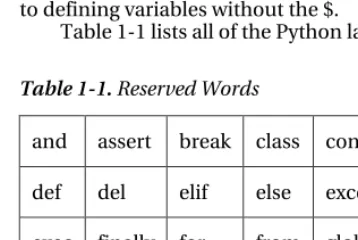
There are a few more rules to creating identifiers that we must follow in order to adhere to the Python language standard. Certain words are not to be used as identifiers as the Python language reserves them for performing a specific role within our programs. These words which cannot be used are known as reserved words. If we try to use one of these reserved words as an identifier, we will see a SyntaxError thrown as Python wants these reserved words as its own.
There are no symbols allowed in identifiers. Yes, that means the Perl developers will have to get used to defining variables without the $.
[image:36.612.56.235.386.506.2]Table 1-1 lists all of the Python language reserved words:
Table 1-1. Reserved Words
and assert break class continue
def del elif else except
exec finally for from global
or pass print raise return
try while with yield
It is important to take care when naming variables so that you do not choose a name that matches one of the module names from the standard library.
Coding Structure
CHAPTER 1 ■LANGUAGE AND SYNTAX
7
end within certain punctuations. Python uses indentation rather than punctuation to define the structure of code. Unlike languages such as Java that use brackets to open or close a code block, Python uses spacing as to make code easier to read and also limit unnecessary symbols in your code. It strictly enforces ordered and organized code but it lets the programmer define the rules for indentation, although a standard of four characters exists.
For instance, let’s jump ahead and look at a simple ‘if’ statement. Although you may not yet be familiar with this construct, I think you will agree that it is easy to determine the outcome. Take a look at the following block of code written in Java first, and then we’ll compare it to the Python equivalent.
Listing 1-5. Java if-statement
x = 100; if(x > 0){
System.out.println("Wow, this is Java"); } else {
System.out.println("Java likes curly braces"); }
Now, let’s look at a similar block of code written in Python.
Listing 1-6. Python if-statement
x = 100 if x > 0:
print 'Wow, this is elegant' else:
print 'Organization is the key'
Okay, this is cheesy but we will go through it nonetheless as it is demonstrating a couple of key points to the Python language. As you see, the Python program evaluates if the value of the variable ‘x’ is greater than zero. If so, it will print ‘Wow, this is elegant.’ Otherwise, it will print ‘Organization is the key.’ Look at the indentation which is used within the ‘if’ block. This particular block of code uses four spaces to indent the ‘print’ statement from the initial line of the block. Likewise, the ‘else’ jumps back to the first space of the line and its corresponding implementation is also indented by four spaces. This technique must be adhered to throughout an entire Python application. By doing so, we gain a couple of major benefits: easy-to-read code and no need to use curly braces. Most other programming languages such as Java use a bracket “[” or curly brace “{” to open and close a block of code. There is no need to do so when using Python as the spacing takes care of this for you. Less code = easier to read and maintain. It is also worth noting that the Java code in the example could have been written on one line, or worse, but we chose to format it nicely.
8
Operators
The operators that are used by Python are very similar to those used in other languages...straightforward and easy to use. As with any other language, you have your normal operators such as +, -, *, and /, which are available for performing calculations. As you can see from the following examples, there is no special trick to using any of these operators.
Listing 1-7. Performing Integer-based Operations
>>> x = 9 >>> y = 2 >>> x + y 11 >>> x - y 7
>>> x * y 18 >>> x / y 4
Perhaps the most important thing to note with calculations is that if you are performing calculations based on integer values then you will receive a rounded result. If you are performing calculations based upon floats then you will receive float results, and so on.
Listing 1-8. Performing Float-based Operations
>>> x = 9.0 >>> y = 2.0 >>> x + y 11.0 >>> x - y 7.0 >>> x * y 18.0 >>> x / y 4.5
It is important to note this distinction because as you can see from the differences in the results of the division (/) operations in Listings 1-7 and 1-8, we have rounding on the integer values and not on the float. A good rule of thumb is that if your application requires precise calculations to be defined, then it is best to use float values for all of your numeric variables, or else you will run into a rounding issue. In Python 2.5 and earlier, integer division always rounds down, producing the floor as the result. In Python 2.2, the // operator was introduced which is another way to obtain the floor result when dividing integers or floats. This operator was introduced as a segue way for changing integer division in future releases so that the result would be a true division. In Chapter 3, we’ll discuss division using a technique that always performs true division.
Expressions
CHAPTER 1 ■LANGUAGE AND SYNTAX
9
and operators that are evaluated. If we wish to perform a calculation based upon two variables or numeric values then we are producing an expression.
Listing 1-9. Examples of Expressions
>>> x + y >>> x - y >>> x * y >>> x / y
The examples of expressions that are shown above are very simplistic. Expressions can be made to be very complex and perform powerful computations. They can be combined together to produce complex results.
Functions
Oftentimes it is nice to take suites of code that perform specific tasks and extract them into their own unit of functionality so that the code can be reused in numerous places without retyping each time. A common way to define a reusable piece of code is to create a function. Functions are named portions of code that perform that usually perform one or more tasks and return a value. In order to define a function we use the def statement.
The def statement will become second nature for usage throughout any Python programmer’s life. The def statement is used to define a function. Here is a simple piece of pseudocode that shows how to use it.
Listing 1-10.
def my_function_name(parameter_list): implementation
The pseudocode above demonstrates how one would use the def statement, and how to construct a simple function. As you can see, def precedes the function name and parameter list when defining a function.
Listing 1-11.
>>> def my_simple_function():
... print 'This is a really basic function' ...
>>> my_simple_function() This is a really basic function
This example is about the most basic form of function that can be created. As you can see, the function contains one line of code which is a print statement. We will discuss the print statement in more detail later in this chapter; however, all you need to know now is that it is used to print some text to the screen. In this case, we print a simple message whenever the function is called.
10
Listing 1-12.
>>> def multiply_nums(x, y): ... return x * y
...
>>> multiply_nums(25, 7) 175
As seen above, parameters are simply variables that are assigned when the function is called. Specifically, we assign 25 to x and 7 to y in the example. The function then takes x and y, performs a calculation and returns the result.
Functions in Python are just like other variables and they be passed around as parameters to other functions if needed. Here we show a basic example of passing one function to another function. We’ll pass the multiply_nums function into the function below and then use it to perform some calculations.
Listing 1-13.
>>> def perform_math(oper): ... return oper(5, 6) ...
>>> perform_math(multiply_nums) 30
Although this example is very basic, you can see that another function can be passed as a parameter and then used within another function. For more detail on using def and functions, please take a look at Chapter 4, which is all about functions.
Classes
Python is an object-oriented programming language. which means that everything in the language is an object of some type. Much like building blocks are used for constructing buildings, each object in Python can be put together to build pieces of programs or entire programs. This section will give you a brief introduction to Python classes, which are one of the keys to object orientation in this language.
Classes are defined using the class keyword. Classes can contain functions, methods, and variables. Methods are just like functions in that the def keyword is used to create them, and they accept
CHAPTER 1 ■LANGUAGE AND SYNTAX
11
Listing 1-14. Simple Python Class
>>> class my_object:
... def __init__(self, x, y): ... self.x = x
... self.y = y ...
... def mult(self):
... print self.x * self.y ...
... def add(self):
... print self.x + self.y ...
>>> obj1 = my_object(7, 8) >>> obj1.mult()
56
>>> obj1.add() 15
In this class example, we define a class named my_object. The class accepts two parameters, x and y. A class initializer method is named __init__(), and it is used to initialize any values that may be used in the class. An initializer also defines what values can be passed to a class in order to create an object. You can see that each method and function within the class accepts the self argument. The self argument is used to refer to the object itself, this is how the class shares variables and such. The self keyword is similar to this in Java code. The x and y variables in the example are named self.x and self.y in the initializer, that means that they will be available for use throughout the entire class. While working with code within the object, you can refer to these variables as self.x and self.y. If you create the object and assign a name to it such as obj1, then you can refer to these same variables as obj1.x and obj1.y.
As you can see, the class is called by passing the values 7 and 8 to it. These values are then assigned to x and y within the class initializer method. We assign the class object to an identifier that we call obj1. The obj1 identifier now holds a reference to my_object() with the values we’ve passed it. The obj1
identifier can now be used to call methods and functions that are defined within the class.
For more information on classes, please see Chapter 6, which covers object orientation in Python. Classes are very powerful and the fundamental building blocks for making larger programs.
Statements
When we refer to statements, we are really referring to a line of code that contains an instruction that does something. A statement tells the Python interpreter to perform a task. Ultimately, programs are made up of a combination of expressions and statements. In this section, we will take a tour of statement keywords and learn how they can be used.
12
Table 1-2. Statement Keywords
if-elif-else for
while continue
break try-except-finally
assert def
print del
raise import
Now that we’ve taken a look at each of these keywords, it is time to look at each of them in detail. It is important to remember that you cannot use any of these keywords for variable names.
if-elif-else Statement
The if statement simply performs an evaluation on an expression and does different things depending on whether it is True or False. If the expression evaluates to True then one set of statements will be executed, and if it evaluates to False a different set of statements will be executed. If statements are quite often used for branching code into one direction or another based upon certain values which have been calculated or provided in the code.
Pseudocode would be as follows:
Listing 1-15.
if <an expression to test>: perform an action else:
perform a different action
CHAPTER 1 ■LANGUAGE AND SYNTAX
13
Listing 1-16. Example of if statement
>>> x = 3 >>> y = 2 >>> if x == y:
... print 'x is equal to y' ... elif x > y:
... print 'x is greater than y' ... else:
... print 'x is less than y' ...
x is greater than y
While the code is simple, it demonstrates that using an if statement can result in branching code logic.
print Statement
The print statement is used to display program output onto the screen (you’ve already seen it in action several times). It can be used for displaying messages, which are printed from within a program, and also for printing values, which may have been calculated. In order to display variable values within a print statement, we need to learn how to use some of the formatting options that are available to Python. This section will cover the basics of using the print statement along with how to display values by formatting your strings of text.
In the Java language, we need to make a call to the System library in order to print something to the command line. In Python, this can be done with the use of the print statement. The most basic use of the
print statement is to display a line of text. In order to do so, you simply enclose the text that you want to display within single or double quotes. Take a look at the following example written in Java, and
compare it to the example immediately following which is rewritten in Python. I think you’ll see why the
print statement in Python makes life a bit easier.
Listing 1-17. Java Print Output Example
System.out.println("This text will be printed to the command line");
Listing 1-18. Python Print Output Example
print 'This text will be printed to the command line'
As you can see from this example, printing a line of text in Python is very straightforward. We can also print variable values to the screen using the print statement.
Listing 1-19.
>>> my_value = 'I love programming in Jython' >>> print my_value
14
Once again, very straightforward in terms of printing values of variables. Simply place the variable within a print statement. We can also use this technique in order to append the values of variables to a line of text. In order to do so, just place the concatenation operator (+) in between the String of text which you would like to append to, and the variable you’d like to append.
Listing 1-20.
>>> print 'I like programming in Java, but ' + my_value I like programming in Java, but I love programming in Jython
This is great and all, but really not useful if you’d like to properly format your text or work with int
values. After all, the Python parser is treating the (+) operator as a concatenation operator in this case...not as an addition operator. Python bases the result of the (+) operator on the type of the first operand. If you try to append a numeric value to a String you will end up with an error.
Listing 1-21.
>>> z = 10
>>> print 'I am a fan of the number: ' + z Traceback (most recent call last):
File "<stdin>", line 1, in <module>
TypeError: cannot concatenate 'str' and 'int' objects
As you can see from this example, Python does not like this trick very much. So in order to perform this task correctly we will need to use some of the aforementioned Python formatting options. This is easy and powerful to do, and it allows one to place any content or value into a print statement. Before you see an example, let’s take a look at some of the formatting operators and how to choose the one that you need.
• %s - String • %d - Decimal
• %f - Float
If you wish to include the contents of a variable or the result of an expression in your print
statement, you’ll use the following syntax:
Listing 1-22.
print 'String of text goes here %d %s %f' % (decimal