Why
Micro PublisAbstra
This white hypervisoHyper‐V
osoft Corpora shed: March 2ct
epaper demo or when desig
V for VD
tion 2011 onstrates why gning and impDI?
y organization plementing a ns should cho Virtual Deskt ose Microsof top Infrastruc ft® Hyper‐V™ cture (VDI) so as their lution.Copyright Information
The information contained in this document represents the current view of Microsoft Corporation on the issues discussed as of the date of publication. Because Microsoft must respond to changing market conditions, it should not be interpreted to be a commitment on the part of Microsoft, and Microsoft cannot guarantee the accuracy of any information presented after the date of publication. This White Paper is for informational purposes only. MICROSOFT MAKES NO WARRANTIES, EXPRESS, IMPLIED OR STATUTORY, AS TO THE INFORMATION IN THIS DOCUMENT. Complying with all applicable copyright laws is the responsibility of the user. Without limiting the rights under copyright, no part of this document may be reproduced, stored in or introduced into a retrieval system, or transmitted in any form or by any means (electronic, mechanical, photocopying, recording, or otherwise), or for any purpose, without the express written permission of Microsoft Corporation Microsoft may have patents, patent applications, trademarks, copyrights, or other intellectual property rights covering subject matter in this document. Except as expressly provided in any written license agreement from Microsoft, the furnishing of this document does not give you any license to these patents, trademarks, copyrights, or other intellectual property© 2011 Microsoft Corporation. All rights reserved. This document is provided "as‐is." Information and views expressed in this document, including URL and other Internet Web site references, may change without notice. You bear the risk of using it. This document does not provide you with any legal rights to any intellectual property in any Microsoft product. You may copy and use this document for your internal, reference purposes. Microsoft, Windows Aero, DirectX, Hyper‐V, Microsoft RemoteFX, RemoteApp, Windows, Windows 7, Windows Server and the Windows logo are trademarks of the Microsoft group of companies. All other trademarks are property of their respective owners.
Table of Contents
Executive Summary ... 4
The How and Why of VDI ... 5
Desktop Virtualization and VDI ... 6
Citrix/Microsoft Integrated Solutions ... 6
Choosing the Best Hypervisor for VDI ... 8
VM Density Testing for VDI Using Microsoft Hyper-V 2008 R2 SP1 ... 10
Overview of Testing Methodology ... 11
Test Results for Windows 7 SP1 64-bit Guests ... 13
Test Results for Windows 7 SP1 32 bit Guests ... 15
Test Results for Windows XP Guests ... 16
Test Results for Citrix/Microsoft VDI ... 17
Additional Observations from VDI Testing ... 19
Hypervisor Out-of-Box Experience ... 19
Hypervisor Time to Restore State from Failure ... 20
Business Value Impact of Choosing Hyper-V for VDI ... 20
Conclusion ... 22
Additional Resources ... 22
Appendix A: Login Consultants Medium Session Workload ... 23
Executive Summary
Choosing a hypervisor for deploying a VDI solution involves a number of important considerations, each of which can be fulfilled by using Microsoft's Hyper‐V 2008 R2 SP1 hypervisor‐based virtualization technology. When implemented together with the Microsoft System Center family of products and desktop virtualization technologies from partners like Citrix, organizations can build integrated VDI solutions that can meet the needs of your business while keeping costs under control. One factor important for ensuring a cost‐effective VDI solution is the maximum VM density supported by the hypervisor. Results from internal benchmark testing demonstrate that Microsoft Hyper‐V 2008 R2 SP1 enables at least 40% higher VM density levels than Microsoft Hyper‐V 2008 R2 for VDI environments having Windows 7 SP1 64‐bit guests and a single virtualization host running on hardware from HP or Dell. Additional test results for VDI environments point to even higher VM density levels being achievable when Windows 7 SP1 32‐bit guests are used instead of Windows 7 SP1 64‐bit guests. VDI was also tested using Windows XP SP2 guests with fixed amounts of memory assigned since Windows XP guests are not able to take advantage of the Dynamic Memory feature of Microsoft Hyper‐ V 2008 R2 SP1. The ability of Windows 7 SP1 guests to take advantage of Dynamic Memory provides a compelling reason for choosing Windows 7 instead of Windows XP as the guest operating system for VDI. Test results were also obtained for VDI environments built using joint technologies from Citrix and Microsoft. The very high VM density levels achieved in the VDI environment clearly demonstrate the superior ability of integrated Citrix/Microsoft VDI even when running on minimal hardware. Finally, comparison with the behavior of third‐party hypervisors demonstrates first, that Hyper‐V provides a superior out‐of‐box experience with minimal tuning required; and second, that Hyper‐V allows much faster recovery of the VDI user environment after a sudden and unexpected shutdown of the host. The best hypervisor for VDI is one that allows IT to implement VDI solutions that are easy to engineer, easy to tune, easy to manage and support, and cost‐effective to deliver. Based on the results obtained from internal testing and because VM density has a significant influence on datacenter cost structures; an integrated Citrix/Microsoft VDI solution that includes Microsoft Hyper‐V 2008 R2 SP1 and System Center delivers unique end‐to‐end business value for organizations planning on implementing VDI.The How and Why of VDI
Virtual Desktop Infrastructure (VDI) is an alternative approach to centralized desktop computing that allows users access to virtualized desktop computing environments ("virtual desktops") running on servers ("virtualization hosts") located in a data center. These virtual desktops can provide users with either pooled (shared) or personal (one‐per‐user) working environments depending on how the VDI solution is implemented. Compared with a traditional PC deployment, VDI can provide your business with significant benefits, especially when centralized desktop management and security/compliance are key considerations for your business. For example, VDI can simplify desktop management by using a centralized desktop delivery architecture that centralizes the storage, execution and management of Windows desktops within the data center. And VDI can enhance security by providing users with completely isolated work environments while keeping sensitive business data safely located in the data center. VDI can also increase your business agility as by allowing users to access their desktop applications and user state (personal settings and data) from any connected endpoint device, managed or unmanaged, including standard PCs, thin clients, tablets/slates or mobile smartphones. VDI can also enhance business continuity and simplify disaster recovery, for should a user's device fail or be lost or stolen the user's virtual desktop remains available in the datacenter to be quickly accessed from another device. But while VDI can bring significant benefits in some business scenarios, there are other scenarios where VDI is clearly not the best approach. For example, in task worker environments where users need access to a limited set of applications with minimal personalization, Remote Desktop Services (formerly Terminal Services), a mature technology included in Windows Server 2008 R2, provides a more cost‐ effective solution than pooled VDI because of its greater scalability.1 Because VDI requires constant network connectivity between users’ endpoint devices and the data center, VDI is also not suitable for mobile workers who require offline mobility. Instead, other desktop virtualization technologies such as Citrix XenClient, Microsoft Enterprise Desktop Virtualization (MED‐V) or Microsoft Application Virtualization (App‐V) can be implemented if mobile workers need access to virtualized desktops or applications when their endpoint devices are disconnected from the corporate network. Choosing the best approach to meet the specific needs of your business requires understanding the different types of desktop virtualization solutions available.1 For a detailed comparison of the scalability of pooled VDI vs. Remote Desktop Services, see the whitepaper “Achieving Business Value through Microsoft VDI Together with Session Virtualization” available from
http://www.microsoft.com/downloads/en/details.aspx?displaylang=en&FamilyID=391c0118‐56f7‐4026‐8283‐
Desktop Virtualization and VDI
Desktop virtualization refers to decoupling the different layers of the Windows desktop environment from the underlying hardware. With standard PCs for example, the system hardware and installed software are tightly bound together into a package that must be deployed and managed as a single unit. Desktop virtualization however is able to separate the user’s operating system, applications and user state (personal settings and data) from the PC hardware, which can improve your business agility by enabling new models for providing services to users and by simplifying desktop and application deployment. Desktop virtualization solutions can be implemented in several different ways depending on the needs of your business: Server Hosted ‐ This approach to desktop virtualization is server‐based and is the method used by VDI. Server hosted desktop virtualization can be a good choice for your business when centralized desktop management and security/compliance are key requirements. Depending on your choice of hypervisor, server hosted desktop virtualization can also be a viable alternative to standard PCs when users require a media‐rich experience with a high level of personalization. Session Virtualization ‐ This older server‐based approach to desktop virtualization lets users access either entire Windows desktops or individual applications running remotely on data center servers. Session virtualization can be a good choice for businesses that need to support a large number of task workers. It can also be a good choice when you need to support contract workers given the ease of provisioning and isolation. Client Hosted In this approach to desktop virtualization, hypervisor‐capable endpoint devices are used to host virtual desktops that are centrally stored and managed on datacenter servers. Client hosted desktop virtualization can help businesses resolve application‐to‐OS compatibility issues and provide their users with a secure personal space on their corporate PCs. It can also be used for supporting mobile workers and can be a good choice for development, test and demo scenarios. Application virtualization Application virtualization refers to a set of technologies that provide a way of running an application in isolation from other applications. With application virtualization, the application runs inside a virtual “sandbox” environment on the user’s PC instead of needing to be locally installed on the PC. The result is that applications can no longer conflict because the underlying file system and registry settings on the user’s PC are never changed—the user’s operating system remains in a pristine condition. The ability this approach to dynamically stream applications to a user’s PC can increase flexibility, speed deployment, and greatly reduce the IT labor needed to deploy and update applications.
Citrix/Microsoft Integrated Solutions
Regardless of which form of desktop virtualization you decide to implement, Citrix® and Microsoft together provide a wide range of integrated solutions that can help meet the needs of your business.
Citrix is the market leader in application delivery infrastructure and provides end‐to‐end delivery solutions that use desktop, application, and server virtualization to enable customers to increase the agility, performance, and security of Windows‐based applications, while significantly lowering operating costs. And Microsoft is the market leader in desktop computing and offers technologies for virtualizing desktops, applications and user state to enable a broad range of different desktop virtualization scenarios including VDI. Key among Microsoft's technologies for implementing desktop virtualization is the Microsoft Hyper‐V™ hypervisor, which has been enhanced in Service Pack 1 for Windows Server 2008 R2 and Microsoft Hyper‐V Server 2008 R2 with two new features: Dynamic Memory lets you pool available physical memory on the host and dynamically allocate that memory to virtual machines based on workload needs. By enabling more efficient usage of physical memory resources, Dynamic Memory allows more VMs to be running simultaneously on a virtualization host without noticeable performance impact. This is important for the VDI scenario because it means fewer hypervisor‐capable servers are needed in the datacenter for hosting large numbers of virtual desktops. Microsoft RemoteFX™ is a feature of the Remote Desktop Services (RDS) server role. RemoteFX lets you provide users with a rich user experience when accessing virtual desktops from a broad range of endpoint devices. For example, using RemoteFX in a VDI environment, users can work remotely in a Windows Aero™ desktop environment, watch full‐motion video, enjoy Silverlight animations, and even run 3D applications from any endpoint device. Depending on the specific desktop virtualization scenario you plan on implementing, other Microsoft technologies you might use can include Microsoft Application Virtualization (App‐V) for dynamically delivering Windows applications on‐demand to endpoint devices; Microsoft Enterprise Desktop Virtualization (MED‐V) for centrally managing and deploying client‐hosted virtual desktops, Folder Redirection and Roaming User Profiles; Windows features that allow users to access personal data and application settings from any connected device; and Remote Desktop Session Host (RDSH), a role service of RDS that can provide users with access to RemoteApp™ programs and session‐based desktops. For more information about Microsoft virtualization technologies and solutions, see www.microsoft.com/virtualization. Citrix, a key partner of Microsoft in a relationship that has spanned more than 20 years, also offers a broad range of technologies for desktop, application and user state virtualization. Key among these is Citrix XenDesktop™ which lets you deliver media‐rich virtual desktops and applications on‐demand to connected endpoint devices using Citrix High Definition User Experience (HDX™) technology. Depending on your desktop virtualization scenario, other Citrix technologies you might use can include Citrix XenApp™ to deliver Windows applications over the network to endpoint devices; Citrix Receiver for provisioning virtual desktops/applications on any type of device; Citrix User Profile Manager for centralizing user personalization data and settings; and Citrix XenClient™ for provisioning client‐hosted virtual desktops. For more information about Citrix solutions and technologies, see www.citrix.com.
Tying together all these different desktop virtualization technologies from Microsoft and Citrix is the Microsoft System Center family of products that can provide your business with a "single pane of glass" for managing both your physical and virtual infrastructures. System Center can meet a broad range of business needs, including:
Virtual desktop and application management System Center Configuration Manager provides asset, application, usage, and desired configuration management for personal physical and virtual desktops.
End‐to‐end management of VDI infrastructure System Center Operations Manager monitors state, health, and performance to ensure uptime and reduce overall cost of management.
Management of third‐party VDI For organizations with Citrix VDI solutions, System Center Virtual Machine Manager manages virtual machines and server utilization across the
datacenter. Virtual Machine Manager integrates with Operations Manager to provide enhanced management for VDI scenarios, allowing performance and resource based allocation of virtual machines.
Compliance insight System Center Service Manager and its IT GRC Process Management Pack use information collected from Configuration Manager, Operations Manager, and Active Directory to provide unified reporting and visibility of compliance in VDI environments. For more information about the System Center family of products, see
www.microsoft.com/systemcenter.
Choosing the Best Hypervisor for VDI
Since the hypervisor is a core component of any VDI solution, choosing the right hypervisor is a key consideration when planning a VDI solution for your business. To be suitable for VDI, the hypervisor platform should: Allow implementation of VDI solutions that are secure, scalable, and highly available. Perform well on a broad range of hardware and be able to take advantage of the advanced capabilities of the latest high‐end processors. Provide high‐speed access to virtual machine storage and high network throughput. Provide users with a full‐fidelity virtual desktop experience across a wide range of endpoint devices in a way that closely mirrors what users are familiar with on standard PCs. Work out of the box with an optimal experience that does not require additional configuration to achieve high density and performance. If we examine Microsoft Hyper‐V 2008 R2 SP1 in detail, we see a close correlation between Microsoft Hyper‐V 2008 R2 SP1 capabilities and VDI hypervisor requirements:
Requirement: Allow implementation of VDI solutions that are security enhanced, scalable, and highly available. Microsoft Hyper‐V 2008 R2 SP1 satisfies this VDI hypervisor requirement as follows: For greater security and easier maintenance, the Hyper‐V role is available in the Server Core installation option of Windows Server 2008 R2. The Server Core option provides a minimal footprint environment that provides enhanced security by reducing the attack surface and lessens maintenance requirements by requiring fewer updates. For improved scalability, Hyper‐V in Windows Server 2008 R2 supports for up to 64 logical processors in the host processor pool. Together with the new Dynamic Memory feature of Windows Server 2008 R2 SP1, this now enables significantly higher virtual machine (VM) densities to be achieved on your Hyper‐V hosts. For increased availability, Hyper‐V in Windows Server 2008 R2 supports hot plug‐in and hot removal of Virtual Hard Drive (VHD) files and pass‐through disks while a virtual machine is running. This allows you to quickly reconfigure virtual machines in order to meet changing workload requirements for your environment. Hyper‐V in Windows Server 2008 R2 also supports Live Migration, which lets you move a virtual machine between two virtualization hosts with no interruption in service. Live Migration can use Cluster Shared Volumes (CSV), a new feature of Failover Clustering in Windows Server 2008 R2 that supports dynamic I/O redirection to improve cluster node connectivity fault tolerance for virtual machines running on the cluster.
Requirement: Perform well on a broad range of hardware and be able to take advantage of the advanced capabilities of the latest high‐end processors.
Microsoft Hyper‐V 2008 R2 SP1 satisfies this VDI hypervisor requirement as follows: For improved performance, Hyper‐V in Windows Server 2008 R2 provides increased virtual machine performance on high‐end servers that support Second Level Address Translation (SLAT). Virtual machines also consume less power because of the new Core Parking feature in Windows Server 2008 R2. And to ensure mobility across a broad range of hardware, the new processor compatibility mode for Hyper‐V in Windows Server 2008 R2 allows you to perform live migrations across different processor versions within the same family, for example from Intel Core 2 to Intel Pentium 4 or from AMD Opteron to AMD Athlon.
Requirement: Provide high‐speed access to virtual machine storage and high network throughput. Microsoft Hyper‐V 2008 R2 SP1 satisfies this VDI hypervisor requirement as follows: Windows Server 2008 R2 includes a number of performance improvements in storage solutions that can directly impact solutions built on Hyper‐V. For example, Windows Server 2008 R2 provides improved performance when multiple paths exist between servers and storage; improved connection performance for iSCSI attached storage; improved storage I/O process performance; and reduced processor utilization to achieve "wire speed" storage performance.
Hyper‐V also leverages new networking technologies in Windows Server 2008 R2 to improve overall virtual machine networking performance. For example, the new Virtual Machine Queue (VMQ) feature increases network throughput and reduces CPU utilization on the host through a combination of reduced routing overhead and direct memory access (DMA), especially for 10 GbE networks. Hyper‐V also provides support for up to 12 single processor virtual machines per logical processor when using Windows 7 SP1 guests.
Requirement: Provide users with a full‐fidelity virtual desktop experience across a wide range of endpoint devices in a way that closely mirrors what users are familiar with on standard PCs. Microsoft Hyper‐V 2008 R2 SP1 satisfies this VDI hypervisor requirement as follows: The new RemoteFX feature introduced with Service Pack 1 for Windows Server 2008 R2 and described previously above can be used to implement VDI solutions that provide users with full‐ fidelity virtual desktops similar to what they experience on standard PCs running Windows 7. RemoteFX extends the benefits of VDI and session virtualization to a wide variety of endpoint devices ranging from high‐end desktop PCs to extremely low‐cost clients such as LCD display devices. The result greater flexibility and more choices for how businesses can use server‐ hosted desktops to meet the needs of their users.
Requirement: Work out of the box with an optimal experience that does not require additional configuration to achieve high density and performance.
As the benchmark testing and analysis described in the next section demonstrates Microsoft Hyper‐V 2008 R2 SP1 satisfies this VDI hypervisor requirement as well.
VM Density Testing for VDI Using Microsoft Hyper‐V
2008 R2 SP1
The remainder of this paper focuses on one specific but very important hypervisor requirement for VDI solutions: achieving the highest VM density on the host, which assists in driving down the cost per user metric. This hypervisor requirement is particularly important for VDI since more virtual desktops per host can mean fewer host machines required, which usually translates into lower costs for implementing the solution. To demonstrate that Hyper‐V excels in this area, the section that follows provides evidence in the form of internal benchmark testing concerning the maximum achievable VDI densitieson Microsoft Hyper‐V 2008 R2 SP1 hosts for both low‐ and high‐complexity VDI solutions based on Citrix/Microsoft technologies.2
Overview of Testing Methodology
In order to determine the scalability of different hypervisors for VDI, Microsoft engineers set up a proof of concept full‐scale lab environment and performed a series of tests on hardware from different vendors. Hyper‐V tests were performed using Windows Server 2008 R2 SP1 Release Candidate running on identical hardware so that comparisons of maximum achievable VM density could be performed. Two basic types of VDI test environments were set up in the lab. First, multiple environments each having a single virtualization host were used for testing the scalability of different hypervisors. The hypervisors tested in these environments included Microsoft Hyper‐V 2008 R2 SP1 and third‐party hypervisors from other vendors. Second, a single high‐complexity environment consisting of eight Microsoft Hyper‐V 2008 R2 2008 SP1 hosts, System Center Virtual Machine Manager, Citrix Desktop Delivery Controller, Citrix Provisioning Server, Citrix Web Server and Citrix License Server was set up for studying the scalability of a joint Microsoft/Citrix VDI solution.3 Initial testing was performed in each test environment to establish an optimal hypervisor configuration. Increasing workload testing was then performed until the targeted VM density was either achieved or not achieved under full workload stress. The test methodology used for measuring maximum achievable VM density relied on validation using the following tools:
Login VSI v 2.1.2, a VDI workload generating tool from Login Consultants, was used to launch each VDI session and initiate a scripted workload that simulates actual use of each virtual desktop until either system saturation was achieved or the scripted workload completed. This particular tool was chosen for these tests because much of the industry now accepts this tool as the de‐facto standard for user workload generation. A newer version of this tool having a slightly different workload profile was available in beta at the time our tests were performed, however many vendors still used version 2.1.2 for performing their tests and our goal was to be consistent with others in the industry. Full details concerning the workload used for these tests are outlined in Appendix A at the end of this whitepaper. Performance Monitor, a tool included in Windows Server 2008 R2 SP1, was used to measure key performance counters relevant to Hyper‐V host and virtual machine performance.
2 Benchmark testing in a lab environment does not represent “real world” analysis. Microsoft bears no
responsibility for any actions you may take based on the benchmark data included in this paper and recommends you perform your own benchmark testing and analysis as you approach the pilot phase of your VDI deployment. 3 For comparison purposes, an additional environment was set up to measure the scalability of a session
virtualization solution based on Windows Server 2008 R2 SP1 Remote Desktop Session Host, but the results of these tests are not relevant for this present whitepaper.
Dell SAN Headquarters SNMP Monitoring, which was used to analyze performance directly at the SAN. This tool provided an understanding of disk IOPs, queue length and also helped to understand iSCSI network performance. This tool was only used during the Dell hardware testing. The results presented below are for tests performed with the Microsoft Hyper‐V 2008 R2 SP1 VDI environments.4 The primary reason for focusing on these tests is that the results clearly demonstrate how Dynamic Memory can benefit VDI solutions by enabling significantly greater VM densities per host than Microsoft Hyper‐V 2008 R2 RTM is able to support. Figure 1 shows the setup used for determining maximum achievable VM density in a Microsoft Hyper‐V 2008 R2 SP1 VDI environment. Initial testing was performed on an HP DL 380 G6 server with dual quad hyper‐threaded (Nehalem) processors configured with 96 GB and connected via iSCSI to a 42 disk storage array configured as RAID 0 for maximum read/write throughput. Subsequent tests were performed using a single Dell M610 server blade connected via iSCSI to a Dell EqualLogic SAN where the virtual hard disks for the virtual machines are stored. Figure 1 shows the details of the VDI environment used for testing Microsoft Hyper‐V 2008 R2 SP1 VM density using the latter hardware platform. 4
Figure 1: Details of the VDI environment using Microsoft Hyper‐V 2008 R2 SP1 as hypervisor. In Windows Server 2008 R2 Hyper‐V (RTM), the minimum supported memory per VM in a VDI environment for both 32‐bit and 64‐bit Windows 7 guests was 1 GB. In practice this meant that a virtualization host having 96 GB RAM like the ones used here could run at most around 85 to 87 concurrent VMs, allowing for spare capacity for the host itself. Using Dynamic Memory on Microsoft Hyper‐V 2008 R2 SP1 and Windows 7 SP1 guests however, VMs can now be configured and supported with as little as 512MB of memory which can then utilize dynamic memory as needed. For comparison purposes, separate tests were performed using VMs running 32‐bit and 64‐bit versions of Windows 7 Enterprise with Service Pack 1 as the guest operating system.
Test Results for Windows 7 SP1 64
‐
bit Guests
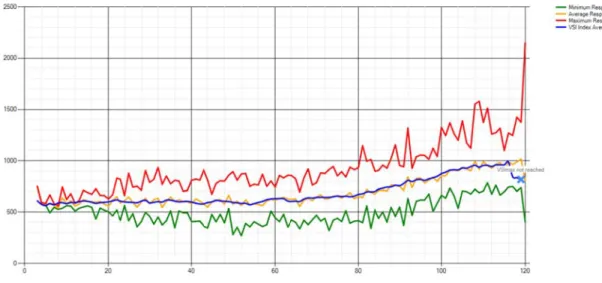
While the VM running Windows 7 SP1 64‐bit would start successfully on 512MB of RAM, when the tests executed it was determined that each, on average, utilize about 725MB of system memory running under full workload when Dynamic Memory is enabled per VM. To allow for proper functioning of the host therefore, the following calculation was used to determine the initial VM density goal for Windows 7 SP1 64‐bit: 96GB (system memory) – 9GB (for headroom) = 87GB (available for VMs) 87GB /725MB = 120 VMs (estimated) Figure 2 shows the Login VSI response results for a test of 120 Windows 7 SP1 64‐bit guests. The graph shows the minimum, maximum and average response time as more and more "users" successively log onto their virtual desktops and perform their "work" (both user and work are simulated using the Login VSI tool). The blue line in the graph is an index generated by the tool that measures response time, which reflects the latency users experience when executing their workload. Response time is measured in milliseconds and ranges from zero to a maximum of nearly 2000 milliseconds. The maximum acceptable response time (VSImax) for these tests was defined as 2 seconds.5 If VSImax is reached more than six times during a test run, Login VSI considers the host to be saturated and the target VM density not to have been achieved. 5
Login VSI uses 2000 msec for VSImax by default. In real‐world VDI, the acceptable level of user latency will depend on expected user workload and will need to be established during pilot deployment.
Figure 2: L As Figure and more clearly de desktops density re Figure 3: P Figure 3 a red line re
Login VSI resu 2 above illust e users log on emonstrates t has been eas esulting from Perfmon log f above shows t epresents the
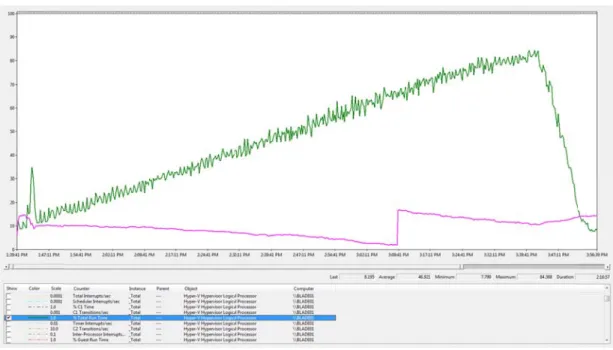
ults for a test trates, the re to their virtu that the targe sily achieved, using the new for a test of 1 the Performa e visible guest of 120 Windo sponse time ual desktops, et VM density which repres w Dynamic M 120 Windows ance Monitor t memory uti ows 7 SP1 64 is relatively s steadily incre y of 120 VMs sents a greate Memory featu 7 SP1 64‐bit log collected lizing dynami 4‐bit guests. table and inc easing the loa running 64‐b er than 40% i re of Microso guests. d on the Hype ic memory on creases only g ad on the hos it Windows 7 mprovement oft Hyper‐V 2 er‐V host duri n one of the V gradually as m st. The Figure 7 SP1 virtual t in maximum 008 R2 SP1. ng this test. VMs during th more e m VM The he
test. The test cycle see the av claim mor pass finish usage ove of the tes Time neve densities
Test R
Similar te version of Memory e using 32‐b capacity a used for p tests with Figure 4: L Figure 4 a blue line r like the pr 6 For more http://blog dynamic add . The blue lin vailable syste re system res hes. The gree er all of the ho t and then qu er reached 10 on this particResults fo
sts to those p f Windows 7 S enabled. This bit Windows and disk. Nev performing sc h the 64‐bit veLogin VSI resu above shows t represents th revious test u e information a gs.msdn.com/b dition of RAM ne highlights t m memory d sources. Noti en line shows ost's logical p uickly decline 00% during th cular host, de
or Wind
performed fo SP1 average o s immediately 7 guests inste vertheless, fo calability tests ersion of Winults for a test the Login VSI he response ti using 64‐bit g about Hyper‐V b/tvoellm/arch from 512MB the measurem ecline as eac ce also the re the “% Total processors. T s when all the his test sugge pending on w
ows 7 S
r Windows 7 only 540 MB y suggests tha ead of 64‐bit, r comparison s with Windo dows 7 SP1. of 120 Windo results for a ime or latenc uests, the res performance c hive/tags/hype B to 730MB h ment of overa h VM begins elease off me Run Time” co his counter to e test cycles h sts that it ma what users wiP1 32 bi
SP1 64‐bit VM of system me at even highe assuming su n purposes th ws 7 SP1 32‐ ows 7 SP1 32 test of 120 W y users exper sponse time i counters, see er_2d00_v+per appens when all available m its test cycle mory per VM ounter which ops out at ap have complet ay be possible ll consider anit Guests
Ms determine emory under er VM density fficient resou e same targe bit guests as 2‐bit guests. Windows 7 SP rience when e s again relativ rformance+cou n this particul memory on th and begins to M back to the h shows aggre pproximately 8 ted. The fact e to achieve e n acceptable rs
ed that VMs r full workload y levels can b urces exist for et VM density was used pre 1 32‐bit gues executing the vely stable an unters/ lar VM began he host. You o dynamically host as the te egate average 88% near the that % Total even higher V response tim running the 3 d with Dynam e achieved by r processor y of 120 VMs w eviously for th sts. As before eir workload. nd increases n its can y est e e end Run VM e.6 32‐bit mic y was he e, the Justslowly as which onc of Dynam Figure 5: P Figure 5 a run. The bump fro overall av the host s Time” cou again this of availab VM densit response
Test R
As with th on single installed. testing fo RAM in Hy was neve additional us ce again repre mic Memory in Perfmon log f above shows t red line again m 512MB to vailable memo still maintains unter showing counter tops ble RAM and t ties likely can time for userResults fo
he Windows 7 Dell M610 Bl Because old r this scenari yper‐V Mana r achieved. ers log on. T esents a mor n Microsoft H for a test of 1 the Performa n represents t 540MB happ ory on the ho s around 30G g aggregate u s out at appro the fact that % n be achieved rs.or Wind
7 SP1 tests ab ade with 96G er operating o involved us ger. All tests he target VM e than 40% im yper‐V 2008 120 Windows ance Monitor the visible gu ened when th ost. It's signifi B of available utilization of a oximately 88% % Total Run T d on this host,ows XP
bove, the env GB RAM runni systems like W sing 120 Wind were consid M density of 12 mprovement R2 SP1. 7 SP1 32‐bit log collected est memory o hat VM began icant to note e RAM. The g all guest over % near the en Time never re , again depenGuests
ironment for ing Windows Windows XP dows XP SP2 3 ered a pass w 20 VMs has a in maximum guests. d on the Hype of one of the n its test cycle that even at green line aga r all logical pr nd of the test eaches 100% c nding on what r testing Wind Server 2008 are not supp 32‐bit guests with workload again been ea VM density a er‐V host duri VMs during t e. The blue li 120 guests a ain shows the ocessors on t t. Clearly the p clearly sugge t is considere dows XP gues R2 SP1 with t orted by Dyn each assigne d level session asily achieved as a direct res ng the 32‐bit the test; the ine measures nd full worklo e “% Total Run the host, and presence of 3 sts even high ed acceptable sts was condu the Hyper‐V r amic Memor ed 768MB of s ns and VSIMa d, sult t test s oad n once 30 GB her e ucted role ry, the static axFigure 6: P bit guests Figure 6 a show that Windows against 12 using the the out‐of on overal VM densit architectu able to ta provides a consider u
Test R
The high‐c those of a 7 Businesse Citrix/Micr Microsoft’ Windows 7 Processor util s. above shows p t the host is a XP guests ind 20 Windows X hardware co f‐box configu l system mem ty levels for W ures and you ke advantage a compelling using WindowResults fo
complexity V a typical ente es who choose rosoft VDI solu s own investm 7 or later. lization (gree processor uti at maximum d dicate that it XP Virtual Ma nfiguration d ration of Mic mory because Windows XP g allocate at le e of Dynamic reason for bu ws 7 as their gor Citrix/
M density tes rprise‐class n e Hyper‐V for V tion to take ad ents in this aren) and availa lization (gree density and c is possible to achines residi escribed earl crosoft Hyper e Windows XP guests are sti ast 768MB pe Memory, the usinesses con guest operati
/Micros
st environme etwork. To cVDI and still nee dvantage of inv ea with Micros able system m en) and availa lose to memo o have 120 co ng on a single ier. Good ov ‐V 2008 R2 SP P is not suppo ll good provid er client. How e release of Se nsidering impl ng system fo
soft VDI
nt was design create this tes ed Windows X vestments by C soft Hyper‐V 20 memory (pink) able system m ory saturation ncurrent VDI e blade Micro verall perform P1, but VM d orted with Dy ded your host wever, becau ervice Pack 1 lementation o r VDI.7 ned to provid st environme P guests shoul Citrix in the are008 R2 SP1 tar ) with 120 Wi memory (pink n. The test re workload lev osoft Hyper‐V mance can be ensity levels ynamic Memo ts have mode use Windows for Windows of a VDI solut de VDI scale n nt, Citrix Xen ld consider an ea of VM densi rgets only VDI g
indows XP SP2 ). These resu esults for vel sessions V 2008 R2 ser achieved usi are static and ory. Neverthe ern CPU XP guests are s Server 2008 tion to seriou numbers matc Desktop 4 integrated ity scalability. guests running 2 32‐ ults rver ng d rely eless, e not 8 R2 usly ching g
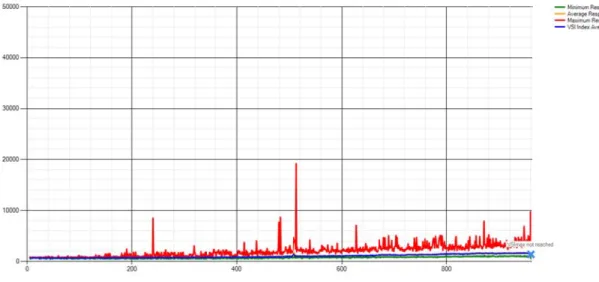
software was added to the environment and scaled up with more blades and EqualLogic SAN equipment so the virtual machines could be provisioned and streamed from the hosts to the clients. The intent was improving the original Dell reference architecture based on Microsoft Hyper‐V 2008 R2 RTM that ran 1000 users on 12 blades down to 8 blades, taking into account the already tested configuration of 120 VMs per host. XenDesktop was used to provision all virtual machine instances from a single VM having Windows 7 SP1 as its guest OS using Citrix Provisioning Server. This approach dramatically decreased the VM replication and rollout time as well as the amount of storage needed for VMs. Testing was conducted from twenty‐two Login VSI Launch workstations to achieve full system usage over time. Figure 7 shows the setup used for this environment: Figure 7: Details of the VDI environment using Citrix XenDesktop and Microsoft Hyper‐V 2008 R2 SP1. Figure 8 below shows the Login VSI results for a test of the combined Citrix XenDesktop and Microsoft Hyper‐V 2008 R2 SP1 high‐complexity VDI infrastructure. These tests successfully achieved the goal with 960 VMs running on 8 Dell M610 blades with 120 VMs provisioned per blade. The test is a pass and clearly shows the superior ability of enterprise‐level infrastructure running on minimal hardware to provide an acceptable VDI user experience:
Figure 8: L VDI infras
Additi
While ach several ot observatio solution fHyperv
The VDI te achieve th achievabl SP1 hyper in achieva experienc Microsoft memory a in achievi careful at Hyper‐V 2 or increasLogin VSI resu structure.
ional Ob
hieving higher ther observat ons are prese or your organisor Out
‐
o
ests performe heir targeted e on pre‐SP1 rvisor with Dy able VM dens ce. t Hyper‐V 200 and disk IO co ng density, it tention to dis 2008 R2 SP1 i sed VDI densiults for a test
bservatio
r VM densitie tions became ented here as nization.f
‐
Box Expe
ed using Micr VM densities Microsoft Hy ynamic Memo sity while kee 08 R2 SP1 also ompared to a is important sk IO perform s very strong ty. of 960 Windoons from
es in various V apparent as s additional coerience
rosoft Hyper‐ s, which were yper‐V 2008 R ory enabled i ping respons o exhibits nat physically in when condu mance, especia in this area w ows 7 SP1 32m VDI Te
VDI environm the various te onsiderations V 2008 R2 SP e more than 4 R2 hosts. In o s well‐tuned e times unde tive or near n stalled server cting interna ally disk queu which could s 2‐bit guests ruesting
ents was the ests were bei s when choos P1 required no 40% greater t other words, t out‐of‐the‐bo er 2 seconds t ative perform r. As disk IO p l hypervisor p ue length and upport a sign unning on a C primary focu ing performe sing a hypervi o tuning at al than the VM d the Microsoft ox to provide to ensure an a mance in all a performance performance d disk IO laten nificantly lowe Citrix/Microsof us of these te ed. These isor for a VDI ll in order to densities t Hyper‐V 200 e significant ga acceptable us reas of proce is a critical fa analysis to pa ncy. Microsof er SAN invest oft sts, 08 R2 ains ser essor, actor ay ft tmentHypervisor Time to Restore State from Failure
Our tests also suggested another consideration that might be important when selecting a hypervisor for VDI, namely, the time needed to restart and log on to all VMs on the host in an unplanned disaster recovery failover of the host. This time factor can be important because it affects the business continuity capabilities of a VDI solution by defining the window of service outage that can occur when a virtualization host unexpectedly shuts down, for example because of power failure, and live migration cannot be employed. By performing a one‐off test involving shutting down the Microsoft Hyper‐V 2008 R2 SP1 host in VDI environment, it was observed that it took about 15 minutes to restart the host, restart all the VMs on the host, and successfully log on to these VMs so that users could resume their work. While 15 minutes may sound like a long time to restart, other hypervisors may not allow a complete restart this fast, especially when scaled to high densities and high levels of memory over commitment. Dynamic Memory by contrast, delivers immediate memory management value and does not require additional computation to calculate memory gains as competitive solutions require. Clearly this is a significant issue that requires careful consideration in hypervisor choice as it can significantly impact business productivity in failover situations.Business Value Impact of Choosing Hyper‐V for VDI
Cost‐reduction is frequently cited as a reason for adopting VDI, with customers indicating that through VDI they can deliver a rich‐desktop experience to a user through a low‐cost endpoint device. That approach to determining the value of a VDI implementation ignores a wide variety of important factors. The traditional Total Cost of Ownership methodology typically assesses the “direct cost” impact of a technology investment – primarily the costs of hardware, software and IT labor. When considering the TCO of VDI, it is necessary to consider not only the hardware, software and labor costs of supporting the endpoints, but also the hardware, software and labor costs in the datacenter. It is impossible to quantify specific cost impacts without considering the details of a specific configuration. Hardware configurations, software licensing models and management best practices directly affect cost‐structures, often in non‐linear ways. It is possible, however, to make some general observations about the TCO impacts of choosing Hyper‐V for VDI: VM density has a significant influence on datacenter cost structures. VM density determines how much server capacity must be purchased, managed and supported for a given number of VDI clients. Whether used in a low‐ or high‐complexity deployment, the testing has shown that Microsoft Hyper‐V 2008 R2 SP1 delivered VM densities significantly higher than achievable on pre‐SP1 Microsoft Hyper‐V 2008 R2 hosts. For a deployment of any given size, these density improvements will allow customers to realize hardware and software cost savings compared to pre‐SP1 hosts. While hardware and software costs tend to be associated with one‐time deployment activities, IT labor costs occur throughout the lifespan of the solution. Solutions which require significant
up‐front engineering and configuration can have two different effects on costs; either an investment in engineering effort is required up front, or an ongoing cost occurs due to elevated operations and support labor for a poorly implemented solution. The testing strongly indicates that Microsoft Hyper‐V 2008 R2 SP1 delivers a well‐tuned out‐of‐the box configuration with a minimum of up‐front investment, as well as a steady‐state platform with little requirement for ongoing performance tuning. This is the best of both worlds; a solution which can be deployed and managed with low incremental labor costs. The third major category of cost impact in a typical TCO analysis is the cost of support and remediation in the event of failure. This cost category considers not only the labor cost of IT staff involved in restoring service, but the impact of downtime on affected users and business processes. The testing found that if a failure did occur, VDI services hosted on Microsoft Hyper‐ V 2008 R2 SP1 could be restored quickly, resulting in reductions in both IT labor effort and end‐ user impact. The combination of resilience and rapid restoration of services represents a differentiating TCO benefit over the entire lifecycle of the implementation. No matter how detailed, a TCO analysis cannot fully describe the impact of a technology investment. TCO only addresses budgeted line‐item impacts, the model does not include non‐monetary aspects of “business value”. Based on research performed by Microsoft’s “War on Cost” team, there are significant areas of business impact which, while not appearing on the IT budget, can make or break the question of whether or not the technology investment delivered “value” to the business. Considerations include: Operational Agility TCO analysis drives an IT‐centric view of technology, but the most impactful technology investments are those which allow the business to respond rapidly to changing conditions, requirements and priorities. Because VDI services hosted on Microsoft Hyper‐V 2008 R2 SP1 deliver solid performance out of the box, readily tunable configurations and dynamic use of system resources, IT gains an unprecedented ability to deliver agile, on‐demand services to meet business needs. Those services can be delivered reliably, scalability and efficiently, with minimal incremental IT effort. That represents an enormous opportunity for IT to be a strategic enabler for the business. Quality of Service As noted above, resilience and service restoration have a direct‐cost impact in a TCO analysis. Those same attributes drive non‐monetary benefits as well. Testing indicated that VDI guests hosted on Microsoft Hyper‐V 2008 R2 SP1 delivered exceptional performance at the endpoint, contributing to end‐user satisfaction and improved productivity. In an environment where business processes are critical, Microsoft Hyper‐V 2008 R2 SP1 enables a world class experience. In addition, because Hyper‐V seamlessly integrates with the System Center suite of management tools, that service‐quality can be monitored and managed through a single interface. Risk Management Disaster recovery – or, more specifically, the ability to rapidly restore end‐ user services in the event of a catastrophic event – is a key scenario for any VDI implementation. Using Hyper‐V SP1 in conjunction with System Center Virtual Machine Manager, IT can rapidly provision virtual machines on diverse hardware platforms, managing physical and virtual
infrastructure resources seamlessly through a single integrated management platform. The new processor compatibility mode, for example, means that services can be restored and live migrations performed across different processor versions in the same family, alleviating the need to have “hot spare” hardware in exactly matching configurations.
Conclusion
The business value of a VDI implementation cannot be expressed with a simple deployment cost calculation. The full picture includes ongoing capital and operational costs as well as impacts on other pillars of value, such as operational agility, service quality and risk mitigation. The best hypervisor for VDI is therefore one that allows IT to implement VDI solutions that are easy to engineer, don’t need custom tuning, easy to manage and support, and cost‐effective to deliver. The performance and density improvements delivered in Microsoft Hyper‐V 2008 R2 SP1 unquestionably drive significant cost reductions in comparison to other VDI solutions, but when all the aspects of business value are considered the differences are compelling. As one customer recently reported, "With Hyper‐V and Dynamic Memory, we've been able to consolidate our data center footprint by more than 50 percent, increase server capacity by about 35 percent, and reduce power costs by 33 percent" (Alan Bourassa, Chief Information Officer, EmpireCLS Worldwide Chauffeured Services).8 With the joint Citrix/Microsoft approach to VDI, businesses can leverage the enhanced VM density capabilities of Microsoft Hyper‐V 2008 R2 SP1 to provide their users with the rich experience of Windows 7 using Remote FX while enabling IT to securely manage both their physical and virtual infrastructures using System Center. Through robust integration with Windows Server 2008 R2 and System Center management capabilities, and together with partner technology from Citrix, Microsoft Hyper‐V 2008 R2 SP1 clearly delivers unique end‐to‐end business value for VDI that is second to none.Additional Resources
For an overview of Microsoft's end‐to‐end VDI offering, see http://www.microsoft.com/windows/enterprise/solutions/virtualization/operating‐system/. 8 See http://www.microsoft.com/casestudies/Microsoft‐Active‐Directory‐Domain‐Services/EmpireCLS‐Worldwide‐ Chauffeured‐Services/Chauffeur‐Service‐Attains‐Seven‐Nines‐Uptime‐Less‐IT‐Work‐by‐Using‐ Virtualization/4000009115.VDI case studies can be found at http://www.microsoft.com/casestudies/Case_Study_Search_Results.aspx?Type=1&Keywords=VDI&Lang ID=46. VDI Standard and Premium Suite licensing details can be found at http://www.microsoft.com/windowsserver2008/en/us/rds‐vdi.aspx. Details concerning Windows Server 2008 R2 Hyper‐V features and capabilities are available at http://www.microsoft.com/windowsserver2008/en/us/hyperv‐main.aspx. For information concerning Microsoft's System Center family of products, see http://www.microsoft.com/systemcenter/en/us/default.aspx. Tips on how to tune System Center Virtual Machine Manager for VDI deployments can be found at http://blogs.technet.com/b/vishwa/. For a technical overview of the new Dynamic Memory feature in Service Pack 1 for Windows Server 2008 R2, see the Dynamic Memory Technical Overview whitepaper which can be downloaded from http://download.microsoft.com/download/D/1/5/D15951B6‐B33C‐4A57‐BCFB‐ 76A9A6E54212/Implementing_and_Configuring_Dynamic_Memory_WP_SP1_final.pdf. Information about the new RemoteFX feature included in Service Pack 1 for Windows Server 2008 R2 can be found at http://www.microsoft.com/windowsserver2008/en/us/rds‐remotefx.aspx.
For information concerning Citrix desktop virtualization products and technologies, refer to the Citrix website at http://www.citrix.com.
Appendix A: Login Consultants Medium Session
Workload
The following details describe the scripted workload performed against each VDI virtual desktop using the Login Consultants Medium Session Workload Tool (Login VSI v 2.1.2). Emulates a medium knowledge working using Office, IE and PDF. Once a session has been started the medium workload will repeat every 12 minutes. During each loop the response time is measured every 2 minutes. The medium workload opens up to 5 apps simultaneously. The type rate is 160ms for each character. Approximately 2 minutes of idle time is included to simulate real‐world users. Each loop will open and use: o Outlook 2007, browse 10 messages.o Internet Explorer, one instance is left open (BBC.co.uk), one instance is browsed to Wired.com, Lonelyplanet.com and heavy flash app gettheglass.com (not used with MediumNoFlash workload). o Word 2007, one instance to measure response time, one instance to review and edit document. o Bullzip PDF Printer & Acrobat Reader, the word document is printed and reviewed to PDF. o Excel 2007, a very large randomized sheet is opened. o PowerPoint 2007, a presentation is reviewed and edited. o 7‐zip: using the command line version the output of the session is zipped.