Proceedings of the
5th International Workshop on
Formal Methods for Interactive Systems
(FMIS 2013)
PVSio-web: a tool for rapid prototyping
device user interfaces in PVS
Patrick Oladimeji, Paolo Masci, Paul Curzon and Harold Thimbleby
8 pages
Guest Editors: Judy Bowen, Steve Reeves
Managing Editors: Tiziana Margaria, Julia Padberg, Gabriele Taentzer
PVSio-web: a tool for rapid prototyping
device user interfaces in PVS
Patrick Oladimeji1, Paolo Masci2, Paul Curzon2and Harold Thimbleby1
1p.oladimeji, [email protected],
http://fitlab.eu/
Future Interaction Technology Lab, Swansea University, Wales
2paolo.masci,[email protected] Queen Mary University of London, United Kingdom
Abstract: We present PVSio-web which extends the simulation component of the PVS proof system with functionalities for rapid prototyping device user interfaces. The tool presents itself as a classic image-editing environment with functionalities such as area selection and hyperlink creation, thus reducing the barriers that prevent non-experts in formal methods from using PVS. Designers load a picture of the lay-out of the device user interface under development, specify interactive areas over the layout, and link them to a PVS specification. They can then explore the behaviour of the formal user interface specification through point-and-click interactions. The architecture of the tool is general, and can be used as the basis for extending other verification tools. A demonstration of the capabilities of PVSio-web is presented through an example based on a commercial medical device user interface. Our ul-timate aim is to promote and facilitate the use of formal verification tools when developing device user interfaces.
Keywords:Prototyping tool; Interactive devices; User interfaces; PVS.
1
Introduction and motivation
Safety-critical systems must be verified against safety requirements before being marketed. This is required by law in many countries to reduce the risk of failures to be as low as reasonably practical. For interactive systems, the verification includes the analysis of user interface designs, with the aim of reducing software defects and use errors.
domain experts before verifying it in the PVS theorem prover. The core of PVSio is a transla-tor that compiles PVS expressions into Common Lisp code. It presents itself as an interactive command prompt with aread-eval-print loopthat allows developers to enter commands and ex-ecute PVS specifications on-demand. For instance, the behaviour of a function defined in a PVS specification can be executed within PVSio by writing the name of the function in the PVSio command prompt: PVSio evaluates the function and returns a result. However, PVSio is hard to use and apply when prototyping interactive systems: a list of nested commands must be provided for evaluating functions, and the results are displayed in textual format as a (possibly long) list of fields. A more natural way of exploring the behaviour of a user interface is by means of in-teractions with buttons and keys on a user interface layout that visually resembles the one under development. In this work, we develop a prototyping environment that enables this interaction style using PVSio.
Contribution. The main contribution of this paper is to present a novel graphical environment, PVSio-web [pvs], for rapid prototyping of device user interfaces in PVS [ORR+96]. Specif-ically, the tool extends the PVSio [Mu˜n03] component of PVS with functionalities that allow designers to execute the formal specification of an interactive system by interacting with a pic-ture that represents the layout of the system user interface. The designer creates interactive areas over the picture. Interactions on the defined areas are translated into commands for PVSio, and the returned result is rendered on the same picture of the layout. The second contribution, in Section3, is that we demonstrate the capabilities of PVSio-web through an example where the layout of a commercial medical device user interface is prototyped with functionalities defined in a PVS specification.
2
PVSio-web
PVSio-web extends the PVSio [Mu˜n03] component of PVS [ORR+96] with a graphical environ-ment that allows rapid prototyping of device user interfaces based on formal PVS specifications. Designers can load a picture of the layout of a user interface and define interactive areas over it: regions of the picture that should react to user clicks or presses, and visible text areas that should render information fed back to users such as displays. The behaviour of these interactive areas is defined in a PVS specification given by the designer. The designer can use point-and-click inter-actions on user interface buttons for exploring the user interface behaviour and visually observe the effect of the interactions in real-time.
Architecture. PVSio-web has a distributed architecture based on a lightweight client and a web-server (see Figure1). The client presents the graphical front-end of the tool as an interactive webpage within a web-browser. A web-server encapsulates the tool back-end. A process in the web-server is dedicated to PVSio for executing the PVS specification on-demand. Other processes are executed on the web-server for additional functionalities, such as type-checking the PVS specification. The server and client may be run on the same computer or on separate computers. An illustration of the functionalities of the client front-end and server back-end of PVSio-web follows.
Figure 1: Architecture of PVSio-web
(e.g., sketch, rendered image, or photograph) of the user interface layout, and bind interactive areas of the layout to function calls in a PVS specification. Two types of interactive areas can be defined: button areas, which are input elements whose behaviour is specified by functions in the PVS specification;display areas, which are output elements whose value is specified in the state of the user interface defined in the PVS specification. The PVS specification is visualised, edited and type-checked from the UI builder environment. TheUI simulatorallows designers to explore the behaviour of the user interface through point-and-click interactions with the defined interactive areas. User interactions with button areas are translated into commands specifying name and arguments of functions in the PVS specification. These functions will be executed on the web-server back-end through PVSio. Replies returned from the web-server provide the result of the execution. They are parsed by the UI simulator using regular expressions. The value of state variables associated to display areas are extracted and rendered on the corresponding display areas defined on the user interface layout. More details about the capabilities of the client front-end are provided in Section3while illustrating an example based on a commercial drug infusion pump.
The server back-endis a web-server hosting processes executing PVS and PVSio on-demand: the former is used for type-checking the PVS specification of the device user interface; the lat-ter is used for executing the same PVS specification according to the commands sent by the UI simulator of the client front-end. The server code is written entirely in JavaScript and runs inNode.js1, which is an environment built on Google’s V8 JavaScript engine shipped with the Chrome web-browser. Node.jsallows developers to easily build fast and scalable network ap-plications written in JavaScript. The execution model of the platform is event driven with asyn-chronous, non-blocking function calls. The platform provides a seamless interface to spawn processes and access their input, output and error streams through JavaScript programs. This mechanism is used in PVSio-web for creating a PVS and PVSio process for type-checking and executing the PVS specification on-demand. Once initialised, the server back-end listens for connections from prospective clients. WebSockets2 are used for exchanging messages between the client front-end and the server back-end. WebSocket is a standardised protocol intended for use on the web to enable bidirectional low-latency communication between two endpoints over a TCP connection. The payload of exchanged messages is specified in the JavaScript Object Notation (JSON) format.
The server side exposes a generic interface for communicating with a PVSio process using websockets. The client initiates a websocket connection with the server and can send messages to
1http://nodejs.org
start or close a process on the server using the websocket connection. It can also send commands to be executed by a running process it started. The server sends responses from the process back to the client through the same websocket connection.
3
Example: prototyping the data entry system of infusion pump
user interfaces
We now demonstrate the capabilities of PVSio-web through two examples based on medical infusion pumps. Medical infusion pumps are used in healthcare to deliver drugs and nutrients to patients at controlled rates. Clinicians enter infusion parameters in the infusion pump by interacting with buttons and keys on the device user interface.
A broad class of data entry system typically used in the current generation of drug infusion pumps is the incremental [CCE+11] data entry. This layout is gradually replacing number pads because it can help reduce the likelihood of undetected key slip errors — the attention of the user is mostly on the display rather than on the keys [UK 10]. A first validation of this hypothesis has been demonstrated recently within a lab experiment [OTC11]. Different variants exist of incre-mental number entry systems: they are currently not standardised, and different manufacturers can implement the data entry system in different ways. A layout used in several medical infusion pumps is based on chevron keys. That is users enter a number by incrementing or decrement-ing the displayed value with a minimum of two dedicated keys. PVSio-web is now used for prototyping the chevron keys of a commercial drug infusion pump.
A picture of the layout of a commercial infusion pump [Car12] with chevron keys is shown in Figure2. It is an exemplar ofchevron keysuser interface, whereupanddownarrows are used for incrementing and decrementing the value of numeric infusion parameters — typically, volume to be infused (VTBI), infusion rate and infusion duration. The device provides buttons for fast (double chevron keys) and slow (single chevron keys) value edit, and they supportpress & hold
interaction styles. That is, when a chevron key is pressed and held down, the value being set is iteratively incremented (with the up keys) or decremented (with the down keys). The value of the infusion parameter being set is always shown on the left display section just above the chevron keys.
Figure 2: A picture of a commercial medical infusion pump with chevron keys.
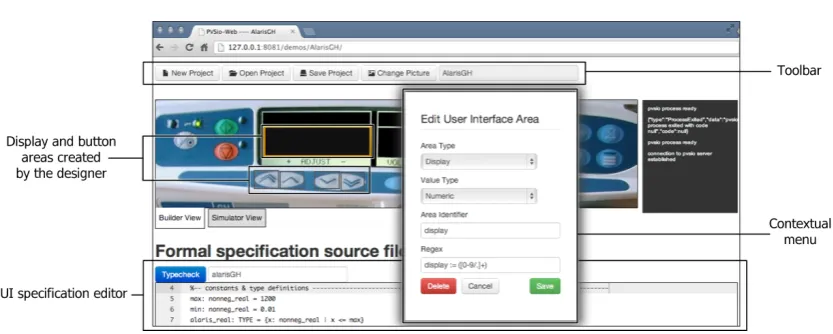
the messages returned by the PVSio-web back-end that encapsulate the result of expressions evaluated with PVSio. In the following, these steps are exemplified for theleft displayelement and thefast upkey of the user interface layout shown in Figure3.
For the display element, the term in the PVS specification modelling this element is a field
displayof typerealin a record type. In order to bind the display element to fielddisplay, the designer creates an area around the display element by clicking and dragging the mouse pointer. By doing so, a contextual menu for setting the binding options of the area is displayed by PVSio-web after the dragging ends: the area type isdisplay in this case, the area identifier isdisplay, and the value type is Number(a pre-defined type template in web). PVSio-web uses these parameters for generating a regular expression, which is shown at the bottom of the contextual menu (display left := [0-9.]+, in this case), for parsing messages returned by the PVSio-web back-end. In this case, PVSio-web will search for a fielddisplayin the message, extract the value (a real number in this case) of the field, and render the value in the display area. For thefast upkey, an area is created around the button edges, and the following parameters are set through the contextual menu displayed by PVSio-web: the area type (button), the area identifier (UP), and the interaction style (press & hold). Given these parameters, PVSio-web bindspress & holdinteractions with this button to a function in the PVS specification. A naming convention and a PVS specification style is used to ease the automation of this binding procedure. For instance, forpress & hold interactions, a pair of functionspress Xandrelease X(where X
Figure 3: The graphical environment of PVSio-web.
the user interface generated after any execution is returned to the PVSio-web front-end. The same procedure is used for associating the other keys to the corresponding functions in the PVS specification. The naming convention and the default values can be overridden by the designer.
After defining interactive areas with the UI builder, the UI simulator of PVSio-web is used for exploring the behaviour of the device user interface. Starting from an initial user interface state, which is set through ainitfunction defined in the PVS specification, the designer can interact with button areas and observe changes in display areas. With the considered device user interface, the initial value shown in the display area is 0, and if the designer clicks once theUP
button then a new value is displayed in real time in the display area (in this case, it becomes 1). This new value is obtained by executing in sequence the press UP and release UP
functions in the PVS specification. If the UP button is pressed and held down, the value is iteratively incremented according to the PVS specification, and each new value is rendered on the display element in real time (every 250ms in this case).
4
Related work and conclusion
We have presented PVSio-web, a new graphical tool for rapid prototyping device user interfaces in PVS. PVSio-web extends PVSio with a graphical environment that allows designers to bind a picture of a device user interface to a PVS specification and explore the user interface behaviour through point-and-click interactions over the picture of the user interface.
product. This helps formal methods experts to illustrate verification results to domain experts, such as engineers and human factors experts, which may be not familiar with formal methods.
Other tools have been created to support users that are non-experts of formal methods. For instance, in [SS12], a tool is developed that can support programmers when writing software code for low-level data structure manipulation, such as insertion or deletion of elements in a list. In [BBC+12], a graphical front-end is developed to facilitate usage of formal tools for biologists that have no previous knowledge in programming or formal methods. PVSio-web has a similar aim, in that has the potential to open the functionalities of a complex verification such as PVS to non-experts of the system. Differently from all the above works, PVSio-web is specifically designed to support prototyping of widget-based interactive device user interfaces.
With PVSio-web, the PVS verification system can be used as-it-is, without any modification that might compromise its correctness. The client-server architecture of PVSio-web can be used as the basis to extend other verification tools that provide simulation functionalities through an interactive command prompt. We have demonstrated the capabilities of PVSio-web with an example based on a commercial medical infusion device.
Acknowledgements: Funded as part of CHI+MED: Multidisciplinary Computer- Human In-teraction research for design and safe use of interactive medical devices project EPSRC Grant Number EP/G059063/1.
Bibliography
[BBC+12] D. Benque, S. Bourton, C. Cockerton, B. Cook, J. Fisher, S. Ishtiaq, N. Piterman, A. Taylor, V. M. Bio Model Analyzer: Visual Tool for Modeling and Analysis of Biological Networks. InProceedings of the 24th international conference on Com-puter Aided Verification. CAV’12. Springer-Verlag, Berlin, Heidelberg, 2012.
[BCE+12] R. Bloomfield, N. Chozos, D. Embrey, J. Henderson, T. Kelley, F. Koornneef, A. Pasquini, S. Pozzi, M. Sujan, G. Cleland, I. Habli, J. Medhurst. Using safety cases in industry and healthcare. 2012.
[BLL+96] J. Bengtsson, K. Larsen, F. Larsson, P. Pettersson, W. Yi.UPPAALa tool suite for automatic verification of real-time systems. Springer, 1996.
[Car12] CareFusion. Alaris GH Syringe Pump. 2012.http://www.carefusion.co.uk.
[CCE+11] A. Cauchi, P. Curzon, P. Eslambolchilar, A. Gimblett, H. Huang, P. Lee, Y. Li, P. Masci, P. Oladimeji, R. Rukˇs˙enas, H. Thimbleby. Towards Dependable Number Entry for Medical Devices. InEics4Med, the 1st International Workshop on Engi-neering Interactive Computing Systems for Medicine and Health Care. ACM Digital Library, 2011.
[Deg04] A. Degani.Taming HAL: Designing Interfaces Beyond 2001. Palgrave, 2004.
[MRO+11] P. Masci, R. Rukˇs˙enas, P. Oladimeji, A. Cauchi, A. Gimblett, Y. Li, P. Curzon, H. Thimbleby. On formalising interactive number entry on infusion pumps. ECE-ASST 45, 2011.
[MRO+12] P. Masci, R. Rukˇs˙enas, P. Oladimeji, A. Cauchi, A. Gimblett, Y. Li, P. Curzon, H. Thimbleby. The benefits of formalising design guidelines: A case study on the predictability of drug infusion pumps.Under review, 2012. Draft available athttp: //tinyurl.com/masci-QMpreprints.
[Mu˜n03] C. Mu˜noz. Rapid prototyping in PVS. Technical report NIA Report No. 2003-03, NASA/CR-2003-212418, National Institute of Aerospace, 2003.
[ORR+96] S. Owre, S. Rajan, J. Rushby, N. Shankar, M. Srivas. PVS: Combining Specifica-tion, Proof Checking, and Model Checking. InCAV96. LNCS 1102. Springer Berlin Heidelberg, 1996.
[OTC11] P. Oladimeji, H. Thimbleby, A. Cox. Number entry interfaces and their effects on error detection. InINTERACT’11. Springer-Verlag, Berlin, Heidelberg, 2011.
http://dl.acm.org/citation.cfm?id=2042283.2042302
[pvs] PVSio-web.http://thehogfather.github.io/pvsio-web/.
[SS12] R. Singh, A. Solar-Lezama. SPT: storyboard programming tool. In Proceedings of the 24th international conference on Computer Aided Verification. CAV’12, pp. 738–743. Springer-Verlag, Berlin, Heidelberg, 2012.
[Thi90] H. Thimbleby.User Interface Design. Addison-Wesley, 1990.
[Thi10] H. Thimbleby.Press On: Principles of Interaction Programming. MIT Press, 2010.