Compositive structures (part I)
Subjects:
-The
char
variable type
-Special
char
s
-The
string
type
-What`s a
value
type?
-Comparing
string
and
char
-
Naming conventions
-Representation of textual data
-Parsing Values from String Data
-
System.String
Type
-Special (escape) characters
-Defining Verbatim Strings
-Strings and Equality
-Strings Are Immutable
The
char
variable type
C# treats letters in two distinctly different ways: individual characters of type char (usually pronounced char) and strings of characters – a type called, cleverly enough,
string.
The char variable is a box capable of holding a single character. A character constant appears as a character surrounded by a pair ofsingle quotation marks, as in this example:
char c = ‘a’;
You can store any single character from the Roman, Hebrew, Arabic, Cyrillic, and most other alphabets. You can also store Japanese katakana and hiragana characters, as well as many Japanese and Chinese kanjis.
In addition, char is considered a counting type. That means you can use a char
type to control the looping structures. Character variables do not suffer from rounding problems.
UNICODE
Unicode is a computing industry standard for the consistent encoding, representation and handling of text expressed in most of the world's writing systems. Developed in conjunction with the Universal Character Set standard and published in book form as The Unicode Standard, the latest version of Unicode consists of a repertoire of more than
110,000 characters covering 100 scripts, a set of code charts for visual reference, an encoding methodology and set of standard character encodings, an enumeration of character properties such as upper and lower case, a set of reference data computer files, and a number of related items, such as character properties, rules for normalization, decomposition, collation, rendering, and bidirectional display order (for the correct display of text containing both right-to-left scripts, such as Arabic and Hebrew, and left-to-right scripts). As of September 2013, the most recent version is Unicode 6.3.
Special
char
s
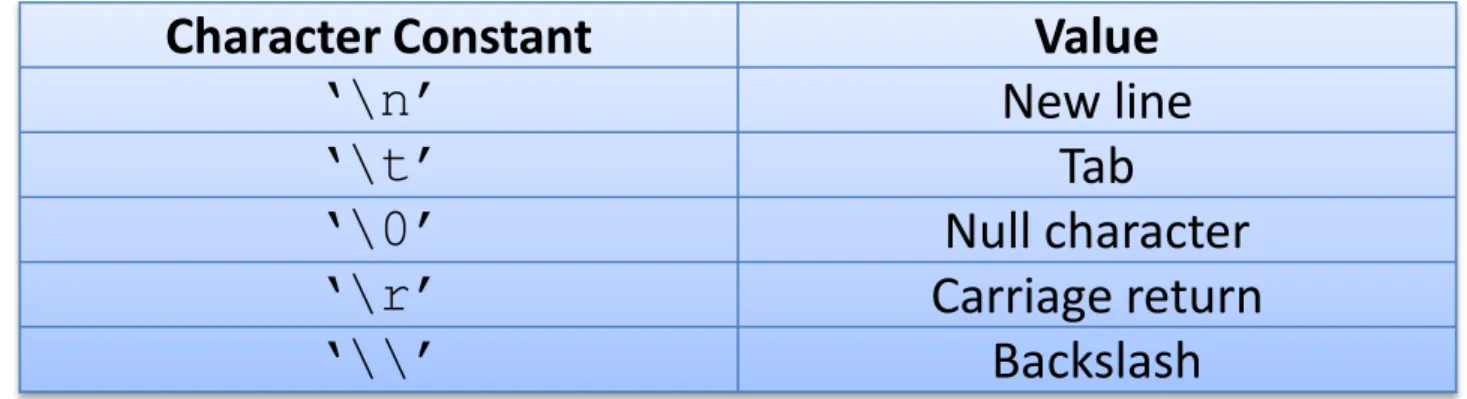
Some characters within a given font are not printable, in the sense that you don’t see anything when you look at them on the computer screen or printer. The most obvious example of this is the space, which is represented by the character „ „ (single quote, space, single quote). Other characters have no letter equivalent – for example, the tab character. C# uses the backslash to flag these characters, as shown in Table 1.
Table 1 Special Characters
Character Constant Value
„\n‟ New line
„\t‟ Tab
„\0‟ Null character
„\r‟ Carriage return
The
string
type
Another extremely common variable type is the
string
.// Declare now, initialize later. string someString1;
someString1 = “this is a string”;
// Or initialize when declared - preferable. string someString2 = “this is a string”;
A string constant, often called a string literal, is a set of characters surrounded by double quotes.
The following examples show how you declare and initialize string variables:
The string type represents a string of Unicode characters. string is an alias for
The
string
type
The characters in a string can include the special characters shown in Table 1. A string cannot be written across a line in the C# source file, but it can contain the new-line character, as the following examples show (see boldface):
// The following is not legal.
string someString = “This is a line
and so is this”;
// However, the following is legal.
string someString = “This is a line\nand so is this”;
The
string
type
A string is not a counting type. A string is also not a value-type – no “string” exists that’s intrinsic (built in) to the processor. Only one of the common operators works on string objects: The + operator concatenates two strings into one. For example:
string s = “this is a phrase” + “ and so is this”;
These lines of code set the string variable s equal to this character string:
“this is a phrase and so is this”
The string with no characters, written “” (two double quotes in a row), is a valid
string, called an empty string (or sometimes a null string). A null string (“”) is different from a null char („\0‟) and from a string containing any amount of space, even one (“ ”).
You can use the String.Empty value to initialize strings, which means the same thing as “” and is less prone to misinterpretation:
What`s a
value
type?
The variable types that we describe are of fixed length – again with the exception of
string. A fixed-length variable type always occupies the same amount of memory. So if you assign a = b, C# can transfer the value of b into a without taking extra measures designed to handle variable length types. This characteristic is why these types of variables are called value types.
The types int, double, and bool, and their close derivatives (like unsigned int) are intrinsic variable types built right into the processor. The intrinsic variable types plus decimal are also known as value types because variables store the actual data. The
string type is neither – because the variable actually stores a sort of “pointer” to the string’s data, called a reference. The data in the string is actually off in another location.
The programmer-defined types known as reference types, are neither value types nor intrinsic. The string type is a reference type, although the C# compiler does accord it some special treatment because strings are so widely used.
Stack memory
Reference
Heap memory
Comparing
string
and
char
Although strings deal with characters, the string type is amazingly different from the char. Of course, certain trivial differences exist. You enclose a character with single quotes, as in this example:
„a‟
On the other hand, you put double quotes around a string:
“this is a string”
“a” // So is this -- see the double quotes?
The rules concerning strings are not the same as those concerning characters. For one thing, you know that a char is a single character, and that’s it. For example, the following code makes no sense, either as addition or as concatenation:
char c1 = „a‟; char c2 = „b‟;
Actually, this bit of code almost compiles – but with a completely different meaning from what was intended. These statements convert c1 into an int consisting of the numeric value of c1. C# also converts c2 into an int and then adds the two integers. The error occurs when trying to store the results back into c3 – numeric data may be lost storing anint into the smaller char. In any case, the operation makes no sense.
A string, on the other hand, can be any length. So concatenating two strings, as shown here, does make sense:
string s1 = “a”; string s2 = “b”;
string s3 = s1 + s2; // Result is “ab”
As part of its library, C# defines an entire suite of string operations.
Comparing
string
and
char
char c1 = „a‟; char c2 = „b‟;
Naming conventions
Programming is hard enough without programmers making it harder. To make your C# source code easier to wade through, adopt a naming convention and stick to it. As much as possible, your naming convention should follow that adopted by other C# programmers:
The names of things other than variables start with a capital letter, and variables start with a lowercase letter. Make these names as descriptive as possible – which often means that a name consists of multiple words. These words should be capitalized but butted up against each other with no underscore between them – for example,
ThisIsALongName. Names that start with a capital are Pascal-cased, from the way a 1970s-era language called Pascal named things.
Prior to the .NET era, it was common among Windows programmers to use a convention in which the first letter of the variable name indicated the type of the variable. Most of these letters were straightforward: f for float, d for double, s for
string, and so on. The only one that was even the slightest bit different was n for int. One exception to this rule existed: For reasons that stretch way back into the Fortran programming language of the 1960s, the single letters i, j, and k were also used as common names for an int, and they still are in C#. This style of naming variables was called Hungarian notation, after a famous Microsoftie Charles Simonyi.
Hungarian notation has fallen out of favor, at least in .NET programming circles. With recent Visual Studio versions, you can simply rest the cursor on a variable in the debugger to have its data type revealed in a tooltip box. That makes the Hungarian prefix a bit less useful, although a few folks still hold out for Hungarian.
Representation of textual data
C# textual data is represented by the intrinsic string and char keywords, which are simple shorthand notations for System.String and System.Char, both of which are Unicode under the hood. A string represents a contiguous set of characters (e.g.,
"Hello"), while the charcan represent a single slot in a string type (e.g., 'H').
static void CharFunctionality() {
Console.WriteLine("=> char type Functionality:");
char myChar = 'a';
Console.WriteLine("char.IsDigit('a'): {0}", char.IsDigit(myChar)); Console.WriteLine("char.IsLetter('a'): {0}", char.IsLetter(myChar));
Console.WriteLine("char.IsWhiteSpace('Hello There', 5): {0}", char.IsWhiteSpace("Hello There", 5)); Console.WriteLine("char.IsWhiteSpace('Hello There', 6): {0}", char.IsWhiteSpace("Hello There", 6)); Console.WriteLine("char.IsPunctuation('?'): {0}", char.IsPunctuation('?'));
Console.WriteLine(); }
Parsing Values from String Data
The .NET data types provide the ability to generate a variable of their underlying type given a textual equivalent (e.g., parsing). This technique can be extremely helpful when you wish to convert a bit of user input data (such as a selection from a GUI-based drop-down list box) into a numerical value.
static void ParseFromStrings() {
Console.WriteLine("=> Data type parsing:"); bool b = bool.Parse("True");
Console.WriteLine("Value of b: {0}", b); double d = double.Parse("99.884");
Console.WriteLine("Value of d: {0}", d); int i = int.Parse("8");
Console.WriteLine("Value of i: {0}", i); char c = Char.Parse("w");
Console.WriteLine("Value of c: {0}", c); Console.WriteLine();
}
Parsing refers to the action by software of breaking an artifact into its constituent elements and capturing the relationship between those elements.
All numeric types have two static parsing methods, Parse and TryParse, that you can use to convert the string representation of a number into a numeric type.
Int32.Parse(String) Converts the string representation of a number to its 32-bit signed integer equivalent.
Boolean.Parse(String) Converts the specified string representation of a logical value to its Boolean equivalent.
Char.Parse(String) Converts the value of the specified string to its equivalent Unicode character.
Convert Class Converts a base data type to another base data type.
Convert.ToInt32 Method Converts a specified value to a 32-bit signed integer.
Convert.ToDouble Method Converts a specified value to a double-precision floating point number.
Convert.ToString Method Converts the specified value to its equivalent String representation.
Parsing Values from String Data
System.String
Type
System.String provides a number of methods you would expect from such a utility class, including methods that return the length of the character data, find substrings within the current string, convert to and from uppercase/lowercase, and so forth.
String member Meaning in life
Length This property returns the length of the current string. Compare() This method compares two strings.
Contains() This method determines whether a string contains a specific substring.
Equals() This method tests whether two string objects contain identical character data.
Format() This method formats a string using other primitives (e.g., numerical data, other strings) and the {0} notation.
Insert() This method inserts a string within a given string.
PadLeft() These methods are used to pad a string with some characters. PadRight()
Remove() Use these methods to receive a copy of a string, with modifications (characters removed or replaced).
Replace()
Split() This method returns a String array containing the substrings in this instance that are delimited by elements of a specified Char or String array.
Trim() This method removes all occurrences of a set of specified characters from the beginning and end of the current string.
ToUpper() These methods create a copy of the current string in uppercase or lowercase format, respectively.
ToLower()
System.String Type
static void BasicStringFunctionality() {
Console.WriteLine("=> Basic String functionality:"); string firstName = "Freddy";
Console.WriteLine("Value of firstName: {0}", firstName);
Console.WriteLine("firstName has {0} characters.", firstName.Length(); Console.WriteLine("firstName in uppercase: {0}", firstName.ToUpper()); Console.WriteLine("firstName in lowercase: {0}", firstName.ToLower()); Console.WriteLine("firstName contains the letter y?: {0}“,
firstName.Contains("y"));
Console.WriteLine("firstName after replace: {0}", firstName.Replace("dy", ""));
Console.WriteLine(); }
The dot operator (.) is used for member access. The dot operator specifies a member of a type or namespace. For example, the dot operator is used to access specific methods within the .NET Framework class libraries.
Special (escape) characters
Like in other C-based languages, C# string literals may contain various escape characters, which qualify how the character data should be printed to the output stream. Each escape character begins with a backslash, followed by a specific token.
Character Meaning in life
\' Inserts a single quote into a string literal. \" Inserts a double quote into a string literal.
\\ Inserts a backslash into a string literal. This can be quite helpful when defining file paths. \a Triggers a system alert (beep). For console programs, this can be an audio clue to the user. \n Inserts a new line.
\r Inserts a carriage return.
\t Inserts a horizontal tab into the string literal.
static void EscapeChars() {
Console.WriteLine("=> Escape characters:\a"); string strWithTabs = "Model\tColor\tSpeed\tPet Name\a ";
Console.WriteLine(strWithTabs);
Console.WriteLine("Everyone loves \"Hello World\"\a ");
Console.WriteLine("C:\\MyApp\\bin\\Debug\a ");
// Adds a total of 4 blank lines (then beep again!).
Console.WriteLine("All finished.\n\n\n\a "); Console.WriteLine();
Defining Verbatim Strings
When you prefix a string literal with the
@
symbol, you have created what is termed averbatim string. Using verbatim strings, you disable the processing of a literal’s escape characters and print out a string as is. This can be most useful when working with strings representing directory and network paths. Therefore, rather than making use of \\ escape characters, you can simply write the following:
// The following string is printed verbatim // thus, all escape characters are displayed. Console.WriteLine(@”E:\Programs”);
Also note that verbatim strings can be used to preserve white space for strings that flow over multiple lines:
// White space is preserved with verbatim strings.
string myLongString = @"This is a very very
very
long string"; Console.WriteLine(myLongString);
Using verbatim strings, you can also directly insert a double quote into a literal string by doubling the " token, for example:
Strings and Equality
A reference type is an object allocated on the garbage-collected managed heap. When
you perform a test for equality on reference types (via the C# == and != operators), you will be returned true if the references are pointing to the same object in memory.
However, even though the string data type is indeed a reference type, the equality operators have been redefined to compare the values of string objects, not the object in memory to which they refer:
static void StringEquality() {
Console.WriteLine("=> String equality:");
string s1 = "Hello!"; string s2 = "Yo!";
Console.WriteLine("s1 = {0}", s1); Console.WriteLine("s2 = {0}", s2); Console.WriteLine();
// Test these strings for equality.
Console.WriteLine("s1 == s2: {0}", s1 == s2);
Console.WriteLine("s1 == Hello!: {0}", s1 == "Hello!"); Console.WriteLine("s1 == HELLO!: {0}", s1 == "HELLO!"); Console.WriteLine("s1 == hello!: {0}", s1 == "hello!"); Console.WriteLine("s1.Equals(s2): {0}", s1.Equals(s2)); Console.WriteLine("Yo.Equals(s2): {0}", "Yo!".Equals(s2)); Console.WriteLine();
}
Strings Are Immutable
One of the interesting aspects of System.String is that once you assign a string object with its initial value, the character data cannot be changed. At first glance, this might seem like a flat-out lie, given that we are always reassigning strings to new values and due to the fact that the System.
String type defines a number of methods that appear to modify the character data in one way or another (uppercasing, lowercasing, etc.). However, if you look more closely at what is happening behind the scenes, you will notice the methods of the string type are in fact returning you a brand-new string object in a modified format:
static void StringAreImmutable() {
// Set initial string value.
string s1 = "This is my string."; Console.WriteLine("s1 = {0}", s1);
// Uppercase s1?
string upperString = s1.ToUpper();
Console.WriteLine("upperString = {0}", upperString);
// Nope! s1 is in the same format!
Letting the C# compiler infer data types
Earlier when you declared a variable, you always specified its exact data type, like this:
int i = 5;
string s = “Hello C#”; double d = 1.0;
You’re allowed to offload some of that work onto the C# compiler, using the var
keyword:
var i = 5;
var s = “Hello C# 4.0”; var d = 1.0;
Letting the C# compiler infer data types
Suppose, for example, you have an initializing expression like this:
var x = 3.0 + 2 - 1.5;
The compiler can figure out that x is a double value. It looks at 3.0 and 1.5 and sees that they’re of type double. Then it notices that 2 is an int, which the compiler can convert implicitly to a double for the calculation. All of the addition terms in x’s initialization expression end up as doubles. So the inferred type of x is double.
You can simply use the word var and supply an initialization expression, and the compiler does the rest:
Letting the C# compiler infer data types
Take a look at this:
var aString = “Hello C#”;
Console.WriteLine(aString.GetType().ToString());
The WriteLine statement calls the String.GetType() method on aString
to get its C# type. Then it calls the resulting object’s ToString()method to display the object’s type. Here’s what you see in the console window:
System.String
It proves that the compiler correctly inferred the type of aString.
Being explicit about the type of a variable is clearer to anyone reading your code than using var.
A new type in C# 4.0 is even more flexible than var: The dynamic type takes var a step further.