Americas Headquarters
Cisco Systems, Inc. 170 West Tasman Drive San Jose, CA 95134-1706 USA http://www.cisco.com Tel: 408 526-4000 800 553-NETS (6387) Fax: 408 527-0883
OR LIMITED WARRANTY, CONTACT YOUR CISCO REPRESENTATIVE FOR A COPY.
The Cisco implementation of TCP header compression is an adaptation of a program developed by the University of California, Berkeley (UCB) as part of UCB’s public domain version of the UNIX operating system. All rights reserved. Copyright © 1981, Regents of the University of California.
NOTWITHSTANDING ANY OTHER WARRANTY HEREIN, ALL DOCUMENT FILES AND SOFTWARE OF THESE SUPPLIERS ARE PROVIDED “AS IS” WITH ALL FAULTS. CISCO AND THE ABOVE-NAMED SUPPLIERS DISCLAIM ALL WARRANTIES, EXPRESSED OR IMPLIED, INCLUDING, WITHOUT
LIMITATION, THOSE OF MERCHANTABILITY, FITNESS FOR A PARTICULAR PURPOSE AND NONINFRINGEMENT OR ARISING FROM A COURSE OF DEALING, USAGE, OR TRADE PRACTICE.
IN NO EVENT SHALL CISCO OR ITS SUPPLIERS BE LIABLE FOR ANY INDIRECT, SPECIAL, CONSEQUENTIAL, OR INCIDENTAL DAMAGES, INCLUDING, WITHOUT LIMITATION, LOST PROFITS OR LOSS OR DAMAGE TO DATA ARISING OUT OF THE USE OR INABILITY TO USE THIS MANUAL, EVEN IF CISCO OR ITS SUPPLIERS HAVE BEEN ADVISED OF THE POSSIBILITY OF SUCH DAMAGES.
CCVP, the Cisco logo, and the Cisco Square Bridge logo are trademarks of Cisco Systems, Inc.; Changing the Way We Work, Live, Play, and Learn is a service mark of Cisco Systems, Inc.; and Access Registrar, Aironet, BPX, Catalyst, CCDA, CCDP, CCIE, CCIP, CCNA, CCNP, CCSP, Cisco, the Cisco Certified Internetwork Expert logo, Cisco IOS, Cisco Press, Cisco Systems, Cisco Systems Capital, the Cisco Systems logo, Cisco Unity, Enterprise/Solver, EtherChannel, EtherFast, EtherSwitch, Fast Step, Follow Me Browsing, FormShare, GigaDrive, HomeLink, Internet Quotient, IOS, iPhone, IP/TV, iQ Expertise, the iQ logo, iQ Net Readiness Scorecard, iQuick Study, LightStream, Linksys, MeetingPlace, MGX, Networking Academy, Network Registrar, Packet, PIX, ProConnect, ScriptShare, SMARTnet, StackWise, The Fastest Way to Increase Your Internet Quotient, and TransPath are registered trademarks of Cisco Systems, Inc. and/or its affiliates in the United States and certain other countries.
All other trademarks mentioned in this document or Website are the property of their respective owners. The use of the word partner does not imply a partnership relationship between Cisco and any other company. (0705R)
Any Internet Protocol (IP) addresses used in this document are not intended to be actual addresses. Any examples, command display output, and figures included in the document are shown for illustrative purposes only. Any use of actual IP addresses in illustrative content is unintentional and coincidental.
Licensing Information
The following license agreement covers the XML parser code that is used by the VoiceXML interpreter and is contained in the Cisco IOS software image.
The contents of this file are subject to the Mozilla Public License Version 1.1 (the "License"); you may not use this file except in compliance with the License. You may obtain a copy of the License at http://www.mozilla.org/MPL/
Software distributed under the License is distributed on an "AS IS" basis, WITHOUT WARRANTY OF ANY KIND, either express or implied. See the License for the specific language governing rights and limitations under the License.
Alternatively, the contents of this file may be used under the terms of the GNU General Public License (the "GPL"), in which case the provisions of the GPL are applicable instead of those above. If you wish to allow use of your version of this file only under the terms of the GPL and not to allow others to use your version of this file under the MPL, indicate your decision by deleting the provisions above and replacing them with the notice and other provisions required by the GPL. If you do not delete the provisions above, a recipient may use your version of this file under either the MPL or the GPL.
The Original Code is expat.
The Initial Developer of the Original Code is James Clark.
Portions created by James Clark are Copyright (C) 1998, 1999
James Clark. All Rights Reserved.
Contributor(s): Jenny Yao from Cisco Systems, Inc.
Modification of the source code made by Jenny Yao is controlled by definition of "TARGET_CISCO". Cisco Modification of Expat Source Code
File Modified Description of Modification hashtable.h Remove include file <stddef.h>. xmldef.h Include Cisco IOS <master.h> file.
Cisco VoiceXML Programmer’s Guide
© 2006-2007 Cisco Systems, Inc. All rights reserved.
Type cast (int) for sizeof() during arithmetic operation.
Add new routine XML_realloc(), replacing realloc() in this file because usage of realloc() could cause memory leakage.
xmltok.c Add argument type void for function with empty argument.
Type cast (int) for sizeof() during arithmetic operation. xmltok.h Add argument type void for function with empty argument. xmltok_impl.c Initialize variable open to 0.
Preface
ix
Audience
ix
Structure of This Guide
ix
Document Conventions
x
Obtaining Documentation
x
Cisco.com
xi
Product Documentation DVD
xi
Ordering Documentation
xi
Documentation Feedback
xi
Cisco Product Security Overview
xi
Reporting Security Problems in Cisco Products
xii
Product Alerts and Field Notices
xii
Obtaining Technical Assistance
xiii
Cisco Support Website
xiii
Submitting a Service Request
xiv
Definitions of Service Request Severity
xiv
Developer Services
xiv
Obtaining Additional Publications and Information
xv
Cisco VoiceXML Features
1-1
Audience
1-1
Recommended Knowledge
1-2
Prerequisites
1-2
VoiceXML Document Development
1-2
Cisco Voice Gateway Requirements
1-3
Overview of Cisco VoiceXML Features
1-3
Voice Store and Forward Feature
1-5
Volume and Rate Control Feature
1-6
ASR and TTS Features
1-6
Tcl IVR 2.0 and VoiceXML Integration (Hybrid Applications) Feature
1-7
T.37 Store and Forward Fax Detection Feature
1-7
Prerecorded Audio Prompts
1-9
Synthesized Audio Playout
1-11
External Server Failure
1-13
Volume and Rate Control
1-16
Type-ahead Support
1-20
Buffer Control and Flushing
1-20
cisco-typeaheadflush Attribute for <prompt>
1-21
com.cisco.autoflush Property
1-21
Type-ahead Buffer with <goto> or <transfer> to an Application
1-21
Type-ahead Interaction with Barge-In
1-21
User Input
1-22
Voice Input
1-22
DTMF Input
1-22
Grammar Support
1-23
Recording Support
1-25
Using cisco-dest
1-26
Shadow Variables
1-28
RAM Recording
1-28
HTTP Recording
1-29
Exception Handling
1-29
Properties for <record>
1-30
Typical Call Flow Using Recording
1-31
<cisco-data> Element
1-31
Transfer Support
1-34
Cisco Longpound Attribute
1-34
Cisco-newguid Attribute
1-34
Continuous Fax Detection and Transfer
1-35
Transfer Form Item Variable
1-38
Cisco Extensions for <transfer>
1-38
Control Flow and Scripting
1-43
Variables
1-43
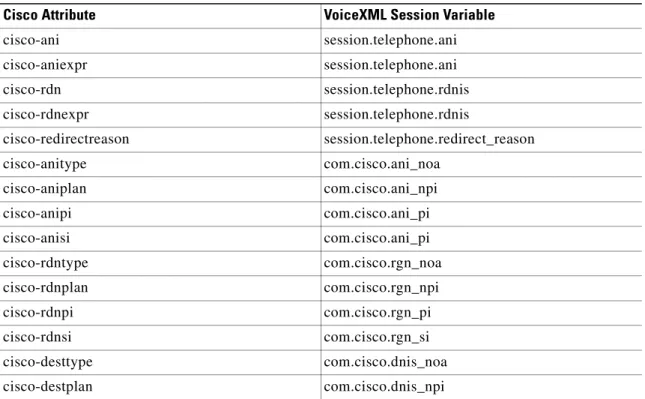
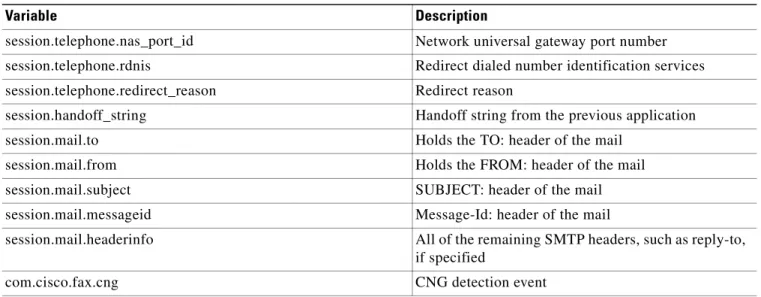
Supported Session Variables
1-43
Application Variables
1-48
Dialog Variables
1-49
Event Variables
1-49
Event Handling
1-49
Fax Event Handler
1-49
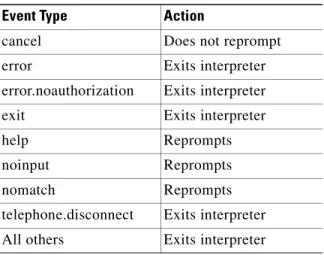
Events and Errors
1-49
Environment and Resources
1-52
Resource Fetching and Caching
1-53
Fetching
1-53
Caching
1-53
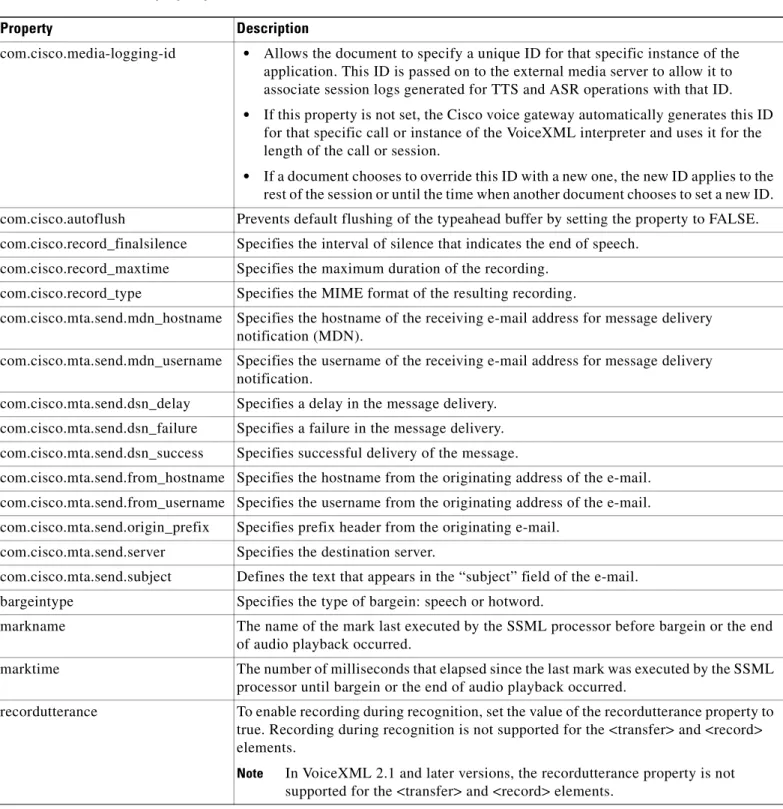
Property
1-54
Default Values and Ranges
1-56
Call Handoff
1-56
Authentication and Authorization
1-59
Authentication
1-59
Authorization
1-61
SIP and H.323 Support
1-63
SIP and TEL URL Support
1-63
Passing Headers in Voice Messages
1-65
Headers in Outbound Calls
1-65
Headers in Inbound Calls
1-67
Example: Passing a SIP URL with Headers Using SIP
1-68
Example: Passing a TEL URL with Headers Using H.323
1-69
SIP Blind Call Transfer
1-70
GTD Manipulation, Cisco IOS Release 12.2(11)T
1-71
GTD Parameters and Fields Mapped to VoiceXML Variables
1-71
GTD Parameter Reference
1-87
GTD Manipulation, Cisco IOS Release 12.3
1-98
Usage Guidelines
1-99
GTD Object and Parameter Syntax
1-103
Creating a New GTD Message
1-104
Reading and Modifying GTD Parameters
1-104
GTD Manipulation Sample Scripts
1-105
Using <transfer> and <disconnect> for GTD Manipulation
1-108
User-to-User Information Manipulation
1-108
GTD Manipulation Error Events
1-108
Redirecting Calls
1-109
Release to Pivot: Redirecting Calls for ISUP
1-109
Two B Channel Transfer: Redirecting Calls for ISDN
1-110
Blind Transfer Using SIP
1-112
Disconnect Cause Code
1-112
Hybrid Applications
1-113
sendevent Object
1-115
Additional References
1-117
Related Documents
1-117
Standards
1-117
RFCs
1-117
Technical Assistance
1-118
Cisco VoiceXML Troubleshooting
2-1
Debugging Cisco VoiceXML Applications
2-1
<cisco-puts>
2-1
debug vxml puts
2-1
<cisco-debug>
2-2
CallID and GUID in Debug Messages
2-3
Error Events
2-4
JavaScript/ECMA Script
2-5
Cisco VoiceXML Applications
3-1
Hybrid Application
3-1
Speech Enabled Banking Application
3-7
ASR and TTS Application
3-12
Multi-Language Application
3-15
Recording Application
3-16
Cisco VoiceXML DTD
A-1
Revised: June 20, 2007, OL-11175-01
Voice Extensible Markup Language (VoiceXML) applications provide access to content and services over the telephone, just as Hypertext Markup Language (HTML) web pages provide access over a web browser residing on a PC. The universal accessibility of the telephone and its ease of use makes VoiceXML applications a powerful alternative to HTML for accessing the content and services of the World Wide Web.
Use this guide in conjunction with the Cisco IOS TCL and VoiceXML Application Guide for your Cisco IOS release, and the TCL IVR API Version 2.0 Programmer’s Guide.
Audience
This guide is written for developers writing applications using Cisco VoiceXML features and must be used in conjunction with the Cisco IOS TCL and VoiceXML Application Guide, and the TCL IVR API Version 2.0 Programmer’s Guide. It describes features based on the Cisco implementation of the
VoiceXML 2.1 W3C Candidate Recommendation (June 13, 2005).
Structure of This Guide
This guide contains the following chapters and appendixes:
• Chapter 1, “Cisco VoiceXML Features”
• Chapter 2, “Cisco VoiceXML Troubleshooting”
• Chapter 3, “Cisco VoiceXML Applications”
• Appendix A, “Cisco VoiceXML DTD”
Document Conventions
This guide uses the following conventions to convey instructions and information.
Note Means reader take note. Notes contain helpful suggestions or references to additional information and material.
Timesaver This symbol means the described action saves time. You can save time by performing the action described in the paragraph.
Caution This symbol means reader be careful.In this situation, you might do something that could result in equipment damage or loss of data.
Tip This symbol means the following information will help you solve a problem.The tips information might not be troubleshooting or even an action, but could be useful information, similar to a Timesaver.
Obtaining Documentation
Cisco documentation and additional literature are available on Cisco.com. This section explains the product documentation resources that Cisco offers.
Convention Description
boldface font Commands and keywords.
italic font Variables for which you supply values.
[ ] Keywords or arguments that appear within square brackets are optional. {x | y | z} A choice of required keywords appears in braces separated by vertical bars.
You must select one.
screen font Examples of information displayed on the screen.
boldface screen font
Examples of information you must enter.
< > Nonprinting characters, for example passwords, appear in angle brackets in contexts where italic font is not available.
Cisco.com
You can access the most current Cisco documentation at this URL:
http://www.cisco.com/techsupport
You can access the Cisco website at this URL:
http://www.cisco.com
You can access international Cisco websites at this URL:
http://www.cisco.com/public/countries_languages.shtml
Product Documentation DVD
The Product Documentation DVD is a library of technical product documentation on a portable medium. The DVD enables you to access installation, configuration, and command guides for Cisco hardware and software products. With the DVD, you have access to the HTML documentation and some of the PDF files found on the Cisco website at this URL:
http://www.cisco.com/univercd/home/home.htm
The Product Documentation DVD is created and released regularly. DVDs are available singly or by subscription. Registered Cisco.com users can order a Product Documentation DVD (product number DOC-DOCDVD= or DOC-DOCDVD=SUB) from Cisco Marketplace at the Product Documentation Store at this URL:
http://www.cisco.com/go/marketplace/docstore
Ordering Documentation
You must be a registered Cisco.com user to access Cisco Marketplace. Registered users may order Cisco documentation at the Product Documentation Store at this URL:
http://www.cisco.com/go/marketplace/docstore
If you do not have a user ID or password, you can register at this URL:
http://tools.cisco.com/RPF/register/register.do
Documentation Feedback
You can provide feedback about Cisco technical documentation on the Cisco Support site area by entering your comments in the feedback form available in every online document.
Cisco Product Security Overview
Cisco provides a free online Security Vulnerability Policy portal at this URL:
http://www.cisco.com/en/US/products/products_security_vulnerability_policy.html
• Obtain assistance with security incidents that involve Cisco products
• Register to receive security information from Cisco
A current list of security advisories, security notices, and security responses for Cisco products is available at this URL:
http://www.cisco.com/go/psirt
To see security advisories, security notices, and security responses as they are updated in real time, you can subscribe to the Product Security Incident Response Team Really Simple Syndication (PSIRT RSS) feed. Information about how to subscribe to the PSIRT RSS feed is found at this URL:
http://www.cisco.com/en/US/products/products_psirt_rss_feed.html
Reporting Security Problems in Cisco Products
Cisco is committed to delivering secure products. We test our products internally before we release them, and we strive to correct all vulnerabilities quickly. If you think that you have identified a vulnerability in a Cisco product, contact PSIRT:
• For emergencies only — [email protected]
An emergency is either a condition in which a system is under active attack or a condition for which a severe and urgent security vulnerability should be reported. All other conditions are considered nonemergencies.
• For nonemergencies — [email protected]
In an emergency, you can also reach PSIRT by telephone:
• 1 877 228-7302
• 1 408 525-6532
Tip We encourage you to use Pretty Good Privacy (PGP) or a compatible product (for example, GnuPG) to encrypt any sensitive information that you send to Cisco. PSIRT can work with information that has been encrypted with PGP versions 2.x through 9.x.
Never use a revoked encryption key or an expired encryption key. The correct public key to use in your correspondence with PSIRT is the one linked in the Contact Summary section of the Security
Vulnerability Policy page at this URL:
http://www.cisco.com/en/US/products/products_security_vulnerability_policy.html
The link on this page has the current PGP key ID in use.
If you do not have or use PGP, contact PSIRT to find other means of encrypting the data before sending any sensitive material.
Product Alerts and Field Notices
Modifications to or updates about Cisco products are announced in Cisco Product Alerts and Cisco Field Notices. You can receive these announcements by using the Product Alert Tool on Cisco.com. This tool enables you to create a profile and choose those products for which you want to receive information.
To access the Product Alert Tool, you must be a registered Cisco.com user. Registered users can access the tool at this URL:
http://tools.cisco.com/Support/PAT/do/ViewMyProfiles.do?local=en
To register as a Cisco.com user, go to this URL:
http://tools.cisco.com/RPF/register/register.do
Obtaining Technical Assistance
Cisco Technical Support provides 24-hour-a-day award-winning technical assistance. The
Cisco Support website on Cisco.com features extensive online support resources. In addition, if you have a valid Cisco service contract, Cisco Technical Assistance Center (TAC) engineers provide telephone support. If you do not have a valid Cisco service contract, contact your reseller.
Cisco Support Website
The Cisco Support website provides online documents and tools for troubleshooting and resolving technical issues with Cisco products and technologies. The website is available 24 hours a day at this URL:
http://www.cisco.com/en/US/support/index.html
Access to all tools on the Cisco Support website requires a Cisco.com user ID and password. If you have a valid service contract but do not have a user ID or password, you can register at this URL:
http://tools.cisco.com/RPF/register/register.do
Note Before you submit a request for service online or by phone, use the Cisco Product Identification Tool
to locate your product serial number. You can access this tool from the Cisco Support website by clicking the Get Tools & Resources link, clicking the All Tools (A-Z) tab, and then choosing
Cisco Product Identification Tool from the alphabetical list. This tool offers three search options: by product ID or model name; by tree view; or, for certain products, by copying and pasting show
command output. Search results show an illustration of your product with the serial number label location highlighted. Locate the serial number label on your product and record the information before placing a service call.
Tip Displaying and Searching on Cisco.com
If you suspect that the browser is not refreshing a web page, force the browser to update the web page by holding down the Ctrl key while pressing F5.
To find technical information, narrow your search to look in technical documentation, not the entire Cisco.com website. After using the Search box on the Cisco.com home page, click the
Advanced Search link next to the Search box on the resulting page and then click the
Technical Support & Documentation radio button.
To provide feedback about the Cisco.com website or a particular technical document, click
Submitting a Service Request
Using the online TAC Service Request Tool is the fastest way to open S3 and S4 service requests. (S3 and S4 service requests are those in which your network is minimally impaired or for which you require product information.) After you describe your situation, the TAC Service Request Tool provides recommended solutions. If your issue is not resolved using the recommended resources, your service request is assigned to a Cisco engineer. The TAC Service Request Tool is located at this URL:
http://www.cisco.com/techsupport/servicerequest
For S1 or S2 service requests, or if you do not have Internet access, contact the Cisco TAC by telephone. (S1 or S2 service requests are those in which your production network is down or severely degraded.) Cisco engineers are assigned immediately to S1 and S2 service requests to help keep your business operations running smoothly.
To open a service request by telephone, use one of the following numbers: Asia-Pacific: +61 2 8446 7411
Australia: 1 800 805 227 EMEA: +32 2 704 55 55 USA: 1 800 553 2447
For a complete list of Cisco TAC contacts, go to this URL:
http://www.cisco.com/techsupport/contacts
Definitions of Service Request Severity
To ensure that all service requests are reported in a standard format, Cisco has established severity definitions.
Severity 1 (S1)—An existing network is “down” or there is a critical impact to your business operations. You and Cisco will commit all necessary resources around the clock to resolve the situation.
Severity 2 (S2)—Operation of an existing network is severely degraded, or significant aspects of your business operations are negatively affected by inadequate performance of Cisco products. You and Cisco will commit full-time resources during normal business hours to resolve the situation.
Severity 3 (S3)—Operational performance of the network is impaired while most business operations remain functional. You and Cisco will commit resources during normal business hours to restore service to satisfactory levels.
Severity 4 (S4)—You require information or assistance with Cisco product capabilities, installation, or configuration. There is little or no effect on your business operations.
Developer Services
Questions and support issues related to Cisco IOS TCL and VoiceXML Application scripting, and TCL IVR scripting are not covered by Cisco Technical Support. Cisco Technical Support is limited to standard Cisco product installation/configuration and Cisco-developed applications—it does not include services or support on this product.
Developers using this guide may be interested in joining the Cisco Developer Services Program. This fee-based subscription program was created to provide you with a consistent level of services that you can depend on while leveraging Cisco interfaces in your development projects. A separate service
agreement and subscription fee is required to participate in the Developer Services Program. For more details on how to subscribe, go to Getting Started on the Program website at
http://www.cisco.com/go/developersupport.
The Developer Services Program provides formalized services for Cisco Systems interfaces to enable developers, customers, and partners in the Cisco Technology Developer program to accelerate their delivery of compatible solutions.
The Developer Services Engineers are an extension of the product technology engineering teams. They have direct access to the resources necessary to provide expert support in a timely manner.
For additional information, refer to Frequently asked Questions about the Program and Support under Q&A on the Developer Services Program website at www.cisco.com/go/developersupport/.
Obtaining Additional Publications and Information
Information about Cisco products, technologies, and network solutions is available from various online and printed sources.
• The Cisco Online Subscription Center is the website where you can sign up for a variety of Cisco e-mail newsletters and other communications. Create a profile and then select the subscriptions that you would like to receive. To visit the Cisco Online Subscription Center, go to this URL:
http://www.cisco.com/offer/subscribe
• The Cisco Product Quick Reference Guide is a handy, compact reference tool that includes brief product overviews, key features, sample part numbers, and abbreviated technical specifications for many Cisco products that are sold through channel partners. It is updated twice a year and includes the latest Cisco channel product offerings. To order and find out more about the Cisco Product Quick Reference Guide, go to this URL:
http://www.cisco.com/go/guide
• Cisco Marketplace provides a variety of Cisco books, reference guides, documentation, and logo merchandise. Visit Cisco Marketplace, the company store, at this URL:
http://www.cisco.com/go/marketplace/
• Cisco Press publishes a wide range of general networking, training, and certification titles. Both new and experienced users will benefit from these publications. For current Cisco Press titles and other information, go to Cisco Press at this URL:
http://www.ciscopress.com
• Internet Protocol Journal is a quarterly journal published by Cisco for engineering professionals involved in designing, developing, and operating public and private internets and intranets. You can access the Internet Protocol Journal at this URL:
http://www.cisco.com/ipj
• Networking products offered by Cisco, as well as customer support services, can be obtained at this URL:
http://www.cisco.com/en/US/products/index.html
• Networking Professionals Connection is an interactive website where networking professionals share questions, suggestions, and information about networking products and technologies with Cisco experts and other networking professionals. Join a discussion at this URL:
• “What’s New in Cisco Documentation” is an online publication that provides information about the latest documentation releases for Cisco products. Updated monthly, this online publication is organized by product category to direct you quickly to the documentation for your products. You can view the latest release of “What’s New in Cisco Documentation” at this URL:
http://www.cisco.com/univercd/cc/td/doc/abtunicd/136957.htm
• World-class networking training is available from Cisco. You can view current offerings at this URL:
Cisco VoiceXML Features
Revised: October 2, 2009, OL-11175-01
This chapter describes Cisco VoiceXML features, and their implementation based on the VoiceXML 2.1
W3C Candidate Recommendation (June 13, 2005) and contains the following sections:
• Audience, page 1-1
• Recommended Knowledge, page 1-2
• Prerequisites, page 1-2
• Overview of Cisco VoiceXML Features, page 1-3
• System Output, page 1-8
• User Input, page 1-22
• Control Flow and Scripting, page 1-43
• Environment and Resources, page 1-53
• Call Handoff, page 1-57
• Authentication and Authorization, page 1-60
• GTD Manipulation, Cisco IOS Release 12.2(11)T, page 1-72
• GTD Manipulation, Cisco IOS Release 12.3, page 1-99
• Hybrid Applications, page 1-114
• Limitations and Restrictions, page 1-117
• Additional References, page 1-118
Audience
This guide is intended primarily for developers writing VoiceXML applications using Cisco VoiceXML features. It describes Cisco VoiceXML features based on the VoiceXML 2.1 W3C Candidate
Recommendation (June 13, 2005) and must be used in conjunction with:
• Cisco IOS Tcl and VoiceXML Application Guide for your Cisco IOS release
• Tcl IVR Version 2.0 Programmer’s Guide
Note Cisco IOS Release 12.4(11)T is based on the W3C VoiceXML Version 2.0 Specification, (W3C Recommendation 16 March 2004). Cisco IOS Release 12.4(15)T adds support for Media Resource Control Protocol version 2 (MRCP v2) servers and VoiceXML 2.1 W3C Candidate Recommendation (June 13, 2005).
Recommended Knowledge
We recommend you have the following knowledge before using this guide:
• For setting up the VoiceXML application environment:
– Knowledge of VoiceXML
– Experience with web application administration
– Knowledge of languages and protocols such as HTML and HTTP
• For working with VoiceXML applications and writing VoiceXML documents:
– Knowledge of web page development
– Familiarity with the VoiceXML 2.1 W3C Candidate Recommendation (June 13, 2005)
– Knowledge of VoiceXML
• For configuring the Cisco VoiceXML-enabled gateway:
– Experience with the prerequisite configuration of the Cisco voice gateway
– Familiarity with Cisco IVR and VoIP functionality
Prerequisites
This section describes the prerequisites necessary to develop a VoiceXML application using Cisco VoiceXML features:
• VoiceXML Document Development, page 1-2
• Cisco Voice Gateway Requirements, page 1-3
VoiceXML Document Development
You must write a VoiceXML document using a web-authoring tool, defining your voice application. The document must be installed on a web or file server. A VoiceXML document can also call for the gateway to interact with various web applications (servlets and cgi executables) in which case you must also supply these web applications.
In general, HTTP is the preferred protocol for loading VoiceXML applications and audio prompts. The HTTP client code is implemented in Cisco IOS specifically for this purpose. The Cisco IOS File System (Cisco IFS) protocols (FTP, TFTP) were implemented for loading images, and saving and restoring configurations, so there are limits to the efficiency and number of concurrent loads. HTTP has been developed for efficiency over the Web; it has mechanisms to determine how long a file is considered valid in cache, and to determine if a cached version is still valid. With TFTP, the only way to determine if a cached version is valid is by reloading the entire file.
Pages which are loaded through a pointer within a document using TFTP are not cached on the gateway. TFTP should not be used for loading these dynamic documents. For example, the application attribute of the <vxml> tag and the next attribute in the <goto> tag should not use IFS protocols in the URI. These documents should use HTTP.
Note Place all VoiceXML documents behind a firewall. For more information, see the following resources:
• VoiceXML 2.1 W3C Candidate Recommendation (June 13, 2005)
• World Wide Web Consortium’s Voice Browser Activities
• Media Resource Control Protocol version 2 (MRCP v2) (draft-ietf-speechsc-mrcpv2-10) (June 9, 2006)
Note Cisco VoiceXML features in Cisco IOS Release 12.2(11)T through 12.4(11)T releases are based on the VoiceXML Version 2.0 W3C Recommendation (March 16, 2004).
Cisco Voice Gateway Requirements
For information on hardware and software requirements for the voice gateway, see the Cisco IOS Tcl IVR and VoiceXML Application Guide.
For information on configuring your external media server, see your vendor’s documentation:
• Nuance Communications
• Loquendo S.p.A.ASR and TTS products
Note The Cisco IOS VoiceXML gateway using MRCP v2 was qualified with Nuance Recognizer 9.0.1, RealSpeak 4.5.0, and Nuance Speech Server 5.0.1.
Overview of Cisco VoiceXML Features
This section provides an overview of the Cisco VoiceXML features implemented in Cisco IOS Release 12.(2)11T.
• Voice Store and Forward Feature, page 1-5
• Volume and Rate Control Feature, page 1-6
• ASR and TTS Features, page 1-6
• Tcl IVR 2.0 and VoiceXML Integration (Hybrid Applications) Feature, page 1-7
• T.37 Store and Forward Fax Detection Feature, page 1-7
Applications written in Voice eXtensible Markup Language (VoiceXML) provide access through a voice browser to content and services over the telephone, just as Hypertext Markup Language (HTML) provides access through a web browser running on a PC. The universal accessibility of the telephone and its ease of use makes VoiceXML applications a powerful alternative to HTML for accessing the information and services of the World Wide Web.
Cisco VoiceXML provides a platform for interpreting VoiceXML documents. When a telephone call is made to the Cisco VoiceXML-enabled gateway, VoiceXML documents are downloaded from web servers, providing content and services to the caller, typically in the form of prerecorded audio in an IVR application. Customers can access online business applications over the telephone, providing for example, stock quotes, sports scores, or bank balances.
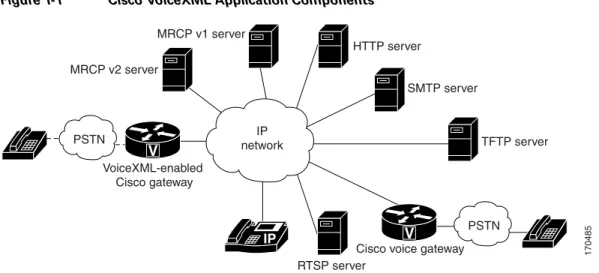
VoiceXML brings the advantages of web-based development and content delivery to voice applications. It is similar to HTML in its simplicity and in its presentation of information. Cisco VoiceXML is based on the VoiceXML 2.1 W3C Candidate Recommendation (June 13, 2005) andis designed to provide web developers great flexibility and ease in implementing VoiceXML applications. Figure 1-1 shows components that can be configured as part of a VoiceXML application installed on a Cisco voice gateway.
Figure 1-1 Cisco VoiceXML Application Components
The following is an example of a call flow for a VoiceXML application:
Note In Cisco IOS Release 12.3, the recording feature is supported only on the Cisco AS5350XM and Cisco AS5400XM.
1. The caller dials a number and is connected through the PSTN or the IP network to a Cisco voice gateway that is configured as a VoiceXML-enabled gateway.
For instance, the caller could be connected to a business providing sport scores over the telephone.
2. The Cisco voice gateway uses the caller’s DNIS information and associates it with the appropriate VoiceXML document, residing on a web server (for example, an HTTP server).
For example, this business uses a VoiceXML document on an HTTP server to provide baseball game scores.
3. The voice gateway runs the VoiceXML document and responds to the caller’s input by playing the appropriate audio content.
TFTP server HTTP server MRCP v1 server MRCP v2 server SMTP server RTSP server VoiceXML-enabled Cisco gateway
Cisco voice gateway 170485
IP network V V PSTN PSTN IP
An application might play a recorded prompt that asks the caller to press a specific dual tone multiple frequency (DTMF) key (for example, “Press 2 for the results of tonight’s National League Playoff Game”) to hear a spoken sport score (“Giants 4, Mets 0”).
4. Cisco IOS VoiceXML could also transfer the caller to another party, perhaps customer service. For example, the application, after playing the score, might prompt the caller with the message: “If you sign up for a year’s service now, you’ll be entered in the drawing for two tickets to this year’s World Series. Press 5 to contact one of our agents.”
The following is an example of a call flow for VoiceXML application using recording:
1. The caller dials a number and is connected through the PSTN or the IP network to a Cisco voice gateway that is configured as a VoiceXML-enabled gateway.
2. The Cisco voice gateway uses the caller’s DNIS information and associates it with the appropriate VoiceXML document, residing on a web server.
3. The voice gateway runs the VoiceXML document and responds to the caller’s input by playing the appropriate prerecorded audio files.
4. The gateway executes the document, which prompts the user to record a voice message.
5. The message is recorded by the gateway and stored in local memory with the selected audio encoding.
6. After the recording is completed, the user can review the message or submit it by either pressing a specified key or hanging up the call.
7. When the user submits the voice mail message, the gateway's VoiceXML browser submits the voice message in .au or .wav file format to a specified URL using the HTTP POST method.
8. After receiving the message, the web server stores the message in the appropriate mailbox.
9. After successfully storing the voice message, the application instructs the media stream process to delete the local copy of the voice message.
Voice Store and Forward Feature
The Voice Store and Forward feature in Cisco IOS Release 12.2(11)T expands the capabilities of Cisco VoiceXML to include the input and processing of form field entries using recorded voice clips, instead of numeric input only. This feature uses the VoiceXML 2.0 <record> element to capture voice clips which can then be submitted to an external web server using Hypertext Transfer Protocol (HTTP) or Real Time Streaming Protocol (RTSP), or to a messaging server using Simple Mail Transfer Protocol (SMTP) for additional processing.
This recording feature can be used to collect caller names or addresses for call screening, product registration, or similar e-commerce applications, and for simple voice messaging, or any voice browser application where alphanumeric input using dual tone multifrequency (DTMF) is cumbersome or impractical.
The Voice Store and Forward feature supports speech recording and playout with a choice of four different media targets, including:
• Local memory—Intended for storing short-length speech clips, such as caller name or address, or a short voice message. Recordings can be submitted to HTTP server using POST method.
• RTSP—Intended for storing indefinite-length audio recordings. Voice recording is directly streamed to an external RTSP server using the recording URL specified by the user.
• SMTP—Recording is done by directly sending voice recordings to the SMTP server as e-mail audio attachments. This option supports the Mailto: URL.
The Voice Store and Forward feature enables voice messaging by dynamically switching a busy or no-answer voice call to a VoiceXML application. The voice gateway can operate in two modes:
• On-ramp mode—Incoming calls are handled by a VoiceXML document that lets callers record voice messages if the destination is busy or there is no answer. The on-ramp gateway saves all voice recordings as audio clip files to internal memory if space is available, or onto an external HTTP or RTSP server, or by directly streaming the voice message as an e-mail enclosure to an external ESMTP server. The audio clips are then converted into outbound ESMTP e-mail messages.
• Off-ramp mode—The external mail server sends an e-mail notification to the off-ramp gateway. The off-ramp gateway matches the DNIS in the e-mail header to a MMOIP dial peer, and places the call to the PSTN or IP phone user. When the call is answered, the gateway executes the VoiceXML application. The VoiceXML application is responsible for delivering the audio clip from the external media server to the outbound PSTN or IP destination using media play functions. The gateway does not support streaming the audio clip directly from the SMTP server.
Volume and Rate Control Feature
The volume of audio prompts can be adjusted during playback. Audio prompts that are played out from an HTTP server using the G.711 codec can also be speeded up or slowed down. A VoiceXML variable contains the rate and duration of the last prompt that was played.
The rate and volume of prompts is controlled by using specific attributes in the VoiceXML document. see the “Volume and Rate Control” section on page 1-16 for details.
Note This feature is a nonstandard extension to VoiceXML and is subject to nonbackward compatible changes in future versions.
ASR and TTS Features
Cisco IOS Release 12.4(15)T enables Cisco voice gateways to support automatic speech recognition (ASR) and text-to-speech (TTS) media services through Media Resource Control Protocol version 2 (MRCP v2) which uses Session Initiation Protocol (SIP) and Session Description Protocol (SDP) as session management protocols to create a session and set up media channels to the MRCP v2 server. Cisco IOS Release 12.2(11)T introduces automatic speech recognition (ASR) and text-to-speech (TTS) capabilities for VoiceXML and Tcl IVR applications on Cisco voice gateways. This release also extends the Cisco VoiceXML interpreter to include support of some VoiceXML 2.0 features.
This release provides interfaces to ASR and TTS media servers using the Media Resource Control Protocol (MRCP), an application level protocol developed by Cisco and its ASR and TTS media server partner, Nuance Communications. MRCP is used to control media service resources such as speech synthesizers for TTS and speech recognizers for ASR. It provides a mechanism for client devices processing audio or video streams to control media resources or devices on external media servers. As shown in Figure 1-2, the Cisco gateway running an IVR application and the media servers providing TTS and ASR functionality maintain a client-server relationship through an RTSP connection; the RTSP client is the gateway and the RTSP server is the streaming media server providing ASR and TTS.
Note The Cisco IOS VoiceXML gateway using MRCP v2 was qualified with Nuance Recognizer 9.0.1, RealSpeak 4.5.0, and Nuance Speech Server 5.0.1.
Figure 1-2 A Network Implementing ASR and TTS
Tcl IVR 2.0 and VoiceXML Integration (Hybrid Applications) Feature
Tcl IVR 2.0 extensions allow Tcl applications to leverage support for ASR and TTS by invoking and managing VoiceXML dialogs within Tcl IVR scripts. This enables the implementation of hybrid applications using Tcl IVR for call control and VoiceXML for dialog management.
T.37 Store and Forward Fax Detection Feature
When a VoiceXML fax detection application is configured on the gateway, callers can dial a single number for both voice and fax calls. The gateway automatically detects that a call is a fax transmission by listening for CNG, the distinctive fax T.30 “calling” tone. When configured for fax detection, the
ASR/TTS server ASR/TTS MRCP v2 server MRCP v2/SIP HTTP server MRCP v1/RTSP VoiceXML audio VoiceXML-enabled Cisco gateway 170486 IP network V PSTN IP
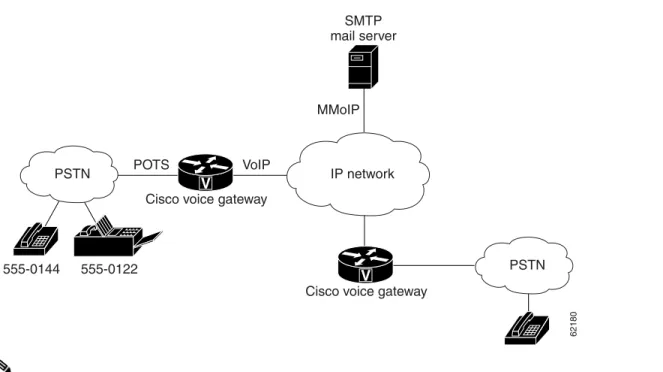
Cisco VoiceXML gateway continuously listens to incoming calls to determine which calls are voice or fax. The gateway then routes the calls to the appropriate application or media server, as shown in
Figure 1-3.
Figure 1-3 Fax Detection on Cisco Gateway
Note In Cisco IOS Release 12.3, fax detection is supported only on the Cisco AS5350XM and Cisco AS5400XM.
After a call is established, the VoiceXML application can play an audio prompt to the caller while waiting for CNG detection. CNG detection continues for the entire duration of the call, so it is possible that a caller could first be connected to a voice-mail server and leave a voice message, then start to transmit a fax and the application would automatically switch the call to the fax application. After the application detects whether a call is voice or fax, the gateway routes the call based on dial peers. The fax detection application requires at least two dial peers:
• Inbound POTS dial peer, for incoming calls from the PSTN
• Outbound MMoIP dial peer for store-and-forward fax, to send fax transmissions to an e-mail server For information on configuring fax relay or store-and-forward fax, see the Cisco IOS Fax and Modem Services over IP Application Guide.
System Output
This section includes:
• Audio Playout, page 1-9
Describes the playout methods for audio prompts and the types of audio file formats and codecs supported for a Cisco VoiceXML application.
IP network PSTN MMoIP POTS 555-0144 555-0122 VoIP
Cisco voice gateway Cisco voice gateway
SMTP mail server PSTN 62180 V V
• Volume and Rate Control, page 1-16
Describes how to control the volume and rate of audio playout.
• Type-ahead Support, page 1-20
Describes how a type-ahead buffer works in a VoiceXML application.
Audio Playout
Cisco VoiceXML supports the following types of prompts:
• Prerecorded Audio Playout
• Synthesized Audio Playout
Prerecorded Audio Prompts
Cisco VoiceXML supports HTTP, TFTP, RAM, RTSP, and flash memory as sources of prerecorded audio prompts for playout. The audio files can be played out in cached or buffered mode, or they can be streamed.
In cached mode, audio files are loaded into the gateway’s memory and then streamed from the gateway to the specific call leg. The streaming occurs only after the entire audio file is loaded from an HTTP or TFTP server. The amount of memory required to store these audio files can be controlled by using the
ivr prompt memory command. Caching can be performed only with HTTP and TFTP servers. RTSP servers can only conduct real-time streaming of audio files.
Streaming of audio files can be performed by both HTTP and RTSP servers; however there is a difference in the method of streaming. HTTP servers stream files to the gateway in chunks, using the transfer encoding method; RTSP servers stream files continuously to the gateway.
With an HTTP server, use the ivr prompt streamed command to enable the gateway to stream audio files during playout. HTTP prompts are streamed by default but they can be disabled by using the no ivr prompt streamed http command.
With an RTSP server, use the rtsp client timeout connect command to set the number of seconds allowed for the router to establish a TCP connection to an RTSP server. With
Cisco IOS Release 15.0(1)M and later releases, use the cisco-maxtime attribute of the <prompt> element to control the playout time for RTSP live streaming. If cisco-maxtime is zero or has no value set, the RTSP stream is played indefinitely.
Cisco voice gateways support .au and .wav file formats, and 14 codecs for audio playout on the PSTN or IP side of a call leg. The VoiceXML document specifies the audio format at the time of recording. If the audio format is not specified, the default format of .au is used. The G.711 codec has an standard industry header that can be recognized by the voice gateway and third-party media players in the industry. However, the other codecs that are supported by Cisco voice gateways have specific Cisco headers that may have to be modified for playout on third-party media players.
For more information on supported codecs, and on how to modify the headers in a codec, see Appendix A, “Audio File Support” in the Cisco IOS Tcl and VoiceXML Application Guide for your Cisco IOS release.
For <audio> playout, the language CLI configuration is not used to locate the audio files. The VoiceXML document uses the full URI in the src attribute of the <audio> element. If src is a relative URL (just the filename), the base attribute of the <vxml> element is used to form a complete URI. If the base attribute is not present, the VoiceXML document uses the URI from where it loads as the base.
Note In Cisco IOS Release 12.4(11)T and later releases, if the <audio> element is under the <prompt> tag and if the <prompt> tag specifies a base URL, then the relative URL in the src attribute of the <audio> element will use the base attribute of the <prompt> tag to form a complete URI.
Multiple <audio> Playout
If you use multiple audio files within a single <prompt> tag, the document first downloads all the audio files before playing them to avoid playback silence between each audio download. However, if the document cannot load one or more of the audio files, none of the audio files are played. The caller will not hear any playback and the document throws an error event.
Tip You may not hear an audio playout if you load all the audio files into a single <prompt>. For best results, separate the audio files into multiple <prompt> tags. The number of audio files in a single <prompt> tag depends on the number of audio files and their individual sizes.
You may also want to preload all or most of the commonly used audio files onto the gateway, or save them in the gateway flash memory instead of the HTTP server.
If you use a single audio file within each< prompt> tag, the document downloads and plays each audio file one at a time. For example:
<prompt> <audio src= “http://1.2.16.1/audio/en_welcome.au”/> </prompt> <prompt> <audio src= “http://1.2.16.1/audio/noaudio.au”/> </prompt>
If the document cannot load an audio file, the caller will hear the welcome prompt before the document throws an error event. Using multiple audio files within a single <prompt> tag works with RTSP because it is streamed; with HTTP, you must use a single audio file within each <prompt> tag.
Using multiple audio files within a single <prompt> tag is only intended for concatenated prompts where playback silence after each download is a concern. For example;
<prompt>
<audio src="http://1.2.16.1/audio/you_have.au"/> <audio src="http://1.2.16.1/audio/3.au"/>
<audio src="http://1.2.16.1/audio/emails.au"/> </prompt>
In the above example, because the prompts are concatenated, they must all be embedded within a single <prompt> tag to ensure that the playback will be:
“You have 3 emails.”
If you split these concatenated prompts by embedding each one within its own <prompt> tag, as shown below: <prompt> <audio src="http://1.2.16.1/audio/you_have.au"/> </prompt> <prompt> <audio src="http://1.2.16.1/audio/3.au"/> </prompt> <prompt> <audio src="http://1.2.16.1/audio/emails.au"/>
</prompt>
The playback will be:
“You have <silence...> 3 <silence...> emails”, which is inappropriate.
Tip Use multiple sources in a single <prompt> tag only for concatenated prompts. For different codec types, embed each audio file within a single <prompt> for successful playout.
Note In Cisco IOS Release 12.4(11)T and later releases, no error event will be thrown if the audio file cannot be loaded or played if you enter the vxml version 2.0 command.
Dynamic Prompts Playout
Note In Cisco IOS Release 12.4(11)T and later releases, only the xml:lang attribute of the <prompt> element in a VoiceXML document can be set to select a specifc language.
Dynamic prompts consist of small audio files played out in sequence. The type of language and the TTS notation used in playout is defined by Tcl language modules or built-in language definitions. Cisco IOS software includes built-in modules for English, Chinese, and Spanish. To add support for a new language, you must configure a new Tcl language module on the voice gateway. For information on how to configure a language module, see Enhanced Multi-Language Support for Cisco IOS Interactive Voice Response.
The language and location of the audio files can specified in the VoiceXML document or they can be configured through the CLI by using the call application voice language and the call application voice set-location commands. If only one language is configured in the CLI, then that language is assumed for all documents that do not specify a language.
If the language and location is to be specified in the VoiceXML document, use the xml:lang attribute of the <prompt> element to select a specific language, and to point to the location of the recorded files.
Synthesized Audio Playout
Synthesized audio playout consists of dynamic prompt and text-to-speech (TTS) prompt playout. Dynamic prompts allow basic TTS operations such as playing dollar amounts, time, and dates. An external media server provided by a third-party is required to play TTS prompts. The type of language supported for TTS playout is dependent on the external media server. In the event of an external media server failure, the application developer can implement a backup server through the script. For details, see the “External Server Failure” section on page 1-13.
Text-to-Speech Prompts
A third-party external media server is required to play TTS prompts. Playout of TTS prompts is dependent on the languages supported on the external media server. A speech synthesis markup language (SSML) is used to allow the development of synthetic speech in web applications. SSML allows VoiceXML document writers to control aspects of speech output, such as emphasis, pitch, and volume. The media server receives the speech synthesis markup specified in the VoiceXML document, converts
it to audio, and streams it to the user through the Cisco voice gateway. SSML support is dependent on the media server. For example, the media server may not be able to support some audio URIs such as TFTP, RTSP, and flash.
For information on SSML, see the Speech Synthesis Markup Language Specification.
Mixed Audio and Text-to-Speech Prompts
Processing of prompts by a Cisco voice gateway depends on the control of the prompt. Prerecorded audio prompts load (or stream) through the Cisco voice gateway without any interaction from the TTS media server. By default, prerecorded prompts load through the voice gateway; however a user can force the voice gateway to direct the SSML to the external media server by modifying the script.
For example, using “alternate text” in <audio src= “audio-to-play”> alternate text </audio> forces the gateway to send the SSML to the media server for playout.
For a <prompt> with SSML, the markup (which includes text and prerecorded audio) is sent to the TTS media server by configuring the CLI or using the com.cisco.tts-server property. The level of SSML support, and the types of file formats and codecs supported, are dependent on the support capabilities of the external media server.
Examples
The following example is handled by the TTS media server:
<prompt> this is a sample tts text <break/> with ssml </prompt>
The following example is handled by the TTS media server because it contains SSML:
<prompt> this is a sample tts text <break/> with ssml and an audio src <=”welcome.wav“/></prompt>
The following example is handled by the voice gateway because it contains only .au and src.
<prompt><audio src=”one.au“/><audio src=”two.au“/></prompt>
The following example shows how the voice gateway is forced to play SSML from the media server and the audio source from the gateway.
<prompt> this is a sample tts text <break/> with ssml and audio src </prompt> <prompt><audio src=”welcome.wav“/></Prompt>
The limitations of TTS in the Cisco implementation of VoiceXML 2.0 are:
• The media server is required to support HTTP clients only. This requirement imposes a limitation on the data contained in a <prompt> element.
• If the <prompt> element contains a W3C speech markup, then the entire markup in that <prompt> element uses an external media server for a TTS operation, and, a single G.711 u-law codec for the entire audio stream. This <prompt> element can only contain an HTTP type URI. The codec of the audio stream is limited to G.711 u-law because the media server cannot switch codecs.
• If the <prompt> element contains <audio src> elements instead of a W3C speech markup, these <audio src> elements can contain individual Flash, TFTP, FTP, and RTSP URIs, or a mix of any of them. These URIs are played using streaming mechanisms available on Cisco voice gateways. The audio files can have different codecs and the system plays them out in sequence subject to the following limitations:
– The digital signal processor (DSP) supports the specified codecs on the telephony side.
– On the IP side, interactive voice response supports the specified codecs. See the Cisco IOS Tcl IVR and VoiceXML Application Guide for your Cisco IOS release for details.
• A URI in the <audio src> element can point to a block of speech markup data, but such support is dependent on, and conditional to the vendor’s decision of where the <audio src> element can point.
External Server Failure
In a Cisco VoiceXML solution, the Cisco voice gateway interacts with external media servers for automatic speech recognition, text-to-speech, and streamed recording. If an external media server fails to work, a backup server is desirable to take over the function of the failed media server. A typical approach is to use a content switch that is transparent to the VoiceXML application developer. However, this approach may not be very desirable because of the cost increase.
Cisco VoiceXML provides an alternate solution to external server failure where the application developer can handle server failure directly through the script. A backup external media server must be provided by the third party server vendor, and it must be initially configured on the voice gateway. In the event of a server failure, the VoiceXML interpreter throws an error event which is caught by the VoiceXML application, and the information is passed to a server side application.
The server side application is a web application written as a Java servlet or a Hypertext Preprocessor (PHP) script. For example, an error.noresource event is thrown if the external ASR server fails to operate. The VoiceXML script passes this error event information to a server side web application using the <submit> element. The server side application assigns a new backup media server using the <property> element in all subsequent VoiceXML pages that are generated dynamically.
The original VoiceXML document is regenerated and returned to the VoiceXML interpreter for execution. The regenerated VoiceXML document is similar to the original document with the exception of pointing to the new backup media server instead of the failed server.
Note In Cisco IOS Release 12.4(11)T and later releases, the error.noresource event is thrown if an external ASR or TTS server fails to operate. The old event com.cisco.media.resource.unavailable is supported for backward compatibility.
Example
This example shows how to recover from media server and HTTP server failures.
color.vxml
<?xml version="1.0"?>
<vxml version="2.0" xml:lang="en-US" application="root.vxml"> <!-- color.vxml
This is the main VoiceXML document invoked when the user calls into the gateway. This VoiceXML document plays a text-to-speech prompt and waits for user input. If the user's input matches the defined grammar, a prompt is played to indicate his selection.
In the form, “colorSelection”, the DOCUMENT_STATE and FORM_STATE are used to track the execution state of this application. When an error event is caught in the root.vxml document, these variables are submitted to the application server. This allows the application server to generate a dynamic VoiceXML document according to the state of execution of this application.-- >
<property name="fetchtimeout" value="5s"/> <property name="timeout" value="5s"/>
<property name="interdigittimeout" value="3s"/> <property name="termchar" value="#"/>
<form id="colorSelection"> <block>
<assign name="DOCUMENT_STATE" expr="'color.vxml'"/> <assign name="FORM_STATE" expr="'colorSelection'"/>
</block>
<field name="color"> <prompt bargein="true">
Please select one of the following colors. Say red, blue or green </prompt>
<grammar version="1.0" xml:lang="en-US" root="colors"> <rule id="colors" scope="public">
<one-of> <item>red</item> <item>blue</item> <item>green</item> </one-of> </rule> </grammar> <filled>
<prompt>You have selected <value expr="color"/></prompt> </filled> </field> </form> </vxml> root.vxml <?xml version="1.0"?> <vxml version="2.0">
<!-- This is the root.vxml document which defines the catch handlers, the default properties and application variables.
The error.noresource event handler is designed to handle two possible scenarios.
The first scenario is a VoiceXML application trying to play a text-to-speech (TTS) prompt and collect user input for recognition. In this scenario, two error.noresource events are thrown.
The first error event is thrown because of a TTS failure, the second event is thrown because of an ASR failure. When the first event is caught, an error counter is incremented. This counter is cleared when the second event is thrown.
The second scenario is a VoiceXML application trying to play a TTS prompt or trying to conduct a recognition. In this case, only one error.noresource event is thrown.
The two forms, “dummyForm” and “resetMediaServer” handle the two scenarios.-- > <var name="WEB_SERVER" expr="'http://httpServer1/'"/>
<var name="FORM_STATE" expr="'ROOT'"/> <var name="DOCUMENT_STATE" expr="'ROOT'"/> <var name="ERROR_EVENT" expr=""/>
<var name="ERROR_COUNTER" expr="0"/> <catch event="error.noresource">
<log> media resources unavailable</log>
<assign name="ERROR_EVENT" expr="'MEDIA_RESOURCE_UNAVAILABLE'"/> <if cond = "ERROR_COUNTER == 0">
<assign name="ERROR_COUNTER" expr="1"/> <goto next="#dummyForm"/>
<else/>
<assign name="ERROR_COUNTER" expr="0"/> <goto next="#resetMediaServer"/> </if>
<!-- This form is to handle the first error.noresource event thrown because of a failure to do Text To Speech --> <form id="dummyForm"> <block> <prompt><audio src="silence.au"/></prompt> <goto next="#resetMediaServer"/> </block> </form> <form id="resetMediaServer"> <block>
<log>Document state is <value expr="DOCUMENT_STATE"/> </log> <log>Form state is <value expr="FORM_STATE"/> </log>
<submit expr="WEB_SERVER+'handleError.php'" method="get" namelist=" ERROR_EVENT DOCUMENT_STATE FORM_STATE"/>
</block> </form>
<catch event="error.badfetch">
<assign name="ERROR_EVENT" expr="'BAD_FETCH'"/>
<assign name="WEB_SERVER" expr="'http://mediaServer2/'"/>
<prompt>We are having technical difficulties. </prompt> <reprompt/>
<submit expr="WEB_SERVER+'handleError.php'" method="get" namelist=" ERROR_EVENT DOCUMENT_STATE FORM_STATE WEB_SERVER ERROR_COUNTER"/>
</catch>
<catch event="nomatch">
<assign name="ERROR_EVENT" expr="'NOMATCH'"/>
<prompt>I did not get that. Please try again</prompt><reprompt/> </catch>
<catch event="noinput">
<assign name="ERROR_EVENT" expr="'NOINPUT'"/>
<prompt>I did not hear you.Please try again</prompt><reprompt/> </catch>
<catch event ="noinput nomatch error" count="3"> <assign name="ERROR_EVENT" expr="'FINAL_TRY'"/> <prompt>Sorry,please try again later</prompt> <exit/>
</catch> </vxml>
handleError.php
<vxml version="2.0" xml:lang="en-US" application="root.vxml">
<!-- This PHP script handles the different error events and generates a dynamic VoiceXML document in response to a request by the root.vxml document. When a media server error is detected, the PHP script sets the properties for a backup media server.
When a HTTP server is detected, the PHP script sets the global variable for the HTTP server. -- >
<form id="handleError"> <?php
if($ERROR_EVENT==MEDIA_RESOURCE_UNAVAILABLE){ if(($FORM_STATE) && ($DOCUMENT_STATE)) { echo("
<property name=\"com.cisco.asr-server\" value=\"rtsp://mediaServer2/recognizer\"/>
<block>
<log> Assign to a new media server </log> </block>
"); }
} elseif($ERROR_EVENT==BAD_FETCH){ echo("
<var name=\"WEB_SERVER\" expr=\"'http://backupServer/'\"/> <block>
<log> Assign a backup web server </log> </block>
"); } else{ echo(" <block>
<log> Fail to assign a new media server </log> </block>
"); } ?>
<property name="fetchtimeout" value="5s"/> <property name="timeout" value="5s"/>
<property name="interdigittimeout" value="3s"/> <property name="termchar" value="#"/>
<property name="bargein" value="true"/> <block>
<assign name="DOCUMENT_STATE" expr="'color.vxml'"/> <assign name="FORM_STATE" expr="'colorSelection'"/> </block>
<field name="color"> <prompt bargein="true">
Please select one of the following colors. Say red, blue or green </prompt>
<grammar version="1.0" xml:lang="en-US" root="colors"> <rule id="colors" scope="public">
<one-of> <item>red</item> <item>blue</item> <item>green</item> </one-of> </rule> </grammar> <filled>
<prompt>You have selected <value expr="color"/></prompt> </filled>
</field> </form> </vxml>
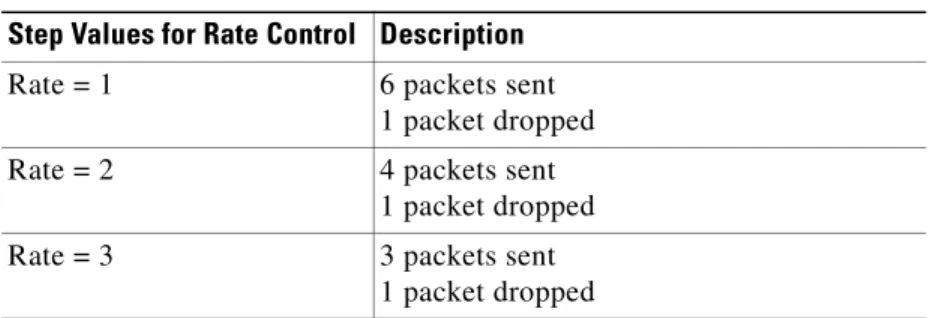
Volume and Rate Control
The attribute cisco-vcrprompt of the <prompt> element is used to control volume and the attribute cisco-rate specifies the rate of prompt playout. To control the playout volume or the rate of playout, set the cisco-vcrprompt attribute to TRUE before you use the <cisco-vcrcontrol> element. To enable volume