Product Support Notice
© 2014 Avaya Inc. All Rights Reserved. PSN # PSN004098uOriginal publication date: 8-Nov-13. This is Issue #06, Published date: 21-Feb-14.
Severity/risk level High Urgency Complete by April 30, 2014 ATTENTION: Mandatory Administrative Update for SAL Remote Access Infrastructure Improvement
PRODUCTS AFFECTED:
All versions {versions 1.5, 1.8., 2.0, 2.1, 2.2} of Secure Access Link (SAL) Gateway, including: Standalone SAL Gateway (software only)
Virtualized SAL vAppliance on VMware
SAL Gateway on System Platform (Services-VM) SAL Gateway packaged with Avaya Diagnostic Server ION SAL SA5600
DESCRIPTION OF CHANGE:
SAL remote access backend infrastructure update
In support of the Westminster facility and data center migration and in continuing efforts to ensure our remote access connectivity solution with our customer is as current as possible, Avaya is updating the Secure Access Link (SAL) remote access backend infrastructure. This upgrade will provide increased scalability and availability of the communication between customer and partner SAL Gateways and Avaya’s infrastructure.
Part of this upgrade will consist of moving the current environment to a new facility which will require some configuration changes at the customer site in order to take advantage of the new capabilities. SAL was designed based on the strictest customer security requirements which mandated a premise-based configurable solution. Due to this design, customer configuration changes will be necessary to ensure continued support. The details for the changes required by the customer and partner are listed in this PSN and include updating firewalls, outbound proxies, and DNS host entries with new IP addresses and fully qualified domain names (FQDN) to allow SAL Gateways to connect appropriately with the new environment.
The changes on the customer network to accommodate the new IP addresses and FQDNs are critical for continued access and ability to support Avaya products via the SAL remote access method. In order to provide the best support possible we are asking that all Customers and Business Partners make these change within the timeframes listed below. Avaya will utilize automation to
reconfigure/re-point most of the SAL Gateways, but only if they have network access to the new environment. Thus it’s imperative to verify and comply with the details within this PSN.
Please note: This PSN and Infrastructure update has no impact on the SAL alarming capabilities or infrastructure CUSTOMER ACTIONS REQUIRED:
Each customer environment is unique and may need to address different variables within their environment. For each environment, the following questions need to be asked:
1.
Do you have any firewall rules that enable SAL Gateway to communicate with Avaya SAL Enterprise? 2. Does your environment have a proxy server?3. Does your SAL Gateway use DNS to communicate to Avaya?
Note: Firewall and proxy settings within the customer network can be made immediately in preparation for the migration.
Administration configuration changes to the SAL Gateway
cannot
be made before March 17, 2014. Any changes previous to this date will introduce disruption of remote access services.© 2014 Avaya Inc. All Rights Reserved. Page 2 Network settings update decision table
To move to the new Avaya infrastructure, determine which scenario applies to you. Complete the actions listed in the following table according to one of the two conditions that matches your network environment. The actions are described in the Network settings update table.
Does your SAL Gateway use DNS resolution to communicate with the current Avaya SAL Remote Server and Global Access Servers?
Actions
(Details for each Action ID are detailed in Table 2: Network Settings Updates)
Due date
Yes 1. Change your firewall settings, if
applicable.
2. Change your outbound proxy server settings, if applicable.
Complete between now/receipt and April 30, 2014
NOTE:
Avaya will reconfigure SAL Gateways to point to the new SAL Remote Servers.
(remote.sal.avaya.com, sas[1-4, 21, 22, 31, 32].sal.avaya.com) Therefore, you must complete the listed actions by April 30 to avoid interruption in the communication to the Avaya Remote Access infrastructure.
No 1. Change your firewall settings, if
applicable.
2. Change your outbound proxy server settings, if applicable.
Complete between now/receipt and April 30, 2014
NOTE:
Complete the listed actions by April 30 to avoid interruption to the remote access infrastructure. 3. Change the network mapping for the
operating system of the SAL Gateway host.
4. Change the Remote Server hostname in the SAL Gateway UI ONLY if your current setting is
sl1.sal.avaya.com or 198.152.212.33
Complete between March 17 and April 30, 2014 NOTE:
Start the listed actions beginning March 17, 2014 to avoid interruption to the remote access infrastructure.
Network Settings Updates (Table 2)
# Action Description Required
1 Change your firewall settings
Complete between now/receipt and the April 30, 2014
Contact your networking and IT teams to configure the firewall on your network to allow access to the new hostnames, IP addresses, and ports mentioned in the “IP Reference Tables” section (Table 1).
Yes
2 Change your outbound proxy server settings
Complete between now/receipt and the April 30, 2014
Have your proxy server configured to allow outbound
communications to the new hostnames, IP addresses, and ports mentioned in the “IP Reference Tables” section (Table 1).
Yes
3 Change the network mapping for the operating system of the SAL Gateway host
The following is a sample procedure to modify the network mapping for a Linux host to add the new addresses. You may use other methods to add the new addresses to the hosts file. 1. Log in to the Linux server as the root user.
2. Open the hosts file located at /etc/hosts in the text
Yes, if you do not use global DNS
# Action Description Required
Complete between March 17 and April 30, 2014
editor, and add the following entries:
135.11.107.20 remote.sal.avaya.com 135.11.105.105 sas1.sal.avaya.com 135.11.105.106 sas2.sal.avaya.com 135.11.105.107 sas3.sal.avaya.com 135.11.105.109 sas4.sal.avaya.com 135.10.203.5 sas21.sal.avaya.com 135.10.203.6 sas22.sal.avaya.com 198.152.76.5 sas31.sal.avaya.com 198.152.76.6 sas32.sal.avaya.com 3. Save and close the file.
4 Change the Remote Server hostname in the SAL Gateway UI ONLY if your current setting is sl1.sal.avaya.com or 198.152.212.33
Completion between March 17 and April 30, 2014
1. Log on to the SAL Gateway UI.
2. Based on your SAL version, perform one of the following in the navigation pane:
For version 1.5 to 1.8, click Administration > Remote Access.
For version 2.0 to 2.2, click Administration > Remote Server.
3. Click Edit, and enter the new address for Remote Server in the following fields:
For version 1.5 to 1.8, modify the values in the Primary Server Host Name / IP Address and the Secondary Server Host Name / IP Address fields. For version 2.0 to 2.2, modify the values in the
Primary Remote Server and the Secondary Remote Server fields.
See Table 1 in the “Reference Tables” section for the new hostname and the IP address of Remote Server. 4. Click Apply.
5. Log off from the SAL Gateway UI.
Yes, if you do not use global DNS
© 2014 Avaya Inc. All Rights Reserved. Page 4 IP Reference Tables
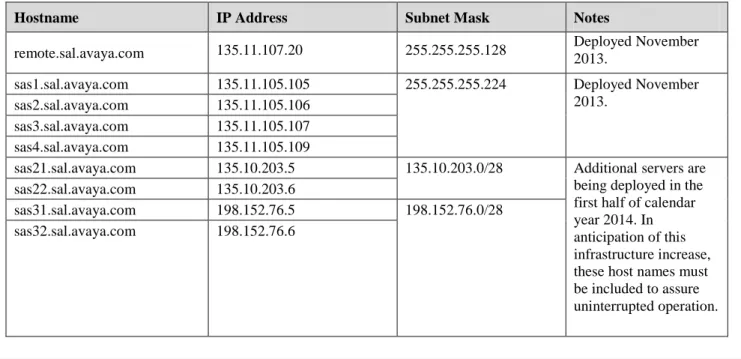
This section contains the values for the additional hostnames and IP addresses as part of the Avaya Remote Access infrastructure upgrade for the Primary Remote Server and the Secondary Remote Server.
Table 1
: Additional IP addresses for SAL Remote Server
Port: 443/TCPHostname IP Address Subnet Mask Notes
remote.sal.avaya.com 135.11.107.20 255.255.255.128 Deployed November 2013.
sas1.sal.avaya.com 135.11.105.105 255.255.255.224 Deployed November
2013. sas2.sal.avaya.com 135.11.105.106
sas3.sal.avaya.com 135.11.105.107 sas4.sal.avaya.com 135.11.105.109
sas21.sal.avaya.com 135.10.203.5 135.10.203.0/28 Additional servers are being deployed in the first half of calendar year 2014. In anticipation of this infrastructure increase, these host names must be included to assure uninterrupted operation. sas22.sal.avaya.com 135.10.203.6
sas31.sal.avaya.com 198.152.76.5 198.152.76.0/28
sas32.sal.avaya.com 198.152.76.6
TESTING YOUR CHANGE:
To ensure that the configuration settings have been completed and the SAL Gateway is successfully migrated, the following test can be run.
1. Ensure to test the connections after the all of the changes have been made for each of the IP addresses in Table 1.
2. The tests below can use either ‘curl’ or ‘wget’, which are available as commands on the SAL Gateway Operating System. 3. Note the following: If your SAL Gateway HTTPS requests are proxied, you will need to do the following step first. If you
do not run this command for your proxy, the subsequent test commands will not succeed. a. Please export the https_proxy variable.
b. Replace your proxy server address for <proxyserver.net> and port for <port> as per example below:
4. Log into your SAL Gateway. Any user privilege can run this following command. 5. To test using “curl”, type in the following command:
curl -m10 -k -o /dev/null --silent --head --write-out '%{http_code}' https://remote.sal.avaya.com:443
export https_proxy https_proxy=http://<username:password@><proxyserver.net>:<port>
e.g.
Example screenshot of the “curl” command being run successfully from linux login [user] - A response with a value of 200 indicates SUCCESSFUL communication:
[user]#
[user]# curl -m10 -k -o /dev/null --silent --head --write-out '%{http_code}'
https://remote.sal.avaya.com:443
200 [user]#
6. To test using “wget”, type in the following command:
wget --no-check-certificate --timeout=10 --spider -S "https://remote.sal.avaya.com:443/" 2>&1 | grep "HTTP/" | awk '{print $2}'
Example screenshot of the “wget” command being run successfully from linux login [user] - A response with a value of 200 indicates SUCCESSFUL communication:
[user]#
[user]# wget --no-check-certificate --timeout=10 --spider -S "https://remote.sal.avaya.com:443/" 2>&1 | grep "HTTP/" | > awk '{print $2}'
200 [user]#
7. Repeat either command for all IP addresses and host names in table 1. ADDITIONAL INFORMATION FOR OUR BUSINESS PARTNERS:
Avaya will publish additional guidance for BPs with and without concentrators once the new migration dates have been announced.
HELPFUL TIPS AND FAQS:
The following are some helpful hints. However, they might not apply to all customer networking requirements. In general, customers and partners need to apply their policies to allow outbound HTTPS connections to Avaya.
Firewall and proxy settings within the customer network can be made any time in preparation for the April 30, 2014.
Administration configuration changes to the SAL Gateway
cannot
be made before March 17, 2014. Any changes prior to this date will introduce disruption of remote access services. Avaya will use automation to reconfigure the SAL Gateways to point to the new SAL Remote Servers. This automation will validate that the Gateway can communicate through firewall and proxies prior to making the SAL Gateway configuration change. The network changes in the PSN are critical to support this automation. Also note that Avaya may utilize this automation outside of the dates noted above.
If DNS is not configured and you are using static mapping between IP address and FQDN, ensure that the /etc/hosts and /etc/sysconfig/network files have host name entries that match the ones the system displays when you use the commandhostname.
If all of the SAL server host names or IP addresses are not included in the SAL Gateway configuration update, including those scheduled for deployment later in 2014, you will have intermittent connectivity for SAL Remote Access.
© 2014 Avaya Inc. All Rights Reserved. Page 6 IMPACTS AND MITIGATIONS:
Avaya will maintain both data centers for a limited time afterwards to avoid customer disruption and evaluate compliance; however, that does not lessen the urgency for customers to take action listed in the PSN. In order to receive the best possible support from Avaya, we are asking for your support in migrating by the dates in the tables above.
If the necessary changes to the customer network configuration have not been completed before the shutdown date, the customer may no longer receive remote access support through the SAL infrastructure.
Disclaimer: ALL INFORMATION IS BELIEVED TO BE CORRECT AT THE TIME OF PUBLICATION AND IS PROVIDED “AS IS”.
AVAYA INC., ON BEHALF OF ITSELF AND ITS SUBSIDIARIES AND AFFILIATES (HEREINAFTER COLLECTIVELY REFERRED TO AS “AVAYA”), DISCLAIMS ALL WARRANTIES, EITHER EXPRESS OR IMPLIED, INCLUDING THE WARRANTIES OF MERCHANTABILITY AND FITNESS FOR A PARTICULAR PURPOSE AND FURTHERMORE, AVAYA MAKES NO REPRESENTATIONS
OR WARRANTIES THAT THE STEPS RECOMMENDED WILL ELIMINATE SECURITY OR VIRUS THREATS TO CUSTOMERS’ SYSTEMS. IN NO EVENT SHALL AVAYA BE LIABLE FOR ANY DAMAGES WHATSOEVER ARISING OUT OF OR IN CONNECTION WITH THE INFORMATION OR RECOMMENDED ACTIONS PROVIDED HEREIN, INCLUDING DIRECT, INDIRECT, CONSEQUENTIAL
DAMAGES, LOSS OF BUSINESS PROFITS OR SPECIAL DAMAGES, EVEN IF AVAYA HAS BEEN ADVISED OF THE POSSIBILITY OF SUCH DAMAGES.
THE INFORMATION PROVIDED HERE DOES NOT AFFECT THE SUPPORT AGREEMENTS IN PLACE FOR AVAYA PRODUCTS. SUPPORT FOR AVAYA PRODUCTS CONTINUES TO BE EXECUTED AS PER EXISTING AGREEMENTS WITH AVAYA.
All trademarks identified by ® or TM are registered trademarks or trademarks, respectively, of Avaya Inc. All other trademarks are the property of their respective owners.