MOBILE PLATFORM
SUPPORT
BASIC MDM
CAPABILITIES
ADVANCED MDM
CAPABILITIES
DEPLOYMENT
MODELS
Evaluating
Mobile
Device Management
Products
Choosing the best mobile device management product can be
tricky. Success requires carefully evaluating product capabilities
and matching them to mobile workforce needs.
BY LISA PHIFER
CHOOSING AND MANAGING MOBILE DEVICES
M
obile device management products can help IT administrators get a grip on the plethora of smartphones and tablets that employees have introduced to enterprises. Mobile device management software can centrally automate many manual IT tasks, such as device enrollment (registering a device to be used for business). This management software delivers IT requests over the air to com-pany-issued or employee-owned devices running everything from Apple iOS to Google Android.Mobile device management (MDM) products are rapidly evolving to keep up with the stream of new devices emerging in the marketplace, updated mobile op-erating systems and increasingly complex business needs. With dozens of diverse products to choose from, finding the best MDM software to monitor and control your mobile workforce can be daunting.
Let’s examine the capabilities of contemporary MDM products and desirable features. Let’s also consider how these tools can help meet workforce require-ments, as well as limitations to avoid and alternative deployment models.
MOBILE PLATFORM SUPPORT
Heterogeneous mobile device management products create a single unified con-sole through which IT can administer different mobile devices and operating sys-tems. But these products vary in breadth and depth.
MOBILE PLATFORM SUPPORT
BASIC MDM CAPABILITIES
ADVANCED MDM CAPABILITIES
DEPLOYMENT MODELS
MOBILE PLATFORM SUPPORT
MOBILE PLATFORM SUPPORT
BASIC MDM CAPABILITIES
ADVANCED MDM CAPABILITIES
DEPLOYMENT MODELS
It is now common for MDM products to support smartphones and tablets run-ning Apple iOS 4 or later, Google Android 2.3 or later, and Windows Phone 6 and 7. Support for BlackBerry OS and Windows Phone 8/RT is less common but grow-ing, while Symbian and WebOS support is fading along with declining popularity. Start any MDM product evaluation by narrowing your candidate list to those capable of supporting mobile devices and
operating systems of strategic importance to your workforce. Accept that MDM products may not support some older devices, while some new consumer devices may not yet be accommodated by MDM products.
Seek acceptable but not 100% device cov-erage, focusing instead on the depth of ca-pabilities available for your highest-priority devices. Ask about legacy management for older devices; many MDM products offer
limited control over nearly anything using Exchange ActiveSync. Look at each product’s track record for supporting newly released devices and OS versions; past performance can be an indicator of future expandability and anticipated time to market.
BASIC MDM CAPABILITIES
Once you’ve compiled a list of products that could manage most of your organiza-tion’s roster of devices, drill down into the capabilities offered for each mobile OS. At first glance, MDM products tend to look alike.
For example, every product on your list should offer device policy management. Any product lacking this basic MDM capability should be disqualified. This might seem obvious, but many offerings that excel at one thing, such as mobile expense management or secure enterprise email, mistakenly make it onto MDM product lists.
In fact, a lack of industry standardization is a fundamental challenge. MDM vendors use varied labels to describe similar capabilities and group capabilities, inhibiting apples-to-apples comparison. For the best results, develop an evalua-tion guide of MDM features that reflect your workforce requirements, using it to BASIC MDM
CAPABILITIES
Accept that
mobile device
management
products may
not support some
older devices.
MOBILE PLATFORM SUPPORT
BASIC MDM CAPABILITIES
ADVANCED MDM CAPABILITIES
DEPLOYMENT MODELS
inventory what each MDM product offers for each required mobile OS.
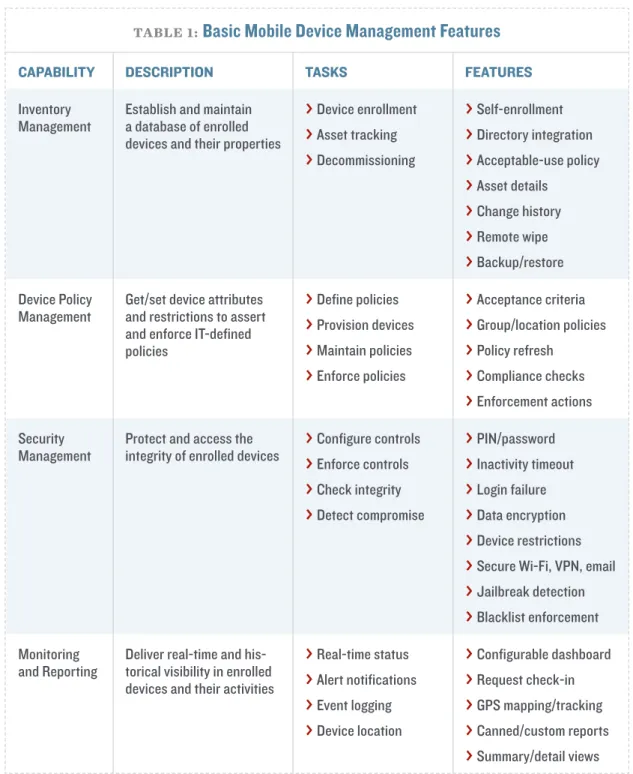
TABLE 1 outlines basic capabilities that any MDM product should offer, along
with common IT tasks and related features to look for. BASIC MDM
CAPABILITIES
TABLE 1:Basic Mobile Device Management Features
CAPABILITY DESCRIPTION TASKS FEATURES
Inventory
Management Establish and maintain a database of enrolled devices and their properties
® Device enrollment
® Asset tracking
® Decommissioning
® Self-enrollment
® Directory integration
® Acceptable-use policy
® Asset details
® Change history
® Remote wipe
® Backup/restore Device Policy
Management Get/set device attributes and restrictions to assert and enforce IT-defined policies
® Define policies
® Provision devices
® Maintain policies
® Enforce policies
® Acceptance criteria
® Group/location policies
® Policy refresh
® Compliance checks
® Enforcement actions Security
Management Protect and access the integrity of enrolled devices
® Configure controls
® Enforce controls
® Check integrity
® Detect compromise
® PIN/password
® Inactivity timeout
® Login failure
® Data encryption
® Device restrictions
® Secure Wi-Fi, VPN, email
® Jailbreak detection
® Blacklist enforcement Monitoring
and Reporting Deliver real-time and his-torical visibility in enrolled devices and their activities
® Real-time status
® Alert notifications
® Event logging
® Device location
® Configurable dashboard
® Request check-in
® GPS mapping/tracking
® Canned/custom reports
MOBILE PLATFORM SUPPORT
BASIC MDM CAPABILITIES
ADVANCED MDM CAPABILITIES
DEPLOYMENT MODELS
Note that supported tasks and features differ among products. This is where you will begin to appreciate each MDM product’s fit for your workforce. For ex-ample, all MDM products support device enrollment. Historically, IT enrolled company-issued devices, individually or in bulk. Today, it’s common to offer a self-enrollment portal that bring your own device (BYOD) users can visit to register their devices and (if approved) get them automatically provisioned with device policies.
Or you may prefer an enrollment portal that integrates with Active Directory so that workers can log in with their usernames and passwords instead of requiring users to type in yet another new password. Rather than require IT to define the same management policies repeatedly for every user in a group, provision devices with group-based policies.
It’s also important to evaluate your required features for each mobile OS. For example, all MDM products can configure PIN and password policies to deter unauthorized use of lost or stolen devices. The mobile OS determines PIN or pass-word length, strength, complexity and reuse; MDM products cannot mask this difference in device capabilities.
What MDM products can do, however, is provide uniform tools to define and apply the same logical policy to devices running different OSes. They can also warn you when certain rules aren’t supported on a given OS or version.
Some MDM products can also automatically check devices and quarantine or de-enroll those that don’t comply with policies.
Carefully consider how criteria are set and enforced and what degree of control and automation an MDM product delivers. If a worker installs a blacklisted ap-plication, an MDM product might do anything from remotely wiping the device to simply notifying a user that the application is banned and should be removed.
The “right” action could depend on the type of device and user. Look for MDM products that give IT a range of useful administrative actions, along with the power to apply them intelligently.
ADVANCED MDM CAPABILITIES
As workforce mobility extends into enterprises, management needs are being refined and expanded. For a portion of your workforce, basic mobile device ca-pabilities may be sufficient. But other workers may have more sophisticated ADVANCED MDM
MOBILE PLATFORM SUPPORT BASIC MDM CAPABILITIES ADVANCED MDM CAPABILITIES DEPLOYMENT MODELS
application needs, pose greater security risks or work with regulated data. And some devices may have different management needs, such as multi-user tablets or consumer-grade smartphones. Such use cases can often be addressed through more advanced mobile device management controls.
The capabilities detailed in TABLE 2 may be bundled with a basic MDM
prod-uct, sold as an MDM add-on module or even be available as a standalone product. Most of these capabilities are relatively new, and products may or may not include a range of features.
ADVANCED MDM CAPABILITIES
CAPABILITY DESCRIPTION TASKS FEATURES
Service
Management Monitoring and controlling networks service use to manage resulting expenses
® Define budgets
® Configure connections
® Monitor usage
® Enforce limits
® Call minute/text limits
® 3G/4G data caps
® Roaming restrictions
® Usage analytics
® Expense reporting Application
Management
Install, update, and remove public and enterprise mobile ap-plications
® Create application library
® Set app policies
® Recommend apps
® Install/update apps
® Monitor app use
® Disable/remove
® Enterprise app store
® License management
® Transparent updates
® Whitelist enforcement
® Application wrapping
Document Management
Download, update and remove corporate documents, using encrypted container
® Create document library
® Set doc policies
® Recommend docs
® Download/update
® Monitor use
® Disable/remove
® File synchronization/ backup
® SharePoint integration
® File sharing
® Offline access
® Security restrictions Container
Management Administer mecha-nisms intended to separate corporate and personal data and applications
® Enable container
® Configure policy
® Monitor use
® Wipe container
® Encryption strength
® Data leak prevention
® Dual persona
® Selective wipe
MOBILE PLATFORM SUPPORT
BASIC MDM CAPABILITIES
ADVANCED MDM CAPABILITIES
DEPLOYMENT MODELS
For example, many MDM products have now expanded to offer some degree of mobile application management (MAM). However, a product many do nothing more than display a catalog of apps whitelisted (recommended or required) by IT, relying on users to complete installation.
Another product might maintain a database of enterprise apps, transparently pushing apps and subsequent updates to devices based on IT-configured policies. A more advanced MDM product might actually “wrap” each enterprise app with features intended to prevent unauthorized
use or unsafe data storage.
If MAM is on your requirements list, care-fully establish baseline features that must be present, and ask each MDM vendor to dem-onstrate whether and how those features are delivered.
Similarly, a smaller but growing number of MDM products is expanding to offer mobile document management. This could include pushing an IT-configured collection of PDFs out to enrolled devices or creating an
au-thenticated, encrypted container that stores an automatically synchronized set of business documents that users can update offline. Decide whether your workforce requires enterprise file share or cloud file-service integration and whether you want to impose copy/paste restrictions.
Both document and application management features have emerged to better meet high-risk and BYOD needs. For high-risk users or users working with data subject to regulatory requirements, these capabilities can add an extra layer of IT control, security and monitoring.
For BYOD programs, these capabilities are sometimes used with very minimal device policy management, giving users more freedom to use devices as they wish while carving out an environment that IT can separately secure—and delete if necessary.
A related trend is container management, where an entire section of a managed device is controlled by IT and used to safely house enterprise apps and data, while leaving a separate section available for unfettered personal use.
Since these capabilities are so new, meaningful comparison among MDM prod-ADVANCED MDM
CAPABILITIES
A smaller but
growing number
of MDM products
is expanding
to offer mobile
document
man-agement.
MOBILE PLATFORM SUPPORT
BASIC MDM CAPABILITIES
ADVANCED MDM CAPABILITIES
DEPLOYMENT MODELS
ucts can be extremely difficult. Instead, focus on specifying exactly what you need from containerization and how well any candidate meets those needs.
DEPLOYMENT MODELS
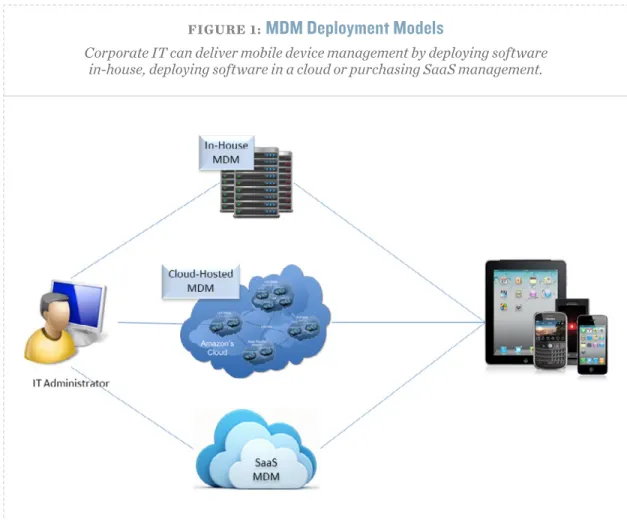
The mobile device management features described here can often be deployed in several ways (see FIGURE 1). The traditional deployment model involves installing
MDM software in-house, on a dedicated server operated by IT and located in a corporate data center or a hosting facility. Many large corporations continue to prefer this deployment model to simplify integration with other enterprise ser-vices such as directories, mail servers and file servers.
Recently, the rise of cloud computing has prompted growth of alternative models. Specifically, enterprises may now consider deploying MDM software on DEPLOYMENT
MODELS
FIGURE 1:MDM Deployment Models
Corporate IT can deliver mobile device management by deploying software in-house, deploying software in a cloud or purchasing SaaS management.
MOBILE PLATFORM SUPPORT
BASIC MDM CAPABILITIES
ADVANCED MDM CAPABILITIES
DEPLOYMENT MODELS
private or public cloud servers, taking advantage of network redundancy, high availability and infinite scalability. Most MDM products can be deployed in this fashion, without requiring any special features.
But a third deployment model—Software as a Service (SaaS)—is quickly becom-ing popular, especially among small and midsize businesses. In this case, MDM vendors install their own software on their own multi-tenant servers, selling MDM capabilities as public cloud services.
Many companies find this pay-as-you-go alternative extremely attractive, especially to lightly manage a large number of devices under BYOD. Even if over the long run your organization prefers to manage its own MDM server, SaaS can be a powerful tool for
MDM evaluation. Once you have whittled down your candidate list to a select set of MDM products to consider, conduct a live pilot with real-world mobile devices and users. If a product under consideration is available in SaaS form, a pilot can often be launched in a matter of hours.
Take advantage of all such opportunities to test capabilities and features, fine-tune MDM policies, and get feedback from business units and participating em-ployees on IT-defined requirements and how well any product really meets them.
This part of your evaluation can also assess critical product attributes such as usability, scalability, reliability, and support. Ultimately, comparing capabilities and features on paper gets you only so far—taking an MDM product out for a test drive is essential before making a final decision. n
DEPLOYMENT MODELS
SaaS can be a
powerful tool for
MDM evaluation.
MOBILE PLATFORM SUPPORT
BASIC MDM CAPABILITIES
ADVANCED MDM CAPABILITIES
DEPLOYMENT MODELS
LISA PHIFER
owns Core
Com-petence Inc., a consulting
firm specializing in business
use of emerging Internet
technologies. For nearly 30
years, she has been involved
in the design, implementation
and evaluation of
network-ing, security and
manage-ment products.
Choosing and Managing Mobile Devices is a
SearchConsumerization.com e-publication. Margie Semilof
Editorial Director
Lauren Horwitz
Executive Editor
Phil Sweeney
Managing Editor
Christine Cignoli
Senior Features Editor
Eugene Demaitre
Associate Managing Editor
Laura Aberle
Associate Features Editor
Linda Koury
Director of Online Design
Neva Maniscalco
Graphic Designer
Rebecca Kitchens
Publisher
[email protected] TechTarget
275 Grove Street, Newton, MA 02466
www.techtarget.com
© 2013 TechTarget Inc. No part of this publication may be transmitted or reproduced in any form or by any means without written permission from the publisher. TechTarget reprints are available through
The YGS Group.
About TechTarget: TechTarget publishes media
for information technology professionals. More than 100 focused websites enable quick access to a deep store of news, advice and analysis about the technologies, products and processes crucial to your job. Our live and virtual events give you direct access to independent expert commentary and advice. At IT Knowledge Exchange, our social community, you can get advice and share solutions with peers and experts.
ABOUT THE AUTHOR