THE VisOR SYSTEM: TESTING THE UTILITY OF USER INTERFACE COMPONENTS FOR FEATURE BASED SEARCHING IN VIDEO RETRIEVAL SOFTWARE
by Richard Gruss
A Master's paper submitted to the faculty of the School of Information and Library Science of the University of North Carolina at Chapel Hill
in partial fulfillment of the requirements for the degree of Master of Science in
Information Science.
Chapel Hill, North Carolina
January, 2004
Approved by:
___________________________
Richard Gruss. The VisOR System: Testing the utility of user interface components for feature-based searching in video retrieval software. A Master's paper for the M.S.
in I.S. degree. January, 2004. 52 pages. Advisor: Gary J. Marchionini.
This study uses a test video retrieval system, VisOR, to assess the value of user interface components that provide feature-based searching on automatically-extracted visual and auditory features. In particular, the study attempts to find a) whether sliders that allow users to adjust the relative weights of individual features improve performance on search tasks, b) which features prove the most useful in conducting normal search tasks, c) whether feature-based searching is difficult for the typical user, and d) whether color and brightness-based searching enables users to find exact-match shots especially quickly. Seventeen subjects completed 14 search tasks each. For a), it was discovered that the weight sliders had no significant effect on
performance. For b), it was found that keywords, Indoors/Outdoors, and
Cityscape/Landscape proved most useful. For c), user questionnaires indicated no special difficulty or frustration. For d), it was found that users who regularly use color and brightness components for searching consistently found exact-match shots more quickly than others.
Headings:
Indexing – Video recordings Information Retrieval
Table of Contents
Introduction……….…1
Related Work………..3
Description of VisOR……….9
Methods……….19
Results………...25
Conclusions………...31
References………37
Appendices Appendix A: Pre-Session Questionnaire………..39
Appendix B: Post-System Questionnaire……….41
Appendix C: MySQL Database Table……….43
Appendix D: Sample Transaction log………..44
I. Introduction
The availability of consumer digital video products has brought about massive increases in the production of both professional and amateur digital video.
According to the Canon Consumer Digital Lifestyle Index (Local sales, 2003), sales of digital cameras that use the Digital-8 and miniDV formats grew by 1041% between 2000 and 2003, far outpacing cameras that use traditional analog formats like Hi-8, VHS, VHS-C, and Super VHS-C. Two of the most popular digital video cameras, the Canon ZR65MC and the Sony DCR-TRV350, start at less than $450 each. Quality video editing software, which used to cost thousands of dollars, is also now within the reach of typical consumers: Apple’s Final Cut Pro sells for about $900 and Adobe Premier is only about $600. Affordable 64-bit PC architectures like the Apple G5 reduce and, for some tasks, eliminate the long latency traditionally associated the computationally intensive video editing and compression. Also, reliable IDE hard drives can be purchased for about $1.00 per gigabyte, making available the large amounts of storage necessary for large video files.
All of these factors contribute to the thousands of hours of digital video being produced every year. Digital video is rapidly becoming the medium of choice for entertainment, education, and communication, and much of the footage being
large digital video collections. Some initiatives include the Internet Archive (http://www.archive.org/movies/), the Open Video Project (http://www.open-video.org) , and the Informedia Project (http://www.informedia.cs.cmu.edu/). As digital librarians gain expertise in managing large video collections that might be distributed on multiple servers and use large databases, they can offer a valuable service by providing individuals with the tools they need to manage their own personal collections that simply reside on hard drives. The role of the librarian is certainly changing in the digital age, and one new responsibility is to help create software that will enable people to be their own librarians and effectively manage their expanding personal digital collections.
To promote the development of tools for cataloging and retrieving digital video, the National Institute of Standards and Technology has added a video track to its TREC workshop, where several organizations can test their video retrieval systems in a competitive atmosphere: “The goal of the conference series is to encourage research in information retrieval by providing a large test collection, uniform scoring procedures, and a forum for organizations interested in comparing their results” (Text Retrieval Conference). Many universities and organizations, whether they participate in TRECVID or not, have groups working on some aspect of this problem, either discovering algorithms for automatically segmenting videos into shots, developing metadata for describing characteristics of shots, or constructing user interfaces for efficient browsing and searching.
search for videos by keywords and nine different low-level visual and auditory features, and allows users to adjust the relative importance of those features. In particular, this study attempts to answer these questions:
1) Will the ability to adjust the relative weights of low-level features in a query improve recall on search tasks?
2) Which of these features will be most useful in typical search tasks?
indoors/outdoors
cityscape/landscape people
faces
human speech instrumental text overlay color brightness
3) Will users find it difficult to formulate queries using low-level features?
4) Will the addition of weight sliders make a system too complicated or frustrating for users?
5) Will the ability to search by keyframe hue or brightness values reduce the time required to find specific shots?
II. Related Work
images. Various weightings of low-level features have been tried, but no system offers a fully satisfying search, primarily because from a user’s perspective, similarity is understood conceptually rather than visually. An image of a fox, for example, is conceptually similar to other foxes, regardless of color, shape or texture. Conversely, a picture of an automobile, even if it matches the color, shape and texture of the fox perfectly, will not be similar. Santini (2001), for similar reasons, argues that any general-use tool for image retrieval must incorporate some form of semantic information. Low level features are useful, however for making very broad
conclusions about the content of an image: whether is it indoors or outdoors, whether is a landscape or a cityscape, or whether it contains a human face. The Informedia Project at Carnegie Mellon (Christel, 1999), successfully uses low level image features to identify a human face, but can only extract accurate semantic data by using video OCR on superimpositions.
Although highly experimental and limited, several intriguing studies have attempted to interpret video content using only automatically extracted low-level features. The system IRIS (Image Retrieval for Information Systems) (Alshuth, 1996) uses neural networks to train systems to recognize objects in videos. The theory is that the objects in the individual frames, which might be of interest even though they would never be mentioned in the title or video description, could be recognized, and the names of those objects stored in ASCII text in a database.
utopic, critical, playful. The research in this area is still new but very promising, challenging Dimitrova’s (1995) belief that semantic video retrieval is a myth. However promising this area of inquiry is, though, it is still confined to highly
specialized genres, and is still impracticable for large, variegated video collections. A reasonably useful video retrieval tool should allow users to combine low-level
features according to their own judgment of what is appropriate to the task, rather than attempt to make broad genre guesses based on those features.
How exactly to create an effective interface using those features, however, is not straightforward. Christel (Christel et al., 2002) formulated some basic principles of user interface design:
1) People want slider bars to move around in a video
2) People want some way to move smoothly from a sample clip to an entire video.
3) People want to be able to initiate new searches quickly.
4) People want text descriptors even on highly image-driven interfaces
single segment. The user is provided with a set of key frames arranged in a multi-tiered hierarchy. Only the widely-spaced first level frames are showing at first, but by clicking a frame, the user can expand a section to see more frames. At any point in the browsing, the user can click on a frame and start the video playing at that point. The Open Video Project’s stated aim in designing user interfaces was to provide users with 1) overviews 2) the ability to search by title, 3) smooth transitions from
overview to preview, 4) a variety of fast previews, and 5) convenient access to supplementary video information (Geisler et al., 2001).
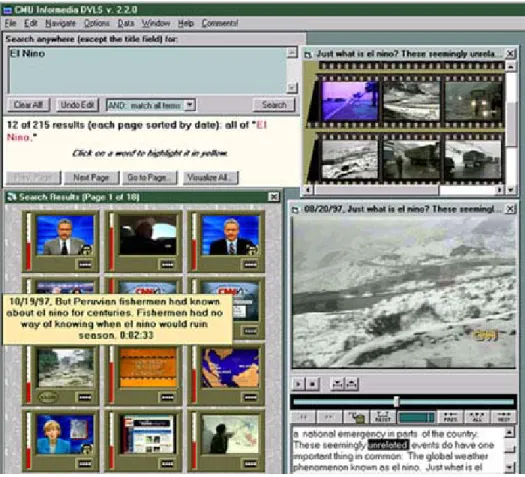
Figure 1. Informedia.
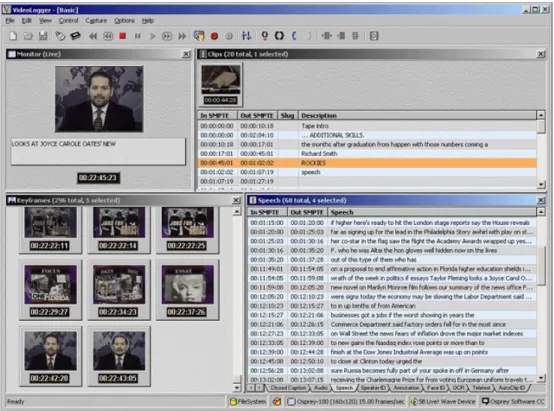
Virage’s VideoLogger is principally a tool for indexing (Figure 2). Like Informedia, it uses speech recognition to create a transcript that is aligned with timestamps. Users can also extract key frames manually and add their own annotations. Also like
Figure 2. VideoLogger, from Virage.
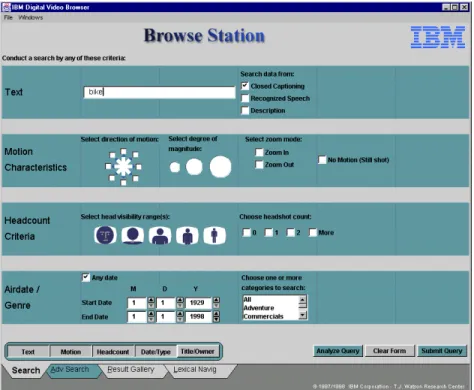
Figure 3. IBM’s Video Browser.
All of these tools allow users to enter queries using combinations of text and visual features, but none of them allow users to adjust the relative importance of the features. Feature weighting in video retrieval is analogous to term weighting in text retrieval. Numerous studies have investigated optimum term weighting in text retrieval (Greiff, 2002; Jin, 2001; Kwok, 1996), but no studies have tested whether allowing users to manually adjust the weights of low-level feature data will improve performance in retrieving digital video.
III. Description of VisOR
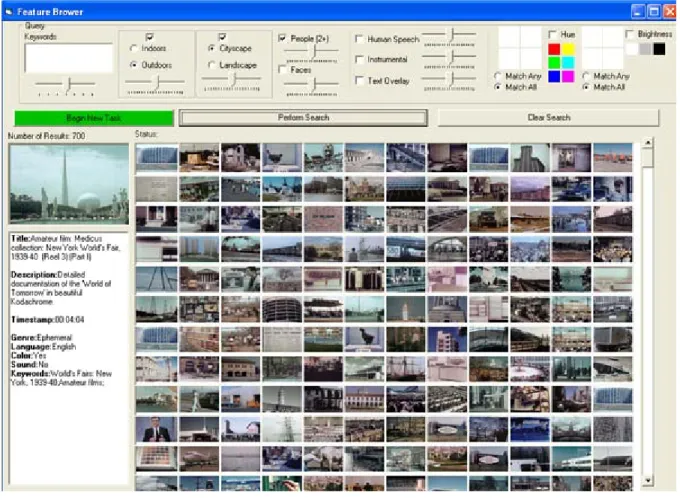
Figure 4. VisOR, Tier 1 and 2
The key principle governing the design of the interface (Figure 4) is that a large amount of information needs to be displayed in a small space. Counting the keyword field, ten features can be included in queries, each requiring its own input component. The color and brightness components require extra space because they allow a user to specify values for the four quadrants of a keyframe, and also to specify whether all quadrants must match or only some. There are over 14,000 shots in the test collection, so most queries will return hundreds of relevant shots that have to be displayed in the most compact way. In addition to feature and result set
be large enough to be easily clicked from anywhere on the screen, since they would be used more frequently than any other interface component. The greatest challenge is to arrange all of these elements so that they are tight without being cluttered or confusing.
To make the best use of screen real estate, the interface offers a 3-tier approach to the videos:
Tier 1:
The user begins a search with the feature options arrayed across the top. An earlier version positioned the feature options on the left, but this caused the main result set thumbnail frame to be tall and thin, which made it more difficult to scan. It was suspected that people tend to scan back and forth along horizontal lines (possibly the result of conditioning through reading), and this suspicion was confirmed in informal observation: subjects typically ran either their finger or the mouse button over the thumbnails in a horizontal sweep. A thumbnail field that is tall and thin, because it requires more frequent vertical retrace, is less efficient than one that is short and wide.
The left-to-right arrangement of the feature components reflects a hypothesis of their relative usefulness and how obtrusive they would be if they were not used. People are accustomed to entering text into a search engine, so a large keyword field was appropriate to have in the upper left corner. The Indoors/Outdoors and
Landscape. By default, these two components are grayed out (disabled). Cityscape and Landscape are mutually exclusive, and if the component were not disabled, the user would think he was required to designate one or the other. The user can activate the components by clicking the checkboxes above them. The People and Faces components are grouped together because they are related features. The close
proximity also forces the user to recognize that there is a difference between the two: “Face” means a shot has a close up of a recognize person, whereas “People” simply means that there is at least one human being in the shot. The Human Speech, Instrumental, and Text Overlay components are placed on the right because they seem to be the least useful, Human Speech because nearly every shot has a person talking in it, and Instrumental and Text Overlay because they are so specific.
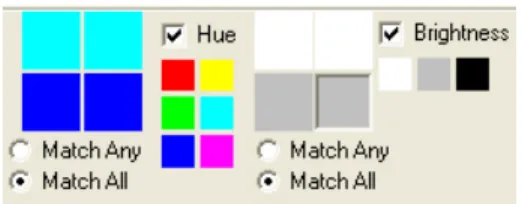
The Color and Brightness components are exiled to the far right not because they might be less useful, but because they require a lot of space and would be too obtrusive further to the left when they are not needed. The four boxes together represent a preview of the keyframe for a shot, and provide a means for the user to enter a rough query-by-example sketch. To assign a color value to one quadrant of the keyframe, a user clicks on a box to specify it, and selects one of the 6 colors. The box turns that color. The user can then specify with radio buttons whether all
Figure 5. VisOR Color and Brightness components
Users can enter any combination of keywords and features. After the query is run, thumbnails of each candidate shot appear in the main image frame, which can accommodate up to 144 images without scrolling. Result sets are limited 700 to keep the system operating quickly and dynamically. The small thumbnails (60 pixels x 41 pixels) allow the user to scan several candidate images rapidly and eliminate any that are plainly not relevant. The user cannot discern everything the thumbnail images, especially the dark ones, but can make out enough of the shape and texture to identify promising candidates. When a shot looks as though it might be relevant, the user can move to Tier 2 to get further information about the shot.
Tier 2:
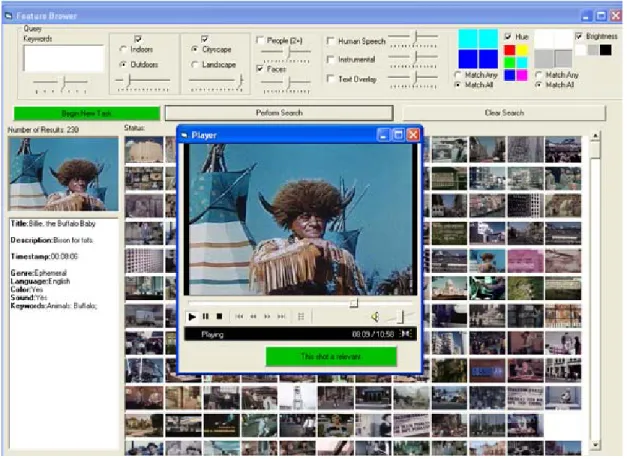
window directly over the cursor, the rationale being that this would minimize eye movement. This caused irritating unintentional popups as the mouse was returned to the query section of the interface, however, so the design was modified. Also, by having the preview picture and text description on the left, users are free to drag the mouse over the thumbnails, which they tended to in the study even when they were not looking at the preview. In Tier 2, the user can make out most of the visual detail of the shot and can gain a conceptual understanding of the video that is home to the shot.
Tier 3:
Figure 6. VisOR, Tier 3.
The 3-tier approach to retrieval appears to be a good compromise between presenting too little data about too many videos (too extensive) and presenting too much data about too few videos (too intensive).
automatically extracted and provided by IBM, MSRA (Microsoft Research-Asia), CMU (Carnegie Melon University), or DCU (Dublin City University) for use in the 2002 TREC Video Retrieval Track (available at
http://www-nlpir.nist.gov/projects/t2002v/t2002v.html). All of the features, with the exceptions of faces, color and brightness, are represented in the database (Table 1) as floating-point rationals that describe the probability (0-1) that that feature occurs in that shot. The faces feature is represented as the number of faces in the shot.
Feature Data Source
How Represented
Indoors IBM 0-1
Outdoors IBM 0-1
Cityscape MSRA 0-1
Landscape MSRA 0-1
People IBM 0-1
Faces CMU Number of faces in the
shot (0-6)
Human Speech DCU 0-1
Instrumental Sound
DCU 0-1
Text Overlay IBM 0-1
Hue Gruss HMMD hue value
average for each quadrant: 0, 60, 120, 180, 240 or 300
Brightness Gruss HMMD max value
quadrant, quantized into 4 bins: 0, 50, 160, 200. Table 1. How features are stored in the database.
The color feature is represented as the hue value in the HMMD color space, which describes hues as degrees along a continuous wheel from red (0°) to yellow (60°) to green (120°) to cyan (180°) to blue (240°) to magenta (300°) and back around to red (360°). Each quadrant of the shot keyframe has a hue value derived by calculating the mean hue for all pixels in that quadrant and taking the nearest value divisible by 60. The brightness value for each quadrant is derived by taking the average Max(r, g, b) for all pixels in the quadrant and assigning whichever of 0, 160, or 200 is closest.
When a user selects features, an SQL query is generated using the following rules:
1) For any feature that is selected, return all values where the probability in the database is greater than .5.
2) If any keywords are entered, use MySQL’s built-in full-text search feature. When a word is entered in the keyword field, only videos whose title, description, or keyword set contain that exact word appear in the result set. There is no thesaurus or stemming, and there are no text transcripts.
3) Conjoin all selected features with “AND”.
4) If “Match Any” is selected with the hue or brightness features, use “OR” between the quadrants but “AND” between color and the other selected features.
5) Order the results using the following rules:
a. Take the full text value for the keywords returned by MySQL and multiply by the keyword slider value, which ranges from 1 to 7 and defaults to 4. The MySQL full-text search uses a form of Inverse Document Frequency to assign relevance to a record, as described in the user manual:
collection. This way, a word that is present in many documents will have lower weight (and may even have a zero weight), because it has lower semantic value in this particular collection. Otherwise, if the word is rare, it will receive a higher weight. The weights of the words are then combined to compute the relevance of the row (MySQL manual).
The relevance score returned from the MySQL full-text search, then, could theoretically be any value, depending on the content of the records. In practice, however, the nature of language causes the values to range from 0 to 20.
b. Take the probability for each selected feature and multiply it by that feature’s slider, which ranges from 1 to 200 and defaults to 100. ( This was the smallest range that had an appreciable effect on the ordering of the result set).
c. Sum these values and sort in descending order. d. Take the top 700.
As example, suppose a user entered the following features and slider weights: keywords 4
Outdoors 50 People 100
100) = 32 + 60 + 0 = 92, while shot B’s score becomes (2 * 4) + (0 * 200) + (.9 * 50) = 8 + 0 + 45 = 53. By placing more weight on the Outdoors feature, the shots are reordered.
The ranges for the sliders were chosen to maximize control over the ordering. Larger ranges tended to have unpredictable results from even small changes in
weights, while smaller ranges had no appreciable effect at all. The text slider only ranges from 0 to 7 because the text values are an order of magnitude larger than those of the other features.
IV. Methods
Seventeen subjects ranging in age from 19 to 62 were recruited from the University of North Carolina-Chapel Hill campus area. There were nine males and nine females. Five subjects were enrolled undergraduates, eight were graduate students, and the remaining five were full time employees, including a nurse, a medical school professor, a pastor, and two tech support specialists. All 17 subjects reported using a computer daily and watching videos at least once a month, usually for entertainment. Subjects were paid $15.00 for participation.
while others did the second set first, according to the counterbalancing plan in table 2.
Subject First System
First Questions
Second System
Second Questions 2 S 1 N 2 3 N 1 S 2 4 S 2 N 1 5 N 2 S 1 6 S 1 N 2 7 N 1 S 2 8 S 2 N 1 9 N 2 S 1
10 S 1 N 2
11 N 1 S 2
12 S 2 N 1
13 N 2 S 1
14 S 1 N 2
15 N 1 S 2
16 S 2 N 1
17 N 2 S 1
18 S 1 N 2
The tasks were completed on a Pentium 4 PC with a 17 inch LCD display. The prompts for the tasks were displayed on a laptop next to the PC. The time to complete all tasks ranged from 1:15 to just under three hours. The video collection consisted of 176 different digital videos from the Internet Archive and Open Video, ranging in duration from five minutes to half and hour, with 14,522 shots total.
Tasks consisted of a single question followed by a set of image examples and/or video examples. All users were encouraged to play the sample videos because they might be in the search collection. The tasks from the first set of questions were:
Task 1-1: Find shots of people spending leisure time at the beach, for example: walking, swimming, sunning, playing in the sand. Some part of the beach or the buildings on it should be visible. (Two image examples and two video examples). Task 1-2: Find shots of one or more musicians: a man or woman playing a musical instrument with instrumental music audible. Musician(s) and instrument(s) must be at least partly visible some time during the shot. (Two image examples and two video examples)
Task 1-3: Find shots of one or more women standing in long dresses. Dress should be one piece and extend below knees. The entire dress from top to end of dress below knees should be visible at some point. (Two image examples and two video examples). Task 1-4: Find shots with one or more sailboats, sailing ships, clipper ships, or tall ships - with some sail(s) unfurled (Two image examples and one video example). Task 1-5: Find more shots of one or more groups of people, a crowd, walking in an urban environment (for example with streets, traffic, and/or buildings) (Two image examples and 2 video examples)
Figure 7. Image example for task 1-7. The tasks from the second set were:
Task 2-1: Find shots of the Golden Gate Bridge (Two image examples)
Task 2-2: Find overhead views of cities - downtown and suburbs. The viewpoint should be higher than the highest building visible.(Two image examples and two video examples).
Task 2-3: Find more shots with one or more snow-covered mountain peaks or ridges. Some sky must be visible them behind (Two image examples and two video
examples).
Task 2-4: Find shots about live beef or dairy cattle, individual cows or bulls, herds of cattle (Two image examples and one video example).
Task 2-5: Find shots of a nuclear explosion with a mushroom cloud (Two image examples and one video example).
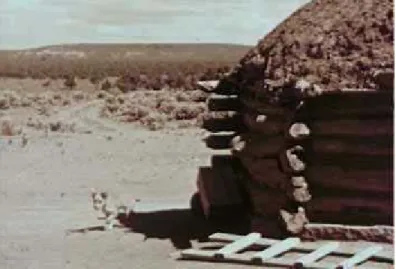
Figure 8. Image example for task 2-7.
Assuming that the number of relevant shots in the collection is a reliable indicator, there was a wide range of difficulty among the tasks, as demonstrated
in Table 3.Task
1-1 33 1-2 30 1-3 119 1-4 32 1-5 133 1-6 1 1-7 1 2-1 23 2-2 55 2-3 45 2-4 148 2-5 7 2-6 1 2-7 1
Table 3. Task difficulty as approximated by relevant shots in the collection
Text transaction logs tracked user queries, videos played, and videos selected, along with timestamps for each action (see Appendix D for a sample log).
1. Are you familiar with this topic?
2. Was it easy for you to get started on this search? 3. Was it easy to do the search for this topic?
4. Was the ability to search by particular features useful? 5. Are you satisfied with your results?
6. Did you have enough time to do an effective search?
When users finished the tasks for each system, they completed a questionnaire designed to gather some feedback on how useful, simple, and enjoyable to use the system was (Appendix B). At the end of the session, after all tasks on both systems had been completed, users were invited to comment more generally on what they liked and did not like about each system.
V. Results
This study sought to answer four main questions about the design of video retrieval software:
1) Will the ability to adjust the relative weights of low-level visual features in a query improve user recall on search tasks?
Hypothesis: The ability to adjust the relative weights of low-level visual features in a query will improve user recall on search tasks.
Null hypothesis: The ability to adjust the relative weights of low-level visual features in a query will not improve user recall on search tasks.
larger sample size, H0 might safely be rejected. Precision and recall by task are
summarized in Table 4 and Table 5.
Table 4. Mean Precision and Recall values for tasks 1-1 through 1-5
Appendix E shows the recall on System S and on System N broken down by task. Only recall is considered, since precision scores usually only dropped a result of misunderstanding the task (e.g., the subject might have forgotten in task 1-3 that the women must be standing). These figures demonstrate that users performing the task with System S did consistently better, but not significantly.
2) Which of these features will be most useful in typical search tasks?
indoors/outdoors
cityscape/landscape people
faces
human speech instrumental text overlay color brightness
The figures in Table 6 represent the percentage of queries for each task that used a particular feature. Which features were most frequently used for each task was not surprising. For task 1-1 (“Find shots of people spending leisure time at the beach”),
rising over the horizon, was brightness, which was used 57% of the time. The most useful feature for task 1-7, which involved finding a shot that had a Native American against a bright blue sky, was color, which was used 53% of the time. Likewise, a highly useful feature for task 2-6, which involved finding a particular shot of a woman in a red dress against a blue background, was color (43%), and for task 2-7, which involved finding a shot of a log cabin that was bright on the left and dark on the right, was brightness (61%).
Table 6. Percentage of queries using features, broken down by task.
features. After these three, the color (25%) and brightness (21%) features were the most frequently used.
Table 7. Mean use of individual features.
3) Will users find it difficult to formulate queries using low-level features? The difficulty of each system was measured using the middle section of the Post-System Questionnaire (Appendix B). The possible difficulty score ranged from 6 (easiest) to 30 (hardest). For all questionnaires, the mean difficulty was 14.8. Users were neutral on questions of difficult; on average, they neither agreed nor disagreed that the system was difficult or confusing.
4) Will the addition of the sliders make the system too complicated or frustrating for users?
for answers on the left (“interesting”) side, for a total possible score of 48. The system with the sliders averaged 36, while the system without the sliders averaged 35.1875. The difference is not significant.
5) Will the ability to search by keyframe hue or brightness reduce the time required to find specific shots?
A Person’s R correlation indicates a consistent negative correlation between time to find the exact-match shots and the subject’s tendency to use the brightness and color features. This tendency is approximated using the percentage of the
subject’s total queries that contained some brightness or color query.
SubjectID Total Queries # using Brightness % using Brightness # using Color % using Color Time Task 1-6 Time Task 1-7 Time Task 2-6 Time Task 2-7 2 98 27 27.6 25 25.5 310 90 50 140 3 71 11 15.5 14 19.7 840 50 180 150 4 163 53 32.5 59 36.2 150 60 120 100 5 129 17 13.2 30 23.3 150 300 180 570 6 106 8 7.5 17 16.0 380 160 120 360 7 216 31 14.4 22 10.2 300 120 240 540 8 77 12 15.6 16 20.8 NA 60 90 210 9 131 10 7.6 27 20.6 NA NA 195 300 10 104 32 30.8 49 47.1 140 90 N/A 220 11 45 10 22.2 10 22.2 NA NA 540 600 12 154 24 15.6 30 19.5 180 80 270 90 13 104 21 20.2 35 33.7 300 180 300 300 14 89 19 21.3 10 11.2 NA NA 280 300 15 164 48 29.3 64 39.0 NA 80 140 100 16 41 9 22.0 27 65.9 360 130 NA NA 17 101 7 6.9 12 11.9 120 150 300 340 18 189 23 12.2 66 34.9 60 90 120 130
Table 8 summarizes users’ tendency to use the color and brightness features and the time required to successfully complete the exact-match tasks. Although there was a consistent negative correlation between the use of these features and the time required to complete the task, the wide variance in time prevented these correlations from being significant.
VI. Conclusions
Much of the literature in video retrieval is concerned with automatically extracting features from video streams. Electrical engineering departments are discovering mathematical ways of describing the angularity that is suggestive of a cityscape, or the ellipticality and color that might be a face, or the fractal textures and ambient light that characterize a landscape. All of this ingenuity seems driven by the supposition that there will be a use for these detection algorithms. This study was an attempt to build a practical video search tool that employs these detection algorithms in an effort to discover empirically which of these low-level features in fact prove useful for normal people doing normal search tasks.
search tasks as naturally as they could, but most appeared anxious and competitive about their performance. They had no background as to why they were looking for these shots, and they had no input as to what shots they could look for. Lacking this context changes the search behavior.
Another limitation of the study is that it lasted, in some cases, almost three hours, and fatigue caused subjects to rush through the last few tasks of whatever set they did second. Because of this, the mean recall scores for some tasks did not necessarily reflect that task’s difficulty. Some subjects chose not to spend very long on any of the tasks, and consequently had lower recall scores, even though they were performing well per unit of time. Also, some subjects were distracted by the content of the videos, and sometimes watched them for several seconds. Two subjects in particular, subjects 8 and 16, enjoyed browsing and commenting on the videos.
The results lead to several recommendations for designing a video search interface:
1) Investment in gathering text data about a video and providing rich text-search features such as thesauri, stemming and latent semantic indexing will be more
useful than refining algorithms to detect low-level features.
right,” one user said. “I tried keyword and after keyword and if I got no results, I’d do the other things.” The idea of searching without keywords was such an alien concept that one user repeatedly forgot that she was not required to have keywords. “How am I supposed to find a beach? I tried beach, sand, ocean, shore, waves…I don’t know what else to do.” Users generally grew more comfortable with using features the more they used the system.
2) A simple component that allows users to specify a limited amount of color or brightness data will improve performance when users are searching for a
specific shot.
Systems that allow users to sketch an example image tend to have poor results because it is difficult to judge exactly how to use the sketch. Too close an
approximation yields zero results, while too rough an approximation yields results that are not similar at all. VisOR’s simple system of allowing users to specify color and brightness values for quadrants allows the user and they system to meet in the middle: the query is not too specific, and there are ample results.
Users enjoyed the novelty of the color search, and this caused them to use these components more often than they really needed to. “This is fun,” one user said. Another user described it as “cool” and demanded an explanation of how it worked before he would proceed with the tasks. The most successful searches for two
bottom two quadrants and selected (“Match any”) found several boats floating on the water. One user felt that this had its limitations. “It only works for obvious things like sunsets and horizons.”
3) Of the features available, Indoors/Outdoors and Cityscape/Landscape prove the most useful for regular searches. The least useful is Text Overlay and Human
Speech.
Indoors/Outdoors may have been most useful because of the nature of the tasks, but it is also likely that is it a general enough characteristic to apply to all videos. Text Overlay is very specific, and speech appears in too many shots to be a good discriminator. Users suggested some other features that they would like to use,
including shape, man/woman, vertical/horizontal, and shot type (close up/long shot).
4) Sliders do not make a significant difference in performance, but users generally feel like the sliders provide a powerful benefit in ordering a large result set.
One common impression was that the sliders could be useful, but it would take some time to learn to use them effectively. One user said, “The system with the sliders seemed more sophisticated, but I don’t think I used it very well. It's something I would have to practice.” Sliders can, however be too abstract, even for people with technical expertise. One user, whose performance was higher than average, said, “I found the sliders confusing. When I pulled the People slider over, did that mean there would be more people?”
5) Users are capable of sifting through large sets (150 on a computer screen) of thumbnail images, but fatigue sets in quickly.
Only one user commented on the size of the thumbnails without prompting. When asked what they thought about the number of images that were squeezed into the result frame, most subjects that the number was fine. Two users said that the thumbnails were too small, even for a rough scan, and one user said that the images became harder and harder to look at the longer he used the system. Any system that is designed to be used for repeated searches should allow users to specify the size of the result set thumbnails according to how tired they are. Also, if a larger preview image pops up when a user mouses over a thumbnail, that image should be close to the mouse pointer, not in a designated location to the left. Having to brush their eyes back and forth frequently probably led to accelerated user fatigue.
6) Sliders have no significant effect on users’ general satisfaction of a search
Neither the difficulty scores nor the flow scores differed significantly between System S and System N, which suggests that the sliders did not add any complexity or discomfort.
As algorithms for automatic analysis of video streams improve, the most important accomplishments, user behavior in this study indicates, will be in object recognition. In performing tasks in this study, users typically followed a process in which they entered an abstract keyword (“music”) and ran the query. If the query failed, they began listing objects that might be in the frame (“guitar,” “tuba,” “flute”). In the task that asked users to find an exact match of a shot of a woman in a red dress, the most frequently-occurring words were “woman,” “dress,” “lamp,” and “table.” The objects had nothing to do with the semantic content of the shot, but people naturally tried queries based on physical, observable objects in the frame.
References
Alshuth, P. (1996). “Video retrieval with IRIS.” ACM Multimedia ’96. Colombo, C., Del Bimbo, A., & Pala, P. (2001). Retrieval of commercials by
semantic content: the semiotic perspective. Multimedia Tools and Applications, 13, 93-118.
Carson, C., Belongie, S., Greenspan, H., & Malik, J. (1999). Blobworld: Image segmentation using Expectation-Maximization and its application to image querying. Retrieved September 16, 2003 from
http://elib.cs.berkeley.edu/carson/papers/pami.html.
Christel, M. (1999). Visual digests for new video libraries. ACM Multimedia ’99.
Christel, M., Hauptmann, A., Wactlar, H., & Ng, T. (2002). Collages as dynamic summaries for new video. ACM Multimedia, July 13-17, 2002.
Christel, M., Cubilo, P., Gunaratne, J., Jerome, W., O, E., & Solanki, A. (2002). Evaluating a digital video library web interface. JCDL, July 13-17, 2002. Geisler, G., Marchionini, G., Wildemuth, B., Hughes, A., Yang, M., Wilkens, T., &
Spinks, R. Interface concepts for the Open Video Project. Retrieved August 3, 2003 from http://www.open-video.org/project_publications.php.
Greiff, W., Morgan, W., & Ponte, J. (2002). The role of variance in term weighting for probabilistic information retrieval. Proceedings of the eleventh
international conference on Information and knowledge management. Retrieved November 5, 2003 from the ACM Digital Library.
Hauptmann, A, Christel, M., Papernick, N. Demonstrations: Video retrieval with multiple image search strategies. Proceedings of the second ACM/IEEE-CS joint conference on Digital libraries. Retrieved June 20, 2003 from the ACM Digital Library.
Research and development in information retrieval. Retrieved December 5, 2003 from the ACM Digital Library.
Kwok, K. (1996). “A new method of weighting query terms for ad-hoc retrieval.” Annual ACM Conference on Research and Development in Information Retrieval, Proceedings of the 19th annual international ACM SIGIR conference on Research and development in information retrieval. Lee, H., Smeaton, A., & Furner, J. (2000). User Interface Issues for Browsing
Digital Video. Retrieved June 14, 2003 from Citeseer.
Local Sales of Still Digital Cameras Jump by 2000% (2003). Retrieved December 30, 2003 from http://www.canon.com.au/home/story_893.html.
MySQL User’s Manual. Retrieved December 20, 2003 from http://www.ninthwonder.com/info/mysql/manual-split/manual_Fulltext_Search.html
Petkovic, D., Niblack, W., Flickner, M., Steele, D., Lee, E., Yin, J., Hafner J., Tung, F., Treat, H., Dow, R., Gee, R., Vo, M., Vo, P., Holt, B., Hethorn, J., Weiss, K., Elliott, P., & Bird, C. (1996). Recent applications of IBM’s Query by Image Content.” Proceedings of the 1996 ACM symposium on Applied Computing February 1996. Retrieved January 5, 2003 from the ACM Digital Library.
Salton, G., & Wu, H. (1980) “A term weighting model based on utility theory.” Annual ACM Conference on Research and Development in Information Retrieval Proceedings of the 3rd annual ACM conference on Research and development in information retrieval. Retrieved December 5, 2003 from the ACM Digital Library.
Smith, J., & Chang, S. (1997). An image and video search engine for the world-wide web. Retrieved January 5, 2004 from Citeseer.
Santini, S. (2001). The Semantic Foundations of Image Databases. Retrieved April 14, 2002 from Citeseer.
Appendix A: Pre-session Questionnaire
Gruss Video Retrieval Study Pre-Session Questionnaire
Subject ID: _______ 1. What is your age? ________
2. What is your sex? ______Female ______Male 3. What is your status?
Undergraduate student Graduate student Faculty
Staff
Other: ___________________________ 4. With what department are you affiliated?
_____________________________________ 5. How often do you use a computer?
Never Occasionally Monthly Weekly Daily
8. How often do you watch videos or films? Never
Occasionally Monthly Weekly Daily
8. How often do you search for videos or films? Never
8. When you search for films or videos, where do you go? Online
Newspaper or magazine Film archives
Other: _______________________________________ 9. How do you usually search for videos or films?
By title
By author or actor By topic
By trailer
Appendix B: Post-System Questionnaire
Subject ID: ____________ System: A B
Date: ____________
Gruss Video Retrieval Study: Post-System Questionnaire Usefulness: Place an x in the column that most applies.
VIDEO RETRIEVAL SYSTEM
useful :____:____:____:____:____:____:____: useless
advantageous :____:____:____:____:____:____:____: disadvantageous helpful :____:____:____:____:____:____:____: not helpful functional :____:____:____:____:____:____:____: not functional valuable :____:____:____:____:____:____:____: worthless appropriate :____:____:____:____:____:____:____: inappropriate beneficial :____:____:____:____:____:____:____: not beneficial
effective :____:____:____:____:____:____:____: ineffective adequate :____:____:____:____:____:____:____: inadequate productive :____:____:____:____:____:____:____: unproductive
Ease of use:
Strongly Strongly
agree disagree
Learning to operate this system was easy for me. 1 2 3 4 5 I found it easy to get this system to do what I wanted it
to do.
1 2 3 4 5 My interaction with this system was clear and
understandable. 1 2 3 4 5
I found this system to be flexible to interact wth. 1 2 3 4 5 It would be easy for me to become skillful at using this
system. 1 2 3 4 5
I found this system easy to use. 1 2 3 4 5
Flow :
USING THE VIDEO RETRIEVAL SYSTEM
interesting :____:____:____:____:____:____:____: uninteresting enjoyable :____:____:____:____:____:____:____: not enjoyable exciting :____:____:____:____:____:____:____: dull
absorbed intensely :____:____:____:____:____:____:____: not absorbed intensely attention was focused :____:____:____:____:____:____:____: attention was not focused
concentrated fully :____:____:____:____:____:____:____: did not fully concentrate
Appendix C: MySQL database table
Shot table:
ShotName varchar(50)
VideoID smallint(6)
VideoTitle tinytext
VideoDescription text VideoKeywords tinytext
VideoDuration varchar(20) VideoCreationDate varchar(10)
VideoSound enum('Yes','No')
ShotNo mediumint(9)
TimePoint varchar(50) Duration varchar(50) BeginTime varchar(20) BeginSeconds int(11)
EndTime time
KeyframeFilename varchar(250) KeyframeTimePoint varchar(50)
KeyframeTime time
KeyframeUpperLeftDomHue smallint(6) KeyframeUpperLeftAvMax smallint(6)
KeyframeUpperLeftAvMin smallint(6) KeyframeUpperLeftAvDif smallint(6)
KeyframeUpperLeftAvSum smallint(6) KeyframeUpperRightDomHue smallint(6)
KeyframeUpperRightAvMax smallint(6)
KeyframeUpperRightAvMin smallint(6) KeyframeUpperRightAvDif smallint(6)
KeyframeUpperRightAvSum smallint(6) KeyframeLowerLeftDomHue smallint(6) KeyframeLowerLeftAvMax smallint(6) KeyframeLowerLeftAvMin smallint(6) KeyframeLowerLeftAvDif smallint(6) KeyframeLowerLeftAvSum smallint(6) KeyframeLowerRightDomHue smallint(6) KeyframeLowerRightAvMax smallint(6)
KeyframeLowerRightAvMin smallint(6) KeyframeLowerRightAvDif smallint(6)
KeyframeLowerRightAvSum smallint(6)
Transcript mediumtext
Annotation tinytext
Faces int(3) unsigned
People double
Indoors double
Outdoors double
Cityscape double
Landscape double
TextOverlay double
Appendix D: Sample transaction log
BEGAN TASK 1 8:48:55 PM
SLIDER CityLand=156 8:49:35 PM
SLIDER IndoorsOutdoors=200 8:49:36 PM
SLIDER people=152 8:49:41 PM
QUERY: 8:50:12 PM SELECT videoid, begintime, beginseconds, keyframefilename from shot WHERE 1=1 AND Outdoors > .5 AND Landscape > .5 AND People > .5 AND ( 1=2 OR
(keyframeupperleftdomhue = 180) OR (keyframeupperrightdomhue = 180) OR (keyframelowerleftdomhue = 240) OR (keyframelowerrightdomhue = 240) ) ORDER BY 1 +Outdoors*200+Landscape*156+People*152 desc limit 700
PLAY 11/25/2003 8:50:45 PM video 102 (00:03:13)
PLAY 11/25/2003 8:50:59 PM video 102 (00:05:55)
QUERY: 8:51:47 PM SELECT videoid, begintime, beginseconds, keyframefilename from shot WHERE 1=1 AND match(VideoTitle,
VideoDescription, VideoKeywords) against ('beach') AND Outdoors > .5 AND Landscape > .5 AND People > .5 AND ( 1=2 OR
(keyframeupperleftdomhue = 180) OR (keyframeupperrightdomhue = 180) OR (keyframelowerleftdomhue = 240) OR (keyframelowerrightdomhue = 240) ) ORDER BY 1 +match(VideoTitle, VideoDescription,
VideoKeywords) against ('beach')
*4+Outdoors*200+Landscape*156+People*200 desc limit 700
QUERY: 8:51:54 PM SELECT videoid, begintime, beginseconds, keyframefilename from shot WHERE 1=1 AND match(VideoTitle,
VideoDescription, VideoKeywords) against ('beach') AND Outdoors > .5 AND Landscape > .5 AND People > .5 ORDER BY 1 +match(VideoTitle, VideoDescription, VideoKeywords) against ('beach')
*4+Outdoors*200+Landscape*156+People*200 desc limit 700
QUERY: 8:52:07 PM SELECT videoid, begintime, beginseconds, keyframefilename from shot WHERE 1=1 AND Outdoors > .5 AND Landscape > .5 AND People > .5 AND ( 1=2 OR
(keyframeupperleftdomhue = 180) OR (keyframeupperrightdomhue = 180) OR (keyframelowerleftdomhue = 240) OR (keyframelowerrightdomhue = 240) ) ORDER BY 1 +Outdoors*200+Landscape*156+People*200 desc limit 700
PLAY 11/25/2003 8:52:16 PM video 97 (00:02:11)
SLIDER CityLand=200 8:52:28 PM
QUERY: 8:52:35 PM SELECT videoid, begintime, beginseconds, keyframefilename from shot WHERE 1=1 AND Outdoors > .5 AND Landscape > .5 AND People > .5 AND ( 1=2 OR
240) ) ORDER BY 1 +Outdoors*200+Landscape*200+People*200 desc limit 700
PLAY 11/25/2003 8:53:03 PM video 50 (00:02:36)
QUERY: 8:54:02 PM SELECT videoid, begintime, beginseconds, keyframefilename from shot WHERE 1=1 AND match(VideoTitle,
VideoDescription, VideoKeywords) against ('recreation') AND Outdoors > .5 AND Landscape > .5 AND People > .5 AND ( 1=2 OR
(keyframeupperleftdomhue = 180) OR (keyframeupperrightdomhue = 180) OR (keyframelowerleftdomhue = 240) OR (keyframelowerrightdomhue = 240) ) ORDER BY 1 +match(VideoTitle, VideoDescription,
VideoKeywords) against ('recreation')
*4+Outdoors*200+Landscape*200+People*200 desc limit 700
QUERY: 8:54:31 PM SELECT videoid, begintime, beginseconds, keyframefilename from shot WHERE 1=1 AND match(VideoTitle,
VideoDescription, VideoKeywords) against ('san francisco') ORDER BY 1 +match(VideoTitle, VideoDescription, VideoKeywords) against ('san francisco') *4 desc limit 700
SLIDER people=186 8:54:39 PM
QUERY: 8:54:42 PM SELECT videoid, begintime, beginseconds, keyframefilename from shot WHERE 1=1 AND match(VideoTitle, VideoDescription, VideoKeywords) against ('san francisco') AND Outdoors > .5 AND Landscape > .5 AND People > .5 ORDER BY 1 +match(VideoTitle, VideoDescription, VideoKeywords) against ('san francisco') *4+Outdoors*100+Landscape*100+People*186 desc limit 700
PLAY 11/25/2003 8:56:01 PM video 43 (00:05:12)
QUERY: 8:56:42 PM SELECT videoid, begintime, beginseconds, keyframefilename from shot WHERE 1=1 AND match(VideoTitle,
VideoDescription, VideoKeywords) against ('leisure') AND Outdoors > .5 AND Landscape > .5 AND People > .5 ORDER BY 1
+match(VideoTitle, VideoDescription, VideoKeywords) against
('leisure') *4+Outdoors*100+Landscape*100+People*186 desc limit 700
QUERY: 8:56:51 PM SELECT videoid, begintime, beginseconds, keyframefilename from shot WHERE 1=1 AND match(VideoTitle,
VideoDescription, VideoKeywords) against ('new york') AND Outdoors > .5 AND Landscape > .5 AND People > .5 ORDER BY 1
+match(VideoTitle, VideoDescription, VideoKeywords) against ('new york') *4+Outdoors*100+Landscape*100+People*186 desc limit 700
PLAY 11/25/2003 8:57:20 PM video 22 (00:04:07)
QUERY: 8:59:58 PM SELECT videoid, begintime, beginseconds, keyframefilename from shot WHERE 1=1 AND match(VideoTitle,
VideoDescription, VideoKeywords) against ('ocean') AND Outdoors > .5 AND Landscape > .5 AND People > .5 ORDER BY 1 +match(VideoTitle, VideoDescription, VideoKeywords) against ('ocean')
*4+Outdoors*100+Landscape*100+People*186 desc limit 700
SLIDER IndoorsOutdoors=200 9:00:04 PM
QUERY: 9:00:11 PM SELECT videoid, begintime, beginseconds, keyframefilename from shot WHERE 1=1 AND match(VideoTitle, VideoDescription, VideoKeywords) against ('sea') AND Outdoors > .5 AND Landscape > .5 AND People > .5 ORDER BY 1 +match(VideoTitle, VideoDescription, VideoKeywords) against ('sea')
*4+Outdoors*200+Landscape*200+People*186 desc limit 700
QUERY: 9:00:21 PM SELECT videoid, begintime, beginseconds, keyframefilename from shot WHERE 1=1 AND match(VideoTitle,
VideoDescription, VideoKeywords) against ('bathing') AND Outdoors > .5 AND Landscape > .5 AND People > .5 ORDER BY 1
+match(VideoTitle, VideoDescription, VideoKeywords) against
('bathing') *4+Outdoors*200+Landscape*200+People*186 desc limit 700