Web Services
LDAP Configuration Guide
Web Services
Version 7.00
December 2008
DWS15V7.0E-01
©2008 Xerox Corporation. All rights reserved. Xerox and the sphere of connectivity design and all product names mentioned in this publication are trademarks of Xerox Corporation in the United States and/or other counties.
Other company trademarks are also acknowledged.
Adaptec®, the Adaptec logo, SCSlSelect®, and EZ-SCSI® are trademarks of Adaptec, Inc. Adobe PDFL - Adobe PDF Library Copyright © 1987-2008 Adobe Systems Incorporated.
Adobe®, the Adobe logo, Acrobat®, the Acrobat logo, Acrobat Reader®, Distiller®, Adobe PDF JobReady™, and PostScript®, and the PostScript logo are either registered trademarks or trademarks of Adobe Systems Incorporated in the United States and/or other countries. All instances of the name PostScript in the text are references to the PostScript language as defined by Adobe Systems Incorporated unless otherwise stated. The name PostScript also is used as a product trademark for Adobe Systems' implementation of the PostScript language interpreter, and other Adobe products.
Copyright 1987 - 2008 Adobe Systems Incorporated and its licensors. All rights reserved. Autologic® is a registered trademark of Autologic Information International, Inc.
Compaq® and QVision® are registered United States Patent and Trademark Office, for Compaq Computer Corporation. DEC, DEC RAID, and Redundant Array of Independent Disks are registered trademarks of Digital Equipment Corporation. Dundas - This software contains material that is (c) 1997-2000 DUNDAS SOFTWARE LTD., all rights reserved.
Imaging Technology provided under license by Accusoft Corporation. ImageGear © 1997 by AccuSoft Corporation. All Rights Reserved. Intel® and Pentium® are registered trademarks of Intel Corporation.
Novell® and NetWare® are registered trademarks of Novell, Inc. in the United States and other countries. Oracle® is a registered trademark of Oracle Corporation Redwood City, California
ScanFix® Image Optimizer and ImagXpress are either registered marks or trademarks of Pegasus Imaging Corp. Copyright © 1997-2008 Pegasus Imaging Corp. All rights reserved.
SonyTM and Storage by SonyTM are trademarks of Sony.
PANTONE ™ and other Pantone, Inc. trademarks are the property of Pantone Inc. Preps™ is a registered trademark of Creo Inc. All rights reserved.
Quark® and QuarkXpress® are registered trademarks of Quark, Inc. StorageView™ is a trademark of CMD Technology, Inc.
TIFF® is a registered trademark of Aldus Corporation.
Windows®, Windows XP®, Windows Server® 2003, and Internet Explorer are trademarks of Microsoft Corporation; Microsoft® and MS-DOS® are registered trademarks of Microsoft Corporation.
Portions Copyright © 2001 artofcode LLC.
This software is based in part on the work of the Independent JPEG Group. Portions Copyright © 2001 URW++. All Rights Reserved.
This product includes software developed by the Apache Software Foundation. Copyright © 1999-2008 The Apache Software Foundation. All rights reserved. This software is based in part on the work of Graeme W. Gill.
© Press-sense Ltd. 2002-2008. All rights reserved.
Includes Adobe® PDF Libraries and Adobe Normalizer technology
The Graphics Interchange Format © is the Copyright property of CompuServe Incorporated. GIFSM is a Service Mark property of CompuServe Incorporated.
Portions contain an implementation of the LZW algorithm licensed under U.S. Patent 4,558,302. Parts of this software Copyright © 2004-2006 Enterprise Distributed Technologies Ltd. All Rights Reserved. Parts of this software Copyright © 1995-2003, The Cryptix Foundation Limited. All Rights Reserved.
Parts of this software are a SSLv3/TLS implementation written by Eric Rescorla and licensed by Claymore Systems, Inc. All Rights Reserved.
Parts of this software Copyright © 2002, Lee David Painter and Contributors. Contributions made by Brett Smith, Richard Pernavas, Erwin Bolwidt.
Parts of this software Copyright © 1995-2005, Jean-loup Gailly and Mark Adler.
All other product names and services mentioned in this publication are trademarks of their respective companies. They are used throughout this publication for the benefit of those companies, and are not intended to convey endorsement or other affiliation with the publication.
Companies, names, and data used in examples herein are fictitious unless otherwise noted. Printed in the United States of America.
Changes are periodically made to this document. Changes, technical inaccuracies, and typographic errors will be corrected in subsequent editions.
Table of Contents
Overview
1
Prerequisites ... 1
LDAP Workflow ... 1
LDAP Configuration
3
Configuring LDAP for Web Services... 3
Configuring the Connection Settings ... 3
Mapping LDAP - Web Services Attributes ... 5
Configuring the Attributes ...5
LDAP Configuration Guide
Web Services ii
1
Overview
The FreeFlow Web -Services Lightweight Directory Access Protocol (LDAP) Adapter enables user authentication when logging in to the FreeFlow Web -Services application by way of a directory service. The LDAP Configuration Guide is designed for Print Providers who want to connect Web Services to an LDAP server.
Integration of the LDAP system into Web Services is intended for corporate Print Buyer accounts, and supports multiple LDAP directories for different customers.
Integration of the LDAP system into Web Services enables users who are managed in an LDAP directory to work with the Web Services system. The Web Services account is a copy of the domain user account and is updated each time the user logs into Web Services. The user is syncronized with the LDAP user including account status, required user details, and properties.
Prerequisites
Use of the FreeFlow Web -Services LDAP Adapter requires the following:
Appropriate Directory User Account(s) should be set up and made available
The Web Services application should be configured to perform LDAP authentication
LDAP Workflow
The following three steps describe the LDAP workflow:
1 The user enters the login URL that will provide external (LDAP) authentication:
http://localhost/iway/?IID=xxx (where xxx is the authentication identifier as defined in the configuration file.
2 The user enters the domain login name and password in order to log in to the Web Services application; according to configuration parameters (refer to Configuring LDAP for Web Services on page 3), Web Services performs user authentication on the LDAP server.
3 If authentication is successful, the user will be logged in to the system, and one of the following events will be performed:
If no corresponding Web Services user account exists, the system will create an account using retrieved domain user details and properties.
The Web Services LDAP Adapter is a separately licensed product and must be purchased in addition to the FreeFlow Web -Services license.
Microsoft Active Directory, Novell's NDS, and FreeFlow Web -Services Print Service Provider are currently supported by LDAP.
Overview
Web Services 2
If the corresponding Web Services user account already exists, the system will update the account using retrieved domain user details and properties. If the corresponding Web Services user account was disabled, the system will enable the account.
If authentication fails, the user will not be logged in to the system and the appropriate error message will appear. In this case:
If the domain user account has been disabled or deleted, but the corresponding Web Services user account still exists and is active, the system will disable the account.
For all other error states (wrong password, technical error, etc.) no other manipulations on the corresponding existing Web Services user account will be performed.
2
LDAP Configuration
In FreeFlow Web -Services, you configure the LDAP Adapter in the External Systems window. To access the External Systems window:
1 Login to the Print Service Provider.
2 Navigate to Settings -> Integrations -> External System; the External Systems window appears.
3 In the Systems list, select LDAP.
Configuring LDAP for Web Services
Configuration settings are divided into two sections:
Configuring the Connection Settings Mapping LDAP - Web Services Attributes
Configuring the Connection Settings
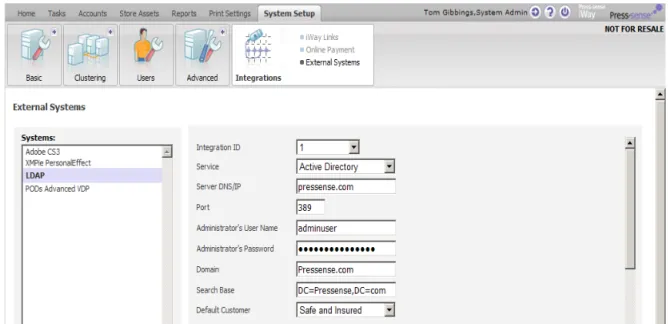
Connection settings provide the parameters necessary to connect to the LDAP server.
Figure 1: Connection Settings
LDAP Configuration
Web Services 4
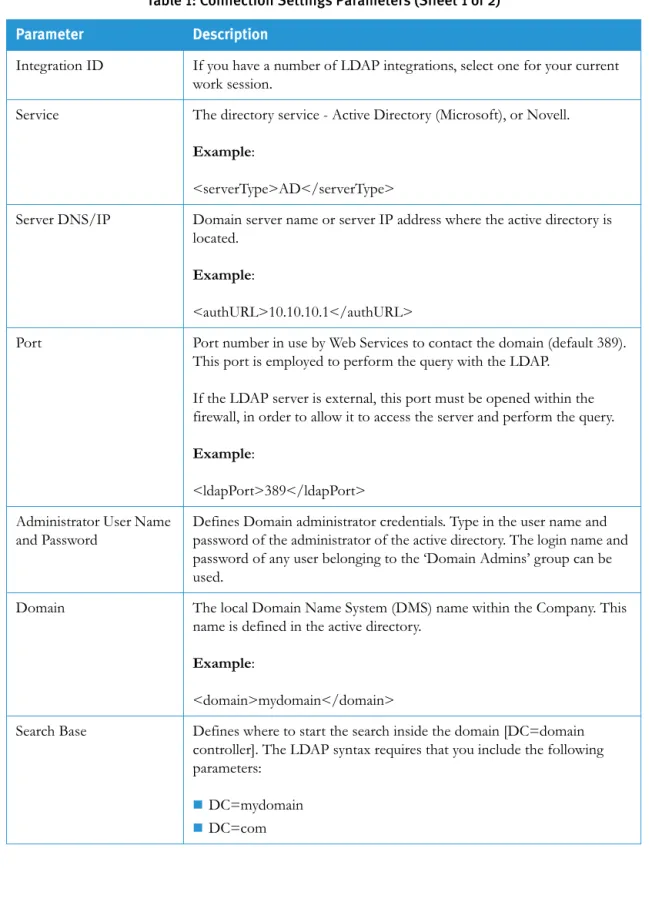
Table 1: Connection Settings Parameters (Sheet 1 of 2)
Parameter Description
Integration ID If you have a number of LDAP integrations, select one for your current work session.
Service The directory service - Active Directory (Microsoft), or Novell.
Example:
<serverType>AD</serverType>
Server DNS/IP Domain server name or server IP address where the active directory is located.
Example:
<authURL>10.10.10.1</authURL>
Port Port number in use by Web Services to contact the domain (default 389). This port is employed to perform the query with the LDAP.
If the LDAP server is external, this port must be opened within the firewall, in order to allow it to access the server and perform the query.
Example:
<ldapPort>389</ldapPort> Administrator User Name
and Password
Defines Domain administrator credentials. Type in the user name and password of the administrator of the active directory. The login name and password of any user belonging to the ‘Domain Admins’ group can be used.
Domain The local Domain Name System (DMS) name within the Company. This name is defined in the active directory.
Example:
<domain>mydomain</domain>
Search Base Defines where to start the search inside the domain [DC=domain controller]. The LDAP syntax requires that you include the following parameters:
DC=mydomain
Configuring LDAP for Web Services
5 LDAP Configuration Guide
Mapping LDAP - Web Services Attributes
The attribute settings define the parameters that Web Services extracts from the LDAP server and how they are translated by Web Services. Mapping the attributes is divided into two sections:
Configuring the Attributes Configuring Privileges Parameters
Configuring the Attributes
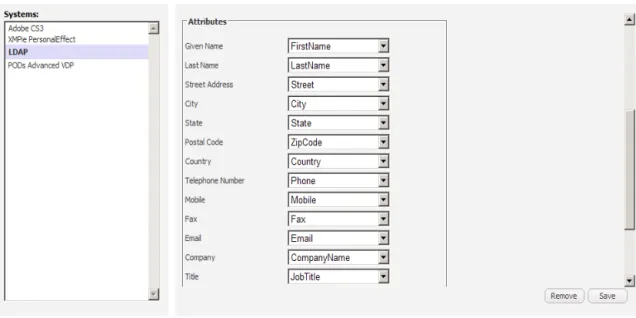
Attributes are the set of parameters - address, phone number, etc. - defined in the LDAP directory, and retrieved and updated in the Web Services user account. Figure 2 shows attribute parameters.
Figure 2: Attribute Settings
Default Customer Defines the default Web Services account into which the authenticated LDAP user will be logged.
Example:
<customerID>2</customerID>
Table 1: Connection Settings Parameters (Sheet 2 of 2)
LDAP Configuration
Web Services 6
Configuring Privileges Parameters
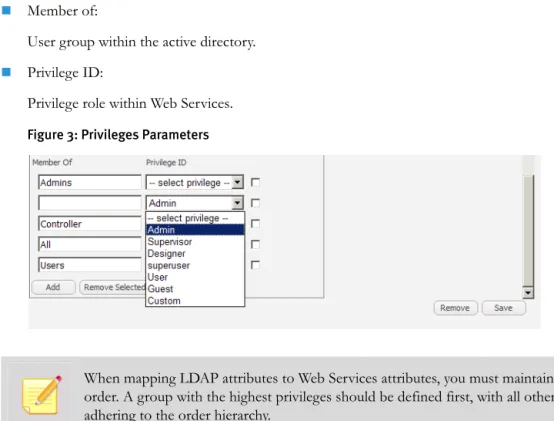
The LDAP Adapter integration enables synchronization between members of LDAP groups and Web Services privileges. Privileges parameters are divided into two headings:
Member of:
User group within the active directory.
Privilege ID:
Privilege role within Web Services.
Figure 3: Privileges Parameters
Testing the New Configurations
To test the new configurations, login to http://localhost/iway/?iid=1.
When mapping LDAP attributes to Web Services attributes, you must maintain a hierarchal order. A group with the highest privileges should be defined first, with all other definitions adhering to the order hierarchy.
1 is the Integration ID defined by you. Refer to Figure 1.
Each buyer must login using this URL in order to receive authentication by the LDAP. When applying a skin to the customer, use the following URL: