[!ill
DIGITAL
RESEARCHT~
PL/r
Language
Foreword
The PL/I system is a complete software package for both applications and system programming. PL/I runs under the Digital Research single-user operating systems, CP/M® or CP/M-86®. PL/I runs in a multiuser environment, under MP/M II™, or MPIM-86™. This manual assumes you are familiar with your operating system and minimizes references to it.
PL/I is formally based on the Subset G language defined by the ANSI PL/I Stan-dardization Committee X3Jl. Subset G contains all the necessary application pro-gramming constructs of full PL/I, and discards seldom-used or redundant forms. The resulting language encourages good programming practices while simplifying the com-pilation task.
The PLII Language Programming Guide is divided into three parts. The first part, Sections 1 through 6, presents a brief introduction to the PL/I language, with emphasis on block structure, data types, and its various executable statements. Section 5 gives guidelines for developing a readable programming style. Section 6 explains the oper-ation of the system as a whole, and introduces you to the mechanics of compiling, linking, and executing programs.
The second part, Sections 7 through 16, contains detailed sample programs that illustrate the useful facilities of the language, including Input/Output processing, string and list processing, scientific computation, and business applications. Each section presents general concepts, and then a detailed discussion of one or more example programs to illustrate the concepts.
The third part, Section 17 through 20, presents advanced programming topics, such as the internal representation of data, conventions for interfacing assembly language prbgrams with PL/I modules, making direct operating system calls, and writing PL/I programs that use overlays.
COPYRIGHT
Copyright © 1982 by Digital Research. All rights reserved. No part of this publication may be reproduced, transmitted, transcribed, stored in a retrieval system, or translated into any language or computer language, in any form or by any means, electronic, mechanical, magnetic, optical, chemical, manual or otherwise, without the prior written permission of Digital Research, Post Office Box 579, Pacific Grove, California, 93950.
This manual is, however, tutorial in nature. Thus, permission is granted to reproduce or abstract the example programs shown in the enclosed figures for the purposes of inclusion within the reader's programs.
DISCLAIMER
Digital Research makes no representations or warranties with respect to the contents hereof and specifically disclaims any implied warranties of merchantability or fitness for any particular purpose. Further, Digital Research reserves the right to revise this publication and to make changes from time to time in the content hereof without obligation of Digital Research to notify any person of such revision or changes.
TRADEMARKS
CP/M and CP/M-86 are registered trademarks of Digital Research. MP/M II, MP/M-86, SID and SID-86 are trademarks of Digital Research. TEX and ED are utilities of Digital Research. ADM-3A is a product of Lear-Siegler Incorporated.
The PL/I Language Programming Guide was prepared using the Digital Research TEX-80 Text formatter and printed in the United States of America by Commercial Press/Monterey.
Table of Contents
1 Introduction
1.1 What is PL/I? ... 1
1.2 Using This Manual ... 1
1.3 Notation ... 2
2 The PL/I Language 2.1 2.2 2.3 2.4 2.5 2.6 Structural Statements ... . Declarative Statements ... . Executable Statements ... . PL/I Blocks ... . Procedures DO-groups 3 3 3 5 6 7 3 Declarations 3. 1 Scalar Data ... 10
3.1.1 Arithmetic Data ... 10
3.1.2 String Data ... 12
3.1.3 Control Data ... 13
3.1.4 Pointer Data ... 16
3.1.5 File Data ... . . . 16
3.2 Data Aggregates ... 16
3.2.1 Arrays ... 17
3.2.2 Structures ... 18
4 Executable Statements 4.1 Assignment Statements ... 21
4.2 Sequence Control Statements ... 23
4.2.1 Iteration ... 24
4.2.2 Procedure Invocation ... 26
4.2. 3 Parameter Passing ... 26
4.2.4 Conditional Branch ... 29
Table of Contents
(continued)
4.3' 1/0 and File-handling Statements ... 29
4.3.1 Opening Files ... 30
4.3.2 File Attributes ... 33
4.3.3 Implied Attributes ... 34
4.3.4 Closing Files ... 35
4.3.5 File Access Methods ... 35
4.3.6 Data Format Items ... 36
4.3.7 Control Forniat Items ... 36
4.3.8 Predefined Files ... 37
4.4 Condition-processing Statements ... 37
4.4.1 The ON Statement ... 38
4.4.2 The REVERT Statement... ... 38
4.4.3 The SIGNAL Statement ... 39
4.4.4 Condition Categories ... 39
4.4.5 Condition Processing Built-in Functions ... 41
4.5 Memory Management Statements ... 41
4.5.1 BASED Variables and Pointers ... 42
4.5.2 The ALLOCATE Statement ... 44
4.5.3 The FREE Statement ... 44
4.6 Preprocessor Statements ... 45
4.7 Null Statements ... 46
5 Programming Style 5.1 Case ... 49
5.2 Indentation ... 49
5.3 Abbreviations ... 50
5.4 Modular Format ... ... 50
5.5 Comments ... 51
6 Using the System 6.1 PL/I System Files ... 54
Table of Contents
(continued)
6.3 Compiler Operation ... 57
6.4 The DEMO Program ... 59
6.5 Running DEMO ... 60
6.6 Error Messages and Codes ... 61
6.6. 1 General Errors ... 62
6.6.2 Pass 1 Errors ... 63
6.6. 3 Pass 2 Errors ... 64
6.6.4 Pass 3 Errors ... 67
6.6.5 Run-time Errors ... 67
6.6.6 Fatal Run-time Errors ... 67
6.6.7 Nonfatal Errors ... 68
7 Using Different Data Types 7.1 The FL TPO L Y Program 7.2 The D ECPO L Y Program 8 STREAM and RECORD File Processing 71 74 8.1 File Copy Program ... 77
8.2 Name and Address File ... 80
8.2. 1 The CREATE Program ... 80
8.2.2 The RETRIEVE Program ... 83
8.3 An Information Management System ... 88
8.3. 1 The ENTER Program ... 88
8.3.2 The KEYFILE Program ... 91
8.3.3 The UPDATE Program ... 92
8.3.4 The REPORT Program ... 96
9 Label Constants, Variables, and Parameters 9.1 Labeled Statements ... 101
9.2 Program 4be1s ... 102
9.3 Computed GOTO ... 103
9.4 Label References ... 104
Table of Contents
(continued)
10 Condition Processing
10.1 10.2
10.3
Condition Categories ... . Condition Processing Statements ... . 10.2.1 ON and REVERT ... . 10.2.2 SIGNAL ... . Examples of Condition Processing
10.3.1 The FLTPOLY2 Program 10.3.2 The COPYLPT Program
107 108 108 110 110 111 112
11 Character String Processing
11.1 The OPTIMIST Program ... 119
11.2 A Parse Function ... 123
11. 2.1 The GNT Procedure ... 125
11.2.2 The DO-Group... ... 126
12 List Processing 12.1 Based and Pointer Variables ... 129
12.2 The REVERSE Program ... 132
12.3 A Network Analysis Program ... 136
12.3.1 NETWORK List Structures ... 139
123.2 Traversing the Linked Lists ... 141
12 3. 3 Overall Program Structure ... 142
12.3.4 The Setup Procedure ... 142
123.5 The Connect Procedure... ... . .... 142
12. 3.6 The Find Procedure ... 143
123.7 The Print-.All Procedure ... . . . .. 143
12.3.8 The Print_Paths Procedure ... 143
123.9 The Print_Route Procedure ... 143
123.10 The Shortest_Distance Procedure. . . .. 144
12.3.11 The Free-.All Procedure ... 144
Table of Contents
(continued)
13 Recursive Processing
13.1 The Factorial Function ... 153
13.2 FIXED DECIMAL and FLOAT BINARY Evaluation ... 158
13.3 The Ackermann Function ... 161
13.4 An Arithmetic Expression Evaluator ... 163
13.4. 1 The Exp Procedure ... 165
13.4.2 Condition Processing ... 166
13.4.3 Improvements ... 167
14 Separate Compilation 14.1 Data and Program Declarations ... 173
14.2 ENTRY Data ... 174
14.3 An Example of Separate Compilation ... 176
15 Decimal Computations 15.1 A Comparison of Decimal and Binary Operations ... 183
15.2 Decimal Representation ... 185
15.3 Addition and Subtraction... ... ... ... 188
15.4 Multiplication ... 191
15.5 Division ... 193
16 Commercial Processing 16.1 A Simple Loan Program ... 197
16.2 Ordinary Annuity ... 201
16.2.1 Mixed Data Types ... 203
16.2.2 Evaluating the Present Value PV ... 205
16.2.3 Evaluating the Payment PMT ... 206
16.2.4 Evaluating the Number of Periods n ... 207
16.3 Loan Payment Schedule Format ... 208
16.3.1 Variable Declarations ... 215
16.3.2 Program Execution. . . .. . . .. 216
Table of Contents
(continued)
(
16.4 Computation of Depreciation Schedules ... 222 \
16.4.1 General Algorithms ... 222
16.4.2 Selecting the Schedule ... 231
16.4.3 Displaying the Output ... 232
17 Internal Data Representation 17.1 FIXED BINARY Representation ... 239
17. 2 FLOAT BINARY Representation ... 240
17.3 FIXED DECIMAL Representation ... 243
17.4 CHARACTER Representation ... 244
17.5 BIT Representation ... . . . .. 245
17.6 POINTER, ENTRY and LABEL Data ... 245
17.7 File Constant Representation ... 246
17.8 Aggregate Storage ... 246
18 Interface Conventions 18. 1 Parameter Passing Conventions ... 247
18.2 Returning Values from Functions ... 253
18.2.1 Returning FIXED BINARY Data ... 254
18.2.2 Returning FLOA T BINARY Data ... ;... 254
18.2.3 Returning FIXED DECIMAL Data ... 255
18.24 Returning CHARACTER Data ... 255
18.2.5 Returning BIT Data ... : . . .. . . . .. 255
18.2.6 Returning POINTER, ENTRY, LABEL Variables ... 256
18.3 Direct Operating System Function Calls ... 259
19 Dynamic Storage and Stack Routines 19.1 Dynamic Storage Subroutines ... 263
19.1.1 The TOTWDS and MAXWDS Functions ... 263
19.1.2 The ALLWDS Subroutine ... 264
Table of Contents
(continued)
20 Overlays
20.1 Using Overlays in PL/I ... 267
20.2 Writing Overlays in PL/I ... 269
20.2.1 Overlay Method One ... 270
20.2.2 Overlay Method Two ... 271
20.2.3 General Overlay Constraints ... 273
20.3 Command Line Syntax ... 273
List of Tables
3-1. PL/I Data Types ... 94-1. PL/I Valid File Attributes. . . 33
4-2 File Attributes Associated with 110 Access ... 34
4-3. PL/I Condition Categories and Subcodes ... 39
6-1. PL/I System Files ... '... 54
6-2 PL/I Compiler Options ... 56
List of Figures
2-1. PL/I Procedure Components ... 63-1. Arrays ... 17
3- 2 Structure Declaration Hierarchy ... 19
4-1. Forms of the DO Statement ... 24
6-1. PL/I Program Development ... 53
8-1. Default Filenames in the Command Tail ... 78
17-1. FIXED BINARY Representation ... 239
17- 2 Single-precision Floating-point Binary ... 240
17-3. Double-precision Floating-point Binary ... 242
17-4. Bit-string Data Representation ... 245
17-5. POINTER, ENTRY, and LABEL Data Storage ... 245
17-6. Aggregate Storage ... 246
Table of Contents
(continued)
List of Listings
(
2-1. SAMPLE PL/I Program ... 4
3-1a. External Procedure A ... 15
3-1b. The CALL Program ... 15
4-1. Parameter Passing ... 28
5-1. PL/I Stylistic Conventions ... 51
6-1a. Compilation of DEMO Using $N Switch ... 58
6-1b. Compilation of DEMO Using $L Switch ... 59
6-2 Interaction with the DEMO Program ... 60
6-3. Error Traceback with the DEMO Program ... 61
7-1. Polynomial Evaluation Program (FLOA T BINARY) ... 72
7-2 Interaction with FL TPOLY Program ... '0' • • • • • • • • • • • • • • 73 7-3. Polynomial Evaluation Program (FIXED DECIMAL) ... 74
7-4. Interaction with DEC POL Y Program ... 75
8-1. COpy (File-to-File) Program ... 78
8-2 Interaction with the COpy Program ... 79
8- 3. CREA TE Program ... 80
8-4. Interaction with the CREATE Program ... 82
8- 5. Output from the CREATE Program ... 83
8-6. RETRIEVE Program ... 84
8-7. Interaction with the RETRIEVE Program ... 86
8-8. The ENTER Program ... 89
8-9. Interaction with the ENTER Program ... 90
8-10. The KEYFILE Program ... 91
8-11. Interaction with the KE YFILE Program ... 92
8-12 Contents of the KEYFILE ... 92
8-13. The UPDATE Program ... 93
8-14. Interaction with the UPDATE Program ... 95
8-15. The REPORT Program ... 97
8-16. REPORT Generation to the Console ... 98
9-1. 10-1. 10-2 10-3. 10-4. 10-5. 11-1. 11-2 11-3. 11-4. 12-1. 12-2 12-3. 12-4. 13-1. 13-2 13-3. 13-4. 13-5. 13-6. 13-7. 13-8. 13-9. 13-10. 13-11. 13-12 13-13. 13-14. 14-1. 14-2 14-3. 14-4.
Table of Contents
(continued)
Illustration of Label Variables and Constants ... 106
Processing the REVERT Statement ... 109
The FL TPOL Y2 Program ... 111
The COPYLPT Program... 112
Interaction with COPYLPT ... 115
Output from COPYLPT ... 116
The OPTIMIST Program ... 121
Interaction with OPTIMIST ... 122
The FSCAN Program... 124
Interaction with the FSCAN Program ... 125
The REVERSE Program ... . . . .. 133
Interaction with the REVERSE Program ... 134
Interaction with the NETWORK Program ... 137
The NETWORK Program ... 145
The IFACT Program ... ;.. 155
Output from the IFACT Program ... 156
The RFACT Program ... 156
Output from the FACT Program ... 157
The DFACT Program ... 158
Output from the DFACT Program ... 159
The FFACT Program· ... 159
Output from the FFACT Program... ... 160
The ACK Program ... 162
Interaction with ACK Program ... 162
EXPRESSION Program Using Evaluator EXPRl ... 164
Interaction with EXPRl ... 167
Expression Evaluator EXPR2 ... 168
Interaction with EXPR2 ... 171
Illustration of ENTRY Constants and Variables ... 176
MAININVT -Matrix Inversion Main Program Module ... 178
INVERT -Matrix Inversion Subroutine ... 180
16-1. 16-2 16-3. 16-4. 16-5. 16-6. 16-7. 16-8. 16-9. 16-10. 16-11. 16-12. 16-13. 16-14. 18-1. 18-2 18-3. 18-4. 18-5. 18-6. 18-7. 18-8. 18-9. 19-1. 19-2 19-3. 19-4.
Table of Contents
(continued)
The LOAN1 Program ... 199
Output from the LOAN1 Program... 200
The ANNUITY Program ... 201
Interaction with the ANNUITY Program ... 203
The LOAN2 Program ... 209
First Interaction with LOAN2 ... 218
Second Interaction with LOAN2 ... 219
Third Interaction with LOAN2 ... 220
Fourth Interaction with LOAN2 ... 221
The D EPREC Program ... 223
First Interaction with DEPREC ... 234
Second Interaction with DEPREC ... 235
Third Interaction with DEPREC ... 236
Fourth Interaction with DEPREC ... 237
The DTEST Program ... 249
DIV2ASM Assembly Language Program (8080) ... 250
DIV2 A86 Assembly Language Program (8086) ... 251
DTEST Output (abbreviated)... 253
The FDTEST Program ... 256
FDIV2ASM Assembly Language Program (8080) ... 257
FDIV2A86 Assembly Language Program (8086) ... 258
D10MOD.DCL ... 260
FCB.DCL ... 261
The ALL TST Program ... 265
Interaction with the ALL TST Program ... 266
The ACKTST Program ... 267
1.1 What is PL/I?
Section 1
Introduction
PL/I is a programming language that you can use to write either applications or system-level programs. It is formally based on the ANSI General Purpose Subset (Subset G) as specified by the ANSI PL/I Standardization Committee X3Jl. PL/I Subset G has the formal structure of the full language, but in some ways it is a new language, and in many ways an improved language compared to its parent.
PL/I Subset G is easy to learn and use. It is a highly portable language because its design generally ensures hardware independence. It is also more efficient and cost effective, because programs written in PL/I Subset G are easier to implement, document, and maintain.
1.2 Using This Manual
This manual is designed to help you learn PL/I by studying sample programs. If you have never programmed in a structured, high-level language such as PL/I, you should read Sections 1 through 4 first. These sections provide you with a brief introduction to the language. PL/I has features that are similar to other programming languages, but it also has its own unique constructs and syntax.
Sections 1 through 4 outline the fundamental structure and features of PL/I in an informal and conceptual framework. This summary can help you become familiar with the overall capabilities of PL/I and encourage you to use its full power.
Sections 1 through 4 are not a complete tutorial on PL/I programming in general.
If you find the overview is not sufficiently detailed, you might want to read some of the books listed in Appendix E of the P LII Language Reference Manual. You should also refer to the material in Sections 1 through 4 of the P LII Language Reference Manual.
1.3 Notation PL/I Programming Guide
1.3 Notation
The following notational conventions appear throughout this document:
• Words in capital letters are PLII keywords or the names of PLII programs that are described in the text.
• Words in lower-case letters or in a combination of lower-case letters and digits separated by
a
hyphen represent variable information for you to select. These words are described or defined more explicitly in the text.• Example statements are given in lower-case.
• The vertical bar
I
indicates alternatives.• ~ represents a blank character.
• Square brackets [ ] enclose options.
• Ellipses ... indicate that the immediately preceding item can occur once or any number of times in succession.
• Except for the special characters listed above, all other punctuation and special characters represent the actual occurrence of those characters.
• In text, the symbol CTRL represents a control character. Thus, CTRL-C means control-C. In a PLII source program listing or any listing that shows. example console interaction, the symbol" represents a control character.
• The acronym BIF refers to one of the PLII built-in functions.
• Throughout this manual, program listings have brackets on the left side to illustrate and emphasize the block structure of the language.
• References to material in the PLII Language Reference Manual are noted at the end of each section. The acronym LRM denotes Language Reference Manual. For example,
Section 2
The PLfI Language
Every PL/I program consists of one or more statements from three general categories:
• structural statements • declarative statements • executable statements
These categories are not mutually exclusive, but provide a convenient starting point. The following sections describe and illustrate the statements in each general category.
2.1 Structural Statements
Structural statements are the foundation of any program because they define the logical units in a program. These logical units are called blocks. When a program executes, control always flows from one logical unit to another. Logical units can contain other logical units, causing control to flow into and out of the units. You use structural statements to specify the hierarchical and logical structure in a program.
2.2 Declarative Statements
Declarative statements always occur in a logical unit defined by a structural statement, and determine the environment of a logical unit. The environment is the name and type of all the data variables available in a logical unit. Use declarative statements to specify the context of the variables you want to manipulate in a logical unit.
2.3 Executable Statements
2.3 Executable Statements PL/I Programming Guide
Listing 2-1 shows a PL/I program that illustrates statements from each category. You need not fully understand the program or the syntax of each statement at this point. The program consists of distinct blocks of statements; each block is a logical unit of control.
s aMP Ie:
procedure options(Main); declare
c cnaracter(10) varyin~;
[
dO;ut sKip list('Input: ');
~et list(c);
c = upper(c); 1* function reference *1
put sKip list('Output: ''c); end;
Ibe~in;
I declare
l
c float binary(Z4); put sKip list('Input: ');~et list(c);
call output(c); 1* subroutine invocation *1
en d ; upper:
procedure(c) returns(cnaracter(10) varyin~); declare
c cnaracter(10) varyin~;
return(translate(c,'A5CDEFGHIJKLMNOPQRSTUVWXYZ' , 'abcdef~nijKlMnopqrstuvwxyZ')) ; end uPper;
[
Output~rocedUre(C)
;deC!a;~oat
binary(Z4);put sKip edit(c) (coluMn(20) ,e(10,Z)); end output;
end saMPle;
PL/I Programming Guide 2.3 Executable Statements
Every PL/I program must have a main procedure block. Although you can separately develop and compile external procedures that can be linked to and called from a main procedure, there can be only one main procedure block in a program. In Listing 2-1, the first two statements, together with the last statement, determine the outermost, or main block of the program.
2.4 PL/I Blocks
In PL/I a block can have its own local environment, and possibly an environment inherited from a containing block. A containing block is any block that contains another block. For example, in Listing 2-1 the DO-group inherits the environment of the main procedure block. However, the BEGIN block has its own local environment, even though it is contained in the main procedure block.
In PL/I there are two types of blocks:
• PROCEDURE blocks • BEGIN blocks
You can nest either type of block. This means that you can put one block inside another, but the blocks cannot overlap. The essential difference between a PROCE-DURE block and a BEGIN block is the way that PL/I executes each block in the overall program.
2.4 PL/I Blocks PL/I Programming Guide
PL/I ignores PROCEDURE blocks as theyare encountered in the usual sequence of statements in the program. Control only passes to and enters a PROCEDURE block when the program invokes the procedure with a CALL statement or a function ref-erence. A PROCEDURE block is active when the statements inside the block are executing. When the statements inside t~e procedure finish executing, the PROCEDURE block returns control to the point of the call.
For this reason, you can place a procedure anywhere in a program. It is good programming practice to put all procedures at the bottom of the main program. This makes debugging and maintaining a program easier.
2.5 Procedures
Every procedure consists of a procedure name, procedure header, the procedure body of zero or more statements, and an end statement. Figure 2-1 shows the components of the main procedure in the SAMPLE program.
procedure name
7
pro~edure headersample: .
procedure options(main);
procedure body
·1 :
end sample;~
[image:21.468.32.432.213.547.2]end statement
~
.PL/I Programming Guide 2.5 Procedures
If you nest procedures, they inherit the environment of containing blocks. However, any variable that you declare in a containing block can be rededared, with local attributes, in the nested procedure.
There are two general types of procedures in PL/I:
• subroutine procedures • function procedures
Use the CALL statement to invoke a subroutine procedure. A subroutine procedure performs a specific task, and optionally returns values to the invoking procedure.
Invoke a function procedure by making a function reference. A function reference is simply using the name of the function in a statement. PL/I evaluates the function reference and replaces it with a scalar value at the point of the reference.
Procedures are either internal or external in relation to the main procedure. An internal procedure is contained in the body of the main procedure, while external procedures are written and compiled separately from the main program. To make an external procedure known to the main procedure, you must declare the procedure name as an entry constant (see Section 3.1.3). You must also link the external procedure to the main procedure after both are compiled. All the procedures in the SAMPLE program are internal to the main procedure.
2.6 DO-groups
The group is similar to the BEGIN block. There are several forms of the DO-group, and they are executable statements because they influence the flow of control. However, they are also considered structural statements because they define logical units.
2.6 Procedures PL/I Programming Guide
A DO-group can bind only executable statements. However, a BEGIN block can bind both declarative statements and executable jstatements. The environment of a DO-group is determined by the environment of the block where it occurs.
Section 3
Declarations
[image:24.469.107.350.199.508.2]Use declarative statements to specify the data items you want to manipulate with the executable statements in your program. PLII has a rich variety of data types. In addition to arithmetic and string data, PL/I supports pointer, label, and entry data, which are generally not available in other languages. Table 3-1 shows the PL/I data types divided into categories and subcategories.
Table 3-1. PL/I Data Types
Category Subcategory
Arithmetic· FIXED BINARY
FLOAT BINARY FIXED DECIMAL
String CHARACTER
BIT
Control Label Variable
Label Constant Entry Variable Entry Constant
Pointer POINTER
File File Variable
File Constant
Data Aggregates Arrays Structures
Procedures Subroutines
3.1 Scalar Data PL/I Programming Guide
All declarative statements specify either data constants or data variables. You must explicitly declare all data variables in a DECLARE statement, but data constants are usually declared implicitly by their occurrence in an executable statement. A PLII variable is defined by an identifier name. The name can consist of up to thirty-one alphanumeric characters or underscores. The first character must be a letter.
Usually, declarative statements, whether explicit or implicit, result in a specific allo-cation of storage for the data item declared. The Compiler determines the amount of storage required for the type of data, and associates the item with this storage. BASED variables are an exception because they do not necessarily force an allocation of storage (see Section 4.5).
3.1 Scalar Data
There are two main kinds of data: scalar, or single, data items, and aggregate, or multiple, data items. Scalar data types are the fundamental data types of the language.
3.1.1 Arithmetic Data
You use arithmetic data for direct numerical calculation. PL/I provides several types of arithmetic data, so you can match the data to the application.
FIXED BINARY
You can use FIXED BINARY data to represent integers. PL/I internally represents this data type in two's complement binary form. The precision of a FIXED BINARY number is the number of bits used to represent it, independent of the sign. PL/I uses from
1 to 15 bits, so it can represent integers in the range from -32768 to + 32767.
FLOAT BINARY
You can use FLOAT BINARY data to represent very small or very large numbers. FLOAT BINARY data has a binary fractional part (called the mantissa), a binary exponent, and a sign. PLII supports both single-precision and double-precision FLOAT BINARY numbers. The precision of a FLOAT BINARY number is the number of bits in the mantissa.
PL/I Programming Guide 3.1 Scalar Data
Double-precision numbers can have from 24 to 53 bits, while the exponent has 11 bits. The maximum range of double-precision FLOAT BINARY numbers in decimal is approximately 9.40 ,:- 10':-':--308 to 1.80 ,:- 10':-':-308.
FIXED DECIMAL
You can use FIXED DECIMAL data to represent numbers with a fixed decimal point. You can also use FIXED DECIMAL data to represent integers. Internally, PL/I represents FIXED DECIMAL data in binary coded decimal (BCD) digits.
FIXED DECIMAL numbers have both precision and scale. The precision is the total number of decimal digits used to represent the number. The scale is the number of decimal digits to the right of the decimal point.
In PL/I, the precision of a FIXED DECIMAL number can vary from one to fifteen, while the scale can vary from zero to fifteen. This arithmetic data type is particularly useful for commercial calculations, which require exact representations of dollars and cents and cannot accept the truncation errors of binary arithmetic.
You declare an arithmetic data variable in a declaration statement of one of the following forms, where p is the precision and q is the scale.
Statement:
DECLARE identifier FIXED BINARY[(p)];
Example:
declare index counter fixed binarv(7);
Statement:
DECLARE identifier FLOAT BINARY[(p)];
Example:
declare pi float binarv(53);
Statement:
3.1 Scalar Data PL/I Programming Guide
Example:
declare base pa}' fixed decifTlal (5 tZ);
Note: precision and scale are optional. If you omit them,--PL/I supplies default values.
You should use binary arithmetic for most-numerical work, because it is faster and uses the least storage. If you are doing scientific work, PL/I has a complete library of built-in mathematical functions, which includes the trigonometric and the hyperbolic functions.
3.1.2 String Data
The ability to manipulate string variables is one of the most useful features of PL/I. PL/I has a complete set of built-in functions that you can use to manipulate string data. You declare a string variable to be either a bit string or a character string in a declaration of one of the following forms:
Statement:
DECLARE identifier CHARACTER[(n)];
Example:
declare alphabet character(ZG);
Statement:
DECLARE identifier CHARACTER[(n)] VARYING;
Example:
declare state character(ZO) uaryin~;
Statement:
DECLARE identifier BIT[(n)];
PL/I Programming Guide 3.1 Scalar Data
The VARYING attribute means that the character string can vary in length, but cannot exceed the value of n. For CHARACTER variables, the value of n can be between 0 and 254. If you want to manipulate longer strings, you can use one-dimen-sional arrays.
Character-string constants are implicitly declared by their occurrence in a program. Indicate a character-string constant by enclosing it in apostrophes. If you want to include an apostrophe in the string, you must precede it with an extra apostrophe. PL/I also allows you to include control characters in a character string.
The following are examples of character strings:
'Ada LOl.lelace'
'~~ ~~ Input Error'
'Can"t Read Previous Line'
Bit-string variables cannot have the VARYING attribute, and the length of a bit string cannot exceed sixteen. PL/I allows you to specify bit-string constants in several different formats. Each format corresponds to a different base, which is the number of bits used to represent the item. The formats for bit-string constants are:
• base 2 (B or B1 format) • base 4 (B2 format) • base 8 (B3 format) • base 16 (B4 format)
In each of the formats, write the bit-string constant as a string of numeric digits for the desired base, enclosed in apostrophes and followed by the format type. The fol-lowing are examples of the four formats:
'101111'5 equals 101111
'101111'51 equals 101111
'233'52 equals 101111
'57'53 equals 101111
'2F'511 equals 00101111
3.1.3 Control Data
There are two types of control data:
3.1 Scalar Data PL/I Programming Guide
LABEL data allows you to reference individual statements in your program. PL/I not only allows individual statements to have labels, it also allows you to declare label variables. This means that you can manipulate labels in your program like any other valid data items.
The value of a label variable is always a label constant, implicitly defined and declared by its occurrence as a label of a statement in the program. PL/I allows you to subscript label constants. You can also declare arrays of label variables.
You can use label variables to manipulate the flow of control between logical units of a program. It is better programming practice to do this without using GOTOs and labels.
The following program is a whimsical example of label variables.
chase >'our tail:
procedure options(Main); declare
l,.Iherel)er label;
there:
IlIlherel)er
=
here;her e :
wherel)er
=
there;goto l,.Iherel)er;
end chase your t a i l ;
PL/I also supports a powerful data type called ENTRY data. ENTRY data allows you to reference procedures just like any valid data item. You can declare an entry variable then assign it a value. The value of an entry variable is an entry constant.
Entry constants are the labels of procedures, rather than labels of executable state-ments. An entry constant is implicitly declared by its appearance as a label to an internal procedure.
PL/I Programming Guide 3.1 Scalar Data
The programs shown in Listing 3-1 illustrate these concepts. Listing 3-1a shows an external procedure called a. Listing 3-1 b shows the program CALL, that references a. In CALL, f is an entry variable that assumes three different constant values. To create an executable program, you compile each module separately then link them together.
[
a: procedure(x) returns(float); declare x float;
return(x/2) ; end ai
1* external procedure *1
Listing 3-1a. External Procedure A
call:
procedure options(Main); declare
f(3) entry(float) returns(float) variable I
a entry(float) returns(float); 1* entrY constant 1*
declare
i fixed, x float;
f ( 1 ) a;
f (2) b i f (3) c;
1 to 3;
put sKip list('Type x '); 9'et list(x)i
put list('f(',i,/)=',f(i)(x)); [
do
end; stop;
procedure(x) returns(float); 1* internal procedure *1
declare x float; return (2*x + 1);
[ b:
end bi
procedure(x) returns(float) i 1* internal procedure *1
declare x float; return(sin(x)) i
[ c:
end c; end calli
3.1 Scalar Data PL/I Programming Guide
3.1.4 Pointer Data
Pointer data allows you to manipulate the storage allocated to variables. The value of a pointer variable is the address of another variable.
3.1.5 File Data
File data items describe and provide access to the data associated with an external device. File data items are either file constants or variables. You must always assign a file constant to a file variable before you access the data in the file.
Declare file data in a declaration statement in one of the following forms:
Statement:
DECLARE identifier FILE;
Example:
declare current transaction file;
Statement:
DECLARE identifier FILE VARIABLE;
Example:
declare feZ) file variable;
The executable statements used for file access determine the file attributes. (Section 4.3 describes file-handling and 1/0 operations.)
3.2 Data Aggregates
A data aggregate is a combination of data types that forms a data type on a higher level. There are two kinds of aggregates in PL/I:
PL/I Programming Guide 3.2 Data Aggregates
3.2.1 Arrays
An array is a subscripted collection of data items of the same data type. PL/I allows arrays of arithmetic values, character strings, bit strings, label constants, entry con-stants, pointers, files, or structures (see Section 3.2.2).
The following are examples of array declarations:
declare test scores(100);
declare A(4 t5);
declare A( 1:4 t2:5 to: 10);
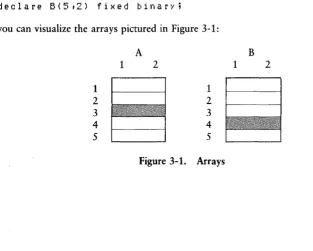
You make direct references to individual elements of an array by using a subscripted variable reference. PL/I also allows you to make cross-sectional references, with the restriction that the reference must specify a data component whose storage is connected. For example, using the following declarations,
declare A(5t2) fixed binary;
declare B(5t2) fixed binan';
you can visualize the arrays pictured in Figure 3-1:
A B
1 2 1 2
1 1
2 2
3 3
4 4
5 5
[image:32.470.64.378.302.553.2]3.2 Data Aggregates PL/I Programming Guide
In this example, A and B are identical in size and attributes. Therefore, an assignment such as
A(3) = BUD;
is valid because the cross-sectional reference specifies connected storage.
3.2.2 Structures
A structure is a very different type of data aggregate than an array. A structure is hierarchical, much like a tree, where the leaves of the tree, called nodes, can be various PL/I data types.
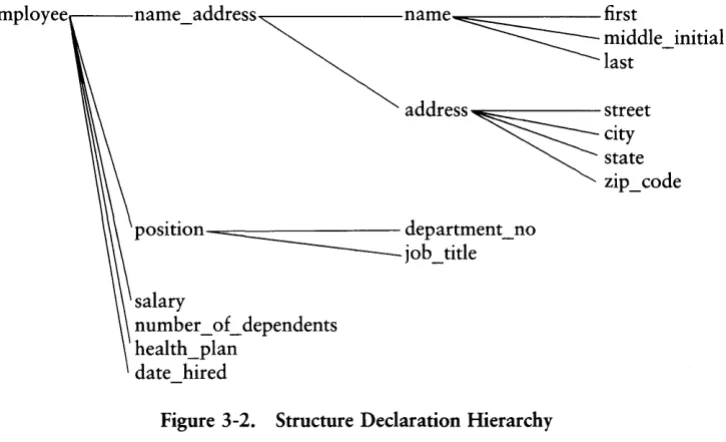
Each node of the tree, beginning with the root, has a name and a level number. The level number indicates the level of each node in relation to the root. The following example illustrates a structure declaration.
declare
1 elT1Plo)'ee t
2 nalTle add ress t
3 nalTle t
a
first character(10),a
Middle initial character(1),a
last character(20), 3 address,a
street character(aO),a
city character(10),a
state character(2),a
zip code character(S), 2 position,3 departMent no character(3) t
3 job title character(20), 2 salan' fixed decilTlal (S ,2) t
2 n U ITI b e r _ 0 f _ d e pen d. en t s fix ed,
PL/I Programming Guide 3.2 Data Aggregates
Figure 3-2 illustrates the hierarchy of levels that corresponds to the declaration.
______ middle_initial
empIOyeer---name_address~name ~ first
last
address~s~reet Clty state zip_code
position ~ department_no
job_title
salary
number_of _ dependents health_plan
date_hired
Figure 3-2. Structure Declaration Hierarchy
Nodes on each level can also determine a structure. Such a substructure is a member of the main structure. You can give the BASED attribute to the main structure with the result that all the members of the structure receive the attribute.
Structures are powerful tools because they enable you to group logically related data items that might not have the same data type. Thus, structures allow you to characterize and manipulate logical objects in your program to more closely resemble real data.
[image:34.469.62.425.76.297.2]Section 4
Executable Statements
The category of executable statements is divided into several subcategories based on the type of function that the statement performs. The subcategories are:
• assignment statements • sequence control statements • 110 and file-handling statements • memory management. statements • condition processing statements • preprocessor statements
• null statements
4.1 Assignment Statements
An assignment statement places the value of an expression into the storage location associated with a variable.
An expression is a combination of operators, operands, function references, and parentheses that control the order of evaluation of the expression.
In PL/I, the assignment statement has the form:
4.1 Assignment Statements PL/I Programming Guide
An expression in PL/I can be fairly complicated. The simplest type of variable ref-erence is instantiating the variable name, which means to assign the variable a specific value. A variable reference can also be a reference to a data aggregate, or to a component of the aggregate. If the variable is BASED, a pointer-qualified reference might be required (see Section 4.5.1).
PLiI also allows certain built-in functions such as UNSPEC and SUBSTR to appear as targets on the left side of assignment statements. When they appear as variables in this context, they are called pseudo-variables.
Expressions can be computational. This means that the expression involves arithmetic or string values of the various types and their respective operators. Expressions can also be noncomputational, involving comparisons of noncomputational data types such as labels, entry constants, and pointers.
PL/I Programming Guide 4.1 Assignment Statements
The following sequence of code illustrates some simple examples of assignment statements. These examples also illustrate some of the ways you can reference a variable in PL/I. Such references can also occur in expressions, although PL/I limits aggregate expressions to comparison for equality.
assign:
procedure options(main); declare
p pointer,
i fixed binary(7), r bit(lG),
s bit(lG) based, (u,!}) float binan(24), A(5,2) character(2), B(5,2) character(2), C character(20),
2 x fixed binary, 2 ~' bit(lG),
z ,
2 x fixed binary, 2}' bit(lG);
u = u + !}; 1* simple assignment *1
A = B; 1* array aggregate assignment *1
A(3) = B(4); 1* cross-sectional reference *1
w = z; 1* structure aggregate assignment *1
p -> s = (r = w.y); 1* pointer-~ualified reference *1
w.x = w.x + z.x; 1* partially-~ualified aggregate reference *1
unspec(I.I.)') = unspec(A(5t1)); 1* pseudo-I)ariable reference *1
substr(Cti+l,3) = substr(CdO,3); 1* pseudo-I)ariable reference *1
A(2*i+l) = B(4); 1* !}ariable is expression *1
end assign;
4.2 Sequence Control Statements
4.2 Se6}1HRce Control Statements PL/I Programming Guide
4.2.1 Iteration
PLiI provides an extensive variety of iteration control in the various forms of the 00 sta$ement. For example, you can perform iteration not only with an arithmetic control variable, but also with a pointer control variable that is moving through a linked list of pointers.
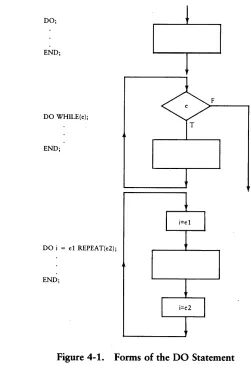
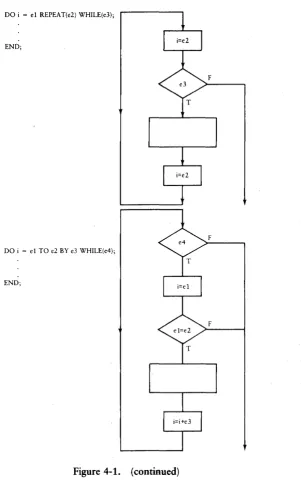
The following diagrams illustrate the basic forms of the DO statement and the flow
of control that they induce. The values el, e2, e3, and e4 represent any scalar expressions.
DO;
END;
F
DO WHILE(e);
END;
DO i = el REPEAT(e2);
[image:39.468.80.331.169.537.2]END;
PL/I Programming Guide 4.2 Sequence Control Statoenunts
DO i = el REPEAT(e2) WHILE(e3); END;
F
F
DO i = el TO e2 BY e3 WHILE(e4); END;
F
[image:40.470.117.419.44.532.2]PL/I Programming Guide 4.2 Sequence Control Statements
4.2.2 Procedure Invocation
A branch and return occurs as the result of a procedure invocation. As we have seen, in PLII there are two types of procedures: subroutine procedures and function pro-cedures. There are two corresponding forms of invocation.
You invoke a subroutine procedure with a CALL statement, but you invoke a function procedure by using its name in an expression. You call a subroutine procedure for a specific reason, such as altering the value of variables passed to the procedure, or input and output. You always invoke a function procedure in an expression to return a scalar data item. In PL/I, both types of procedures can be recursive, which means they can call themselves.
There is an important distinction between a procedure definition and a procedure invocation. A procedure definition is a declarative statement; a procedure invocation is an executable statement. The data items you pass to the procedure when you invoke it are called the actual parameters. The actual parameters are distinguished from the formal parameters you give in the procedure definition. Thus, the actual parameters are the parameters as they are known in the invoking block, while the formal parameters are the corresponding parameters as they are known in the invoked block, the procedure.
4.2.3 Parameter Passing
In PL/I, you can pass parameters by reference or by value. You pass them by reference if the actual parameters and the formal parameters share storage. You pass them by value if the value of the formal parameter is held as a local copy of the value of the actual parameter.
PL/I Programming Guide 4.2 Sequence Control Statements
A procedure is an independent logical unit that performs a specific function. If you carefully define the specific function that the procedure performs and the parameters that it expects from the invoking environment, you can divide the design, coding, and debugging of the overall program into separate units.
If you pass a parameter by reference to conserve storage, be aware that the invoked procedure can change the value of a variable outside its local environment. If you want to assure that the procedure. does not change a variable outside its local environment, then you must pass the parameters by value and use extra storage.
Parameter passing is a trade-off between the amount of storage available on your system and the level of modularity and isolation you want in your program. There are three alternatives for parameter passing, characterized as the high, middle, and low road. The skeletal program in Listing 4-1 illustrates the concepts they represent.
In the low road, you pass by reference but pay close attention to the possible side effects that can result. The advantage of this method is that it conserves storage.
In the middle road, you pass by value, enclosing the actual parameter in parentheses at the point of invocation in the CALL statement or function reference.
4.2 Sequence Control Statements PL/I Programming Guide
Main:
procedure optionsIMain); declare
a float binary;
call low_subia); 1* pass by reference *1
call Middle sublla)); 1* pass by value *1
call hi~h sub(a); 1* pass by reference *1
low sub:
procedure(x) ; declare
x float binary;
end low sub; Middle sub:
procedure(x) ; declare
x float binary;
end Middle sub; -hi!lh sub:
procedl.lre(x) ; declare
(X,MY x) float binary;
MY x = x; 1* reassi~n I.lsin~ local variable *1
end hi~h sub; end Main;
PL/I Programming Guide 4.2 Sequence Control Statements
4.2.4 Conditional Branch
PL/I provides a conditional branch in the form of an IF statement. The conditional branch has one of the following forms,
IF condition THEN group
IF condition THEN group-l ELSE group-2
where the condition is a scalar expression that PL/I evaluates and reduces to a single value, and the groups are either single statements, DO-groups, or BEGIN blocks.
You can nest IF statements, in which case PL/I matches each ELSE with the innermost unmatched IF-THEN pair. However, you can use NULL statements following an ELSE to force an arbitrary matching of ELSE statements with IF-THEN pairs. (See Section 4.7 NULL Statements.)
4.2.5 Unconditional Branch
PL/I provides an unconditional branch in the form of a GOTO statement. The unconditional branch has one of the following forms:
GOTO GOTO
label_ constant; label_ variable;
Because PL/I is block-structured, certain rules apply to the use of the GOTO. The target label must be in the same block containing the GOTO, or in a containing block. You cannot transfer control to an inner block.
4.3 I/O and File-handling Statements
The executable I/O statements provide PL/I with a device-independent input/output system that allows a program to transmit data between memory and external devices. To understand the I/O statements, you must first know about files and their attributes.
4.3 110 and File-handling Statements PL/I Programming Guide
As with other data items, you must declare files before you use them in a program. The general form of a file declaration is,
DECLARE file_id FILE [VARIABLE];
where file_id is the file identifier. If you do not include the optional VARIABLE attrib-ute, the declaration defines a file constant. With the VARIABLE attribattrib-ute, the decla-ration defines a file variable that can take on the value of a file constant through an assignment statement. You must assign a file constant to a file variable before you can perform any 110 operations.
4.3.1 Opening Files
PLII requires that a file be open before performing any 110 operations on the data set. You can open a file explicitly by using the OPEN statement, or implicitly by accessing the file with the following 110 statements:
• GET EDIT • PUT EDIT • GET LIST • PUT LIST • READ • WRITE • READ Varying • WRITE Varying
The general form of the OPEN statement is,
OPEN FILE(file_id) [file-attributes];
where file_id is the file identifier that appears in a FILE declaration statement, and file-attributes denotes one or more of the following:
• STREAM! RECORD • TITLE
• PRINT • ENVIRONMENT
• INPUT! OUTPUT! UPDATE • PAGESIZE
• SEQUENTIAL! DIRECT • LINESIZE
PL/I Programming Guide 4.3 I/O and File-handling Statements
Multiple attributes on the same line are conflicting attributes, so you can only specify one attribute. The first attribute listed is the default attribute. All the attributes are optional; you can specify them in any order.
A STREAM file contains variable length ASCII data. You can visualize it as a stream of ASCII character data, organized into lines and pages. Each line in a STREAM file is determined by a linemark, which is a line-feed or a carriage return/line-feed pair. Each page is determined by a pagemark, which is a form-feed. Generally, you must convert the data in a STREAM file from character form to pure binary form before using it. ED automatically inserts a line-feed following each carriage return, but files that PLII creates can contain line-feeds without preceding carriage returns. In this case, PL/I senses the end of the line when it encounters the line-feed.
A RECORD file contains binary data. PL/I accesses the data in blocks determined by a declared record size, or by the size of the data item you use to access the file. A RECORD file must also have the KEYED attribute, if you use FIXED BINARY keys to directly access the fixed-length records.
The PRINT attribute applies only to STREAM OUTPUT files. PRINT indicates that the data is for output on a line printer.
For an INPUT file, PL/I assumes that the file already exists when it executes the OPEN statement. When it executes the OPEN statement for an OUTPUT file, PL/I also creates the file. If the file already exists, PL/I first deletes it, then creates a new one.
You can read from and write to an UPDATE file. PL/I creates an UPDATE file, if it does not exist, when executing the OPEN statement. An UPDATE file cannot have the STREAM attribute.
4.3 1/0 and File-handling Statements PL/I Programming Guide
A KEYED file is simply a fixed-length record file. The key is the relative record position of the record within the file based upon the fixed record size. You must use keys to access a KEYED file. PL/I automatically gives KEYED files the RECORD attribute.
The TITLE(c) attribute defines the programmatic connection between an internal filename and an external device or a file in the operating system's file system. If you omit the TITLE attribute, PL/I assigns the default title file_id.DAT, where file_id is the file identifier specified in the OPEN statement.
If the character string c specifies a disk file, it must be in the form,
d: filename. typ ;password
where the drive code d, the filetype, and the password are all optional. You must specify a filename. The filename cannot be an ambiguous wildcard reference.
You can also specify $1 or $2 for both the filename and filetype. $1 gets the first default name from the command line, $2 gets the second default name.
The ENVIRONMENT attribute defines fixed record sizes for RECORD files, internal buffer sizes, the file open mode, and the level of password protection. You can open a file in one of three modes: Locked, Read-Only, or Shared. Locked is the default mode, and means that no other user can access the file while it is open. Read-Only means that other users can access the file, but only to read it. Shared mode means that other users can also simultaneously open and access the file. You can use the built-in LOCK and UNLOCK functions to lock and unlock individual records in the file, so there are no collisions with other users.
If you assign a password to a file, you can also assign the level of protection that the password provides. The levels of protection are: Read, Write, and Delete. Read means that you must supply the password to read the file. Write means that you can read the file, but you must supply the password to write to the file. Delete means that you can read the file or write to it, but you cannot delete the file without the password.
PL/I Programming Guide 4.3 110 and File-handling Statements
4.3.2 File Attributes
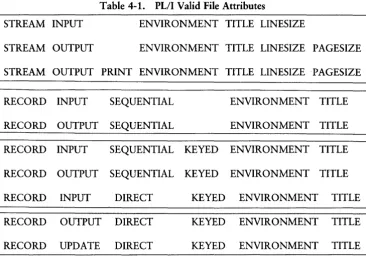
[image:48.470.63.429.180.436.2]PL/I controls all file transactions through an internal data structure called the File Parameter Block (FPB). The FPB contains information about the file, such as whether it is open or closed, the external device or file associated with the file, the current line and column, or record being accessed, and the internal buffer size. The FPB also contains a File Descriptor that describes the file's attributes. These attributes in turn describe the allowable methods of access. Table 4-1 summarizes the valid attributes that you can assign to a file, either through an explicit OPEN statement, or implicitly by an 110 access statement.
Table 4-1. PL/I Valid File Attributes
STREAM INPUT ENVIRONMENT TITLE LINESIZE
STREAM OUTPUT ENVIRONMENT TITLE LINESIZE PAGESIZE
STREAM OUTPUT PRINT ENVIRONMENT TITLE LINESIZE PAGESIZE
RECORD INPUT SEQUENTIAL ENVIRONMENT TITLE
RECORD OUTPUT SEQUENTIAL ENVIRONMENT TITLE
RECORD INPUT SEQUENTIAL KEYED ENVIRONMENT TITLE
RECORD OUTPUT SEQUENTIAL KEYED ENVIRONMENT TITLE
RECORD INPUT DIRECT KEYED ENVIRONMENT TITLE
RECORD OUTPUT DIRECT KEYED ENVIRONMENT TITLE
4.3 110 and File-handling Statements PL/I Programming Guide
4.3.3 Implied Attributes
[image:49.468.39.408.135.547.2]If you do not open a file with explicit attributes, PL/I determines the attributes from the type o£ 110 statement you use to access the file. Table 4-2 summarizes the attributes implied by each o£ the 1/0 statements. In the following table, £ is a file constant, x is scalar or aggregate data type that is not CHARACTER VARYING, and k is a FIXED BINARY key value.
Table 4-2. File Attributes Associated With 1/0 Access
110 Statement
GET FILE(£) LIST
PUT FILE(£) LIST
GET FILE(£) EDIT
PUT FILE(£) EDIT
READ FILE(£) INTO(v)
WRITE FILE(f) FROM(v)
READ FILE(£) INTO(x)
READ FILE(£) INTO(x) KEYTO(k)
READ FILE(£) INTO(x) KEY(k)
Implied Attributes
STREAM INPUT
STREAM OUTPUT
STREAM INPUT
STREAM OUTPUT
STREAM INPUT
STREAM OUTPUT
RECORD INPUT SEQUENTIAL
RECORD INPUT SEQUENTIAL KEYED ENVIRONMENT(Locked,Fixed(i))
RECORD INPUT DIRECT KEYED ENVIRONMENT(Locked,Fixed(i))
RECORD UPDATE DIRECT KEYED ENVIRONMENT(Locked,Fixed(i))
WRITE FILE(£) FROM(x) RECORD OUTPUT SEQUENTIAL
WRITE FILE(£) FROM(x) KEYFROM(k) RECORD OUTPUT DIRECT KEYED ENVIRONMENT(Locked,Fixed(i))
PL/I Programming Guide 4.3 I/O and File-handling Statements
4.3.4 Closing Files
The CLOSE statement disassociates the file from the external data set. The form of the CLOSE statement is,
CLOSE FILE(file_id);
where file _ id is a file constant for which PL/I clears the internal buffers, records all the data on the disk, and closes the file at the operating system level. You can subse-quently reopen the same file using the OPEN statement. PL/I automatically closes all open files at the end of the program or upon execution of a STOP statement.
4.3.5 File Access Methods
PLII supports two methods of file access:
• STREAM 110 • RECORD 110
There are three different kinds of STREAM 110:
• LIST-directed uses the GET LIST and PUT LIST statements, which transfer a list of data items without any format specifications.
• Line-directed uses the READ and WRITE statements, which allow you to access variable-length CHARACTER data in an unedited form. These statements might not be available in other implementations of PL/I.
• EDIT-directed uses the GET EDIT and PUT EDIT statements, which allow formatted access to character data items.
EDIT-directed I/O is similar to list-directed I/O except that it writes data into particular fields of the output line, as described by a list of format items. The data list specifies a number of values to write in fixed fields defined by the format list.
4.3 I/O and File-handling Statements PL/I Programming Guide
You can precede any format item with a positive constant integer value, not exceeding 254, that determines the number of times to apply the format item or group of format items.
4.3.6 Data Format Items
The following examples show the various format items you can use in a GET EDIT or PUT EDIT statement.
A[(w)]
The A format reads or writes the next alphanumeric field whose width is specified by w, with truncation or blank padding on the right. If you omit w, the A format uses the size of the converted character data as a field width.
B[n][(w)]
The B format reads or writes bit-string values. n is the number of bits used to repre-sent each digit. w is the field width that you must include on input.
E(w[,d])
The E format reads or writes a data item into a field of w characters in scientific notation, with maximum precision allowed in the field width. w must be at least 8.
F(w[,d])
The F format reads or writes fixed-point arithmetic values with a field width of w digits, and d optional digits to the right of the decimal point.
4.3.7 Control Format Items
LINE(ln)
Moves to the line In in the data stream before writing the next data item.
COLUMN(nc)
PL/I Programming Guide 4.4 Condition-processing Statements
PAGE
Performs a page eject for PRINT files.
SKIP[(nl)]
Skips nl lines before reading or writing the next data item.
X(n)
Advances n blank characters into the data stream before reading or writing the next data item.
R(fmt)
Specifies a remote format. This means that the format is specified elsewhere in a FORMAT statement.
4.3.8 Predefined Files
PL/I has two predefined file constants called SYSIN, the console keyboard, and SYSPRINT, the console output display. These files do not need to be declared unless you make an explicit reference to them in an OPEN or 110 statement.
SYSIN has the default attributes:
STREAM INPUT ENVIRONMENT(LocKedtBuff(12B» TITLE(\$CON') LINESIZE(BO) PAGESIZE(O)
SYSPRINT has the default attributes:
STREAM PRINT ENVIRONMENT(LocKedtBuff(12B» TITLE(\$CON') LINESIZE(BO) PAGESIZE(O)
4.4 Condition-processing Statements
4.4 Condition-processing Statements PL/I Programming Guide
Because PL/I is designed as a production-programming language, it has various features that allow you to intercept run-time errors, program a response, and recover control. These features are collectively called condition processing.
PL/I provides condition processing with these executable statements:
• ON • REVERT • SIGNAL
4.4.1 The ON Statement
Use the ON statement to intercept and program a response to a run-time condition signaled by the system, or by the execution of a SIGNAL statement. The ON statement is an executable statement that defines the response. It has the form,
ON condition on-body;
where condition is one of the major condition categories, with or without a subcode (see Section 4.4.4). The on-body is a PL/I statement or statement group that you process when the condition occurs.
If the subcode is not present, then PL/I processes the ON statement when any of the subcode conditions occur. This is equivalent to subcode O. The file conditions must have a file reference describing the file for which the condition is signaled.
4.4.2 The REVERT Statement
Use the REVERT statement to disable the ON condition set by the ON statement. This is important because you can have only sixteen ON conditions set without over-flowing the condition code area. If overflow happens, the PL/I run-time system stops processing. The form of the REVERT statement is:
REVERT condition;
PL/I Programming Guide 4.4 Condition-processing Statements
4.4.3 The SIGNAL Statement
The SIGNAL statement allows you to activate the response for a condition. The form of the SIGNAL statement is:
SIGNAL condition;
4.4.4 Condition Categories
The condition categories describe the various conditions that the run-time system can signal or that your program can signal by executing a SIGNAL statement.
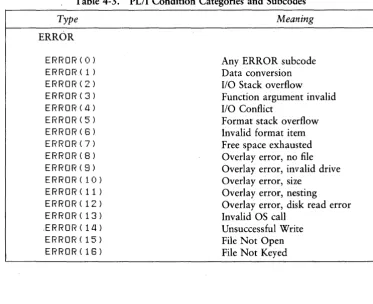
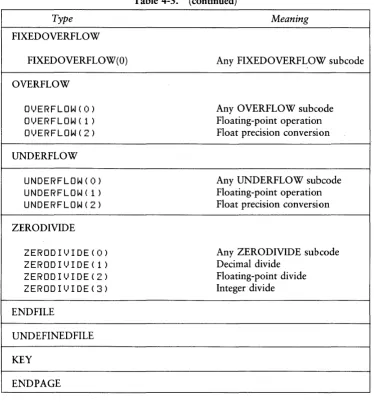
[image:54.471.55.429.235.539.2]There are nine major condition categories with subcodes, some of which are system-defined, and some of which you can define yourself. Table 4-3 shows the predefined subcodes.
Table 4-3. PL/I Condition Categories and Subcodes
Type Meaning
ERROR
ERROR(O) Any ERROR subcode
ERROR(l) Data conversion
ERROR(Z) 110 Stack overflow
ERROR(3) Function argument invalid
ERROR (£1 ) 110 Conflict
ERROR(5) Format stack overflow
ERROR(G) Invalid format item
ERROR(7) Free space exhausted ERROR(8) Overlay error, no file
ERROR(S) Overlay error, invalid drive
ERROR(10) Overlay error, size
ERROR(ll) Overlay error, nesting
ERROR(lZ) Overlay error, disk read error
ERROR(13) Invalid OS call
.ERROR ( 1 Ll) Unsuccessful Write
ERROR(15) File Not Open
4.4 Condition-processing Statements PL/I Programming Guide
Table 4-3. (continued)
Type Meaning
FIXED OVERFLOW
FIXEDOVERFLOW(O) Any FIXEDOVERF~OW subcode
OVERFLOW
OlyJERFLOW ( 0) Any OVERFLOW subcode
OlyJERFLOW ( 1 ) Floating-point operation
OlyJERFLOW ( Z ) Float precision conversion
UNDERFLOW
UNDERFLOW(O) Any UNDERFLOW sub code
UNDERFLOW(l) Floating-point operation
UNDERFLOW(Z) Float precision conversion
ZERODIVIDE
ZEROD I lyJ I DE ( 0 ) Any ZERODIVIDE subcode
ZERODIl)IDE( 1) Decimal divide
ZEROD I lyJ I DE ( Z ) Floating-point divide
ZEROD I l) I DE ( 3 ) Integer divide
ENDFILE
UNDEFINEDFILE
KEY
END PAGE
[image:55.469.38.412.55.466.2]