Evaluation of Sensitive Data Security in Android
Ch.Naveen Kumar Reddy#1, C.Ramakrishna#2
#1,2
Computer Science Engineering, School of Engineering, Anurag Group of Intuitions
Hyderabad, India
Abstract—Android applications is an open source software stack for developing mobile applications, as it is open source most of the mobile applications are developed on android platform. Most of Smart phone users can download and install the applications from Google play store. While installing the apps users need to agree on the permissions requested by the apps, they are not given any other option. Basically, during installation the app users may not aware on some security issues that may arise by agreeing on permissions. Some of the app developers may have the right to manipulate sensitive data such as GPS location, images, contact list, email, log history and files. In this paper, we explain the problems occurred on sensitive data, what the malicious apps can do to the data, and apply the experiential software engineering analysis to find the factors that could potentially influence the permissions in Android apps.
Keywords- Android applications; sensitive data; experimental analysis; permission types
I. INTRODUCTION
Smart phone users can do most of their everyday tasks using the various types of applications offered in the Android Play Store. Android had more than 75 percent share of the world market [1]. All types of android applications can be available on a central repository called Google play store where the individual developers can submit the apps on freely or for a price
In Android, applications must request permission at install time for any sensitive privileges they wish to exercise. Such privileges include access to the Internet, access to course or fine location information, or even access to see what other apps are installed on the phone [2]. Consequently, the properties that give Android apps the potential to improve our lives, also pose a serious threat to enterprise privacy and security.
Typically, Android users would click through terms of service and warnings, and therefore, unlikely to pay much attention to notices about Android permissions. Users tend to be unaware of the privacy impacts of their decisions. The disconnect between the user accepting security and privacy settings during installation and the enforcement of these settings upon subsequent application execution, along with ambiguous permission descriptions can lead to a fundamentally unaware user base [3].
Generally, there are two steps in obtaining permissions. First, an application developer declares that his or her application requires certain permissions in a file that is packaged with the application. Second, the user must approve the permissions requested before installation. Each application has its own set of permissions that reflects its functionalities and requirements. Users can weigh the
permission against their trust of the application and personal privacy concerns [4].
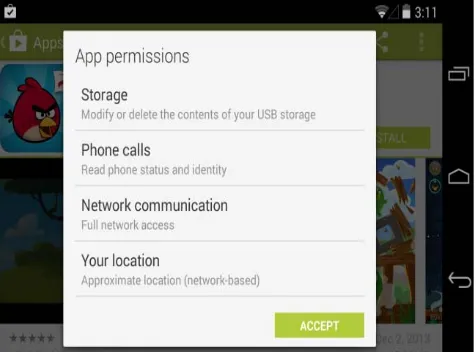
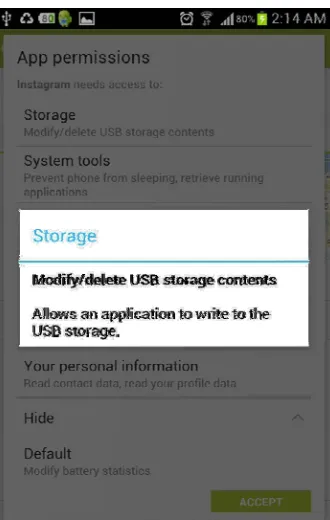
The official Android Market provides every application with two installation pages. The first installation page comprises a description, user reviews, screenshots and an “Install” button. After pressing “Install”, the user is shown a final installation page that includes the application’s requested permissions, as shown in Fig. 1. Permissions are displayed as a three-layer warning: a large heading that states each permission’s general category, a small label that describes the specific permissions, and a hidden details dialog. If a user clicks on a permission, the details dialog pops. The details dialog may include examples of how malicious applications can abuse the permission, e. g., “Allows an application to write to the USB storage”. The permission system gives users a binary choice: the user can accept all of the permissions and proceed with installation
Figure 1. Download page of an application, the final installation page which displays the application’s
permission requests.
The main focus of this paper is to investigate the relationships between several variables, i.e., Number of downloads Price, and Rating with the Permissions in Android.
II.
RELATED WORKFigure 2. The permission dialog that appears if a user clicks on a permission warning
In particular, Barrera et al. conducted and empirical analysis to investigate how the permission-based system in Android is used in practice by looking at whether the design expectations meet the real-world usage characteristics [5]. They introduced a methodology for exploring and empirically analysing permission-based models using the Self-Organizing Map (SOM) algorithm.
In addition, Alhamed et al. perform a comparison on the privacy control methods implemented on the Android and iOS platforms. As a result, the propose a programming model for platform designers to improve privacy and they claim that using their proposed programming models, 14 Android and 5 iOS privacy bugs can be eliminated [6].
The work of Vidas et al. looks at the way permissions are managed in Android. It states that because developers do not have an easy way to determine which of the 130 application permissions their application needs, they end up specifying more permissions that they need. This results in the violations of least privileges principle [3].
Stevens et al. [7] analyse about 10,000 free apps from popular Android markets and found that a significant sub-linear relationship between the popularity of a permission and the number of times when it is misused. Moreover, they also study the effect of the influence of a permission (the functionality that it controls) and the interference of a permission (the number of other permissions that influence the same classes) on the occurrence of both permission misuse.
Jeon et al. [8] investigate fine-grained versions of five of the most common Android permissions, including access to the Internet, user contacts and system settings. On top of that, they develop a suite of tools that allow the fine-grained permissions to be inferred on existing apps; to be enforced by developers on their own apps; and to be retrofitted by
users on existing apps.
From user privacy point of view, Felt et al. [4] examine whether the Android permission system is effective at warning users. In the study, they evaluate whether Android users pay attention to, understand, and act on permission information during installation. They performed two usability studies: an Internet survey of 308 Android users, and a laboratory study where they interviewed and observed 25 Android users. From the studies, they found that current Android permission warnings do not help most users make correct security decisions.
While other works look at various aspects in Android permission issues, we are interested at studying the factors that would influence the number of permissions in Android apps.
III. ANDROID PERMISSION MODEL
Android apps are programmed in Java, and compiled into Dalvik bytecode, and then packaged as a .apk file (APK), which is similar to Java’s JAR file format. An APK consists of the app’s class files, static assets such as image or video data, and a Manifest file [7]. The Manifest is an XML file that specifies a number of properties about the app, such as what Android API level the app is targeted for, what screen or Activity the app should start on, and what permissions the app requests.
Permissions are the basis for the Android security model; they are granted to the app for its lifetime while installed on the device, with the exception of updates which may change the app’s permissions. The appropriate permission must be requested in order for an app to access sensitive device functionality, such as the network or GPS manager. Usually, each permission controls some set of Android or Java API functions, and calling one of these privileged functions without the appropriate permission will cause a security exception [9].
When a user installs an app, usually done through an Android app marketplace, all permissions requested by the app are presented to the user prior to installation, and the user is given an all-or-nothing choice of granting all the permissions and installing the app, or cancelling the install altogether.
A basic Android application has no permissions associated with it by default, meaning it cannot do anything that would adversely impact the user experience or any data on the device. To make use of protected features of the device, the developer must include in the A
AndroidManifest.xml one or more <uses- permission> tags declaring the permissions that your application needs.
At application install time, permissions requested by the application are granted to it by the package installer, based on checks against the signatures of the applications declaring those permissions and/or interaction with the user.
Often times, a permission failure will result in
SecurityException being thrown back to the application. However, this is not guaranteed to occur everywhere. For example, the sendBroadcast(Intent) method checks permissions as data is being delivered to each receiver, after the method call has returned, so you will not receive an exception if there are permission failures. In almost all cases, however, a permission failure will be printed to the system log.
The permissions provided by the Android system can be found at Manifest.permission. Any application may also define and enforce its own permissions, so this is not a comprehensive list of all possible permissions
IV. SECURITY SENSITIVE DATA ON ANDROID
Each Android device contains a wealth of security-sensitive information associated with the user’s identification, whereabouts, contacts, and many more.
A recent work by Wei et al. [2] reported various sensitive-security information which could potentially be manipulated by the Android apps, such as:
1. IMEI, IMSI, and phone number. The IMEI (International Mobile Equipment Identity), IMSI (International Mobile Subscriber Identity), and phone number are unique numbers that identify the physical device and the user’s mobile subscription, respectively.
2. Contacts list. This list identifies all contacts which may include names, phone numbers, addresses, and emails.
3. Location. This information, provided by the GPS and the
Network Location Provider, allows apps to determine the user’s geographical location.
4. SMS messages. These include the private text, picture, and sound messages contained in the phone’s message Inbox.
5.
External SD card. The SD card (external storage) may contain a variety of personal files including photos, music, and documents. The card may also contain application-specific data.6. Physical sensors. These sensors include the accelerometer, compass, light sensor, pressure sensor, proximity sensor, and temperature sensor. The sensor data is generated by hardware components directly measuring changes in the physical properties in the environment of Android devices
In a similar line, Jeon et al. [8] developed a taxonomy that partitions Android permissions into broad categories based on the kind of resource being protected. Essentially, they categorized the permissions to four categories:
1. Category 1: Access to outside resources:
The first category contains 11 Android permissions that enable access to external resources, including Internet access, sending and receiving text messages, and reading and writing external storage. These
permissions are naturally parameterized by the particular external resource being accessed. For example, Internet access involves specifying an Internet domain, text messages are sent to a phone number in a certain area code, and SD card access involves specifying a directory or file name.
2. Category 2: Access to Structured User Information:
The second category contains 14 Android permissions that access structured user data, such as a user's calendar, contact list, and account information.
3. Category 3: Access to Sensors:
The third category contains 7 Android permissions that protect access to various sensors on the phone, including the camera, GPS receiver, and microphone.
4. Category 4: Access to System State and Settings: The fourth category contains 15 Android permissions that provide access to state and settings information on the phone. Typically each such permission provides access to read or update several unrelated pieces of information. For example, Android's READ PHONE STATE, among other things, allows an application to determine if a phone call is occurring and read the phone's unique IMEI number. Similarly, the WRITE SETTINGS permission allows an app to update many distinct phone settings, including the default ringtone and network preferences.
V. RESEARCH METHODOLOGY
A. Research Questions
Based on the objective mentioned in Section 1, the following research questions were formulated:
1. What are the variables that have influence on the number of permissions in Android apps?
2. Which permissions are the most popular in Android apps?
3. Are the variables correlated with one another?
B. Research Hypotheses
The hypotheses in this research are:
H1: The number of permissions in Android is correlated with Price.
H2: The number of permissions in Android is correlated with Downloads.
H3: The number of permissions in Android is correlated with Rating.
These hypotheses will be tested using the data obtained from the App store repository.
C. Data Collection
Figure 3. OSSGrab search results in HTML format
The example of the result in HTML format is shown in Fig. 3. The result shows the list of systems with several variables like Rating, Category, Downloads, Price and Permissions. These variables are important to be analysed in this research.
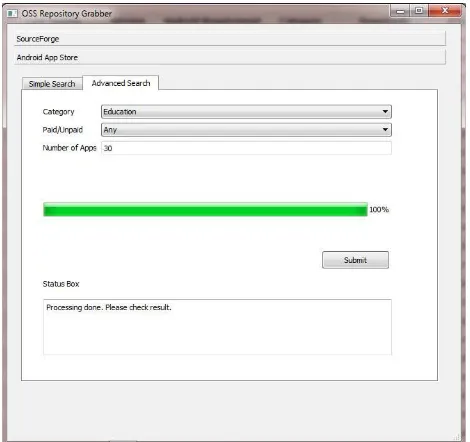
We collected 5000 Android apps from the Android Play Store using the OSSGrab tool and analyzed them using a statistical package, SPSS. The results will be discussed in the next section
Figure 3. OSSGrab tool to extract Android apps from Google Play Store
VI. RESULTS ANALYSIS
In order to answer the research questions and test the hypotheses, several analyses were conducted on the data. First, we conducted a normality test on the data and the results show that the distributions of the data are not normal.
Therefore, for correlation analysis, Spearman correlation analysis was done. Due to the non-normality of the data, a few variables were transformed into log base 10 values. For instance, Price is transformed into logPrice, Permissions variable is transformed into logPermissions and lastly, Number of Downloads istransformed into logDownloads.
The overall results of the Spearman analysis are shown in Table 1. The abbreviations used in the table are defined as follows: Perm. represents logPermissions, Pri. represents logPrice, Down. represents logDownload, and Rate represents Rating.
TABLE I. Spearman Correlation Between Variables
Metrics Perm Pri Down Rate
Perm 1 0.134 0.237 -0.129
(0.000) (0.000) (0.000)
Pri - 1 0.02 -0.018
(0.307) (0.395)
Down - - 1 --0.017
(0.234)
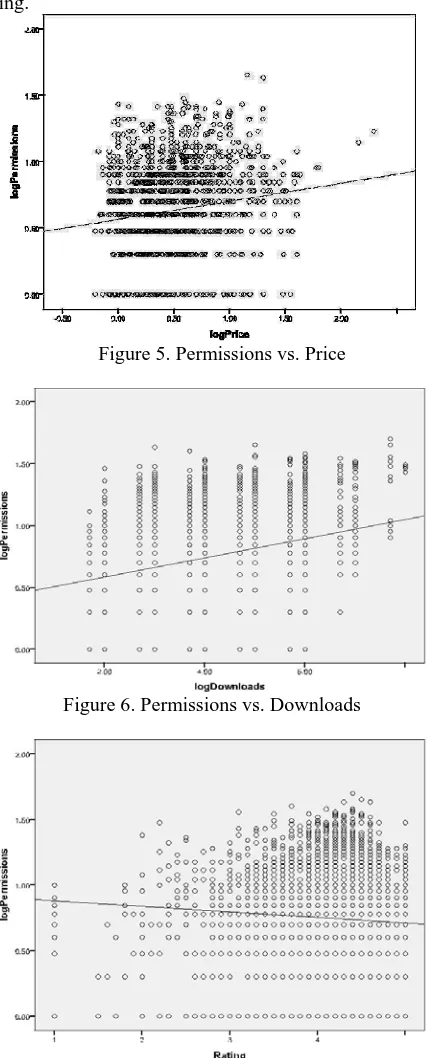
In Table 1, the top row represents the values for the Spearman correlation coefficient between the two variables, while the bottom row (in parenthesis) represents the p-value for the correlation. The results show that all the tested variables, i. e. Rating (Spearman corr. = -0.129, p-value = 0.000), Number of Downloads (Spearman corr. = 0.237, p-value = 0.000) and Price (Spearman corr. = 0.134, p-p-value = 0.000) are correlated with Permissions. Thus, our hypotheses H1, H2 and H3 are supported by the findings.
The correlation between Permissions and Price is depicted in Figure 5. Figure 6 illustrates the correlation between Permissions and Number of Downloads while Figure 7 exhibits the correlation between Permissions and Rating.
Figure 5. Permissions vs. Price
Figure 6. Permissions vs. Downloads
Figure 7. Permissions vs. Rating
From the data we collected, there are a total of 101 different types of permissions being requested by the apps, and the number of permissions varies in each app. For example, a popular photo sharing app, Instagram, requests nine permissions to be accepted by the users, which includes permissions to control USB storage, system tools, location, full internet access, hardware controls, user’s personal information, modify battery statistics, receive data from Internet and discover user’s accounts. If the users want to install the application, the users have to accept all permissions, there is no tick boxes on the choices of permissions which the users can select.
From the 5000 Android apps which we collected from the Android Play Store, we wish to highlight the top ten permission types. Table 2 shows the permission types and the respective number of systems which contain the permissions.
TABLE 2. Top Ten Permission Types
Permission Type Number of
Systems
Full network access 3955
View network connections 3167
Modify or delete the contents of USB
storage 2928
Test access to protected storage 2912 Read phone status and identity 2005 Prevent device from sleeping 1371
Control vibration 1290
View Wi-Fi connections 1218
Run at startup 825
Google Play license check 818
VII. CONCLUSIONS AND FUTURE WORK
This paper applies the empirical software engineering analysis on the permissions in Android apps with several variables such as, Price, Number of Downloads and Rating. The findings indicate that all the variables have correlation with Android permissions, which means they have influence to some degree on the permissions. We also highlighted the top ten most used permissions in mobile apps, some permission are necessary but most of the permissions invade user’s privacy, especially if they involve modifying user’s data and reading sensitive data.
In the future, we plan to develop a tool to identify the apps that contain malicious permissions and provide users with the information on the threats which could potentially arise from the permissions.
ACKNOWLEDGMENT
REFERENCES
[1] Techland, Who’s Winning, iOS or Android? All the Numbers, All in One Place. April 16 2013.
http://techland.time.com/2013/04/16/ios-vs-android/ #ixzz2XFRn70Rp
[2] X.Wei, L. Gomez, J. Neamtiu and M. Faloutsos, “Malicious Android applications in the Enterprise: What do they do and how do we fix it? ”, IEEE 28th International Conference on Data Engineering Workshops, pp. 251-254, 2012.
[3] T. Vidas, N. Christin and L. F. Cranor, “Curbing Android permission creep”, Proccedings of the 2011 Web 2.0 Security and Privacy Workshop. Oakland, California, May 2011.
[4] A. Felt, E. Ha, S. Egelman, A. Hanet, E. Chin and D. Wagner, “Android permissions: User attention, comprehension and behaviour”, Technical Report No. UCB/EECS-2012-26, 2012. University of California at Berkeley.
[5] D. Barrera, H. G. Kayacik, P. C. Oorschot and A. Somayaji, “A methodology for empirical analysis of permission-based security models and its application to Android”, ACM CCS’10, Chicago, Illinois, October 2010.
[6] M. Alhamed, K. Amir, M.Omari and W. Le, “Comparing privacy control methods for smartphone platforms”, International Workshop on the Engineering of Mobile-Enabled Systems, San Francisco, Califormia, May 2013.
[7] R. Stevens, J. Ganz, V. Filkov, P. Devanbu and H. Chen, “Asking for (and about) permissions used by Android apps”, Mining Software Repositories (MSR) 2013, San Francisco, California, May 2013. [8] J. Jeon, K.K. Micinski, J. A. Vaughn, A. Fogel, N. Reddy, J. Foster
and T. Millstein,”Dr. Android and Mr. Hide: Fine-grained permissions in Android applications”, SPSM’12, Raleigh, North Carolina,October2012.
[9] Android Developer Documentation URL:
http://developer.android.com