DOI: http://dx.doi.org/10.26483/ijarcs.v9i3.5936
Volume 9, No. 3, May-June 2018
International Journal of Advanced Research in Computer Science
RESEARCH PAPER
Available Online at www.ijarcs.info
ISSN No. 0976-5697
WEB APPLICATION FOR PROVIDING IMMERSIVE DEVELOPMENT &
VISUALIZATION OF WEB PAGES
ABSTRACT: There are numeroustechno logical inventions taking place in accordance with time. Consideringtoday's scenario, there are many web applications and services available which provide the user with some ready-made tool which will help in development, but thereis no such web application which helps the user to code and test at the same time. The main areas of focus in other applications are the functional aspects which mainly highlight the logic, but the flow of codingis not consideredas a part. In this paper, we are proposing a system wherea user who is learning to work on web technologies as a beginner, intermediate or expert in the domain, mayrequire this web application on the go to code and test whileeliminating the need of saving the document and then view ingit in the browser. This paper focuses on the real-time implementation where the components are interconnected and the user canvisualize the output whilehe/she codes.
KEYWORDS: Web Application; Web Design; Web Component; Web Portal; Framework
1. INTRODUCTION
M
ultitudinous web technologies are available in the market for building a variety of web-applications. Web-based applications are very notorious more than that provides a vast range of usability [15]. Also, in pursuance of communicating with the computer one needs to use different languages together with packages and integrate them to accomplish specific output. Moreover, the application utilizes web browser and web technology to function certain task over the Internet. Deliberating from an ultimate consumer point of view, the developer should design a web suchlike the appearance of the web glance impressive interaction. In this manner, our system takes into account all the major technologies and grants the developer to code with different standard languages such as HTML, CSS, and JavaScript [1].These languages hold the major role in developing any sort of web pages. Our system allows the developer to synchronously review the output as well as reduces the developing time. Additionally, at the same time, any changes to the web page can be easily perceived and can be rectified at that very moment [3].
Our system fulfils the need even from a developer's point of view. A developer is facilitated with a screen where he can code and judge the output simultaneously. Furthermore,
within a web application, interactive web pages can be created. Most of the application is desktop based where a developer needs to code and save the file in order to run and observe the outcome of the written code inside a browser [5]. On the other hand, our proposed system does not ask the developer to save the file every time instead it shows the corresponding output on the screen itself without wasting developer's time. Existing system provides simultaneous output for a single language whereas our system provides a screen for a coder to work with multiple languages on a single platform providing an environment of learning and growing.
Since everything is to be coded on a browser which ultimately leads to a minimum or no use of disk space at all. Our system is well suited for testing the web pages where the developer can paste different codes and depend on that, the output will be displayed and even he can make changes to the code if needed [6].
2. FRAMEWORK
2.1
It equips the outline of the web application in conjunction with text, images, and objects tend to utter the objects which
HTML (Hyper Text Markup Language) Computer Science & Engineering
Fr. Conceicao Rodrigues College of Engineering Mumbai, India
Computer Science & Engineering Fr. Conceicao Rodrigues College of Engineering
Mumbai, India
Computer Science & Engineering
Fr. Conceicao Rodrigues College of Engineering Mumbai, India
Mohit Khosla
Nishi Sheth
should be displayed on the screen.HTML language can be considered as the skeleton that gives structure to every webpage HTML is a computer language discovered to allow website creation [11]. It is somewhat easy to learn and relatively robust in what it allows you to create. This created website can be explored by those who are connected to the internet
• Html language is very easy to learn
• Easy to develop and maintain
• Very powerful language
HTML is the root language, the first step towards developing any website. This language uniformly undergoes and evaluates according to requirements of the end users "HyperText"is a process by which you can act over on the web, clicking on a specific text will carry you to the another page, those text are called as hyperlinks.Html tag does the implementation of the text written within them, known as "Markup" Tags disclose the difference between the HTML code and the normal code. Tags are written as<angular-brackets>and the text which needs to be processed has to be written between those tags different tags operate on various functions [4]. Tags never appear on the screen, only the text processed inside them are viewed on the screen with a properly visualized structure.Html is a simple language which includes codes, syntax same as other languages.Html subsist a sequence of small code which has to be typed in a text file. This text file then has to be saved with the .html extension and can be explored on browsers such as Google chrome, Mozilla Firefox etc. After that, the browser then scans the text file and converts into a visible expected structure only if the code is correctly typed. When talking about our system, it does not require any text file because all the work of developing web pages is carried out under a browser, may it be a code or an output. The code has to be typed in the browser itself and the corresponding output will be thrown on to the screen accordingly.
2.2 CSS (Cascading Style Sheet)
CSS is the classic technology used to design websites [12]. In order to give homogeneous look to the web pages, a style sheet can be created and later it can be imputed on every web page this not only rescues the duration but also reduces the coding complexity for the developer. Instead of frequently coding the same entities, a single style sheet can be referenced for the pages whose manifestation is carbon [2]. CSS files are described as cascading style sheets due to some reasons such as single style sheet can cascade, or can have the impact on multiple pages. Likewise, multiple CSS files can describe a single page [13].
• CSS is very easy to learn and understand
• CSS holds major control on the appearance of an HTML document
There are three ways to carry out execution of CSS commands
• For all the pages, use single CSS file
• CSS commands can be integrated into the head of every document
• Style attribute can be used to stick the CSS codes precisely in the HTML element
There are many options available for extra formatting using CSS language, which may be not possible through an HTML language. Talking about our system, CSS is directly implemented on to the HTML code without inserting the style attribute into the HTML code.Html and CSS both the files run concurrently which makes the use of our system very flexible. Working simultaneously with both the languages gives a clear idea about the formatting of the website as everything is visualized on a single screen (code and output) [7].Even a single line of code gives the output, may it be a CSS or HTML code.
In web development, another most important language is JavaScript [10]. A layered structure which indicates how to build a specific program and how they would be interrelating is said to be a framework. This language does the work of adding interactive and dynamic objects or element into the website. Writing the code of JavaScript neither requires any special tools nor the compiler [14].
• JavaScript is incompetent, understandable programming language.
• It is designed for creating applications.
• JavaScript can be easily integrated with HTML language.
This language is open and cross-platforms language is also known as a client-side scripting language because the source code is implemented through the client web browser on behalf of a web server. Also, as it does not require a web server, functions of java script can be run once the web page is loaded, without any communication with the web server. The main purpose of this language is to check the terms and conditions of a particular function [9]. For example: form filling (if any of the field is empty an error can be thrown). Once the condition gets satisfied, then only the information is actually transferred on to the server. JavaScript language can be coded separately or inside an HTML file. JavaScript remains visible only in the source code [8]. Our system allows coding JavaScript separately as well as inside the HTML code.
Working towards the development process, we have proposed different frameworks of HTML, CSS, and JavaScript within our web application. The process is segregated into:
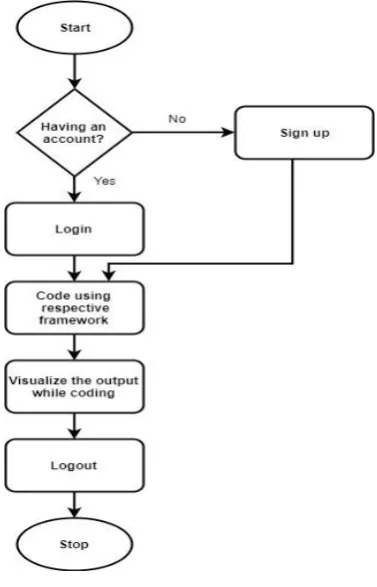
The following architecture is well explained with some info graphics. In this section, the actual flow of the Web 2.3 JavaScript
3. PROPOSED ARCHITECTURE
application is determined. Once the user visits, what all actions to be taken are elaborated briefly.
The above flowchart helps to understand this web application better.
i) Initially, the start state indicates the user process; where a user has just visited the website.
ii) Before moving on to the actual web app, the user must have an account in order to open us his working dashboard. For that, it firstly proposes user to login if already having an account or should signup if not.
iii) Once signed up/logged in, the system will take the user to his leading dashboard where he can see his actual workspace with the basic frames of HTML, CSS, and JavaScript.
iv) While wishing to work on any of the frames, the user can expand/collapse other frames to eventually work on a single frame while others are hidden.
v) Along with coding on a single frame, the user can visualize the output at the real time. This saves the time of naming the document and viewing it in the browser. In accordance, the user can apply some effects using CSS frame and also can implement some necessary JavaScript functions and can determine the output.
vi) On finishing up, the user can take a note of his optimized code and save it to his local machine, now the need to executing and viewing of code is eliminated and files are up for hosting.
vii) Now, the user may log out once completed with his work and can log in any time in the near future.
3.2 Implementation
This web application has been implemented using latest web technologies proposed under Web 2.0 standards. The main screen which is the index.php page has been developed with a secure login system. Login system comprises of the technologies including Bootstrap, HTML, Customized CSS and some JavaScript functions.
Bootstrap classes are used to provide the look and feel of UI/UX. The HTML form includes the customized stylesheet and a secure login/signup action. Initially, the login page is displayed, while the user can sign up by clicking on signup button and can toggle between them. This feature is implemented using jQuery. After signing up, the connection is established using a connection function mysqli() in PHP and the passwords are securely hashed using the MD5 algorithm where the hashes are stored in MySQL database in a 16 digit encrypted text. Whereas, the user can check the stay signed in the box and the cookie function of PHP runs, where the user credentials cookies are saved for a year and don't need to log in every time.
Once logged in, the session starts and the user is redirected to the loggedinpage.php where he can view his dashboard which has features of HTML frame, CSS frame, and JavaScript frame. The user can yet toggle again between these frames and this feature is implemented using AJAX, while the clicked frame is represented as a respective function in the code which expand/collapse the panel. The CSS, JavaScript frames are eventually hidden at the start and can expand as the user clicks on it. The output panel is the iframe which will keep on updating.While coding in HTML, the user can visualize the output where the UpdatedOutput() is called using jQuery and it finds the content in the HTML panel and get its value and append it to the CSS value and JavaScript value. This provides with the dynamic linking of the code of different frames and visualizing the output at the same instance. The panels are divided into the total width of the screen if only HTML panel is active, the screen is divided into two parts, whereas if all the four panels are active, the screen width is divided by 4.
So as now, the user can modify by writing the code into their respective panels and AJAX will find the contents of each of these panels and append it to the output panel. On the contrary, the user can update and can still find his code being modified at the real time.
Once, the functionality of their web application is written the user can take down the code and can host it. When clicked on logout button, the session expires and the user is now logged out and cannot login back with the same session id, so the user has to now log in using his credentials again.
3.3 Snapshots
[image:3.595.63.252.92.386.2]Below are some screenshots of the implemented work. With this, the vague idea of implementation section will be cleared.
Fig. 2:
The first purpose is to login into the system or signs up Fig. 2. There by leading to the dashboard. If the user explicitly tries to enter into our system without any credentials, he will be prompt with error messages. Also, SQL Injection code security has been includedFig. 3. The user can also check box the Stay logged in option.
Login screen
Fig. 3:
Once signed up and logged in, the user can now work on his dashboard and can visualize different sections, by default the HTML, CSS, and JavaScript panel consist of Hello world code, so that the user can get a glimpse of what is happening Fig. 4.
[image:4.595.37.290.59.289.2]Login failure
Fig. 4:
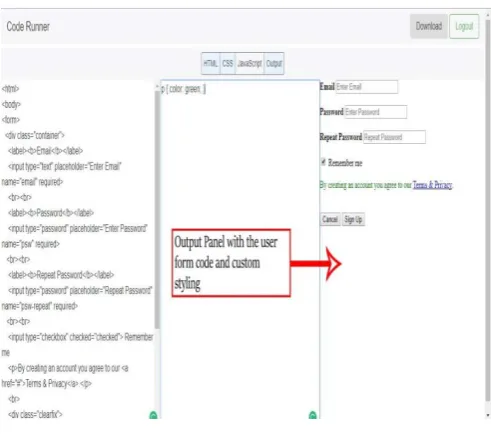
Now, the user can toggle between different panels and can work on any module individually. Suppose, creating a form in HTML and viewing the output in the output panel at the same time, can be a basic task of beginner or styling different pages like registration page, or any static page i.e. about us page, can be a task of an intermediate developer. The screenshot below shows the form with Email, Password Repeat password fields and a paragraph of terms and conditions with color green Fig. 5.
[image:4.595.35.287.414.657.2]Dashboard
Fig. 5:
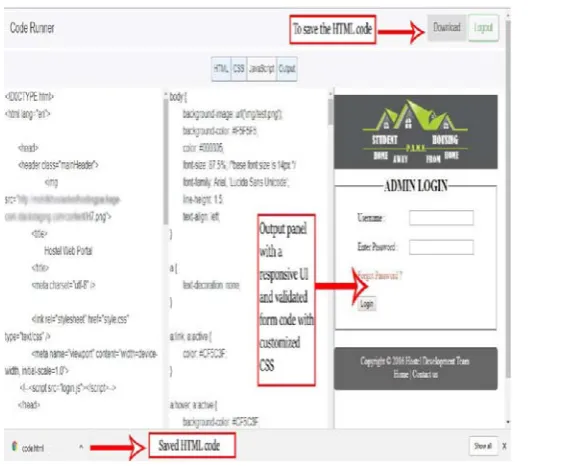
After creating the form, if the user seems to be unsatisfied with UI, he can further go with a full-fledged Login form with some customized CSS and form validation. Also, with a responsive UX Fig. 6.
[image:4.595.315.561.439.659.2]Fig. 6: Responsive login form
Once implemented with the code the user can now take it down to his local machine by clicking on the download button as shown in the above figure and can upload for hosting, then the user can logout from the dashboard.
[2] V.Okanovic, 26-30 May 2014, Web Application Development with Component Frameworks from (http://ieeexplore.ieee.org/document/6859693/)
[3] Francis Pahng, SeokhoonBae& David Wallace, 06 August 2002, A Web-based Collaborative Design
Modeling Environment from (http://ieeexplore.ieee.org/document/725688/)
[4] PloypailinIntapong, "et.al.", 24–33- 2010, The Design of Modular Web-Based Collaboration from
(https://link.springer.com/chapter/10.1007/978-3-642-16444-6_4)
[5] Shen Zhiqi, "et.al.", Collaborative Workspace Over
Service-Oriented Grid from (http://www.ntu.edu.sg/home/zqshen/publications/confer
ence/Collaborative%20Workspace%20over%20Service-Oriented%20Grid.pdf)
[6] Sun Microsystems 2004. Web Application Framework. Retrieved from http://docs.oracle.com/cd/E19454-01/819-0726/s1afovew.html
[7] V. Okanovic, Dz. Donko, T. Mateljan, 2010, Frameworks for Model-Driven Development of Web Application from (http://www.wseas.us/e- library/conferences/2010/Faro/DNCOCO/DNCOCO-11.pdf)
[8] N. Senin.,N. Borland, & D. R. Wallace, October 8-10,1997), Distributed Modeling of Product Design Problems in a Collaborative Design Environment
[9] Andreas Oskarsson, Martin Kling, Tobias Norberg, spring 2002 Web Application Development from (http://www.diva
portal.org/smash/get/diva2:828938/FULLTEXT01.pdf) [10] Mozilla and individual contributors 2005-2017.
JavaScript Basics (2005). Retrieved from
https://developer.mozilla.org/en-US/docs/Learn/Getting_started_with_the_web/JavaScript _basics
Language (2005). Retrieved from
https://developer.mozilla.org/en-US/docs/Learn/Getting_started_with_the_web/HTML_b asics
[12] Mozilla and individual contributors 2005-2017. CSS
Language (2005). Retrieved from
https://developer.mozilla.org/en-US/docs/Learn/Getting_started_with_the_web/CSS_basi cs
[13] M.M. Larrondo-Petrie, K.R. Nair, G.K.Raghavan, 06 August 2002, A domain analysis of Web browser architectures, languages and features from (http://ieeexplore.ieee.org/document/535061/)
Technologies (2005-2017) Retrieved from https://developer.mozilla.org/bm/docs/Web.
Majority of the developers tend to lose interest in coding since they find it hectic to save the code and view it in the browser, if errors found, going back to the terminal and making necessary changes and again saving it and executing it in the browser. Our system overcomes the drawback of traditional coding, saving and executing in the browser and if no errors found, then uploading it to the server. With this web application, the user can now code, test and rectify the errors at run time. The user can also learn and grow on the go through desktop, mobile or any other device while travelling or in their spare time. This application can turn out fruitful for all the naive users of web technologies and also can encourage non-coders to learn basic web technologies. This system can also be extended for collaborative workspace, where a different group of users can work on different modules at the same time.
[1] Choon How Choo, Sai Peck Lee, 2007, Towards Persistence Framework-Based Rapid Application Development Toolkit for Web Application Development, from
(http://thescipub.com/abstract/10.3844/jcssp.2008.290.29 7)
[15] Konrad Perkowski, WojciechZabierowski, 19-23 Feb. 2013 Web technologies in the development of the application supporting multi-programmer project
management from (http://ieeexplore.ieee.org/document/6543314/)
[11] Mozilla and individual contributors 2005-2017. HTML
[14] Mozilla and individual contributors 2005-2017. Web 4. CONCLUSION