• No results found

A COMMUNICATING ROBOT WITH HUMAN

N/A
N/A
Protected

Academic year: 2020

Share "A COMMUNICATING ROBOT WITH HUMAN"

Copied!
6
0
0

Loading.... (view fulltext now)

Full text

(1)

30 |

P a g e

A COMMUNICATING ROBOT WITH HUMAN

Vineet Kumar Disodia

1

, Ashish Tanwar

2

, Rajat Aggarwal

3

, Amrita

Kumari

4

1,2,3,4

Computer & Science Engineering Department, Dronacharya Group Of Institutions,

Greater Noida, Uttar Pradesh, (India)

ABSTRACT

Several new remote control of machinery on robot platforms are introduced in recent years, as this technology

has the potential to increase bond between those people who work away from their team. The main aim is that

each and every person with disabilities may find similar benefits while remaining connected with their family &

friends. Here we discuss our design of a remote control machinerysystem which is used by such type

ofpeople.In this we describe new machinery in which people with their needs will operate that remote control

machinery at their families & also about their potential of these robots.

Keyword- “PEBBLE S” (Providing Education By Bringing Learning Environments To Students),

“LIRC” (Linux Infrared Remote Control).

I. INTRODUCTION

A person’s quality of life may be impacted when he/she is no longer able to participate in everyday activities

with family & friends. This can lead to desperation which could affect our health. Researchers have investigated

robots as social companions such as PARO the baby harp seal. This remote control machinery can be controlled

independently by an operator, means a driving person can look around as he/she wants. We also found that

people who used to be collocated with their teammates and then became remote workers had the best

experiences recreating the closeness with their team usingremote control machinery. We try to give such type of

benefits, which can be gained by people with their needs who wish to make social interaction but cannot

physically present with their families & friends. Thus, the recent numbers of remote control machinery robot

platforms are:-

 Giraff Technology’s Giraff

 RoboDynamics’ TiLR

 Anybots’ QB

 VGoCommunications’VGo

 WillowGarage’sTexai

 Gostai’s Jazz

Our believe is that people with needs will adopt this type of new technology. The outline of this research is the

need of people which take the active role of operatingremote control machinery. Firstly we have to find out what

(2)

31 |

P a g e

social situations & how a user interface to control it. In this paper, we discuss overall System design &the

experimental design which will run from the middleof May 2011 through theend of July 2011. There are two

techniques in whichremotecontrol machinery can be used with people with their needs.

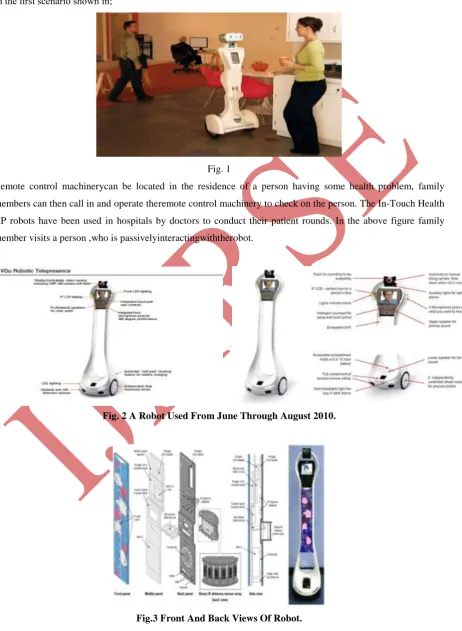
In the first scenario shown in;

Fig. 1

Remote control machinerycan be located in the residence of a person having some health problem, family

members can then call in and operate theremote control machinery to check on the person. The In-Touch Health

RP robots have been used in hospitals by doctors to conduct their patient rounds. In the above figure family

member visits a person ,who is passivelyinteractingwiththerobot.

Fig. 2 A Robot Used From June Through August 2010.

(3)

32 |

P a g e

Family members could check or anything that he/she wants when necessary. Beer and Taka-yama conducted a

user needs assessment of seniors (n=12; ages 63-88) with a V-G robot. The participants were visited by a person

who operated the V-G. The participants also assumed the role of operator and controlled the V-G to interact

with a person, the researchers found that in post-experiment inter- views, the participants discussed significantly

more concerns when visited by a person through the remote control robot than the condition when they operated

the V-G remote controlrobot which implies that seniors are willing to operateremote control robot systems with

respect to where the participants wanted to use theremote control robots, Beer and Taka-yama reported that 6 of

12 participants wanted to use the robot outside, 5 wanted to attend a concert or sporting event through the robot,

and 4 wanted to use the robot to visit a museum or a theatre. There are few examples, however, of people with

special needs using such type of robots in the real world. “PEBBLESTM” was developed by Telebotics, the

University of Toronto, and Ryerson University as a means for hospitalized children to continue attending their

regular schools. “PEBBLES” has been used across the US since 2001 including at UCSF Children’s Hospital,

Yale-New Haven’s Children’s Hospital, and Cleveland’s Rainbow Babies and Children’s Hospital. A

“PEBBLES” robot is placed at the child’s school, and the child uses a computer station or another “PEBBLES” robot to look around the classroom and “raise its hand” to participate and ask questions. However, the “PEBBLES” robot is a passive mobile system and the robot operator is unable to change the robot’ slocationin dependently. More recently in the media has been used of the V-Go Communications’

II. DESIGN

Robot we selected the V-Go Communications robot as our base platform. The V-Go robot retails for $6,000

USD. It uses two wheels and two rear casters to drive; its maximum speed is 3.0 mph. The V-Go robot is four

feet tall (48 inches) and weighs approximately 18 lbs with a 6-hour lead acid battery; a 12-hour battery is

available. It has a six inch display with two pairs of front and rear microphones and red and green status LEDs

on either side of the display. On top of the display, there is a forward facing camera on a servo motor that can

tilt up and down 180 degrees. There are two speakers on the robot with the woofer in the base of the robot and

the tweeter in the “head.” The robot driver uses the V-Go Communications’ video application on

Windows7/Vista/XPto drive the robot using arrow keys to move the robot forward, back, left, or right. The robot

driver can also use a mouse to indicate a “Click and Go” velocity based on the the angle and magnitude of the

(4)

33 |

P a g e

additional pro-cessing and sensors based on guidelines that we developed forremote control

machineryBeagleboard xM-B with an ARM RC-ortexTM -A8 1GHz processor and 512 MB RAM runs Ubuntu

10.10. The BeagleBoard receives and logs latched TCP robot movement commands; these commands are then

sent to the V-Go base using serial communication. An Iguana works IR transceiver sends camera commands to

the V-Go head using the (LIRC) package. The BeagleBoard also sends a UDP Streamer video stream from a

Logitech Webcam Pro 9000, which provides a downward facing view of the base of the robot.

TheBeagleBoardinterfaceswithtwodgetsensorsboards and logs the sensor values. The first is a

Phi-dgetSpatial 3/3/3 board which has a three axis compass, a three axis gyroscope, and a three axis accelerometer.

The second is a Phi-dgetInterfaceKit 8/8/8 board which has eight digital input ports, eight digital output ports,

and eight analog input ports. ThePhi-dgetInterfaceKitsignalMiniBoxpower converter to turn on when the robot

leaves its charging station; the converter powers draws 5V directly from the robot’s battery and connects the

USB peripherals to the BeagleBoard through a 4 port hub. The Phi-dgetInterfaceKit also illuminates four blue

LEDs in a clear Plexiglas necktie on the front of the robot to let the user and interacts when the BeagleBoard is

powered on. Additional sensors will be added to Hugo in the second phase of this research to implement the

autonomous robot behaviours described in the following section. We are considering a Ho-ku-yolaser which

will be used for moving safely in a person’s home and localizing itself in a known environment. Other options for localization may be to use an additional webcam for identifying QR codes or AR-Tags placed throughout a

person’s home identifying a specific room or “ground truth” locations; a similar approach could be to use RFID

tags read with a dgetRFID board. The Hu-ku-yo laser in conjunction with an array of IR

Phi-dgetTemperatureSensors can also be used to identify people near theremote control robot. B. Alternative User

Interface we have designed an alternative user interface prototype for operating the V-Gorobot. Our alternative

interface was designed for Safari (MacOS and Windows) and is programmed using HTML, Javascript, and

PHP. The V-Go video is displayed in a separate window to the left of our alternative interface. When the status

bar at the top of the screen shows the left segment as green and “Control Hugo” is bolded, the operator can

provide input to the robot. The light gray bar below shows the operator’s request, which is an <h1> HTML

heading tag (24 point boldfaced type). To the right of the request are three buttons: go, stop, and clear. The

operator presses the “go” button when he/she wants Hugo to execute the current command. If the command is valid, a “ding” sounds and the status bar shows the right segment as a red scrolling marquee. While the command is being executed, the operator can pause the robot’s actions by pressing the “stop” button; the right

segment of the status barchanges to a light gray colour. Pressing “go” will resume the robot’s action. If the

operator wants to cancel the robot’s current actions, he/she can press the “clear” button; the displayed request

will empty, and the status bar turns back to a ready state with the left segment coloured green. The request is

generated from three modes of robot control shown on the left side of the interface as dark gray buttons.

Whenamodeisselected, thebuttonturnsdarkblueanditstext turns white for contrast. The shape of the button

changes from a rounded rectangle to a rectangle with right-side arrow edge. The robot control on the right side

of the interface changes according to the mode, which we describe below. Tele-operation. As with the original

V-Go interface, a person can tele-operate the robot to move forward, backward, left, and right and to tilt the

camera up and down. The operator can use a mouse to depress the arrows, use the arrow keys on the keyboard,

or a custom jelly bean switch array which emulatesarrow key presses. When an arrow is pressed by any one of

thesethreemethods,theuserinterfaces how thepressedarrow in a dark blue colour and the text of the arrow

(5)

34 |

P a g e

the drive command is posted to the gray bar. TheoriginalV-Gointerfaceprovidescontinuousrobotmovement

which means that the robot would move in the desired direction when the arrow key was pressed and stop when

the key was released. However, in a preliminary evaluation, we found that continuous robot movement was an

issue with our target population’s mental model of the robot due to the latency between issuing the commands,

the robot receiving the commands, the robot executing the command, and the video updating to show the robot

moving. This issue is consistent with our previous work where we found that able- bodied novice users had

difficulty drivingremote robots straight down a corridor; the latency often caused the robot to turn greater than

the desired angle and thus zigzag down the hallway. The interface for the participant at CMRC will be the

standard V-Go Communications video chat window on the left side of the screen and our previously described

alternative user interface on the right. He/she will use our alternative user interface to control the robot. In the

laptop condition, the remote person will use the V-Go video conferencing software which is similar to Skype.

The laptop provided for this study is the Dell Mini 9 netbook running Windows 7. The screen size is comparable

to the V-Go’s screen and the integrated webcam is in a similar position above the screen. The Windows 7

interface has been replaced with a custom LiteStep interface which allows the remote participant to access the

V-Go software, view any shareddata from the V-Gointerface, andshutdownthenetbook. The interface for the

participant at CMRC will be the V-Go Communications video chat window only. In robotic devices have been

listed under the categories of environmental controls and self- care devices. Asrobots prove their value in this

use case, we may findrobots explicitly listed in students’ IEPs in the near future. For adults with disabilities,

robotscould be used to engage in telecommuting or remote work. According to the Americans with Disabilities

Act, employees and potential employees with disabilities1 can request reasonable accommodations to the work

environment or processes related to their job. Employers are not required to accommodate requests that incur a

large expense or are difficult to implement. However, companies have already begun to investigaterobots for

ad-hoc conversations beyond the conference room for remote employees to be better connected. Asrobots become

part of the corporate culture; it will become feasible for more adults with disabilities to telecommute from their

residence. 1The Americans with Disabilities Act (ADA) Amendment Act of 2008 provided a broader definition

of “disability”. These changes have been implemented by the Equal Employment Opportunity Commission

(EEOC) and active as of March 25, 2011.

III. SCOPE IN FUTURE

In this paper our 1st step towards developing aremote control robot system for people with needs to operate. We

have designed the study to assess if theremote controlrobot is perceived as valuable. The current design is

largely visual with large buttons and high contrast colour to accommodate low-vision users. As the primary task

of the remote control robot is communication, audio status indicators have been minimally used. Based on the

feedback from the study participants, we will iterate on the alternative user interface and input methods. We

believe that our system design will be useful for both a home and a corporate environment.At the end of the

2012-13 school year, more than 40 students were using a VGo to attend school remotely.

REFERENCES

[1] Jump up^ Children's Hospital Boston is sending home some of their patients with a VGo for remote patient

(6)

35 |

P a g e

[2] Jump up^ Palomar Hospital is using AV-Go to allow distant family members to visit with patients, and be

part of care planning discussions.

[3]

http://www.nytimes.com/2013/06/08/education/for-homebound-students-a-robot-proxy-in-the-classroom.html?pagewanted=all&_r=0

[4] http://www.boston.com/business/technology/articles/2011/12/12/the_robot_that_makes_house_calls/

[5] http://www.palomarhealth.org/ContentPage.aspx?nd=907

[6] Defleur, M.L. & Dennis, E.E. (2005). Understanding mass communication: A liberal perspective (7th ed.).

Boston: Houghton Mifflin.

[7] Katz, W.A. (2002). Introduction to reference work: Basic information services (8th ed.). New York:

McGraw-Hill

[8] Kemoni, H.N. (2004). Melvin DeFleur’s information communication model: Its application to archives

administration. African Journal of Library, Archives & Information Science, 14(2), 167-175

[9] Lin, T. (1997). Inferiority complex: Prevention in children and relief from it in adults. Retrieved 26 May,

2010 fromwww.bsmi.org/download/lin/inferioritycomplex.pdf

[10] McKay, M., Davis, M., & Fanning, P. (2003). Communication skills (2nd ed.). New Delhi: Kuldeep Jain.

[11] Nwalo, K.I.N. (2003). Reference sources and services. Ibadan: Centre for External Studies, Univesity of

IbadanOdini, C. (1999). Training and development of skills in changing information environment. Library

Management. 1 (2), 100-104

[12] Ojomo, O.W. (2004). Communication: theory and practice. In E. Adegbija (Ed.), Language,

Communication and Study Skills, (pp. 77-95). Ota: Covenant University.

[13] Rothwell, J.D. (2004). In the company of others: An introduction to communication. (2nd ed.). New York:

McGraw-Hill

[14] Tubbs, S.L. & Moss, S. (2003). Human communication: Principles and contexts. (9th ed.). New York:

Figure

Fig.3 Front And Back Views Of Robot.

References

Related documents

Table 8: Results for the Marginal Decomposition of the Validation Data Base Subportfolio

The idea of the strategic approach consists of two processes, non-pruning for trained ensemble neural networks without continuous attributes and relaxed rule generation

Within the broad framework of psychosocial rehabilitation, a range of services needs to be available and the mix tailored to the needs of each client. For example, if someone wants to

eRegistration Submit registration information online to establish a WSIB account Report of. injury/illness Submit online employer’s report

This thesis explores the life and work of General Bernard Schriever, principally with regard to his work introducing intercontinental ballistic missiles (ICBMs) into United States

For example: no single technique, but rather a range of measurement methods is needed to test whether a material meets the EC Definition; there appears to be a need to

The high lift Afridev, shown in Figure 3, is a conventional lever action piston pump, with an ‘open top’ cylinder design, allowing the pump rods, piston and foot valve to be

Chiropractors are more likely to rely on medical history taking and pain drawings during an initial intake assessment, as well as neurological and visually estimated range of