
I
LLINOIS
C
LOUD
NLP: Text Analytics Services in the Cloud
Hao Wu, Zhiye Fei, Aaron Dai, Stephen Mayhew, Mark Sammons, Dan Roth
Department of Computer Science, University of Illinois, Urbana-Champaign.
{haowu4,zfei2,dai13,mayhew2,mssammon,danr}@illinois.edu
Abstract
Natural Language Processing (NLP) continues to grow in popularity in a range of research and commercial applications. However, installing, maintaining, and running NLP tools can be time consuming, and many commercial and research end users have only intermittent need for large processing capacity. This paper describes ILLINOISCLOUDNLP, an on-demand framework built around NLPCURATORand Amazon Web Services’ Elastic Compute Cloud (EC2). This framework provides a simple interface to end users via which they can deploy one or more NLPCURATORinstances on EC2, upload plain text documents, specify a set of Text Analytics tools (NLP annotations) to apply, and process and store or download the processed data. It also allows end users to use a model trained on their own data: ILLINOISCLOUDNLP takes care of training, hosting, and applying it to new data just as it does with existing models within NLPCURATOR. As a representative use case, we describe our use of ILLINOISCLOUDNLP to process3.05million documents used in the 2012 and 2013 Text Analysis Conference Knowledge Base Population tasks at a relatively deep level of processing, in approximately 20 hours, at an approximate cost of US$500; this is about 20 times faster than doing so on a single server and requires no human supervision and no NLP or Machine Learning expertise.
Keywords:Natural Language Processing Tools, Text Analytics, Cloud Computing
1.
Motivation
Natural Language Processing (NLP) is an active research area, and its use in commercial enterprises has ballooned with the advent of the recent surge of interest in analyzing large amounts of data to support business intelligence prac-tices. Many end users are small research teams or small-to medium-sized commercial enterprises withintermittent processing loads, i.e. they do not constantly process a large volume of data, but instead wish to process data as needed. When the need arises, they may have a large amount of data that they wish to process quickly. This use case has led to the commercial success of cloud services such as Amazon Web Services’ Elastic Compute Cloud (EC2): a knowledgeable user can select from a wide variety of vir-tual machine images, start multiple instances on a group of EC2 host machines, and process data in parallel to achieve fast, high-volume data processing.
However, the use of Text Analytics tools and of cloud com-puting resources still requires significant end user expertise. While a number of NLP-related commercial and research efforts are underway to provide frameworks to support ma-chine learning and NLP on cloud infrastructure (see Sec-tion 7.), many still require significant end user expertise and a corresponding investment of time, effort, and money. ILLINOISCLOUDNLP is a prototype cloud-based service that aims simply to provide scalable Text Analytics pro-cessing capabilities to non-expert end users, performing al-most the entire set-up and the processing based on end user instructions via a simple application interface. ILLINOIS -CLOUDNLP builds on NLPCURATOR, an NLP component management framework (Clarke et al., 2012). Clients sign up for an Amazon EC2 account, install a small client pro-gram, and can then upload and process text documents on multiple EC2 nodes. The interface manages the initializa-tion of the nodes and the processing of the documents. It provides a straightforward interface for choosing the level of processing needed (which tools to run on the data) and
for monitoring progress and node health. Once the docu-ments are processed, the user can easily download or store the data, and terminate the EC2 nodes. The interface pro-vides estimates of processing time and cost based on the user’s data collection and choice of NLP annotations. The ILLINOISCLOUDNLP infrastructure therefore allows the user to process documents on demand, and requires no NLP, Machine Learning, or Cloud Computing expertise. This paper describes the analytics and classification ca-pabilities that ILLINOISCLOUDNLP currently provides (Sec. 2. and 3.), the system infrastructure that manages the Amazon servers (Sec. 4.), and the workflow from the user perspective (Sec. 5.). It also gives an example application of the ILLINOISCLOUDNLP system (Sec. 6.), a comparison to some other NLP/Machine Learning frameworks (Sec. 7.) and our plans to improve the system (Sec. 8.).
2.
NLPC
URATORNLPCURATOR (Clarke et al., 2012) is an NLP manage-ment system that allows multiple NLP components to be distributed across multiple machines. End users can config-ure pipelines over components by specifying input depen-dencies for components in a configuration file. NLPCU
-RATORcaches processed documents, allowing fast retrieval when multiple clients need to process the same data, or when a single user needs to repeat the same processing of the data (e.g. in an experimental setting). NLPCURA
-TORprovides a single point of access to all these services, and a programmatic interface that allows end users to re-quest and access NLP annotations within applications. It is complemented by EDISON, a Java library that provides a large suite of NLP data structures and supports feature extraction and common experimental NLP tasks. Together, EDISONand NLPCURATORprovide a straightforward API for applying a suite of state-of-the-art Illinois NLP tools to plain text documents.
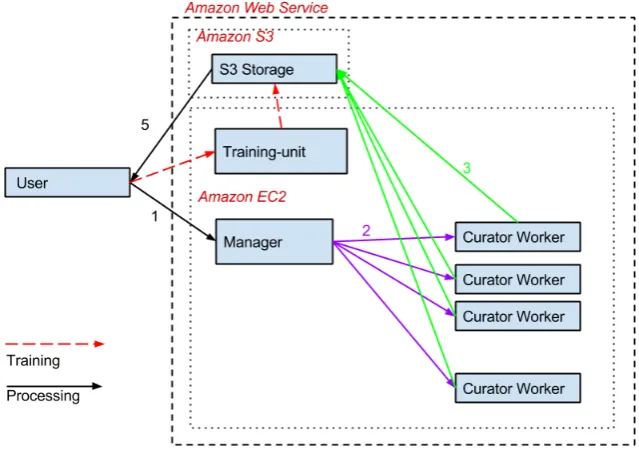
Figure 1: System architecture of ILLINOISCLOUDNLP. Arrows indicate workflow: 1. The client uploads documents to be processed or to train a classifier. 2. For an annotation task, the manager node transmits documents to worker nodes for processing. 3. Worker nodes store annotated documents using Amazon’s S3 service. 4. When a model is trained, the client starts a training node, which stores the model it learns on S3. 5. The user can access the data on S3 without starting a cluster.
naming a new one. This allows users to simply access data they previously annotated without starting any annotation servers. (The user can decide to use a different data bucket or upload a new data set.)
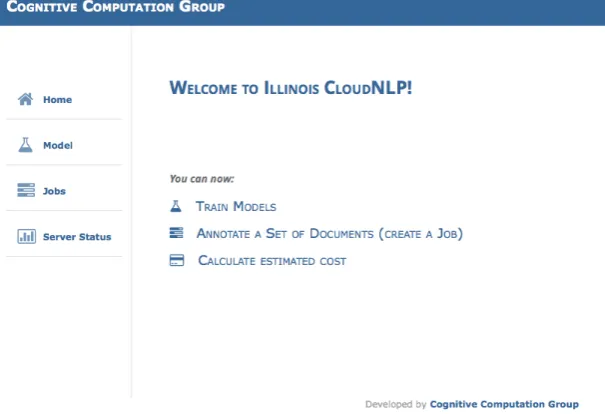
The interface then starts the manager component on the cloud. Once this has loaded, the user is directed to a browser-based interface which presents four options: 1) View existing annotations generated in previous runs. 2) Add new annotations to data previously uploaded and processed by the user. 3) Annotate new documents pro-vided by the user with Illinois NLP services and/or user-trained classifiers. 4) Train a new classifier (see Figure 2). At any time after one or more jobs have been started, the user can visit the cost estimation pane to get an estimate of the expected time and cost. These estimates are dynami-cally updated as the task progresses.
5.3.
Annotating Text
The user defines an annotation task by specifying a set of desired NLP annotations (see Figure 3). The list of avail-able annotation components will also include any models trained by the user.
When the user is satisfied with their task specification, they start the process. Our client program will run the entire system as described in the previous sections, and push the raw documents into the job queue; all of this is initiated by a single click.
TheJobspane displays information about ongoing annota-tion and training tasks, indicating which stage of processing the system has reached (an example is shown in Figure 4). Once the task is finished, the user is alerted and the anno-tations are stored in an S3 bucket with a name provided by the user. These annotations can be viewed or downloaded, and by default are stored on S3 for later use.
Figure 3: Selecting annotation components for an annotation task
5.4.
Using
I
LLINOISC
LASSIFIERto Train a Model
Users can provide labeled text data to the ILLINOISCLAS
-SIFIERcomponent to train and evaluate a classifier (see Sec-tion 3.). Once data is provided, ILLINOISCLASSIFIER auto-matically takes care of the rest – dividing the input data into training and evaluation sets and tuning training parameters to learn a robust model. In the initial release, the ILLINOIS -CLASSIFIERuses simple n-gram features. In later releases, we will enrich the feature representation to use the other NLP annotations provided by the Annotation components. To train a model using ILLINOISCLASSIFIER, the user first creates on their own machine a directory for the data T
Figure 2: Main selection pane in ILLINOISCLOUDNLP interface
Figure 4: ILLINOISCLOUDNLP pane showing jobs in progress
the target label, and containing the text snippets associated with that label. For example, for a spam filter, the user would use two sets of files, one for the spam and one for the non-spam. They would put each set of files in its own directory, and name the two directories with the label they would like the classifier to assign to that type of document. They put these two directories into a single root directory, and create a zip from that directory.
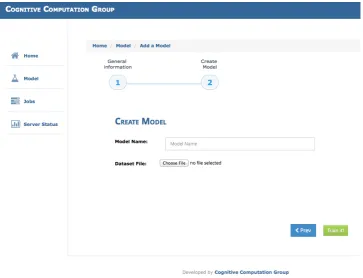
After selecting the option“Train Models”from the main menu, the user will be prompted to upload the zip file (see Figure 5). Clicking the“Train it”button uploads the data to an S3 bucket and launches a single Amazon EC2 node that runs the training process. Once completed, the interface alerts the user, and a new model with the name provided by
the user appears in the list of available models in theModel pane. It also appears as an available annotation component when starting an annotation task (see Figure 3).
5.5.
Viewing and Downloading the Annotated
Data
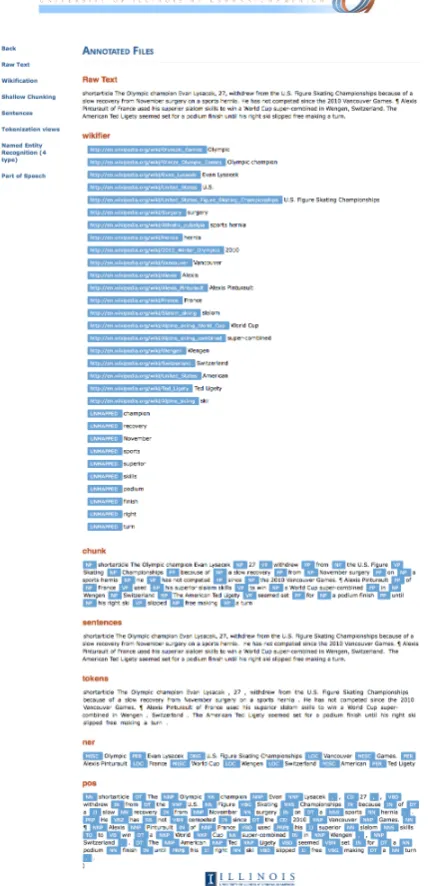
Once the documents in the collection have been processed, the annotations are stored using Amazon S3 in the data bucket the user named when the task was specified. The processed documents can be viewed in a concise, human-readable form using the ILLINOISCLOUDNLP client’s vi-sualization interface (see Figure 6). Data labeled with the ILLINOISCLASSIFIERcomponent appear as views with single labels.
Figure 5: ILLINOISCLOUDNLP pane for setting up a classifier training task
S3 cluster storage service for later use (for a use case that illustrates why this can be helpful, see Section 6.). They can be downloaded from Amazon S3 using a third party application such as S3cmd3for local use, and deleted from the S3 storage if desired.
6.
An Example Application
For a recent project, we wanted to annotate 3.4 million doc-uments from TAC KBP 2012 and 2013 (Ellis et al., 2012; Ellis et al., 2013) with a set of our NLP tools. A server with 128G RAM and two 6-Core, 2.4GHz Intel Xeon E5645 processors would have taken more than two weeks to pro-cess this collection. In the past, the best we could do was to split our dataset and manually distribute it to several servers running the curator. However, this is limited by the number of available servers and the need to share them between multiple projects. With ILLINOISCLOUDNLP, we were able to annotate 3.05 million documents with the NLPCU
-RATOR’s Wikifier, NER, POS and Chunker components, in only 20 hours and for $500. In addition, the outcome is a set of serialized NLPCURATORRecord data structures (Clarke et al., 2012) stored on Amazon S3; these can be easily de-serialized and used in a number of programming languages. But working on the Amazon EC2 cloud and using its S3 storage has other advantages too. In almost any project in-volving a large set of documents, it is likely that there is a need for some batch processing to generate useful statistics from the annotated dataset, such as, for example, building inverted indexes on words or entity mentions. Often this
3http://s3tools.org/s3cmd
involves a lot of time and energy, not only in building and maintaining further infrastructure to support these opera-tions, but also in running them on slow local hardware. However, having all of our annotated documents in Ama-zon S3, we are able to take advantage of other AmaAma-zon ser-vices, specifically AWS Elastic MapReduce (EMR). Using EMR, we can easily run MapReduce jobs on those anno-tated documents using straightforward MapReduce code. Through a very simple setup, EMR allows us to calcu-late a wide range of interesting statistics on the text we just processed. For example, counting frequency and co-occurrence of entities, or answering more sophisticated questions like what is the most popular adjective to describe a noun such as “president”.
7.
Related Work
We discuss below a number of other machine learning/NLP frameworks built around cloud services, with varying ob-jectives and expected user expertise.
7.1.
API-based Services
Figure 6: Viewing annotated data.
allows 6000 transactions per day. It would take 500 days to annotate our 3 million documents, at a cost of over $3000.
Semantria (2014) provides a variety of NLP services based on the Lexalytics Salience engine, but is accessed only through an API, or through Microsoft Excel. The baseline cost is $450 per month for academic users ($900 for com-mercial users), and the number of transactions is limited to 100,000 (where each transaction represents a discrete piece of text to be annotated). Again, it requires more expertise and is more expensive than ILLINOISCLOUDNLP.
AnnoMarket (Tablan et al., 2013) is based on GATE tools (Cunningham et al., 2002) and provides APIs for text processing, but also allows a user to create their own API and sell it to others. Unlike the services above, the cost is hourly based on machine usage. At present,
AnnoMar-ket has good multilingual support for some basic NLP tasks but limited diversity in types of NLP tools. The key differ-ence between these services and ILLINOISCLOUDNLP is that simply by virtue of being APIs, they require significant user expertise for even simple tasks.
7.2.
NLP Processing Services
GATECLOUD (2014) is a cloud-based version of the GATE suite of NLP tools, and it offers a number of spe-cialty services. The relevant functionalities are similar to those offered by ILLINOISCLOUDNLP, but only include annotations out-of-the-box for a limited number of tools – named entities, measurements, and numbers. Charges are calculated by the hour.
7.3.
Machine Learning Cloud Services
There are other cloud computing services that support ma-chine learning and/or algorithm development. GoogleAPI (2014) provides a service for learning and using a classifier, but does not support the range of Text Analytics tools that we do. Moreover, users must send their data to Google, and build their classifier using its API. The free quota of predictions is limited; going beyond 40k queries/day re-quires direct negotiation with Google. GraphLab (2014) provides the infrastructure for algorithms development on the cloud, but targets algorithm developers rather than ap-plication programmers as we do. Moreover, it does not have an existing model for text analytic components as we do.
7.4.
Summary
It is important to note that for all of the services described in this section, the issues of of data privacy and security are not handled in a clear and transparent way. For example, it is sometimes unclear who provides the cloud computing re-sources, and a third party is involved in handling billing and in managing access to computing resources. Many of these services require an ongoing financial commitment, limit the amount of processing per day, or offer only relatively low-complexity NLP analytics.
On the other hand, ILLINOISCLOUDNLP provides a state-of-the-art suite of tools for English text analytics via a very simple interface. Our analytics tools have all been individually described and evaluated in peer-reviewed aca-demic publications. There is no third party billing agent, and users maintain direct control over their data, which is processed and stored in a user-owned account on Amazon EC2/S3 machines and protected via their Amazon creden-tials. Rather than paying a monthly subscription for a fixed upper limit on the number of documents that can be pro-cessed, users pay as they go and process what they need, when they need to.
![Non operative management of posterior tibialis tendon dysfunction: design of a randomized clinical trial [NCT00279630]](data:image/gif;base64,R0lGODlhAQABAIAAAP///wAAACH5BAEAAAAALAAAAAABAAEAAAICRAEAOw==)