Image Authentication by Detecting Traces of
Demosaicing and Color Classification Methods
Shweta P. Kachhawal 1, Prof. Avinash P. Wadhe 2
M.E (CSE) 2nd Year, Department of CSE, GHRCEM, SGBAU, Amravati, Maharashtra, India 1
Assistant Professor, Department of CSE, GHRCEM, SGBAU, Amravati, Maharashtra, India 2
ABSTRACT: Recently advanced image processing tools and computer graphics techniques make it straight forward to edit or modify digital images. In court, for police agencies, for insurance or media companies, this raises the challenge of discriminating original images from malicious forgeries. Particular region from an image is pasted into other image with purpose to create image splicing. Image splicing is a common type of image tampering (manipulation) operation. , currently pictures can't be thought of trustworthy proof. In this project, machine learning approach is used that exploits refined inconsistencies within the color of the illumination of pictures, distinguishes between computer generated and photographic image and exploits forged region in digital image. The technique is applicable to photographs containing two or additional individuals and normal non face images also and needs no knowledgeable interaction for the tampering decision. For differentiating the photorealistic computer generated image (PRCG) and photographic image (PIM), a completely unique approach is to concentrate on the image textures, and can acknowledge that pictures from digital cameras contain traces of resampling as a results of employing a color filter array with demosaicing parameters.
KEYWORDS: Digital tampering ; demosaicing; resampling; illuminant map; color inconsistencies; forgery
I. INTRODUCTION
The field of computer graphics is rapidly maturing to the point where human subjects have difficulty distinguishing photorealistic computer generated images (PRCG) from photographic images (PIM). Partly because of the success of computer animation in popular culture, it is well known by the general public that images can be manipulated and are not necessarily a historical record of an actual event. When viewing movies for entertainment, the audience is usually a willing participant when fooled into believing computer generated images represent a fictional version of reality. However, in other situations, it is extremely important to distinguish between PRCG and PIM [2]. In the mass media, there have been embarrassing instances of manipulated images being presented as if they represent photographically captured events. In legal situations, where photographs are used as evidence, it is crucial to understand whether the image is authentic or forged (either computer generated or altered). Furthermore, in the intelligence community, it is of vital importance to establish the origin of an image.
The progression of the digital information age has evolved to replace technologies with state-of-the-art digital counterparts. The change of photography from requiring smelly chemicals and darkroom tricks to manipulate images has given way to the digital era. With the move to the world of Megapixels, a new door opens to the dark-side of image counterfeiting and forgeries. Gone are the days of needing to create “trick shots” with an analog camera or careful chemical preparation in the darkroom. Today, manipulating an image involves simply using tools available in the digital darkroom, such as Adobe Photoshop or Macromedia Fireworks. With these new techniques easily available to the masses via an inexpensive PC, the need exists to verify the authenticity of a digital image because of our increased reliance on digital media. Two examples of the importance of digital image authentication are the one witnessed in the news media we rely on to provide accurate information and second the courtroom where someone’s fate may depend on the authenticity of a digital image as evidence. This explores these issues with emphasis on creating tools to aid in the detection of digital image tampering for spliced images [3].
II. RELATED WORK
Tiago José de Carvalho et al. in [1] planned forgery detection technique that exploits refined inconsistencies within the color of the illumination of pictures. This method is applicable to only composite pictures. The authors combined the attributes of each physics and statistical-based illuminant estimator to apply on image region of same material. Here, authors made user interaction minimal by extracting texture- and edge-based features by making use of machine-learning approach for automatic decision-making.
Andrew C. Gallagher, Tsuhanchen in [2] explain a concept that images taken from camera can contain traces of resampling as a results of using a color filter array with demosaicing algorithms. It distinguishes photorealistic computer graphic images and photographic images captured with a camera.
In [3], C. Riess and E. Angelopoulou explain image authenticity by considering illumination color as a new indicator. The authors planned a technique in which the user selects illuminated areas for further investigation. The illuminant colors are regionally estimated, effectively decomposing the scene in a map of differently illuminated regions. If a picture has been manipulated, the transition between these illuminants should consequently be disturbed.
In [4], the author H. Farid and M. J. Bravo explained three ways that show that the human visual system is unable to discover inconsistencies in shadows, reflections, and planar perspective distortions. they have described computational strategies that may be applied to discover the inconsistencies that seem to elude the human visual system. The These results of their work recommend that care should be taken once making judgments of image legitimacy based mostly solely on visual inspection.
E. Kee and H. Farid in [5] used inconsistencies in the lighting model of image as an proof of manipulation. whereas making a composite image, its vital to maintain the lightning conditions. The authors describe how to estimate the total 3-d lighting environment in images of individuals. For extracting the desired 3-d surface normals, they match 3-d models to an image of a person’s head and automatically align this model to an arbitrary head pose. Lighting inconsistencies in a picture are then used as proof of manipulation.
In [6], Micah K. Johnson and Hany Farid, like [5], used lightning inconsistencies in a photograph as a proof of tampering. Here authors show a way to approximate complex lighting environments with a low-dimensional model and the way to estimate the model’s parameters from one image.
Anderson Rocha et al. in [7] introduces the subject areas that comes under the sphere of digital image forensics. The topics like source camera identification, forgery detection, etc.
Sintayehu Dehnie in [8] describe technique to differentiate pictures captured by a digital camera from laptop generated images. This approach is predicated on the fact that image acquisition in a photographic camera is essentially different from the generative algorithms deployed by computer generated image.
V. P. Kavitha and M. Priyatha in [9] proposed a forgery detection method that use delicate inconsistencies in the color of the illumination of images. Their approach uses fully automatic methods that requires minimal user interaction .To achieve this, they integrate information from illuminant estimators on image regions of similar material.
S. Rajapriya and S. Nima Judith Vinmathi [10] reviewed different methods for digital image forgeries detection. They reviewed a forgery detection method to expose the photographic manipulations known as image composition or splicing by exploiting the color inconsistencies in the illuminated image. For this, effective illuminant estimators are used to obtain illuminant estimates of the image from which texture and edge based features are extracted. The features are used for automatic decision making and finally Extreme Learning machine (ELM) is applied to classify the forged image from the original one.
Shrishail Math and R. C. Tripathi in [11] discussed the problems and challenges in digital forgery areas. The recent advances in software developments, plug and play (run) tools to capture, process, access and transmission of digitizes information, it has never so easy to alter the information without leaving any visual clues of tempering of digital data.
The authors Shweta P. Kachhawal and Prof. Avinash P. Wadhe reviewed the method for detecting traces of demosaicing and color inconsistencies [29].
III.PROPOSED ALGORITHM
In this paper, two strategies are used for authenticating the image. The primary one is to detect the traces of resampling as a results of demosaicing. And second is to search out inconsistencies in human faces in composite image. After this, main task is to detect the forgery region.
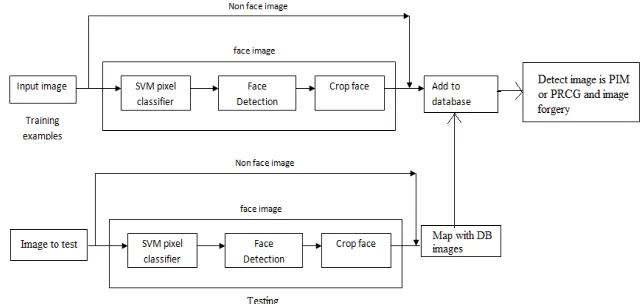
The Proposed methodology for detecting traces of demosaicing and color inconsistencies in digital image is as follow.
Figure 1. Proposed System
The main approach for distinguishing between photorealistic computer graphic images and photographic images captured with a digital camera deals with the idea that photographic images will contain traces of demosaicing [2]. Authors recognize that finding the actual demosaicing parameters is not necessary for distinguishing between photorealistic computer graphics and photographic images. One achieve the highest reported accuracy on a standard test set for distinguishing between photographic images and photorealistic computer graphics by detecting traces of demosaicing. They demonstrate robustness by working only with images captured and processed with consumer-grade digital cameras, including the associated JPEG compression [9]. Further, then extend our algorithm to examine images locally, accurately detecting forged regions in otherwise natural images.
A. Face Detection Algorithm
Step 1: Take an input image
Step 2: Detect skin color/ SVM pixel classification
Step 3: If skin color presents then go to step 4 else go to step 6 Step 4: Detect the face features to skin region
Step 5: If face features found draw face rectangle Step 6: Stop
In this scheme, take an input image from the sample images and detect the skin color of that image. If skin color is detected then draw the face rectangle to show the face otherwise stop the procedure.
B. Crop Faces
Following are the steps to crop face adaptively (automatically). Step 1: Take an input image
Step 3: If skin color presents then go to step 4 else go to step 9 Step 4: Detect the face features to skin region
Step 5: If face features found draw face rectangle Step 6: Crop detected face region
Step7: Label cropped face Step8: Save to database Step 9: Stop
The starting five steps are the part of face detection procedure. After detecting the face next step is to crop that part. After getting crop face it is necessary to save it in database.
Following are the steps to crop face manually. Step 1: Take an input image
Step 2: Detect skin color/ SVM pixel classification
Step 3: If skin color presents then go to step 4 else go to step 9 Step 4: Detect the face features to skin region
Step 5: If face features found draw face rectangle else go to step 7 Step 6: Crop detected face region
Step 7: Manually click on two corners of face bounding box Step 8: Detect Crop face region
Step 9: Label cropped face Step 10: Save to database Step 11: Stop
If the face is not properly cropped in automatic face detection and cropping procedure, then need to crop the face manually. For selecting the interested region of image i.e face, one have to click on two corners of face bounding box. After clicking, face will be cropped and then need to save it in database.
C. Detecting Image is PIM or PRCG
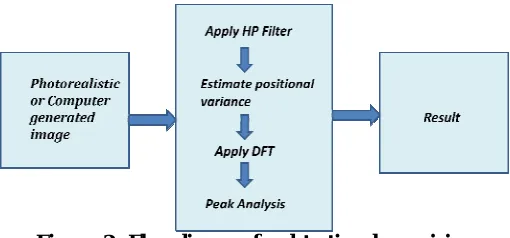
Nearly all digital cameras contain an image sensor with a color filter array, for example, the Bayer filter array shown in following figure. A filter is positioned over each photosite, sensitizing it to either the red, green, or blue component of the incident light. While other color filter array patterns and filters are sometimes used, the Bayer is the most common. The raw image from the image sensor contains only a single signal value at each pixel position. This pixel value further corresponds to only a single color component (red, green, or blue in the case of the Bayer filter array). Typically, a demosaicing algorithm [2], also called color filter array interpolation, is applied to the raw image to estimate the pixel value for each color component. The interpolation can either be linear or adaptive.
Figure 2. Flow diagram for detecting demosaicing
D. Detect Forgery
Following is the algorithm for detecting forgery region between two images. Step 1: Read image IF (Testing image or forged image)
Step 2: Read Database image IO (Original image)
Step 3: For i=1 to Image length (IF or IO)
R1= IFPiR
G1= IFPiG B1= IFPiB
R2= IOPiR G2= IOPiG
B2= IOPiB
Step 4: Compute values of R, G, B R = | R1-R2 | <= Threshold value G = | G1-G2 | <= Threshold value B = | B1-B2 | <= Threshold value Step 5: If (R || G || B) then
Non forgery pixel-set to white Else
Forgery Pixel-set to original Step 6: Exit
In proposed system, there are two main tasks.
Detecting whether input image is PIM or PRCG
Detecting forgery region
The proposed system has following main phases:For Face images- SVM Pixel Classification, Face Detection, Crop Faces, For Non face image- Load image, Change Parameter if need,Detect whether the image is real image or computer generated image and last is Detect forgery region.
IV. EXPERIMENTAL RESULTS
We have validated the proposed method with various input examples. Following analysis shows the main results. The first column shows input images. We achieve two different colorization results through optionally giving two methods for selecting region of interest. In implemented system we calculate PSNR value by using following formula. PSNR is the best parameter which will help to improve image quality.
= 10 log 10 ² ( )
Here, MAXI is the maximum possible pixel value of the image. When the pixels are represented using 8 bits per sample, this is 255. For color images with three RGB values per pixel, the definition of PSNR is the same except the MSE is the sum over all squared value differences divided by image size and by three.
The sample real images used for the experiments are shown below:
Shweta.jpg Nature.jpg
Pic8.jpg
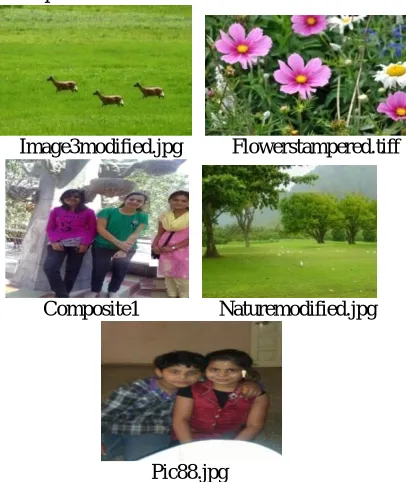
The sample forged images used for the experiments are shown below:
Image3modified.jpg Flowerstampered.tiff
Composite1 Naturemodified.jpg
Pic88.jpg
Following table 1 shows the comparison on Entropy, mean intensity and Peak value.
Table 1. Entropy, Mean Intensity and Peak analysis value comparison Choose reference images
I/P Image Entropy Mean Intensity
Peak analysis
Flowers 17.7128 0.45882 5.6272 Image3 17.2541 0.34118 4.1869 Nature 17.5888 0.37647 4.5268 Shweta 17.7638 0.52157 6.6892
In this above table, entropy, mean intensity and time required for face detection parameters are shown. The images containing faces or person need to go through the process of face detection. Hence parameter time for face detection used to calculate average time required to detect all the present faces in input image.
Table 2. The variation in PSNR and MSE value of the images
I/P Image Mean Intensity
PSNR value MSE value
Flowers 0.45882 11.2284 1633.5095
Image3 0.34118 8.2837 3218.0196
Nature 0.37647 9.0901 2672.7046 Shweta 0.52157 8.7957 2860.1195
The above table shows parameters like mean intensity, PSNR and MSE value of input images. The PSNR and MSE is calculated by enhancing the input image by factor of 0.5 using Gabor filter. Then the PSNR is calculates with respect to the input image.
Following table 3 shows the comparison on percentage of forged area in tampered image for different threshold values like 0, 5, 10 and 15.
Table 3 : Percentage of Forged area with respect to different threshold value comparison Choose reference images
Threshold Value (in %)
I/P image x Forged image Value= 0 Value= 5 Value= 10 Value= 15
Image3 x Image3modified 57 5 3 2 Flowers x Flowerstampered 8 7 7 6 Nature x Naturemodified 71 14 14 13
In above table, percentage of forged area in input image with respect to different threshold value is represented. Threshold value 0 means exact matching pixels are considered. Hence at 0 threshold value, maximum forged area is detected. At threshold 5, 10 and 15, forged area is detected with great accuracy.
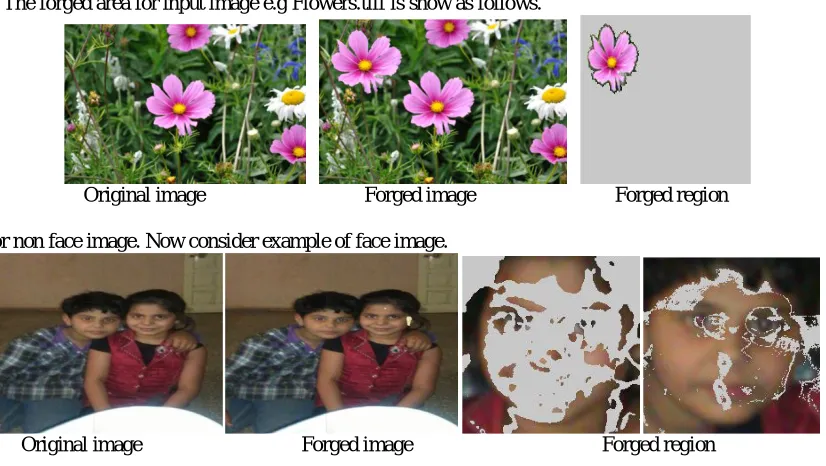
The forged area for input image e.g Flowers.tiff is show as follows.
Original image Forged image Forged region
This is for non face image. Now consider example of face image.
V. CONCLUSION
In this paper, novel approach to distinguish between photographic images and photorealistic computer generated images is used. Instead of focusing on characteristics of the scene itself, exploiting the image processing necessitated by the camera hardware is important. In particular, most cameras image sensors contain a color filter array and demosaicing must be used to produce three-color images. Demosaicing acts as a type of passive watermarking that leaves a trace embedded within the image signal. When traces of demosaicing are detected, it surmises that the image is a photo graphic (rather than computer generated) image. The proposed method works on face images and non face images both. The forgery region in both the images is detected accurately. The images containing face parts are also authenticated by detecting forged region. Although the proposed method is custom-tailored to detect splicing on images containing faces, there is no principal hindrance in applying it to other, problem-specific materials in the scene. The proposed method requires only a minimum amount of human interaction and provides a crisp statement on the authenticity of the image.
REFERENCES
[1] Tiago José De Carvalho, Christian Riess, Elli Angelopoulo,hélioPedrini, Anderson De Rezende Rocha , “Exposing Digital Image Forgeries by Illumination Color Classification”1556-6013/$31.00 © 2013 IEEE.
[2] Andrew C. Gallagher, Tsuhan Chen, “Image Authentication by Detecting Traces of Demosaicing”978-1-4244-2340-8/08/$25.00@2013 IEEE [3] C. Riess and E. Angelopoulou, “Scene illumination as an indicator of image manipulation,” Inf. Hiding, vol. 6387, pp. 66–80,2010
[4] H. Farid and M. J. Bravo, “Image forensic analyses that elude the human visual system,” in Proc. Symp. Electron. Imaging (SPIE), 2010 [5] E. Kee and H. Farid, “Exposing digital forgeries from 3-D lighting environments,” in Proc. IEEE Int. Workshop on Inform. Forensics and
Security (WIFS), Dec. 2010
[6] Micah K. Johnson, Hany Farid, “Exposing Digital Forgeries in Complex Lighting Environments”, 1556-6013/$25.00 © 2007 IEEE
[7] Anderson Rocha , Walter Scheirer, Terrance Boult, SlomeGoldenstein ,” Vision Of The Unseen : Current Trends And Challenges In Digital Image And Forensics” © 2009 ACM 0000/2009/0000-0001 $5.00
[8] Sintayehu Dehnie, ”Digital Image Forensics For Identifying Computer Generated And Digital Camera Images”
[9] V.P.Kavitha, M.Priyatha, “A Novel Digital Image Forgery Detection Method Using SVM Classifier,” International Journal Of Advanced Research In Electrical, Electronics And Instrumentation Engineering, ISSN: 2278 – 8875, Vol. 3, Issue 2, February 2014
[10] S. Rajapriya, S. Nima Judith Vinmathi, “Detection of Digital Image Forgeries by Illuminant Color Estimation and Classification,” International Journal of Innovative Research in Computer and Communication Engineering, Vol.2, Special Issue 1, March 2014
[11] Shrishail Math, R.C.Tripathi, “Digital Forgeries: Problems and Challenges,” International Journal of Computer Applications (0975 – 8887) Volume 5– No.12, August 2010
[12] Shweta P. Kachhawal and Prof. Avinash P. Wadhe, “STUDY OF DIFFERENT VIDEO FORENSICS TECHNIQUES” in International Journal of Computer, Information Technology & Bioinformatics (IJCITB) ISSN: 2278-7593, Volume-2, Issue-2