
graflex_stereo
25
0
0
Full text
(2) GRAFLEX' www.orphancameras.com.
(3) I Page Easy A . . B . . C picture taking.. Parts of the Stereo Graphic. .. . . .. 3 4-5. What kind of film to boy.. What kind of flash bulbs to buy.. Taking careof your camera.... . .. 6. l,oading your Stereo Graphic. . . .. B-9. Setting the exposure dial. 6 7 t0. Daylight and Flash settings l1 l2-13 Taking the picture "B"-bulb t4 Using the setting... . . Tripod & Cable Release. t4 Rewinding the film. l5. Unloading the camera How to take flash pictures.. l5 t6-17. Installing flash batteries. . . Stereo Graphic Accessories. 1B-r9. Stereo Graphic Viewer. 22-23. 20-21. YOU NOW OWN A. Stereo Grqphic Your Stereo Graphic goes beyond the capabilities of previous stereo cameras in that it gives you maximum three dimensional effect without having to manually focus your camera. For this camera has a unique and exclusive method of focusing known as Depthmaster Auto-focus. Even a beginner can get thrilling lifelike three dimensional pictures with the Stereo Graphic. www.orphancameras.com.
(4) { 1. ; there are'five positionsmarked Cloudy,Hazy,Bright, BrUliant andf l16 for Color Film (alsoidentified by f/numbers).. A.. a. C.. .. ; this automatically cocksthe shutter, preventsdoubleexposures,and turns the film counter dial.. our new Stereo Graphic is different from other stereo cameras. The Depthmaster lens system used in the Stereo Graphic eliminates the need for a focusing mechanism and gives you greater depth of field than other stereo cameras under normal conditions. Compare the slides taken with any other stereo camera and the slides taken with a Stereo Graphic and you will see the difference. Stereo Graphic slides are always in focus from foreground to background. www.orphancameras.com.
(5) Rewinding Knob Winding Knob. 35 mm., f/4 Lenses. 35 mm., f/4 Lenses. Exposure Diol. Exposure Setting Knob. www.orphancameras.com.
(6) our Stereo Graphic camera is a precision instrument designed and built by the world's most skilled photographic craftsmen. They have for years built the famous Speed Graphic cameras used by press photographers around the world. Coble Releose Socket. Rewind Releose Button. www.orphancameras.com.
(7) Atry type of 35 rnrn. film can be used in the Stereo Graphic, but you wili finA that the easiest and least expensive is color filrn that gives you a full color positive transparency. This includes: Kodachrome, Anscochrome. Ilkfachrome, Ansco Color and several others that your photo dealer can recommend. All color films are identified for outdoor (daylight) use or indoor (tungsten) use. You can use either type and get excellent pictures as long-as you carefully follow'the instructions on pages 10 and 11. fn*** films come in 20 and 36 exposure rolls. NOTE: on a 20 enposure roll you witt get 16 pairs of stereo pictures; on a 36 enposure ryll you will get ig pairs oy tttrio pictures. Kodachrome film is also available in size 5lS, ,nud* especially lor stereo cameras, which gives 20 pairs of pictures on a roll.. Your Stereo Graphic is synchronized for all M type bulbs such as No. 5 and I.{o. 25 (M-t bubs can also be used provided you have the M-2 Graflash B-C unit). These bulbs are available with clear or blue glass. {Jse blue bulbs (No. 58 and No. 258) for daylight type color film and clear bulbs (No. 5 and No. 25) for black and white or tungsten (indoor) type color film- F-or detailed instructions see pages 10 and 11.. www.orphancameras.com.
(8) rotect it from dust, dirt and rain. It is a good idea to k'eepthe camera in the leather carryirg case with the cover fl"p closed whenever the camera is not in use. Do not attempt to oil or repair your STtrREO GRAPHIC yourself. Remember that on generalprinciples it is a good idea to have your photo dealer check your camera every few years to make sure it is irr tip-top operating condition. The surface of the lenseshas a hard coating which will reduce internal reflections and help make clearer, brighter color transparerlcies.To preserv€ the coating, clean the lenseswith a soft camel's hair brush or lens tissue, Moisten the lens tissue with a drop or two of lens cleaner. Do not apply the lens cleaner directly to the surface of the lenses.When cleaning the lenses, wipe them with smooth, easy motions. Avoid scrubbitg the lenses.. www.orphancameras.com.
(9) l. Ilernove thecarnera frorn t,he leather carrying case by loosening the large t,humb screw (fiS. 1) on the bott,orn.. 2. Turn Lhe Lock lever on t,he bot,t,orn of the camera in a count,erclockwise direction (fig. 2).. 3. ]\ow that the camera rs'urrIocked, t,he bot,tom and back can easily be slipped down about, % inch and lifted off (lig. 3).. www.orphancameras.com.
(10) 4. lfurn the winding knob so that the slot in the take-utrr spool is showing (fig. 4).. 5. Ilold the camera in the left hand and the film in the right. hand. Insert the end of the film int,o the slot on the takeup spool with Lhe perforated edge agains[ the flange of the spool (fis. 5).. 6. Place your lef t thumb on the film to hold it in place, tlraw the film cartridge toward you, and slip it into posit,ion. Turn the the rewind knob until cartridge is engaged (fis. 6).. 7. Transport film by turning winding knob in the direction l,he arrow points until it stops. The film can also be advanced by turning the take-up spool direclly with the thumb. The filrn must lie between the *Lricle rails and both sprockets 'rrust engage the film perfora'. '. / r. r\. r , _ r n S( I 1 8 . I ) .. B. Lay the back of the camera over the film and slide it closed. Lock it, by t,urning t,he Lock lever in a clockwise direct,ion ({is. 8). With t,he back in place, press the shutter releuse and uind the fiIm. Repeat tlris cornplete cycle two more times. The carlera is now seL. 9. Turn the knurled rewind release button on Lhe top of the camera so that [he lock pins in it extend across the camera away from t,he slots in I he coYer. This will prevent its being accidentally depressed, which would cause the exposure counter dial to regist,er incorrectly and rnay result in incorrect advance of the filrrr. 10. Set the exposurecounterat, ': 16" for regular 20-exposure "29" film or at for regular 36exposure film, or at "20" for Kodachrome 335. To set, press down on black center of dial and turn (fis. 10). Aft,er each exposure, turn winding knob fully until it locks; dial will tell you how many exposures you have left on l.he film.. THE CAMERA IS NOW READY E T H E F I R S TE X P O S U R E T O T A Kwww.orphancameras.com.
(11) tTn*. exposure setting controls the lens openilg- and regulSte,s the arnount of light I the flm. It is tf,e only adjustment yriu wilf have to make in ord_erto get good picll: reaches -Wh*n you turn the exposlre ietting knbb (fig. 1) on the front of the camera you will that there are five different positions- Each posiword and a tion is identified with a descriptive 'fhe nurnbers number (for example: Bright-S). are standard f/stops used by advanced amateur and professional photographers. The descriptive wo.d refers to the arnbunt of sunlight shining on the subject and rnakes it easy for the beginner to. select the correct exposure setting. When using daylight Kodachrome or daylight Ansco Color Film follow these simple directions.. fie. I. STOPS DIAT BETWEEI{ DO ]IOT STTTHEEXPOSURE. '). 10. (Approxil. Be sure that the black dot on the shutter selector is set at instantaneous, i/SO second has been chosen to assure good exposures-) (Fig. 2). *ui*fv 2. For a clear sunny duy, set the exposure dial "BRIGHT" and you are ready to take y-our at or picture . For a brilliant sunny 4y,y^4 -Ut beach ' " bn the snou setthe diaphragm at B RILLI ANT' ; .for" a hazy day with soft shadows set the diaphragm "at H AZY.""On dull oaercastdays - you can take pig"CLO(JDY" but the colors are usually tures at btuish-gra!t just as they appear to the eyeTo fake pictures with Ektachrorne or Anscochrome filrn outdoors, and when taking flash pictures, follow the f/stop numbers listed in the charts on the opposite page. www.orphancameras.com.
(12) ,DAY.LI,G.HT $TTTIilGS * Daylieht Color Films. Kodachrome Ansco Color. Beach; water and snow scenesin bright sun Nearby'subjects clear sky. of ayerage color, sunny,. Hazy, light elouds, tqansparent with no sharply defined edges Cloudy,sky,. shadows,. oYercast,; no shadow**. Ektachrome Anscochrome. Brilliant. tl1r. Bright. fls. Hazy. tls.6 Cloudy tl4 Cloudy fl4. flL6 Brilliant tlLL Bright. Kodachrome A (indoor) No. 85 Filter Brilliant f ILL Bright. fls. Hazv t15.6. tls Hazy. tls.6 Cloudy fl4 Cloudy tl4. Hazy Open shade.** Subject in open with ample light tls.6 from sky overhead, but not in direct sunlight. **Note that pictures taken under these ccinditions -may have an ex@ssive bluish cast. Picture takins is not iecommended under these conditions because of difficulty -of judging light values. Try o-ne exposure at indicated setting, and if poseible, tine with the next larger lens opening. "1." xFor Siereo Gruphic with shutler seleclor 3ol sl. www.orphancameras.com.
(13) -Your Stereo Graphic has an Automatic Cocking Shutter coupled to the Wind Knob. Simply wind the knob after each exposure and your shutter is cocl ready for use. I\ote: Just turn the knob until it stops. Excessive pressur( not needed and should be avoided. The Stereo Graphic also has Double I posure Prevention, so if your shutter fails to operate it is an indication tl yo.r inadvertently forgot to wind the film. SEE PAGE I O (do not set the exposuredial between stops). - On the top of your Stereo Graphic you will find two ((I)) shutter positions identified as and 668" (fig. 1). Choosethe shutter setting you want by turning the Shutter Selector so that the black dot lines up with ((I') "8." the letter 0r ((I)' The setting stands for instantaneous (approximately 1/50 second). AU of the erposure settings desuibed on pages I0 and II a,reto be used uith the " shutter set at 1." 668" The setting stands for bulb and is used in taking long exposures.fts use is described on page 14. {ig. I 12. www.orphancameras.com. l J. l. I' i. l. V.
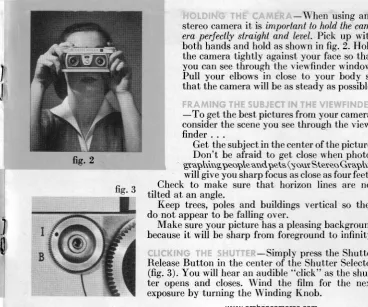
(14) When using any stereo camera it is important to hold the camera perfectly straight and leael. Pick up with both hands and hold as shown in frg. 2. Hold the camera tightly against your face so that you can see through the viewfinder window. Pull your elbows in close to your body so that the camera will be as steady as possible.. I J frg. 2 fig. 3. l. ffi. -To get the best pictures from your camera, consider the sceneyou seethrough the viewfinder . . . Get the subject in the center of the picture. Don't be afraid to get close when photogr aphing peopte andpets (y our Ster eo Gr aphic will give you sharp focus as closeas four feet). Check to make sure that horizon lines are not tilted at an angle. Keep trees, poles and buildings vertical so they do nof appear fo be falling oYer. Make sure your picture has a pleasitg background because it will be sharp from foreground to infinity. -Simply press the Shutter ReleaseButton in the center of the Shutter Selector (fig. 3). You will hear an audible "click" as the shutter opens and closes. Wind the film for the next exposure by turning the Winding Knob. www.orphancameras.com.
(15) with each roll of film you buy. When using your STEREO GRAPHIC at slow speeds it is recommended that you use a tripod and cable release. Rememberthut the shutter wiII remain open as long qs the shutter release is depressed. - Your STEREO GRAPHIC has a standard tripod socket (fiS. 1)' Just screw your camera into position.. ard European release will fit. -Atty standor American-made cable the Cable Release Socket. (fie.2).. ft1.2. www.orphancameras.com.
(16) Iig. I -Turn the rewind re"R." Hold lease button until the bar points to pins engaged in the button down with the lock the key slot until the film is completely rewound (fig. 1). Turn the rewind knob in the direction of the arrow (fig. 2). Rewind the film until the knob turns very freely (to check-release the button, if the knob continues to turn freely, you may remove the back and take out the film). "L" Free the rewind releasebutton and turn it to so that it cannot be accidentally depressed. If it should be accidentally depressedwith film in the camera, the exposure counter dial will not correctly register the number of exposures left to be made on the film. fte. 2 -After the film has been rewound release the Lock on the bottom of the camera (fig. 3). Slip the back down tl" and lift off. Remove film cartridge. the'Have a new roll of film handy so that you can immediately reload your camera, and it will always be ready for use. Exposed film should be processed promptly. Take it to your camera dealer or follow the processing instructions packed with the film. www.orphancameras.com. fie. 3.
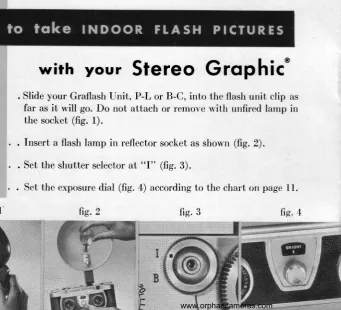
(17) wirh your Stereo Grophic' l.. . Slide your Graflash lJnit, P-L or B-C, into the flash unit clip as far as it will go. Do not attach or remove with unfired lamp in the socket (fig. 1).. 2.. . fnsert a flash lamp in reflector socket as shown (fig. 2).. 3.. . Set the shutter selector at. 4.. . Set the exposuredial (fiS. 4) according to the chart on page 11.. fig. 1'. fig. 2. ((I". (fig. 3).. fig" 3. +'ffi ii:o. l;ii:::.:;! ,i:!ii!:r: :ir.;l::j!!j i::,:r::;1. ::il iriit;i. www.orphancameras.com. fr1. 4.
(18) Your Stereo Graphic will accept,three Graflash units. The P-L uses pholoflash pen{ight batteries, and the B-C and M-2 B-C accept a 22ll volL photoflash bar'I'he tery. lirst two units uccepl the bayoneL base farnps such as t,henurnber 5, 25, SNt and SF lamps, ancl the last riccepls the srnall N'I-2 lamps, Lhe small reflecLor providing ellicienL distribution of lighL.. -Graflash unifs connect direcLly to the Stereo Graphic canrera wilhoul cor.ds or special mounLs. Inserl the foob of the flash uniL inlo the flcint of t,hecamerii shoe (located on the top of the camera) rnoving the unit backwarcl as far as it will go freely. Grasp Lhecamera and flash firmly and slide the unit unlil Lhe curved section of the foot is llush with the fore parb of the shoe. This compleles the fitting and prepares the equipmenl for use. To rernoye the unit apply pressure Lo Lhe rear of Lhe flash case, gripping Iirmly so t,haLit does noL dr:op out of the shoe when free. Do nol lit or renlove the Graflash with iin un{ired flash lamp in place as it may {ire accidenlally during {itLing or removal. www.orphancameras.com.
(19) The Graflash units are offered less batteries in order that, fresh ones can be supplied and installed at the tirne of purchase. Obtain two penlight batteries identified for photooraphic use. Loosen the slotted screw attaching the outer case correr with a coin or finger tips. Remove the plate exposing the interior. Install the batteries observing the arrows conYeniently imprinted into the inner portion of the case. Always insert the batteries so that the contact or top end is inserted in the direction of the arrow which will be behind iL. Replace cover and tighten down. -Loosen the large screw on the side plate with a small coin or finger tips. Remorre the plate exposing the interior. With the reflector facing left,, see illustration, the bottom of the battery should also face left, i.e. minus (- ) left, plus (*) right. After the batLery has been positioned replace the cover and tighten with the screw. With good care the battery should last 1-2 years. NOTE: Longer battery life can be expected if lamps are not left in the unit when not in use. Groflosh P-[ ond Groflosh B-C-The Graflash reflector accepls the standard bayonet type M and F lamps, To fit the larnp, slide the base portion into the socket as far as it will go freely. Apply pressure to the top at the 'fhis will allow the catch to lock the (seeillustration). 1g same time pulling forward slightly www.orphancameras.com.
(20) lamp base into position and the unit will then be ready for use. To remove the lamp depress the ejector at the base of the socket. M-2 Graflqsh B-C-TheM-2lamp has a pinlessbalse and does not have to be turned or aligned in any special way. Merely press the base of the lamp into the reflector socket until it locks in place. To eject, simply push the ejector button on the back of the reflector. -It is good practice to check the equipment from time to time for battery strength and continuity of the circuit. For this obtain from your photo dealer a suitable test lamp. Fit the lamp into the Graflash reflector socket as described above. With the camera unloaded or with the lens covered trip once or twice at a slow shutter speed. Each time that the shutter is tripped the lamp should glow momentarily. Batteries may lose their e{ficiency with age as well as with use. Strong batteries are your best assurance for constant results. We recommend replacement of penlight batteries approximately eyery six months and 22rl volt batteries approximately eighteen-twenty-four months. -On one side of theGraflashB-C units will be found an outlet for a two-prong household plug. This accepts a standard connecting cord for Graflite Extension Flash which your dealer will be glad to show you. www.orphancameras.com. l9.
(21) Groflqsh B-C. Grqflosh P-L. M-2 Groflqsh B-C. This small, efficient uniL uses a 22rZ volt battery and has special current saver circuit. Extension out,let permit,s use of extension flash. Accepts bayonet base flash lamps.. Lowest cost Graflash available. Uses two inexpensive penlight batteries. Accepts bayonet base flash larnps.. This unit differs from the regular B-C in that it has new 3,, reflector recommended for M-2 flash lamps. Has push-button ejector and extension outlet.. Grqflite Sidelighring Unit For auxiliary back or side lighting, this unit is ideal. Lamp socket assembly has outlets for B-C cartridge and 6'f)" size bat,t,ery use, two of each accommodating standard household plugs. Adjust,s to any position. Includes 15' extension cord.. GRAFLITE'? Designed for more efficienl use of Bottery or B-C power Graflite is the finest, most versat,ile flash unit on the market today. It "f)" can be used with size batteries or the new B-C cartridge. Built for use with synchronized shutters. The high efficiency reflector can be adjusted for broad or beam lighting. Light weight, beautifully styled. The finest flash unit you can choose for your Stereo Graphic.. www.orphancameras.com.
(22) Grqflex Speed Tripod $. gog{tlipod. is one of the most useful of accessories. The Graflex. is an idealunit fo1vo-qrsrereoGraphic.It is r.rss"J, Pry:{ tiip:d comp_act. opens. to 67 inches, cloies to 28 in"cies. [grr.tyeigh!, w.gtghs only^A/2 lbs. Complete with Pan-Tilt Head and lateral adjustment for leveling the ^cgmpra. Quick acting and lockffi-iee extensions with shake proof lock nuri ar rhe t"F. D;rLi;;;i;;-sion center post for quick height adjustm*ofi. li;;;"r"t";liy priced, too.. LENSSHADE & FITTERS Filters for color films especially 4esigned fgr the Stereo Graphic". Supplied _in pairs with slip-on mounts. Lens shades eliminate undesirable reflections on the camera lenses. Slip-on design permits use of filters, sunshades, or both. Camera case may be closed while filters are on lenses.. CARRY-AIL CASE Handsome grey top grain cowhide. A deluxe case lo carry camera, flash, flash bulbs, filrn, filters, lens shade, exposure meter and other small equipment. Solid reinforced construbtion. Full leng,th shoulder strap and pad. Lock and kev.. www.orphancameras.com. z.
(23) The Stereo Graphic Viewer has a built-in battery operated light and ground glass diffusion screensfor best possible illumination of the slide. You will find it easyand quick to adjust and easyto use. ,i,.itlti:riri r',r,::'i,:i-ii',i-Dropa slide in the slot in the top of the viewer with the slide turned in accordance with the directions printed on it. Hold the viewer in either the right or left hand and press the red bar in the batteries should base of the viewer to turn on the light. (l\ote-fresh See below your dealer. be suppliedwhen the viewer is purchasedfrom left hand the or right the either with for loading.) Focus the viewer effect, it proper stereo gain To viewer. the of sides red knob at the may be necessary to adjust the separation of the lenses. The control knob for this is conYeniently located at the upper right hand corner ' of the front of the viewer. .. , .', ,,,*;'1.:., ,'..i:. , '. :-Loosen the 2 screws in the base of the viewer. A coin can be used for the purpose. Separate the top and bottom halves of the rear part of the viewer. Insert 2 size D standard batteries for photoflash or industrial use. Be sure to insert them with the tops poiniing in the same direction as in a flashlight. Refit the top and bottom sections, sliding them into place, so that they will properly connect with the front part of the viewer. The screws are held in place with retainers, so that they cannot be lost. A coin can be used to retighten them.. www.orphancameras.com.
(24) SIDE ADJUSTS FOR, EYES. FOCUSING KNOB.. BOTTOM PUSH BUTTON. LOOSEN sCREWs TO REMOVE COVER.. TOPWITH C O V E RR E M O V E D F L A S H T I G H TB U L B . D-SIZE FLASHLIGHT BATTERIES.. o www.orphancameras.com. 23.
(25) GFIAFLEX, g,. ROCHE!$TER. GRAFLEX, INC. Western Division 800 North Cole Avenue Hollywood 38, Colifornio. INC.. GRAFIEX, INC. Midwest Division, Soles <lnd Service 320 West Ohio Street Chicogo 10, lllinois. N. Y.. GRAFTEX, INC. New York Bronch Suite 922,50 Rockefeller Plozo New York 20, New York. Groflex of Conodo Limited 137 Wellington Street West Toronlo, Ontorio, Conodo. F o r mN o . 2 8 9 / 8 5 5. www.orphancameras.com. Printed in U. S. A..
(26)
Figure
Related documents
The jurisdiction and discretion granted to the coastal state regarding it^s fishing resources should therefore be implemented into national legislation to the benefit of such
After Day, in the lighting of Moon Night wakens under a prayer to call hush to Day, time to commune. with Night, windswept under
Results suggest that the probability of under-educated employment is higher among low skilled recent migrants and that the over-education risk is higher among high skilled
○ If BP elevated, think primary aldosteronism, Cushing’s, renal artery stenosis, ○ If BP normal, think hypomagnesemia, severe hypoK, Bartter’s, NaHCO3,
Proprietary Schools are referred to as those classified nonpublic, which sell or offer for sale mostly post- secondary instruction which leads to an occupation..
effect of government spending on infrastructure, human resources, and routine expenditures and trade openness on economic growth where the types of government spending are
In summary and taking into account the resonance characteristics of the ACUREX plant, the main contribution of this paper, is to improve a gain schedul- ing (GS) predictive
dotal but not statistical evidence for similar effects (Woodward et al., 1990). Bayer and colleagues (2011) argue that vestibular stimulation
