Available online: http://edupediapublications.org/journals/index.php/IJR/ P a g e | 4 1 9
Attendance Management & Feedback Management
T. Siri Chandhana
1,
S. Anitha Chowdary
2,
M. Sai Srikar
3, S. Avinash
41B.Tech C.S.E TKREC Hyderabad Email: [email protected]
2B.Tech C.S.E TKREC Hyderabad Email: [email protected] 3B.Tech C.S.E TKREC Hyderabad Email: [email protected]
4Asst.Professor, CSE Dept, TKREC, Hyderabad, TS-India, Email:[email protected]
1. ABSTRACT
In current scenario, management and maintenance of student information is cumbersome task for any institution. The traditional way of attendance is, recording manually in a log book and then converting into desktop application. Mobile Responsive Attendance Management & Feedback Management mainly deals with managing the attendance and generating the report and even deals with providing the feedback. The admin can activate and deactivate the faculty and also he is able to give the notifications to both the faculty and students. This notification can be seen when a faculty login’s to their account. This project is intended to produce an automated solution for attendance management. Using this online system, daily attendance of students in schools and colleges can be easily managed.
Keywords: Handheld computers, Web
servers, Hardware, Feedback, attendance, notifications.
2. INTRODUCTION
Now-a-days, management and
maintenance of student information is hefty task for any institution. The student’s
academic information consists of
monitoring their performance and progress periodically which seems to be a huge workload on lecturers to handle and update on the progress of subjects for the respective
classes. The traditional way of attendance is, recording manually in a log book and then converting into desktop application. Such system can be tedious process and may often lead to errors while generation reports. Apart from this, sometimes the attendance sheets are lost, misplaced or information wrongly entered due to various reasons. In order to reduce the manual work and to achieve more efficiency in managing student’s information, a “mobile responsive attendance and feedback management” can be applied to make this process more easy and beneficial in every way. This system will store, retrieve and an email will be sent with their respective attendance report. This system will provide the faculty with a student attendance sheet consisting of name, roll number and Absent/Present mark. The faculty can download the file where this data can be stored and maintained by the school or college. It will send an email to the students or their parents, showing their attendance percentage over that particular period. He is also allowed to delete a particular student in that list if required. Faculty can also see their feedback percentage which is given by the students. The admin can add and delete the faculty and also he is able to give notifications to both the faculty and students. This notification can be seen when a faculty login’s to their account.
Available online: http://edupediapublications.org/journals/index.php/IJR/ P a g e | 4 2 0
2.1. Objective
In order to avoid above existing manual attendance register problem, we are planning to design a system for to automate this process, so that taking attendance and report generation becomes more interactive, automated and effective.
1. Daily attendance will be placed through Mobile Responsive Web Application which can be maintained in the database. It reduces the paper work and storage area. 2. Save time & work load for Faculties, Heads of Departments and Organisation Administration.
3. Easy to access.
4. Feedback reports can be generated very easily.
5. Easy and quick process.
6. It will have a user friendly interface
3. SYSTEM ANALYSIS
3.1. Existing System
The system that is existing consists of traditional method of managing the students attendance using registers. At the desired point of time the registers are analyzed to verify the details of the students. This process is time consuming and needs lots of manual work.
This process is vulnerable to manipulation since the handwritten records can be manipulated. Since the data increases as time passes maintaining it may become difficult as the manual records need to be maintained. The space for storing the record also increases and also retrieving of older records becomes difficult.
Apart from manual process we have barcode system, Rfid system, biometric system. But the disadvantages with these systems are if the barcode that is generated
is tampered then it cannot be used further. The rfid used can be scanned from about 40feet which may lead to low security. Biometric system is very costly.
In the present system all work is done on paper. The whole session attendance is stored in register and at the end of the session the reports are generated. We are not interested in generating report in the middle of the session or as per the requirement because it takes more time in calculation. At the end of session the students who don’t have 75% attendance get a notice.
Due to the disadvantages of the present existing systems a system is proposed which reduces the manual work, space occupied, difficulty in retrieving or analyzing the data. It also reduces the opportunities to manipulate the data and has security more than rfid and less costly than biometric system.
3.1.1. Disadvantages In Existing System Not User Friendly
The existing system is not user friendly because the retrieval of data is very slow and data is not maintained efficiently. Difficulty In Report Generating
We require more calculations to generate the report so it is generated at the end of the session. And the student not get a single chance to improve their attendance. Manual Control
All calculations to generate report is done manually so there is greater chance of errors.
Lots Of Paperwork
Available online: http://edupediapublications.org/journals/index.php/IJR/ P a g e | 4 2 1
Time Consuming
Every work is done manually so we cannot generate report in the middle of the session or as per the requirement because it is very time consuming.
3.2. Proposed System
In order to overcome the above mentioned problem we introduce this system. There is an urgent need for the solution to any student or organization “Attendance Management And Feedback Management” comes in handy. It has various dynamic features that are listed below as follows:
A step towards futuristic e-schools and colleges.
More secure than traditional method.
Attendance information is
available 24x7.
It will automatically send the e-mail notifications.
3.2.1. Advantages In Proposed System User Friendly
The proposed system is user friendly because the retrieval and storing of data is fast and data is maintained efficiently. Moreover the graphical user interface is provided in the proposed system, which provides user to deal with the system very easily.
Reports Are Easily Generated
Reports can be easily generated in the proposed system so user can generate the report as per the requirement (monthly) or in the middle of the session. User can give the notice to the students so he/she become regular.
Very Less Paper Work
The proposed system requires very less paper work. All the data is feted into
the computer immediately and reports can be generated through computers. Moreover work become very easy because there is no need to keep data on papers.
Computer Operator Control
Computer operator control will be there so no chance of errors. Moreover storing and retrieving of information is easy. So work can be done speedily and in time.
4. SYSTEM ARCHITECTURE
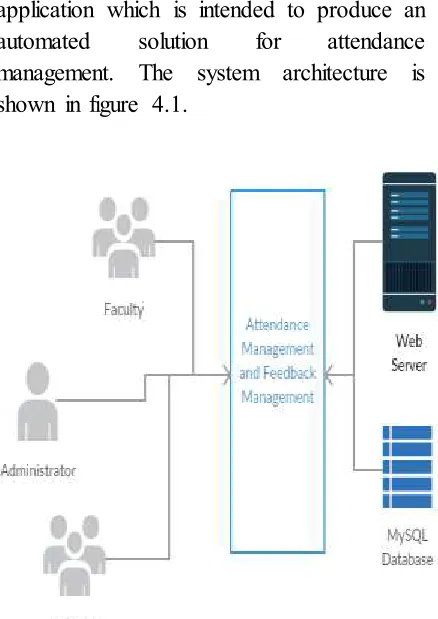
The development of the proposed model is not only depending on how the system works. It also depends on the working flow process that being identified and need to be implemented and followed. The proposed “Attendance Management &
Feedback Management” is a
web-application which is intended to produce an automated solution for attendance management. The system architecture is shown in figure 4.1.
Available online: http://edupediapublications.org/journals/index.php/IJR/ P a g e | 4 2 2
5. ALGORITHM
Algorithm for a Login Scenario Step 1 Start
Step 2 Create variables to receive the post data from user submission.
Step 3 Store the Email and Password in variables
Step 4 Check the number of rows in Users table with the received Email and Password in the database.
Step 5 If number of rows > 0 Go to Step 6 else Step 1
Step 6 Initialise session and store email id as a session variable
Step 7 Redirect to dashboard Step 8 End
6. MODULES
6.1. Faculty
In this module, the faculty can go to the website and login with the help of their unique id and password. After they get access to their profiles, they can give attendance, can view his performance feedback percentage which is given by the students, faculty can activate and deactivate/delete the students. Faculty can even generate the attendance report and it can be saved in the college databases.
6.2. Administrator
In this module, the
administrator can view list of faculty and students in his organization. Administrator has a privilege to activate and deactivate the faculty. Admin has the ability to create notifications for both the faculty and students.
6.3. Students
In this module, initially the students need to be registered in the website in order
to obtain attendance. After that students can access the website with the help of their unique user id and password. They can view the notifications given by admin. They can even give the feedback to the faculty.
6.4 Implementation Tools 6.4.1 Taking Attendance
Faculty can take the attendance daily in from his mobile phone using this Mobile Responsive Web Application. He can select the type of attendance i.e., lab or class attendance and it can be stored in the database. At the end of every money, the aggregate sheet can be downloaded and can be saved in the college servers.
6.4.2 Feedback
Now-a-days taking feedback became a big task and generating aggregate from that has been a challenging task for both the faculty and also for the administration. So, in this Web Application students can simply give the feedback which will be stored in the database. This feedback report can be viewed by the faculty and by the admin. 6.4.3 Notifications
Admin can place notifications in this Web Application in order to inform the faculty and even students about the organization functionalities. These notifications can be seen by the faculty and the students as soon as when they login to their accounts.
Available online: http://edupediapublications.org/journals/index.php/IJR/ P a g e | 4 2 3
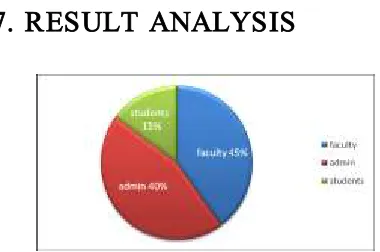
Fig 6.1 Pie chart showing the participation of modules in the system
Description
Faculty is an entity which has the major part in this application. Faculty performs various operations like adding and deleting the students, viewing his
performance feedback, viewing
announcements given by admin and the main part which is giving attendance and also sending the email to the students about their attendance percentage. So it is mentioned with the highest percentage i.e.45%.
Admin is considered as the super user as it maintains all the operations of Attendance management and feedback management. He can gives the notifications to both the students and the faculty members about the information related to that organization. So it is mentioned with the 2nd highest percentage i.e.40%.
Then next to the admin, students entity comes, who is allowed to perform various operations like posting solutions to the student queries, uploading the lecture videos and lecture notes, changing his profile. So it is mentioned with the lower percentage i.e.15%.
8. CONCLUSION
This system is aimed at providing a cheaper and secured way of maintain the attendance details. The details can't be mis-conducted or mis-interpreted. The designed system fulfills all the necessary requirements of the lecturers in maintaining the student attendance records. Students also can be benefited through this system. They can easily get the updates about their performance and parents also see their wards attendance percentage. They can also
get the notifications which is given by the admin. It reduces the time and workload of the lecturers. At the end of every month, faculty can directly download the attendance sheet and can be saved in the servers of the schools or colleges.
9. FUTURE ENHANCEMENT
In Future we can implement this project by the subsequent traditions as follows:
i. Can be developed into mobile application.
ii. Can provide SMS notifications. iii. Can provide call services.
10. REFERENCES
[1]http://www.w3schools.com/sql/ [2]http://www.w3schools.com/php/ [3]https://en.wikipedia.org/wiki/Attendance _management
[4]https://en.wikipedia.org/wiki/Student_inf ormation_system
[5]https://en.wikipedia.org/wiki/Feedback [6]https://en.wikipedia.org/wiki/Cloud_com puting
[7]https://en.wikipedia.org/wiki/Cloud_stor age
[8]https://support.rackspace.com/white- paper/understanding-the-cloud-computing-stack-saas-paas-iaas/
[9]https://books.google.co.in/books?hl=en& lr=&id=BHazecOuDLYC&oi=fnd&pg=PR 7&dq=ensuring+data+storage+security+in+ cloud+computing+wikipedia&ots=Fz86J1jT Gd&sig=4WXfYgX8p4kUB3ACv0TFucJT Kyc#v=onepage&q&f=false
Available online: http://edupediapublications.org/journals/index.php/IJR/ P a g e | 4 2 4
[12]http://www.ijarcce.com/upload/2013/m
arch/15-Manoj%20Kokane%20-%20data%20storage-c.pdf
[13]RFID: unique identification technique for attendance system, Volume 2, Issue 2 (February 2012) ISSN: 2249-3905.
[14]RFID-Based Students Attendance Management System International Journal of Scientific & Engineering Research Volume 4, Issue 2, February- 2013 1 ISSN 2229-5518.
[15]http://www.ijreat.org/Papers%202014/I ssue8/IJREATV2I2090.pdf
[16]http://www.iisjaipur.org/iiim-current-08/mca_iv_sem_pro_eva/15.project%20atte ndence%20managemnt%20system.pdf [17]http://en.wikipedia.org/wiki/Symbian [18] Symbian Developer Community wiki [19]http://christoph33r.com/groupproject/te chni cal.html