Architecture Guide
Version Management
Version historyVersion Date Author Distribution
1.0 22 August 2014 Pete Trevitt & Lisa Watts Release
Related Documents
Name Location
Campaign Manager 4.0.0 Release Notes.pdf Documentation Portal Campaign Manager 4.0.0 Installatiion Guide.pdf Documentation Portal Campaign Manager 4.0.0 Upgrade Guide.pdf Documentation Portal Campaign Manager 4.0.0 Administration Guide.pdf Documentation Portal Campaign Manager Load Process Guide.pdf Documentation Portal Campaign Manager Backup requirements and Data Structure.pdf Documentation Portal Engine Shared Repositories Technology Briefing.pdf Documentation Portal
Table of Contents
1
Introduction ... 1
2
Architecture Overview ... 2
2.1
Technology Stack ... 2
2.1.1 Logical Architecture ... 2
2.2
Server Roles Defined ... 3
2.2.1 App Server Role ... 3
2.2.2 SQL Server Role ... 5
2.2.3 Proxy Server Role ... 9
2.2.4 SMTP Server ... 9
2.3
Engine Multi-Tenancy... 9
2.4
Shared Repositories ... 10
3
Security Control ... 11
3.1
Authentication System ... 11
3.1.1 Forms Based Logon ... 11
3.1.2 Single Sign On ... 12 3.1.3 Authentication Framework ... 12
3.2
Activity Logging ... 13
3.3
Notification System ... 13
3.4
Data Encryption ... 14
3.4.1 SQL Server ... 144
Environment Administration ... 15
5
Firewall Configuration ... 16
5.1
External Firewall ... 16
5.2
Between App Server and Engine Server ... 16
5.3
Between App Server and SQL Server ... 17
5.4
Between Engine and SQL Server ... 17
6
Physical Hardware Planning ... 18
6.1
Dedicated Server Role Hardware Examples ... 19
6.1.1 Standalone Engine Server ... 19
6.1.2 Standalone App Server ... 20
6.1.3 Standalone SQL Server ... 20
6.1.4 Combined App and SQL Servers... 21
6.1.5 Combined App, SQL and Engine Servers ... 21
1
Introduction
This document provides an overview of common architecture configurations for a production SDL Campaign Manager system. It includes guidance on security and firewall configurations, and information on how to plan the physical hardware required for your environment.
This document is intended for those who are responsible for planning or installing a Campaign Manager environment for the purposes of hosting the application.
For detailed installation instructions, please see the SDL Campaign Manager Installation and Upgrade Guide.pdf.
Please review the other related documents listed on Page 2 for other information that may be useful in planning your environment.
2
Architecture Overview
2.1
Technology Stack
SDL Campaign Manager is built on a Microsoft technology stack that delivers an n-Tier application via the internet. The server side uses the following major products: Windows Server Operating system, C#.NET 4.0, IIS 7.5, and SQL Server Standard Edition. The client side uses Microsoft Silverlight 5, and optionally Microsoft Excel 2007 or greater. Note that Silverlight 4 is no longer supported.
Upgrades to newer versions of SQL Server and Silverlight should not be performed without consulting the latest release notes for supported versions.
The release notes for each release will outline supported versions and pre-requisites for the technology stack and inter-application pre-requisites and should always be referred to prior to commencing a project.
2.1.1
Logical Architecture
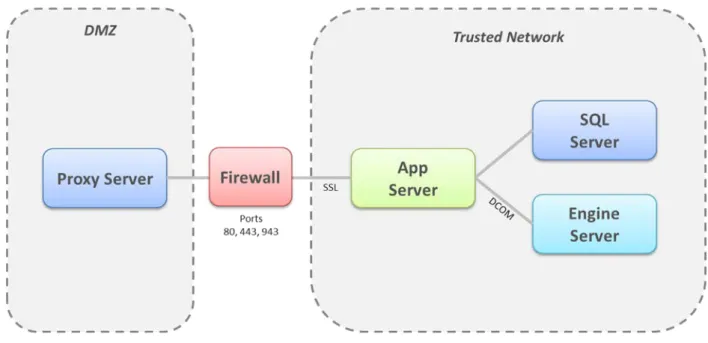
The logical architecture for Campaign Manager is pictured in Figure 1, below. The
recommended approach is to place the App Server, SQL Server and Engine Server roles all within the trusted network, and direct traffic to the App Server through the firewall by means of a reverse proxy. This is the most secure way to make the application publicly available over the web, and yet support the Microsoft DCOM client requirement on the App Server, which is the communication protocol for Engine.
Note that campaign Manager 4.0.0 can no longer be run in parallel (same Engine project) with AMS due to the removal of support for Engine from version 6.0.0 onwards. AMS will continue to be supported on Engine 5.3.
2.2
Server Roles Defined
The following server roles are required for each installed Campaign Manager environment. A role is not necessarily a physical machine, but a major collection of components that have specific application requirements on that host machine.
It is assumed that each of the machines in the trusted network reside on the same network domain, and are physically located in close proximity to one another.
2.2.1
App Server Role
Summary
Windows Server 2008 R2 SP1 64 bit App Server Role
.Net Framework 3.5.1 .Net Framework 4 Web Applications Hosting Services Authentication Engine Suite 6.0.0 Windows Services Alert Logger Alert Notifier CM Listener
Document Schedule Service Certificates
NOTE This is an architectural change from SDL Campaign Manager 2.8, as in that release the 3 Web Applications listed in the above grid were installed as separate Web Sites.
For upgrades, there are full instructions to convert from multiple sites to single site in the SDL Campaign Manager Installation Guide.
Here is a summary of each:
1. Hosting: This is the ‘gateway’ to the system. It is possible for each client to have their own hosting site but more typically, clients will share a hosting site each accessing it via a ‘client specific’ host header.
2. Services: The ‘workhorse’ application, which either re-directs or performs the bulk of the processing requested by each user’s interaction with the system.
3. Authentication: As its name suggests, it handles the request to access resources from the Campaign Manager service itself or Email Manager service if that has been included in the solution. Certificates are used to validate these requests.
NOTE Installation of Engine is required on the App Server to facilitate DCOM
communication between it and the Engine server. It is not necessary to have an Engine repository on this server, and a license is not required.
This App Server role hosts .NET assemblies for the application middle tier and serves content to all “client” computers using Windows Server IIS 7.5. The Campaign Manager website communicates with the client computer’s Silverlight plugin over either HTTP or HTTPS. If the SDL Campaign Manager system is using the integrated SDL Email Manager system then they should share the same protocol i.e. ALL http or ALL https.
The SQL Server and Engine Server roles communicate with this role through the following Windows services.
App Server Service Table
Name Purpose Default State
Alchemy Alert Logger
Takes the .txt files from the Alerts folder and puts their contents into AlMain.AL.alertlog table.
Automatic
Alchemy Alert Notifier
Reads AlMain.AL.alertlog table and sends out alerts according to its configuration.
Automatic
Alchemy
CMListenerService
Alchemy Document Schedule Service
The main service handling campaign execution - deals with outputs that need running, recipients that need adding, populating campaign tables with responses, etc. The number of campaigns that can run concurrently is also handled by this service, in the appsetting
“NumOfTriggerProcessorThreads’. A thread represents an active executing campaign.The default value is 8, meaning that up to 8 campaigns can run at the same time, however this can be increased depending on your hardware setup. Service which runs documents on a schedule
Automatic
2.2.2
SQL Server Role
Summary
Windows Server 2008 R2 SP1 64 bit .Net Framework 3.5.1
.Net Framework 4
SQL Server 2008 R2 (Standard) or 2012 (Standard) Database Engine Services
Full Text Search Management Tools File Services SQL Database Engine 3 ‘System’ Databases AlMain AlterianAuth AlchemyStore
Client Databases (CM) – one per hosted client Windows Services
Alchemy AlertLogger Achemy AlertNotifier Alchemy SQLJobService
This server role hosts three system databases to handle authentication, management and storage of application metadata. A separate client database is required for persistence of user created content.
The three system level databases which are shared across all hosted clients are:
AlMain: This database holds system settings such as Time Zone information and the tables used to issue alerts.
AlterianAuth: This is the credential store for the authentication server. It stores user logins and a mapping to which applications those users have permission to use.
AlchemyStore: This database is used to store linking information to enable joins between Engine and SQL Server.
The App Server and Engine Server roles communicate with this role through the following Windows services.
SQL Server Service Table
Name Purpose Default State
Alchemy AlertLogger
Takes the .txt files from the Alerts folder and puts their contents into AlMain.AL.alertlog table.
Automatic
Alchemy AlertNotifier
Reads AlMain.AL.alertlog table and sends out alerts according to its configuration.
Automatic
Alchemy SQLJobservice
Performs a daily output of campaign history and events to an Engine database. Also performs audience and recipient processing.
Automatic
Alchemy (or Client Name) Database
The SDL Campaign Manager Architecture supports the creation and management of multiple Client DB’s to securely exist within a single software environment to facilitate multiple client s being hosted on a single SQL server. The “Alchemy” Client DB is the default client database created by the deployer, subsequent Client DB’s are created via a SQL script, and these databases are used to store client specific data. There will be one of these per hosted client organization within the system and the names of subsequent Clients DB’s will be set on creation. The data held in this database corresponds to CM’s working data: users,
documents, templates, folders, tools, groups, permissions, and storage of Campaign Manager incoming event data.
More information on the creation of Client DB’s is available in the SDL Campaign Manager Administration Guide.
It is important to note that user activity on Campaign Manager 4.0.0 places minimal load on SQL Server for all analytics and outbound message creation and execution. Some load will be placed on SQL Server from incoming inbound events, which need to be stored as they come into the system. When deciding system specifications for this server role, take into account how many inbound events are expected to be handled each day. As the number of inbound events grows, more disk storage will be required on the SQL Server.
Engine Server Role Summary
Windows Server 2008 R2 64 bit .Net Framework 3.5.1 .Net Framework 4 Engine Suite 6.0.0 Windows Services ConnectionBroker AltDocumentcache AltLogService Alchemy AlertLogger Alchemy EngineService Alchemy AlertNotifier
This Engine Server role hosts the Engine application. Campaign Manager 4.0.0 supports Engine 6.0.0 or later. Each Campaign Manager account can support multiple Engine Projects. This server role communicates with the App Server and SQL Server through the following Windows services.
Engine Server Service Table
Name Used By Purpose Default State
ConnectionBroker Engine Manage client application connections to Engine tenants
Automatic
AltDocumentCache Engine Caching of crosstab result sets Automatic
AltLogService Engine Surrogate
Asynchronous logging of surrogate messages
Automatic
AlertLogger CM Picks up alerts created by EngineService and writes them to SQL Server.
Automatic
EngineService CM Monitors changes made to Engine and updates CM where appropriate.
Automatic
AlertNotifier CM Provides redundancy for AlertNotifier running on other servers.
2.2.3
Proxy Server Role
This server role is optional, but highly recommended so that a reverse proxy can protect the DCOM enabled App Server from punching a large range of holes in outside firewall, making all requests from the outside look as though it originated from the reverse proxy itself. Any Linux box with Apache or Microsoft ISA Server or the Threat Management Gateway product would be suitable. A load balancer could achieve a similar objective. This document assumes a device is already in place, which can be used for this purpose.
2.2.4
SMTP Server
This server is highly recommended so that internal alerts can be emailed to system
administrators about the health of the Campaign Manager system. It is an optional server role, but it provides good feedback on unexpected environment conditions. This document
assumes a machine is already in place, which can be used for this purpose.
2.3
Engine Multi-Tenancy
Multi-Tenancy allows multiple client Projects to run on the same Engine server. Each Project is completely segregated and has its own Engine Repository.
This removes the need to buy and maintain a separate Engine server for each customer solution, where those customer solutions are sufficiently small that there is no risk of resource contention (either memory or hard-disk) in running the solutions on the same server. This means that an Engine server will be securely hosting multiple Engine projects for multiple clients.
Highlights:
• Multiple Engine Projects may be securely hosted on single piece of hardware
• Sharing hardware may reduce the total cost of ownership
• Hosting multiple clients repositories on a single physical box may result in better performance than virtualization
• Multi-tenancy is only suitable for smaller databases or low concurrency accounts For further information, please consult your SDL account representative.
2.4
Shared Repositories
Campaign Manager fully supports the use of Engine Shared Repositories. For more
information on this technology, please refer to the Engine Shared Repositories Technology Briefing, available from the SDL Supportal.
3
Security Control
3.1
Authentication System
The SQL Server database named AlterianAuth contains all the credentials that each user will authenticate against for that particular SQL instance. At the current time, each instance must have its own Auth server/database. To actually setup logins and passwords, see the
Administration section of this document.
A named user is explicitly allowed only one active session at a time. Subsequent logins boot the prior session out. The session token is only returned when authentication is successful for either of the authentication methods detailed below. Session tokens are specific to IP, user name, client account, and length of time. Any attempt to modify a session token parameter to gain access to another account or other mischievous purpose will invalidate it going forward.
3.1.1
Forms Based Logon
Campaign Manager is typically configured to allow users to enter a login ID and password to gain access to the system. This information is stored in a table named AL.LoginIndex in the AlterianAuth SQL database. The password is securely stored as a salted hash of the actual password.
Password rules can be configured on the backend by editing the AUTH.LoginPasswordRules table in the AlterianAuth SQL database. To establish the password rules, apply the following options:
minimumLength Minimum length of the password
numChars Number of alpha characters required to be in the password
numNumeric Number of numeric characters required to be in the password
numSpecial Number of special characters required to be in the password
passwordReuse How many passwords must you use before a password can be reused
requireMixedCase Whether or not passwords must contain mixed case.
passwordExpiryDays How long until passwords expire
inactivityLockoutDays How many days before a login gets locked out for inactivity
numberofattempts How many invalid login attempts before an account is locked
attemptlockoutinminutes Time in minutes until a login can be retried after it has been locked by incorrect login attempts
complexity This field cannot be updated and is a calculated
complexity value which should be placed into the hosting site’s configuration
3.1.2
Single Sign On
Configuration of Single Sign-On is documented in the SDL Campaign Manager Administration Guide.
3.1.3
Authentication Framework
The SDL Authentication Framework is an extensible framework that allows other third party applications to authenticate into Campaign Manager for the purposes of seamless integration by implementing a simple interface to create a session token that can be used to securely have trusted applications communicate over the internet. See Fig. 3 below.
Session inactivity will be supported in future versions of Campaign Manager so that an inactive session will be terminated, similar to what a banking website provides. At the current time the best policy is to configure the user desktop to lock after certain number of minutes until Campaign Manager provides the functionality natively.
3.2
Activity Logging
Campaign Manager logs valid and invalid login attempts, including the invalid login attempt reasons. Additional logging and a user audit trail is due to be included in a future version. This includes logging usage of any entity which is securable in the user interface, for example, where a user has permission to output data, the log would include detail like when, who, how long, to where, file names, etc.
Document usage is recorded today with a time/date and user stamp on every modified record. All activity logs are stored in SQL Server and can be secured in the same manner as other SQL data. A user cannot use the user interface to view log information generated by the activity of other users.
3.3
Notification System
The Campaign Manager system has a service that is registered on each server named Alert Notifier. This service takes information\warning\error messages that are logged by the applications in the ALMAIN.AL.Alertlog and sends those out as emails to various people
configured in the system. The tables associated with the notification system are described below:
AL.notifyindex Contains the email addresses to which the alert system sends emails
al.notifycategoryindex al.notifygroup
These two tables are used to create groups for notifications based upon notifyindex.
al.alerttypeindex Alert types which are logged by the system
AL.alertnotify Groups to which the types of alerts from alerttypeindex should be sent.
3.4
Data Encryption
3.4.1
SQL Server
The SQL encryption feature (available on the Enterprise level) to enable rest encryption can be used to protect sensitive data on the SQL Server. As typically encountered, using this type of encryption could have a negative performance aspect. Consult the following Microsoft knowledge article to determine if it is right for your deployment. http://msdn.microsoft.com/en-us/library/bb934049.aspx.
The Engine server does not support a native encryption on disk feature, but being a column based system it is virtually impossible for users to gain insight into customer specific data just because of the separation of rows of data into separate columns which have different indexing and storage strategies. If greater data security is required, a hardware based encryption system on a SAN or other high end disk array will usually provide features to encrypt data which just sits on the disk. As with SQL Server, these mechanisms provide added security but usually come with a cost of performance. To see which approach is right for you, a trial should be conducted prior to rolling into production. Faster CPU’s or faster disks may be able to offset the performance penalty of encryption.
4
Environment Administration
Automatic Windows updates can affect the performance of Campaign Manager. In particular, they have been observed in some cases to cause degradation of Campaign output
performance. We would encourage system administrators to follow Microsoft best practice guidelines with regards to Windows updates, but to also keep in mind the production usage patterns of the system that they are administering.
Administrators should take every effort to avoid unplanned restarts of Engine. This has particular implications for campaigns which are currently processing. See the Campaign Manager Administration Guide for a section on ‘Managing Engine Restarts’.
5
Firewall Configuration
The Campaign Manager Deployer utility makes extensive use of Windows Management Instrumentation (WMI) to communicate between servers during the installation. Where there are firewalls between servers, this may interfere with communication. This section provides best practice recommendations for environments where firewalls exist between the physical Web Server and other physical backend servers. It provides guidance on what ports need to be opened to allow communications between the various servers. Note that these are recommendations only, and will depend on what ports are available in your environment.
5.1
External Firewall
The external firewall facing the DMZ should be configured to allow port 80 and 443, to allow HTTP and HTTPS respectively. One additional port 943 is required for Silverlight.
5.2
Between App Server and Engine Server
DCOM
Engine requires communication over DCOM if the App Server and Engine Server roles are installed on separate hardware. If a firewall is placed between the App Server and Engine Server the following considerations should be observed to ensure DCOM communication can succeed.
DCOM uses dynamically assigned ports in the range 1025-65535 for all method calls and callbacks. In order to set up DCOM to work with firewalls, the range of ports that DCOM can use should be restricted to reduce the number of ports needed to be opened. As a callback might be on a different port than the method call, the range should be configured on both machines.
The following steps show how to set up an example DCOM port range of 5500-5700. Best practice recommendations from Microsoft specify a minimum range of 100 ports above 5000. See http://support.microsoft.com/kb/217351 for more information.
Follow these steps on both the App Server and the Engine Server: 1. From the Start menu, click Run. Type in dcomcnfg, then click [OK]. 2. Expand Component Services then expand Computers.
3. Right click on My Computer and select Properties. 4. Click on the Default Protocols tab.
6. Click Properties. 7. Click [Add].
8. In the port range field type in 5500-5700. Click [OK] to close the Add Port Range dialog. 9. Click [OK] to close the Properties for COM Internet Services dialog.
10. Click [Apply] on the My Computer Properties dialog.
The firewall should then be configured to allow bi-directional traffic on the specified range of ports.
5.3
Between App Server and SQL Server
SQL
If a firewall is placed between the App Server and SQL Server, open the port 1433 for bi-directional access, which is required for standard Microsoft SQL Server connections.
UNC
The App Server will require access to SQL server to write file streams over ports 135 through 139, including port 445 which allows file sharing between the web and the managed file system of SQL Server. All of the test ports should be configured as bi-directional.
5.4
Between Engine and SQL Server
If a firewall is placed between the Engine Server and SQL Server, open the port TCP 1433 for bi-directional access, which is required for standard Microsoft SQL Server connections.
5.5
Between App Server and SMTP Server
If a firewall is placed between the App Server and SMTP server, open port 25 for bi-directional access, which is required for to send notification emails from the AlertNotifier service.
6
Physical Hardware Planning
Let SDL help you plan your physical hardware environment. Please answer the following questions and provide this information to your implementation consultant.
# Questions Consider
Q1 How many partitioned clients
(databases) will share this hardware environment? (Only count production instances, not demo or test)
If number of clients is greater than three, do not combine any of the server roles for production.
Q2 How many total concurrent users across all clients will this environment need to support? (This includes all analytics, reporting and campaign management users.)
If number of concurrent users is greater than 50, do not combine any of the server roles for production. Contact an SDL implementation consultant for further analysis.
Q3 How many total promotion history records will be created in the course of an average month? (Count of all direct mail, email, or other channels
outbound messages)
Use Engine table partitions to ease the process to roll off old history from the data. Partitioning by month is becoming a standard practice.
Q4 How many years of promotion history will need to remain accessible by users? (The typical length of time is 3 years.)
To calculate future storage of promotion history growth over the amount currently in the database - approximate 300K per record. (300 MB per million records)
Q5 How many outbound campaign tactics will be executed in an average month? (If a campaign tactic recurs weekly, we should count that one 4 times.)
This count plus the number of promotion history records each month will help us calculate how much file system space may be required for output files.
Q6 How many inbound/trigger campaigns will be active in an average month? (If a campaign is active and ready to process inbound events to take further action for even one day in a month,
This count helps us to know how much polling of the database is happening. More than 30 active polling campaigns will demand more CPU cores and clock speed.
count the campaign.)
Q7 How many inbound events are
expected to be received in the course of an average month? (We should count the Email Manager response records plus any API level or event import routine from event import tool)
The storage of inbound events averages to about 450 MB per million events. Currently this is stored in SQL Server but will be moving to Engine in a future release. Estimate SQL Server data storage for one year of events.
Q8 How large in gigabytes is the size of the Engine Repository we are starting with on disk, including the current promotion history. (Get the size on disk from Windows Explorer)
The Engine hardware examples below
assume the production server is also the load server using A/B repository switching.
Calculate Engine disk size as Raw data + plus repository A + Repository B. If a repository is greater than 250 GB, it may be best not to share that Engine Server with other clients.
Q9 Does a SAN device already exist to hold the Engine repository?
The best Engine disk I/O performance comes from direct attach SAS drives, but if a SAN is available, it may offer greater flexibility in data management. Hardware performance differs greatly; try to get the best disk I/O
performance your budget will allow.
6.1
Dedicated Server Role Hardware Examples
The examples in this section use standard ‘off the shelf’ server hardware, the configurations of off the shelf hardware differ by vendor and frequently change.
Additionally system implementations typically differ in some way, With that in mind the following hardware suggestions are offered as guidance to minimum specifications only.
An SDL implementation consultant can ensure the system you are putting together will meet your requirements. Please do not purchase hardware without discussing your options with SDL.
6.1.1
Standalone Engine Server
Dell PowerEdge R720.
• Dual Processor Intel® Xeon® E5-2640 2.50GHz, 15M Cache, 7.2GT/s QPI, Turbo, 6 Core, 95W, Max Mem 1333MHz
• Memory Capacity 32GB Total 8x4 RDIMM, 1333 MHz
• Operating System Windows Server 2008 R2 SP1, Standard Edition x64
• RAID Controller PERC H710P Integrated RAID Controller, 1GB NV Cache
• Hard Drives 300GB x 8 15K RPM SAS 6Gbps 2.5in Hot-plug Hard Drive in RAID 10, Net Storage Size 1.2 TB
6.1.2
Standalone App Server
Dell PowerEdge R720 with the following options prices at ~ $6,100 USD.
• Chassis Configuration 2.5" Chassis with up to 8 Hard Drives
• Single Processor Intel® Xeon® E5-2640 2.50GHz, 15M Cache, 7.2GT/s QPI, Turbo, 6Core, 95W, Max Mem 1333MHz
• Memory Capacity 32 GB 8x4 RDIMM, 1333 MHz
• Operating System Windows Server 2008 R2 SP1, Standard Edition,x64
• RAID Controller PERC H310P Integrated RAID Controller
• Hard Drives 300GB x 2 15K RPM SAS 6Gbps 2.5in Hot-plug Hard Drive in RAID 1, Net Storage Size 300 GB
6.1.3
Standalone SQL Server
Dell PowerEdge R720 with the following options prices at ~ $7,900 USD.
• Chassis Configuration 2.5" Chassis with up to 8 Hard Drives
• Single Processor Intel® Xeon® E5-2620 2.00GHz, 15M Cache, 7.2GT/s QPI, Turbo, 6C, 95W, Max Mem 1333MHz
• Memory Capacity 16GB 8x2 RDIMM, 1333 MHz
• Operating System Windows Server 2008 R2 SP1, Standard Edition,x64
• Database Software Microsoft®SQL Server™2008 Standard or 2012 Standard
• Hard Drives 300GB x 2 15K RPM SAS 6Gbps 2.5in Hot-plug Hard Drive in RAID 1, Net Storage 300 GB
6.1.4
Combined App and SQL Servers
Dell PowerEdge R720 with the following options prices at ~ $10,900 USD.
• Chassis Configuration 2.5" Chassis with up to 16 Hard Drives
• Single Processor Intel® Xeon® E5-2665 2.40GHz, 20M Cache, 8.0GT/s QPI, Turbo, 8C, 115W, Max Mem 1600MHz
• Memory Capacity 32 GB 8x4 RDIMM, 1600MHz MHz
• Operating System Windows Server 2008 R2 SP1, Standard Edition,x64
• Database Software Microsoft®SQL Server™2008 Standard or 2012 Standard
• RAID Controller PERC H310 Integrated RAID Controller
• Hard Drives 300GB x 4 15K RPM SAS 6Gbps 2.5in Hot-plug Hard Drive in RAID 10, Net Storage 600 GB
6.1.5
Combined App, SQL and Engine Servers
Dell PowerEdge R720 with the following options prices at ~ $21,000 USD.
• Chassis Configuration 2.5" Chassis with up to 16 Hard Drives
• Dual Processor Intel® Xeon® E5-2667 2.90GHz, 15M Cache, 8.0GT/s QPI, Turbo, 6C, 130W, Max Mem 1600MHz
• Memory Capacity 48 GB 8x6 RDIMM, 1600 MHz
• Operating System Windows Server 2008 R2 SP1, Enterprise Edition,x64
• Database Software Microsoft®SQL Server™2008 Standard or 2012 Standard
• RAID Controller PERC H710P Integrated RAID Controller, 1GB NV Cache
• Hard Drives 300GB x10 15K RPM SAS 6Gbps 2.5in Hot-plug Hard Drive in RAID 10, Net Storage 1.5 TB