ANDROID BASED OBJECT RECOGNITION INTO
VOICE INPUT TO AID VISUALLY IMPAIRED
1J.Prakash,
2P.Harish,
3Ms.K.Deepika
1,2,3
Department of Computer Science and Engineering,Agni College of Technology,Chennai(India)
ABSTRACT
In this paper we present the main features of software modules dedicated to the aid of visually impaired or blind
users. The main aim of developing this software is to reduce or eliminate the need of separate dedicated devices
for object recognition and motion detection. The software modules are designed for Android operating system,
used in majority of the smart phones today. This project proposes a principal component analysis (PCA)
algorithm to recognize the object.To support real-time scanning of objects, we developed a key frame extraction
algorithm that automatically retrieves high-quality frames from continuous camera video stream of mobile
phones. The sequence is approximately capture 3 frames per second. The object is recognized then converted
into text, BY text to speech application it is converted into the voice output. so we have developed an off-line
navigation device that uses 3-D sounds to provide navigation instructions to the user.
Keywords
:Blindperson,
Principal
Component
Analysis
(PCA),Text-To-Speech(TTS),
Imageprocessing, Object Recognition, Visually Impaired
.
I
INTRODUCTION
The visually impaired and blind people face numerous challenges in routine tasks such as making coffee or
crossing roads. Identification of objects and movement in the surroundings is a primary challenge for them
which normal sighted people take for granted. We aim to provide some assistance to them via software based on
android platform which will help ease the difficulty of performing the task of object identification and motion
detection. There are about 285 million visually impaired people in the world, around 39 million of which are
blind. Currently, the most popular choice of Smartphone’s among visually impaired users is iPhone or Android
based phones. Commonly, the non-operating system devices are not preferred by blind users as they do not offer
special functions such as text to speech conversion.
One can find a number of dedicated devices for navigation and object recognition. These wearable devices have
the disadvantage that they are expensive in comparison to software. Also, the blind users are required to carry a
number of gadgets and devices, each for a different purpose such as object identifiers, navigators and mobile
phones.
Software that will run on the blind user’s Smartphone’s will eliminate the need to carry several devices.
Development of PCA algorithms for object detection on Android is gaining popularity. Most algorithms focus
on desktop applications.
The paper is structured as follows. In section I we review software applications for mobile devices that are
specially devoted to blind users. In section II (A) image processing and analysis algorithms that were applied in
object recognition module in the developed applications are described. In section II (B) image processing and
analysis algorithms that were applied in motion detection module in the developed applications are described.
II.RELATED WORKS
We have chosen the Android platform because of the immense popularity of Android devices. According to
Gartner’s analysis in the end of 2012 this mobile platform has gained 70% share of the Smartphone market. [1]
Further it also provides built in speech synthesis software. Google search through voice has been available since
initial release. Voice actions for calling, texting, navigation, etc. are supported on Android 2.2 onwards. As of
Android 4.1, Google has expanded Voice Actions with ability to talk back and read answers from Google's
Knowledge Graph when queried with specific commands. The voice search and Talkback services in android
facilitate use for blind people. Further, most smart phones have built-in, good quality digital cameras, GPS
services, audio and video recorders, etc. These can be utilized by the dedicated software with ease.
A number of image analysis software’s for mobile devices can be found in the market. The Eye Ring project is
one such application. It is a finger-worn device intended as an aid for blind users. This device communicates
with an Android phone which runs the speech processing and image analysis algorithms. It provides facilities
such as bank note recognition, color recognition and distance calculation. It also works as a virtual cane.
However the major drawbacks of Eye Ring are its high cost and that the blind user has to wear an additional
device. Another software developed to aid blind and visually impaired people is Recognizer developed by
LookTel. This application is developed for iPhones and can recognize objects that are previously stored in a
local database. In most cases it requires a sighted person to capture objects and an audio message is to be
recorded identifying the objects. It is intended to help visually impaired people identify household objects. But,
for images with arbitrary orientation of objects, the results of recognition are not specified . Further, Matusiak et
al provide software modules for object recognition, color detection and light source detection. They have used a
combination of SIFT and FAST algorithms. However, the modules do not have any provision for motion
detection. Performance of the algorithms used depends on the quality of the built in camera.
III. SYSTEM DESIGN
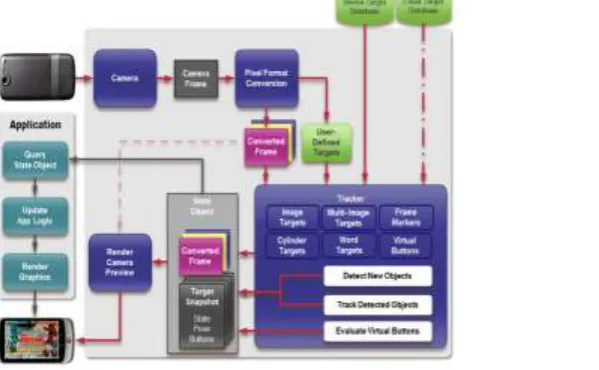
Figureshows the overall architecture of our proposed method which considers all the above issues as shown in
Fig 1:System Architecture
3.1 Image processing methods
There are two types of methods used for image processing:
i. Analog image processing or visual techniques of image processing: used for printouts and photographs.
ii. Digital image processing: processing digital images by using a computer. This technique includes three
phases for processing images: pre-processing, enhancement and display, information extraction.
Image pre-processing or image restoration consists of correcting the image from different errors, noise and
geometric distortions.
Image enhancement improves the visual aspect of the image, after the correction of errors, to facilitate the
perception or interpretability of information in the image.
Information extraction utilizes the computer's decision-making capability to identify and extract specific
pieces of information or pixels. The different image processing techniques used in the Phone Reader Project
help in extracting the text contained in the image taken by the user.
among other similar objects).
An RGB image is captured using the mobile phone camera. First, this image is blurred to reduce effect of noise.
A 5X5 kernel is used for the same and average of the R, G and B values for the 25 pixels is found and applied to
the central pixel. Blurring is done in order to reduce defects in the image such as small dark spots. This image is
then converted to Grayscale format. Thus, now only the intensity
information of the image is contained in the pixel. This image which is made up of shades of grey is obtained by
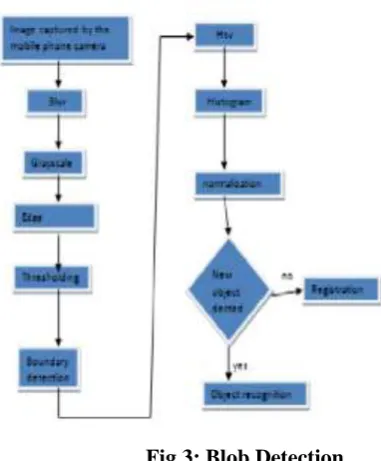
iteratively taking the average of the R, G and B values for each pixel forming the image. Fig3 represents the
flow of image detection in our module. Following functions are performed.
4.2 Edge Detection
The Sobel operator is used for edge detection. We use a 3X3 Sobel matrix which is convoluted with our source
image. The x-coordinate is defined here as increasing in the right direction changes, and the y-coordinate is
defined as increasing in the down direction changes. According to this the gradient can be approximated. These
gradient approximation in the x and y direction can be used to calculate Gradient Magnitude.
After calculating Gradient for the image, the required Edges can be detected as is seen in Fig1. The required
features of the image (i.e. object to be detected) are extracted using thresholding method. In this method, a
binary image is generated with only black and white color. The required features are converted to white (or
black) and the background is set to black (or white), respectively.
4.2.1 Thresholding
Thresholding is the simplest method of image segmentation. From a grayscale image, thresholding can be used
to create binary images with only black or white colors’. It is usually used for feature extraction where required
features of image are converted to white and everything else to black (and vice-versa). Fig2 represents a
4.2.2 Blob Detection
The next operation performed is blob detection. Blob detection refers to mathematical methods that are aimed at
detecting regions in a digital image that differ in properties, such as brightness or color, compared to areas
surrounding those regions. Informally, a blob is a region of a digital image in which some properties are
constant or vary within a prescribed range of values; all the points in a blob can be considered in some sense to
be similar to each other. Since we have separated foreground (say black) and back ground (white) of an image in
thresholding process. Hence by using those intensity values we compare x-coordinates of an image to find x min
and x max. Similarly we do for Y-axis and find y min and y max and store it in a matrix and draw a blob over an
object.
Further, a key point detection procedure is performed. To improve performance of the application the Features
from Accelerated Segment Test (FAST) algorithm was implemented. It is one of the fastest corner detection
algorithms. The FAST corner detector is commonly used to track objects in different frames [2]. That is, FAST
corner detector algorithms extract feature information, and rotation and movement information in different
frames can be computed through feature matching, which is often based on a distance between the vectors, e.g.
the Euclidean distance of feature vectors.
4.2.3 Histogram
Key points descriptor obtained from SIFT method is based on gradient magnitudes computed for 16 or 4 pixels
adjacent to a key point. These values are used to form the histogram. By looking at the histogram for a specific
image a viewer will be able to judge the entire tonal (i.e. representation of variation in the perception of a color)
variation of an image. The left side of the horizontal axis represents the black and dark areas, the middle
represents medium grey and the right hand side represents white area. Thus if an image is dark then majority
points will be located in the left side of the histogram similarly the grey points and the lighter points of an image
can be located respectively in the middle and the right side of an histogram.
4.2.4 Object Recognition
In this object is recognized by selecting the frame by a key frame algorithm for efficient frame selection, after
that the object is converted into pixels. Then pixels is matched with the stored folder if the object recognized it
will convert it to voice output, otherwise it take the object as new one then it will be saved if recommended.
4.3 Background Removal
When the frame is captured from the video is converted to pixels, the most repeated pixel are removed because
it is a background image, it is done to make easy recognition of object soon. In this module we construct the
color histogram of each frame and remove the colors that appear most frequently in the scene. These removed
pixels do not need to be considered in subsequent detection processes. Performing background color removal
cannot only reduce object info but also speed up the detection process.
4.4 Object Extraction
The second module of our application is the motion detection module. Fig4 shows the flow of operations
performed in this module. Here a video stream is taken using camera of android mobile phone and is processed
to estimate motion. The aim of motion detection is to identify moving objects from a sequence of image frames
especially traffic which will alert the blind user. Several approaches have been proposed to the problem of
motion segmentation. In conventional video surveillance systems, most of the motion detection is performed by
using thresholding methods video stream is nothing but the stream of images taken continuously after 0.25
seconds. Hence we work on these images to detect motion and on successful detection we alert the user about it
.Along similar lines, users are alerted when the motion (specifically moving vehicle) has stopped and there is no
motion in front of the camera. As seen in the object detection module, the image is blurred to reduce effect of
noise. A 5X5 kernel is used for the same and average of the R, G and B values for the 25 pixels is found and
applied to the central pixel. Blurring is done in order to reduce defects in the image such as small dark spots.
contained in the pixel. This image which is made up of shades of grey is obtained by iteratively taking the
average of the R, G and B values for each pixel forming the image.
4.5 Feature Extraction
In this module we extract the feature from the image frame. In this module we do the following Edge Detection,
Corner Detection, color Transformation and color classification and it will determine obstacle and image
recognition result.
4.5.1 TTS
After the object recognition, the text stored in the object below is converted into the voice output to the blind
user. It is done by the text to speech application in android OS.
V. OUTPUT DESIGN
A quality output is one, which meets the requirements of the end user and presents the information clearly. In
any system results of processing are communicated to the users and to other system through outputs. In output
design it is determined how the information is to be displaced for immediate need and also the hard copy output.
It is the most important and direct source information to the user. Efficient and intelligent output design
improves the system’s relationship to help user decision-making.
a) Designing computer output should proceed in an organized, well thought out manner; the right output
must be developed while ensuring that each output element is designed so that people will find the system
can use easily and effectively. When analysis design computer output, they should Identify the specific
output that is needed to meet the requirements.
b) Select methods for presenting information.
c) Create document, report, or other formats that contain information produced by the system.
5.1 Speech output
This module has been added specifically to alert user about the motion in front of them and to convey the results
of object detection to the blind users (especially when crossing roads). If motion is detected, the object is
recognized and it converted into the TTS to alert the users. Due to this, blind users can take necessary
precautions or stop for a while till the motion in front of them stops.
VI. CONCLUSION
With over 39 million visually impaired people worldwide, the need for an assistive device that allows the blind
user navigate freely is crucial. We have developed an off-line navigation device that uses 3-D sounds to provide
navigation instructions to the user.
REFRENCES
Workshop CameraBased Document Anal. Recognit., 2011, vol. LNCS-7139, pp. 15–28
[6] X. Chen, J. Yang, J. Zhang, and A. Waibel, “Automatic detection and recognition of signs from natural scenes,” IEEE Trans. Image Process.,vol. 13, no. 1, pp. 87–99, Jan. 2004..
[7] S. Shoval, J. Borenstein, and Y . Koren, “Auditory guidance with the Nav-belt: A computerized travel for the blind,” IEEE Trans. Syst., Man, Cybern. C. Appl. Rev., vol. 28, no. 3, pp. 459–467, Aug. 1998.
[8] J. Zhang and R. Kasturi, “Extraction of Text Objects in Video Documents: Recent Progress,” In IAPR
Workshop on Document Analysis Systems, 2008.
[9] K. Matusiak,P. Skulimowski And P.Strumillo ,Object recognition in a mobile phone application for visually
impaired users, IEEE Trans., 2014.
[10] Kanghun Jeong, Hyeonjoon Moon, Object Detection Using FAST Corner Detector Based On Smartphone
Platforms, 2011 First ACIS/JNU International Conference on Computers, Networks, Systems, and
Industrial Engineering.
[11] [3] Alessandro Dionisi, Emilio Sardini, Mauro Serpelloni,Wearable Object Detection System for the Blind,