7
A Survey Of Top 10 Open Source Learning
Management Systems
Mohamed R. Elabnody
Abstract: Open Source LMSs are fully flexible and customizable, so they can be designed in line with your school/organization's brand image. Open Source LMSs can also be converted to social learning platforms. You can create an online community through your LMS. This paper describes the most important features in learning management systems (LMS), that are critical to compare and contrast depend on your system requirements. Also represents a multiple LMS providers that are designed to use in university environment.
Index Terms: cloud computing, e-learning, higher education, learning management systems, LMS features, open source, testing tools.
————————————————————
1
I
NTRODUCTIONIn the In the eLearning industry, we see a growing number of LMS providers who continually strengthen and improve their LMS solutions. It is very difficult to find the best LMS solution that fits your specific requirements (Christopher, 2013). The decision on the learning management system can be difficult. With so many features to consider which option is best for you. However, the technology of Open Source is where the source code is ―open‖, i.e., the code is available to the public and free to be modified. Updates can be made by developers and it can be spread or sold to the general community (Christopher, 2015). Open Source LMSs are fully flexible and customizable, so they can be designed in line with your school/organization's brand image. Open Source LMSs can also be converted to social learning platforms. You can create an online community through your LMS. For example, your learners can chat, blog, connect to social network sites (Facebook, etc.) and have polls on your open source LMS.
2
T
HEM
OSTI
MPORTANTF
EATURES IN AL
EARNINGM
ANAGEMENTS
YSTEMSWhen you are in the market for a learning management system, it is critical to compare and contrast all options, services, and features available. Important LMS features depend on your specific system requirements (Sara, 2014). For example, a LMS solution that is right for a University does not mean it will be successful for a large organization. The following features are the most important items that must be considered for LMS selection.
2.1 Administration
Administration section includes the number of course administrators like tracking and reporting, content management, notifications, single sign-on, API, and more (Sara, 2014).
2.2 Tracking and Reporting
There are a number of different ways to track your LMS data within an LMS. With these tools, guide student progress via prerequisites and learning paths, an assigned curriculum, or a certification program, and make adjustments for completion (CapitalWave Inc., 2010).
2.3 Assessment & Testing Tools
Most learning management systems have some sort of online examination system with several testing tools. Quizzes, Reflective learning journals, Portfolios, Grades, Surveys, Practice activities and past exams (Jose & Ricardo, 2011).
2.4 Compatibility and Supported Devices
Most LMSs have a user interface based on HTML 5 which adapts to different hardware devices, including desktops, laptops and tablets. Specific platforms that can be supported are Windows OS, iOS (iPad / iPhone), Andriod, Blackberry and more (Sara, 2014).
2.5 Customization and Branding
The online courses can be identified as your own. By brand courses with your own logo and colors, create certificates of completion, and create custom reports.
2.6 Email Notifications
A huge number of vendors are offering this feature in their system. E-mail Notifications means the actual e-mail messaging going from teachers to students (eLearning info 247, 2012).
2.7 Communication and Collaboration
Chat, Announcements, Discussion Board, Email, Blogs, Discussion Forums. Wikis, Virtual Classroom and Voice-based communication; (Jose & Ricardo, 2011).
2.8 Mobile Learning
With advancement in technologies and increased use of smart phone, which clearly shows students of all ages are using mobile devices; mobile learning has gained popularity as another form of learning and has enabled learners to learn anywhere and anytime (Frederick & Qing, 2013).
2.9 Integration
With this tools, you can integrate with talent management systems, ecommerce, CRMs, Third Party eLearning Courses, and more (Sara, 2014).
2.10 Social Learning
Social media are transforming the look of higher education. Facebook, LinkedIn and Twitter are creating communities of learners where education culture intersects.
2.11 E-Commerce
If you plan to sell your courses online, you must have these
_______________________________
features: integrated shopping cart, emailed receipts/notifications, and various payment gateways (Sara, 2014). At the brick and mortar level, many colleges offered the opportunity to collaborate up with a company, so that their employees could take a variety of courses (eLearning info 247, 2012).
2.12 Course Interactivity
Interactive features that may be important are HD streaming video, audio, images, assignments, tests, and SCORM presentations - Sharable Content Object Reference Model – "SCORM tells programmers how to write their code so that it can ‗play well‘ with other e-learning software (SCORM, 2014)".
2.13 Student Portal
Some systems offer parents the ability to see their students' homework, communicate with teachers. Staying with the portal angle, many systems offer them for teachers. (eLearning info 247, 2012).
2.14 User Registration
Be sure you can import students via mass uploads, automate uploads, and/or enable students to self-register quickly
3.
O
PENS
OURCEL
EARNINGM
ANAGEMENTS
YSTEMSP
LATFORMSWith the large number of learning management systems currently available, therefore the decision on what platform to choose can be quite overwhelming. Below I have written a brief explanation of the best open source systems available today.
3.1 Moodle
Moodle is an abbreviation for ―Modular Object-Oriented Dynamic Learning Environment‖. Moodle was developed by Martin Dougiamas to help educators create online courses. It has been around for over ten years, with the first version in August 2002 (Moodle, 2016). Moodle is Open Source Course Management System (CMS) software so it‘s constantly being upgraded and developed.
The focus of the Moodle project is always on giving educators the best tools to manage and promote learning, but there are many ways to use Moodle:
Moodle has features that allow it to scale to very large deployments and hundreds of thousands of students. Many institutions use it as their platform to conduct fully
online courses, while some use it simply to augment face-to-face courses (blended learning).
Many of users prefer to use the activity modules (such as forums, databases and wikis) to build richly collaborative communities of learning around their subject matter, while others prefer to use Moodle as a way to deliver content to students (such as standard SCORM packages).
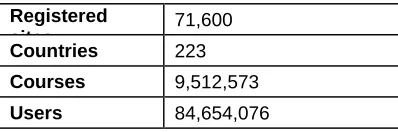
TABLE1 MOODLE STATISTICS (MOODLE, 2016)
Registered sites
71,600
Countries 223
Courses 9,512,573
Users 84,654,076
Enrolments 247,294,492
Forum posts 172,110,200
Resources 86,919,279
Quiz questions 432,264,170
Table (1) shows the increase in the number of users on the Moodle around the world where the number of sites that use Moodle LMS reached 71,600.
Fig. 1. Top countries by registrations.
For the countries the United States recorded highest number by registration "10,867", next country Span "6,687", Brazil "4,167", United Kingdom "3,629", and Mexico which recoded "3,075" by registrations as shown in (fig. 1).
3.2 LRN
.LRN (pronounced "dot learn") was originally developed at MIT and is used by over half a million users in educational institutions, corporations and government in over 18 countries (MIT, 2014). It comes out of the box with a lot of great teaching tools (forums, assessment, calendar, grading, evaluation, surveys, syllabus, file storage and a lot more) (.LRN, 2016). .LRN has been internationalized to support multiple languages, dialects and time zones.
3.3 eFront
eFront is an all-in-one learning management system (LMS/LCMS). It can be used as a tool for training, communication, evaluation, and certification, as well as file management and sharing. It can also be combined with traditional classroom education for blended learning or combined with tools for synchronous learning. There are two efront LMS platforms, an educational edition and an enterprise edition. The enterprise edition was aimed at medium sized enterprises with between 100 and 10,000 users (eFront, 2016). eFront is an Ajax enabled, Unicode, LDAP (Lightweight Directory Access Protocol) and SCORM supporting, multilingual eLearning platform. eFront includes a wide variety of components that help you create your lesson structure and add content, build online-tests, communicate with others, track users history and progress, conduct surveys, assign projects, and create certifications.
3.4 Dokeos
9 (Dokeos, 2016).
3.5 Sakai
Sakai was designed by universities, for universities. It was built by MIT, Stanford and Berkeley amongst others so they did not need to use homegrown systems or pay vendors (Sakai, 2016). It aims to be very well suited to group projects and describes itself as a Collaborative Learning Environment (CLE). Because Sakai is mainly coded in Java it can cause problems, especially if using older versions of browsers. It can also be difficult to find programmers with Java skills.
3.6 Latitude Learning LMS
The Latitude Learning LMS was designed to manage partner training programs. Training including: owners that own multiple locations and the absence of management command. Cloud-based, flexible and configurable, Latitude Learning LMS can be customized to specifications that meet your unique training processes and workflows
3.7 Canvas
Cloud-based LMS solution for universities and K-12 schools with grading, course content tools, mobile applications. NFB Certified.
3.8 Chamilo
Open source learning management and collaboration system that supports simultaneous working and learning.
3.9 OLAT
Web-based open source LMS for sizable academic institutions. You will also find a class calendar, email notifications, eLearning course bookmarks, file storage, and certificates in this open source Learning Management System. OLAT is ideal for multi-platform eLearning courses that need to run on a variety of different devices.
3.10 Totara LMS
Award Winning Open Source LMS and social platforms. Flexibility and freedom to customise, innovate and manage your learning needs.
4.
C
OMPARISONF
RAMEWORKThe goal of this work is to analyze and compare LMS features. We selected top ten open sources LMSs based on their prominence in the LMS. The content delivered by an LMS can be created, developed, gathered or evaluated in several types of systems such as Administration, Course Development, Collaboration, and Instruction methods. We use formula (1) to calculate the average of evaluation values for LMS features (Software Insider, 2016).
Σ = the sum of …, w = the weights, x = the value.
4.1 Course Development Features
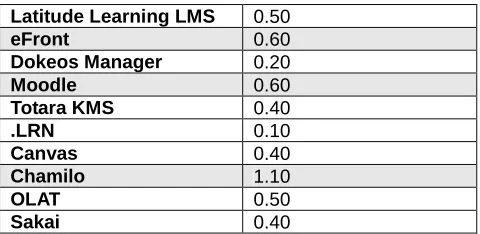
TABLE2 LMS COURSE DEVELOPMENT FEATURES
Latitude Learning LMS 0.50
eFront 0.60
Dokeos Manager 0.20
Moodle 0.60
Totara KMS 0.40
.LRN 0.10
Canvas 0.40
Chamilo 1.10
OLAT 0.50
Sakai 0.40
When comparing LMS development features such as Course Authoring, Custom Branding, Custom User Interface, and Exam Engine) show that Chamilo cover all the features followed by Moodle and eFront as shown in table 2
4.2 Administration Features
TABLE3LMS ADMINISTRATION FEATURES COMPARISON
Latitude Learning LMS 1.70
eFront 1.40
Dokeos Manager 0.50
Moodle 1.30
Totara KMS 0.40
.LRN 0.50
Canvas 0.90
Chamilo 1.40
OLAT 0.80
Sakai 0.70
When comparing LMS administration features shows that Latitude Learning LMS covers most of the features followed by eFront, Chamilo, and Moodle, as shown in Table 3
4.3 Collaboration Features
TABLE4LMS COLLABORATION FEATURES COMPARISON
Latitude Learning LMS 0.03
eFront 0.04
Dokeos Manager 0.04
Moodle 0.09
Totara KMS 0.01
.LRN 0.05
Canvas 0.04
Chamilo 0.10
OLAT 0.06
Sakai 0.06
Table 4 shows that Chamilo, and Moodle have most Collaboration features such as Blogs, Discussion Forums, Live chat, and wikis
4.4 Instruction Methods
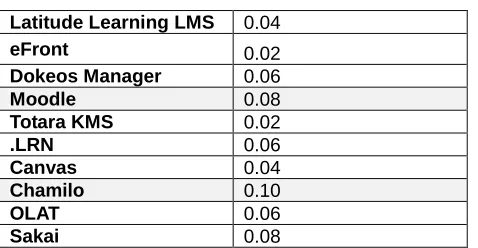
TABLE4LMS INSTRUCTION METHODS
Latitude Learning LMS 0.04
eFront 0.02
Dokeos Manager 0.06
Moodle 0.08
Totara KMS 0.02
.LRN 0.06
Canvas 0.04
Chamilo 0.10
OLAT 0.06
Sakai 0.08
Table 5 shows that Chamilo, Moodle, and Sakai support interactive courses, Multimedia, and Virtual Classroom.
5.
C
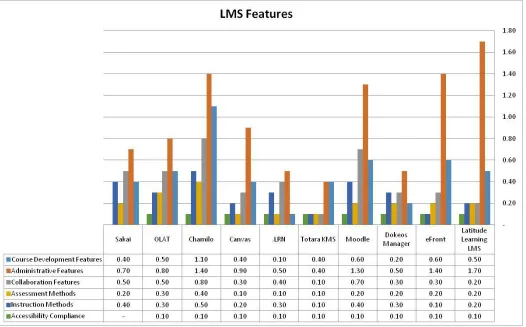
ONCLUSIONSIn this paper we focused on the important learning management system features, and compare between the most famous open source LMS, i.e. (Latitude Learning LMS, eFront, Dokeos, Moodle, Totara KMS, .LRN, Canvas, Chamilo, OLAT, and Sakai). The choice of LMS relay-on the features the important to you and covered your design and technological requirements. Moodle is by far the most popular. It has over 84 million users worldwide. Otherwise Moodle is very easy to import files from Flickr, Google Docs, Dropbox, YouTube, etc. These files can be stored in one place for easy access later. Chamilo, Moodle and eFront covers all the most important course development features. eFront, Chamilo and Moodle covers the most of administrative features. Chamilo, and Moodle have most Collaboration features such as blogs, forums, and wikis. Chamilo, Moodle, and Sakai support interactive courses, Multimedia, and Virtual Classroom, Figure 2 show the comparison between LMS features. Finally, these free open source options in general require a lot of improvements to make looking designed professionally. In our view tend to look a little dated out of the box.
R
EFERENCES[1] LRN (2016) ".LRN HOME", [ONLINE] AVAILABLE: HTTP://WWW.DOTLRN.ORG/ , RETRIEVED 5 APRIL 2016.
[2] CapitalWave Inc. (2010), "Learning Management System (LMS) – The Foundation of Your Training Initiative", [Online] Available: http://www.yourtrainingedge.com/wp-content/uploads/2010/01/LMS-White-Paper-May-2010.pdf
, Retrieved 1 April 2016.
[3] Christopher Papas (2013), "Learning Management Systems Comparison Checklist of Features", [Online] Available: http://elearningindustry.com/learning-management-systems-comparison-checklist-of-features , Retrieved 1 April 2016.
[4] Christopher Pappas (2015), "Top Open Source Learning Management Systems", [Online] Available:
http://elearningindustry.com/top-open-source-learning-management-systems , Retrieved 3 April 2016.
[5] Dokeos (2016) "DOKEOS ELEARNING SUITE experience elearning at an expert level", [Online]
2016.
[6] eFront (2016) "Enterprise Learning Management System Software - eFront LMS", [Online] Available:
http://www.efrontlearning.net/ , Retrieved 5 April 2016.
[7] eLearning info 247 (2012), " Education learning management system trends", [Online] Available:
http://elearninfo247.com/2012/04/27/education-learning-management-system-trends/ , Retrieved 5 April 2016.
[8] Frederick Ako-Nai and Qing Tan (2013), " Location-Based Learning Management System for Adaptive Mobile Learning", International Journal of Information and Education Technology, Vol. 3 ,No. 5, October 2013.
[9] Jose Paulo Leal and Ricardo Queiros (2011), "A comparative study on LMS interoperability", University of Porto, Portugal, [Online] Available:
http://www.dcc.fc.up.pt/~zp/papers/HEILMS.pdf , Retrieved 5 April 2016.
[10] MIT (2014) "Learning Management Systems" [Online] Available: http://web.mit.edu/edtech/casestudies/lms.html, Retrieved 5 April 2016.
[11] Moodle (2016a) "Moodle - Open-source learning platform Moodle.org", [Online] Available: https://moodle.org/ , Retrieved 5 April 2016.
[12] Moodle (2016b), "Moodle.org Moodle Statistics", [Online] Available: http://moodle.net/stats/ , Retrieved 5 April 2016.
[13] Sakai (2016) " Introducing Sakai 11 | Sakai", [Online] Available: http://www.sakaiproject.org/ , Retrieved 5 April 2016.
[14] Sara Bright (2014), "Learning Management System Comparison: 15+ Must-Have Features", [Online] Available:
http://www.digitalchalk.com/blog/learning-management-system-comparison-15-must-features , Retrieved 5 April 2016.
[15] SCORM (2016), "SCORM Explained - What is SCORM?" [Online] Available: http://scorm.com/scorm-explained/ , Retrieved 27 March 2016.
[16] Software Insider (2016), "Learning Management System", [Online] Available: http://lms.softwareinsider.com,