Support to Apply Accessibility Guidelines to Web
Applications
Tamaki Ohara
1*, Hajime Iwata
2, Junko Shirogane
3, Yoshiaki Fukazawa
11 Waseda University, 3-4-1 Okubo, Shinjuku-ku, Tokyo, Japan.
2 Kanagawa Institute of Technology, 1030 Shimono, Atsugi, Kanagawa, Japan. 3 Tokyo Woman’s Christian University, 2-6-1 Zempukuji, Suginami-ku, Tokyo, Japan.
* Corresponding author. Tel.: +81-3-5286-3345; email: [email protected] Manuscript submitted October 4, 2014; accepted November 25, 2014.
doi: 10.17706/ijcce.2016.5.2.99-109
Abstract: Recently RIAs (Rich Internet Applications) have been widely adopted in Web applications. Although RIAs realize that Web pages change dynamically, their accessibility is often insufficient, preventing people with disabilities from properly operating and recognizing content. To resolve these problems, the WAI (Web Accessibility Initiative) of the W3C (World Wide Web Consortium) has established accessibility guidelines, called WAI-ARIA (Web Accessibility Initiative — Accessible Rich Internet Applications), which provide detailed instructions to make RIAs accessible for users with disabilities employing ATs (assistive technologies). ATs include screen readers, alternative keyboards, screen magnification software, and voice recognition software. Applying these guidelines to Web applications is extremely burdensome due to the numerous elements in the guidelines. Herein we propose a method to automatically evaluate the accessibility of Web applications, reducing developers' efforts and costs. The target RIAs of our current method are developed by JavaScript.
Key words: Accessibility, Ajax, RIA, WAI-ARIA.
1.
Introduction
RIAs (Rich Internet Applications) have been widely used for Web applications because they can provide functions similar to desktop applications while offering complex and high levels of user interactivity. RIAs have two important elements compared to traditional static Web applications: custom controls called widgets and asynchronous data transactions [1]. Web developers can create new custom controls to extend the functional limitations in native HTML. Additionally RIAs can dynamically alter and update Web pages. JavaScript and Flash are often used to realize RIAs. In particular, Ajax can realize RIAs possessing the ability to access and modify DOM (Document Object Model) of the Web pages without a full-page refresh [2].
However, RIAs have several accessibility problems. Accessibility is more difficult in RIAs than static Web content. When content is updated in RIAs, the user must be aware of the update and able to access the new content without unduly interrupting the current task [3]. Because the accessibility of Web applications by RIAs is insufficient, users with disabilities and elderly users have difficulty operating RIAs. For example, when parts of Web pages are changed and updated dynamically, ATs (Assistive Technologies) cannot detect the dynamic changes, preventing recognition by the users.
information in real time. Also, ATs cannot manipulate custom controls that allow users to use a mouse in lieu of a keyboard.
To resolve these issues, the WAI (Web Accessible Initiative) of the W3C (World Wide Web Consortium) has established accessibility guidelines called WAI-ARIA [4], which provide detailed instructions to make RIAs accessible by adding semantics to HTML [5]. Due to these guidelines, Web developers can develop accessible RIAs that notify dynamic changes to ATs, which allows users to recognize the status of the current Web pages by ATs. However, WAI-ARIA contains an enormous number of elements, making it difficult to understand and appropriately apply them to Web applications due to economic and time constraints. In particular, manual evaluations are expensive in development environments in which applications are updated frequently [5]. Therefore, accessibility should be improved by automatic evaluation tools designed specifically for these environments. These systematic and fast tools should increase the effectiveness, productivity, and coverage of web pages [6].
Existing automatic evaluation tools have faced several challenges [7]. One is that they cannot detect the DOM changes in the same way as ATs and often report inaccurate evaluation results. Watanabe et al. examined several HTML static automatic evaluation tools as well as their own approach for accessibility evaluations of RIAs [5]; they reported that the HTML static automatic evaluation tools report more incorrect assertions.
To resolve these problems, we propose a method to automatically evaluate whether the guidelines are properly applied to Web applications. In the first step, Web developers specify URLs of the Web pages to be evaluated. Second, the accessibility of the Web pages is evaluated by analyzing the HTML source code statically. Third, the operation histories of the Web pages are obtained by Crawljax [7], which is a Web crawler that manipulates Web pages automatically. Finally, the accessibility of the Web pages is evaluated based on the operation histories. Using our method, Web developers can easily apply the WAI-ARIA guidelines to Web applications. Currently, our method focuses on JavaScript applications as RIAs.
2.
Related Works
In this section, we introduce some related works.
2.1.
Evaluating the Accessibility of Web Applications
Fernandes et al. proposed a method to automatically evaluate the accessibility of RIAs [8]. Their method automatically collects all clickable elements with an assigned onclick function, and detects the changes by JavaScript. However, this method uses WCAG (Web Content Accessibility Guidelines) [9], which specify how to create pure HTML code in an accessible way. Most Web applications use client-side technologies like JavaScript and Ajax to give users real-time information such as stock prices. Thus, only making HTML code accessible is insufficient.
2.2.
Evaluating Web Accessibility at Different Processing Phases
Fernandes et al. evaluated the accessibility of Websites at different processing phases: before and after loading [10]. They evaluated in the command-line environment before loading and then evaluated it in a browser after loading using QualWeb evaluator. They could not evaluate the accessibility properly before the loading phase using a command-line, and concluded that the command-line environment cannot correctly be evaluated because the evaluator does not detect the dynamical DOM changes in Web contents such as Ajax.
2.3.
Integrating Manual and Automatic Evaluations
semantics of Web coding is more valuable for accessibility evaluations. Their method used WCAG to evaluate the accessibility.
3.
Features of Our Proposed Method
3.1.
Reducing Cost and Time
To develop accessible RIAs using JavaScript, Web developers must apply WAI-ARIA. Typically, confirming that all the necessary elements are applied to Web applications is burdensome. Because our method is automatic, it reduces both the cost and time.
3.2.
Supporting Dynamic Web Applications
Our method detects the code of Web applications with accessibility problems and suggests modifications. Although accessibility evaluations of Web applications are difficult because Web pages are dynamically changed, our method can evaluate various changes in Web applications.
3.3.
Evaluating Automatically
Our method can evaluate the accessibility using HTML source codes and JavaScript source codes of Web applications. Thus, Web developers and users do not have to manipulate Web applications to evaluate the accessibility. In addition, even Web developers unfamiliar with the accessibility guidelines can evaluate the accessibility and modify their Web applications based on the evaluation results.
4.
Accessibility Guidelines
In the late 1990s, the W3C WAI released three guidelines for Web content accessibility for people with disabilities: WCAG for content, UAAG (User Agent Accessibility Guidelines) [12] for user agents, ATAG (Authoring Tool Accessibility Guidelines) [13] for authoring tools [14].
The first version of the guidelines, WCAG, was used to improve the accessibility of Web pages [14]. However, today’s Web is no longer static and simple. The expansion of RIAs realizes more complex interactions between Web applications [5]. Because ATs cannot keep up with the interactivity growth, ATs do not always recognize dynamic changes and updates generated by JavaScript [5], which are required to support the interoperability between RIAs and ATs [15]. In this context, the W3C WAI established WAI-ARIA, which provides specifications to make RIAs accessible for users through ATs [5].
Our method evaluates the accessibility of Web applications along with WAI-ARIA. WAI-ARIA introduces several concepts [14]:
1) Tabindex extensions 2) Role attributes 3) Properties/states
WAI-ARIA introduces an extension of the tabindex [14], which is already used in HTML to support keyboard navigation. Web developers can decide whether their custom controls are focusable with JavaScript or tab navigation.
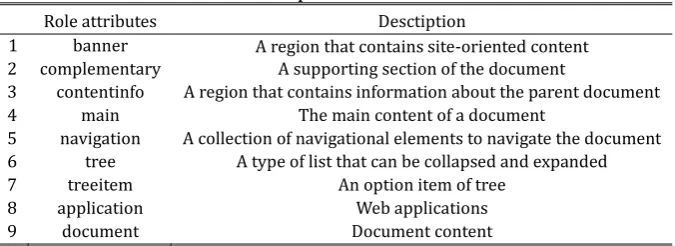
Table 1. Examples of Role Attributes Role attributes Desctiption
1 banner A region that contains site-oriented content 2 complementary A supporting section of the document
3 contentinfo A region that contains information about the parent document 4 main The main content of a document
5 navigation A collection of navigational elements to navigate the document 6 tree A type of list that can be collapsed and expanded 7 treeitem An option item of tree
8 application Web applications 9 document Document content
5.
Strategies of Accessibility Evaluation
Fig. 1 overviews our system. Our method consists of three steps, which begins when Web developers specify URLs of the target Web pages. These steps are:
1) Analyzing the HTML code statically
2) Analyzing the operation histories dynamically 3) Evaluating the extracted information
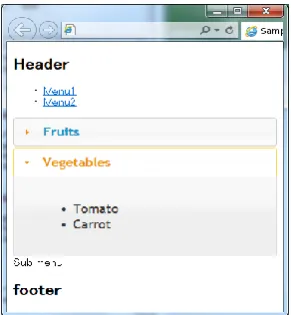
Fig. 2 shows a Web page example. When users click the menu items, the state changes dynamically to another state (Fig. 3). Fig. 4 shows the HTML source code of the Web page, which consists of the header part, the navigation part, the main content, the sub menu part, and the footer part. The main content part shows a list, which can be expanded and collapsed dynamically by JavaScript. The JavaScript source code of the process, which uses the JQuery UI [16] plugin, is shown in Fig. 5.
Fig. 1. Overview of our system.
Fig. 3. State after transition.
1 <header>Header</header> 2 <nav id="globalnavi"> 3 <ul>
4 <li><a href="#">Menu1</a></li> 5 <li><a href="#">Menu2</a></li> 6 </ul>
7 </nav>
8 <div id="main"> 9 <div id="accordion"> 10 <div class="section"> 11 <h2>Fruits</h2> 12 <ul id=”bar”> 13 <li>Apple</li> 14 <li>Orange</li> 15 </ul>
16 </div>
17 <div class="section"> 18 <h2>Vegetables</h2> 19 <ul id=”bar”> 20 <li>Tomato</li> 21 <li>Carrot</li> 22 </ul>
23 </div> 24 </div> 25 </div>
26 <aside>Sub menu</aside> 27 <footer>footer</footer>
Fig. 4. Example of HTML.
Fig. 5. JavaScript source code.
5.1.
Analyzing the HTML Codes Statically
First, our method analyzes the inputted HTML source code to extract tag names, attributes, and attribute 1 $(function(){
2 $("#accordion").accordion({ 3 header: "h2",
4 collapsible: true, 5 autoHeight: false, 6 active: 0
7 }); 8 });
Header
Navigation
Main content
values in order beginning with the first line.
5.2.
Analyzing the Operation Histories
In this step, our system analyzes whether each extracted content item in the static analysis changes dynamically using Crawljax [7] and DOM MutationObserver [17]. Crawljax, which is a program that collects and stores Web content, is an open source Web crawler. Crawljax extracts and automatically clicks all clickable elements. DOM MutationObserver is an API (Application Programming Interface), which detects the changes of DOM. Our system uses Crawljax to operate the target Web applications automatically, while the changed contents are detected with DOM MutationObserver.
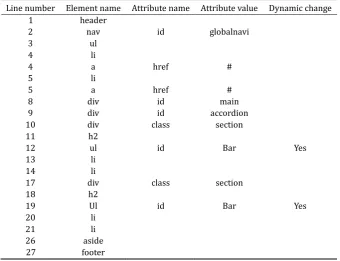
Fig. 2 shows the initial display of the target Web application. When Crawljax clicks the menu item labelled as “Vegetables”, the display changes to that shown in Fig. 3. In this change, the style attribute in <ul> tagged at line 12 in Fig. 4 changes from <style=”display: block;”> to <style=”display: none;”>. In addition, the style attribute in <ul> tags at line 19 in Fig. 4 changes from <style=”display: none;”> to <style=”display: block;”>. DOM MutationObserver detects these changes. Consequently, our system analyzes these <ul> tags as a list of the dynamically changed states. Table 2 shows the extracted data.
Table 2. Information Extracted in the Dynamic Analysis
Line number Element name Attribute name Attribute value Dynamic change 1 header
2 nav id globalnavi 3 ul
4 li
4 a href #
5 li
5 a href #
8 div id main 9 div id accordion 10 div class section 11 h2
12 ul id Bar Yes 13 li
14 li
17 div class section 18 h2
19 Ul id Bar Yes 20 li
21 li 26 aside 27 footer
5.3.
Evaluating the Extracted Information
In this step, our system evaluates the extracted data using static and dynamic analysis to compare the accessibility guidelines. The evaluation results are divided in two types of assertions: modification requirements and confirmation requirements. In the modification requirements, Web developers must modify the source code following the assertions. In the confirmation requirements, the source code may not require modification, but Web developers should confirm that current roles are appropriate.
and its child elements must have “treeitem” roles.
5.3.1.
Modification requirements
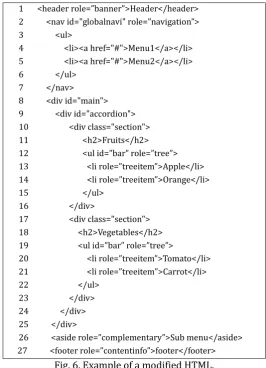
The <header> tag in line 1, the <navi> element in line 2, the <aside> tag in line 26, and the <footer> tag in line 27 in Fig. 6 are not assigned the appropriate role attributes. In addition, the <ul> tags, which move dynamically in line 12 and line 19, are not assigned tree roles.
5.3.2.
Confirmation requirements
Some roles can be added to <a> tags. If our system is unable to determine the most appropriate role, it presents all candidates. Our system detects insufficient tags by comparing the guidelines and the extracted data in Table 2 and then presents how to modify the tags as the evaluation results. Web developers can modify their source code by following the assertions. Fig. 6 shows the modified HTML code in Fig. 4.
1 <header role=”banner”>Header</header> 2 <nav id="globalnavi" role=”navigation”> 3 <ul>
4 <li><a href="#">Menu1</a></li> 5 <li><a href="#">Menu2</a></li> 6 </ul>
7 </nav>
8 <div id="main"> 9 <div id="accordion"> 10 <div class="section"> 11 <h2>Fruits</h2> 12 <ul id=”bar” role=”tree”> 13 <li role=”treeitem”>Apple</li> 14 <li role=”treeitem”>Orange</li> 15 </ul>
16 </div>
17 <div class="section"> 18 <h2>Vegetables</h2> 19 <ul id=”bar” role=”tree”>
20 <li role=”treeitem”>Tomato</li> 21 <li role=”treeitem”>Carrot</li> 22 </ul>
23 </div> 24 </div> 25 </div>
26 <aside role=”complementary”>Sub menu</aside> 27 <footer role=”contentinfo”>footer</footer>
Fig. 6. Example of a modified HTML.
6.
Evaluation
To confirm the effectiveness of our method, we evaluated ten Websites (the top ten in Alexa Top 500 Websites [17]) manually (manual evaluation) and by using our system (system evaluation). The manual evaluation determines whether the accessibility guidelines are applied to the target Websites by comparing each element in the guidelines with each line in the source codes of the target (Table 3).
Table 3. Results of the Evaluation
Website Manual System
Modification requirements Confirmation requirements
1 35 33 357
2 16 8 931
3 0 0 106
4 4 0 314
5 117 49 1060
6 26 14 53
7 10 10 2
8 3 2 48
9 15 0 36
10 11 11 791
Average 23.7 12.7 369.8
Our system detects fewer assertions than the manual evaluation for most of the Websites. However, all assertions in the modification requirements by the system evaluation are included in the assertions detected by the manual evaluation. Also, all assertions reported by the manual analysis are equivalent to the modification requirements in the system analysis. The average numbers of assertions detected by the manual evaluation and the system evaluation are 23.7 (manual evaluation) and 12.7 (system evaluation). Our system detects about a half of the assertions detected by the manual evaluation. Below we consider the differences between these two methods.
6.1.
Assertions Not Be Detected by Our System
About half of the assertions detected by the manual evaluation are not detected in the system evaluation due mainly to two reasons. First, in the system evaluation, Crawljax clicks all clickable contents, but sometimes clicking alone does not induce a change in state. Other operations such as a mouse hover are necessary to change the content state. Consequently, our system cannot detect contents with these types of dynamic state changes.
1 <div id =”header”>Header</div> 2 <div id="menu">
3 <ul>
4 <li><a href="#">Menu1</a></li> 5 <li><a href="#">Menu2</a></li> 6 </ul>
7 </nav>
8 <div id="main"> 9 Main contents 10 </div>
11 <div id =”submenu”> 12 <ul>
13 <li><a href="#">Sub menu1</a></li> 14 <li><a href="#">Sub menu2</a></li> 15 </ul>
16 </div>
17 <div id=”footer”>footer</div>
Fig. 7. Example of HTML using div elements.
various purposes, different role attributes can be added and the intended purpose must be clarified. Additionally, the appropriate role attributes must be added to each tag to apply the guidelines. Our system cannot clarify the purposes of the <div> and <span> tags, preventing proper evaluation. In many cases, the id attributes indicate the purposes, but their values depend on each Web developer, making it difficult for our system to identify the intended purpose appropriately.
6.2.
Assertions Detected Only by Our System
Our system detected over 100 confirmation requirements for almost all of the Websites. Confirmation requirements mean suggestions, but are not required in these Websites. The two most common confirmation requirements are for the <a> and <button> tags. The <a> and <button> tags have default role values, but Table 4 lists other candidates to add to the <a> and <button> tags with dynamic changes. Our system shows which role values are modification candidates. However, in our experiment, the default roles have to be added to these <a> and <button> tags, so the modifications are unnecessary. Many tags have default roles when other roles are not added. The reasons why our system suggested incorrect candidates are the same as those for the <div> and <span> tags explained above. Because our system cannot clarify the purpose of these tags, Web developers must verify that the role is appropriate.
Table 4. Possible Roles Tag name Default role Possible roles
a link button, checkbox, menuitem, menuitemcheckbox, menuitemradio, tab, or treeitem button button link, menuitem, menuitemcheckbox, menuitemradio, or radio
7.
Conclusion
In this paper, we propose a method to automatically evaluate whether the accessibility guidelines, “WAI-ARIA”, are applied to Web applications. Our system analyzes an input HTML to extract all the tags and then manipulates the Web application automatically to identify which tags are changed and updated dynamically. Finally, our system compares the extracted data and the guidelines to evaluate the accessibility of the Web application. We used our method to evaluate the accessibility of ten existing Websites and compared the results to a manual evaluation. Our system reported about half of the assertions detected by the manual analysis, indicating that our method can help develop accessible Web applications effectively by reducing the time and cost necessary to apply the accessible guidelines. However, our method has some limitations due to the crawling process and how the Websites are developed.
In future work, we will improve our system so it can detect various operations instead of solely mouse clicks, including mouse hovers. Additionally, we plan to expand our method to id attributes of various tags as well as consider strategies to analyze states/properties and keyboard navigation using the tabindex attribute.
References
[1] Marino, L., Adolfo, L., Miguel, A. P., Juan, C. P., Roberto, R., & Fernando, S. (2011). Providing RIA user interfaces with accessibility properties. Journal of Symbolic Computation, 46(2), 207-217.
[2] Peter, T., & Stephen, H. (2010). WAI-ARIA live regions: eBuddy IM as a case example. Proceedings of the 2010 International Cross Disciplinary Conference on Web Accessibility: Article No. 33. USA.
[3] Michael, C. (2007). Accessibility of emerging rich web technologies: Web 2.0 and the semantic web.
USA.
[4] Accessible rich internet applications (WAI-ARIA) 1.0. From http://www.w3c.org/TR/wai-aria/
[5] Willian, M. W., Renata, P. M. F., & Ana, L. D. (2012). Using acceptance tests to validate accessibility requirements in RIA. Proceeding of the International Cross-Disciplinary Conference on Web Accessibility: Article No.15. USA.
[6] Giorgio, B. (2008). Beyond conformance: The role of accessibility evaluation methods. In S. Hartmann, X. Zhou, & M. Kirchberg (Eds.), Proceedings of Web Information Systems Engineering — WISE 2008 Workshops (pp. 63-80). New Zealand.
[7] Ali, M., & Arie, V. D. (2009). Invariant-based automatic testing of Ajax user interfaces. Proceeding of the 31st International Conference on Software Engineering (pp. 210-220). Canada.
[8] Nadia, F., Daniel, C., Carlos, D., & Luis, C. (2012). Evaluating the accessibility of web applications.
Proceeding of the 4th International Conference on Software Development for Enhancing Accessibility and Fighting Info-exclusion: Vol. 14 (pp. 28-35). Portugal.
[9] Web Content Accessibility Guidelines (WCAG) 2.0. From http://www.w3.org/TR/WCAG20/
[10]Nadia, F., Rui, B. L., & Luis, C. (2012). Evaluating web accessibility at different processing phases.
Journal of The New Review of Hypermedia and Multimedia — Web Accessibility, 18(3), 159–181.
[11]Paola, S., Silvia, M., Ludovico, A. M., & Matteo, B. (2012). Integrating manual and automatic evaluations to measure accessibility barriers. In K. Miesenberger, A. Karshmer, P. Penaz, & W. Zagler (Eds.),
Computers Helping People with Special Needs (pp. 288-395).
[12]User Agent Accessibility Guidelines (UAAG) 2.0. From http://www.w3.org/TR/UAAG20/ [13]Authoring Tool Accessibility Guidelines (ATAG) 2.0. From http://www.w3.org/TR/ATAG20/
[14]Loretta, G. R., & Andi, S. (2008). WCAG 2.0: A web accessibility standard for the evolving web.
Proceeding of the 2008 International Cross-Disciplinary Conference on Web Accessibility (pp. 109-115). USA.
[15]Iyad, A. D., Faisal, A., Eslam, A. M., & Mohammed, A. A. (2013). The design of RIA accessibility evaluation tool. Advances in Engineering Software, 57, 1–7.
[16]jQuery UI. From http://jqueryui.com/ [17]Alexa. From http://www.alexa.com/
Tamaki Ohara is a master course student at Waseda University, Japan. He received a bachelor degree from Waseda University, Japan in 2013.
Hajime Iwata received the B.E., M.E. and D.E. degrees in information and computer science from Waseda University, Tokyo, Japan, in 2002, 2004 and 2008, respectively.
Junko Shirogane received the B.E., M.E. and D.E. degrees in information and computer science from Waseda University, Tokyo, Japan, in 1997, 1999 and 2002, respectively. She joined the Department of Communication of Tokyo Woman's Christian University as a lecturer in 2003. Her research interest includes support tools for development of software with graphical user interface. She is a member of IPSJ Japan and IEEE.