© 2015 IJSRSET | Volume 1 | Issue 5 | Print ISSN : 2395-1990 | Online ISSN : 2394-4099 Themed Section: Engineering and Technology
Application for Securing Credentials
Fatema Zakir Husain
1, Margi Patel
2, Vishal Chhabra
31,2
Department of Computer & Science Engineering, Indore Institute of Science & Technology, Indore, Madhya Pradesh, India 3
Department of Computer & Science Engineering, Malwa Institute of Science & Technology, Indore, Madhya Pradesh, India
ABSTRACT
This tool lets you securely store your user valuable data such as bank documents, insurance policy papers, IDs and passwords and other credentials in a secure database. This software has a neat and uncomplicated interface that lets you arrange your credentials in user-specified categories. Credential Protection offers ample security measures such as saving valuable data using a picture so that could be able to verify it. It provides security that no other tool can provide since hiding valuable data inside an image‟s part by cropping it makes it a most difficult technique for intruders to hack it. Credential protection using an image is a very secure password management program. It is designed to permanently store, secure and organize all your passwords and account details and can be highly used by security conscious people. This web application provides users to put all their credentials in one database, which is locked with one master key or a key file. So they only have to remember one single master password or select the key file to unlock the whole database. The databases are encrypted and there is also a facility to update and change information is provided.
Keywords: SQL, HTML, Credential Projection Manager, JSP
I.
INTRODUCTION
Credential protection is locking software that helps a user to organize his valuable information like trade credential, academic and professional credentials, bank documents, credit card and debit card numbers and user having multiple passwords. This project explains about password hacking and thefts of important and confidential information of an individual. We normally face problems in forgetting password or confused with different passwords of different accounts. Also placing our important documents and credentials at a proper and secured place is a big issue to worry. People generally use same passwords for saving their id‟s and data which is prone to be hacked. This project is designed for solving this problem. Credential protection manager application helps user to organize his number of passwords and other valuable data in a secure way, using this application user can put all his passwords and data in to single database which is protected with a single master key or a key file and that key will be located in the cropped part of the image selected by the user. When
the user click at the position selected by him, he will be given a verification code on hi given contact number which he can enter in the key file and access his/her valuable data. This system is implemented using java language and HTML, JSP are used as front end and MySQL as back end.
II.
METHODS AND MATERIAL
A.
Objectives
• To provide security to highly confidential data such as id‟s and passwords that may span from PC applications to financial information.
• Provides registration to public in order to access the application.
• The user can change his password.
• Registered users can store critical and confidential data in a secured form.
• Unprotect and Retrieve data as and when necessary. • The data can be retrieved anytime, from anywhere
and any number of times.
• Protection provided to the stored data using simple algorithm.
• To provide an effective and user friendly website. • To provide a very secure mechanism using image
processing.
• To provide an easy to use website which is fast saves time and reliable.
• To provide an easy and effective GUI interface for the user to deal with the software.
B.
Problem Statement
In the present scenario every person is associated with some id and password. It may pertain to accessing the PC, the web, emails, financial institutions, access to credit cards, ATM‟s etc. Most often a person tries to remember them in order to use it. It is always known that a person or individual confuses between passwords of different Id‟s. Some individuals in order to avoid confusion adapt to use -
• Simple passwords - short in length, that use words found in dictionaries, or don't mix in different character types (numbers, punctuation, upper/lower case), or are otherwise easily guessable
• Passwords others can find - on sticky notes on monitors, in a notepad by the computer, in a document in computer, whiteboard reminders, smart device storage in clear text, etc.
• The same password - using the same password for multiple sites, never changing account passwords, etc. • Shared passwords - users telling others passwords,
sending unencrypted emails with password
information, contractors using same password for all their accounts, etc.
It is typical to make at least one of these mistakes. This makes it very easy for hackers, crackers, malware and cyber thieves to break into individual accounts, corporations of all sizes, government agencies, institutions, etc.
Some individuals even try to save critical information in books or registers or electronic diaries and carry them along. The possibility of this carrier being lost or damaged is high. In the present scenario certain passwords can be recovered after a procedural delay.
Some applications available to store all the passwords securely at one place do not provide high security and are prone to be hacked and these kind of software installed on one system can be accessed from there only, means no portability.
C.
Solution Approach
This system is a password protector, which helps you to manage your passwords in a secure way.
1. You can put all your passwords in one database at server, which is locked with one master key. 2. „N‟ no. of passwords can be stored in database. 3. Can be accessed from anywhere, portable.
4. So you only have to remember one single master password to unlock the whole database.
5. The master password can be changed from time to time.
6. The master password will be a part of image that the user will select from a large image as per his/her choice. This is more secure than character password.
7. After successful matching of the password, a random code is sent at user‟s mobile which the user will enter for further proceeding and after matching of this code the database will be unlocked. This further increases the level of security.
8. The databases will encrypt.
9. A facility to update and change information will be provided.
This online application provides a secure mean to store and retrieve passwords anytime, anywhere securely.
D.
Literature Survey
Passwords have been used with computers since the earliest days of computing. MIT's CTSS, one of the first time sharing systems, was introduced in 1961. It had a LOGIN command that requested a user password. "After typing PASSWORD, the system turns off the printing mechanism, if possible, so that the user may type in his password with privacy." In the early 1970s, Robert Morris invented the idea of storing login passwords in a hashed form as part of the UNIX operating system. The system was based on a simulated Hagelin rotor crypto machine, and first appeared in 6th Edition Unix in 1974. A later version of his algorithm, known as crypt(3), used a 12-bit salt and invoked a modified form of the DES algorithm 25 times to reduce the risk of pre-computed dictionary attacks.
Software developers have taken different to creating password management software, including where it stores the data, how it‟s secured and what additional features should be available for saving and retrieving account information. The earliest type of password management software was the standalone application not associated with any other software. Many such apps still exist today, including KeePass and Aurora. Aurora boasts strong encryption along with added features such as form-filling for Web pages, a password generator and the option to export passwords to a readable file. Password managers using embedded security hardware is a less commonly employed approach than other types of password management. This software requires hardware embedded on your device to save and encrypt data. For example, Lenovo's T-series ThinkPad laptops feature a chipset mounted on the motherboard called the Embedded Security Subsystem. Used in combination with Lenovo's password management software, you can save passwords and other data to the device.
With the frequent use of technology from the last few decades, in almost all the field increases the requirement for securing the information so that no other person can have access of it and make misuse of the information. For securing all the credential there are many application formed like Password Manager and many more to store the password but they have some lacking which are
surely eliminated by our software and provide even more confidentiality to ones credentials.
E.
Proposed Method
The proposed system is a web based system which can be accessed by customer from anywhere around the world. The system can offer secured storage of our credentials.
• The user will first of all get register into the system. He will provide his user name and select an image password as a master password and provide other necessary details.
• Now the user can login to the system anytime from anywhere. He will enter his id and image password and all inputs are correct and login is successful then he will be directed to the main page. Here pages are not connected directly by hyperlink; instead there is an XML file which contains controller which tells the direction path to another page.
• The advantage is that this file is not compiled but only saved and hence the system does not gets slow even if the system is updated.
• Another advantage is that the address of the web page seen at the address bar is not the actual address, mapping is there. Also the logic code and view code are on different pages. So, the system cannot be hacked.
• Then the user can perform all the functions like storing and retrieving information, changing password.
For all this a very user friendly GUI will be provided. The user not having much knowledge about the computers can also use it easily and efficiently.
F.
Design
UML Modeling
the views needed to develop and then deploy such systems. Even though it is expressive, the UML is not difficult to understand and to use. Learning to apply the UML effectively starts with forming a conceptual model of the language, which requires learning three major elements: the UML's basic building blocks, the rules that dictate how these building blocks may be put together, and some common mechanisms that apply throughout the language.
G.
Methodology Flow Chart
Figure 1: Work Flow
III.
RESULTS AND DISCUSSION
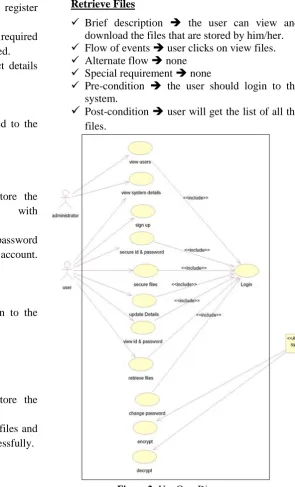
Use-Case Description
Login:
Brief description the user can enter the system by login.
Flow of events User enters the valid username and password. Click the login button. Receive a random code on mobile and enters it correctly. Welcome page will be displayed.
Alternate flow
User enters the invalid username and password. An error message is displayed that invalid username or password
User enters incorrect code. An error message is displayed that incorrect code.
Special requirement the system should be able to match username and password with accuracy. System should be able to generate a unique random code every time and send it to user‟s mobile.
Pre-condition The user should be a registered user.
Post-condition If action is successful, the user is logged in. If error occurred the state will not be changed.
Reset Password:
Brief description the user can set the new password.
Flow of events user enters the correct old password, new password and then enters the same new password. The message will be displayed telling that password is changed. Alternate flow user enters the incorrect old
password or the new password is not same both the times. An error message is displayed showing the problem.
Special requirement the user should be a registered user.
Pre-condition the user should be logged in. Post-condition If the action is successful, the
View Users
Brief description Admin can view the users‟ details.
Flow of events Admin will click on view users.
Alternate flow none Special requirement none
Pre-condition Admin is logged into the system.
Post-condition List of users will be displayed.
Sign Up
Brief description the user can register himself.
Flow of events user enters all the required details correctly. He/she will be registered. Alternate flow User enters incorrect details
or do not enter all the mandatory details. Special requirement none
Pre-condition None
Post-condition User will be directed to the login page
Store ID – Password
Brief description the user can store the passwords of various accounts with corresponding id.
Flow of events User clicks on store password and enters the id and password of account. Details will be stored successfully.
Alternate flow none Special requirement none
Pre-condition the user should login to the system.
Post-condition none
Store Files
Brief description the user can store the important files.
Flow of events user clicks on store files and uploads the file. File will be stored successfully. Alternate flow none
Special requirement none
Pre-condition the user should login to the system.
Post-condition none
Retrieve ID – Passwords
Brief description the user can view the passwords of his/her various accounts.
Flow of events user clicks on view Passwords.
Alternate flow none Special requirement none
Pre-condition the user should login to the system.
Post-condition user will get the list of all the id with corresponding passwords.
Retrieve Files
Brief description the user can view and download the files that are stored by him/her. Flow of events user clicks on view files. Alternate flow none
Special requirement none
Pre-condition the user should login to the system.
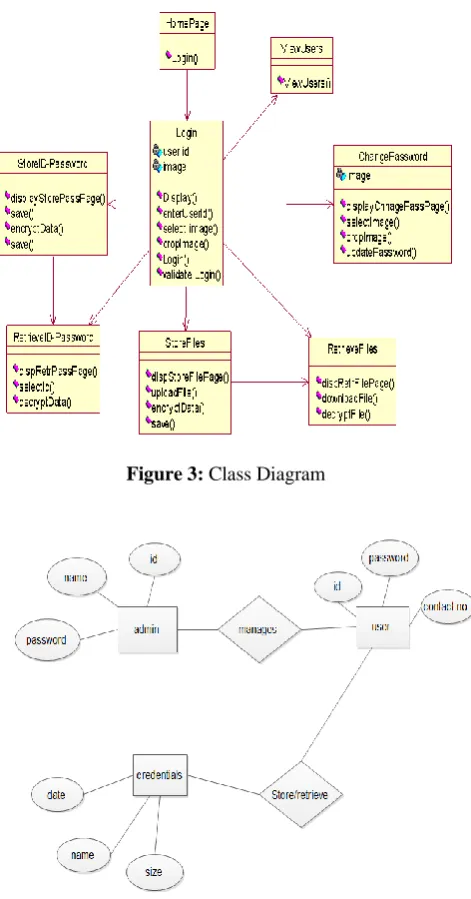
Post-condition user will get the list of all the files.Figure 3: Class Diagram
Figure 4: E-R Diagram
IV.
CONCLUSION
The past decade has seen a growing interest in using graphical passwords as a relative to the traditional text-based passwords. The main argument for graphical passwords is that people are better at memorizing graphical passwords than text-based passwords; the existing user studies are limited and there is not yet convincing evidence to support this argument. Our preliminary analysis suggests that it is more difficult to break graphical passwords using the traditional attack methods such as brute force search, dictionary attack, or spyware. However, since there is not yet wide deployment of graphical password systems, the
vulnerabilities of graphical passwords are still not fully understood.
Overall, the current graphical password techniques are still immature. Much more research and user studies are needed for graphical password techniques to achieve higher levels of maturity and usefulness.
V.
LIMITATIONS
1. Since all passwords and credentials will be stored in this single password manager, it is very crucial and important to remember this password.
2. Internet connection is required to get access or to retrieve the passwords or any other credentials.
3. The major limitation of online password managers is the requirements that the user trusts the hosting site and thus we have to provide best security of data.
VI.
CONSTRAINTS
1. User need to crop the image for hiding the credentials: Since this will be the first step after login user will have to select and crop the image before securing the credentials.
2. Mobile Number Authentication is must: User has to register with a unique and permanent mobile number which can't be changed afterwards.
VII.
REFERENCES
Journal/Conference Papers:
[1] Bhavya Daya, “Network Security”, New Orleans, Louisiana, March 2013.
[2] IEEE Symposium on Security and Privacy- May 2012, Westin St Francis Hotel, San Francisco. [3] Kim j., Lee k., Lee c.," design and implementation
of integrated security engine for secure networking," in proceedings international conference on advanced communication technology, 2004.
[5] Chen s., Iyer R., and Whisnant K., "Evaluating the security threat of firewall data corruption caused by instruction transient errors," in proceedings of the 2002 international conference of the 2002 international conference on dependable systems & network, Washington, D.C, 2002.
[6] Kim H., "Design and implementation of a private and public key crypto processor and its application to a security system," IEEE transactions on consumer electronics, vol. 50, no 1, February 2004. [7] Rybaczyk P., "Cisco router troubleshooting
handbook", M&T Books, 2000.
[8] Jo S., "Security engine management of router based on security policy," proceedings of world academy of science, engineering and technology, volume 10, ISSN 1307-688, 2005.
[9] “About ubuntu”. Ubuntu.com. Retrieved 2011-05-27.
[10]Q. Ali., and Alabady S., "Design and implementation of a secured remotely administrated network," in proceedings international arab conference on information technology, ACIT'2007. [11]Alabady S., "Design and implementation of a network security model using static LAN and AAA server," in proceedings international conference on information &communication technologies: from theory to applications, ICTTA'2008.
Websites:
[1]. http://www.passpack.com/en/home/, 2013. [2]. http://www.wikipedia.com, 2013
[3]. http://www.lifehacker.com, 2013 [4]. http://www.keepersecurity.com, 2013.
Text Books:
[1]. Herbert Schildt, “Java 2: The Complete Reference”, Fifth Edition, Tata Mc. Graw Hill, 2002.