HANNING ZHAO
USER INTERFACE DESIGN OF META MODEL REPOSITORY
FOR IOT DEVICES
Master of Science Thesis
Examiners: Prof. Kaisa Väänänen, Bilhanan Silverajan
Supervisors: Prof. Kaisa Väänänen, Bilhanan Silverajan
Examiners and topic approved by the Council of the Faculty of Computing and Electrical Engineering on 27th September 2017
ABSTRACT
HANNING ZHAO: User interface design of meta model repository for IoT devices Tampere University of technology
Master of Science Thesis, 70 pages, 6 Appendix pages Master’s Degree Programme in Information Technology Major: User Experience
Examiner: Professor Kaisa Väänänen, Bilhanan Silverajan
Keywords: Data models, Internet of Things(IoT), user-centered design, usability, user interface design, collaboration platforms
Internet of Things (IoT) has become prevalent in recent years. IoT works as a gigantic network in which the vast set of devices are integrated and interconnected. These devices include sensors, gateways and other smart objects. Accordingly, plenty of data models are produced to define and describe IoT devices by various organizations and manufac-turers. Those data models significantly help in device management. However, it seems that the sharing and presenting of data models is not so effective. For a variety of organ-izations have different standardized ways exist to manage and present data models. Par-ticularly, one device may have multiple data models. They are generated as diverse data formats of defining a device and distributed in different platforms. Consequently, to fa-cilitate developers and enterprises’ work with data models, existing practices of data model management still need to be upgraded.
This master’s thesis proposes a user interface design solution for a meta model repository for IoT devices. Based on the exploration of various collaboration platforms, it analyses the selected platform with its aspects that make it easy to share the models while allow collaboration. Additionally, the study includes the research work on exploring current state of data models. The analysis of different collaboration platforms is also reported. Throughout the design process, user-centered design (UCD) methodology was applied to help create a usable repository in terms of both its user interface and its functionality. In this regard, two rounds of usability testing (6 and 7 participants, respectively) were con-ducted, which aimed to collect insights and requirements from users. The relevant results are presented and discussed.
The outcome of this thesis is a functional meta model repository which has been designed iteratively during user tests. It starts with support of Lightweight machine to machine (LWM2M) data models. With more data models appear, the repository will be more val-uable and significant. More importantly, the repository can be extended to machine to machine communication in future. Therefore, the result of this thesis also demonstrates perceptions about the possibilities of the repository in future use.
PREFACE
This master thesis work was carried out during autumn 2017 and spring 2018 at the La-boratory of Pervasive Computing at Tampere University of Technology. The goal of the thesis was to design a usable user interface for meta model repository for IoT devices. It aimed to enhance a better management of data models through designing a repository. Firstly, I would like to express my sincere gratitude to my supervisor Professor Kaisa Väänänen and Doctor Bilhanan Silverajan for constant guidance, inspiration and all con-structive comments during my thesis. Especially, Prof. Kaisa Väänänen provided insight-ful suggestions related to user experience, user interface design and user centered design. Doctor Bilhanan Silverajan also assisted me in the work of IoT field in terms of data models and device management. Both of them are always being willing to provide sup-ports and share their knowledge whenever I got stuck in my thesis.
I also warmly thank my colleague and other participants, who spent time attending the user tests, without their participant, the implemented repository could not achieve a high usability level. Especial thanks to them for providing invaluable feedbacks and comments that contribute to the future development of the repository.
Furthermore, I wish to thank all warm friends and schoolmates for encouragements. Fi-nally, I greatly appreciate my family for immense supports and encouragements in my entire life.
Tampere, on 19th of March 2018
CONTENTS
1. INTRODUCTION ... 1
1.1. Terminology ... 2
1.2. Motivation ... 3
1.3. Research goal and questions ... 4
1.4. Structure of the Thesis... 5
2. RELATED WORK OF IOT DATA MODELS ... 7
2.1. Introduction to IoT data models ... 7
2.1.1. LWM2M and IPSO Objects ... 7
2.1.2. Bluetooth Low Energy Profile ... 9
2.1.3. Unified Configuration Interface ... 10
2.1.4. Other data models ... 11
2.2. Exploration of existing data model management tools ... 12
2.2.1. Open Mobile Alliance for LWM2M ... 12
2.2.2. IPSO Alliance ... 14
2.2.3. Eclipse Vorto project ... 15
2.2.4. BLE-IPSO project ... 16
2.3. Summary of various data models ... 17
3. WEB BASED COLLABORATION PLATFORMS ... 18
3.1. Content management system (CMS)... 18
3.2. Version control system (VCS) ... 18
3.3. Content sharing web platforms ... 19
3.3.1. Custom built platforms... 19
3.3.2. Online CMS platforms ... 20
3.3.3. Online VCS platforms ... 20
3.4. Comparison of various web platforms ... 22
4. UX DESIGN AND EVALUATION METHODS ... 25
4.1. User experience ... 25
4.2. User centered design ... 26
4.3. User interface design ... 28
4.4. UX design methods ... 30
4.4.1. High-fidelity prototyping ... 31
4.5. UX evaluation methods ... 32
4.5.1. Task based usability testing and interview ... 32
4.5.2. Heuristic evaluation ... 34
4.5.3. Data gathering and analyzing ... 35
5. DESIGN AND EVALUATION OF USER INTERFACE FOR IOT META MODEL REPOSITORY ... 37
5.1. Selected platform for the repository ... 37
5.2. Overall process of research work ... 38
5.2.2. Two rounds of user tests ... 40
5.3. Design of the first version of the UI ... 42
5.4. Iterative evaluation ... 45
5.4.1. First user tests... 46
5.4.2. Second user tests ... 49
5.5. The final design ... 53
5.5.1. Re-design of UI ... 53
5.5.2. New features ... 57
5.6. Summary ... 60
6. DISCUSSION ... 61
6.1. Reflections of the research questions ... 61
6.2. Limitations ... 62
6.3. Future research ... 63
7. CONCLUSION ... 65
REFERENCES ... 66
APPENDIX A: CONSENT FORM
APPENDIX B: USER BACKGROUND QUESTIONNAIRE APPENDIX C: USER SATISFACTION QUESTIONNAIRE APPENDIX D: TASKS IN FIRST USER TESTS
APPENDIX E: TASKS IN SECOND USER TESTS APPENDIX F: QUESTIONS IN INTERVIEWS
LIST OF FIGURES
Figure 1-1: The overview architecture of LWM2M ... 1
Figure 2-1: The structure of a LWM2M data model ... 8
Figure 2-2: The example of IPSO temperature object ... 9
Figure 2-3: The structure of a single BLE profile ... 10
Figure 2-4: The configuration file of UCI model ... 11
Figure 2-5: The example of Demo Router YANG model ... 12
Figure 2-6: LWM2M online editor of data models ... 13
Figure 2-7: LWM2M objects in object and resource registry ... 13
Figure 2-8: The homepage of the public IPSO Repository ... 14
Figure 2-9: The web interfaces of Vorto Repository ... 15
Figure 2-10: A list of BIPSO Objects ... 16
Figure 4-1: Activities of user-centered design (ISO 13407) ... 27
Figure 5-1: The overall process of research work... 39
Figure 5-2: High-fidelity prototypes of desktop and mobile ... 39
Figure 5-3: The process of a single user test ... 41
Figure 5-4: The overall structure of the user interface design ... 43
Figure 5-5: The homepage of the mockups ... 43
Figure 5-6: The model list page ... 44
Figure 5-7: The page of multiple data models for gateway system object ... 45
Figure 5-8: The results of grades by same participants in two rounds user tests ... 52
Figure 5-9: The new design of UI structure... 53
Figure 5-10: The design of new navigation bar ... 54
Figure 5-11: The design of homepage ... 55
Figure 5-12: The design of model list with the pagination ... 56
Figure 5-13: The page of multiples data models for one object ... 57
Figure 5-14: The design of search bar, which above the model list ... 57
Figure 5-15: The design of download function of xml file ... 58
LIST OF SYMBOLS AND ABBREVIATIONS
BLE Bluetooth Low Energy
CI Continuous Integration
CoAP Constrained Application Protocol CSS Cascading Style Sheets
HTML Hypertext Markup Language HTTP Hypertext Transfer Protocol
IoT Internet of Things
IP Internet Protocol
IPSO Alliance IP Smart Object Alliance
ISO International organization for standardization LWM2M Lightweight machine to machine
OCF Open connectivity foundation
OMA Open Mobile Alliance
REST Representational State Transfer RAML RESTful API Modeling Language UCI Unified Configuration Interface
UCD User-Centered Design
UI User interface
1. INTRODUCTION
Internet of Things (IoT) refers to the vast network of interconnected devices. It includes smart devices such as smart mobile phones, tablets as well as wearable devices, and other physical objects with sensors. Indeed, IoT intends to get all real world “objects” con-nected to the network, and then to interconnect the real world with the virtual world. In doing so, the objects and their states in the real world will be reflected in the virtual world (Giner et al., 2008). Specifically, diverse devices interconnect to gather and exchange data, such as sensors, actuators, gateways as well as other IoT devices. All these physical devices can be defined in various formats according to different protocols and standards. To help developers manipulate IoT devices, data models are defined to describe smart objects for device management. More precisely speaking, data models could identify managed smart objects competently by comprising implementation-specific and proto-col-specific details. They generally indicate how developers can manage and maintain IoT devices. Due to the diversity of data models, the practices of device management vary widely. For example, Lightweight Machine to Machine (LWM2M) is one example of a device management protocol, which is a standard from the Open Mobile Alliance (OMA). LWM2M specifications defines how the LWM2M client communicate with LWM2M server in the application layer. The main target of LWM2M specification is for device management and service enablement for the M2M devices (Elgazzar, 2015). Figure 1-1 below displays the architecture of LWM2M.
Overall, LWM2M provides a simple and reusable object model with a set of interfaces for managing constrained devices, covering bootstrap, information reporting, client reg-istration, service enablement and device management (Tracey & Sreenan, 2017). Through these four logical interfaces, LWMW enables the devices management more effectively, in particular, for constrained devices. Moreover, LWM2M has its own data models to define devices and applies them in device management.
Apart from LWM2M, other approaches of device management exist based on different concepts and data models. While some of data models come from Standards Developing Organizations (SDOs), others may be non-standard or proprietary models. Currently, all these data models vary in terms of formats and locations. There is no unified platform available for sharing and presenting these data models. That leads to an extremely chal-lenging task for both developers and organizations to search or organize these data models for IoT devices. Even one device can also have multiple data models. Therefore, the man-agement of these data models is a significant component that makes IoT work properly and efficiently. Since the manipulation of IoT devices is mainly based on understanding these data models, through sharing and organizing data models via a collaboration plat-form, IoT devices could be discovered and managed effectively. Therefore, sharing and presenting multiple data models in a more appealing and organized way can contribute to a better device management. On the other hand, it undoubtedly facilitates the work of both individual developers and organizations.
1.1. Terminology
The relevant terms and concepts are presented below to avoid the confusion; some of terms are specifically defined for this thesis work instead of using general definition. All terms and concepts were used and concerned throughout the research work.
Data model – is generally used to define IoT devices with more details in terms of imple-mentation and protocol. A data model contains the information of how data is represented and operated. Data models vary widely due to different SDOs. There can be multiple data models for one device and each data model also supports versioning.
Information model (IM) – is the abstract level of defining IoT devices. It manages objects at a conceptual level, without any details of implementation or protocols. Normally there is confusion between data model and information model. The degree of specificity (or detail) of the abstractions of a IM depends on the modeling needs of its designers. To make an explicit overall design, an IM is supposed to hide all protocol and implementa-tion details (Pras & Schoenwaelder, 2003).
Device management – means the management of IoT devices, including manipulation, maintenance and operation of devices. Even the communication between multiple devices is involved.
Data model management – refers to the management of various data models with relevant files and versions. Mainly for sharing and organizing diverse data models. It also includes presenting data models in a more interactive way. Moreover, data model management can contribute to data model discovery and distribution.
Collaboration platform – serves as a platform specifically for managing various data models. It allows collaborative work of sharing and organizing data models. The platform develops with time, with more contributions of data models from different parties. Repository – a collaboration platform used for data model management. It also stores all relevant resources of multiple data models, including files, code snippets and different versions. It is a proposal of solution of data model management in this thesis.
1.2. Motivation
With the advent of increasingly interconnected devices, the IoT domain has begun to get congested with heterogeneous services and applications by using various data models and communication protocols (Bandyopadhyay & Bhattacharyya, 2013). A very large number of nodes are recording, transmitting, storing data and similarly large numbers of nodes are retrieving, analyzing and consuming the information with intermediate nodes trans-forming and integrating data to information (James et al., 2009). Currently, to promote an efficient and competent IoT device management, various organizations such as the All-Seen alliance, OpenIoT alliance and IPSO Alliance have developed different standardi-zation of communication protocols to provide interoperability between diverse vendors’ silos. These approaches will be discussed in the following chapter to provide an explicit overview of current practices.
Generally, data models help identify managed smart objects and IoT devices. Typically, through comprising implementation-specific and protocol-specific details, they could demonstrate the way to operate devices. In fact, there are already several alternatives to manage data models based on different standards. However, the sharing of data models remains in a way of inefficiency and obscure. This is mainly due to the fact that data models are presented and systematized differently according to the preferences of various organizations. Therefore, it costs much effort for developers when considering that one device may have multiple different data models. Moreover, some data models can be distributed in different online ways, for example, in the form of a rough list or documen-tation. By contrast, others can be presented via websites with poor user interfaces. Currently, the research related to sharing and organizing multiple data models is quite restricted, especially for non-standard or proprietary data models. Those are usually from either developers or organizations who develop their own IoT devices. For the majority of literature work, the aim is to study data models from the various standards perspectives. They rarely attempt to explore the solution of managing multiple data models. Since there
is no well-organized method of gathering and managing data models of devices, the work in device management become more time-consuming and inefficient. This provides the motivation of undertaking these challenges by developing engaging and usable solutions. Based on current practices, a design solution of organizing and sharing multiple data models more efficiently is highly demanded.
User interfaces are an important part of the design solution of the managing data model. They are supposed to be designed properly to help in use of the system. With a usable user interface, users can search and share data models easily and efficiently. In addition to functionality, a product with appealing visual design can contribute to a positive atti-tude of users. It promotes the motivation of continued use of the system. Meanwhile, a usable and attractive user interface enables users to achieve tasks quite successfully and enjoy a delightful user experience.
1.3. Research goal and questions
Based on the barriers and weaknesses in current practices of sharing and discovering data models, the goal of this thesis is to implement a repository to create a better solution of data model management. More precisely, the research primarily focuses on two questions as follows:
1. How to share and distribute standard and non-standard data models for IoT de-vices?
2. How to design a usable user interface for data model repository for developers, contributors and enterprise users?
The first question will be approached by starting with the exploration of the related work, for example, investigation of the current data model management tools. Afterwards, a suitable collaboration platform for repository is selected based on the analysis of existing platforms. In order to share and distribute the data models properly, there still some re-quirements based on that. Primarily, it should contain multiple data models, and make it possible for sharing new data models. Meanwhile, the platform is supposed to encourage collaboration and distribution. Therefore, the ultimate solution is to implement a func-tional repository, which can benefit three user groups as follows:
Developers, mainly those who have demands for searching and browsing data models for implementation work.
Contributors, who need to share or present the data models for their own devices. A contributor can be either an individual developer or a company (organization) who wants to share data models.
Enterprise users, who intend to have their own platform to present and maintain data models. They are mostly companies and organization who want a customized platform for their own use instead of just sharing data models.
Moreover, the repository can be extended for machine-to-machine (M2M) communica-tion. In the LWM2M context, M2M communication can allow a LWM2M server to query the repository for unknown data models. However, this part of work is out of scope of this thesis and will be addressed in future.
After achieving functional requirements, the data model repository is expected to provide good user experience for all end users. More concretely, developers should be able to effortlessly search and browse data models. As for contributors, they can share data mod-els easily and reliably. Additionally, enterprise users can simply take the repository for their own business without exhaustive maintenance work.
Based on the diversity of user groups, the repository should be simple and easy to learn in a general way. The overall design of user interface is supposed to be clean and elegant. In addition, the interaction between user and the repository is supposed to be straightfor-ward. That can help users pay attention to the information itself without any distrusting from improper user interface.
1.4. Structure of the Thesis
This thesis work is organized in seven chapters. It begins with the background of IoT and provides the terminology of relevant concepts. Then, it explains the existing problems related to devices management, which indicates research questions and objectives. Chapter 2 explores the related work of data management in IoT world. More precisely, it is divided into two subsections. Firstly, various data models are introduced, and then the exploration work of existing platforms for data models is described with a brief introduc-tion of each platform.
Chapter 3 covers the description of various web-based collaboration platforms. By intro-ducing different technologies for collaboration platforms, it discusses several examples of web platforms for content sharing and presents a comparison among different web -based collaboration platforms.
Chapter 4 goes through the theoretical background of research work by introducing the fundamental concepts and main methodologies that are applied in this thesis work. In addition, it describes the principles and process related to these methods and the reasons of use is clarified.
Chapter 5 demonstrates the design process of the meta-model repository and it contains four subsections. Initially, an overall process and phase of design work is presented. It contains both user-centered design process and two rounds of user tests. Then the first version of the user interface is introduced. The third part reported the related iterative evaluation based on two rounds usability testing. Finally, it provides the final design of the repository in terms of redesign part and new features.
Chapter 6 includes the discussion session, mainly about reflections of the research ques-tions and limitaques-tions of the thesis work. Additionally, it discusses the future research. A conclusion is given in the last Chapter 7.
2. RELATED WORK OF IOT DATA MODELS
This chapter mainly describes the related work of exploring current data models. It con-sists of the introduction of various data models and relevant management tools of data models. The primary emphasis is to figure out different data formats and how they are being created and presented currently. By discovering existing approaches, more insights and ideas related to the repository can be generated.
2.1. Introduction to IoT data models
Due to different technical and commercial reasons, several SDOs define their own device management methods and data models for use in IoT. Each SDO’s data models are dis-tributed differently. Meanwhile, there is a huge chance that one IoT device may have multiple data models, to cater to each SDO. Several data models of different SDOs are introduced as follows.
2.1.1. LWM2M and IPSO Objects
LWM2M is a standard from the Open Mobile Alliance; it aims to develop an efficient deployable specification of client-server to provide machine to machine (M2M) services and device management (Rao et al., 2015). Based on four logical interfaces which were shown in Figure 1-1, LWM2M provides an efficient device management. The communi-cation model within the LWM2M relies on the COAP methods, mainly by GET, PUT, POST and DELETE. That significantly makes LWM2M an easy and efficient manage-ment of constrained devices.
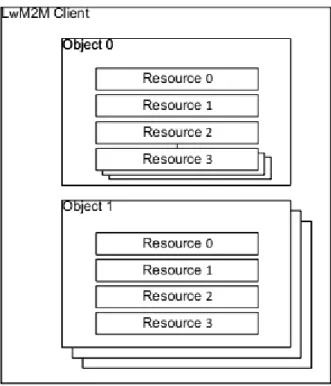
Apart from device management, LWM2M defines a data model in which data sources are defined by resources. A resource can be seen as an atomic piece of information that con-tains multiple instances. A resource can be operated such as written, read or executed. Multiple resources are logically grouped into one single Object and a LWM2M Client can have one or multiple Object Instances (Robles & Jokela, 2015). Figure 2-1 displays the structure of the LWM2M data object.
Figure 2-1: The structure of a LWM2M data model
As shown, the object model is a collection of resources and all these resources are used to present the objects, and all the objects can define the IoT device. Moreover, the theory behind the device management concept is that the LWM2M server can manipulate dif-ferent clients through operating a series of resources within objects.
Another SDO is the IPSO Alliance. It is an organization for promoting the use of the Internet Protocol (IP) technology for communications between smart objects (http://www.ipso-alliance.org/). In general, IPSO focuses on the definitions and interop-erability of smart objects. More concretely, the IPSO objects are basically based on LWM2M, following the LWMWM data model format. The object model is associated with a uniform resource identifier (URI) to be accessed; it also contains metadata which can be operated in implementation work. According to Jimenez, Koster and Tschofenig (2016), IPSO Smart Objects provide the same design pattern as LWM2M, which is an object model, to enhance a high-level interoperability between different smart object de-vices. More concretely, the data model for IPSO Smart Objects consists of four parts:
Object Representation Data Types
Operations Content Formats
IPSO Smart Objects cover a range of entities, including basic sensors and actuators. These basic objects are represented using a simple common data model and resource template in LWM2M (Tracey & Sreenan, 2017). Moreover, there are possibilities for IPSO basic
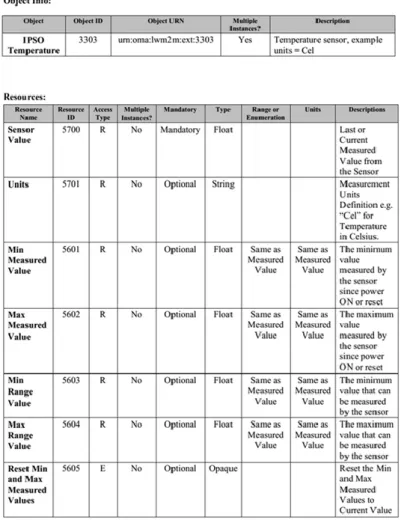
data models to form composite objects with a more usable design. Figure 2-2 below dis-plays an example of IPSO Temperature object.
Figure 2-2: The example of IPSO temperature object
Each IPSO object model has a unique ID and object uniform resource name (URN) as the LWM2M data model. The general description of the data model is provided, and the re-sources are used to define the object specifically through various properties. Apart from presenting in the form of document, each ISPO object has the XML file, which contains both the object information and resources fields.
2.1.2. Bluetooth Low Energy Profile
Bluetooth wireless technology is an open specification that enables short-range and low-power wireless connections (Yu, Xu & Li, 2012). Within the Bluetooth wireless technol-ogy, a low energy feature is developed to serve for Bluetooth Smart devices. Bluetooth Low Energy (BLE) is an emerging wireless technology, it developed by the Bluetooth Special Interest Group (Bluetooth SIG) for short-range communication (Gomez, Oller &
Paradells, 2012). The BLE standard aims to transmit small packets of data between de-vices with saving energy.
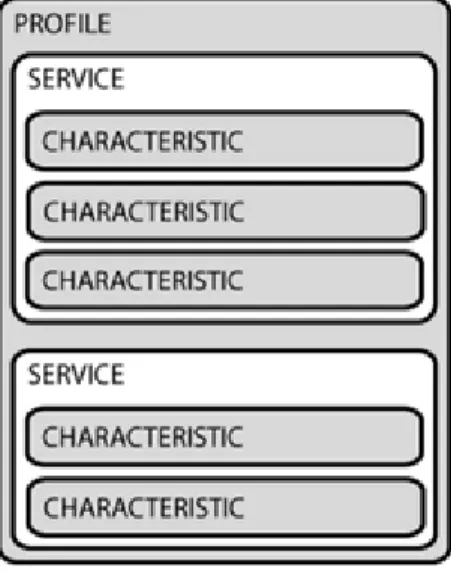
In BLE system, a BLE profile contributes to the communication among different BLE devices. It enables the transfer of data based on services and characteristics. More specif-ically, the BLE profile includes a standard data format constituted by the Bluetooth SIG. It mainly consists of many types of different profiles with various relevant functions (Pro-file, 2016). The structure of a single BLE profile is displayed in Figure 2-3.
Figure 2-3: The structure of a single BLE profile
Generally, a single profile can have multiple services while one service may include sev-eral characteristics. According to Bluetooth 5.0 specification, a profile can be seen as a virtual collection of services. Services are mainly grouping of real data associated with the operation for specific functionalities and features. Every service contains several char-acteristics with their descriptors.
Each service is assigned with a unique identifier, called a UUID. Within services, each characteristic also includes a value with related information of configuration. Moreover, it contains properties and operations to manipulate the value. For example, the value can be read, write, indicate and notify. The BLE profile defines the way of the operation and communication between the devices.
2.1.3. Unified Configuration Interface
The Unified Configuration Interface (UCI) aims to centralize the configuration of a Linux distribution for embedded devices and access points, called OpenWRT. It serves as Open-WRT's main configuration user interface for the most important settings related to sthe
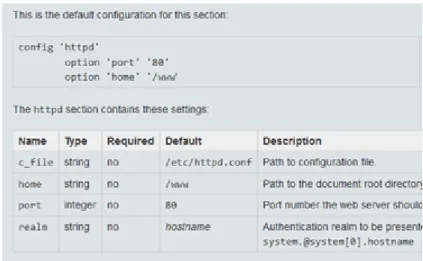
ystem. Typically, these settings are crucial for proper device functioning. Examples in-cluding logging functionality, wireless settings, network interface configuration, and re-mote access configuration (https://openwrt.org/). OpenWRT provides the general infor-mation of a UCI file and contains a list of UCI files for users. Figure 2-4 shows the ex-ample of UCI file.
Figure 2-4: The configuration file of UCI model
Generally, a UCI model contains the configured file and rules of setting of system. The information of configuration is basically presented as plain text table. The UCI system makes the configuration become easy and straightforward.
2.1.4. Other data models
Apart from the data models discussed above, more standardized data models exist in IoT device management. Another two well-known data models are YANG and RESTful API Modeling Language (RAML) models from Open connectivity foundation (OCF). YANG is a language for data modeling, which is generally used to model configuration and state data that manipulated by the Network Configuration Protocol (NETCONF). A YANG module mainly defines a hierarchy structure of data. It can be used for NETCONF-based operations, includes state data, configuration, Remote Procedure Calls (RPCs), and notifications (Bjorklund, 2010). Figure 2-5 shows an example of Router YANG model.
Figure 2-5: The example of Demo Router YANG model
In general, a YANG module contains several types of content. It consists of Header in-formation, Type definitions, Imports & Includes, Action & Notification declarations and Configuration & Operational data declarations. Based on these attributes, it provides an-other possibility for data modeling and sharing.
The other one is RAML, which is used by OCF. To manage IoT devices, OCF has re-source specifications, and it mainly uses RAML as a standard language for the APIs and JavaScript Object Notation (JSON) schemes as the representations of resources. Alterna-tively, a RAML data model induces the APIs of operations of resources and can be in different file format such as eXtensible Markup Language (XML), JSON.
Overall, a variety of data models is created for IoT device management. They have dif-ferent data formats and the way of use vary. In addition to standardized data models, there are also non-standards data models from different companies and enterprises.
2.2. Exploration of existing data model management tools
Based on various data formats and organizations, different data model management tools are provided to facilitate the work of device management. This section mainly presents existing management of data models from several organizations.
2.2.1. Open Mobile Alliance for LWM2M
To support LWM2M and manage data models more effectively, OMA provides other possibility for developers and enterprise users. In addition to the definition of protocol and object models, OMA allows developers to register their own LWM2M data models
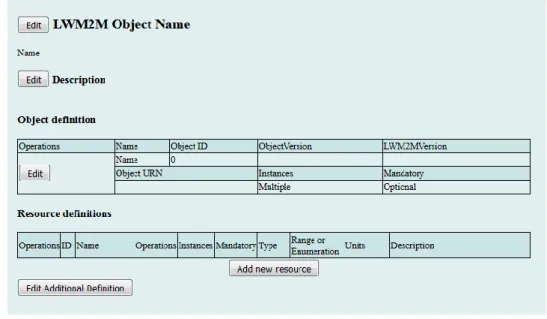
by providing an online editor. The XML schema used by LWM2M Editor is included to present the example of XML of data model. The user interface of online editor is shown in Figure 2-6.
Figure 2-6: LWM2M online editor of data models
Furthermore, OMA also provides object and resource registry, which shares plenty of LWM2M data models of different objects for IoT use cases. Figure 2-7 displays the LWM2M object and resource registry.
Figure 2-7: LWM2M objects in object and resource registry
Concretely speaking, each data model is registered by Object ID and it has a unique URN. For one object model, there could be multiple versions. The registry can be regarded as a database containing different object models, mainly for developers or enterprises who use LWM2M in device management.
Generally, all LWM2M data models are shared and constructed with the OMA online editor and registry. The object registry is quite informative for developers who are search-ing for the data models for implementation work. More resources such as technical spec-ifications, API or other documentation could be found there as well. Moreover, some open source LWM2M projects exist. For instance, Eclipse Leshan provides a Java-based LWM2M server and client while Eclipse Wakaama provides them in C (https://www.eclipse.org/leshan/).
2.2.2. IPSO Alliance
The IPSO Alliance also provides its own management of IPSO object. It develops the public IPSO Repository for object models. It uses GitHub, and the main page introduces object representation and validation. It also provides other document and support for de-velopers. Figure 2-8 displays the user interface of the homepage of the repository.
Figure 2-8: The homepage of the public IPSO Repository
Primarily, the IPSO Smart Object Registry is intended for developers that are building products based on IPSO Objects (https://ipso-alliance.github.io/pub/). It is a repository on GitHub that contains a list of XML files of smart objects. Each file includes a defini-tion of the object models and clarifies the resources elements. The registry contains n introduction of the IPSO smart objects and an XML file template of a data object.
2.2.3. Eclipse Vorto project
Eclipse Vorto (http://www.eclipse.org/vorto/) is an open source tool that helps users to create and manage abstract device descriptions, so called information models. In general, Eclipse Vorto is an advanced open source project. The foremost contribution of Eclipse Vorto is to define the capabilities of smart devices in entirety – by using information model. All these information models are stored in a central repository, by which different vendors can build reusable solutions. The generators can create automatic code which can ensure the model is in appropriate code representation and can be reuse and interopera-bility (Tayur & R, 2017). Through compiling and manage information models, it aims to achieve interoperability for connected IoT devices, especially for those use different plat-forms and technologies.
The purpose of Vorto is to serve for different target groups in IoT development scenarios, including various devices manufactures, platform operators, and different communion protocols as well as standardization organizations. Eclipse Vorto offers the value in terms of four main features: Vorto Toolset, Vorto Code Generators, Vorto repository and meta model. All these functions help in IoT development work. They also support collaboration among developers and organizations.
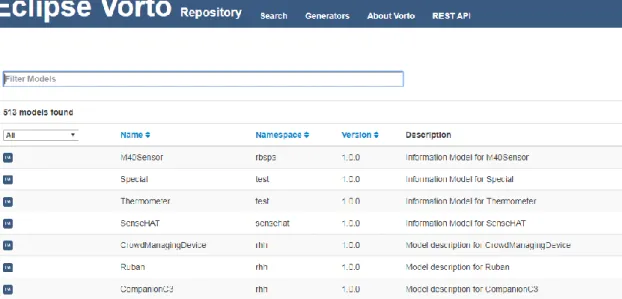
Unlike LWM2M and IPSO, what is special about the Eclipse Vorto is it focuses on infor-mation models of devices. In Eclipse Vorto, inforinfor-mation models are mainly managed and shared in through the Vorto Repository. Generally, users can upload models, search the model they need or reuse the information models based on requirements. The repository is hosted by Eclipse Vorto, and users can complete most tasks through the web interfaces. Figure 2-9 shows the web interfaces of Vorto repository. There is a list of information models is provided to be managed and reviewed.
For organizations or device manufactures, they can provide their information models for developers to browse or download. Moreover, it allows developers to create platform-specific source code through the code generator. This code generator helps developers integrate IoT devices into different platforms. That significantly reducing the amount of development work and ease the implementation work of IoT players. In addition to code, users are able to discuss about the information models by adding comments to a model. Nevertheless, the information model in the repository also contains specific details of devices. Therefore, it is tough to strictly separate the information model and data model in real IoT use case.
Overall, Eclipse Vorto provides a practical solution of managing and sharing of infor-mation models. Through Vorto, the IoT devices from different manufactures can be de-fined in information models, and the Vorto repository allows an effective data sharing and reuse. Additionally, its code generators have prompted a solution to developers of integrating information models with any other devices and platforms.
2.2.4. BLE-IPSO project
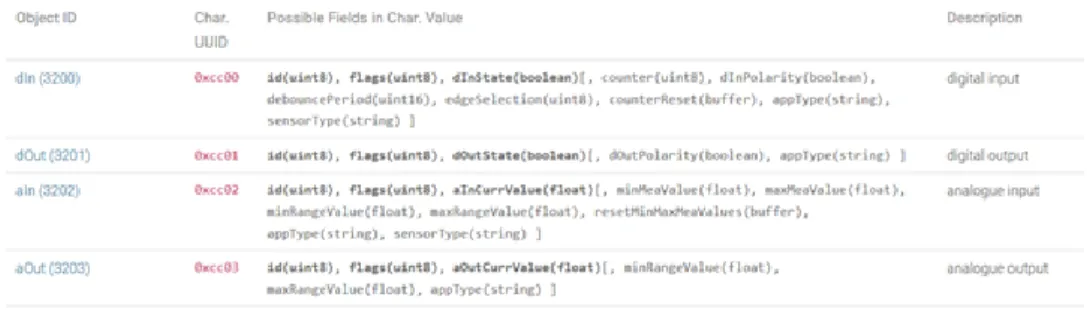
BLE-IPSO (BIPSO) is another project aims to define BLE models as IPSO objectsto solve this problem of consistency and compatibility for BLE applications. It defines a set of BLE Characteristics that follows the IPSO Smart Object Guideline for developers to build their applications with a unified data model (https://bluetoother.github.io/bipso/#/). BIPSO consists of webpages hosted on the GitHub with clean user interfaces. It contains the information, motivation and introduction of the mapping of data models. In BIPSO, with a well-defined Characteristic Value, IPSO Smart Object can be mapped to a BLE Characteristic. More specifically, the BLE data model has its own properties and format to define the objects. The characteristics work as resources to define the smart object in detail. Therefore, the Characteristic Value is used within mapping process; since it is mostly a piece of data presents resources in an IPSO Object. Figure 2-10 illustrates the components of the BIPSO model.
Apart from the definition of object models, BIPSO provides an online tool, which mainly helps developers generate a snippet of C code in terms of defining the BLE characteris-tics. By choosing smart objects through web interface, the sample code that contains def-inition of models will be provided accordingly. Therefore, developers could use those code snippets in the implementation work of software applications.
Overall, BIPSO is serving as a mapping tool to generate BLE model in IPSO format. However, there are not many data models available in the repository. Instead, the purpose of the repository aims to indicate the concept of BIPSO, since it focuses on introducing the technique side of the mapping rather than sharing data models. Moreover, the tool primarily facilities the developers’ work in terms of implementation.
2.3. Summary of various data models
This chapter indicated some popular ways for IoT device management. It introduced var-ious formats of data models in different organizations. Moreover, each organization has its own solution to share and manage data models. In fact, there are more existing data model management approaches which were not discussed, such as non-standard data models. They all have different data formats, and the platforms of sharing data models vary.
Overall, there are diverse approaches in defining and manipulate IoT devices. Conse-quently, this variety of presenting and sharing data models causes inconvenience for both individual users (such as developers, contributors) and organizations. Although all stand-ardized data models can be accessed quite effortlessly, it leads to frustration in the case of dealing with non-standard data models.
To solve this problem, the ultimate goal of this thesis work is to develop a meta model repository, that intends to serve as a platform for presenting and sharing multiple data models for IoT device management. Moreover, the repository aims to allow developers browse data models in a more interactive way. At the same time, it is able to help enter-prises (organizations) to manage data models on their own platforms and demonstrate them publicly in a more appealing way.
3. WEB BASED COLLABORATION PLATFORMS
This chapter discusses various web-based collaboration platforms. It starts with the intro-duction of existing technologies of collaboration in software development. Moreover, more examples and solutions of web platforms for content sharing are described. In the last part, it presents a comparison among these different web-based collaboration plat-forms.
3.1. Content management system (CMS)
When it comes to managing digital content, content management system (CMS) is the prevalent technology for setting up to generate and customize specific information. A CMS can be also seen as a software for creating digital content. Specifically, it is a plat-form hosting on a web server. Generally, it allows users to manage the digital content including pages, online articles and blogs effortlessly. Users can update the content effi-ciently. Also, CMS services enables multiple editors to maintain online content without any conflicting occurs (Goroshko, 2014). Some prominent advantages have resulted in the widespread use of CMS. Firstly, it allows users to create a powerful website without a high level of programming skills, and it can manage and organize different digital con-tent based on the need of user. Moreover, the design work of the website, including lay-out, appearance and even structure of the site can be easily modified and updated. Often, the types of content management system vary widely. Various CMSs have different em-phases and a user can choose a suitable CMS according to the purpose of use.
3.2. Version control system (VCS)
A Version control system (VCS) is typically used to track changes and updating in soft-ware development. It enables the acceleration and simplification of the softsoft-ware develop-ment process and enables new workflows. VCSs keep track of files and their history and have a model for concurrent access (Otte, 2009). There are two types of VCSs: centralized and distributed. The centralized VCS has one central repository, which is basically used to track files and history. Generally, a VCS allows developers to constant track the itera-tive changes to the code. As a result, developers can experiment with new ideas and changes, while they always have the option to revert to a specific past version in the de-velopment (Blischak, Davenport & Wilson, 2016). Meanwhile, it also records the changes and commits from other developers in the project. By using a VCS, all the changes of the code can be tracked and saved. That significantly enhances group collaboration.
3.3. Content sharing web platforms
This section mainly introduces three different solutions of web platforms for digital con-tent sharing. It presents the general concepts of different web-based platforms. Moreover, some relevant examples of various platforms are given with the description of their fea-tures and usages.
3.3.1. Custom built platforms
Generally, a web-based platform can be installed from scratch and customized according to different purposes. Companies and organizations can develop their own platform to support business or for enterprise use. To build a successful and stable web-based plat-form, several technical components should be considered. Firstly, a server installation is needed which contains a suitable operating system. Then, a software implementing the functionality of a web server is required. For example, many distributions of Linux are used for server platforms, while one widely used web server is Apache which uses open source code. Apart from the server, some programming languages can be used in building a web platform such as PHP and JavaScript. PHP is a server-side language for web de-velopment and PHP code is able to combine with other web content management systems. JavaScript can help create interactive web pages. It is also a high-level programming lan-guage and work for web development with Hypertext Markup Lanlan-guage (HTML) and Cascading Style Sheets (CSS). After determining the server and language framework, developers can implement the platform according to customized content and features. Furthermore, rather than develop the entire platform by programming, CMSs can be used to create a platform more easily and efficiently. For example, Drupal is an open source platform written in PHP for building flexible websites. It provides thousands of free themes (templates) or even paid product with professional design. Additionally, users are able to expand it with different content and features according to needs. It also has a large community that provides developers with support, testing and documentation related to the website. Likewise, Joomla is another popular CMS for making highly interactive web sites speedily such as online media, portals, blogs and E-commerce services and applica-tions (Patel et al., 2011). These CMSs can help build a web platform in a short period. Another possibility is using a VCS. Currently, various open source VCS existing to facil-itate collaborations in software development. For instance, Subversion (SVN; http://sub-version.tigris.org) is a widely used open source version-control system that facilitates dis-tributed file sharing. SVN resorts a centralized architecture. It is mainly a single central server and hosts all metadata of projects (Lanubile et al., 2010).
As for hosting, it can be decided by the requirements of platform. One approach is the developers can build their own hardware and network based on their technical skills.
Oth-erwise, a Cloud hosting service can be utilized, such as Amazon Web Service or Mi-crosoft Azure. However, a customer-built platform takes time and costs, which depends on the selected server, programming language and the way of hosting. Moreover, it re-quires some technical knowledge and experience in terms of operating. Even if the plat-form is built on a CMS, there are still costs and other additional plugin features need to be considered.
3.3.2. Online CMS platforms
A variety of online CMS platforms is available for helping in managing digital content. One widely used CMS is WordPress, which is open source. It was initially developed as a blogging platform, but in the last several years, WordPress has repositioned itself as a practical content management system. It provides a large number of plugins released by other independent developers (Patel et al., 2011). That could especially contribute to the creation of a more sophisticated website. In addition, it contains the most number of freely available templates and extension plugins. It also has premium themes for more profes-sional purpose. A WordPress community forum exists to provide advice and enhance communication among users so that developers do not encounter difficulties with select-ing the correct plugins for specific purposes. Moreover, it is easy to move a WordPress website to a new host or change to a new domain name.
Another well-known platform is Blogger, which is a platform for publishing blogs pro-vided by the tech giant Google. It is free, reliable and quite enough to publish the users’ content on the web (Stuff, 2018). Moreover, the platform has quite easy and usable user interfaces for bloggers to use. It also provides free templates for users with clean design. Users can customize their website by modifying the design through built-in tools. How-ever, Blogger has quite limited tools which can only allow users to perform specific tasks online. It is not suitable for advanced and professional bloggers because of lack of high-end features. Compare to WordPress, Blogger has more limitations and the site cannot be moved easily and safely.
Generally speaking, different CMS platforms support different levels of services. They aim to help those users without any technical knowledge to make a promising website effortlessly. Also, they provide users with a selection of features based on the purpose of the platform. By using a CMS platform, users can create a satisfying website efficiently without struggling with the programing work. Meanwhile, numerous plugins can be uti-lized to implement a wide variety of features. More importantly, the website can go live in a short time and update immediately.
3.3.3. Online VCS platforms
Online VCS platforms are today for collaborative work, particularly for open source soft-ware development. One example of an online web-based VCS platform is SourceForge.
It contributes a lot to control and manage open source projects by providing various help-ful features. Every software project hosted on Sourceforge has a source code repository, which supports discussion boards, issue tracker, and a wiki for documentation. Develop-ers can easily develop, download and publish projects. However, because it contains lots of feature and contents, it can take a long time for novice users to get started and make a good use of it.
Bitbucket is a web-based VCS platform owned by an Australian software company called Atlassian. Bitbucket provides repository-hosting services for software projects. It can also integrate with other software such as Jira, which is an application for project and issue managing from Atlassian. Bitbucket is a Git-based platform for code and code review. It supports many attractive features for developers and organizations to host their software projects. For example, it supports pull requests and code reviews, branch comparisons and tracking commit history. Bitbucket offers free unlimited private repositories as long as the amount of members of a team is under five.
In addition to Sourceforge and Bitbucket, GitHub is another web-based collaborative plat-form for software development. It is already known as one of the largest open source communities in world (Jiang et al., 2017). It generally manages software projects in the form of repository. A repository refers to a folder comprising all tracked code and files as well as their history. Each project can be a repository, with multiple core members. Other developers, once they want to submit changes or fix bugs, can forks the repository firstly and then send pull requests to merge the commits to the original repository. In the workflow, the forked repository appears as a copy of the original repository. Each devel-oper can modify and submit new implemented features without damaging the original repository or causing any conflicts. In addition, core members can evaluate all pull re-quests before deciding whether to merge or reject them. In a way, GitHub provide a safe and encouraging environment for collaborations. There is a chance for projects to be im-plemented by various developers from the worldwide. GitHub also aims to bring a large amount of projects to a community and facilitate all the collaborations rather than just for one specific project.
Compared to SourceForge and Bitbucket, GitHub works more like a social coding site. It prompts a social network through connecting developers with different activities happen-ing in their projects. Indeed, this social effect allows GitHub to be more widely used in fields other than software development. Currently, more organizations and users have started to use it as the general collaboration platform instead of narrowing in software projects. For instance, some repositories have been used to store the other tracked re-sources such as documentation, and conference papers. Based on its powerful versioning, GitHub is being widely used as a collaboration platform for doing more than just manag-ing the code files in the software development.
Another attractive feature is GitHub pages, which are simple and free websites hosted by GitHub. Users are able to generate their own website or blog related to specific projects and host it on GitHub. The generator of the static site is called Jekyll. The web pages can be customized by integrating with other web frameworks such as Bootstrap (Perez-Riverol et al., 2016). GitHub pages can be customized according to the needs of different individuals or organizations. Furthermore, since GitHub aims to encourage the collabo-ration in software projects, some continuous integcollabo-ration (CI) tools exist to facilitate the development work. One popular tool is Travis CI, which is a hosted, distributed CI ser-vice. It can be used to develop and deploy software projects hosted on GitHub. Generally, it helps automates the process of merging new code from different developers. There are also other CI tools that work seamlessly with GitHub such as Jenkins and Circle CI.
3.4. Comparison of various web platforms
Based on the discussions in the previous sections regarding different web collaboration platforms, Table 1 displays a comparison among these platforms according to several dimensions. Based on their features and popularity, WordPress and GitHub have been selected to represents online CMS and CVS platforms respectively.
Table 1. The comparison of different web collaboration platforms
Custom online CMS or VCS
WordPress GitHub
Cost Cost of hardware, soft-ware (server), hosting service. Time for setting up hardware, depends on the technical skills of de-velopers. Time for devel-oping.
Free themes for use. cost of professional template. Time for setting up webpage. Time for main-taining database.
Free themes for GitHub Pages. Time for setting up webpage.
Effort Depends on the require-ment of platform, may need some implementa-tion work for collabora-tive features.
Depends on the require-ment of platform, may need some implementa-tion work for collabora-tive features.
Less effort since some collaborative features exits.
User base
Organizations, enter-prises.
Organizations, individ-ual, bloggers, enter-prises. Developers, indi-vidual, bloggers, enterprises, organ-izations. Collabo-rative features
Depends on the require-ments and all features need to be implemented by developers.
Supports social network-ing. Provides discussion forum, collaborative ed-iting for digital content. Other Plugins such as project management, collaboration email.
Provides pull re-quest for contribu-tion, issue track-ing, wiki and fork-ing etc. Supports social networking.
Mobile usage
Have to develop the plat-form to fit the mobile us-age.
Automatic fit, no extra effort.
Automatic fit, no extra effort.
As shown in Table 1, building a web platform on GitHub definitely takes much less cost and effort than other twos. Firstly, developers do not have to consider about the hardware and software such as hosting services. They can concentrate on the content of platform. GitHub pages provides the creation of webpages free with appealing themes. All these design themes are responsive and work smoothly on mobile devices. When users prefer to have a customized website, they can update web pages by implementing source code and deploying the code in the repository.
As for WordPress, it could be used for creation of websites for hosting digital content according to different user cases. Based on a variety of plugins and templates, it can set up an interactive website speedily and successfully. However, it might take extra time and effort to develop plugins if the platform has special collaborative requirements. With the updating of content, the maintenance of database could be another cost.
By contrast, GitHub has more collaborative features can be utilized directly. For example, pull requests have already enabled contributions and collaborations from others. Even in that way the quality and accuracy of data can be guaranteed based on the evaluation before merging the pull request. Since every user can login with their own GitHub account, it saves a lot work for developers when implementing the platform. They do not have to develop new user profile for users. Therefore, developers do not have to implement any extra plugin-ins as needed in WordPress. They can take advantage of all existing features of GitHub to help optimize the platform. Other features such as issues tracking, wiki,
allowing developer or contributor to follow the repository transparently, can contribute towards more collaborations among different users.
Another advantage is GitHub repository seems more practical in terms of storing files since it does not require any databases. It already provides the public repository for data storing with support of versioning. Any kinds of data can be stored in the repository by simply uploading. Additionally, the sources code of the web pages can be stored in the repository. The owner of the repository can modify these files easily to allow the webpage can be updated in a straightforward way at any time as needed.
More significantly, GitHub is the only web collaboration platform that enables the easy migration and replication of platform among different users. Through the forking feature, every user is able simply take the built platform for their own use. Since all the source code is available in the repository, they can modify it according to their own business. When building the platform on GitHub, the primary work will be concentrated on the design of the platform while GitHub delivers almost all collaborative functions for use.
4. UX DESIGN AND EVALUATION METHODS
This chapter presents the main theories studied in the research process. With explaining the concepts of user experience, other relevant methods such as user centered design and user interface design are also clarified. Moreover, it presents the main design methods and evaluation methods which applied in the design work of this thesis.
4.1. User experience
The definition of User experience (UX) varies widely within Human-Computer Interac-tion (HCI) community. According to ISO 9241-210 standards, UX can be defined as a “person's perceptions and responses that result from the use and/or anticipated use of a product, system or service.” It concerns that UX more subjectively by including all the users’ perceptions, emotions and preference as well as anticipation. Hassenzahl and Tractinsky (2006) also summarized the UX as follows, “UX is about technology that fulfils more than just instrumental needs in a way that acknowledges its use as a subjec-tive, situated, complex and dynamic encounter. UX is a consequence of a user’s internal state--, the characteristics of the designed system-- and the context within which the in-teraction occurs—”. Generally, UX reflects the users’ feeling/experience at the begin-ning, during and after of use of system or product. Another similar definition is from Hassenzahl (2008), he defined UX as a momentary, primarily evaluative feeling (good-bad) while interacting with a product or service. By that, UX shifts attention from the product and materials (i.e., content, function, presentation, interaction) to humans and feelings – the subjective side of product use. Thus, UX reveals what feedback and expe-rience the product can provide from a perspective of user. That mostly drives from the subjective experiences of users when interacting with product.
Another relevant concept is usability, which refers to “the extent to which a product can be used by specified users to achieve specified goals with effectiveness, efficiency and satisfaction in a specified context of use.” (ISO 9241-11). UX is occasionally incorrectly seen as synonym of usability. However, UX is not as same as usability, instead, usability can be an aspect contributing to the overall UX as perceived by the users (Roto et al., 2011). More specifically, usability can be regarded as one dimension of UX when users interact with products. It is a more concrete measurement of UX based on its criteria. Nevertheless, the range of UX covers more and it concentrates on creating the overall outstanding experience instead of just preventing usability problems. Moreover, it mani-fests more from subjective impression of users.
Good UX enables users to achieve their goal efficiently when interacting with product along with high satisfaction. Moreover, it even provides users with unexpected, delightful
experience. Norman (1988) also clarified that a product with good UX, especially with attractive visual design, makes users more creative and accomplish tasks patiently. Prod-ucts with satisfying UX do not only fulfill user needs by designed services, but also focus on other factors which affecting UX. For example, the context of use, inner state of users (emotions, experience, motivation and expectation). With increasingly digital products appear, UX gathers more attention and plays a vital role in product competition.
4.2. User centered design
User-centered design (UCD) is a general term refers to a philosophy and methods. It fo-cuses on involving users in the design of computerized systems (Abras et al., 2004). In brief, the end-user influences how the final product takes shape in user-centered design. Another working definition is ‘UCD is herein considered, in a broad sense, the practice of the following philosophies, the active involvement of end users for a clear understand-ing of users and requirements of tasks, iterative design and evaluation, and a multi-disci-plinary approach’ (Vredenburg et al., 2002). This definition reflects the holistic perspec-tive of the UCD.
In general, the essential principle of the UCD is to involve user throughout the entire design process. The user could only be end user who will use the final product in future. During design process, the user becomes a core part of the development processes. Their involvement contributes to more efficient, effective and safer products and leads to the acceptance and success of products (Preece, Rogers & Sharp, 2002). Additionally, ISO 9241-210 standard has defined six principles of the UCD method as below:
The design is based upon an explicit understanding of end users, needs, tasks and environments.
Users are involved throughout design and development. The design is driven and refined by user-centered evaluation. The process is iterative.
The design addresses the whole user experience.
The design team includes multidisciplinary skills and perspectives.
More than uncover the principles of designing a usable and appealing product, UCD also indicates the design process for inspiring and learning. According to ISO 13407, a general UCD process consists of main four activities, which is illustrated in Figure 4-1:
Figure 4-1: Activities of user-centered design (ISO 13407)
The main activities in a UCD process can be briefly described as follows: Understand and specifying the context of use.
Specifying the user requirements. Producing design solution
Evaluating the design
Knowing the user is a high priority task during design process, especially to understand the target user group, what they need and the context of use. Since that is the only way of product can be actual built based on the understanding of real use cases. Moreover, it is significant that involving the user in the evaluation stages. Since the real user is the only one who can evaluate the design, as a real user can tell what they expect and if the design is practical and user-friendly. Although the users may not speak everything they have in mind, it is not unrealistic to explore feedbacks and attitudes by other approaches, for ex-ample by observing, interviewing, survey and other methods in user research.
To be involved with user in design work, a variety selection of methods can be applied in UCD process, inducing usability testing, heuristic evaluation, participatory design and discount evaluation (Abras et al., 2004). Through connecting user, more information that is valuable and profound insights could be revealed. That could help in determining the functionality side of design; meanwhile, it can suggest the designers of the overall user experience the product can provide. As a result, the product can be developed accurately on the behalf of users. In that way, there are higher chance to design the satisfying and delightful product. Therefore, UCD is an effective method can support of making digital products that are more usable and attractive. It guides the designers focus on the users instead of the product itself. It is the need of users shapes the final product. Admittedly, the business goals also affect the product designing; However, user-centered development still plays a key role in designing for good user experiences. Through understand real users’ needs and values before starting designing and evaluating solution
(Väänänen-Vainio-Mattila, Roto & Hassenzahl, 2008). Moreover, keeping user in mind helps de-signers realize the potential desire, which can generate more ideas for the product in fu-ture development.
4.3. User interface design
User interface (UI) as another important component, determines if a product is usable and understandable. The user interface is that part of the computer system through which users can use for undertaking and achieving their goals (Stone et al., 2005). Therefore, the quality of user interfaces, such as if it is easy to understand and use, directly affecting the users’ understanding of system and the use of system as well. Good UI enables users can control the system effortlessly. It also helps user concentrate on their tasks and accom-plish them effectively. Moreover, proper interface design will provide a combination of well-design input and output mechanisms that satisfy the user’s needs, capabilities. It helps users perform tasks most effectively (Galitz, 2007). It is the essence of a product providing good user experience.
User interface design can be known as a subset of HCI. In fact, user-centered design is a good approach to help in user interface design and development by involving end users throughout the design and development process (Stone et al., 2005). UI plays a critical role in UCD, especially in iterative design phase, a user interacts with system based on UI. User interface design significantly benefits from the iteration design process by vali-dating UI from end users. In general, user interface design (UID) utilizes the same process of UCD, as they both have to focus on the users in order to create a product with usable and satisfying user interfaces. UID still starts with the understanding of real users, includ-ing who are they, what they need and what they expect. Afterwards, users interface is design iteratively based on feedback and comments from users. By resorting UCD method in which users shape the design, the product can be created with appealing user interfaces.
Although different products have dissimilar requirements of UI design, some widely used principles of UI can be concerned during design. According to Constantine and Lock-wood (1993) in their usage-centered design, these are six general principles as follows:
The structure principle
Design should organize the user interface purposefully based on clear, consistent models that are apparent and recognizable to users.
The simplicity principle
The design should make simple, common tasks easy, communicating clearly and simply in the user's own language.
The visibility principle
The design should make all needed options and materials for a given task visible without distracting the user with extraneous or redundant information.
The feedback principle
The design should keep users informed of actions or interpretations, changes of state or condition.
The tolerance principle
The design should be tolerant and flexible, reducing the cost of mistakes and mis-use by allowing undoing and redoing. It also prevents errors.
The reuse principle
The design should can be reused both internal and external components and be-haviors, maintaining consistency to avoid users’ rethink and remember.
Another type of user interface is mobile user interface. According to different use context and environment, mobile user interfaces have some special principles while they follow the general ones. However, user interface design of mobile application is more restrictive than desktop ones. Mobile devices' screens are typically smaller than their desktop coun-terparts. They have less processing power, and communicate in low-bandwidth environ-ments, always-changing context. Mobile applications must be carefully designed when considering these limitations (Tarasewich, 2003). Accordingly, Gong and Tarasewich (2004) proposed a set of practical design principles for mobile device interfaces design. These guidelines also summarized general user interfaces design principle that modified based on mobile use context. A list of most frequently used principles is displayed in Table 2.
Table 2. Guidelines of mobile user interface design (Gong & Tarasewich, 2004) Guideline Description Enable Frequent Users to Use
Shortcuts
The system should always keep users informed about feedback, such as what is going on, through appropriate feedback within reasonable time. Design Dialogs to Yield Closure The number and pace of interactions should be
re-duced as the frequency of user increases.
Support Internal Locus of Control Some feedback should be provided to every user action.
Consistency Sequences of actions should be organized into groups. Users should obtain satisfaction of ac-complishment and completion.
Reversal of actions Users can in charge of the system and have the system respond to their actions, rather than feeling that the system is controlling them.
Error prevention and simple error handling
The design should be the same across multiple platforms and devices. Elements of mobile inter-faces such as names, color schemes, and dialog appearances should be the same as their desktop counterpart.
Reduce short-term memory load Mobile applications should rely network connec-tivity as little as possible.
Design for multiple and dynamic contexts
Nothing potentially harmful should be triggered by too simple an operation (e.g., power on/off). Design for limited and split
atten-tion
Rely on recognition of function choices instead of memorization of commands.
Design for “top-down” interaction Users can configure output to their needs and pref-erences. Allow for single- or no-handed operation. Have the application adapt itself automatically to the user’s current environment.
Design for speed and recovery Provide sound and tactile output options.
Design for enjoyment Provide enough information and let users decide whether or not to retrieve details
All these guidelines are basically deriving from the traditional guidelines for desktop ap-plications. They were collected from different published researches. In addition, more user interfaces principles exist to provide guidance to design work based on different platforms, such as Human interface guidelines from Apple and material design of Google. All these guidelines and design frameworks can contribute to a useful and delightful prod-uct.
4.4. UX design methods
To make a usable product, some design methods can be applied to help improve the user experiences. In fact, User centered design is widely utilized in the UX design to develop a product based on real users. During UX design, other approaches such as prototyping is discussed as follow. Generally, prototyping is involved in UCD method to guarantee the good user experience of the final design.