Delivery of courseware, tutorials and formative assessment with
WebOL
Dr Ray Harper
University of Luton Division of Science Park Square Luton Bedfordshire LU1 3JU United Kingdom
Updated and modified from a paper first presented at 5th
International CAA conference, Loughborough, UK, 2001
Introduction
Computer-based assessments (CBA) can be formative or summative. This paper will focus on formative assessments and courseware but some of the comments will also apply to summative assessments. The various reasons for using CBA such as to automate marking and to link teaching and assessment have been discussed elsewhere, (for example Brown, Bull and Pendlebury 1997). It may be anticipated that most modern CBA systems will enable delivery through the World Wide Web. This reflects its great reach, its presence in educational institutions and the availability of free browsers. To construct an assessment you need to create some questions, to package them together to make the assessment and enable its delivery to the users. There are various software packages available that enable the construction of assessments and may also enable their distribution and management. Some systems were outlined by Brown, Bull and Pendlebury (1997) and The Computer Assisted Assessment Centre at the University of Luton (http://www.caacentre.ac.uk/resources/web/onlres4.shtml) provides a summary of some of the main software packages available. Some software packages such as
WebCT (http://www.webct.com), and Blackboard (http://www.blackboard.com)
are enterprise solutions that include elements of assessment management. Some of these systems have significant limitations inherent in their design such as (i) systems designed as enterprise solutions that cannot be installed by individual users, (ii) systems with limitations in terms of distribution media, (iii) systems that use proprietary or system specific software and (iv) others that only allow the construction of assessments not other materials. Some do not appear to be user-friendly in terms of how questions are constructed or how the system is installed. The purpose in designing WebOL (http:// www.luton.ac.uk/biology/webol) was to produce a system that was (i) able to produce a range of courseware materials based on web pages; (ii) a small simple system that was quick and easy to use by an individual though could be run at an enterprise level; (iii) a system that was based on standards and (iv) one that could be run from a variety of media.
Question styles
Most assessment systems enable the construction of a range of question styles in order to enable appropriate styles to be used for topics and to enable good practice that encourages the use of a variety of question styles. WebOL includes all of the main styles:
1. radio buttons associated with text or images (MCQs); 2. check boxes associated with text or images (MRQs);
3. text input as single words/short phrases or the use of larger text areas; 4. text input as fill-in blanks or selection from drop-down lists;
5. numeric input;
6. zone selection of images or part of an image or a location from an X/Y grid; 7. matching of text to text or text to images; and
8. ranking text options.
designs for questions it is essential that question designers are informed by the appropriate literature. Some useful articles are by Joanna Bull and Colleen McKenna (Bull and McKenna 2003) by Norma Pritchett (Pritchett 1999) and by Susan Case and David Swanson (Case and Swanson 1998).
All questions can include additional components such as sound, videos, Java applets, images and animations to support or provide a basis for a question.
Formative assessment
Formative assessments are designed to aid learning. This can be done in a variety of ways, for example setting essays that are marked and provide feedback. However, topics which can be assessed by essays can commonly also be assessed through the styles of questions available with CBA. Formative assessment can be more difficult for some aspects of courses such as practical work, particularly if this relates to practical work that has not been undertaken. Such learning may be supported by data interpretation exercises but paper-based exercises cannot address issues that are dependent on running the practical. However, through the use of computer-based simulations (e.g., Robinson, Russell and Netherwood 2003; Sandberg 2003) practical components can also be assessed through CBA. Formative assessment can be used to enable students to feel involved in the learning process, to check on their progress and to practice for summative assessment. The marks from formative assessment are normally only made available to the user, however, the marks may be sent to the tutor for monitoring to identify users who require additional support. The issues involved with computer-based formative assessment have been discussed previously for example by Charman (1999) and by Sly and Rennie (1999). There are various reports on the effective use of formative assessment, for example, by Sambell, Sambell and Sexton (1999). However, there can be problems with CAL. Some of these have been summarised by Parslow (1997) and mainly reflect poor design and implementation. Basic good design rules for the use of fonts, colour, etc. should be observed when constructing materials. Guidelines are available from the Web, for example, the collection at
http://usableweb.com and in literature (Nielsen 2000). WebOL attempts to incorporate these into the default formatting for the web pages it generates. Implementation should ensure that the assessments fits into the delivery of the curriculum, that access to the materials is not restricted and that the assessment is undertaken in a suitable environment.
An issue often overlooked is the interpretation of marks by the users, particularly the contribution to marks from guessing. When tutors direct students to formative assessments they must clearly indicate the meaning of the marks generated. For example, students will normally think of 50% as a reasonable mark and certainly a ‘pass’ but from a series of TRUE/FALSE based MCQs 50% is equivalent to 0%, i.e., the score from someone who knows nothing about the topic and is purely guessing. These issues have been discussed more fully elsewhere (Harper 2002). Alternative systems such as ‘Confidence Weighting’ or ‘Multiple Evaluation’ may be used that allow the user to
indicate how correct they feel their response is. Compared with MCQ tests, Multiple Evaluation appears to increase test reliability. However, marking and grading such tests is statistically complex and suitable software is not widely available (Holmes, 2002). WebOL includes ‘Confidence Weighting’ for assessments based solely on MCQ style questions.
Getting started with formative CBA
Three factors that can limit the introduction of formative CBA are (i) time to construct the assessments & support materials; (ii) the availability of easy to use software tools; and (iii) support by the institution.
Software tools that have a steep ‘learning curve’ or are difficult to use can be seen as contributing to the construction time factor. Similarly, software that generates materials that cannot easily be re-used in alternative ways increases the time to produce interrelated materials and revised versions of a project. Commercial software provided by an institution may not be readily available to staff due to cost or licensing arrangements. The institution may provide support for the delivery of assessments but this may be directed at summative rather than formative assessments. Software that is complex to use requires support for its implementation. An institution may not provide support or support may not be readily available.
WebOL attempts to address these issues. The software does not have a steep learning curve. There is very little that is hidden from the user behind arrays of menus. At a workshop participants with no previous experience of WebOL were able to construct a project containing a few questions in under one hour. Questions and Web pages within a project can easily be utilised in other projects. It is possible to convert between tutorial style and self-assessment style projects in a few seconds. The software is free and can be easily obtained and installed by an individual user or by an institution. WebOL is designed to be easy to use and has built in help so that it does not require any formal support from an institution. An exception is when projects are to be delivered over the Internet or a local area network (LAN) when the project files will need to be put on an internet or LAN server respectively. However, WebOL simplifies this task through maintaining all of the files for a project in one directory ready for distribution.
Flexibility
It is not possible to foresee clearly how assessment materials will be used beyond the initial project. It is therefore necessary where at all possible that the materials should be flexible so that they can respond to future scenarios. Assessment projects need to be flexible and be able to: (i) use the questions and other web pages in a variety of different projects; (ii) run on a variety of target platforms; and (iii) be distributed through a variety of media.
to move to another page. For navigating between questions in assessments (or other courseware) this is not suitable since although the questions are arranged serially they may be required to be delivered in random order and it would prevent the re-use of the web pages in other projects. The navigation through WebOL projects does not involve links in the web pages. This means the questions produced by WebOL can be linked into any number of projects and can be rearranged within a project without any alteration. The questions and projects are based on HTML 3.2 (World Wide Web Consortium 1997) and JavaScript 1.1 (Netscape 1996) and do not contain any features specific to a browser or to an internet server. All of the questions can be edited in any text editor or web-editor. These features ensure the projects will run on any PC that has a browser that supports these specifications such as Netscape Communicator v4.0 or greater, Internet Explorer v4.0 or greater and Opera v4.0 or greater. Browsers of this specification are freely available for all major PC operating systems making the delivery of the WebOL projects platform independent. For delivery over the Internet the projects are independent of the operating system or server software on the internet server. For formative assessments WebOL does not require any scripts to run on the internet server.
Assessment systems based on web pages are inherently flexible in their delivery options if they are not constrained. Constraints can appear by requiring web-server-based components such as cgi scripts, active server pages and server-side databases. The presence of such components limits delivery to the Web. In many instances this may be adequate. However, courses may develop and be delivered by distance learning, perhaps internationally, where internet access cannot be guaranteed. The ability to transfer materials to other media such as CD-ROM may become essential. WebOL is designed with this flexibility in mind so that WebOL projects will remain compatible with future developments in the delivery of courses. Questions produced in WebOL can also be saved and loaded in the QTI (Question & Test Interoperability) xml specification (http://www.imsglobal.org/question/index.cfm). This recently developed format enables the transfer of most question styles between assessment software packages such as WebOL and Questionmark Perception.
Although WebOL is primarily designed to create assessments it can also be used to create lecture style courseware based on web pages and to integrate the delivery of courseware with the assessment. Assuming the web pages used for the courseware do not contain any of the constraints discussed above, the resulting courseware will have all of the flexibility described for WebOL assessments. The materials used for such courseware can be reused in tutorial assessments as the support pages to which users are directed when they are given incorrect answers. Also courseware, i.e., non-question web pages, can be mixed with questions in tutorials or self-assessments.
It is sometimes useful to direct users to different blocks of pages and questions depending on their responses. WebOL allows branching based on correct/incorrect answers. This allows the development of ‘key-concept’ questions which if not answered correctly, indicating that the user would be
unable to answer subsequent questions, they can be redirected to some support pages.
Virtual Learning Environments (VLEs) are becoming widespread in higher education and they provide an excellent platform for bringing a variety of resources together. If these are to be used to their full potential they need to be more than a way of delivering lectures and other materials for students who do not turn up. They provide excellent vehicles for delivering formative assessment, however built in assessment resources can be rudimentary and may not be integrated with the learning materials i.e., mix the materials with the questions in one resource. It remains the case that a link in the VLE to a web based resource can be the best way to provide supporting formative assessment. A lecture is often based on a word processed document that may be used to generate a printed version. This can be used to ‘cut and paste’ into presentation software to generate a lecture. These can both be made available through the VLE. The presentation or sections from the word processed document can be saved as web pages which are ready without alteration to be mixed with questions to provide an excellent formative assessment. Making this final resource available, which is probably of greatest value to the student, may not be possible solely within the VLE and may require a link to the resource set-up on a web server.
WebOL-Development Environment
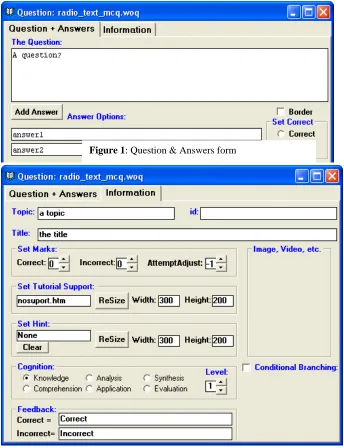
Although WebOL generates web pages and JavaScript files, the user requires no knowledge of HTML or JavaScript. The current version of WebOL simply involves the completion of forms. This software for constructing questions, web pages and projects only runs on Microsoft Windows based PC systems, though as discussed above the output is platform independent. Questions are created in a Question Development Environment (QDE) containing two forms. One form is where the question and answers are set and is unique to the question style, e.g., a text based radio button (Figure 1). The other is common to all questions (Figure 2). These sets support files, feedback, the cognitive ability assessed by the question according to Bloom’s Taxonomy (Bloom 1972), the level of the question, the topic and title and enables project values (see (iv) below) for the marking of questions to be over-ridden. An assessment project is then constructed by completing four forms: (i) Name/Type/Files; (ii) Navigation; (iii) Display; and (iv) Set marks. At any time questions and projects can be previewed to see the effects of changes. All resources for the project or series of related projects are maintained in a single directory that should be copied to the delivery media (removable disc or server) on completion. The project(s) can then be run from a browser by opening the start-up page (or URL) created by the software.
feedback and incorrect answers allow a supporting or help page to be shown. These support pages should be designed to help the student understand the topic and answer the question. They may form part of a separate ‘Lecture’ on the topic. The focus in a tutorial is more on support and less on assessment. In order to provide additional feedback, optionally on reaching a set maximum number of allowed attempts the correct answer may be displayed. For all assessments the main page can be set to update relevant information on progress such as the mark scored for the question, the number of attempts and the total score as required—inappropriate options are prevented. On finishing the whole assessment the overall score may be shown. Most of the information that can be displayed and the types of responses can be customised when designing the project.
WebOL-Limitations
Questions designed in WebOL by default have minimal formatting-the answer options are centre aligned and, for text, given a suitable font and size. The latter is editable through a cascading style sheet so that all of the questions in a project will look the same. Some formatting enhancements can be added within the WebOL QDE such as line breaks, paragraphs, fonts, colours and alignment. Tables can be inserted to aid formatting. However, a purpose of WebOL is to shield the user from HTML and to have a short learning curve so these facilities have been kept minimal. Users who want additional formatting options must use a web editor. It is a facet of the flexibility of WebOL that all of the web pages generated can be edited in web editors. WebOL includes a simple text-based web editor to aid formatting questions and to enable the construction of supporting web pages.
Figure 2: Information form
Some advanced features available in browsers are proprietary and are not generated by WebOL. Some features of DHTML can be added in the web editor, however these are based on browser independent routines. Other advanced features such as ‘Flash’ animations can be added to pages. However, pages modified in this way require the browser to have an appropriate ‘plug-in’ and cannot be guaranteed to work. It should be noted that enhanced multimedia interactivity does not necessarily result in improved learning and that simple, well designed CAL can be effective (Parslow 1999).
WebOL does not contain any features for the recording of assessment results at the enterprise level.
Conclusions
Formative assessment is a valuable tool to support learning. CBL can provide an avenue to deliver formative assessments and other learning environments. The ubiquitous availability of browsers makes web-based courseware an effective vehicle for universal delivery. Various software packages are available to enable the construction of such courseware. WebOL provides a free, flexible, customisable and easy to use entry into the construction of web-based assessments and courseware.
References
Bloom, B.S. (1972) Taxonomy of Educational Objectives: Handbook 1, Cognitive Domain. New York: Makay. Brown, G., Bull, J. and Pendlebury, M. (1997) Chapter 13:
Using computers in assessment In Assessing Student Learning in Higher Education, Routledge.
Bull, J. and McKenna, C. (2003) Blueprint for Computer Assisted Assessment. Routledge Falmer.
Case, S.M. and Swanson, D.B. (1998) Constructing Written Test Questions for the Basic and Clinical Sciences, 3rd Edition, National Board of Medical Examiners, USA. [Online] Available:
http://www.nbme.org/about/itemwriting.asp
Charman, D. (1999) Issues and impacts of using computer-based assessments (CBAs) for formative assessment. In Computer-Assisted Assessment in Higher Education, (Eds) Brown, S., Bull, J. and Race, P. London: Kogan Page Ltd.
Harper, R.D. (2002) Allowing for Guessing and for the Expectations from the Learning Outcomes in Computer-Based Assessments. In Proceedings of the Sixth International Computer Assisted Assessment Conference, Eds Danson, M. and Eabry, C., Learning and Teaching Development, Loughborough University. Holmes, P. (2002) Multiple Evaluation versus Multiple
Choice as Testing Paradigm: Feasibility, Reliability and Validity in Practice. Thesis. [Online] Available:
http://www.ub.utwente.nl/webdocs/to/1/t0000017.pdf
Netscape (1996) JavaScript Guide for JavaScript 1.1 [Online] Available:
http://home.netscape.com/eng/mozilla/3.0/handbook/jav ascript/
Nielsen, J. (2000) Designing Web Usability: The Practice of Simplicity. New Riders.
Sambell, K., Sambell, A. and Sexton, G. (1999) Student perceptions of the learning benefits of computer-assisted assessment: a case study in electronic engineering. In Computer-Assisted Assessment in Higher Education, (Eds) Brown S., Bull J. and Race P. Kogan Page Ltd. London.
Parslow, G. (1997) Beyond the Euphoria—Questioning the Web, the Computer and Everything. A roundup of printed misgivings. Biochemical Education. 25(3), 151-152.
Parslow, G. (1999) Computer-aided learning: an overvalued resource? Biochemical Education. 27(3), 159.
Pritchett, N. (1999) Effective Question Design. In Computer-Assisted Assessment in Higher Education, (Eds) Brown S., Bull J. and Race P. London: Kogan Page Ltd.
Robinson, S.A., Russell, W. and Netherwood, A. (2003) Photosynthesis in Silico: A multimedia CD-ROM combining animations, simulations and self-paced modules for photosynthesis education in all tertiary levels. CAL-laborate 10, 13-16.
Sandberg, G (2003) Computer-aided interactive histology summary of 10 years. CAL-laborate 10, 17-24.
Sly, L. and Rennie, L. (1999) Computer Managed learning as an aid to formative assessment in higher education In Computer-Assisted Assessment in Higher Education, (Eds) Brown, S., Bull, J. and Race, P. London: Kogan Page Ltd.
World Wide Web Consortium (1997) HTML 3.2 Reference Specification 4 [Online] Available: